

Page 1
Thank you for selecting the Motif™ Mentor™ Coffee
Brewing Scale. It has been designed to help you elevate
your home brewing experience. Please read all our
instructions to assure operational excellence.
Scale Status Light Mode Indication
When the scale
is plugged in
with power off:
When the scale
power is on:
When the scale
is unplugged and
the power is on:
When the scale
is unplugged
with power off:
Flashing
Green
Solid
Green
Flashing
Blue
Solid
Blue
Red
Alternating
Flashing Blue
Red
Alternating
Solid Blue
Flashing
Red
No Light Scale is in sleep mode
Scale battery is still
charging and should
remain plugged in
for use
Scale battery is fully
charged and can be
unplugged for use
Scale is not connected
with the Mentor™
Scale App
Scale is connected with
the Mentor™ Scale App
Red light indicates scale
battery is low and needs
to be charged, plug in
scale. Blue light indicates
scale is not connected to
Mentor™ Scale App
Red light indicates scale
battery is low and needs
to be charged, plug in
scale. Blue indicates
scale is connected to
Mentor Scale App
Scale battery is critically
low and scale cannot
be used. Plug in scale
immediately to charge
after auto shut off
Charge Your Scale
1. To charge your scale, plug the small end of the USB
cord into the port on your scale. (Fig A)
(Fig A)
2. Plug the larger end of
the USB cord (Fig B) into a
computer or power adapter
that provides 5V and at
least 1amp. Note: Plugging
the cord into an adapter
greater than 5V could cause
damage to the scale or
(Fig B)
reduce battery life.
Getting Started
1. Download the Mentor™ Scale App.
• To download, go to iTunes* App Store* (for Apple
devices), Google Play* (for Android) to download the
Mentor™ Scale App. Go to MotifCoffee.com. for the latest
list of compatible devices.
• To connect your phone to the scale for the first time,
go to your phone settings to turn on Bluetooth. From
the app, press the scale button and select the Mentor™
Coffee Scale from the list of devices. This needs to be
done from the Mentor™ Scale App not the device’s
Bluetooth settings. Next time, your app should remember
the last scale it connected to and connect directly from
the app. When your scale is connected to the app and
ready to brew, the light on the scale will be solid blue.
Use Your Scale
1. Press the power button on the bottom of the scale.
Then place the scale right side up on your counter or
table top.
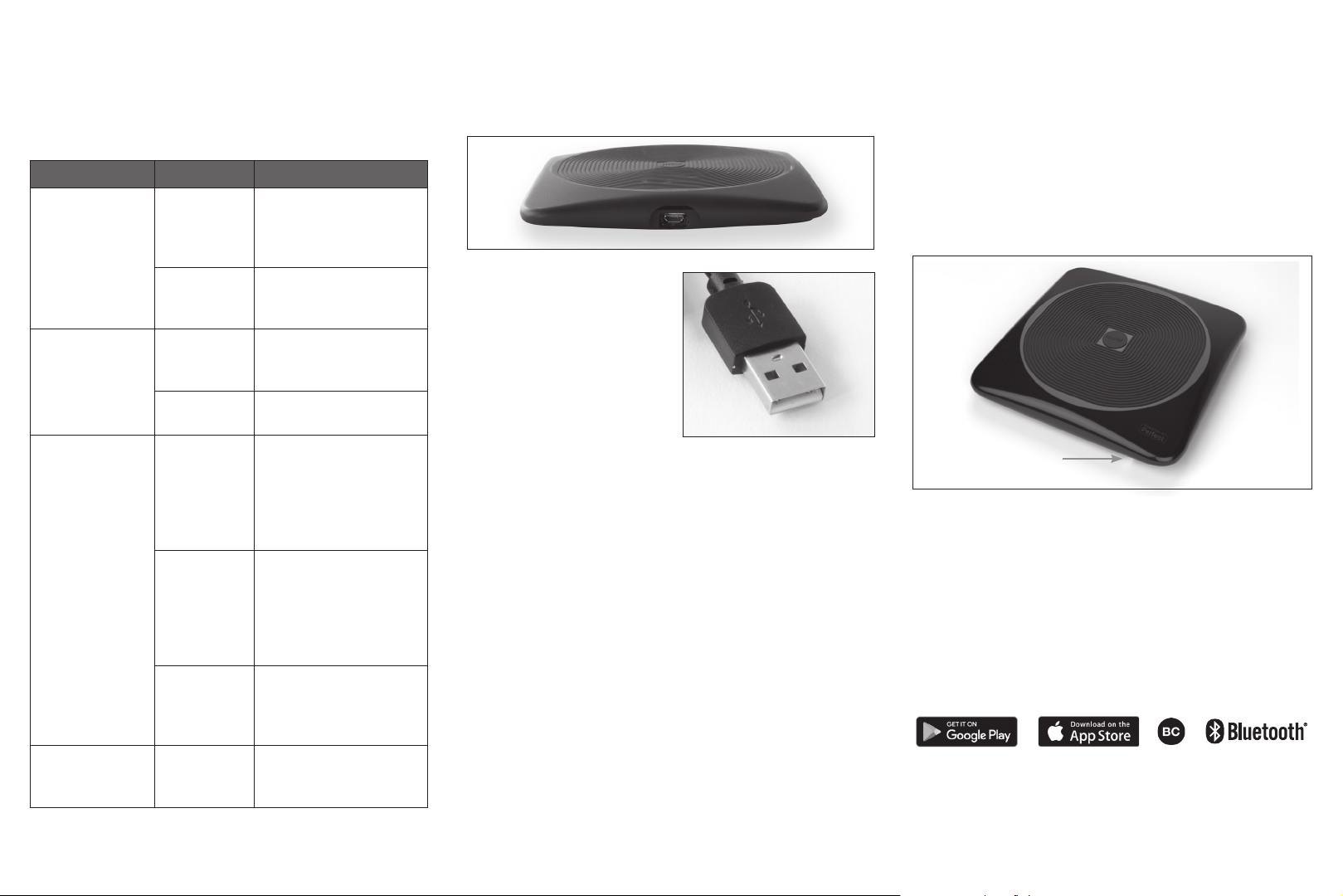
2. Look for the light on the side of your scale. (Fig C)
If the light is red plug in your scale while you use it.
Be careful to avoid spilling liquid on the cord
or USB connection.
Light
(Fig C)
3. Following the instructions on the Mentor™ Scale App
to connect your scale, choose your brew method and
create a delicious cup of coffee.
4. The Mentor™ Scale App also includes a standard
scale functionality with timer and TARE capability. You
may use this scale to weigh cooking, baking, and other
kitchen ingredients as needed. Weights are shown in
ounces and grams.
iPad and iPhone are trademarks of Apple Inc. Google Play and the Google Play
logo are trademarks of Google inc. App Store is a service mark of Apple Inc.
Android is a trademark of Google Inc.
Part # 13003-00
Page 2

Care and Use
Cleaning – never immerse the scale in water. If needed,
wipe the surface gently with a damp cloth. The scale
is not dishwasher safe or water resistant. If spills occur
remove scale from liquid area and avoid getting water
in the USB port, LED light, or inside the underside of
the scale.
Storage – do not place heavy objects on the top of
the scale during storage. If the scale is compressed in
storage it may damage the accuracy of the scale.
Battery – the lithium-ion battery is built into the scale;
it is rechargeable but cannot be replaced. Use only
with power adapters that provide 5V and at least 1amp.
The scale is a precision instrument designed to
be durable but damage could occur if exposed to
extreme heat or cold, shaken violently, dropped, or
stored while compressed.
Limited Warranty
2-year limited warranty from date of the purchase.
Go to MotifCoffee.com to register your Mentor™
Coffee Brewing Scale for warranty.
This warranty extends only to the original retail
purchaser or gift recipient. Keep the original sales
receipt as proof of purchase is required to make a
warranty claim. The warranty applies only to the scale,
it does not apply to your phone, tablet or other items
or equipment used with the scale.
1. This warranty covers all defects in material or
workmanship from the manufacturing process.
2. Defects occurring due to improper handling or
improper care or repair attempts by non-authorized
persons are not covered by this warranty.
FCC Information: FCC ID: 2AE3AMT02001US
This device complies with part 15 of the FCC Rules. Operation
is subject to the following two conditions: (1) This device may
not cause harmful interference, and (2) this device must accept
any interference received, including interference that may cause
undesired operation.
Changes or modifications not expressly approved by the party
responsible for compliance could void the user’s authority to
operate the equipment.
NOTE: This equipment has been tested and found to comply
with the limits for a Class B digital device, pursuant to part 15 of
the FCC Rules. These limits are designed to provide reasonable
protection against harmful interference in a residential
installation.
This equipment generates, uses and can radiate radio
frequency energy and, if not installed and used in accordance
with the instructions, may cause harmful interference to
radio communications. However, there is no guarantee that
interference will not occur in a particular installation.
If this equipment does cause harmful interference to radio or
television reception, which can be determined by turning the
equipment off and on, the user is encouraged to try to correct
the interference by one or more of the following measures:
Reorient or relocate the receiving antenna.
Increase the separation between the equipment and receiver.
Connect the equipment into an outlet on a circuit different from
that to which the receiver is connected.
Consult the dealer or an experienced radio/TV technician for
help.
RF exposure statements: Section 2.1091(d) (3) - Mobile devices
(a minimum separation distance may be required).
e.g. This device must be used in fixed locations and in such
a way that a separation distance of at least 20 centimeters
is normally maintained between the transmitter’s radiating
structure(s) and the body of the user or nearby persons.
Mentor
™
Coffee Brewing Scale
• App-driven scale with built-in lithium-ion
battery
• USB cable included
• 3000-gram capacity with 0.1-gram precision
• Auto shut off after 5 minutes of inactivity
Proprietary smart scale design and the
app are powered by the Perfect Co.
Pat. MakeItPerfectly.com/patents
Contents: app-driven scale with built
in lithium-ion battery and USB cable
(mobile device not included)
Distributed by Espresso Supply, Inc.
Seattle, WA 98107
© 2017 Motif Coffee. All rights reserved.
Made in China.
Customer Service 1-800-782-6671
Model: MT02001US
Go to MotifCoffee.com/FAQs for the
latest list of compatible devices.
This scale is compatible with
Perfect Drink®, Perfect Bake®,
Perfect Blend™ Apps.
Perfect Drink and Perfect Bake are
registered trademarks of Perfect
Company.
Perfect Blend and Powered by Perfect
are trademarks of Perfect Company.
 Loading...