

Page 1
How-to Document
PePWave Surf AP 200 and 400
Wirelessly Connecting a Home Network with PePWave Surf AP 200 and 400
I n t e g r a t e d H o m e W i - F i A c c e s s P o i n t S e t u p G u i d e
Overview
This guide presents a brief introduction, and a step-by-step process, to
configure a basic setup for the Integrated Home Wi-Fi Access Point
functionality of PePWave Surf AP 200 and 400.
Prior to carrying out the setup procedure in this
guide, the process of connecting PePWave Surf
AP 200/400 with Citywide Wi-Fi must have been
successfully performed.
The high-level steps are as follows:
1. Set up Integrated Home Wi-Fi Access
Point on PePWave Surf AP 200/400
2. Configure Wi-Fi enabled host PC(s)
3.
Test the Wi-Fi connection(s) with PePWave Surf AP 200/400
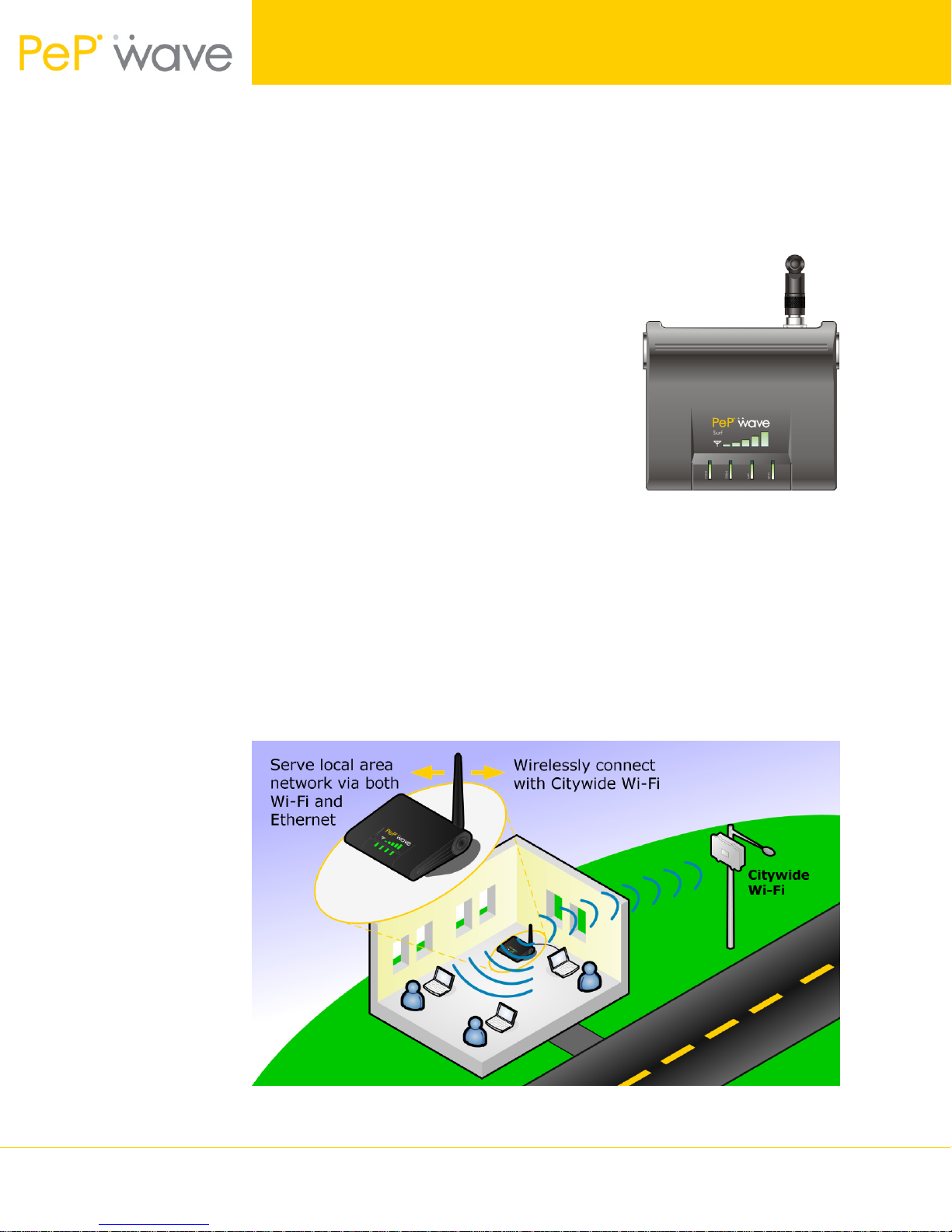
Integrated Home Wi-Fi Access Point – Introduction
Integrated Home Wi-Fi Access Point functionality of PePWave Surf AP 200/400 allows
802.1b/g devices on customers’ premises to wirelessly connect with a PePWave Surf
AP 200/400 unit through which Citywide Wi-Fi is accessed. With PePWave Surf AP
200/400, the already existing Ethernet capabilities of the PePWave Surf Series
remain unaffected.
Figure 1 – PePWave Surf AP 200/400 and Integrated Home Wi-Fi Access Point
Wirelessly Connecting a Home Network 1 Copyright © 2007 PePWave Ltd.
Page 2

How-to Document
PePWave Surf AP 200 and 400
Important Note: Prerequisite Setup
In order to configure, and subsequently test, the Integrated Home Wi-Fi Access Point
functionality of PePWave Surf AP 200/400, connectivity between the PePWave Surf AP
200/400 unit and Citywide Wi-Fi must have already been established.
A guide through this “Prerequisite Setup” process to connect PePWave Surf AP 200/400
and Citywide Wi-Fi is available from the PePWave website, as follows:
Wi-Fi Connection Setup Guide – PePWave Surf How-to Document
http://www.pepwave.com/document/PePWave_Surf_howto_connection_setup_guide.pdf
Setup Procedure
Integrated Home Wi-Fi Access Point Configuration
From the configuration and connections performed in the Prerequisite Setup, the
Web-based Configuration Interface of PePWave Surf AP 200/400 should remain
accessible via a host PC connected via Ethernet to the PePWave Surf AP 200/400
unit.
Configure the Integrated Home Wi-Fi Access Point settings as follows:
1. Connect through a web-browser with the Web-based Configuration Interface
of PePWave Surf AP 200/400, via the URL http://192.168.20.1
Upon successfully connecting, the Welcome Screen is displayed.
Figure 2 – PePWave Surf Web-based Configuration Interface Welcome Screen
2. Click on Advanced Config. This loads the CPE Setup page, where the Wi-Fi
settings are configured. (On the CPE Setup page, configuration parameters
in the section AP Settings will need to be modified, whereas the other
settings will remain at the values configured in the Prerequisite Setup.)
Wirelessly Connecting a Home Network 2 Copyright © 2007 PePWave Ltd.
Page 3
How-to Document
PePWave Surf AP 200 and 400
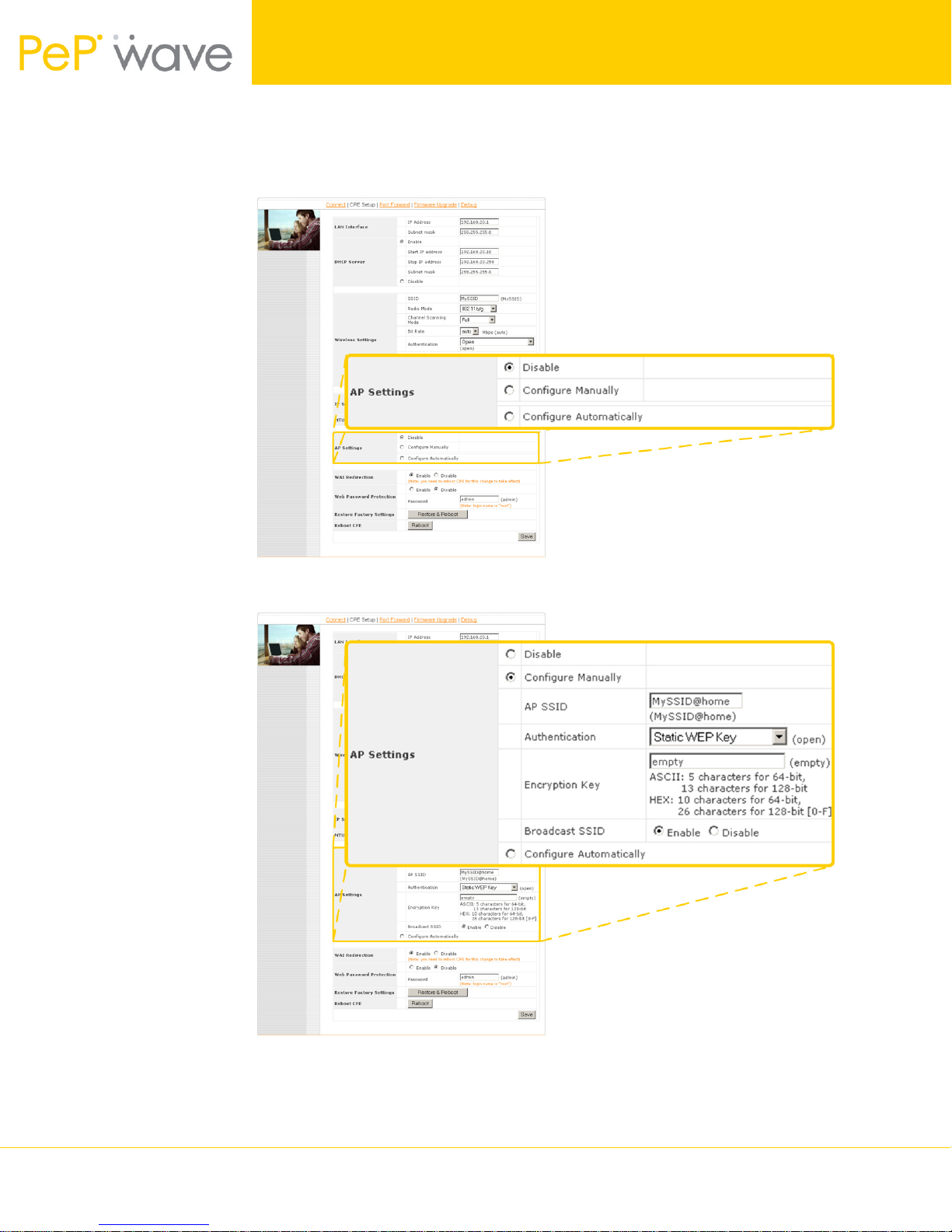
3. In the section AP Settings, select the radio button labeled Configure
Manually. Upon the selection, further configuration parameters are
displayed.
Figure 3 – The AP Settings section on the CPE Setup page
Figure 4 – Further configuration parameters are displayed upon the selection of the
Configure Manually radio button.
Wirelessly Connecting a Home Network 3 Copyright © 2007 PePWave Ltd.
Page 4
How-to Document
PePWave Surf AP 200 and 400
4. In the AP SSID field, enter an alphanumeric value by which the home Wi-Fi
network is to be identified. For illustration purposes, the default AP SSID
value MySSID@home will be used throughout this guide.
5. Select WPA/WPA-2-Personal from the Authentication drop-down menu.
6. In the Encryption Key field, enter an alphanumeric value that is difficult to
guess, and contains at least 8 characters. The same value as the one
entered here will subsequently be used when configuring host PC(s) that
connect with Integrated Home Wi-Fi Access Point of PePWave Surf AP
200/400. For illustration purposes, the encryption key value
PePWaveSurfAP will be used throughout this guide.
7. Click Save at the bottom-right corner of the CPE Setup page.
Configuration of Wi-Fi Enabled Host PC(s)
From a Wi-Fi enabled Windows XP host PC, connect with the Integrated Home Wi-Fi
Access Point of PePWave Surf AP 200/400 as follows:
1. Make the following menu selections:
Start Menu > Control Panel > Network Connections
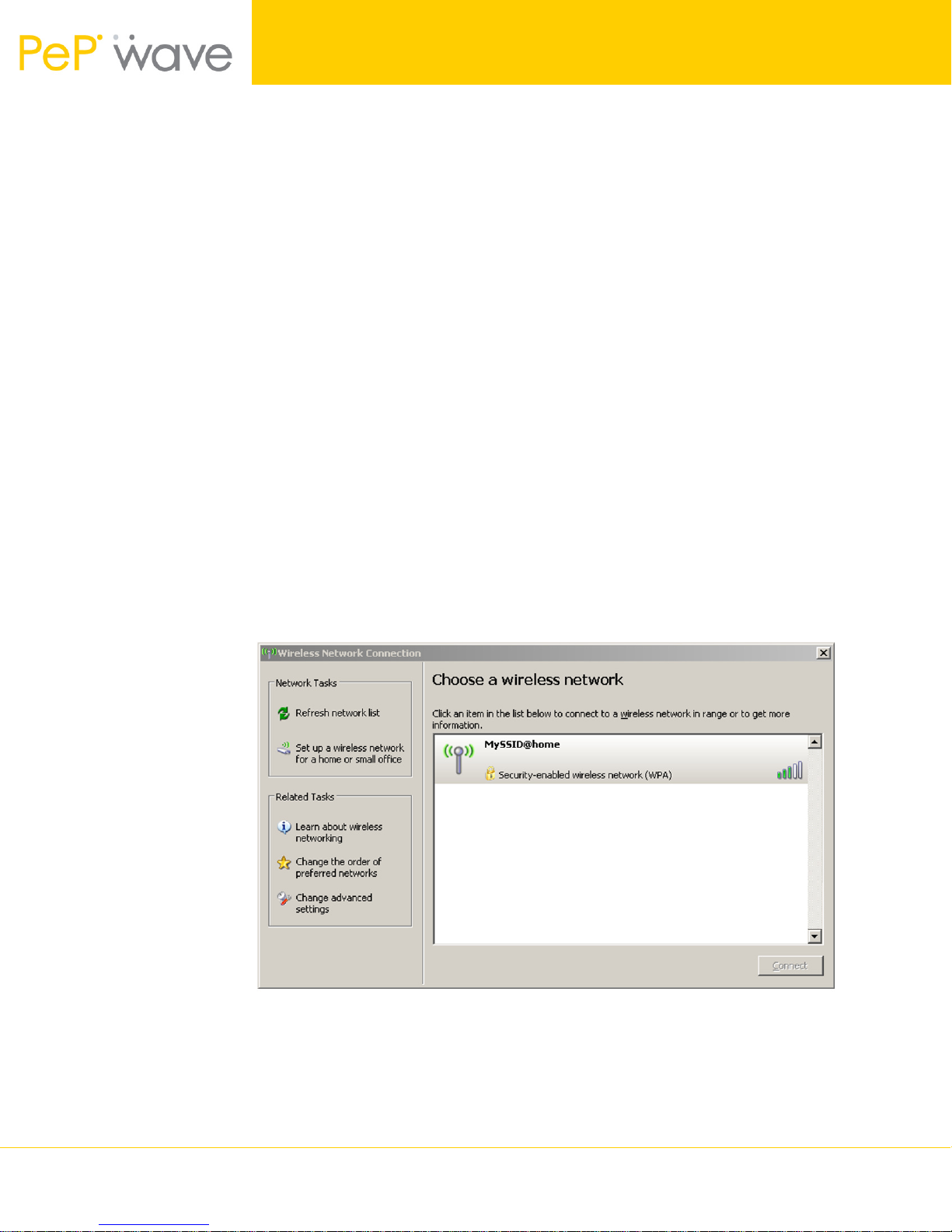
2. From Network Connections, right-click on the Wireless Network
Connection icon, then select View Available Wireless Networks. The
Wireless Network Connection window appears, as illustrated in Figure 5.
Figure 5 – Windows XP dialog box for connecting to a wireless network
An entry for MySSID@home should be present in the list of available
wireless networks. If the entry is absent, click on Refresh network list on
the left-hand side of the Wireless Network Connection window.
The entry for MySSID@home should be present afterwards.
Wirelessly Connecting a Home Network 4 Copyright © 2007 PePWave Ltd.
Page 5

How-to Document
PePWave Surf AP 200 and 400
3. Select the entry for MySSID@home.
4. Click Connect at the bottom-right corner of the Wireless Network
Connection window. A dialog box then prompts for the Network Key.
5. In the Network key field, enter the value that was previously entered as the
Encryption Key when configuring the AP Settings of PePWave Surf AP
200/400. (The value PePWaveSurfAP was previously used in this guide for
illustration.)
6. In the Confirm key field, enter the same value as in the previous step.
7. Click Connect at the bottom-right corner of the dialog box.
Testing the Wi-Fi Connection(s)
Test the Wi-Fi connection between the newly configured Wi-Fi enabled host PC and
PePWave Surf AP 200/400 as follows:
1. Disconnect the Ethernet cable from the host PC.
2. Connect through a web-browser with the Web-based Configuration Interface
of PePWave Surf AP 200/400, via the URL http://192.168.20.1
Upon successfully connecting, the Welcome Screen is displayed.
After successfully testing the connection between the Wi-Fi enabled host PC and
PePWave Surf AP 200/400, test the connection with the Internet by visiting our
website at www.pepwave.com.
PePWave Technical Support
In the event that, after carrying out the setup procedure, the Integrated Home Wi-Fi
Access Point component of PePWave Surf AP 200/400 fails to function, please browse
the PePWave website at www.pepwave.com for additional information, or contact
PePWave Technical Support via email at [email protected].
Wirelessly Connecting a Home Network 5 Copyright © 2007 PePWave Ltd.
 Loading...