

Pepwave Surf SF-200BG-X, Surf SF-400BG-X, Surf SF-UP9-X, PolePoint PP-400BG-X Installation Manual
Page 1

How-to Document
PePWave Surf/PolePoint Outdoor Installation Guide
P e P W a v e S u r f / P o l e P o i n t O u t d o o r I n s t a l l a t i o n G u i d e
PePWave Surf SF-200BG-X, SF-400BG-X, SF-UP9-X & PolePoint PP-400BG-X
Introduction
This document serves as the guide to installing the following products:
PePWave Surf Outdoor (Models SF-200BG-X, SF-400BG-X, SF-UP9-X)
PePWave PolePoint Outdoor (Model PP-400BG-X)
Features
LAN/WAN Compatibility: PePWave Surf/PolePoint Outdoor supports
802.11b/g protocol.
Power over Ethernet: Each PePWave Surf/PolePoint Outdoor unit is
powered through an RJ-45 network cable using Power over Ethernet
technology.
Users need to supply power to Surf/PolePoint Outdoor via the specified
Power over Ethernet 802.3af method.
Compatible Power over Ethernet units can be obtained from PePWave.
Outdoor Network Cable & RJ-45 Cable Head: PePWave Surf/PolePoint
Outdoor should be connected to a network via an outdoor RJ-45 network
cable.
Antenna: PePWave Surf/PolePoint Outdoor units use N-type antenna(s).
For models PP-400BG-X, SF-200BG-X and SF-400BG-X, users should attach
2.4Ghz N-type antennas, where for model SF-UP9-X, 900Mhz N-type
antennas should be attached.
Compatible antennas can be obtained through PePWave.
Ring terminal for grounding cable: PePWave Surf/PolePoint Outdoor
units may be further protected by using a grounding cable.
A ring terminal for grounding cable is included in the packages for PePWave
Surf/PolePoint Outdoor units.
Surf/PolePoint Outdoor Installation Guide 1 Copyright © 2007 PePWave Ltd.
Page 2

PePWave Surf/PolePoint Outdoor Installation Guide
Package Contents & Accessories
The following items are included in the PePWave Surf/PolePoint Outdoor package:
1 x PePWave Surf/PolePoint Outdoor unit…………………………………
2 x Pole-Mounting unit………………
1 x Surf/PolePoint Mounting unit……………………………………………
1 x Plastic bag of washers, nut and bolts
1 x User Manual CD
1 x Installation Guide (this document)
How-to Document
Installation
1. Fix the mounting unit to the pole you intend to use for your PePWave
Surf/PolePoint Outdoor unit:
With the pole in between, attach the two
semicircular pole connectors to the mounting unit,
as shown in the diagram to the left.
Place a washer in between the nut and mounting
unit surface on both the front and backsides of the
mounting unit. (See diagram to the left for front side
installation details.)
Tighten the nut on both the front and backside to fix
the combined mounting unit onto the pole. (See
photo on the left for completed backside
installation.)
Surf/PolePoint Outdoor Installation Guide 2 Copyright © 2007 PePWave Ltd.
Page 3

PePWave Surf/PolePoint Outdoor Installation Guide
2. Fix the Surf/PolePoint unit to the mounting unit.
Align the holes on the lips of the mounting unit with
the holes on the back of your Surf/PolePoint Outdoor
as shown in the figure on the left.
Place a washer in between each screw and hole on
the mounting unit and tighten the screw into the
back of your Surf/PolePoint Outdoor.
How-to Document
Completed Side View
3. Connect your PoE-powered outdoor RJ45 network cable to the RJ45 cable
port inside your Surf/PolePoint Outdoor.
i) Unscrew the four bolts on the cover of the
Surf/PolePoint Outdoor unit and remove the cover
thus exposing the inside.
iii) Pass the cable through the Surf/PolePoint
Outdoor unit’s cable connector on the bottom side
of the unit. (See location of the cable connector in
the bottom left figure.)
Note: If your network cable already has an RJ45
head, detach it from the cable before passing the
cable through the wall.
iv) Crimp the RJ45 cable head to the end of the
outdoor network cable. The cable should now be
through the wall of the Surf/PolePoint Outdoor unit.
Surf/PolePoint Outdoor Installation Guide 3 Copyright © 2007 PePWave Ltd.
v) Plug the network cable into the RJ45 port inside
the Surf/PolePoint Outdoor unit as shown in the
adjacent figure.
vi) Tighten the knob on the cable connector and
fasten the cover back onto the PolePoint /Surf
Outdoor unit.
Page 4
How-to Document
PePWave Surf/PolePoint Outdoor Installation Guide
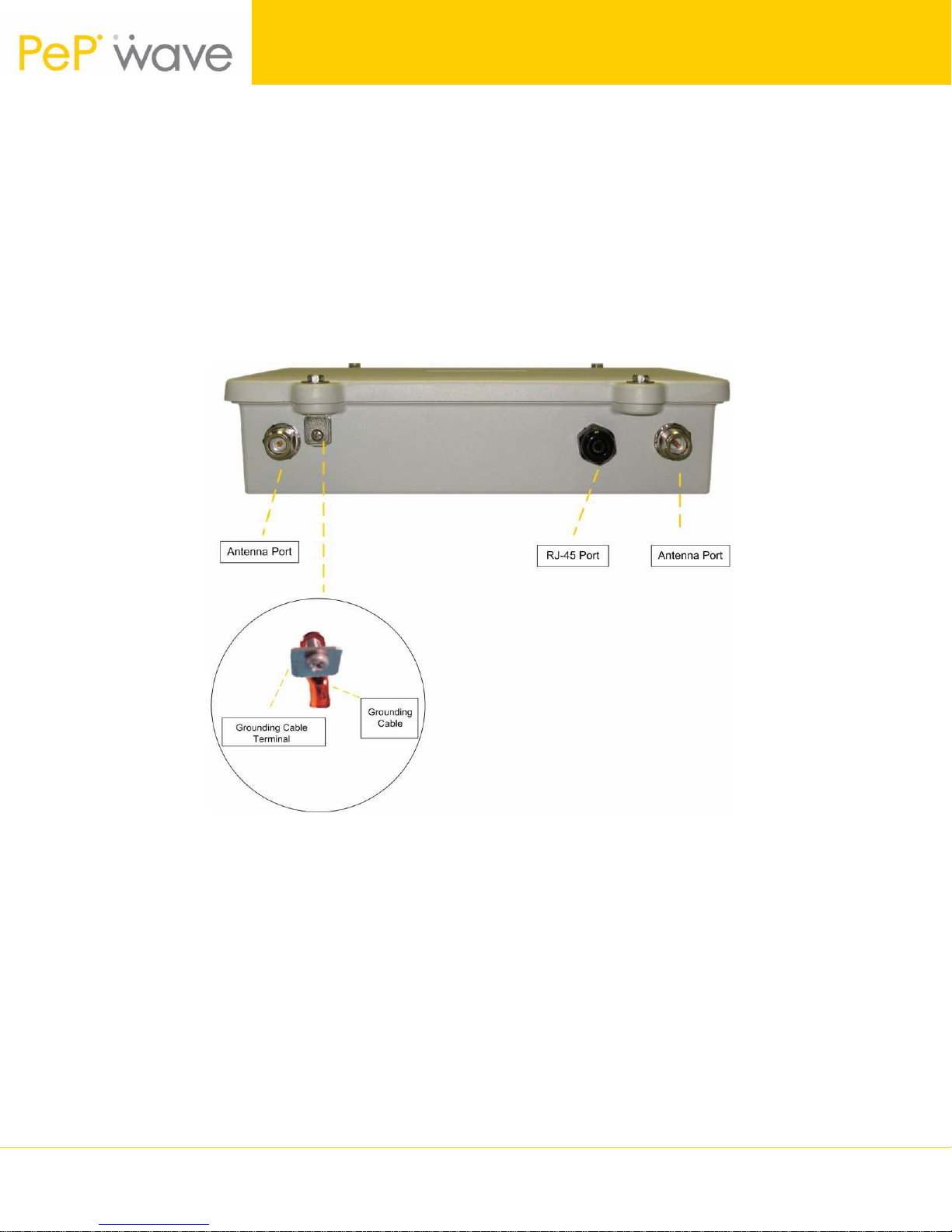
4. Attach antenna(s) to the antenna port on the bottom side of the
Surf/PolePoint Outdoor unit.
** The picture below shows a PePWave PolePoint Outdoor. PePWave Surf
Outdoor only has one antenna connector **
5. Your PePWave Surf/PolePoint Outdoor can be
grounded if your pole is equipped with a grounding
cable.
- Remove the screw and plate from the grounding
terminal on your Surf/PolePoint Outdoor unit.
- Place the end of the grounding cable as shown in
the picture and fasten the grounding plate back
onto the Surf/PolePoint Outdoor unit.
6. Follow the instructions in the User Manual to set up the network.
PePWave Technical Support
In the event of issues during installation, please contact PePWave Technical Support
at [email protected] for assistance.
Surf/PolePoint Outdoor Installation Guide 4 Copyright © 2007 PePWave Ltd.
 Loading...