

Page 1
FACTORY AUTOMATION
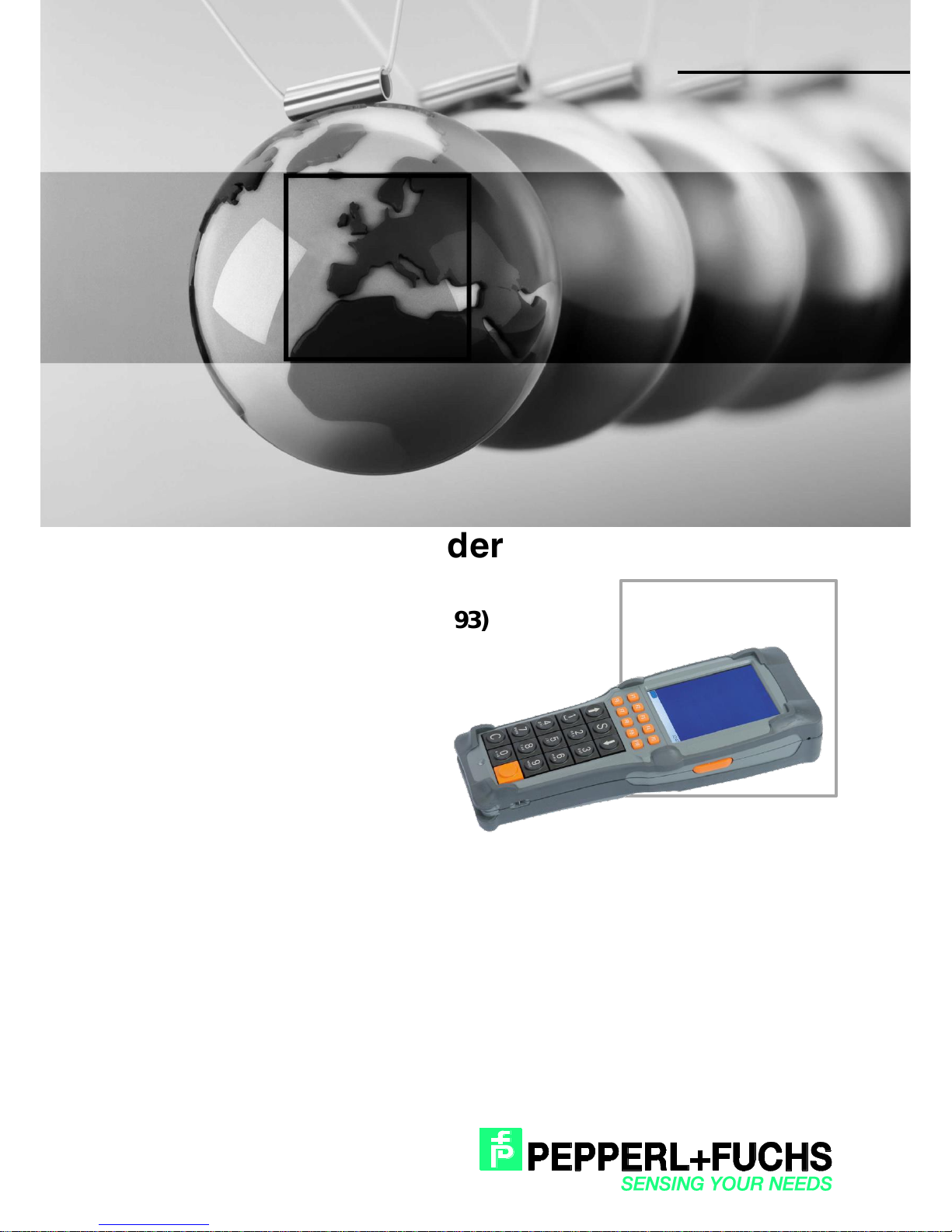
Kurzanleitung / Quick Start Guide
RFID Handheld Reader
IPT-HH27 (125 kHz)
IQT1-HH27 (13,56 MHz, ISO15693)
Page 2

2018
-09
2
RFID Handheld Reader
With regard to the supply of products, the current issue of the following document is
applicable: The General Terms of Delivery for Products and Services of the Electrical
Industry, published by the Central Association of the Electrical Industry (Zentralverband
Elektrotechnik und Elektroindustrie (ZVEI) e.V.) in its most recent version as well as the
supplementary clause: "Expanded reservation of proprietorship"
Page 3

2018
-09
3
RFID Handheld Reader
Deutsch
1 Auspacken .................................................................................................................................................. 6
2 Produktbeschreibung .................................................................................................................................. 7
2.1 Allgemeine Funktion ........................................................................................................................... 7
2.2 Bestimmungsgemäße Verwendung .................................................................................................... 7
3 Hinweise zu Lithiumbatterien ...................................................................................................................... 8
3.1 Batterien kleiner 100 Wh ..................................................................................................................... 8
3.2 Rücktransport von Batterien zur Entsorgung und Recycling ............................................................... 8
3.3 Rücktransport von beschädigten oder defekten Batterien .................................................................. 8
4 Sicherheitshinweise .................................................................................................................................... 9
4.1 Allgemeine Sicherheitshinweise im Umgang mit dem Gerät .............................................................. 9
4.2 Allgemeine Sicherheitshinweise im Umgang mit Batterien ............................................................... 10
4.3 Sicherheitshinweis zu Geräten mit integriertem Barcodescanner ..................................................... 11
5 Vor der ersten Inbetriebnahme des Gerätes ............................................................................................. 12
6 Handhabung des Gerätes ......................................................................................................................... 13
6.1 Tauschen des Akkus......................................................................................................................... 13
6.2 Einlegen des IxT-HH27 in die Docking-Station IQZ-HH27-Charger1 ............................................... 13
6.3 Herausnehmen des Gerätes aus der Docking-Station ...................................................................... 14
6.4 Einschalten des Handterminals IxT-HH27 ........................................................................................ 14
6.5 Der Suspend-Modus ......................................................................................................................... 14
6.6 Ausschalten des Handterminals ....................................................................................................... 14
6.7 µSD-Karte ......................................................................................................................................... 15
6.8 RFID Reader ..................................................................................................................................... 16
7 Zubehör .................................................................................................................................................... 17
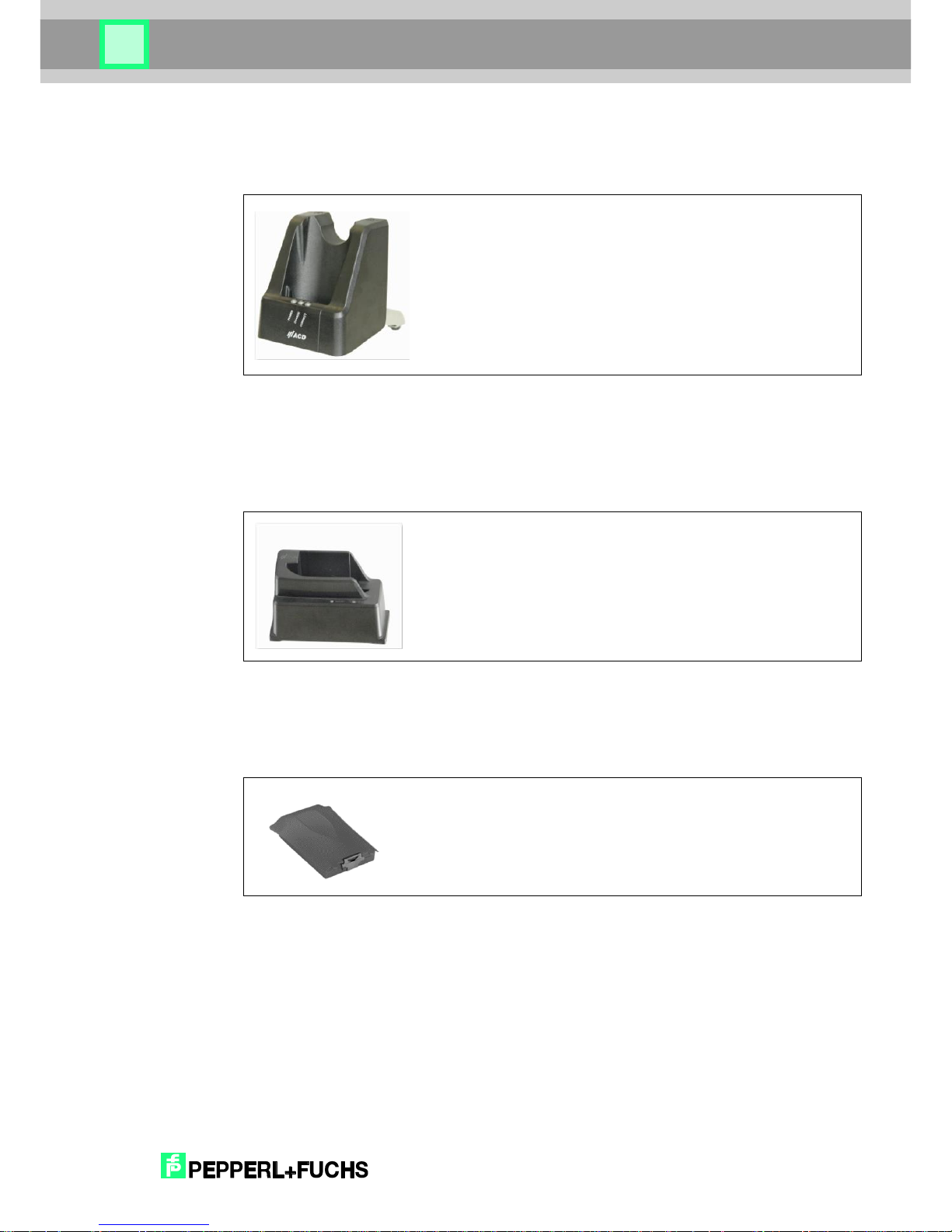
7.1 Docking + Ladestation IQZ-HH27-Charger1 .................................................................................... 17
7.2 Ladestation für Ersatz-Akku IQZ-HH20-Charger2 ............................................................................ 17
7.3 Ersatzakku IQZ-HH27-BAT .............................................................................................................. 17
8 Reinigungs- und Pflegehinweise ............................................................................................................... 18
8.1 Display .............................................................................................................................................. 18
8.2 Lade- und Kommunikationskontakte ................................................................................................ 18
9 Sonstiges .................................................................................................................................................. 19
Page 4

2018
-09
4
RFID Handheld Reader
10 Zulassungen............................................................................................................................................. 20
10.1 EG-Konformitätserklärung ................................................................................................................ 20
10.2 FCC-Information ............................................................................................................................... 21
English
11 Unpacking ................................................................................................................................................ 22
12 Product Description .................................................................................................................................. 23
12.1 General Function .............................................................................................................................. 23
12.2 Intended Use .................................................................................................................................... 23
13 Instructions for lithium batteries ................................................................................................................ 24
13.1 Batteries less than 100 Wh .............................................................................................................. 24
13.2 Return transport of batteries for disposal and recycling ................................................................... 24
13.3 Return transport of damaged or defective batteries ......................................................................... 24
14 Safety Information .................................................................................................................................... 25
14.1 General safety instructions for handling the device .......................................................................... 25
14.2 General safety instructions for handling batteries ............................................................................ 26
14.3 Safety instruction for devices with an inbuilt barcode scanner ......................................................... 27
15 Prior to the initial commissioning of the handheld terminal ....................................................................... 28
16 Handling of the Device ............................................................................................................................. 29
16.1 Replacing the battery in the handheld terminal ................................................................................ 29
16.2 Inserting the IxT-HH27 into the Docking Station IQZ-HH27-Charger1 ............................................. 29
16.3 Removing the IxT-HH27 from the Docking Station ........................................................................... 30
16.4 Switching on the Handheld Terminal................................................................................................ 30
16.5 Suspend mode ................................................................................................................................. 30
16.6 Switching off the Handheld Terminal................................................................................................ 30
16.7 µSD card .......................................................................................................................................... 31
16.8 RFID Reader .................................................................................................................................... 31
17 Accessories .............................................................................................................................................. 32
17.1 Docking + Charging Station IQZ-HH27-Charger1 ............................................................................ 32
17.2 Charging Station for Spare Battery, IQZ-HH20-Charger2 ................................................................ 32
17.3 Spare Battery IQZ-HH27-BAT .......................................................................................................... 32
Page 5

2018
-09
5
RFID Handheld Reader
18 Cleaning and Maintenance Information .................................................................................................... 33
18.1 Display .............................................................................................................................................. 33
18.2 Charging and communication contacts ............................................................................................. 33
19 Miscellaneous ........................................................................................................................................... 34
20 Approval .................................................................................................................................................... 35
20.1 EC Declaration of Conformity............................................................................................................ 35
20.2 FCC-Information ............................................................................................................................... 36
Page 6

2018
-09
6
RFID Handheld Reader
1 Auspacken
Inhalt der Verpackung:
Gerät
Akku
Touch-Pen
Kurzübersicht
Überprüfen Sie, ob die Komponenten unbeschädigt sind und der Packungsinhalt vollständig
ist.
Folgende Hinweise zur Verpackung sind zu beachten:
Innenverpackungen müssen die Batterien komplett umschließen
Die Batterien sind gegen Kurzschluss zu sichern (nur Batterien und Batterien mit
Ausrüstung/Gerät)
Die Batterien sind gegen unbeabsichtigtes Bewegen innerhalb der Verpackung zu
sichern
Bei eingesteckten oder eingebauten Batterien ist das Gerät so zu sichern, dass eine
unbeabsichtigte Inbetriebnahme während der Beförderung verhindert wird
Die Batterien sind so zu verpacken bzw. zu schützen, dass ein Kontakt mit leitfähigen
Werkstoffen innerhalb derselben Verpackung nicht zu einem Kurzschluss führen kann
Es ist eine starke Außenverpackung (Versandkarton) zu verwenden
Page 7

2018
-09
7
RFID Handheld Reader
2 Produktbeschreibung
2.1 Allgemeine Funktion
Das vorliegende Handterminal dient zur mobilen Erfassung, Änderung und Übermittlung von
Daten. Für das Gerät stehen zwei verschiedene RFID Reader zur Verfügung:
IQT1-HH27 -> HF RFID Reader (13,56 MHz, ISO15693)
zur Verwendung mit P+F Datenträgern IQC21 - IQC39
IPT-HH27 -> LF RFID Reader (125 kHz) zur Verwendung mit P+F Datenträgern IPC.
Mit diesen Geräten kann der Speicherbereich passiver Datenträger der o.a. Typen gelesen
und beschrieben werden. Je nach Frequenz, Größe und Einbauart des Datenträgers beträgt
der Erfassungsbereich einige Millimeter bei z.B. Einbau kleiner Datenträger in Metall bis zu
wenigen Zentimetern bei großen Datenträger in Luft. Das Handterminal besitzt eine integrierte
Antenne (siehe 5.8) und ist durch sein robustes Gehäuse für den industriellen Einsatz
geeignet.
2.2 Bestimmungsgemäße Verwendung
Bitte verwenden Sie das System z. B. nicht in explosionsgefährdeten Bereichen oder
sonstigen Gefahrenzonen. Beachten Sie bitte alle Warnhinweise zum Einsatz von drahtlosen
Geräten.
Page 8

2018
-09
8
RFID Handheld Reader
3 Hinweise zu Lithiumbatterien
3.1 Batterien kleiner 100 Wh
Für Batterien und Geräte mit Batterien, die eine Gesamtkapazität kleiner 100 Wh aufweisen
gelten für den Transport folgende Verpackungsvorschriften:
Verpackungsvorschrift für Straße/Schiene: ADR/RID SV188
Verpackungsvorschrift für Seefracht: IMDG SP188
Verpackungsvorschrift für Luftverkehr: IATA
Varianten der Verpackungsvorschrift für Luftverkehr:
1. Vorschrift bei Batterien einzeln, mehr als zwei Batterien: IATA PI965 Section IB
2. Vorschrift bei Batterien einzeln, bis zu zwei Batterien: IATA PI965 Section II
3. Vorschrift bei Batterien mit Ausrüstung/Gerät bis zu zwei (Ersatz-)Batterien: IATA
PI966 Section II
4. Vorschrift bei Batterien in Ausrüstung/Gerät: IATA PI967 Section II
3.2 Rücktransport von Batterien zur Entsorgung und Recycling
Der Rücktransport von Batterien zur Entsorgung und Recycling darf nur per Straße/Schiene
oder Seefracht vorgenommen werden. Es gilt die Verpackungsvorschrift SV377 P909.
Ein Transport per Luftfracht ist nicht erlaubt!
3.3 Rücktransport von beschädigten oder defekten Batterien
Der Rücktransport von beschädigten oder defekten Batterien darf nur per Straße/Schiene
oder Seefracht vorgenommen werden. Es gilt die Verpackungsvorschrift SV376 P908.
Ein Transport per Luftfracht ist nicht erlaubt!
Bei Fragen kontaktieren Sie bitte den Hersteller:
PEPPERL + FUCHS GMBH
Lilienthalstraße 200
68307 Mannheim
Telefon +49 621 776-0
Page 9
2018
-09
9
RFID Handheld Reader
4 Sicherheitshinweise
4.1 Allgemeine Sicherheitshinweise im Umgang mit dem Gerät
Bitte lesen Sie die folgenden Hinweise. Sie dienen Ihrer Sicherheit und der
Betriebsbereitschaft des Gerätes.
Warnung!
Für den Betrieb dieser Gerätefamilie dürfen ausschließlich Originalnetzteile, sowie
zugelassene Akkus verwendet werden!
Die Verwendung nicht zugelassener Komponenten kann zur Zerstörung des Gerätes führen.
Wird das Gerät längere Zeit nicht verwendet, nehmen Sie den Akku aus dem Gerät heraus.
Warnung!
Der Akku für das Gerät ist ein Lithium Polymer Akkupack. Lithium Polymer Akkus können
explodieren, wenn sie Feuer ausgesetzt werden. Bitte den Akkupack nicht zerlegen und nicht
Feuer oder Hitze (größer 60 °C) aussetzen.
Warnung!
Bedienen Sie den Touchscreen grundsätzlich nur mit den Fingerkuppen, oder mit dem auf der
Rückseite am Halteband befestigten Touch-Pen. Niemals Kugelschreiber oder andere spitze
Gegenstände verwenden.
Warnung!
Stellen Sie das Gerät nicht in der Nähe von Wärmequellen (Heizlüftern o. ä.) auf und setzen
Sie es niemals direkter Sonneneinstrahlung, übermäßigen Staubquellen oder Erschütterungen
aus.
Warnung!
Der Touch-Pen darf nur für die Bedienung des Touchscreen verwendet werden. Alle anderen
Verwendungszwecke sind verboten. Bitte beachten Sie eine mögliche Verletzungsgefahr
durch den Touch-Pen.
Warnung!
Um Überhitzungen zu vermeiden, darf das Handterminal im Betrieb nicht abgedeckt werden.
Page 10
2018
-09
10
RFID Handheld Reader
Warnung!
Vor der Benutzung ist das Handterminal, sowie eventuell vorhandene Anschlusskabel auf
Beschädigungen zu überprüfen. Beschädigte Teile müssen ausgetauscht werden. Nehmen
Sie bitte hierzu Kontakt mit der Fa. Pepperl+Fuchs auf.
Warnung!
Eine nicht bestimmungsgemäße Verwendung der Schnittstellen ist verboten.
4.2 Allgemeine Sicherheitshinweise im Umgang mit Batterien
Das Arbeiten in der Nähe von Batterien kann gefährlich sein
Warnung!
Batterien können explosive Gase produzieren.
Warnung!
Rauchen, Funkenbildung und offenes Feuer in der Nähe von Batterien sind zu vermeiden.
Warnung!
Tragen Sie stets Augen- und Kleiderschutz.
Warnung!
Berühren Sie Ihre Augen während der Arbeit mit Batterien nicht.
Warnung!
Waschen Sie sich nach der Arbeit an Batterien gründlich die Hände.
Warnung!
Seien Sie vorsichtig beim Gebrauch von metallenen Gegenständen in der Nähe von Batterien;
dies kann zu einem Kurzschluss oder zu einer Explosion der Batterie führen.
Page 11
2018
-09
11
RFID Handheld Reader
Warnung!
Legen Sie persönliche Gegenstände wie Ringe, Armbänder, Uhren, Ketten, etc. ab, wenn Sie
mit Batterien arbeiten; dies kann im Falle eines Kurzschlusses zu ernsthaften Verletzungen
führen.
4.3 Sicherheitshinweis zu Geräten mit integriertem Barcodescanner
Die mobile Terminals, Scanner und sonstige Geräte können integrierte Barcodescanner mit
Lasertechnik beinhalten. Die Laserklassifizierung ist auf einem Aufkleber auf dem Gerät
angegeben.
Warnung!
Blicken Sie niemals in den Strahl des Lasers.
Schalten Sie bei Reinigungsarbeiten stets das Gerät aus.
Page 12

2018
-09
12
RFID Handheld Reader
5 Vor der ersten Inbetriebnahme des Gerätes
Um sicherzustellen, dass der ab Werk in das Gerät eingelegte Akku voll geladen ist, legen Sie
das Gerät in die Dockingstation IQZ-HH27-Charger1 ein, siehe auch Punkt 5.4. Schließen Sie
die Dockingstation über das mitgelieferte Netzteil an das Stromnetz an (Power-LED leuchtet
grün).
Der Ladevorgang des Akkus ist beendet, wenn die LED mit der Bezeichnung ‚CHARGE‘ grün
leuchtet. Sie können nun das Handterminal in Betrieb nehmen.
Page 13
2018
-09
13
RFID Handheld Reader
6 Handhabung des Gerätes
6.1 Tauschen des Akkus
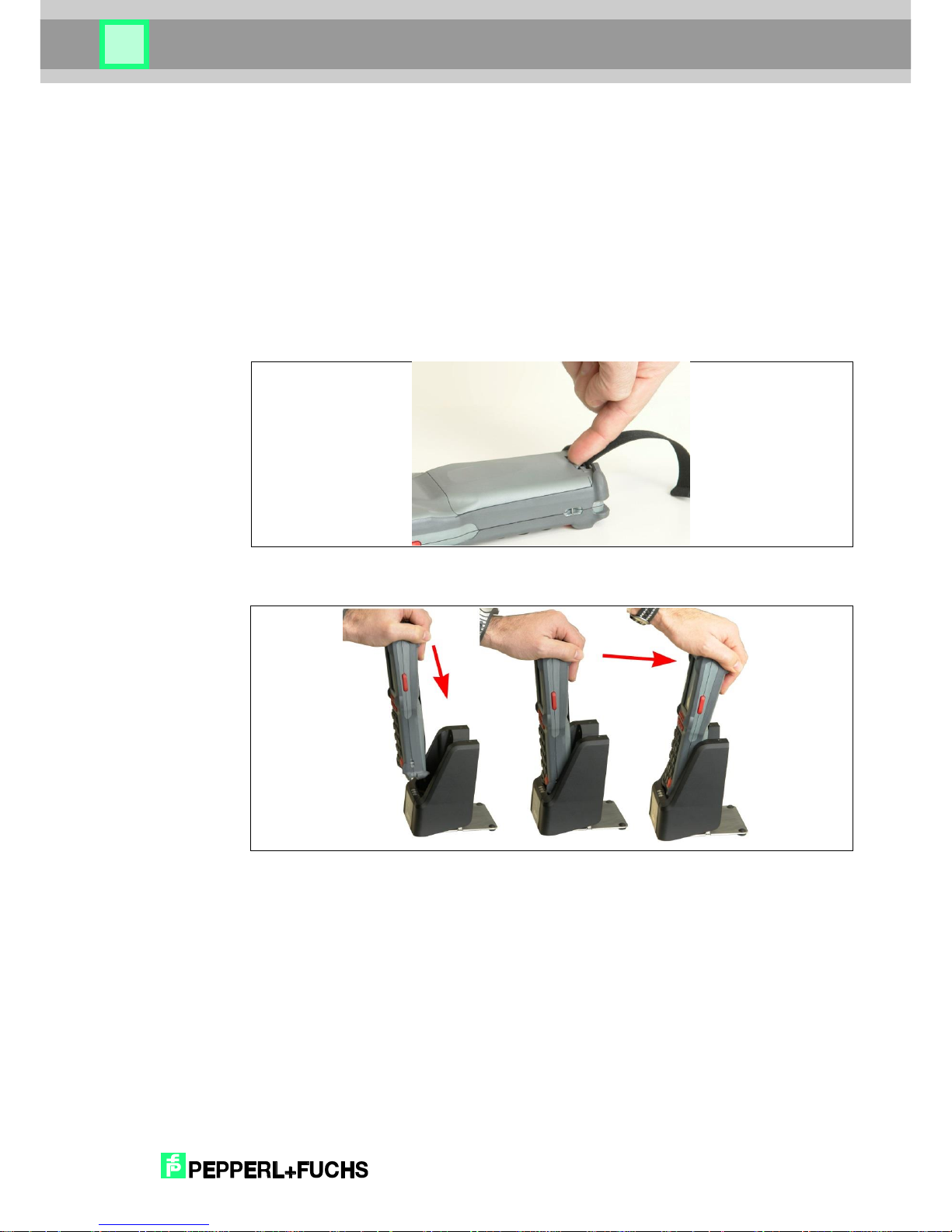
Das Akkufach befindet sich auf der Geräterückseite. Um den Akku zu entnehmen, entfernen
Sie zunächst die Handquerschlaufe durch einfaches Aushängen. Drücken Sie nun am Akku
die Verriegelungslasche in Richtung der Akkufläche (siehe Abb. 1). Der Akku kann nun an der
Lasche herausgenommen werden.
Der Akku lässt sich leicht einsetzen. Beachten Sie dabei, dass Sie den Akku leicht schräg in
Richtung Kontakte geneigt einsetzen und dabei an der Haltelasche einhängen. Dann drücken
Sie die Verriegelung mit leichtem Druck zu.
Abb. 1: Entnehmen des Akkus
6.2 Einlegen des IxT-HH27 in die Docking-Station IQZ-HH27-Charger1
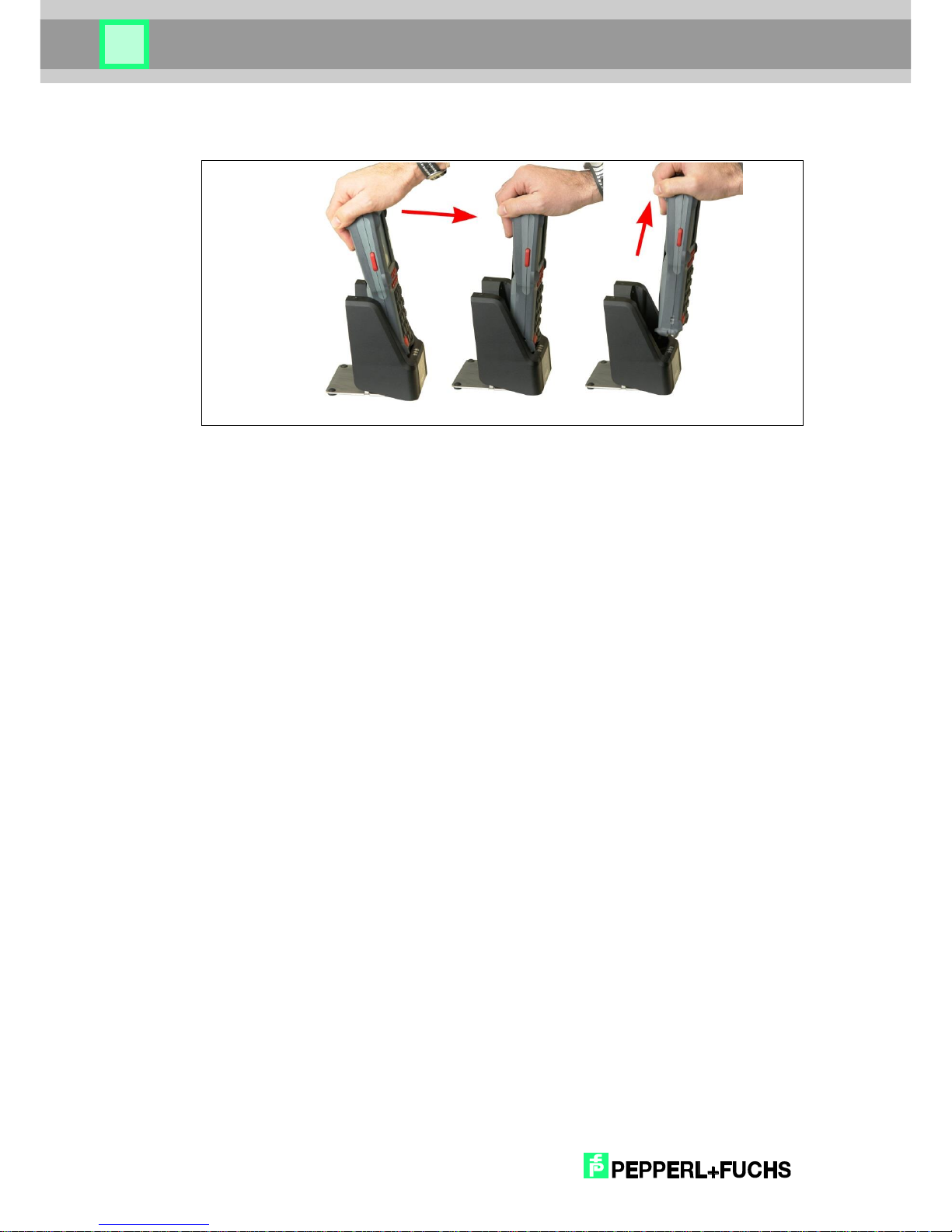
Abb. 2: Einlegen des Gerätes in die Docking Station
Page 14
2018
-09
14
RFID Handheld Reader
6.3 Herausnehmen des Gerätes aus der Docking-Station
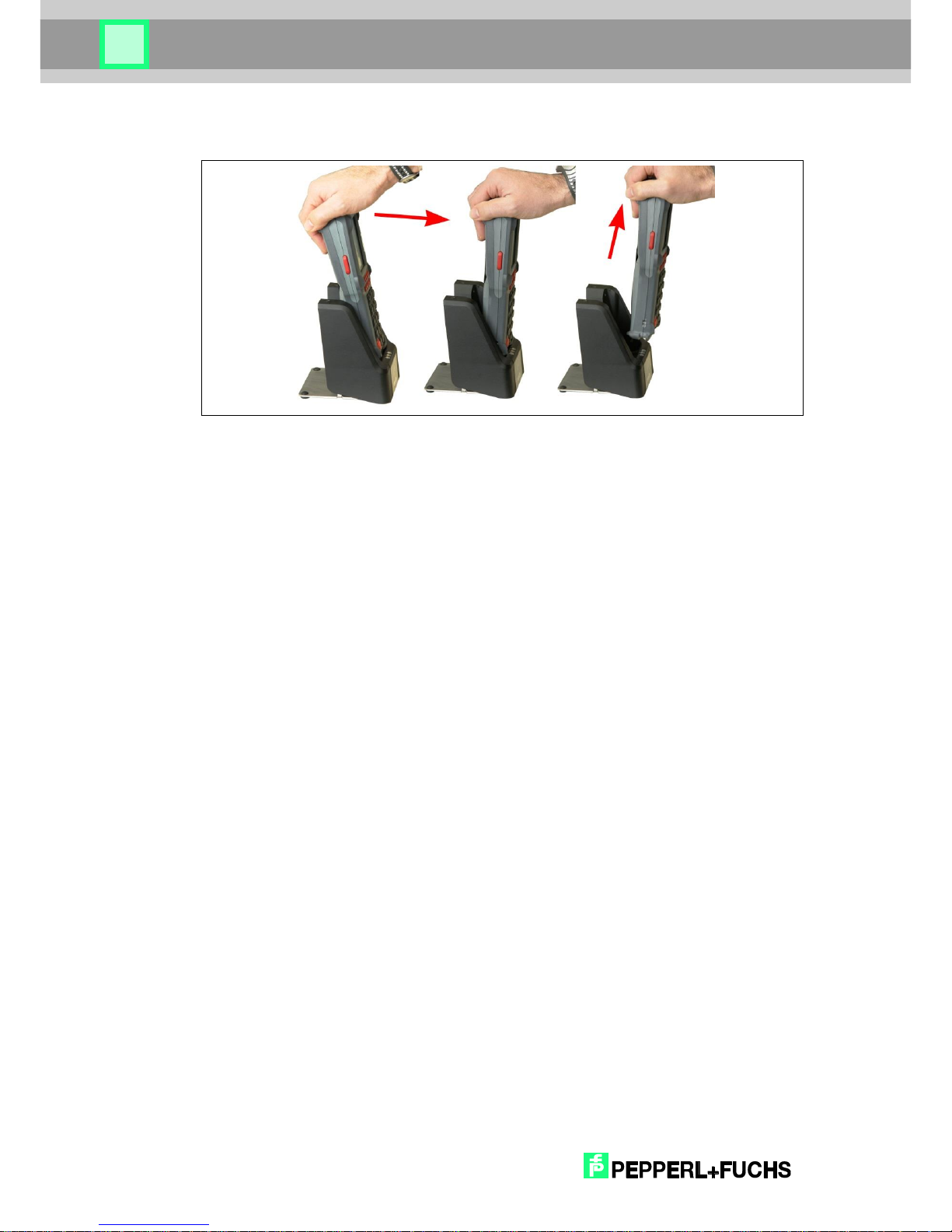
Abb. 3: Herausnehmen des Gerätes aus der Docking Station
6.4 Einschalten des Handterminals IxT-HH27
Zum Einschalten des Gerätes betätigen Sie die „C“-Taste und die „orange Enter“-Taste rechts
von der “0” gleichzeitig, bis die LED darunter leuchtet. Danach können Sie die Tasten
loslassen. Der Desktop des Betriebssystems bzw. Ihre gewohnte Arbeitsumgebung erscheint
am Display.
6.5 Der Suspend-Modus
Beim Suspendmode wird das Betriebssystem und die darauf laufende Anwendung
angehalten. Das Display wird abgeschaltet und ist somit dunkel. Im Suspendmode verbraucht
das Gerät nur noch sehr wenig Strom.
Man gelangt in den Suspendmode durch gleichzeitiges Betätigen der „C“-Taste und der
„orangen Enter“-Taste rechts von der “0”. Beim Verlassen des Suspendmodes (gleicher
Ablauf wie bei Punkt 5.6 ‚Einschalten des Handterminals‘) läuft die Anwendung und das
Betriebsystem an gleicher Stelle weiter.
6.6 Ausschalten des Handterminals
Das Ausschalten erfolgt durch Betätigen der drei Tasten „C“-, „“- und „orange Enter“-Taste
rechts von der “0”, wobei Sie zunächst die Taste mit der Beschriftung “C” drücken und halten.
Danach zusätzlich die „“-Taste drücken und halten. Dann zusätzlich die „orange Enter“-
Taste drücken und halten. Diese drei Tasten für min. zehn Sekunden gedrückt halten!
Page 15
2018
-09
15
RFID Handheld Reader
6.7 µSD-Karte
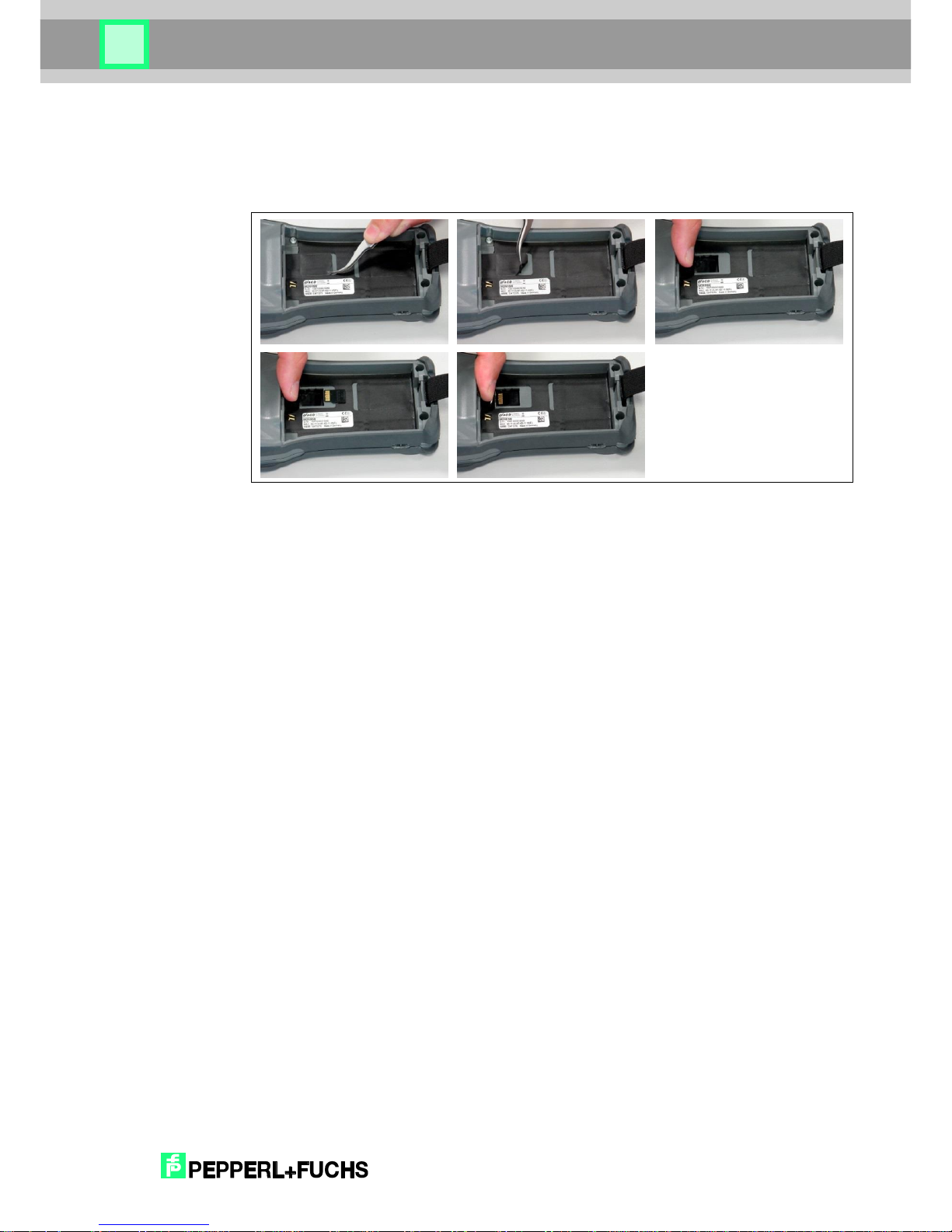
Im Gerät ist ein µSD Steckplatz vorbereitet mit welchem der Speicher erweitert werden kann.
Die µSD-Karte ist über das Batteriefach zugänglich.
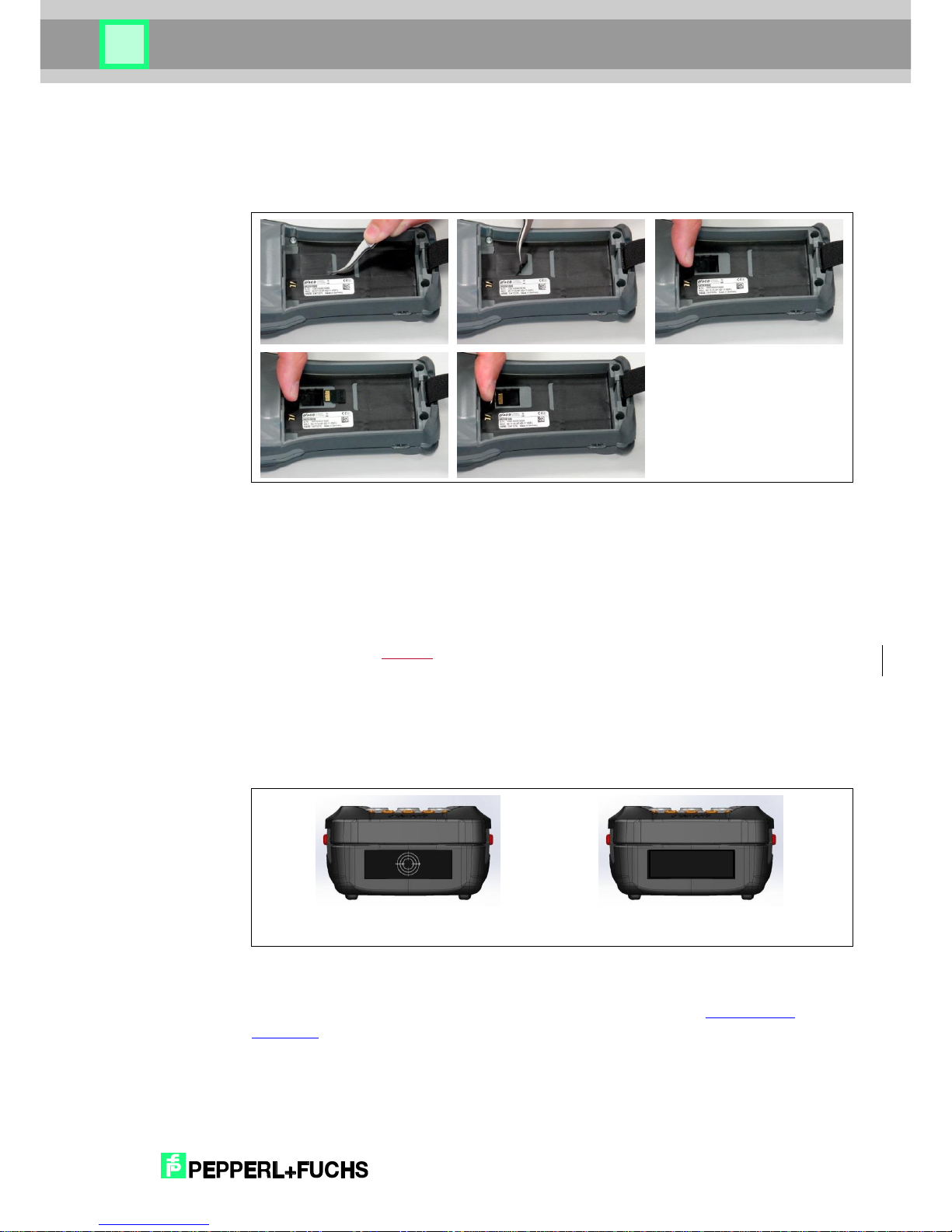
Abb. 4: Einführen der µSD-Karte in den µSD-Card Slot
Das Einlegen der µSD-Karte darf nur durch eine unterwiesene Person erfolgen. Zunächst
muss die schwarze Abdeckfolie durch eine Pinzette vorsichtig angehoben werden. Die
Lasche der Abdeckfolie unter welcher sich der µSD-Card Slot verbirgt, muss vorsichtig
umgeklappt und zurückgehalten werden. Dann kann die µSD-Karte mit Kontakte nach oben in
den µSD-Card Slot eingeführt werden. Die Karte ist gesteckt wenn die Karte spürbar
eingerastet ist. Anschließend die Lasche der Abdeckfolie wieder zurückklappen und mit dem
Finger zum Wiederverschließen darüberstreichen. Den Akku wieder stecken und das Gerät
booten. Nun sollte die µSD-Card im Windows Explorer unter dem Namen SDMMCCard2
sichtbar sein.
Page 16
2018
-09
16
RFID Handheld Reader
6.8 RFID Reader
Das Handterminal ist mit einem RFID Reader in zwei verschiedenen Ausführungen erhältlich:
IQT1-HH27 -> HF RFID Reader (13,56 MHz, ISO15693)
IPT-HH27 -> LF RFID Reader (125 kHz)
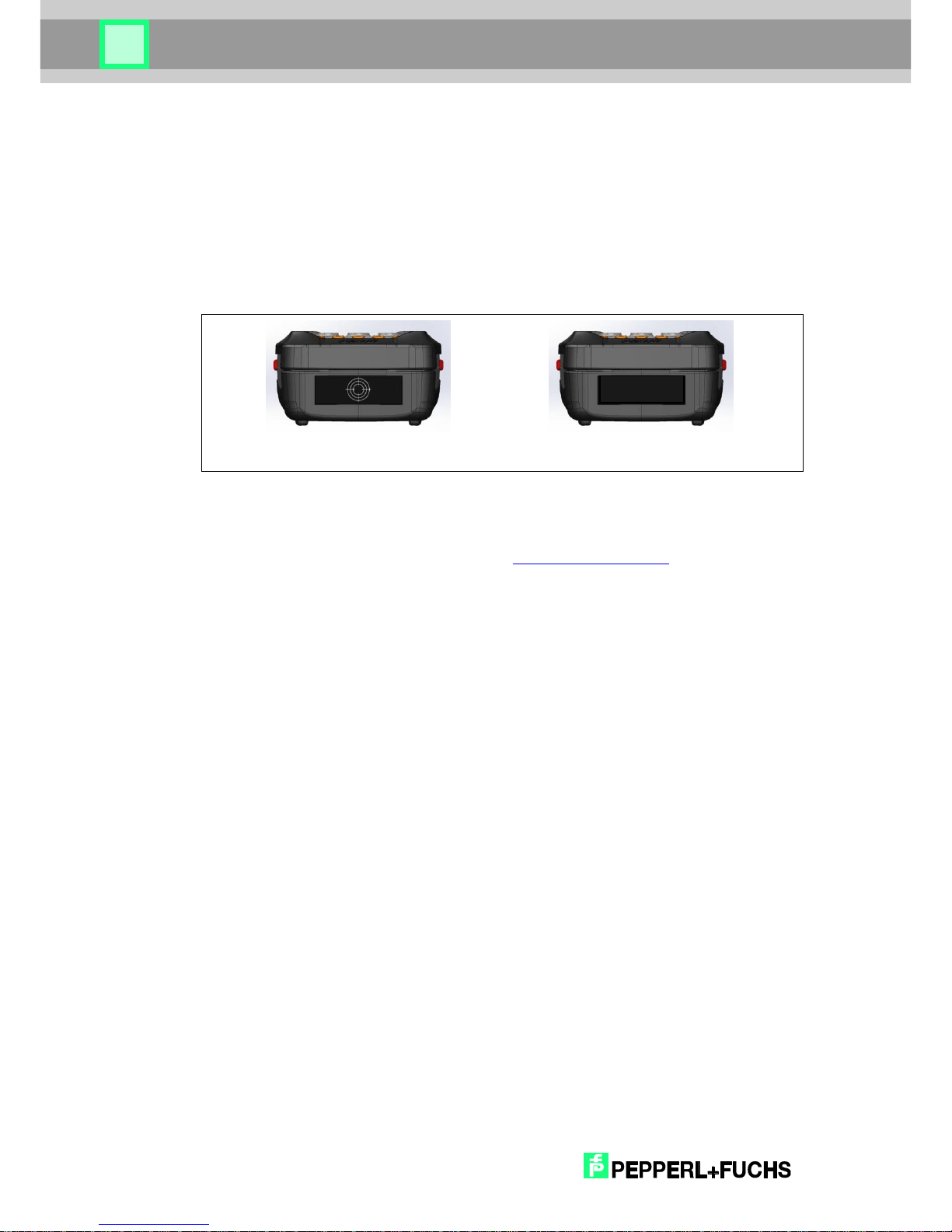
Der RFID Reader befindet sich oben am Gerät hinter der schwarzen Abdeckung bzw. dem
Fadenkreuz (siehe Abb. 5). Um einen RFID Tag zu lesen, halten Sie das Gerät senkrecht über
den RFID Tag.
Abb. 4: Position RFID Reader
Beim Einschalten des Gerätes wird automatisch die P+F RFID Applikationssoftware gestartet.
Eine genauere Beschreibung der Funktionen dieser Software finden Sie im Handbuch des
jeweiligen Gerätes auf unserer Homepage unter www.pepperl-fuchs.com.
HF-RFID
LF-RFID
Page 17
2018
-09
17
RFID Handheld Reader
7 Zubehör
7.1 Docking + Ladestation IQZ-HH27-Charger1
Mit der Dockingstation IQZ-HH27-CHARGER1 können die Handhelds
IQT1-HH27 und IPT-HH27 über USB und Ethernet mit einen PC
verbunden werden. Die Dockingstation bietet auch die Möglichkeit,
den eingebauten Akku des Handhelds zu laden.
7.2 Ladestation für Ersatz-Akku IQZ-HH20-Charger2
Mit der Ladestation IQZ-HH27-CHARGER2 haben Sie die Möglichkeit,
einen separaten Akku IQZ-HH27-BAT für die Handhelds IQT1-HH27
und IPT-HH27 zu laden.
7.3 Ersatzakku IQZ-HH27-BAT
Ersatzakku zum Wechseln.
Page 18
2018
-09
18
RFID Handheld Reader
8 Reinigungs- und Pflegehinweise
Reinigen Sie das Gerät, indem Sie es fest auf eine Fläche (z. B. Tisch) aufsetzen. So haben
Sie einen sicheren Halt und das Gerät kann Ihnen während des Reinigungsvorganges nicht
aus der Hand gleiten.
Warnung!
Verwenden Sie zur Reinigung keine ätzenden Chemikalien, Reinigungslösungen oder scharfe
Reinigungsmittel.
8.1 Display
Reinigen Sie das Display bei Bedarf mit einem weichen, trockenen Tuch. Schalten Sie hierzu
das Gerät stets aus, da das Display auf Berührungen reagiert und so das aktive Programm
beeinträchtigt oder gestört werden kann. Üben Sie keinen starken Druck auf das Display aus.
8.2 Lade- und Kommunikationskontakte
Sollten Übertragungsprobleme auftreten, bitte die Lade- und Kommunikationskontakte mit
einem weichen feuchten Tuch reinigen.
Bei der Ladestation unbedingt vorher den Netzstecker ziehen!
Page 19

2018
-09
19
RFID Handheld Reader
9 Sonstiges
EU-Richtlinie über die Entsorgung von Elektro- und Elektronik-Altgeräten (WEEE, Waste
Electrical and Electronic Equipment)
Alle Komponenten müssen am Ende ihrer Lebensdauer zum Recycling an Pepperl+Fuchs
zurückgesandt werden.
WEEE: 53473276
Page 20
2018
-09
20
RFID Handheld Reader
10 Zulassungen
10.1 EG-Konformitätserklärung
Hiermit wird erklärt, dass die Funkanlagentypen IPT-HH27 und IQT1-HH27 der Richtlinie
2014/53/EU entspricht. Der vollständige Text der EU-Konformitätserklärung ist unter der
folgenden Internetadresse verfügbar: www.pepperl-fuchs.de
Achtung!
Das Gerät verfügt über folgende Funksysteme: WLAN, BT, RFID Frequenzbänder:
WLAN
2,412 GHz – 2,472 GHz
5,15 GHz – 5,35 GHz
5,47 GHz – 5,725GHz
Bluetooth
2,402 GHz – 2,480 GHz
LF-RFID
100 kHz – 135 kHz
HF-RFID
13,56 MHz
Max. zulässige Sendeleistung im Frequenzband:
WLAN 2,4 GHz-Band max. 100 mW
WLAN 5 GHz-Band max. 200 mW
Bluetooth max. 100 mW
LF-RFID max. 42 dbµA/m in 10 m Abstand (mag. Feldstärke)
HF-RFID max. 42 dbµA/m in 10 m Abstand (mag. Feldstärke)
Achtung!
Beachten Sie bitte die folgenden nationalen regulatorischen Einschränkungen zum Einsatz
von drahtlosen Geräten.
WLAN-Einschränkungen:
In der EU darf WLAN 5 GHz-Band (5,15 GHz – 5,35 GHz) nur im Innenbereich betrieben
werden.
In Frankreich ist WLAN-Betrieb im Außenbereich (Kanäle 8 – 13) bei 2,454 GHz – 2,4835 GHz
nur mit max. 10 mW erlaubt.
Page 21
2018
-09
21
RFID Handheld Reader
10.2 FCC-Information
The IPT-HH27 and IQT1-HH27 described in this manual correspond to MS260SE. The
M260SE Set (M260SE/DS260) data acquisition system is a solution for the mobile acquisition
and transfer of data. Do not use the system in geographical areas where explosives may be
used.
Observe all warning information regarding the use of wireless devices.
The supplied connection kit (see Point 1) is only intended for use with the M260SE Set.
Note!
This equipment has been tested and found to comply with the limits for a Class A digital
device, pursuant to part 15 of the FCC Rules. These limits are designed to provide reasonable
protection against harmful interference when the equipment is operated in a commercial
environment. This equipment generates, uses, and can emit radio frequency energy and, if not
installed and used in accordance with the instruction manual, may cause interference with
certain radio communications.
Note!
This device complies with Part 15 of the FCC Rules. Operation is subject to the following two
conditions: (1) this device may not cause harmful interference, and (2) this device must accept
any interference received, including interference that may cause undesired operation.
Note!
Changes or modifications not expressly approved by the party responsible for compliance
could void the user’s authority to operate the equipment.
Page 22

2018
-09
22
RFID Handheld Reader
11 Unpacking
Package contents:
Device
Battery
Touch-Pen
Brief overview
Check that all components are undamaged and that all package contents are present.
The following packaging instructions must be observed:
Internal packaging must completely surround the batteries
The batteries must be secured against short circuits (only batteries and batteries with
equipment/device)
The batteries must be secured against unintentional movement within the packaging
If batteries are inserted or installed, the device must be secured to prevent inadvertent
commissioning during transport
The batteries must be packed/protected such that contact with conductive materials
within the same packaging cannot result in a short circuit
Sturdy outer packaging (shipping carton) must be used
Page 23

2018
-09
23
RFID Handheld Reader
12 Product Description
12.1 General Function
The present RFID handheld terminal is a device for the mobile acquisition and transfer of
data.
There are two types of this terminal available:
IQT1-HH27 -> HF RFID Reader (13,56 MHz, ISO15693)
for usage with P+F TFID tags IQC21 - IQC39
IPT-HH27 -> LF RFID Reader (125 kHz) for usage with P+F TFID tags IPC…
With that device the memory of passive RFID tags of the correct type can be read and written.
Depending on the frequency, size of the tag and mounting conditions the sensing range can
vary from a few mm (e.g. a small tag mounted flush in metal) up to several cm (a 50mm tag
mounted on plastic). The handheld terminal has an intergated antenna (see chapter 14.8) and
is designed for harsh operation conditions due to ist robust housing.
12.2 Intended Use
Do not use the system e.g. in explosive areas or other hazardous areas.
Observe all warning information regarding the use of wireless devices.
Page 24

2018
-09
24
RFID Handheld Reader
13 Instructions for lithium batteries
13.1 Batteries less than 100 Wh
For batteries and devices with batteries with an overall capacity less than 100 Wh, the
following packaging regulations apply to their transport:
Packaging regulation for road/rail: ADR/RID SV188
Packaging regulation for sea freight: IMDG SP188
Packaging regulation for transport by air: IATA
Variants of the packaging regulation for transport by air:
1. Regulation for standalone batteries, more than two batteries: IATA PI965 Section IB
2. Regulation for standalone batteries, up to two batteries: IATA PI965 Section II
3. Regulation for batteries with equipment/device up to two (spare) batteries: IATA
PI966 Section II
4. Regulation for batteries in equipment/device: IATA PI967 Section II
13.2 Return transport of batteries for disposal and recycling
Return transport of batteries for disposal and recycling may only take place by road/rail or by
sea freight. Packaging regulation SV377 P909 applies.
Transport by air freight is not permitted!
13.3 Return transport of damaged or defective batteries
Return transport of damaged or defective batteries may only take place by road/rail or by sea
freight. Packaging regulation SV376 P908 applies.
Transport by air freight is not permitted!
If you have any queries, please contact the manufacturer:
PEPPERL + FUCHS GMBH
Lilienthalstraße 200
68307 Mannheim
Germany
Telephone +49 621 776-0
Page 25
2018
-09
25
RFID Handheld Reader
14 Safety Information
14.1 General safety instructions for handling the device
Read the following information. It serves to ensure your safety as well as the operational
readiness of the device.
Warning!
Only original power supply units and approved batteries must be used for the operation of the
system. The utilization of non-approved components can lead to the destruction of the device.
Remove the battery from the device if it is not used for an extended period of time.
Warning!
The battery is a lithium polymer battery pack. Lithium polymer battery packs can explode if
exposed to fire. Do not disassemble the battery pack and do not expose it to fire or heat
(greater than 60 °C/140 °F).
Warning!
Only operate the touchscreen using the fingertips or with the touch-pen attached to the retainer
strap on the rear. Never use a pen or other sharp objects.
Warning!
Never position the device in close proximity to heat sources (heating fans or similar equipment)
and never expose it to direct sunlight, excessive dust sources or shocks.
Warning!
The touch pen may only be used for operation of the touch screen. It should not be used for
any other purposes.
Warning!
In order to prevent excessive heat, the handheld terminal, as well as the docking station and
the power pack must not be covered while in use.
Warning!
Prior to each use, the handheld terminal, the docking station and the connection cables must
be inspected for damages. Damaged parts must be replaced. Please contact Pepperl+Fuchs
in either case.
Page 26
2018
-09
26
RFID Handheld Reader
Warning!
Unintended use of the interfaces should be avoided.
14.2 General safety instructions for handling batteries
Working in the vicinity of batteries can be hazardous:
Warning!
Batteries can produce explosive gases.
Warning!
Avoid smoking, sparks and naked flames in the vicinity of batteries.
Warning!
Wear eye protection and protective clothing at all times.
Warning!
Do not touch your eyes when working with batteries.
Warning!
Wash your hands thoroughly after working with batteries.
Warning!
Take care when using metallic objects in the vicinity of batteries; these can result in a short
circuit or in the battery exploding.
Warning!
Remove personal items such as rings, wristbands, watches, chains, etc. when working with
batteries; in the event of a short circuit, these can result in serious injuries.
Page 27
2018
-09
27
RFID Handheld Reader
14.3 Safety instruction for devices with an inbuilt barcode scanner
Mobile terminals, scanners and other devices can feature an inbuilt barcode scanner with
laser technology. The laser classification is specified on a sticker on the device.
Warning!
Never look into the laser beam.
Always switch off the device for cleaning.
Page 28

2018
-09
28
RFID Handheld Reader
15 Prior to the initial commissioning of the handheld
terminal
In order to ensure that the battery inserted into the device at the factory is fully charged, insert
the device into the docking station, also see Point 13.4. Using the power supply unit, connect
the docking station to the mains (Power LED shows a green light).
The battery charging process has been complete when the “CHARGE” LED shows a green
light. You can now use the handheld terminal.
Page 29
2018
-09
29
RFID Handheld Reader
16 Handling of the Device
16.1 Replacing the battery in the handheld terminal
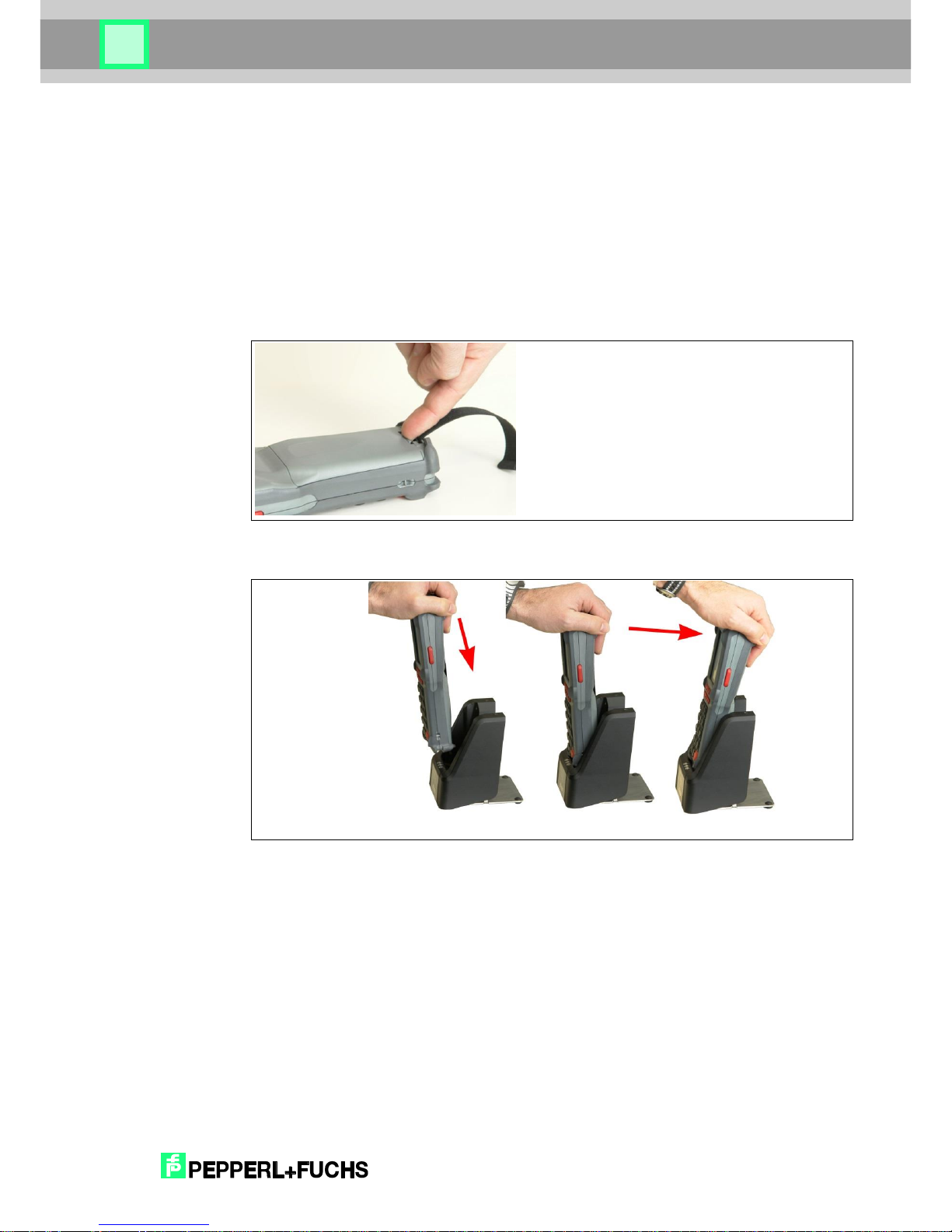
The battery compartment is located on the rear of the device. In order to remove the battery,
first remove the transverse hand strap by simply unhooking it. Now push the locking tab on the
battery towards the battery surface (see Fig. 6). The battery can now be removed from the tab.
The battery can easily be inserted. In doing so, ensure that you insert the battery at a slight
incline towards the contacts and hook it on the fixing tab whilst doing so. Then close the locking
mechanism with a slight amount of pressure.
Fig. 6: Removing the battery
16.2 Inserting the IxT-HH27 into the Docking Station IQZ-HH27-Charger1
Fig. 7: Inserting the device into the docking station
Page 30
2018
-09
30
RFID Handheld Reader
16.3 Removing the IxT-HH27 from the Docking Station
Fig. 8: Removing the device from the docking station
16.4 Switching on the Handheld Terminal
In order to switch on the device, press the “C” button and the “red enter” button to the right of
“0” simultaneously until the LED beneath it lights up. You can then release the buttons. The
desktop of your operating system or your usual work environment appears on the display.
16.5 Suspend mode
In suspend mode, the operating system and the application running on it are stopped. The
display is switched off and consequently becomes dark. In suspend mode, the device uses an
extremely small amount of power.
Suspend mode can be accessed by simultaneously pressing the “C” button and the “red enter”
button to the right of “0”. Upon leaving suspend mode (same process as under Point 13.6
‘Switching on the handheld terminal’), the application and the operating system starts to run
from the same point.
16.6 Switching off the Handheld Terminal
The device is switched off by pressing the three buttons “C”-, “” and “red enter” right of the “0”,
whereby the “0” button must first be pressed and held. Then also press and hold the “” button.
Then also press and hold the “red enter” button. Press and hold these three buttons for at least
10 seconds.
Page 31
2018
-09
31
RFID Handheld Reader
16.7 µSD card
To expand memory space, you find a µSD card slot inside the device. The µSD card is
accessible from the battery case.
Fig. 9: Insert the µSD card into the µSD card slot
You have to insert the µSD card into the slot with contacts bottom-up. The card will be fixed if
the card is locked noticeably.
Afterwards insert the battery and boot the device. Now the µSD card will be visible in the
Windows Explorer under the name SDMMCCard2.
16.8 RFID Reader
The RFID handheld terminal is available in two different designs:
IQT1-HH27 -> HF RFID Reader (13,56 MHz, ISO15693)
IPT-HH27 -> LF RFID Reader (125 kHz)
The RFID reader is located at the back behind the black cover / the crosslines (see fig. 10)
To read the RFID tag, the device has to be held in center above the RFID tag.
Fig. 10: Position RFID reader
When the device is switched on, it automatically starts the P+F RFID application program.
For detailed information about that program please visit our homepage www.pepperl-
fuchs.com and find the manual for the respective device.
HF-RFID
LF-RFID
Page 32
2018
-09
32
RFID Handheld Reader
17 Accessories
17.1 Docking + Charging Station IQZ-HH27-Charger1
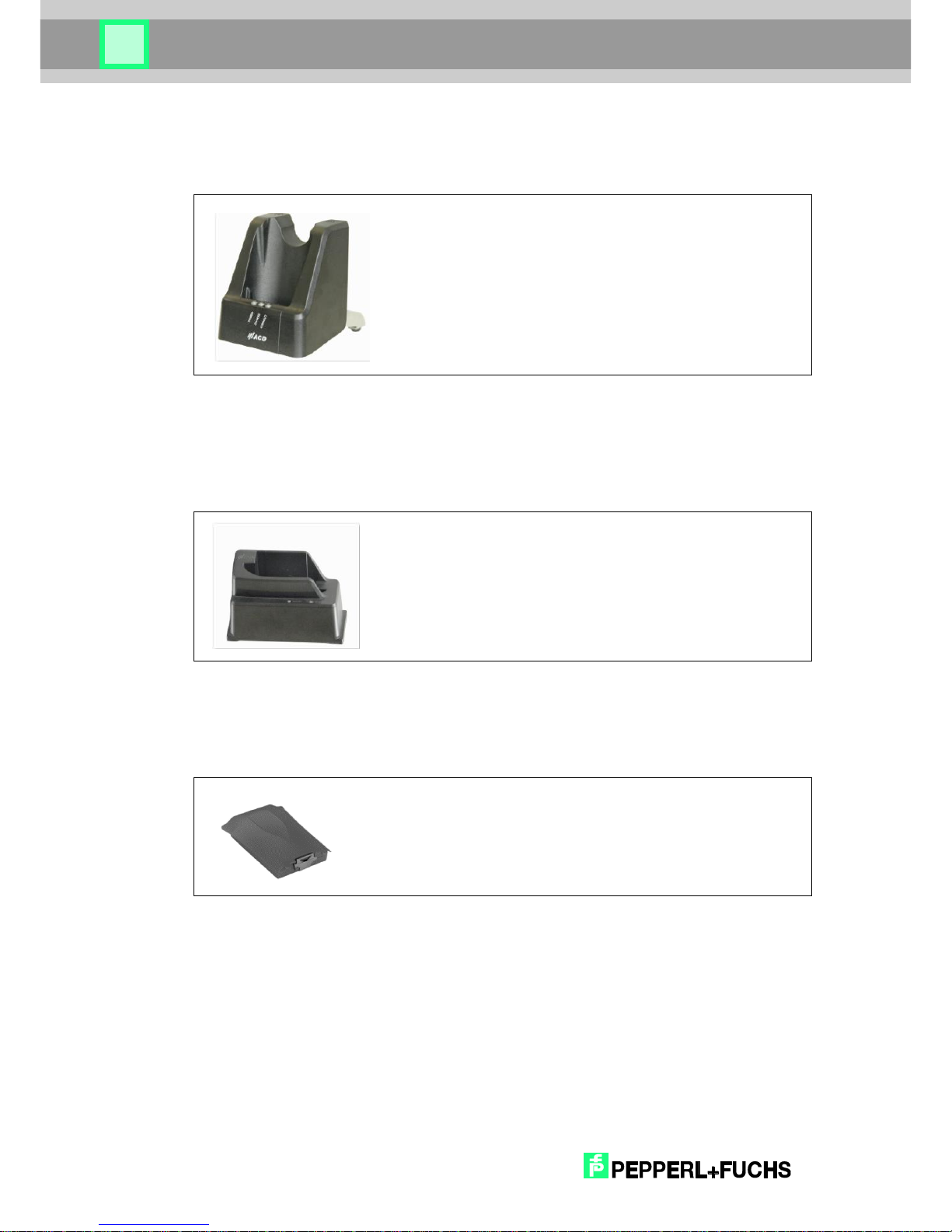
The Docking Station IQZ-HH27-CHARGER1 provides a connection for
the IQT1-HH27 und IPT-HH27 to a PC via USB and Ethernet interface.
When placed in the cradle, the battery of the handheld reader will be
charged.
17.2 Charging Station for Spare Battery, IQZ-HH20-Charger2
The Charging Station IQZ-HH27-CHARGER2 will charge the single
battery IQZ-HH27-BAT used in the handheld devices IQT1-HH27
and IPT-HH27.
17.3 Spare Battery IQZ-HH27-BAT
Spare battery for changing.
Page 33
2018
-09
33
RFID Handheld Reader
18 Cleaning and Maintenance Information
Clean the device by placing it firmly onto a surface (e.g. table). This ensures a secure hold and
the device cannot slip out of your hand during the cleaning process.
Warning!
Do not use any corrosive chemicals, cleaning solutions or strong cleaning agents in order to
clean the device.
18.1 Display
If required, clean the display with a soft, dry cloth. In order to do, always switch off the device
as the display responds to all contact and could therefore compromise or interfere with the
active program. Do not apply any severe pressure on the display.
18.2 Charging and communication contacts
If transfer problems occur, clean the charging and communication contacts with a soft, moist
cloth.
When dealing with the devices, the power plug must be disconnected beforehand.
Page 34
2018
-09
34
RFID Handheld Reader
19 Miscellaneous
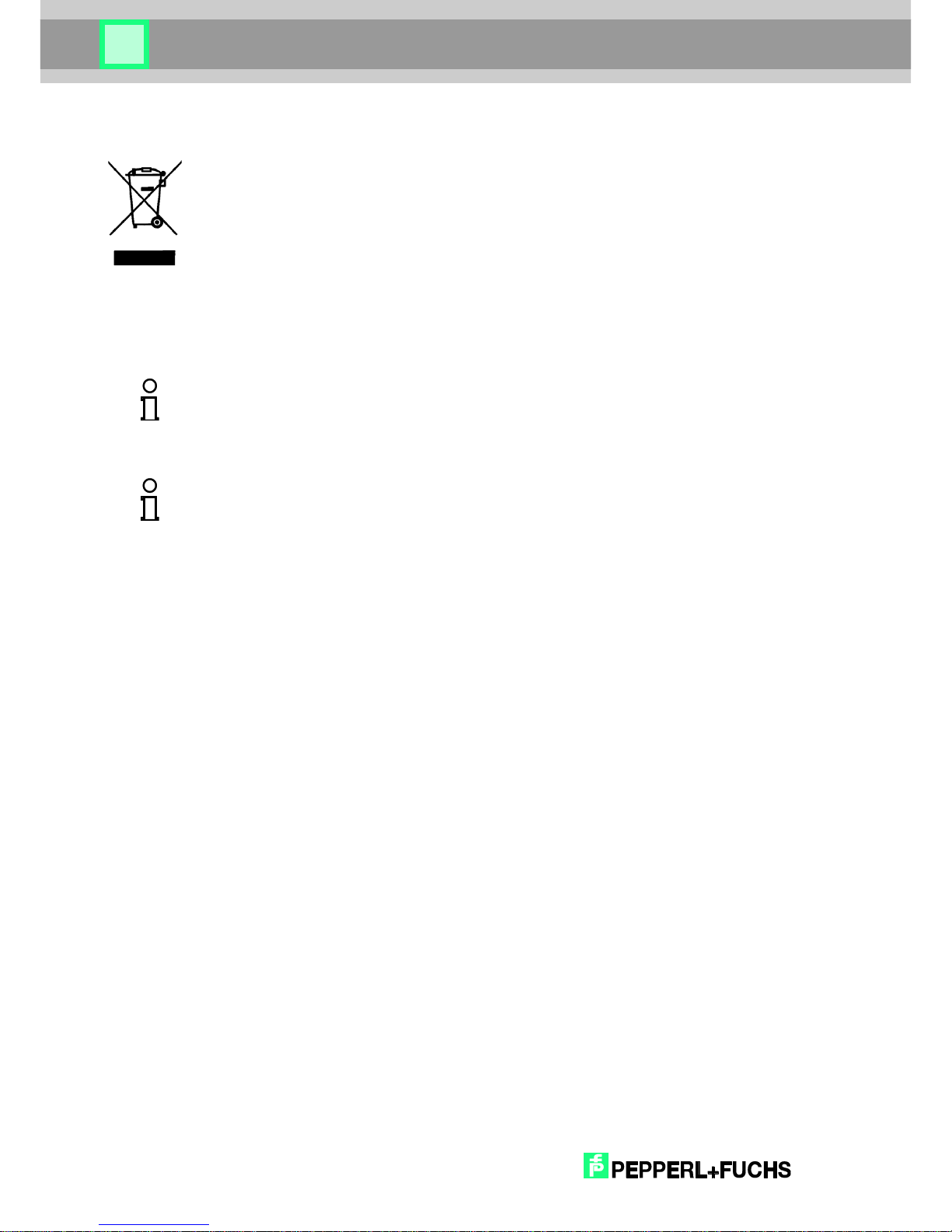
EU directive on the disposal of waste electrical and electronic equipment (WEEE, Waste
Electrical and Electronic Equipment)
All components must be returned to Pepperl+Fuchs for recycling at the end of their service
lives.
WEEE: 53473276
This device is a 2.4 GHz wideband transmission system (transceiver), intended for use in all
EU member states and EFTA countries, except in France and Italy where restrictive use
applies.
Note!
In Italy the end-user should apply for a license at the national spectrum authorities in order to
obtain authorization to use the device for setting up outdoor radio links and/or for supplying
public access to MICommunications and/or network services.
Note!
This device may not be used for setting up outdoor radio links in France and in some areas the
RF output power may be limited to 10 mW EIRP in the frequency range of 2454 – 2483.5 MHz.
For detailed information the end-user should contact the national spectrum authority in France.
Page 35
2018
-09
35
RFID Handheld Reader
20 Approval
20.1 EC Declaration of Conformity
Hereby, it is declared that the radio installation types IPT-HH27 and IQT1-HH27 complies with
Directive 2014/53/EU. The full text of the EU Declaration of Conformity is available from the
following Internet addresses: www.pepperl-fuchs.com.
Warning!
The device is equipped with the following radio systems: WLAN, BT, RFID Frequency
bands:
WLAN
2.412 GHz – 2.472 GHz
5.15 GHz – 5.35 GHz
5.47 GHz – 5.725 GHz
Bluetooth
2.402 GHz – 2.480 GHz
LF-RFID
100 kHz – 135 kHz
HF-RFID
13.56 MHz
Max. transmission power in frequency bands:
WLAN 2.4 GHz band max. 100 mW
WLAN 5 GHz band max. 200 mW
Bluetooth max. 100 mW
LF-RFID max. 42 dbµA/m in 10 m distance (mag. Field strength)
HF-RFID max. 42 dbµA/m in 10 m distance (mag. Field strength)
Warning!
Please observe the following national regulatory restrictions for wireless devices.
WLAN restrictions:
In the EU, the WLAN 5 GHz band (5.15 GHz – 5.35 GHz) may only be used indoors.
In France, WLAN may not be used at a value greater than 10 mW outdoors (channels 8 – 13)
when in the 2.454 GHz – 2.4835 GHz band.
Page 36
2018
-09
36
RFID Handheld Reader
20.2 FCC-Information
The IPT-HH27 and IQT1-HH27 described in this manual correspond to MS260SE. The
M260SE Set (M260SE/DS260) data acquisition system is a solution for the mobile acquisition
and transfer of data. Do not use the system in geographical areas where explosives may be
used.
Observe all warning information regarding the use of wireless devices.
The supplied connection kit (see Point 1) is only intended for use with the M260SE Set.
Note!
This equipment has been tested and found to comply with the limits for a Class A digital
device, pursuant to part 15 of the FCC Rules. These limits are designed to provide reasonable
protection against harmful interference when the equipment is operated in a commercial
environment. This equipment generates, uses, and can emit radio frequency energy and, if not
installed and used in accordance with the instruction manual, may cause interference with
certain radio communications.
Note!
This device complies with Part 15 of the FCC Rules. Operation is subject to the following two
conditions: (1) this device may not cause harmful interference, and (2) this device must accept
any interference received, including interference that may cause undesired operation.
Note!
Changes or modifications not expressly approved by the party responsible for compliance
could void the user’s authority to operate the equipment.
Page 37

2018
-09
37
RFID Handheld Reader
Page 38

2018
-09
38
RFID Handheld Reader
DOCT-5442B 09/2018
 Loading...