

Page 1
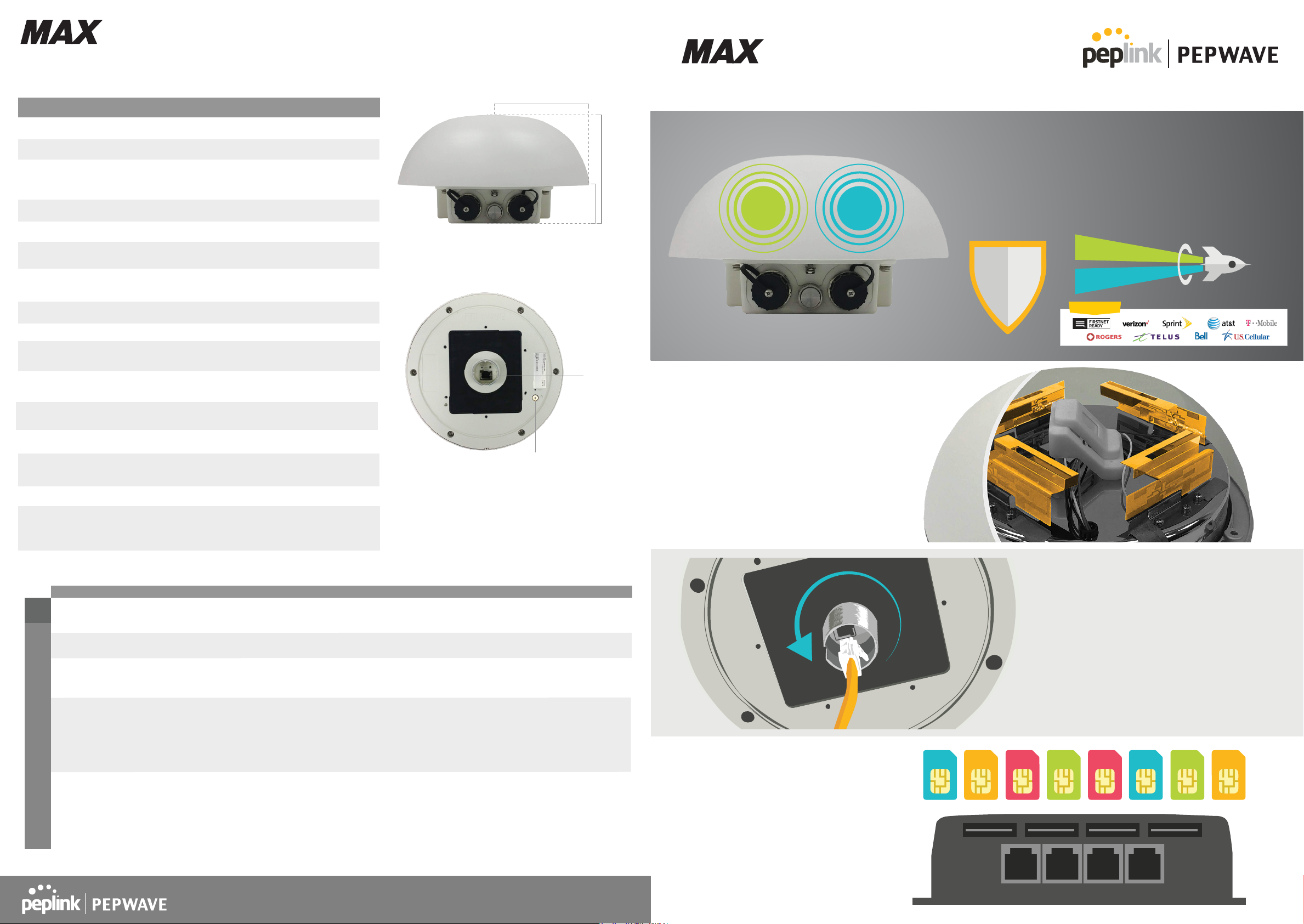
HD2 Dome
Dual Cellular Router for Mobile Deployments
HD2 Dome
Specifications
MAX HD2 Dome
WAN Interface 2x Embedded LTE Modems with Redundant SIM Slots
LAN Interface 1x 10/100/1000M Ethernet Ports^
100/50Mbps (LTE)
Downlink/Uplink Datarate
Recommended Users 150
Cellular Antenna
Included Antenna
Power Input
Power Consumption 20W (max.)
Dimensions
Weight
Without Ethernet Splitter (1200 grams, 2.65 pounds)
110mm (radius) x 115mm (height)
With Ethernet Splitter (1700 grams, 3.75 pounds)
Operating Temperature
Certications
Shock and Vibration Resistance: EN 61373:1999 IEC 61373:1999
Warranty
300/50Mbps (LTEA)
600/150Mbps (LTE-A Pro)
Rugged outdoor IP67Enclosure
2x2 Internal MIMO Antennas
1x Internal GPS Antenna
Built-In Omni Antenna
Antenna gain: 5dBi
1x Power over Ethernet 802.3at
4.33in. (radius) x 4.53in. (height)
-40° – 149°F
-40° – 65°C
15% – 95% (non-condensing)Humidity
FCC, CE, RoHS
1-Year Limited Warranty
4.33 inches
HD 2 Dome
#
110 mm
Dual Cellular Router for Mobile Deployments
Achieve Dual-Cellular Connectivity,
No Expensive RF Cable, Zero Cable Loss
8.4 inches
124 mm
1.57 inches
40 mm
#SIM Injector is available separately
^Ethernet LAN port can be split into two LAN ports
using the included splitter (1x LAN 802.3af PoE out, 1x LAN PoE in)
PoE ETH
Port 802.3at
input^
Reset
Button
LTE LTE
Minimum Cable Loss, Best
Cellular Signal Quality
Most outdoor deployments require a centrally
placed router attached to strategically placed
antennas. With the HD2 Dome, the antennas are
placed in the same integrated enclosure as the
cellular radios. This arrangement minimizes
cable loss, giving you the best signal possible.
The HD2 Dome provides dual-cellular Bandwidth Bonding in an IP67
enclosure that has a minimal profile on the rooftop while providing
maximum signal. With redundant SIM, the HD2 Dome supports two
cellular radios and four SIM cards. Combine the HD2 Dome with the
SIM Injector, and the number of cards increases to twelve.
LTE
IP67
LTE
Compatible With:
*Selected models
Integrated
Antennas
Package Content
Mounting Kit, SIM Injector (Optional), SIM Injector,
C14 power cord, 56V PSU
Ordering Information - MAX HD2 Dome
MAX HD2 Dome, Ethernet Splitter,
2
2
2
2
2
Cellular Standard
LTE
LTE Advanced
LTE AdvancedMAX-HD2-DOM-M-LTEA-P
LTE Advanced Pro:
Cellular 1
LTE Advanced:
Cellular 2
LTE Advanced Pro:
Cellular 1
LTE Advanced:
Cellular 2
Product Code
LTE
MAX-HD2-DOM-M-LTE-E
MAX-HD2-DOM-M-LTEA-W
LTEA
MAX-HD2-DOM-M-LTEA-WF
MAX-HD2-DOM-M-LTEA-WK
*China & HK TD LTE are excluded.
Carrier/Region
Europe/
International/
CAT-4
Worldwide/
CAT-6
Asia Pacific/
CAT-6
America/FirstNet/
CAT-12/CAT-6
Global */
CAT-12/CAT-6
Modems
B1, B3, B7, B8, B20
B1, B2, B3, B4, B5, B7, B8 , B12, B13, B20,
B25, B26, B29, B30, B41
B1, B3, B5, B7, B8, B18, B19, B21, B28, B38,
B39, B40, B41
Cellular 1:
4G LTE-A Pro: B1, B2, B3, B4, B5, B7, B8,
B9, B12, B13, B14, B18, B19, B20, B26, B29,
B30, B32, B41, B42, B43, B46, B48, B66
Cellular 2:
4G LTE-A: B1, B2, B3, B4, B5, B7, B8 , B12,
B13, B20, B25, B26, B29, B30, B41
Cellular 1:
4G LTE-A Pro: B1, B2, B3, B4, B5, B7, B8, B9,
B12, B13, B18, B19, B20, B26, B28, B29, B30,
B32, B41, B42, B43, B46, B48, B66
Cellular 2:
4G LTE-A: B1, B2, B3, B4, B5, B7, B8 , B12, B13,
B20, B25, B26, B29, B30, B41
3G Bands4G Bands
WCDMA/HSPA+/DC-HSPA+:
B1, B2, B5, B6, B8
WCDMA/HSPA+/DC-HSPA+:
B1, B2, B3, B4, B5, B8
WCDMA/HSPA+/DC-HSPA+:
B1, B5, B8, B9, B19
UMTS: B6
TD-SCDMA: B39
Cellular 1:
HSPA+: B1, B2, B4, B5, B6, B8, B9, B19
Cellular 2:
WCDMA/HSPA+/DC-HSPA+:
B1, B2, B3, B4, B5, B8
Cellular 1:
HSPA+: B1, B2, B4, B5, B6, B8, B9, B19
Cellular 2:
WCDMA/HSPA+/DC-HSPA+:
B1, B2, B3, B4, B5, B8
www.peplink.com
©Pepwave. All rights reserved.
Ref. no: max-hd2-dome-202006-v6
Single-Cable
Deployment
Choose Between 8 Additional
SIM With the SIM Injector.
Anywhere, Anytime.
With the addition of the SIM bank, the HD2 Dome
can support up to 12 SIM at your fingertips. Simply
connect an Ethernet cable between the SIM
Injector and the HD2 Dome. The SIM Injector is
capable of PoE output, so you don’t need to add
another PoE switch to your deployment.
Screw
Mount
Simple Installation Running a
Single Ethernet Cable
The HD2 Dome has a M35 screw mount, and only
requires a single Ethernet cable to install. For wall or
pole mounted deployments, the HD2 Dome comes
with an Ethernet splitter and a mounting rack that
provides a multitude of installation options.
Page 2
Form SpeedFusion
LTE LTE
Convenient M35 Screw
Mount for Rooftops
Connections With
2x Cellular WAN
Internet
SIM Injector: Supports 8x
SIM, Choose the SIM Card
to Use For Each Cellular
Radio. Change anytime
from the driver’s seat.
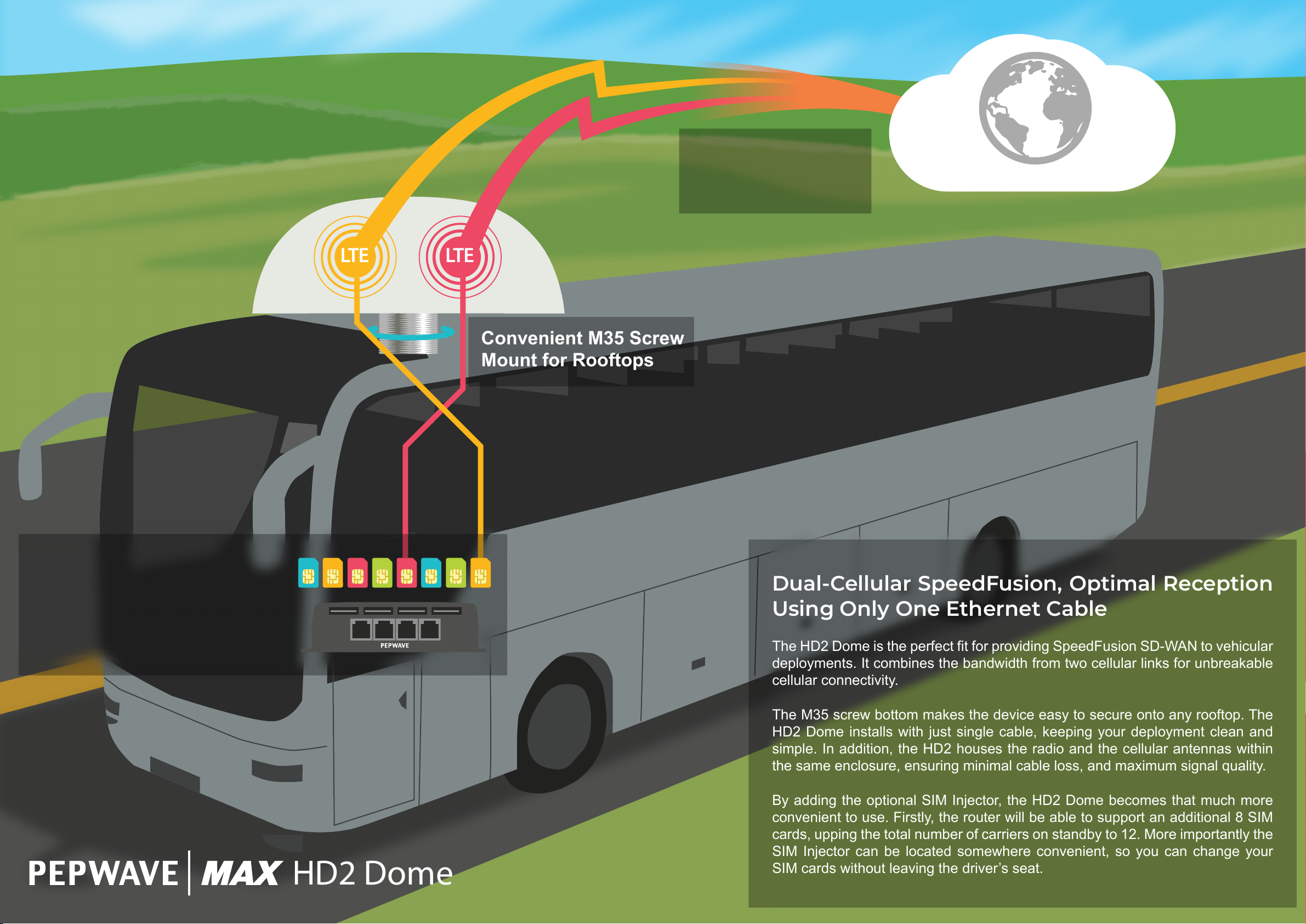
Dual-Cellular SpeedFusion, Optimal Reception
Using Only One Ethernet Cable
The HD2 Dome is the perfect fit for providing SpeedFusion SD-WAN to vehicular
deployments. It combines the bandwidth from two cellular links for unbreakable
cellular connectivity.
The M35 screw bottom makes the device easy to secure onto any rooftop. The
HD2 Dome installs with just single cable, keeping your deployment clean and
simple. In addition, the HD2 houses the radio and the cellular antennas within
the same enclosure, ensuring minimal cable loss, and maximum signal quality.
By adding the optional SIM Injector, the HD2 Dome becomes that much more
convenient to use. Firstly, the router will be able to support an additional 8 SIM
cards, upping the total number of carriers on standby to 12. More importantly the
SIM Injector can be located somewhere convenient, so you can change your
SIM cards without leaving the driver’s seat.
HD2 Dome
Page 3
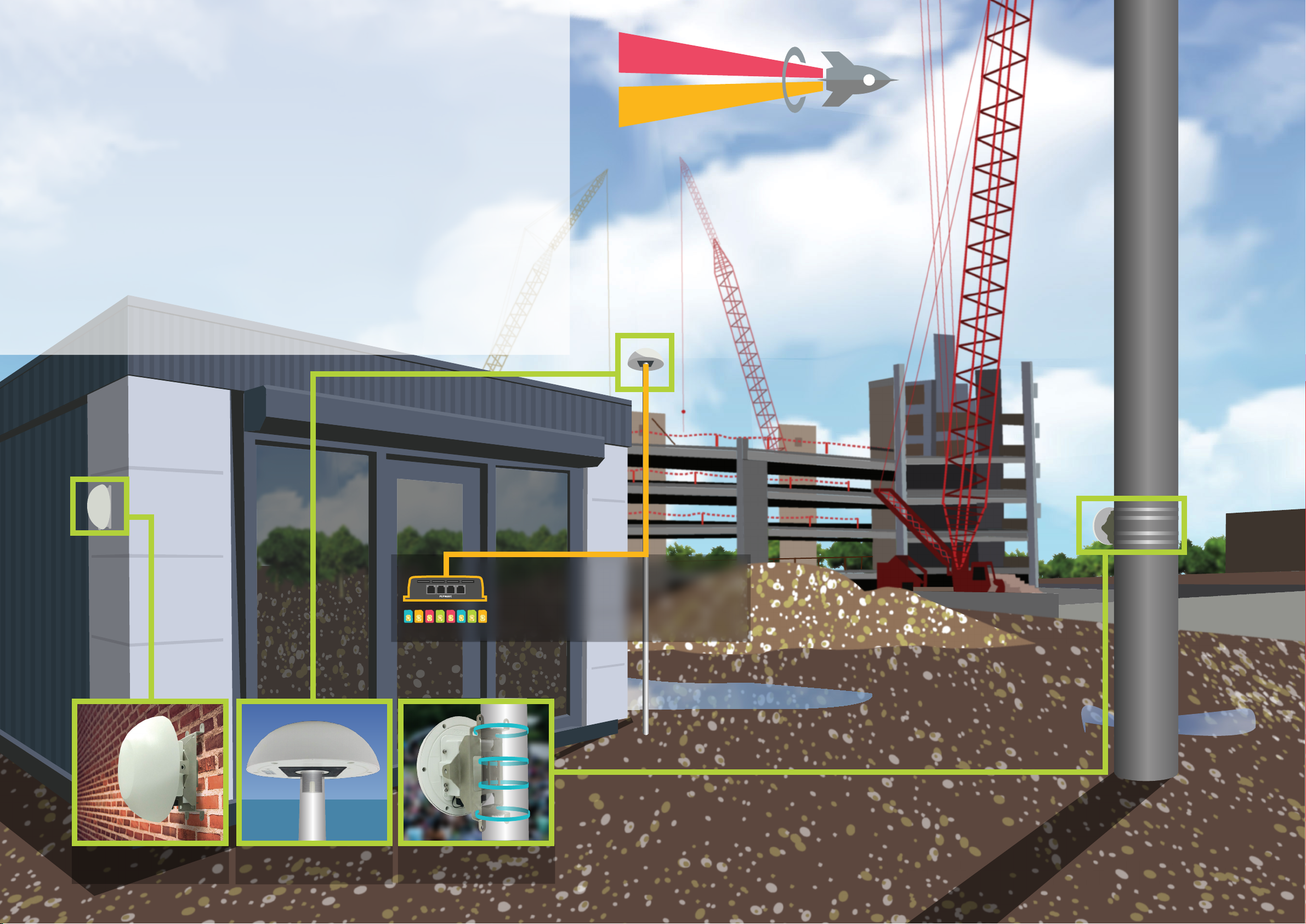
SpeedFusion SD-WAN for Any Remote Site
The HD2 Dome uses SpeedFusion SD-WAN to combine the bandwidth of two
cellular links, providing unbreakable connectivity to any branch office or temporary
site. It comes with an wide range of mounting options for any installation.
For pole-mounted or rooftop installations, the HD2 Dome has a M35 screw bottom
that can be used to screw the device onto a pole, or to secure it on a rooftop. For
wall-mounted or pole-tied deployments, the HD2 Dome comes with an Ethernet
splitter and a mounting bracket. With the bracket, the HD2 Dome can be fixed onto
a wall using the screw mounts, or tied into place on the side of a pole.
With the optional SIM Injector, the HD2 Dome can support a total of 12 SIM cards,
ensuring that any datastreams carrying important VoIP and ERP related traffic
remain unbreakable. The SIM Injector can be deployed to up 100 meters away
from the HD2 Dome, enabling you to place the router at the point of best possible
reception without worrying about climbing up to swap SIM cards.
LTE
LTE
Fixed to the Wall
Poletop/Rooftop
Use the SIM Injector to
change an additional 8
cards effortlessly.
Tied to a Pole
HD2 Dome
Page 4
Form SpeedFusion
Connections With
Antennas
2x Cellular WAN
Internet
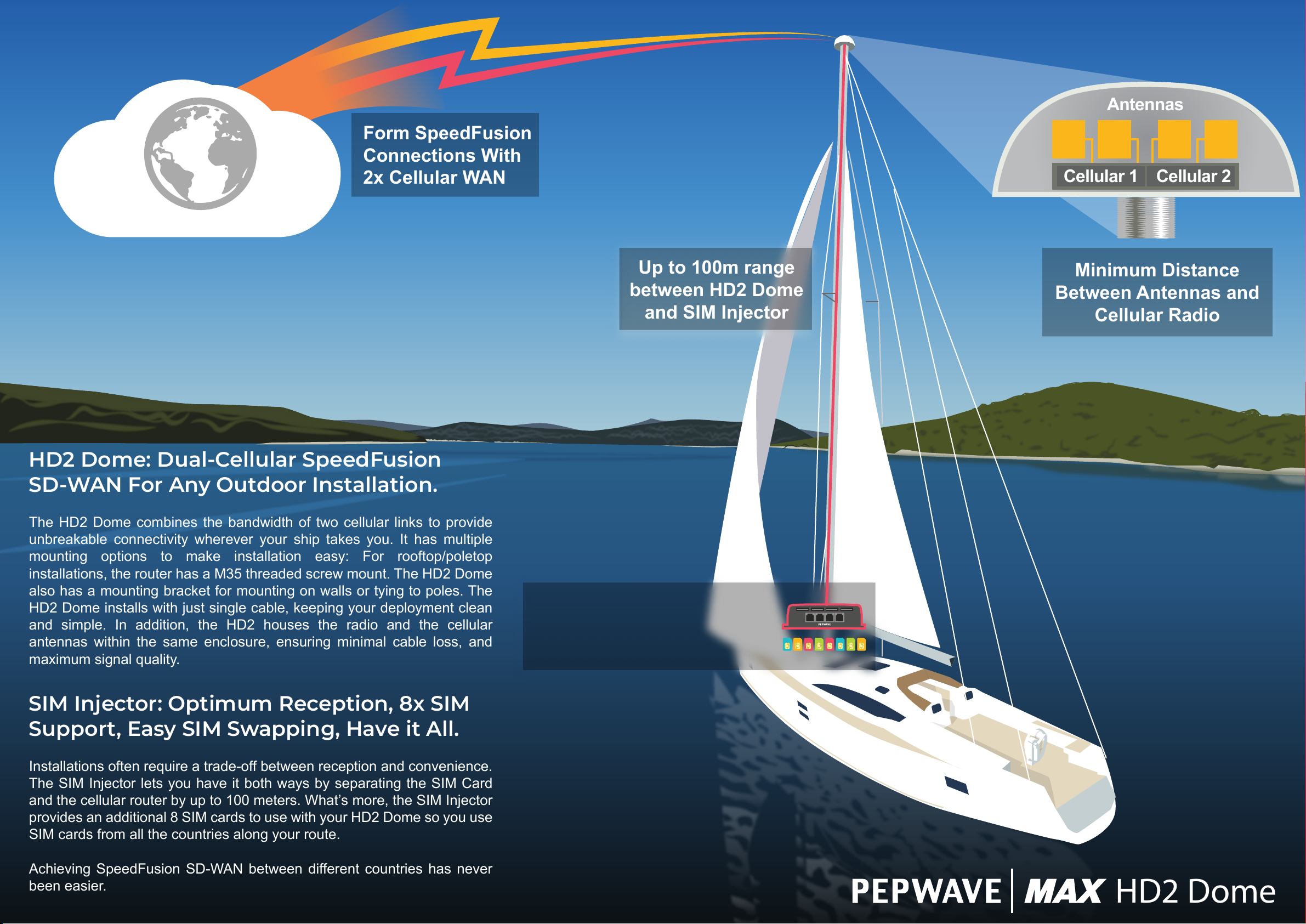
HD2 Dome: Dual-Cellular SpeedFusion
SD-WAN For Any Outdoor Installation.
Up to 100m range
between HD2 Dome
and SIM Injector
Cellular 1 Cellular 2
Minimum Distance
Between Antennas and
Cellular Radio
The HD2 Dome combines the bandwidth of two cellular links to provide
unbreakable connectivity wherever your ship takes you. It has multiple
mounting options to make installation easy: For rooftop/poletop
installations, the router has a M35 threaded screw mount. The HD2 Dome
also has a mounting bracket for mounting on walls or tying to poles. The
HD2 Dome installs with just single cable, keeping your deployment clean
and simple. In addition, the HD2 houses the radio and the cellular
antennas within the same enclosure, ensuring minimal cable loss, and
maximum signal quality.
SIM Injector: Optimum Reception, 8x SIM
Support, Easy SIM Swapping, Have it All.
Installations often require a trade-off between reception and convenience.
The SIM Injector lets you have it both ways by separating the SIM Card
and the cellular router by up to 100 meters. What’s more, the SIM Injector
provides an additional 8 SIM cards to use with your HD2 Dome so you use
SIM cards from all the countries along your route.
Use the SIM Injector to
Change SIM Cards
Without Climbing the Mast
Achieving SpeedFusion SD-WAN between different countries has never
been easier.
HD2 Dome
Page 5
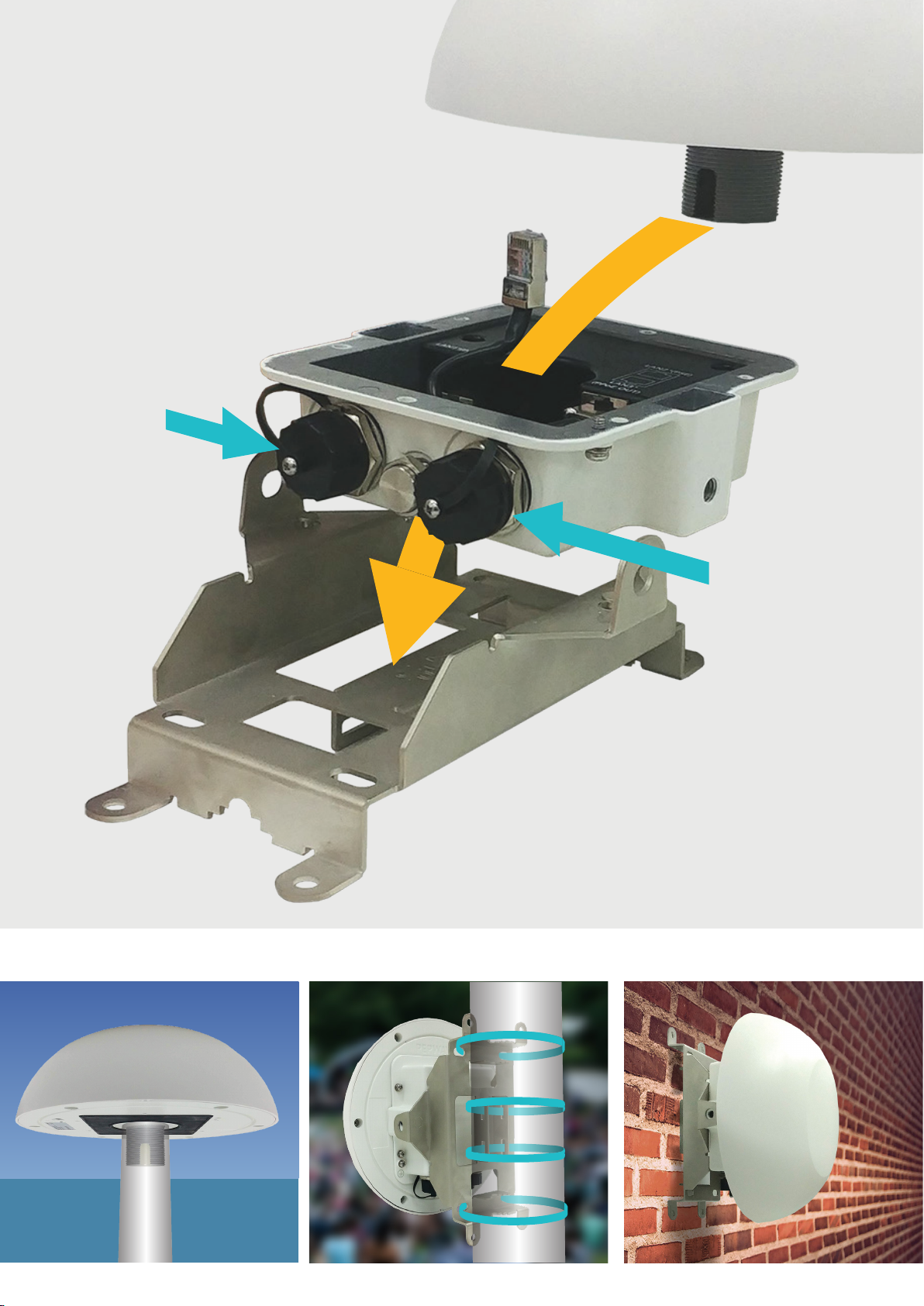
Multiple Mounting Options
The HD2 Dome offers significant deployment flexibility
due to its modular construction. By itself, it has an M35
thread, making it easy to mount on top of any pole or on
the rooftop of any vehicle.
The HD2 Dome comes with an Ethernet splitter that
enables an additional GE LAN output. With the splitter
installed, the HD2 Dome can then be used with the
included mounting bracket to fix onto any wall, or to
securely tie onto any pole.
The HD2 Dome, Ethernet splitter, and the mounting
bracket are all included, so you can deploy this device
just about anywhere.
802.3at PoE
Input
M35 Screw Mount
Ethernet Splitter
Deploy it Anywhere
802.3af PoE Output
Mounting Bracket
Rooftop / Poletop
Tied to Any Pole
Mounted On Any Wall
Page 6
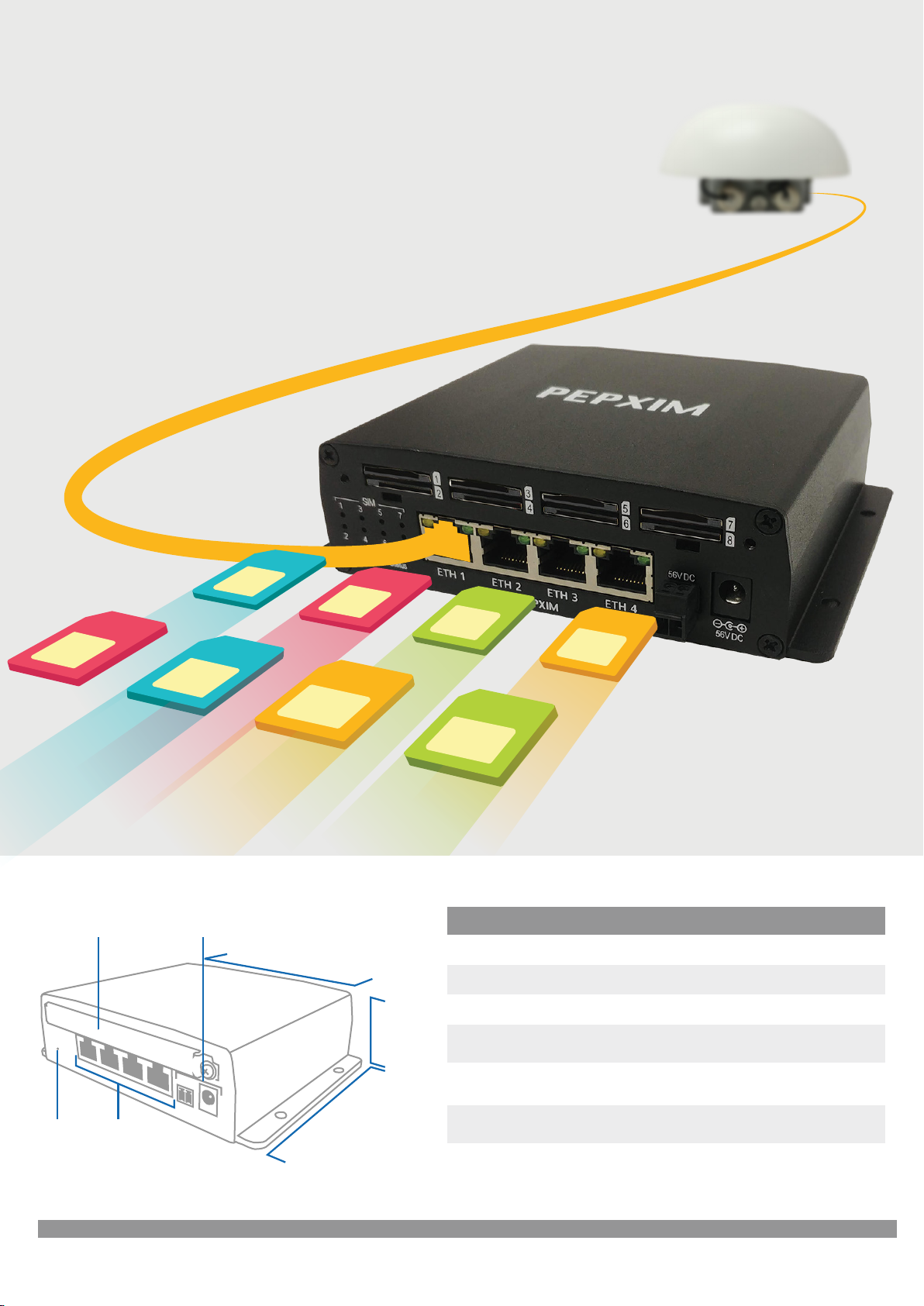
SIM Injector - More SIM, More Range
Use the SIM Injector to add another 8 SIM cards to your
deployment, giving you the ability to connect to multiple
carriers and ensuring that your connection remains
unbreakable.
In addition to adding SIM capacity, the SIM Injector also adds
100 meters of flexibility between the Router and the SIM cards,
enabling you to place the cellular router anywhere you want
without worrying about changing SIM cards.
Finally, the SIM Injector uses an flexible architecture. You can
connect multiple SIM Injectors to the HD2 Dome, and the
device will have access to all the SIM cards carried by the SIM
Injectors.
Extend up to
100m
Specifications
Redundant SIM Slots
with Protective Plate
Reset
Button
Ethernet
56V DC Power Jack +
Terminal Block
Ports
5.8 Inches
147mm
1.6 Inches
5.0 Inches
128mm
40mm
Supports up to
8x
SIM Cards
SIM Injector
SIM Slots 8x Active SIM Slots, Standard Size
LAN Interface
Power Input DC Jack/Terminal Block: 12-56V
Dimensions
Weight
Operating Temperature
Humidity 15% – 95% (non-condensing)
4x GE, PoE 802.3at Support*
1.6 x 5.8 x 5 inches
40 x 147 x 128 mm
430 grams
0.94 pounds
-40° – 149°F
-40° – 65°C
Ordering Information - SIM Injector
Product Code
SIM-BK8-4E-56V SIM Injector, 8x SIM cards capacity, 4x 10/100/1000 LAN ports, 56V DC
Description
 Loading...