

Page 1

TREAD MANUAL
Page 2

TABLE OF CONTENTS
USING THE TREAD
Center Button
Speed
Incline
Free Mode
Safety Key
Joining a Class
Class Types
Accessories
Heart Rate Monitor
Weights
Resistance Bands
Exercise Mat
Class Screen
MAINTENANCE
Cleaning the Tread
Maintenance Schedule
TROUBLESHOOTING
LIMITED WARRANTY
16
16
17
17
18
18
19
19
20
20
20
20
20
21
22
22
22
23
25
SAFETY INFORMATION
NOTICES
WARNING LABELS
Support
SPECIFICATIONS
Dimensions
User Requirements
Performance
Technology
SETTING UP THE TREAD
Location Guidelines
Leveling
Transportation
Storage
Plugging in/Powering On and Off
GETTING STARTED
Logging in
Connecting to the Internet
Adjusting the Touchscreen
04
05
06
07
08
10
10
10
10
11
11
12
12
13
13
14
14
14
15
Peloton Tread Manual V1.3
3
In Studio with Rebecca Kennedy
Page 3

4 5
NOTICES
1 Reorient or rel ocate the receiving
antenna.
2 Increase the sepa ration between
the equipment an d receiver.
3 Connect the equ ipment to an
outlet on a circui t different from
that to which the rece iver is
connected.
4 Consult the dealer or a n
experienced radio/TV technician
for help.
CAUTION:
1 To comply with FCC R F exposure
compliance re quirements, a
separation dista nce of at least 20
cm must be maintain ed between
the antenna of this devi ce and all
persons.
2 This transmitter mu st not be
co-loc ated or operating in
conjunction with any other
antenna or transmitter.
This device com plies with part 15 of
the FCC Rules. Op eration is subject
to the following two con ditions: (1)
this device must n ot cause harmful
interference , and (2) this device must
not accept any inter ference received,
including inter ference that may cause
undesired operation.
NOTE: This e quipment has been
tested and found to compl y with the
limits for a Class B digital device,
pursuant to Par t 15 of the FCC
Rules. These lim its are designed to
provide reasonable protection against
harmful interfer ence in a residential
installation. This equipment generates,
uses and can radiate radio frequency
energy and, if not i nstalled and used
in accordance with the instructions,
may cause harmful inte rference to
radio communic ations. However, there
is no guarantee that in terference will
not occur in a par ticular installation. If
this equipment d oes cause harmful
interference to radio or television
reception, whi ch can be determined by
turning the equi pment off and on, the
user is encoura ged to try to correct
the interferenc e by one or more of the
following measures:
Read and foll ow all warnings,
instructions, and procedures before
using the Pe loton Tread. It is the
owner’s responsibility to ensure that
all users ar e aware of all warnings
and precau tions. Use only as
described. Peloton is not responsible
for damage or injury ca used by
inappropriate use.
Consult a physici an before beginning a
new tness pla n. Incorrect or exces sive
training can result in serious injury.
If you experience faintness, chest pain,
or shortne ss of breath, stop exercising
immediately and consult a physician.
Keep children and a nimals away from
th e Trea d.
The Tread is designed for hom e use. Do
not use in a commerc ial or rental setting.
Inspect the Tread for loose , worn,
damaged, or inc orrect parts before
using. Do not use be fore parts are
replaced, repaired, or tightened.
Do not wear loose or d angling clothing
while using the Tread. Keep towels a nd
loose clothing away fro m the slat belt.
Make sure your shoel aces don’t extend
past the soles of your s hoes.
User weight must not e xceed 300 lbs.
Be careful when mo unting and
dismounting. Never mount or dismount
while the belt is mov ing. Use handrails
for support , but avoid resting your
whole weight on the h andrails.
When the Tread is in Free Mode , the
belt moves freel y. If you inadvertently
start the bel t moving, you could fall.
Never leave the Tread unattend ed in
Free Mode.
If an error occur s during operation, the
Tread belt may come to a gradual o r
sudden stop, depending on the error
and your speed . Always remain alert
while using the Tread.
Ensure that the power s upply is
plugged into an out let that supports 15
amps and complies with local building
codes.
Unplug the Tread and remove th e
safety key before ser vicing and when
it is not in use. Always sto re the safety
key away from the Tread and out of
reach of children.
Familiarize yourself with emergency
stop procedures b efore using the Tread.
Do not use or store the Tread outdo ors
or in damp or wet loc ations.
Always keep the runn ing surface clean
and d ry.
Set up and oper ate the Tread on a solid,
level surface . Make sure you have at
least 78.7" of clear ance directly behind
the Tread, and 20" of clearan ce on
each side of the Tread.
Use only original parts from
Peloton. Unauthorized changes or
modifications to this equipment could
damage the Tread, impair it s operation,
and void your warranty.
SAFETY INFORMATION
This product is A NT+™
certie d and is compatible
with ANT+ sensors
that suppor t heart rate
monitoring.
Do not attempt to ser vice the Tread
yourself other than performing the
basic maintenance described in this
manual. Ser vice other than basic
maintenance should be performed
by authorized personnel.
Keep hands away from mov ing parts.
Never touch the moving belt or reach
under the Tread while it is power ed on.
Never operate the Tread if it isn’ t
working prope rly, or if the power cord
has been damage d. Keep power cord
away from heated surfa ces, sharp
edges, and water.
Do not soak or spray Tread sur faces
with liquid. Clea n using a damp cloth.
Do not store items in the s ide
compartm ents while the Tread is
in use.
Metrics on the sc reen, including hear t
rate monitoring, may be inaccurate.
Use values for referenc e only.
Page 4
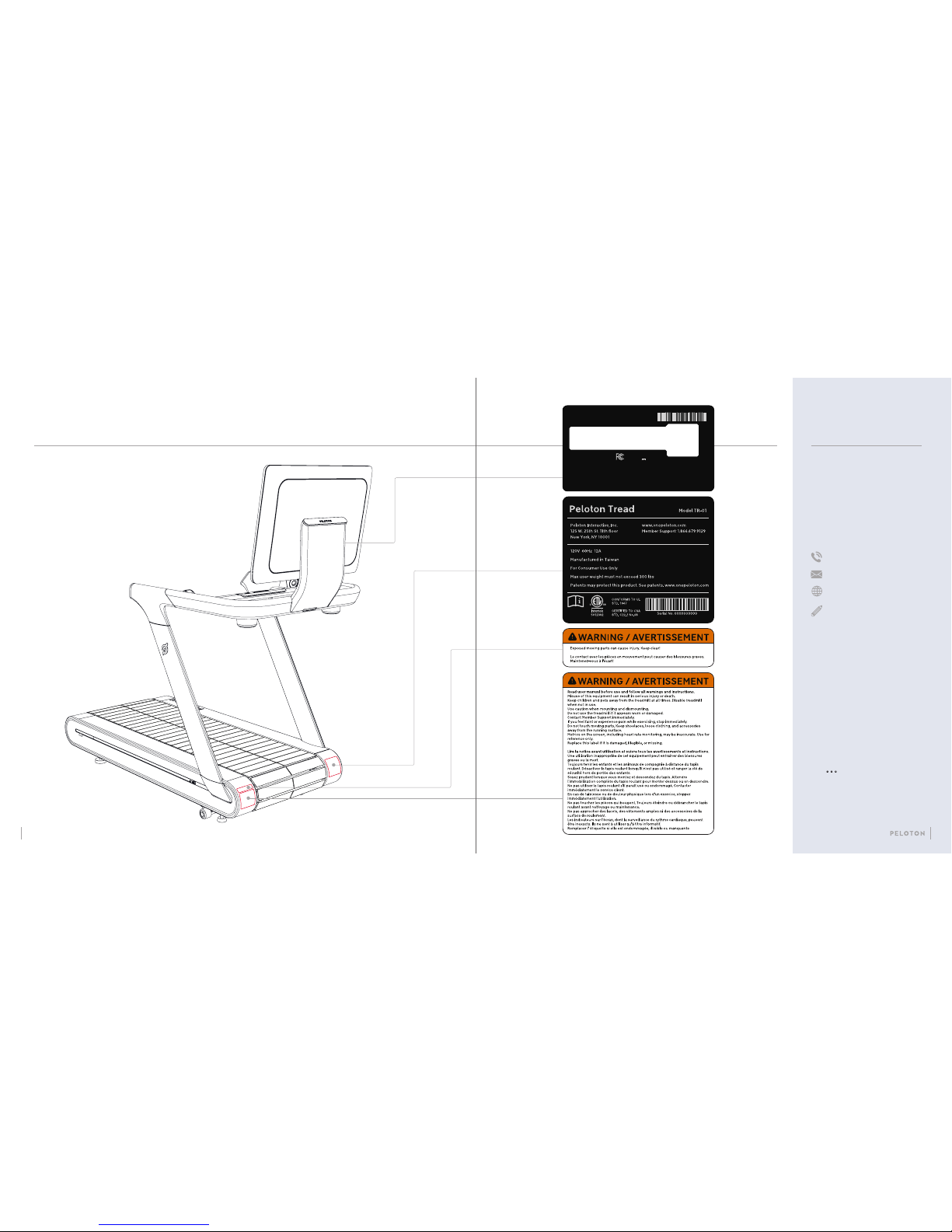
WARNING LABELS
BEFORE USING THE PELOTON TREAD:
Familiarize yourse lf with all warnings on
the Tread before use. If a warning la bel
is damaged or lost , contact Peloton for
a replacement immediately.
SUPPORT
QUESTIONS OR CONCERNS
Peloton’s #1 concern is member
satisfaction. If yo u require
assistance or are ex periencing
issues with your Pe loton Tread,
please contact member support
for additional hel p.
1.8 66.6 79.912 9
support.onepeloton.com
Peloton Interactive, Inc.
125 West 25th Street, 11th FL
New York, NY 10001
When you contact member
support, h ave the following
information ready :
1 Tread ID/serial number*
2 Purchase Date
3 Your order number or th e email
address associated with your
Tread purchase
To access the Tread ID/serial
number from the touchscreen, tap
the icon at the lower rig ht,
and select About.
Peloton Console
Peloton Interactive, Inc.
125 W. 25th St. 11th Floor
New York, NY 10001
Input 24V 3A
This device complies with Part 15 of the FCC Rules.
Operation is subject to the following two conditions:
(1) this device may not cause harmful interference, and (2) this device must accept
any interference received, including interference that may cause undesired operation.
FCC ID: 2AA3N-TC1VS
Serial Number
Model PLTN-TC1VS
Serial Number : 0000000000
*
6 7
Page 5
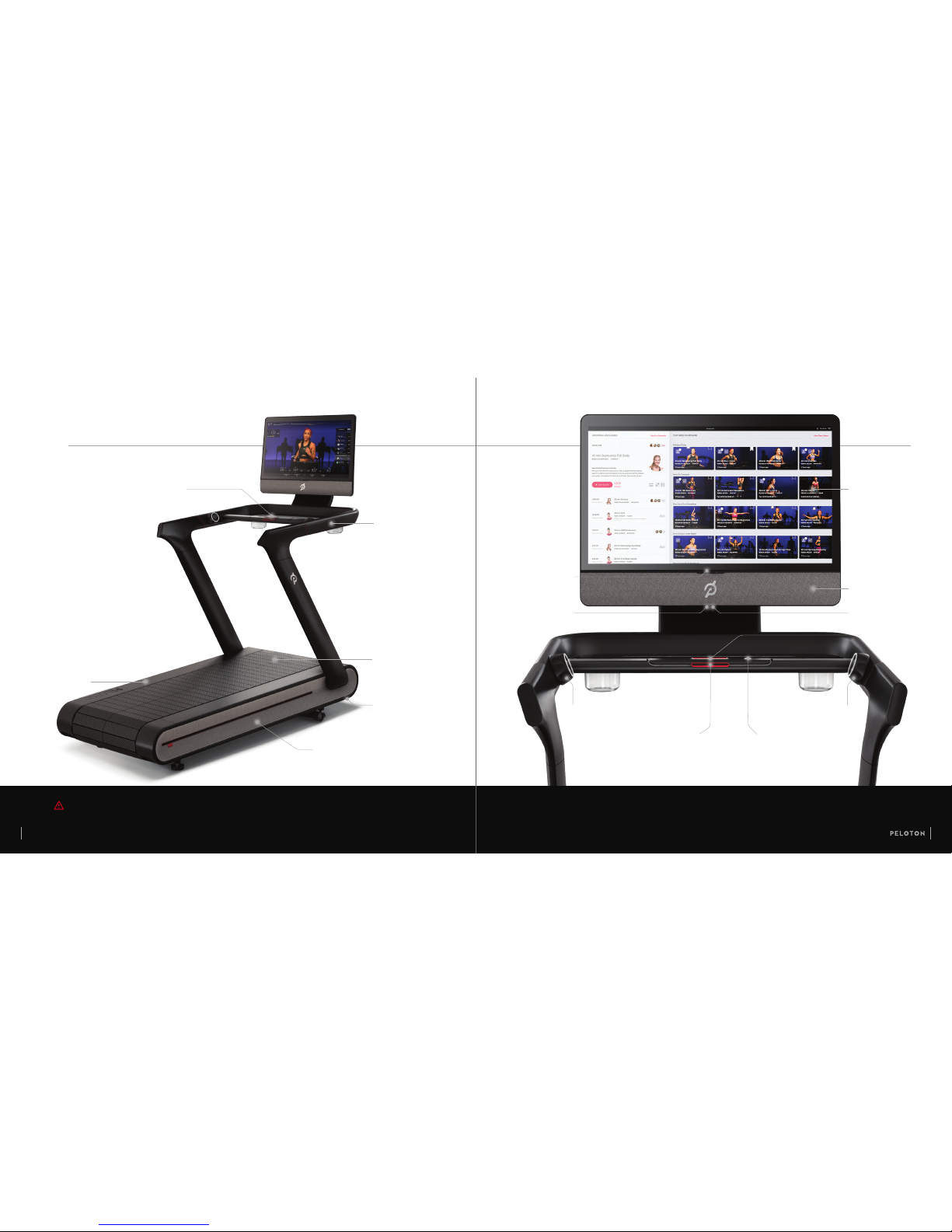
POWER SWITCH /
POWER INPUT
8 9
FREE MODE BUTTON
CENTER BUTTON
INCLINE KNOB
TRAY
HANDRAIL
FOOTRAILS
SIDE COMPARTMENTS
SLAT BELT
CAUTION Do not store items in the side compartments while the Tread is in use.
SAFETY KEY
VOLUME BUTTONS
SPEED KNOB
SOUNDBAR
USB PORT
HEADPHONE JACK
SPECIFICATIONS
TOUCHSCREEN
Page 6
10 11
SPECIFICATIONS CONTINUED SETTING UP THE TREAD
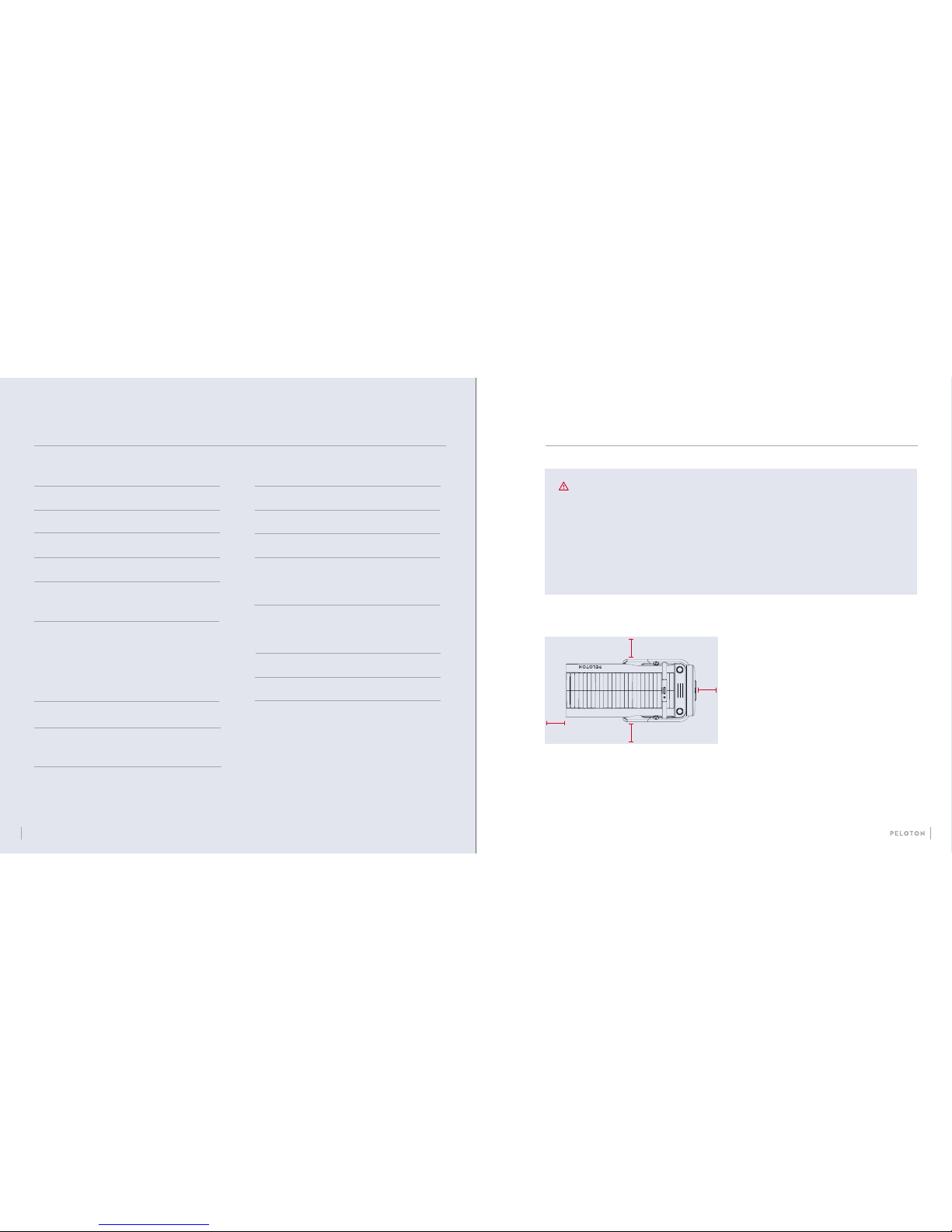
LOCATION GUIDELINES
•
Install the Tread on a at, level , stable surface.
•
Do not put a mat or thic k carpet underneath the Tread.
•
Make sure you have at least 78 .7" of clearance directly
behind the Tread.
•
The Tread deck can inclin e to a height of 18”. Make
sure the ceiling ab ove your Tread allows adequate
clearance and is f ree of obstructions.
•
Make sure the Tread is situated withi n 6’ of an outlet.
The provided powe r cord must be able to reach the
outlet at minimum a nd maximum incline. The powe r
cord must never pas s under the Tread.
78.7"
20"
20"
20"
TECHNOLOGY
CONNECTION
CAMERA
SOUND
WiFi 802.11a/b/g/n/ac
100 Mbps Ethernet
MIMO 2x2 antenna
ANT+
Bluetooth 4.2
5 megapixel front-facing
20 W soundbar with 70Hz to 20KHz
frequency response
USER REQUIREMENTS
USER HEIGHT RANGE
MAX USER WEIGHT
4'11" - 6'4"
300 lbs
0 - 12.5 mph
0 - 15% grade
0 - 30° vertical tilt
120V, 60Hz, 15A dedicated circuit
PERFORMANCE
SPEED
INCLINE
SCREEN ADJUSTMENT
POWER
REQUIREMENTS
(US ONLY):
MEASUREMENTS
FOOTPRINT
DIMENSIONS
SLAT BELT
SCREEN
6' x 2.7'
72.5” L x 36.5” W x 72” H
67” L x 20” W
32" diagonal
SAFETY INFORMATION
•
When installin g the Tread, make sure th at the
electrical in stallation complies with all lo cal codes
and ordinances .Consult an electrician if yo u are not
sure whether your o utlet can support the Tread.
•
Do not use extensi on cords or adapters. Do not
attach other ap pliances to the same circuit.
•
Use a grounded cir cuit capable of carryin g 15 or
more amps. If the ci rcuit is not properly ground ed
there is a risk of elec tric shock.
•
Never put anyt hing under the Tread or reach
under the Tread while it is power ed on.
•
Keep the area around t he Tread free of
obstructions.
Page 7
SETTING UP THE TREAD CONTINUED
12 13
STORAGE
•
Store the Tread in a dry, indo or area.
•
Remove the Safety Key a nd store it in a separate
location when t he Tread is not in use.
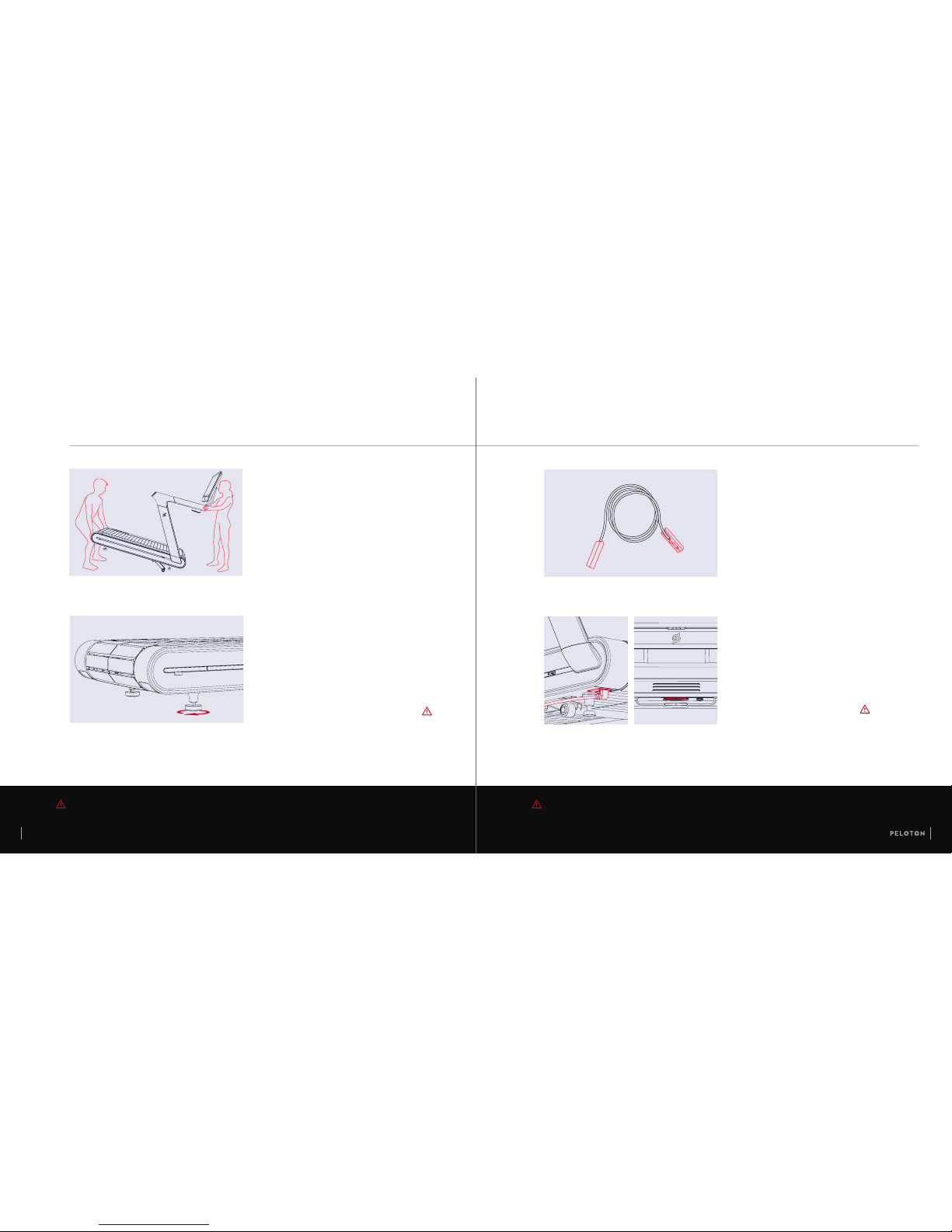
TRANSPORTATION
•
Before moving the Tread, set th e incline to 2% or higher
to raise the front feet .
•
Make sure to power down and un plug the Tread before
moving it.
•
One person sta nds at front, holding the hand rail.
•
One or two peop le lift from the back, usi ng handholds.
•
Tilt the Tread forward to rest on i ncline wheels.
•
Slowly and carefu lly roll the Tread backwards or forward s.
PLUGGING IN /
POWERING ON AND OFF
•
Plug in the power cor d.
•
Switch the Tread on.
•
Press the center bu tton to wake the Tread.
•
To power down, press and hold th e center
button. The n switch the Tread off.
CAUTION Do not attempt to transport the Peloton Tread with fewer than two people. WARNING Always switch power off and unplug the Tread before cleaning and when it is not in use.
LEVELING
The back feet of the Tread are adjus table. If the Tread
rocks or wobbles , turn one or both of the back feet
clockwise u ntil all feet rest rmly on t he ground.
Page 8
14 15
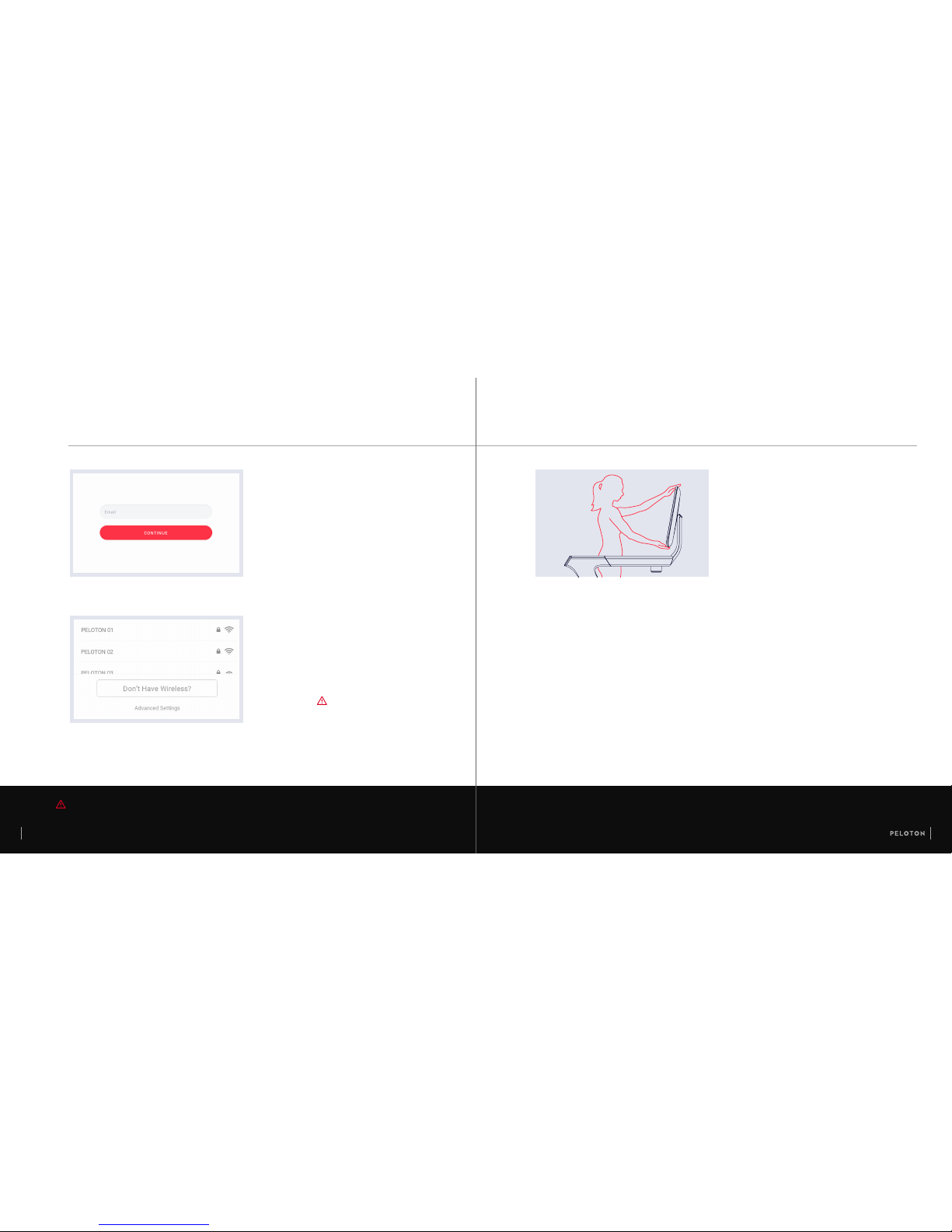
LOGGING IN
•
When logging in for the rst time, please have
available your Subscription Activation Key or the
login information you set up when you purchased
the Peloton Tread.
•
Once a subscription is activated and associated
with this Tread, any user can log in and access
subscription content.
CAUTION The ethernet cable must not pass under the Tread or touch the running surface.
GETTING STARTED
CONNECTING TO
THE INTERNET
•
Select your W iFi network and enter the pa ssword.
•
If a WiFi networ k is not available, use an Etherne t cable
to connect to a Local A rea Network (LA N). Pull the
back panel off th e touchscreen mount to acce ss the
Ethernet port.
ADJUSTING THE
TOUCHSCREEN
•
Hold the top and bot tom of the screen and
tilt back or forward.
•
You should be able to look at t he screen
comfortabl y, without tilting your head up or
down, from the midd le of the platform.
Page 9
16 17
USING THE TREAD
SPEED
•
Turn knob forward to increa se speed in increments
of 0.1 mph.
•
Turn knob backward to dec rease speed in increments
of 0.1 mph.
•
Press the jump bu tton at the center of the knob to
increase spee d to the next whole mph.
•
Tap Speed to change your speed using ons creen
shortcuts . Tap the screen an d select Customize
Shortcuts to put in your own shor tcut speeds.
CENTER BUTTON
•
When the Peloton Tread is powere d on but inactive,
press to wake.
•
When the Peloton Tread is acti ve but not in use,
press and hold for thr ee seconds to sleep.
•
When the Peloton Tread is in use , press to stop.
INCLINE
•
Turn knob forward to increa se incline in increments
of 0.5 percent grad e.
•
Turn knob backward to dec rease incline in increments
of 0.5 percent grad e.
•
Press the jump bu tton at the center of the knob to
increase inclin e to the next whole percent gra de.
•
Tap Incline to chan ge incline using onscreen
shortcuts . Tap the screen a nd select Customize
Shortcuts to put in your own shor tcut incline setting s.
WARNING Do not start the Tread before stepping
onto the running surface.
Step onto the Tread from the rear, using handrails for
balance. Avoid putting your full weight on the handrails.
Page 10
USING THE TREAD CONTINUED
18 19
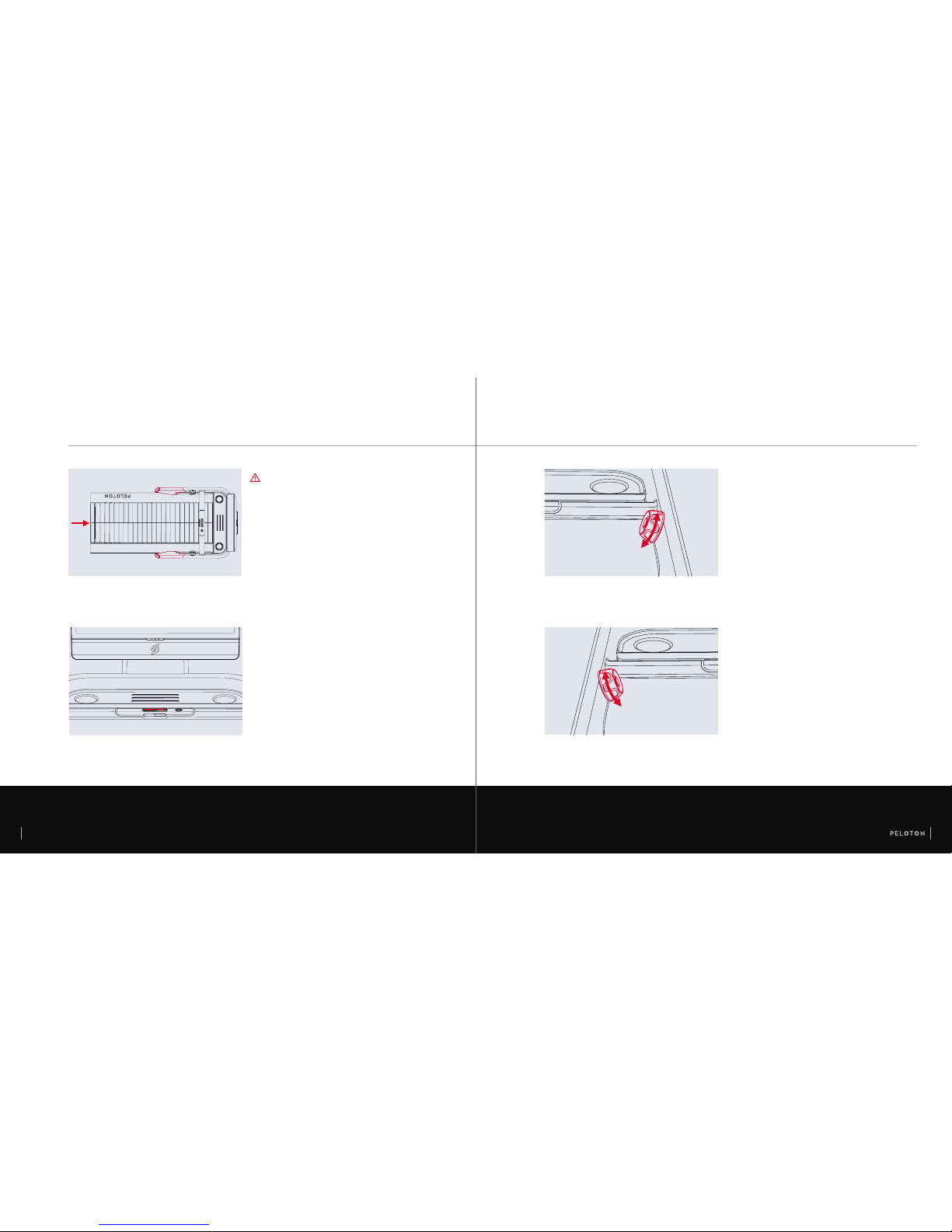
SAFETY KEY
Familiarize yourse lf with emergency stop proc edures
before using the Tread.
•
Detach the magn etized clip from the center rail an d clip it
to a tight-tting pi ece of clothing.
•
If the safety key is detac hed, the slat belt will immediately
stop moving and the tread will lock.
•
The Tread will be disabled unt il the key is reattached.
•
To start running again , reattach the safety key and pr ess
the center button.
•
Always detach the s afety key when the Tread is not in use.
WARNING When the Tread is in Free Mode, the slat belt moves freely. If you inadvertently start the belt moving,
you could fall. Never leave the Tread unattended in Free Mode.
CAUTION The Tread will function only when the safety key is present and fully engaged. Do not lose the safety key.
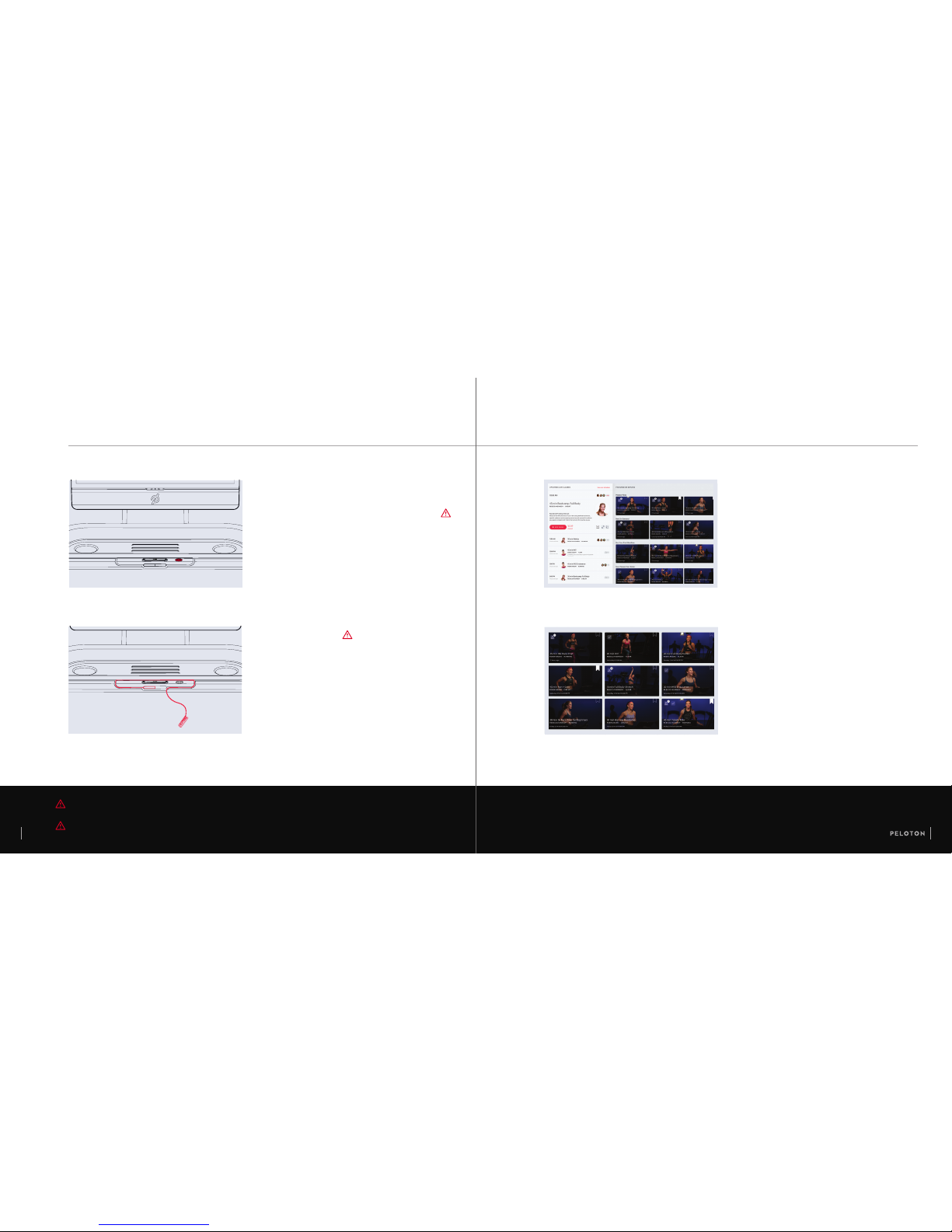
CLASS TYPES
Peloton’s schedule i ncludes a variety of differe nt kinds
of classes. Class t ypes may include the following:
•
Run/Walk: cardio-focused classes taking place
entirely on the Tread.
•
Bootcamp: a comb ination of cardio segments tak ing
place on the Tread and streng th segments taking
place off the Tread.
•
Floor: a co mbination of strength, exibility, and cardio
segments takin g place off the Tread.
JOINING A CLASS
Most Peloton class es will include warmup and
cooldown.
•
Select live cla sses from the schedule or cho ose
from on-d emand classes
•
Filter by instructor, class length, class type,
and more
•
Select Mo re for a Scenic Run or Just Run
FREE MODE
In Free Mode, the sl at belt moves freely. Hold the
handrail and move the r unning surface using you r feet.
•
Before turning on Fre e Mode, bring the Tread to a
complete stop and se t the incline to 0%.
•
Press the Free Mode b utton to turn on Free Mode.
•
Press the Free Mode b utton or the center butto n to
stop the belt and exi t Free Mode.
Page 11
ACCESSORIES
20 21
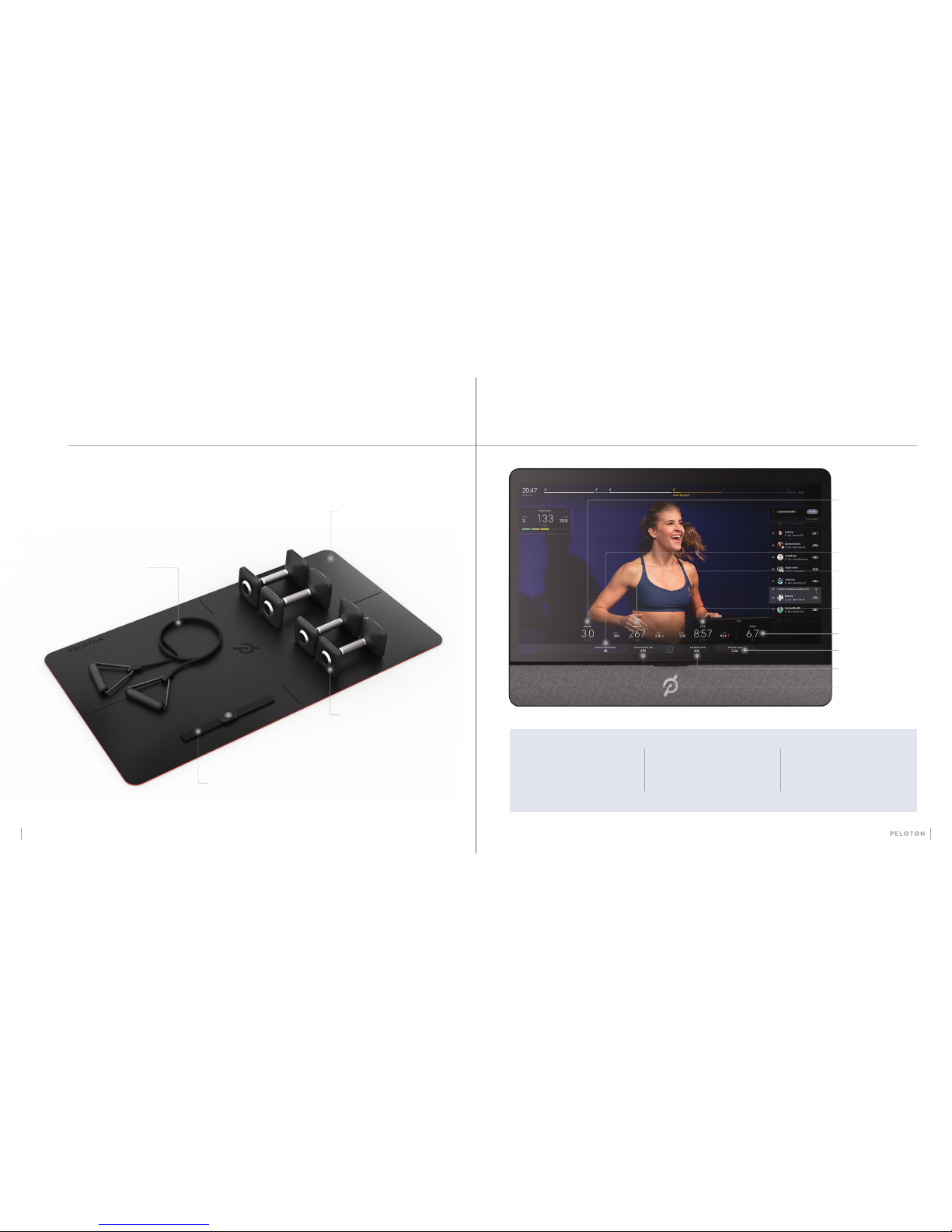
CLASS SCREEN
WEIGHTS
Ergonomically designed cast iron
weights with a natural rubberized
coating, available in weights from
5 to 30 lbs.
RESISTANCE BANDS
High-grade natural rubber latex
resistance bands with aluminum
handles, nylon cording, and
rubber grips.
HEART RATE MONITOR
A comfortable ANT+ and BLE chest
strap that connects instantly to track
your heart rate on and off the Tread.
EXERCISE MAT
A 5 mm-thick reversible mat
designed for superior grip
and comfort.
SPEED
DISTANCE
Your PACE, in
minutes per mile.
CALORIES
TOTAL OUTPUT
Your OUTPUT, in watts.
This is a combination of
your speed and incline.
ELEVATION, in feet.
This is the amount
of vertical distance
you’ve climbed.
Current INCLINE
setting, in
percent grade.
LEADERBOARD
Shows all participants
in the class, sorted by
total output.
METRICS
Shows the Tread’s current
settings and monitors
your status.
TIMELINE
Shows class segments
and your progress within
the class.
Our Tread accessories will help you get the most out of Floor and Bootcamp
classes. When using Peloton accessories, follow instructions and warnings
in accompanying literature and from instructors for safe and proper use.
All accessories are available at onepeloton.com/shop/accessories
Page 12

PROBLEM:
The touchscre en has trouble connecti ng
to WiFi.
SOLUTION:
Peloton recomm ends a minimum of
10-15 mbps download and 2.5 mb ps
upload speed fo r your touchscreen.
WiFi extend ers and boosters, distan ce
from the router, and obs tructions like
walls and furnitu re can weaken your
WiFi signal.
If you continue to have tr ouble with
your WiFi connection, you can connect
to a Local Area Net work (LAN) using an
Ethernet cabl e. Remove the back panel
of the touchscree n mount to access
the Ethernet port.
See support.onepeloton.com for more
information on possible errors.
MAINTENANCE
CLEANING THE TREAD
Clean the Tread regularly fo r optimal performance
and longevity.
•
Clean surfac es with a damp cloth and mild,
soapy water.
•
Never use abrasive c leaners.
•
Never spray or pou r liquid directly on Tread
surfaces. N ever allow liquid to drip between t he
slats or into any other op ening on the Tread.
•
Before powering of f the Tread for cleaning,
set the incline to 2% o r higher to allow access
to the area underne ath the Tread.
•
Always power off and u nplug the Tread
before cleaning.
MAINTENANCE SCHEDULE
WEEKLY:
•
Clean Tread surfaces
•
Check power cor d for damage
•
Clean the area underneath the Tread
MONTHLY:
•
Check the entire Tread for wear a nd damage
•
Test the safety key by pulling it ou t while
walking on the Tread
CAUTION: Any repair or troubleshooting procedure other than those described in this section must be performed
by authorized personnel.
22 23
TROUBLESHOOTING
PROBLEM:
The slat belt won’ t move.
SOLUTION:
First, make sure t he Tread is awake. If
the screen is dar k, the Tread is asleep
and will not work.
If the Tread is awake, try deta ching and
reattaching t he safety key. If you are still
unable to start t he belt, use the switch
on the undersid e of the deck to turn the
Tread off and then on.
PROBLEM:
Control lights ar e on, but the touchscree n
is blank.
SOLUTION:
If you have just turne d on the Tread, wait
a few moments for the sy stem to boot.
If the screen stil l doesn’t turn on, tr y to
wake the system by touchi ng the screen
or by pressing and ho lding the center
button for a few sec onds. If the screen is
still unrespons ive, contact Suppor t.
PROBLEM:
An object falls into the Tread
SOLUTION:
Look undern eath the Tread. If the object has
fallen through to the o or, raise the incline to
at least 2%, tur n off and unplug the Tread, and
retrieve it. If it is n ot there, it may be stuck
inside the belt . Turn on Free Mode and slowly
move the belt for ward until the object falls to
the oor.
PROBLEM:
The slat belt comes to a sudden stop during
a workout.
SOLUTION:
If an error occurs during operation, the Tread
belt will come to a stop. The stop
may be gradual or more sudden, depending on
the error and your speed. If an error occurs,
follow the instructions on the screen. If there
are no instructions, use the switch on the
underside of the deck to switch the Tread off
and then on. See support.onepeloton.com for
more information on possible errors.
SAFETY INFORMATION
•
The safety and integ rity of the Tread can only
be maintained whe n it is regularly examined for
damage and repaire d.
•
It is the owner’s so le responsibility to ensure
that regular mainten ance is performed.
•
Replace worn or da maged parts immediately.
Do not use the Tread until repair s are made.
•
Use only origina l parts from Peloton.
Page 13

LIMITED WARRANTY
*
24 25
Peloton Interactive, Inc. (“Peloton”) extends
the following Limi ted Warranty to U.S.
purchasers, wh ich applies only to non-
commercial, i n-home, indoo r use of the
Peloton Tread. Any other use of th e Peloton
Tread shall void this Limited Warr anty.
During the applicable Limited Warranty
periods desc ribed below, the covered
components of th e Peloton Tread will be
free of defects or malf unctions during
normal use. Ce rtain exclusions apply, as
further des cribed in this Limited Warr anty.
The Limited Warr anty applies for the
following compo nents of the Peloton
Tread only, for the time period in dicated.
The Limited Warr anty applies only agains t
defects discovere d within the applicable
Limited Warrant y period and only so
long as the Peloton Tread remain s in the
possession of the o riginal purchaser, or
for gifted Peloton Treads, th e owner of
the original Sub scription attached to th at
Pe loto n Tre ad.
HD TOUCHSCREEN – 12 MONTHS:
Peloton warrants the touchscreen against
defects in workma nship and materials for
a period of 12 months from th e date of
original delivery.
FRAM E – FIVE YEARS : Peloton
warrants the plat form frame (excluding
any moving part s attached to the
structural fra me) against defects in
workmanship an d materials for a period
of ve years from the date of o riginal
deli very.
TREAD COMPO NENTS – 12
MONTHS: Peloton warrants the
components an d all original parts of
the Peloton Tread against defec ts in
workmanship an d materials for a period
of 12 months from the date of origi nal
deli very.
LABO R – 12 MONTHS: For P eloton
Treads originally assemb led by an
authorized Pelo ton technician, Peloton
will cover the labor c ost for the repair or
replacement m ade under this Limited
Warranty for a per iod of 12 months
from the date of origina l delivery.
Except where ap plicable law requires
otherwise, re pair labor is not covered for
locations whe re Peloton did not originally
assemble the Pel oton Tread or if the
Peloton Tread is moved to a location t hat
is outside of Peloton’s se rvice area.
EXCLUSIONS AND LIMITATIONS:
Who is covered? Th e original owner of the
Peloton Tread. The Peloton Tread must
remain in the posse ssion of the original
purchaser, or for gif ted Peloton Treads,
the owner of the origi nal Subscription
attached to that Pe loton Tread. This
Limited Warrant y is not transferable.
What is covered? If a de fect arises
in the Peloton Tread or a warranted
component wi thin the applicable Limite d
Warranty peri od, the purchaser’s sole
and exclusive remed y is for Peloton
to, at Peloton’s discretio n to the extent
permitted by law, ei ther replace or repair
the defective or malf unctioning Peloton
Tread or component with t he same or a
comparable model.
Any replaceme nt or repaired component
shall be warranted for t he remainder
of the original Lim ited Warranty period
or 30 days, which ever is longer, or for
any additional pe riod that is required by
applicable law.
What is NOT covered? A ny other Peloton
products or services, non-Peloton
products or lab or, units that are, or that
PROBLEM:
The Speed an d/or Incline knob does n ot work.
SOLUTION:
If the Tread is awake and the contro ls are not
working, rst , ensure that the Tread is not
in Free Mode. Co ntrols will not work in Free
Mode. Then , check the control lig hts. The
Tread will function only wh en the safety key
is present and full y engaged. Solid re d lights
indicate that the safet y key is not connected.
Try detaching and reat taching it. Blink ing
red lights indica te an error. Follow the
instruction s on the screen, or, if there a re no
instruction s, use the switch on the und erside
of the deck to turn the Tread off a nd then on.
PROBLEM:
The Free Mode bu tton does not work.
SOLUTION:
Make sure both spee d and incline are set
to zero. If the Tread is awake and both
speed and incl ine are set to zero, use the
switch on the unde rside of the deck to turn
the Tread off and then on.
TROUBLESHOOTING CONTINUED
PROBLEM:
The Tread won’t turn on.
SOLUTION:
First make sure that t he power cord is
securely att ached to the Tread and the outlet,
and that the Tread is switched o n. Then press
and hold the cente r button for a few seconds .
The control lig hts should turn on. If the Tread
is still unrespon sive, contact Suppo rt.
PROBLEM:
The Tread does not register h eart rate data.
SOLUTION:
Check your hea rt rate monitor.
•
Is the sensor rec eiving data? You may
need to tighten the st rap or moisten the
electrodes to he lp the monitor pick
up your heart r ate.
•
Is the heart rate m onitor paired with
a different devi ce?
•
Does the monito r battery need to be
replaced?
Keep in mind that the Tread will o nly display
heart rate data wh en a class is in progress.
PROBLEM:
The Tread is producing an u nusual noise.
SOLUTION:
Immediately stop u sing the Tread, set the
incline to zero, and c ontact Support.
PROBLEM:
Control lights ar e red.
SOLUTION:
•
Solid red lights i ndicate that the
safety key is not conne cted. The
Tread will function only wh en the safety
key is present and fully en gaged. Try
detaching and reat taching it.
•
Blinking red lig hts indicate an error.
Fol low the instructions on th e screen,
or, if ther e are no instructions, use t he
switch o n the underside of the deck to
tu rn the Tread off and then on.
See support.onepeloton.com for more
information on possible errors
.
CAUTION: Any repair or troubleshooting procedure other than those described in this section must be performed
by authorized personnel.
Page 14

LIMITED WARRANTY
*
CONTINUED
This limited war ranty is the exclusive
warranty given by P eloton and
supersedes a ny prior, contrary or
additional representations. All other
warranties, express or implied, including
any statutory warranty or condition
of merchantabili ty or tness for a
particular purpose, are disclaimed
except to the extent p rohibited by
law. In such event, suc h warranty is
limited to the durati on of the warranty
periods set for th above. This exclusio n
applies even if thi s warranty fails of
its essential pur poses and regardless
of whether damages are sought
for breach of warra nty, breach of
contract, negligence, or strict liability
in tort or unde r any other legal theory.
Some jurisdi ctions do not allow the
exclusion or li mitation of incidental or
consequentia l damages, so the above
limitation may not ap ply to you. This
limited warrant y gives you specic legal
rights, and you may al so have other
legal rights, wh ich vary from state to
state.
HOW DO I OBTAIN WARR ANTY
SERVICE?
To be eligible for servic e under this
Limited Warrant y you must provide
Peloton with the ser ial number of your
Peloton Tread (see page 7) and the
dated receipt, or ot her proof of purchase
indicating the date p urchased, upon
discovering any nonconformity or
defect. Contact member support if you
believe you need service:
Claims must be mad e within the
specied war ranty period.
26 27
1.8 66.6 79.912 9
support.onepeloton.com
WHAT IF I HAVE QUESTIONS
OR CONCERNS?
You may direct any question s or concerns
to member support:
Any disputes bet ween you and Peloton
related to this Limited War ranty or the
Peloton Tread will be governed by t he
then-curre nt dispute resolution procedures
in Peloton’s Terms of Servi ce, available at
onepeloton.com/terms-of-service.
WHAT IF I WANT MORE COVER AGE?
Extended wa rranty coverage is available
for purchase. Se e support.onepeloton.com
for more details.
1.8 66.6 79.912 9
Peloton Interactive, Inc.
125 West 25th Street, 11th FL
New York, NY 10001
Attn: Limited Warranty Claims
Peloton reasonabl y believes to be,
stolen, counter feit, or purchased from a n
unauthorized dis tributor or reseller, units
purchased or use d outside the U.S., and
units missing ser ial numbers.
Software, eve n if sold with or embedded
in the Peloton Tread, or Intern et
connectivi ty. Peloton does not warrant
that the operatio n of the Peloton Tread
will be uninterrupted or error-free.
Damage or equip ment failure due to
normal wear and tear, impr oper or
negligent assembly, maintenance,
installation, re location, or repair (other
than that caused by a Pe loton authorized
service tec hnician), use of the Peloton
Tread with parts or acce ssories from
third parties, or with parts or accessories
not originally inte nded for or compatible
with the Peloton Tread, or any use
contrary to the instructions in the
Peloton User Manual.
Damage or equip ment failure due to
accident, abuse, improper or abnormal
use, neglect, corrosion, discoloration of
paint or plastic (or any oth er change in
cosmetic appe arance that does not affect
performan ce), theft, vandalism, re, o od,
wind, lightning , freezing or other natural
disasters or acts of Go d of any kind,
electrical wi ring, power reduction, p ower
uctuation or power fai lure from whatever
cause, unusual atmospheric conditions,
collision, introduction of foreign objects,
or modicatio ns that are unauthorized or
not recommend ed by Peloton.
Incidental or consequential damages.
Peloton is not respon sible or liable
for indirect, special, incidental or
consequential damages, economic
loss, loss of proper ty or prots, loss of
enjoyment or use, or other consequential
damages of any nature wha tsoever in
connection with the purchase, use, repair
or maintenance of eq uipment or parts.
Peloton does not prov ide monetary or
other compensation for any such repairs
or replacemen t parts costs, includ ing but
not limited to gym mem bership fees, work
time lost, cost of s ubstitute equipment,
diagnostic visits, maintenance visits or
transportation.
Equipment used for commercial purposes
or for any use other than a si ngle family or
household.
Any attempt to move or repair t ness
equipment crea tes a risk of injury
and propert y damage. Peloton is not
responsible or li able for any damage or
injury incur red during, or as a result of,
any move, repair or at tempted repair of
equipment by anyon e other than a Peloton
authorized service technician. All moves
or repairs attem pted by you or your agents
are undertake n at your own risk and
Peloton will have no liabil ity for any injury
to persons or property arising from such
attempted moves or re pairs. In addition,
labor may no longe r be covered if you
move outside of Peloton ’s service area.
Where permit ted by law, replacement
units, part s and electronic compo nents
recondition ed to as-new conditio n by
Peloton or its vendors may sometimes
be supplied as warr anty replacement and
constitute ful llment of warranty terms.
Page 15

© Peloton 2018, Peloton Interactive, Inc. All rights reserved.
125 W 25th Street, 11FL, New York, NY 10001
www.onepeloton.com
TR-01
 Loading...