

Page 1

PEEKEL INSTRUMENTS B.V
INDUSTRIEWEG 161
3044 AS ROTTERDAM
TEL: (010)-415 27 22
FAX: (010)-437 68 26
EMAIL: [email protected]
PEEKEL INSTRUMENTS GMBH
BERGMANNSTRASSE 43
44809 BOCHUM
TEL: 0234/904 1603
FAX: 0234/904 1605
EMAIL: [email protected]
User
manual
PICAS
Page 2

Peekel In struments B.V. User manual PICAS V2.6.1
Page 2 of 59
Contents:
1.
Introduction.................................................................4
1.1
Power.................................................................................................................................4
1.2
General ..............................................................................................................................5
1.3
The Carrier Frequency principle ........................................................................................5
1.4
General design principles ..................................................................................................6
2
Connecting the instrument........................................7
2.1
Carrier frequency inputs on CA2CF...................................................................................7
2.1.1 Connecting the Transducers..............................................................................................7
2.1.2 About Cable-capacitance...................................................................................................7
2.1.3 Bridgeconnector pinout......................................................................................................8
2.1.4 Full-bridge ..........................................................................................................................9
2.1.5 Half-bridge .......................................................................................................................10
2.1.6 Quarter-bridge using 2-wires ...........................................................................................11
2.1.7 Quarter-bridge using 3-wires ...........................................................................................11
2.1.8 Displacement Transducers ..............................................................................................12
2.1.9 Potentiometer connection ................................................................................................13
2.2
Analog inputs on CA4AI...................................................................................................14
2.2.1 Analog input connector pinout .........................................................................................15
2.2.2 Potentiometer connection ................................................................................................16
2.2.3 Connection of a resistor sensor like a PT100 ..................................................................16
2.2.4 Connection of a voltage signal.........................................................................................17
2.2.5 Connection of a 4 – 20 mA Sensor.................................................................................17
2.2.6 Connection of a 0-20mA Sensor.....................................................................................18
2.2.7 Connection of a Thermocouple element..........................................................................18
2.3
Outputs ............................................................................................................................19
2.3.1 Combined analog output..................................................................................................19
2.3.2 Digital Outputs .................................................................................................................19
2.3.3 Digital Inputs ....................................................................................................................19
2.4
Communication ports.......................................................................................................20
2.4.1 RS232 interface ...............................................................................................................20
2.4.2 USB..................................................................................................................................20
2.4.3 RS485 interface ...............................................................................................................21
2.4.4 Rear panel connections ...................................................................................................22
2.4.5 Option Sum & difference values ......................................................................................23
3
Setting-up the instrument........................................24
3.1
General ............................................................................................................................24
3.1.1 Power up..........................................................................................................................24
3.1.2 Presentation of numbers..................................................................................................24
3.1.3 Conventions .....................................................................................................................24
3.1.4 Settings Protection...........................................................................................................25
3.2
Software Installation.........................................................................................................25
3.2.1 Loading new versions of firmware (Updates) ..................................................................25
3.3
Human Interfacing ...........................................................................................................25
3.3.1 Navigating the LCD display and the pushbuttons ............................................................25
3.3.2 Fields ...............................................................................................................................27
3.4
Measuring Display ...........................................................................................................29
3.4.1 Actual value display .........................................................................................................29
3.4.2 Peak value display...........................................................................................................30
3.4.3 Sum – difference value display.......................................................................................31
3.4.4 Bar graph value display....................................................................................................31
3.5
System-menu’s ................................................................................................................32
3.5.1 System-menu: GENERAL ...............................................................................................34
3.5.2 System-menu: Communication........................................................................................35
3.5.3 System-menu: Actions.....................................................................................................36
3.5.4 System-menu: Memory....................................................................................................37
Page 3

Peekel In struments User manual PICAS V2.6.1
Page 3 of 59
3.5.5 System-menu: Measuring Parameters ............................................................................38
3.5.6 System-menu: Datalog ....................................................................................................39
3.5.7 System-menu: Password.................................................................................................41
3.6
CA2CF channel menu’s...................................................................................................42
3.6.1 CA2CF -menu: GENERAL...............................................................................................43
3.6.2 CA2CF -menu: SENSOR.................................................................................................45
3.6.3 CA2CF -menu: STRAIN...................................................................................................46
3.6.4 CA2CF -menu: RANGE ...................................................................................................47
3.6.5 CA2CF -menu: BALANCE ...............................................................................................48
3.6.6 CA2CF -menu: TRIPS .....................................................................................................49
3.7
CA4AI channel menu’s ....................................................................................................50
3.7.1 CA4AI menu: GENERAL .................................................................................................51
3.7.2 CA4AI menu: Sensor .......................................................................................................52
3.7.3 CA4AI menu: Range........................................................................................................53
3.7.4 CA4AI menu: Tara ...........................................................................................................54
3.7.5 CA4AI menu: Trips ..........................................................................................................55
4
Problem resolving ....................................................57
5
Technical Specifications..........................................58
Version number 2.7.0
Release date March 2008
Author J.H. Steeneveld
Page 4

Peekel In struments User manual PICAS V2.6.1
Page 4 of 59
1. Introduction
1.1 Power
The instrument is powered from an earthed 230 V / 50 Hz mains through a standard europlug.
The power switch is at the rear.
Just below the power switch the fuse of 1A slow is present.
WARNING
Replacing the fuse must be done with
the power cord disconnected, to
prevent
electrical shock hazard
WARNING
Do not open the case. There are no user serviceable
parts inside.
Danger for electrical shock hazard!!
Page 5

Peekel In struments User manual PICAS V2.6.1
Page 5 of 59
1.2 General
PICAS is a tabletop stand-alone compact amplifier system from Peekel Instruments B.V.
It can be connected as one node (station) in a larger, decentralized system by using the
integrated RS-485 bus connection.
PICAS is delivered with an LCD-front and pushbuttons for the operation of the system.
The PICAS can be also be connected to a external PC through a RS232 or USB interface.
It is designed to be used for high-accuracy experimental and industrial measurements and
can be used with a variety of Wheatstone bridge-based sensors.
PICAS can hold 2 input cards. These input cards can be the CA2CF or CA4AI cards.
The CA2CF card comprises 2 high-accurate galvanic isolated carrier frequency amplifier
channels each with its own analog output. On these channels a variety of resistive
straingauge configurations can be connected for experimental materials testing. Also Load
cells can be connected for industrial weighing and force measurements. LVDT’s (Linear
Variable Differential Transformers) can be used for measuring linear or angular
displacements and also Capacitive Transducers can be connected.
The CA4AI card comprises 4 input channels for voltage, current or resistor measurements.
PICAS contains a control board which comprises a microprocessor which controls the
amplifier settings, keyboard and display handling and the communication to external
systems through the serial communication channels.
1.3 The Carrier Frequency principle
High-accuracy measuring at the output of passive transducers is usually configured into
some sort of a Wheatstone Bridge circuit which always needs some form of reference
(bridge supply) voltage.
DC bridge supply is by far the most popular for resistive transducers, but when it comes to
the highest sensitivity, DC might introduce different spurious voltages which makes the
measuring unreliable. In the late 50’s PEEKEL already developed the Carrier Frequency
principle for these applications, where an AC voltage is being used for the supply, which
eliminates most of these spurious and misleading signals. Furthermore, AC bridge supply
can be also used together with capacitive and inductive transducers.
If dynamic signals are being measured, the AC bridge supply voltage will be “modulated” by
the measuring signal and by “detecting” this signal, the output signal becomes available.
This way of measuring, through modulation of a carrier frequency with detection in a later
step, is similar to the principle of AM radio. Hence, the term “Carrier Frequency” is being
used.
The inherent use of isolation transformers assures a complete isolation between the
sensing circuit and the rest of the system.
Page 6
Peekel In struments User manual PICAS V2.6.1
Page 6 of 59
1.4 General design principles
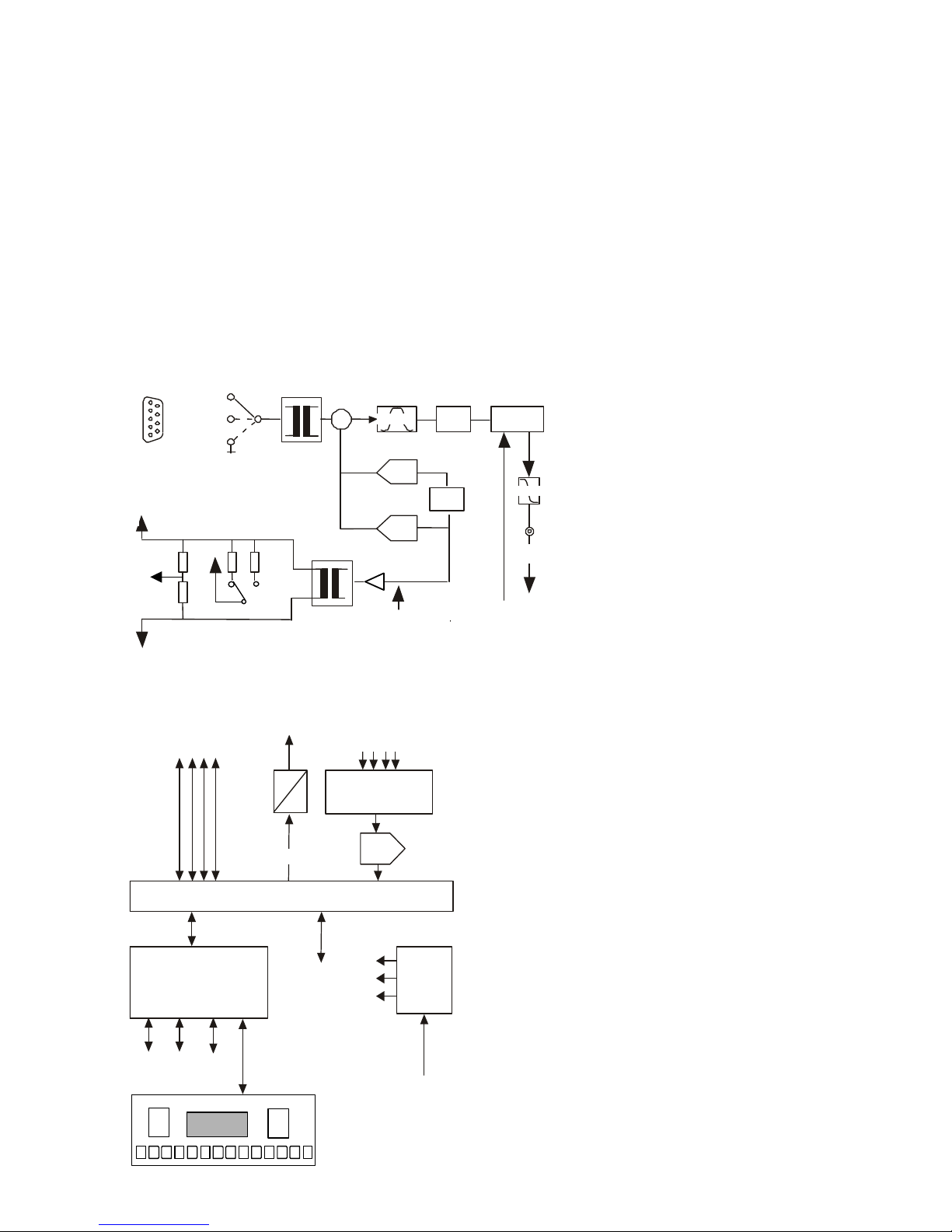
The following drawings only show the basic principles of the carrier frequency amplifier, as
it is outside the scope of this user’s manual to go in full detail.
Basically, PICAS houses 1 controller board which controls the settings of the amplifiers as
well as the communication with external devices like a PC.
Also PICAS can hold up to 2 input cards, of the type CA2CF or CA4AI or a mix of those
cards.
The carrier frequency Amplifiers
gnd
-IN
+IN
+EX
-EX
1/4
+SE
-SE
IN
ZERO
9p M
Dsub
+
Analog
OUT
Phase
C-BAL
R-BAL
Demodulator
(Detector)
Bandpass
Phase
shifter
Gain-
control
Lowpass
125 uV/V .. 1V/V
Input
Control
5 KHz exc.ref.
Bridge completion
+ EX
-
EX
1/4
SE
240Ω
240Ω 120Ω 350Ω
-IN
The Controller board
The drawing shows the
evident advantage: the two
transformers, fully isolating
the measuring input from the
rest of the system.
The blockdiagram
shows the basic
elements of the central
processor module.
Further hardware
components.
Apart from the basic module,
the PICAS cabinet further
houses the power supply, the
LCD display-module, the front
with integrated pushbuttons and
a backpanel with various inputand output- connectors.
Analog
amplifiers
controls
5KHz
0.1234
Frontpaneel
Analog
signals
1 2 3 4
Multiplexer
Excitation
reference
FPGA
ADC
Power
regulator
Vin
Unstab.
Digital
sync.
Microprocessor,
Memory,
Communications
RS 232
RS 485
USB
Page 7

Peekel In struments User manual PICAS V2.6.1
Page 7 of 59
2 Connecting the instrument
2.1 Carrier frequency inputs on CA2CF
The following pages show examples of the various options of how to connect various input
signals and transducers to the instrument. Later in this document, further details are given
of how to actually measure these signals.
2.1.1 Connecting the Transducers
The carrier-frequency amplifier is mainly used for straingauges and lvdt’s. They are
connected in full-, half- or quarter-Wheatstonebridge configurations, having 4, 2 or 1
external straingauges, resistors, inductances or capacities respectively. The other arms of
the bridge can be completed with the internal, on-board, ½- and ¼-bridge complementaryresistors. (As a standard, these are 240 Ω for 1/2 bridge and 120 Ω for 1/4 bridge.)
The precise value for a half-bridge completion is not important as long as these resistors
are stable and in balance. The value of a quarter-bridge completion resistor, however,
should fairly accurately match the external straingauge, otherwise a too large unbalance
(offset) will be the result.
All drawings show dotted lines, connecting the ±SE with the ±EX lines. These are the sense-
lines and must be connected, even when not 6 but only 4 wires to the straingauge-bridge
are used.
The drawings include polarity-signs within the straingauge-resistors. These indicate the
polarity of the amplifier-output-signal for increasing strain and increasing resistance.
It is strongly recommended to use shielded cables.
2.1.2 About Cable-capacitance
A topic, inherent with the use of CF-amplifiers (contrary to DC-amplifiers) is cablecapacitance. The capacitance between cables to a straingauge-bridge yields a parasitic
impedance, parallel to the arms of the Wheatstone bridge. Any unbalance in capacitance
may therefore lead to errors in the measured signal.
This becomes crucial in quarter-bridge configurations, where the capacitance comes
directly across one arm of the bridge.
(Example: every 1 meter cabling of 100 pF/meter, connecting a 120 Ω bridge to a 5 kHz
carrier-frequency amplifier, gives rise to 100 µV/V C-signal offset. The carrier-frequencyamplifier luckily does suppress this C-signal by at least a factor 1000. However, this works
only if the amplifier is not overloaded by the C-signal. The C-signal therefore should not be
more than 4...7 times the selected measurement-range of the amplifier. In the mostsensitive range of 100 µV/V this would allow for 10 meters of cabling.)
The presence of such a large C-signal is not recommended though. In quarter-bridge
configurations therefore, it is common practice to compensate the capacitance by a fixed
capacitor, built in the other arm (between pins +EX and ¼).
Page 8

Peekel In struments User manual PICAS V2.6.1
Page 8 of 59
2.1.3 Bridgeconnector pinout
pin 1 : -EX (-excitation)
pin 2 : +EX (+excitation)
pin 3 : +IN (+input)
pin 4 : -IN (-input)
pin 5 : Gnd (ground)
pin 6 : -SE (-sense)
pin 7 : +SE (+sense)
pin 8 :
pin 9 : 1/4 (quarter-bridge completion resistor, 120 or 350 ohm)
The straingauge-bridges and lvdt’s are connected through 9-pole male DSUB connectors.
The pin connections are shown in the above table. The abbreviations are as follows:
±EX Excitation to the transducers. For the carrier-frequency-amplifier this is an ac-signal
of 0,5 to 5 volt at normally 5000 Hz. Although the polarity-signs do not have a meaning for
this ac-signal, they are used here to indicate the relation with +IN and -IN.
±IN Differential input of the amplifier. Like for the excitation, the polarity-signs wouldn’t
have a meaning if they weren’t used to indicate the relation with +EX and -EX. Connecting
+EX to +IN and -EX to -IN should give a positive (but overload) outputsignal.
±SE Sense-lines for 6-wire connection of full-bridges. The + SE and - SE connections
have to be connected (see diagrams at the next pages) in order to compensate for the
voltage drop of the EXcitation voltage over the lines, connected to the measuring sensors.
¼ Quarter-bridge completion resistor. (120Ω or 350Ω precision-resistor.). A single
external straingauge can be completed by the internal resistors in the other bridge-arms,
available through ¼-pin. The ¼-bridge completion resistor is internally connected to +EX.
With the settings a choice can be made between a 120 Ω or a 350 Ω internal
compensation resistor.
Gnd -ground. At this pin the ground from the system is connected. Normaly this pin is not
used
Screen When a cable is used with a screen, this screen must be connected to the
housing of the connector. For the optimal screening this housing must be metalised.
Page 9
Peekel In struments User manual PICAS V2.6.1
Page 9 of 59
2.1.4 Full-bridge
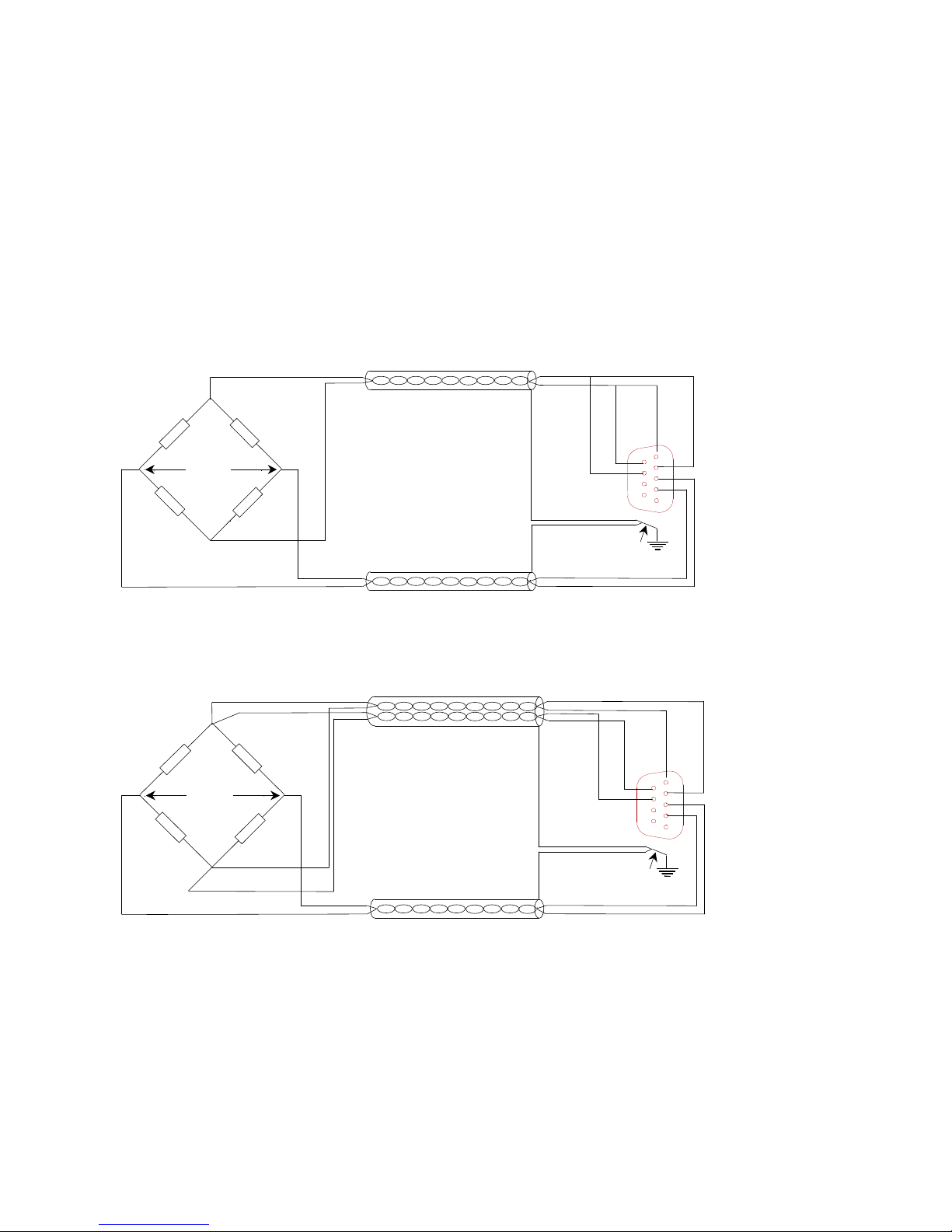
Figure 1 shows the connection of a full straingauge-bridge. This is the most reliable
configuration. The leadwire-resistances affect only the sensitivity of the bridge. For instance
6Ω resistances in both the +EX as well as the -EX wire, connected to a 120Ω bridge, give a
decrease in outputsignal of 9.1%. This can be compensated by using the internal sense
circuit. However, that does not compensate the temperature-influence on the leadwireresistance. A temperature-coefficient of 0.4%/°C on 12Ω of copperwire, connected to a
120Ω bridge, will still give 0.04%/°C change in sensitivity. Short, thick cabling is therefore
recommended.
-EX
+EX
9 polig
male Sub D
+SE -SE
-IN
+IN
-EX
+EX
-IN
+IN
5
9
6
1
SIGNAL
Connect cable screen to
connector case.
Figure 1: Full-bridge, 4-wire, straingauge-connection
+SE
-EX
+EX
9 polig
male Sub D
+SE -SE
-IN
+IN
-EX
+EX
-IN
+IN
-SE
5
9
6
1
SIGNAL
Connect cable screen to
connector case.
Figure 2: Full-bridge, 6-wire, straingauge-connection
Page 10
Peekel In struments User manual PICAS V2.6.1
Page 10 of 59
2.1.5 Half-bridge
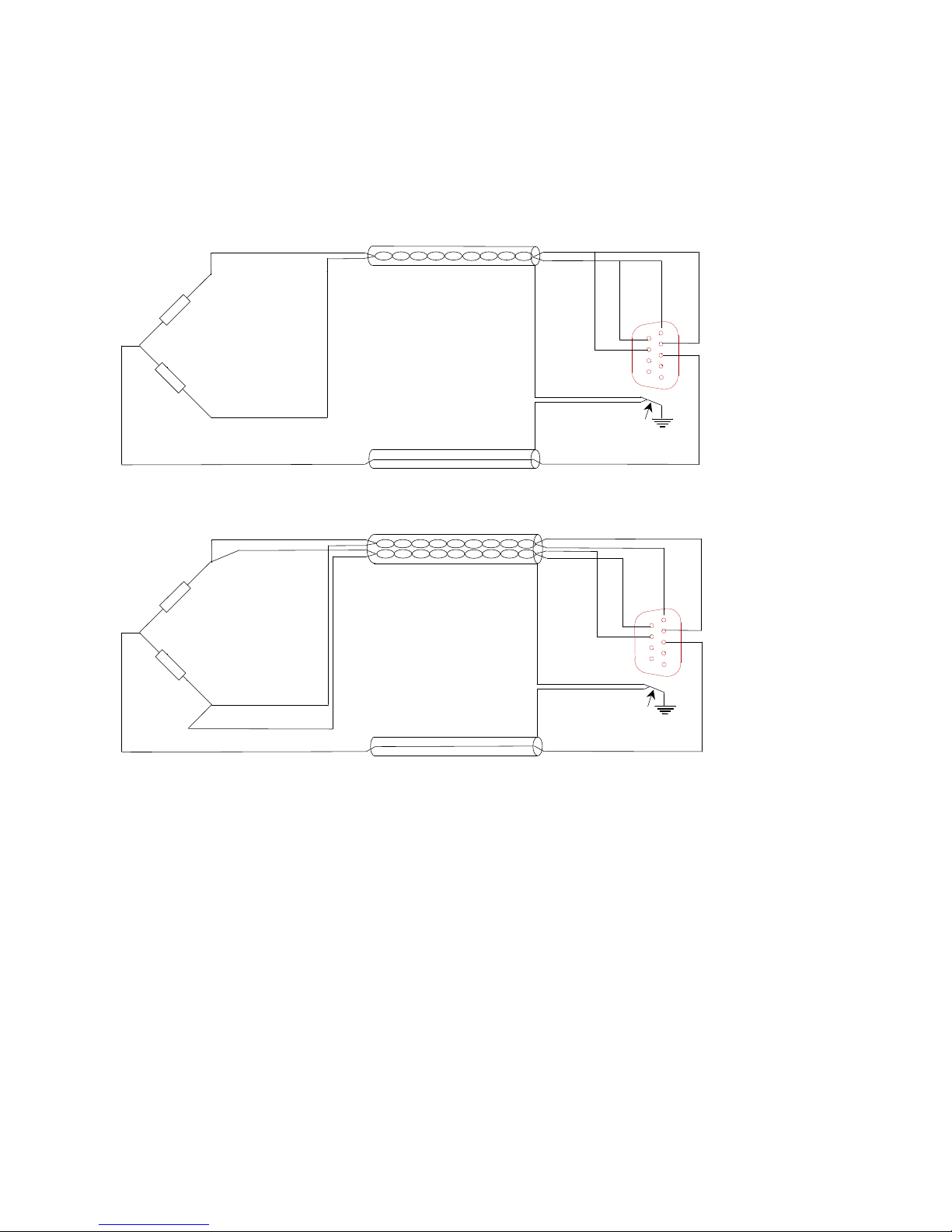
Figure 2 shows half-bridge configured straingauges. The ½-bridge completion-resistors are
internally connected to -IN.
-EX
+EX
9 polig
male Sub D
+SE -SE
+IN
-EX
+EX
+IN
5
9
6
1
Connect cable screen to
connector case.
Figure 3: Half bridge, 3-wire, straingauge-connection
+SE
-EX
+EX
9 polig
male Sub D
+SE -SE
+IN
-EX
+EX
+IN
-SE
5
9
6
1
Connect cable screen to
connector case.
Figure 4: Half bridge, 5-wire, straingauge-connection
The connection of the ½-bridge completion to -IN sets the amplifier for positive gain: so
connecting the +IN signal to +EX gives a positive outputsignal (although in overload).
Half-bridge connections are more critical than full-bridge. The leadwire-resistances in the
±EX-lines are in series with the 2 straingauges, in the Wheatstone bridge. Any slight
unbalance in these leadwire-resistances will give rise to signal-offset. Every 1mΩ difference
in resistance on a 120Ω bridge gives 2 µV/V offset. This may be compensated by use of the
internal balance circuit. However, temperature-influence can not be compensated. Short,
thick cabling is highly recommended
Page 11
Peekel In struments User manual PICAS V2.6.1
Page 11 of 59
2.1.6 Quarter-bridge using 2-wires
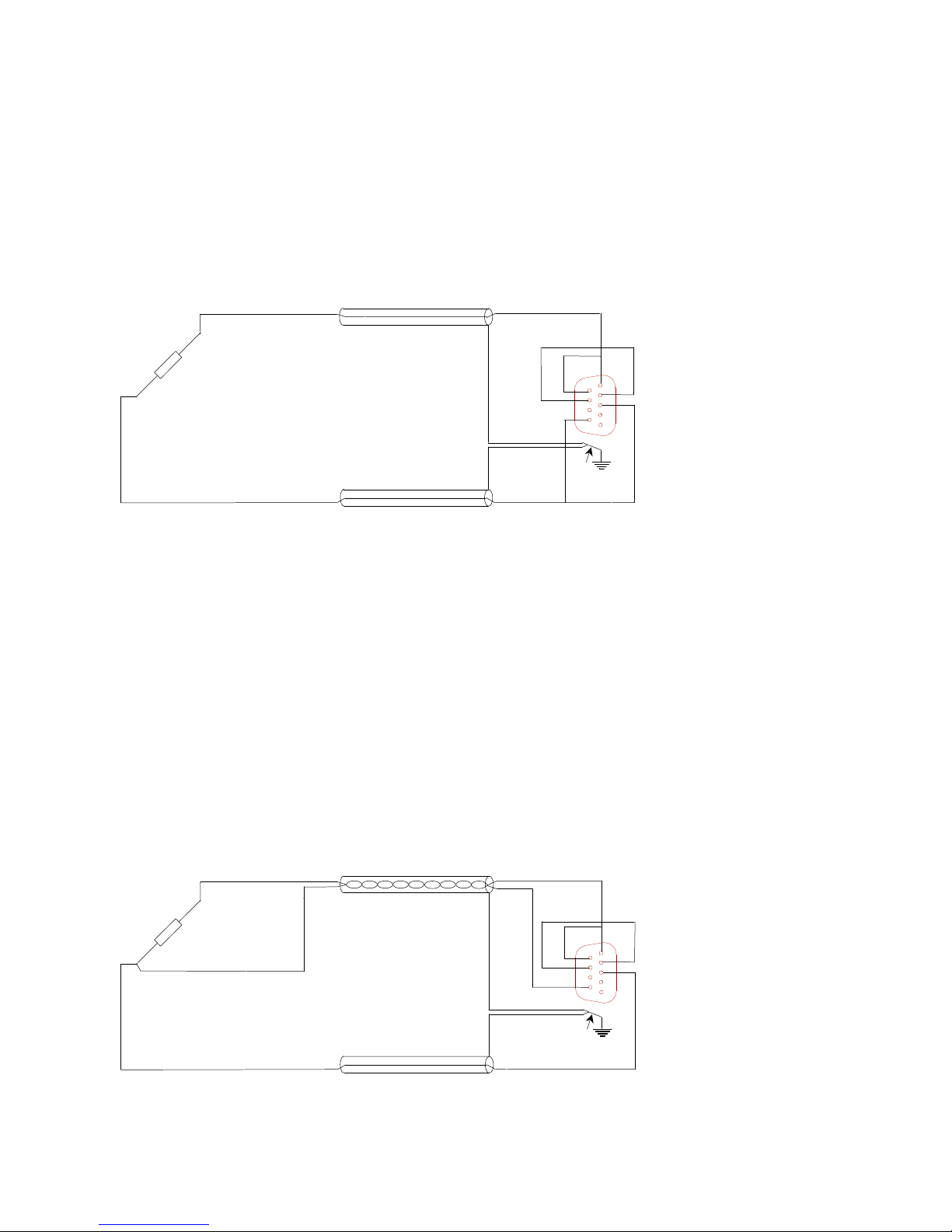
Application of quarter-bridges is the simplest but least accurate way of measuring. The
leadwires in 2-wire configurations are completely incorporated in one arm of the
straingauge-bridge. Every 1 mΩ of cabling-resistance in series with a 120Ω straingauge, will
directly add 2 µV/V signal-offset, though in practical situations it is more likely to meet
several ohm’s of resistance
-EX
9 polig
male Sub D
+SE -SE
+IN
-EX
+IN
5
9
6
1
Connect cable screen to
connector case.
Figure 5: Quarter-bridge, 2-wire, straingauge-connection
The internal balance-compensation range is 65 mV/V at 5 volt excitation. This allows for
1.25Ω total leadwire-resistance in series with a 120Ω straingauge. A bridge-voltage of 0.5
volt however gives a 10 times balance-range and enables 12.5Ω leadwire in series with a
120Ω straingauge.
The temperature-influence on the cable-resistance cannot be compensated. The
temperature- coefficient of copper of 0.4%/°C will give rise to 8.3 µV/V offset-change for
each Ω in series with a 120Ω straingauge. Short and thick cabling is evidently necessary!
2.1.7 Quarter-bridge using 3-wires
Most of the problems, mentioned before, can be avoided by using the 3-wire connection
method. It adds the resistance of the -EX-leadwire to the external straingauge, and it adds
the resistance of the wire leading to the internal ¼-bridge completion to this internal ¼bridge resistance. Only the difference in leadwire-resistance (and connector contactresistance) gives signal-offset.
-EX
9 polig
male Sub D
+SE -SE
+IN
-EX
+IN
5
9
6
1
Connect cable screen to
connector case.
-1/4
1/4
Figure 6: Quarter-bridge, 3-wire, straingauge-connection.
Page 12
Peekel In struments User manual PICAS V2.6.1
Page 12 of 59
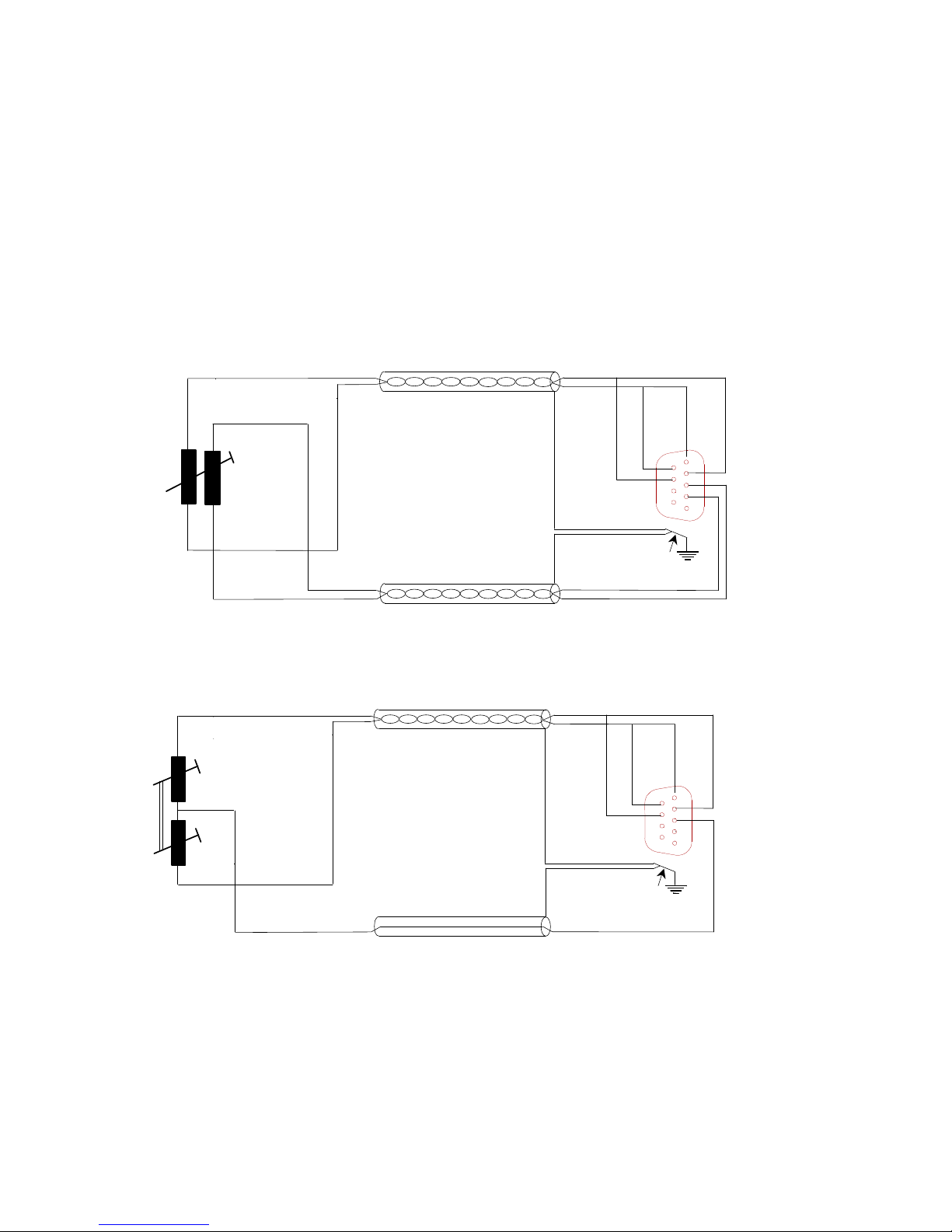
A similar situation as with the ½-bridge connection method has appeared. Every 1 mΩ of
difference in resistance, when using 120Ω straingauges, gives a change in signal-offset of 2
µV/V. This may be compensated internally by the balance circuit. However, the
temperature-influence cannot be compensated for. Short and thick cabling is again highly
recommended.
2.1.8 Displacement Transducers
LVDT’s, or Linear-Variable-Differential Transformers may be configured as full- or halfbridges. The connection method for both possibilities is shown in the next figures.
-EX
+EX
9 polig
male Sub D
+SE -SE
-IN
+IN
-EX
+EX
-IN
+IN
5
9
6
1
Connect cable screen to
connector case.
Figure 7: Connection of a full-bridge lvdt.
-EX
+EX
9 polig
male Sub D
+SE -SE
+IN
-EX
+EX
+IN
5
9
6
1
Connect cable screen to
connector case.
Figure 8: Connection of a half-bridge lvdt
Page 13
Peekel In struments User manual PICAS V2.6.1
Page 13 of 59
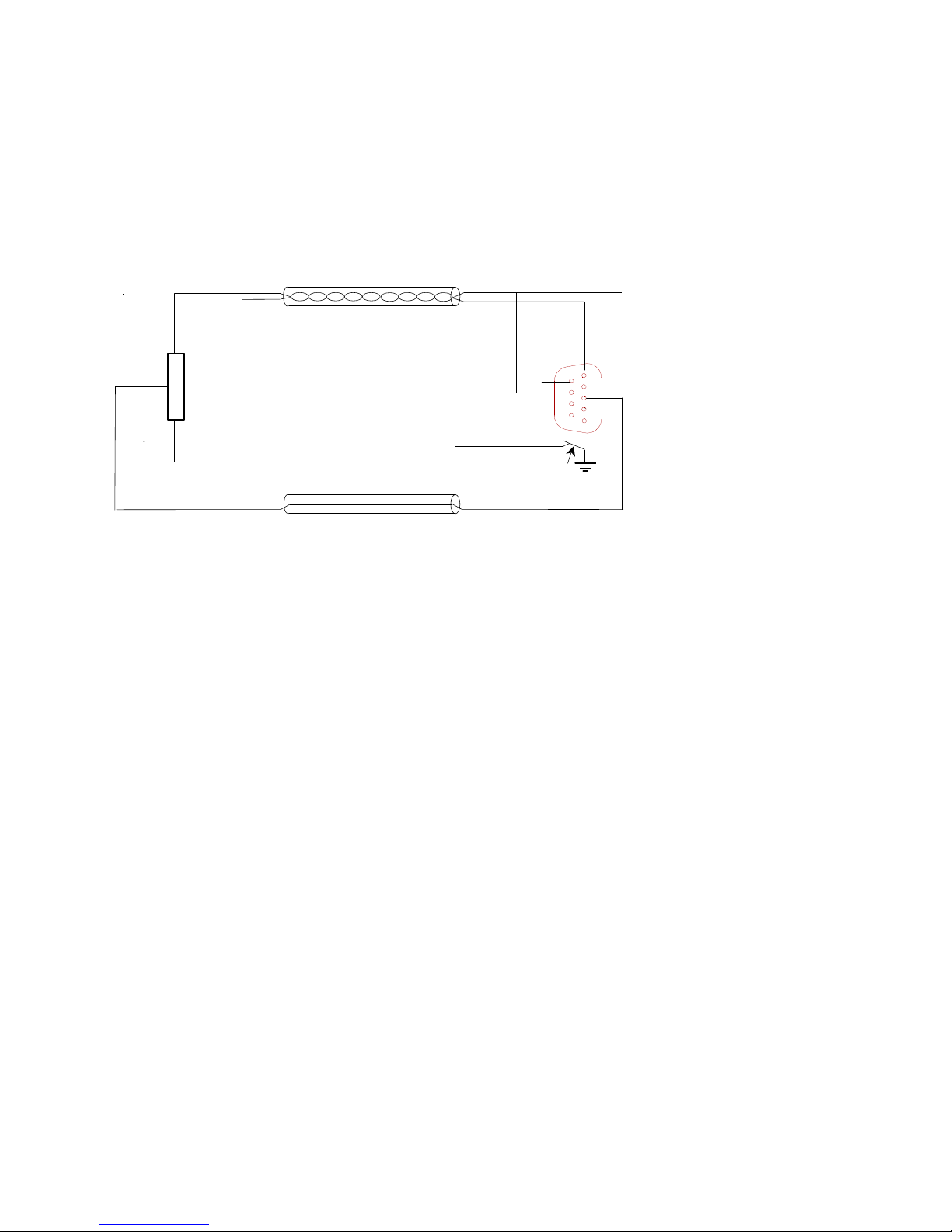
2.1.9 Potentiometer connection
A potentiometer can be connected as a half bridge, 3 wire connection:
-EX
+EX
9 polig
male Sub D
+SE -SE
+IN
-EX
+EX
+IN
5
9
6
1
Connect cable screen to
connector case.
Figure 9: Potentiometer connection as a half bridge, 3-Wire
The linearity of the measurement is influenced by the impedance of the potentiometer.
When the potentiometer value is between 120 and 350 Ohm, the linearity of the
measurement is within 0.1 %.
When measuring a Potentiometer based sensor, the mid position of the potentiometer will
be the zero point. Moving the potentiometer to the minimum or maximum position, the
output value will be in the range of –full range to +full range.(-100% to +100%).
Based on the actual input resistance of the CA2CF of about 50K, the following non-linearity
will be present when measuring a potentiometer with a higher value:
potentiometer value linearity
500 ohm 0.15 %
1000 ohm 0.3 %
5000 ohm 1.45 %
Page 14
Peekel In struments User manual PICAS V2.6.1
Page 14 of 59
2.2 Analog inputs on CA4AI
The analog DC-inputs are located on the CA4AI card, which can be ordered as a alternative
for a CA2CF card which has 2 carrier frequency channels.
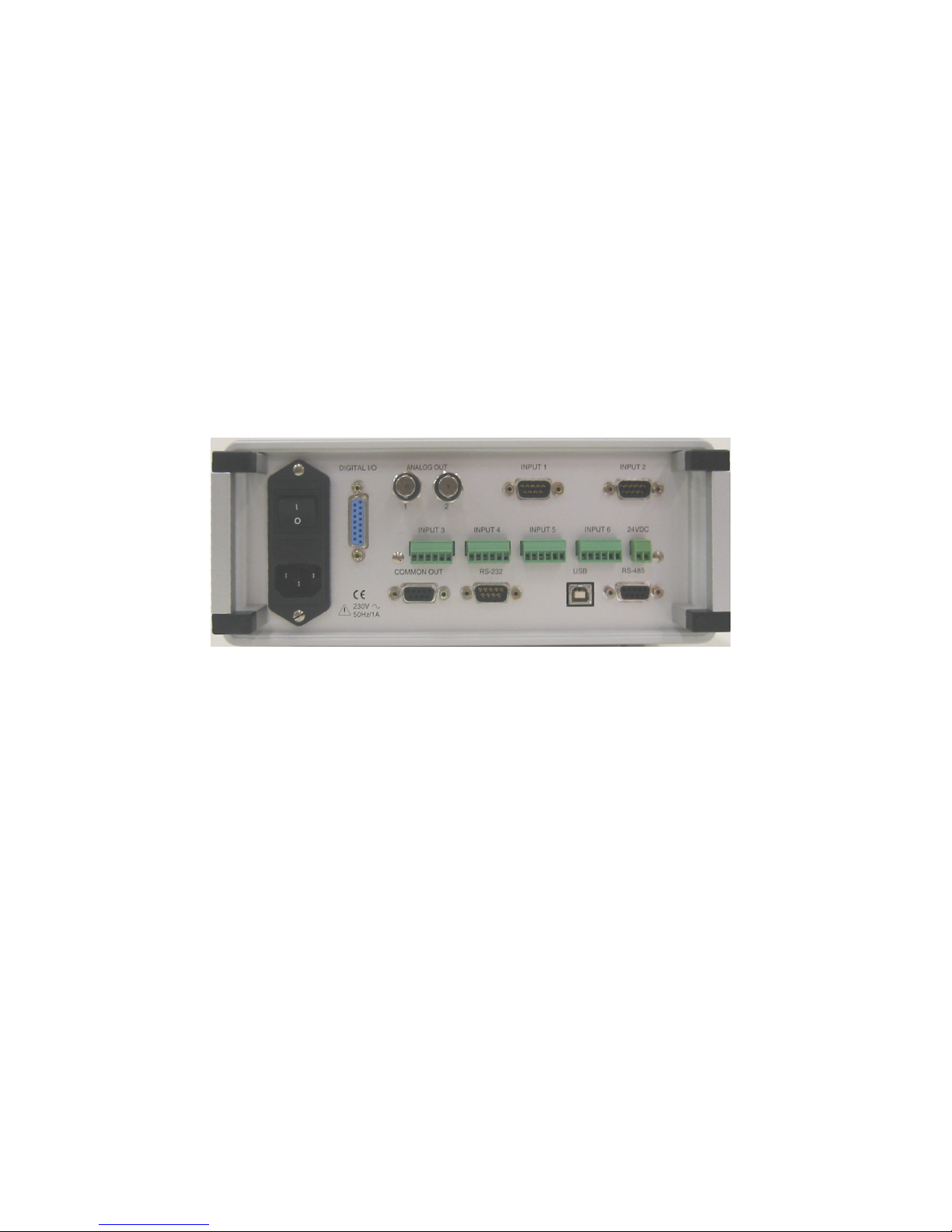
At the back side of PICAS for each CA4AI card 4 detachable screw terminals with each 6
terminals are present, on which the signals/sensors can be connected.
Also each CA4AI cards holds another detachable screw terminals with 2 terminals. On this
terminals an 24VDC/80mA power supply is present which can be used as a power supply
for electronic sensors.
Figure 10: Backside of PICAS with 1 CA2CF-card and 1 CA4AI-card.
Page 15
Peekel In struments User manual PICAS V2.6.1
Page 15 of 59
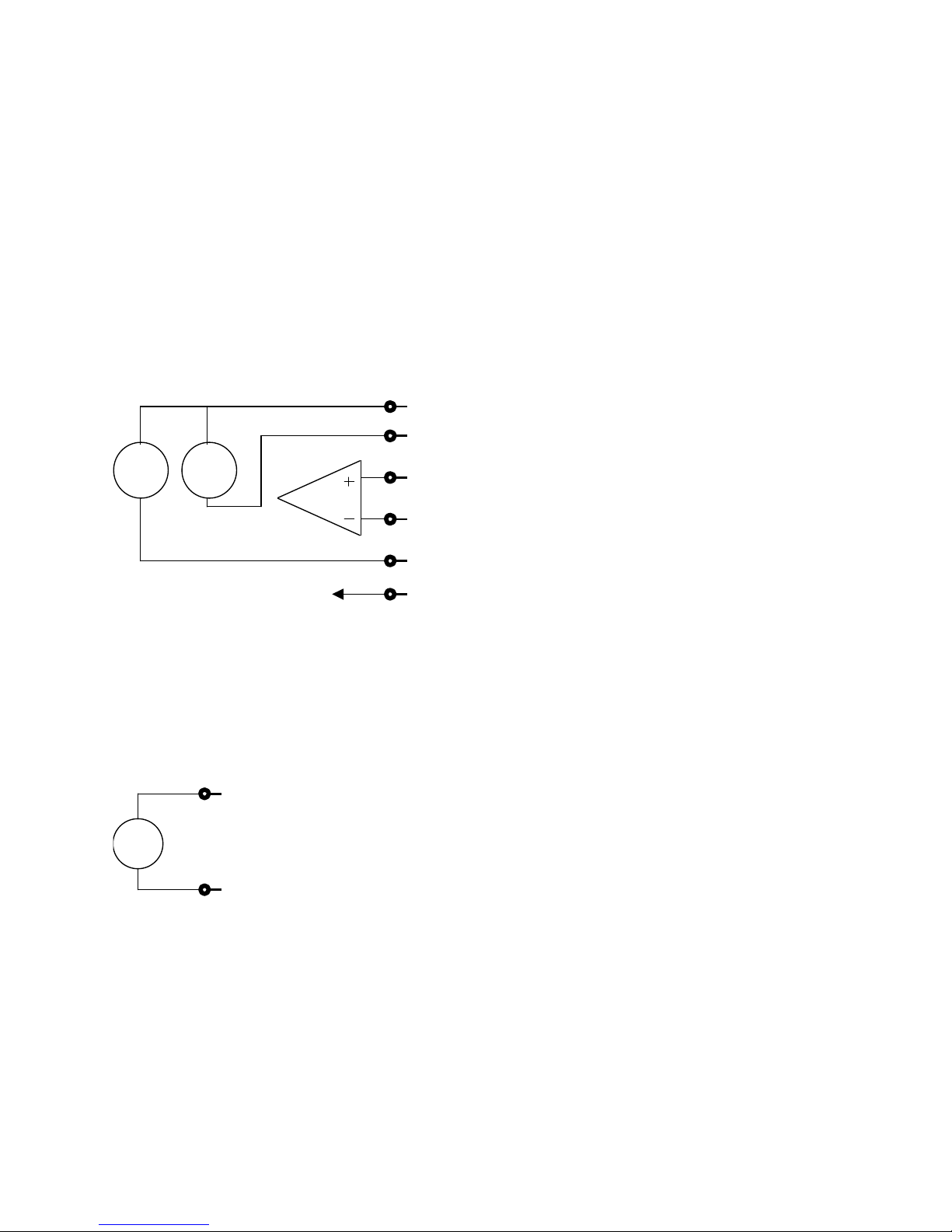
2.2.1 Analog input connector pinout
The following signals are present on the input connector:
pin 1 : + Supply voltage or current
pin 2 : - supply current
pin 3 : + IN (+ Input)
pin 4 : - IN (- Input)
pin 5 : - Supply voltage (0V)
pin 6 : Screen Ground
(Pin 1 is on the left side of each terminal, when one is looking at the rear site of PICAS.
5V
1mA
1
2
3
4
5
6 to chassis
Figure 11: Interne connection of the analog input
Connection pinout of the Power-terminal:
pin 1 : + 24VDC
pin 2 : - 24VDC
(Pin 1 is on the left side of each terminal, when one is looking at the rear site of PICAS.
24V
1
2
+
-
Figure 12: Interne connection of the 24VDC supply
This power supply can deliver 80 mA maximum, and is galvanic isolated from PICAS.
Page 16
Peekel In struments User manual PICAS V2.6.1
Page 16 of 59
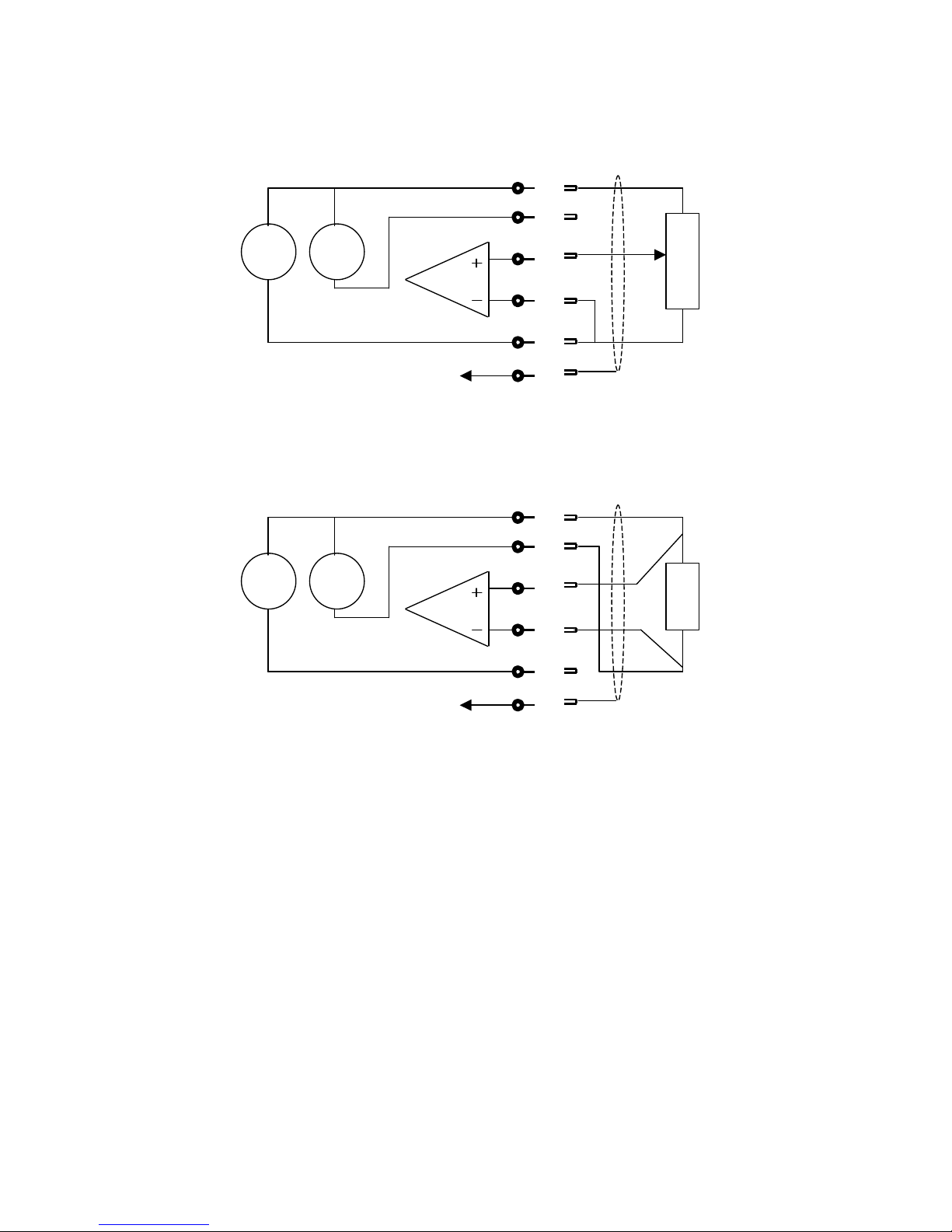
2.2.2 Potentiometer connection
5V
1mA
1
2
3
4
5
6 screen gnd
Figure 13: Potentiometer connection
2.2.3 Connection of a resistor sensor like a PT100
5V
1mA
1
2
3
4
5
6 screen gnd
Figure 14: Resistor connection
This connection diagram is used with a PT100 sensor.
Page 17
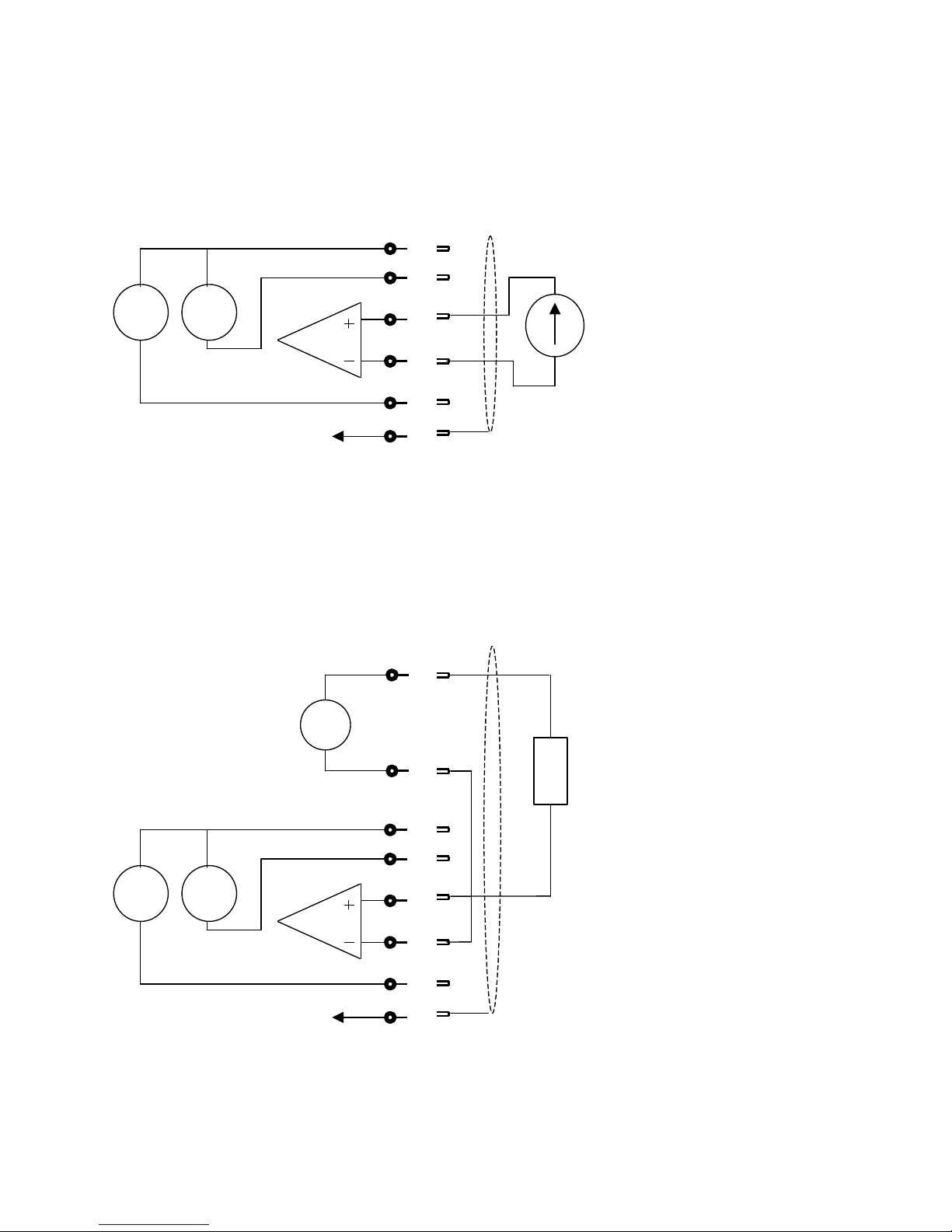
Peekel In struments User manual PICAS V2.6.1
Page 17 of 59
2.2.4 Connection of a voltage signal
A voltage signal is directly connected to the signal input terminals of the channel.
5V
1mA
1
2
3
4
5
6 to chassis
V
Figure 17: Voltage signal connection
2.2.5 Connection of a 4 – 20 mA Sensor
Normally these sensors will deliver a 4 mA signal, when the measured signal is at minimal
level. This 4 mA signal is also used as a power supply for the sensor. In this case a 2 wire
connection to the sensor is used. The 24VDC supply can be used for these sensors.
5V
1mA
1
2
3
4
5
6 to chassis
24V
1
2
+
-
Active 4-20
mA sensor
Figure 15: 4 – 20 mA Sensor connection
note: make sure that the sensor can handle the 24VDC supply.
Page 18
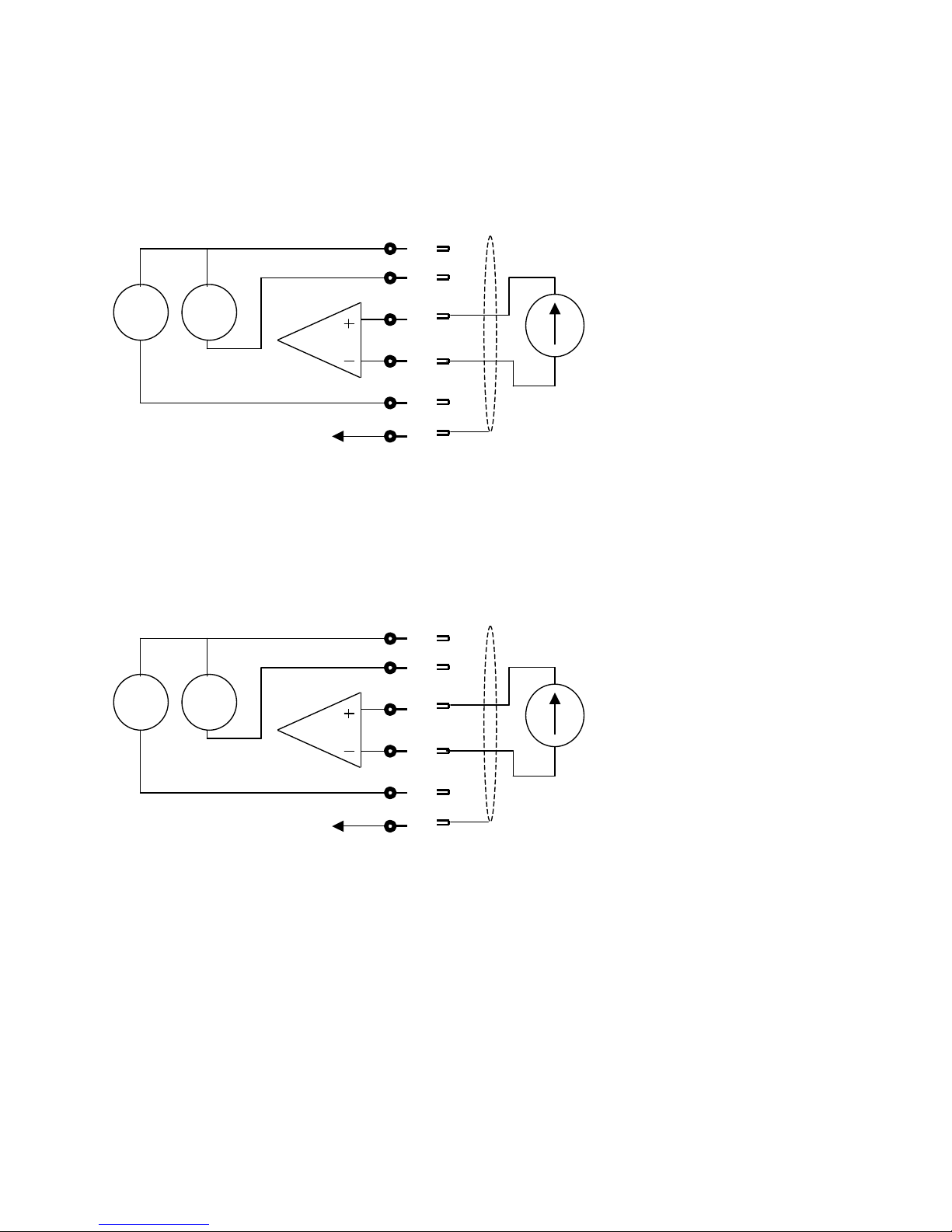
Peekel In struments User manual PICAS V2.6.1
Page 18 of 59
2.2.6 Connection of a 0-20mA Sensor
Connection of a current sensor (0-20 mA or 4 – 20mA) when the sensor power supply from
PICAS is not used.
5V
1mA
1
2
3
4
5
6 to chassis
I
Figure 16: 0 – 20 mA Sensor connection
2.2.7 Connection of a Thermocouple element
A thermocouple element is connected like a voltage signal. For the compensation of the
cold junction at the screw terminals, the first channel of the CA4AI card is used. With this
channel the temperature of the junction must be measured, with a PT100 element.
5V
1mA
1
2
3
4
5
6 to chassis
V
Figure 17: Thermocouple connection
Page 19
Peekel In struments User manual PICAS V2.6.1
Page 19 of 59
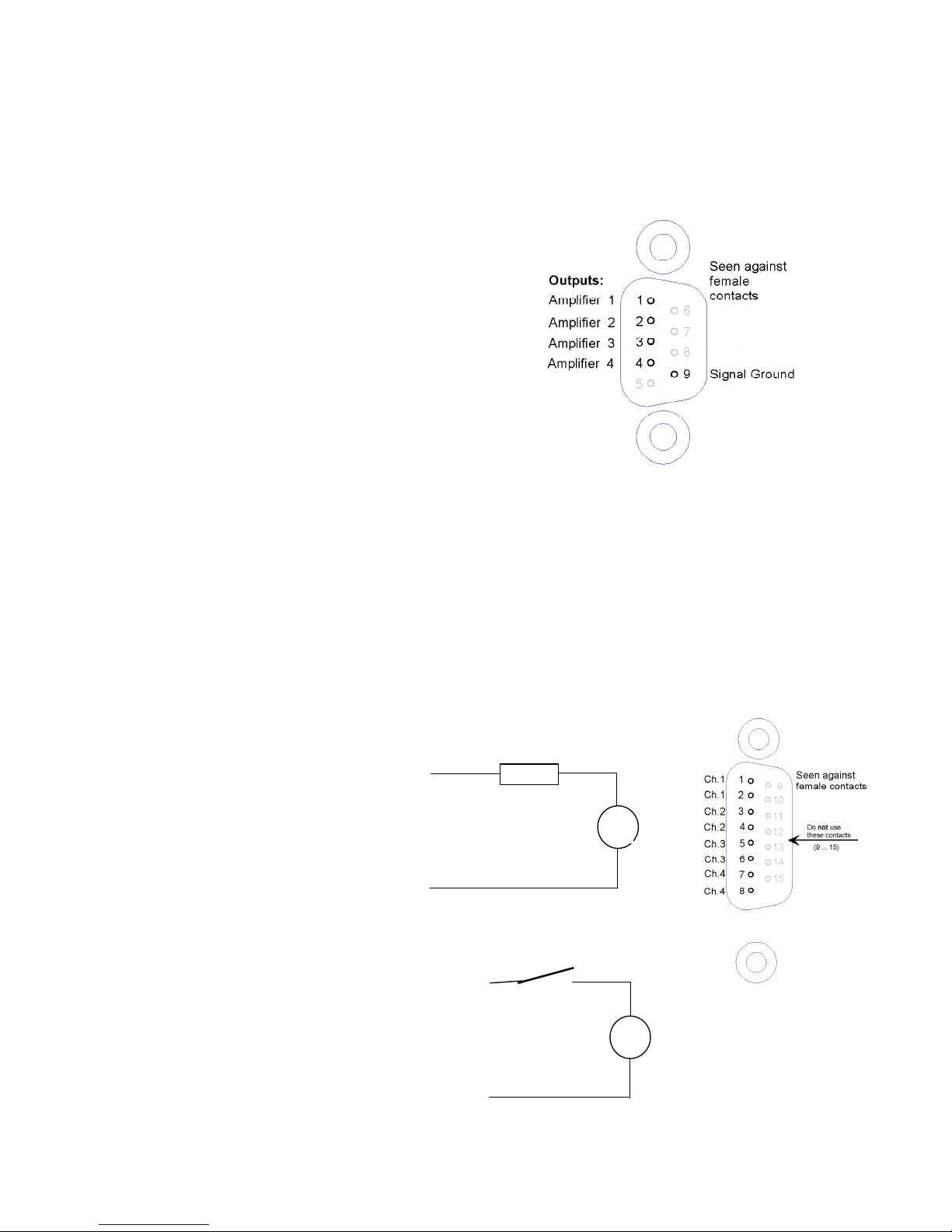
2.3 Outputs
2.3.1 Combined analog output
pin 1 : Amplifier output 1
pin 2 : Amplifier output 2
pin 3 : Amplifier output 3
pin 4 : Amplifier output 4
pin 5 : Screen gnd
pin 6 : Ground
pin 7 : Ground
pin 8 : Ground
pin 9 : Ground
Through these connections, all 4 outputs (0...+/-10 V)
are continuously available. They might be used for connecting an external multiplexer, or
other device.
Cable screen should be connected to the connector case. Do not connect to pin 5!
Individual analog outputs:
For each Carrier frequency channel, the same output voltage (0... +/-10 V) is also available
on a BNC connectors at the rear of the cabinet.
Note: The Channels from the CA4AI card do not have an analog output. Not on the board
itself and not on this combined analog output connector!!
2.3.2 Digital Outputs
Connection diagram for
channel 1. The other channels are
identical, just use other pins:
2.3.3 Digital Inputs
On the same connector 2 digital
inputs are present. These
inputs are connected through
optocouplers to the processor.
Pin 12
Pin 11
5 – 24VDC
Imax = 2 mA
V
Input 2
Pin 9
Pin 10
Input 1
LOAD
AC or DC
max 48V
Pin 1
Pin 2
Imax = 300 mA
V
Page 20
Peekel In struments User manual PICAS V2.6.1
Page 20 of 59
2.4 Communication ports
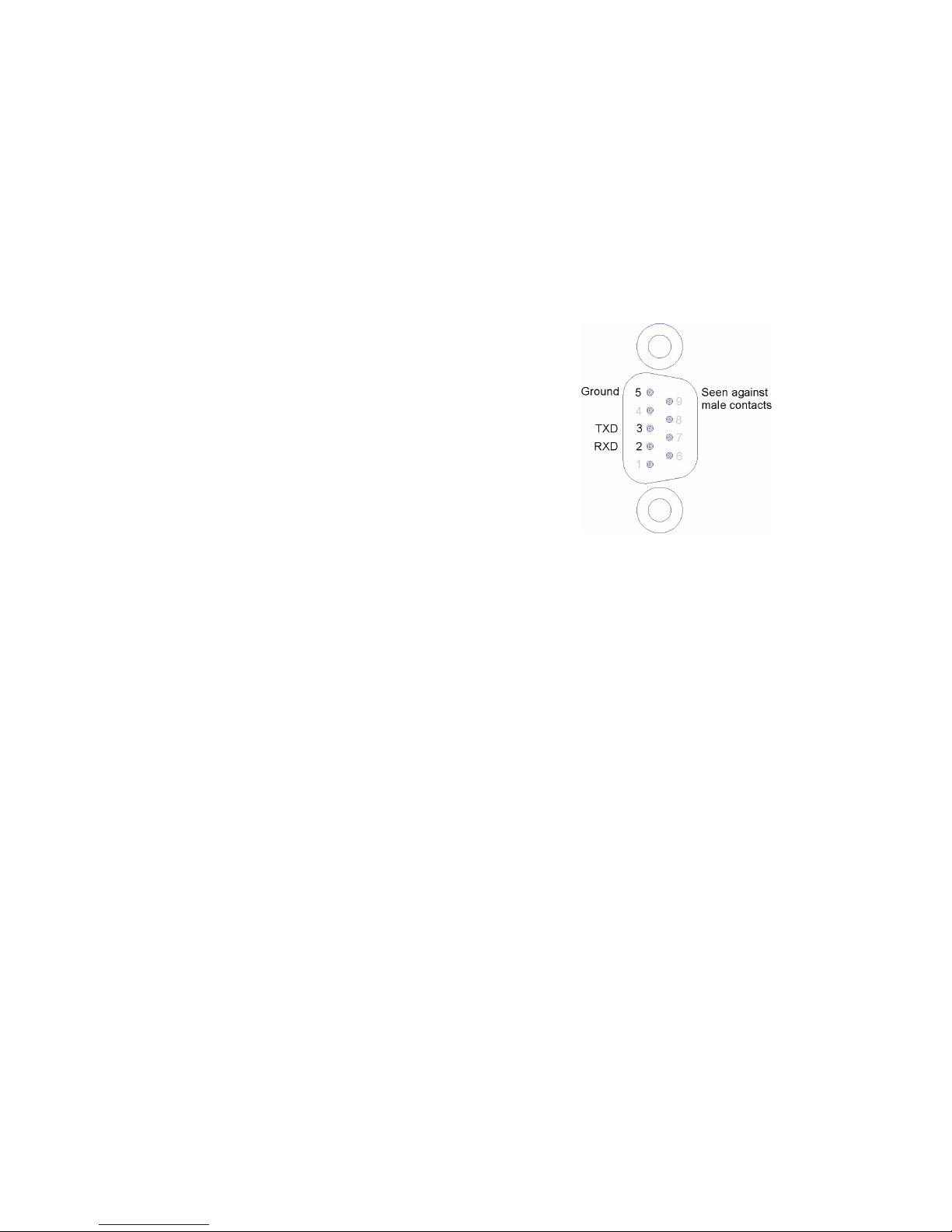
2.4.1 RS232 interface
This port can be used to connect a COM-port of a PC. The Baudrate can be selected with
System Menu 02.
pin 1 : pin 2 : RXD
pin 3 : TXD
pin 4 : pin 5 : Ground
pin 6 : pin 7 : pin 8 : pin 9 : -
2.4.2 USB
This interface is only present on the fast controller. It is used for data communication
between the PICAS and the PC.
The PICAS is a USB device, and the USB connector on the back side is a type B
connector. It is a USB V1.1 interface.
When the PICAS has a USB interface, only 1 RS485 connector is present.
Page 21
Peekel In struments User manual PICAS V2.6.1
Page 21 of 59
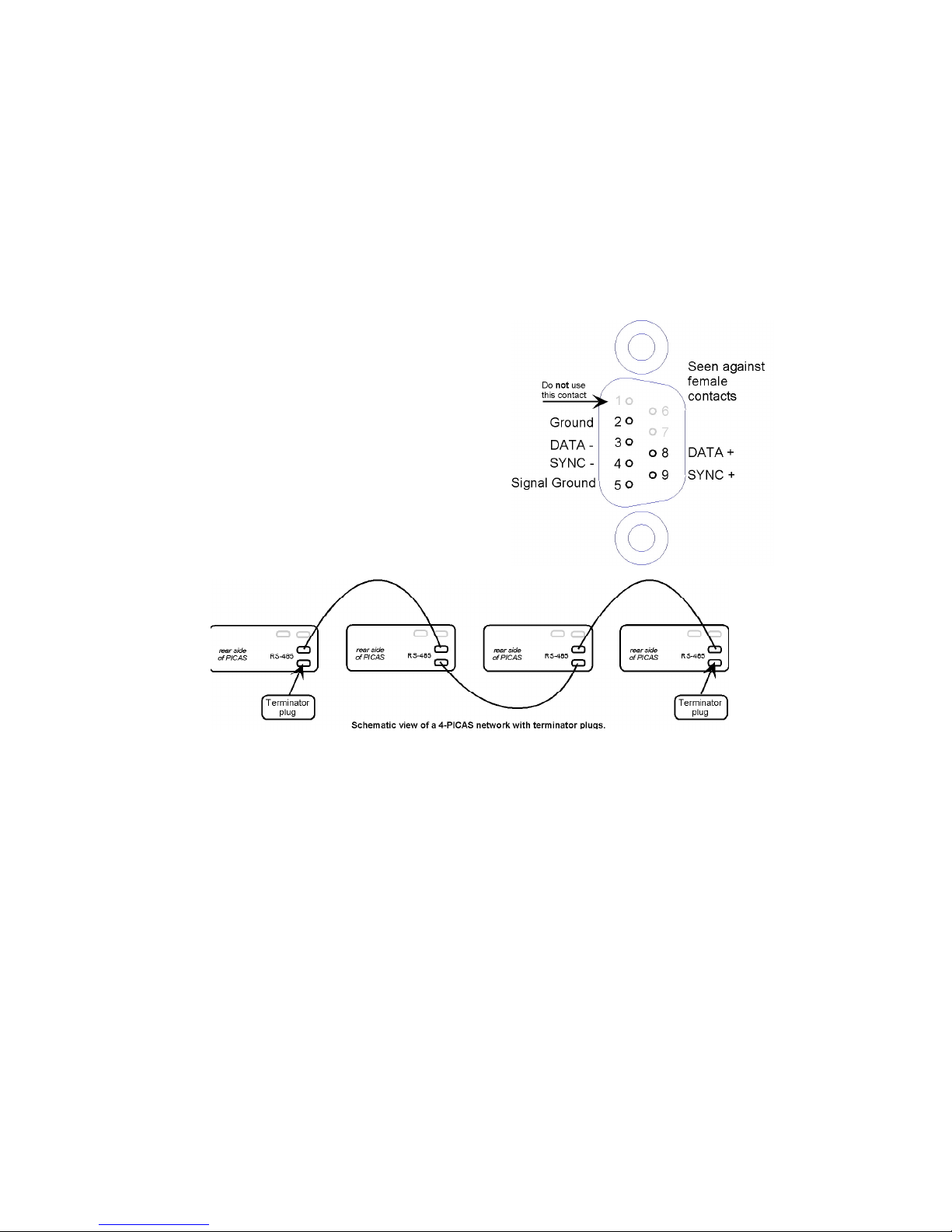
2.4.3 RS485 interface
The RS-485 interface connector is used to build a network (bus) between 2 or more PICAS
units. By using System menu 02, this communication can be established.
Connections shall be made on a 1-to-1 basis with twisted-pair lines. The SYNC connection
is to synchronize the oscillator frequencies of the various units. The cable used for this
connection, must have separated shielded twisted pairs for the communication lines and
the sync lines, to avoid interference between the communication and synchronization
signals. If not used, sometimes the measuring might be disturbed.
pin 1 : do not use this connection
pin 2 : Ground
pin 3 : DATA pin 4 : SYNC pin 5 : Signal Ground
pin 6 : pin 7 : pin 8 : DATA +
pin 9 : SYNC +
Cable screen should be connected to the connector case. Do not connect to pin 5!
Note: on the PICAS with the fast controller only 1 RS485 connector is present. A separate external adapter
can be ordered which holds 2 RS485 connectors.
Page 22
Peekel In struments User manual PICAS V2.6.1
Page 22 of 59
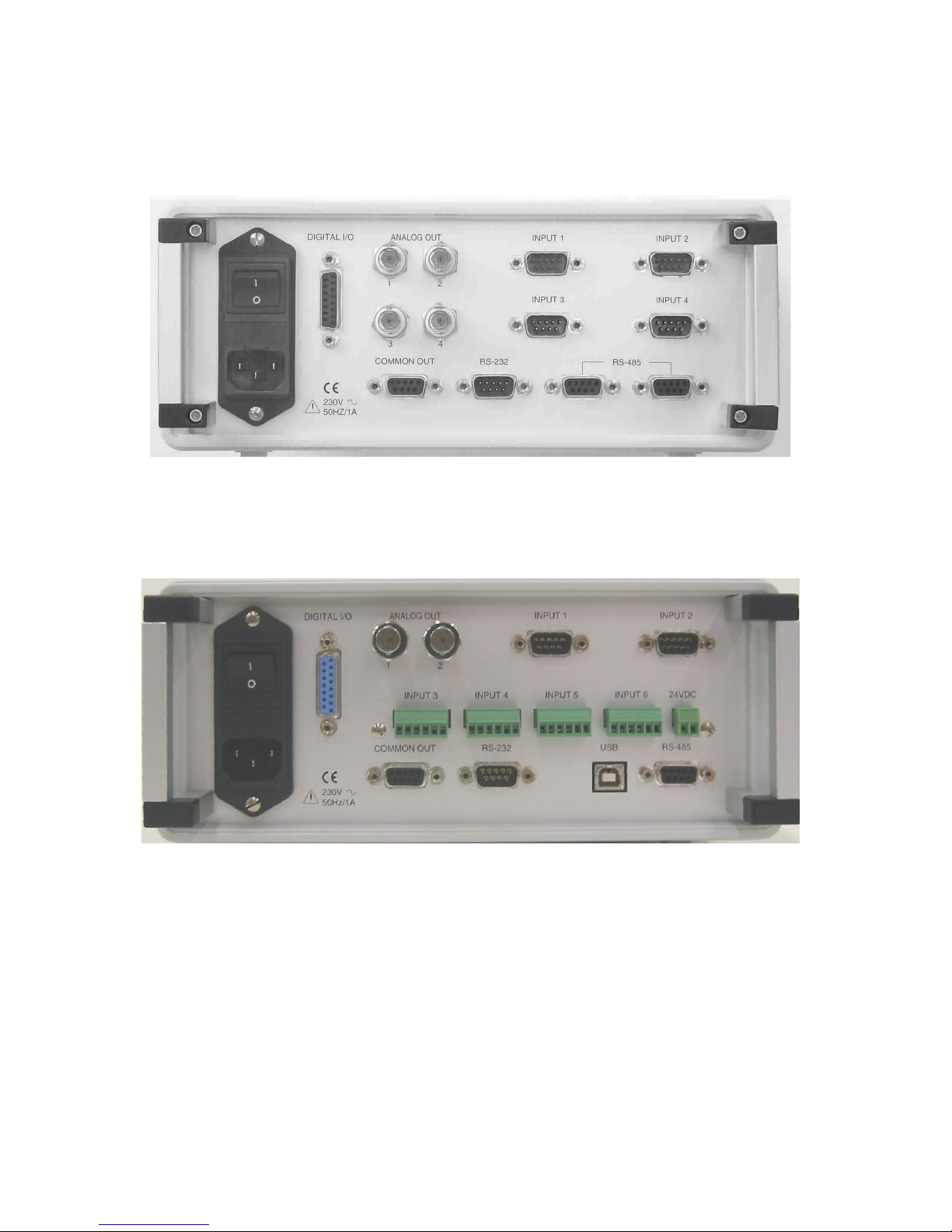
2.4.4 Rear panel connections
Rear panel of a PICAS with 4 Carrier frequency channels
Rear panel of a PICAS with 2 Carrier frequency channels, 4 analog DC-channels
and a USB interface.
Page 23

Peekel In struments User manual PICAS V2.6.1
Page 23 of 59
2.4.5 Option Sum & difference values
A extra hardware option is available for a 2 channel PICAS.
This option will determine the sum and difference of the values of channel 1 and 2.
The sum value will be available on the analog output of channel 3, and the difference value
will be available on the analog output of channel 4.
These sum and difference values are also presented on the display.( see 3.4.3)
Page 24

Peekel In struments User manual PICAS V2.6.1
Page 24 of 59
3 Setting-up the instrument
3.1 General
3.1.1 Power up
When the power switch at the rear of the instrument is switched ON („I”), for a short time,
the display shows the PEEKEL Instruments logo, after which it comes into the operational
mode for Channel 1, Menu 1.
The instrument has to be switched on for at least 15 minutes, before the instrument will
operate within the specified accuracy.
3.1.2 Presentation of numbers
Throughout the channel-settings, floating-point numbers are used. They are internally
stored as 4 bytes and can take very small and very large values. They are generally shown
in the format +1.2345 or +12.345 or +123.45 where the plus sign might be replaced by the
minus sign. As an example, values smaller than 1.0000 will be shown as +123.45 m, where
m stands for milli or 1/1000.
Remember also that +123.45mV (for example) is the same as +0.12345V.
The m can be understood as a prefix to the physical unit (V in this case) but can also be
thought of as a suffix to the value (+123.45 in this case).
PICAS always presents its floating-point numbers using the suffixes p, n, µ, m, none, k, M,
G and T, standing for: pico, nano, micro, milli, none, kilo, Mega, Giga and Tera.
A value of +825.0 µV/V is (for example) the same as +0.825 mV/V. On the other side,
values larger than 999.99 will be shown for example as 1.2345 k where k stands for kilo or
1000.
Note that there are 2 keys on the frontpanel EXP and EXP that easily toggle the
discussed suffix while editing a number.
3.1.3 Conventions
In this manual, the following conventions are being used:
Any line in a menu shall firstly be selected by putting the cursor in front of it, using the UP /
DOWN buttons. After this, the following controls may be used:
adjustable means that a value can be entered and edited by using the keyboard. To start
editing push ENTER. To leave this mode, push ENTER again.
selectable means that a choice can be made from a pre-defined list of expressions etc.
which can be scrolled by using the LEFT / RIGHT buttons
adjustable and selectable means that, after adjusting the numerical value, the suffix can be
selected with the UP / DOWN buttons.
<execute> means that a command can be given by pressing the ENTER button, after which
the required command is then being executed.
Page 25

Peekel In struments User manual PICAS V2.6.1
Page 25 of 59
3.1.4 Settings Protection
When the device is completely configured, the settings can be stored in nonvolatile
memory. When the same settings are needed again at a later time, they can simple be
loaded from this memory. In total 4 of these memory locations are available.
In order to prevent that the settings are accidentally overwritten, it is possible to setup a
password protection in the instrument. This will disable the storage of the settings in the
nonvolatile memory. All the settings are free to be changed, just the storage is prohibit.
When the instrument is delivered, the password is set to 00000. With this password the
protection is off.
There are 3 modes in which the instrument can be regarding to the password protection,
these are:
1. Protection is active
In the “memory menu” an extra line is displayed, to enter the password. On top of
this menu at the selection of the actions the “Store setup” command is not available
The “Password menu” is also not available
2. The user is logged on
To do this, the right password must be entered on the bottom line of the “Memory
menu”. After this, the selection of the “Store setup” is available again. Also the
“password menu” can be selected, by pushing 3 times on “Menu +”.
3. The protection is switched off
In this case the password is set at “0”. This is also the default condition of the
instrument. The “Password menu” is available and the extra line at the “Memory
menu” is not displayed, because there is no need to log in.
How to enter a new password is explained at the description of the password menu.
3.2 Software Installation
3.2.1 Loading new versions of firmware (Updates)
New firmware versions are distributed on CD or e-mail.
If new firmware versions becomes available, this can be easily installed into the firmware
memory of your PICAS system.
After connecting the communications-port of the PICAS with a COM-port of your PC, just
run the UPDATE program from the update diskette
3.3 Human Interfacing
3.3.1 Navigating the LCD display and the pushbuttons
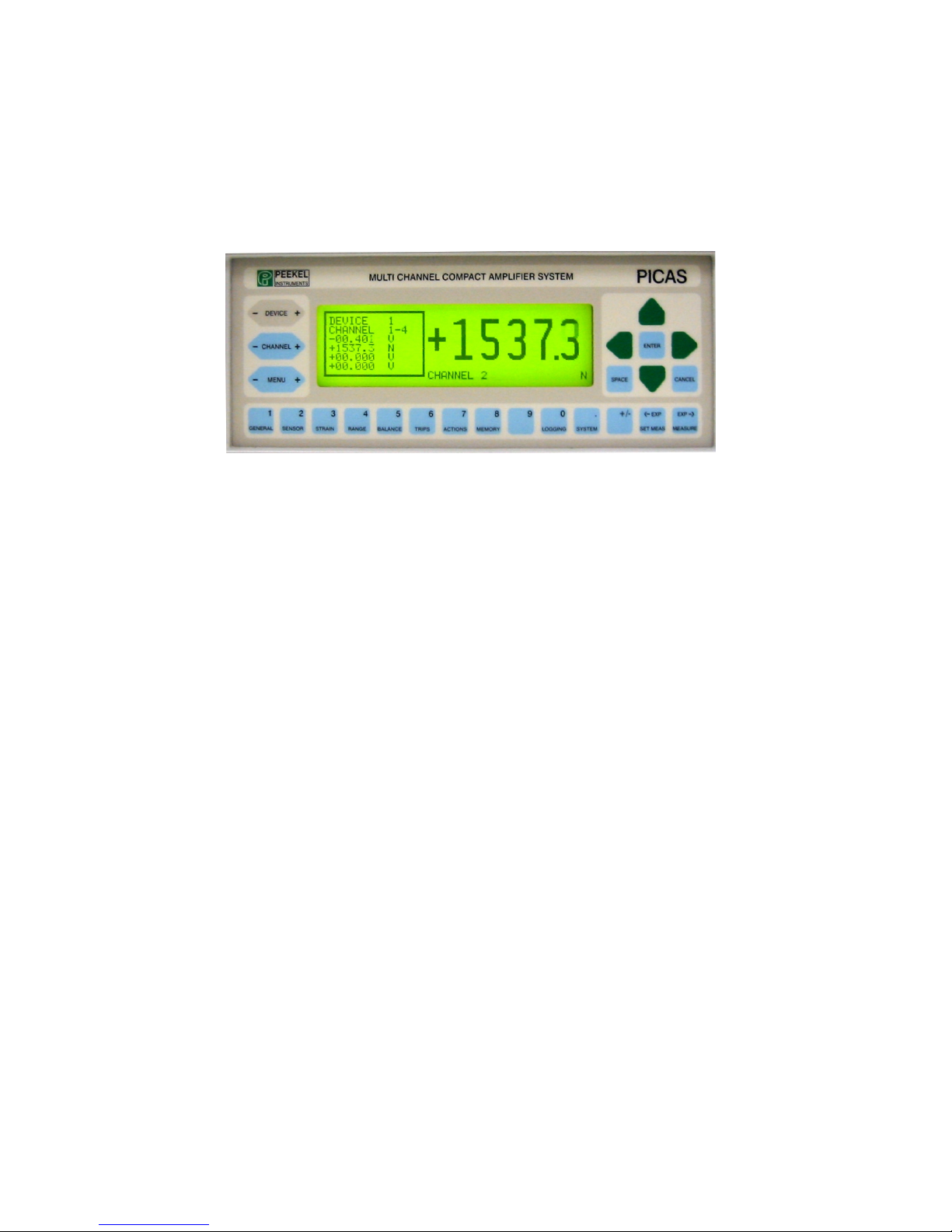
The functioning of each individual pushbutton on the frontpanel of PICAS will now be
explained.
DEVICE + : scrolls through the various Picas
devices if connected at the RS-485 bus.
The 4 CURSOR-keys are for navigating through the
display (UP-DOWN-RIGHT-LEFT)
Page 26
Peekel In struments User manual PICAS V2.6.1
Page 26 of 59
CHANNEL + : scrolls through the 4 channels of the
Picas device selected.
ENTER : to acknowledge an edited command or to
initiate an action if <ENTER> is required.
MENU + : scrolls through the menu selected
(either SYSTEM- or CHANNEL-)
SPACE : to type a space when editing.
CANCEL : to cancel a manually edited command
The example above shows the MEASURE display with one channel large (in engineering units)
and all 4 output-signals small in volts.
GENERAL (1) :Shortcut to Channel-menu: GENERAL; (decimal "1" when entering data)
SENSOR (2) :Shortcut to Channel-menu: SENSOR; (decimal "2" when entering data)
STRAIN (3) :Shortcut to Channel-menu: STRAIN; (decimal "3" when entering data)
RANGE (4) :Shortcut to Channel-menu: RANGE; (decimal "4" when entering data)
BALANCE (5) :Shortcut to Channel-menu: BALANCE; (decimal "5" when entering data)
TRIPS (6) :Shortcut to Channel-menu: TRIPS; (decimal "6" when entering data)
ACTIONS (7) :Shortcut to System-menu: ACTIONS; (decimal "7" when entering data)
MEMORY (8) :Shortcut to System-menu: MEMORY; (decimal "8" when entering data)
9 :decimal 9 when entering data
Logging (0) :Shortcut to System menu: Logging, (decimal 0 when entering data)
SYSTEM (.) :Shortcut to System-menu: GENERAL; (decimal dot (.) when entering data)
+ / - :plus or minus when entering data
SET MEAS (<-EXP) :Shortcut to System-menu: MEAS.PARMS; (scroll downward through exponents
or engineering unit-suffixes when entering data)
MEASURE (EXP->) :Shortcut to measuring display (large figures); (scroll upward through exponents
or engineering unit-suffixes when entering data)
Page 27

Peekel In struments User manual PICAS V2.6.1
Page 27 of 59
General
At the LCD screen, three different groups of displays can be shown:
SYSTEM menu’s
CHANNEL menus
MEASURE display.
With the SYSTEM menus, the various settings of a DEVICE can be set. With the
CHANNEL menu’s, the behavior of each of the CHANNELS of a DEVICE can be set. The
MEASURE display is generally used when actually measuring. It shows 1 selected channel
in large figures and all other channel-outputs of a DEVICE selected in small figures.
For the SYSTEM- and CHANNEL-menu’s, the LCD screen is divided in 3 columns. At the
left are the various menu names, device- and channel number as selected by the
pushbuttons. In the middle are the specific functions, which belong to the menu, chosen
and at the right are the individual settings (fields). Some fields can be chosen or set by the
user, some cannot be changed and are dictated by the system.
The upper-left portion of the display shows the device as chosen by the –DEVICE+
pushbutton. With only one device in use (one PICAS instrument), this will always show “1”.
If more PICAS instruments are connected to the RS-485 bus, these other DEVICES can be
selected and displayed.
The next line shows the selected channel.
Each one of the 4 channels is selected with the -CHANNEL+ button.
The third line (the first in the next box) shows the active menu-, followed by the name of
that menu in the next line.
The menu of your choice is selected with the -MENU+ button. This will bring you through all
settings for the selected channel.
A quicker method is to use one of the short-cut keys 1...6 of the lower row of 14
pushbuttons. These will bring you directly to a specific channel-menu. The names of these
menus are also printed on these keys.
The keys ACTIONS, MEMORY, SYSTEM and set SET MEAS will bring you directly to one
of the system-menu.
Use the up/down-keys to go to the required line, indicated by a black cursor in front of the
name of that field in the middle column.
3.3.2 Fields
The column at the right of the LCD-display (largest area) shows the fields with the
parameters (settings) of the currently selected menu.
Selectable fields, which represent a pre-defined choice (like LANGUAGE in the
GENERAL system-menu) can be modified with the left/right keys.
Fields which represent actions (like CALIBRATION in the GENERAL channel menu) can
be activated by pushing the ENTER key. (Such a field shows <execute> and switches
temporarily to <wait> during when the action is being executed.
Adjustable fields require manually introduced numbers (like BRIDGE-VOLT in the
GENERAL channel menu) and can be set by pressing the ENTER key. This will move the
Page 28

Peekel In struments User manual PICAS V2.6.1
Page 28 of 59
cursor to the right and makes it a small edit- (underline-) character. Then the numbered
keys, the decimal dot, the +/- key and/or the exponent-keys can be used to type the
required value.
The <-EXP and EXP-> -keys switch the value-suffix or the physical unit suffix between
p, n, µ, m, none, k, M, G and T for micro, milli, none, kilo, mega, giga en tera.
Use ENTER to accept this edited value or CANCEL to restore the previous value.
Notice that, when channel-information is shown, at the bottom-left of the screen a
measurement of the amplifier-output voltage is shown.
This enables directly viewing the effect of the settings on the amplifier-status.
Page 29
Peekel In struments User manual PICAS V2.6.1
Page 29 of 59
3.4 Measuring Display
To display the measurement values, PICAS has 4 display layouts:
Actual the actual value of the selected channel will be presented on the
PICAS display in a large font.
Peak values the low and high peak values of each channel will be presented on the
display.
Sum & Diff the sum and difference value of channel 1&2 and channel 3&4 will be
presented on the display
Bar graph for each channel a ‘bar graph’ is presented on the display. The actual
value is presented as a level in the bar graph. The actual values are
also presented in numbers, if there is room on the display.
When more then 4 channels are present in the PICAS, scrolling through the list of channel
values can be done with the arrow up / down keys.
Pressing the measure button, the selected view will be presented on the display.
Pressing this button again, will select the next display layout.
3.4.1 Actual value display
When the measure button is pressed, the following display will be presented:
DEVICE 1
+04.738
CHANNEL 1 V
+ 04.738 V
+ 01.546 V
+ 06.432 V
+ 09.089 V
Pressing the enter button, will change the unit of the presentation of the values in Signal
V/V, which presents the value of the input signal, Output V, which presents the output
voltage of the amplifier and Physic. Unit, which present the physical unit of the measured
signal. This selection can also be made in the presentation line on System menu 5.
When a measured value reaches the level of trip setting in channel menu, this trip status
will be presented on the display as follows:
DEVICE 1
+08.734
CHANNEL 2 TRIPPED V
+ 04.738 V
+ 08.734↑V
+ 06.432 V
+ 09.089 V
When this display is presented, and the measure button is pressed again, the peak value
display will be presented.
Page 30
Peekel In struments User manual PICAS V2.6.1
Page 30 of 59
3.4.2 Peak value display
The peak value display has the following layout:
DEVICE 1
Peak values
Low Peak High Peak .
+01.789 +05.645
-03.342 +09.786
+04.536 +07.687
+03.879 +09.123
Reset
Runn
+ 04.738 V
+ 08.734 V
+ 06.432 V
+ 09.089 V
At the right side of the display the low and high peak values of each channel are displayed.
Those values are updated whenever the peak values changes. On the bottom of the display
2 commands are present. As shown above, none of these commands are selected. With
the left and right cursor keys a command can be selected. A selected command is
displayed between brackets, like <Reset>. The selected command can be given with the
enter Button.
When no command is selected, the enter button has the same functionality as by the
actual values display.
When the <Runn> is displayed, it means that the peak holding function is running. Pressing
the enter button when the <runn> command is selected, will stop the peak holding option.
The last peak values remain on the display, but will not be updated anymore. The <Runn>
text will be changed in <Hold>.
When the peak holding option is running, this function will be activated all the time, even
when the peak holding display is not on the screen.
The Hold/Runn and Reset commands can also be given in Set Meas.menu.
When a channel or system menu is displayed, and the measure button is pressed, the
setting in Set Meas. menu will determine, whether the actual value or the peak value
display is shown.
When the <Reset> command is given, the low peak values will be set at “++.+++”, and the
high peak values will be set at “--.---“.
If the Peak option is not running, and the reset command is given, the following display will
be presented:
DEVICE 1
Peak values
Low Peak High Peak .
+++.+++ ---.--+++.+++ ---.--+++.+++ ---.--+++.+++ ---.---
<
Reset>
Hold
+ 04.738 V
+ 08.734 V
+ 06.432 V
+ 09.089 V
When the peak holding option is on, every 10 milli seconds, 1 channel is measured. This
value is used for the peak holding determination. In this way every channel is converted
every 40 milli seconds.
When this display is presented, and the measure button is pressed again, the Sum-diff
value display will be presented.
Page 31
Peekel In struments User manual PICAS V2.6.1
Page 31 of 59
3.4.3 Sum – difference value display
This display has the following layout:
DEVICE 1
Sum & diff. values .
1 + 2 +06.472
1 - 2 +03.004
3 + 4 +08.521
3 - 4 +04.343
+ 04.738 V
+ 01.734 V
+ 06.432 V
+ 02.089 V
On the right side the sum and difference values of channel 1 & 2 and channel 3 & 4 are
displayed. In case of a 2 channel PICAS the values related to channel 3 & 4 are not
displayed.
When this display is presented, and the measure button is pressed again, the Bar graph
value display will be presented.
3.4.4 Bar graph value display
This display has the following layout:
DEVICE 1
1: -04.472 mV/V
2: +06.143 mV/V
1 2
- -
- -
- -
- -
- -
- -
- -
- -
The actual value of the channels is presented on the left in a bar graph view. On the right
the actrual values are presented as numbers.
When this display is presented, and the measure button is pressed again, the Actual
value display will be presented.
Page 32
Peekel In struments User manual PICAS V2.6.1
Page 32 of 59
3.5 System-menu’s
SYSTEM menu structure (Overview)
DEVICE 1
SYSTEM
LANGUAGE :
DEVICE ADDR :
CARRIER FREQ :
CF MASTER :
SERIAL NUMBR:
FIRMWARE :
ENGLISH
001
5000 Hz
YES
00009918
FW-991012
MENU
GENERAL
The field
-
names and
-
settings within a menu
The device (or PICAS unit) with which the keyboard/display is communicating
System menu 1
DEVICE 1
SYSTEM
RS-
232 SPEED :
RS-485 SPEED :
DEVICE nr 2 :
DEVICE nr 3 :
DEVICE nr 4 :
Configure :
19200 BAUD
19200 BAUD
00000000
00000000
00000000
<execute>
MENU
COMMUNICAT
System menu 2
The cursor indicates the selected field of the menu
DEVICE 1
SYSTEM
CHOOSE ACTION :
ACTION :
SOURCE CHAN :
CHANNEL 1 :
CHANNEL 2 :
CHANNEL 3 :
CHANNEL 4 :
CALIBRATION
<execute>
01
YES
YES
YES
YES
MENU
ACTIONS
System menu 3
The menu type seleced (either CHANNEL or SYSTEM)
DEVICE 1
SYSTEM
CHOOSE ACTION :
SCOPE :
CHANNEL :
ACTION :
DATE :
TIME :
Password :
STORE SETUP
CHANNELS
SETUP 1
<execute>
27/11/03
13:45:12
*****
MENU
MEMORY
System menu 4
The menu number and its name
DEVICE 1
SYSTEM
PRESENTATION :
DISP. TIME(S) :
DISPLAY :
RESET PEAK :
PEAK OPTION :
AMPLIF. Vout
+0.5
Actual
<execute>
Hold
MENU
MEAS. PARMS
System menu 5
Page 33
Peekel In struments User manual PICAS V2.6.1
Page 33 of 59
DEVICE 1
SYSTEM
DATALOGGING :
CLEAR BUFFER :
FACTOR :
CHANNEL 1 :
CHANNEL 2 :
CHANNEL 3 :
CHANNEL 4 :
INACTIVE
<execute>
10 msec.
002
002
000
000
MENU
DATALOG
0.0%
System menu:
DEVICE 1
SYSTEM
Password :
Set password :
Log off :
****
<execute>
<execute>
MENU
Password
Password menu:
Page 34
Peekel In struments User manual PICAS V2.6.1
Page 34 of 59
3.5.1 System-menu: GENERAL
This menu is for the most general system settings.
DEVICE 1
SYSTEM
LANGUAGE :
DEVICE ADDR :
CARRIER FREQ :
CF MASTER :
SERIAL NUMBR:
FIRMWARE :
CONTRAST[%] :
ENGLISH
001
5000 Hz
YES
00009918
FW-991012
57
MENU
GENERAL
Controls and Functions
Language selectable (English / Deutsch / Nederlands)
Device Address selectable (1 . . .>>>. . . 99)
Carrier frequency provided by system
CF Master selectable (Yes / No)
Serial number provided by system
Firmware (version no.) provided by system
Contrast selectable
Functional Description
Language: can be toggled here between English, German (Deutsch) and Dutch
(Nederlands). If you want to start-up always with the same language, you must specifically
save the system-settings from within the system -menu 3: “memory”.
Device Address: can be selected from 1 to 99 and is to be used when more than one
PICAS are connected to the bus.
Carrier frequency: this is automatically displayed and cannot be altered
CF-master: should always be set to yes if the device is operated separately. If more than
one PICAS is connected to the bus, only one is to be called the “master” and the other(s),
being “slaves”, should be set to no
When more PICAS systems are connected to each other through the RS485 bus, all the
PICAS systems should be master, or just 1 PICAS is master and all the other systems are
slave. If more then 1 PICAS is “master”, the synchronization frequency on the RS485 will
be the sum of the frequencies send by each PICAS. This signal will be out of specification
to be used for synchronizing the PICAS units. In this case the slave PICAS will not operate
within specifications.
Serial number: this is automatically displayed and cannot be altered
Firmware (version no.): this is the automatically displayed version-number of the firmware
installed and cannot be altered
Contrast: this is the contrast setting of the display. A higher number will darken the display.
Page 35
Peekel In struments User manual PICAS V2.6.1
Page 35 of 59
3.5.2 System-menu: Communication
With this menu you can set-up the various parameters for communication between 2 or
more PICAS instruments via the RS-485 port and/or using a PC, which is connected via the
RS-232 connection.
DEVICE 1
SYSTEM
RS-
232 SPEED :
RS-485 SPEED :
DEVICE nr 2 :
DEVICE nr 3 :
DEVICE nr 4 :
Configure :
19200 BAUD
19200 BAUD
00000000
00000000
00000000
<execute>
MENU
COMMUNICAT
Controls and Functions
RS-232 Speed selectable (4800,9600, 19200, 38400)
RS-485 Speed selectable (9600, 19200, 38400)
Device nr 2 editable (00000000...99999999)
Device nr 3 editable (00000000...99999999)
Device nr 4 editable (00000000...99999999)
Configure <execute>
Functional Description
In the first and second line you can select the Baudrate with which to communicate with the
external device(s). (It shall be noticed that the other device(s) are set to the same
Baudrate).
The device from which you can communicate with the other(s) is always device number 1.
Device 1 thus is the Master on the RS-485 bus.
For Devices numbered 2, 3, 4, the serial numbers can be entered. Serial numbers can be
found at the labelsticker but are also fixed in the firmware and can be read in System Menu
1 “General”
With the cursor at configure and pressing ENTER, device number 1 sends a broadcast
over the bus, informing the devices with the respective serial numbers that from then on
they are named Device 2, 3, and so on.
Page 36
Peekel In struments User manual PICAS V2.6.1
Page 36 of 59
3.5.3 System-menu: Actions
This menu enables the user to order a number of centralized ACTIONS, which then can be
performed by the system in one go.
DEVICE 1
SYSTEM
CHOOSE ACTION :
ACTION :
SOURCE CHAN :
CHANNEL 1 :
CHANNEL 2 :
CHANNEL 3 :
CHANNEL 4 :
CALIBRATION
<execute>
01
YES
YES
YES
YES
MENU
ACTIONS
Controls and Functions
Choose Action selectable (Calibration / Copy Params / Auto-
Balance / Disable BAL. / Use Balance)
Action <execute>
Source Chan. selectable (01...04)
Channel 1 selectable (Yes / No)
Channel 2 selectable (Yes / No)
Channel 3 selectable (Yes / No)
Channel 4 selectable (Yes / No)
Functional Description
In the first line you can select the required action, hence you can have the instrument
<execute> that action by selecting the second line and pressing ENTER.
With Source Chan. you can select any one of 4 channels from which to copy parameters
Channel 1 ... Channel 4 can be set to YES or NO to instruct if such channel is taking part in
the centralized ACTION.
ACTION Description
Calibration When this command is given, the bridge supply will be calibrated with the
use of the sense lines.
Copy Params Copies the parameter from the source channel to the selected channel.
Auto Balance Performs an auto balance action to all selected channels.
Disable Bal Switches OFF the use of the balance function for the selected channels.
Use Balance Switches ON the use of the balance function for the selected channels.
Page 37
Peekel In struments User manual PICAS V2.6.1
Page 37 of 59
3.5.4 System-menu: Memory
This menu allows storage of all 4 amplifier-settings and system-settings.
DEVICE 1
SYSTEM
CHOOSE ACTION :
SCOPE :
CHANNEL :
ACTION :
DATE :
TIME :
Password :
STORE SETUP
CHANNELS
SETUP 1
<execute>
27/11/03
13:45:23
****
MENU
MEMORY
Controls and Functions
Choose Action selectable (Store Setup / Get Default / Get Setup)
Scope selectable (Channels / System / Chan + System)
Channel selectable (Setup 1...Setup 4)
Action <execute>
Date* editable current date day/month/year
Time* editable current time: hour:minute:seconds
Password* editable always displayed with ‘*’ characters
* These items are only available on the PICAS with the USB controller
Functional Description
With action you select if you want to store setup-, load setup- or get default- parameters.
The default values are factory-set and can always be used as a safe starting point with
known values. The action “Store setup” is only available when the instrument is not in the
protected mode.
The scope allows you to save/recall the settings of the channels only, the system only or
both the system + channels at the same time. As the system-parameters do not need a
change too often, here it is usually sufficient to select channels.
4 different channel settings can be saved. At start-up, PICAS will always load Setup 1.
If the cursor of this menu points to memory, pressing the ENTER button saves all current
Channel- and System- settings into the instrument’s non-volatile memory.
What is saved exactly, is defined by the action and scope settings (see corresponding
paragraphs).
Note that you must deliberately save parameters before they can be recalled. Changes
in amplifier-settings are not automatically stored.
Note that PICAS always starts up with loading channel Setup 1. If you do not save your
settings deliberately, the saved settings may be those from earlier measurements with
totally different settings. Therefore, first check all parameters for your application or load
default values.
The Date and Time lines will display the actual date/time when the menu is selected. The
values will only be updated when the complete menu is updated. To set the date/time just
enter the actual value and the instruments will active this date/time when entered.
Page 38
Peekel In struments User manual PICAS V2.6.1
Page 38 of 59
On the last line a password can be entered. When the correct password is entered, the
selection of the action “Store Setup” will be possible. When the password is set at “0”, this
last
3.5.5 System-menu: Measuring Parameters
This menu sets the presentation mode of the local display.
DEVICE 1
SYSTEM
PRESENTATION :
DISP. TIME(S) :
DISPLAY :
RESET PEAK :
PEAK OPTION :
AMPLIF. Vout
+0.5
Actual
<Execute>
Hold
MENU
MEAS. PARMS
Controls and Functions
Presentation selectable (Signal V/V / Physic. Unit / Output V)
Disp. Time(s) adjustable (+0.1 /... / +5.0)
Display selectable (Actual / Peak values / Sum & Diff / Bargraph)
Reset peak <execute>
Peak option selectable (Hold/Runn)
Functional description
The presentation parameter defines how measurements are presented on the display .
When set to amplif.Vout the value represents the output voltage of the amplifier. When set
to amplifier the value represents the input signal of the amplifier in V/V ( volts-per-volt).
When set to physic.unit, the display shows the physical unit, as chosen in Channel Menu
4: Range with the range of parameter. In that case the presentation can be either with the
sensor-unit, the straingauge-unit or again the amplifier-signal in V/V.
The value disp.time(s) indicates the display update time-interval. Depending on the time
chosen, the instrument calculates the average value of the number of actually measured
values in that time. This average time is only used when the channel value is displayed in a
large font, and by the calculation of the trip values.
The setting of Display will influence the presentation.
Actual the actual value of the selected channel will be presented on the
PICAS display in a large font.
Peak values the low and high peak values of each channel will be presented on the
display.
Sum & Diff the sum and difference value of channel 1&2 and channel 3&4 will be
presented on the display
Bar graph for each channel a ‘bar graph’ is presented on the display. The actual
value is presented as a level in the bar graph. The actual values are
also presented in numbers, if there is room on the display.
When PICAS is in measuring mode, the presentation can be changed with the “enter” key.
Page 39
Peekel In struments User manual PICAS V2.6.1
Page 39 of 59
3.5.6 System-menu: Datalog
This menu is only available on devices where the datalog option is enabled. It allows the
user to perform a measurement and store measurement data in the internal memory of the
device. The memory will retain the data for 48 hours after switching the device off or
unplugging it from its power source. The data can be retrieved from the device at a later
time using a PC and the Signasoft 6000 software.
The differences in this function between the PB6000 and PB6100 controller are mentioned
in the text.
DEVICE 1
SYSTEM
DATALOGGING :
LOGFILTER:
CLEAR BUFFER :
FACTOR :
CHANNEL 1 :
CHANNEL 2 :
CHANNEL 3 :
INACTIVE
Off
<execute>
10 msec.
002
002
000
MENU
DATALOG
0.0%
Controls and Functions
Datalogging selectable (Inactive / Cyclic Log / Log & Fill RAM)
Logfilter selectable (Off / Dig.Input 1 / Dig. Input 2 / Trip Ch. 1 / ...)
Clear Buffer <execute>
for the PB6000 controller
Factor selectable (10 msec. / 1 sec)
Channel 1 editable (000 … 250)
Channel 2 editable (000 … 250)
Channel 3 editable (000 … 250)
Channel 4 editable (000 … 250)
for the PB6100 controller
Factor selectable (100usec / 1 sec
Channel 1 editable interval time, see text
Channel 2 editable interval time, see text
Channel 3 editable interval time, see text
Channel 4 editable interval time, see text
Functional Description
To store a measurement in RAM, the buffer must be empty. The device can not store
several different measurements in RAM. Select the clear buffer function and press ENTER
to remove previous measurement data. Beware: once the buffer has been cleared, the
measurement data can not be recovered.
To configure a measurement, the measurement interval must be configured for all
channels. The interval for all channels can be selected in steps.
PB6000: the selectable steps are 10 msec or 1 second.
For each channel, a number can be entered. This number, multiplied by the factor,
indicates the measurement interval for the channel. When '000' is entered for a
channel, that channel will not be measured.
Page 40

Peekel In struments User manual PICAS V2.6.1
Page 40 of 59
The maximum number which can be entered is 250.
PB6100: the selectable steps are 100 usec,1 msec, 10 msec., 100 msec or 1 second.
For each channel an interval time can be entered. This interval time must be a
multiply of the selected step. The maximum interval time is 65000 x selected step
To start the measurement, select 'cyclic log' or 'log & fill RAM' on the datalog line. In 'log &
fill RAM' mode, the device will measure until the available RAM is full. In 'cyclic log' mode,
the device will continue measuring until stopped manually, overwriting old measurement
data when the buffer is full. The percentage on the left side of the display shows the current
usage of the buffer.
The buffer can contain up to about 29500 for the PB6000 and 500000 for the PB6100
measurement values. Due to bookkeeping overhead, this total amount will be lower when
the interval times are higher (ie. for slower measurements).
PB6000: If you attempt to start a new measurement while there is still data in the buffer, the
message 'Clear buffer first!' will be displayed and the measurement will not start.
Use the 'clear buffer' function to remove the previous measurement, or transfer it
to a PC first.
If the configured measurement speed can not be matched, a message 'Datalog speed too
high!' will be displayed and the measurement will not start.
PB6000: The device can perform up to 100 measurements per second.
PB6100: The device can perform up to `10000 measurement per second.
Up to 20000 measurement per second can be achieved when all the channel
intervals are the same. This setting can only be done using a PC with the
appropriated software.
It is possible to filter the storage of measurement values based on digital inputs or trips.
When the Logfilter option is set to a digital input, logging will only be performed when the
input is activated. The display shows 'armed' while logging is active without the input being
active (no measurement values are stored), and 'logging' when the input is active.
When the Logfilter option is set to an active trip on a channel, logging will only be
performed when the channel is tripped.
Page 41
Peekel In struments User manual PICAS V2.6.1
Page 41 of 59
3.5.7 System-menu: Password
This menu is only available when the PB6100 controller is in use.
In this menu a password can be entered, to protect the instrument settings in nonvolatile
memory to be overwritten.
When the correct password is entered, the command to store the settings is available.
When the used has “logged off” the settings can be altered but cannot be stored.
DEVICE 1
SYSTEM
Password :
Set password :
Log off :
****
<execute>
<execute>
MENU
Password
Controls and Functions
Datalogging selectable (Inactive / Cyclic Log / Log & Fill RAM)
Password editable a numeric value can be entered here, which is
larger then –32000 and smaller then +32000.
Set password <execute> When this command is given the entered
password is saved and made active
Log off: <execute> After this command, the entered password is
erased, and the protection is activated
Functional Description
This menu is only available when the correct password is entered in the “Memory menu” or
if the password protection is not activated.At the first line a password can be entered.
Choose a numeric value between –32000 and 32000, enter this value and give the
command “Set password”. Now the password is saved in nonvolatile memory. To enter the
protected mode, give the command “Log off”. Because this menu is only available in the
non-protected mode, this menu will immediately disappear when the “Log off” command is
entered.
Page 42
Peekel In struments User manual PICAS V2.6.1
Page 42 of 59
3.6 CA2CF channel menu’s
CHANNEL menu structure (Overview)
DEVICE 1
CHANNEL 1
BRIDGE-
VOLT :
SIGNAL MODE :
POLARITY :
CALIBRATION :
BRIDGE LOAD :
BRIDGE COMPL.:
PRESENTATION
+5.0
NORMAL
NORMAL
<execute>
+120.0
1/1 BRIDGE
Default
MENU
GENERAL
+0.0577 V
Channel menu 1
DEVICE 1
CHANNEL 1
SENSOR RANGE :
PHYSIC UNIT :
SENSOR V/V :
MEAS. SENSOR :
+10.0 k
N
+1.0 m
<execute>
MENU
SENSOR
+0.0577 V
Channel menu 2
DEVICE 1
CHANNEL 1
K-
FACTOR :
BRIDGE FACTOR :
USE E-MODUL :
E-MODULUS :
E-MOD UNIT :
+2.0
+4.0
NO
+200.0 k
N/mm
2
MENU
STRAIN
+0.0577 V
Channel menu 3
DEVICE 1
CHANNEL 1
RANGE OF :
RANGE :
UNIT :
AMPLIF.Vout :
Signal V/V
+1.0 m
V/V
+10.0
MENU
RANGE
+0.0577 V
Channel menu 4
DEVICE 1
CHANNEL 1
AUTO BALANCE :
R-BALANCE :
C-BALANCE :
UNIT :
USE BALANCE :
<execute>
+0.0
+0.0
V/V
YES
MENU
BALANCE
+0.0577 V
Channel menu 5
DEVICE 1
CHANNEL 1
TRIP VALUE :
HYST ERESIS :
UNIT :
TRIP CONTROL :
ACT. PERIOD :
890 k
2 k
kN
HIGH SIGNAL
200 ms
MENU
TRIPS
+0.0577 V
Channel menu 6
Page 43
Peekel In struments User manual PICAS V2.6.1
Page 43 of 59
3.6.1 CA2CF -menu: GENERAL
DEVICE 1
CHANNEL 1
BRIDGE-
VOLT :
SIGNAL MODE :
POLARITY :
CALIBRATION :
BRIDGE LOAD :
BRIDGE COMPL.:
PRESENTATION
+5.0
NORMAL
NORMAL
<execute>
+120.0
1/1 BRIDGE
Default
MENU
GENERAL
+0.0577 V
Controls and Functions
Bridge-Volt adjustable (0.5 ....5 volts)
Signal Mode selectable (Normal / Capacitive)
Polarity selectable (Normal / Inverted
Calibration <execute>
Bridge Load adjustable (60.0 >>> 3000 Ω)
Bridge compl. Selectable (1/1, ½, ¼ 120Ω or 1/4 350Ω)
Presentation selectable (default / Output V / Signal V/V / Physical unit)
Functional Description
The first line bridge-volt defines the excitation-voltage of the transducer or straingauges.
Values from 0.5 … 5 volt are possible. There is a 10% margin to compensate cable-losses
when using 6-wire connections (sensing). This allows for (e.g.) 12 Ω total cable-resistance
when using 120 Ω straingauges at 5 volt excitation.
After the value is accepted for bridge-volt, the amplifier will automatically perform a
calibration. It measures the real bridge-voltage using the sense-lines and corrects any
deviation. It is therefore necessary that the sense-lines are connected on the bridgeconnector. When sensing is not used to compensate cable-losses, it is still necessary to
connect the sense-lines on the connector itself.
This calibration can also be done later with the calibration-parameter. It is even necessary
when another sensor or straingauge with different resistance is connected to the amplifier.
Just press the ENTER-button at this line, while the sensor and sense-lines are connected.
Notice that the output voltage of the amplifier will be disturbed during the calibration. Null
and full-scale reference-measurements are done and will be visible in the amplifier output
signal.
The local display will not show any error, because it just does not measure during the
calibration.
The polarity parameter gives an easy method of changing the polarity of the output voltage
without changing the wiring. But use normal if you do not need inverted polarity.
Inverted polarity is the same as a negative gain. When such a negative gain is entered, the
polarity will be on inverted mode.
The signal-mode is usually set to normal. In capacitive mode, the amplifier does not
measure the normal resistive signal from the straingauges but the capacitive, phase-shifted
signal, caused by cable-capacitance and other parasitic causes. Although the amplifier is
designed to distinguish between the desired measurement and error-signals, when this
signal is large (full-scale or more) it can affect the accuracy of the normal measurement.
Capacitive unbalance is mostly observed in quarter-bridge configurations with several
meters of cabling.
Page 44

Peekel In struments User manual PICAS V2.6.1
Page 44 of 59
At the Bridge load line, the bridge load seen from the input of the amplifier must be
entered. This value is used, together with the input impedance from the amplifier (about
50KΩ), to optimize the measurement value. When a bridge with a large impedance is used,
this value becomes more important, because the voltage division at the input will cause an
error in the measurement.
At the Bridge compl. line, the internal bridge complementation can be selected. A selection
can be made from the following options:
1/1 bridge: with this selection a full bridge must be connected
½ bridge: with this selection the internal ½ bridge is connected toe the –IN pin.
The external ½ bridge must be connected to the +IN pin
¼ 120Ω with this selection a 120 Ω resistor is internally connected between the
¼ pin and the +EX pin. Just connect 1 120Ω staingauge between the –
EX and the ¼ pin, to measure this strain gauge.
¼ 350 Ω with this selection a 350 Ω resistor is internally connected between the
¼ pin and the +EX pin. Just connect 1 350Ω staingauge between the –
EX and the ¼ pin, to measure this strain gauge.
With the presentation setting, the presentation of the value on the display is influenced.
When it is set to default, the presentation will follow the setting in System menu 5. When it
is set to another value, this setting will overrule the setting in the system menu 5.
Page 45
Peekel In struments User manual PICAS V2.6.1
Page 45 of 59
3.6.2 CA2CF -menu: SENSOR
This menu specifies the connected sensor like a load-cell or a LVDT. If plain strain gauges
are used, it is easier to use the strain gauge-menu number 3.
DEVICE 1
CHANNEL 1
SENSOR RANGE :
PHYSIC UNIT :
SENSOR V/V :
MEAS. SENSOR :
AUTO BALANCE :
+10.0 k
N
+1.0 m
<execute>
<execute>
MENU
SENSOR
+0.0577 V
Controls and Functions
Sensor-Range adjustable (-10,000 . . . >>> . . . +10.000 with
selectable suffix (pico /... / Tera)
Physic.Unit selectable (N, Nm, N/mm2, Pa, ppm, psi, t, V,
V/V,%, bar, oC / g, g/mm2, G, Hz, inch, K,
lbs, m, m/m, m/s or m/s2)
Sensor V/V editable (00,000 . . . >>> . . 10.000 with
selectable suffix (pico /... / Tera)
Meas. Sensor <execute>
Auto-Balance <execute>
Functional Description
Sensor-range specifies the physical stimulus (force, displacement) that will generate
sensor v/v at the amplifier-input. In the shown example a load-cell is specified that gives 1
mV/V signal if a force of 10000 Newton is applied. These values can often be read from the
datasheet and represent mostly full-load signals. But the values in the sensor-menu can
also be obtained from in-house calibration and they do not necessarily have to be full-load
signals. If you have measured and know that your 10kN load-cell produces 0.83mV/V if
8.3kN is applied, those values would do the job as well.
The parameter physic.unit specifies the physical unit of the sensor. A load-cell could have
t or N as unit and an lvdt could have m (meter, as in centimeter, millimeter) as unit.
The sensor-calibration can automatically be done with this menu.
First the sensor must be placed in a zero position condition. Now the Auto Balance
command must be give. After this the measured value will be at zero.
AT this time the sensor must be placed in a known position. situation, for example at a
load-cell 8.3kN is applied. Now the meas.sensor command is given. The input signal level
is measured and the sensor sensitivity is calculated and presented on the display at the
line sensor v/v.
Page 46
Peekel In struments User manual PICAS V2.6.1
Page 46 of 59
3.6.3 CA2CF -menu: STRAIN
This menu is specifically intended for using with experimental strain gauge-measurements.
If you measure a complete sensor, like a load-cell or an LVDT, it is easier to use the
sensor-menu number 2
DEVICE 1
CHANNEL 1
K-
FACTOR :
BRIDGE FACTOR :
USE E-MODUL :
E-MODULUS :
E-MOD UNIT :
+2.0
+4.0
NO
+200.0 k
N/mm
2
MENU
STRAIN
+0.0577 V
Controls and Functions
K-Factor adjustable
Bridge-Fact. adjustable
Use E-Modul selectable (No / Yes)
E-Modulus adjustable ( - 1.0000.....+ 10 000 )
and selectable (pico…>>>… Tera)
E-Mod unit fixed (N/mm2 )
Functional Description
The k-factor can be copied from the datasheet of the manufacturer of the strain gauges.
The bridge-factor is basically equal to the number of active strain gauges in the bridge. If
applicable it can also be used for the correction of Poisson effects in strain gauges
configurations.
When using half- and quarter ridge configurations be sure to connect the internal bridgecompletion resistors through the bridge-connector. These built-in bridge-completion
resistors are: 120 Ω for 1/4 bridge-completion and 2 x 240 Ω for 1/2 bridge-completion (see
page 5).
The above parameters allow calculation of the signal into the strain unit m/m. If further
calculations are to be done to obtain the stress in the material, the e-modulus parameters
may be set. Set the use e-modul line to yes and set the e-modulus-unit and -value as
appropriate for the material to be tested.
Page 47
Peekel In struments User manual PICAS V2.6.1
Page 47 of 59
3.6.4 CA2CF -menu: RANGE
By this menu the amplifier can be set to a certain measurement-range.
DEVICE 1
CHANNEL 1
RANGE OF :
RANGE :
UNIT :
Output V :
Signal V/V
+1.0 m
V/V
+10.0
MENU
RANGE
+0.0577 V
Controls and Functions
Range of selectable (Signal V/V / Sensor / Strain)
Range adjustable (-10.0 .... +10.0)
and selectable (pico- /... / Tera-)
Unit provided by system
Output V Maximum voltage on output when input voltage is equal to the
range
Functional Description
The parameter range of determines the interpretation of the range-parameter. As it is set
to amplifier the range represents the amplifier-range in V/V. When it is set to sensor, the
range takes into account the values from the sensor-menu and the range is shown with the
physical unit from the sensor-menu. If range of is set to strain, the range is calculated using
the values in the strain-menu and the physical unit will be m/m, g/mm2 or N/mm2. As the
range of parameter is changed, the unit parameter will change as well. That unit can not be
modified from within this menu but only in the sensor- and strain gauge-menu’s.
The range of parameter also determines how measurements are shown on the display,
when the presentation parameter in the system menu 5 (behind the set meas button) is set
to physic. unit.
The electrical range of the amplifier (when range of is set to amplifier) can be set between
100uV/V and 1 V/V. Using smaller bridge-voltages than 5 volt, this has limitations on the
smallest value that can be set as the range.
If the range is adjusted wrongly, an indication:
Calc. gain too large ! !
Settings adjusted ! !
appears in the lower part of the LCD-display. The settings are adjusted to the highest
possible gain.
The value for Output V determines the output-voltage when full-scale input signals are
applied. It is thereby possible to match to data-acquisition equipment, connected to the
amplifier-output.
Most modern systems accept the -10…+10 volt signals that PICAS delivers by default.
Note that the full-scale output voltage, as specified with Output V, is not the same
as the maximum output voltage. Even when 5 volt full-scale is chosen, a maximum of
14 volt may arise on the output during overload-conditions.
Page 48
Peekel In struments User manual PICAS V2.6.1
Page 48 of 59
3.6.5 CA2CF -menu: BALANCE
This menu gives the offset-adjustment of the sensor or strain gauges.
DEVICE 1
CHANNEL 1
AUTO BALANCE :
R-BALANCE :
C-BALANCE :
UNIT :
USE BALANCE :
<execute>
+0.0
+0.0
V/V
YES
MENU
BALANCE
+0.0577 V
Controls and Functions
Auto-Balance <execute>
R-Balance provided by system
or adjustable (-100.0 ... + 100.0)
and selectable (pico- /... / milli-)
C-Balance provided by system
or adjustable (-10.0 ... + 10.0)
and selectable (pico- /... / milli-)
Unit provided by system
Use Balance selectable (Yes / No)
Functional Description
If a sensor or strain gauge-bridge is connected with known unbalance, that unbalance-value
can be entered as ...-balance. That value is then electronically subtracted from the input
signal in the amplifier.
The use of the input balance can temporarily be disabled by setting use balance to no. The
value does not change and can be used again by setting use balance to yes again.
When a sensor or strain gauge-bridge with unknown unbalance is connected, it is possible
to use the auto-balance-function. If enter is pressed on the appropriate line, a
measurement is done and the result is placed on the ..-balance lines. The output of the
amplifier should be near 0 volt. In the larger ranges, an output signal of a few millivolts may
be left.
In the 100uV/V range however a maximum of 50mV may be left at the output because of
the 0.5uV/V resolution of the input balance.
The balance values are displayed and entered in the unit, displayed in this menu. The unit
value cannot be changed in this menu.
Page 49
Peekel In struments User manual PICAS V2.6.1
Page 49 of 59
3.6.6 CA2CF -menu: TRIPS
This menu offers the possibility to monitor the measured value and add “trip” -functions to
each measurement.
DEVICE 1
CHANNEL 1
TRIP VALUE :
HYSTERESIS :
UNIT :
TRIP CONTROL :
ACT.PERIOD :
890 k
2 k
kN
HIGH SIGNAL
200 ms
MENU
TRIPS
+0.0577 V
Controls and Functions
Trip-Value editable (0000000...999999)
Hysteresis editable (0000000...999999)
Unit provided by system
Trip-Control selectable (unactive / high signal / low signal)
Functional Description
Of each PICAS, each one of 4 channels can be selected in this menu by CHANNEL (up or
down).
Before setting the trip-levels, all other parameters have to be set. Adjusting Trip-Levels is
practically the last adjustment before actual measuring starts.
The trip-value can be set to a numerical value at which a switching action of the tripping
function has to work. This value shall be any level from within the measuring range (see
range menu).
Hysteresis can be set as the value at which the trip function goes back to normal again.
Normally this is a percentage of the trip-value.
(Example: you wish to get a trip at 98% of the maximum measured value, of, say “100”. You
then set the Trip-Value at “98”. If you now adjust the hysteresis at “3”, the trip mechanism
will perform a switch action at the digital output (for connections see 3.5.3). This digital
output will switch back to normal when the measured value reaches a value of “98 - 3 = 95”.
The digital output switches again if the measured value then comes to 98 again.)
Unit is automatically displayed, according to the measuring range set earlier.
Trip-Control offers the facility of either not tripping at all, tripping when a high level, or
tripping when a low level of the measured value is reached.
Act.Period (Activation Period) determines the minimum time span during which a trip will
remain active. When set to anything other than 0, the trip will stay active for at least the
given amount of time. If after this time the trip is still active, another span of the same
duration is entered.
Page 50
Peekel In struments User manual PICAS V2.6.1
Page 50 of 59
3.7 CA4AI channel menu’s
Menu General:
Menu Sensor
Menu Range
Menu Tara
Menu Trips
Device 1
Channel 3
Excitation :
Meas. Type :
Presentation :
5V
Voltage
Default
MENU
General
+00.006 V
Device 1
Channel 3
Range of :
Range :
Unit :
Meas. value
10 V
V
Menu
Range
+00.006 V
Device 1
Channel 3
Physic. unit :
Sensor max. :
Sensor min. :
Signal max. :
Signal min. :
N
+100.0
+0.0
+10.0
+0.0
Menu
Sensor
+00.006 V
Device 1
Channel 3
Auto Tare :
Tare :
Unit :
Use Tare:
<execute>
+0.0
V
Yes
Menu
Tare
+00.006 V
Device 1
Channel 3
Trip va lue :
Hysteresis :
Unit :
Trip control :
Act. Period :
0.0
0.0
N
Inactive
0
M enu
Trips
+00.006 V
Page 51
Peekel In struments User manual PICAS V2.6.1
Page 51 of 59
3.7.1 CA4AI menu: GENERAL
Controls and Functions
Excitation
selectable
5 V or 1 mA
Meas. Type: selectable Voltage: 20mV – 10V
Current: 5mA – 50 mA
Resistor: 100 - 7500
Ω
PT100
PT1000
CJC (Only selectable on channel 1)
On channel 2,3 and 4 of each card the
following thermocouples can be selected:
Type B,E,J,K,N,R,S and T
Presentation selectable (default / Signal V/V / Physical unit)
Functional Description
In this menu the general settings for the channel are made. At first a choice must be made
for the sensor excitation to be Voltage of Current.
The next selection is the type of measurement to be done. In this menu only the type is
selected. The range selection is made in the Range menu.
Thermocouple measurement.
This is a special case measurement, because 2 temperatures has to be measured. First of
course the signal on the terminals of the CA4AI card. Somewhere in the connection of the
thermocouple a junction is present. The temperature of this point must be known to
determine the correct temperature measured by the thermocouple. This extra measurement
must be done with channel 1. The selected type must be CJC, and a PT100 must be
connected to the input of channel 1. This PT100 must be placed near the junction of the
thermocouple connection.
A special item is available to measure the temperature of the terminal of channel 1.
Due to this, no more then 3 thermocouple signal can be measured on each CA4AI card.
Device 1
Channel 3
Excitation :
Meas. Type :
Presentation :
5V
Voltage
Default
MENU
General
+00.006 V
Page 52
Peekel In struments User manual PICAS V2.6.1
Page 52 of 59
3.7.2 CA4AI menu: Sensor
Controls and Functions
Physic.Unit
selectable
(N, Nm, N/mm2, Pa, ppm, psi, t, V,
V/V,%, bar, oC / g, g/mm2, G, Hz, inch, K,
lbs, m, m/m, m/s or m/s2)
Sensor-max
adjustable
(-10,000 . . . >>> . . . +10.000 with
selectable suffix
(pico /... / Tera)
Sensor-min
adjustable
(-10,000 . . . >>> . . . +10.000 with
selectable suffix
(pico /... / Tera)
Signal-max
adjustable
(-10,000 . . . >>> . . . +10.000 with
selectable suffix
(pico /... / Tera)
Signal-min
adjustable
(-10,000 . . . >>> . . . +10.000 with
selectable suffix
(pico /... / Tera)
Functional Description
When the range information of a sensor is known, this information can be entered in this
menu. At the fields Sensor max and Sensor min the physical limits of the sensor are
entered. At the field Signal max and Signal min the electrical signal values belonging to
the mentioned physical limits are entered.
PICAS will now calculate the correct physical value from each measured signal value.
Device 1
Channel 3
Physic. unit :
Sensor max. :
Sensor min. :
Signal max. :
Signal min. :
N
+100.0
+0.0
+10.0
+0.0
Menu
Sensor
+00.006 V
Page 53
Peekel In struments User manual PICAS V2.6.1
Page 53 of 59
3.7.3 CA4AI menu: Range
Controls and Functions
Range of selectable (Signal V/V / Sensor)
Range selectable see table below.
Unit provided by system
Functional Description
The selection of Range of selection will influence the presentation of the measured value in
physical units. When Sensor is selected, the displayed value will be in the units entered in
the Sensor menu.
The selection of the Range value depends on the type of measurement selected in the
General menu and are:
Voltage Current Resistor Temperature measurement
+- 10V
±
100 mA
4000 Ω
PT100
-200 - +590 °C
+- 5V
±
50 mA
2000 Ω
PT1000
-200 - +590 °C
+- 2V
±
10 mA
500 Ω
Type B
+250 - + 1820 °C
+- 0.5 V
±
5 mA
100 Ω
Type E
-200 - + 1000 °C
+- 0.1 V Typ eJ
-200 - + 1200 °C
+- 50 mV Type K
-200 - + 1370 °C
+- 20 mV Type N
-200 - + 1300 °C
Type R
- 50 - + 1760 °C
Type S
- 50 - + 1760 °C
Type T
- 50 - + 390 °C
Device 1
Channel 3
Range of :
Range :
Unit :
Meas. value
10 V
V
Menu
Range
+00.006 V
Page 54
Peekel In struments User manual PICAS V2.6.1
Page 54 of 59
3.7.4 CA4AI menu: Tara
Controls and Functions
Auto-Tare <execute>
Tare provided by system
or adjustable (-100.0 ... + 100.0)
and selectable (pico- /... / milli-)
Unit provided by system
Use Tare selectable (Yes / No)
Functional Description
When a measured signal is at ‘zero’ level this command can be given. The presented value
will be corrected by the value displayed at the “Tare” line.
This correction is activated by the “Auto Tare” command.
The balance values are displayed and entered in the unit, displayed in this menu. The unit
value cannot be changed in this menu.
Device 1
Channel 3
Auto Tare :
Tare :
Unit :
Use Tare:
<execute>
+0.0
V
Yes
Menu
Tare
+00.006 V
Page 55
Peekel In struments User manual PICAS V2.6.1
Page 55 of 59
3.7.5 CA4AI menu: Trips
Controls and Functions
Trip-Value editable (0000000...999999)
Hysteresis editable (0000000...999999)
Unit provided by system
Trip-Control selectable (unactive / high signal / low signal)
Act.Time selectable (0 / 100 ms / 200 ms / ... / 60 m)
Functional Description
Before setting the trip-levels, all other parameters have to be set. Adjusting Trip-Levels is
practically the last adjustment before actual measuring starts.
The trip-value can be set to a numerical value at which a switching action of the tripping
function has to work. This value shall be any level from within the measuring range (see
range menu).
Hysteresis can be set as the value at which the trip function goes back to normal again.
Normally this is a percentage of the trip-value.
(Example: you wish to get a trip at 98% of the maximum measured value, of, say “100”. You
then set the Trip-Value at “98”. If you now adjust the hysteresis at “3”, the trip mechanism
will perform a switch action at the digital output (for connections see 3.5.3). This digital
output will switch back to normal when the measured value reaches a value of “98 - 3 = 95”.
The digital output switches again if the measured value then comes to 98 again.)
Unit is automatically displayed, according to the measuring range set earlier.
Trip-Control offers the facility of either not tripping at all, tripping when a high level, or
tripping when a low level of the measured value is reached.
Act.Period (Activation Period) determines the minimum time span during which a trip will
remain active. When set to anything other than 0, the trip will stay active for at least the
given amount of time. If after this time the trip is still active, another span of the same
duration is entered.
When a channel is in the Trip status, this is presented on the display:
a) on the left side of the display, after the unit of the measured value a “up” or “down”
arrow is presented (↑ o. ↓)
b) in the Measure-Display on the bottom line the text „TRIPPED“ is displayed.
Only channel 1 to 4 have a digital output on the trip status. When a channel exceeds the
trip level the output will be activated.
Device 1
Channel 3
Trip value :
Hysteresis :
Unit :
Trip control :
Act.period :
0.0
0.0
N
Inactive
0
M enu
Trips
+00.006 V
Page 56

Peekel In struments User manual PICAS V2.6.1
Page 56 of 59
Page 57

Peekel In struments User manual PICAS V2.6.1
Page 57 of 59
4 Problem resolving
Error description Possible course
The connected sensor does not generate any
signal
Is the sensor supply present?
1. Is the CF-MASTER in the general system menu
selected to ‘YES”
2. If 2 or more PICAS units are used and the CF
are synchronized, only 1 PICAS must have the
CF-MASTER to ‘YES’, At the other units the CFMASTER must be at ‘NO’.
Check the cabling of the RS485 connectors.
The measurement signal is changing with a slow
sinus wave form.
When more PICAS units are used together, it is
possible that the different carrier frequencies will
influence each other. In this case the PICAS units
must be synchronized (see General system menu)
The linearity of the signal is not within
specifications.
When the sensors have a higher impedance, a
error may occur at the input. To compensate this,
the correct impedance must be entered in the
general channel menu.
Page 58

Peekel In struments User manual PICAS V2.6.1
Page 58 of 59
5 Technical Specifications
Carrier frequency inputs of the CA2CF-card
General
Typical accuracy class 0.1%
Bandwidth (-3 dB) 2000 Hz
Maximum cable length: 500m
Sensor connection 2-, 3-, 4-, or 6-wire configurations
Bridge supply (transformer-isolated)
Supply voltage 0,5... 5V (adjustable)
Voltage accuracy ± 0.05%
Frequency 5 kHz
Frequency accuracy ± 1%
Load 60..-..1000 0,1%
1000..- 3000 >0,1%
Internal bridge-completion ½- bridge und
¼- bridge 120 / 350
Measuring input (transformer-isolated)
Ranges (@5V excitation):
± 100 µV/V.... ± 1 V/V
Input Filter: (High pass) > 500 Hz
Max. Common Mode Voltage 200V
Common Mode Rejection (50 Hz) >120 dB
Serial Mode Rejection: >66 dB
Capacitive input overload max.7x range permissible
Special input filtering for noise reduction
Balance control
R-balance +/- 65 mV/V
C-Balance at 120 Ω bridge up to 10 nF
Output
Full scale voltage +/- 10 V
Protection long-term short circuit allowed
Maximum capacitive load 10 nF
Maximum cable length 100 m (@100 pF/m)
Frequency (-3 dB) < 2000 Hz
Filter type 7-pole low pass Butter worth -42 dB/Octave
Analog inputs of CA4AI-card
General
Typical accuracy class 0.1%
Bandwidth (-3dB) 10 Hz
Sensor connections 2-, 3-, or 4-wire configuratieons
Sensor supply:
Voltage: 5V ± 0.1% (max. 50 mA)
(Maximum for 4 channels together is 100 mA)
Current: 1mA ± 5% (max. 7,5kΩ)
Power for active sensors 24VDC (max 80mA)
(galvanic separated from inputs)
Page 59

Peekel In struments User manual PICAS V2.6.1
Page 59 of 59
Input:
Measurement range : Voltage: ± 20 mV - ± 10V
Current: ± 5 mA - ± 100 mA
Resistor 100Ω - 7500Ω
Temperature PT100 -200 - +590 °C
PT1000 -200 - +590 °C
Type B +250 - + 1820 °C
Type E -200 - + 1000 °C
Type J -200 - + 1200 °C
Type K -200 - + 1370 °C
Type N -200 - + 1300 °C
Type R - 50 - + 1760 °C
Type S - 50 - + 1760 °C
Type T - 50 - + 390 °C
Cold Junction Compensation with
a PT100 on channel 1 of the CA4AI-card.
Input filter (-3 dB) 10 Hz
Filter type: 2-pole low pass Butter worth
Input resistance: 10 MΩ
Max. input voltage: ±35V
Max. input current (only is current mode): 120 mA
Common Mode voltage ±12V
The CA4AI board does not have an analog output for each input channel!
Controller Boards
PB6000 PB6100
A/ D- c onv ert er
16 Bi t
Amplifier calibration per Software and D/A-converter
Synchronization of carrier frequency digital (with other PICAS units)
Interfaces 1x RS232
1x RS485
1x USB V1.1
Digital outputs (solid state switch)
for trip generation
max. 48VAC/DC / 300mA
Max total conversion speed: 100 Hz 20.000Hz
Measurement value storage 29.000 values 500.000 values
Housing
PICAS 250 x 330 x 110 mm (B x T x H)
Power supply 100 - 240 VAC / 50/60 Hz
Operating temperature 0 -..+50°C
Note: the PB600 controller board is not used in new systems.
 Loading...