

Page 1
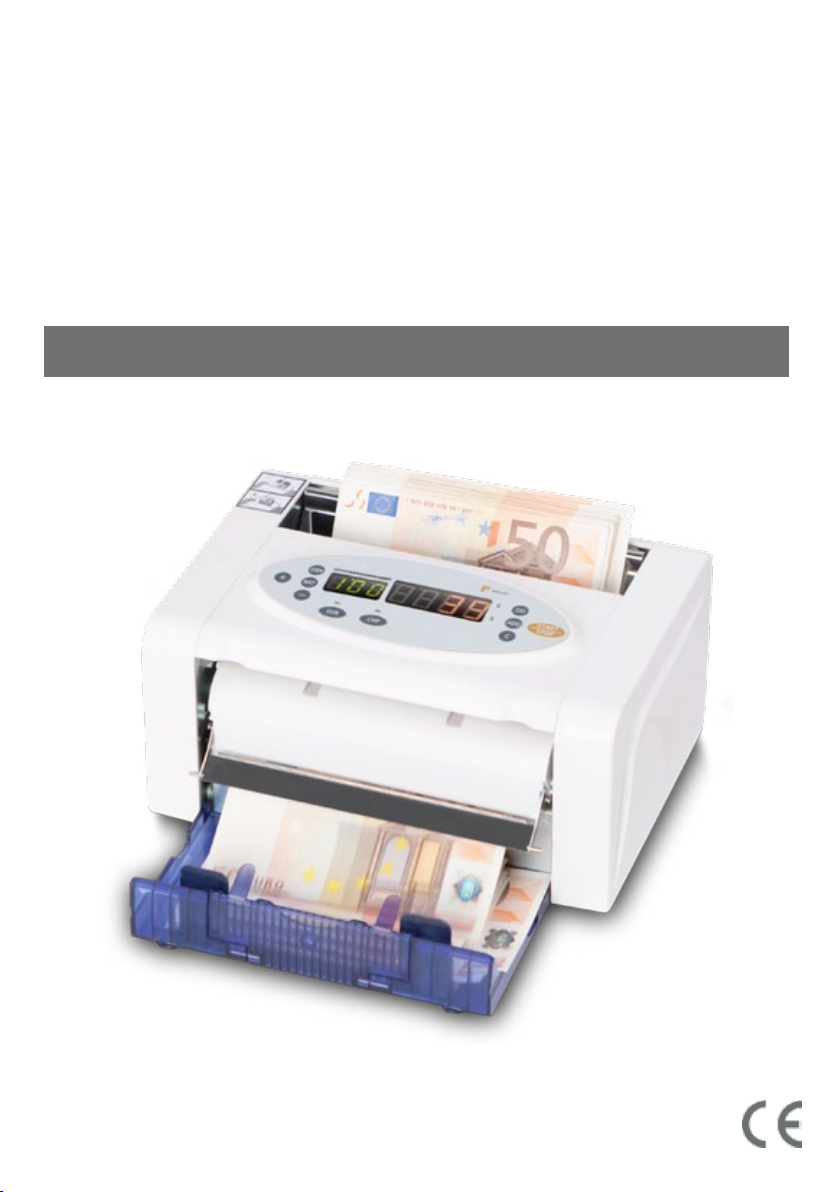
T 90 M
P
pecunia
______________________________________________________________
Mobiler Notenzähler / Portable Note Counter / Compteuse de billets mobile
mit Echtheitsprüfung / with counterfeit detection / avec détection de faux billets
Benutzerhandbuch / Operation Manual / Mode d’emploi
www.pecunia-cash.com
Page 2

Kundeninformation / Customer information
______________________________________________________________________
Unsere Benutzerhandbücher werden regelmäßig überarbeitet, da Weiterentwicklungen
und Erfahrungen unseren Kunden helfen sollen, das Arbeiten mit unseren Produkten noch
benutzerfreundlicher zu gestalten. Die aktuellste Version dieses Benutzerhandbuchs finden
Sie bei hbw cash solutions unter: 0049 / (0) 700 / 01 00 78 78* oder
www.pecunia-cash.com.
Es gilt die aktuellste Version.
Customer information
Our operation manuals are revised at regular intervals as further developments and
experiences shall help our customers to make using our products more and more
user-friendly. You can find the latest version of this manual at hbw cash solutions:
0049 / (0) 700 / 01 00 78 78* or www.pecunia-cash.com.
The latest version is valid.
Information pour nos clients
Nos modes d’emploi sont remanies régulièrement: Nos développements et nos expériences
doivent aider nos clients à façonner le travail avec nos produits entièrement agréable et
plus facilement applicable pour l’utilisateur. Vous pouvez bien demander la respectivement
dernière version à hbw cash solutions: +49 / (0) 700 / 01 00 78 78* ou
www.pecunia-cash.com.
La dernière version est valide.
Technischer Support / Technical support / Soutien technique
______________________________________________________________________
Telefon / Phone / Téléphone: +49 (0) 711 / 719 59 65
Telefax / Fax / Téléfax: +49 (0)7 11 / 34 55 95 27
Email / Émail: [email protected]
Internet: www.pecunia-cash.com
Herausgeber / Editor / Éditeur: hbw cash solutions GmbH
Januar 2010 Version 1.10
* 0,14 € / min. aus dem Festnetz der DTAG
Page 3

Inhaltsverzeichnis / Table of contents / Sommaire
______________________________________________________________________
______________________________________________________________________
Grundlagen
Was wurde geliefert?
Kurzbeschreibung
Hauptfunktionen
Selbsttest
Automatischer Zählstart
Zählmodi
Freier Zählmodus
Bündelmodus
Echtheitsprüfung (Euro)
Echtheitsprüfung (Zweitwährung / CHF)
Addition mehrerer Zählvorgänge
Wartung und Pflege
Fehlerbehebung
Fehlercodes
Fehler bei der Echtheitsprüfung
Technische Daten
Basic principles
Scope of delivery
Short description
Main functions
Self-test
Automatic start
Counting modes
........................................................................................................................................................................ 10
Free counting mode
Batch mode
Counterfeit detection (Euro)
Counterfeit detection (2
Addition of several results
Maintenance
Trouble shooting
Error codes
Errors caused by the counterfeit detection
Technical specification
Informations générales
Volume de livraison
Description brève
Fonctions principales
Système d’auto-diagnostique
Démarrage automatique
Modes de comptage
.................................................................................................................................................................. 13
Comptage libre
Comptage d’emballage
Détection de faux billets (Euro)
Détection de faux billets (autres monnaies / CHF)
Fonction d’addition
Maintenance
Dépannage
Codes d’erreurs
Erreurs à la détection de faux billets
Données techniques
Garantie und Gewährleistung
............................................................................................................................................................................... 5
................................................................................................................................................................... 5
........................................................................................................................................................................ 6
...................................................................................................................................................................... 7
.................................................................................................................................................................................... 7
..................................................................................................................................................................................... 7
................................................................................................................................................................................. 8
...................................................................................................................................................................................... 10
................................................................................................................................................................................11
............................................................................................................................................................................. 14
.............................................................................................................................................................. 7
...................................................................................................................................................... 7
............................................................................................................................................................ 7
................................................................................................................................................................ 7
................................................................................................................................................................ 7
....................................................................................................................................................................... 8
...................................................................................................................................................................... 8
.......................................................................................................................................................................... 5
......................................................................................................................................................................... 5
......................................................................................................................................................................... 9
....................................................................................................................................................................... 10
......................................................................................................................................................................... 10
............................................................................................................................................................ 10
....................................................................................................................................................... 10
nd
currency / CHF)
.......................................................................................................................................................... 10
........................................................................................................................................................................... 10
......................................................................................................................................................................11
............................................................................................................................................................12
............................................................................................................................................................ 5
..................................................................................................................................................................... 5
....................................................................................................................................................................... 12
.............................................................................................................................................................. 13
..................................................................................................................................................... 13
............................................................................................................................................................ 13
....................................................................................................................................................... 13
................................................................................................................................................... 13
................................................................................................................................................................... 13
........................................................................................................................................................................... 13
......................................................................................................................................................................... 14
................................................................................................................................................................14
...................................................................................................................................... 7
.................................................................................................................................................. 7
................................................................................................................................................... 8
................................................................................................................................................ 10
.................................................................................................................................. 10
..................................................................................................................................11
........................................................................................................................................... 13
....................................................................................................................... 13
........................................................................................................................................... 14
............................................................................................................................................... 15
Inhaltsverzeichnis
Page 4

Bevor Sie den Banknotenzähler T 90 M aufstellen oder in Betrieb nehmen ...
... beachten Sie bitte unbedingt die Anweisungen dieser Anleitung.
Der Gesetzgeber fordert, dass wir Ihnen wichtige Hinweise für Ihre Sicherheit geben und Sie darauf
hinweisen, wie Sie Schäden am Gerät und an anderem vermeiden.
Wenn Sie diese Anleitung nicht beachten, haftet hbw cash solutions nicht für Schäden, die daraus
entstehen.
Der Banknotenzähler T 90 M eignet sich nur für die Zählung bzw. Prüfung aktuell zugelassener Banknoten. Werden andere Währungen verarbeitet, wird das Ergebnis verfälscht.
Vor Reinigungsarbeiten (z. B. mit einem feuchten Tuch) ist in jedem Fall der Netzstecker zu ziehen!
Öffnen Sie nicht das Gehäuse. Durch Öffnen des Gehäuses und unsachgemäße Reparaturen können
Gefahren für die Benutzer entstehen.
Außerdem erlischt der Garantieanspruch.
Verwenden Sie niemals Staubsauger oder ähnliches zur Reinigung des Gerätes.
Lassen Sie keine Flüssigkeiten ins Innere der T 90 M eindringen, da sonst elektrische Schläge oder
Kurzschlüsse die Folge sein können.
Stellen Sie den Banknotenzähler auf eine waagrechte, ebene Fläche, so dass er fest und sicher steht.
Andernfalls kann es zu Problemen im Zählergebnis kommen.
Before setting up or using the banknote counter T 90 M ...
... please pay attention to the instructions in this manual. We are required by the law to give you
important advices for your security and to allude you how to avoid damages to the device and others.
If you disobey this manual hbw cash solutions shall not be liable for damages.
The banknote counter T 90 M is only suitable for counting current
permitted currencies. If other currencies are counted, the result can be falsified.
Before cleaning the device (with a wettish cloth e.g.) please be sure that the power plug is disconnected.
Do not open the machine. Hazards for the user can result if the chassis is opened and
improper repairs are done. Furthermore the warranty claim expires.
Please never use a vacuum cleaner (or similar products) for cleaning the device.
Be sure that no liquids attain to the interior of the machine. Electric shocks and short-circuits can be
the result.
Put the banknote counter on a level and planar surface, so that it is placed firm and safe
Otherwise problems refering the counting results can appear.
Avant la mise en service …
… suivez, s‘il vous plaît, absolument les instructions de ce mode d’emploi.
Le législateur exige que nous vous donnons des indications importantes pour votre sécurité. Respectez
les renseignements comme vous pouvez empêcher des dommages à l’appareil et à n’importe quoi.
Si vous ne prêtez pas attention à ce mode d’emploi, hbw cash solutions ne répondra pas des dommages.
La compteuse de billets T 90 M convient pour le comptage et le contrôle de billets actuellement
valables. En élaborant d’autres monnaies, le résultat sera altéré.
Avant des travails de nettoyage (par exemple avec un tissu moite) il faut débrancher la fiche
d’alimentation!
N’ouvrez pas le coffret. En ouvrant le coffret et par réparations inappropriées vous courez des risques
périlleux. En outre, vous perdez vos droits relatifs sur la garantie.
Ne laissez aucun liquide dans l‘intérieur de l‘appareil, parce que les coups d‘habitude électriques ou
les court-circuits peuvent être le résultat.
Posez la compteuse de billets sur une superficie horizontale et plate. Assurez, que l’appareil soit dans
une position arrêtée et sécuritaire. Sinon, des problèmes peuvent apparaître.
La hbw cash solutions GmbH n’est pas responsable pour le comptage et le contrôle de billets.
Page 5
Grundlagen / Basic principles / Informations générales
______________________________________________________________________
Was wurde geliefert?
What has been delivered?
Volume de livraison
Überprüfen Sie den Lieferumfang auf Vollständigkeit:
Please check the scope of delivery for completeness:
Vérifiez le volume de livraison sur l’intégralité:
· Mobiler Notenzähler T 90 M
· Portable Banknote counter T 90 M
· Compteuse de billets mobile T 90 M
· Netzadapter (230 V)
· Adaptor (230 V)
· Adaptateur (230 V)
· Netzadapter (12 V, Anschluss am Zigarettenanzünder)
· Car adaptor (12 V)
· Adaptateur (12 V, pour l‘allume-cigare)
· Akku
· Rechargeable Battery
· Accumulateur
· Transporttasche
· Portable Bag
· Poche de transport
· Benutzerhandbuch
· Operation manual
· Mode d’emploi
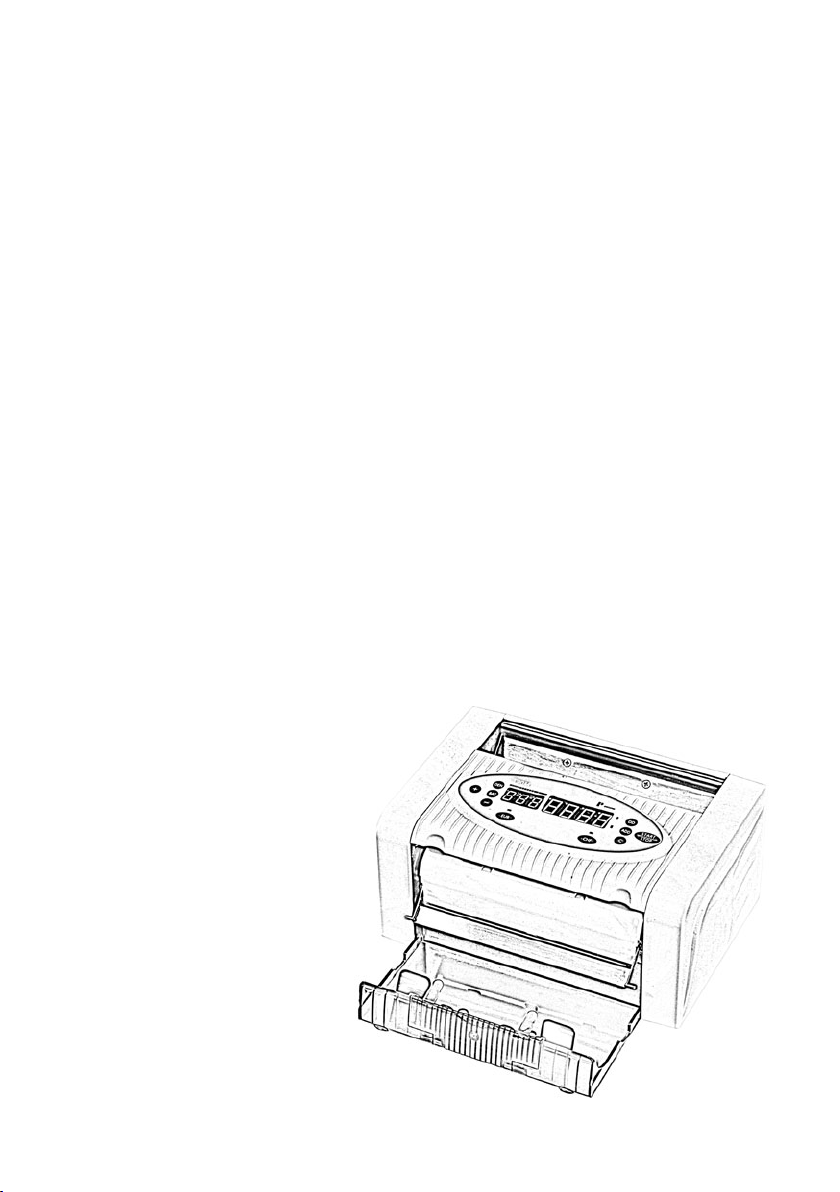
Banknotenaufnahme __________________________________________
Banknote hopper
Bac d’alimentation
Bedienfeld und Hauptdisplay ______________________________________
Display and key panel
Clavier et afficheur principal
Banknotenausgabe _______________________________
Banknote stacker
Bac de réception
Grundlagen / Basic principles / Informations générales 5
Page 6
Kurzbeschreibung
______________________________________________________________________
Kurzbeschreibung
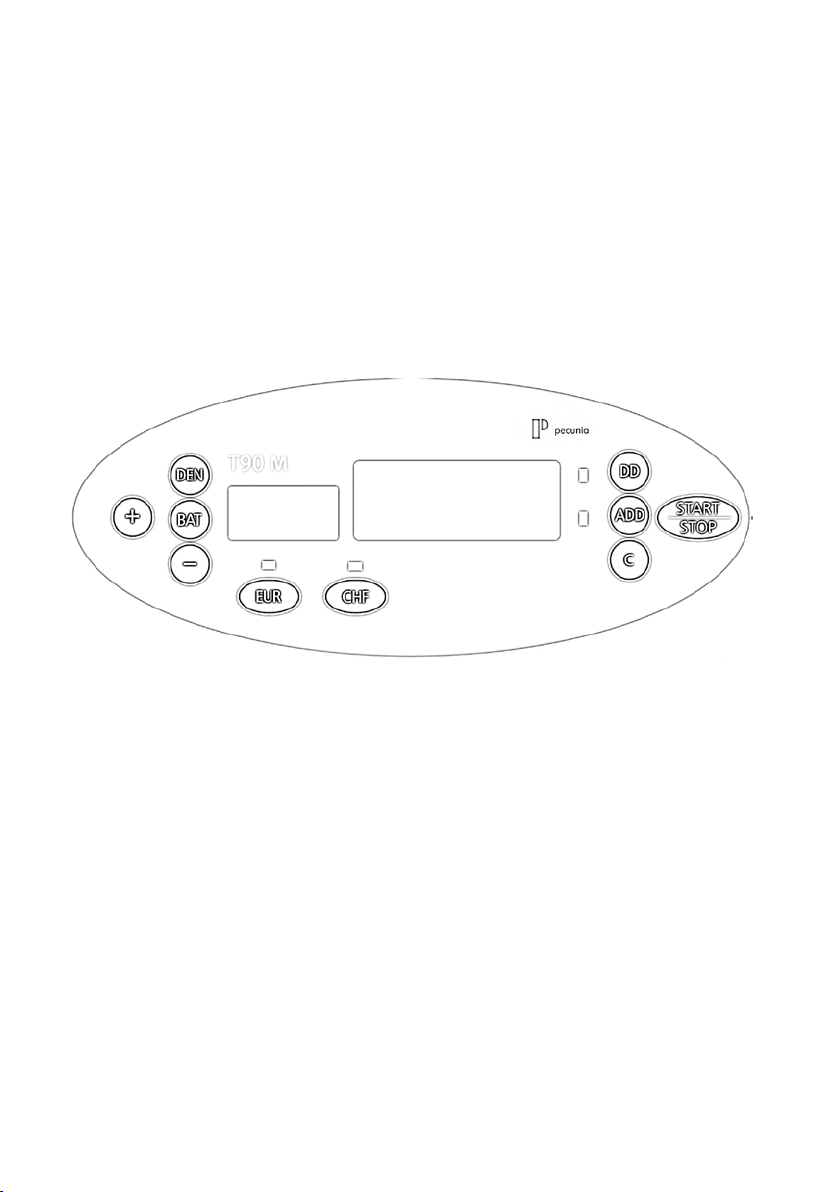
Am Bedienfeld können Sie den gewünschten Zählmodus und die
Echtheitsprüfung einstellen.
Im Display werden dargestellt:
· alle Meldungen (z. B. Fehlercodes)
· alle aktiven Funktionen
· das Zählergebnis
Abbildung PC 800 E
Taste “BAT“ Aktivieren / Deaktivieren der Bündelzählung,
Einstellen üblicher Bündelgrößen (5/10/25/50/10)
Taste “+“ Erhöhen der Bündelgröße um 1
Taste “-“ Verringern der Bündelgröße um 1
Taste “DEN“ Aktivieren / Feineinstellen der Doppelscheinerkennung
Taste “DD“ Einstellen der Formatprüfung (Erkennung abweichender Formate)
Taste “ADD“ Aktivieren / Deaktivieren der Additionsfunktion
Taste “C“ Löschen des aktuellen Zählergebnisses / Löschen der Bündelgröße
Taste “EUR“ Aktivieren der Echtheitsprüfung für Euro
Taste “CHF“ Aktivieren der Echtheitsprüfung für Zweitwährung
(hier: Schweizer Franken)
Taste “START/STOP“ Fortsetzen / Unterbrechen eines Zählvorgangs
6
Page 7

Hauptfunktionen
______________________________________________________________________
Selbsttest
Schalten Sie das Gerät am Hauptschalter auf der Rückseite ein.
Wurden keine Funktionsfehler erkannt, erscheint im Hauptdisplay “0“ und im Bündeldisplay “100“.
Ist der Fehler „E2“ im Display zu lesen, ist vermutlich die Banknotenausgabe (blaue Klappe auf der Vorderseite)
noch geschlossen. Öffnen Sie diese um das Gerät in betriebsbereiten Zustand zu bringen.
Automatischer Zählstart
Das Gerät beginnt automatisch zu zählen, sobald sich Scheine im Aufnahmeschacht befinden.
Zählmodi
Nach dem Einschalten ist automatisch der Bündelmodus (Bündelgröße “100“) aktiviert.
Freier Zählmodus
Drücken Sie “C“ um in den freien Zählmodus zu gelangen.
Das Gerät zählt alle Banknoten im Aufnahmeschacht.
Bündelmodus
Die Bündelgröße kann durch mehrfaches Betätigen der Taste “BAT“ in übliche Größen eingestellt
werden (5/10/25/50/100). Zur Einstellung einer Bündelgröße außerhalb der Standardgrößen
nutzen Sie die Tasten “+“ oder “-“.
Nach Erreichen der eingestellten Bündelgröße stoppt das Gerät den Zählvorgang automatisch.
Echtheitsprüfung (Euro)
Die T 90 M verfügt über vier Prüfmethoden (UV, MG, IR, MT). Drücken Sie die Taste “EUR“ um die
Echtheitsprüfung für Euronoten zu aktivieren. Beim Erkennen falschgeldverdächtiger Noten wird der
Zählvorgang unterbrochen und ein entsprechender Warnhinweis erscheint (siehe Fehlercodes, S. 8).
Echtheitsprüfung Zweitwährung (hier: Schweizer Franken)
Drücken Sie die Taste “CHF“ (Bezeichnung kann bei anderen Währungen abweichen) um die Echtheitsprüfung
für die Zweitwährung (hier: Schweizer Franken) zu aktivieren.
Beim Erkennen falschgeldverdächtiger Noten wird der Zählvorgang unterbrochen und ein entsprechender
Warnhinweis erscheint (siehe Fehlercodes, S. 8).
Addition mehrerer Zählvorgänge (ADD)
Um mehrere Zählvorgänge automatisch zusammenzählen zu lassen, drücken Sie die Taste “ADD“.
Wartung und Pflege
______________________________________________________________________
Da das Gerät einem hohen Verschleiß ausgesetzt ist, empfiehlt es sich das Gerät professionell reinigen
und warten zu lassen. hbw cash solutions bietet diese Serviceleistungen an. Wenden Sie sich einfach
an den technischen Support.
Da die Funktionsweise der Maschine auf optischen Sensoren basiert, darf das Gerät nicht direkter
Sonneneinstrahlung ausgesetzt werden.
Für die Aussortierung von falschgeldverdächtigen Banknoten sowie die Zählung von Banknoten kann
keine Haftung übernommen werden.
Das Zuführen der Banknoten geschieht mit einem Rollen - Reibungs - System. Aus diesem Grund dürfen Nadeln,
Büroklammern, Haare oder Kleinteile jeglicher Art nicht ins Innere der Maschine gelangen.
Vor Reinigungsarbeiten an der Maschine ist die Stromzufuhr in jedem Fall unbedingt zu unterbrechen!
Reinigen Sie das Gerät ausschließlich mit einem trockenen Pinsel, dem Druckluftreiniger* B8 oder dem
Spezialreiniger R 605 von hbw cash solutions.
(alternativ: Kompressor mit trockener / ölfreier Luft und Ausblaspistole. max. 4 bar)
Benutzen Sie niemals chemische Reinigungsmittel in direkter Verbindung mit dem Gerät.
Unsachgemäße Handhabung des Geräts führt zum Garantieverlust.
Hauptfunktionen / Wartung und Pflege 7
Page 8

Fehlerbehebung
______________________________________________________________________
Fehlercodes
Wenn ein Fehler auftritt, ertönt ein Warnsignal und der Zählvorgang wird unterbrochen. Es erscheint nun ein
Fehlercode auf dem Display. Mit Hilfe der folgenden Tabelle können Sie die Fehlerursache erkennen und den
Fehler beseitigen.
Fehler-
Fehler Mögl. Ursache Lösung
code
CF0
CF1
CF2
CF3
CF4
ED Doppelt
DD Größenabweichung
EH
EJ, EC, EF Notenstau Banknoten sind im Gerät gestaut.
E0, E1, E2
Falschgeldverdächtige
Banknote
Falschgeldverdächtige
Banknote (UV)
Falschgeldverdächtige
Banknote (MG)
Falschgeldverdächtige
Banknote (MT)
Falschgeldverdächtige
Banknote (IR)
Beschädigte
Banknote
Fehlerhaftes oder defektes
Bauteil
Mehrere Sicherheitsmerkmale wurden
als fehlerhaft erkannt
(falschgeldverdächtig!).
Ultraviolettmerkmal wurde als fehlerhaft erkannt
(falschgeldverdächtig!).
Magnetische Merkmale wurden als
fehlerhaft erkannt
(falschgeldverdächtig!).
Sicherheitsfaden wurde als fehlerhaft
erkannt (falschgeldverdächtig!).
Infrarotmerkmal wurde
als fehlerhaft erkannt
(falschgeldverdächtig!).
Es wurden mindestens zwei Banknoten
auf einmal erkannt.
Eine Banknote mit abweichender
Größe wurde erkannt.
Beschädigte (zerrissene) Banknote
wurde erkannt.
xxx
Entfernen Sie die als verdächtig erkannte
Banknote und zählen Sie alle Scheine erneut
Entfernen Sie alle Banknoten aus dem Ausgabeschacht
und zählen Sie alle Scheine erneut.
Überprüfen Sie die Banknote auf Unregelmäßigkeiten
und zählen Sie alle Noten erneut. Justieren sie ggf. die
Einzugseinstellschraube.
Überprüfen Sie die Banknote auf Unregelmäßigkeiten
und zählen Sie alle Noten erneut.
Entfernen Sie die gestauten Noten und zählen Sie alle
Scheine erneut.
Wenden Sie sich an den technischen Support von hbw
cash solutions.
Fehler bei der Echtheitsprüfung
Hinweise zu ihrer Vermeidung:
· Ist die UV - Röhre ohne Funktion (erkennbar bei niedrigem Umgebungslicht), ersetzen Sie die UV - Röhre oder
wenden Sie sich an den technischen Support von hbw cash solutions.
· Die Sensoren müssen in regelmäßigen Abständen gereinigt bzw. gewartet werden, um Fehlfunktionen der
Sensorik zu vermeiden. Reinigen Sie die Sensoren nur mit Alkohol (Spiritus) und einem Baumwolltuch oder
wenden Sie sich an den technischen Support von hbw cash solutions.
Technische Daten
______________________________________________________________________
Umgebungstemperatur, Rel. Luftfeuchtigkeit 0 - 40 °C, 40 - 90 %
Kapazität der Banknotenaufnahme ca. 150 Banknoten
Kapazität der Banknotenausgabe ca. 150 Banknoten
Anzeigedisplays 4 - stelliges LED - Display, 3 - stelliges LED - Display
Zählgeschwindigkeit ca. 800 Banknoten pro Minute
Stromzufuhr Netzadapter (12 V)
Leistungsaufnahme ca. 20 W
Größe 250 x 125 x 168 (mm)
Gewicht 2,80 kg
8
Technische Änderungen vorbehalten.
Page 9
Short description
______________________________________________________________________
Short description
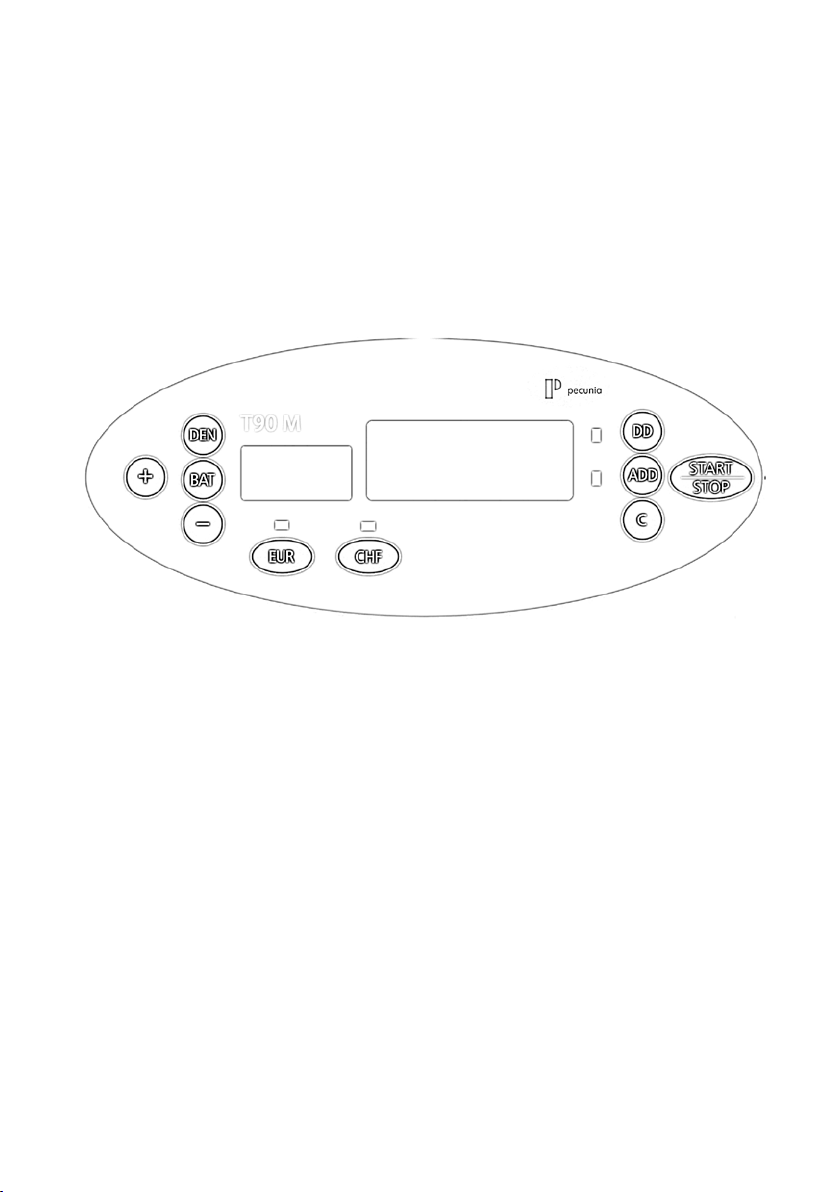
On the control panel you can adjust the counting mode and the counterfeit detection.
On the display you can see:
· all messages (error codes, e.g.)
· all active functions
· the counting results
Key “BAT“ Activate / Deactivate the batch function,
presetting default batches (5/10/25/50/10)
Key “+“ Increase the batch number (+1)
Key “-“ To decrease the batch number (-1)
Key “DEN“ Aktivate / Adjust the Double Note Detection
Key “DD“ Adjust the Size Detection (Recognition of devergent notes)
Key “ADD“ To activate / deactivate the addition mode.
Key “C“ Delete the current result / Reset the batch preset
Key “EUR“ Activate the Counterfeit Detection (EURO)
Key “CHF“ Activate the Counterfeit Detection (second currency)
(here: Swiss Franc)
Key “START/STOP“ Re-start / Stop an operation
Short description 9
Page 10

Main functions
______________________________________________________________________
Self-test
Switch on the machine by pressing the power switch on the back.
If no defects are recognised the following messages will appear: main display “0“, batch display “100“
Automatic start
The banknote counter will start counting as soon as banknotes are put onto the hopper.
Counting modes
By default the T 90 M starts in the batch mode (batch “100“).
Free counting mode
Press “C“ to enter the free counting mode.
All banknotes on the hopper will be counted.
Batch mode
Press “BAT“to enter the batch mode (several times for adjusting common presets).
To set batches apart from the presets use the “+“/ “-“ keys.
Reaching the set batches the machine will stop counting.
Counterfeit Detection (EURO)
Four types of counterfeit detection are available (UV, MG, IR, MT). Press “EUR“ to activate the euro counterfeit
detection. If suspected notes are recognised the machine will stop and an appropriate message will appear
(see page 11, “error codes“)
Counterfeit Detection of a second currency (here: Swiss Franc)
Drücken Sie die Taste “CHF“ (Bezeichnung kann bei anderen Währungen abweichen) um die Echtheitsprüfung
für die Zweitwährung (hier: Schweizer Franken) zu aktivieren.
Press “CHF“ to activate the euro counterfeit detection (key label may differ with other currencies). If suspected
notes are recognised the machine will stop and an appropriate message will appear
(see page 11, “error codes“)
Adding several results (ADD)
To add several counting results press “ADD“ to activate the addition function.
Maintenance
______________________________________________________________________
As the machine is exposed to wear it is advisable to clean the device professionally. hbw cash solutions
offers services for that. Feel free to contact the technical support of hbw cash solutions.
As the operating mode of the machine is based upon sensor technology,
do not expose it to direct solar radiation.
hbw cash solutions can take no liability for counting and sorting out different or counterfeit notes, as well as for
the value counting.
The banknotes are feeded by a roller friction system. Therefor no nails, paper clips, hairs and other small parts
should reach the interior of the machine.
Before cleaning the machine the power supply has to be disconnected unconditionally!
Clean the device exclusively with a dry brush, the compressed air* cleaner B8 or the special cleaner R 605 of hbw
cash solutions.
(*alternative: Compressor with dry / oil free air. Max. 4 bar)
Please never clean the device with chemical cleaner.
10
Page 11
Trouble shooting
______________________________________________________________________
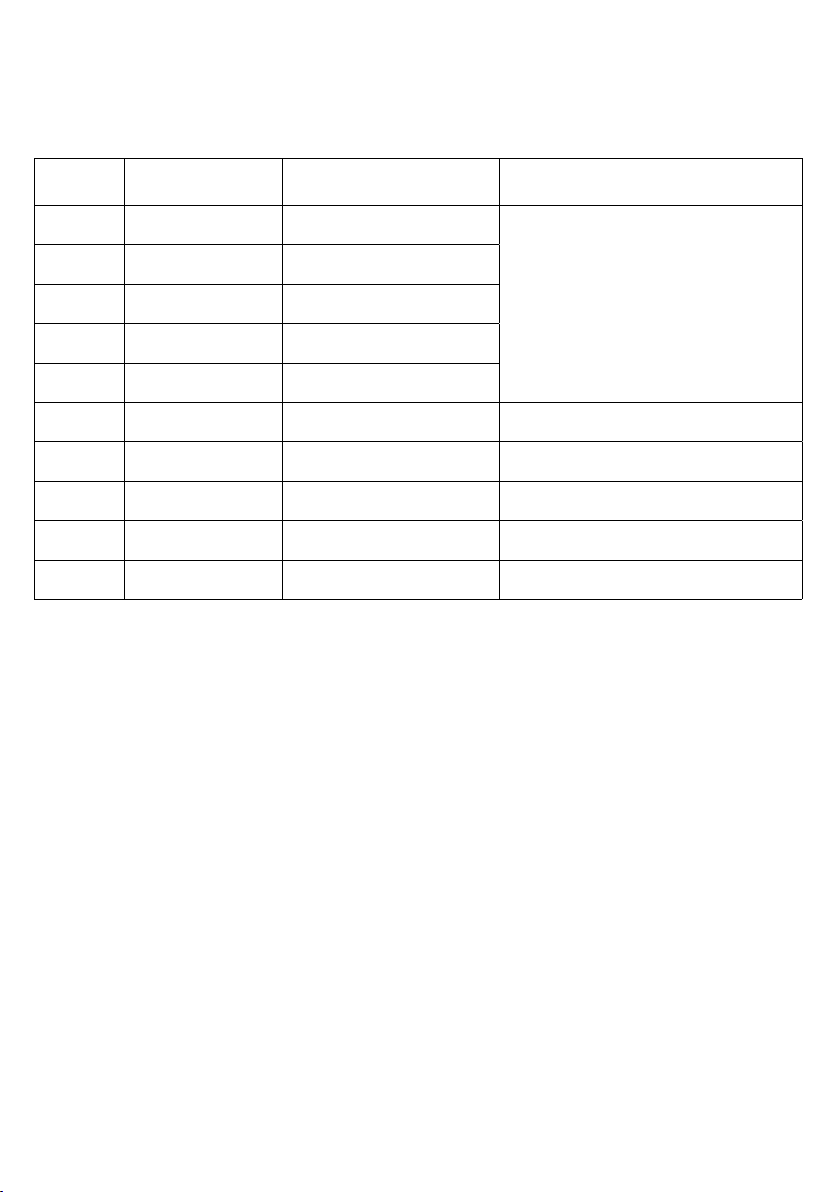
Error codes
If an error occurs, a warning signal sounds and the machine will stop.
You can see an error code on the display. The following table can help you to understand / solve the problem
Fehler-
Fehler Mögl. Ursache Lösung
code
CF0 Suspected note
CF1 Suspected note (UV)
CF2 Suspected note (MG)
CF3 Suspected note (MT)
CF4 Suspected note (IR)
ED Double notes Double note have been detected.
DD Variance of note size Divergent note size was detected.
EH Damaged note Damaged notes have been detected.
EJ, EC, EF Jam Note is jammed
E0, E1, E2 Damaged component xxx
More than one security feature has not
been verified (suspected note!)
The ultraviolet feature has not been
verified (suspected note!).
Magnetic features have not been
verified (suspected note!).
The security thread seems to be
defective (suspected note!).
The infrared feature has not been
verified (suspected note!).
Remove the concerned banknote and count all notes
again.
Remove all banknotes from the stacker and count all
notes again. You may control the adjusting screw.
Remove all banknotes from the stacker and count all
notes again. You may control the adjusting screw.
Check the concerned note and count all the notes
again.
Remove the concerned note and count all the notes
again.
Please appeal to the technical support of hbw cash
solutions.
Errors caused by the counterfeit detection
Advices to avoid errors:
· If the UV - bulb is unoperable (discernable at dark ambient light) replace the bulb or appeal to the technical
service of hbw cash solutions.
· The sensors have to be cleaned in regular intervalls to avoid disfunctions of the sensor technology. Clean the
sensors only with ethyl alcohol and cotton cloths or appeal to the technical support of hbw cash solutions.
Technical specifications
______________________________________________________________________
Ambient temperature 0 - 40 °C / 0 - 104 °F
Relative humidity 40 - 90 %
Hopper capacity approx. 150 notes
Stacker capacity approx. 150 notes
Banknote size min. 50 x 115 (mm)
max. 85 x 185 (mm)
Display 4 - digit LED - Display
3 - digit LED - Display
Counting speed approx. 800 notes / minute
Power supply Adaptor
Power consumption approx. 20 W
Dimensions (w x h x l) 250 x 125 x 168 (mm)
Weight 2,80 kg
Technical specification is subject to change without notice.
Trouble shooting 11
Page 12
Description brève
______________________________________________________________________
Description brève
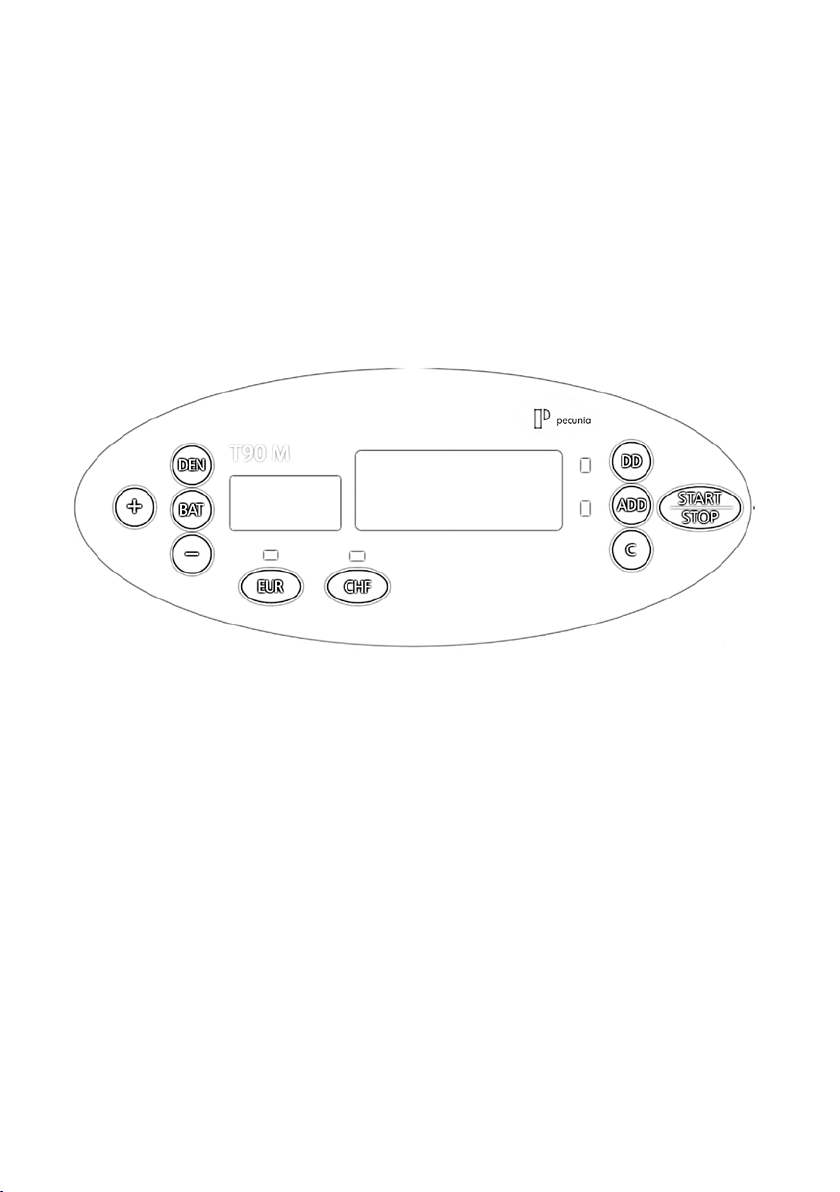
En usage le clavier numérique vous pouvez ajuster le mode de comptage et les fonctions de
détection de faux billets.
L’afficheur visualit:
· Toutes les informations de surveillance (par exemple les codes d’erreurs)
· Toutes les fonctions actives
· Tous les résultats du comptage
Bouton « BAT » Bouton pour la présélection du comptage avec mise en lots.
Ici, vous réglez le balluchon désiré.
Bouton « +/- » Ici, vous pouvez augmenter ou diminuer le número
du balluchon.
Bouton « DEN » Activation / Désactivation de la fonction d‘identification de
billets double.
Bouton « DD » Activation / Désactivation de la fonction d‘identification de
format de billets.
Bouton « ADD » Afin d‘activer le fonction d‘addition, appuyez-vous ce bouton.
Bouton « C » Supprimez le résultat indiqué / la fonction de mise en lots.
Bouton « EUR » Activation de la détection de faux billets (pour Euro)
Bouton « CHF » Activation de la détection de faux billets (ici: pour CHF)
Bouton « START/STOP » Démarrage / Arrêt d‘un processus de comptage.
12
Page 13

Fonctions principales
______________________________________________________________________
Système d’auto - diagnostique
Activez-vous l’appareil. Après deux secondes, le chiffre „100“ sera visualisé sur l’afficheur d’emballage et le
chiffre “0” sur l’afficheur d’indication.
Démarrage / Arrêt automatique
L’appareil se met automatiquement à compter, aussitôt qu’il y a des billets dans le bac d’alimentation.
Modes de comptage
Mode du comptage libre (Comptage de nombre de billets)
L’appareil compte tous les billets dans le bac d’alimentation.
Mode du comptage de mise en lots
Suite à l’action du bouton pour la présélection du balluchon, vous pouvez faire compter 10, 20, 25, 50
ou 100 billets de banques. L’afficheur de la présélection indique le numéro de la présélection. Pour
désactiver le fonction d’emballage, appuyez-vous le bouton „BAT” tant de fois que l’afficheur ne
visualise plus rien. Pour compter des balluchons, qui ne conviennent pas aux balluchons standards
(10, 20, 25, 50 100), appuyez-vous les boulons „ + / - ”. Ainsi, l’appareil compte automatiquement
le balluchon présélectionné. Après la reprise du balluchon, le prochain balluchon sera être compté
automatiquement.
Détection de faux billets (pour Euro)
Pour activer la détection de faux billets pour Euro (UV / MG / IR / MT), appuyez-vous sur la touche „EUR”. À
l’identification d’un billet douteux, un signal d’alarme retente et la machine arrète le processus de comptage.
Alors, enlevez-vous le billet, qui a été identifié douteux, et faites compter tous les autres billets de nouveau.
Détection de faux billets pour autres monnaies (ici: CHF)
Pour activer la détection de faux billets pour CHF (ou pour autres monnaies), appuyez-vous sur la touche „CHF”
(dépend de la monnaie). À l’identification d’un billet douteux, un signal d’alarme retente et la machine arrète le
processus de comptage. Alors, enlevez-vous le billet, qui a été identifié douteux, et faites compter tous les autres
billets de nouveau.
Fonction d’addition (Addition de plusieurs processus de comptage)
Pour une addition des résultats de plusieurs processus de comptage, appuyez-vous sur la touche „ADD”.
Cela n’est possible que dans le mode du comptage libre. (Pour activer le mode du comptage libre:
regardez Modes de comptage)
Maintenance
______________________________________________________________________
En vertu d’une usure mécanique, hbw cash solutions recommande un nettoyage et maintenance
professionnel. hbw cash solutions offre des services diverses. Contactez, s‘il vous plaît, le soutien
technique de hbw cash solutions. Le mode de fonctionnement de cet appareil fonde sur des capteurs
complexes. N’exposez jamais la compteuse de billets à l’irradiation directe du soleil. hbw cash solutions n’est pas
responsable pour le comptage et le contrôle de billets ou de billets douteux. L’amenée des billets se produit avec
un système de roulement et friction. À cause de cela, des aiguilles, des trombones, des cheveux et d’autres petite
pièces ne doivent pas accéder l’intérieur de l’appareil.
Inconditionellement, avant de travaux de nettoyage – interrompez l’alimentation électrique!
Nettoyez l’appareil exclusivement avec un pinceau aride, un purificateur à l’air comprimé B8 ou avec
le détergent spécial R605 de hbw cash solutions. (alternativement: compresseur avec d’air aride / non-oléique et
pistolet de soufflage. Max. 4 Bar) N’utilisez jamais des détergents chimiques en contact directe avec l’appareil.
Chaque traitement d’appareil inapproprié cause la perte de la garantie.
Fonctions principales 13
Page 14
Dépannage
______________________________________________________________________
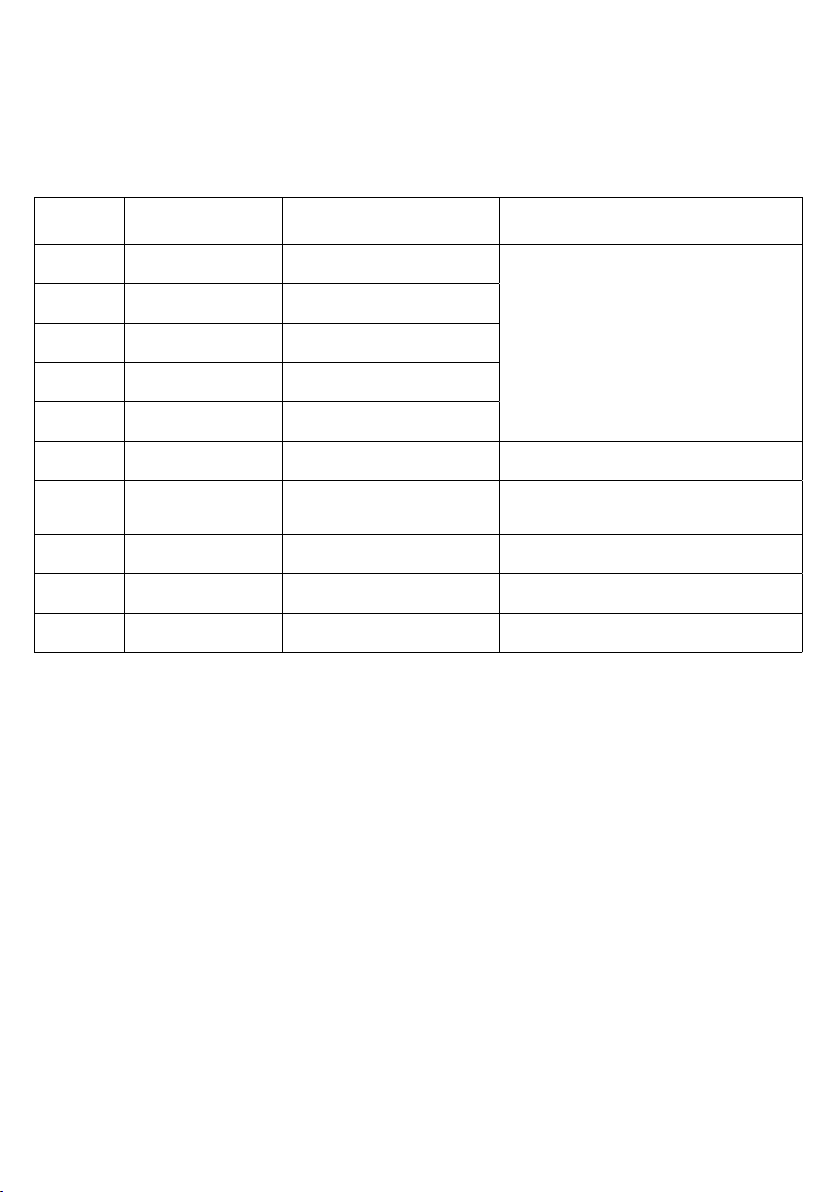
Codes d’erreurs
En cas d’un erreur, un signal d’alarme retente et le processus de comptage sera être interrompu.
Alors, un code d’erreur apparaît sur l’afficheur. À l’aide de la table suivante, vous pouvez identifier la cause
d’erreur. Ainsi, vous êtes a même de remédier la cause d’erreur.
Code
Erreur Cause possible Solution
d’erreur
CF0
CF1
CF2
CF3
CF4
ED Double / Blocage
DD Déviation de format
EH Billet abîmé Un billet abîmé (déchiré) a été identifié.
EJ, EC, EF Blocage
E0, E1, E2
Billet douteux par plusieurs
fonctions détectrices
Billet douteux par détection
ultraviolette (UV)
Billet douteux par détection
magnétique (MG)
Billet douteux par détection
magnétique (MT)
Billet douteux par détection
infrarouge (IR)
Élément défectueux ou
défaut
Un billet anormal a été identifié.
Un billet anormal a été identifié.
Un billet anormal a été identifié.
Un billet anormal a été identifié.
Un billet anormal a été identifié.
Au moins deux billets ont été identifiés
à la fois.
Un billet de format anormal a été
identifié.
Il y a plusieurs billets bloqués dans la
machine.
xxx Contactez le soutien technique de hbw cash solutions.
Enlevez le billet douteux et comptez tous les autres
billets de nouveau.
Enlevez tous les billets de banques et comptez tous les
billets de nouveau.
Enlevez le billet déviant et comptez tous autres es billets
de nouveau. Ajustez-vous le boulon pour l’ajustage du
rentrage, le cas échéant.
Enlevez le billet abîmé et comptez tous les autres billets
de nouveau.
Enlevez tous les billets de banques bloqués et comptez
tous les billets de nouveau.
Erreurs à la vérification d’authenticité
Indications pour l’évitement d’erreurs à la vérification d’authenticité:
· Si le tube ultraviolet est hors de service (découvrable par une lumière d’entourage faible), renouvelez le tube
ultraviolet ou contactez le soutien technique de hbw cash solutions.
· Les senseurs doivent être nettoyés et entretenus régulièrement pour éviter des erreurs. Nettoyez les senseurs
exclusivement avec un tissu cotonnier et alcool ou contactez le soutien technique de hbw cash solutions.
Données techniques
______________________________________________________________________
Température de l’air ambiant 0 - 40 °C
Humidité atmosphérique relative 40 - 90 %
Capacité du bac d’alimentation environ 150 billets
Capacité du bac de réception environ 150 billets
Afficheur 1 display-unit LED à 4 digits et
1 display-unit LED à 3 digits
Vitesse de comptage environ 800 billets par minute
Alimentation électrique AC 230 V / 50 Hz ou adaptateur pour réseau 12 V
Consommation environ 20 W
Dimensions 250 (L) x 168 (l) x 125 (H) (mm)
Poids 2,80 kg
Sous réserve de modifications des données techniques.
14
Page 15

Gewährleistungsregelungen
______________________________________________________________________
hbw cash solutions bietet eine Gewährleistung auf ihre Geräte von 24 Monaten. Diese Festlegung entspricht den
gesetzlichen Garantie- und Gewährleistungsregelungen Deutschlands.
Gewährleistungsbedingungen
· Neugeräte und deren Komponenten, die aufgrund von Fabrikationsfehlern und/oder Materialfehlern inner-
halb von 24 Monaten ab Kauf einen Defekt aufweisen, werden von hbw cash solutions nach eigener Wahl
gegen ein dem Stand der Technik entsprechendes Gerät ausgetauscht oder repariert. Für Verschleißteile (z. B.
Einzugsrollen o. ä.) gilt diese Haltbarkeitsgewährleistung nicht.
· Diese Gewährleistung gilt nicht, wenn der Defekt des Geräts auf unsachgemäße Behandlung und/oder
Nichtbeachtung des Benutzerhandbuchs zurückzuführen ist.
· Als Gewährleistungsnachweis gilt der Kaufbeleg bzw. die Rechnung, mit Kaufdatum. Gewährleistungs ansprüche sind innerhalb von zwei Monaten nach Kenntnis des Gewährleistungsfalls geltend zu machen.
· Ersetzte Geräte bzw. deren Komponenten, die im Rahmen des Austauschs an hbw cash solutions zurück gesandt werden werden, gehen in das Eigentum von hbw cash solutions über.
· Die Gewährleistung gilt nur für innerhalb der Europäischen Union erworbene Neugeräte.
Gewährleistungsgeberin ist die hbw cash solutions GmbH, Junkersstraße 66, 73249 Wernau
(Neckar), Deutschland.
· Für hbw cash solutions Originalteile, die in Gewährleistungsfällen verwendet werden, gilt im Falle des Einbaus in
ein hbw cash solutions Produkt nur die verbleibende Gewährleistungsdauer des Geräts.
· Soweit kein Gewährleistungsfall vorliegt, behält sich hbw cash solutions vor, dem Kunden den Austausch oder die
Reparatur in Rechnung zu stellen.
· Weitergehende oder andere Ansprüche als die o. g. sind ausgeschlossen.
Im Servicefall wenden Sie sich bitte an den technischen Support von hbw cash solutions unter der
Telefonnummer 07 11 / 6 56 85 87.
Vorgehen im Gewährleistungsfall
Sollte Ihr hbw cash solutions Produkt wider Erwarten einen Fehler aufweisen, wenden Sie sich bitte zuerst an den
technischen Support von hbw cash solutions. Unsere Mitarbeiter werden Ihnen dabei helfen, Defekte und
Fehlfunktionen zu diagnostizieren und möglicherweise am Telefon zu beheben.
Die Kontaktmöglichkeiten des technischen Supports finden Sie am Anfang dieses Benutzerhandbuchs. Bitte halten
Sie beim Anruf stets folgende Informationen bereit:
· Ihren Namen, Ihre Adresse, Ihre Postleitzahl und eine Telefonnummer, unter der Sie erreichbar sind, die
Modellbezeichnung und die Seriennummer des Geräts (am Gerät abzulesen).
· Datum und Ort, an dem Sie das Produkt gekauft haben
Gewährleistung 15
Page 16
_____________________________
pecunia
designed in Germany
89/336 EWG
73/23 EWG
© 2010 hbw cash solutions.
All rights reserved.
www.pecunia-cash.com
 Loading...