

Page 1
BT 500
Benutzerhandbuch
Operation manual
Page 2

BT 500 SERIES
Kundeninformation
Kontaktinformation:
hbw cash solutions GmbH
Jurastraße 1
73119 Zell unter Aichelberg
Tel.: +49 (0) 71 64 / 800 90 10
Fax: +49 (0) 71 64 / 800 90 11
Web: www.pecunia-cash.com
E-Mail: [email protected]
Kundeninformation
Unsere Benutzerhandbücher werden regelmäßig überarbeitet, da
Weiterentwicklungen und Erfahrungen unseren Kunden helfen sollen, das
Arbeiten mit unseren Produkten noch benutzerfreundlicher zu gestalten. Die
aktuellste Version dieses Benutzerhandbuchs finden Sie bei hbw cash solutions
unter:
+49 (0) 71 64 / 800 90 10
oder
www.pecunia-cash.com
Es gilt die aktuellste Version!
Wichtiger Hinweis
Bitte beachten Sie, dass das Gerät keiner Sonneneinstrahlung oder
unverhältnismäßigen Stromquellen ausgesetzt ist. Achten Sie unbedingt auf
korrektes Einlegen der Banknoten (siehe „Inbetriebnahme“). Beachten Sie
außerdem die Einhaltung der Wartungs- und Reinigungsintervalle.
Grundlagen ....................................................................................................................................................................4-5
- Was wurde geliefert?
- Infomeldungen
- Inbetriebnahme
- Banknoten richtig einlegen
Hauptfunktionen...........................................................................................................................................................6-7
- Zählmodi / Funktionen
- Vorderseite / Rückseite / Bedienfeld / Display
Technische Daten ..............................................................................................................................................................8
- Technische Daten
Wichtige Informationen ..................................................................................................................................................9
- Reinigung
- Wartung
- Garantie
- Umweltschutz
Page 3
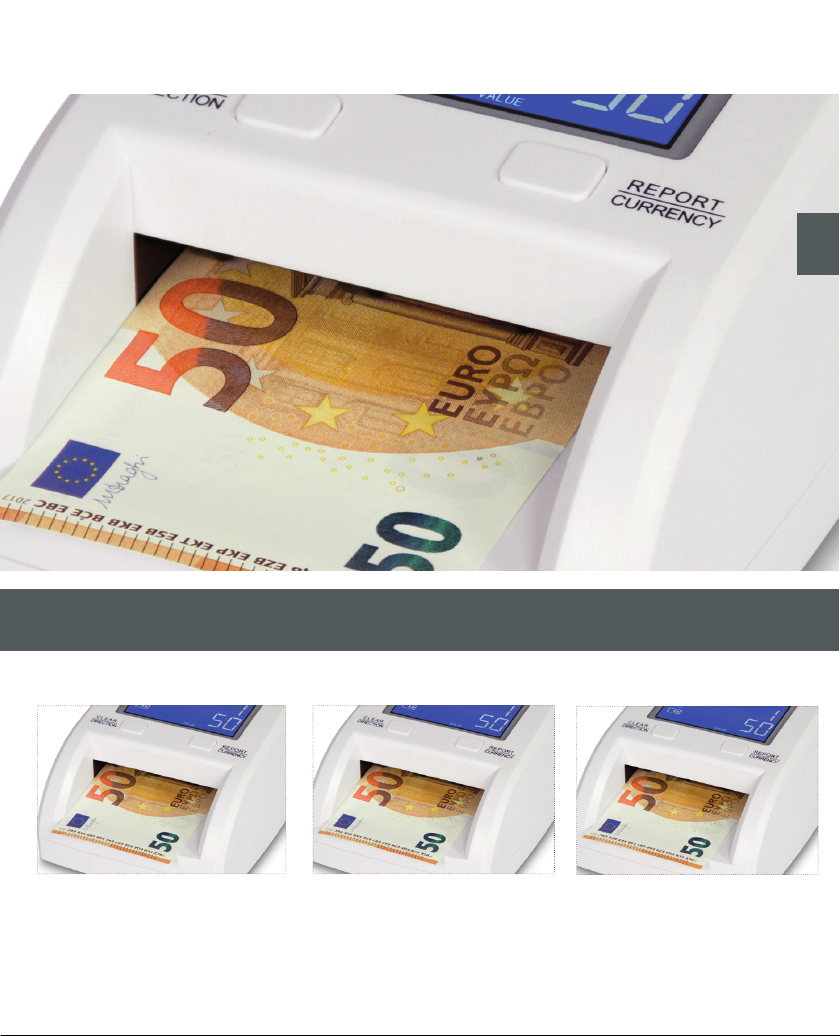
Modelle
de
BT 500
Elektronisches Prüfgerät für verschiedenste Währungen.
BT 500 updatefähig BT 500 mobil
Elektronisches Prüfgerät für verschiedenste Währungen mit
Updatefähigkeit.
Elektronisches Prüfgerät für verschiedenste Währungen mit Updatefähigkeit und Akku.
Page 4
04
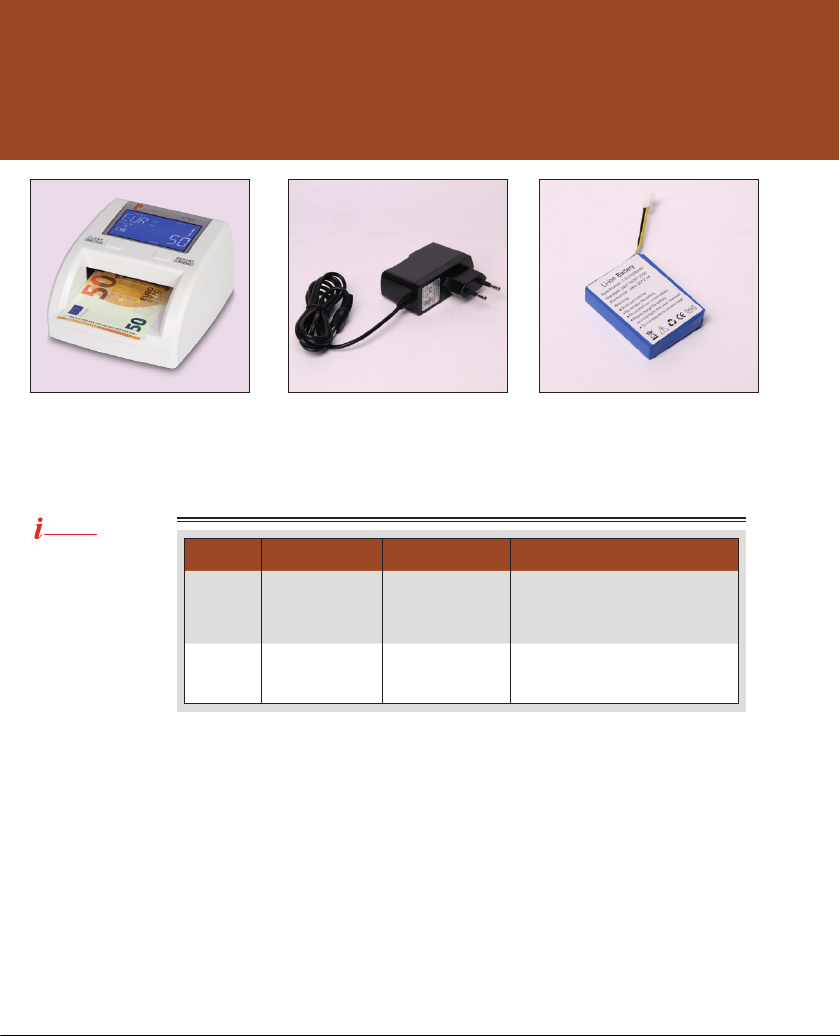
Was wurde geliefert?
Geldscheinprüfer* Anschlusskabel* Akku* (nur BT 500 mobil)
*Abbildung ähnlich!
Infomeldungen (Es ertönt ein Hinweiston und die Infomeldung erscheint im Display)
Hinweis!
Bitte achten Sie stets
auf das richtige Einlegen der Banknoten.
Fehlercode Fehlerbeschreibung Mögliche Ursache Lösungsvorschläge
EJ
CFx (1 - 20)
Banknotenlänge
unplausibel
Falschgeld
(verdächtig)
Mehrere Banknoten
wurden eingelegt oder
es wurde eine falsche
Währung eingestellt.
Unnormaler Schein
wurde erkannt (falschgeldverdächtig).
Entfernen Sie den/die Schein(e) und legen Sie
eine einzelne Banknote ein (siehe „Banknoten richtig einlegen“). Prüfen Sie, ob die
richtige Währung eingestellt wurde.
Entfernen Sie den betroffenen Schein und
prüfen Sie den Schein erneut.
Page 5
1.
2.
4.
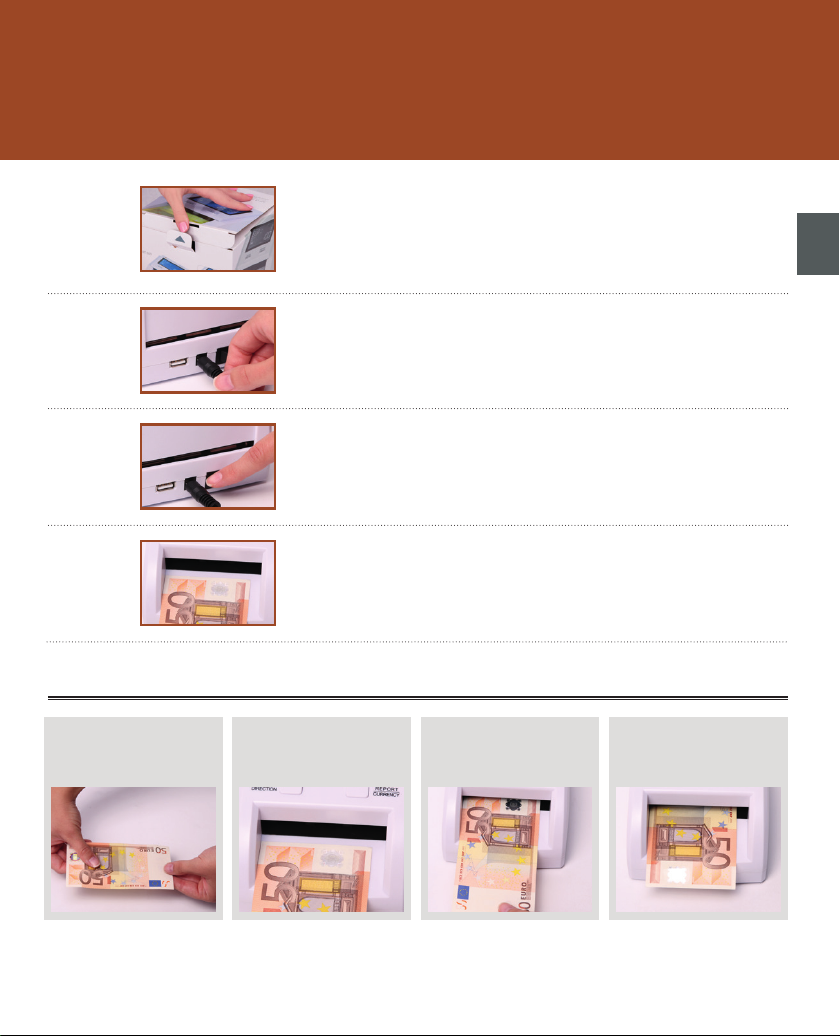
Inbetriebnahme
1. Maschine auspacken
Packen Sie die Maschine aus und überprüfen Sie den Lieferumfang auf Vollständigkeit.
2. Anschlusskabel einstecken
Schließen Sie das Anschlusskabel an der Maschine und einer geeigneten
Stromquelle an.
3. Maschine einschalten
Schalten Sie die Maschine am Hauptschalter ein. Sobald Sie die Maschine
einschalten, wird der Selbsttest durchgeführt. Hierbei prüft die Maschine säm-
tliche Funktionen bzw. Sensoren.3.
4. Banknoten einlegen, Prüfung starten
Legen Sie die Banknoten linksbündig in den Banknoteneinzug und beachten
Sie den Hinweis „Banknoten richtig einlegen“ unten.
05
de
Banknoten richtig einlegen
1. Banknote glätten
Sofern nötig, glätten Sie die
Banknote.
Wichtiger Hinweis zu 3.):
Achten Sie beim Einschieben der Banknoten unbedingt darauf, keinen Druck auszuüben. Die Banknoten sollten vorsichtig
eingeschoben werden, bis die Maschine die Banknote automatisch einzieht.
2. Banknote linksbündig einlegen
Setzen Sie die Banknote vorsichtig
linksbündig am Aufnahmeschacht
an.
3. Banknoten einschieben
Schieben Sie die Banknote in
Richtung Aufnahmeschacht.
4. Automatischer Einzug
Die Banknote wird automatisch
eingezogen, geprüft und ausgegeben.
Page 6
06
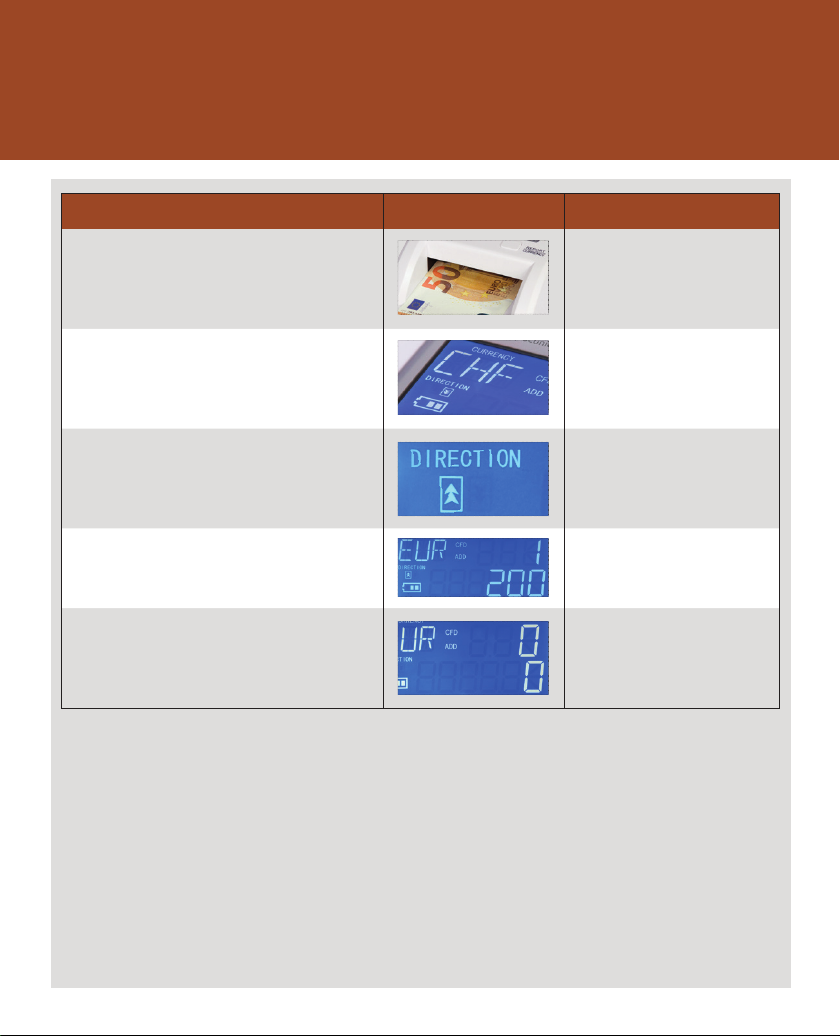
Zählmodi / Funktionen
Modus / Funktionen Zu- / Abschaltbar über „Taste“
Prüfmodus
Das Gerät prüft die Banknote im Aufnahmeschacht und zeigt
den Banknotenwert im Display an. Bei einer verdächtigen Banknote wird eine Hinweismeldung angezeigt.
Dieser Modus ist standardmäßig
voreingestellt und aktiviert sich beim
Einschalten.
Währungsänderung
Die eingestellte Währung wird im Display angezeigt.
Ausgaberichtung ändern
Die eingestellte Ausgaberichtung für echte Banknoten wird im
Display angezeigt. Verdächtige Banknoten werden in die entgegengesetzte Richtung ausgegeben.
Report
Mit dieser Funktion lässt sich der aktuelle Prüfvorgang detailliert
anzeigen. Die Stückzahl der einzelnen Sorten lassen sich nachträglich abfragen.
Zählergebnis löschen
Das aktuelle Zählergebnis kann einfach gelöscht werden.
„REPORT / CURRENCY”
Um die Währung zu ändern, muss die
Taste „REPORT / CURRENCY“ 3 Sekunden
gedrückt werden.
„CLEAR / DIRECTION”
Um die Ausgaberichtung zu ändern, muss
die Taste „CLEAR / DIRECTION“ 3 Sekunden gedrückt werden.
„REPORT / CURRENCY“
Um die Stückzahlen der einzelnen Sorten
abzufragen, muss die Taste „REPORT /
CURRENCY“ gedrückt werden.
„CLEAR / DIRECTION”
Durch Drücken der Taste „CLEAR /
DIRECTION“ wird das Zählergebnis
gelöscht.
Page 7
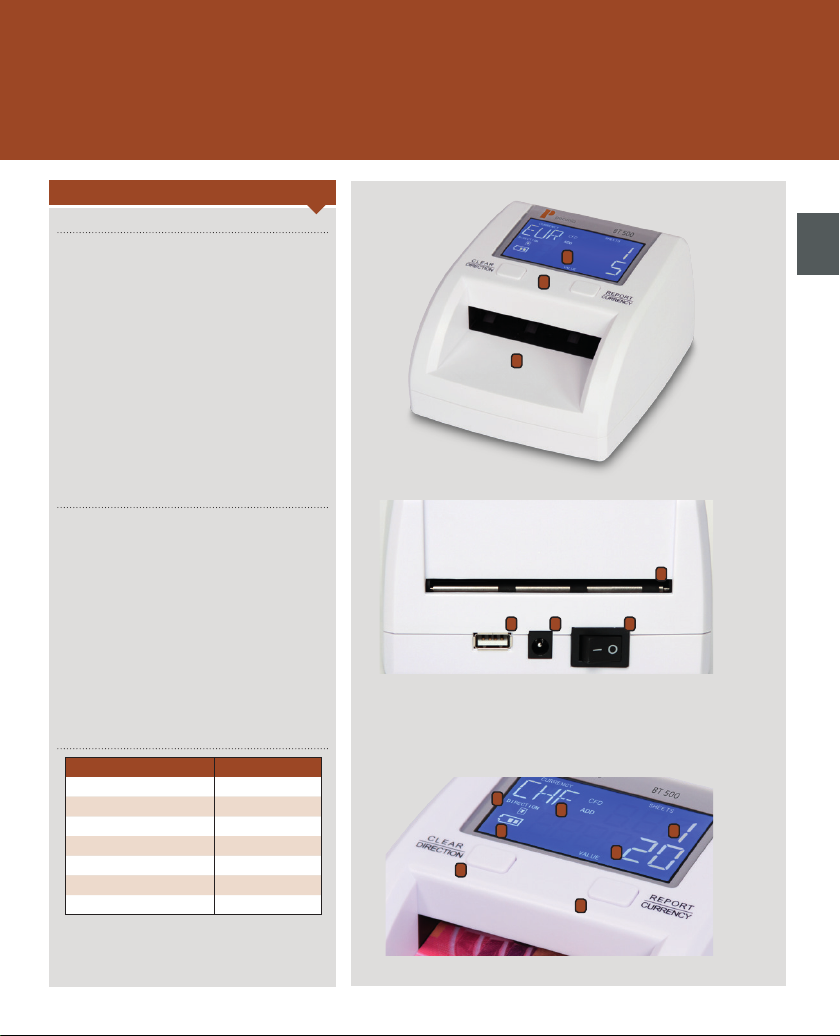
Vorderseite / Rückseite / Bedienfeld / Display
Beschreibung
Vorderseite
1. Display
2. Banknoteneinzug
3. Bedienfeld / Tastenfeld
Rückseite
1. Hauptschalter
2. Stromanschluss
3. USB-Anschluss
4. Banknotenausgabe
1
3
2
4
123
07
de
Bedienfeld / Display
Beschreibung Aufschrift / Anzeige
1. Löschen / Richtung CLEAR / DIRECTION
2. Report / Währungsauswahl REPORT / CURRENCY
3. Währungsanzeige CURRENCY
4. Ausgaberichtung DIRECTION
5. Wert der Banknote VALUE
6. Anzahl der geprüften Noten SHEETS
7. Batterieanzeige Batteriesymbol
4
7
1
3
6
5
2
Page 8
08
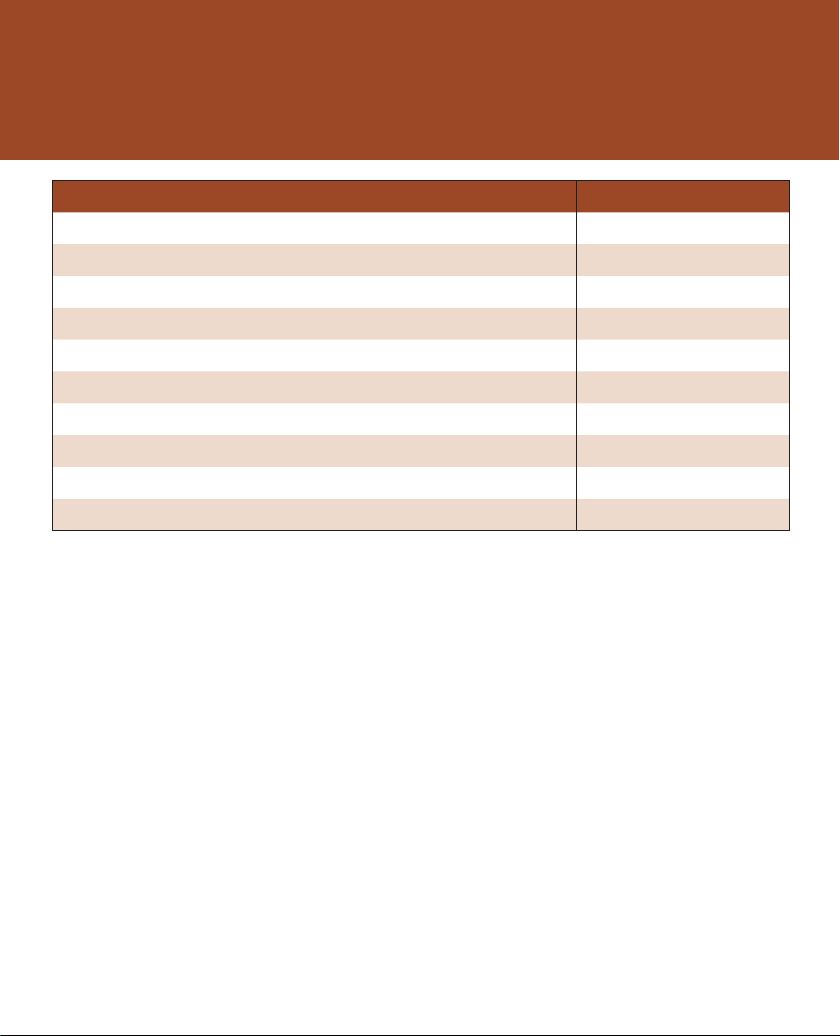
Technische Daten
Beschreibung Daten
Umgebungstemperatur 0 - 40 °C
Relative Luftfeuchtigkeit 40 - 90 %
Anzeigedisplay LCD - Display
Prüfgeschwindigkeit ca. 0,5 Sekunden pro Banknote
Gewicht ca. 0,5 kg
Stromzufuhr 230 V ~ 50 Hz
Leistungsaufnahme ca. 5 Watt
Breite 125 mm
Höhe 75 mm
Tiefe 135 mm
Page 9
Achtung!
Vor Reinigungsarbeiten an der Maschine
ist die Stromzufuhr in jedem Fall unbedingt zu unterbrechen!
Hinweise!
Reinigen Sie das Gerät ausschließlich mit
einem trockenen Pinsel, dem Druckluftreiniger B8 oder dem Spezialreiniger R 605
von hbw cash solutions!
Benutzen Sie niemals chemische Reinigungsmittel in direkter Verbindung mit
dem Gerät.
Unsachgemäße Behandlung des Geräts führt
zum Garantieverlust.
Umweltschutz!
Werfen Sie das Gerät am Ende der
Lebensdauer nicht in den normalen
Hausmüll. Bringen Sie es zum Recycling zu
einer offiziellen Sammelstelle. Auf diese
Weise helfen Sie die Umwelt zu schonen.
Bilder & Grafiken
Bei den in der Anleitung verwendeten
Bildern und Grafiken handelt es sich um
Beispielmaterial, welches vom Produkt,
dem Zubehör etc. abweichen kann.
09
Wichtige Informationen
Wichtige Informationen
Da das Gerät einem hohen Verschleiß ausgesetzt ist, empfiehlt es sich, das Gerät professionell durch
hbw cash solutions reinigen und warten zu lassen.
hbw cash solutions bietet diese Serviceleistungen an. Wenden Sie sich einfach an den technischen
Support von hbw cash solutions.
Je nach Beanspruchung der Maschine empfehlen wir, eine professionelle Wartung alle 1 bis 4 Monate
durchführen zu lassen. Bei erhöhter Beanspruchung kann ein verkürztes Intervall notwendig sein.
Da die Funktionsweise der Maschine auf optischen Sensoren basiert, darf das Gerät nicht direkter
Sonneneinstrahlung ausgesetzt werden.
Es ist darauf zu achten, dass die Maschine frei von Störquellen (Bsp. fremde Stromquellen, elektronische Geräte und Maschinen, Mobiltelefone, DECT-Telefone uvm.) betrieben wird.
Für die Aussortierung, Zählung und Wertermittlung des Bargelds sowie für die Erkennung von falschgeldverdächtigen Banknoten / Münzen kann keine Haftung übernommen werden.
Es dürfen keine Fremdkörper wie z.B. Nadeln, Büroklammern, Haare oder andere Kleinteile an die
Maschine oder ins Innere der Maschine gelangen.
Bei niedrigen Temperaturen warten Sie bitte mindestens 3 Minuten, bis Sie mit dem Zählvorgang
beginnen.
Garantie
hbw cash solutions gewährt eine Garantie auf die Geräte der Marke „Pecunia“ von 6 Monaten.
Garantiebedingungen
Neugeräte und deren Komponenten, die aufgrund von Fabrikationsfehlern und/oder Materialfehlern
innerhalb von 6 Monaten ab Kauf einen Defekt aufweisen, werden von hbw cash solutions nach
eigener Wahl gegen ein dem Stand der Technik entsprechendes Gerät ausgetauscht oder repariert.
Für alle Verschleißteile (z. B. Einzugsrollen o. Ä.) gilt diese Haltbarkeitsgarantie nicht. Diese Garantie
gilt nicht, wenn der Defekt des Geräts auf unsachgemäße Behandlung und/oder Nichtbeachtung
des Benutzerhandbuchs zurückzuführen ist. Beim Service durch eine fremde Werkstatt, durch den
Kunden selbst oder Dritter erlischt die Garantie mit sofortiger Wirkung. Als Garantienachweis gilt der
Kaufbeleg bzw. die Rechnung mit Kaufdatum. Garantie- bzw. Gewährleistungsansprüche sind innerhalb von zwei Monaten nach Kenntnis des Garantiefalls geltend zu machen. Ersetzte Geräte bzw.
deren Komponenten, die im Rahmen des Austauschs an hbw cash solutions zurückgesandt werden,
gehen in das Eigentum von hbw cash solutions über. Garantie und Gewährleistung gelten nur für
innerhalb der Europäischen Union erworbene Neugeräte. Garantie bzw. Gewährleistungsgeberin ist
die hbw cash solutions GmbH, Jurastraße 1, 73119 Zell unter Aichelberg, Deutschland. Für hbw cash
solutions Originalteile, die in Garantiefällen verwendet werden, gilt im Falle des Einbaus in ein hbw
cash solutions Produkt nur die verbleibende Garantiedauer des Geräts.
Soweit kein Garantiefall vorliegt, behält sich hbw cash solutions vor, dem Kunden die Diagnose, den
Austausch oder die Reparatur in Rechnung zu stellen. Weitergehende oder andere Ansprüche als die
o. g. sind ausgeschlossen.
Im Servicefall wenden Sie sich bitte an den technischen Support von hbw cash solutions unter der
Telefonnummer +49 (0) 71 64 / 800 90 10.
Vorgehen im Garantiefall
Sollte Ihr hbw cash solutions Produkt wider Erwarten einen Fehler aufweisen, wenden Sie sich bitte
zuerst an den technischen Support von hbw cash solutions. Unsere Mitarbeiter werden Ihnen dabei
helfen, Defekte und Fehlfunktionen zu diagnostizieren und möglicherweise am Telefon zu beheben.
Die Kontaktmöglichkeiten des technischen Supports finden Sie am Anfang dieses Benutzerhandbuchs. Bitte halten Sie beim Anruf stets folgende Informationen bereit:
Ihren Namen, Ihre Adresse, Ihre Postleitzahl und eine Telefonnummer, unter der Sie erreichbar sind,
die Modellbezeichnung und die Seriennummer des Geräts (am Gerät abzulesen),
Datum und Ort, an dem Sie das Produkt gekauft haben und eine kurze Beschreibung des Problems.
de
Page 10

BT 500 SERIES
Customer information
Customer information:
hbw cash solutions GmbH
Jurastraße 1
73119 Zell unter Aichelberg
Tel.: +49 (0) 71 64 / 800 90 10
Fax: +49 (0) 71 64 / 800 90 11
Web: www.pecunia-cash.com
E-Mail: [email protected]
Customer information
Our operation manuals are revised at regular intervals as further developments and
experiences shall help our customers to make using our products more and more
user-friendly. You can find the latest version of this manual at hbw cash solutions:
+49 (0) 71 64 / 800 90 10
or
www.pecunia-cash.com
The latest version is valid!
Important comment
Please pay attention not to use the device in direct sun beam or around abnormal
electric power. Pay attention for sure to place the banknotes in a correct way (also
refer to „commissioning“). Moreover please pay attention to the intervals for
maintenance and cleaning.
Bases ...........................................................................................................................................................................12-13
- What was delivered?
- Information messages
- Commissioning
- Correct banknote insertion
Main functions .........................................................................................................................................................14-15
- Counting modes / Functions
- Front / Rear / Operator panel / Display
Technical data .................................................................................................................................................................16
- Technical data
Important information .................................................................................................................................................. 17
- Cleaning
- Maintenance
- Warranty
- Environmentalism
Page 11
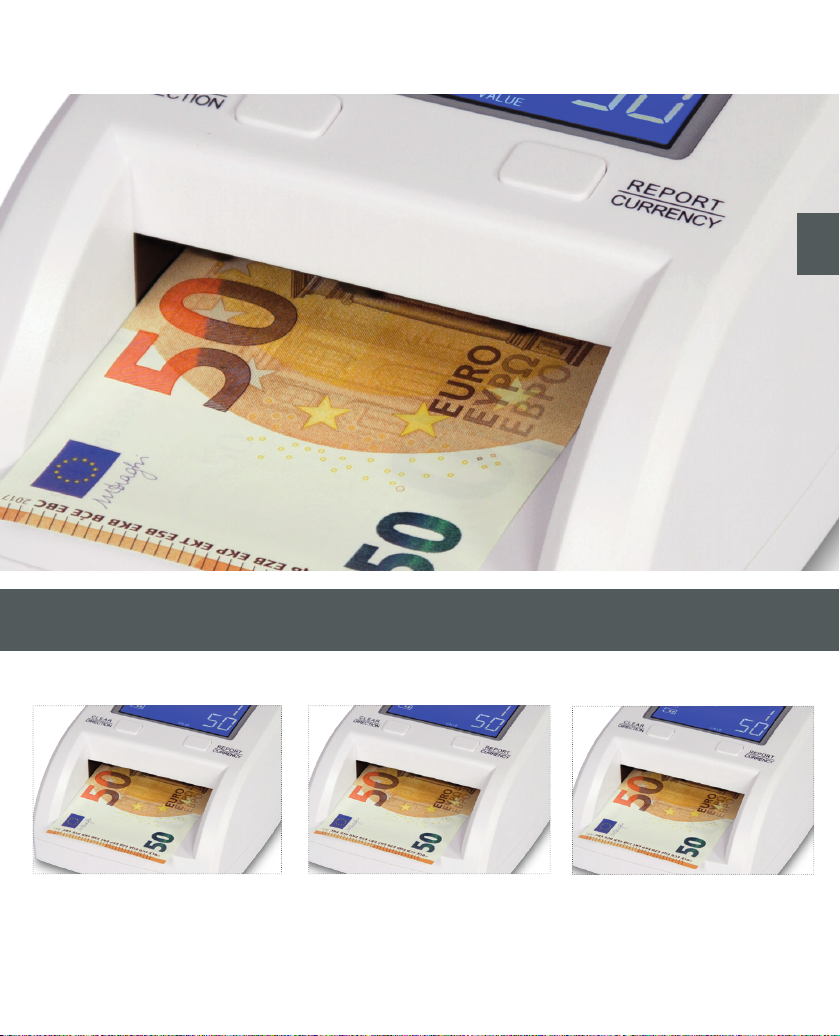
Models
en
BT 500
Electronic counterfeit detector for
different currencies.
BT 500 update BT 500 mobile
Electronic counterfeit detector for
different currencies and update
capability.
Electronic counterfeit detector for
different currencies, update
capability and battery.
Page 12
012
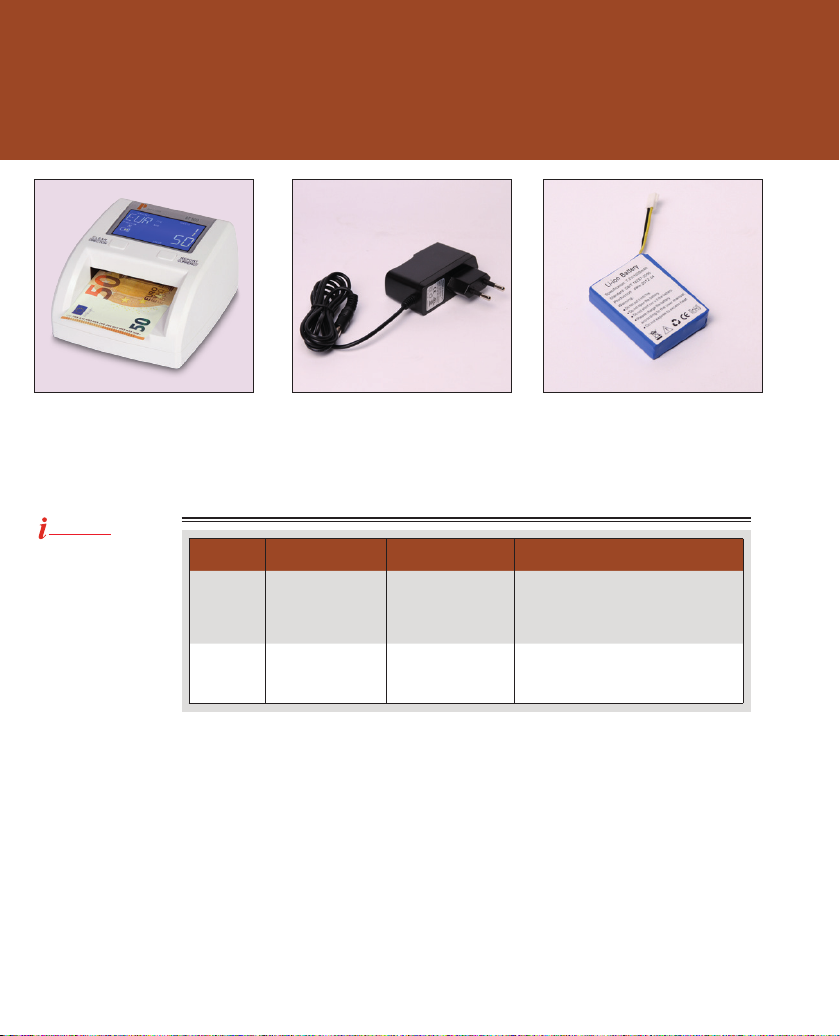
What was delivered?
Counterfeit detector* Connection cable* Battery* (only BT 500 mobile)
*Similar illustration!
Information messages (You will hear an acustic signal and the information message appears in the display)
Comment!
Please always pay
attention to place the
banknotes in a
correct way.
Error code Error Possible reason Solution proposals
EJ
CFx (1 - 20)
Length of banknote
possibly incorrect
Fake money
(suspicious)
More than one banknote was inserted at
one time or the wrong
currenty was adjusted.
Abnormal banknote
was detected (suspicious)
Remove the banknote(s) and insert
one single banknote (refer to „correct
banknote insertion“. Please check if the
correct currency was chosen correctly.
Remove the relevant banknote and check
again.
Page 13
1.
2.
4.
013
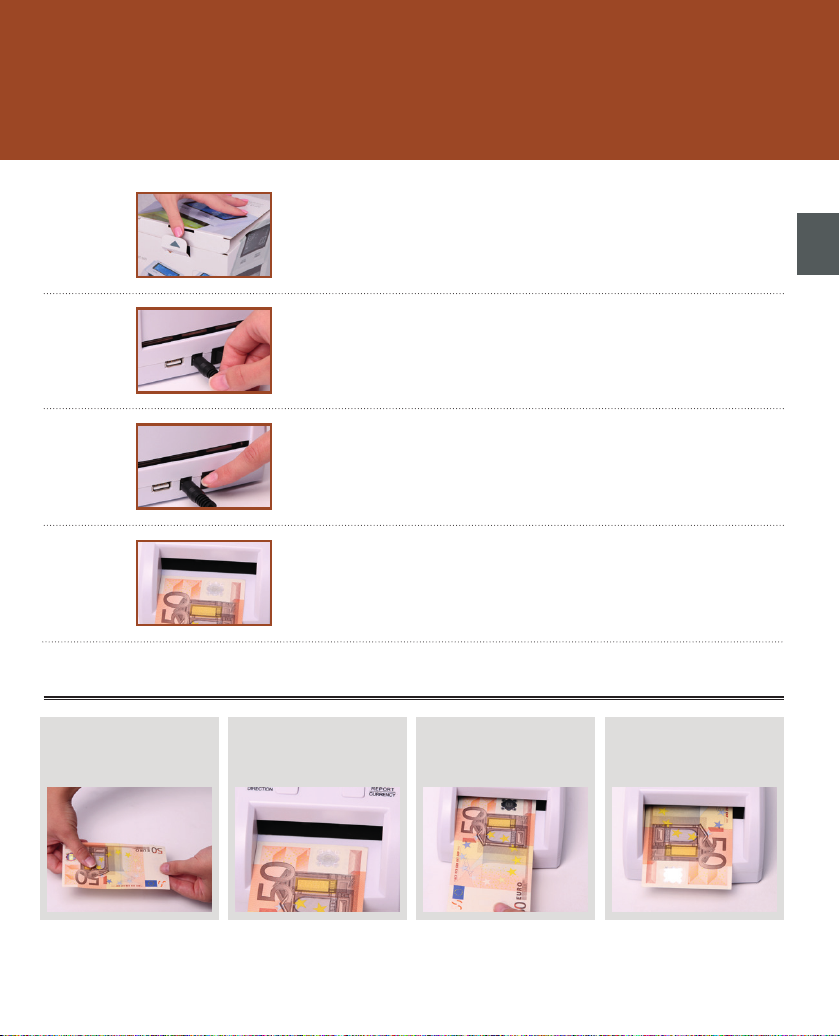
Commissioning
1. Machine unpacking
Unpacking the machine and check what was delivered.
en
2. Insert the connecting cable
Connect the cable to the device and to a suitable power source.
3. Switch on the machine
Switch on the machine at the main switch. After the power is switched on,
the machine will do the self test. All functions and sensors of the machine will
be tested automatically.3.
4. Insertion of banknotes, starting detecion
Insert the banknotes left-aligned in the hopper and pay attention to the below shown comment „correct banknote insertion“.
Correct banknote insertion
1. Smooth out the banknote
If needed, smooth out the
banknote.
Important comment to 3.):
By inserting the banknotes, pay attention not to push the banknote strong in any direction. The banknote must be pushed
in the hopper carefully till the banknote gets feeded automatically.
2. Insert banknote left-aligned
Place the banknote carefully leftaligned on the hopper.
3. Feed the banknote
Feed the banknote in the hopper.
4. Automatic transportation
The banknote gets feeded and
transported automatically.
Page 14
014
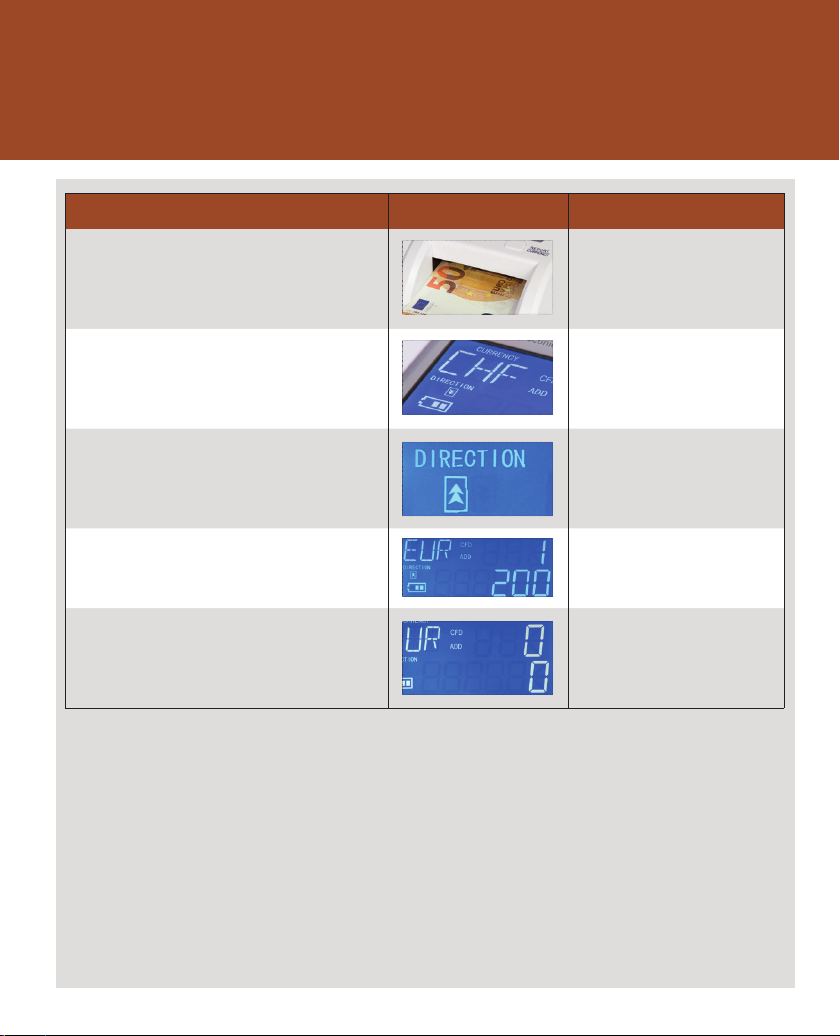
Counting modes / Functions
Modes / Functions Switched off / on by „key“
Counterfeit detection
The device checks the banknote in the hopper for
authenticity and shows the value in the display. If a suspect
banknote gets detected, an information will be shown in the
display.
This function is pre-adjusted and gets
activated automatically after switching on
the device.
Choose the currency
The chosen currency will be shown in the display.
Choose the returning direction
The chosen returning direction for genuine banknotes is shown
in the display. Suspect banknotes will be returned in the opposite direction.
Report
With this function you can check the details of the actual
procedure. The quantity of each denomination can be shown in
the display.
Delete the result
The actual counting result can be deleted very easy.
„REPORT / CURRENCY”
For changing the currency, press the
„REPORT / CURRENCY“ key for about 3
seconds.
„CLEAR / DIRECTION”
For changing the returning direction,
press the „CLEAR / DIRECTION“ key for
about 3 seconds.
„REPORT / CURRENCY“
To show the quantities of each
denomination press the „REPORT /
CURRENCY“ key.
„CLEAR / DIRECTION”
To delete the counting result press the
„CLEAR / DIRECTION“ key.
Page 15
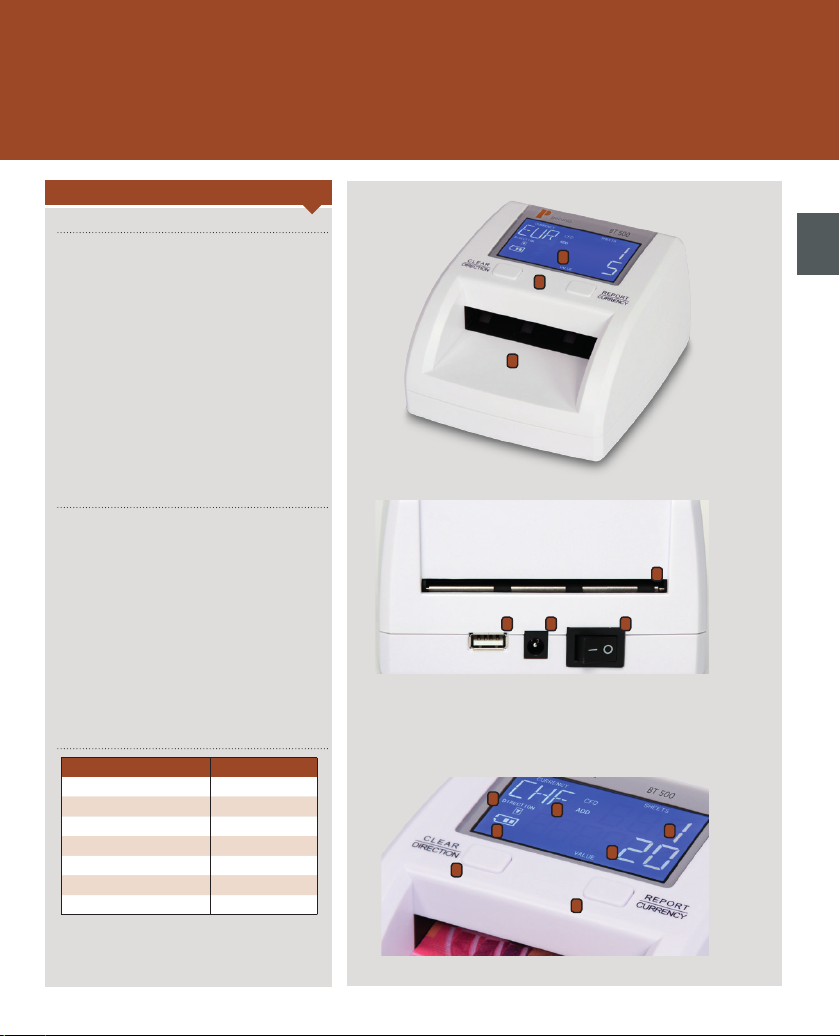
Front / Rear / Operator panel / Display
Description
Front
1. Display
2. Banknote hopper
3. Operator panel / keypanel
Rear
1. Main switch
2. Power socket
3. USB-interface
4. Banknote exit
015
1
3
2
4
123
en
Operator panel / Display
Description Inscription / display
1. Clear / Direction CLEAR / DIRECTION
2. Report / Currency REPORT / CURRENCY
3. Chosen currency CURRENCY
4. Chosen direction DIRECTION
5. Value of the banknote(s) VALUE
6. Quantity of the banknotes SHEETS
7. Battery indicator Battery symbol
4
1
3
7
2
6
5
Page 16
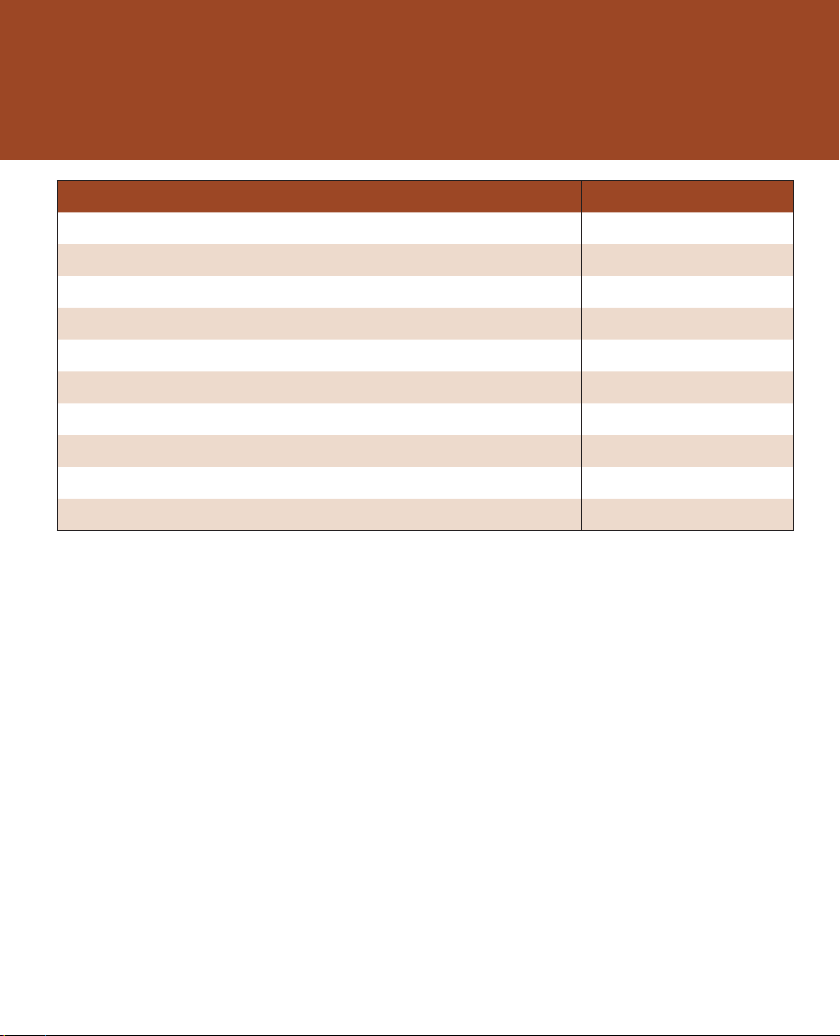
016
Technical data
Description Data
Ambient temperature 0 - 40°C
Relative humidity 40 - 90 %
Display LCD - display
Detecting speed appr. 0.5 seconds per banknote
Weight appr. 0.5 kg
Power supply 230 VAC / 50 Hz
Power comsumption appr. 5 watt
Width 125 mm
Height 75 mm
Depth 135 mm
Page 17
Attention!
Before cleaning the device, it´s imperative
to disconnect the power supply!
Comment!
Clean the device only with a dry brush,
the compressed air cleaner B8 or the
special cleaner R 605 from hbw cash
solutions!
Never use chemical cleaning agents in
direct connection to the device.
Improper treatment leads to loss of warranty.
Environmentalism!
Do not throw the device at the end of life
in normal household wastestation. Bring
it to a recycling at an official collection. In
this way, you help to preserve the
environment.
Pictures & graphics
The pictures and graphics in the user
manual are examples which may vary
from the product or accessories you have
bought.
017
Important information
Important informations
As the device is exposed to strong wear, it is recommendable to get the device
professionally cleaned and maintained by hbw cash solutions.
hbw cash solutions offers this service. Please feel free to contact the technical support of hbw cash
solutions.
Depending on the use, we recommend a professional mantenance after every 1 to 4 months. If the
use is stronger, it might be necessary to shorten the interval.
As the device is equipped with optical sensors, the direct contact to sun beam must be avoided.
Pay attention that the device is not in use close to sources of interference (e.g. other power source,
electronic devices and machines, cell phones, DECT-phones etc.).
hbw cash solutions shall not be liable for the correctness of sorting, coutning and value-counting of
banknotes and coins as well as the detecion for suspect or fake coins and banknotes.
It´s forbidden to insert foreign objects, like needles, paperclips, hairs and other small parts into the
device.
In cold condition, please wait at least 3 minutes before starting the procedure.
Warranty
hbw cash solutions offers a warranty for the devices of the brand „Pecunia“ of 6 months.
Warranty regulations
New devices and its components which have a malfunction within the first 6 months caused by a
fabrication error, can be repaired or replaced by hbw cash solutions.
This warranty is not valid for wearparts (hopper-rollers, feeding-rollers, driving-belts, ...). This warranty is not valid when the malfunction was caused by improper treatment or caused by disregard
of the operation manual. If maintenance is made by a foreign service partner, by the customer or by
any third party, the warranty voids. As a warranty document, the invoice or packing list with date is
valid. Warranty claims must be submitted at the latest 2 months after the malfunction was detected.
Replaced devices or components which have been returned to hbw cash soltutions as warranty
become property of hbw cash solutions. Warranty claims are only valid for new devices which have
been bought in the European Union. Warranty partner is the hbw cash solutions GmbH, Jurastraße 1,
73119 Zell unter Aichelberg, Germany. For spare parts, which are used in warranty cases, will be valid
only the remaining warranty period of the device. If no warranty case is accepted, hbw cash solution
reserves the right to charge the cost for exchange or service. Other claims as declared are excluded.
If service or maintenance is needed, please do not hesitate to contact the technical support of hbw
cash solutions: +49 (0) 71 64 / 800 90 10.
Process in warranty case
If your hbw cash solutions product may have a malfunction, as first step please first contact the
technical support for hbw cash solutions. Our staff will help you to check malfunctions and possibly
to solve them in assist you by the telephone conversation.
You can find the contact details of the technical support at the beginning of this user manual. Please
prepare and submit the following information:
Your name, your address, your zip-code and your telephone number, the type and serial number of
the device (see on device), the date and place where you have bought the device as well as a short
description of the malfunction.
en
Page 18

018
Page 19

019
en
Page 20
_____________________________
© 2014 hbw cash solutions.
All rights reserved.
www.pecunia-cash.com
 Loading...