

Page 1
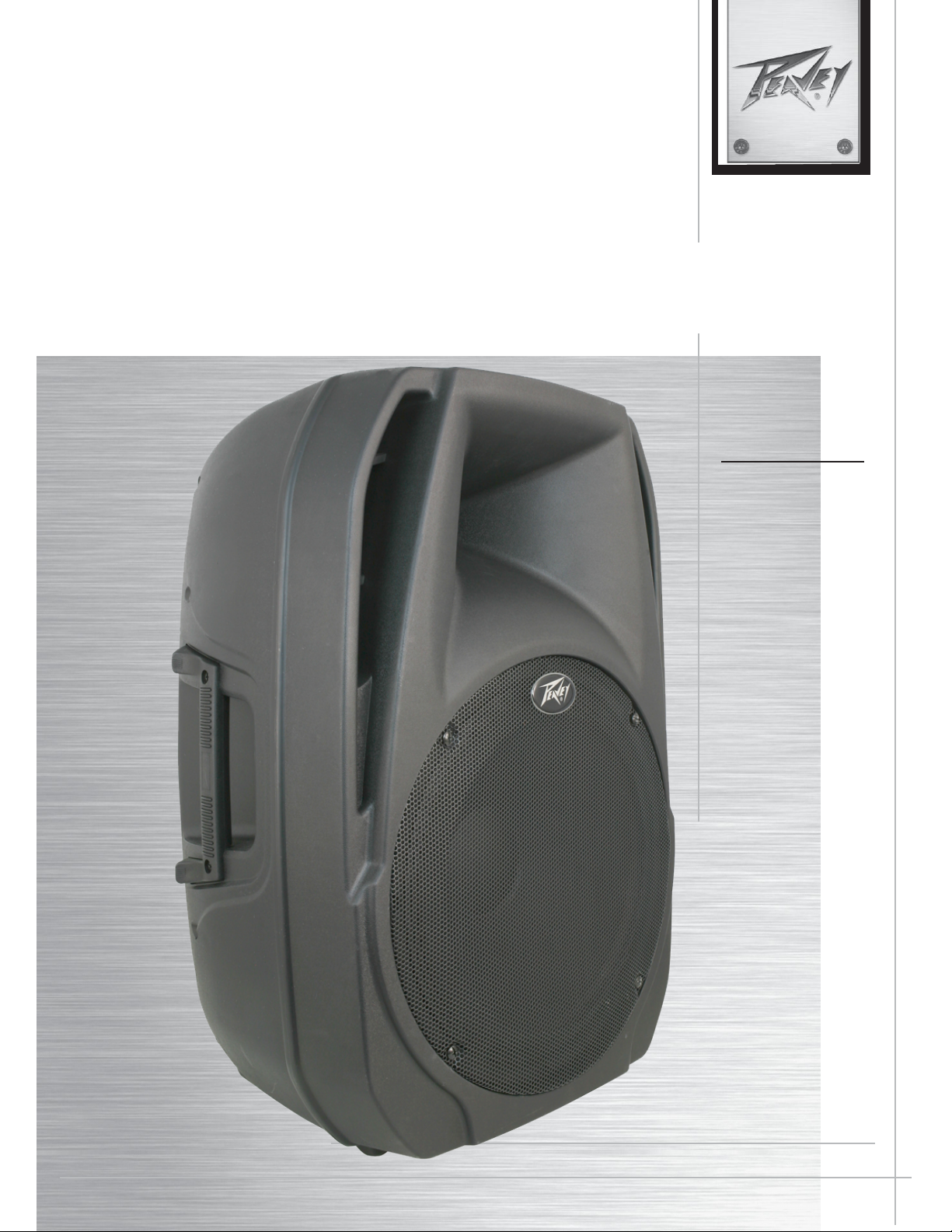
PBK15
FM
Two-way Powered Sound Reinforcement Enclosure
Operating
Manual
www.peavey.com
Page 2

Page 3

English
PBK15
Two-way Powered Sound Reinforcement Enclosure
•
15" heavy-duty woofer
•
14Ti™ compression driver, with 1.4" titanium diaphragm
•
100
W peak available power
•
Bass & Treble controls for adjusting lows and highs
•
Horn loaded compression driver tweeter for crystalline highs
•
Line Input is via a female RCA phono jacks
•
Mic Input is via a female XLR with balanced input 、1/4" phone jack and two wireless microphones input
Can be operated on internal battery or external 12V power source.
•
•
Line output is via
•
USB/FM/BLUETOOTH input port for MP3 file playback
•
Durable plastic injection-molded enclosure
•
Heavy-duty perforated steel grille, with powder coat finish
•
Pole mount molded-in for 1 3/8" diameter poles
Description
The PBK15
diaphragm dynamic compression driver mounted on a medium coverage horn. It‘s sleek modern appearance coupled with
e xcellent performance offer an outstanding package.
FM
input
RCA
phone jack
FM
is a two-way sound reinforcement system based on a heavy-duty 15" woofer and a 14Ti™ titanium
The lightweight yet rugged injection-molded plastic enclosure with molded-in stand mount cup facilitates portable use for live
music or PA sound. The rounded profile cabinet has three handles for ease of portability. A black powder coated perforated
steel grille provides woofer protection and a professional appearance.
The PBK15FM speaker system power amplifier is a low-distortion reliable passive air-cooled unit providing 100W
peak available power for the system.
Cooling is provided via a large heat sink for low-noise and reliable operation under any conditions.
Line Input is via two RCA phono jacks to the preamp/EQ electronics, and a level control. Mic input is via a female XLR with
balanced input, and a 1/4" phone jack. A Line Output has
additional speaker systems, or feed of the signal to a powered subwoofer, etc.
Additionally, a USB/FM/BLUETOOTH input port is provided to allow playback of MP3 files via a USB thumb drive.
PBK15FM can be powered via internal battery, or via external 12V power source (e.g. car battery).
two RCA
phone jack connector. These outputs allow linking of
Applications
The Peavey PBK15
karaoke or musical playback.
A typical signal source for the line-level inputs of the Peavey PBK15
(mixer) or the output from a CD player, MP3 player or tape deck. A dynamic microphone can be connected to the Mic Input
and used as well.
FM
has a variety of applications such as sound reinforcement, public address, side fill system,
FM
would be a sound reinforcement mixing console
Page 4
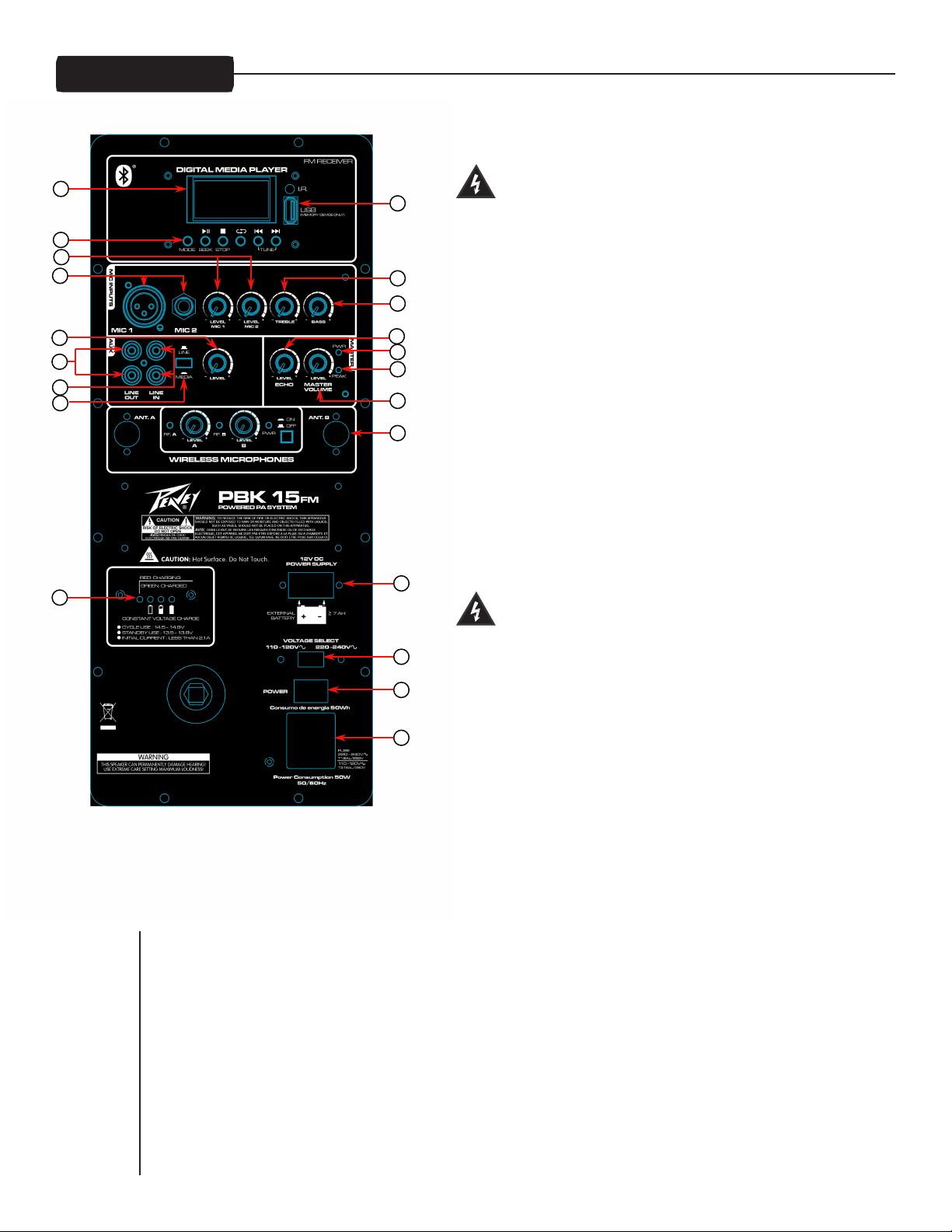
REAR PANEL
VOLTAGE SELECTION PROCESS
CAUTION:Always disconnect AC power cord from unit, or AC power
source before attempting to change fuse/voltage selector position!
WARNING!: Before AC power is applied to this device,
20
19
18
17
21
voltage selection (2) may select 110-120V AC or 220-240V AC
The fuse should be changed to the correct amperage rating. For
12
11
an input power voltage range of from 110VAC to 120VAC, use a 3.15
amp rated, 250V 5 x 20 mm cartridge type time-delay fuse, which
always insure proper operating voltage selection is
engaged to match AC power source being used.
conforms to the international fuse classification "T3.15AL". For
16
14
13
15
10
8
7
9
6
an input power voltage range of from 220VAC to 240VAC, use a 1.6
amp rated, 250V 5 x 20 mm cartridge type time-delay fuse,
which conforms to the international fuse classification "T1.6AL".
The IEC power cord that is correct for your locale can now be
plugged into the IEC receptacle (3), and the Power switch (1)
activated to turn on the powered PBK15
ON-OFF SWITCH (1)
is rocker switch supplies AC power to the PBK15FM when
Th
FM
speaker system.
switched to the ON position. The ON position is with the top side
of the switch pushed "in" or nearly flush with the rear panel.
5
4
2
FUSE (2)
connector (2), just below the IEC connector blades. If the fuse
fails, THE FUSE MUST BE REPLACED WITH THE SAME TYPE AND
1
VALUE IN ORDER TO AVOID DAMAGE TO THE EQUIPMENT AND TO
PREVENT VOIDING THE WARRANTY!
3
The fuse in the Peavey PBK15
delay type 5 x 20 mm size 250V rated fuse.
The unit is AC power line fuse protected from overloads
and fault conditions with a slow-blow 5 x 20mm 250V fuse.
This fuse is located within the base of the IEC power cord
FM
can be replaced with a time-
For 110-120VAC operation, a fuse rated at 3.15 amps
and 250V should be used, which conforms to the
international fuse classification "T3.15AL".
For 220-240VAC operation a fuse rated at 1.6 amps and 250V shou ld be used, wh ich conforms to the
international fuse classification "T1.6AL".
If the unit continues to blow replacement fuses, do not keep replacing them, it should be taken to a qualified
service center for repair.
To replace the fuse, be sure to remove the IEC power cord from the IEC socket. The fuse holder tray is located
beneath the IEC socket cavity. Pry the fuse holder tray out with a small flat blade screwdriver placed under the
center of the top edge of the fuse tray, and gently lever the fuse tray out. The fuse is held in a clip in the fuse tray,
and should be removed and replaced with a fresh 5 X 20mm 250V type fuse of the appropriate current rating.
Page 5

Then, once the fresh fuse has been put in place, re-insert the fuse tray into the IEC connector assembly, making
sure that the voltage range selection is correct (see above section) and make sure it is fully seated and flush
with the outside of the IEC connector assembly.
IEC POWER CORD CONNECTION (3)
This receptacle is for the IEC line cord (supplied) that provides AC power to the unit. It is very important that
you ensure the PBK15
PBK15
FM
by following the instructions above under the section VOLTAGE SELECTION PROCESS.
Please read this guide carefully to ensure your personal safety as well as the safety of your equipment. Never
break off the ground pin on any equipment. It is provided for your safety. If the outlet used does not have a
ground pin, a suitable grounding adapter should be used and the third wire should be grounded properly. To
prevent the risk of shock or fire hazard, always be sure that the mixer and all other associated equipment are
properly grounded.
External power (4)
External battery supply 12VDC
Battery charging indication
CONSTANT VOLTAGE CHARGE CYCLE USE : 14.5 - 14.9V
STANDBY USE : 13.5 - 13.8V
INITIAL CURRENT : LESS THAN 2.1A
WIRELESS MICROPHONES(6)
Press ON/OFF switch, PWR indicator light, The wireless receiver module is working.
FM
has the proper AC line voltage supplied. You can change the voltage for your
(5)
PEAK(7)
Indicator cavity peak signal.Ignition to detect an input signal with a high or high output level that may cause a failure
POWER LED (8)
Illuminates green when the power switch is on and power is present
MASTER VOLUME CONTROL (9)
It is used to directly set the system output level for a given set of input channel input signals
ECHO
CONTROL
This controls the amount of Echo effect that is added back to the output signal.
BASS CONTROL (11)
The Bass control provides a boost or cut of lower frequency content, such as bass gu itar, so that the tonal
balance can be adjusted depending on the signal source. Do not use excessive boost when playing sound at
loud levels, as the boost is not needed then.
TREBLE CONTROL (12)
The Treble control provides a boost or cut of higher frequency content, such as cymbals, so that the tonal
balance can be adjusted depending on the signal source. Do not use excessive boost when playing sound at
loud levels, as the boost is not needed then.
(10)
LINE LEVEL INPUTS (13)
The line-level inputs are of the medium impedance type. A pair of RCA phono connectors is available. Note the
RCA jacks do not denote stereo operation, the signal from both jacks is summed together into one signal that is
fed to the speakers.
Page 6

LINE OUT (14)
These RCA jacks are intended for the use of linking multiple PBK15
FM
in a line or to provide a feed to a
powered subwoofer, or other electronics that needs to receive a full range version of the input signal. The
connectors available are RCA jack.
Signal input selector switch(15)
Signal input selector. You can select between the line inputs and the media (USB/FM radio/BT) inputs.
LINE IN LEVEL (16)`
Controls the gain or output level of the line level input signal.
MIC INPUT (17)
The Mic level input is of the low impedance type. The jacks are a female XLR and a 1/4" phone connector. Gain
is much higher than the line level inputs.
THIS INPUT SHOULD NOT BE USED FOR LINE LEVEL SIGNAL INPUT, AS IT WILL OVERLOAD AND DISTORT,
DESPITE THE MASTER VOLUME CONTROL OR THE MIC GAIN CONTROL BEING TURNED DOWN !
MIC GAIN (18)
Controls the gain for the microphone inputs.
Media Playback Buttons (19)
MODE:
A short press of the MODE button will toggle between the USB input, FM Radio and Bluetooth. A long
press of the MODE button will enter the setting menu for whichever source is selected. In the settings menu, you can
select things like the pre-programmed EQ modes and the repeat functions. In the FM Radio settings, you can Auto search
for stations, delete stations or delete all the stations. There are no settings available for the Bluetooth.
PLAY/PAUSE: A short press of the PLAY/PAUSE button causes the operation to change from PLAY
to PAUSE or from PAUSE back to PLAY.
STOP: Press the STOP button to stop a file that is playing.
REPEAT: Pressing the REPEAT button toggles the function between ALL, REPEAT ONE, REPEAT
FOLDER, NORMAL, RANDOM and BROWSE.
ALL: Repeats all songs.
REPEAT ONE: Repeats a single song.
REPEAT FOLDER: Repeats all the songs in a single folder.
NORMAL: Plays all songs in order.
RANDOM: Plays all songs in a random order.
BROWSE: Plays the first 10 seconds of each song.
TRACK SKIP: In playback mode the TRACK SKIP buttons let you select the track to play. A short
press skips to the next track. A long press allows you to fast forward/rewind through a song. Hold the
button down until the desired playback point is found. Release the button and the song will start
playing. The TRACK SKIP buttons are used to increment/decrement through the options in the
menu.
DISPLAY (20)
Digital display for USB MP3 functions
USB PORT (21)
For connection of a USB thumb drive for MP3 file playback. DO NOT PLUG A USB CABLE FROM A COMPUTER
INTO THIS PORT! The PBK15
FM
USB MP3 input, and/or the computer USB output can be damaged as a result.
Page 7

Bluetooth® Player
To listen to your music via Bluetooth wireless connection, you need to pair (link) your PBK 15FM with your
Bluetooth phone and/or music device.
1. Turn off any Bluetooth devices previously paired with your PBK 15FM.
2. Turn on the Bluetooth feature on your phone or music device.
3. Press the mode button until the Bluetooth symbol appears in the upper left hand corner of the LCD display.
4. Place your phone or music device in Bluetooth search mode.
5. Select Bluetooth audio from search results on your phone or music device.
6. Select OK or YES to pair your speaker system with your phone or music device.
When your PBK 15FM successfully pairs and connects with your phone or music device, the LCD display will
indicate the name of the device connected. You will now be able to play music from your connected music
source through your PBK 15FM. The level can either be adjusted from the connected source or by the MP3
Volume control. * Wireless range can vary depending on Bluetooth class of source device, and be subject to
interference from obstructions such as walls or other electronic devices.
Page 8
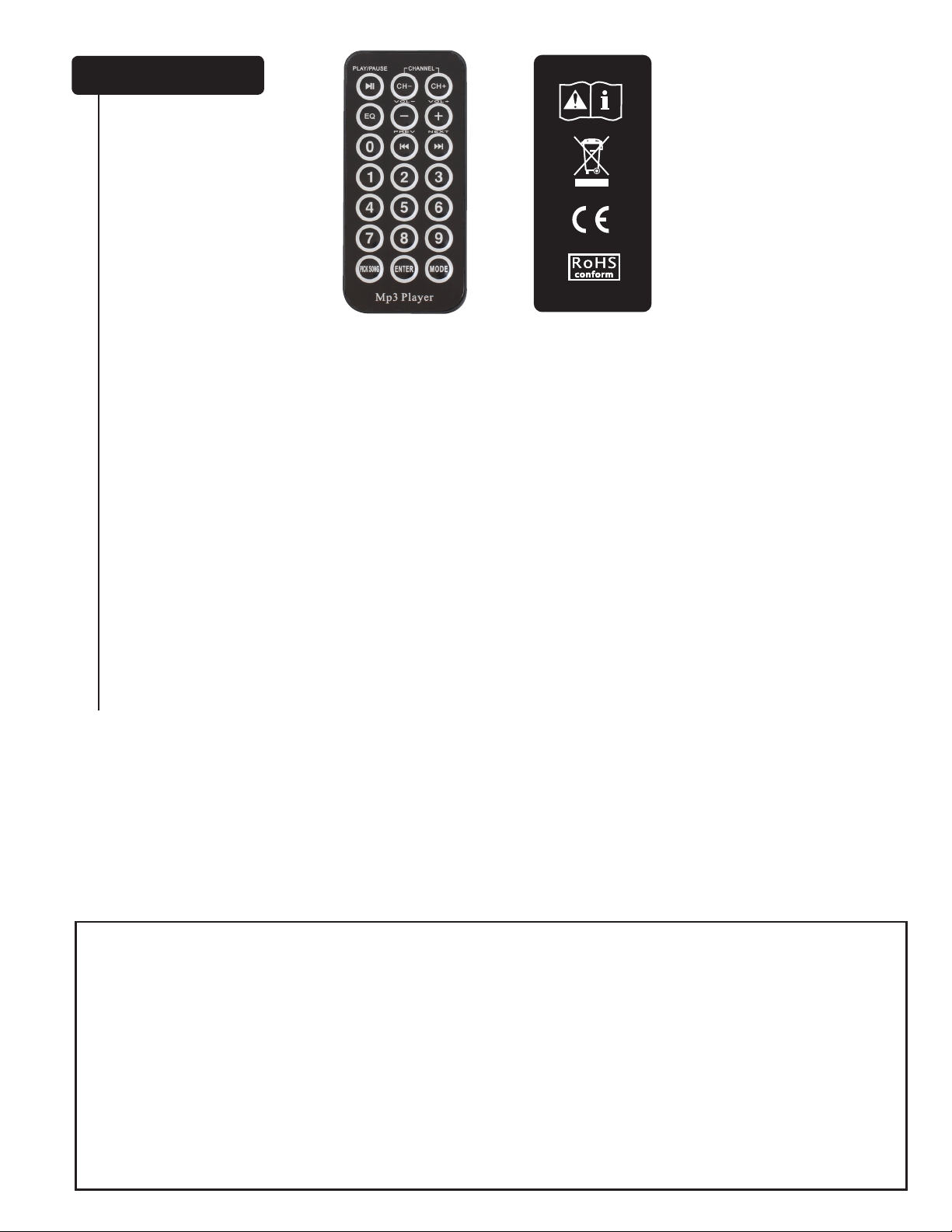
Remote Control
NOTE: For proper use, do not block the IR Receiver.
PLAY/PAUSE: A short press of the PLAY/PAUSE button causes the operation to change from PLAY to PAUSE or
from PAUSE back to PLAY
CH- / CH+: Channel adjustment buttons.
EQ:
EQ Preset adjustment button.
- / +: Volume adjustment buttons.
I<< / >>I: Track skip buttons let you select the track to play.
0-9: Directly access tracks.
PICK SONG: N/A on this model
ENTER: Enters the settings menu.
MODE: Toggles between the USB input, FM radio and Bluetooth.
For ease of use and convenience, a remote control comes with the PBK 15FM (battery included). To replace the battery,
push in left tab and pull out. Use only a CR2025 model battery as a replacement.
WARNING
Do not ingest the battery. Chemical Burn Hazard.
(The remote control supplied with) This product contains a coin/button cell battery. If the coin/button cell
battery is swallowed, it can cause severe internal burns in just 2 hours and can lead to death.
Keep new and used batteries away from children.
If the battery compartment does not close securely, stop using the product and keep it away from children.
If you think batteries might have been swallowed or placed inside any part of the body, seek immediate
medical attention.
Page 9

Specifications
Frequency Range:
1 m on-axis, swept-sine in 1/2 Space environment, +/- 6dB:
54 Hz to 20 kHz
Nominal sensitivity (1W @1m, swept sine input in anechoic environment):
98 dB (average)
Maximum Sound Pressure Level (1 meter):
122 dB SPL peak with music
Transducer Complement:
Heavy-duty 15" woofer
14Ti™ 1.4" titanium diaphragm dynamic compression driver, mounted on a semi-exponential horn.
Nominal Coverage Pattern:
60 degrees horizontal by 45 degrees vertical
Electroacoustic crossover frequency:
2,700 Hz
Crossover type:
Internal passive two-way crossover with driver EQ, and level matching,
Crossover Slopes:
12 dB/octave (2nd order) low pass, 12dB/octave (2nd order) high pass, both with staggered poles and driver EQ.
Input Connections:
Line Level:
Mic Level: One female XLR 、one 1/4" phone jack and two wireless microphones.
USB Input Port:
DO NOT PLUG A USB CABLE FROM A COMPUTER INTO THIS PORT!
The PBK15
Output Connections:
two RCA
provide a feed to a powered subwoofer, or other electronics that needs to receive a full range version of the
input signal.
Enclosure Materials & Finish:
Black ABS plastic with textured surface, black powder-coated perforated grille.
Mounting or Suspension:
NOTE: This unit is not designed for overhead suspension!
phone jack. The Line Out jacks are intended for the use of linking multiple PBK15
two
RCA phono jacks.
For connection of a USB thumb drive/memory stick for playback of MP3 music files.
FM
USB MP3 input, and/or the computer USB output can be damaged as a result.
Molded-in 1 3/8" pole-mount cup for stand mounting, four rubber feet for floor use.
FM
in a line or to
Page 10

Overall Dimensions (H x W x D):
27.56" x 17.90" x 13.80"
(700mm x 455mm x 350mm)
Net Weight:
47 Lbs. (21.0 kg)
Electronics and Amplifier Specifications:
Internal power amplifier (@120 VAC line):
100
watts peak available power
Continuous Power:
Electronic Input Impedance (Nominal):
Line: 10 k ohms unbalanced RCA
Mic: 2.2 k ohms balanced (XLR) No phantom power available.
Input Sensitivity for Full Output (Level full CW):
Line Level – 0.36 V RMS
Mic Level – 0.02 V RMS
Tone Control Corner & Range:
B ass: +/- 12 dB, corner @
Nominal Amplifier Frequency Response (before EQ):
+1, -3 dB from 20 Hz to 20 kHz
Hum and Noise:
Greater than 90 dB below rated power
THD and IM:
Typically less than 1 %
Power requirements of Peavey PBK15
Nominal
Fuse Type :
For 110-120 VAC USE: International fuse classification T3.15AL cartridge-style 5 x 20 mm size fuses with a 250V
rating can be used.
For 220-240VAC USE: International fuse classification T1.6AL . This is a cartridge style 5 x 20 mm size time-
delay fuse with a 2.0 amp 250V rating.
50
Watts, 100-120 VAC 50-60 Hz
50
watts @ less than 3% THD
100
Hz, Treble: +/- 12 dB, corner @ 10kHz
FM
System:
Features and specifications are subject to change without notice.
Peavey Electronics Corporation • 5022 Hartley Peavey Drive • Meridian • MS • 39305
(601) 483-5365 • FAX (601) 486-1278 • www.peavey.com • ©2013 • EX000181
Page 11

Page 12

www.peavey.com
Warranty registration and information for U.S. customers available online at
www.peavey.com/warranty
or use the QR tag below
Features and speci 白 cations subject to change without notice.
Peavey Electronics Corporation 5022 Hartley Peavey Drive Meridian, MS 39305 (601) 483-5365 FAX (601) 486-1278
Logo referenced in Directive 2002/96/EC Annex IV
(OJ(L)37/38,13.02.03 and defined in EN 50419: 2005
The bar is the symbol for marking of new waste and
is applied only to equipment manufactured after
13 August 2005
 Loading...