

Page 1
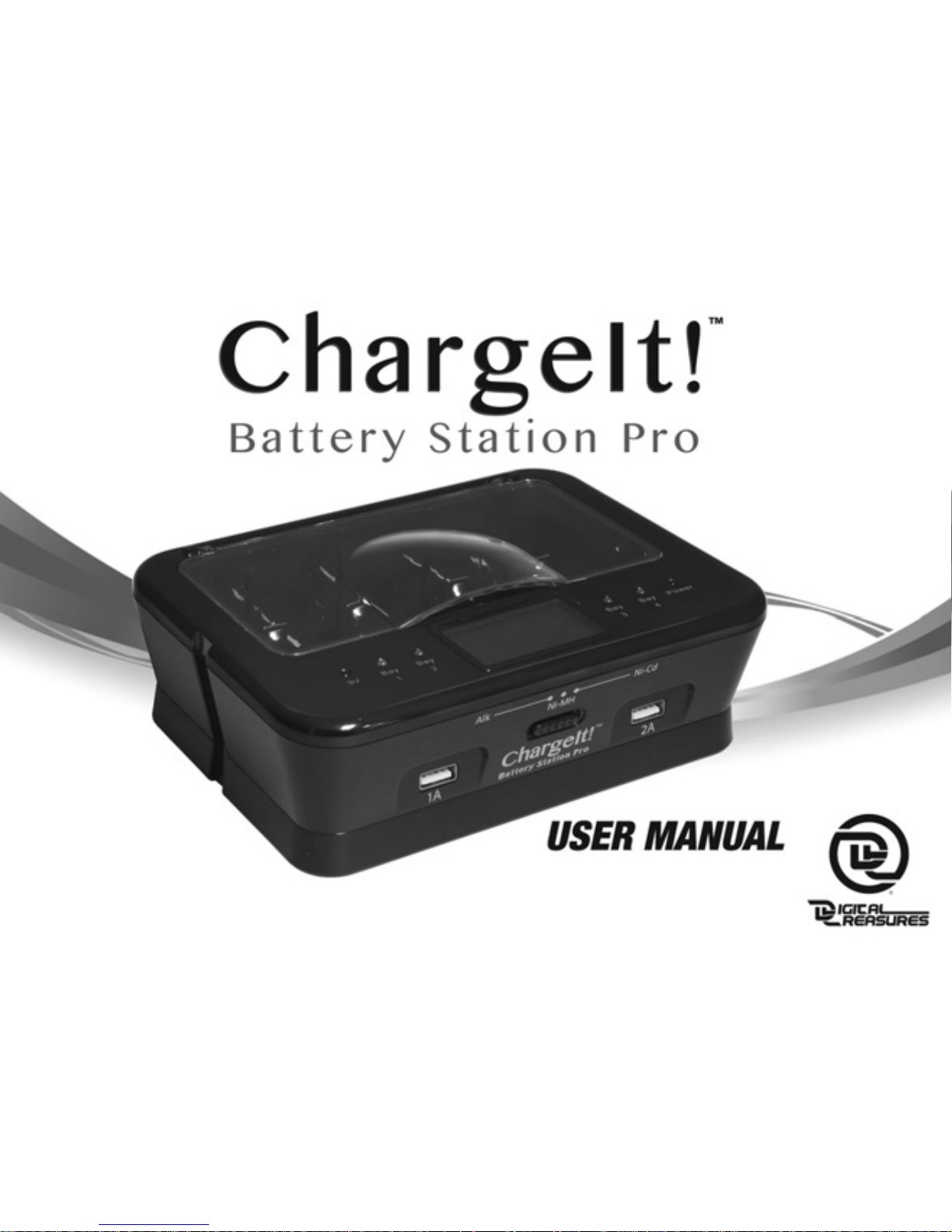
Digital Treasures Part Number 08767, 08768, 08769, 08770, 08771, 08803
Power Supply Model Number NLD200120W1U
Page 2
2
Page 3

3
Congratulations on your purchase of the ChargeIt! Battery Station Pro, the
convenient, money-saving, and environmentally-responsible way to get the most
out of your batteries. The ChargeIt! Battery Station Pro’s innovative design and
microprocessor-monitored charging ability lets you add significant life to standard
alkaline batteries as well as recharging rechargeable alkaline, NiMH, and NiCd
batteries.
Features:
• Charges/recharges AA, AAA, C, D, and 9V standard and rechargeable alkaline, and
rechargeable NiMH and NiCd batteries.
• Microprocessor controlled charging for optimum performance.
• Individual bay monitoring so you can charge from one to five batteries at a time.
• Features Negative Delta V cut-off function and short circuit protection for safety.
• Easy-to-use. Includes LED and LCD displays for at-a-glance operation.
• Individual Maximum Timer Control for overcharge protection.
• Two USB ports to charge your mobile devices.
Page 4

4
Alkaline Batteries
The ChargeIt! Battery Station Pro charges and extends the life of alkaline batteries.
Please make sure that when charging alkaline batteries, you have the selector switch
on the front of the ChargeIt! Battery Station Pro to the “ALK” setting.
Because of the innovative microprocessor control utilized by the ChargeIt! Battery
Station Pro, you will be able to recharge most alkaline batteries up to ten times
with each charging cycle retaining 75-90% of the battery charge status from the
prior charging cycle, until the batteries are exhausted.
To ensure safe and optimum performance, please follow the operating instructions as
described in this user’s manual.
Important Safety Instructions:
• Never attempt to charge expired, damaged, or corroded batteries.
• This unit is designed for indoor use only. Do not attempt to use outdoors.
• The ChargeIt! Battery Station Pro is designed for use with standard/rechargeable
Page 5

5
alkaline batteries and rechargeable NiMH and NiCd batteries only.
• Do not use this unit with an extension cord.
• Always make sure the batteries are inserted into the bays correctly and that
the polarity is correct.
• Unplug the ChargeIt! Battery Station Pro when not in use or before cleaning.
• Use only in an ambient temperature of 0-104° Fahrenheit. Avoid excessive heat
and humidity.
• Never disassemble the ChargeIt! Battery Station Pro. It does not contain any serviceable parts. If the unit fails to work, please contact us for service.
Alkaline and Rechargeable Battery Operating Instructions:
• Before charging please inspect your batteries for leakage, expiration date,
type of battery, and corrosion.
• The ChargeIt! Battery Station Pro charges/recharges AA, AAA, C, D, and 9V
standard/rechargeable alkaline and rechargeable NiMH and NiCd batteries. Never
attempt to charge any other type of batteries with this unit.
Page 6

6
• Never mix battery types when charging. Alkaline batteries should only be
recharged with alkaline batteries, NiMH with NiMH, and NiCd with NiCd.
• Use the AC adapter to plug the ChargeIt! Battery Station Pro into a standard
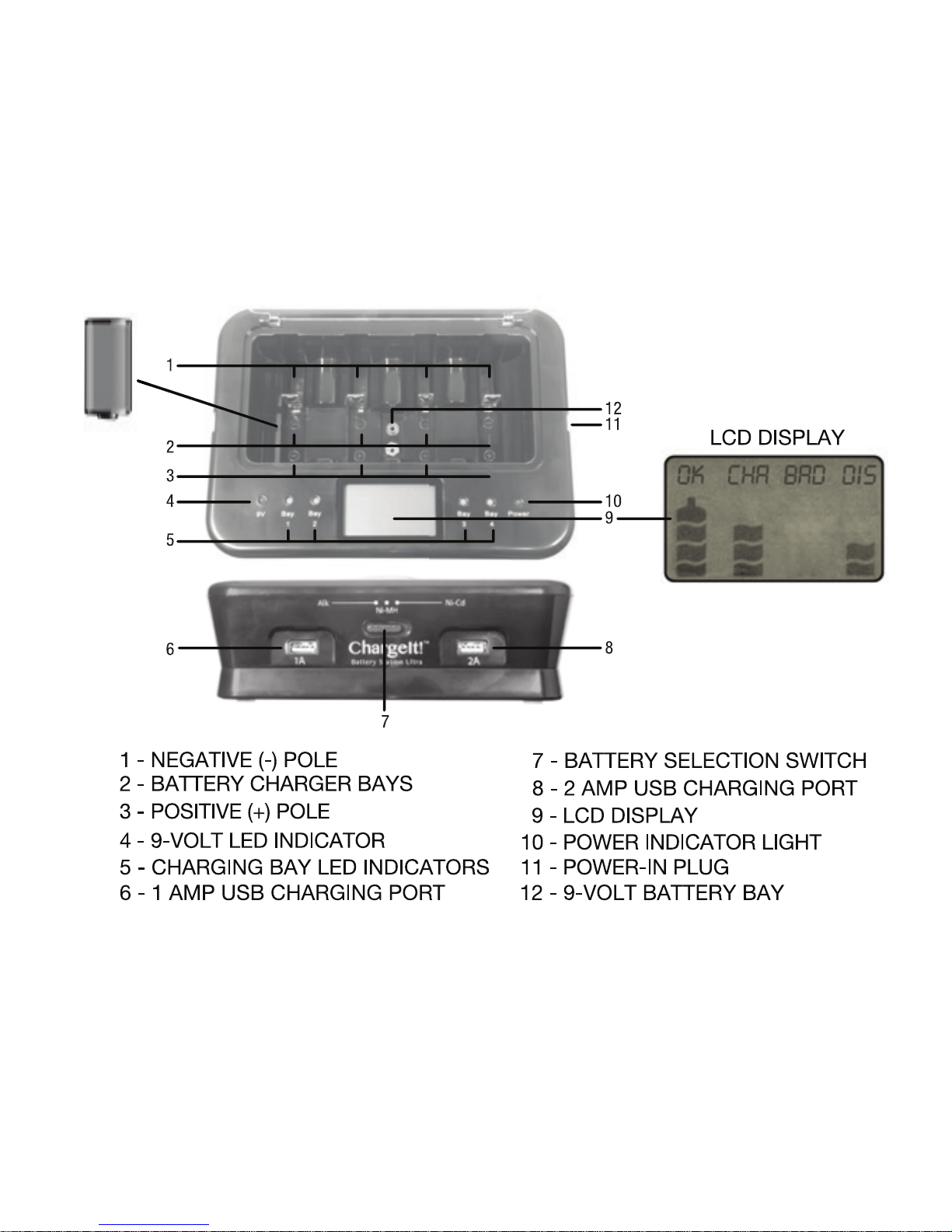
wall outlet. The LED Power Indicator Light will indicate the unit is on.
• Set the battery selector switch to the appropriate battery type, alkaline, NiMH, or
NiCd. (NOTE: Do not move the selector switch after the batteries have been placed
in the bay.)
• Insert the batteries negative side first that you wish to charge into the bays. Please
make sure that they are placed correctly with regards to the polarity.
• After approximately two seconds, the ChargeIt! Battery Station Pro will detect the
batteries and display the individual battery status.
• The ChargeIt! Battery Station Pro automatically begins to charge your batteries, as
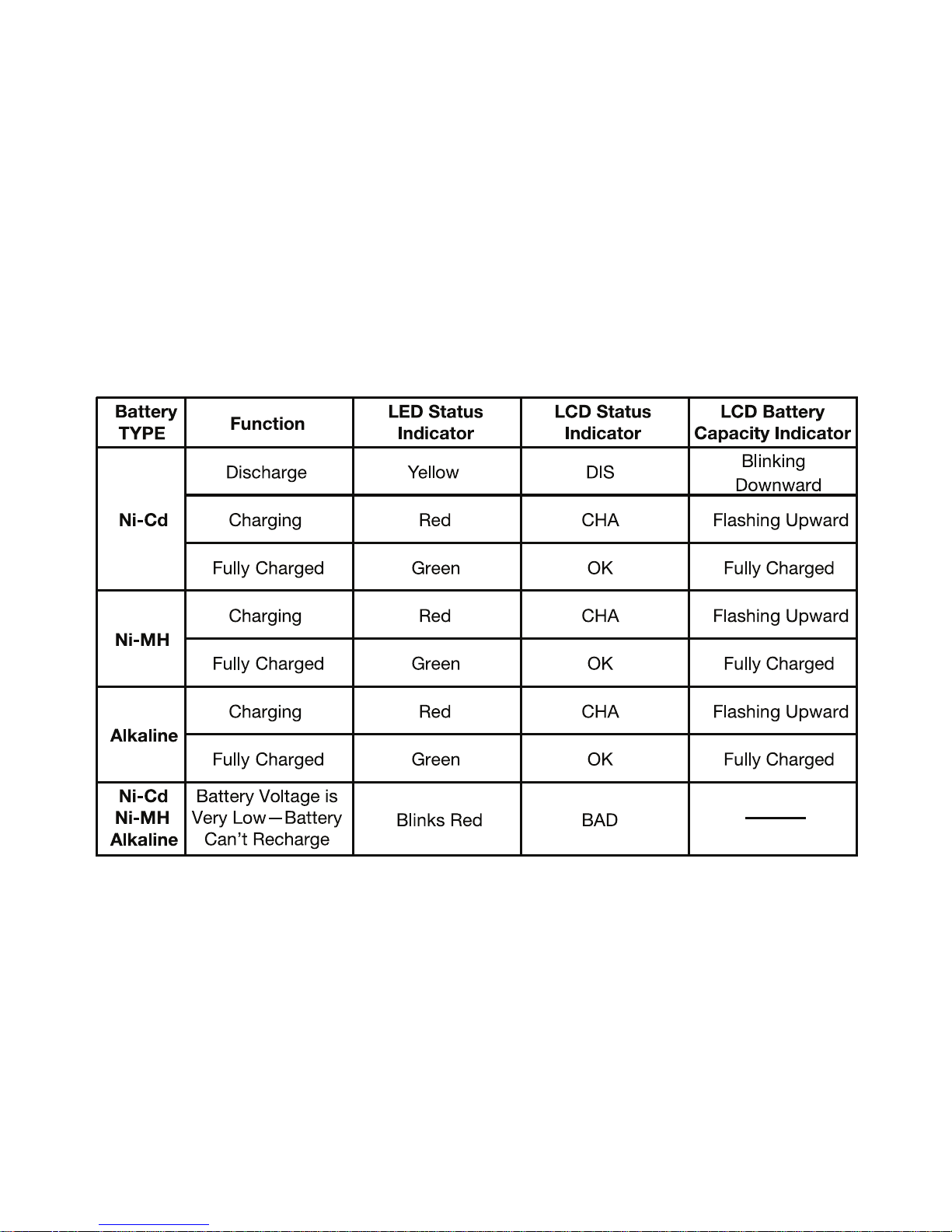
indicated by both LED and LCD Status Indicators.
Page 7

7
• When your battery is fully charged, the LCD Status Indicator will read “OK” and the
LED Status Indicator will turn green.
9V Charging:
• The 9V battery bay does not have a corresponding readout on the LCD Display.
The red 9V LED light indicates that the battery is being charged. When the
light goes out the battery is fully charged.
NOTE: To avoid battery memory loss, NiCd batteries must first be discharged. The
ChargeIt! Battery Station Pro knows this and automatically discharges your NiCd
batteries before charging to ensure ideal battery performance. Discharge is indicated
by “DIS” appearing in the LCD Status Indicator. Once discharge has been completed,
the unit will begin to recharge your NiCd batteries.
USB Charging:
• Use the 1A USB port to charge smartphones and the 2A USB port to charge tablets
or phones.
Page 8
8
LCD and LED Display
Page 9
9
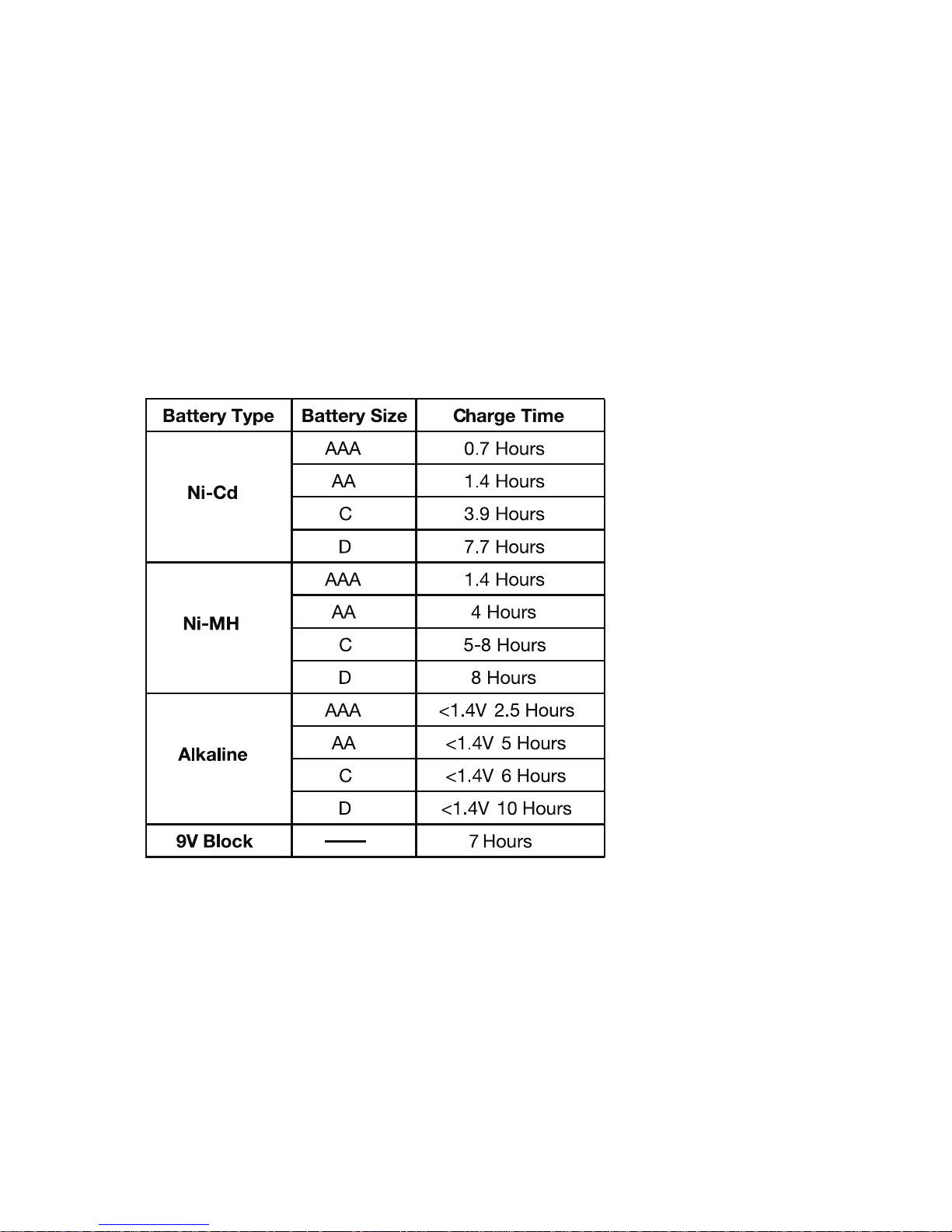
Approximate Charging Times
Page 10

10
IMPORTANT:
• Do not let the unit get wet.
• It is normal for batteries to get warm during the recharging process, please handle recharged
batteries with care.
• Use only under adult supervision; keep this device out of the hands of children.
• Do not remove the cover or disassemble the ChargeIt! Battery Station Pro.
One (1) Year Limited Warranty
PC Treasures, Inc. warrants this product to be free from defects in materials and workmanship. This
warranty covers the original purchaser only, and is not transferable to anyone who subsequently buys,
leases or otherwise obtains from you. Your One (1) Year Limited Warranty begins on the date of purchase.
Your original purchase invoice or sales receipt, showing date of purchase, is your proof of warranty
period. The duration of this warranty does not extend beyond the initial period of coverage should any
repairs or replacements be made or performed.
This warranty does not extend to any product not purchased from PC Treasures, Inc., or an authorized
PC Treasures, Inc. reseller. This warranty does not extend to product that has been damaged or rendered
defective as a result of use for which the product is not intended, is contrary to instructions provided in
the user manual, as a result of the use of parts not manufactured or sold by PC Treasures, Inc., or due
to any misuse, abuse, negligence, modification, or improper packing when returning product to
PC Treasures, Inc.
EXCEPT FOR THE WARRANTY SET FORTH HEREIN, PC TREASURES, INC. DISCLAIMS ALL OTHER
Page 11

11
WARRANTIES, EXPRESSED OR IMPLIED OR STATUTORY, INCLUDING BUT NOT LIMITED TO THE IMPLIED
WARRANTIES OF MERCHANTABILITY OR FITNESS FOR A PARTICULAR PURPOSE. ANY IMPLIED
WARRANTIES THAT MAY BE IMPOSED BY APPLICABLE LAW ARE LIMITED TO THE TERM OF THIS
WARRANTY. IN NO EVENT SHALL PC TREASURES, INC. BE LIABLE FOR ANY INCIDENTAL, SPECIAL OR
CONSEQUENTIAL DAMAGES, INCLUDING BUT NOT LIMITED TO LOSS OF BUSINESS, PROFITS, DATA OR
USE, WHETHER IN AN ACTION IN CONTRACT OR TORT OR BASED ON A WARRANTY, ARISING OUT OF OR
IN CONNECTION WITH THE USE OR PERFORMANCE OF THE PRODUCT. YOU AGREE THAT REPAIR, AND
(UPON AVAILABILITY) REPLACEMENT, AS APPLICABLE, UNDER THE WARRANTY SERVICES DESCRIBED
HEREIN IS YOUR SOLE AND EXCLUSIVE REMEDY WITH RESPECT TO ANY BREACH OF THE
PC TREASURES, INC. LIMITED WARRANTY SET FORTH HEREIN.
How Do I Obtain Warranty Service?
In the event that you require warranty service, please send an email message to
[email protected] or contact PC Treasures, Inc. directly at (248) 236-0061 to report a claim,
at which time PC Treasures, Inc. technicians will attempt to solve any issues. If unable to resolve your
issue, you will be issued an RMA to authorize the return of the item for repair/replacement. All charges
incurred while returning product, including postage, duties, export taxes, and customs duties, are the
responsibility of purchaser, and purchaser assumes all risk of loss during shipment.
Models Covered Under This Warranty
ChargeIt! Battery Station Pro
PCT Part Number 08767, 08768, 08769, 08770, 08771, 08803
Power Supply Model Number NLD200120W1U
Page 12
CBSP MAN REV 2
PC Treasures, Inc.
3720 Lapeer Rd., Auburn Hills, MI 48326
(248) 969-7800 • www.pctreasures.com
Made in China
© 2013 PC Treasures, Inc. All Rights Reserved. PC Treasures, the PC Treasures logo, ChargeIt!, the ChargeIt! logo, and ChargeIt!
Battery Station Pro are trademarks or registered trademarks of PC Treasures, Inc. All Rights Reserved.
Intertek
CONFORMS TO UL
STD.1310
CERTIFIED TO CSA
STD.C22.2 No.223
FCC Compliance
This device complies with Part 15 of the FCC Rules. Operation is subject to the following two conditions: (1)
this device may not cause harmful interference, and (2) this device must accept any interference received,
including interference that may cause undesired operation.
Note 1: This equipment has been tested and found to comply with the limits for a Class B digital device, pursuant to part 15 of the FCC Rules. These limits are designed to provide reasonable protection against harmful
interference in a residential installation. This equipment generates, uses, and can radiate frequency energy
and, if not installed and used in accordance with the instructions, may cause harmful interference to radio
communications. However, there is no guarantee that interference will not occur in a particular installation.
If this equipment does cause harmful interference to radio or television reception, which can be determined
by turning the equipment off and on, the user is encouraged to try to correct the interference by one or more
of the following measures: a) Reorient or relocate the receiving antenna, b) Increase the separation between
the equipment and receiver, c) Connect the equipment into an outlet on a circuit different from that to which
the receiver is connected, d) Consult the dealer or an experienced radio/TV technician for help.
Note 2: Any changes or modifications to this unit not expressly approved by the party responsible for
compliance could void the user’s authority to operate the equipment.
12
 Loading...