

Page 1
Page 2

Parameterizing the reader with a parameter card
2 G3000-021.01
Parameterizing the reader with a parameter card
Revision 04/2014
Order number G3000-021.01
PCS Systemtechnik GmbH
Pfaelzer-Wald-Str. 36,
D-81539 Munich, Germany, Phone +49- 89-68004-0
Home page: http://www.pcs.com
PCS Customer Service Centre
Phone: +49- 89- 68004-666
Fax: +49- 89- 68004-562
Email: [email protected]
PCS, INTUS, INTUS LBus and “PCS. The terminal people“ are trademarks or registered
trademarks of PCS Systemtechnik GmbH. All other product and service names are
trademarks of the respective company and organization.
Copying of this document in whole or in parts is forbidden without the express authority of
PCS Systemtechnik GmbH. The information in this manual is subject to changes so that we
can maintain the state of the art at all times.
Copyright 2014 by PCS Systemtechnik GmbH
Page 3

Parameterizing the reader with a parameter card
© PCS Systemtechnik GmbH 3
Table of contents
1 Parameterizing INTUS 3xxx, 5x00, 400, 600 ............................................. 4
1.1 Prerequisites ............................................................................................ 4
1.2 Parameter card ........................................................................................ 5
1.3 Preparation .............................................................................................. 6
1.4 Parameterizing the INTUS 400 / 600 ...................................................... 7
1.5 Parameterizing the internal reader of INTUS 3xxx / 5x00 ..................... 7
1.6 Completing the parameterization ............................................................ 9
1.7 Controlling the parameterization ............................................................ 9
2 Parameterizing the INTUS 6200 / 6800 / 600FP and ADMITTO reader .. 10
2.1 Parameter card ...................................................................................... 10
2.2 Preparation ............................................................................................ 10
2.3 Parameterizing the INTUS 6200 / 6800 / ADMITTO reader ............... 11
2.4 Parameterizing the INTUS 600FP ........................................................ 14
2.5 Completing the parameterization .......................................................... 15
Important notes for parameterizing
• Before starting the parameterizing you have to de-energize and
subsequent to energize the reader.
• Never use the parameter card not until the reader is visible in
operation (LED is on or flashes, terminal is operable, PC is booted).
• The parameter card has to be read first after energizing the reader.
This reading can be repeated.
• Not every reader can be parameterized with a parameter card. Please
control it at the status page, see section 1.1.
Page 4

Parameterizing the reader with a parameter card
4 G3000-021.01
1 Parameterizing INTUS 3xxx, 5x00, 400, 600
You have to operate the parameterization at each terminal and each
access reader.
You should have knowledge operating the INTUS RemoteSetup and the
local TCL Setup.
Note regarding INTUS 600FP:
Please see the chapter 2, to parameterize an INTUS 600FP reader.
1.1 Prerequisites
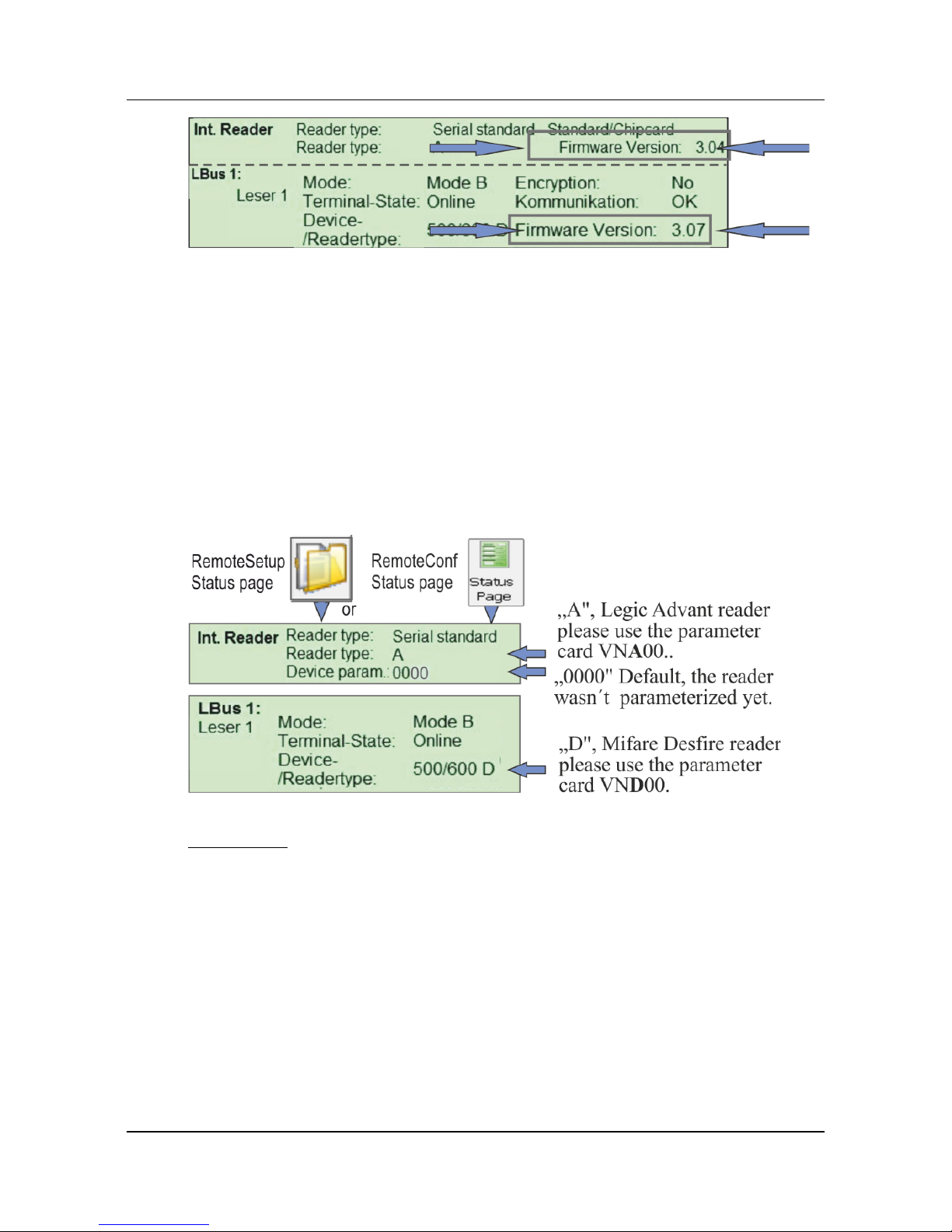
Hardware “Firmware version“ TCL from V6.04
Dependent on the user card parameterizing an internal and external
reader (LBus) is permitted from „Firmware Version“:
• Standard card from V3.04;
• Multi tag card from V3.05 Legic reader,
• Multi tag card from V3.06 Mifare DESFire reader;
• Pegasys with Mifare DESFire EV1 cards from V3.07
Page 5
Parameterizing the reader with a parameter card
© PCS Systemtechnik GmbH 5
1.2 Parameter card
You have to parameterize the installed RFID reader with the assigned
parameter card only.
The card required depends on the installed reader type:
• VND00-xxx.yy, Mifare Desfire reader
• VNA00-xxx.yy¸ Legic Advant reader
• VNH00-xxx.yy, Hitag reader
Please note:
If another number is displayed instead of the default 0000, it is the number
of a reader parameterization.
Page 6
Parameterizing the reader with a parameter card
6 G3000-021.01
1.3 Preparation
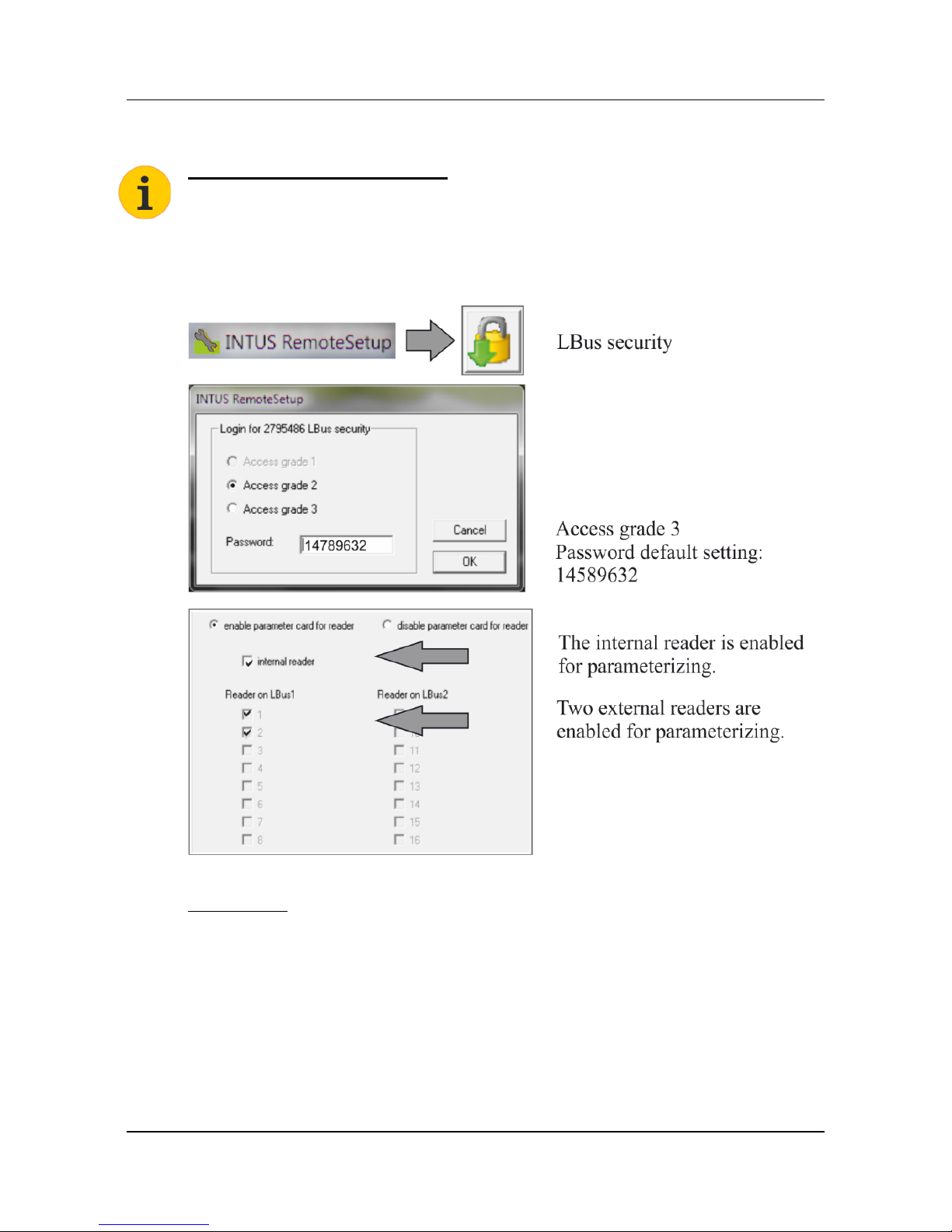
INTUS 5500/5600 please note:
Currently you have to enable the parameter card with a TCL program, the
PCS Service provides this software.
Step 1
Enable the parameter card.
Please note:
If necessary you can enable the parameter card on the terminal with the
local TCL Setup, please see “Configuration and Operation“ Manual.
Step 2
Disconnect the reader or terminal from the power supply.
Step 3
Reconnect it to the power supply.
Page 7
Parameterizing the reader with a parameter card
© PCS Systemtechnik GmbH 7
1.4 Parameterizing the INTUS 400 / 600
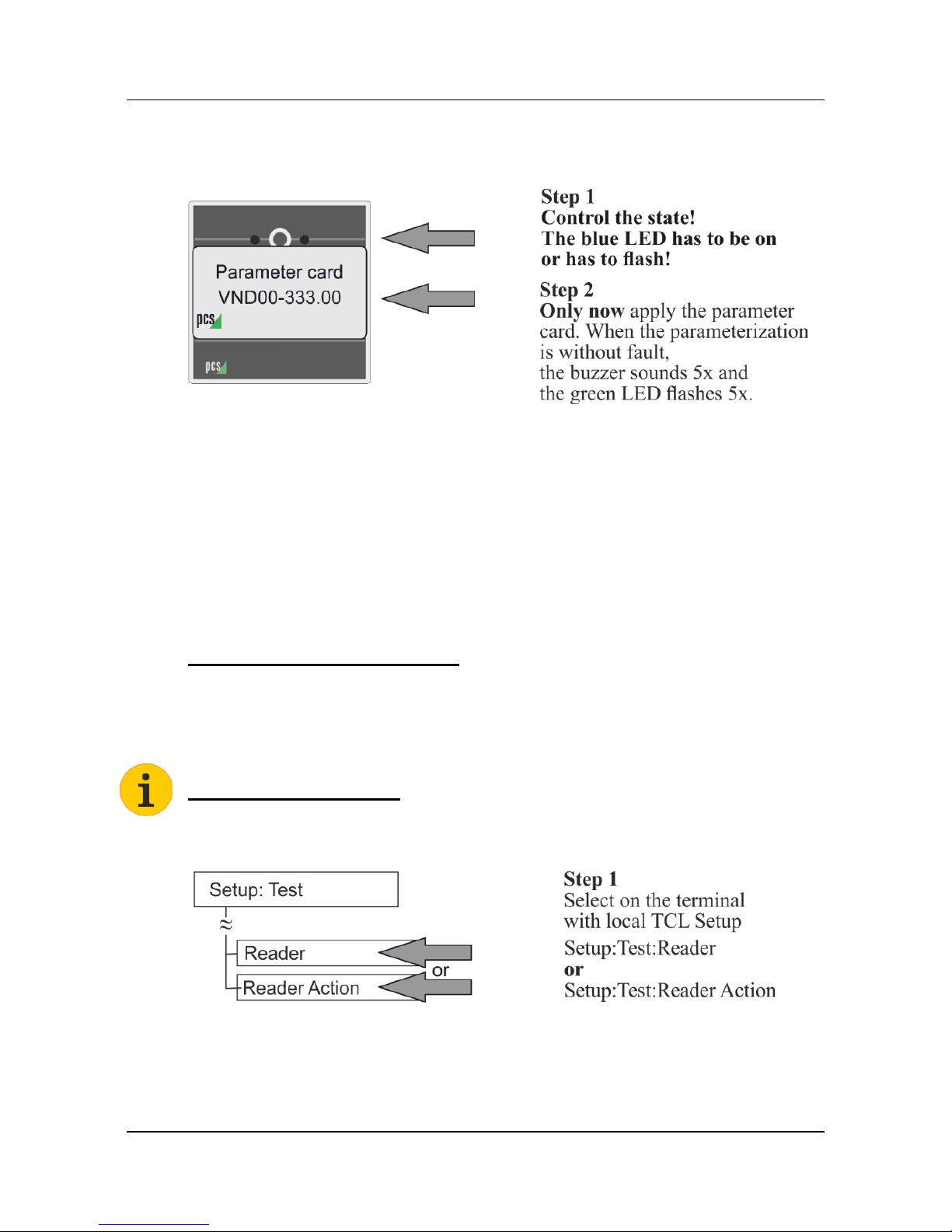
Example INTUS 600
Incorrect parameterizing
If the parameterizing is incorrect, the reader does not work or the red LED
is flashing 3x and the buzzer sounds 3x.
Please check:
• Did you use the right card?
• Has it been the first reading after the restart of the reader?
• Is the parameter card enabled for the reader?
Note regarding INTUS 600FP:
Please see the chapter 2, to parameterize an INTUS 600FP reader.
1.5 Parameterizing the internal reader of INTUS 3xxx / 5x00
INTUS 5600 please note:
You will get a TCL program for the reader action test at PCS Service.
All information on the local Setup please find in the “Configuration and
Operation“ Manual.
Page 8
Parameterizing the reader with a parameter card
8 G3000-021.01
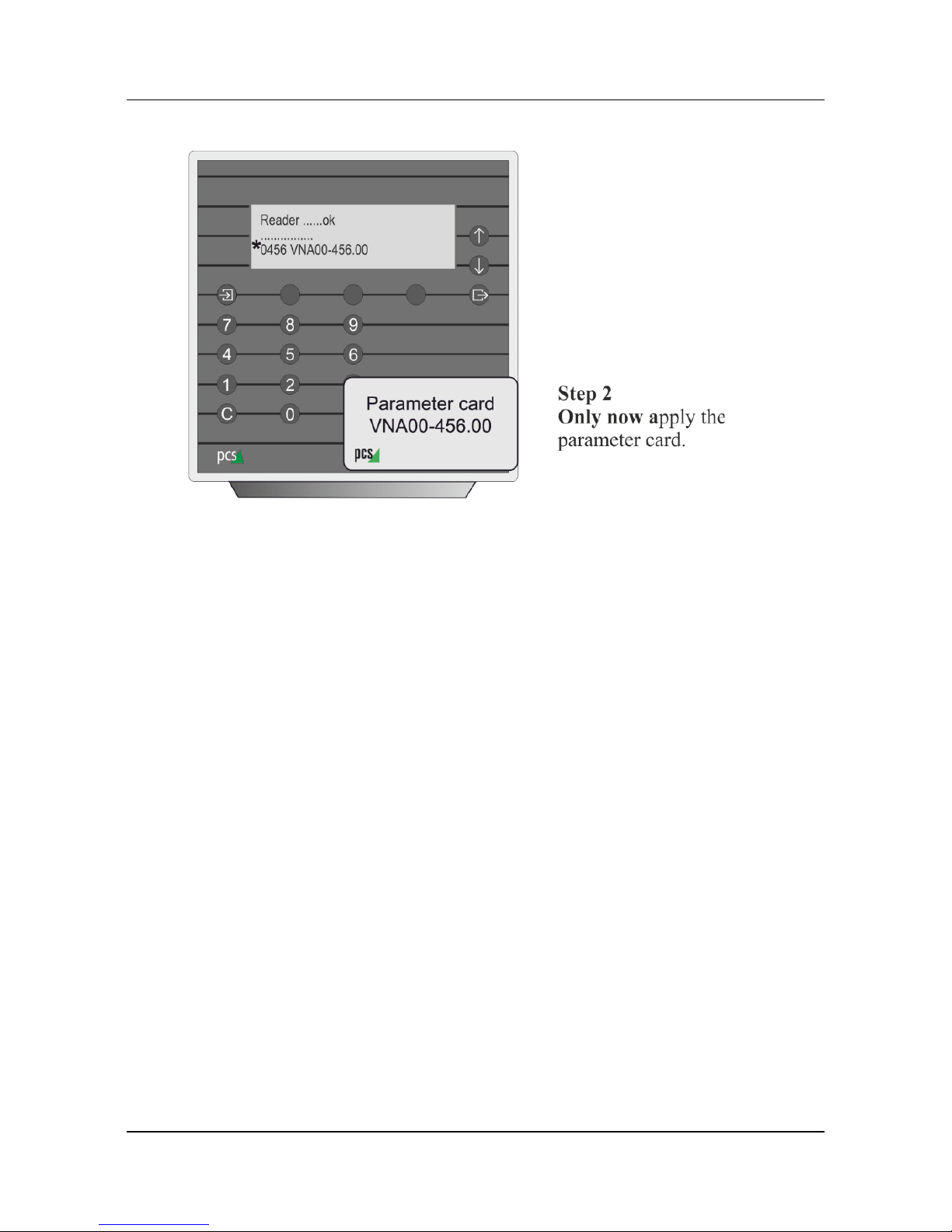
Example INTUS 5300
* When the parameterization is without fault, the number of the reader
parameterization and reader type are displayed.
Example: 0456, “A“ Legic Advant reader.
Incorrect parameterizing
If the parameterizing is incorrect, the reader does not work or “11111” is
displayed in the third line.
Please check:
• Did you use the right card?
• Has it been the first reading after the restart of the reader?
• Is the parameter card enabled for the reader?
Page 9
Parameterizing the reader with a parameter card
© PCS Systemtechnik GmbH 9
1.6 Completing the parameterization
Step 1
Disconnect the reader or terminal from the power supply.
Step 2
Reconnect it to the power supply.
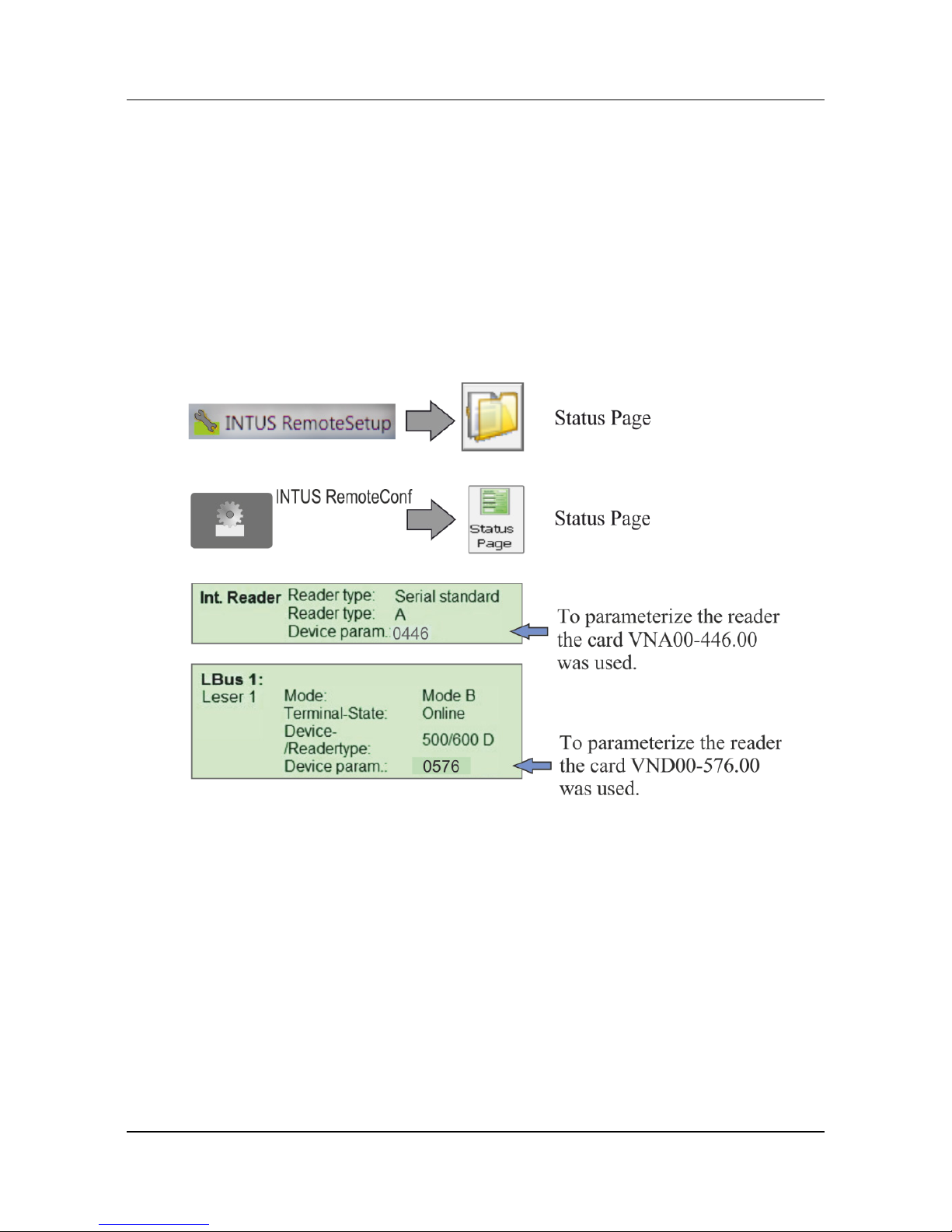
1.7 Controlling the parameterization
Page 10
Parameterizing the reader with a parameter card
10 G3000-021.01
2 Parameterizing the INTUS 6200 / 6800 / 600FP and
ADMITTO reader
2.1 Parameter card
Enabling the parameter card is unnecessary.
You have to parameterize the installed RFID reader with the assigned
parameter card only.
The card required depends on the installed RFID reader:
• VND90-xxx.yy, Mifare Desfire reader
• VNA90-xxx.yy¸ Legic Advant reader
• VNH90-xxx.yy, Hitag reader
Please note:
You have to use a parameter card with the characteristic VNx90.
2.2 Preparation
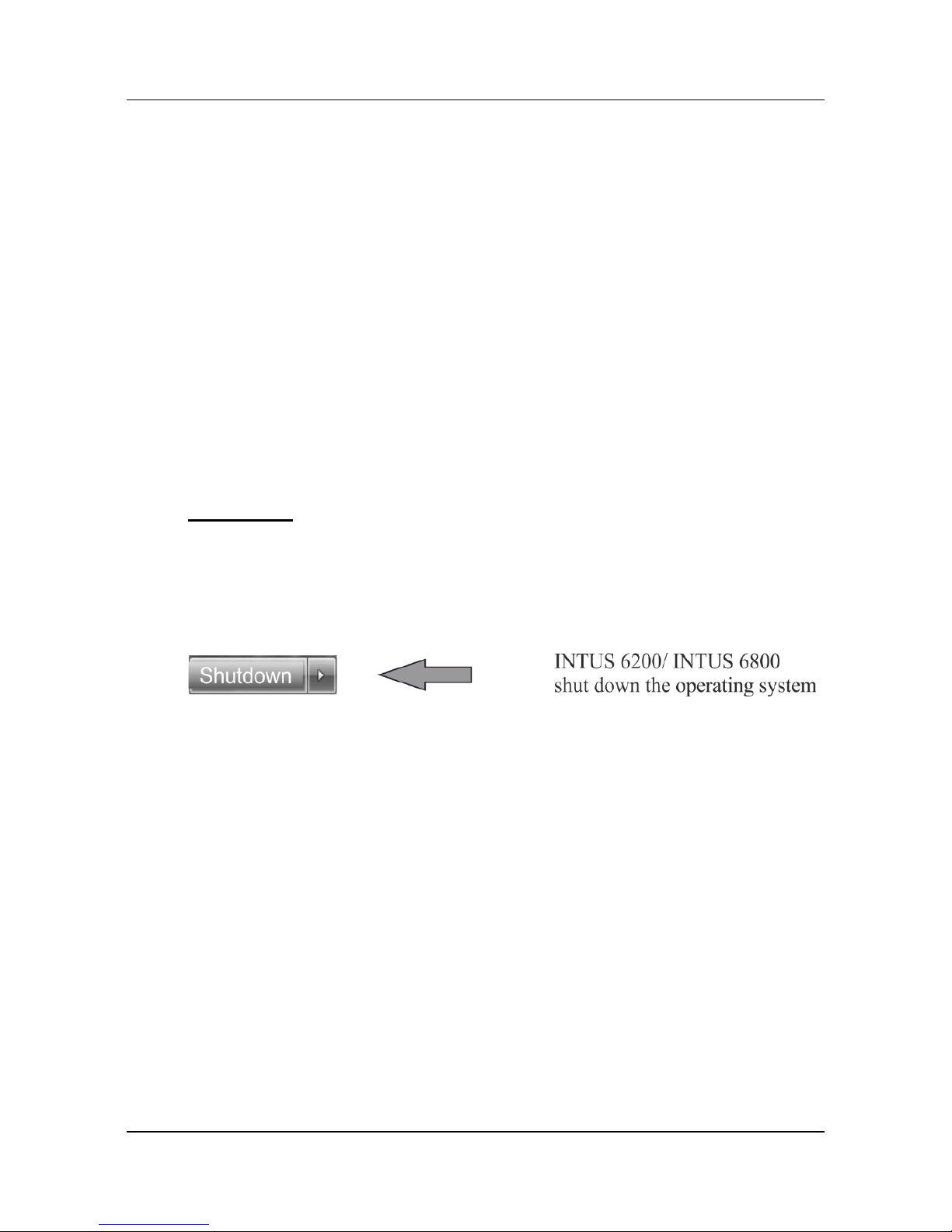
Step 1
Step 2
• Disconnect INTUS 6200/ 600FP from the power supply.
• Unplug the ADMITTO reader.
Step 3
• Reconnect INTUS 6200/ 600FP to the power supply.
• Switch on the INTUS 6800 (switch is on the rear side of the device).
• Insert the ADMITTO reader.
Page 11
Parameterizing the reader with a parameter card
© PCS Systemtechnik GmbH 11
2.3 Parameterizing the INTUS 6200 / 6800 / ADMITTO reader
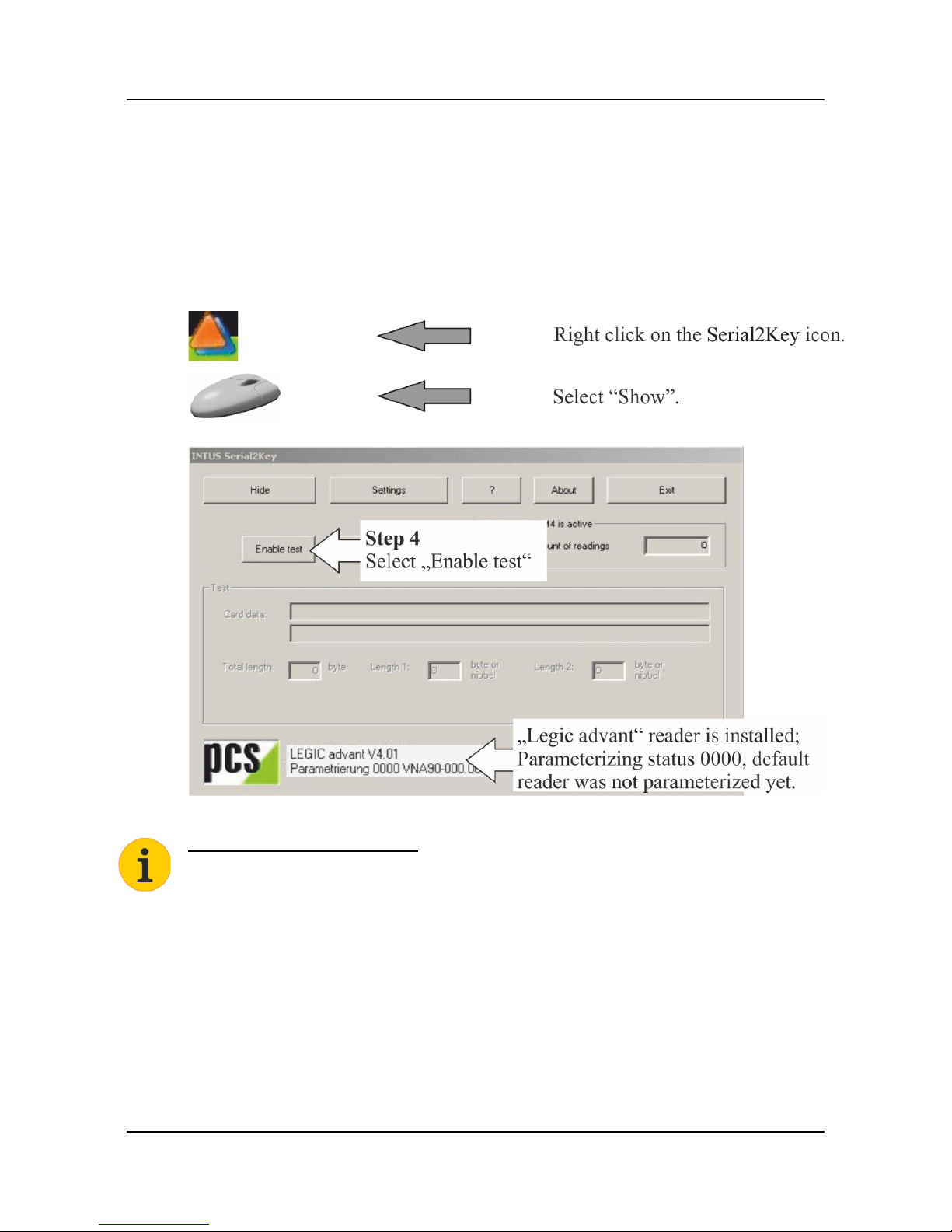
INTUS Serial2Key
INTUS Serial2Key is auto run started, it can be found on the lower task bar
to the right of the screen.
Alternatively you find INTUS Serial2Key with “All programs>INTUS
Serial2Key”.
Tip to the parameter card
You have to parameterize the installed RFID reader with the assigned
parameter card and the characteristic VNx90- only, please see page 2.1.
Page 12
Parameterizing the reader with a parameter card
12 G3000-021.01
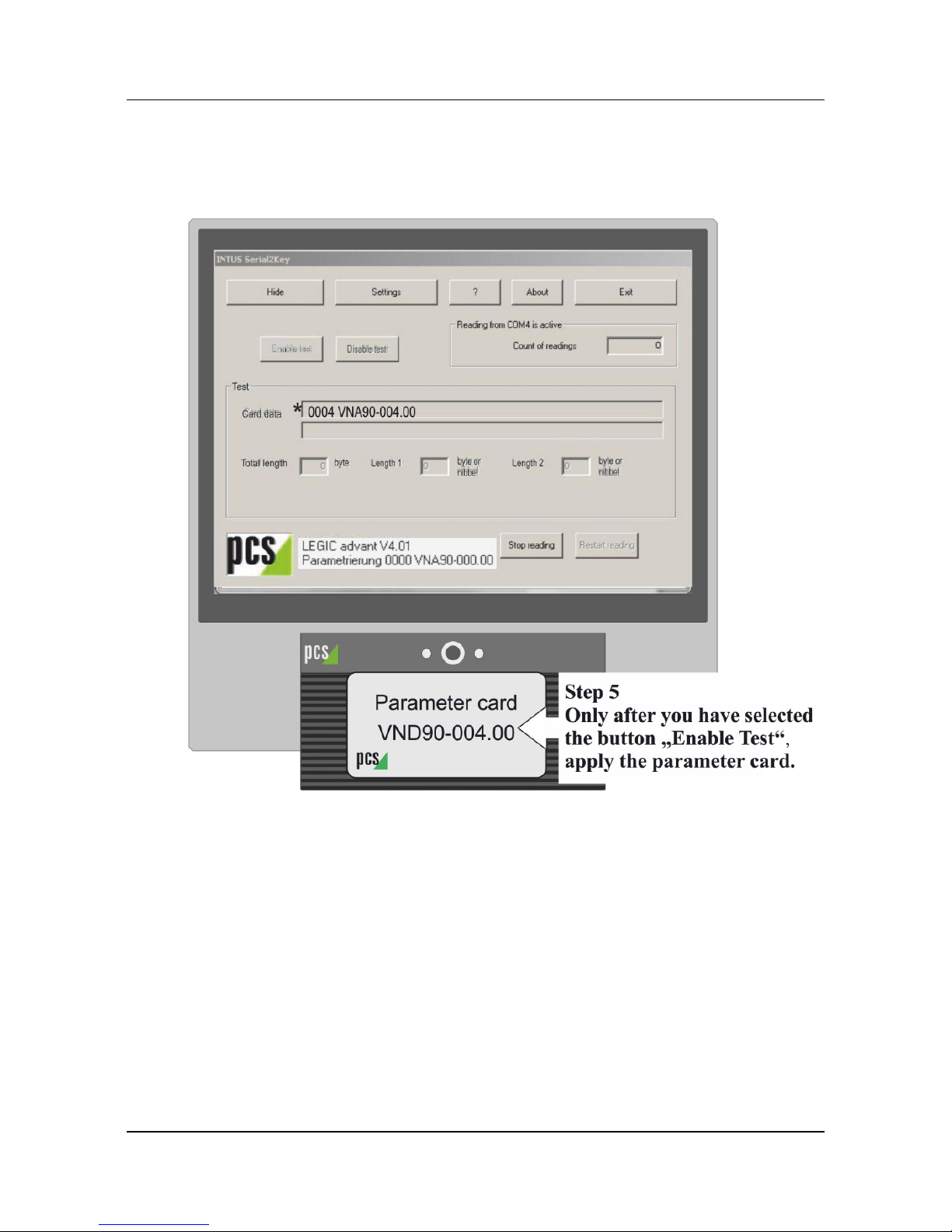
Operating the parameterizing
Example INTUS 6200
* The parameterization is without fault, the number of the reader
parameterization and reader type are displayed.
Example: 0004, “A“ Legic Advant reader.
Incorrect parameterizing
If the parameterizing is incorrect, the reader does not work or “11111” is
displayed under “Card Data”.
Please check:
• Did you use the right card?
• Has it been the first reading after the restart of the reader?
Page 13
Parameterizing the reader with a parameter card
© PCS Systemtechnik GmbH 13
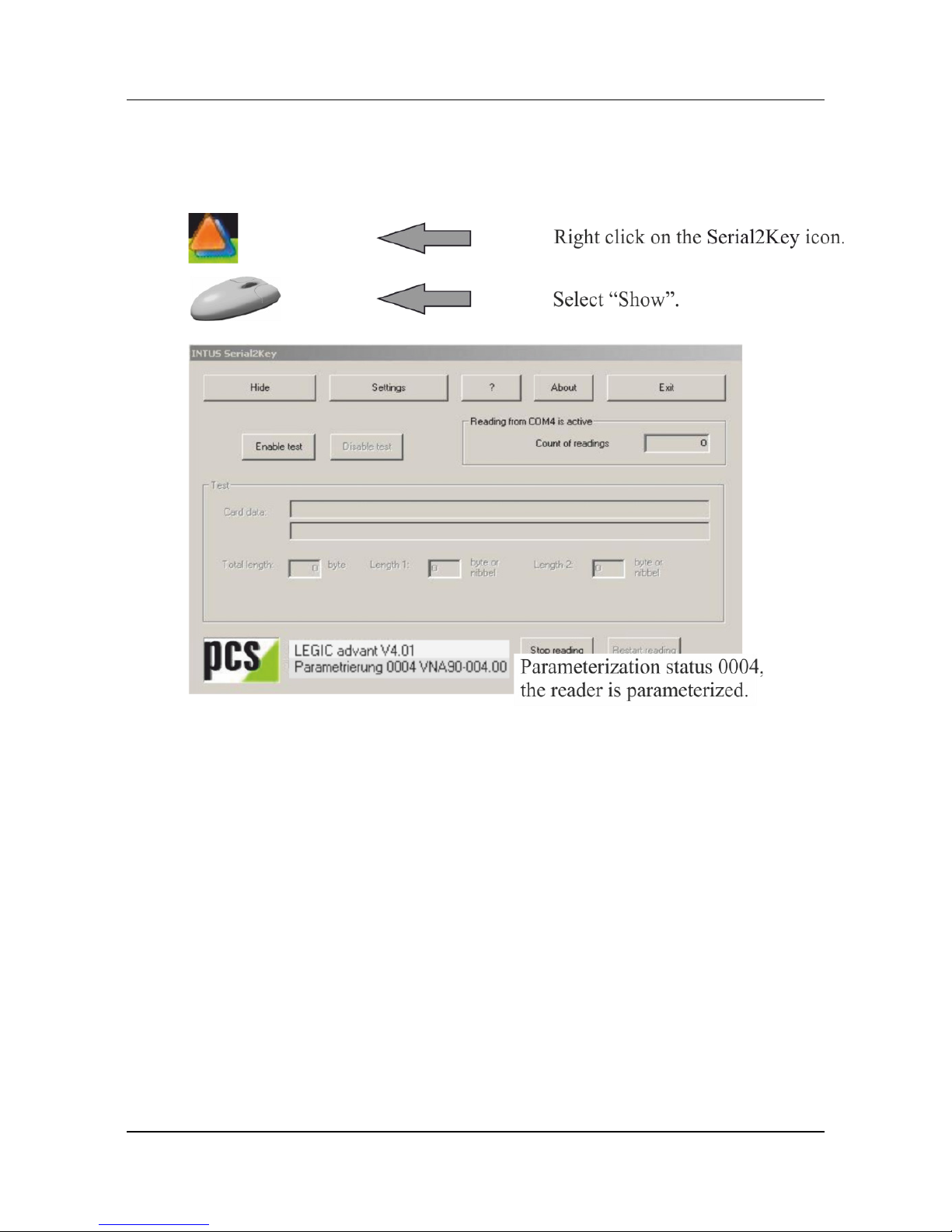
Controlling the parameterization
Serial2Key:
Page 14
Parameterizing the reader with a parameter card
14 G3000-021.01
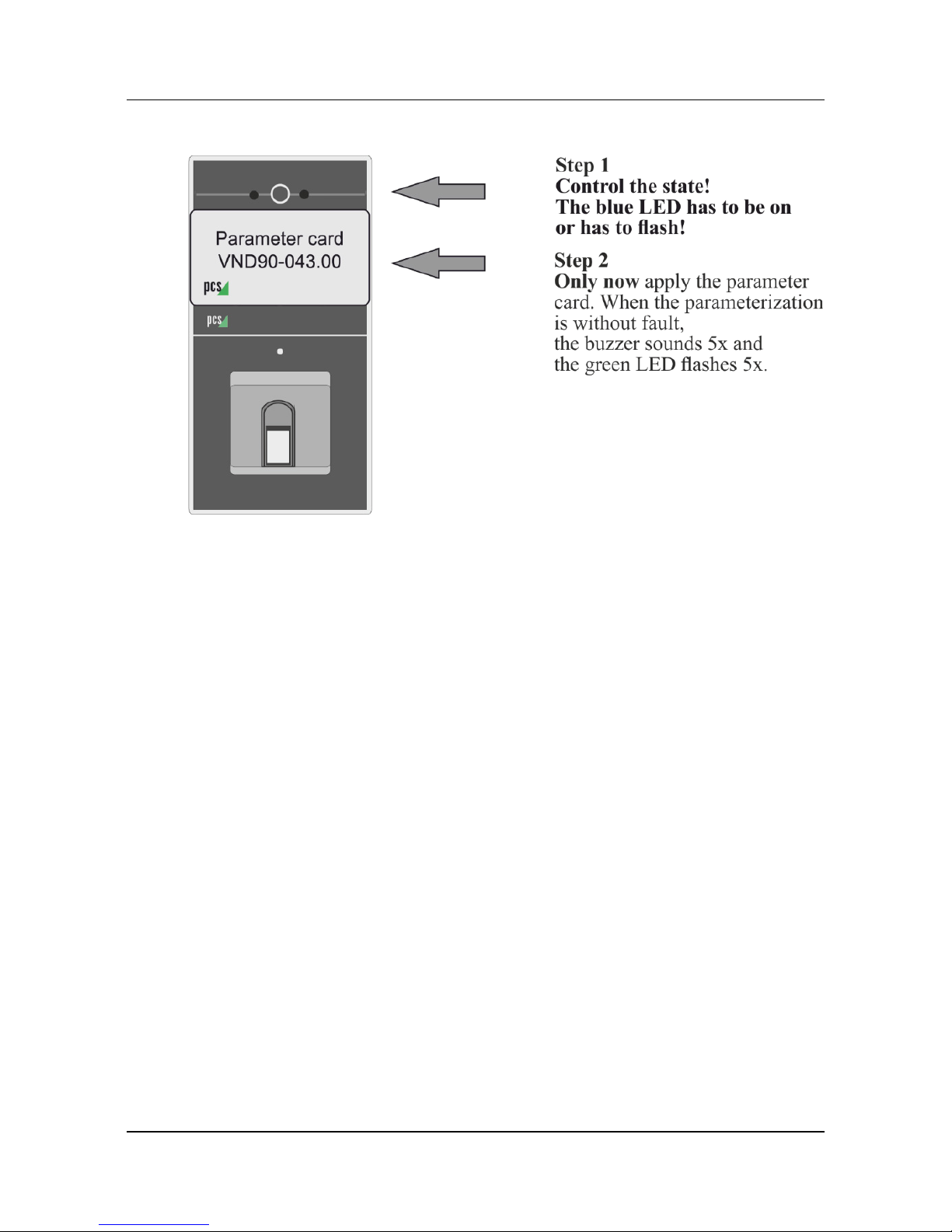
2.4 Parameterizing the INTUS 600FP
Incorrect parameterizing
If the parameterizing is incorrect, the reader does not work.
Please check:
• Did you use the right card?
• Has it been the first reading after the restart of the reader?
• If the using of a parameter card is allowed for the current
parameterizing? If necessary send the INTUS 600FP to the PCS Service.
Page 15

Parameterizing the reader with a parameter card
© PCS Systemtechnik GmbH 15
2.5 Completing the parameterization
Step 1
Step 2
• Disconnect INTUS 6200 / INTUS 600FP from the power supply.
• Unplug the ADMITTO reader.
Step 3
• Reconnect INTUS 6200 / INTUS 600FP to the power supply.
• Switch on the INTUS 6800 (switch is on the rear side of the device).
• Insert the ADMITTO reader.
Page 16
 Loading...