

Page 1
© PCE Instruments
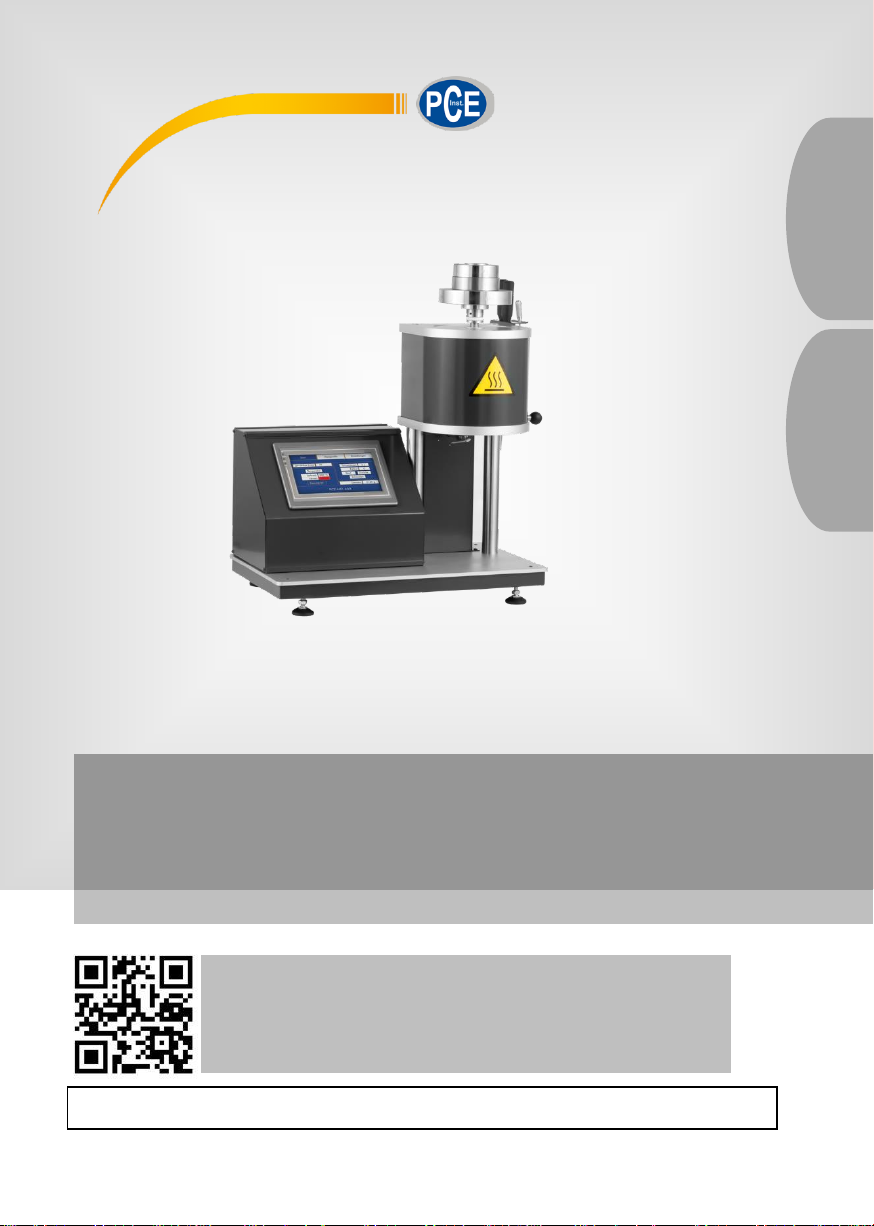
Schmelzindex Prüfgerät | Melt Flow Meter PCE-MFI 400
Bedienungsanleitung
User Manual
User manuals in various languages (français,
italiano, español, português, nederlands, türk, polski,
русский, 中文) can be found by using our
product search on: www.pce-instruments.com
Letzte Änderung / last change: 16 November 2020
v1.0
Deutsch
English
Page 2

© PCE Instruments
Deutsch
Inhaltsverzeichnis
1 Sicherheitsinformationen .................................................................. 1
2 Spezifikationen ................................................................................... 3
2.1 Technische Spezifikationen .......................................................................................... 3
2.2 Lieferumfang ................................................................................................................. 3
3 Systembeschreibung ......................................................................... 4
3.1 Gerät ............................................................................................................................ 4
3.2 Startbildschirm .............................................................................................................. 5
3.3 Messprofile ................................................................................................................... 7
3.4 Einstellungen .............................................................................................................. 10
4 Garantie ............................................................................................. 11
5 Entsorgung ....................................................................................... 11
Page 3

English
Contents
1 Safety notes ...................................................................................... 12
2 Specifications ................................................................................... 14
2.1 Technical specifications .............................................................................................. 14
2.2 Delivery contents ........................................................................................................ 14
3 System description .......................................................................... 15
3.1 Device ........................................................................................................................ 15
3.2 Start screen ................................................................................................................ 16
3.3 Profiles ....................................................................................................................... 18
3.4 Settings ...................................................................................................................... 21
4 Contact ............................................................................................ 22
5 Disposal ............................................................................................ 22
© PCE Instruments
Page 4

© PCE Instruments
1
Deutsch
1 Sicherheitsinformationen
Bitte lesen Sie dieses Benutzer-Handbuch sorgfältig und vollständig, bevor Sie das Gerät zum
ersten Mal in Betrieb nehmen. Die Benutzung des Gerätes darf nur durch sorgfältig geschultes
Personal erfolgen. Schäden, die durch Nichtbeachtung der Hinweise in der
Bedienungsanleitung entstehen, entbehren jeder Haftung.
• Dieses Messgerät darf nur in der in dieser Bedienungsanleitung beschriebenen Art
und Weise verwendet werden. Wird das Messgerät anderweitig eingesetzt, kann es
zu gefährlichen Situationen kommen.
• Verwenden Sie das Messgerät nur, wenn die Umgebungsbedingungen (Temperatur,
Luftfeuchte, …) innerhalb der in den Spezifikationen angegebenen Grenzwerte
liegen. Setzen Sie das Gerät keinen extremen Temperaturen, direkter
Sonneneinstrahlung, extremer Luftfeuchtigkeit oder Nässe aus.
• Setzen Sie das Gerät keinen Stößen oder starken Vibrationen aus.
• Das Öffnen des Gerätegehäuses darf nur von Fachpersonal der PCE Deutschland
GmbH vorgenommen werden.
• Benutzen Sie das Messgerät nie mit nassen Händen.
• Es dürfen keine technischen Veränderungen am Gerät vorgenommen werden.
• Das Gerät sollte nur mit einem Tuch gereinigt werden. Verwenden Sie keine
Scheuermittel oder lösungsmittelhaltige Reinigungsmittel.
• Das Gerät darf nur mit dem von der PCE Deutschland GmbH angebotenen Zubehör
oder gleichwertigem Ersatz verwendet werden.
• Überprüfen Sie das Gehäuse des Messgerätes vor jedem Einsatz auf sichtbare
Beschädigungen. Sollte eine sichtbare Beschädigung auftreten, darf das Gerät nicht
eingesetzt werden.
• Das Messgerät darf nicht in einer explosionsfähigen Atmosphäre eingesetzt werden.
• Der in den Spezifikationen angegebene Messbereich darf unter keinen Umständen
überschritten werden.
• Wenn die Sicherheitshinweise nicht beachtet werden, kann es zur Beschädigung
des Gerätes und zu Verletzungen des Bedieners kommen.
Für Druckfehler und inhaltliche Irrtümer in dieser Anleitung übernehmen wir keine Haftung.
Wir weisen ausdrücklich auf unsere allgemeinen Gewährleistungsbedingungen hin, die Sie in
unseren Allgemeinen Geschäftsbedingungen finden.
Bei Fragen kontaktieren Sie bitte die PCE Deutschland GmbH. Die Kontaktdaten finden Sie
am Ende dieser Anleitung.
Page 5
© PCE Instruments
2
Deutsch
Sicherheitssymbole
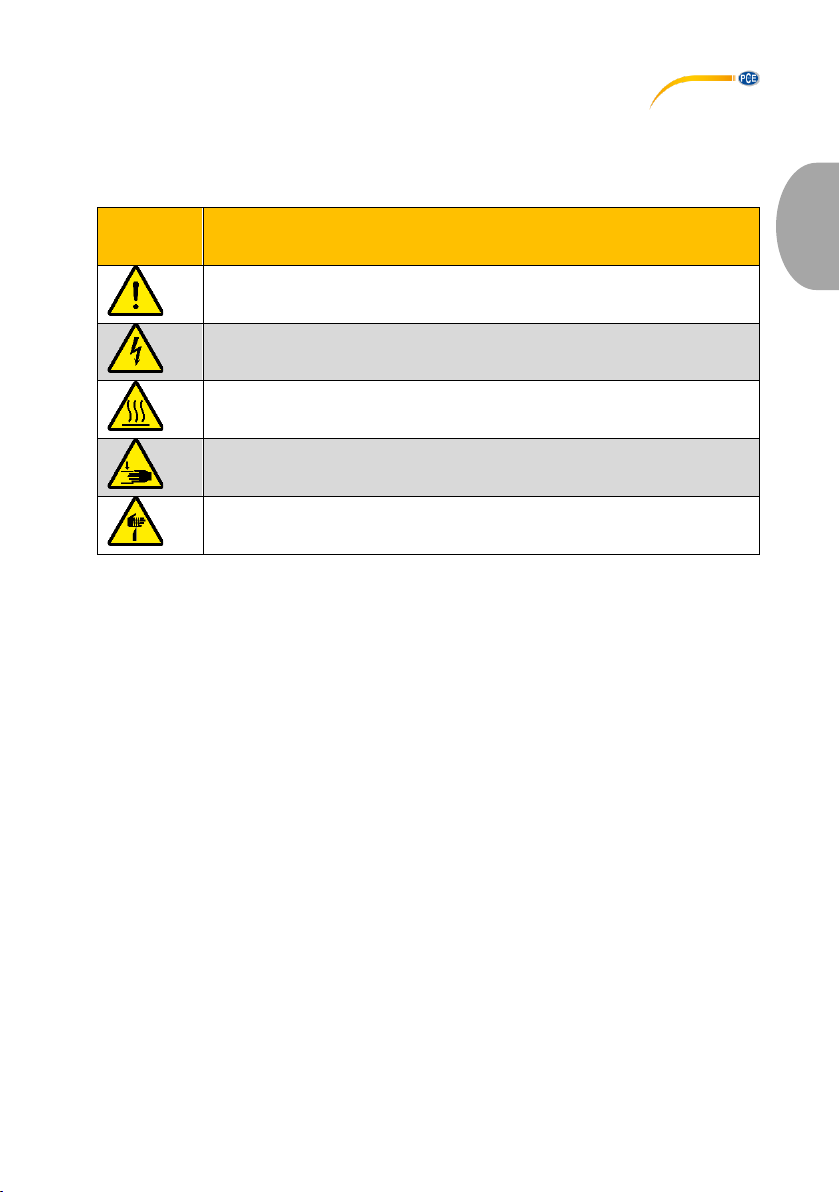
Sicherheitsrelevante Hinweise, deren Nichtbeachtung zu Schäden am Gerät oder zu
Verletzungen führen kann, sind zusätzlich mit einem Sicherheitssymbol gekennzeichnet.
Symbol
Bezeichnung / Beschreibung
Allgemeines Warnzeichen
Nichtbeachtung kann zu Verletzungen und/oder Schäden am Gerät führen.
Warnung vor elektrischer Spannung
Nichtbeachtung kann zu Stromschlägen führen.
Warnung vor heißer Oberfläche
Nichtbeachtung kann zu Verbrennungen führen.
Warnung vor Handverletzungen
Nichtbeachtung kann zu Verletzungen der Hände durch Quetschungen etc.
führen.
Warnung vor spitzem Gegenstand
Nichtbeachtung kann zu Stichverletzungen führen.
Page 6
© PCE Instruments
3
Deutsch
2 Spezifikationen
2.1 Technische Spezifikationen
Messbereich
Schmelzrate
0,1 … 400,0 g/10 min
Heiztemperatur
+120 … +400 °C
Messgenauigkeit Temperatur
±0,2 °C
Auflösung
1 °C
Prüflast
325 g … 21,6 kg
Prüfkolben Ø
9,48 mm
Extrusionsdüse Ø
2,095 mm
Normen
ISO1133-1997, ASTM 1238-04C, GB/T3682-2000
Display
Typ
7“ LCD Touchdisplay
Auflösung
800 x 480 Pixel
Farbtiefe
16000 Farben
Abmessungen (ohne Prüflast)
ca. 500 x 320 x 500 mm
Gewicht (ohne Prüflast)
ca. 15 kg
Spannungsversorgung
90 … 264 V AC, 50 … 60 Hz
Leistungsaufnahme (bei Volllast)
ca. 0,6 kVA
2.2 Lieferumfang
1 x Schmelzindex Prüfgerät PCE-MFI 400
1 x Extrusionsdüse Ø2,095 mm
1 x Gewichtssatz bestehend aus:
1 x 325 g (Belastungskolben)
1 x 875 g
1 x 960 g
1 x 1200 g
1 x 1640 g
1 x 2500 g
1 x 4100 g
2 x 5000 g
1 x Kaltgerätekabel
1 x Einfülltrichter
1 x Reinigungsstab
1 x Verdichtungsstab
1 x Baumwoll-Mullbinden zur Reinigung
1 x Kalibrierzertifikat
1 x Bedienungsanleitung
Page 7
© PCE Instruments
4
Deutsch
3 Systembeschreibung
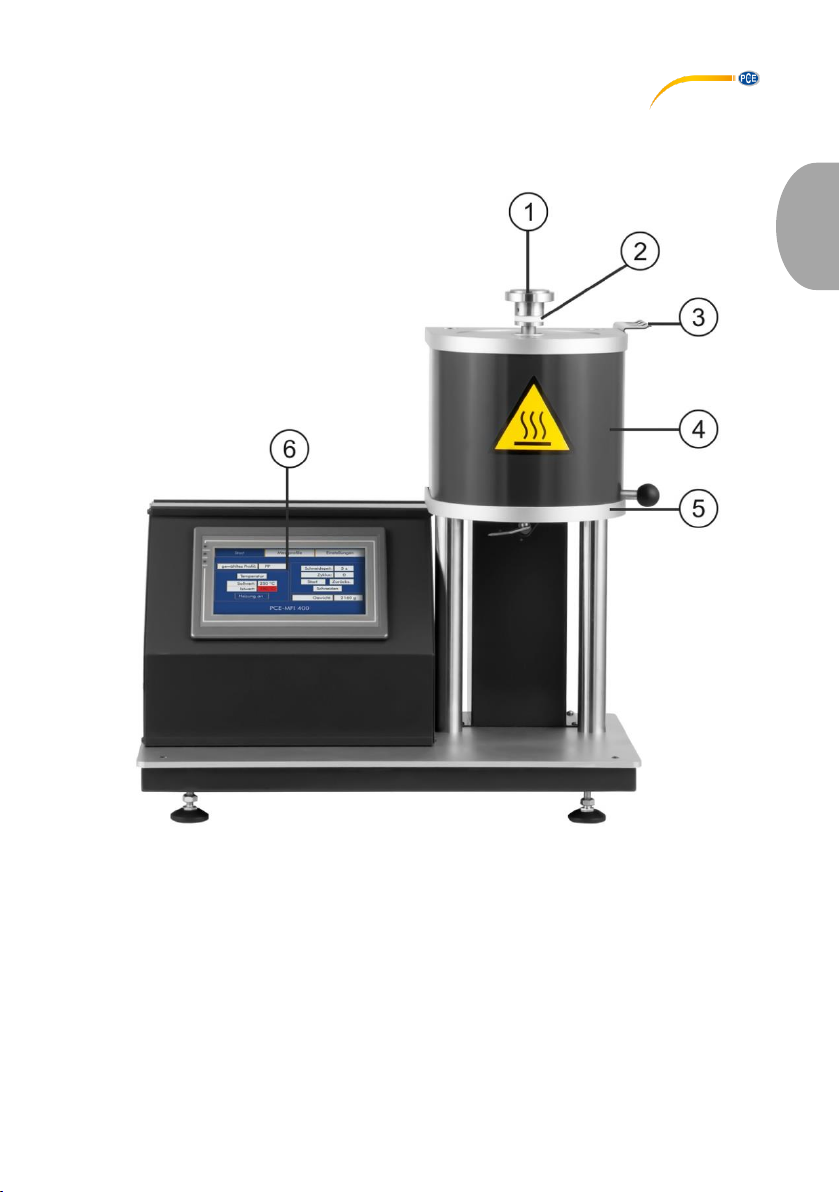
3.1 Gerät
1 Prüflast
4 Heiztiegel
2 Belastungskolben
5 Schneide
3 Zubehör-Halter
6 7“ Touchdisplay
Page 8
© PCE Instruments
5
Deutsch
3.2 Startbildschirm
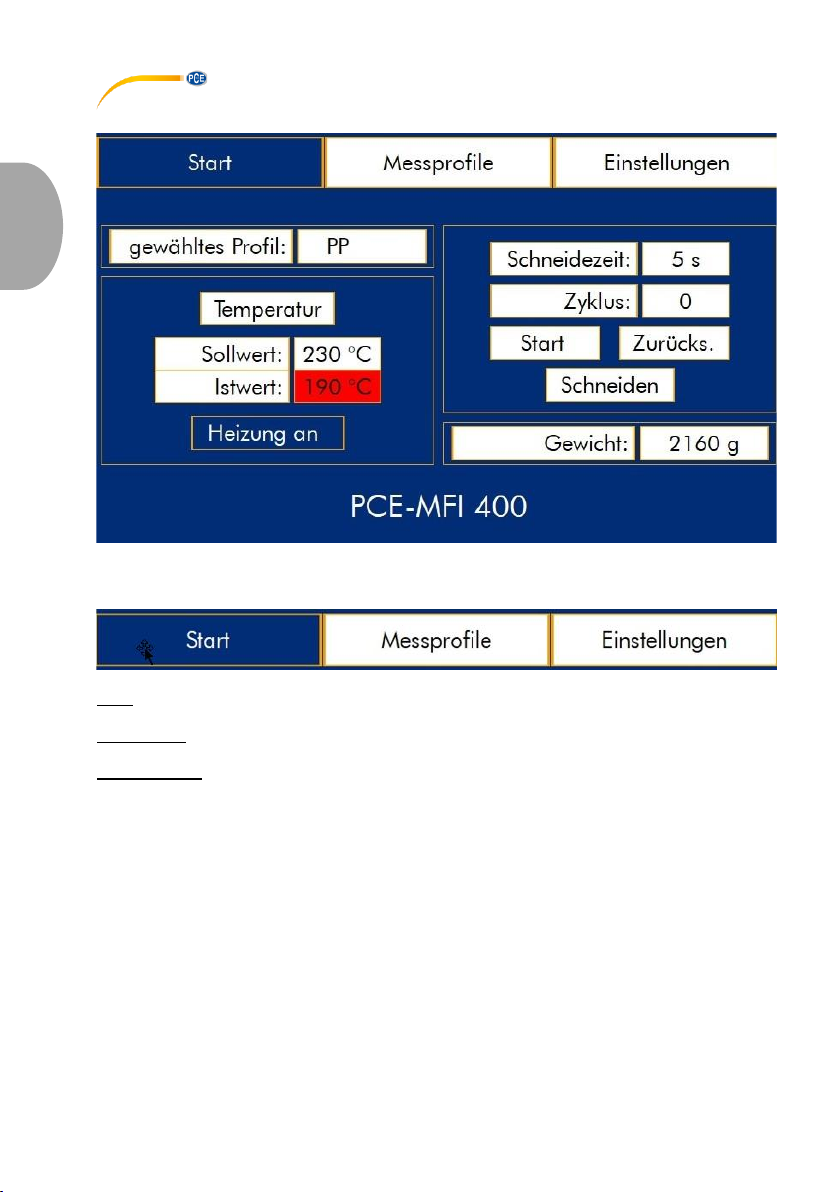
3.2.1 Menüleiste
Start: zeigt den Startbildschirm mit eingestellten Parametern, Heiztiegel-Temperatur,
Schneidezeit-Zyklus und dem eingestellten Gewicht dar.
Messprofile: ermöglicht die Auswahl von standardmäßig hinterlegten Werkstoffprofilen.
Zusätzlich können Profile für neue Werkstoffe hinterlegt werden.
Einstellungen: Veränderungen von Basiseinstellungen des Gerätes wie z. B. Displayhelligkeit,
Zeit bis zur autom. Deaktivierung der Heizung bei Nicht-Bedienung des Gerätes, etc.
Page 9
© PCE Instruments
6
Deutsch
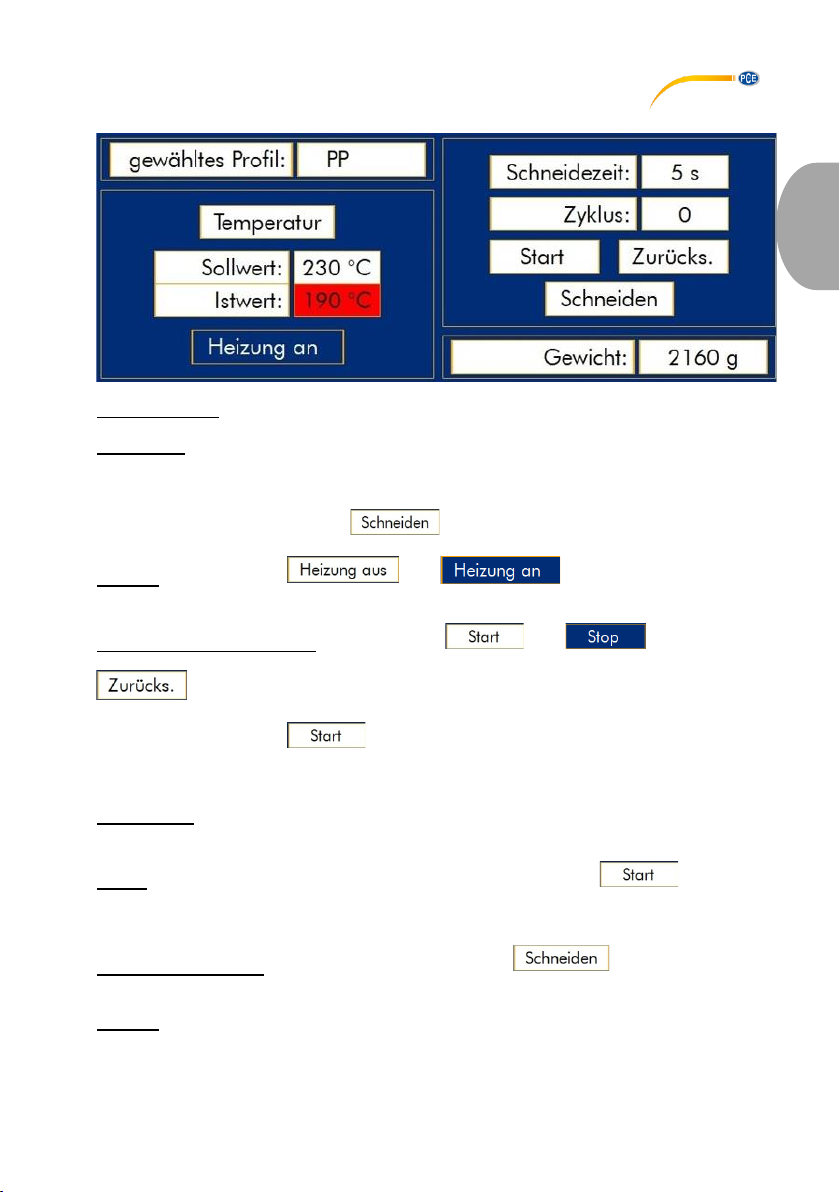
3.2.2 Parameter
gewähltes Profil: gibt an, welches Werkstoffprofil im Menü „Messprofile“ gewählt wurde.
Temperatur: Darstellung der Soll-Ist Temperatur; sobald die Temperaturstabilität erkannt wird
(min. 10 Minuten nach Erreichen des Sollwertes), färbt sich die Anzeige des Istwertes grün;
erst danach wird die autom. Schneidefunktion freigeschaltet.
Hinweis: manuelles Schneiden des geschmolzenen Kunststoffstrangs aus dem
Extrusionswerkzeug über die Taste ist zu jedem Zeitpunkt möglich.
Heizung: über die Tasten bzw. kann der Heiztiegel auf die
voreingestellte Temperatur aufgeheizt werden.
Start/ Stop und Zurücksetzen: mittels der Taste bzw. wird der autom.
Schneidvorgang des extrudierten Kunststoffstrangs gestartet bzw. gestoppt. Die Taste
stoppt sofort den autom. Schneidvorgang und setzt den Zykluszähler auf „0“
zurück.
Hinweis: sobald die Taste betätigt wird, rotiert die Schneide einmalig, um bereits
extrudierten Kunststoff, welcher nicht zur Berechnung des Schmelzindexes verwendet werden
darf, zu beseitigen.
Schneidezeit: zeigt die voreingestellte Zeit an, in welcher der extrudierte Kunststoffstrang
automatisch abgeschnitten wird.
Zyklus: nach dem Start des autom. Schneidvorgangs mittels der Taste wird dieser
Zähler nach Ablauf der Schneidezeit um „1“ erhöht, um später die Berechnung des
Schmelzindexes durchführen zu können.
manuelles Schneiden: durch die Betätigung der Taste rotiert die Schneide
einmalig.
Gewicht: gibt an, welches Belastungsgewicht für die Prüfung des ausgewählten Werkstoffs
auf den Belastungskolben aufgelegt werden muss.
Page 10
© PCE Instruments
7
Deutsch
3.3 Messprofile
Page 11
© PCE Instruments
8
Deutsch
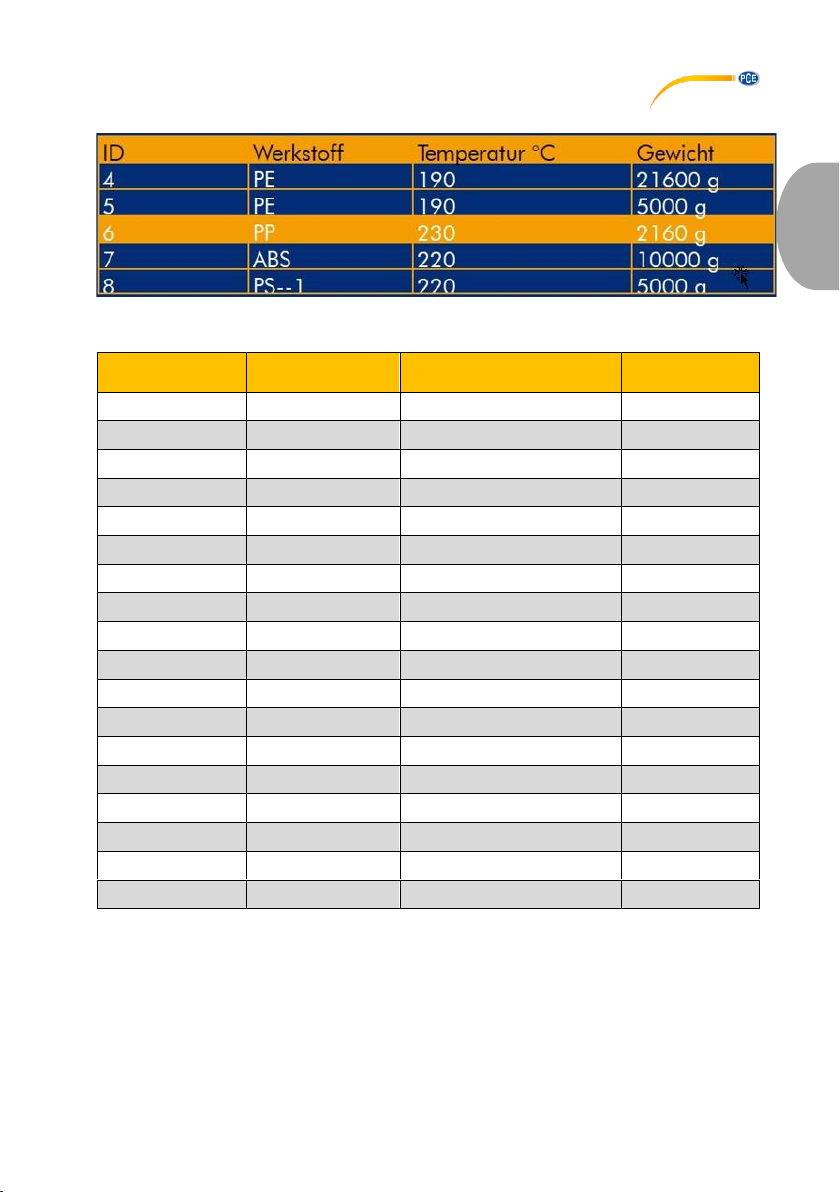
3.3.1 Übersicht
Tabellarische Übersicht voreingestellter Werkstoffprofile zur Schmelzindexprüfung. Folgende
Profile sind werksseitig hinterlegt:
ID
Werkstoff
Temperatur
Gewicht
1
PS
200 °C
5000 g
2
PE
190 °C
2160 g
3
PE
190 °C
325 g
4
PE
190 °C
21600 g
5
PE
190 °C
5000 g
6
PP
230 °C
2160 g
7
ABS
220 °C
10000 g
8
PS-1
220 °C
5000 g
9
E/VAC
150 °C
2160 g
10
E/VAC
190 °C
2160 g
11
E/VAC
125 °C
325 g
12
SAN
220 °C
10000 g
13
ASA ACS AE
220 °C
10000 g
14
PC
300 °C
1200 g
15
PMMA
230 °C
3800 g
16
PB
190 °C
2160 g
17
POM
190 °C
2160 g
18
MABS
220 °C
10000 g
Page 12
© PCE Instruments
9
Deutsch
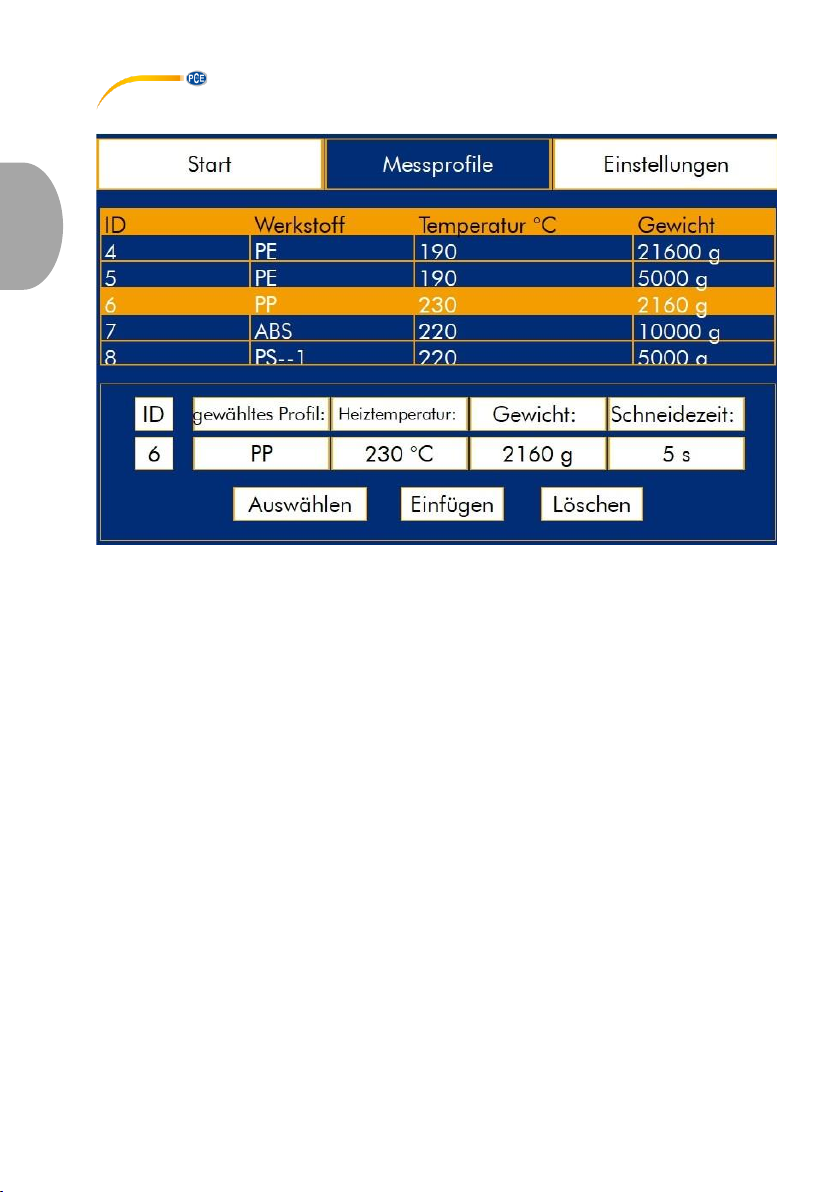
3.3.2 Profilauswahl und Bearbeitung
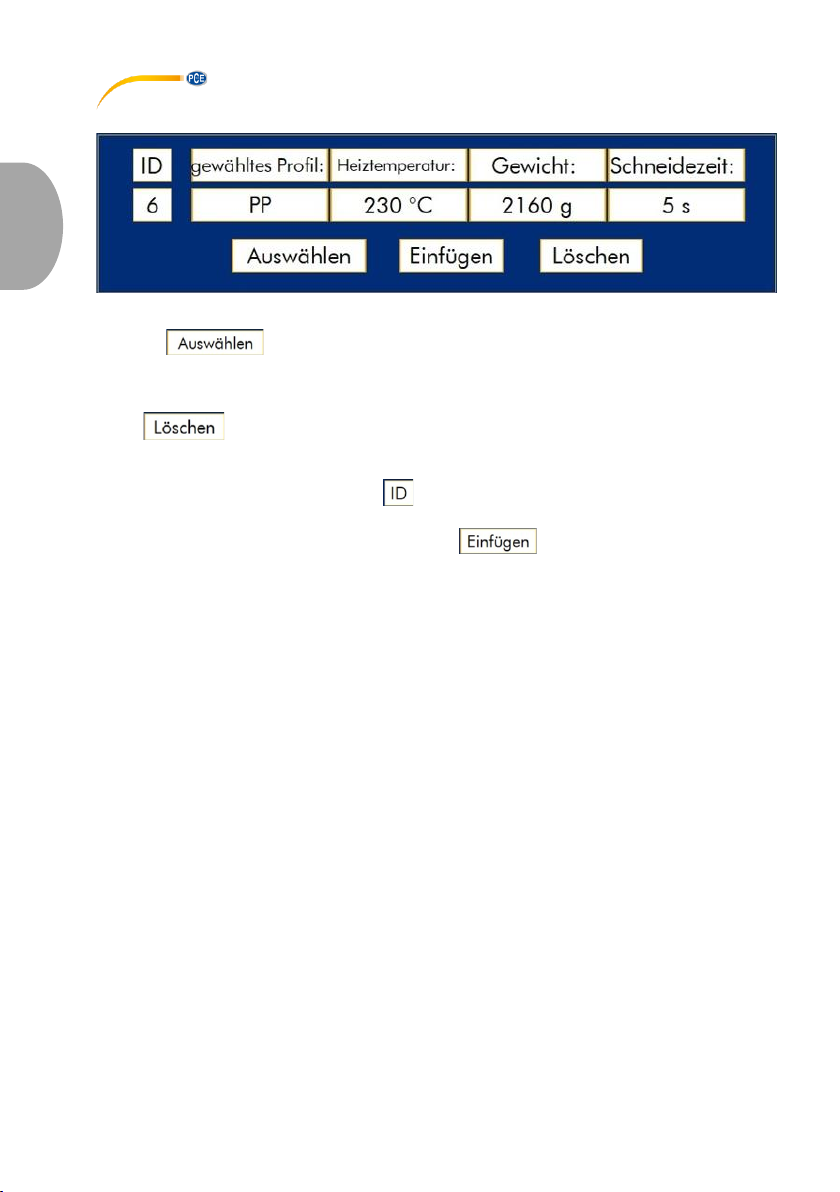
Sobald ein Profil in der tabellarischen Übersicht durch Druck auf den Bildschirm markiert und
die Taste gedrückt wurde, ist das gewählte Profil als „aktiv“ gekennzeichnet und
wird in der oben dargestellten Ansicht angezeigt. In dieser Ansicht kann das werkseitige Profil
auch bearbeitet oder gelöscht werden, indem die entsprechenden Eingabefelder (in diesem
Beispiel „PPE“, „230 °C“, „2160 g“ durch Druck auf den Bildschirm aktiviert werden bzw. die
Taste . betätigt wird. Zur Bearbeitung erscheint eine Bildschirmtastatur, über
welche Eingaben gemacht werden können.
Soll ein neues Profil angelegt werden, so wird die nächste freie „ID“ (standardmäßig 19) durch
Druck auf die Schalfläche unterhalb von über die Bildschirmtastatur eingetragen. Danach
sollten noch der Profilname, die Heiztemperatur und das Belastungsgewicht eingetragen
werden, um die Daten durch Drücken der Taste in der internen Datenbank zu
hinterlegen.
Page 13
© PCE Instruments
10
Deutsch
3.4 Einstellungen
3.4.1 Sprache
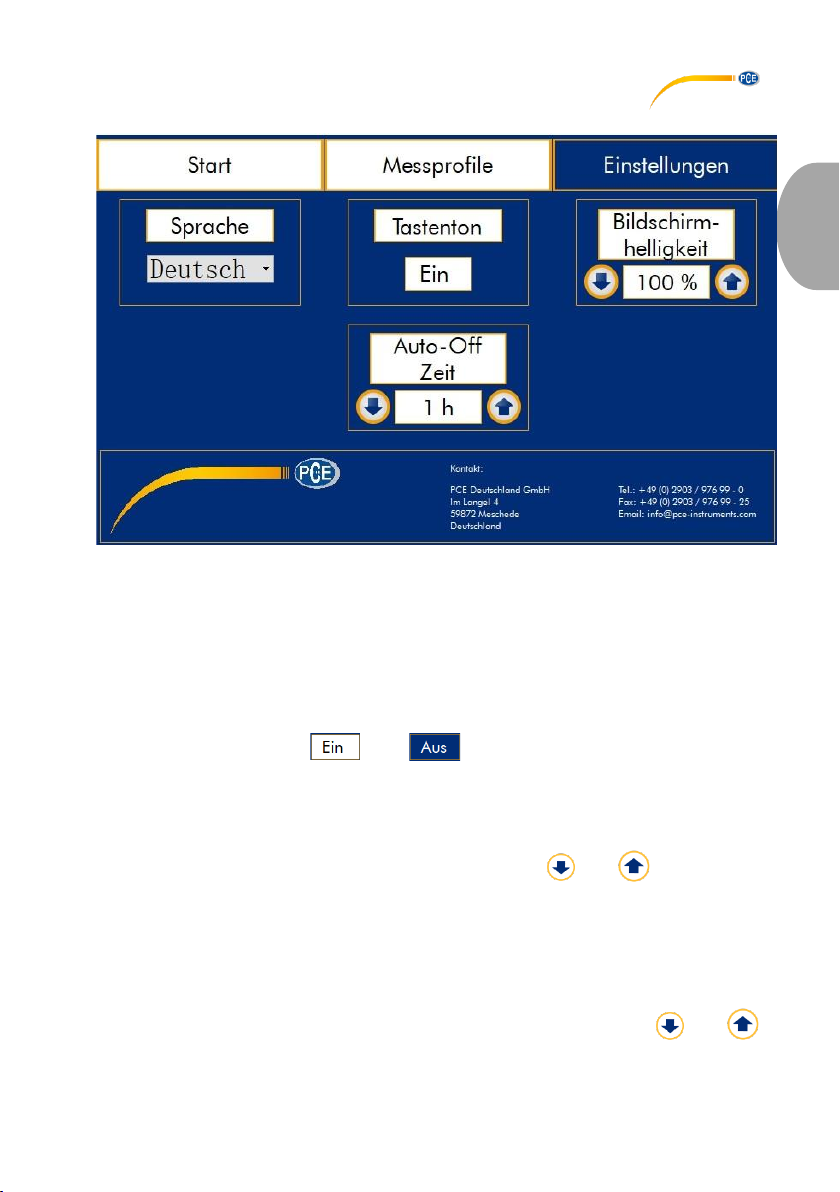
Über das Dropdown-Menü kann die Anzeigesprache geändert werden. Dazu wird das
Dropdown-Menü durch Druck auf den Bildschirm geöffnet und durch Druck auf die
entsprechende Sprache wird diese ausgewählt. Die Einstellung wird sofort übernommen.
Zur Auswahl stehen Deutsch und Englisch.
3.4.2 Tastenton
Durch Druck auf die Taste bzw. kann die akustische Signalisierung bei
Berührung des Displays ein- bzw. ausgeschaltet werden.
3.4.3 Bildschirmhelligkeit
Die Hintergrundbeleuchtung des Displays kann über die Tasten bzw. im Bereich von
0 % bis 100 % verändert werden.
3.4.4 Automatische Abschaltung
Aus Sicherheitsgründen wird bei eingeschalteter Heizung ein interner Timer gestartet, welcher
nach Ablauf der eingestellten Zeit automatisch die Heizung deaktiviert, sofern das Display
innerhalb dieser Zeit nicht berührt wird. Die Einstellung kann über die Tasten bzw.
zwischen 1 h und 12 h getätigt werden.
Page 14

© PCE Instruments
11
Deutsch
4 Garantie
Unsere Garantiebedingungen können Sie in unseren Allgemeinen Geschäftsbedingungen
nachlesen, die Sie hier finden: https://www.pce-instruments.com/deutsch/agb.
5 Entsorgung
HINWEIS nach der Batterieverordnung (BattV)
Batterien dürfen nicht in den Hausmüll gegeben werden: Der Endverbraucher ist zur Rückgabe
gesetzlich verpflichtet. Gebrauchte Batterien können unter anderem bei eingerichteten
Rücknahmestellen oder bei der PCE Deutschland GmbH zurückgegeben werden.
Annahmestelle nach BattV:
PCE Deutschland GmbH
Im Langel 4
59872 Meschede
Zur Umsetzung der ElektroG (Rücknahme und Entsorgung von Elektro- und
Elektronikaltgeräten) nehmen wir unsere Geräte zurück. Sie werden entweder bei uns
wiederverwertet oder über ein Recyclingunternehmen nach gesetzlicher Vorgabe entsorgt.
Alternativ können Sie Ihre Altgeräte auch an dafür vorgesehenen Sammelstellen abgeben.
WEEE-Reg.-Nr.DE69278128
Page 15

© PCE Instruments
12
English
1 Safety notes
Please read this manual carefully and completely before you use the device for the first time.
The device may only be used by qualified personnel and repaired by PCE Instruments
personnel. Damage or injuries caused by non-observance of the manual are excluded from our
liability and not covered by our warranty.
• The device must only be used as described in this instruction manual. If used
otherwise, this can cause dangerous situations for the user and damage to the meter.
• The instrument may only be used if the environmental conditions (temperature,
relative humidity, …) are within the ranges stated in the technical specifications. Do
not expose the device to extreme temperatures, direct sunlight, extreme humidity or
moisture.
• Do not expose the device to shocks or strong vibrations.
• The case should only be opened by qualified PCE Instruments personnel.
• Never use the instrument when your hands are wet.
• You must not make any technical changes to the device.
• The appliance should only be cleaned with a damp cloth. Use only pH-neutral
cleaner, no abrasives or solvents.
• The device must only be used with accessories from PCE Instruments or equivalent.
• Before each use, inspect the case for visible damage. If any damage is visible, do
not use the device.
• Do not use the instrument in explosive atmospheres.
• The measurement range as stated in the specifications must not be exceeded under
any circumstances.
• Non-observance of the safety notes can cause damage to the device and injuries to
the user.
We do not assume liability for printing errors or any other mistakes in this manual.
We expressly point to our general guarantee terms which can be found in our general terms of
business.
If you have any questions please contact PCE Instruments. The contact details can be found
at the end of this manual.
Page 16
© PCE Instruments
13
English
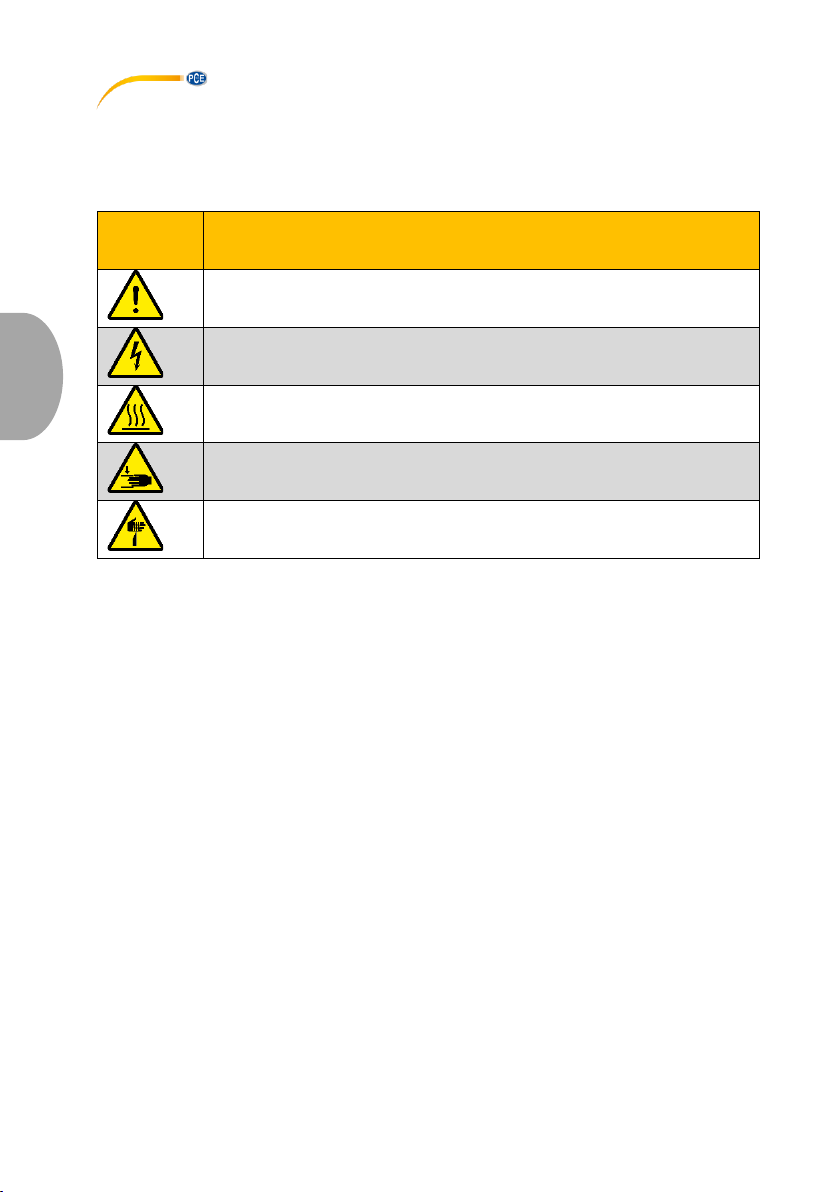
Safety symbols
Safety-related instructions the non-observance of which can cause damage to the device or
personal injury carry a safety symbol.
Symbol
Bezeichnung / Beschreibung
General warning sign
Non-observance can cause damage to the device and injuries to the user.
Warning: electrical voltage
Non-observance can cause electric shock.
Warning: hot surface
Non-observance can cause burns.
Warning: hand injuries
Non-observance can cause hand injuries.
Warning: sharp-pointed object
Non-observance can cause stab wounds.
Page 17
© PCE Instruments
14
English
2 Specifications
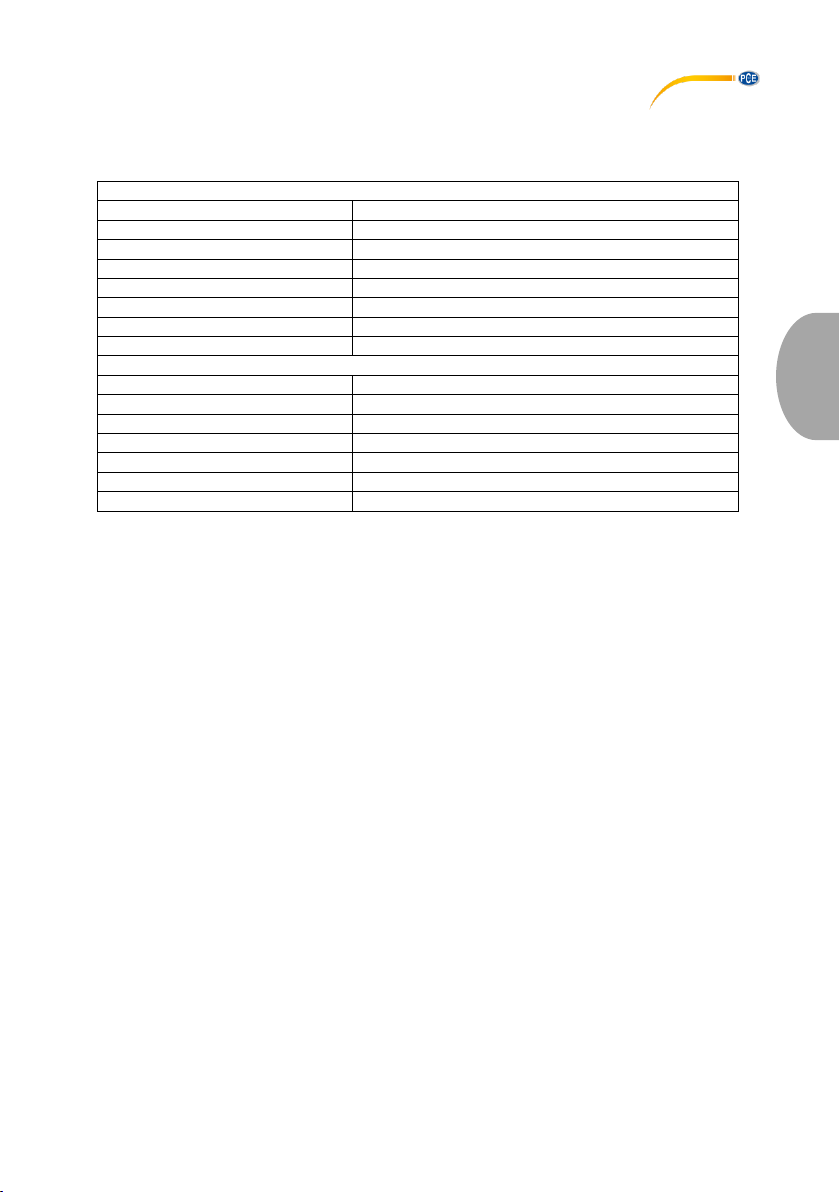
2.1 Technical specifications
Measurement range
Melting rate
0.1 ... 400.0 g / 10 min
Temperature
120 ... 400 °C / 248 ... 752 °F
Measuring accuracy temperature
±0.2 °C/ 0.36 °F
Resolution
0.1 °C / 0.18 °F
Test load
0.325 ... 21.6 kg
Test piston Ø
9.48 mm
Capillary Ø
2.095 mm
Standards
ISO1133-1997, ASTM 1238-04C, GB / T3682-2000
Display
Type
7" LCD touch display
Resolution
800 x 480 pixels
Colour depth
16,000 colours
Dimensions (without test load)
500 x 320 x 500 mm / 19.7 x 12.6 x 19.7 in
Weight (without test load)
approx. 15 kg / 33 lbs
Power supply
90 ... 264V AC
Power consumption (at full load)
approx. 0.6 kVA
2.2 Delivery contents
1 x melt flow meter PCE-MFI 400
1 x capillary Ø2.095 mm
1 x weight set consisting of:
1 x 325 g (load piston)
1 x 875 g
1 x 960 g
1 x 1200 g
1 x 1640 g
1 x 2500 g
1 x 4100 g
2 x 5000 g
1 x cold-device cable
1 x funnel
1 x cleaning rod
1 x tamping rod
1 x set of cleaning patches
1 x calibration certificate
1 x user manual
Page 18
© PCE Instruments
15
English
3 System description
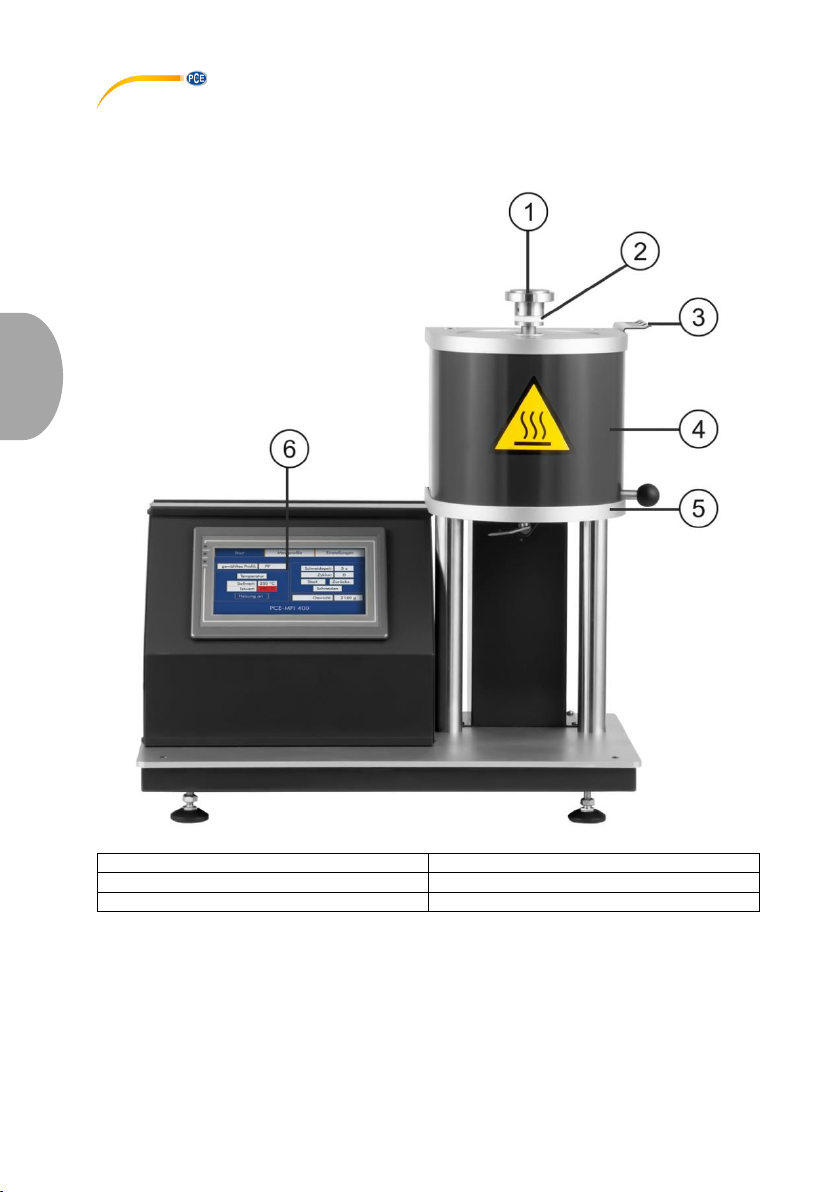
3.1 Device
1 Test load
4 Heating barrel
2 Load piston
5 Blade
3 Accessory retainer
6 7“ touch display
Page 19

© PCE Instruments
16
English
3.2 Start screen
3.2.1 Menu bar
Start: displays the start screen with the set parameters, heating barrel temperature, cutting
time cycle and the set weight.
Profiles: allows the selection of standard stored material profiles. Additionally, profiles for new
materials can be stored.
Config: Changes of basic settings of the device such as display brightness, time until automatic
deactivation of the heater when the device is not in use, etc.
Page 20
© PCE Instruments
17
English
3.2.2 Parameters
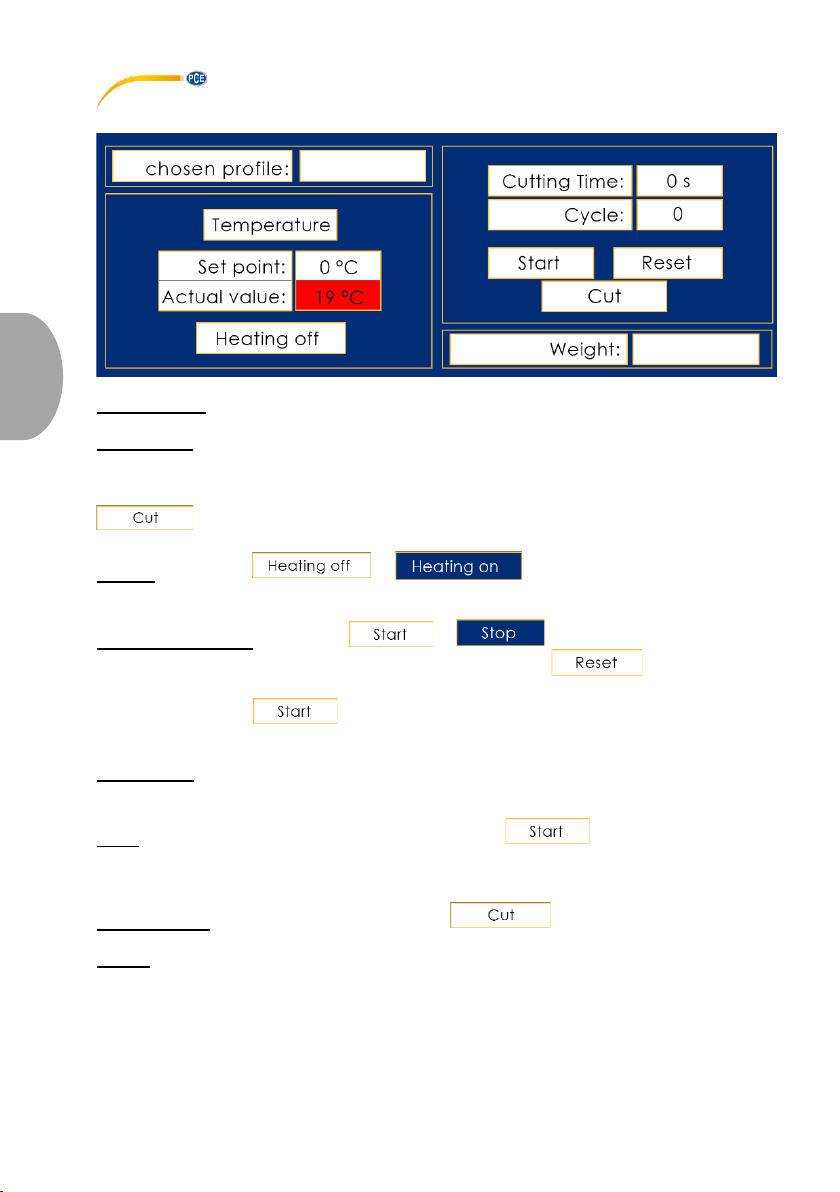
chosen profile: shows what material profile has been selected in the menu „Profiles“.
Temperature: displays the set/actual temperature; as soon as temperature stability is detected
(min. 10 minutes after reaching the set point), the actual value display turns green; only then
the automatic cutting function is enabled.
Note: manual cutting of the melted plastic strand from the extrusion tool is possible via the
key at any time.
Heating: via the keys or , the heating barrel can be heated
to the the pre-set temperature.
Start/Stop and Reset: via the keys or , the automatic cutting process
of the extruded plastic strand can be started or stopped. The key immediately
stops the automatic cutting process and resets the cycle counter to “0“.
Note: as soon as the key is pressed, the blade rotates once in order to remove
already extruded plastics which must not be included in the calculation of the melt index.
Cutting Time: shows the pre-set time during which the extruded plastic strand is automatically
cut.
Cycle: after starting the automatic cutting process via the key, this counter will be
increased by “1“ when the cutting time has passed so that the melt index can be calculated
later.
Manual cutting: the blade rotates once when the key is pressed.
Weight: shows what load weight must be placed on the load piston to test the selected material.
Page 21
© PCE Instruments
18
English
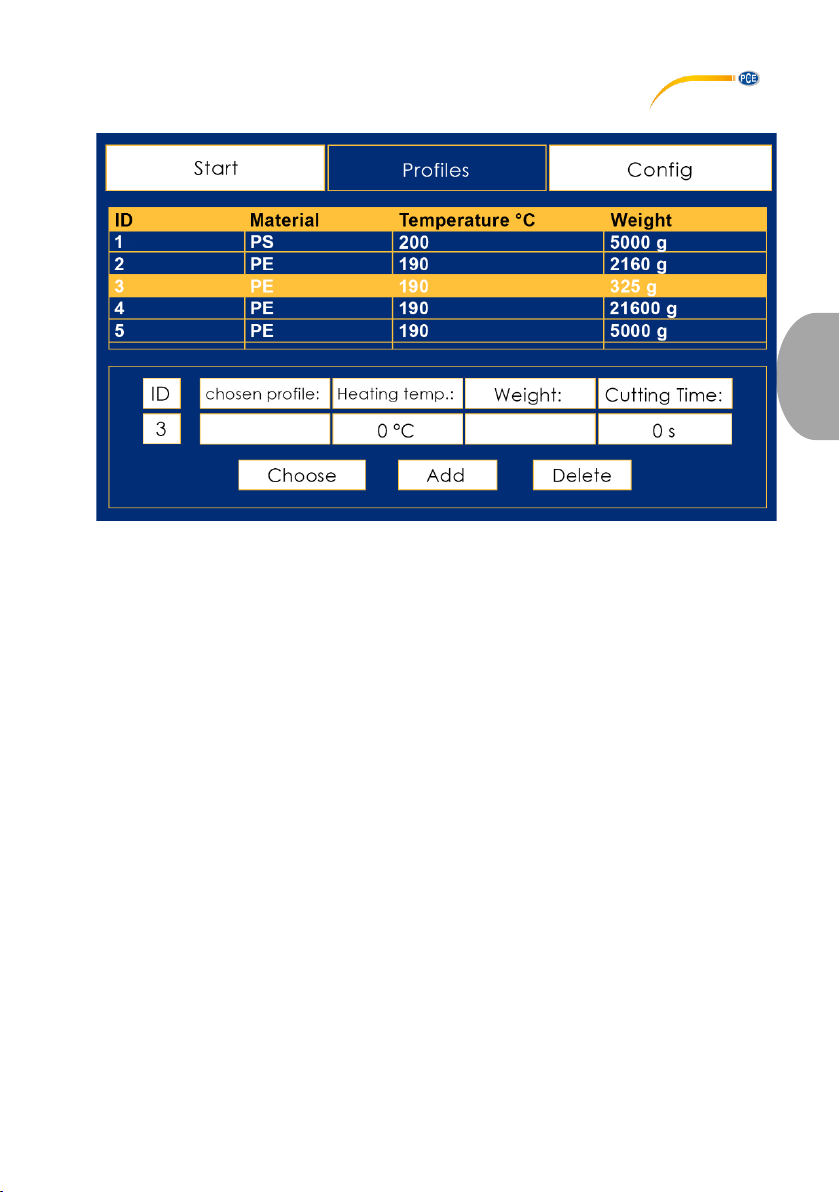
3.3 Profiles
Page 22
© PCE Instruments
19
English
3.3.1 Overview
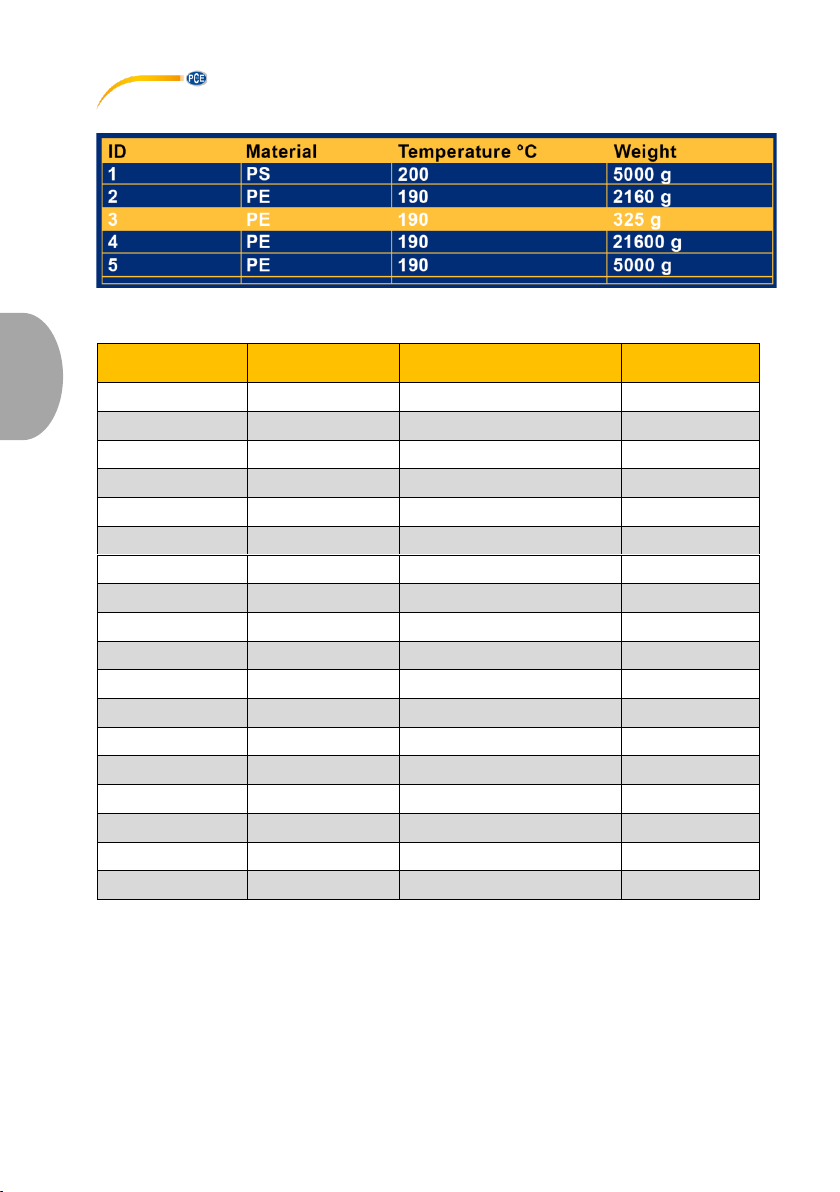
Tabular overview of pre-set material profiles for melt index testing. The following profiles are
pre-stored:
ID
Material
Temperature
Weight
1
PS
200 °C
5000 g
2
PE
190 °C
2160 g
3
PE
190 °C
325 g
4
PE
190 °C
21600 g
5
PE
190 °C
5000 g
6
PP
230 °C
2160 g
7
ABS
220 °C
10000 g
8
PS-1
220 °C
5000 g
9
E/VAC
150 °C
2160 g
10
E/VAC
190 °C
2160 g
11
E/VAC
125 °C
325 g
12
SAN
220 °C
10000 g
13
ASA ACS AE
220 °C
10000 g
14
PC
300 °C
1200 g
15
PMMA
230 °C
3800 g
16
PB
190 °C
2160 g
17
POM
190 °C
2160 g
18
MABS
220 °C
10000 g
Page 23
© PCE Instruments
20
English
3.3.2 Profile selection and editing
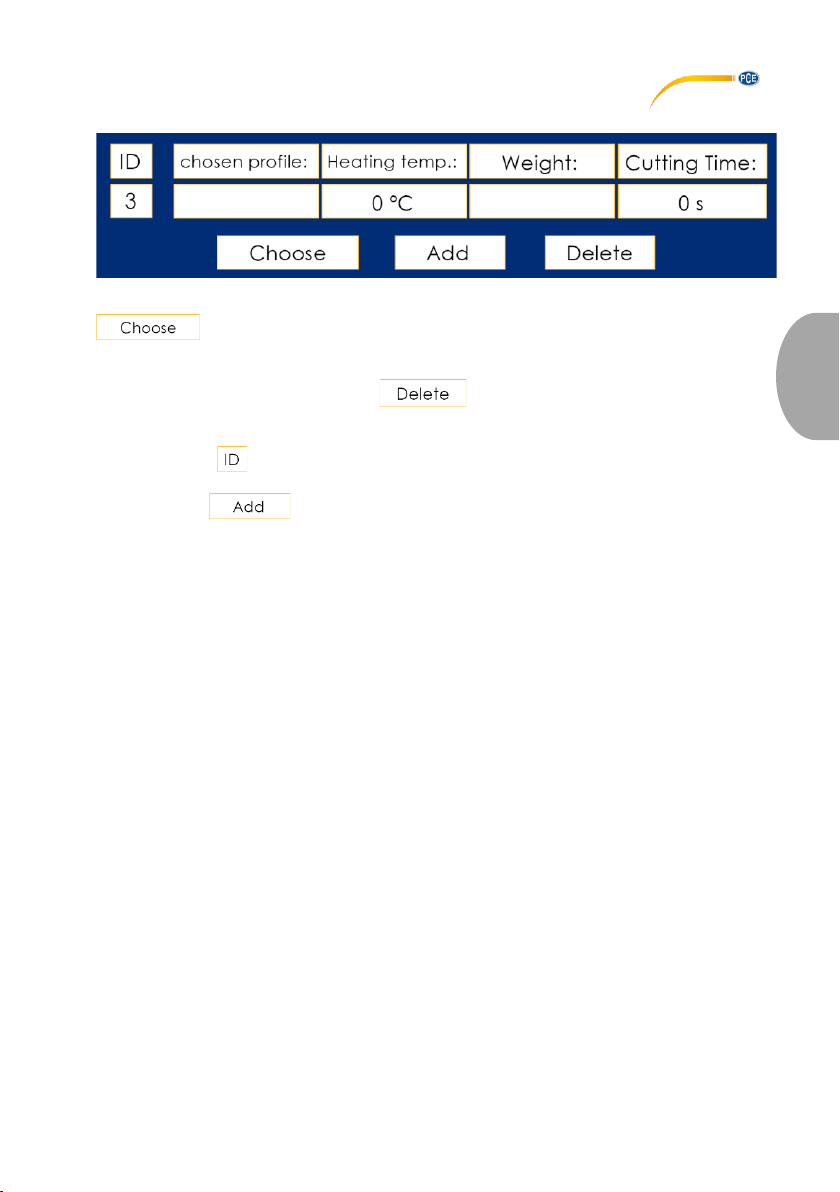
As soon as a profile is highlighted in the tabular overview by touching the screen and the
key has been pressed, the selected profile is marked as "active" and is
displayed in the view shown above. In this view, the default profile can also be edited or deleted
by activating the corresponding input fields (in this example "PPE", "230 °C", "2160 g") by
touching the screen or by pressing the key. For editing, an on-screen keyboard
appears. This can be used to make entries.
When a new profile is to be created, the next free "ID" (19 by default) is entered by pressing
the button below , using the on-screen keyboard. Afterwards, the profile name, the heating
temperature and the load weight should be entered to save the data to the internal database
by pressing the key.
Page 24
© PCE Instruments
21
English
3.4 Settings
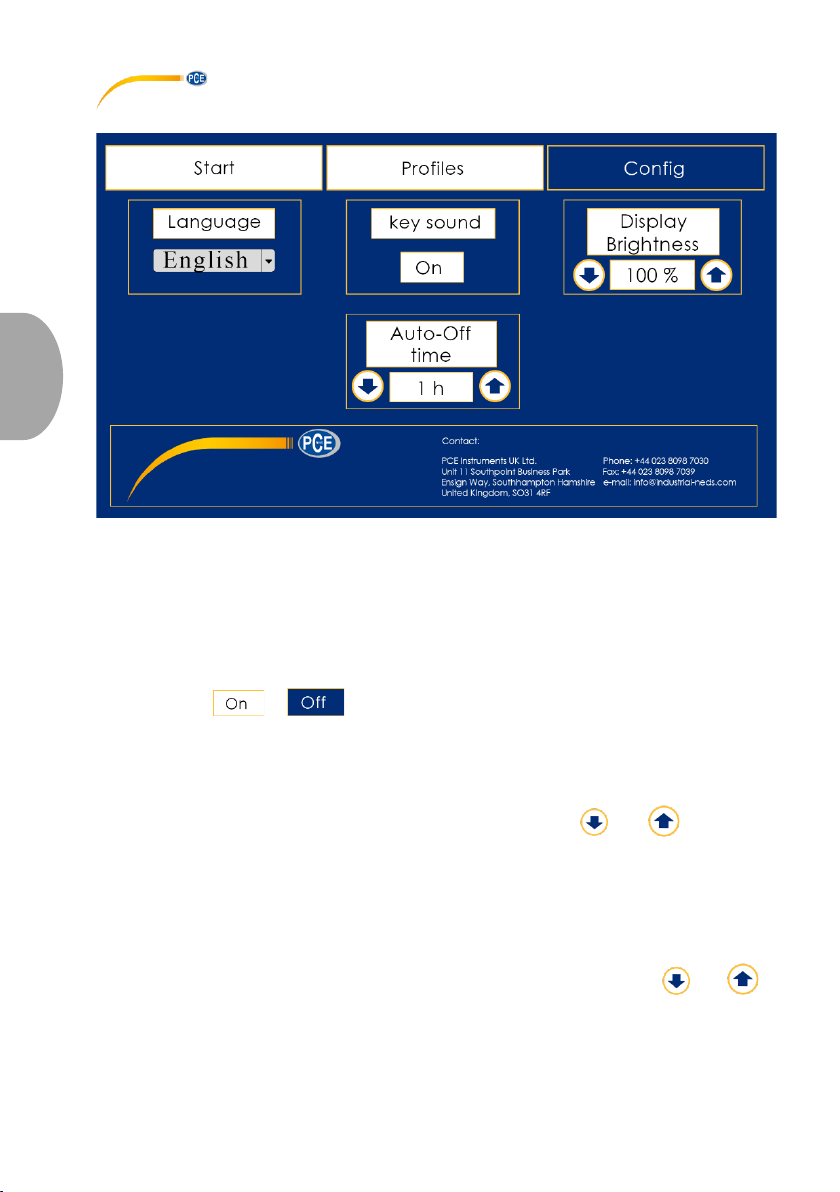
3.4.1 Language
Use the drop-down menu to change the display language. To do this, touch the screen to open
the drop-down menu and select the language by pressing it. The setting is applied immediately.
You can select either English or German.
3.4.2 Key sound
By pressing the or key, the acoustic signal that can be heard when touching
the display can be activated or deactivated.
3.4.3 Display brightness
The brightness of the display backlight can be changed via the and keys. The
possible range is 0 % to 100 %.
3.4.4 Automatic power off
For safety reasons, an internal timer is started when the heater is switched on, which
automatically deactivates the heater once the set time has elapsed, provided the display is not
touched within this time. The setting between 1 h and 12 h can be made via the and
keys.
Page 25

English
4 Contact
If you have any questions, suggestions or technical problems, please do not hesitate to
contact us. You will find the relevant contact information at the end of this user manual.
5 Disposal
For the disposal of batteries in the EU, the 2006/66/EC directive of the European Parliament
applies. Due to the contained pollutants, batteries must not be disposed of as household waste.
They must be given to collection points designed for that purpose.
In order to comply with the EU directive 2012/19/EU we take our devices back. We either reuse them or give them to a recycling company which disposes of the devices in line with law.
For countries outside the EU, batteries and devices should be disposed of in accordance with
your local waste regulations.
If you have any questions, please contact PCE Instruments.
© PCE Instruments
22
Page 26

© PCE Instruments
23
English
PCE Instruments contact information
Germany France Spain
PCE Deutschland GmbH PCE Instruments France EURL PCE Ibérica S.L.
Im Langel 4 23, rue de Strasbourg Calle Mayor, 53
D-59872 Meschede 67250 Soultz-Sous-Forets 02500 Tobarra (Albacete)
Deutschland France España
Tel.: +49 (0) 2903 976 99 0 Téléphone: +33 (0) 972 3537 17 Tel. : +34 967 543 548
Fax: +49 (0) 2903 976 99 29 Numéro de fax: +33 (0) 972 3537 18 Fax: +34 967 543 542
[email protected] [email protected] [email protected]
www.pce-instruments.com/deutsch www.pce-instruments.com/french www.pceinstruments.com/espanol
United Kingdom Italy Turkey
PCE Instruments UK Ltd PCE Italia s.r.l. PCE Teknik Cihazları Ltd.Şti.
Unit 11 Southpoint Business Park Via Pesciatina 878 / B-Interno 6 Halkalı Merkez Mah.
Ensign Way, Southampton 55010 Loc. Gragnano Pehlivan Sok. No.6/C
Hampshire Capannori (Lucca) 34303 Küçükçekmece - İstanbul
United Kingdom, SO31 4RF Italia Türkiye
Tel: +44 (0) 2380 98703 0 Telefono: +39 0583 975 114 Tel: 0212 471 11 47
Fax: +44 (0) 2380 98703 9 Fax: +39 0583 974 824 Faks: 0212 705 53 93
[email protected] [email protected] [email protected]
www.pce-instruments.com/english www.pce-instruments.com/italiano www.pce-instruments.com/turkish
The Netherlands China Hong Kong
PCE Brookhuis B.V. PCE (Beijing) Technology Co., Limited PCE Instruments HK Ltd.
Institutenweg 15 1519 Room, 6 Building Unit J, 21/F., COS Centre
7521 PH Enschede Zhong Ang Times Plaza 56 Tsun Yip Street
Nederland No. 9 Mentougou Road, Tou Gou District Kwun Tong
Telefoon: +31 (0)53 737 01 92 102300 Beijing, China Kowloon, Hong Kong
[email protected] Tel: +86 (10) 8893 9660 Tel: +852-301-84912
www.pce-instruments.com/dutch [email protected] [email protected]
www.pce-instruments.cn www.pce-instruments.cn
United States of America
PCE Americas Inc.
1201 Jupiter Park Drive, Suite 8
Jupiter / Palm Beach
33458 FL
USA
Tel: +1 (561) 320-9162
Fax: +1 (561) 320-9176
[email protected]
www.pce-instruments.com/us
Page 27

© PCE Instruments
Page 28

© PCE Instruments
User manuals in various languages (français, italiano, español,
português, nederlands, türk, polski, русский, 中文) can be found by
using our product search on: www.pce-instruments.com
Specifications are subject to change without notice.
 Loading...