

Page 1

PCE-LES 350
PORTABLE LED ST ROBOSCOPE
USE R MA NUAL
Page 2

WARNING: READ BEFORE OPERATING UNIT
Operation
◼ Viewing of this light by people with photosensitive epilepsy may
trigger epileptic seizures.
◼ Eye damage may result from direct viewing of the lamp used in
this unit.
◼ Do Not Operate the unit in Explosive Areas.
Servicing
◼ For repair, consult factory or authorized service center.
Portable LED Stroboscope PCE-LES 350 1
Page 3

TABLE OF CONTENTS
WARNING ........................................................................................ 1
TABLE OF CONTENTS ............................................................................... 2
Ⅰ INTRODUCTION ................................................................................. 3
TECHNICAL DATA ......................................................................................... 3
Ⅱ OPERATION ......................................................................................... 4
CONTROL PANEL OR DISPLAY PANEL ............................................................. 4
RUN OR STOP FLASH ..................................................................................... 5
AUTO SCAN FUNCTION................................................................................. 5
SETUP MENU ................................................................................................ 5
UNIT SETTING .............................................................................................. 6
LUMINANCE SETTING ................................................................................... 6
ENERGY-SAVING SETTINGS ........................................................................... 6
Ⅲ CHARGE BATTERY ............................................................................ 5
Ⅳ PACKING LIST ....................................................................................... 8
Portable LED Stroboscope PCE-LES 350 2
Page 4

Ⅰ Introduction
The portable LED stroboscope PCE-LES 350 is a compact
industrial surface inspection spotlight, Widely used in packaging,
printing, paper and other industries.
The PCE-LES 350 has the following features:
◼ Operates from a rechargeable 12V DC Power or AC Adapter.
◼ High flash brightness, wide range and high accuracy of flash rate.
◼ The built-in lithium battery module with large capacity could be
recharged while the instrument is working.
◼ Built-in memory feature that automatically updates and stores its
last used control setup, Control parameters are automatically stored
as long as they remain unchanged for a 8 seconds period.
◼ Graphic LCD with backlight displays friendly and concise
operating interfaces.
◼ A special shortcut function named as "Auto Scan" is offered.
◼ Automatically stop flash when timing over.
◼ Internal trigger mode.
◼ Built-in low battery indicator.
Technical data
◼ Supply Power: Rechargeable Li-ion cells,12 VDC 2.9 Amp hour.
◼ Charger: Input:AC100V~240V,50~60Hz.
◼ Display: Graphic LCD.
◼ Mode: Internal trigger mode.
◼ Flash rate:50.0 f/m-12000.0f/m, resolution 0.1.
1.00f/s -200.00f/s, resolution 0.01.
◼ Flash timing:maximum 250 min.
◼ Dimension: 213mm(L)×80mm(W)×85mm(H).
Portable LED Stroboscope PCE-LES 350 3
Page 5
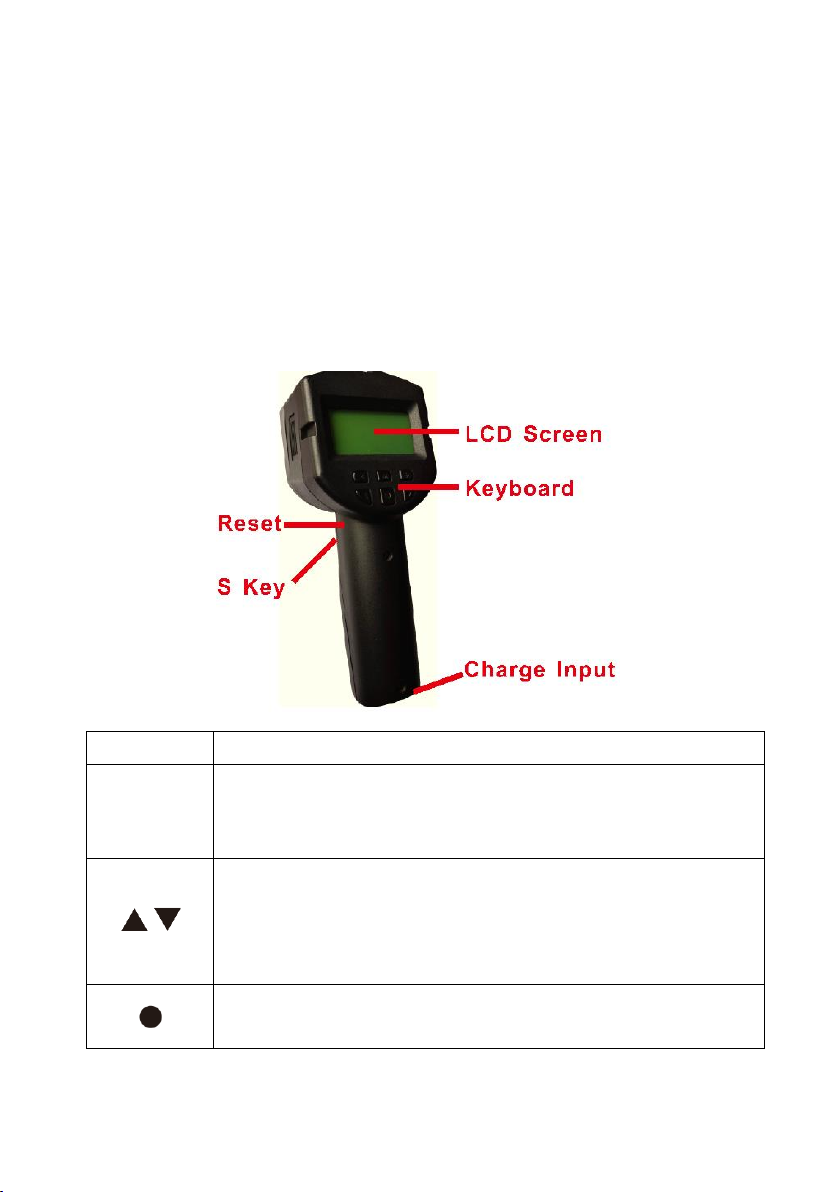
Ⅱ Operation
M
The key is used to enter or exit Setup menus.
×/÷
These key is used to change the flash rate to ×2 or ÷2
directly. In Setup menus, they are used to choose the left or
right submenu.
/
These key is used to change the flash rate in small
increments/decrements. Longer the key is pressed, larger
increments/decrements. In Setup Menus, they are used to
choose the up or down item.
This key is used to enter or exit the Auto Scan process. In
Setup menus, they are used to confirm.
There are one working mode:
Internal Trigger: In this mode, the rate of strobe flashing is controlled by
the inner high-accuracy controller. The flash rate can be
adjusted accurately and quickly through the keyboard.
Control panel or display panel
Portable LED Stroboscope PCE-LES 350 4
Page 6
S key
The key is used to control the flashing run or stop. You can
press S key for 3 seconds to switch the instrument on/off.
Reset
Press and hold the button for 3 seconds to force a reset when
the system is crashes.
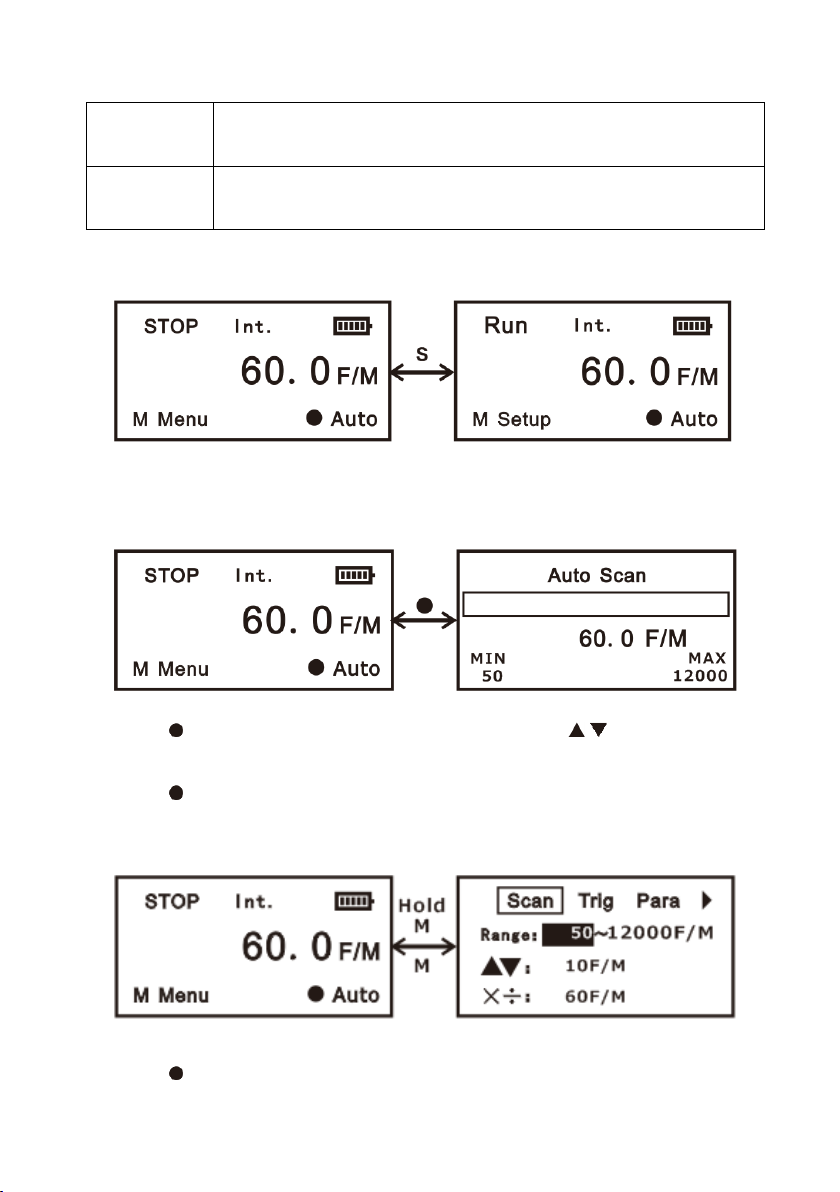
Run or Stop flash
Press the S key to control the flashing run or stop.
Auto Scan Function
Press key to enter the Auto Scan function. Press / /×/÷ key to
automatically increase/decrease the rate value to the upper/lower limit.
Press key to exit.
Setup Menu
Hold the M key to enter the Setup menus.
Press key to change the trigger mode.
5
Page 7
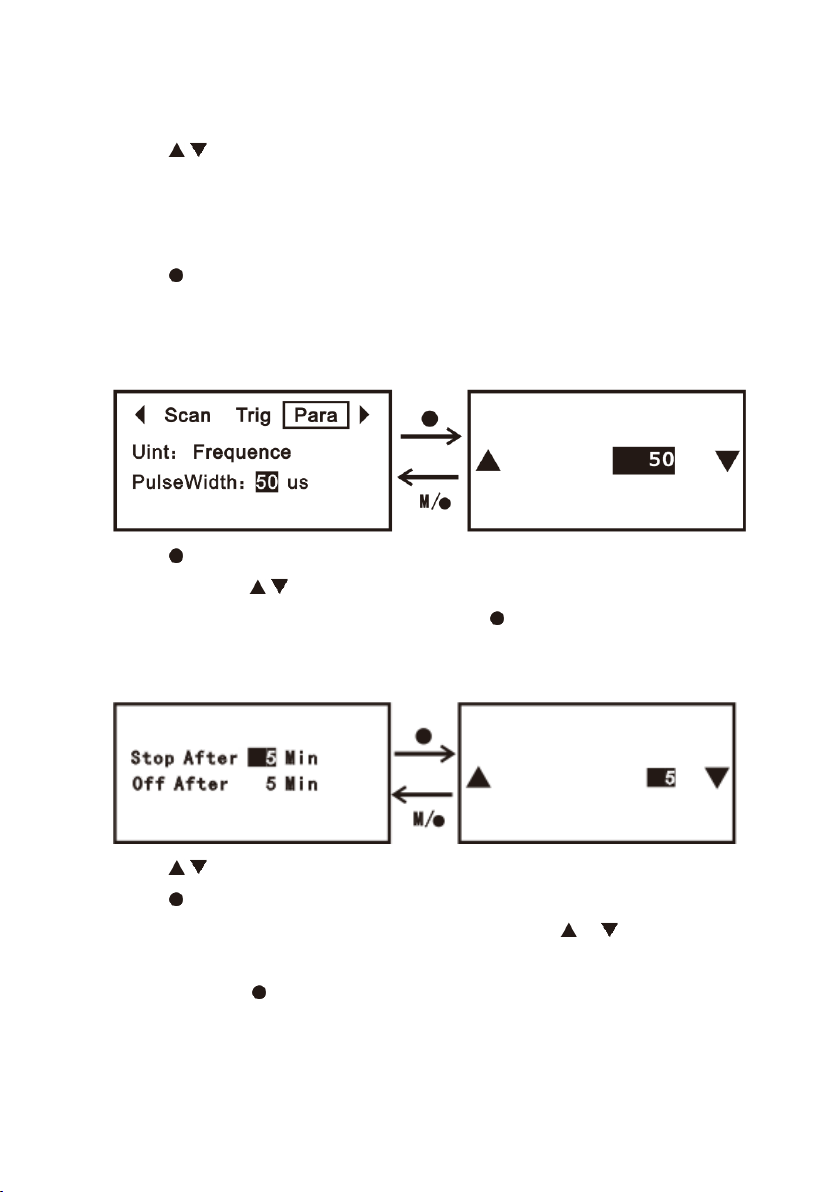
Press ×/÷ to choose the left or right submenu.
Press / key to choose the up or down item.
Unit Setting
There are three unit: Frequence,f/m and linespeed
Press key to change unit.
Press M key to exit.
Luminance Setting
Press key to enter modifying the “PulseWidth” value,whose range is
8-100us. Press / key to increase/decrease the value. Press ×/÷
to change the value ×2 or ÷2.Press M or key to exit.
Energy-saving settings
Press / key to choose the “Stop timing” or “off timing” value.
Press key to enter modifying the “Stop timing” or “Off timing”
value,whose range is 1-250 minutes. Press / key to
increase/decrease the value. Press ×/÷ to change the value ×2 or
÷2.Press M or key to exit.
Portable LED Stroboscope PCE-LES 350 6
Page 8

Ⅲ Charge battery
When LES 350 display ‘ ’, Built-in Li-ion Battery should be
changed immediately. The Input Connector Pin Assignments as follows:
Pin1: Adapter output positive
Pin2: Adapter output negative
Charging need about 3 hours.When the LED indictor turn green,charge
complete.
CAUTION: It is nessary to use the original adapter.
Portable LED Stroboscope PCE-LES 350 7
Page 9

Ⅳ Packing list
1 x stroboscope PCE-LES 350
1 x mains adaptor 12.6 V / 2 A
1 x carrying case
1 x user manual
Portable LED Stroboscope PCE-LES 350 8
Page 10

V Disposal
For the disposal of batteries in the EU, the 2006/66/EC directive of the
European Parliament applies. Due to the contained pollutants, batteries must not
be disposed of as household waste. They must be given to collection points
designed for that purpose.
In order to comply with the EU directive 2012/19/EU we take our devices back.
We either re-use them or give them to a recycling company which disposes of
the devices in line with law.
For countries outside the EU, batteries and devices should be disposed of in
accordance with your local waste regulations.
If you have any questions, please contact PCE Instruments.
VI PCE Instruments contact information
Germany
PCE Deutschland GmbH
Im Langel 26
D-59872 Meschede
Deutschland
Tel.: +49 (0) 2903 976 99 0
Fax: +49 (0) 2903 976 99 29
[email protected]
www.pce-instruments.com/deutsch
United Kingdom
PCE Instruments UK Ltd
Trafford House
Chester Rd, Old Trafford
Manchester M32 0RS
United Kingdom
Tel: +44 (0) 161 464902 0
Fax: +44 (0) 161 464902 9
[email protected]
www.pce-instruments.com/english
The Netherlands
PCE Brookhuis B.V.
Institutenweg 15
7521 PH Enschede
Nederland
Telefoon: +31 (0)53 737 01 92
[email protected]
www.pce-instruments.com/dutch
France
PCE Instruments France EURL
23, rue de Strasbourg
67250 Soultz-Sous-Forets
France
Téléphone: +33 (0) 972 3537 17
Numéro de fax: +33 (0) 972 3537 18
[email protected]
www.pce-instruments.com/french
Italy
PCE Italia s.r.l.
Via Pesciatina 878 / B-Interno 6
55010 Loc. Gragnano
Capannori (Lucca)
Italia
Telefono: +39 0583 975 114
Fax: +39 0583 974 824
[email protected]
www.pce-instruments.com/italiano
United States of America
PCE Americas Inc.
1201 Jupiter Park Drive, Suite 8
Jupiter / Palm Beach
33458 FL
USA
Tel: +1 (561) 320-9162
Fax: +1 (561) 320-9176
[email protected]
www.pce-instruments.com/us
Spain
PCE Ibérica S.L.
Calle Mula, 8
02500 Tobarra (Albacete)
España
Tel. : +34 967 543 548
Fax: +34 967 543 542
[email protected]
www.pce-instruments.com/espanol
Turkey
PCE Teknik Cihazları Ltd.Şti.
Halkalı Merkez Mah.
Pehlivan Sok. No.6/C
34303 Küçükçekmece - İstanbul
Türkiye
Tel: 0212 471 11 47
Faks: 0212 705 53 93
[email protected]
www.pce-instruments.com/turkish
Denmark
PCE Instruments Denmark ApS
Birk Centerpark 40
7400 Herning
Denmark
Tel.: +45 70 30 53 08
[email protected]
www.pce-instruments.com/dansk
 Loading...