

Page 1
© PCE Instruments
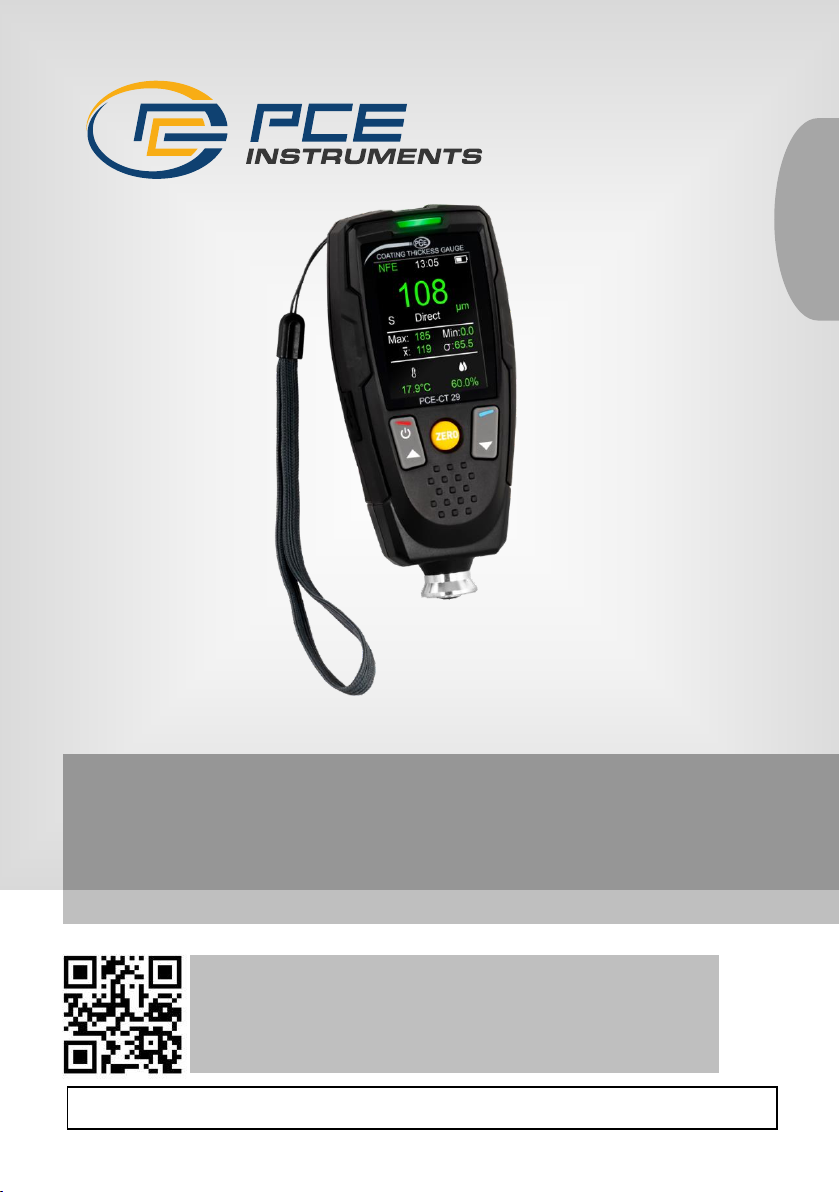
PCE-CT 29 Coating Thickness Gauge
User Manual
User manuals in various languages (français,
italiano, español, português, nederlands, türk, polski,
русский, 中文) can be found by using our
product search on: www.pce-instruments.com
Last change: 6 February 2024
v1.0
English
Page 2

© PCE Instruments
Contents
1 Safety notes ........................................................................................... 1
2 Specifications ........................................................................................ 2
3 Scope of delivery .................................................................................. 3
4 Device description ................................................................................ 4
4.1 Display description ........................................................................................................... 5
5 Inserting or replacing batteries ........................................................... 6
6 Switching the meter on and off ........................................................... 6
6.1 Menu ................................................................................................................................ 6
7 Software ................................................................................................. 9
8 Contact ................................................................................................. 10
9 Disposal ............................................................................................... 10
Page 3

© PCE Instruments
1
1 Safety notes
Please read this manual carefully and completely before you use the device for the first time. The
device may only be used by qualified personnel and repaired by PCE Instruments personnel.
Damage or injuries caused by non-observance of the manual are excluded from our liability and
not covered by our warranty.
• The device must only be used as described in this instruction manual. If used otherwise,
this can cause dangerous situations for the user and damage to the meter.
• The instrument may only be used if the environmental conditions (temperature, relative
humidity, …) are within the ranges stated in the technical specifications. Do not expose
the device to extreme temperatures, direct sunlight, extreme humidity or moisture.
• Do not expose the device to shocks or strong vibrations.
• The case should only be opened by qualified PCE Instruments personnel.
• Never use the instrument when your hands are wet.
• You must not make any technical changes to the device.
• The appliance should only be cleaned with a damp cloth. Use only pH-neutral cleaner,
no abrasives or solvents.
• The device must only be used with accessories from PCE Instruments or equivalent.
• Before each use, inspect the case for visible damage. If any damage is visible, do not
use the device.
• Do not use the instrument in explosive atmospheres.
• The measurement range as stated in the specifications must not be exceeded under
any circumstances.
• Non-observance of the safety notes can cause damage to the device and injuries to
the user.
We do not assume liability for printing errors or any other mistakes in this manual.
We expressly point to our general guarantee terms which can be found in our general terms of
business.
Page 4
© PCE Instruments
2
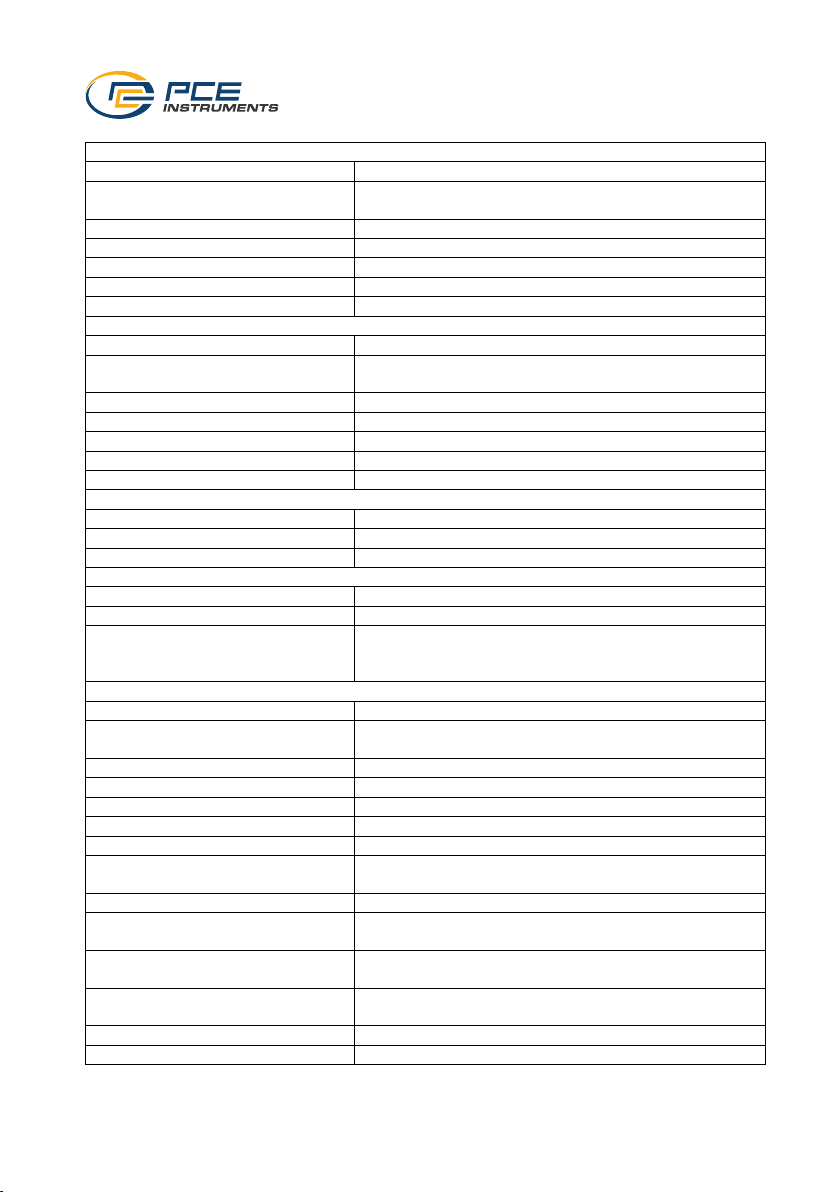
2 Specifications
Measurement on ferrous metal (Fe)
Measurement range
0 ... 2000 µm
Resolution
0.1 µm at 0.0 ... 99.9 µm
1 µm at 100 ... 2000 µm
Accuracy
±2 % ±2 µm of Rd
Repeatability
±1 % ±1 µm of Rd
Smallest radius of curvature
1.5 mm
Smallest measuring surface
Ø7 mm
Smallest layer thickness
0.5 mm
Measurement on non-ferrous metal (NFe)
Measurement range
0 ... 2000 µm
Resolution
0.1 µm at 0.0 ... 99.9 µm
1 µm at 100 ... 2000 µm
Accuracy
±2 % ±2 µm of Rd
Repeatability
±1 % ±1 µm of Rd
Smallest radius of curvature
3 mm
Smallest measuring surface
Ø5 mm
Smallest layer thickness
0.3 mm
Temperature
Measurement range
0 ... 50 °C / 32 ... 122 °F
Resolution
0.1 °C / °F
Accuracy
±1.2 °C / ±2.2°F
Moisture
Measurement range
0 ... 100 % RH
Resolution
0.1 % RH
Accuracy
±3.2 % RH at 20.0 ... 70.0 % RH
±4.0 % RH at 0.0 ... 19.9 % RH
±4.0 % RH at 70.1 ... 100.0 % RH
Further specifications
Display
2.4" LC display
Automatic display orientation
(measuring window only)
0, 90, 180 and 270 °, can be switched off
Statistical functions
average, highest, lowest and SDev measured value
Measuring modes
direct, groups, SSPC
Units
µm, mm, mils, inch
Power supply
2 x AA batteries
Interface
micro USB
Alarm
signal tone and / or LED signal light when the adjustable
upper or lower alarm limit is exceeded
Automatic power-off
off, 30 seconds, 1 minute, 5 minutes
Menu languages
English, German, French, Spanish, Italian, Portuguese,
Chinese, Japanese
Operating conditions
0 ... +50 °C
20 ... 90 % RH, non-condensing
Storage conditions
-10 ... +60 °C
20 ... 90 % RH, non-condensing
Dimensions
35 x 64 x 137 mm
Weight
175 g
Page 5

© PCE Instruments
3
3 Scope of delivery
1 x PCE-CT 29 coating thickness gauge
1 x set of standard foils
1 x calibration plates (Fe and NFe)
1 x USB pen drive
2 x 1.5 V AA battery
1 x carrying case
1 x user manual
Page 6
© PCE Instruments
4
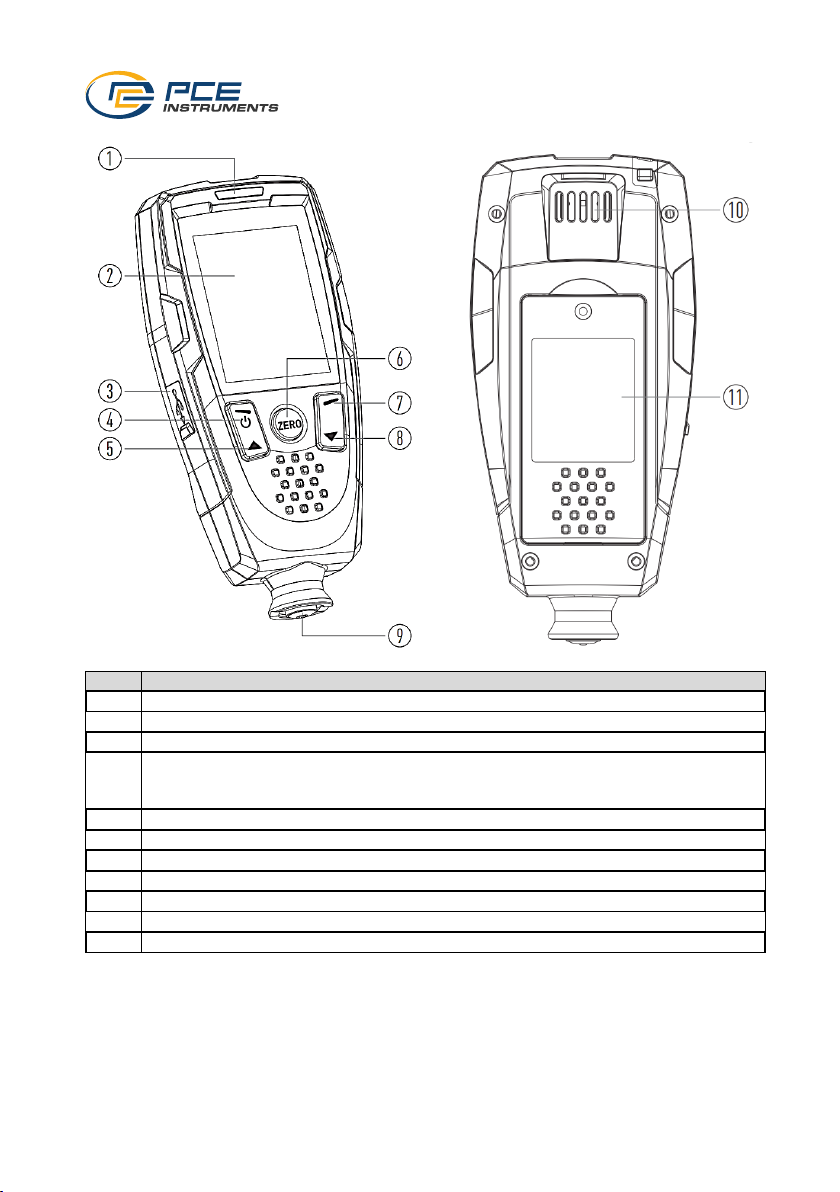
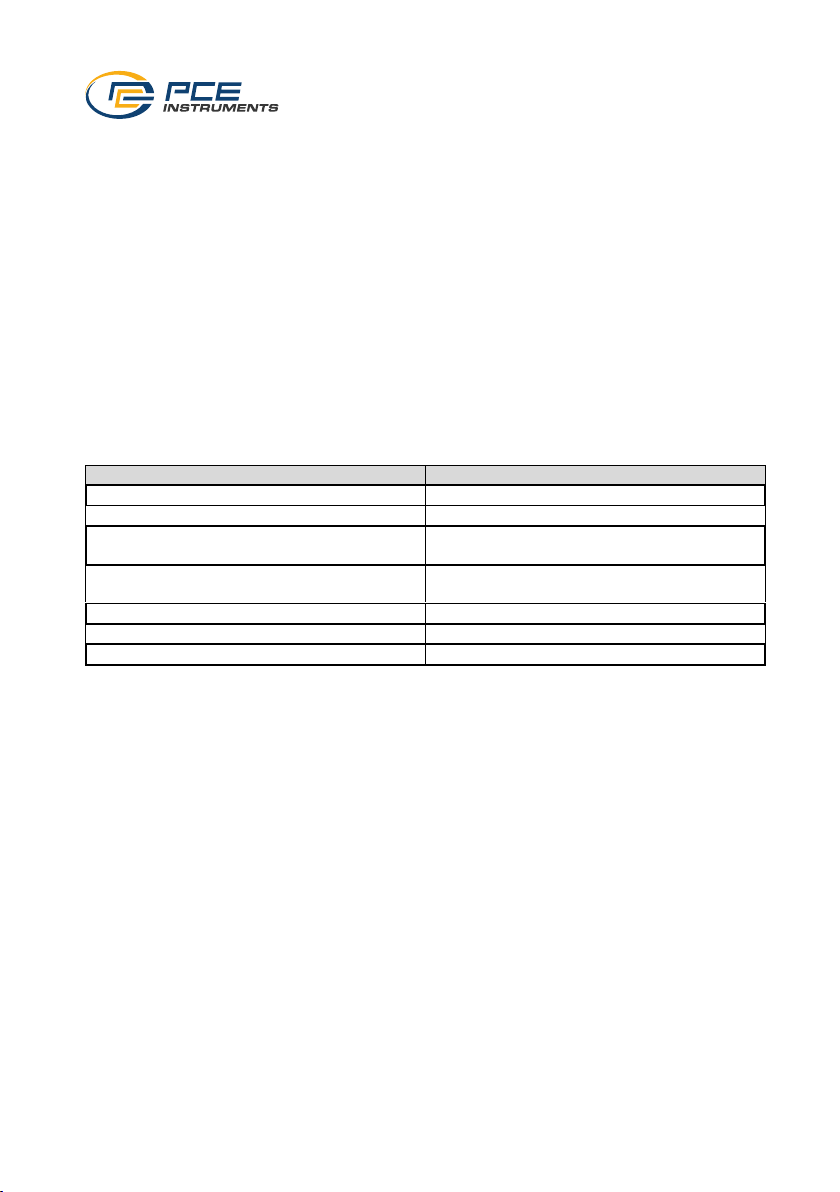
4 Device description
No.
Description of the
1
LED with three different signals
2
LCD 3 Micro-USB interface
4
Menu key
Back key
On and off switch
5
Arrow up key
6
Zero calibration key
7
Enter key
8
Arrow down key
9
Coating thickness sensor
10
Temperature and humidity sensor
11
Battery compartment cover
Page 7
© PCE Instruments
5
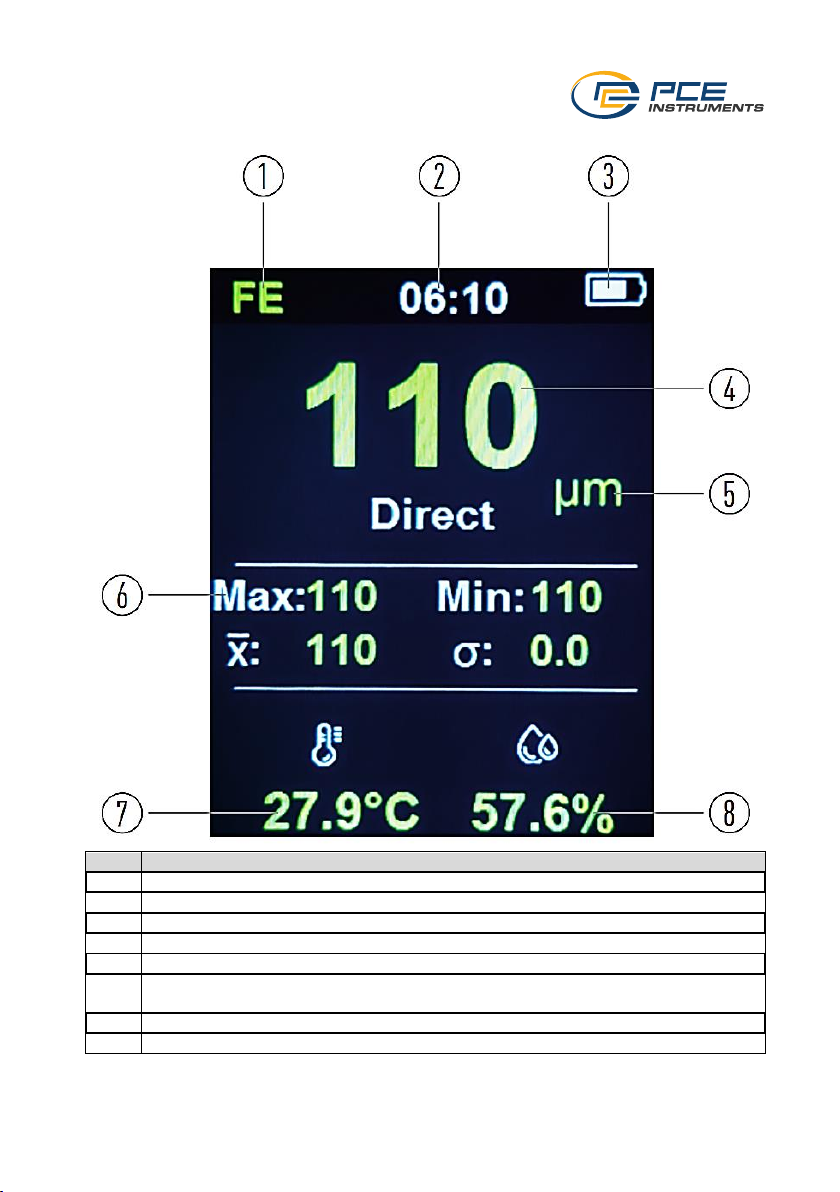
4.1 Display description
No.
Description of the
1
Display of the method used for measurement
2
Set time
3
Current battery charge
4
Measured value
5
Unit
6
Statistics
Largest, smallest measured value, average and standard deviation
7
Ambient temperature
8
Ambient humidity
Page 8
© PCE Instruments
6
5 Inserting or replacing batteries
If the battery is discharged, it is possible that the meter can no longer be switched on or that the
measured values are no longer within the specified accuracies.
To insert or replace the batteries, first switch off the meter. Open the battery compartment on the
back, remove the batteries if necessary and replace them with 2 new 1.5 V batteries. Ensure that
the polarity is correct when inserting the batteries.
6 Switching the meter on and off
To switch on the meter, press and hold the on and off switch for two seconds. After switching on,
the measurement can be carried out immediately. To switch the meter off again, press and hold
the switch again for two seconds.
6.1 Menu
To make settings, press the menu key. The arrow keys can now be used to select between the
individual setting options and to change parameters. Press the enter key to accept the respective
setting or open the setting option. Use the back key to go back one level if settings are not to be
accepted or the measurement is to be resumed.
The menu is organised as follows:
Function
Meaning
Work mode
Settings for the individual operating modes
Fe/NFe
Setting the measurement method
Units
Setting the unit of coating thickness
measurement
Environment
Setting the temperature, humidity and dew
point
Calibration
Calibration of the meter
Limits
Set limit values
User settings
Other settings for the meter
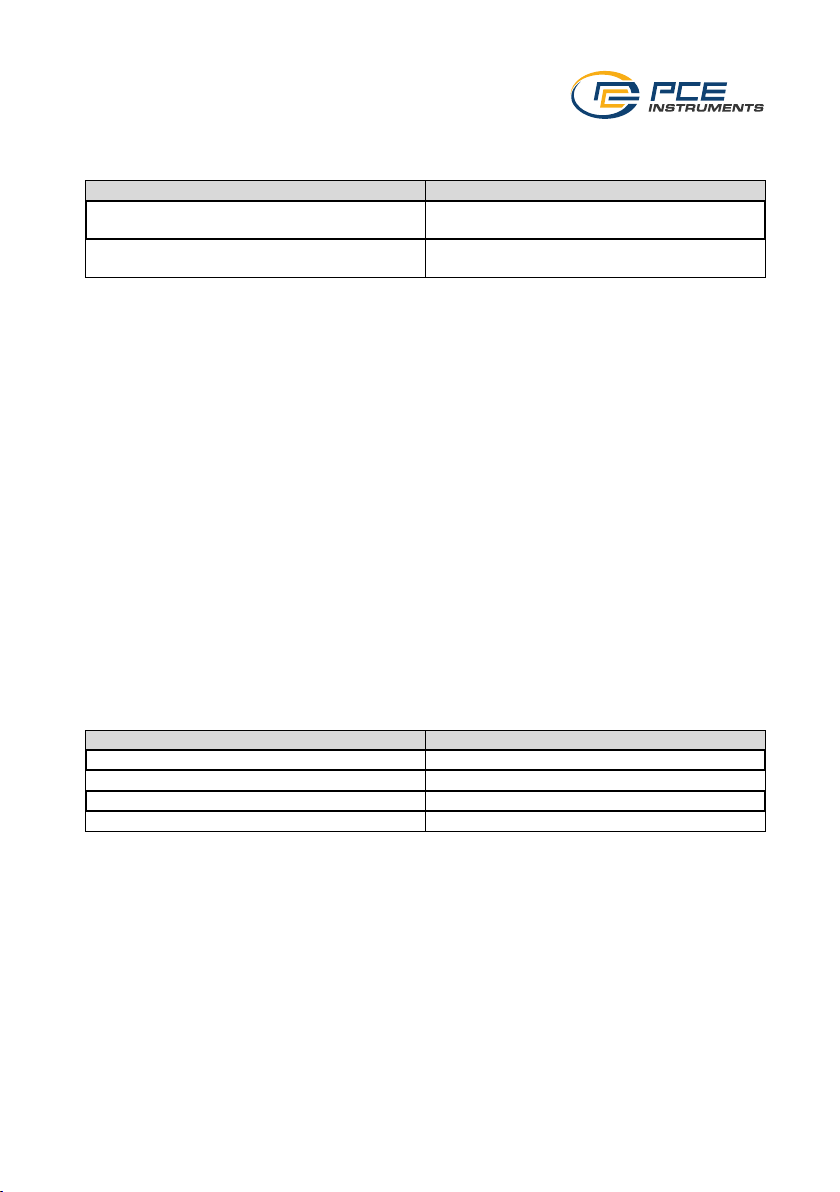
6.1.1 Set work mode
To set the work mode, go to the settings and select "Work mode". Here, you can switch between
the individual work modes.
6.1.1.1 Switch work mode
To switch to a different work mode, select the desired work mode under "Mode select". You can
choose between "Group" and "SSPC (Society of Protective Coatings)"
6.1.1.2 Set group mode
To choose between the individual groups, go to "Group select" where you can choose between
50 different groups where the measured values are saved. The number of measured values
already saved is displayed for each group. 50 measured values can be saved for each group.
No measured values are saved with "Direct".
Page 9
© PCE Instruments
7
6.1.1.3 Set SSPC mode
To set the SSPC mode, go to "SSPC mode". The number of measuring points can be set there.
Function
Meaning
Times/Spots
Number of measurements per surface
Smallest value: 3
Spots/Area
Number of surface that are measured
Smallest value: 5
Note: The limit values are taken from the limit value function. See also 6.1.6 Set alarm limit values.
6.1.1.4 Clear memory
To clear the memory, go to "Clear Memory". If you really want to clear the memory, confirm the
entry by selecting "Yes".
6.1.2 Ferrous and non-ferrous measuring substance
To switch between the measurement of ferrous (Fe) and non-ferrous (NFe) metals, go to "Fe/NFe"
in the settings. Here, you can select which method should be used for measurement. The
measurement method is automatically selected if you choose "Both".
Note: It is recommended to select "Both".
6.1.3 Set units
To set the coating thickness unit, go to "Units" in the menu. The coating thickness unit can be set
there. The following options are available: µm, mm, mils, inch.
6.1.4 Change temperature, humidity and dew point
To set the temperature, humidity and dew point, go to the menu and select "Environment". From
there, you can set which measured values are to be displayed. The following options are
available:
Selection
Meaning
Temp only
Temperature display
Temp/Humidity
Display of temperature and humidity
Temp/Dew Point
Display of temperature and dew point
Enviro off
No display
6.1.4.1 Set temperature unit
To set the temperature unit, go to "Units". From there, you can change the temperature unit. You
can choose either °C or °F.
Page 10
© PCE Instruments
8
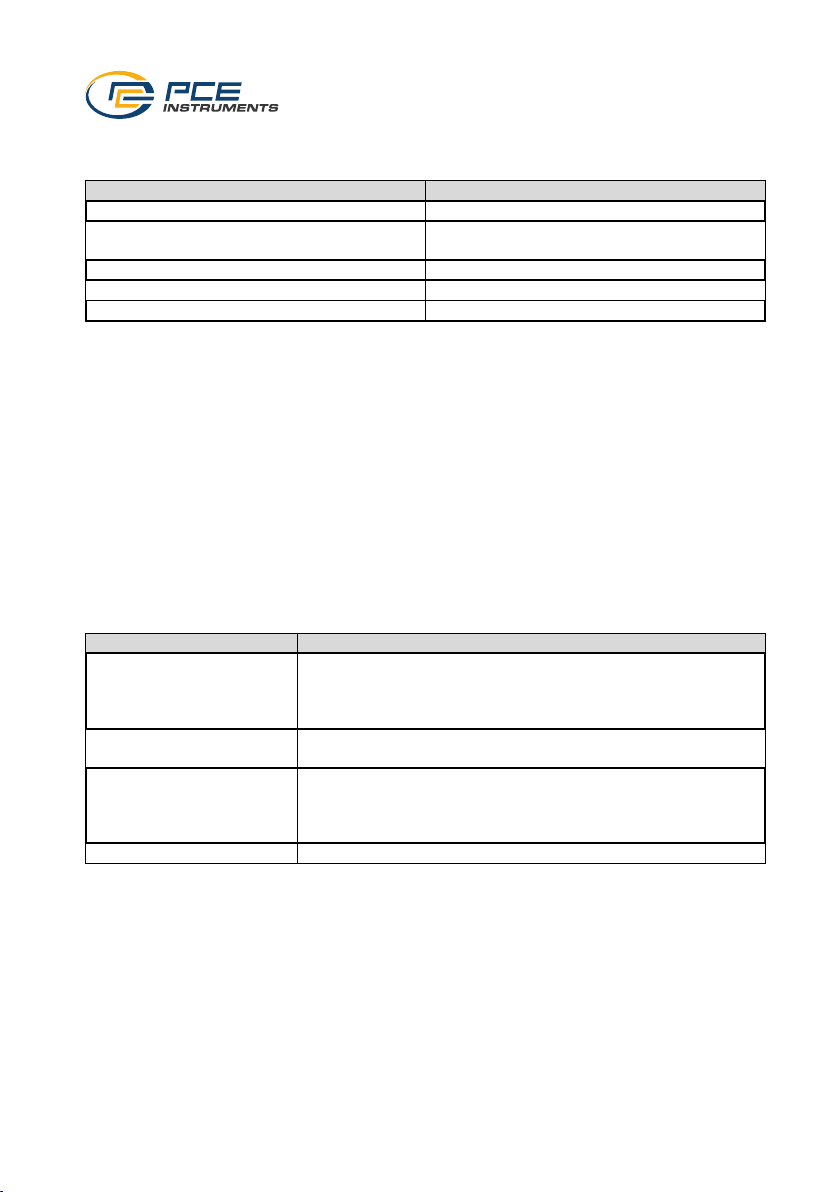
6.1.5 Calibration
To calibrate the meter, go to "Calibration" in the settings.
There are four different options for calibration:
Selection
Meaning
Zero Only
Calibration of the zero point
Single Point
Zero point calibration with calibration of a
reference
SSPC Mode 1
Calibration of a reference
SSPC Mode 2
Calibration with two references
Reset
Reset all calibration points
Select the desired function and follow the instructions on the display. Depending on the selection,
a calibration must first be carried out on the zero standard or with a reference foil. If calibration is
carried out with reference foils, the measured value can be adjusted using the arrow keys after
the measurement with a reference.
6.1.6 Set alarm limit values
To set the alarm limits for the measurement, go to the "Limits" item in the menu.
6.1.6.1 Switching the limit value alarm on and off
To switch the limit alarm function on and off, switch "Limit" on or off.
6.1.6.2 Setting the limit value alarm indicator
To set the limit value alarm indicator, go to "Warning Indication".
The following settings can be made from there.
Setting option
Meaning
Beeper
An acoustic signal is emitted as soon as the set limit value is
exceeded.
Note: The sound must be active in the settings for the signal
tone to be active.
LED Flash
The LED indicator signals whether the measured value is within
the set limit value.
Both
Both the acoustic signal and the LED indicator show whether
the measured value is within the set limit values.
Note: The sound must be active in the settings for the signal
tone to be active.
Off
No signal when limit values are exceeded
6.1.6.3 Set alarm limit values
Go to "Set High Limit" to set the upper alarm limit value. To set the lower limit value, go to "Set
Low Limit".
Page 11
© PCE Instruments
9
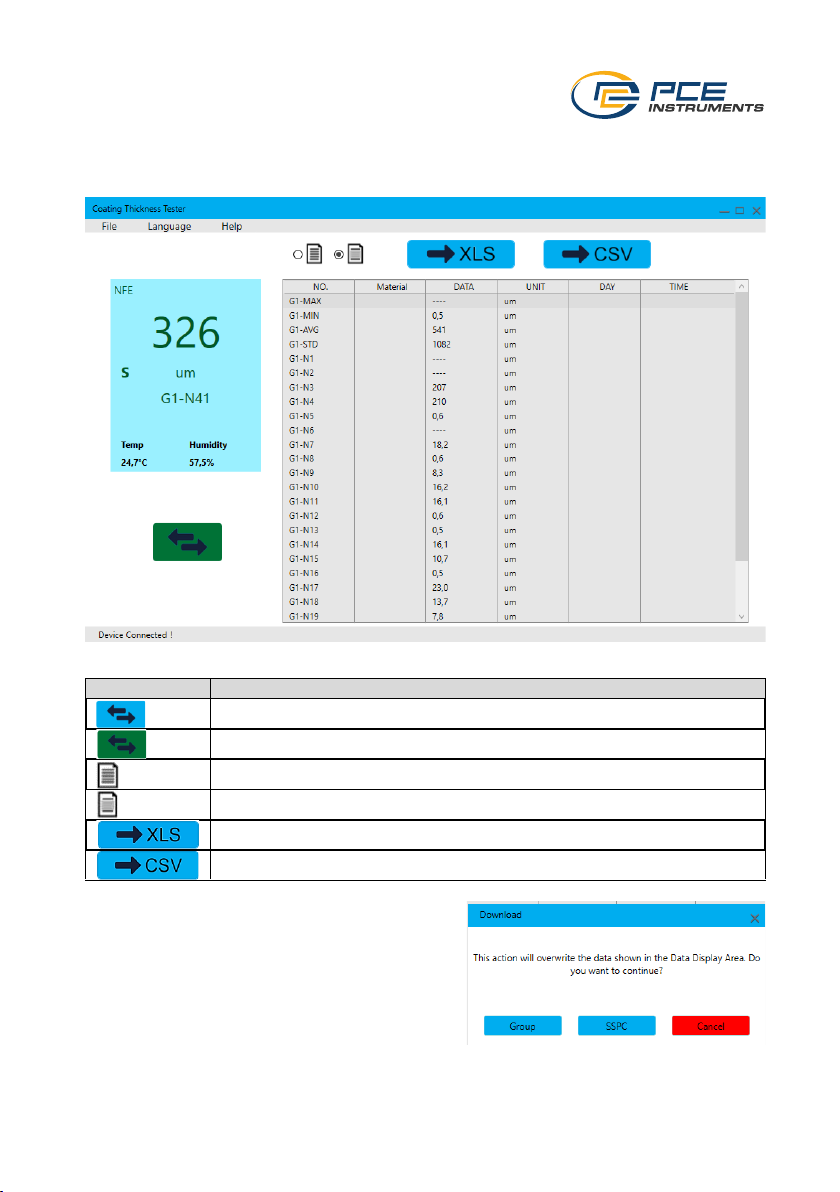
7 Software
First install the software on your computer with administrator rights. Then connect the meter to
your PC. Then start the software with administrator rights.
Symbol
Meaning
Measured values are transferred live from the meter
Data memory is read out
Mark all displayed measured values
Mark measured values selected by the user
Export measured values in XLS file format
Export measured values in CSV file format
If you switch from live transfer to retrieving the data
memory, you will be asked whether the currently
displayed measured values should be overwritten.
Therefore, make sure that the currently displayed
measured values have been exported.
Then select which memory group you want to
transfer to the PC.
Here, you can choose between "Group" and
"SSPC". The import can be cancelled with "Cancel".
Page 12

© PCE Instruments
10
8 Contact
If you have any questions, suggestions or technical problems, please do not hesitate to contact
us. You will find the relevant contact information at the end of this user manual.
9 Disposal
For the disposal of batteries in the EU, the 2006/66/EC directive of the European Parliament
applies. Due to the contained pollutants, batteries must not be disposed of as household waste.
They must be given to collection points designed for that purpose.
In order to comply with the EU directive 2012/19/EU we take our devices back. We either re-use
them or give them to a recycling company which disposes of the devices in line with law.
For countries outside the EU, batteries and devices should be disposed of in accordance with
your local waste regulations.
If you have any questions, please contact PCE Instruments.
Page 13

© PCE Instruments
11
PCE Instruments contact information
Germany France Spain
PCE Deutschland GmbH PCE Instruments France EURL PCE Ibérica S.L.
Im Langel 26 23, rue de Strasbourg Calle Mula, 8
D-59872 Meschede 67250 Soultz-Sous-Forets 02500 Tobarra (Albacete)
Deutschland France España
Tel.: +49 (0) 2903 976 99 0 Téléphone: +33 (0) 972 3537 17 Tel. : +34 967 543 548
Fax: +49 (0) 2903 976 99 29 Numéro de fax: +33 (0) 972 3537 18 Fax: +34 967 543 542
[email protected] [email protected] [email protected]
www.pce-instruments.com/deutsch www.pce-instruments.com/french www.pce-instruments.com/espanol
United Kingdom Italy Turkey
PCE Instruments UK Ltd PCE Italia s.r.l. PCE Teknik Cihazları Ltd.Şti.
Trafford House Via Pesciatina 878 / B-Interno 6 Halkalı Merkez Mah.
Chester Rd, Old Trafford 55010 Loc. Gragnano Pehlivan Sok. No.6/C
Manchester M32 0RS Capannori (Lucca) 34303 Küçükçekmece - İstanbul
United Kingdom Italia Türkiye
Tel: +44 (0) 161 464902 0 Telefono: +39 0583 975 114 Tel: 0212 471 11 47
Fax: +44 (0) 161 464902 9 Fax: +39 0583 974 824 Faks: 0212 705 53 93
[email protected] [email protected] [email protected]
www.pce-instruments.com/english www.pce-instruments.com/italiano www.pce-instruments.com/turkish
The Netherlands United States of America Denmark
PCE Brookhuis B.V. PCE Americas Inc. PCE Instruments Denmark ApS
Institutenweg 15 1201 Jupiter Park Drive, Suite 8 Birk Centerpark 40
7521 PH Enschede Jupiter / Palm Beach 7400 Herning
Nederland 33458 FL Denmark
Telefoon: +31 (0)53 737 01 92 USA Tel.: +45 70 30 53 08
[email protected] Tel: +1 (561) 320-9162 [email protected]
www.pce-instruments.com/dutch Fax: +1 (561) 320-9176 www.pce-instruments.com/dansk
[email protected]
www.pce-instruments.com/us
 Loading...