

Page 1
PCE Americas Inc.
711 Commerce Way
Suite 8
Jupiter
FL-33458
USA
From outside US: +1
Tel: (561) 320-9162
Fax: (561) 320-9176
[email protected]
PCE Instruments UK Ltd.
Unit 11
Southpoint Business Park
Ensign way
Hampshire / Southampton
United Kingdom, SO31 4RF
From outside UK: +44
Tel: (0) 2380 98703 0
Fax: (0) 2380 98703 9
www.pce-instruments.com/english
www.pce-instruments.com
Manual
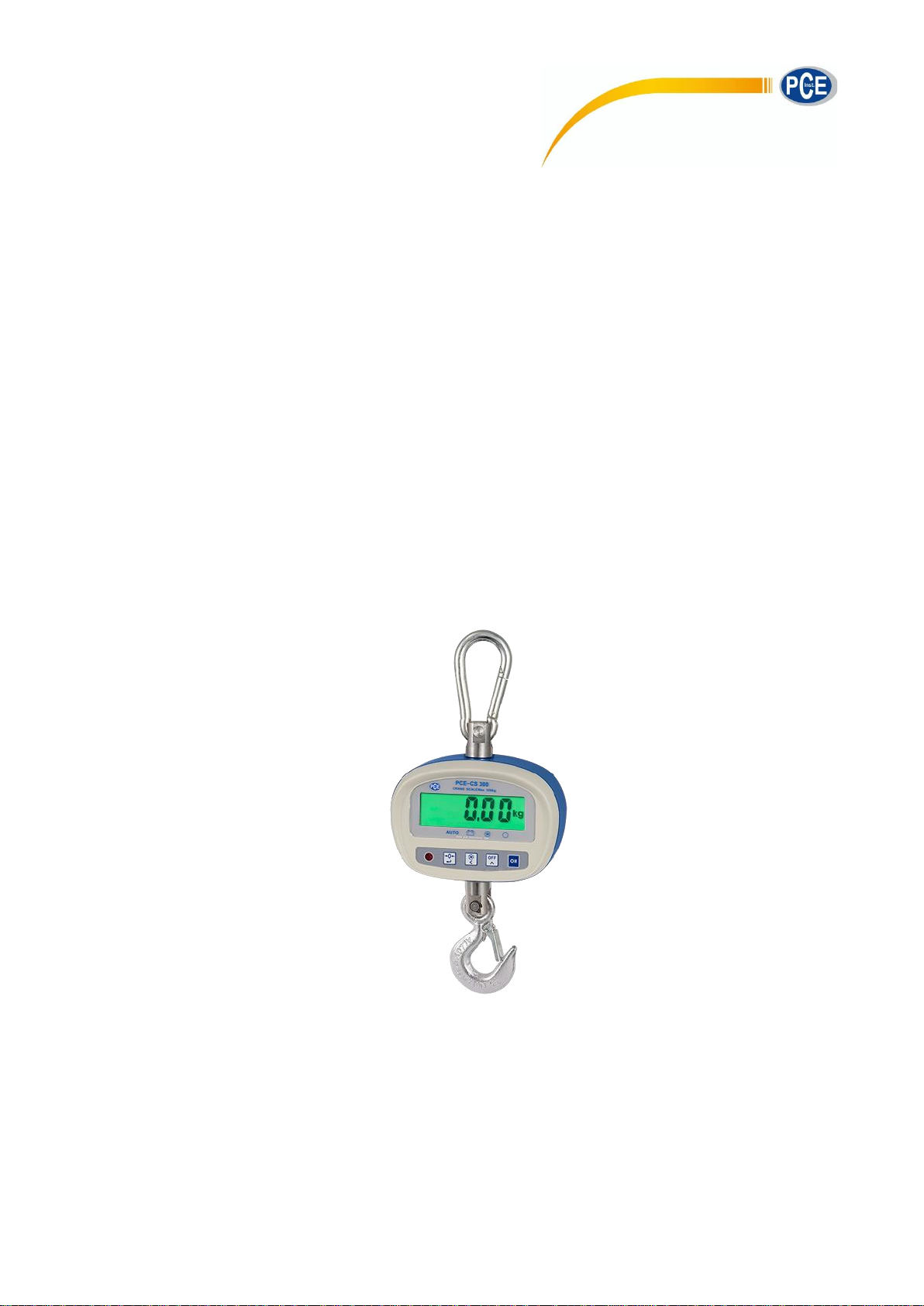
Crane Scales
PCE-CS 300
Version 1.0
Date of creation 04.09.2015
Date of last change 10.11.2021
Page 2

Manual
2
Contents
1 Safety notes ............................................................................................................. 3
2 Maintenance and testing ........................................................................................ 4
3 Specifications .......................................................................................................... 4
4 Accessories ................................ ................................ ................................ ............. 4
5 System description ................................................................................................. 5
6 Manual ...................................................................................................................... 7
6.1 How to switch on the scales ....................................................................................................... 7
6.2 Zeroing........................................................................................................................................ 7
6.3 Weighing ..................................................................................................................................... 7
6.4 How to switch off the scales ....................................................................................................... 7
6.5 Calibration................................................................................................................................... 7
6.6 Settings in the submenu ............................................................................................................. 8
7 Contact ..................................................................................................................... 9
7.1 PCE Instruments UK .................................................................................................................. 9
7.2 PCE Americas ............................................................................................................................ 9
Page 3

Manual
3
1 Safety notes
Please read this manual carefully and completely before you use the device for the first time. The device
may only be used by qualified personnel and repaired by PCE Instruments personnel. There is no
warranty of damage or injuries caused by non-observance of the manual.
• If the device is not in use for a longer period of time, the batteries should be taken out. Otherwise
the device can get damaged.
• Using the device in another way than described in this manual can lead to dangerous situations.
• Do not expose the device to extreme temperatures or humidity, direct sunlight, or moisture.
• Only use it with dry hands.
• It is not allowed to modify the device in any way.
• The device should be cleaned only with a damp cloth. Do not use solvents or abrasives.
• It is only permissible to use the device with spare parts of PCE Instruments or equal, tested
products.
• Moreover, the device must only be used under conditions stated in the specifications.
• The device must not be used in explosive atmospheres.
• Never measure higher weights than described in the specifications as this could damage or
destroy the device.
• Since the lifting of weights can be dangerous, the manufacturer and the user have the special
duty to prevent dangerous situations. Using measuring equipment like this must at no time
involve any hazard.
• The people responsible for measuring equipment and the user have to observe national
regulations e.g. accident prevention, safety rules, work regulations and other regulations
applicable to the use of this measuring equipment.
• When using this device, it is also important to pay attention to the guidelines, regulations and
safety instructions made for example by the crane or shackles manufacturer.
• The assembly, commissioning, maintenance and use of the device is only allowed by trained
personnel wearing protective clothing.
• Repairs and maintenance work of the equipment must be carried out by trained staff on a regular
basis and must be documented along with the spare parts used. The equipment must be at least
visually inspected before each use. If you see that any part of the equipment is incomplete or if
there is damage like cracks, deformations or split-offs, the equipment must be banned from use.
Please talk to the person responsible for safety at your company.
• Manuals and safety instructions must always be with the device.
• The equipment is not ex protected and must not be used in explosive areas. Furthermore, the
environmental conditions have to match with the values stated in the specifications of this
manual. Aggressive and corrosive areas need to be avoided. When there are considerable
temperature fluctuations, some time for acclimatisation must be taken into account.
• The device is suitable for lifting and weighing freely moveable loads only. Torsional stress must
not occur. Transporting people, pulling and tearing loads is not allowed.
• The permissible nominal loads [MAX] of the measurement device and other equipment in use
should not be exceeded.
• While using the device, you have to make sure not to enter the danger zone which is not just the
area below the load but also the area around the load.
This manual is published by PCE Instruments without any guarantee.
We expressly point to our general guarantee terms which can be found in our general terms of business.
If you have any questions please contact PCE Instruments.
Page 4
Manual
4
2 Maintenance and testing
Check the device before each use
You must examine the device before using it. When checking the device, the user has to convince
himself/herself,
- that the device is not deformed or otherwise damaged, (e. g. cracks).
- that every attachment is in flawless condition (e. g. hooks).
- that the complete system works without any hazards (e. g. improper installation).
- that the whole area is free of danger and if not, that countermeasures are taken.
• Regular control / maintenance
Every third month or 12,500 measurements,
depending on what happens first
- Check the degree of wear.
- Check the dimensions.
- Check for any deformation and
damage.
- Verify proper function of every part.
Every year or 50,000 measurements,
depending on what happens first
- Check every load-bearing parts for
e. g. hair cracks. This must be
carried out by trained staff.
Every 5 years or 250,000 measurements,
depending on what happens first
- Exchange all load-bearing parts.
Every 10 years or 500,000 measurements,
depending on what happens first
- Service life of the device has run
out. Exchange the complete
equipment.
3 Specifications
4 Accessories
1 x PCE-CS 300
4 x AA batteries
1 x snap hook
1 x hook
1 x remote control
Technical specifications
Weighing capacity
300 kg / 661.39 lb
Readability
Selectable: 0.1 … 0.05 kg / 0.22 … 0.11 lb
Repeatability
0.1 kg / 0.22 lb
Min. weight
2 kg / 4.41 lbs
TARE
full range
Protection
IP 54 (dust and splashproof)
Settling time
<10 s
Max. overload
50%
Display
20 mm LCD
Power supply
four batteries of size ‘AA’
General information:
Operating temperature
-10°C … +40°C
Operating humidity
30% … 90%
Weight
1.2 kg / 2.65 lbs incl. batteries
Page 5
Manual
5
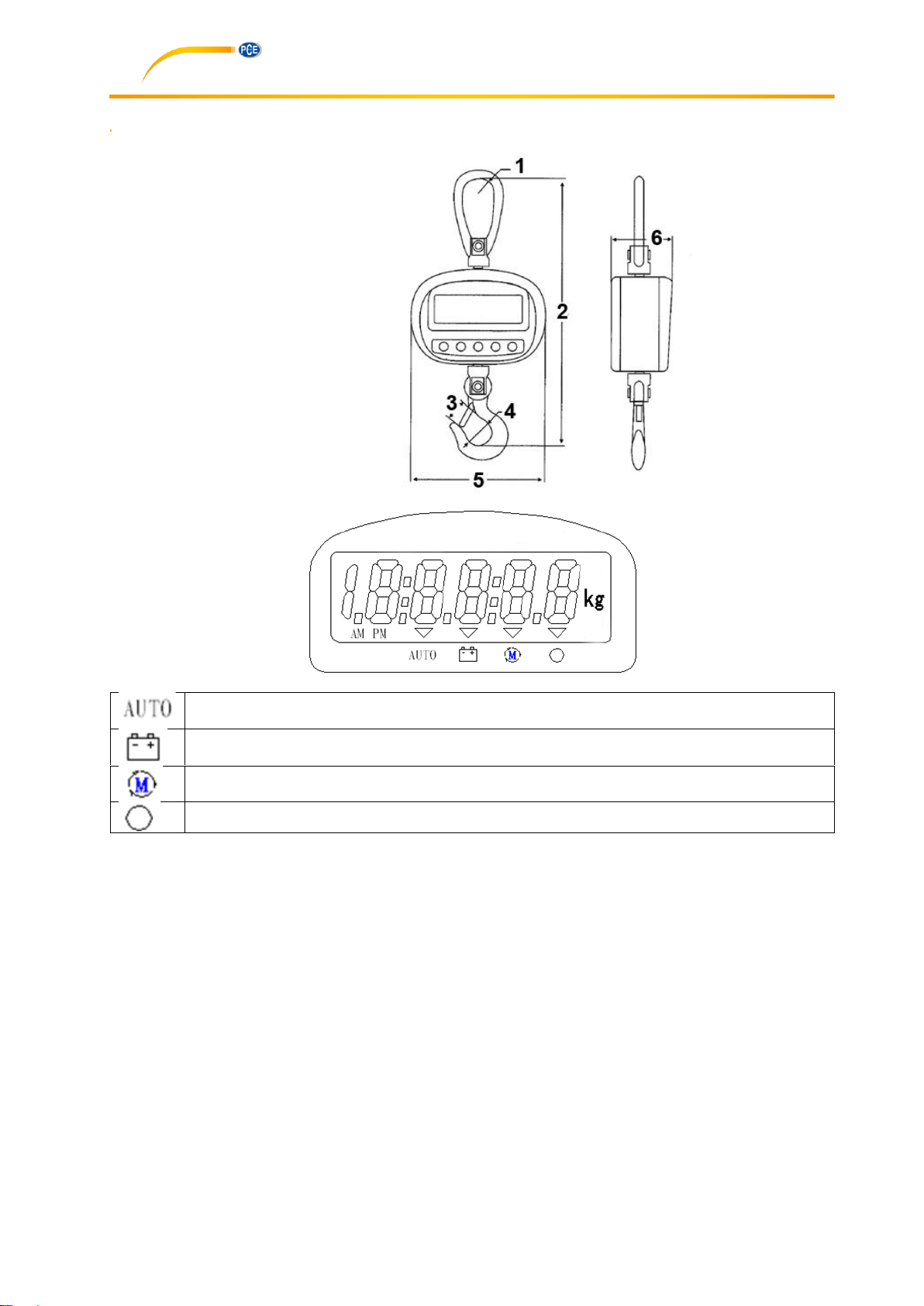
5 System description
1. 30 mm
2. 295mm
3. 20 mm
4. 23 mm
5. 152 mm
6. 67 mm
LC display
When the arrow above this icon lights up, this means that the backlight will be on during
operation.
The arrow above this icon lights up when the battery is low.
This icon indicates that the resolution / readability has been set to 0.10 kg.
This icon means that the value is stable and can be recorded by the user.
Page 6
Manual
6
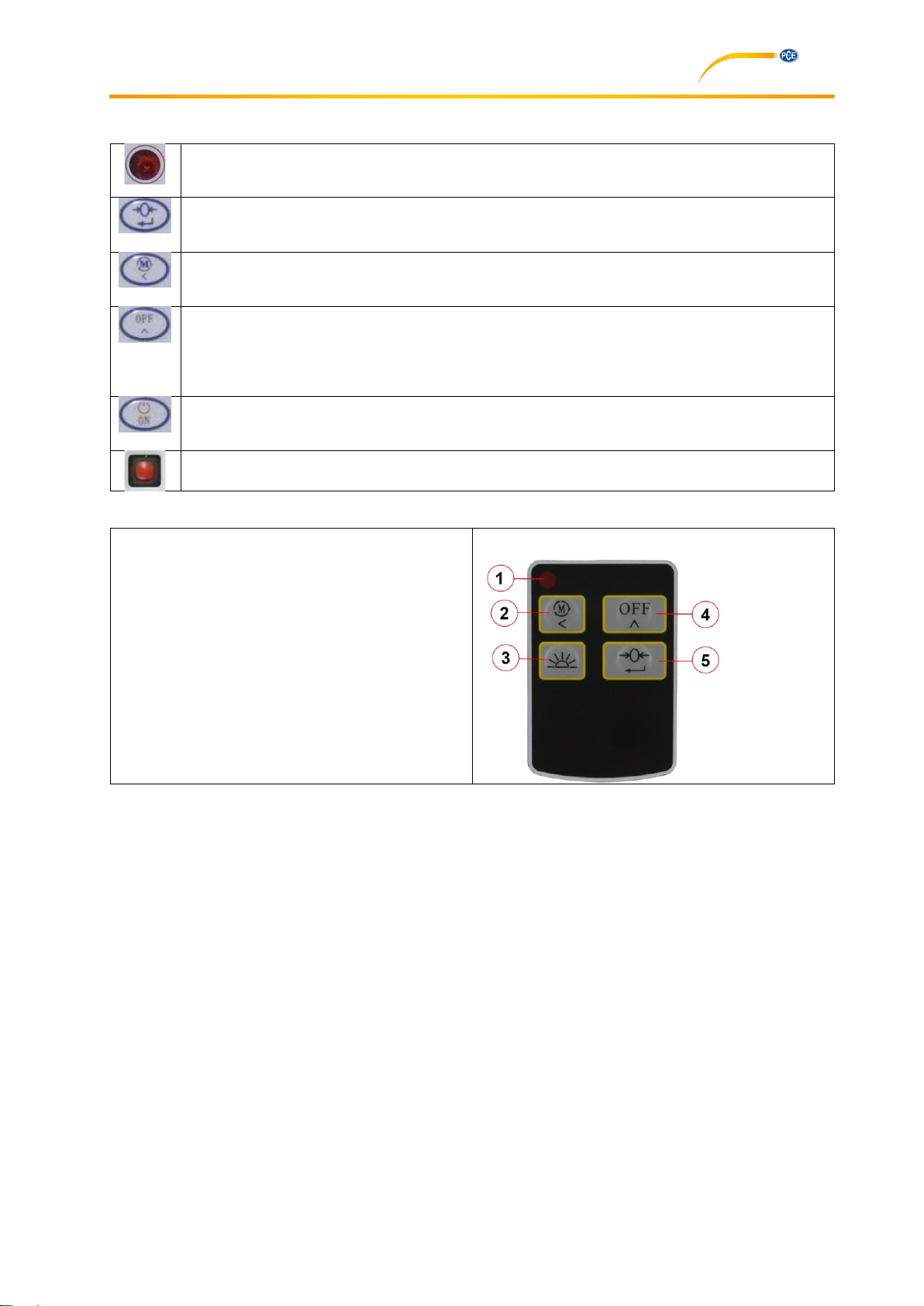
Keys on the scales
Infrared interface
Tare
Resolution between 0.10 kg and 0.05 kg
Turns device off
(Note: In this mode, there will still be high power consumption (approx. 30 mA). Therefore,
we recommend to use the red key on the rear side of the scales to power off the scales
completely)
Key not in use
ON / OFF
Keys on the remote control
1. LED indicator
2. Change readability /
Switch on from standby modetandby
3. Key not in use
4. Off / standby
(Note: In this mode, there will still be high
power consumption (approx. 30 mA).
Therefore, we recommend to use the red
key on the rear side of the scales to
power off the scales completely)
5. Tare / switch on from standby mode
Page 7

Manual
7
6 Manual
6.1 How to switch on the scales
1. Open the cover on the rear side of the case.
2. Insert the 4 AA batteries and set the sliding switch to “B“. If you have chosen the scales with the
optional lithium battery, please set the sliding switch to “A”.
3. Close the cover.
4. Apply the mechanical power switch on the rear side of the scales. The maximum load will be
indicated first, followed by a self-checking sequence.
5. When 0.0 is indicated along with the respective icon, the equipment is ready for weighing. We
recommend you to allow 3 to 5 minutes for warm-up before starting the weighing process.
6.2 Zeroing
1. When switched on, the scales normally show 0.0 kg or 0.00 kg. However, when the display
indicates a different numerical value, push the “Zero“ button to zero the display.
2. When “Aut” is set to zero in the submenu, the backlight will be activated when you press and hold
the „Zero“ button for more that 3 seconds. Press and hold the “Zero” button again for 3 seconds
to deactivate the backlight. When “Aut“ is set to 1 in the submenu, the backlight will be activated
automatically when you add load to the scale and will be deactivated when you remove the load.
6.3 Weighing
1. When the load has been attached to the scales completely, the weight will be displayed. When
“stable” is indicated, the value can be recorded.
2. For taring, attach the tare weight, e. g. a cable, to the hook and push the “Zero” button to set the
display to zero. The weight which is then indicated is the net weight. This weight will only change
if the tare weight is modified or when the scale is switched off.
6.4 How to switch off the scales
1. The scales should be switched off after each weighing process.
2. Then apply the mechanical power switch on the rear side of the scales to power off the scales
entirely and to prevent the battery from leaking.
6.5 Calibration
1. Turn off the scales.
2. Remove all loads from the scales.
3. Press and hold the ‘Zero’ button and turn on the scale.
4. Release the ‘Zero’ button now. The display shows ‘SPEN’.
5. Briefly press the ‘Zero’ button once again. The display shows ‘SET’ and 00000.
6. Set the weight of the calibration weight by pressing the ‘Off’ button to increase the value. By
means of the ‘Set resolution’ button, the set digit is moved left.
7. Press the ‘Zero’ button again to save your settings.
Page 8
Manual
8
6.6 Settings in the submenu
1. Turn on the scales.
2. While the scales count down from 9 to 0, press the key briefly to confirm.
3. The scale now shows ‘00000’ and you must enter a code to get to the submenu. To do so, use
the following keys:
for changing the number
to confirm the entered value and proceed to the next position.
The code is “11111” and must be confirmed with .
4. The submenu has the following structure:
bEE
0
Deactivates the beep at stabilisation
1 Activates the beep at stabilisation
Stb
0
Allows zeroing when values are not stable
1 Disallows zeroing when values are not stable
CHt
0
Lb 1
Kg
Aut
0
Manual
1 Automatic
OFF
0
Save 1
Do not save
YES
0
Keep settings
1 Do not keep settings
In the submenu, the keys are used as follows:
for changing the number
to confirm the entered value and proceed to the next position.
Page 9

Manual
9
7 Contact
If you have any questions about our range of products or measuring instruments please contact PCE
Instruments.
7.1 PCE Instruments UK
By post:
PCE Instruments UK Ltd.
Unit 11 Southpoint Business Park
Ensign Way, Southampton
Hampshire
United Kingdom, SO31 4RF
By phone:
02380 987 035
7.2 PCE Americas
By post:
PCE Americas Inc.
711 Commerce Way
Suite 8
Jupiter
33458 FL
USA
By phone:
561 3209162
 Loading...