

Page 1
© PCE Instruments
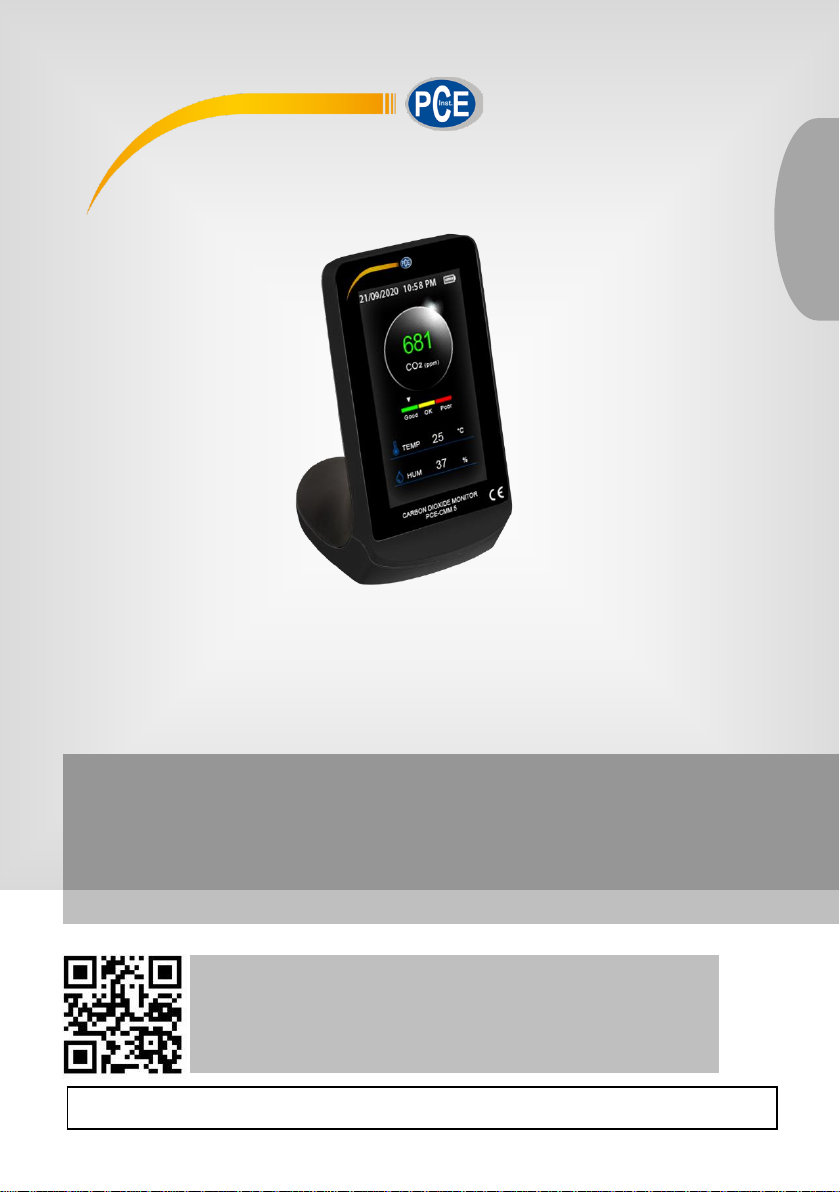
PCE-CMM 5 CO2 analyser
User Manual
User manuals in various languages (français,
italiano, español, português, nederlands, türk, polski,
русский, 中文) can be found by using our
product search on: www.pce-instruments.com
Last change: 25 January 2021
v1.0
English
Page 2

Contents
1 Safety notes ........................................................................................... 1
2 Device description ................................................................................ 2
2.1 Front and back ................................................................................................................. 2
2.2 Display ............................................................................................................................. 3
3 Technical specifications ...................................................................... 4
4 Delivery scope ....................................................................................... 4
5 Operating instructions ......................................................................... 4
5.1 Switch on the device ........................................................................................................ 4
5.2 Switch off the device ........................................................................................................ 4
5.3 Toggle view ...................................................................................................................... 4
5.4 CO2 traffic light function ................................................................................................... 4
5.5 Settings ............................................................................................................................ 5
5.6 Automatic calibration ........................................................................................................ 5
5.7 Charge the meter ............................................................................................................. 5
6 Contact ................................................................................................. 6
7 Disposal ................................................................................................. 6
© PCE Instruments
Page 3

© PCE Instruments
1
1 Safety notes
Please read this manual carefully and completely before you use the device for the first time. The
device may only be used by qualified personnel and repaired by PCE Instruments personnel.
Damage or injuries caused by non-observance of the manual are excluded from our liability and
not covered by our warranty.
• The device must only be used as described in this instruction manual. If used otherwise,
this can cause dangerous situations for the user and damage to the meter.
• The instrument may only be used if the environmental conditions (temperature, relative
humidity, …) are within the ranges stated in the technical specifications. Do not expose
the device to extreme temperatures, direct sunlight, extreme humidity or moisture.
• Do not expose the device to shocks or strong vibrations.
• The case should only be opened by qualified PCE Instruments personnel.
• Never use the instrument when your hands are wet.
• You must not make any technical changes to the device.
• The appliance should only be cleaned with a damp cloth. Use only pH-neutral cleaner,
no abrasives or solvents.
• The device must only be used with accessories from PCE Instruments or equivalent.
• Before each use, inspect the case for visible damage. If any damage is visible, do not
use the device.
• Do not use the instrument in explosive atmospheres.
• The measurement range as stated in the specifications must not be exceeded under
any circumstances.
• Non-observance of the safety notes can cause damage to the device and injuries to
the user.
• Do not cover the back of the meter as this may cause malfunction.
We do not assume liability for printing errors or any other mistakes in this manual.
We expressly point to our general guarantee terms which can be found in our general terms of
business.
If you have any questions please contact PCE Instruments. The contact details can be found at
the end of this manual.
Page 4
© PCE Instruments
2
2 Device description
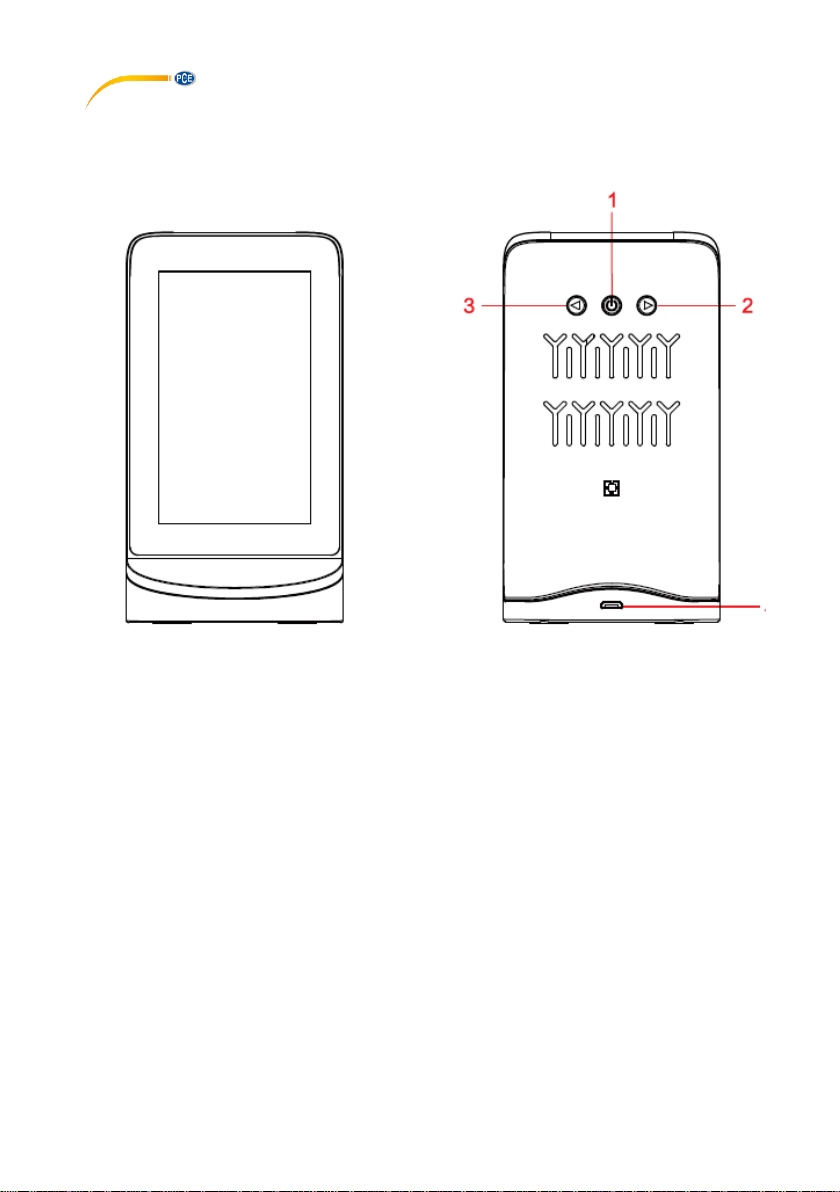
2.1 Front and back
1. On/off key
2. Right key
3. Left key
4. Micro USB charging socket
Page 5
© PCE Instruments
3
2.2 Display
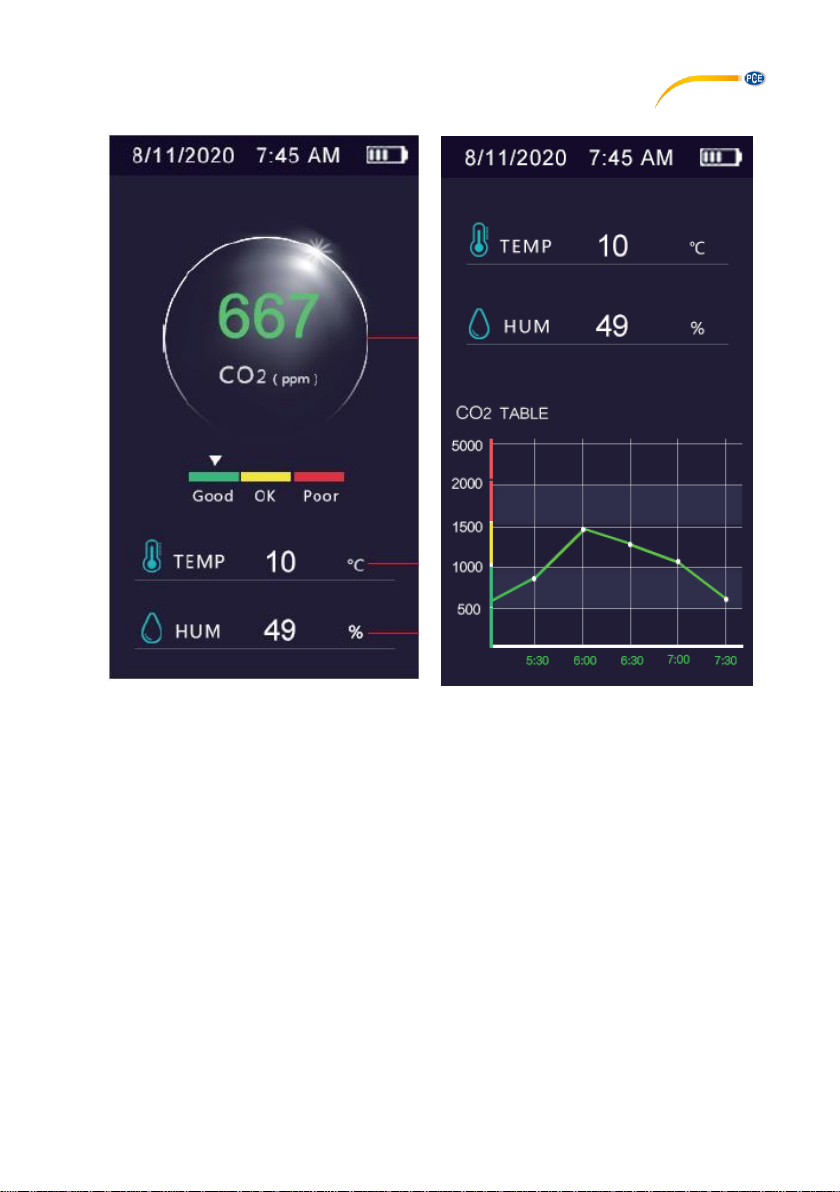
Figure 1 Standard view
Figure 2 Graph view
Page 6
© PCE Instruments
4
3 Technical specifications
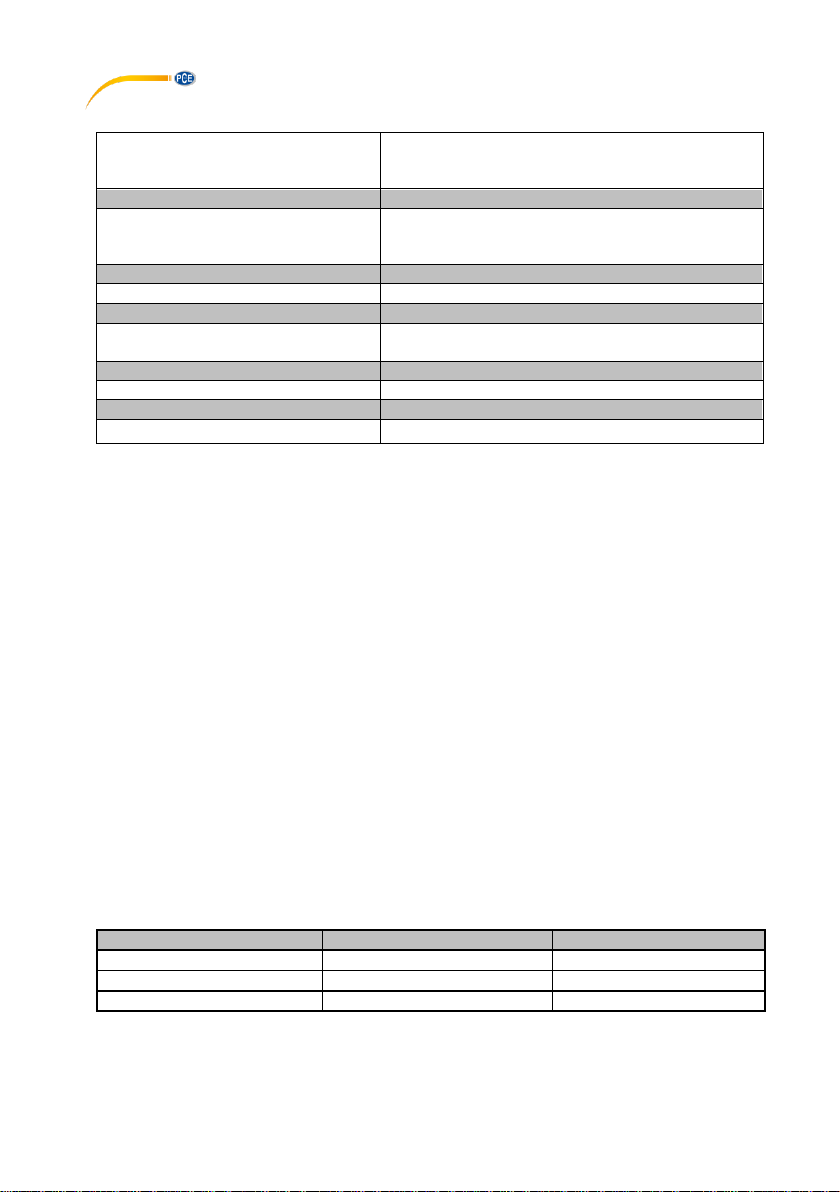
Measurement range CO
2
Accuracy
Resolution
400 ... 5000 ppm CO
2
±75 ppm or ±5 % of rdg. (the higher value applies)
1 ppm
CO2 sensor
NDIR
Measurement range humidity
Accuracy
Resolution
20 ... 95 % RH
±4 % RH
1 % RH
Display
4.3" LC display
Sampling rate
1.5 s
Environmental conditions
-10 ... 50 °C / 20 ... 85 % RH
Power supply
3.7 V Li-Ion battery 3000 mAh
5 V micro USB
Battery life
6 h
Charging time
2 h
Dimensions
145 x 78 x 97.2 mm
Weight
210 g
4 Delivery scope
1 x CO2 analyser PCE-CMM 5
1 x USB charging cable 5 V / 2 A
1 x user manual
5 Operating instructions
5.1 Switch on the device
When the CO2 monitor is off, press and hold the on/off key for 3 seconds to turn on the meter.
5.2 Switch off the device
When the power is on, press the on/off key for 3 seconds to switch off the meter.
5.3 Toggle view
When the unit is switched on, all measured values are displayed as numerical values.
Furthermore, the CO2 meter shows the air quality status in a green-yellow-red status lamp.
Use the arrow keys (left / right) to switch to the graph. The graph shows the course of the CO2
content of the last 5 h after switching on.
5.4 CO2 traffic light function
The CO2 monitor has a status lamp display (CO2 traffic light). The limit values for colour changes
are as follows:
Air quality
CO2 content
Colour
Good
400 ... 800 ppm
Green
OK
800 ... 1200 ppm
Yellow
Poor
1200 ... 5000 ppm
Red
Page 7

© PCE Instruments
5
5.5 Settings
Press the on/off key twice in quick succession to open the settings menu .
5.5.1 Setting the date (DATE)
Use the left and right keys to change the highlighted value for day, month, year. Confirm the
setting with the on/off key.
5.5.2 Setting the time (TIME)
Use the left and right keys to change the highlighted numeric value for hour and minute. Confirm
the setting with the on/off key.
5.5.3 Select unit (UNIT)
You can switch between °C and °F using the left and right keys. Confirm the setting with the on/off
key.
5.5.4 Set temperature offset (TEMP)
To set an offset for the measured temperature value, use the left and right keys to change the
numerical value. Confirm the setting with the on/off key.
5.6 Automatic calibration
The PCE-CMM 5 has the integrated self-correcting ABC algorithm (Automatic Baseline
Correction) for automatic adjustment of the baseline value. This calibration is performed once a
day.
For this, the PCE-CMM 5 requires a regular supply of fresh air. The measured value is adjusted
automatically.
The ABC function is permanently switched on (cannot be switched off) and adjusts the baseline
value at regular intervals when the CO2 level is low. Do not use this meter in a closed environment
where the CO2 concentration remains relatively high. This would adversely affect the selfcorrection of the meter.
5.7 Charge the meter
When the battery icon on the display indicates that the battery is discharged, the PCE-CMM 5
must be charged via the micro USB port. To do this, use the supplied USB charging cable or a
USB power supply with 5 V / 1000 mA. Please note that it may take at least 2 hours to recharge
the battery to 100 %.
Note: Charging via a 500 mA port on the computer is not possible.
Page 8
6 Contact
If you have any questions, suggestions or technical problems, please do not hesitate to contact
us. You will find the relevant contact information at the end of this user manual.
7 Disposal
For the disposal of batteries in the EU, the 2006/66/EC directive of the European Parliament
applies. Due to the contained pollutants, batteries must not be disposed of as household waste.
They must be given to collection points designed for that purpose.
In order to comply with the EU directive 2012/19/EU we take our devices back. We either re-use
them or give them to a recycling company which disposes of the devices in line with law.
For countries outside the EU, batteries and devices should be disposed of in accordance with
your local waste regulations.
If you have any questions, please contact PCE Instruments.
© PCE Instruments
6
Page 9

© PCE Instruments
7
PCE Instruments contact information
Germany France Spain
PCE Deutschland GmbH PCE Instruments France EURL PCE Ibérica S.L.
Im Langel 4 23, rue de Strasbourg Calle Mayor, 53
D-59872 Meschede 67250 Soultz-Sous-Forets 02500 Tobarra (Albacete)
Deutschland France España
Tel.: +49 (0) 2903 976 99 0 Téléphone: +33 (0) 972 3537 17 Tel. : +34 967 543 548
Fax: +49 (0) 2903 976 99 29 Numéro de fax: +33 (0) 972 3537 18 Fax: +34 967 543 542
[email protected] [email protected] [email protected]
www.pce-instruments.com/deutsch www.pce-instruments.com/french www.pce-instruments.com/espanol
United Kingdom Italy Turkey
PCE Instruments UK Ltd PCE Italia s.r.l. PCE Teknik Cihazları Ltd.Şti.
Unit 11 Southpoint Business Park Via Pesciatina 878 / B-Interno 6 Halkalı Merkez Mah.
Ensign Way, Southampton 55010 Loc. Gragnano Pehlivan Sok. No.6/C
Hampshire Capannori (Lucca) 34303 Küçükçekmece - İstanbul
United Kingdom, SO31 4RF Italia Türkiye
Tel: +44 (0) 2380 98703 0 Telefono: +39 0583 975 114 Tel: 0212 471 11 47
Fax: +44 (0) 2380 98703 9 Fax: +39 0583 974 824 Faks: 0212 705 53 93
[email protected] [email protected] [email protected]
www.pce-instruments.com/english www.pce-instruments.com/italiano www.pce-instruments.com/turkish
The Netherlands China Hong Kong
PCE Brookhuis B.V. PCE (Beijing) Technology Co., Limited PCE Instruments HK Ltd.
Institutenweg 15 1519 Room, 6 Building Unit J, 21/F., COS Centre
7521 PH Enschede Zhong Ang Times Plaza 56 Tsun Yip Street
Nederland No. 9 Mentougou Road, Tou Gou District Kwun Tong
Telefoon: +31 (0)53 737 01 92 102300 Beijing, China Kowloon, Hong Kong
[email protected] Tel: +86 (10) 8893 9660 Tel: +852-301-84912
www.pce-instruments.com/dutch [email protected] [email protected]
www.pce-instruments.cn www.pce-instruments.cn
United States of America
PCE Americas Inc.
1201 Jupiter Park Drive, Suite 8
Jupiter / Palm Beach
33458 FL
USA
Tel: +1 (561) 320-9162
Fax: +1 (561) 320-9176
[email protected]
www.pce-instruments.com/us
 Loading...