

Page 1

CO2 meter
1
Protecve case
1
User manual
1
PCE Americas Inc.
711 Commerce Way
Suite 8
Jupiter
FL-33458
USA
From outside US: +1
Tel: (561) 320-9162
Fax: (561) 320-9176
[email protected]
www.pce-instruments.com/english
www.pce-instruments.com
Gas Detector
PCE-CMM 10
I. Introduc�on
CO2 is a naturally occurring gas that emied at great levels by human acty and it is one of
several greenhouse gases in our atmosphere. CO2 only accounts for 0.03% of the fresh air. If you
breathe high concentraon CO2, you may be at risk of carbon dioxide intoxicaon. Symptoms of
carbon dioxide toxicity include headache, irregular heartbeat, nausea, unconsciousness, or even
death.
PCE Instruments UK Ltd.
Units 12/13
Southpoint Business Park
Ensign way
Hampshire / Southampton
United Kingdom, SO31 4RF
From outside UK: +44
Tel: (0) 2380 98703 0
Fax: (0) 2380 98703 9
PCE-CMM 10 is a CO2 meter that measures CO2 concentraon, temperature and humidity. This
meter is widely used in
homes, shopping malls, oces, vehicles, staons etc.
Please read carefully and follow all warnings and precauons before using the device.
II. Open box inspec�on
Open the box and take out the device. Please check whether the following items are decient or
damaged and contact your supplier immediately if they are.
USB cable 1
III. Safety informa�on
1. Check the device and its accessories for any damage or anomaly before use. Do not use the
device if the cover is damaged, or has any other malfuncons.
2. Please follow the operaon instrucons.
3. Please do not open the device case and modify the internal circuit.
4. Do not store or use this device in high temperature, high humidity, ammable, explosive and
strong electromagnec environments.
5. Charge the meter when symbol is displayed.
6. Regularly u
se so cloth and m
ild detergent to clean the case. Do not use abradant or solvent.
7. Complies with CE standards.
8. This meter has ABC (Automac Baseline Correcon) funcon. Do not use this meter in closed
environment where CO2 concentraon remains relavely high.
9. Use speciadapter to charge the device. The adapter should comply with UL/FCC safety
standards.
Page 2

IV. Structure
① Case
② LCD screen
③ USB port
④ Functional buttons
V. Symbols
No.
Indication
1
Audio alarm ON/OFF
2
STEL/TWA/MAX/MIN/AVG modes
3
CO2 calibration
4
Timing shutdown
5
Battery status
6
Exit calibration
7
CO2 concentration
8
CO2 concentration grading emoticon
9
Relative humidity
10
Date/time
11
Temperature
12
Data hold
Page 3

VI. Operation instructions
1. Functional buttons
The following table shows the buttons functions in different modes.
Modes
Functions
Buttons
OFF
Long press: turn on/off the meter
Long press: enter calibration mode
+
Measure
Short press: turn on/off the backlight
Short press to switch temperature unit ˚C/˚F
Long press to turn on/off audio alarm
Short press: cycle switch between HOLD/MAX/MIN/AVG/TWA/STEL
MODE
Long press: reset to zero
Long press: calibrate the CO2 concentration (outdoor fresh air)
+MODE
Calibration
Short press: increase the value
Short press : next parameter (double press to enter date/time
calibration)
Long press: save
Short press: decrease the value
MODE
Short press: previous parameter
+MODE
Long press: exit calibration
+
Page 4
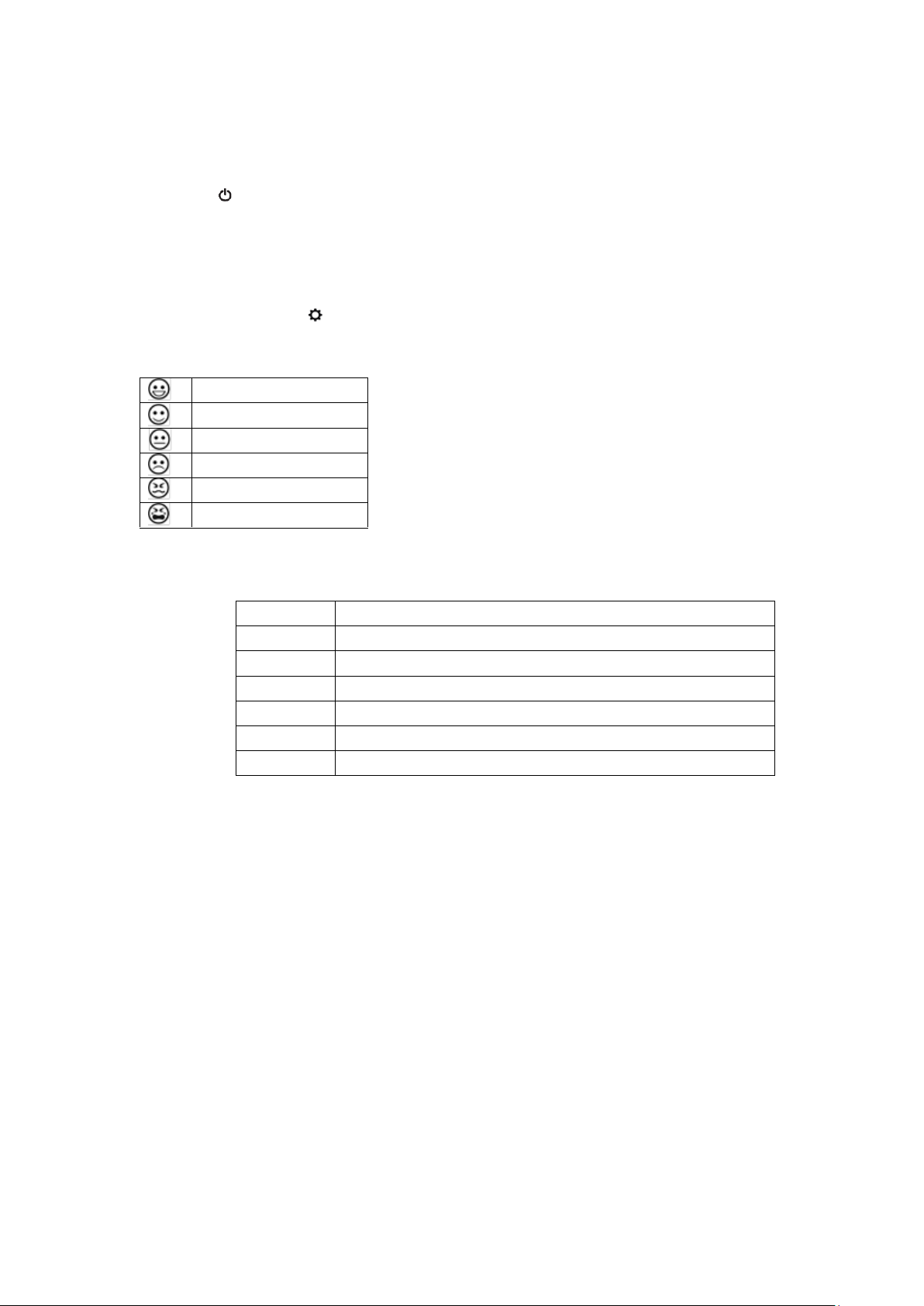
2. Operations
CO2 measurement
Long press to turn on the meter. It takes 120s to stabilize CO2 concentration. CO2
concentration, ambient temperature, relative humidity will be displayed on the screen. CO2
concentration value is refreshed every 3 seconds.
Note: if CO2>1000ppm, buzzer goes off with red backlight flashing. The audio alarm’s default
setting is OFF, long press to turn on the audio alarm.
1) Concentration grading emoticons
400ppm ~ 450ppm
450ppm ~ 700ppm
700ppm ~ 1000ppm
1000ppm ~ 2000ppm
2000ppm ~ 5000ppm
>5000ppm
Data
Short press MODE to cycle switch between HOLD/MAX/MIN/AVG/TWA/STEL values.
Symbol
Indication
HOLD
Data hold
MAX
Maximum value
MIN
Minimum value
AVG
Average value
TWA
Time weighted average
STEL
Short-term exposure limit
TWA: The average exposure within the workplace to any hazardous contaminant or agent using
the baseline of an 8 hour day or 40 hours week work schedule.
STEL: The acceptable exposure limit to a toxic or irritant substance over a short period of time
(time-weighted average), usually 15 minutes.
Auto shutdown
The meter will automatically shut down if there is no operation for 2 hours.
Backlight
Please refer to Operation Instructions-Functional Buttons
Audio alarm
Please refer to Operation Instructions-Functional Buttons
Temperature unit
Please refer to Operation Instructions-Functional Buttons
Page 5

Battery
Charge the battery when is displayed on the screen. It takes 2~3 hours to fully charge the
battery.
3. Calibration
Date/time
Please refer to Operation Instructions-Functional Buttons to calibrate date/time.
CO2
Note: CO2 function has been calibrated before delivery. If the value is greatly deviated from the
standard, you can calibrate it by either methods below:
① Automatic calibration
PCE-CMM 10 has the built-in self-correcting ABC (Automatic Baseline Correction) algorithm to
automatically adjust the base value.
1) Turn on the meter and leave PCE-CMM 10 at a place where there is flowing fresh air for 3 days
(powered by the adaptor)
2) ABC function will automatically adjust and correct the CO2 standard value.
Warnings: ABC function is always on, do not use this meter in closed environment where CO2
concentration remains relatively high.
② Manual calibration
1) Turn on the meter, leave it outdoor for 20 minutes
2) Long press MODE+ until appears on the screen. Calibration takes 10 minutes.
symbol disappears when calibration is done.
Note: It is suggested to calibrate the meter in outdoor environments where there is air flow. Keep
device away from animals, plants and human.
VII. Specifications
1. Technical specifications
Function
Range
Resolution
Accuracy
CO2
400~5000 ppm
1ppm
±(5% of rdg+50ppm)
from 400~2000ppm 1
Temperature
-10.0˚C~50.0˚C
0.1˚C
±1˚C
Humidity
0-99%RH
1%RH
(10%RH~90%RH) ±5%RH @25˚C
1
Measure environment: 1atm, ambient temperature and humidity
2
It may be influenced by heat emitted by the adaptor
Page 6

2. General specifications
Specifications
Descriptions
Sensor
NDIR principle
ABC
Automatic baseline correction
Audio alarm
Buzzer
Visual alarm
Red backlight
Display
LCD screen
Low battery
indication
√
Auto power off
√
Backlight
√
Operating
environment
0˚C ~50 ˚C , 0%RH~85%RH
Storage
environment
-20 ˚C ~60 ˚C , 0%RH~95%RH
Power supply
Built-in 3.7V DC rechargeable battery
Weight
195g
Dimension
75mm x 55mm x 130mm
3. Adaptor
Output voltage
5VDC
Output current
1A
Safety standards
UL/FCC
VIII. Maintenance
⚫ Maintenance
1. The maintenance and service of the device must be implemented by qualified professionals
or the designated departments.
2. Regularly use dry cloth to clean the case. Do not use detergent containing solvents.
3. To conserve battery, please turn off the device if not being used for a long time.
IX. CO2 concentration and effects (only for reference)
Concentration
Effect
350~450ppm
Fresh air
350~1000ppm
Normal
1000~2000ppm
Turbid air, sleepy
2000~5000ppm
Headache, irregular heartbeat, nausea
>5000ppm
Unconsciousness or even death
 Loading...