

Page 1
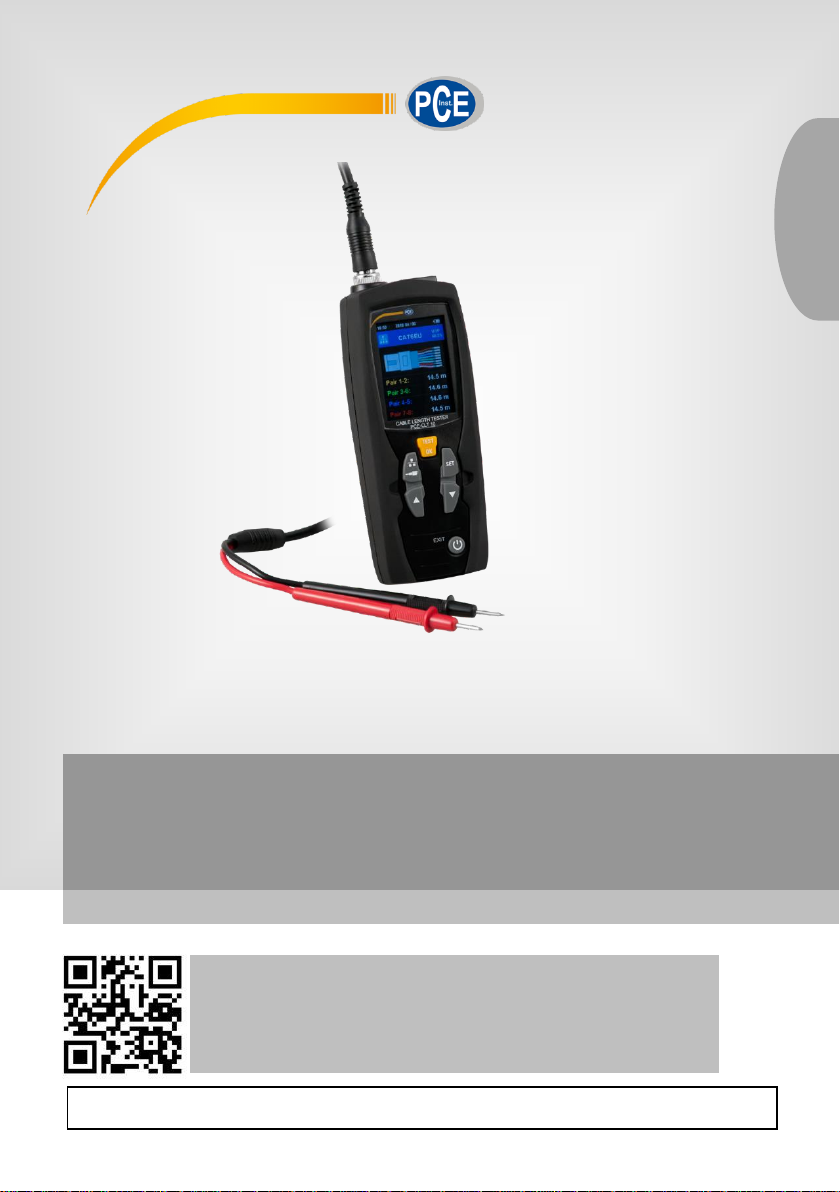
User Manual
User manuals in various languages (français,
italiano, español, português, nederlands, türk, polski,
русский, 中文) can be found by using our
product search on: www.pce-instruments.com
Last change: 19 September 2019
v1.0
English
PCE-CLT 10 Electrical Tester
© PCE Instruments
Page 2

Contents
1 Safety notes ........................................................................................... 1
2 Characteristics ...................................................................................... 2
3 Technical specifications ...................................................................... 2
4 Delivery contents .................................................................................. 2
5 Device description ................................................................................ 3
6 Operation ............................................................................................... 3
6.1 Preparation / inserting the batteries .................................................................................. 3
6.2 Turn on/off cable length tester .......................................................................................... 4
6.3 Main menu ....................................................................................................................... 4
6.4 Cable length measurement .............................................................................................. 4
6.5 VOP library ....................................................................................................................... 6
6.6 Showing the history .........................................................................................................11
6.7 Settings ...........................................................................................................................12
7 Contact ............................................................................................... 13
8 Disposal ............................................................................................... 13
© PCE Instruments
Page 3

© PCE Instruments
1
1 Safety notes
Please read this manual carefully and completely before you use the device for the first time. The
device may only be used by qualified personnel and repaired by PCE Instruments personnel.
Damage or injuries caused by non-observance of the manual are excluded from our liability and
not covered by our warranty.
• The device must only be used as described in this instruction manual. If used otherwise,
this can cause dangerous situations for the user and damage to the meter.
• The instrument may only be used if the environmental conditions (temperature, relative
humidity, …) are within the ranges stated in the technical specifications. Do not expose
the device to extreme temperatures, direct sunlight, extreme humidity or moisture.
• Do not expose the device to shocks or strong vibrations.
• The case should only be opened by qualified PCE Instruments personnel.
• Never use the instrument when your hands are wet.
• You must not make any technical changes to the device.
• The appliance should only be cleaned with a damp cloth. Use only pH-neutral cleaner,
no abrasives or solvents.
• The device must only be used with accessories from PCE Instruments or equivalent.
• Before each use, inspect the case for visible damage. If any damage is visible, do not
use the device.
• Do not use the instrument in explosive atmospheres.
• The measurement range as stated in the specifications must not be exceeded under
any circumstances.
• Non-observance of the safety notes can cause damage to the device and injuries to
the user.
We do not assume liability for printing errors or any other mistakes in this manual.
We expressly point to our general guarantee terms which can be found in our general terms of
business.
If you have any questions please contact PCE Instruments. The contact details can be found at
the end of this manual.
Page 4

© PCE Instruments
2
2 Characteristics
- Precise and quick cable length measurement
- Easy operation
- 2.4“ LCD
- Auto zero and auto range
- 20 pre-set cable types
- Auto power off
- Automatic setting of sensitivity for more accurate cable length measurement
- Up to 99 individual cable types can be set
3 Technical specifications
Measuring range cable length
Depending on the propagation speed of the tested
cables
5 ... 3000 m / 16.4 ... 9842.5 ft
with shortening factor ≤99.9%
5 ... 2400 m / 16.4 ... 7874.0 ft
with shortening factor ≤80.0%
5 ... 2000 m / 16.4 ... 6561.7 ft
with shortening factor ≤66.0%
5 ... 1500 m / 16.4 ... 4921.3 ft
with shortening factor ≤50.0%
Measurement units
m, ft
Resolution
0.1 m
Measuring principle
Time domain reflectometer
Selection area
Automatic control range
Measurement accuracy
± [2% of reading ± 0.2 m] <100 m
± [2% of reading ± 0.5 m] ≤100 m
Impedance selector
Automatic output of the impedance control
Shortening factor / propagation
speed
Adjustable from 1.0 ... 99.9%
Cable types
20 standard cables
Memory
99 memory slots for individual cables
Connector type
BNC, RJ45
Power supply
2 x 1.5V AA battery
Battery status indicator
Yes
Automatic shutdown
Adjustable between 10 and 60 minutes
Menu languages
German, English
Operating temperatur
0 ... 40°C / 32 ... 104°F
Storage temperature
-10 ... 50°C / 14 ... 122°F
Relative humidity
0 ... 80 % RH
4 Delivery contents
1 x Cable fault meter PCE-CLT 10
2 x Test leads
2 x Crocodile clip
2 x AA battery 1.5V
1 x Transport bag
1 x User manual
Page 5
© PCE Instruments
3
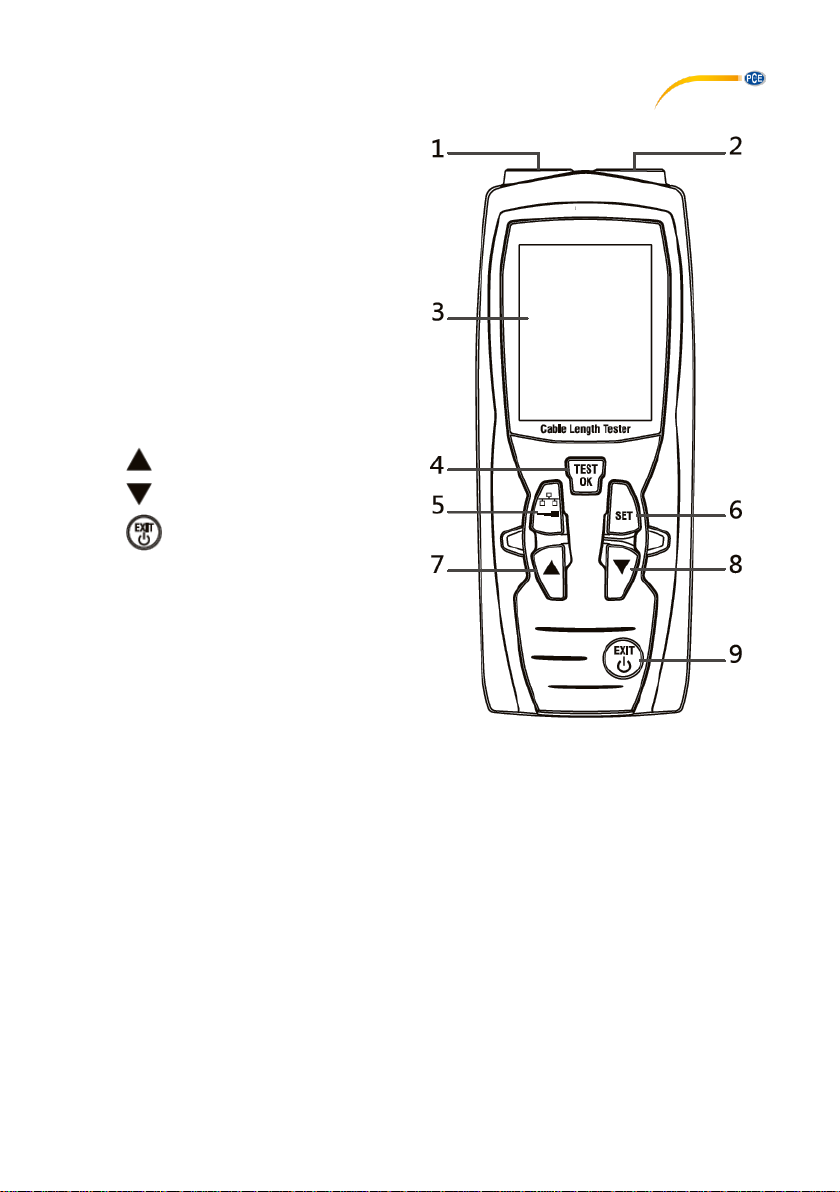
5 Device description
1. BNC socket – to measure cable length
via Coax option
2. RJ45 socket - to measure cable length
via network option
3. LCD
4. OK / measuring key
5. Coax-netzwork switch key
6. Set key
7. key (up / increase value)
8. key (down / decrease value)
9. key (On/off / in menu: back)
6 Operation
6.1 Preparation / inserting the batteries
To run the cable length meter, the included batteries must be inserted first. To do so, turn around
the meter and open the battery compartment cover at the rear side. Insert the batteries as marked
in the battery compartment. Then close the battery compartment cover.
Note:
Replace the batteries as soon as the battery icon in the display glows in red. Only use 1.5 V AA
Alkaline batteries. If you will not use the cable fault tester for a longer period of time, remove the
batteries.
Page 6
© PCE Instruments
4
6.2 Turn on/off cable length tester
Press and hold the key for approx. 3 seconds to turn on the meter. To turn off the meter,
press and hold the key for approx. 3 seconds again.
Note:
The meter has an automatic power off function to save battery power. The cable length meter will
turn off automatically after 10 minutes of inactivity.
6.3 Main menu
After powering on, the cable fault meter will be in the mode to measure network cables. To enter
the main menu, short-press the key. To return to measuring mode, short-press again.
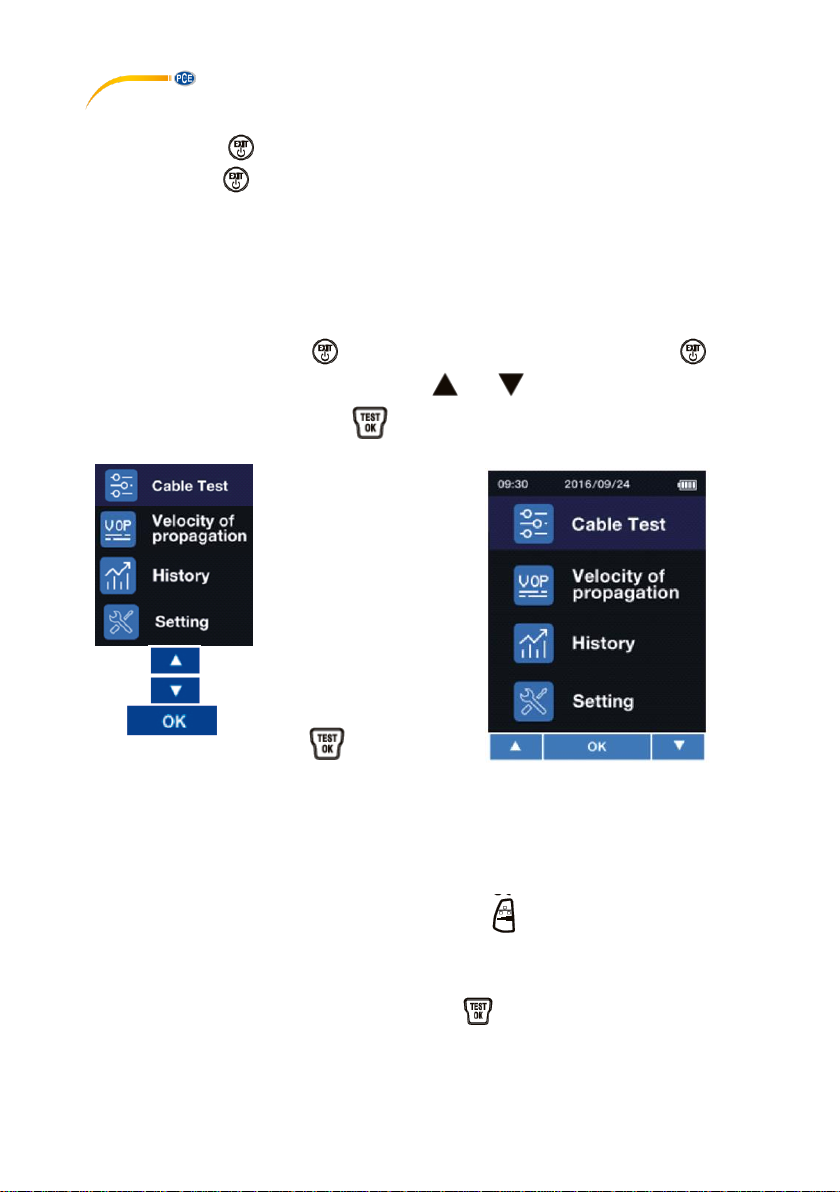
When you are in the main menu, you can use the and keys to select one of the following
functions which you can confirm with .
Cable length
measurement
Setting the velocity
of propagation
History of past
measurements
System settings
Up in the menu
Down in the menu
Confirm selection
with key
6.4 Cable length measurement
6.4.1 Preparing the measurement
Connect the cable to be measured to the meter. If you wish to measure a network cable with
RJ45, use the RJ45 socket. If you wish to measure a coaxial cable or measure a cable via the
coaxial adaptors, use the BNC socket. Now use the key to enter the relevant mode,
depending on the connected cable.
It is also possible to make a cable length measurement via the main menu. To do so, select the
upper menu item and confirm your selection with the key.
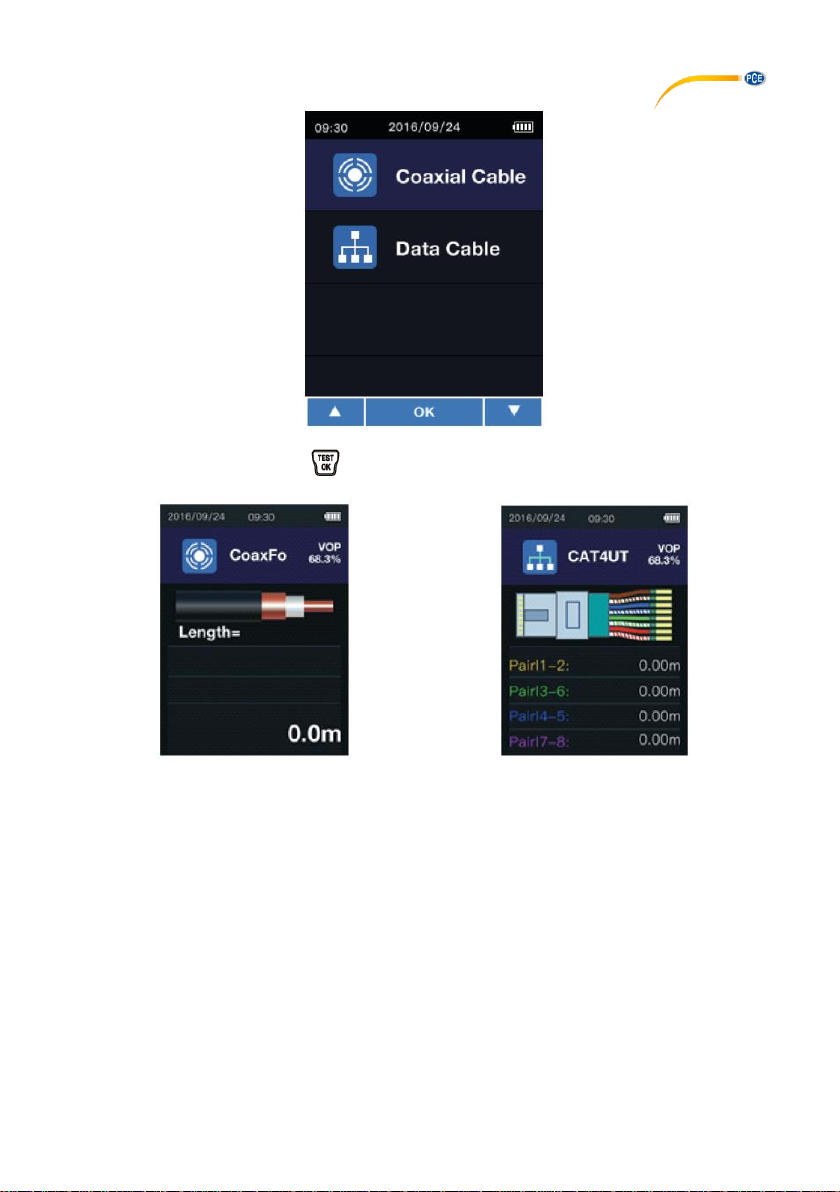
Now select in the following screen whether you wish to use the RJ45 or the BNC socket to
measure a cable.
Page 7
© PCE Instruments
5
Confirm your selection with the key. As soon as you have entered the mode for cable
length measurements, the screen will look as follows after making a selection:
Measuring mode for coaxial cables and
cables connected to the meter with a
measuring adaptor
Measuring mode for the length
measurement of cables connected to the
RJ45 socket
Important:
Do not measure any current-carrying cables.
Page 8
© PCE Instruments
6
6.4.2 Selecting the cable type
To measure the cable length accurately, it is necessary to select the correct cable type and
propagation velocity of the measuring signal (VOP) prior to the measurement.
1. Press the key to be able to select the cable type from the database of the cable length
tester with the key.
2. The velocity of propagation of the selected cable can only be changed manually for this
measurement. To do so, press and hold the key in measuring mode. In the upper right
part of the display, the VOP value will now be displayed with a black background. This VOP
value can now be changed via the and keys. To confirm the change, short-press the
key.
6.4.3 Cable length measurement
If you have selected the correct cable as described in 6.4.2, you can now make a measurement
by pressing the key. After the cable length measurement, the reading will be displayed. To
leave measuring mode, short-press the key.
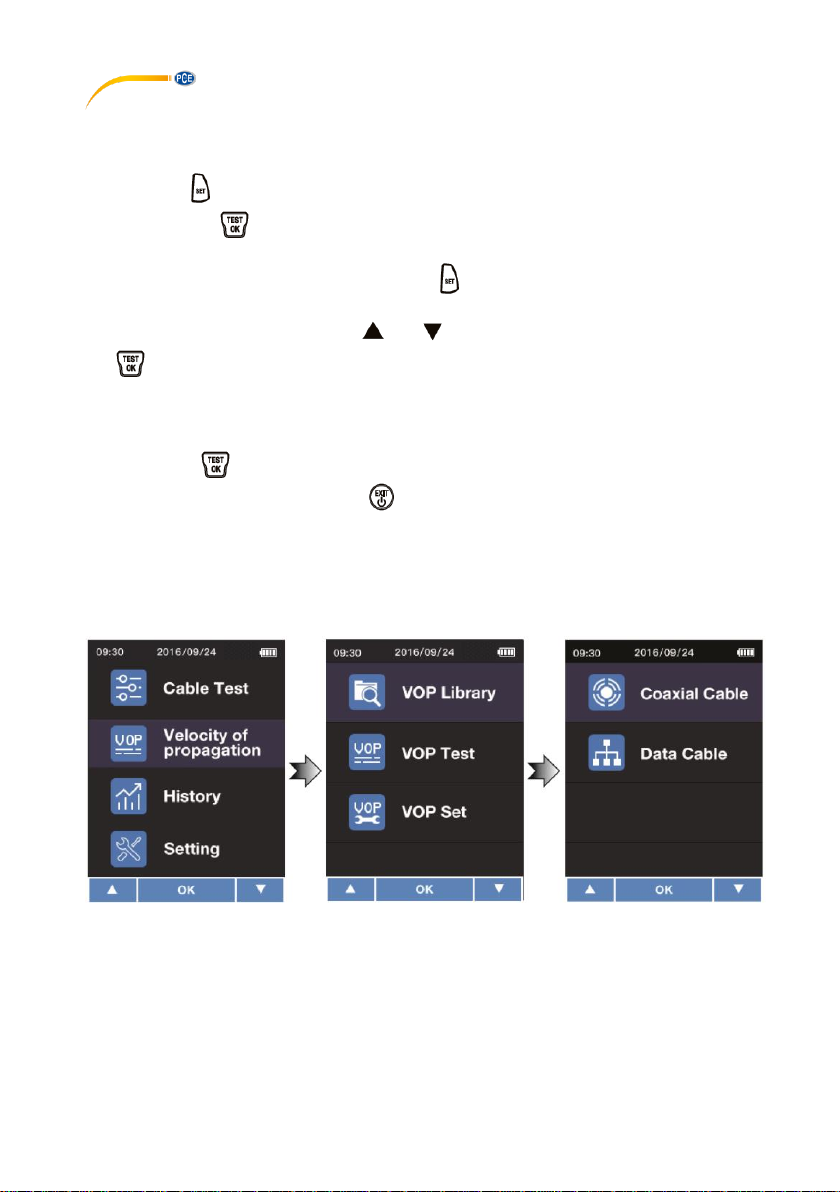
6.5 VOP library
To open the VOP library, first go to the menu. Select the menu item “Velocity of propagation“.
Then select “VOP Library“. Then select the library you wish to open. You can select either the
library “Coaxial Cable“ or “Data Cable“.
Page 9
© PCE Instruments
7
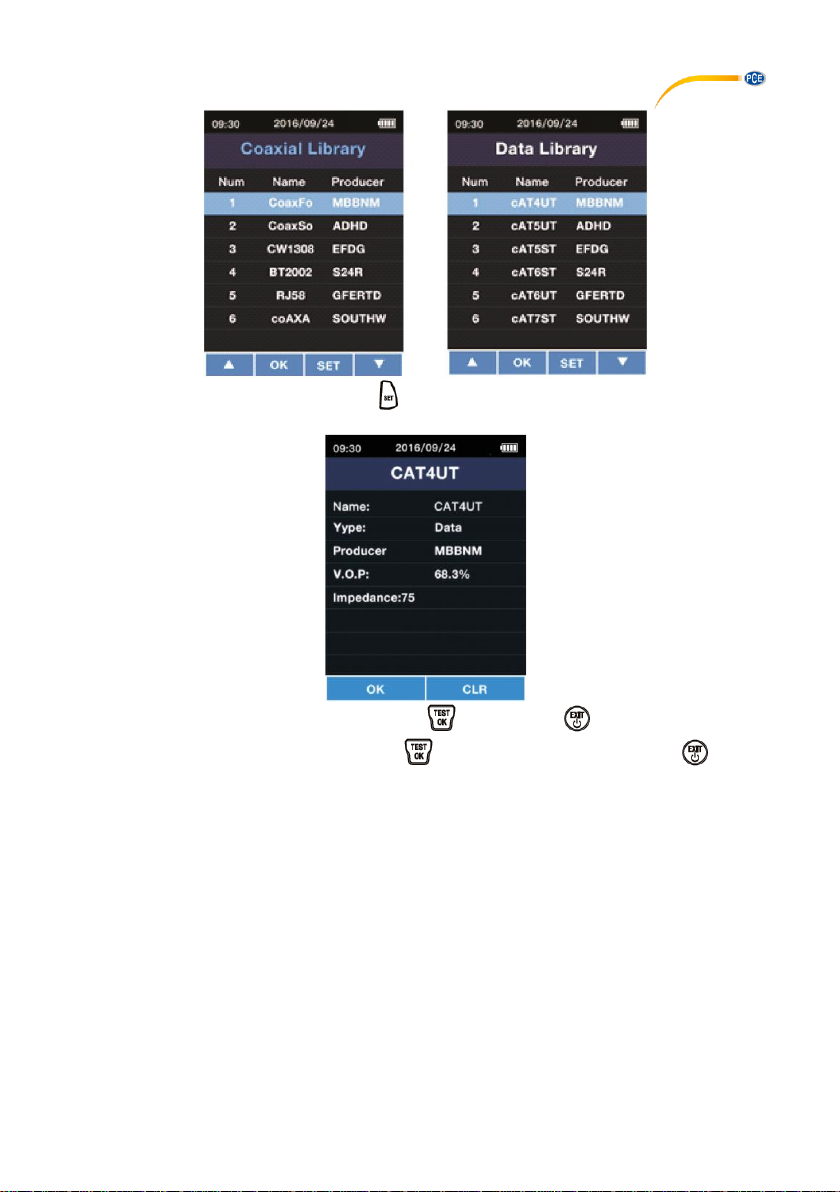
As a last step, select your cable with the key.
You can go back to the library by pressing the key. With the key, you can delete the
current cable. To confirm the deletion, press . To cancel the deletion, press the key.
Page 10
© PCE Instruments
8
6.5.1 Pre-set cable types
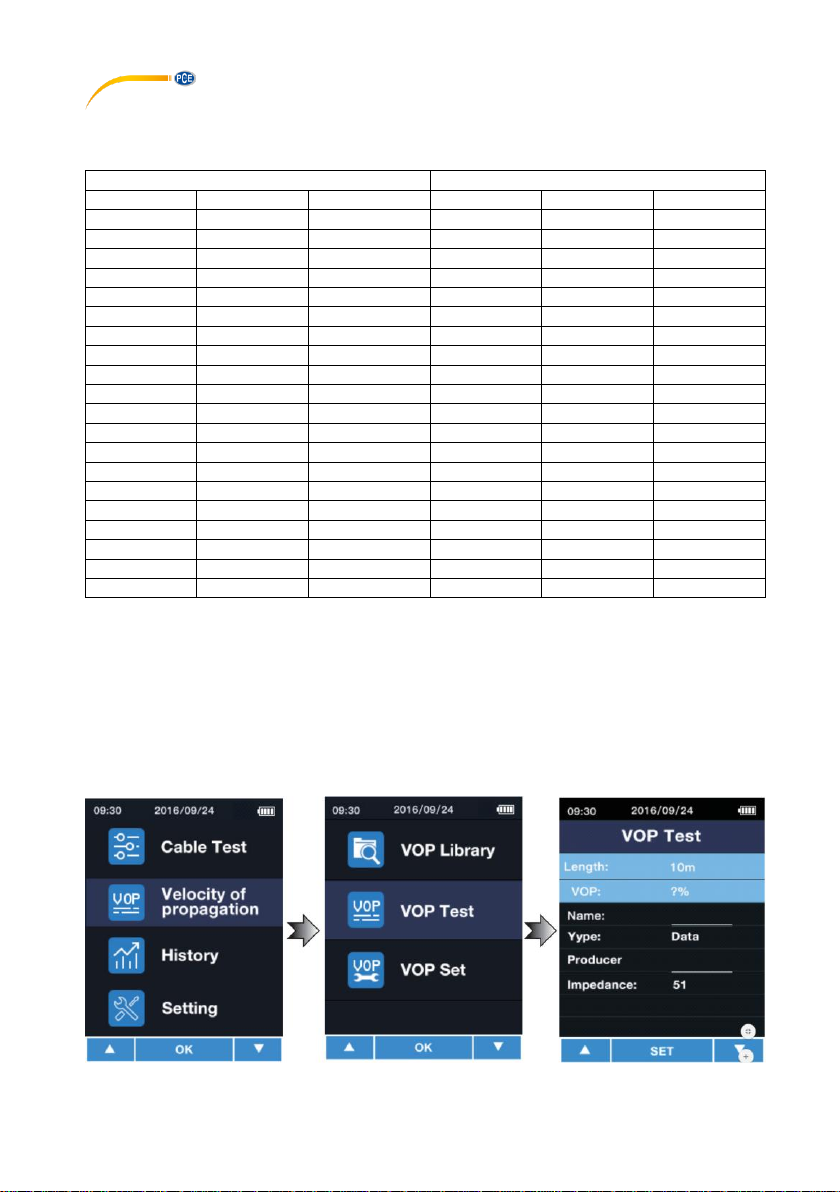
The cable types pre-set in the PCE-CLT 10 are:
Network cable
Coaxial cable
No.
Name
Producer
No.
Name
Producer
1
CAT3UT
HANWEI
1
CW1308
PE 2 CAT4UT
HANWEI
2
CFPE50
FOAMED
3
CAT4ST
DINTEK
3
CFPE75
FOAMED
4
CAT5UT
DINTEK
4
CSPE50
SOLLD
5
CAT5ST
SHIP
5
CSPE75
SOLLD
6
CAT6UT
SHIP
6
ET9901
PVC 7 CAT6ST
DINTEK
7
ET9903
PVC 8 CAT6ES
DINTEK
8
IBME3
TELLON
9
CAT6EU
DINTEK
9
IBME9
FOAMED
10
CAT7ST
DINTEK
10
BT2002
FOAMED
11
CAT3UT
NEXAN
11
COR50
AIR
12
CAT4UT
NEXAN
12
COR75
AIR
13
CAT4ST
NEXAN
13
COR550
AIRPE
14
CAT5UT
IBDN
14
COR575
AIRPE
15
CAT5ST
IBDN
15
RG6U
FOAMED
16
CAT6UT
IBDN
16
RG59BU
VBFH
17
CAT6ST
SIEMON
17
RG62AU
PVC
18
CAT6ES
SIEMON
18
TPPVC
PVC
19
CAT6EU
SIEMON
19
EPPE
PE
20
CAT7ST
SIEMON
20
BS6500
PP
6.5.2 Adding cables of known lengths
Each cable has its own VOP. If the VOP of the cable is unknown, it can be determined by making
a measurement. To do so, the cable length must be know.
To make a measurement, follow these steps:
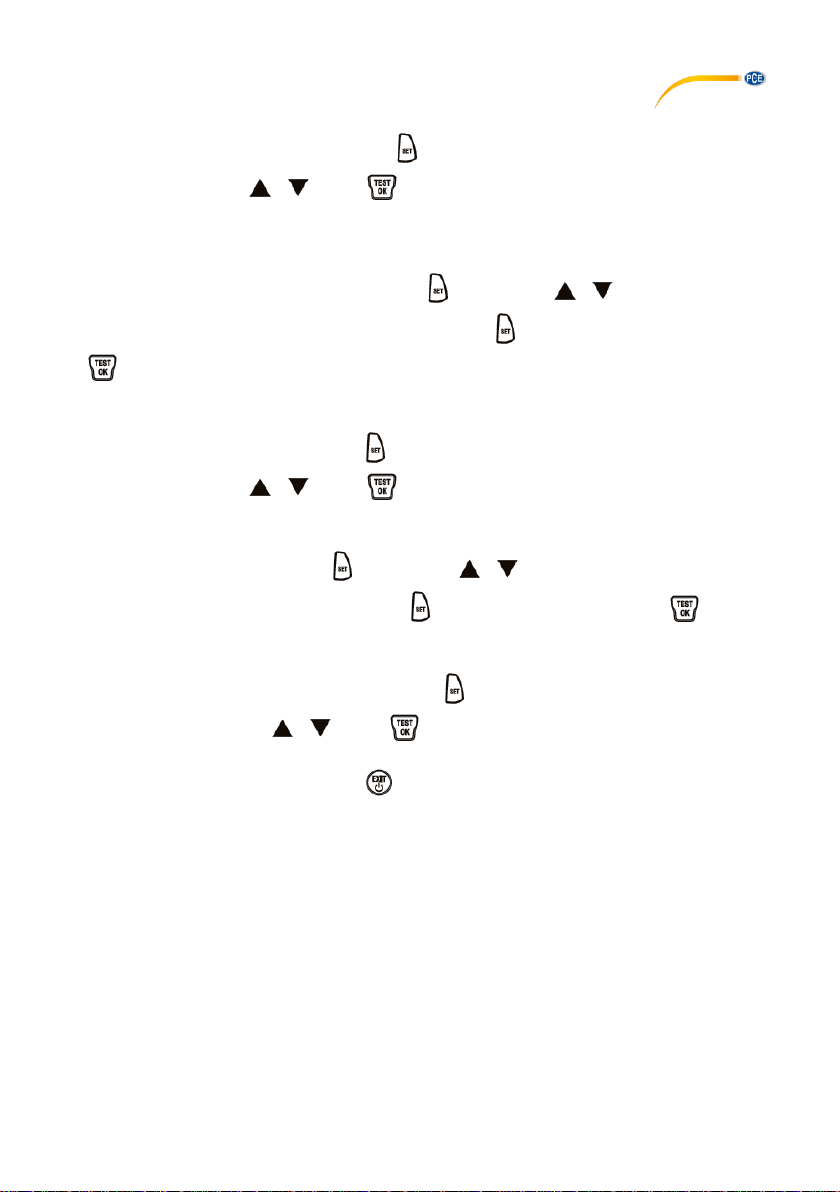
First connect the cable to be measured. It is recommended to use a cable that is longer than 10
m. Now enter the menu. Select “Velocity of propagation“. Then select “VOP Test“.
Page 11
© PCE Instruments
9
Under “length“, enter the length of the connected cable. You can select a value between 5 …
999 m. To change the value, first press the key to select the box. The value can then be
changed with the keys / . Press to confirm the entered value. The VOP value will
be displayed directly.
In the “Name“ box, you can assign a name to the cable, for instance “NYM 1.5“. Up to six digits
are possible. To select the input field, press the key. With the / keys you can select
the number or letter. You can go to the next digit with the key. Confirm your entry with the
key.
In the “Type“ box, you can select the type of cable. You can choose “Coaxial cable“ or “Network
cable“. To change the value, press the key to select the box. The value can then be
changed with the keys / . Press to confirm the entered value.
In the “Producer“ box, you can enter the manufacturer of the cable. Up to six digits are possible.
To select the input field, press the key. With the / keys you can select the number
or letter. You can go to the next digit with the key. Confirm your entry with the key.
In the “Impedance“ box, you can select the impedance of the cable. You can choose either 51
Ω, 75 Ω or 100 Ω. To change the value, press the key to select the box. The value can then
be changed with the keys / . Press to confirm the entered value.
After making all desired settings, press to save the entered cable to the library.
Page 12
© PCE Instruments
10
6.5.3 Adding cables with known VOP values
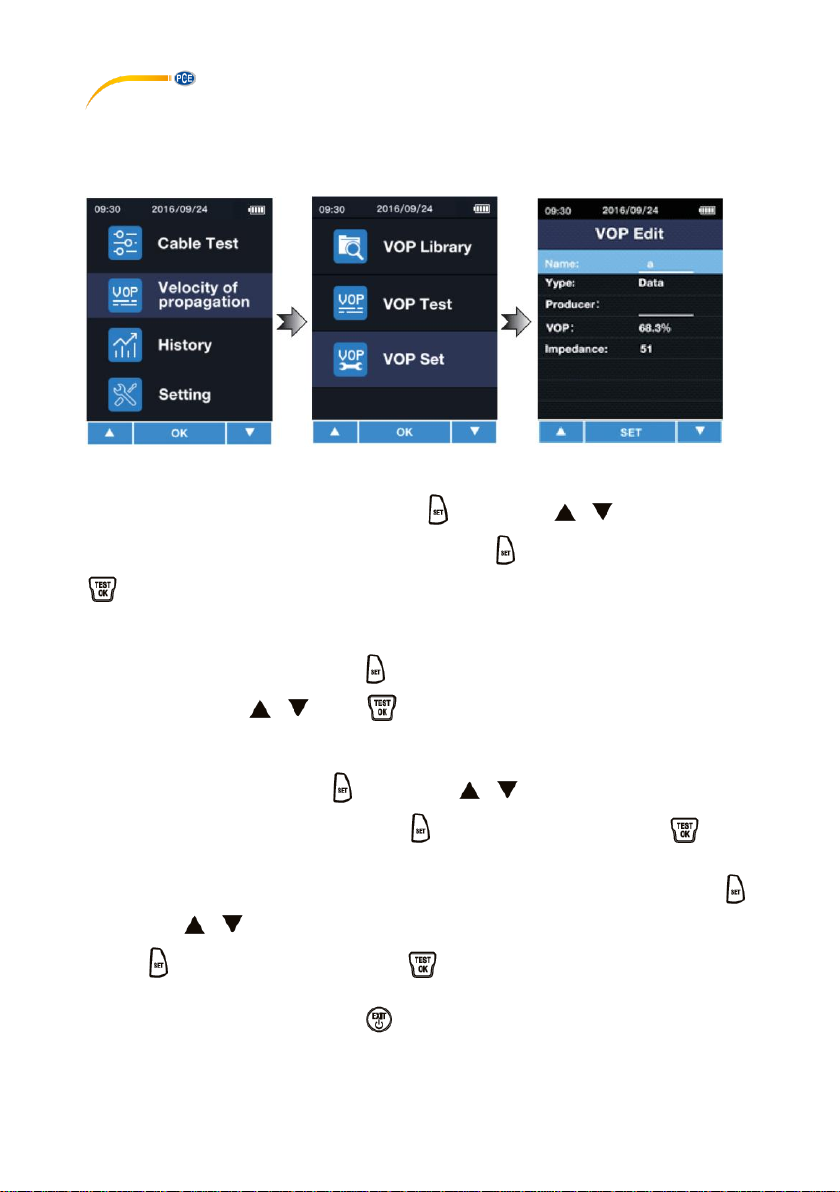
If the VOP value of the cable is known, you can add it without making a reference
measurement. First enter the menu. Then select “Velocity of Propagation“ and “VOP Set“.
In the “Name“ box, you can assign a name to the cable, for instance “NYM 1.5“. Up to six digits
are possible. To select the input field, press the key. With the / keys you can select
the number or letter. You can go to the next digit with the key. Confirm your entry with the
key.
In the “Type“ box, you can select the type of cable. You can choose “Coaxial cable“ or “Network
cable“. To change the value, press the key to select the box. The value can then be
changed with the keys / . Press to confirm the entered value.
In the “Producer“ box, you can enter the manufacturer of the cable. Up to six digits are possible.
To select the input field, press the key. With the / keys you can select the number
or letter. You can go to the next digit with the key. Confirm your entry with the key.
In the “VOP“ box, you can enter the known VOP value. To select the input field, press the
key. With the / keys you can select the number or letter. You can go to the next digit
with the key. Confirm your entry with the key.
After making all desired settings, press to save the entered cable to the library.
Page 13
© PCE Instruments
11
6.6 Showing the history
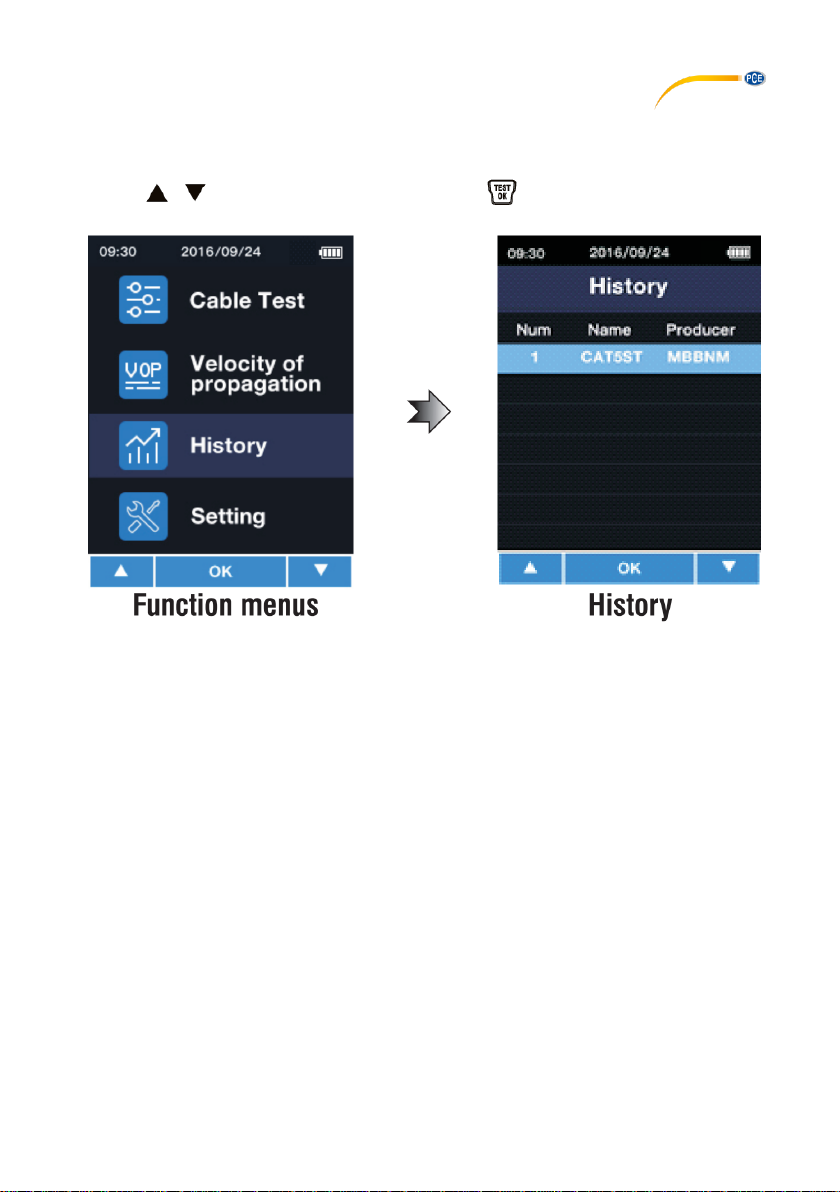
To view the history of the cables last used, first enter the menu. Then select “History“. The
cables last used will be displayed directly for your selection. You can select the desired cable
with the / keys. To confirm your selection, press .
Note: Measured values will not be saved.
Page 14
© PCE Instruments
12
6.7 Settings
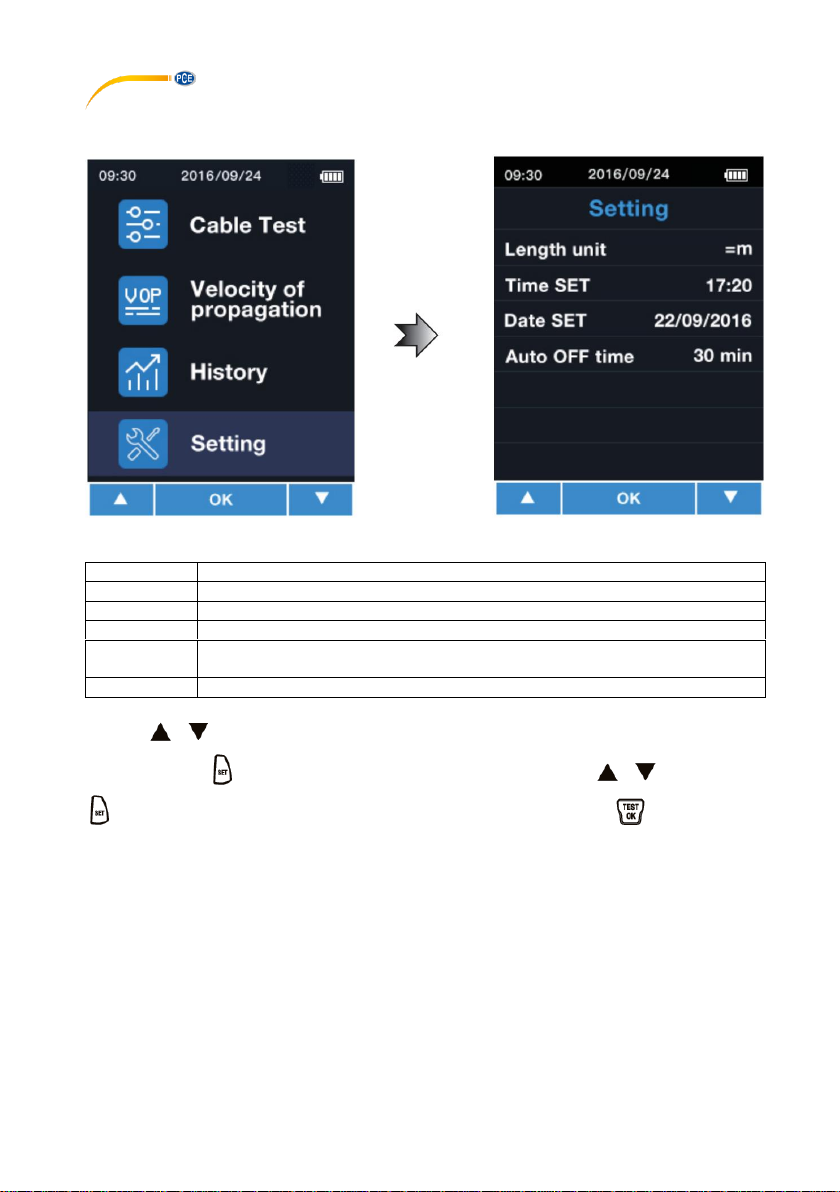
Enter the menu to make settings. Select “Setting“.
In this menu, the following settings can be made:
Menu
Description
Length Unit
Here you can set the unit. You can select metres “m“ or feet „ft“.
Time SET
Here you can set the time. Format HH:MM
Date SET
Here you can set the date. Format JJJJ/MM/TT
Auto OFF
time
Here you can set the time of inactivity after which the meter turns off
automatically. Possible options: 10,20,30,40,50 or 60 minutes
Language
Here you can set the language. Possible options: English or German
With the / keys, you can select an item from the Setting menu. The input field can be
selected with the key. The parameter can now be changed with the / keys. Press
again to go to the next parameter or to confirm your setting. Press the key to confirm
the setting directly.
Page 15

7 Contact
If you have any questions, suggestions or technical problems, please do not hesitate to contact
us. You will find the relevant contact information at the end of this user manual.
8 Disposal
For the disposal of batteries in the EU, the 2006/66/EC directive of the European Parliament
applies. Due to the contained pollutants, batteries must not be disposed of as household waste.
They must be given to collection points designed for that purpose.
In order to comply with the EU directive 2012/19/EU we take our devices back. We either re-use
them or give them to a recycling company which disposes of the devices in line with law.
For countries outside the EU, batteries and devices should be disposed of in accordance with
your local waste regulations.
If you have any questions, please contact PCE Instruments.
© PCE Instruments
13
Page 16

© PCE Instruments
14
PCE Instruments contact information
Germany France Spain
PCE Deutschland GmbH PCE Instruments France EURL PCE Ibérica S.L.
Im Langel 4 23, rue de Strasbourg Calle Mayor, 53
D-59872 Meschede 67250 Soultz-Sous-Forets 02500 Tobarra (Albacete)
Deutschland France España
Tel.: +49 (0) 2903 976 99 0 Téléphone: +33 (0) 972 3537 17 Tel. : +34 967 543 548
Fax: +49 (0) 2903 976 99 29 Numéro de fax: +33 (0) 972 3537 18 Fax: +34 967 543 542
[email protected] [email protected] [email protected]
www.pce-instruments.com/deutsch www.pce-instruments.com/french www.pce-instruments.com/espanol
Germany United Kingdom Italy
PCE Produktions- und PCE Instruments UK Ltd PCE Italia s.r.l.
Entwicklungsgesellschaft mbH Unit 11 Southpoint Business Park Via Pesciatina 878 / B-Interno 6
Im Langel 26 Ensign Way, Southampton 55010 Loc. Gragnano
D-59872 Meschede Hampshire Capannori (Lucca)
Deutschland United Kingdom, SO31 4RF Italia
Tel.: +49 (0) 2903 976 99 471 Tel: +44 (0) 2380 98703 0 Telefono: +39 0583 975 114
Fax: +49 (0) 2903 976 99 9971 Fax: +44 (0) 2380 98703 9 Fax: +39 0583 974 824
[email protected] [email protected] [email protected]
www.pce-instruments.com/deutsch www.pce-instruments.com/english www.pce-instruments.com/italiano
The Netherlands China Hong Kong
PCE Brookhuis B.V. PCE (Beijing) Technology Co., Limited PCE Instruments HK Ltd.
Institutenweg 15 1519 Room, 6 Building Unit J, 21/F., COS Centre
7521 PH Enschede Zhong Ang Times Plaza 56 Tsun Yip Street
Nederland No. 9 Mentougou Road, Tou Gou District Kwun Tong
Telefoon: +31 (0)53 737 01 92 102300 Beijing, China Kowloon, Hong Kong
[email protected] Tel: +86 (10) 8893 9660 Tel: +852-301-84912
www.pce-instruments.com/dutch [email protected] [email protected]
www.pce-instruments.cn www.pce-instruments.cn
United States of America Turkey
PCE Americas Inc. PCE Teknik Cihazları Ltd.Şti.
711 Commerce Way suite 8 Halkalı Merkez Mah.
Jupiter / Palm Beach Pehlivan Sok. No.6/C
33458 FL 34303 Küçükçekmece - İstanbul
USA Türkiye
Tel: +1 (561) 320-9162 Tel: 0212 471 11 47
Fax: +1 (561) 320-9176 Faks: 0212 705 53 93
[email protected] [email protected]
www.pce-instruments.com/us www.pce-instruments.com/turkish
 Loading...