

Page 1
PCE Americas Inc.
Manual
Data Logger
PCE-CLL 1
711 Commerce Way
Suite 8
Jupiter
FL-33458
USA
From outside US: +1
Tel: (561) 320-9162
Fax: (561) 320-9176
[email protected]
www.pce-instruments.com/english
www.pce-instruments.com
PCE Instruments UK Ltd.
Units 12/13
Southpoint Business Park
Ensign way
Hampshire / Southampton
United Kingdom, SO31 4RF
From outside UK: +44
Tel: (0) 2380 98703 0
Fax: (0) 2380 98703 9
Page 2
QUICK START GUIDE
FOR DATA LOGGERS
WELCOME
Th is ser ies of D ire ct-U SB-C onn ecti on dat a log gers a re de sign ed to us e ver y easi ly. Thi s
Qu ick St art Gu ide c over s prep arat ion a nd use t o ass ist yo u in get ting t he be st res ult s from
you r dat a logg er. Now fo llo w this g uide t o sta rt.
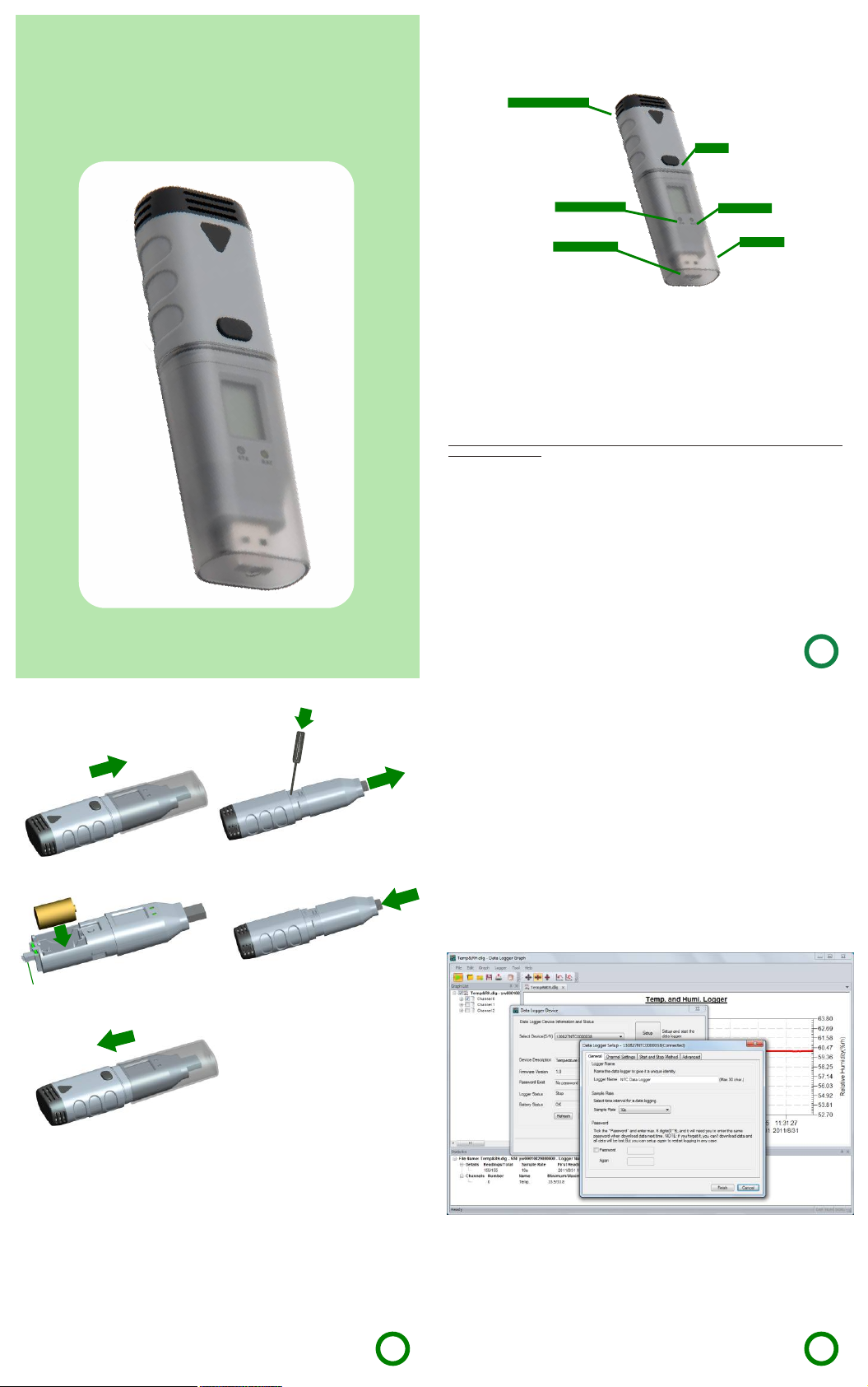
Se nsor L ocat ion
Bu ttonBu tton
Red /Gr een LE D
US B Inte rfac e
IMPORT NOTES
Th is ser ies of d ata l ogge rs off er a var iet y of dif fere nt mo dels a nd mea sur emen t para met ers,
so i n the se nsor l oca tion , the re wil l be dif fere nt se nsor e xte nsio ns for d iffe ren t mode ls th at
you p urc hase d, bu t this g uide a lway s can b e suit abl e for th e whol e ser ies of d ata lo gge rs.
Th e prod uct ra nge is c ons tant ly be ing up date d and n ew mod els ad ded , and re lat ed
in form atio n is li able t o chan ge wi thou t not ice. S o if nec ess ary, co nsul t your s upp lier t o get
th e late st inf orm atio n and ne ws.
Ap pear ance o f a prod uct c olor i s sub ject t o actu al pu rcha se of pr odu ct, an d all t he pic ture s
me ntio ned in t his g uide i s only f or re fere nce.
To in stall t he soft ware an d USB dri ver, yo u mus t have a n admi nist rato r righ ts on
the h ost com puter .
Wh en the d ata lo gge r is con nect ed to t he USB p ort , the ba tter y ins ide th e data l ogg er is
di scha rged a t a hig her ra te tha n nor mal. To co nse rve ba tter y lif e, do no t leav e the da ta
lo gger c onne cte d to the U SB po rt for a p rolo nged p eri od of ti me.
Yel low LE D
US B Cap
GETTING STARTED
Al l you ne ed to pr epa re are a P C runn ing u nder W indo ws XP / Vist a/ 7/ 8(32 b it or 64 b it) w ith
US B port a nd CD- ROM d rive , the CD i ncl udin g Dat a Logg er Gra ph sof twa re and d rive r, th e
da ta log ger it sel f and a 3. 6V 1/ 2AA ba tter y.
BATTERY INSTALLATION
Be fore u sing t he da ta log ger, you w ill n eed to i nsta ll th e 3.6V 1 /2A A batt ery in clu ded in t he
da ta log ger st and ard ki t. Be side s, rep lac emen t batt eri es ava ilab le fro m you r supp lier.
Fol low ing in stru cti ons le ft pa ge to op erat e.
1
1
3
NOT E: Ma ke su re to al ign t his co nne cto r
wi th its o the r sid e when i nst all t he par t.
2
4
5
SOFTWARE INSTALLATION
Ins tal l the Da ta Lo gger G raph s oft ware b y plac ing t he CD in t he PC CD -RO M driv e. If se tup
pro gra m does n ot aut oma tica lly r un and s tart , dou ble cl ick t he “se tup. exe” f ile i nclu ded o n
th e CD-> Setu p dir ecto ry to st art i nsta lli ng. Fo llow t he on -scr een pr omp ts to co mple te
in stal lati on. Yo u will s ee a ne w icon D ata Lo gge r Grap h on you r des ktop . For fu rthe r
in form atio n on th e soft ware , you ca n acc ess th e hel p menu o n the so ftw are in terf ace .
Pl ease n ote th at yo u must i nsta ll th e USB dr iver a fte r comp let ing th e soft war e inst alla tio n to
us e the da ta log ger.
DRIVER INSTALLATION
Af ter co mple tin g the so ftwa re in stal lat ion, m ake su re the C D is in yo ur PC CD -ROM
dri ve. Do uble c lick t he “U SBXp ress Ins tall er.exe ” fil e incl uded o n the C D->D riv er dir ecto ry
to s tart i nsta lli ng. Fo llow t he on -scr een pr omp ts to co mple te in stal lat ion. Yo u can no w plu g
th e data l ogge r to an a vail able U SB por t on th e PC, an d a few mi nut es lat er, your c omp uter
wi ll app ear su cce ssfu l mess age o n the bo ttom r igh t of the s cre en If th e driv er for t his d ata
lo gger d evic e has b een in sta lled n orma lly.
No w, you ha ve suc ces sful ly ins tal led th e nec essa ry so ftwa re and d rive r for y our
da ta log ger. Ple ase c onti nue to r efe r to nex t sect ion o f this d ocum ent f or a
gu ide on h ow to us e the d ata lo gger f or a ta sk.
2
SETUP AND START
To use t he dat a log ger, tak e the fo llow ing s teps :
1. M ake su re the b atte ry is c orre ctly i nst alle d, or i f you us e USB po rt to p ower t he da ta
lo gger d irec tly, yo u mus t not re move d ata lo gge r from U SB por t whe n the da ta lo gger i s
lo ggin g.
2. In ser t the da ta lo gger i nto an a vail abl e USB po rt of a P C whic h has in sta lled t he Da ta
Lo gger G raph s oftw are a nd dri ver.
3. D oubl e clic k on th e ”Dat a Logg er Gr aph” i con on y our W indo ws des kto p. Thi s wil l load
th e Data L ogge r Grap h sof twar e. On th e lef t top of t he so ftwa re, yo u can se e “St art” b utto n
an d clic k on it. T his w ill op en “Da ta Logg er Devi ce” di alog .
4. Se lec t data l ogg er dev ice th at wi ll be se t(o r defa ult) . Her e you ca n chec k the f irmw are
ver sio n, sta tus , etc. o f the se lec ted da ta lo gger d evic e.
5. C lick o n the “S etup ” butto n to lo ad “Da ta Log ger Se tup” d ialo g. Her e you c an fol low
th e scre en ins tru ctio ns and s etu p the da ta lo gger. On t he “Ge nera l”, you c an set l ogg er
na me and s ampl e rate . On th e “Cha nne l Sett ings ”, you ca n set hi gh/ low li mit , enab le/d isa ble
al arm, a nd ena ble /dis abl e alar m hold . On th e “Sta rt and S top M etho d”, you c an sel ect h ow
to s tart a nd sto p log ging . Or al l sett ings c an be fa cto ry def ault i f fir st att empt s.
6. C lick o n the “F inis hed” bu tto n. The d ata lo gge r will s tar t acco rdin g to yo ur set ting s.
7. Rem ove th e dat a logg er fro m PC US B port e xcep t USB p ort wi ll be u sed as p ower s upp ly
as yo ur re quir ed.
DATA DOWNLOAD
1. W hen a ta sk is fi nis hed, y ou can d own load d ata to P C. Do a ccor din g to ste p 2 to 4 of
“S ETUP A ND STAR T” fir stl y, and th en cli ck on t he “Dow nload ” butt on on th e “Dat a
Log ger Dev ice” di alo g. Her e you ca n fol low th e scre en in stru cti ons to d ownl oad a nd sav e
th e data t o PC. Pl eas e note t hat yo u nee d to inp ut co rrec t pass wor d to ope rate t his st ep if
th e data l ogge r has b een se t a pas swor d befo re(N o for fa cto ry def aul t).
2. A fter d ownl oad ing fi nis hed, a “ Down loa ding F inis hed ” dial og wi ll be sh own, u ser c an
cl ick th e “Ope n” bu tton t o grap h the do wnl oade d dat a.
3
Page 3
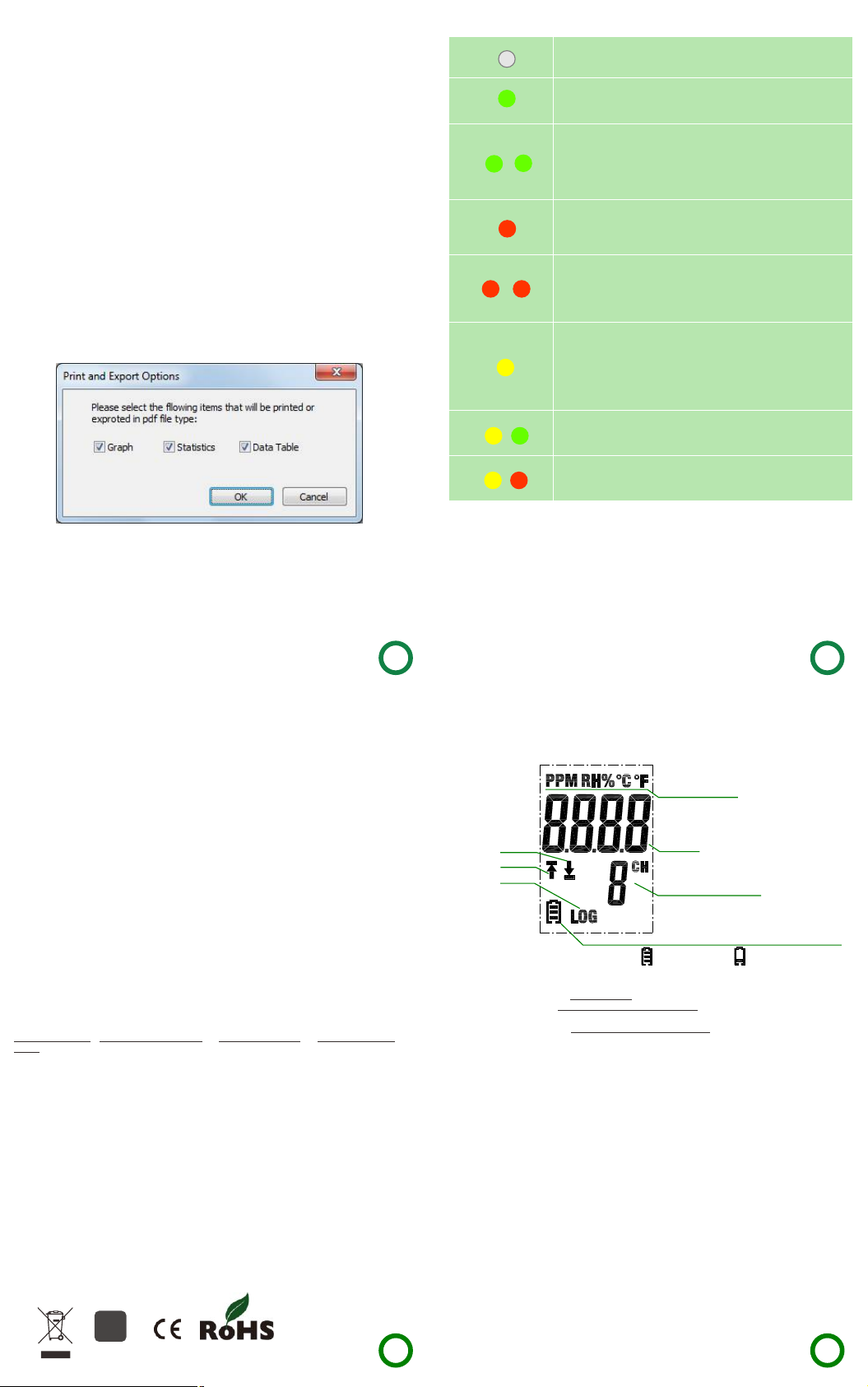
Not a ny LEDs f lash
1
Da ta log ger is i dle , batt ery is e xha uste d or no b atte ry is fi tte d.
Gre en sing le flas h every 1 0s
Th e data l ogge r is cu rren tly lo ggi ng.
Gre en doub le flas h every 1 0s
Th e data l ogge r wil l Star t at use r set d ate an d time , or re mind
2
us er to St art by B utto n.
Gre en doub le flas h every 6 0s
Th e data l ogge r has f inis hed u ser se t logg ing t ask an d stop ped .
Red s ingle f lash ev ery 10s
3
Th e dat a log ger is cu rren tly logg ing . Ala rm (H igh, low o r bo th)
4
on a t leas t one ch ann el.
Red d ouble f lash ev ery 60s
Th e data l ogge r has f inis hed u ser se t logg ing t ask an d stop ped .
Al arm (H igh, l ow or b oth) on at le ast o ne cha nne l.
5
NOT E: Th is onl y occu r whe n Alar m Hold i s ena bled .
Yel low sin gle fla sh ever y 60s
Lo w batt ery in dica tio n. The log gin g tas k con tinu es, an d you
ne ed to ch eck ba tte ry cap acit y and r epla ce it ti mel y.
Yel low sin gle fla sh ever y 1s
Ind ica te tha t USB c onne ctio n is no rmal .
Yel low and G reen si ngle fl ash one b y one
Ba tter y is ins tal ling a nd po wer on O K.
Yel low and r ed sing le flas h one by on e
Ba tter y is ins tal ling a nd po wer on f aile d.
GRAPH
1. D oubl e clic k on th e ”Dat a Logg er Gr aph” i con on y our W indo ws des kto p. Thi s wil l load
th e Data L ogge r Grap h sof twar e.
2. U ser ca n open a d ata l ogge r fil e (*.d lg, *. mdl g) via t he men u “Fi le-> Ope n”, and th e
gra ph wi ll be sh own .
3. Zo om in: U se th e mous e to cl ick an d drag a b ox aro und a ny gra ph are a to mag nif y the
are a sel ecte d. Zoo m out : Clic k on the " Und o Last " or "U ndo Al l" but ton o n tool b ar to sh ow
la st gra ph are a or the o rig inal g raph a rea .
4. Pa n: Pre ss an d hold t he mid -bu tton o f the m ouse a t any gr aph lo cat ion, a nd mov e the
mo use to p an the g raph a rea .
5. Zo om and P an Me thod . Auto : Zoom a nd pa n in any d irec tion . Hor izon tal : Zoom a nd pan
on ly in ho rizo nta l dire ctio n. Ver tica l: Zoo m and p an onl y in ver tic al dir ecti on. M anua lly : Set
th e star t time a nd en d time f or hor izo ntal a xis, a nd se t the sc ale fo r the v erti cal a xis.
6. M ark Da ta Poi nts: C lic k righ t-bu tton o n gra ph are a to sho w the p op-u p menu b elo w,
Cl ick "M ark Da ta Poi nts " to sho w mar ks on al l samp le po int lo cat ions .
7. Gra ph Se ttin gs: Cl ick r ight -but ton on g raph a rea t o show t he pop -up m enu be low, c lic k
“G raph S etti ngs” t o sho w a dial og. U ser ca n set co lor, fon t, li ne siz e and un it fo r the gr aph.
FILE EXPORT
Th e soft ware s ave an d ope n the *. dlg or * .md lg fil e type i n def ault . Use r can cl ick “F ile >S ave As ” to sav e the *. dlg o r *.md lg as ot her f ile ty pes, i ncl udin g *.t xt, *. csv, *. xls, * .bm p,
an d *.jp g.
PRINT
To pri nt the g raph , sta tist ics a nd dat a tabl e, cl ick on t he pri nte r icon o n sta ndar d tool bar o r
se lect “ Prin t” fr om the “ File ” pul l-do wn me nu.
Use rcanal socl ick th e “Fil e-> Prin t and E xpor t Opti ons ” sele ctthep rint edcon tent sinthe
fol lowi ngdia log.
LED INDICATION GUIDE
4
BUTTON
Th ere is o nly on e but ton on t he hou sin g of the d ata lo gge r, pre ssi ng the b utto n has a
di ffer ent ou tcom e dep endi ng on w hat th e logg er is d oing a t the t ime th e butt on is p ress ed:
If u ser se lect s Sta rt by Bu tton a s sta rt met hod v ia the D ata Lo gge r Setu p dia log in t he
Da ta Log ger Gr aph so ftw are, a fter a s etu p is fin ish ed, us er can p res s and ho ld th e butt on
un til th e gree n LED l ight s to sta rt th e logg ing t ask.
If u ser se lect O ver writ e When F ull a s stop m eth od via t he Dat a Log ger Se tup d ialo g in the
Da ta Log ger Gr aph so ftw are, u ser ca n pre ss and h old t he but ton un til t he gre en LED l igh ts
to s top th e logg ing t ask.
If C onfi rm and C lea r LED Al arm by B utt on is en abl ed via t he Dat a Log ger Se tup d ialo g in
th e Data L ogge r Grap h sof twar e, whe n red L ED fla she s for al arm, u ser c an pre ss and h old
th e butt on unt il th e red LE D ligh ts to c lear a nd res et th e LED al arm .
HOW TO GET RIGHT RESULTS
Ch eck th e batt ery c apac ity be fore b egi nnin g your l ogg ing ta sk. I f you wa nt to us e the
US B inte rfac e to su pply p ower f or da ta log ger, thi s can b e skip ped.
Ob serv e the IP r atin g, me asur men t rang e and op erat ing ra nge . Allo w it to b e loca ted in a
pl ace wi th a rig ht en viro nmen t.
So me sen sors w ill a ge and d rif t inev itba ly, and i f nec essa ry, you c an co nsul t your s upp lier
to g et hel p on rec ali brai on .
Se e the re late d pro duct d atas hee t care full y if ha ve any o ther q ues tion s.
RELATED DOCUMENTS
Al l help ful do cum ents i nclu de:
Qu ick St art Gu ide D Grap h Soft ware G uid e Prod uct Da tas heet P rod uct Se lect ion
Gu ide
Th ese do cume nts c an be fo und on t he su ppli ed CD d isk
ENVIRONMENTAL DISPOSAL
WEE E This p rodu ct may c ont ain su bsta nce s that c an be h azar dous t o the e nvir onme nt if n ot
di spos ed of pr ope rly. El ectr ical a nd el ectr oni c equi pmen t sho uld ne ver be d isp osed o f wit h
ge nera l hous e hold w ast e but mu st be se par atel y coll ect ed for t heir p rop er tre atm ent an d
rec ove ry. The c ross ed-o ut bi n symb ol, p lace d on the p rod uct, r emin ds yo u of the n eed to
di spos e of the p rod uct co rrec tly a t the en d of it s life . In thi s way yo u wil l assi st in th e
rec ove ry, rec ycli ng and r e-u se of ma ny of th e mat eria ls use d in th is pro duc t. At th e end of
th e life o f your p rodu ct pl ease c ont act yo ur dis tri buto r for in for mati on on co lle ctio n
ar rang emen ts.
BAT TERY Mo st ba tter ies e nd up in l andf ill w here t heir h aza rdou s mat eria l can le ach i nto th e
so il and c ause h arm . It is mu ch mor e env iron ment all y frie ndl y to rec ycle b atte rie s in a saf e,
co rrec t mann er. Foll ow ap plic able c oun try, st ate, a nd lo cal re gula tio ns for d ispo sal /rec ycli ng
of t he 1/2 AA bat ter y supp lied w ith y our da ta log ger.
RoH S The Res tri ctio n of Ha zard ous Su bst ance s (RoH S) Di rect ive 20 02/ 95/E C of the
Eu rope an Par liam ent s tipu lat es tha t cert ain h azar dous s ubs tanc es mu st not b e pres ent
ab ove de fine d leve ls in p rodu cts . This d ata lo ggi ng pro duct i s man ufac ture d to be Ro HS
co mpli ant.
1
Ba tter y Stat us ca n be che cked v ia th e Data L ogge r Dev ice di alo g in the D ata Lo gge r Grap h
so ftwa re. Ev en if th e bat tery i s exh aust ed, th e log ged da ta won 't lo se.
2
St art an d Stop M eth od can b e set vi a the D ata Lo gge r Setu p dial og in t he Dat a Log ger
Gra ph so ftwa re.
3
Red L ED Al arm fo r each c han nel an d Gree n LED S tatu s Indi cat ion ca n be di sabl ed via t he
Da ta Log ger Se tup d ialo g in th e Data L ogge r Grap h sof twar e for sa ve pow er.
4
Al l chan nels s har e the re d and gr een L ED for t his se rie s of dat a log gers .
5
If A larm H old is e nab led, t he red L ED wi ll fla sh wh en any c hann els b eing m easu red h as
exc eed ed the a lar m limi t, and a lso w hen th e cha nnel s bein g mea sure d go bac k the n orma l
ran ge. T his en sure s tha t you al ways k now w heth er the a lar m limi t has b een ex ceed ed.
5
LCDDISPLAY
Us er can p ress t he bu tton o nce to a cti vate t he LCD d ispl ay an d swit ch the d isp laye d chan nel
an d func tion s. Th e LCD di spla y wil l be clo sed au tom atic all y if not a ny but ton op era tion s
wi thin 3 0 seco nds .
Th e unit o f the
di spla yed re adin gs
4
3
2
Ba tter y indi cat ion,
If . B atte ry is OK . If . Ba tter y is exh aus ted
1. T he rea l-ti me re adin gs.
2. LO G sym bol sh own w hen Lo ggin g mod e. LOG s ymbo l not s hown w hen o ther m odes .
3. U p arro w show n whe n Logg ing mo de or F inis hed m ode: S ome lo gge d read ing s exce ed the
hi gh lim it.
4. Do wn ar row sh own w hen Lo ggin g mod e or Fin ishe d mod e: Som e log ged re adin gs ex ceed
th e low li mit.
NOT E: The LC D can’t w ork at be low -10 C elsiu s degre e, an d it wil l not di spla y
nor mally a t the env ironm entcon ditio ns.
For f urthe r infor matio n on the so ftwar e, yo u can ac cess t he hel p menu o n the
sof tware i nterf ace or ot her doc ument s on the CD .
1
Th e chan nel nu mbe r of
th e disp laye d read ing s
IP 67
6
7
 Loading...