

Page 1
PCE Americas Inc.
711 Commerce Way
Suite 8
Jupiter
FL-33458
USA
From outside US: +1
Tel: (561) 320-9162
Fax: (561) 320-9176
[email protected]
www.pce-instruments.com/english
Manual
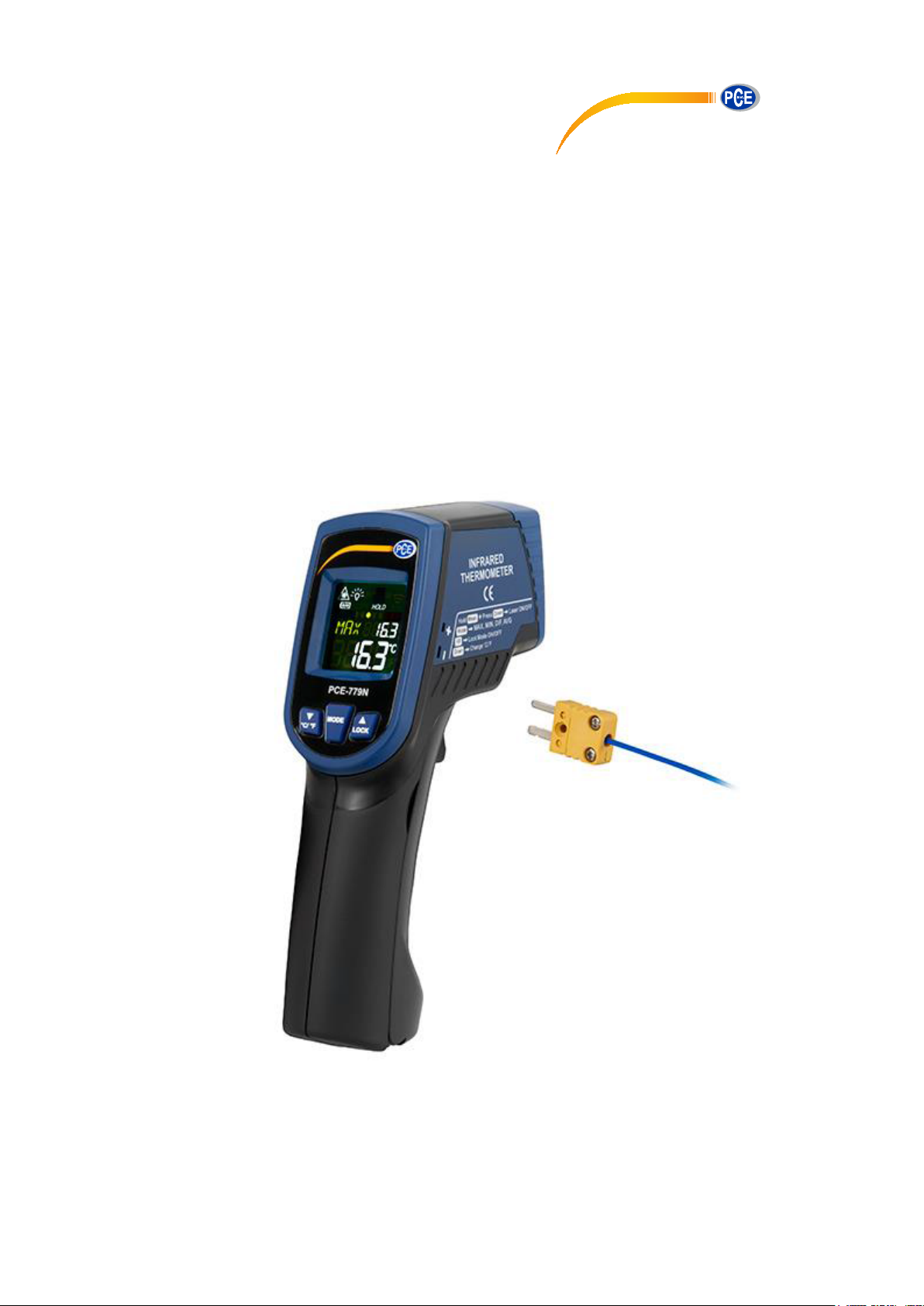
HVAC Meter PCE-779N
PCE Instruments UK Ltd.
Units 12/13
Southpoint Business Park
Ensign way
Hampshire / Southampton
United Kingdom, SO31 4RF
From outside UK: +44
Tel: (0) 2380 98703 0
Fax: (0) 2380 98703 9
www.pce-instruments.com
Version 1.0
Date of creation: 15.04.2015
Date of last change: 03.05.2018
Page 2

Contents
1 Introduction ............................................................................................................. 3
1.1 Delivery content .......................................................................................................................... 3
2 Safety notes ............................................................................................................. 3
3 Specifications .......................................................................................................... 4
4 System description ................................................................................................. 4
5 Instructions .............................................................................................................. 5
5.1 How to make a measurement .................................................................................................... 5
5.2 Measurement with external sensor ............................................................................................ 5
5.3 Functions .................................................................................................................................... 5
5.4 Settings ....................................................................................................................................... 5
6 LCD error messages ............................................................................................... 6
7 Storage and cleaning .............................................................................................. 6
8 Batteries ................................................................................................................... 6
9 Contact ..................................................................................................................... 7
9.1 PCE Instruments UK .................................................................................................................. 7
9.2 PCE Americas ............................................................................................................................ 7
Page 3

Manual
1 Introduction
Thank you for purchasing a PCE-779N from PCE Instruments.
This compact non-contact infrared thermometer can measure surface temperatures quickly and has
various measurement functions such as max, min and average measurement as well as an alarm
function. The device is equipped with a dual laser for targeting the measuring point. It has a large display
and is easy to use. The PCE-779N is frequently used for food inspection and hygiene testing, in heating
and air conditioning, switch cabinet monitoring, road construction, production monitoring as well as for
temperature measurements on motors.
1.1 Delivery content
1 x HVAC Meter PCE-779N,
1 x thermocouple type K (max. 200 °C),
2 x AAA battery,
1 x instruction manual
2 Safety notes
Please read this manual carefully and completely before you use the device for the first time. The device
may only be used by qualified personnel and repaired by PCE Instruments personnel. There is no
warranty of damages or injuries caused by non-observance of the manual.
- Keep the thermometer away from children.
- Do not use this instrument for safety-related applications.
- In order to prevent permanent eye injuries, do not look directly into the laser beam when the device is in
use. Be very careful when using the laser. Do not point it towards people’s or animals’ eyes.
- The device may only be used in the approved temperature range.
- The measurement range only applies to the thermometer. Make sure to choose the adequate type of
probe for your application. To avoid damage of the probe, make sure that the target to be measured
does not exceed the temperature range of the probe.
- To avoid electric shock or damage of the thermometer, do not measure in live circuits where the voltage
exceeds 24 V ac RMS or 60 V dc with the thermocouple.
- After measuring high temperatures, the probe may remain hot for a while.
- EMC / RFI: your readings may be affected if the device is operated within a radio frequency
electromagnetic field strength of approximately 3 V/m. However, the device’s performance will not be
permanently affected.
- The case should only be opened by qualified personnel of PCE Instruments.
- The instrument should never be placed with the user interface facing an object (e.g. keyboard side on a
table).
- You must not make any technical changes to the device.
- The appliance should only be cleaned with a damp cloth / use only pH-neutral cleaner.
This manual is published by PCE Instruments without any guarantee.
We expressly point to our general guarantee terms which can be found in our general terms of business.
If you have any questions please contact PCE Instruments.
3
Page 4
Manual
Item
Infrared thermometer
K-type thermocouple
Measurement range
-60 … +760 °C (-76 … +1400
°F)
-64 … +1400 °C (-83.2 … +2552
°F)
Resolution
0.1 °C / 0.1 °F (at -83.2 … 999.9 °C / °F), otherwise 1 °C / 1 °F
Accuracy (T
obj
= 15 … 35°C,
T
amb
= 25°C)
±1.0 °C (1.8 °F)
+/-1 % of reading or 1 °C (1.8 °F)
whichever is higher
(at T
amb
= 23 ±6 °C)
Accuracy (T
amb
= 23 ±3 °C)
T
obj
= -60 … 0: +/-(2 + 0.05 x
reading) °C, T
obj
=0 … 760: +/-2
% of reading or 2 °C (4 °F)
whichever is higher
Note: under an electromagnetic field strength of 3V/m from 200 to
600 MHz, the maximum error is 10 °C (18 °F)
Emissivity
0.95 default – adjustable 0.1 to 1 in steps of 0.01
Response time (T90)
1 second
Distance:spot
30:1
Automatic Power Off
after more than1 minute of
inactivity
in PRB mode: after more than
12 minutes of inactivity
Operating conditions
0 … +50 °C (32 … +122 °F)
Battery life (alkaline)
min. 30 hours continuous use without laser
min. 3 hours continuous use with laser and white LED
Dimensions
119.2 x 47.5 x 171.8 mm (4.7 x 1.87 x 6.76")
Weight
255.7 g (9.02 oz) including batteries (2 x AAA)
3 Specifications
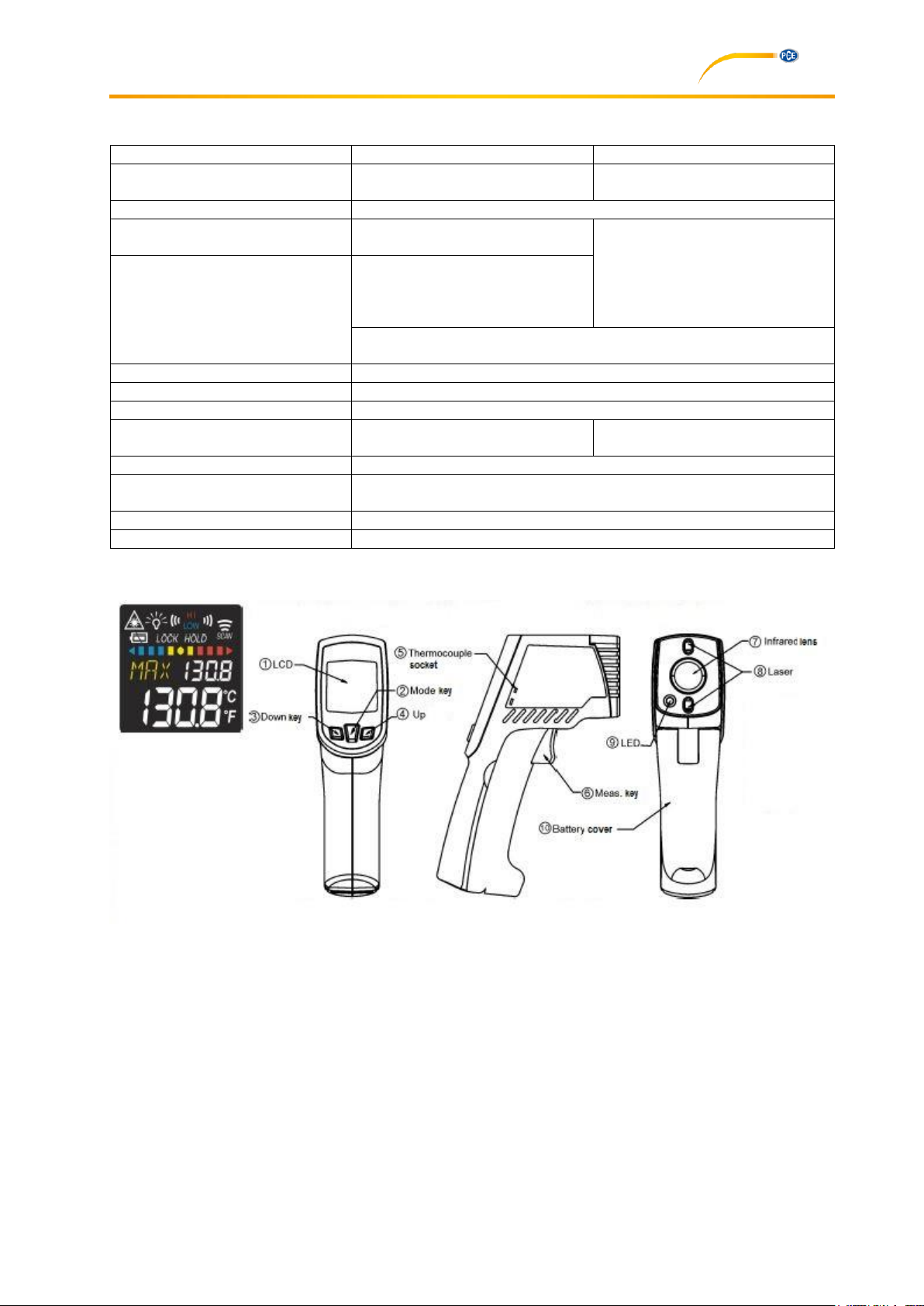
4 System description
4
Page 5
Manual
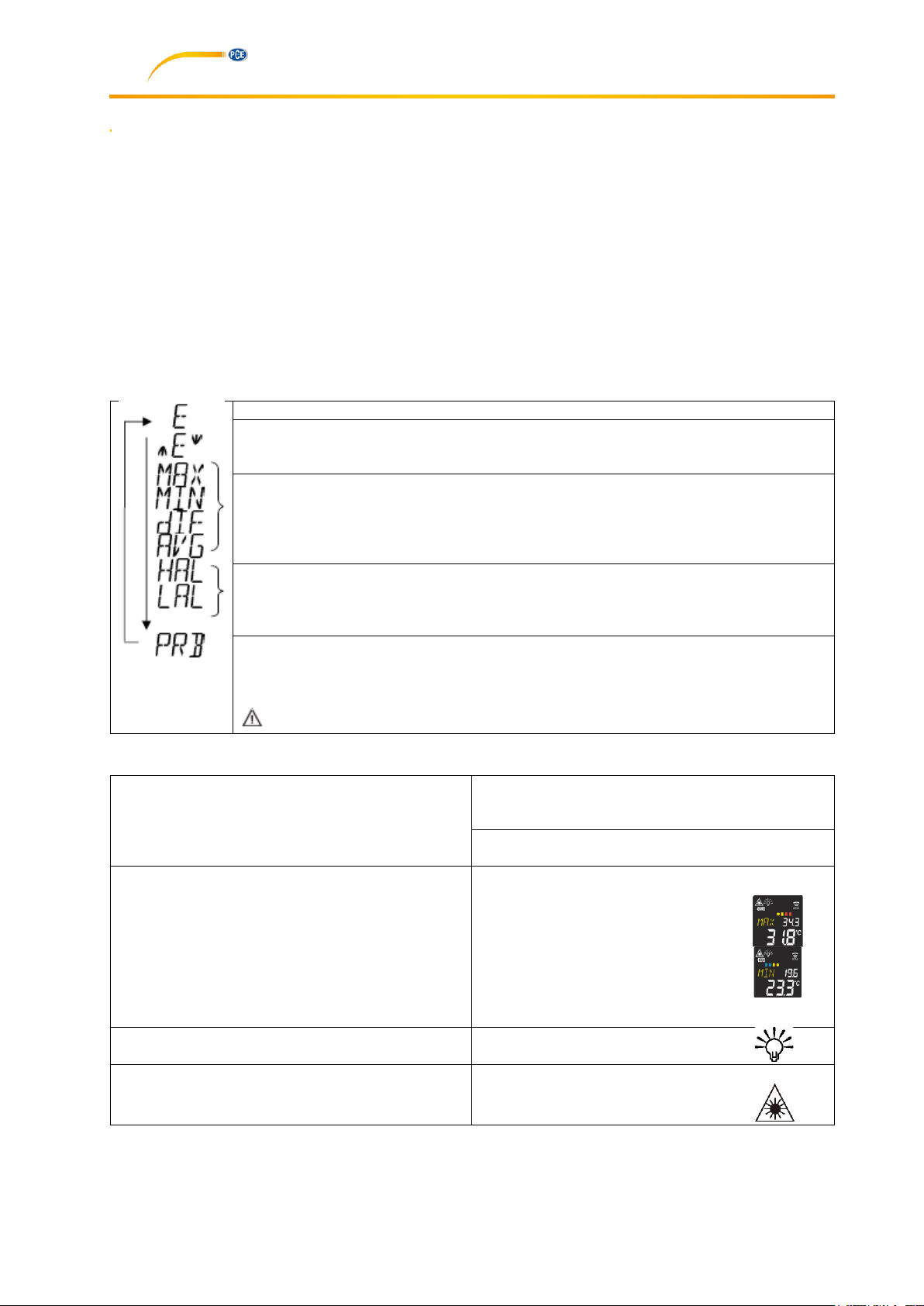
Here, you can see the emissivity. The default emissivity is 0.95.
Press the mode key (2), then press the up (4) or down key (3) to set the emissivity.
Press mode key (2) to confirm. You can select an emissivity between 0.10 (10 E) and
1 (100 E).
Press the mode key (2) to enter maximum (MAX), minimum (MIN), difference
between MAX and MIN (DIF) and average (AVG) modes. During measurement, the
respective reading will be displayed next to the mode icon.
Press the up (4) or down (3) key to change the high alarm (HAL) or low alarm (LAL).
Then press measurement key (6) to confirm your entry. When the reading exceeds
the high alarm (HAL) or falls below the low alarm (LAL), the high or low icon will flash
and you will hear a beep sound.
Use the thermocouple socket (5) to connect the probe. Place the probe on the object
to be measured. The thermometer will display the temperature automatically. To see
the maximum or minimum value during probe measurement, please press and hold
the up (4) or down key (3).
After measuring high temperatures, the probe may remain hot for a while.
In E, MAX, MIN, DIF, AVG modes:
Press the up key (4) to lock or unlock. Lock mode
is particularly useful for continuous temperature
measurements of up to 60 minutes.
Press the down key (3) to switch between °C and
°F.
In MAX, MIN mode: press and hold the
measurement key (6).
The bar indicator shows the
measured temperature. The bars
will be RED when the reading is
close to the maximum value or
BLUE when it comes close to the
minimum value. They will be
YELLOW when the temperature
is between the maximum and the
minimum value.
Backlight
The LCD backlight is always on.
In all modes: Press and hold the measurement
key (6).
Then press the down key (3) to turn the laser on
or off.
5 Instructions
5.1 How to make a measurement
To make a measurement, simply target the lens (7) of thermometer at the object to be measured and
press the measurement key (6). The surface temperature will then be displayed. The distance-to-spot –
ratio is 30:1. Please make sure that the target area is within the field of view.
5.2 Measurement with external sensor
Connect an external K-type thermocouple to the meter via the mini jack at the side of the device. Press
the Mode key until PRB appears in the display. Then press the Measurement key. The display will now
show the temperature measured by the external thermocouple.
5.3 Functions
Press the mode key (2) to see the following functions:
5.4 Settings
5
Page 6
Manual
Error message
Reason
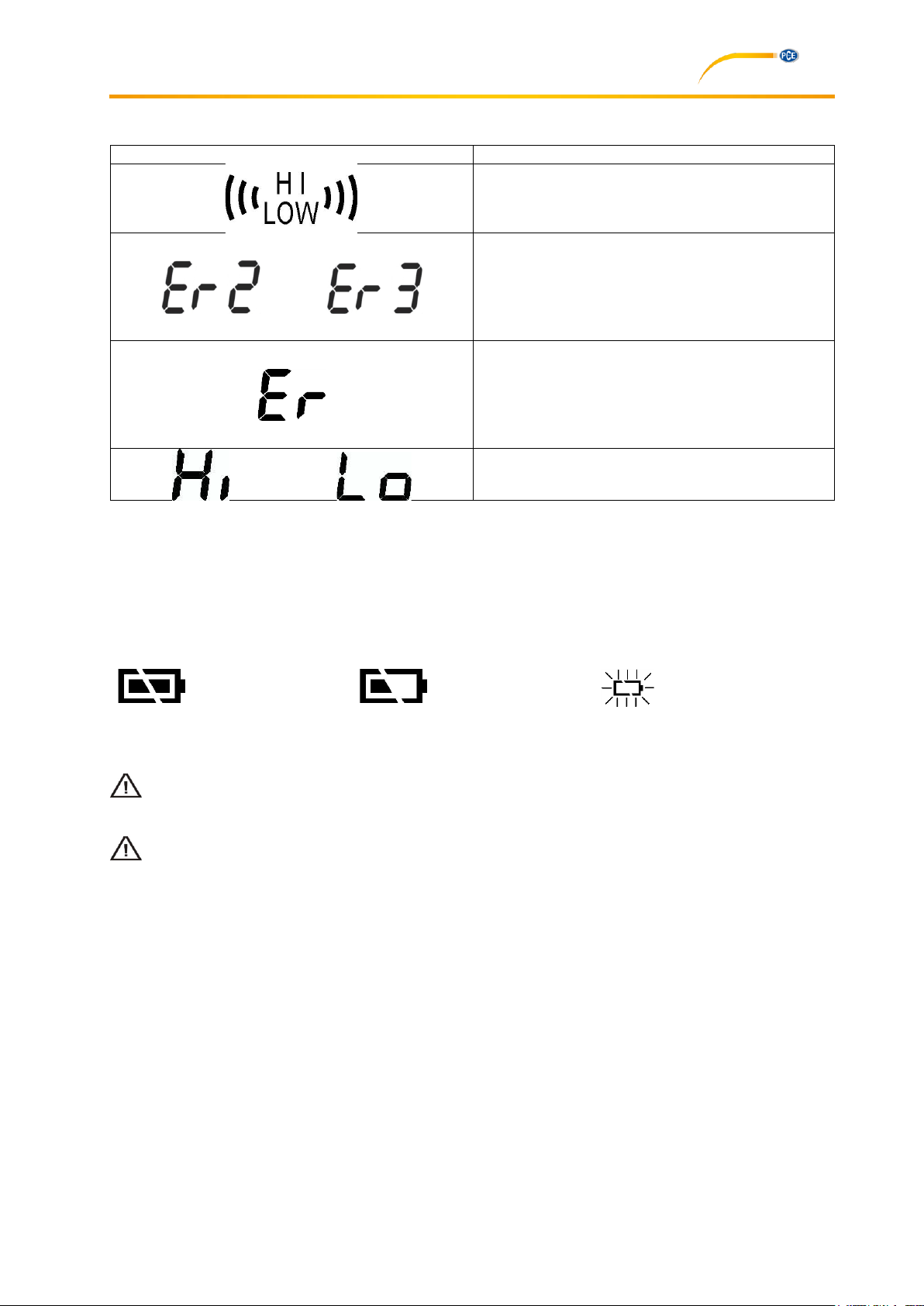
“Hi” or “Low” is displayed when the temperature
measured is outside the HAL and LAL limits.
“Er 2” is displayed when the ambient temperature
changes quickly. “Er 3” is indicated when the
ambient temperature falls below 0 °C (32 °F) or
exceeds +50 °C (122 °F). Allow at least 30
minutes for the thermometer to adapt to the room
temperature.
“Er 5” … “Er 9” means that you must reset the
thermometer. To do so, turn the device off,
remove the battery and wait for at least one
minute before you reinsert the battery and turn
the device back on. If the error remains, please
contact PCE Instruments.
“Hi” or “Lo” is indicated when the temperature
measured is outside the measurement range.
“Battery OK”: measurements are
possible.
“Battery low”: measurements are
still possible, but battery needs
to be replaced.
“Battery flat”: measurements are
no longer possible.
6 LCD error messages
7 Storage and cleaning
The device should be stored at room temperature. The sensor lens is the most sensitive part of the
thermometer. Therefore, it should always be kept clean. Please be careful when cleaning it. Use a soft
cloth or cotton swab with water or medical alcohol. Do not submerge any part of the instrument.
8 Batteries
The battery level indication can be as follows:
When the “Battery low” icon appears, the battery should immediately be replaced by a new 1.5 V
AAA battery. To avoid malfunction, please switch off the device before replacing the battery.
Dispose of used batteries immediately and keep them away from children.
For the disposal of batteries, the 2006/66/EC directive of the European Parliament applies. Due to the
contained pollutants, batteries must not be disposed of as household waste. They must be given to
collection points designed for that purpose.
In order to comply with the EU directive 2012/19/EU we take our devices back. We either re-use them or
give them to a recycling company which disposes of the devices in line with law.
6
Page 7

Manual
9 Contact
If you have any questions about our range of products or measuring instruments please contact PCE
Instruments.
9.1 PCE Instruments UK
By post:
PCE Instruments UK Ltd.
Units 12/13 Southpoint Business Park
Ensign Way, Southampton
Hampshire
United Kingdom, SO31 4RF
By phone:
02380 987 035
9.2 PCE Americas
By post:
PCE Americas Inc.
711 Commerce Way
Suite 8
Jupiter
33458 FL
USA
By phone:
561 320 9162
7
 Loading...