

Page 1
© PCE Instruments
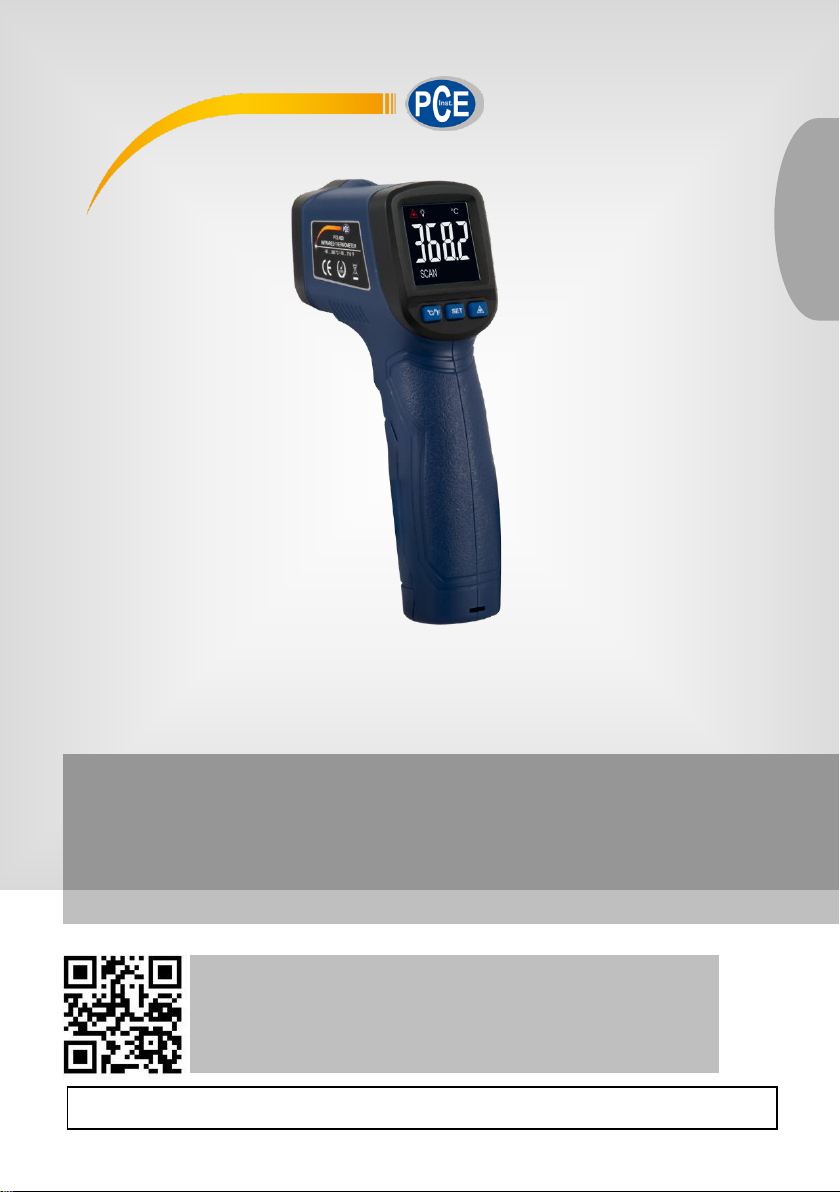
Infrared Thermometer PCE-660
User Manual
User manuals in various languages (français,
italiano, español, português, nederlands, türk, polski,
русский, 中文) can be found by using our
product search on: www.pce-instruments.com
Last change: 15 June 2018
v1.0
English
Page 2

© PCE Instruments
Contents
1 Safety notes ........................................................................................... 1
2 Features ................................................................................................. 1
3 Field of view ........................................................................................... 2
4 Technical specifications ...................................................................... 2
5 Device description ................................................................................ 3
6 Delivery contents .................................................................................. 3
7 Operation ............................................................................................... 3
7.1 How to make a measurement ........................................................................................... 3
7.2 Settings ............................................................................................................................ 4
7.3 Battery replacement ......................................................................................................... 4
8 Further information ............................................................................... 5
8.1 Field of view ..................................................................................................................... 5
8.2 Distance and spot size ..................................................................................................... 5
8.3 Locating a hot spot ........................................................................................................... 5
8.4 Tips .................................................................................................................................. 5
9 Emissivities ........................................................................................... 5
10 Warranty ................................................................................................. 6
11 Disposal ................................................................................................. 6
Page 3

© PCE Instruments
1
1 Safety notes
Please read this manual carefully and completely before you use the device for the first time. The
device may only be used by qualified personnel and repaired by PCE Instruments personnel.
Damage or injuries caused by non-observance of the manual are excluded from our liability and
not covered by our warranty.
• The device must only be used as described in this instruction manual. If used otherwise,
this can cause dangerous situations for the user and damage to the meter.
• The instrument may only be used if the environmental conditions (temperature, relative
humidity, …) are within the ranges stated in the technical specifications. Do not expose
the device to extreme temperatures, direct sunlight, extreme humidity or moisture.
• The meter must not be immersed in water.
• Do not expose the device to shocks or strong vibrations.
• The case should only be opened by qualified PCE Instruments personnel.
• Never use the instrument when your hands are wet.
• You must not make any technical changes to the device.
• The appliance should only be cleaned with a damp cloth. Use only pH-neutral cleaner,
no abrasives, solvents or volatile liquids.
• The device must only be used with accessories from PCE Instruments or equivalent.
• Before each use, inspect the case for visible damage. If any damage is visible, do not
use the device.
• Do not use the instrument in explosive atmospheres.
• The measurement range as stated in the specifications must not be exceeded under
any circumstances.
• Do not point the laser beam at yourself or other people / animals. Avoid eye contact
with the laser beam, either direct or from a reflective surface.
• Non-observance of the safety notes can cause damage to the device and injuries to
the user.
We do not assume liability for printing errors or any other mistakes in this manual.
We expressly point to our general guarantee terms which can be found in our general terms of
business.
If you have any questions please contact PCE Instruments. The contact details can be found at
the end of this manual.
2 Features
• Quick and easy measurement
• Precise non-contact measurement
• Built-in laser pointer increases the target accuracy
• Colour LCD
• Adjustable emissivity: 0.1 … 1.0
• Automatic measurement range selection with resolution 0.1 °C/0.1 °F
• Hold function
• Auto Power Off function
• Selectable units
• D:S = 13:1
Page 4
© PCE Instruments
2
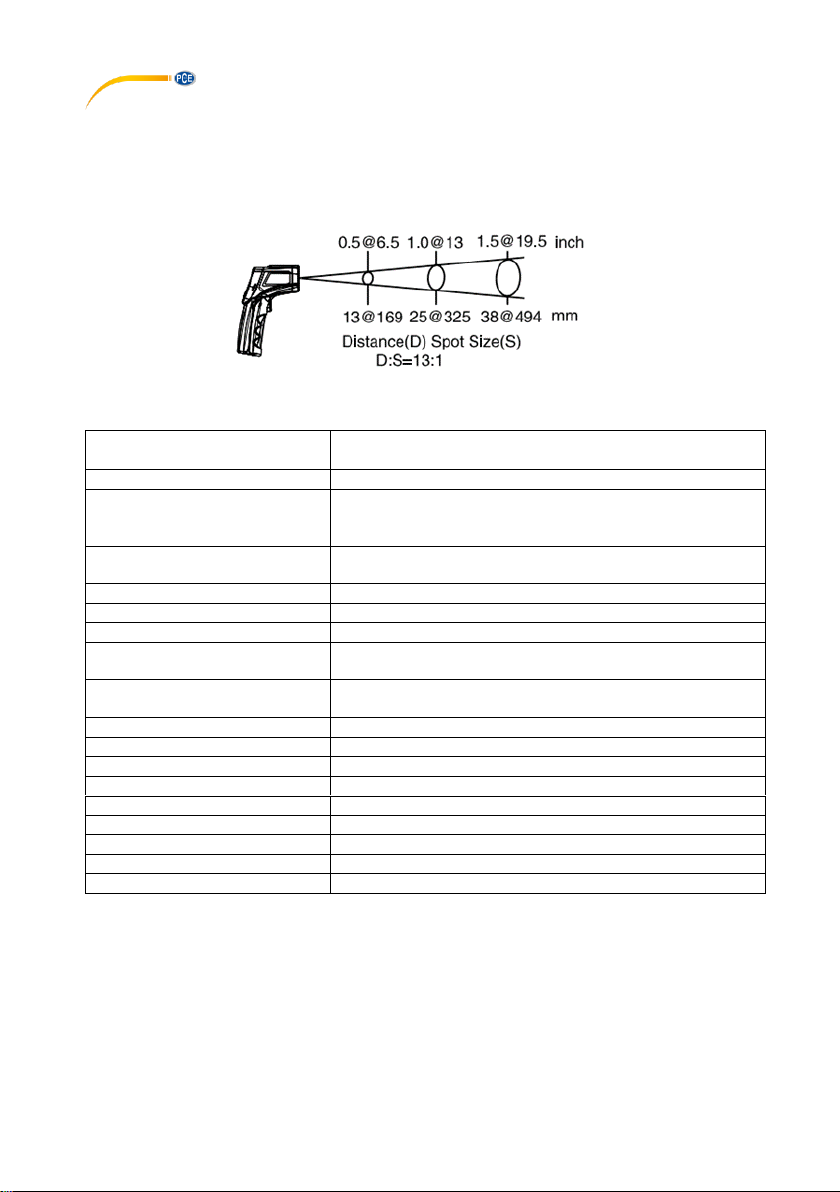
3 Field of view / distance to spot ratio
The meter's field of view is 13:1, for example, if the meter is 13 inches from the target spot, the
diameter of the target must be at least 1 inch. Other distance ratios are shown below in the field
of view diagram.
4 Technical specifications
Measurement range
-50 … 380 ℃ / -58 … 716 ℉
-50 … 580 ℃ / -58 … 1076 ℉
Resolution
0.1 ℃/℉
Accuracy
-50 … 0 ℃ / -58 … 32 ℉: ±4 ℃ / 7 ℉
Above 0 ℃: ±2 % from reading or ±2 ℃ / 3.6 ℉, whichever
is greater
Field of view / distance to spot
ratio
D:S = approx. 13:1 (D=distance, S=spot)
Response time
<1 s
Emissivity
Adjustable from 0.1 … 1.0
Spectral response
8 … 14 µm
Over-range indication
“HI” indicates that upper temperature limit is exceeded
“LO” indicates lower temperature limit is fallen below
Temperature display
Auto display, “-” means negative, positive value shown w/o
sign
Diode laser
Output <1mW, 630 … 670nm, class 2
Automatic Power Off
Meter shuts off automatically after 15 seconds of inactivity
Operating temperature
0 … 50 ℃ / 32 … 122 ℉
Storage temperature
-20 … 60 ℃ / -4 … 158 ℉
Operating humidity
10 … 95 % RH
Storage humidity
<80 % RH
Power supply
9 V battery
Weight
121 g
Dimensions (H x W x D)
144.6 x 75.0 x 38.5 mm
Page 5
© PCE Instruments
3
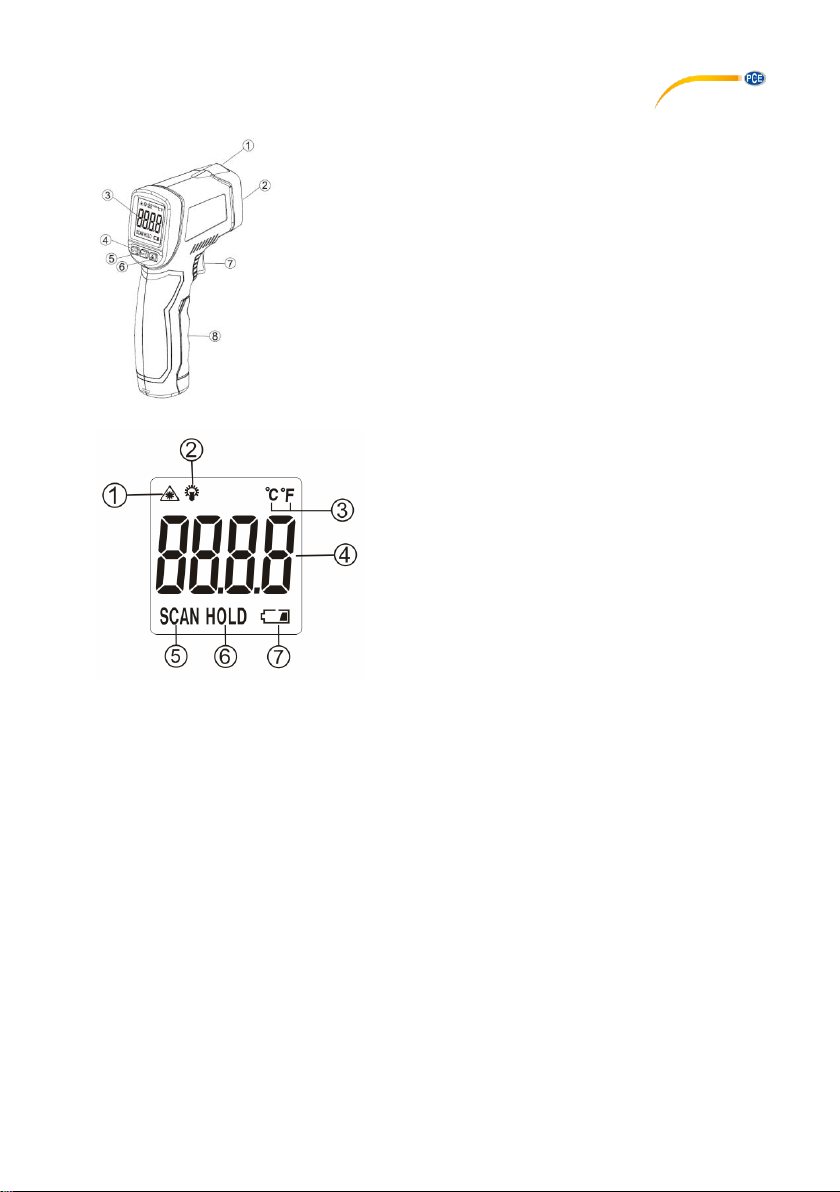
5 Device description
① Laser pointer
② IR sensor
③ LC display
④ Unit key
⑤ SET key
⑥ Laser/backlight key
⑦ Trigger button
⑧ Battery compartment cover
Display
① Laser icon
② Backlight icon
③ Temperature unit (℃/℉)
④ Reading
⑤ Measurement icon
⑥ Hold icon
⑦ Battery status indicator
6 Delivery contents
1 x infrared thermometer PCE-660
1 x 9 V battery
1 x user manual
7 Operation
7.1 How to make a measurement
① Hold the meter by its handle grip and point it towards the surface to be measured.
② Pull and hold the trigger button to turn on the meter. The "SCAN" icon will appear and the
measurement will start.
③ The surface temperature being tested will be displayed on the LCD screen.
④ Release the trigger. The "HOLD" icon will appear and the reading will be held for several
seconds. The meter will automatically shut off after 15 seconds.
Note:
If the meter is used in an environment with wide temperature changes, allow at least 30 minutes
for the meter to adjust.
Page 6
© PCE Instruments
4
7.2 Settings
Power on the meter, press and hold the SET key until the emissivity icon appears on the LCD
screen, then release the button. To adjust the emissivity, press the unit key to increase and the
laser/backlight key to decrease the emissivity value.
In measurement mode, press the unit key to switch the temperature unit from ℃ to ℉ or vice
versa.
To power on or disable the laser pointer, press the laser/backlight key.
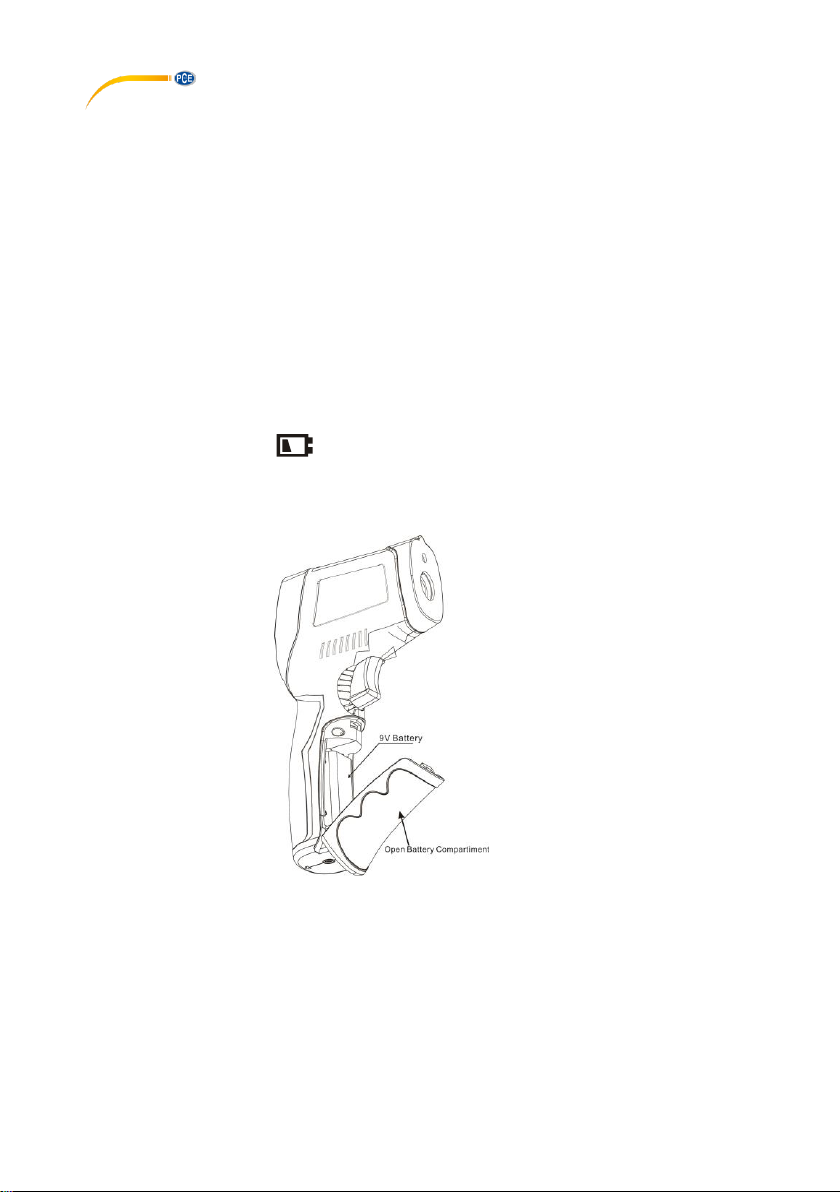
7.3 Battery replacement
When the low battery icon appears, replace the battery.
Open the battery compartment, replace the 9 V battery and close the battery compartment cover.
Observe correct polarity.
Page 7

© PCE Instruments
5
8 Further information
8.1 Field of view
- The object under test should be larger than the spot size calculated by the field of view diagram.
- The smaller the target object is, the closer the meter should be to it for accurate measuring.
- When accuracy is critical, make sure the target is at least twice as large as the spot size.
8.2 Distance and spot size
As distance (D) from the object increases, the spot size (S) of the area measured by the unit
should become larger.
8.3 Locating a hot spot
To find a hot spot, first aim the thermometer at the area around the target, then scan up and down
until the hot spot is located.
8.4 Tips
- Not recommend for measuring shiny or polished metal surfaces like stainless steel, aluminium,
etc.
- You cannot make measurements through transparent surfaces such as glass.
- If the surface of the object under test is covered with frost, oil, grime, etc., clean it before making
a measurement.
9 Emissivities
Substance
Asphalt
Concrete
Marble
Human skin
Ice
Cloth(black)
Aluminium
Emissivity
0.95
0.95
0.94
0.98
0.98
0.98
0.30
Substance
Rubber
Frozen food
Timber
Carbon
Brick
Plastic
Lacquer
Emissivity
0.95
0.90
0.94
0.85
0.90
0.85 … 0.95
0.80 … 0.95
Substance
Ceramic
Hot food
Fat-lute
Copper
Snow
Plaster
Glass
Emissivity
0.95
0.93
0.94
0.50
0.90
0.80 … 0.90
0.90 … 0.95
Substance
Leather
Water
Textiles
Lead
Sand
Paper
Iron oxides
Emissivity
0.95
0.93
0.94
0.50
0.90
0.70 … 0.94
0.78 … 0.82
Page 8

© PCE Instruments
6
10 Warranty
You can read our warranty terms in our General Business Terms which you can find here:
https://www.pce-instruments.com/english/terms.
11 Disposal
For the disposal of batteries in the EU, the 2006/66/EC directive of the European Parliament
applies. Due to the contained pollutants, batteries must not be disposed of as household waste.
They must be given to collection points designed for that purpose.
In order to comply with the EU directive 2012/19/EU we take our devices back. We either re-use
them or give them to a recycling company which disposes of the devices in line with law.
For countries outside the EU, batteries and devices should be disposed of in accordance with
your local waste regulations.
If you have any questions, please contact PCE Instruments.
Page 9

© PCE Instruments
7
PCE Instruments contact information
Germany France Spain
PCE Deutschland GmbH PCE Instruments France EURL PCE Ibérica S.L.
Im Langel 4 23, rue de Strasbourg Calle Mayor, 53
D-59872 Meschede 67250 SOULTZ-SOUS-FORETS 02500 Tobarra (Albacete)
Deutschland France España
Tel.: +49 (0) 2903 976 99 0 Téléphone: +33 (0) 972 3537 17 Tel. : +34 967 543 548
Fax: +49 (0) 2903 976 99 29 Numéro de fax: +33 (0) 972 3537 18 Fax: +34 967 543 542
[email protected] [email protected] [email protected]
www.pce-instruments.com/deutsch www.pce-instruments.com/french www.pce-instruments.com/espanol
United States of America United Kingdom Italy
PCE Americas Inc. PCE Instruments UK Ltd PCE Italia s.r.l.
711 Commerce Way suite 8 Unit 11 Southpoint Business Park Via Pesciatina 878 / B-Interno 6
Jupiter / Palm Beach Ensign Way, Southampton 55010 LOC. GRAGNANO
33458 FL Hampshire CAPANNORI (LUCCA)
USA United Kingdom, SO31 4RF Italia
Tel: +1 (561) 320-9162 Tel: +44 (0) 2380 98703 0 Telefono: +39 0583 975 114
Fax: +1 (561) 320-9176 Fax: +44 (0) 2380 98703 9 Fax: +39 0583 974 824
[email protected] [email protected] [email protected]
www.pce-instruments.com/us www.pce-instruments.com/english www.pce-instruments.com/italiano
The Netherlands Chile Hong Kong
PCE Brookhuis B.V. PCE Instruments Chile S.A. PCE Instruments HK Ltd.
Institutenweg 15 RUT: 76.154.057-2 Unit J, 21/F., COS Centre
7521 PH Enschede Santos Dumont 738, local 4 56 Tsun Yip Street
Nederland Comuna de Recoleta, Santiago, Chile Kwun Tong
Telefoon: +31 (0)53 737 01 92 Tel. : +56 2 24053238 Kowloon, Hong Kong
Fax: +31 (0) 53 - 430 36 46 Fax: +56 2 2873 3777 Tel: +852-301-84912
[email protected] [email protected] [email protected]
www.pce-instruments.com/dutch www.pce-instruments.com/chile www.pce-instruments.cn
China
Turkey
PCE (Beijing) Technology Co.,Ltd PCE Teknik Cihazları Ltd.Şti.
1519 Room, 6 Building Halkalı Merkez Mah.
Men Tou Gou Xin Cheng, Pehlivan Sok. No.6/C
Men Tou Gou District 34303 Küçükçekmece - İstanbul
102300 Beijing Türkiye
China Tel: 0212 471 11 47
Tel: +86 (10) 8893 9660 Faks: 0212 705 53 93
[email protected] [email protected]
www.pce-instruments.cn www.pce-instruments.com/turkish
 Loading...