

Page 1
© PCE Instruments
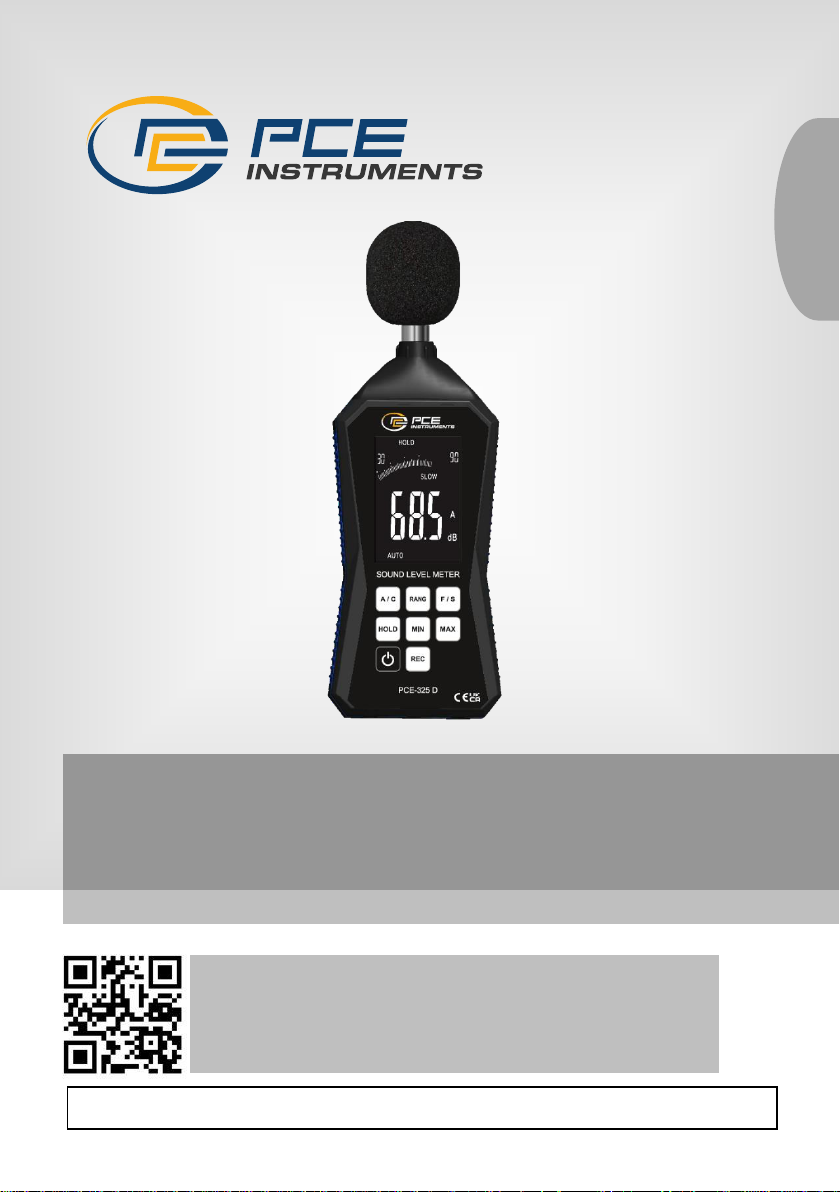
PCE-325 / PCE-325D Sound Level Meter
User Manual
User manuals in various languages (français,
italiano, español, português, nederlands, türk, polski,
русский, 中文) can be found by using our
product search on: www.pce-instruments.com
Last change: 20 June 2024
v1.0
English
Page 2

© PCE Instruments
Contents
1 Safety notes ........................................................................................... 1
2 Technical specification ........................................................................ 2
3 Delivery Scope ...................................................................................... 2
4 Device description ................................................................................ 3
4.1 Key description................................................................................................................. 3
4.2 Display ............................................................................................................................. 3
5 Operating instructions ......................................................................... 4
5.1 Switch the meter on/off ..................................................................................................... 4
5.2 Select A/C frequency weighting ........................................................................................ 4
5.3 Select F/S Mode ............................................................................................................... 4
5.4 Selecting decibel ranges .................................................................................................. 4
5.5 Measurement ................................................................................................................... 4
5.6 MAX/MIN mode ................................................................................................................ 5
5.7 Hold data.......................................................................................................................... 5
5.8 Recording mode (PCE-325D only) ................................ ................................................... 5
5.9 Auto Power Off ................................................................................................................. 5
5.10 Data recording and software installation ........................................................................... 5
6 Calibration ............................................................................................. 6
7 Maintenance and cleaning ................................................................... 6
7.1 Cleaning and storage ................................................................................................ ....... 6
7.2 Charging the battery ......................................................................................................... 6
8 Contact ................................................................................................... 6
9 Disposal ................................................................................................. 6
Page 3

© PCE Instruments
1
1 Safety notes
Please read this manual carefully and completely before you use the device for the first time. The
device may only be used by qualified personnel and repaired by PCE Instruments personnel.
Damage or injuries caused by non-observance of the manual are excluded from our liability and
not covered by our warranty.
• The device must only be used as described in this instruction manual. If used otherwise,
this can cause dangerous situations for the user and damage to the meter.
• The instrument may only be used if the environmental conditions (temperature, relative
humidity, …) are within the ranges stated in the technical specifications. Do not expose
the device to extreme temperatures, direct sunlight, extreme humidity or moisture.
• Do not expose the device to shocks or strong vibrations.
• The case should only be opened by qualified PCE Instruments personnel.
• Never use the instrument when your hands are wet.
• You must not make any technical changes to the device.
• The appliance should only be cleaned with a damp cloth. Use only pH-neutral cleaner,
no abrasives or solvents.
• The device must only be used with accessories from PCE Instruments or equivalent.
• Before each use, inspect the case for visible damage. If any damage is visible, do not
use the device.
• Do not use the instrument in explosive atmospheres.
• The measurement range as stated in the specifications must not be exceeded under
any circumstances.
• Non-observance of the safety notes can cause damage to the device and injuries to
the user.
We do not assume liability for printing errors or any other mistakes in this manual.
We expressly point to our general guarantee terms which can be found in our general terms of
business.
Page 4
© PCE Instruments
2
2 Technical specification
3 Delivery Scope
1 x sound level meter PCE-325 or PCE-325D
1 x USB cable
1 x PC software (PCE-325D)
1 x service bag
1 x user manual
Applicable standards
IEC61672-1: 2013 class 2
Measurement range
Auto: 30 … 130 dB
Manual: 30 … 90 dB, 50 … 110 dB, and 70 … 130 dB
Accuracy
±1.5 dB (at reference condition of 94 dB and 1 kHz)
Resolution
0.1 dB
Data update rate
500 ms
Frequency weighting
A and C
Response time
FAST: 125 ms, SLOW: 1 sec
Standard calibrator
1 KHz sine wave @ 94 or 114 dB
Display
3 1/2-digit LCD with analogue bar graph
Out of range indication
“OVER” and “UNDER” indicators on LCD
Auto power off
after 3 minutes of inactivity
Battery level indication
flashes when the battery voltage is too low
Data logger (PCE-325D)
32,000 sets of measured values
Power supply
3.7 V Li-Ion battery
Operating conditions
-10 ... 50 °C / <80 % RH
Storage conditions
-20 ... 50 °C / <80 % RH
Dimensions
Meter: 162 x 88 x 32 mm (6.38 x 3.46 x 1.26 ")
Sensor: 102 x 60 x 25 mm (4.01 x 2.36 x 0.98")
Weight
approx. 306 g (0.674 lbs)
Page 5
© PCE Instruments
3
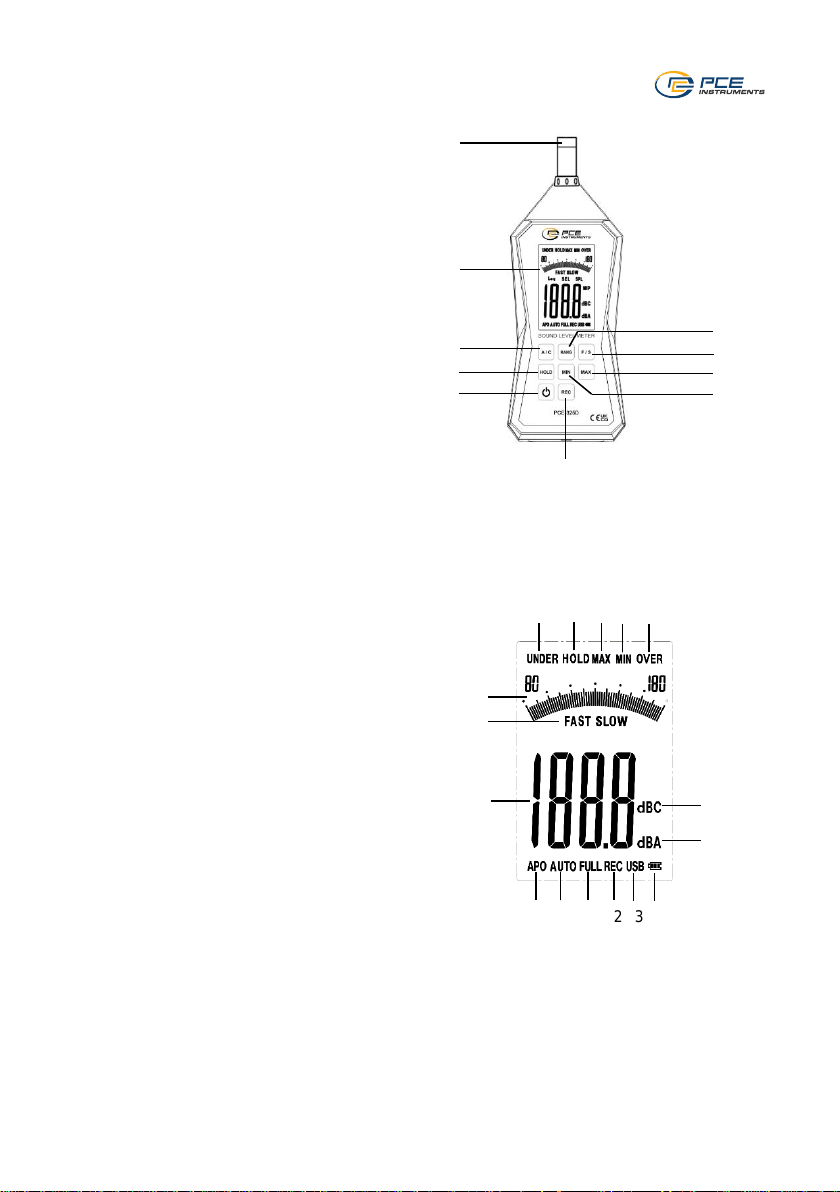
4 Device description
4.1 Key description
1. Sensor
2. LCD
3. A/C frequency weighting key
4. HOLD key
5. ON/OFF key
6. RANGE selection key
7. Fast/slow response time key
8. MAX key
9. MIN key
10. REC key (PCE-325D) / RANGE selection
key (PCE-325 only)
Note:
The micro USB socket is located at the
bottom of the meter.
4.2 Display
1. Under-range indicator
2. Data HOLD
3. MAX mode indicator
4. MIN mode indicator
5. Over-range indicator
6. Analogue bar graph
7. Fast/slow response time indicator
8. Digital display
9. Automatic power off
10. AUTO ranging indicator
11. Memory full indicator
12. Data recording icon
13. USB icon
14. Battery icon
15. C frequency weighting (decibel)
16. A frequency weighting (decibel)
1
2
3
4
5
6
7 8 9
10
1 2 3
4
5
6
7
8
15
16
9
10
11
12
13
14
Page 6

© PCE Instruments
4
5 Operating instructions
5.1 Switch the meter on/off
Press and release the key to turn on the sound level meter and press and hold the same key
for 3 seconds to turn off the sound level meter.
5.2 Select A/C frequency weighting
Press the A / C key to select the desired frequency weighting. The “A” or “C” indicator will
appear on the LCD.
A weighting is commonly used for measuring general noise levels. It emulates the response of
the human ear.
C weighting is typically used for peak measurements and more accurately characterizes low
frequency noise.
5.3 Select F/S Mode
Press the F/S key to select the desired response time. The “FAST” or “SLOW” indicator will
appear on the LCD.
FAST sampling: once every 125 milliseconds
SLOW sampling: once per second
To measure a short sound burst or record a peak sound level, use the FAST response time. For
general sound level measurements, use the SLOW response time.
5.4 Selecting decibel ranges
This sound level meter has three manual ranges as well as an auto-range mode. It defaults to
auto-ranging on power-up with a range of 30 … 130 dB. The manual ranges are: 30 … 90 dB, 50
… 110 dB and 70 … 130 dB. Use the RANG (only for PCE-325D, for PCE-325 use the arrow
keys) key to select the preferred range. The selected range will display in the top left and right of
the LCD. When in auto-ranging mode, the AUTO indicator will appear at the bottom left. When
selecting your range, observe the indicators UNDER and OVER at the top of the LCD to help
guide you in selecting the best range. UNDER means you should select a lower range. OVER
means you need to select a higher range. Ideally, the analogue bar graph should be reading near
the middle of the range. When in doubt, use auto-range mode.
5.5 Measurement
Hold the instrument away from your body or mount it onto a tripod. Point the microphone at the
sound source. The LCD displays the current sound level reading. It is updated twice per second.
Note:
When using the instrument in windy conditions (greater than 20 mph), use the windshield ball to
avoid inaccurate readings.
Page 7

© PCE Instruments
5
5.6 MAX/MIN mode
To capture maximum sound levels, press the MAX/MIN key once. The MAX indicator will
appear on the LCD. Now, only the maximum sound level will be captured and displayed.
The displayed value will not update until a higher sound level value is detected.
However, the analogue bar graph will continue to reflect the instantaneous readings.
To capture minimum sound levels, press the MAX/MIN key again, the MIN indicator will appear
on the LCD. Now, only the minimum sound level will be captured and displayed. Press the key
one more time to exit the MAX/MIN measurement mode.
5.7 Hold data
Press the HOLD key. The digital reading is held and the "HOLD" icon appears on the LCD. Press
the HOLD key again to return to normal operation.
5.8 Recording mode (PCE-325D only)
The sound level meter has a data logging function. Before starting the recording function, connect
the sound level meter to the PC via micro USB and set up the parameters via the PCE software.
Press the REC key on the sound level meter to start recording. The REC icon will start flashing
and will be displayed on the LCD.
Do not turn off the meter during recording mode. When the set number of data is reached, the
sound level meter will be turned off automatically. When the memory is full, the FULL icon appears
at the bottom of the LCD. When all data have been deleted, the FULL icon disappears.
Note:
If the sound level meter is turned off during recording, connect it to the PC and set up the
parameters again before starting to record again. Otherwise, the ERR icon will be displayed on
the LCD when you press the REC key for recording.
5.9 Auto Power Off
The APO function is set to ON by default. To turn off the APO function, press the key lightly.
To extend the battery life, the sound level meter will automatically turn off after about 3 minutes
when not in use.
In recording mode or when the meter is connected via USB, the APO function is automatically
disabled until the memory is full or the set number of records is reached.
5.10 Data recording and software installation
This sound level meter is able to record data in its internal memory. Before you can record data,
you need to install the PCE software on your PC. The latest version of this software and detailed
instructions on how to install and use it can be found at https://www.pce-instruments.com. A CD
with the software is included for your convenience but we recommend downloading the latest
version at the pce-instruments website.
To setup for a recording, connect the meter to a PC via the micro USB port.
Page 8
© PCE Instruments
6
6 Calibration
The instrument has been calibrated before shipment. The recommended calibration interval is
one year. The meter should only be calibrated by PCE Instruments. Please get in touch with us
when a calibration is required and follow our instructions on returning the meter.
7 Maintenance and cleaning
7.1 Cleaning and storage
1. The white plastic sensor dome should be cleaned with a damp, soft cloth, if necessary.
2. Store the sound level meter in an area with moderate temperature and relative humidity.
7.2 Charging the battery
When the battery power is insufficient, the battery icon appears on the LCD and flashes. Use the
DC 5V power adaptor to connect to the micro USB charging port at the bottom of the meter. The
battery icon on the LCD will indicate that the battery is charging and will disappear when the
battery is fully charged.
8 Contact
If you have any questions, suggestions or technical problems, please do not hesitate to contact
us. You will find the relevant contact information at the end of this user manual.
9 Disposal
For the disposal of batteries in the EU, the 2006/66/EC directive of the European Parliament
applies. Due to the contained pollutants, batteries must not be disposed of as household waste.
They must be given to collection points designed for that purpose.
In order to comply with the EU directive 2012/19/EU we take our devices back. We either re-use
them or give them to a recycling company which disposes of the devices in line with law.
For countries outside the EU, batteries and devices should be disposed of in accordance with
your local waste regulations.
If you have any questions, please contact PCE Instruments.
Page 9

© PCE Instruments
7
PCE Instruments contact information
Germany France Spain
PCE Deutschland GmbH PCE Instruments France EURL PCE Ibérica S.L.
Im Langel 26 23, rue de Strasbourg Calle Mula, 8
D-59872 Meschede 67250 Soultz-Sous-Forets 02500 Tobarra (Albacete)
Deutschland France España
Tel.: +49 (0) 2903 976 99 0 Téléphone: +33 (0) 972 3537 17 Tel. : +34 967 543 548
Fax: +49 (0) 2903 976 99 29 Numéro de fax: +33 (0) 972 3537 18 Fax: +34 967 543 542
[email protected] [email protected] [email protected]
www.pce-instruments.com/deutsch www.pce-instruments.com/french www.pce-instruments.com/espanol
United Kingdom Italy Turkey
PCE Instruments UK Ltd PCE Italia s.r.l. PCE Teknik Cihazları Ltd.Şti.
Trafford House Via Pesciatina 878 / B-Interno 6 Halkalı Merkez Mah.
Chester Rd, Old Trafford 55010 Loc. Gragnano Pehlivan Sok. No.6/C
Manchester M32 0RS Capannori (Lucca) 34303 Küçükçekmece - İstanbul
United Kingdom Italia Türkiye
Tel: +44 (0) 161 464902 0 Telefono: +39 0583 975 114 Tel: 0212 471 11 47
Fax: +44 (0) 161 464902 9 Fax: +39 0583 974 824 Faks: 0212 705 53 93
[email protected] [email protected] [email protected]
www.pce-instruments.com/english www.pce-instruments.com/italiano www.pce-instruments.com/turkish
The Netherlands United States of America Denmark
PCE Brookhuis B.V. PCE Americas Inc. PCE Instruments Denmark ApS
Institutenweg 15 1201 Jupiter Park Drive, Suite 8 Birk Centerpark 40
7521 PH Enschede Jupiter / Palm Beach 7400 Herning
Nederland 33458 FL Denmark
Telefoon: +31 (0)53 737 01 92 USA Tel.: +45 70 30 53 08
[email protected] Tel: +1 (561) 320-9162 [email protected]
www.pce-instruments.com/dutch Fax: +1 (561) 320-9176 www.pce-instruments.com/dansk
[email protected]
www.pce-instruments.com/us
 Loading...