

Page 1

Mainboard User’s Manual
This publication, including all photographs, illustrations and
software, is protected under international copyright laws, with all
rights reserved. Neither this manual, nor any of the material
contained herein, may be reproduced without the express written
consent of the manufacturer.
The information in this document is subject to change without
notice. The manufacturer makes no representations or warranties
with respect to the contents hereof and specifically disclaims any
implied warranties of merchantability or fitness for any particular
purpose. Further, the manufacturer reserves the right to revise this
publication and to make changes from time to time in the content
hereof without obligation of the manufacturer to notify any person
of such revision or changes.
Trademarks
IBM, VGA, and PS/2 are registered trademarks of International
Business Machines.
Intel, Pentium, Pentium -II, Pentium-III, MMX, and Celeron are
registered trademarks of Intel Corporation.
Microsoft, MS-DOS and Windows 95/98/NT/2000 are registered
trademarks of Microsoft Corporation.
PC-cillin and ChipAwayVirus are trademarks of Trend Micro Inc.
AMI is a trademark of American Megatrends Inc.
A3D is a registered trademark of Aureal Inc.
SuperVoice is a registered trademark of Pacific Image
Communications Inc.
MediaRing Talk is a registered trademark of MediaRing Inc.
3Deep is a registered trademark of E-Color Inc.
Other names used in this publication may be trademarks and are
acknowledged.
Copyright © 2001
All Rights Reserved
M756T+ Series , V5.3
S63X/April 2001
Page 2
Mainboard User’s Manual
II
Notice:
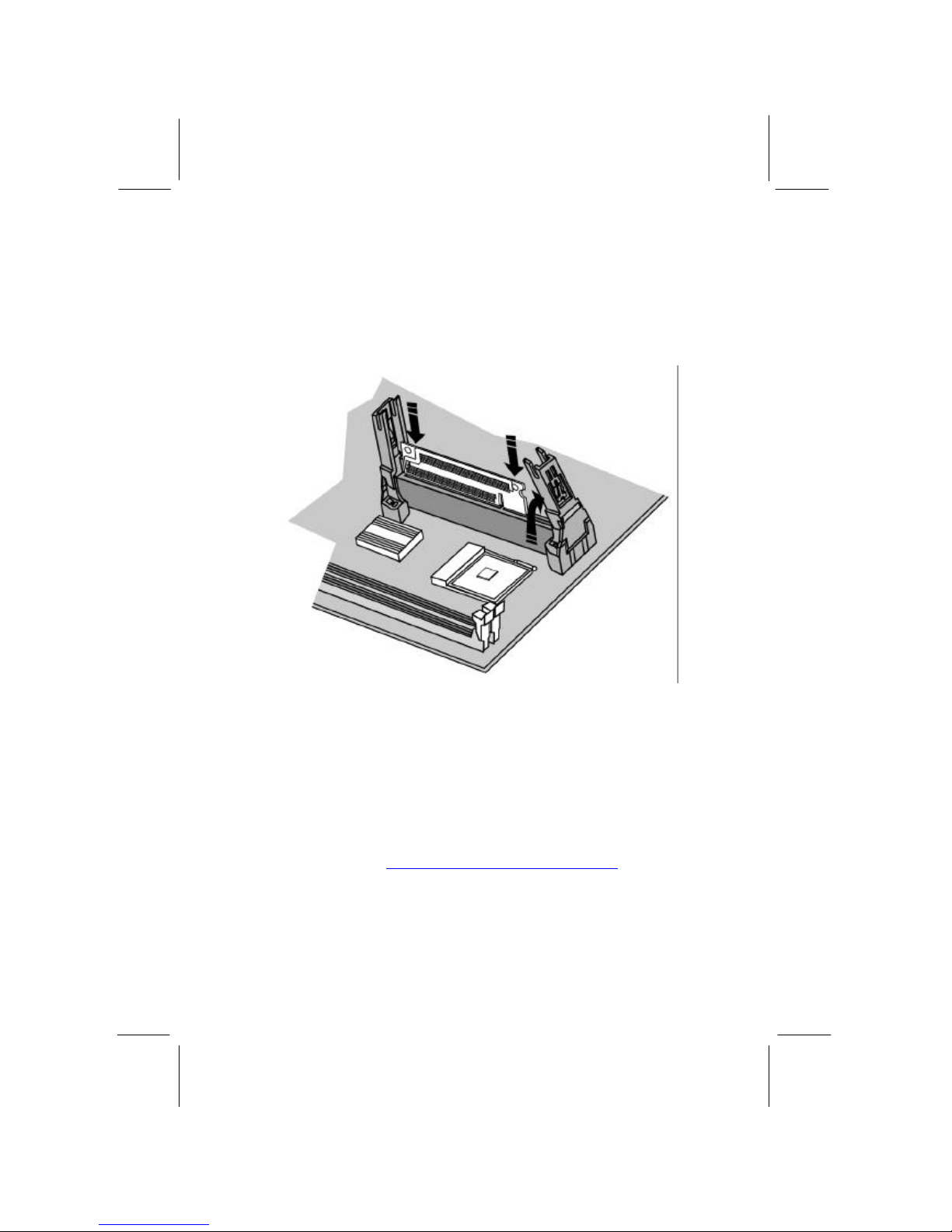
1. Please insert the Slot-1 card shipped with this product to the
SLOT1 as below, if you installed a Socket-370 processor on
the mainboard.
2. Please avoid to do “Clear CMOS” and “reFlash BIOS”
operations simultaneously.
3. If the user needs to do the above operations simultaneously, the
user must to reprogram the LAN ID, and its procedure is as
follows:
a. You may find the LAN ID on the motherboard at least.
b. You may find the programming utility (EE.ZIP) on our
Web site – http://www.pcchips.com.tw/bios.html or on the
Driver CD disc (\LAN\SiS900\Utility\).
c. Please follow the “README.TXT” (After unzipping
EE.ZIP or under the directory \LAN\SiS900\Utility \)
instruction to reprogram your LAN ID.
Page 3

Mainboard User’s Manual
III
Table of Contents
Chapter 1: Introduction.............................................................. 1
Key Features...................................................................... 2
Package Contents............................................................... 5
Static Electricity Precautions ............................................... 6
Pre-Installation Inspection................................................... 6
Chapter 2: Mainboard Installation ............................................... 7
Mainboard Components ......................................................8
I/O Ports............................................................................ 8
Install A CPU..................................................................... 9
Install Memory .................................................................12
Setting Jumper Switches................................................... 13
Install the Mainboard........................................................ 15
Install the Extension Brackets........................................... 16
Optional Extension Brackets............................................. 17
Install Other Devices........................................................ 18
Expansion Slots................................................................ 20
Chapter 3: BIOS Setup Utility.................................................. 21
Introduction ..................................................................... 21
Running the Setup Utility ..................................................22
Standard CMOS Setup Page.............................................. 23
Advanced Setup Page................................ .......................24
Power Management Setup Page......................................... 26
PCI / Plug and Play Setup Page......................................... 28
Load Optimal Settings ...................................................... 29
Load Best Performance Settings........................................ 29
Features Setup Page.......................................................... 30
CPU PnP Setup Page........................................................ 32
Hardware Monitor Page.................................................... 33
Change Password ............................................................. 34
Exit ................................................................................. 34
Chapter 4: Software & Applications.......................................... 35
Introduction ..................................................................... 35
Installing Support Software................................ ...............35
Installing Under Windows 98............................................ 37
Page 4

Mainboard User’s Manual
IV
Page 5

1: Introduction
1
Chapter 1
Introduction
This mainboard has a Slot 1 processor socket for an Intel SEPP
Celeron, Pentium II or III CPUs. It also has a Socket 370, which
uses an Intel PPGA/ FCPGA Celeron or FCPGA Pentium-III
processor. You can install any one of these processors on the
mainboard.
This mainboard supports front-side bus speeds of 66MHz,
100MHz or 133MHz.
This mainboard uses the GFXcel chipset which provides CPU
Plug & Play through firmware, integrates a 128-bit AGP
Graphics Accelerator. The mainboard has a built -in AC97
Codec, provides an AMR (Audio Modem Riser) slot to support
Audio and Modem application, and has a built -in 10BaseT/
100BaseTX Network Interface . In addition, the mainboard has an
extended set of ATX I/O Ports including PS/2 keyboard and
mouse ports, two USB ports, a parallel port, a serial port and a
VGA port.
This mainboard has all the features you need to develop a powerful
multimedia workstation that is network ready, and has built -in
communications. The board is micro-ATX size and has power
connectors for an ATX power supply.
Caution:
??Cyrix III 133MHz FSB CPUs do not support, please refer to page 9.
??
You cannot install two processors simultaneously on this mainboard.
Page 6

Mainboard User’s Manual
2
Key Features
The key features of this mainboard include:
Slot-1 Processor Support
? ? Pentium III, Pentium II and SEPP Celeron CPUs are
supported
? ? Supports 66MHz, 100MHz or 133MHz Front-Side Bus
Socket-370 Processor Support
? ? Supports PPGA/FCPGA Celeron and FCPGA Pentium
III
CPUs
? ? Supports 66MHz, 100MHz or 133MHz FSB
All processors are automatically configured using firmware and a
synchronous/asynchronous Host/DRAM Clock Scheme.
Memory Support
? ? Two DIMM slots for 168 -pin SDRAM memory modules
? ? Support for 66MHz, 100MHz, & 133MHz memory bus
? ? Maximum installed memory is 2 x 512MB = 1 GB
Expansion Slots
? ? Two 32-bit PCI slots
? ?
One AMR slot for a special audio/modem riser card
Onboard IDE channels
? ? Primary and Secondary PCI IDE channels
? ? Support for PIO (programmable input/output) modes
? ? Support for Multiword DMA modes
? ? Support for Bus Mastering and Ultra DMA 33/66 modes
Power Supply and Power Management
? ? ATX power supply connector
? ? ACPI and previous PMU support, suspend switch,
keyboard power on/off
? ? Supports Wake on Modem, Wake on LAN and Wake on
Alarm
Page 7

1: Introduction
3
Built-in Graphics System
? ? Onboard 128-bit 2D/3D 100MHz Host interface AGP
Graphics Accelerator Complies with AGP V2.0
? ?
Shared memory architecture allows a maximum of 64 MB
main memory to act as frame buffer
? ? Supports high resolutions up to 1920x1200 16M colors, up
to 2048x2048 Texture size and Virtual screen up to
4096x4096
? ? Supports hardware DVD Accelerator
AC97 Codec
? ? Compliant AC97 2.1 specification
? ? Supports 18-bit ADC (Analog Digital Converter) and DAC
(Digital Analog Converter) as well as 18-bit stereo fullduplex codec
Onboard I/O Ports
? ? Provides PC99 Color Connectors for easy peripheral device
connections
? ? Floppy disk drive connector with 1Mb/s transfer rate
? ? One serial port with 16550 -compatible fast UART
? ? One parallel port with ECP and EPP support
? ? Two USB ports and optional two USB ports module
? ? Two PS/2 ports for keyboard and mouse
? ? One infrared port header for optional module
Hardware Monitoring
? ?
Built-in hardware monitoring for CPU & System
temperatures, fan speeds and mainboard voltages
Built-in Ethernet LAN
? ? 10BaseT/100BaseTX Ethernet LAN
? ? LAN controller integrates Fast Ethernet MAC and PHY
compliant with IEEE802.3u 100BASE -TX, 10BASE-T and
ANSI X3.263 TP -PMD standards
? ? Compliant with ACPI 1.0 and the Network Device Class
Power Management 1.0
Page 8

Mainboard User’s Manual
4
? ? High Performance provided by 100Mbps clock generator
and data recovery circuit for 100Mbps receiver
Onboard Flash ROM
? ?
Automatic CPU and board configuration
? ? Supports Plug and Play configuration of peripheral devices
and expansion cards
? ? Built-in virus protection using Trend’s ChipAwayVirus
provides boot process virus protection.
Bundled Software
? ? PC-Cillin2000 provides automatic virus protection under
Windows 95/98/2000/NT
? ? SuperVoice is data, fax and voice communication software
? ? MediaRing Talk provides PC to PC or PC to Phone
internet phone communication
? ? 3Deep delivers the precise imagery and displays accurate
color in your monitor
? ? WinDVD2000 is a DVD playback applic ation (optional)
Dimensions
? ? Micro-ATX form factor (24.4cm x 19cm)
Page 9

1: Introduction
5
Package Contents
Attention: This mainboard series includes four different models.
They are M756LMRT+ (LAN/Modem Ready), M756LRT+ (LAN
Ready), M756MRT+ (Modem Ready) and M756T+ (without LAN
& Modem).
Please contact your local supplier for your purchase model.
Each model will support different specification, list as below:
Model Specification
M756LMRT+ Onboard LAN header (LAN1), LAN
extension bracket and an AMR v.90 56K
Fax/Modem card
M756LRT+ Onboard LAN header (LAN1) and LAN
extension bracket
M756MRT+ Support an AMR v.90 56K Fax/Modem card
M756T+ ---
Your mainboard package ships with the following items:
?? The mainboard
?? This User’s Guide
?? 1 UDMA/66 IDE cable
?? Floppy disk drive cable
?? Support software on CD -ROM disk
Optional Accessories
You can purchase the following optional accessories for this
mainboard.
?? Extended USB module
Page 10

Mainboard User’s Manual
6
Static Electricity Precautions
Components on this mainboard can be damaged by static
electricity. Take the following precautions when unpacking the
mainboard and installing it in a system.
1. Keep the mainboard and other components in their original
static-proof packaging until you are ready to install them.
2. During installation, wear a grounded wrist strap if possible. If
you don’t have a wrist strap, discharge static electricity by
touching the bare metal of the system chassis.
3. Handle the mainboard carefully by the edges. Avoid touching
the components unless it is absolutely necessary. During
installation put the mainboard on top of the static-protection
packaging it came in with the component side facing up.
Pre-Installation Inspection
1. Inspect the mainboard for damage to the components and
connectors on the board.
2. If you suspect that the mainboard has been damaged, do not
connect power to the system. Contact your mainboard vendor
and report the damage.
Page 11

1: Introduction
7
Chapter 2
Mainboard Installation
To install this mainboard in a system, follow the procedures in this
chapter:
?? Identify the mainboard components
?? Install a CPU
?? Install one or more system memory modules
?? Verify that any jumpers or switches are set correctly
?? Install the mainboard in a system chassis (case)
?? Connect any extension brackets or cables to the mainboard
connector headers
?? Install any other devices and make the appropriate connections
to the mainboard connector headers.
Note:
1. Before installing this mainboard, make sure jumper JP7 is set
to Normal, the default setting is set to Clear CMOS. See this
chapter for information on locating JP7 and the setting options.
2. When installing this mainboard, make sure jumper JP9 is set to
correct setting for the installed CPU. See this chapter for
information on locating JP9 and the setting options.
3. Never connect power to the system during installation. Doing
so may damage the mainboard.
Page 12
Mainboard User’s Manual
8
Mainboard Components
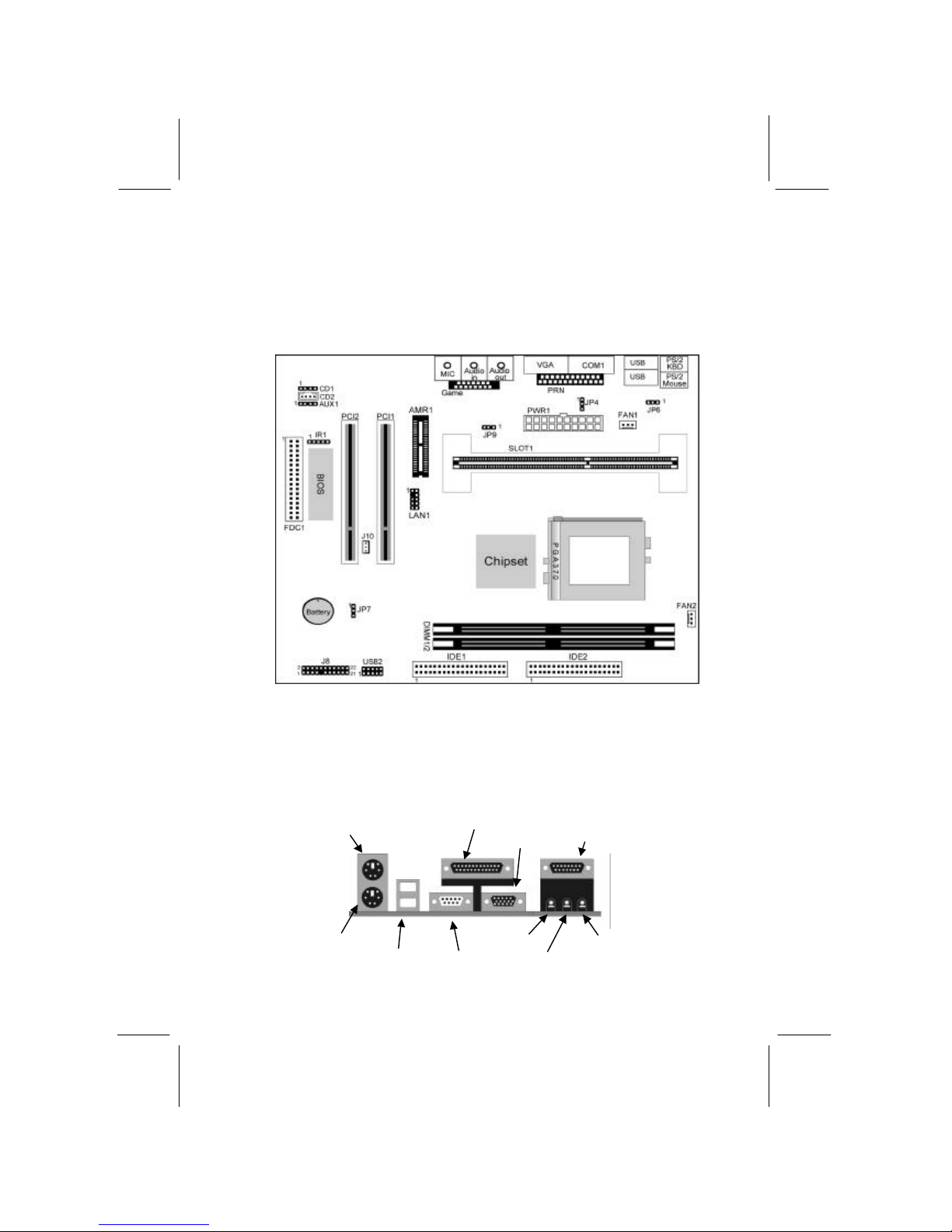
Use the diagram below to identify the major components on the
mainboard.
Note: Any jumpers on your mainboard that do not appear in
thisillustration are for testing only.
I/O Ports
The illustration below shows a side view of the built-in I/O ports on
the mainboard.
PS/2 Mouse
PS/2 Keyboard
Parallel Port
Game/MIDI Port
Serial Port COM1/3
USB Ports
Microphone Jack
Line-Out Jack
VGA Port
Line-In Jack
LAN Port
Page 13
1: Introduction
9
Install A CPU
This mainboard has a Slot-1 CPU socket for any Slot-1 processor
cartridge including the Pentium -III, Pentium-II and SEPP Celeron.
It also has a Socket-370 which supports PPGA/FCPGA Celeron,
FCPGA Pentium-III processor. You can install either a Slot 1
processor or a Socket. You cannot install both a Socket-370 and
a Slot-1 CPU .
Do not try to install a Socket 7 processor in the Socket-370. A
Socket 7 processor such as the Pentium-MMX, or the AMD K5/K6
does not fit in the Socket 370.
The following list notes the processors that are currently supported
by this mainboard.
Pentium III : Slot-1, 450~866MHz, FSB: 100MHz/133MHz
Pentium II: Slot-1, 350~450MHz, FSB: 100MHz;
233~333Mhz, FSB: 66MHz
SEPP Celeron: Slot-1, 266~433MHz, FSB: 66MHz
PPGA/FCPGA Celeron: Socket-370, 300~766MHz, FSB: 66
MHz
FCPGA Pentium III: Socket-370, 500M~1.13GHz,
FSB: 100MHz/133MHz
Notice:
1. The default setting of this mainboard does NOT support Cyrix III
CPUs.
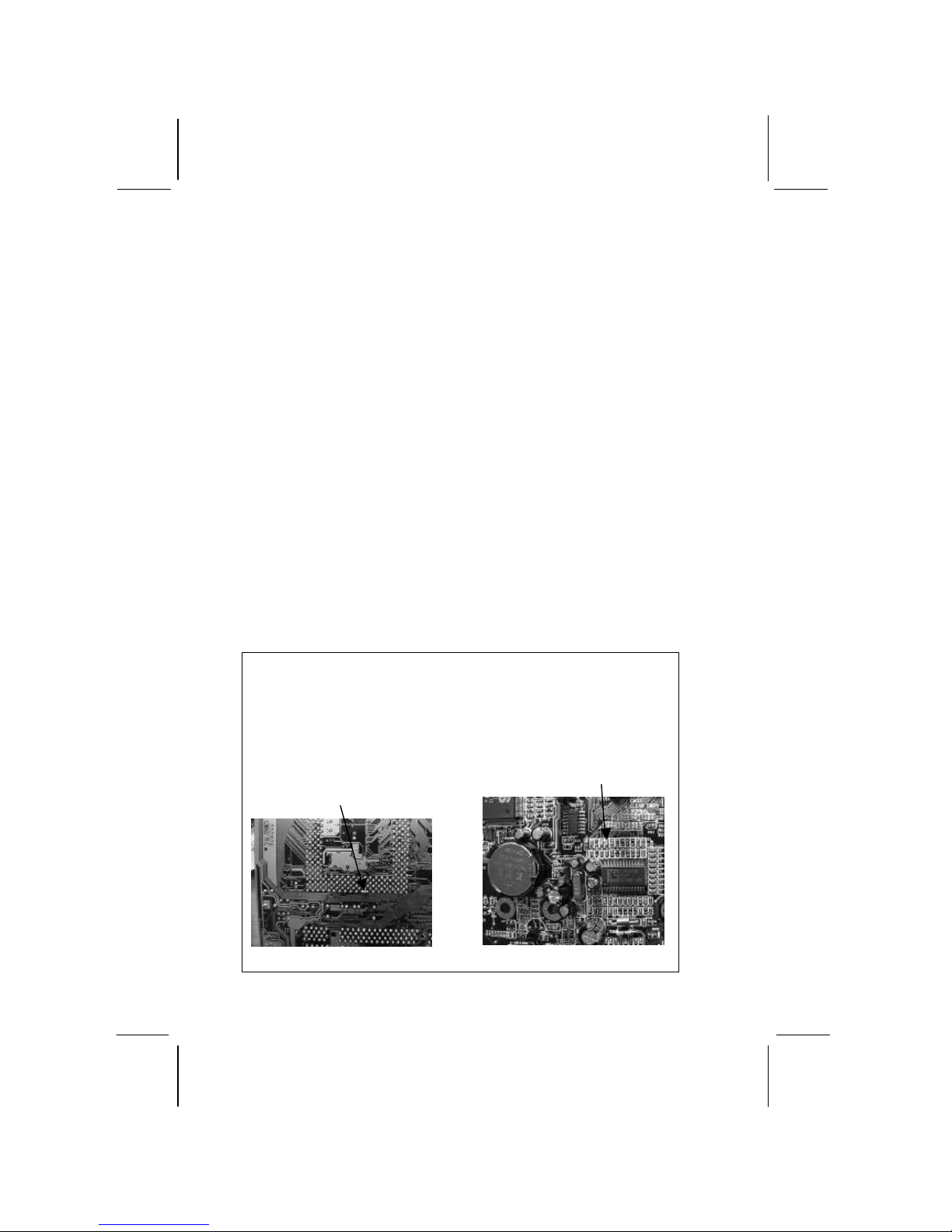
2. If the user wants the M/B to work with Cyrix III CPU, two capacitors
located as Figure-A and B must be taken out. However, the M/B may
NOT support Intel’s CPU any more after removing those two
capacitors.
Figure-A
The capacitor on the back of Socket-370
Figure-B
The capacitor C74
Page 14
Mainboard User’s Manual
10
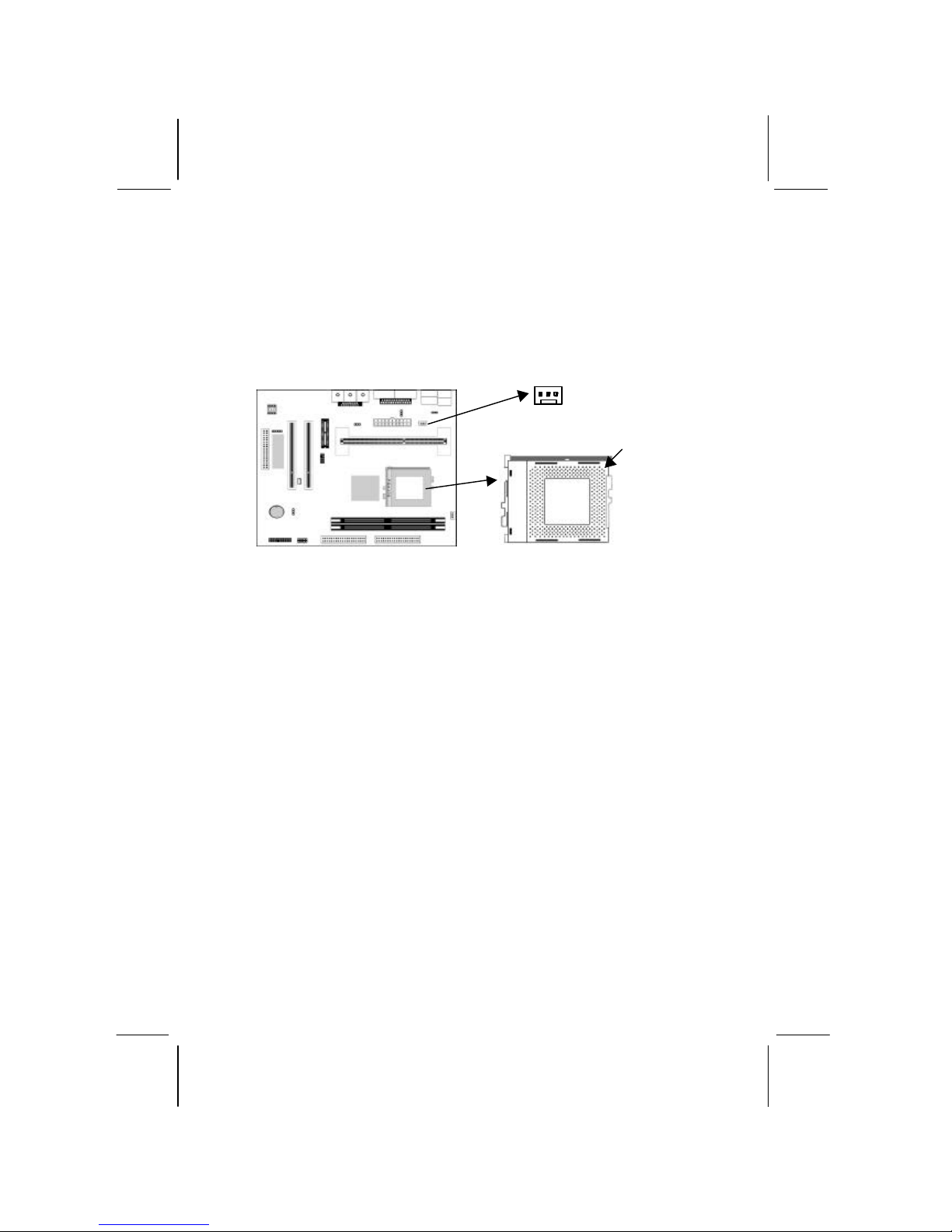
Installing a Slot-1 Processor Cartridge CPU
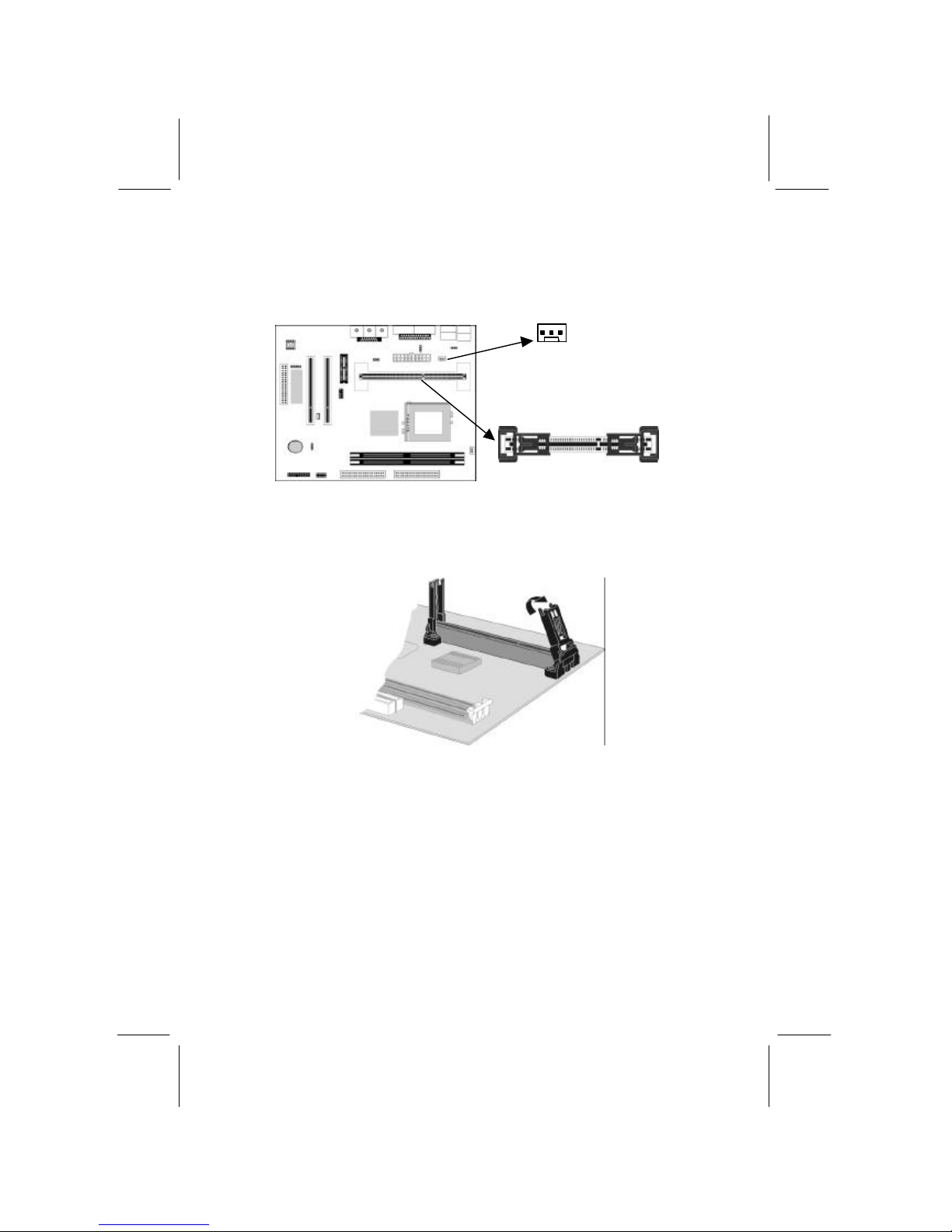
1. Locate Slot-1 and FAN1 on the mainboard.
2. The Slot-1 is installed with a retention module. The upright
arms of the module are folded down for shipping. Raise the
arms so that they are in the upright position.
3. Slide the CPU cartridge into the module arms. Follow the
instructions that come with the CPU. The edge connector on
the CPU cartridge has a notch so that it only fits into the Slot-1
in the correct way.
4. Locate the cooling fan power supply FAN1. Connect the cable
from the processor cartridge cooling fan to FAN1.
5. On this mainboard, you can configure the processor by entering
the correct settings in the BIOS setup utility.
Slot-1 has pre
-
installed retention
module. The upright arms are
folded down for shipping.
FAN1
Page 15
1: Introduction
11
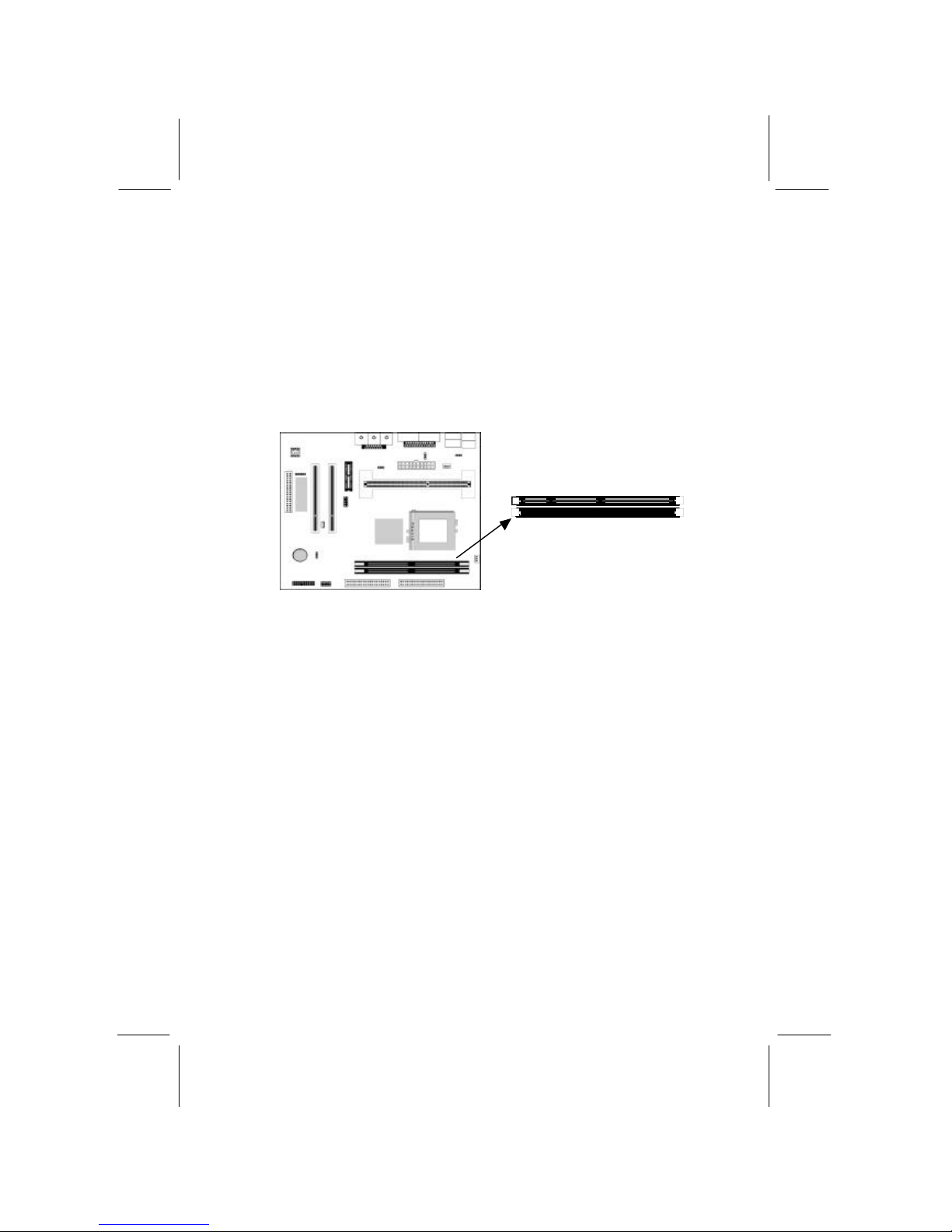
Installing a Socket-370 Processor
A PPGA/FCPGA processor install into the ZIF (Zero Insertion
Force) Socket-370 on the mainboard.
1. Locate the Socket-370 and FAN1. Pull the locking lever out
slightly from the socket and raise it to the upright position.
2. On the processor, identify the Pin -1 corner by its beveled edge.
3. On the Socket-370, identify the Pin-1 corner. The Pin -1 corner
is at the end of the locking lever when it is locked.
4. Match the Pin-1 corners and insert the processor into the
socket. No force is required and the processor should drop into
place freely.
5. Swing the locking lever down and hook it under the catch on
the side of the socket. This secures the CPU in the socket.
6. All PPGA/FCPGA processors should be installed with a
combination heatsink/cooling fan, connect the cable from the
fan to the CPU fan power connector FAN1.
Pin-1 Corner
Socket-370
FAN1
Page 16
Mainboard User’s Manual
12
Install Memory
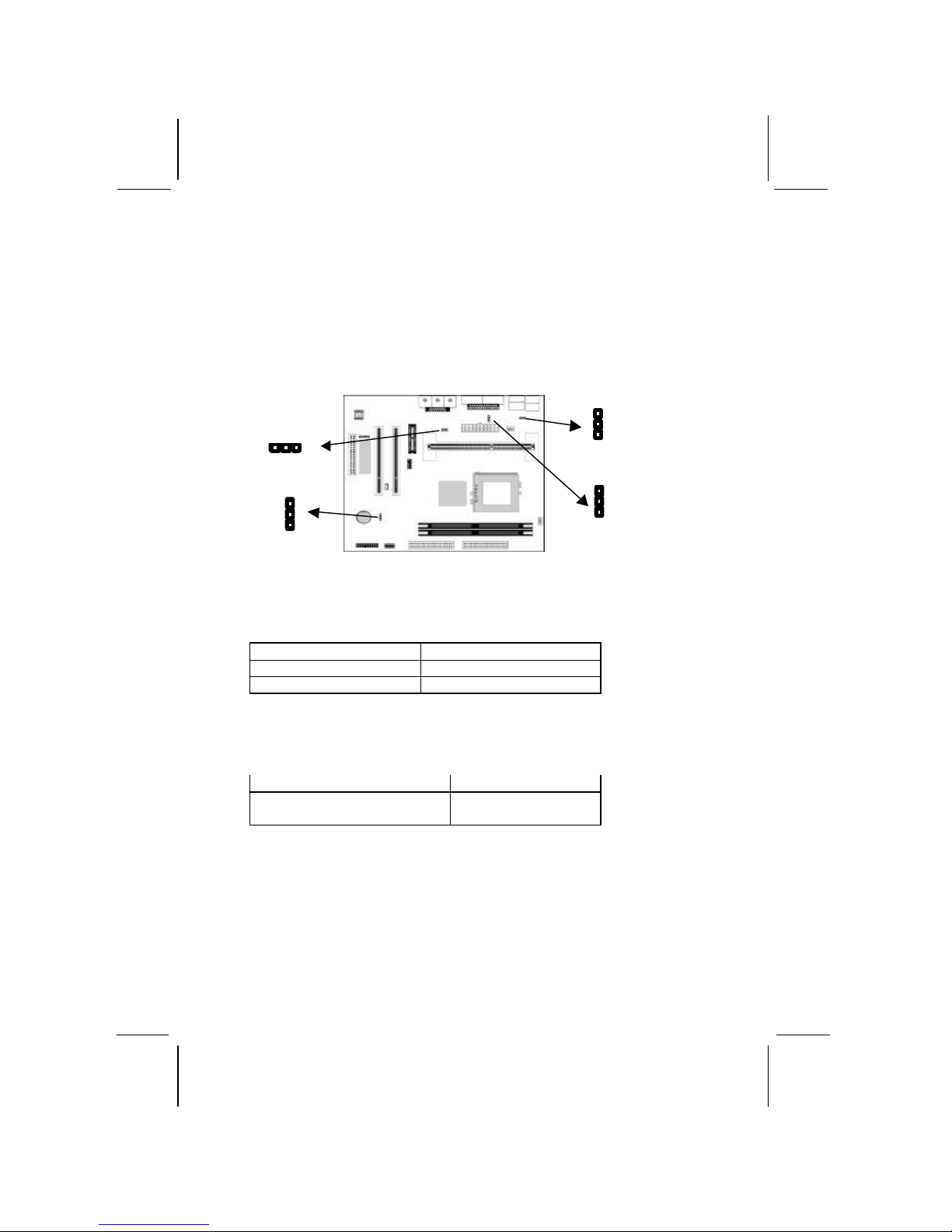
The mainboard has two DIMM sockets for system memory
modules. You must install at least one memory module in order to
use the mainboard.
You must install the first memory module in the DIMM1 socket
to provide shared memory to the onboard VGA display
circuitry.
For this mainboard, you must use 168 -pin, 3.3V unbuffered
SDRAM memory modules. If the installed CPU uses a 100MHz
system bus, you must use PC100 or PC133 memory. If the installed
CPU uses a 66MHz system bus, you must use PC66 memory. You
can install any size memory module from 16 MB to 512MB, so the
maximum memory size is 2 x 512MB = 1GB.
The edge connectors on the memory modules have cut outs, which
coincide with spacers in the DIMM sockets so that memory
modules can only be installed in the correct orientation.
To install a module, push the retaining latches at either end of the
socket outwards. Position the memory module correctly and insert
it into the DIMM socket. Press the module down into the socket so
that the retaining latches rotate up and secure the module in place
by fitting into notches on the edge of the module.
DIMM1
DIMM2
Page 17
1: Introduction
13
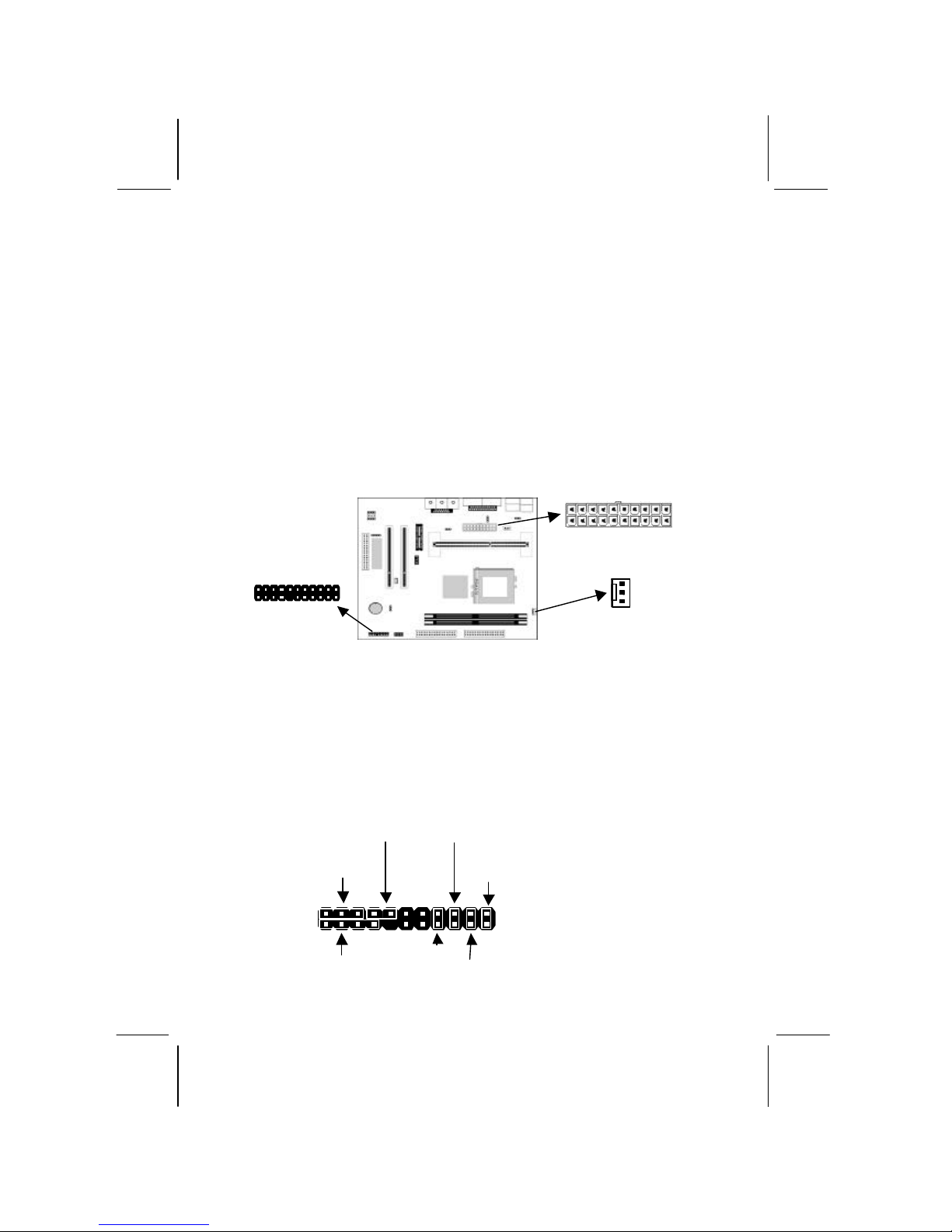
Setting Jumper Switches
Jumpers are sets of pins which can be connected together with
jumper caps. The jumper caps change the way the mainboard
operates by changing the electronic circuits on the mainboard. If a
jumper cap connects two pins, we say the pins are SHORT. If a
jumper cap is removed from two pins, the pins are OPEN.
Jumper JP4: Onboard LAN Wakeup Selector
Use this 3-pin jumper to enable or disable the onboard LAN
Wakeup function.
Function Jumper Setting
Disable Wake On LAN Short Pins 1-2
Enable Wake On LAN Short Pins 2-3
Jumper JP6: Keyboard Power On Selector
If you enable the keyboard power on feature, you can use hot keys
on your keyboard as a power on/off switch for the system.
Function Jumper Setting
Disable Keyboard Power On Short Pins 1-2
Enable Keyboard Power On Short Pins 2-3
Note JP4 & JP6: The system must provide 1A on the +5VSB
(+5V Standby) signal before using these two functions.
JP6 1
JP7
1
JP9 JP4
1
1
Page 18

Mainboard User’s Manual
14
Jumper JP7: Clear CMOS Memory
Use this jumper to clear the contents of the CMOS memory. You
may need to clear the CMOS memory if the settings in the Setup
Utility are incorrect and prevent your mainboard from operating.
To clear the CMOS memory, disconnect all the power cables from
the mainboard and then move the jumper cap into the CLEAR
setting for a few seconds.
Function Jumper Setting
Normal Operation Short Pins 2-3
Clear CMOS Memory Short Pins 1-2
Jumper JP9: FCPGA Pentium-III CPU Selector
Use this 3-pin jumper to select the installed CPU that is Socket-370
FCPGA CPUs or not. Be careful, the error setting may damage
the CPU.
Function Jumper Setting
Slot-1/PPGA CPUs Short Pins 1-2
Socket-370 FCPGA CPUs Short Pins 2-3
Page 19
1: Introduction
15
Install the Mainboard
Install the mainboard in a system chassis (case). The board is a
micro-ATX size mainboard with a twin -tier of I/O ports. You can
install this mainboard in any ATX case. Special micro-ATX cases
are also available with a reduced number of expansion slot bays
and a smaller power supply unit. Ensure that your case has an I/O
cover plate that matches the ports on this mainboard.
Install the mainboard in a case. Follow the instructions provided by
the case manufacturer using the hardware and internal mounting
points on the chassis.
Connect the power connector from the power supply to the ATX
Power connector on the mainboard.
If there is a cooling fan installed in the system chassis, connect the
cable from the cooling fan to the FAN2 fan power connector on the
mainboard.
Connect the case switches and indicator LEDs to the J8 switch and
LED connector header. See the illustration below for a guide to the
J8 connector pin assignments.
22
21
Power LED
Pins 2-4-6
Speaker
Pins 1-3-5-7
Keylock
Pins 8-10
HDD LED
Pins 15-16
2 1
Reset Switch
Pins 17-18
Power Button/Suspend
Switch Pins 21-22
ATX Power
J8
FAN2
ACPI LED
Pins 19-20
Page 20
Mainboard User’s Manual
16
Install the Exten sion Brackets
The extension brackets are used to connect features on the
mainboard to external connectors that can be attached to the system
chassis. Follow the steps below to install the extension brackets.
Note: All the ribbon cables used on the extension brackets have a
red stripe on the Pin -1 side of the cable.
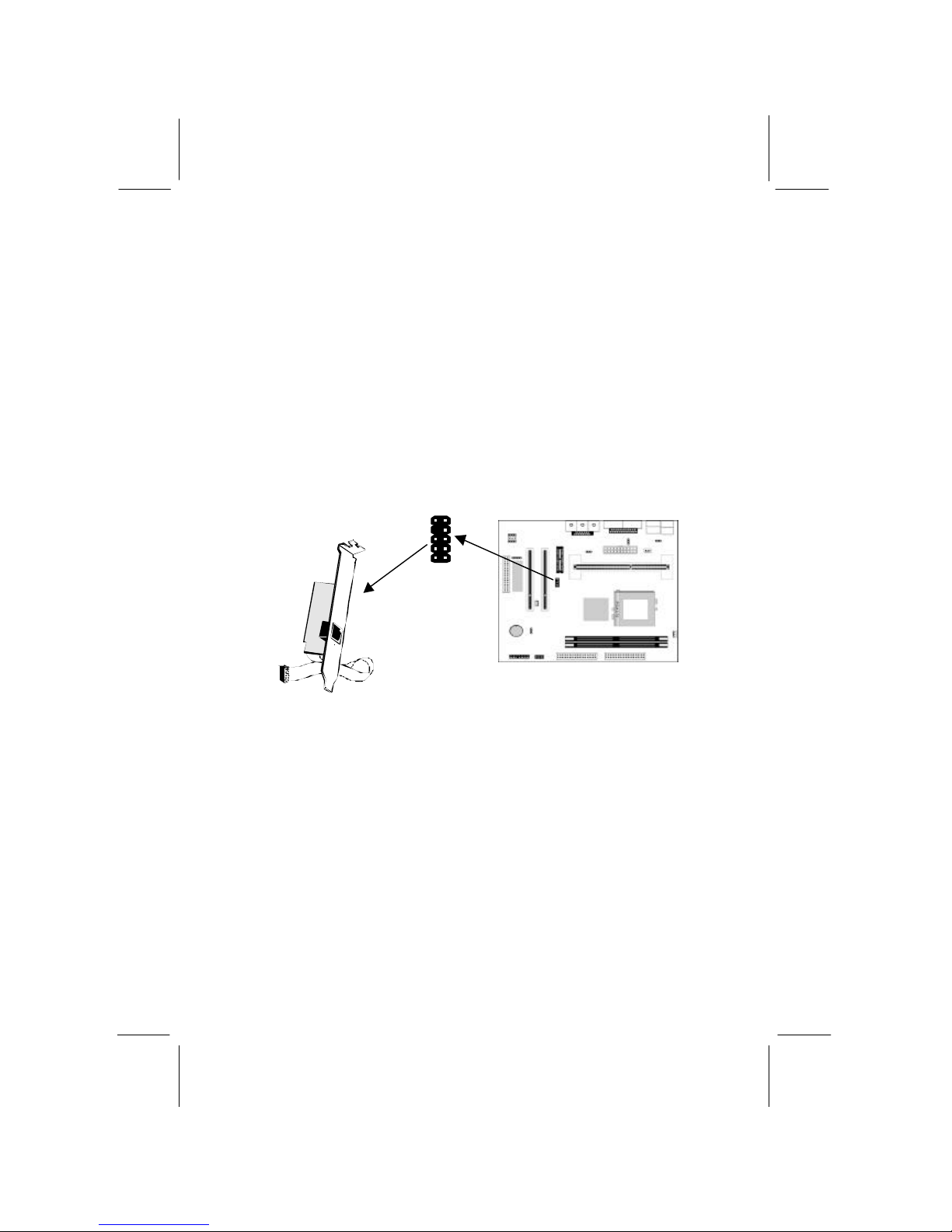
LAN Adapter Extension Bracket
This bracket supports an RJ45 network connector and connects to
the built in LAN header on the mainboard.
1. On the mainboard, locate the LAN header for this bracket.
2. Plug the cable from the bracket into the LAN header.
3. In the system chassis, remove a blanking plate from one of the
expansion slots and install the extension bracket in the slot. Use
the screw that held the blanking plate in place to secure the
extension bracket.
LAN Extension
Bracket
LAN Header
1
Page 21
1: Introduction
17
Optional Extension Brackets
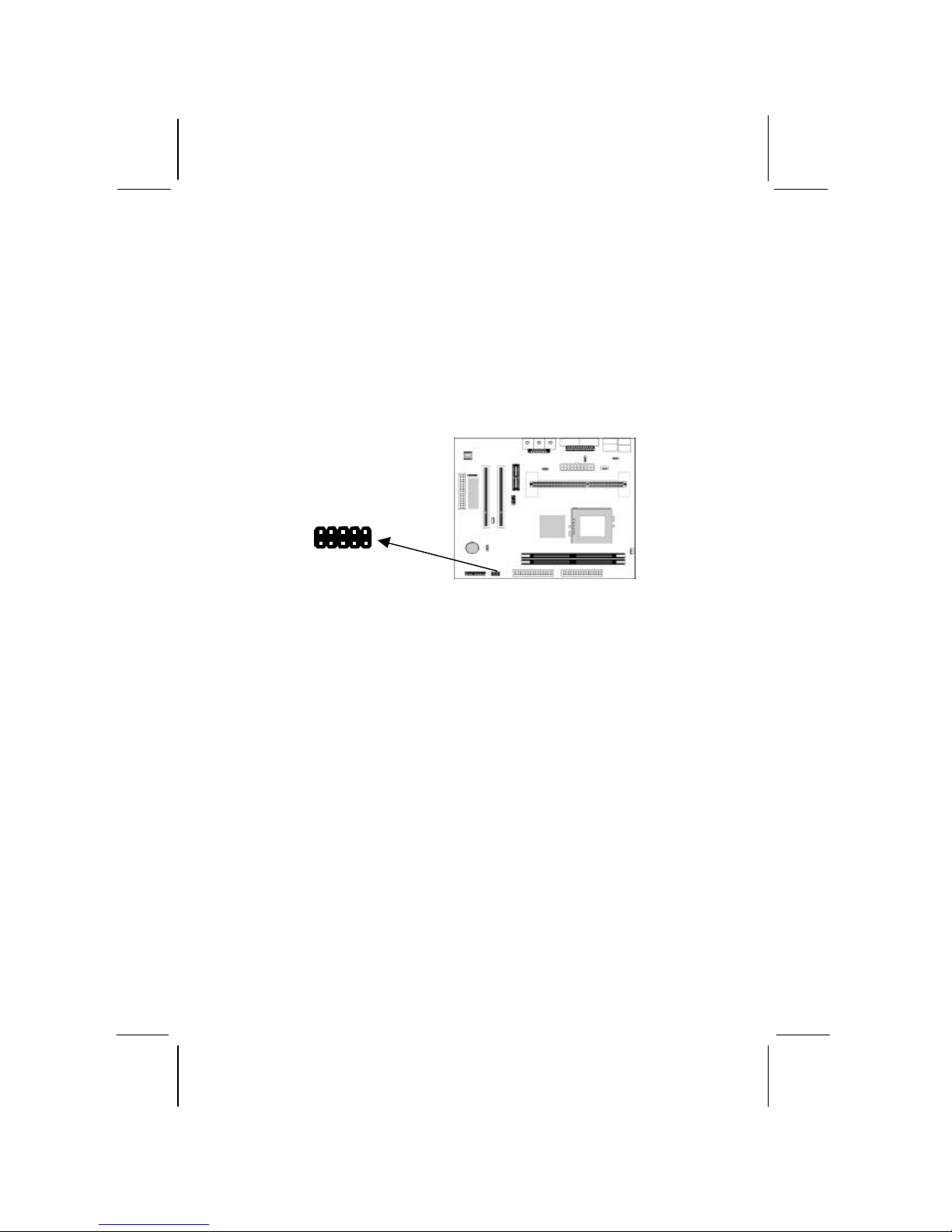
For this mainboard, you can also obtain an USB module extension
bracket. Install them by following the steps below.
Extended USB Module
This module bracket has two USB ports for more USB devices.
1. Locate the USB2 header on the mainboard.
2. Plug the bracket cable onto the header.
3. In the system chassis, remove a slot cover from one of the
expansion slots and install the extension bracket in the opening.
Use the screw that held the slot cover in place to secure the
extension bracket to the chassis.
VCC
NCUV-
UV+
GND
USB2 Header
GND
UV+
UV-
NC
VCC
Page 22
Mainboard User’s Manual
18
Install Other Devices
Install and connect any other devices in the system following the
steps below.
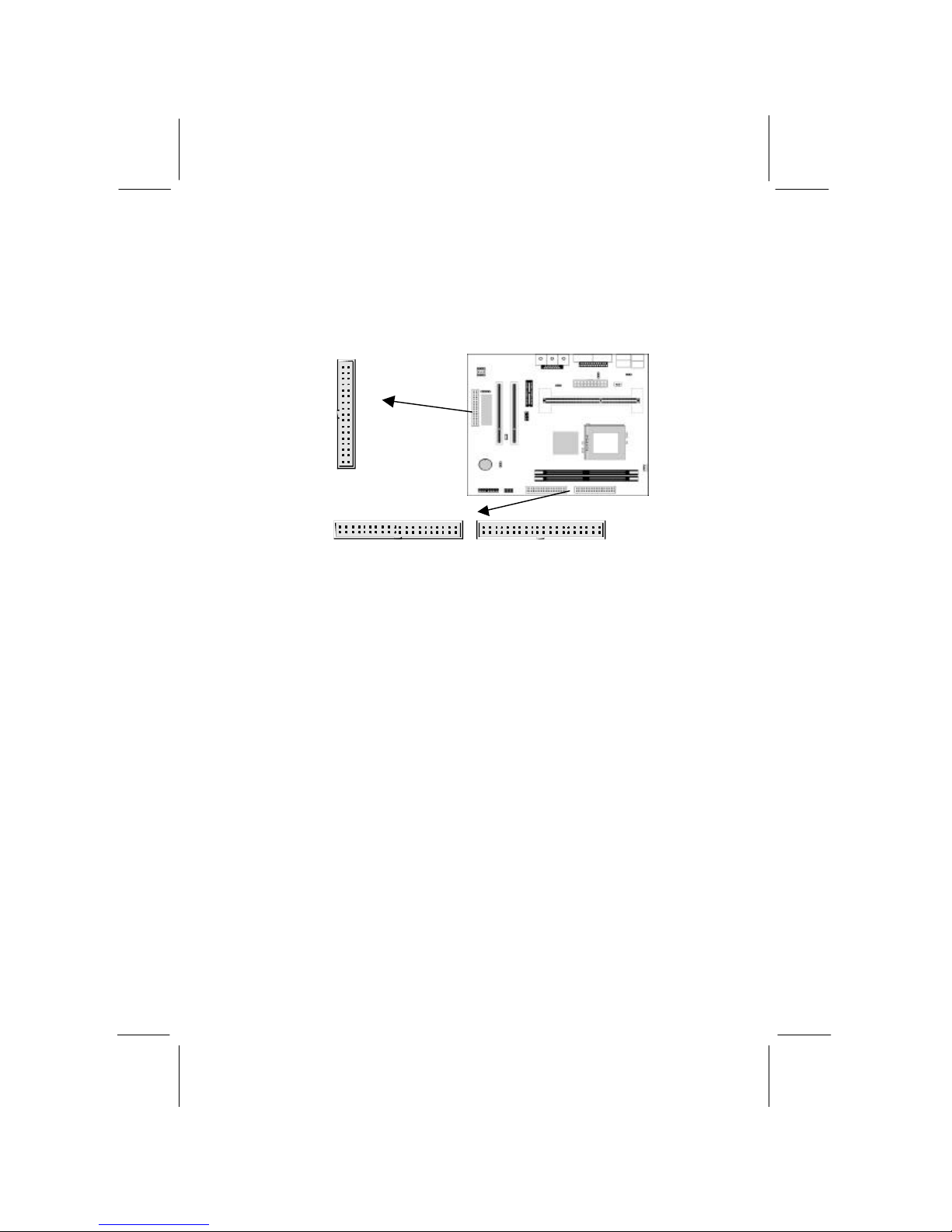
Floppy Disk Drive
The mainboard ships with a floppy disk drive cable that can
support one or two drives. Drives can be 3.5” or 5.25” wide, with
capacities of 360K, 720K, 1.2MB, 1.44MB, or 2.88MB.
Install your drives and connect power from the system power
supply. Use the cable provided to connect the drives to the flopp y
disk drive header FDC1.
IDE Devices
IDE devices include hard disk drives, high -density diskette drives,
and CD-ROM or DVD-ROM drives, among others.
The mainboard ships with an IDE cable that can support one or two
IDE devices. If you connect two devices to a single cable, you must
configure one of the drives as Master and one of the drives as
Slave. The documentation of the IDE device will tell you how to
configure the device as a Master or Slave device. The Master
device connects to the end of the cable.
Install the device(s) and connect power from the system power
supply. Use the cable provided to connect the device(s) to the
Primary IDE channel connector IDE1 on the mainboard.
IDE2
1
1
IDE1
FDC1
1
Page 23
1: Introduction
19
If you want to install more IDE devices, you can purchase a second
IDE cable and connect one or two devices to the Secondary IDE
channel connector IDE2 on the mainboard. If you have two devices
on the cable, one must be Master and one must be Slave.
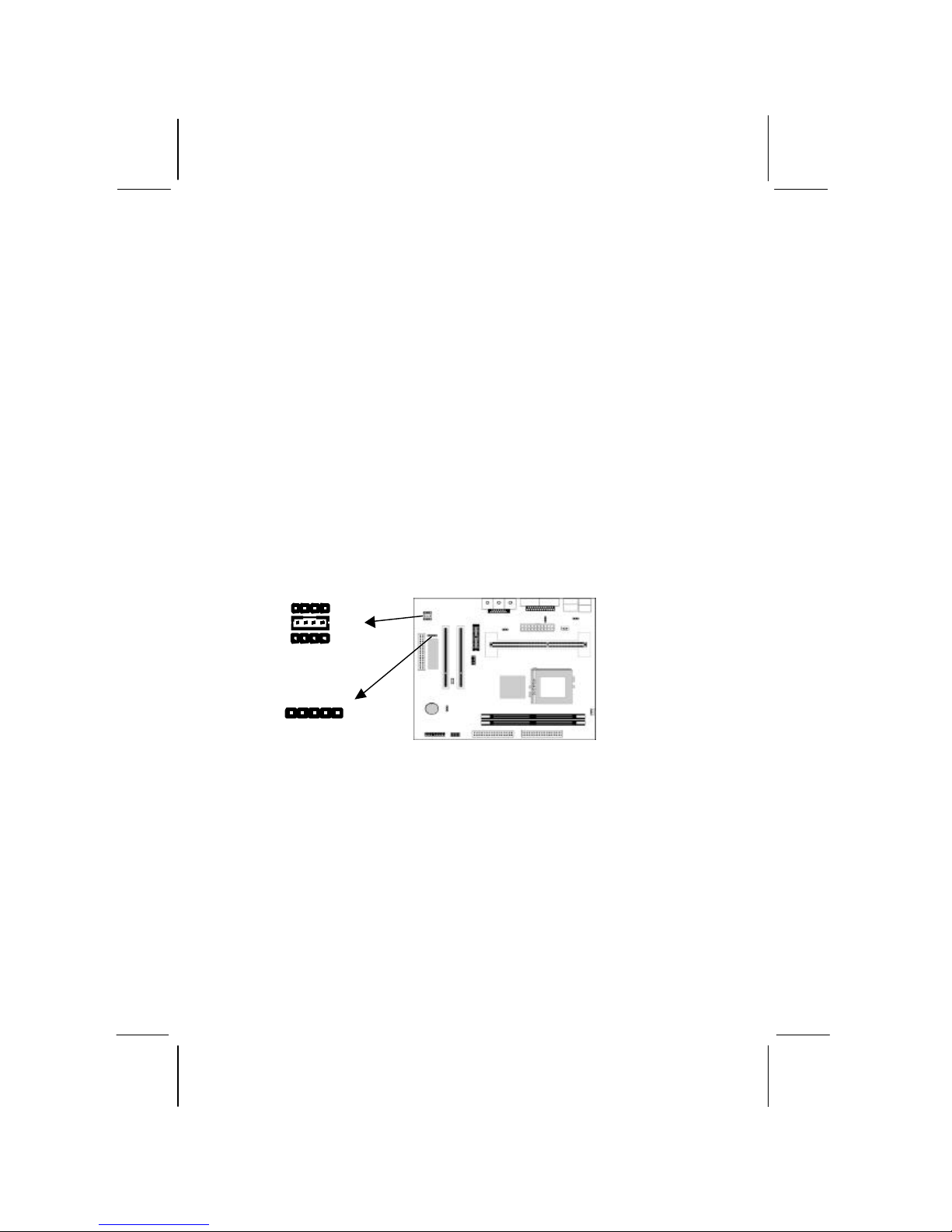
Internal Sound Connections
If you have installed a CD-ROM drive or DVD-ROM drive, you
can connect the drive audio cable to the onboard sound system.
On the mainboard, locate the two 4-pin connectors CD1 and CD2.
There are two kinds of connector because different brands of CDROM drive have different kinds of audio cable connectors. Connect
the cable to the appropriate connector.
If you have installed a secondary CD-ROM drive or DVD-ROM
drive, you can connect the drive audio cable to the onboard sound
system. On the mainboard, locate the 4-pin Aux-In header AUX1,
connect the cable to the connector.
Infrared Port
You can connect an infrared port to the mainboard. You can
purchase this option from third-party vendors.
1. Locate the infrared port IR header on the mainboard.
2. If you are adding an infrared port, connect the ribbon cable
from the port to the IR header and then secure the port to an
appropriate place in your system chassis.
1
IR Header
CD1 CD2
1 AUX1
L 1
GND 2
GND 3
R 4
Page 24
Mainboard User’s Manual
20
Expansion Slots
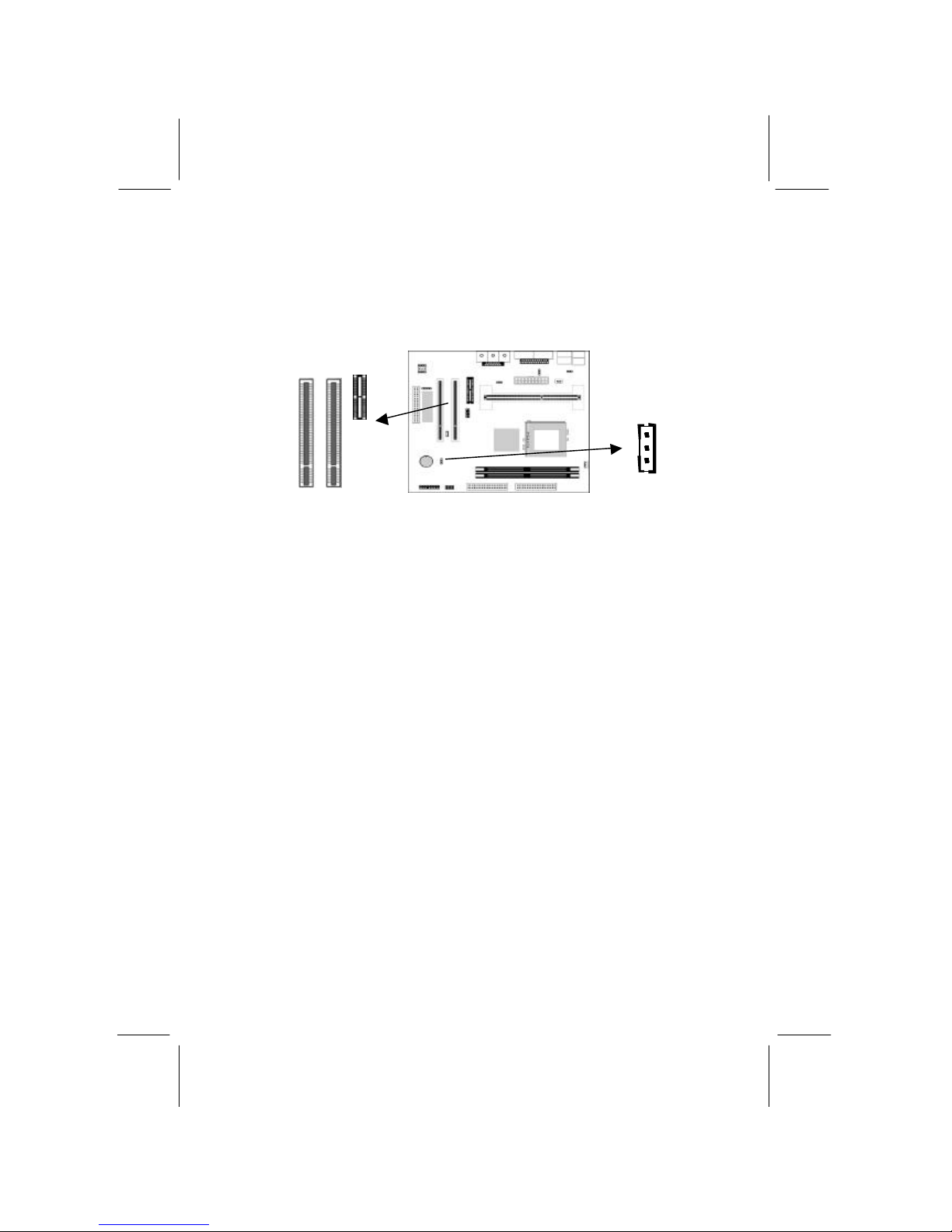
This mainboard has two 32-bit PCI expansion slots and one AMR
slot.
Follow the steps below to in stall a PCI/AMR expansion card.
1. Select a free PCI/AMR slot.
2. Remove the slot cover for the expansion slot from the system
chassis.
3. Insert the expansion card edge connector into the slot and press
it firmly down into it so that it is fully inserted.
4. Secure the expansion card bracket to the system chassis using
the screw that held the slot cover in place.
AMR Slot
The AMR (Audio Modem Riser) slot is an industry standard slot
that allows for the installation of a special audio/modem riser card.
Different territories have different regulations regarding the
specifications of a modem card. You can purchase an AMR card
that is approved in your area and install it directly into the AMR
slot.
Wake On LAN (WOL)
If you are using an ATX power supply you can configure your
system so that it powers down by software and can be resumed by
alarms. If you have installed a LAN adapter expansion card,
connect the card to the Wake On LAN connector J10. This allows
incoming traffic to resume the system from a software power
down. You need to enable this feature in the system setup utility.
J10 - WOL
connector
PCI2
PCI1
AMR1
Page 25

3: BIOS Setup Utility
21
Chapter 3
BIOS Setup Utility
Introduction
The BIOS Setup Utility records settings and information about
your computer such as the date and time, the kind of hardware
installed, and various configuration settings. Your computer uses
this information to initialize all the components when booting up
and functions as the basis for coordination between system
components.
If the Setup Utility configuration is incorrect, it may cause the
system to malfunction. It can even stop your computer from
booting properly. If this happens, you can use the clear CMOS
jumper to clear the CMOS memory used to store the configuration
information, or you can hold down the
Page Up
key while you
reboot your compute r. Holding down the Page Up key also clears
the CPU PnP Setup information, you may need to set the CPU
speed again.
You can run the setup utility and manually make changes to the
configuration. You might need to do this to configure some of the
hardware that you install on or connect to the mainboard, such as
the CPU, system memory, disk drives, etc.
Page 26
Mainboard User’s Manual
22
Running the Setup Utility
Each time your computer starts, before the operating system loads,
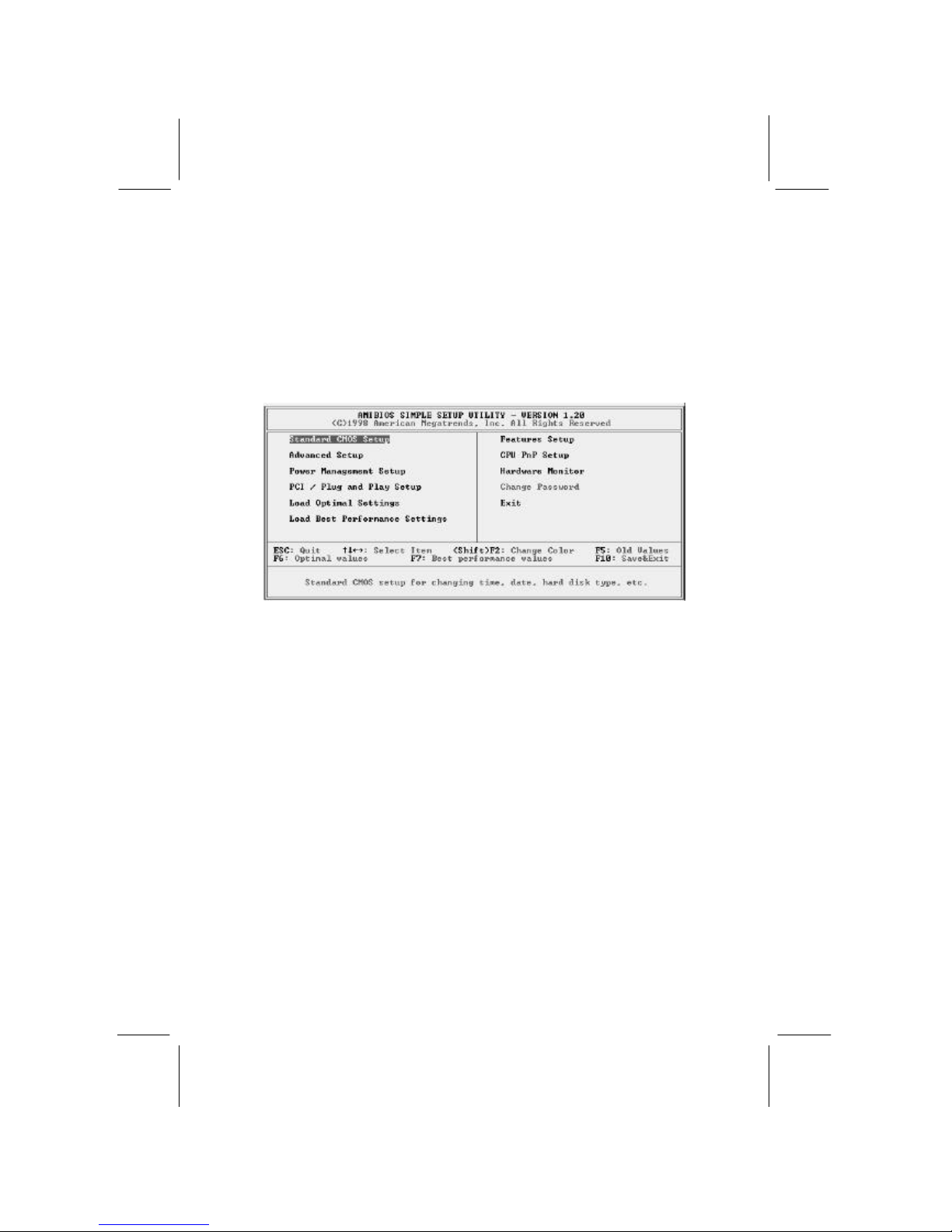
a message appears on the screen that prompts you to “Hit <DEL>
if you want to run SETUP ”. When you see this message, press the
Delete key and the Main menu page of the Setup Utility appears on
your monitor.
You can use the cursor arrow keys to highlight any of the options
on the main menu page. Press Enter to select the highlighted
option. To leave the setup utility, press the Escape key. To cycle
through the Setup Utility’s optional color schemes hold down the
Shift key and press F2.
Some of the options on the main menu page lead to tables of items
with installed values. In these pages, use the cursor arrow keys to
highlight the items, and then use the PgUp and PgDn keys to cycle
through the alternate values for each of the items. Other options on
the main menu page lead to dialog boxes which require you to
answer Yes or No by hitting the Y or N keys.
If you have already made changes to the setup utility, press F10 to
save those changes and exit the utility. Press F5 to reset the
changes to the original values. Press F6 to install the setup utility
with a set of default values. Press F7 to install the setup utility with
a set of high-performance values.
Page 27
3: BIOS Setup Utility
23
Standard CMOS Setup Page
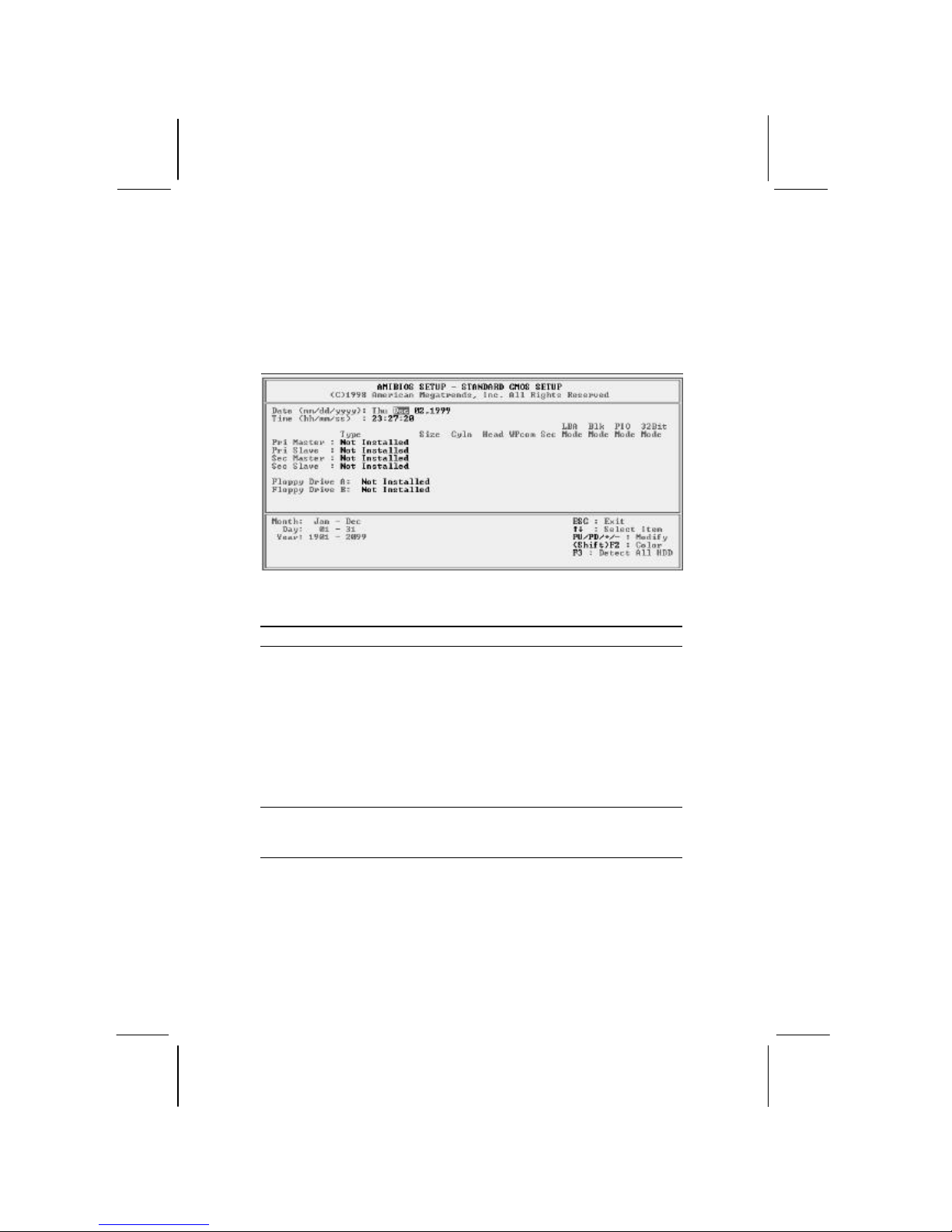
Use this page to set basic information such as the date and time, the
IDE devices, and the diskette drives. If you press the F3 key, the
system will automatically detect and configure the hard disks on
the IDE channels.
Date & Time
Use these items to set the system date and time
Pri Master
Pri Slave
Sec Master
Sec Slave
Use these items to configure devices connected
to the Primary and Secondary IDE channels. To
configure an IDE hard disk drive, choose Auto. If
the Auto setting fails to find a hard disk drive, set
it to User, and then fill in the hard disk
characteristics (Size, Cyls, etc.) manually. If you
have a CD -ROM drive, select the setting
CDROM. If you have an ATAPI device with
removable media (e.g. a ZIP drive or an LS-120)
select Floptical.
Floppy Drive A
Floppy Drive B
Use these items to set the size and capacity of
the floppy diskette drive(s) installed in the
system.
Page 28

Mainboard User’s Manual
24
Advanced Setup Page
Use this page to set more advanced information about your system.
Take some care with this page. Making changes can affect the
operation of your computer.
AMIBIOS SETUP – ADVANCED SETUP
(C) 2000 American Megatrends, Inc. All Rights Reserved
Trend ChipAway Virus Enabled
Frame Buffer Cache Control Auto
Share Memory Size 16M
1st Boot Device IDE-0
2nd Boot Device Floppy
3rd Boot Device CDROM
Try Other Boot Devices Yes
S.M.A.R.T. for Hard Disks Disabled
BootUp Num -Lock On
Floppy Drive Swap Disabled
Floppy Drive Seek Disabled
PS/2 Mouse Support Enabled
Password Check Setup
Boot To OS/2 > 64MB No
Internal Cache Enabled
System BIOS Cacheable Enabled
CAS Latency 3T
ESC : Quit ? ? ? ? : Select Item
F1 : Help PU/ PD/+/- : Modify
F5 : Old Values (Shift)F2 : Color
F6 : Load Optimal values
F7 : Load Best performance values
Trend ChipAway
Virus
This mainboard has built -in virus protection in the
firmware. Use this item to enable or disable the
built-in virus protection.
Frame Buffer
Cache Control
This item appears when a Frame Buffer Cache
card is installed in the ADIMM socket. The default
setting, Auto, automatically sets the display
memory size. The Manual setting uses the next
item to manua lly set display memory size.
Share Memory
Size
This item lets you allocate a portion of the main
memory for use by the onboard VGA display.
1st Boot Device
2nd Boot Device
3rd Boot Device
Use these items to determine the device order
the computer uses to look for an operating
system to load at start -up time.
Try Other Boot
Device
If you enable this item, the system will also
search for other boot devices if it fails to find an
operating system from the first two locations.
S.M.A.R.T. for
Hard Disks
Ena
ble this item if any IDE hard disks support the
S.M.A.R.T. (Self-Monitoring, Analysis and
Page 29

3: BIOS Setup Utility
25
Reporting Technology) feature.
BootUp NumLock
This items determines if the Num Lock key is
active or inactive at system start -up time.
Floppy Drive
Swap
If you have two diskette drives installed and you
enable this item, drive A becomes drive B and
drive B becomes drive A.
Floppy Drive
Seek
If you enable this item, your system will check all
floppy disk drives at start up. Disable this item
unless you are using an old 360KB drive.
PS/2 Mouse
Support
If this item is set to Enabled, the onboard PS/2
Mouse port will work. Setting this to Disable turns
off the port.
Password Check
If you have entered a password for the system,
use this item to determine if the password is
required to enter the Setup Utility (Setup) or
required both at start -up and to enter the Setup
Utility (Always).
Boot to OS/2 >
64MB
Enable this item if you are booting the OS/2
operating system and you have more than 64MB
of system memory installed.
Internal Cache
Leave this item enabled since all the processors
that can be installed on this board have internal
cache memory.
System BIOS
Cacheable
If you enable this item, a segment of the system
BIOS will be cached to main memory for faster
execution.
CAS Latency This item determines the operation of the
SDRAM memory CAS (column address strobe).
We recommend that you leave this item at the
default value. The 2T setting requires faster
memory that specifically supports this mode.
Page 30

Mainboard User’s Manual
26
Power Management Setup Page
This page sets some of the parameters for system power
management operation.
AMIBIOS SETUP – POWER MANAGEMENT SETUP
(C) 2000 American Megatrends, Inc. All Rights Reserved
Power Management/APM Disabled
Standby Time Out (Minute) Disabled
Suspend Time Out (Minute) Disabled
Hot Key Power On Disabled
OnBoard LAN Card Power On Disabled
Ring On Power On Disabled
RTC Alarm Power On Disabled
RTC Alarm Date Every Day
RTC Alarm Hour 12
RTC Alarm Minute 30
RTC Alarm Second 30
ESC : Quit ? ? ? ? : Select Item
F1 : Help PU/PD/+/ - : Modify
F5 : Old Values (Shift)F2 : Color
F6 : Load Optimal values
F7 : Load Best performance values
Power
Management/APM
Use this item to enable or disable a power
management scheme. If you enable power
management, you can use the items below to
set the power management operation. Both
APM and ACPI are supported.
Standby Time Out
(Minute)
This sets the timeout for Standby mode in
minutes. If the time selected passes without any
system activity, the computer will enter power saving Standby mode.
Suspend Time Out
(Minute)
This sets the timeout for Suspend mode in
minutes. If the time selected passes without any
system activity, the computer will enter power saving Suspend mode.
Hot Key Power On
If you enable this item, you can turn the system
on by pressing hot keys (Ctrl + Alt +
BackSpace) on the keyboard. You must
connect an ATX power supply and enable this
function jumper in order to use this feature.
OnBoard LAN
Card Power On
The system can be turned off with a software
command. If you enable this item, the system
can automatically resume if there is traffic on
the network adapter. You must use an ATX
power supply in order to use this feature.
Page 31

3: BIOS Setup Utility
27
Ring On Power On
The system can be turned off with a software
command. If you enable this item, the system
can automatically resume if there is an
incoming call on the Fax/Modem. You must use
an ATX power supply in order to use this
feature.
RTC Alarm Power
On
The system can be turned off with a software
command. If you enable this item, the system
can automatically resume at a fixed time based
on the system’s RTC (realtime clock). Use the
items below this one to set the date and time of
the wake-up alarm. You must use an ATX
power supply in order to use this feature.
Page 32
Mainboard User’s Manual
28
PCI / Plug and Play Setup Page
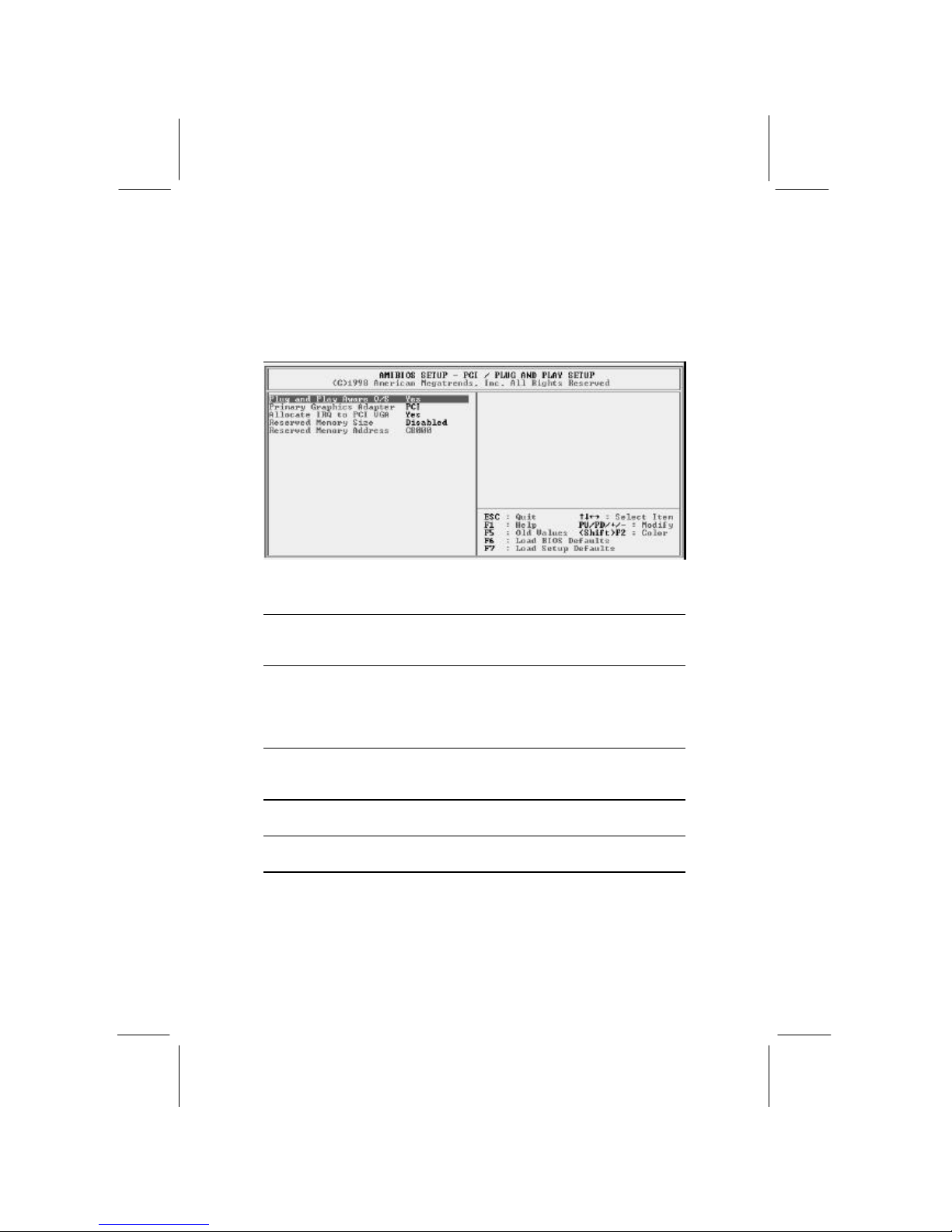
This page sets some of the parameters for devices installed on the
PCI bus and devices that use the system plug and play capability.
Plug and Play
Aware O/S
Enable this item if you are using an O/S that
supports Plug and Play such as Windows 95 or
98.
Primary Graphics
Adapter
This item indicates if the primary graphics
adapter uses the PCI or the AGP bus. The
default PCI setting still lets the onboard display
work and allows the use of a second display
card installed in a PCI slot.
Allocate IRQ to
PCI VGA
If this item is enabled, an IRQ will be assigned
to the PCI VGA graphics system. You set this
value to No to free up an IRQ.
Reserved Memory
Size
This item lets you reserve a block of memory
for any device that requires it.
Reserved Memory
Address
This item lets you set the address for any block
of memory that has been reserved.
Page 33

3: BIOS Setup Utility
29
Load Optimal Settings
If you select this item and press Enter a dialog box appears. If you
press Y, and then Enter, the Setup Utility loads a set of fail-safe
default values. These default values are not very demanding and
they should allow your system to function with most kinds of
hardware and memory chips.
Load Best Performance Settings
If you select this item and press Enter a dialog box appears. If you
press Y, and then Enter, the Setup Utility loads a set of best -
performance default values. These default are quite demanding and
your system might not function properly if you are using slower
memory chips or other low-performance components.
Page 34

Mainboard User’s Manual
30
Features Setup Page
This page sets some of the parameters for peripheral devices
connected to the system.
AMIBIOS SETUP – FEATURES SETUP
(C) 2000 American Megatrends, In c. All Rights Reserved
OnBoard FDC Enabled
OnBoard Serial PortA 3F8h/COM1
OnBoard IR Port Disabled
OnBoard Parallel Port 378h
Parallel Port Mode SPP
Parallel Port IRQ 7
Parallel Port DMA N/A
OnBoard Game Port Auto
OnBoard MIDI Port 300h
MIDI Port IRQ 10
OnBoard PCI IDE Both
Ultra DMA Support Disabled
OnChip Audio Enabled
OnChip Modem Auto
OnBoard LAN Enabled
USB Function Disabled
USB Function for DOS Disabled
ESC : Quit ? ? ? ? : Select Item
F1 : Help PU/PD/+/ - : Modify
F5 : Old Values (Shift)F2 : Color
F6 : Load Optimal values
F7 : Load Best performance values
OnBoard FDC
Use this item to enable or disable the onboard
floppy disk drive interface.
OnBoard Serial
PortA
Use this item to enable or disable the onboard
COM1 serial port, and to assign a port address
OnBoard IR Port
Use this item to define the protocol for an
infrared port if you have installed an optional IR
port. The choices are IrDA and ASKIR.
Onboard Parallel
Port
Use this item to enable or disable the onboard
LPT1 parallel port, and to assign a port
address. The Auto setting will detect and
available address.
Parallel Port Mode
Use this item to set the parallel port mode. You
can select SPP (Standard Parallel Port), ECP
(Extended Capabilities Port), EPP (Enhanced
Parallel Port), or ECP + EPP.
Parallel Port IRQ
Use this item to assign either IRQ 5 or 7 to the
parallel port.
Parallel Port DMA
Use this item to assign a DMA channel to the
parallel port. The options are 0, 1 and 3.
Page 35

3: BIOS Setup Utility
31
OnBoard Game
Port
Use this item to enable or disable the onboard
game port, and to assign a port address.
OnBoard MIDI Port
Use this item to enable or disable the onboard
MIDI port, and to assign a port address.
MIDI Port IRQ
Use this item to assign an IRQ to the MIDI port.
Onboard PCI IDE
Use this item to enable or disable either or both
of the onboard Primary and Secondary IDE
channels.
Ultra DMA Support
Use this item to set Ultra DMA support for IDE
devices on the Primary or Secondary IDE
channels. You must enable this or UDMA
devices will not work at their intended speed.
OnChip Audio
This item enables or disables the onboard
audio chip.
OnChip Modem
This item enables or disables the onboard
modem chip.
OnBoard LAN
This item enables or disables the onboard
network interface.
USB Function
Enable this item if you plan to use the USB
ports on this mainboard.
USB Function for
DOS
Enable this item if you plan to use the USB
ports on this mainboard in a DOS environment.
Page 36
Mainboard User’s Manual
32
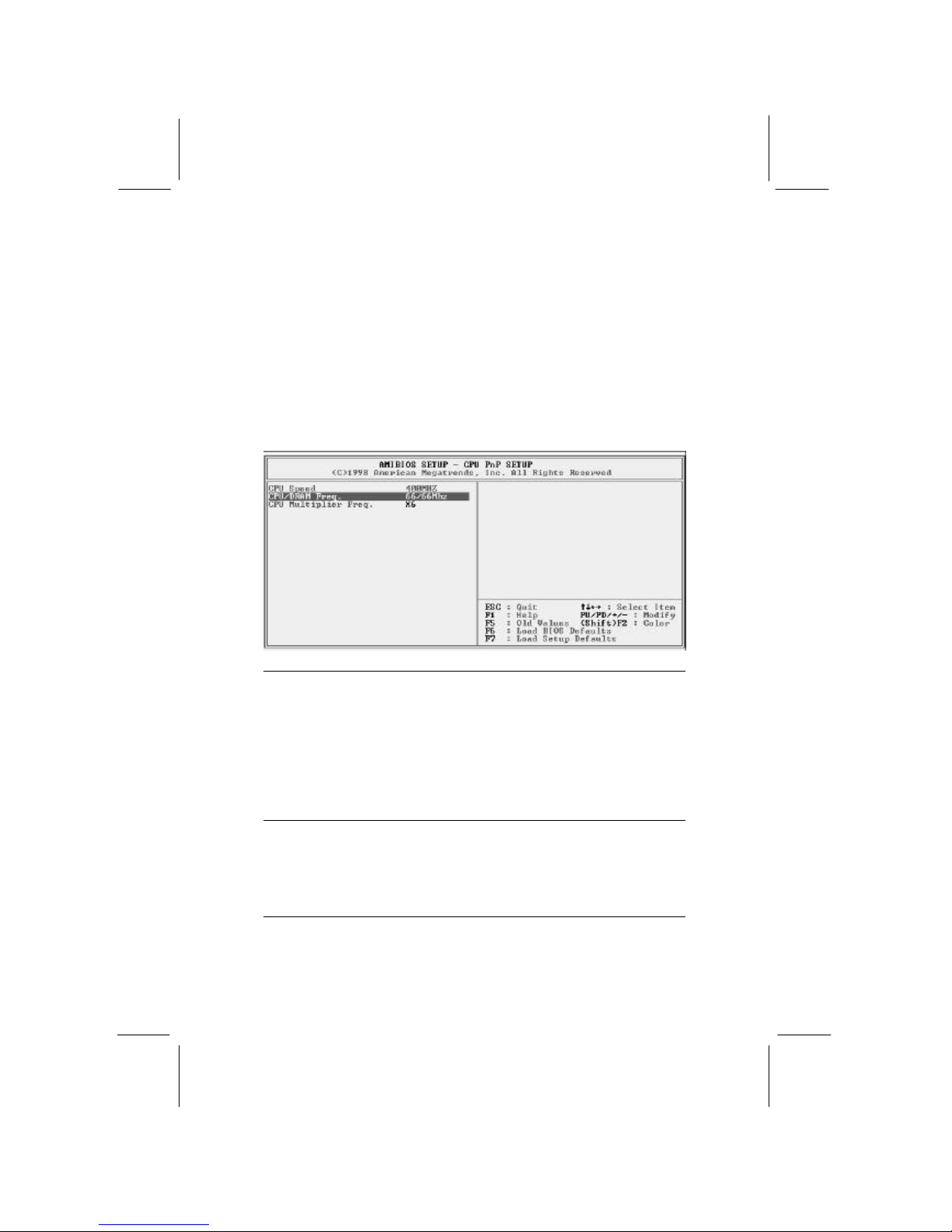
CPU PnP Setup Page
This page lets you manually configure the mainboard for the CPU.
The system will automatically detect the kind of CPU that you
have installed and make the appropriate adjustments to the items
on this page.
Note: If you manually set the wr ong speed and the system won’t
run properly, press the Page Up key while the system is booting
and a default setting will replace the incorrect CPU setting.
CPU Speed
The item displays the internal clock speed of
the CPU, based on the next two items.
CPU/SDRAM
Frequency
Use this item to sets the external clock
frequency for the CPU and the memory bus
frequency. The options include combinations of
66 and 100MHz. Set the CPU clock based on
the requirements of the CPU installed on the
board. Select the memory frequency based on
the speed of the memory installed on the board.
CPU Multiple Freq.
Use this item to set a multiplier for the CPU
external frequency. The multiplier times the
external CPU frequency sets the internal clock
speed of the CPU, e.g. 100 MHz (external clock
or “FSB”) x 4.5 (muliplier) = 450 MHz (internal
clock speed of the installed CPU).
Page 37
3: BIOS Setup Utility
33
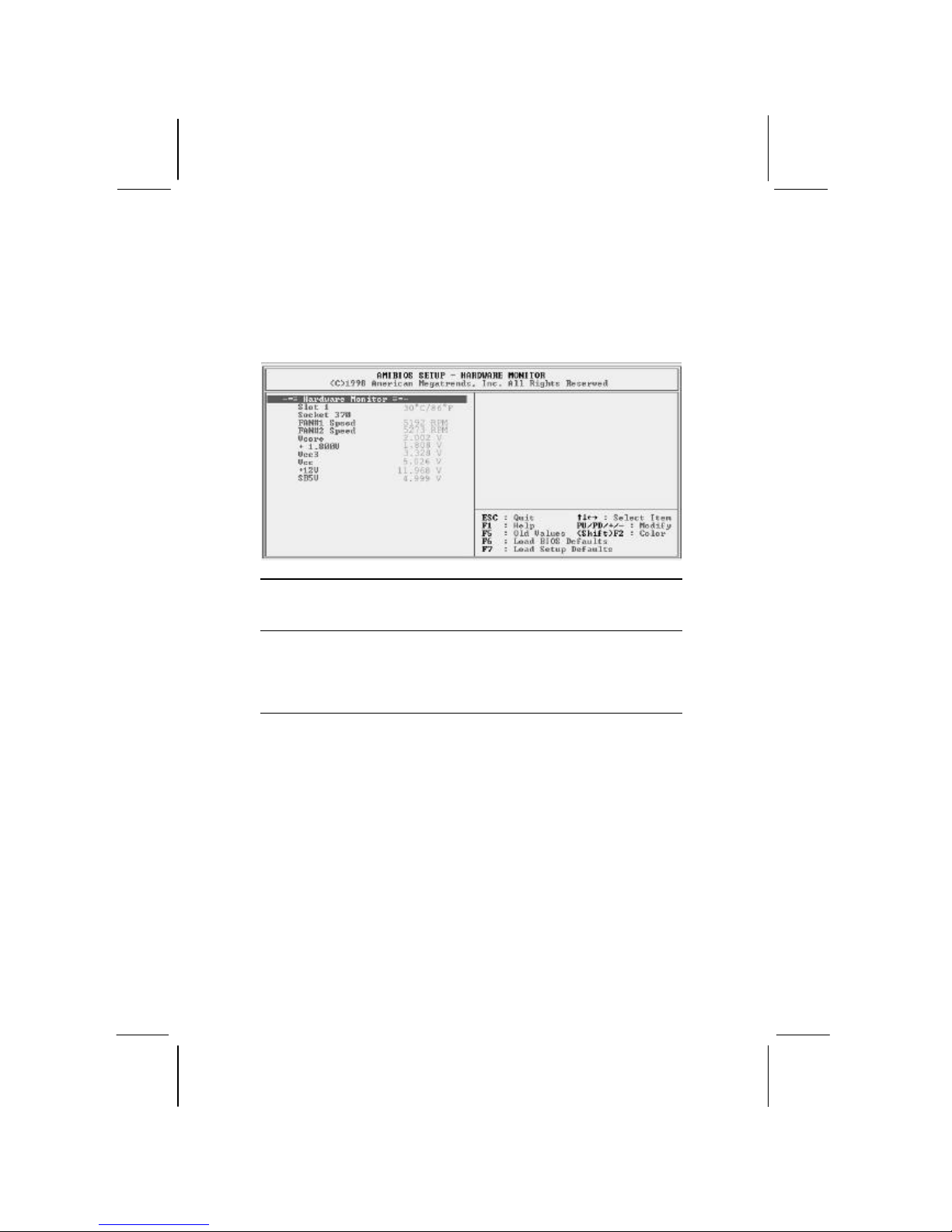
Hardware Monitor Page
This page sets some of the parameters for the hardware monitoring
function of this mainboard.
Slot 1, Socket 370
These items display CPU temperature
measurement. The system will alert you if a
safe temperature is exceeded.
FAN#1, 2 Speed &
Voltage
Measurements
These items indicate cooling fan speeds in
RPM and the various system voltage
measurements. If the values deviate beyond
certain limits, the hardware monitoring feature
will alert you with a warning.
Note: The CPU temperature appears for the CPU socket used. If
the Socket 370 socket is used, a CPU temperature will display on
that line instead of the Slot 1 line as shown here.
Page 38
Mainboard User’s Manual
34
Change Password
If you highlight this item and press Enter, a dialog box appears
which lets you enter a Supervisor password. You can enter no more
than six letters or numbers. Press Enter after you have typed in the
password. A second dialog box asks you to retype the password for
confirmation. Press Enter after you have retyped it correctly. The
password is then required to access the Setup Utility or for that and
at start-up, depending on the setting of the Password Check item
in Advanced Setup.
Change or Remove the Password
Highlight this item, press Enter and type in the current password.
At the next dialog box, type in the new password, or just press
Enter to disable password protection.
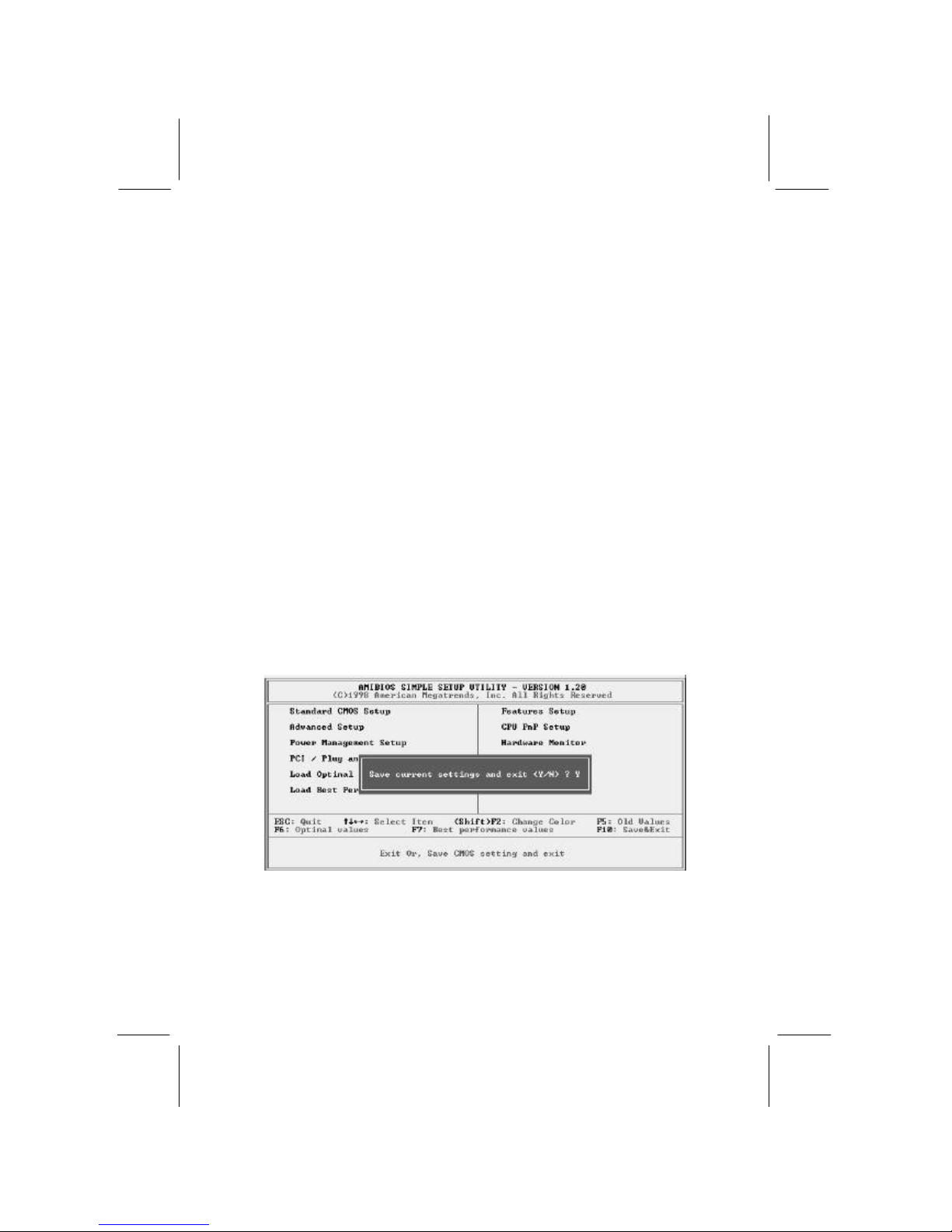
Exit
Highlight this item and press Enter to save the changes that you
have made in the Setup Utility configuration and exit the program.
When the Save and Exit dialog box appears, press Y to save and
exit, or press N to exit without saving.
Page 39

4: Software & Applications
35
Chapter 4
Software & Applications
Introduction
The support software CD-ROM that is included in the mainboard
package contains all the drivers and utility programs needed to
properly run our products. Below you can find a brief description
of each software program, and the location for your mainboard
version. More information on some programs is available in a
README file, located in the same directory as the software.
If the operating system used in your system is Windows 98, it
will automatically install all the drivers and utilities for your
board. See the Installing under Windows 98 section.
Installing Support Software
The software on the support CD-ROM is for Windows 95/NT/2000
and Windows 98/Me. The installation procedure differs depending
on which Operating System you have, but the automatic
installation is now for Win98/Me only.
Installing Under Windows 95/NT/2000
To install support software for Windows 95/NT/2000 follow this
general procedure:
1. Insert the support CD-ROM disc in the CD-ROM drive.
(The system might get an error message from the PnP function.
Don’t care the message. You don’t really need that file to install
the drivers)
2. Use My Computer or Windows Explorer to look at the
directory structure. You must use the Open command in the
right-button menu. Double-clicking on the drive icon will
result in an error message because the disc’s AutoRun feature
doesn’t work in Windows 95/NT/2000.
3. Execute the EXE file name given in the description below.
Page 40

Mainboard User’s Manual
36
Note: The correct path name for each software driver is provided,
where D: identifies the CD-ROM drive letter – modify if necessary.
Bus Master IDE Driver
The IDE Bus Master Drivers allows the system to properly manage
the IDE channels on the mainboard. You only need to install an
IDE driver if you are running Windows 95. Use the default
Windows driver on the Windows CD-ROM disc.
Display Drivers and Software
Find the Display drivers and software here:
? ? D:\VGA\SiS630\
Audio Driver
The Audio driver allows the system to use the onboard audio
circuitry. Find the driver and audio application here:
? ? D:\SOUND\Driver\SiS\
AMR Modem Driver
Find the driver here:
? ? D:\Modem\Driver\AMR\PCtel\
Network Adapter Driver
Find the network interface driver here:
? ? D:\LAN\SiS900
USB Driver
The USB Driver allows the system to recognize the USB ports on
the mainboard. You need to install this d river if you are running
Windows 95. Windows 95 OSR2 does not require this driver.
This driver is available for:
? ? Win95 – D:\USB\EUSBSUPP\USBSUPP.EXE
? ? Win95 (Chinese) – D:\USB\CUSBSUPP\CUSBSUPP.EXE
3Deep Software
Find the software here:
? ?
D:\3Deep\3Deep 3.3\S etup.EXE
Page 41

4: Software & Applications
37
BIOS Update Utility
The BIOS Update utility allows you to update the BIOS file on the
mainboard to a newer version. You can download the latest version
of the BIOS setup available for your mainboard from the website.
? ? D: \UTILITY\AMINFxxx.EXE
PC-Cillin Software
The PC -cillin software program provides anti-virus protection for
your system.
Find this program here:
? ? D: \PC-CILLIN\
Installing Under Windows 98
The support software CD-ROM disc loads automatically under
Windows 98/Me. When you insert the CD-ROM disc in the system
CD-ROM drive the Autorun feature will automatically bring up the
install screen. The screen has three buttons on it, Setup, Browse
CD and Exit. See the following screen illustration.
When you click on the Setup button the software installation
program will run and you can select what kind of installation you
want to do, as explained later in this section.
Page 42
Mainboard User’s Manual
38
The Browse CD button is the standard Windows command that
allows you to examine the contents of the disc using the Windows
98 file browsing interface.
The Exit button closes the Auto Setup window. To run the
program again, reinsert the CD-ROM disc in the drive or click on
AutoRun in the context sensitive menu for the CD -ROM drive icon
in a file browser window.
Installing Software with Auto Setup
To install support software for the system board follows this
procedure:
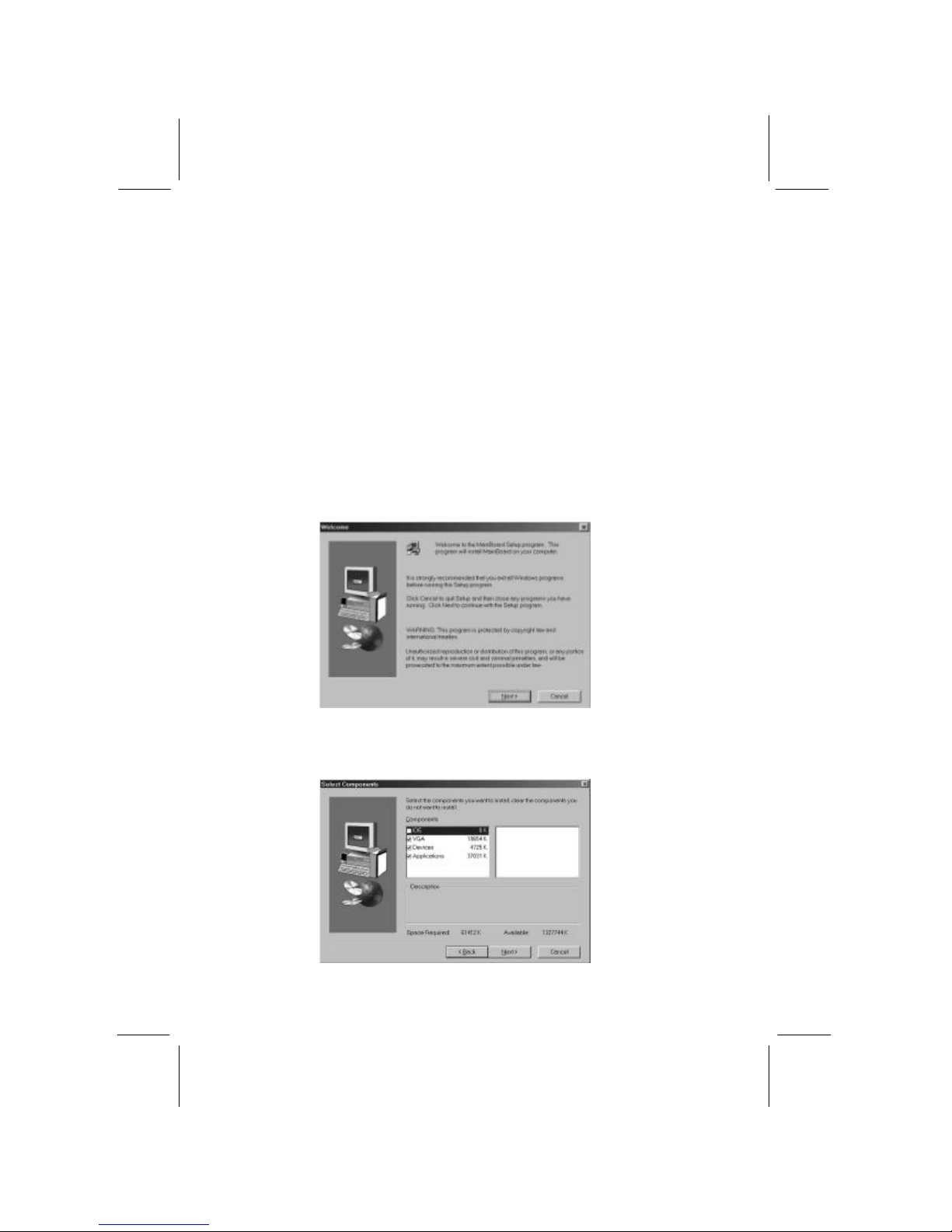
1. Click on the Setup button. The install program will load and
display the following screen. Click the Next button.
2. Select the items that you want to setup by clicking on it (the
default options are recommended). Click the Next button to
proceed.
Page 43

4: Software & Applications
39
3. The support software will automatically install.
Once any of the installation procedures start, software is
automatically installed in sequence. You will need to follow the
onscreen instructions, confirm commands and allow the computer
to restart as few times as is needed to complete installing whatever
software you selected to install. When the process is finished, all
the support software will be installed and working.
There are some utilities that you have to manually install if you
need, check to the above section.
 Loading...