

Page 1
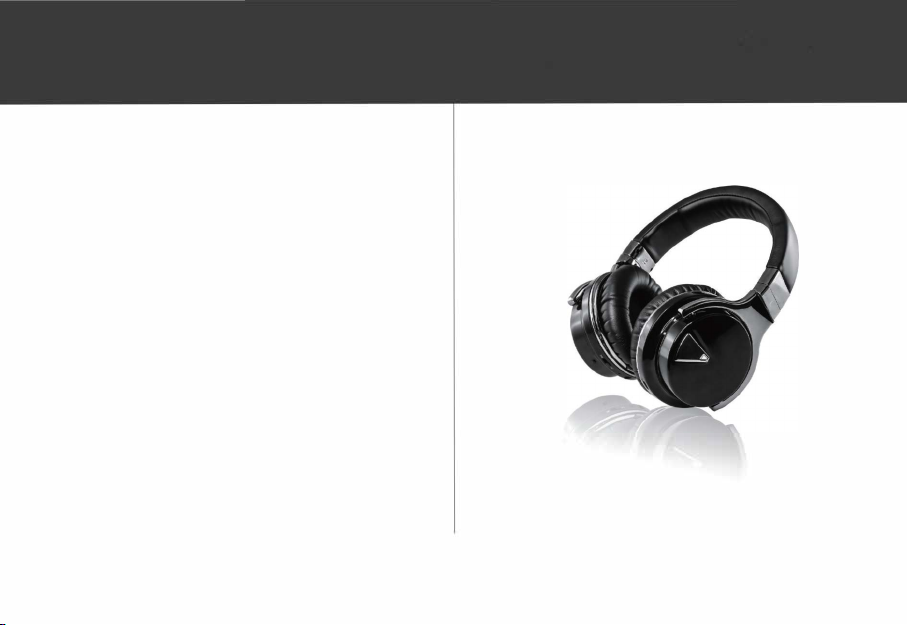
WAVESOUN02
User Guide
Page 2
Contents
1. Introduction
2. Battery Precautions
3. Getting Started
4. Cable Connection
5. Bluetooth Connection
6. NFC Connection
7. Function Guidance
8. LED Display Status
9. Battery Charging
10. Product care
Please read the following safety warnings and precaution before using this device.
-1-
2
3
4
5
5
6
7
7
8
8
Page 3

Specification
Paww WaveSound 2
Range:
Driver:
Frequency range:
Battery:
Functional Specs:
Size:
65.6' (20m)
40mm Neodymium
20Hz-20KHz
3.7v, 800 mAH replaceable
Bluetooth, Hands-free, ANC, NFC
i
166x92x181mm
1. Introduction
Congratulations on your purchase of Paww WaveSound 2; one of the most
advanced headphones systems on the market. Paww WaveSound 2 has been
engineered to provide you with years of enjoyment and comfort. Experience
music without compromise. Experience Paww WaveSound 2.
-2-
Page 4

2. Battery Precautions
The Paww WaveSound 2 can be powered by a built-in rechargeable lithium-
ion battery. Please charge the battery for at least 8 hours before first use.
If the device has not been used for an extended period of time, the battery
may be drained of power and require recharging.
Rechargeable batteries should only to be charged under adult supervision.
Only use the supplied micro-USB cable to recharge the battery. Improper
charging may damage the battery and the device.
Do not attempt to open the rechargeable battery or battery pack. There
are no serviceable parts inside.
Keep the battery out of reach of children. If swallowed, consult a physician
immediately.
Avoid storing the battery in extremely hot or cold environments. A device
with a hot or cold battery may not work temporarily, even when the
battery is fully charged.
Do not dispose of the batteries in a fire as they may explode. Batteries may
also explode if damaged. Please dispose of them according to local
regulation. Do not dispose of batteries as household waste.
-3-
Page 5
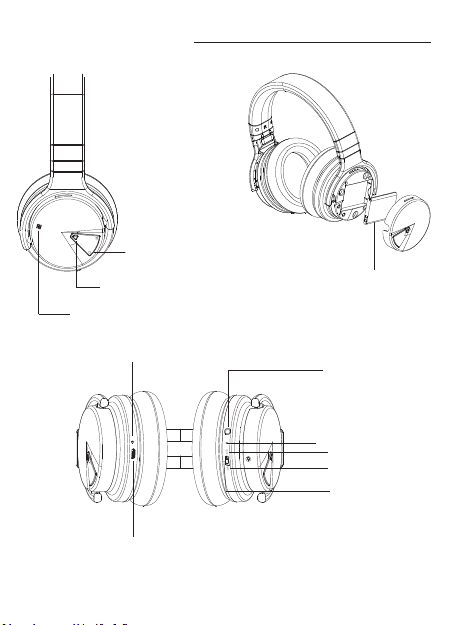
3. Getting Started
Volume Down/Previous
Volume Up/Next
Play/Pause, Answer call, Left LED
NFC
Battery
Removable battery
Right LEDD
USB for Charging
-4-
AUX IN
MIC
OFF
Noise cancelling
Bluetooth
Page 6
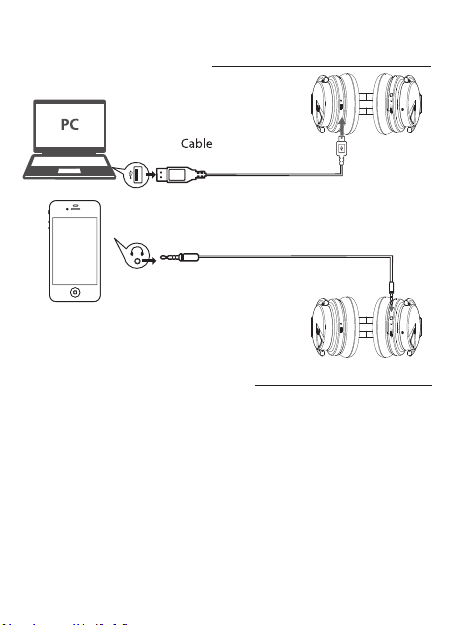
4. Cable Connection
USB
for power
Cable
for audio
5. Bluetooth Connection
The Paww WaveSound 2 headphone system can be paired with most
Bluetooth enabled devices with the range of 20 meters (65.6 feet)
1. Activate pairing mode on the Paww WaveSound 2 by turning the
switch to “BT” mode. The LED will flash blue in color.
2. On your Bluetooth enabled device, navigate to the settings menu, and
select the Bluetooth option.
3. Select “Search” or “Discover” devices.
4. Select “WAVESOUND 2”.
5. If requested, type the password or PIN as 0000
6. Press the Enter key to complete setup.
-5-
Page 7
After completing the steps above, a message on your Bluetooth enabled
device will appear confirming that the pairing process was successful.
In case the pairing in unsuccessful, please restart the Paww WaveSound 2
and try again. If the Bluetooth on your smart device remains open, when you
restart the headphone, the Bluetooth will be connected automatically.
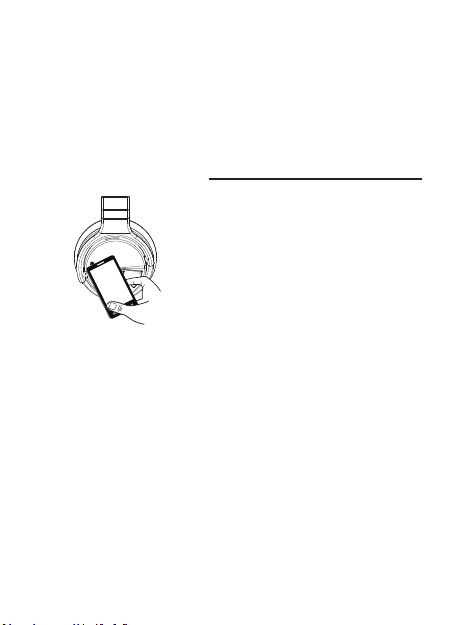
NFC Connection
6.
NFC or (Near Field Communication),
is a set of standard for wireless
devices to establish radio
communication between compatible
devices by touching them together
or bringing them into close
proximity to each other.
Please activate the NFC function of your NFC enabled Bluetooth
device and put the device close to the Paww WaveSound 2.
Your device will ask you if you want to pair the two device, choose
Yes or OK to complete the pairing process.
-6-
Page 8
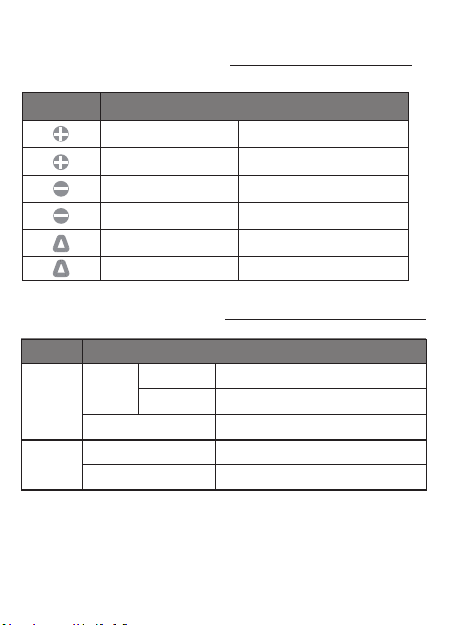
7. Functional Guide
music
Playing
Button Operation Function
Long press
Short press
Long press
Short press
Short press
Long press
Play/Pause, Answer/End a call.
Ready for pairing
8. LED Display Status
Volume up
Next song
Volume down
Previous song
Right LED LED
Left LEDD
Blue
LED Display
Flash
Stay Solid
White
Red
OFF
Light indication
Power ON
Paired
Active noise cancelling ON
Charging in process
Fully charged
-7-
Page 9

9. Battery Charging
This Paww WaveSound 2 has a built-in rechargeable lithium-ion battery
that can be charged by connecting the supplied cable to a USB port of
your computer or into an AC adapter with USB port. When charging is
completed, the red light will go off.
10. Product care
This device is designed to be light, compact and durable. As an electronic
device it must be treated carefully. Putting unnecessary pressure on it or
striking the device against other objects may cause damage. To avoid
damage to your device, please:
Do not drop, crush, bend or apply excessive force to the device.
Do not expose your device to moisture, extreme or prolonged heat, cold,
humidity, or other adverse conditions. Avoid storing it in damp, humid or
wet places, as it is not waterproof.
Clean the unit with a soft cloth or damp chamois leather. Never use
solvents.
The unit can only be opened by qualified personnel.
This unit contains magnets. Keep magnetic field sensitive products such as
credit cards and video screen away from this device to avoid damage or
malfunction.
-8-
 Loading...