

Page 1
Connect
臘腸狗
臘腸狗
Treasure Hunt
3 Years Old
正面
iPuppyGo
Smart Pet Activity Tracker
Quick Guide
Hardware Specifications
Dimensions: 35mm x 11mm (Φ 35mm)
Net Weight: 8g (including battery)
Power Input: DC 3V 0.2A
Package Content
・Smart pet activity tracker
・Frame accessory
・Silicone strap x2
・Quick guide/warranty card
Warranty Policy
The warranty period of iPuppyGo should
be decided by the law of the country where
the purchase occur. You may also visit our
website for further detials.
Additional Information &
Customer Service
If you need further customer support or
want to find out more products from us,
please visit our website: www.pawbo.com
Product Warranty Card
Keep your receipt of purchase or invoices
to ensure your warranty privileges.
Product
serial
number
Purchase date
Reseller seal
Manufacturer : Pawbo Inc.
6F, No.68, Ruiguang Rd. , Neihu Dist., Taipei City 114, Taiwan
E-mail:[email protected]
https://www.pawbo.com/uk/support/
QG
組合尺寸57*57mm
100p特銅
雙面4色印刷
背面
1
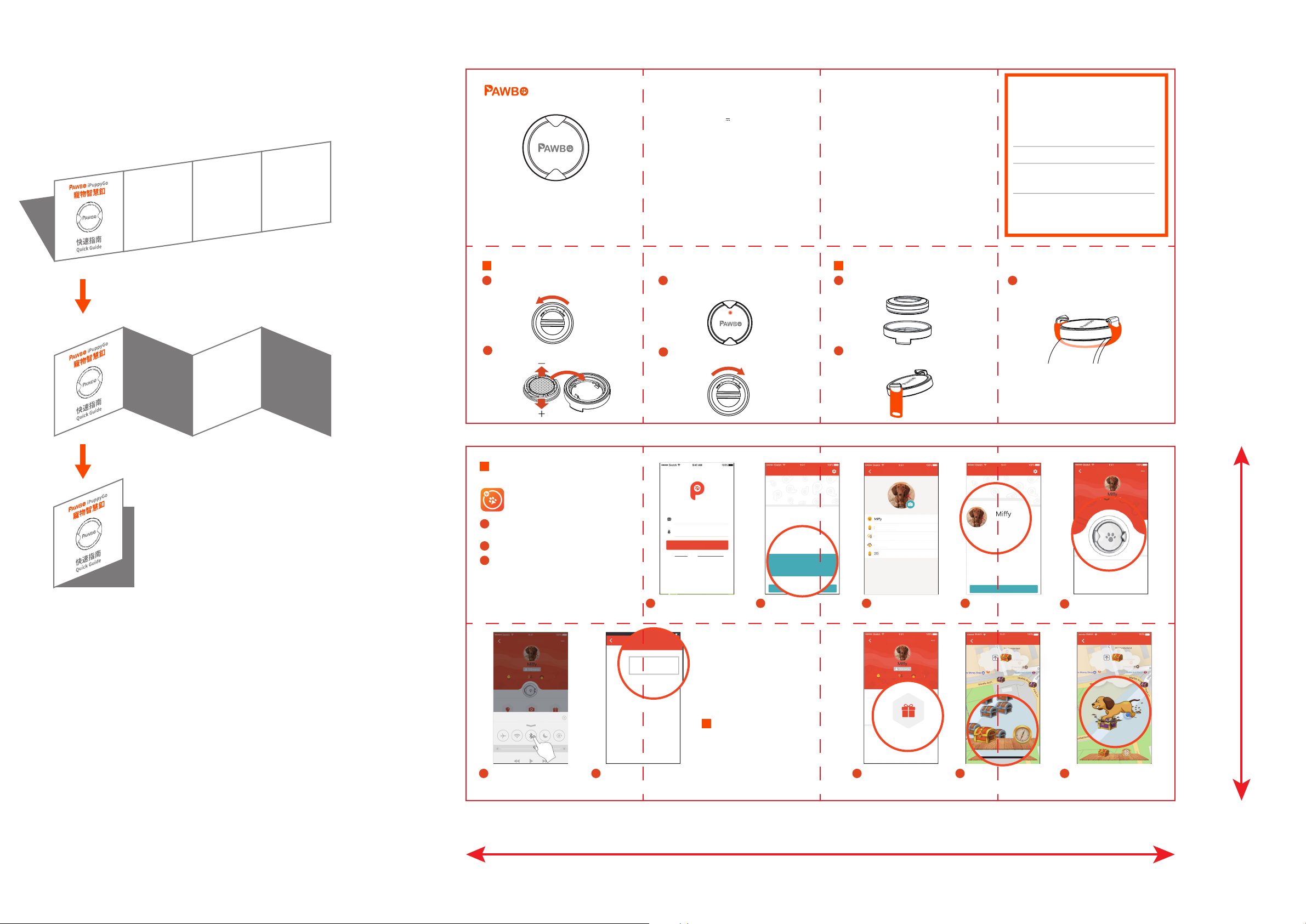
Installing the Battery
A
Twist counterclockwise (from CLOSE
towards OPEN) to open as indicated.
B
Install the CR2032 coin battery (please
pay attention to polarity).
3
Connecting the iPuppyGo to
Your Phone
iPuppyGo
iOS : Supports iOS 9.0 or later
Android: Supports Android 5.0 or later
A
Please search for "iPuppyGo" in App Store/
Google Play.
B
Touch the app to launch.
Each smart pet activity tracker can be linked
C
to one account, and can record the information
for one pet. You can set up smart pet activity
tracker for multiple pets on one phone.
Pet Info
17 Months Old Male
Swipe up from the bottom of the
screen and enable Bluetooth
I
Enable Bluetooth on your
phone to connect to the
smart pet activity tracker.
Dachshund
Smart pet activity tracker
J
Select "Connect" to start
tracking your pet's status.
C
After the battery is installed, the front
indicator light on the smart pet activity
tracker will flash.
D
Align the positioning points, and
tighten the battery cap as illustrated
below.
Email Address
Password
Log In
Register Forgot Password
D
Enter your email address
and password to log in.
Note
Please connect to the PAWBO
iPuppyGo app and upload your
pet's data to the cloud at least
once every 7 days. Due to
memory capacity, the smart
collar only keeps data from the
last 7 days.
4
Starting Your
Treasure Hunt
Dig and win virtual treasure
and prizes for your pet!
Personal Profile
Add Pet Profile
E
Register the pet that will
be wearing the smart
pet activity tracker .
2
How to Wear
A
Place the smart pet activity tracker into
the frame accessory and press down
lightly.
B
Place the hole on one end of the
silicone strap onto the hook on the
frame accessory.
Enter your pet's information
2016 Set.19
Male
Long-Haired Dachshund
F
Enter your pet's
information.
Pet Info
All Photos
A
Tap on "Treasure Hunt".
SAVE
Dachshund17 Months Old Male
C
Wrap the silicone strap around the
smart pet activity tracker and place the
hole on the other end of the strap onto
the hook on the other side of the frame
accessory.
Personal Profile
Add Pet Profile
G
Select the pet wearing
the iPuppyGo smart
pet activity tracker .
iPuppyGO
200 meters to next treasure chest
B
Tap on compass to show
the treasure chest.
Pet Info
臘腸狗
Tap on smart pet activity
H
tracker icon in the centre to
connect to your phone.
100%9 41Sketch
C
Tap on treasure chest to
start digging for treasures.
iPuppyGO
200 meters to next treasure chest
100%9 41Sketch
114mm
228mm
 Loading...