

Page 1
®
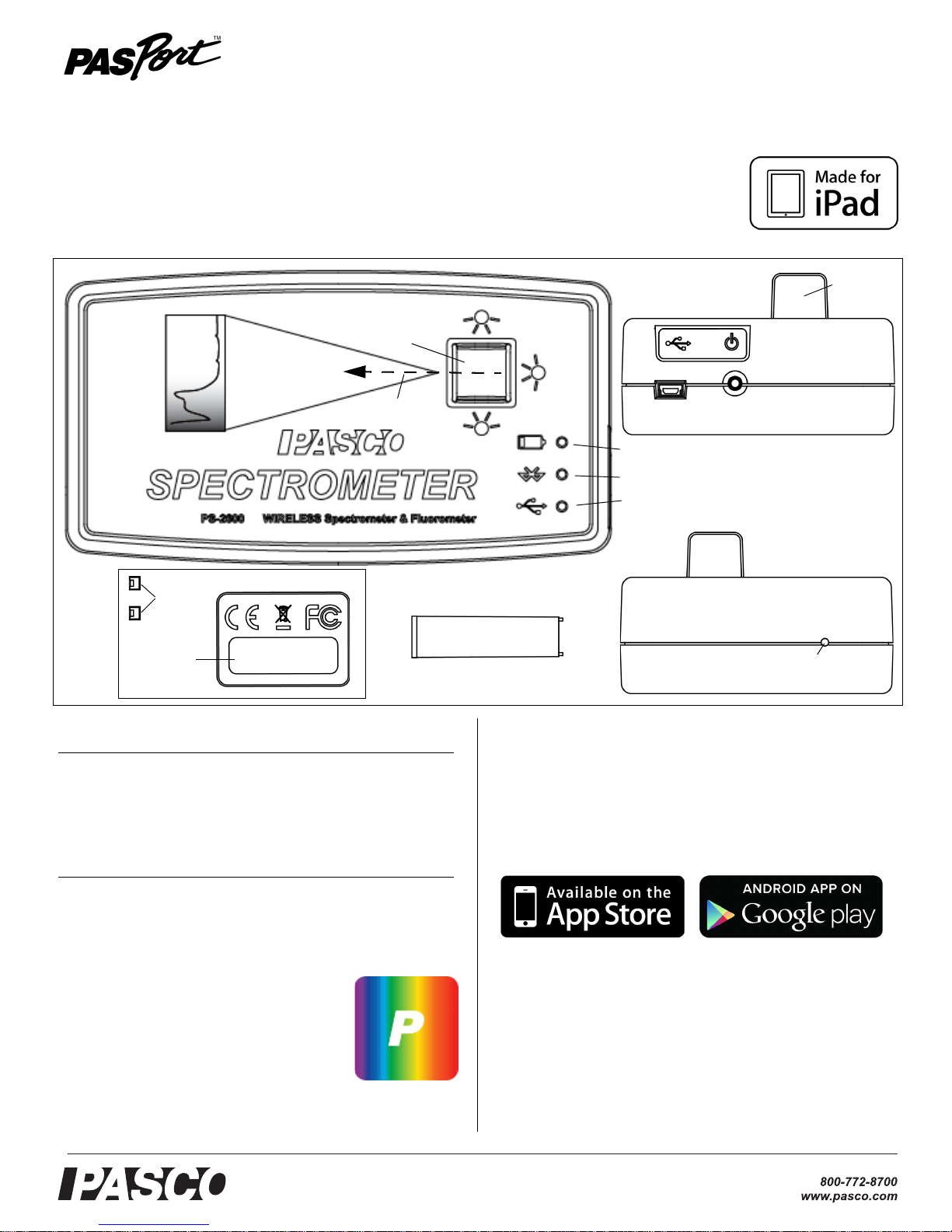
Wireless Spectrometer
Cuvette and Lid (10)
Left End
Reset Button Access
Right End
USB
Port
ON/OFF
Button
Battery Status LED
Bluetooth Status LED
USB Status LED
Bottom
Bluetooth ID#
Label
Drain
Ports
Cuvette Holder
Light Path
Top
Cuvette
Holder
PS-2600
Reference Guide
013-14074D
Included Equipment Part Number
Spectrometer PS-2600
Cuvette and Lid (10 each)
USB Cable
Optional Equipment
Fiber Optic Probe PS-2601
Also Required: Spectrometry Software
Software for Computer or Tablet
Spectrometry
Available free for Mac and PC
computers and iPad and
Android* tablets at the PASCO
web site:
www.pasco.com/downloads
*Android tablet must be Bluetooth-compatible.
Download the software from the PASCO web
site or from another source.
Software: Other Sources
The Spectrometry software is also available
from the App Store and from Google Play.
Initial Step: Charge the Battery
The Wireless Spectrometer is partially
charged at the factory. The battery is charged
using the USB cable connected to a USB port
or USB charger. Leave the Spectrometer off
while charging. As the battery is charging, the
Battery Status LED (light-emitting diode) will
+1 916 786 3800
Page 2
®
Wireless Spectrometer PS-2600
blink red. When the battery is fully charged,
the Battery Status LED shines green. The
charger circuit inside the unit turns itself off
when the unit is fully charged, so it can’t be
overcharged.
Introduction
The Wireless Spectrometer is specifically
designed for introductory spectroscopy
experiments. The Bluetooth and USB
connectivity enable its use with tablets and
computers. With this one apparatus, you can
measure intensity, absorbance, transmittance,
and fluorescence, making this a powerful and
intuitive tool for your spectroscopy needs.
Specifications
Item Value
Resolution: 2 to 3 nanometers (nm)
Range: 380 to 950 nm
5. In the Menu, select the Wireless Spectrometer
with the Device ID # that matches the Device
ID # on the bottom of the device.
Connecting the Wireless Spectrometer to a
Computer with a USB Cable
1. Connect the small end of the included USB into
the USB port on the back of the Spectrometer
2. Connect the other end of the USB cable to a
USB port on the computer, or into a USB hub
connected to the computer.
3. Turn on the Spectrometer, and briefly press
and hold the ON/OFF button on the side. After
all three status LEDs blink in sequence,
release the ON/OFF button.
4. The USB Status LED will shine green. (NOTE:
The Bluetooth Status LED will slowly blink
blue. The Battery Status LED may also blink to
indicate that the battery is charging through
the USB cable.)
Fluorescence Excitation
Wavelengths:
Light Source: LED boosted tungsten
405 nm and 500 nm
Connecting the Wireless Spectrometer to a Tablet
or Computer via Bluetooth
1. Turn on the spectrometer, and briefly hold the
ON/OFF button on the back. After all three
status LEDs blink in sequence, release the
ON/OFF button. The Bluetooth Status LED will
blink blue.
2. Pair /connect through Bluetooth to your
computing device. This step will depend on
your computing device and operating system.
The Bluetooth Status LED will shine blue.
3. Start the Spectrometry software. (Refer to the
Spectrometry Software User Guide at the
PASCO web page:
www.pasco.com/spectrometer
under Resources.)
Usage
Place the sample to be examined in a cuvette.
Fill the cuvette to the point where the top of the
sample is at least 3.0 centimeters (cm) or 1.2
inches above the bottom. Put the lid on the
cuvette and put the cuvette in the cuvette
holder of the Spectrometer.
NOTE: The cuvette has two smooth sides and
two ribbed sides. When putting the cuvette into
the Spectrometer, the smooth sides need to
be along the light path (perpendicular to the
light path). The body of the spectrometer is
made from ABS. Only use solutions in the
spectrometer to which ABS shows good
chemical resistance. Avoid letting any solution
come in contact with the spectrometer
housing.
Replacement Cuvettes
Order Model SE-8739 Cuvettes and Caps to
get 100 replacement cuvettes and lids.
4. If the Wireless Spectrometer is not found,
select Choose Wireless Device.
2
There are two drain ports in the bottom of the
cuvette holder to allow for drainage if
something spills into the holder, To clean the
holder, moisten a small cotton swab with
013-14074D
Page 3

®
Technical Support PS- 2600
deionized water and gently wipe the interior.
The cuvettes included with this spectrometer
are made from polystyrene. With these
cuvettes, only use solutions to which
polystyrene shows good chemical resistance.
Battery:
Life
On a full charge, the Spectrometer will run in
Analyze Light mode for eight to nine hours.
The battery is replaceable.
Replacement
If the Spectrometer fails to recharge, the
battery may need to be replaced. The battery
is field replaceable using the Model PS-2569
Replacement Battery. Removing the battery
requires a Torx T8 screwdriver and a small
Phillips head screwdriver.
CAUTION: Make the area as dust-free and
static-free as possible before opening the
Sprectrometer. Do not touch the optical
components inside the Spectrometer.
• Use the Torx screwdriver to remove the four
screws from the bottom of the
Sprectrometer case.
Light Source Replacement
The small printed circuit board that holds the
incandescent bulb and the three light-emitting
diodes can be removed and replaced by a
skilled technician. Contact Technical Support
regarding availability and installation
instructions for PASCO part number
004-14026.
Troubleshooting the Spectrometer
• If the Spectrometer loses Bluetooth
connection and will not reconnect, try
cycling the ON/OFF button. Press and
briefly
hold the button until the status LEDs
blink in sequence, and then release the
ON/OFF button to turn on the
Spectrometer.
• If the Spectrometer stops communicating
with the computer software or tablet
application, try restarting the software or
application. If the problem remains, try
cycling the ON/OFF button.
• As a last resort, push a pin into the Reset
port on the left end of the Spectrometer.
• Lift the top half of the case off the
Spectrometer and set it aside.
• Disconnect the battery leads from the
connector on the bottom edge of the printed
circuit board.
• Use a small Phillips head screwdriver to
remove the one small screw that is near the
middle of the top edge of the printed circuit
board.
• Lift the printed circuit board aside, and
replace the square shaped battery pack.
Reconnect the battery leads to the
connector on the bottom edge of the printed
circuit board.
• Check that the printed circuit board and its
components are free of dust.
• Reverse the other steps to close the
Spectrometer.
Contact PASCO Technical Support for more
information.
Technical Support
For assistance with any PASCO product,
contact PASCO at:
Address: PASCO scientific
10101 Foothills Blvd.
Roseville, CA 95747-7100
Phone: +1 916 462 8380 (worldwide)
800-772-8700 (U.S.)
Web: www.pasco.com
Email: [email protected]
For more information about the product and
the latest revision of this Reference Guide,
visit the PASCO web site at:
www.pasco.com/manuals
and enter “Spectrometer” or the product
number (PS-2600) in the Search window.
Limited Warranty
The Spectrometer has a five year warranty. For a more thorough
description of the product warranty, see the PASCO catalog.
013-14074D
3
Page 4
®
Wireless Spectrometer PS-2600
Copyright
The PASCO scientific 013-14074D
Guide
is copyrighted with all rights reserved. Permission is granted to
non-profit educational institutions for reproduction of any part of this
manual, providing the reproductions are used only in their laboratories and
classrooms, and are not sold for profit. Reproduction under any other
circumstances, without the written consent of PASCO scientific, is
prohibited.
Trademarks
PASCO, PASCO scientific, PASCO Capstone, PASPORT, and
SPARKvue are trademarks or registered trademarks of PASCO scientific,
in the United States and/or in other countries. All other brands, products,
or service names are or may be trademarks or service marks of, and are
used to identify, products or services of their respective owners. For more
information visit www.pasco.com/legal.
Made for iPad
“Made for iPad” means that an electronic accessory has been designed to
connect specifically to iPad and has been certified by the developer to
meet Apple performance standards. Apple is not responsible for the
operation of this device or its compliance with safety and regulatory
standards. Please note that the use of this accessory with iPad may affect
wireless performance.
iPad, iPad Air, and iPad mini are trademarks of Apple, Inc, registered in
the U.S. and other countries.
FCC Statement
This Class A digital device complies with part 15 of the FCC Rules.
Operation is subject to the following two conditions: (1) This device may
not cause harmful interference, and (2) this device must accept any
interference received, including interference that may cause undesired
operation.
Wireless Spectrometer Reference
The Lithium Polymer (Li-Poly) rechargeable battery used in this product is
marked with the International symbols to indicate the need for the
separate collection and recycling of batteries.
CE Statement
This device has been tested and found to comply with the essential
requirements and other relevant provisions of the applicable EU
Directives.
Product End of Life Disposal Instructions:
This electronic product is subject to disposal and recycling regulations that
vary by country and region. It is your responsibility to recycle your
electronic equipment per your local environmental laws and regulations to
ensure that it will be recycled in a manner that protects human health and
the environment. To find out where you can drop off your waste equipment
for recycling, please contact your local waste recycle/disposal service, or
the place where you purchased the product.
The European Union WEEE (Waste Electronic and
Electrical Equipment) symbol (to the right) and on the
product or its packaging indicates that this product
must not be disposed of in a standard waste
container.
Battery Disposal Instructions:
Batteries contain chemicals that, if released, may affect the environment
and human health. Batteries should be collected separately for recycling,
and recycled at a local hazardous material disposal location adhering to
your country and local government regulations. To find out where you can
drop off your waste battery for recycling, please contact your local waste
disposal service, or the product representative.
4
013-14074D
 Loading...