

Page 1
Quad Pressure Sensor
PS-2164
Quad Pressure
Sensor
1
QUAD PRESSURE SENSOR
234
PRESSURE SENSORS
Instruction Sheet
012-09012A
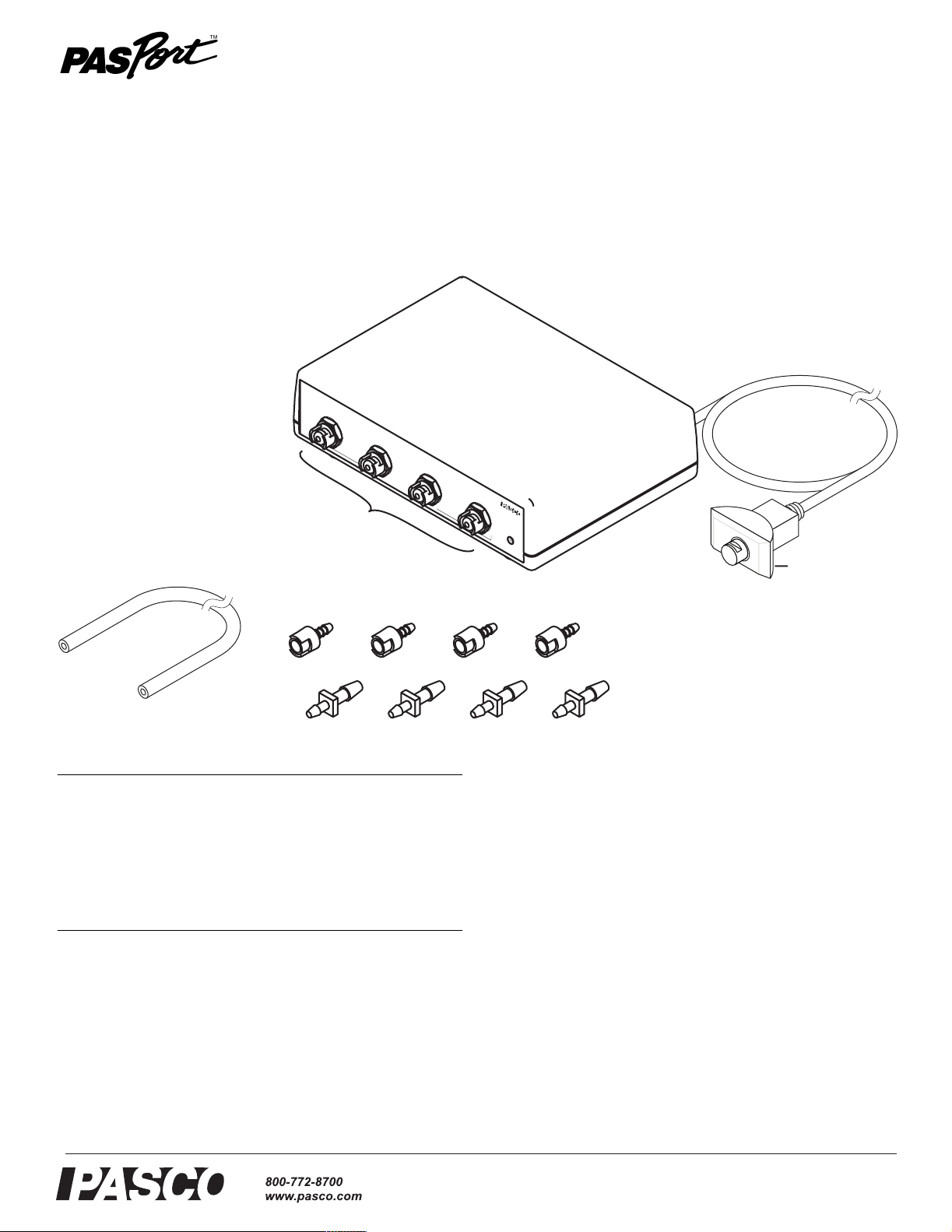
Pressure Ports
Polyurethane
Tubing
Included Equipment Part Number
Quad Pressure Sensor
Polyurethane Tubing (length 2.4 m)
Quick-release Connectors (qty. 4)
Tubing Connectors (qty. 4)
PS-2164
640-023
640-021
640-030
Required Equipment
PASPORT Interface
1 See PASCO catalog
or www.pasco.com
PS-2164
POWER
Connect to
PASPORT interface
Quick release Connectors
Tubing Connectors
Introduction
The four-port Quad Pressure Sensor is a multi-sensor capable
of reading up to four absolute pressures, or two differential
pressures, or two gauge pressures. Dynamic variable
over-sampling automatically reduces measurement noise at
low sampling rates. Sample rates up to 1000 Hz make studies
of both transient and steady-state pressure possible. The sensor measures pressure in units of kPa, N/m
square inch (psi).
2
, and pounds per
1
PASPORT interfaces include the AirLink (IW-4100 or PS-2005), Xplorer
GLX (PS-2002), Xplorer (PS-2000), PowerLink (PS-2001), and USB
Link (PS-2100)
®
Setup
Types of Pressure Measurements
To measure pressure in an apparatus, connect one or more of
the four pressure ports using the included tubing and connectors. The way that you connect the Quad Pressure Sensor
Page 2
Model No. PS-2164 Setup
depends on whether you will measure absolute pressure, differential pressure, or gauge pressure:
Absolute Pressure The multi-sensor can measure up to
four absolute pressures simultaneously. One connection is
required for each measurement, and any of the pressure ports
may be used.
Differential Pressure The multi-sensor measures differential pressure by determining the pressure difference between
two ports. It can measure one or two differential pressures
simultaneously, with two connections required for each measurement. Differential pressure can be measured between
ports 1 and 2 or between ports 3 and 4 (or both).
Gauge Pressure Gauge pressure is a special case of differential pressure in which the second port of the pair is left
unconnected. The multi-sensor measures the pressure difference between the first port (connected to the apparatus) and
the second port (left open to the atmosphere). It can measure
up to two gauge pressures simultaneously, with one connection required for each measurement. Gauge pressure can be
measured by port 1 (with port 2 left open) and by port 3 (with
port 4 left open).
5. Connect the multi-sensor’s cable to your PASPORT inter-
face.
DataStudio Setup
If you are using a computer, connect the PASPORT interface
to the computer and start DataStudio. (Refer to the documentation that came with your PASPORT interface for instructions
on connecting it to your computer.) In DataStudio, click the
Start button to begin data collection; click the Stop button to
stop data collection.
By default, DataStudio displays the absolute pressures measured by all four ports in a Graph display. To make the differential measurements available for display, click the Setup
button to open the Experiment Setup window; in that window, select 1-2 Differential Pressure or 3-4 Differential
Pressure. There you can also change the sampling rate (up to
1000 Hz) and select different units of measure. For more
instructions on using DataStudio, press F1 to open DataStudio’s on-line help.
Xplorer GLX Setup
Sensor Setup
1
QUAD PRESSURE SENSOR
234
PRESSURE SENSORS
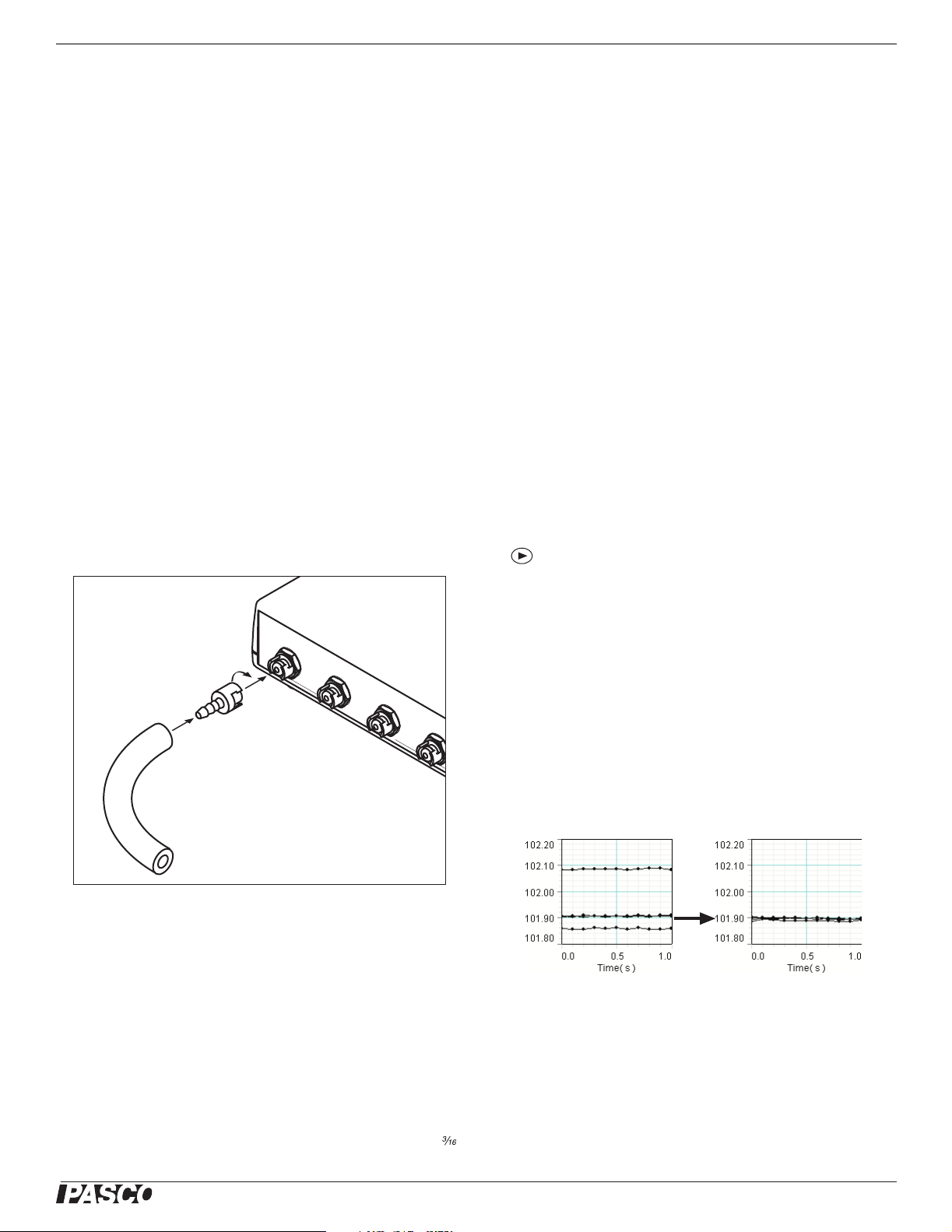
1. Cut a piece (or pieces) of tubing to the desired length.
2. Insert a quick-release connector into each piece of tubing.
If you are using an Xplorer GLX in standalone mode, press
to start data collection. By default, the GLX displays the
absolute pressure from port 1 (Absolute Pressure 1) in units
of kPa, but you can select any of the other absolute or differential measurements for display. For more instructions on
using the Xplorer GLX, refer to the GLX Users’ Guide.
Multiple-measurement Alignment
When you are using multiple pressure ports, you may find that
their readings differ slightly when they are measuring the
same thing. In the example illustrated below, measurements
from four ports open to the atmosphere vary by about 0.2 kPa.
The multiple-measurement alignment procedure adjusts the
calibrations of the measurements so they agree more closely.
3. Connect each piece of tubing to the multi-sensor by
inserting the quick-release connector into one of the pressure ports and twisting clockwise.
4. Connect the free ends of the tubing to the apparatus using
connectors supplied with the apparatus or the tubing connectors include with the Quad Pressure Sensor.
You can use the included tubing connectors to connect to a 5 mm (
inch) hole in a rubber stopper.
®
The procedure described here for DataStudio can also be performed
on the Xplorer GLX. See the Xplorer GLX Users’ Guide for detailed
instructions.
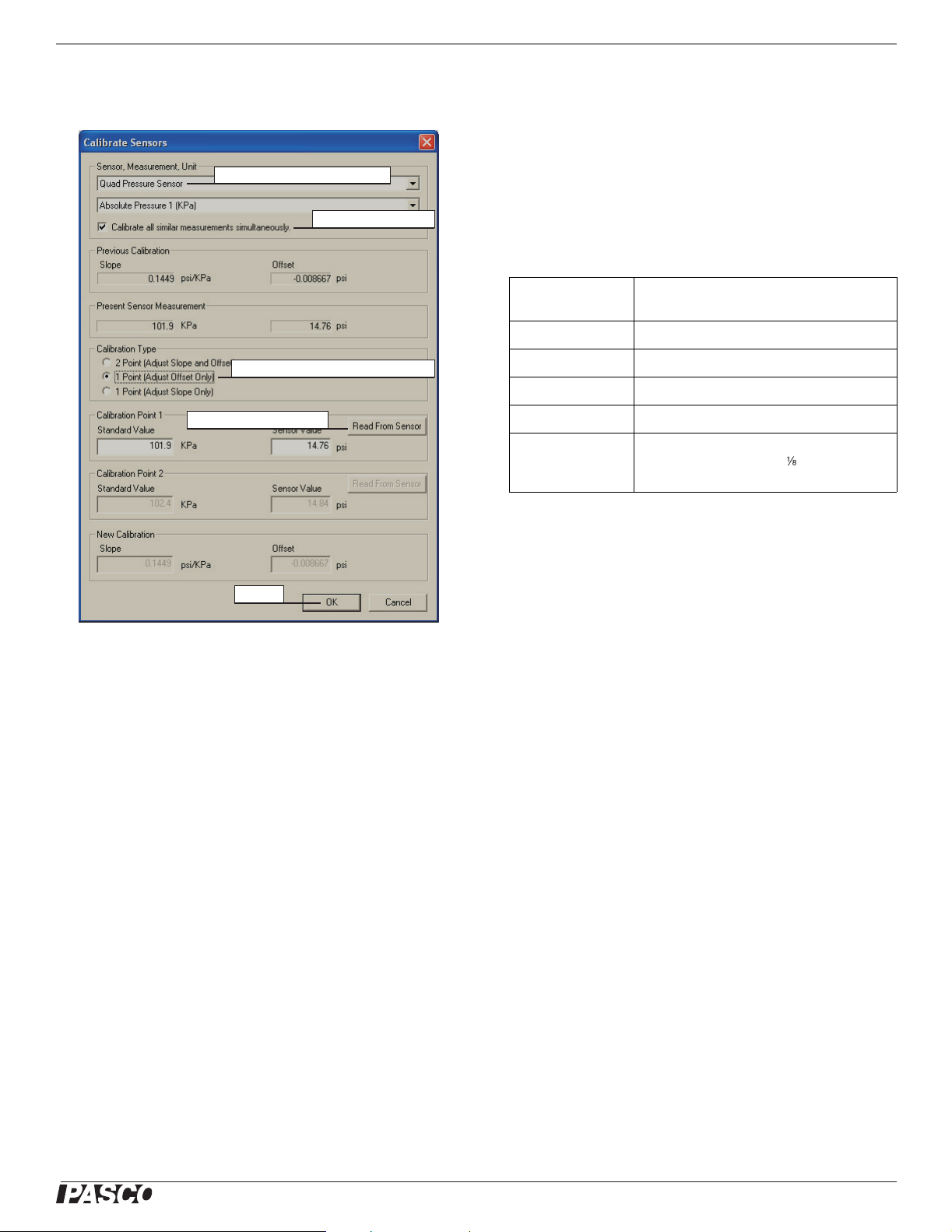
1. Click the Setup button to open the Experiment Setup
window. Click Calibrate Sensors to open the calibration
dialog box.
2
Page 3
Model No. PS-2164 Specifications
2. From the Sensor field, select the Quad Pressure Sensor.
(See screenshot below.)
Select Quad Pressure Sensor
Select Calibrate all...
Select 1 Point (Adjust Offset Only)
click Read From Sensor
measurement resolution. This effect is especially noticeable
when very small pressure changes or differences are measured. The degree of dynamic variable over-sampling that
takes place within the Quad Pressure Sensor depends on the
sample rate. To maximize the over-sampling, set the sample
rate as low as possible for a given application. Maximum
over-sampling occurs at sampling rates of 1 Hz or slower.
Specifications
Range Absolute pressure: 0 to 200 kPa
Differential pressure: −100 kPa to +100 kPa
Resolution 0.01 kPa at 10 Hz
Repeatability 1 kPa
Units of Measure kPa, N/m
Max. Sample Rate 1000 Hz
Included tubing Material: polyurethane
Inside diameter : 3.2 mm ( inch)
Length: 2.4 m (8 feet)
2
, psi
click OK
3. Select the Calibrate all similar measurements simulta-
neously option.
4. From the Calibration Type menu, select 1 Point (Adjust
Offset Only).
5. Apply the same pressure to all four ports (for instance by
opening them to the atmosphere).
6. Click the Read From Sensor button for Point 1.
7. Click OK to accept the new calibration.
One-point and Two-point Calibrations
Though it is usually not necessary, a one-point or two-point
calibration can be performed on any of the absolute or relative
measurements to make them more accurate. To do so, you
must have a very accurate independent means of measuring
pressure, such as a barometer. For step-by-step instructions
refer to the documentation for DataStudio version 1.9.5, the
Xplorer, or the Xplorer GLX.
Over-sampling
Technical Support
For assistance with any PASCO product, contact PASCO at:
Address: PASCO scientific
10101 Foothills Blvd.
Roseville, CA 95747-7100
Phone: 916-786-3800 (worldwide)
800-772-8700 (U.S.)
Fax: (916) 786-3292
Web: www.pasco.com
Email: [email protected]
Limited Warranty
For a description of the product warranty, see the PASCO catalog.
Copyright
The PASCO scientific 012-09012A
Sheet
is copyrighted with all rights reserved. Permission is granted to
non-profit educational institutions for reproduction of any part of this manual, providing the reproductions are used only in their laboratories and
classrooms, and are not sold for profit. Reproduction under any other circumstances, without the written consent of PASCO scientific, is prohibited.
Trademarks
PASCO, PASCO scientific, DataStudio, PASPORT, and ScienceWorkshop
are trademarks or registered trademarks of PASCO scientific, in the
United States and/or in other countries. All other brands, products, or service names are or may be trademarks or service marks of, and are used to
identify, products or services of, their respective owners. For more information visit www.pasco.com/legal.
Quad Pressure Sensor Instruction
The Quad Pressure Sensor uses dynamic variable over-sampling to reduce noise, produce smoother data, and improve the
®
3
 Loading...