

Page 1
Page 2

Contents
1 Introduction ................................................................................ 1
1.1 Appearance of MT -6330 ........................................................................................................ 1
1.2 Installing an SD Card ............................................................................................................. 2
1.3 Installing a SIM Card ............................................................................................................. 3
1.4 Installing a Battery ................................................................................................................. 3
1.5 Disassembling the Battery Cover ......................................................................................... 4
1.6 Charging ................................................................................................................................. 4
2 Instructions on MT-6330 ............................................................ 6
2.1 Power-on and Power-off........................................................................................................ 6
2.2 Locking and Unlocking the MT-6330 .................................................................................... 6
2.3 Keys of MT-6330 .................................................................................................................... 6
2.4 Home ....................................................................................................................................... 7
2.5 Status Icons and Indicators ................................................................................................ ... 7
2.6 Basic Settings ......................................................................................................................... 8
3 Call Function ............................................................................ 12
3.1 Making a Call ........................................................................................................................ 12
3.2 Contacts ................................................................................................................................ 12
3.3 SMS and MMS ................................................................ ..................................................... 13
3.4 Email ..................................................................................................................................... 14
4. Network and Connection Synchronization ............................ 16
4.1 GPRS Data Connection ...................................................................................................... 16
4.2 Wi-Fi Network Connection .................................................................................................. 16
4.3 GPS ................................................................ ....................................................................... 17
4.4 Connecting MT-6330 to a Computer .................................................................................. 18
4.5 Synchronization .................................................................................................................... 18
5 Introduction to iScan of MT-6330 ............................................ 20
5.1 Installing and Using iScan ................................................................................................... 20
6 Managing MT-6330 ................................................................... 21
6.1 Installing Software ................................................................................................................ 21
6.2 Uninstalling Software ................................ ........................................................................... 21
6.3 Managing Applications ........................................................................................................ 22
7 Precautions and Troubleshooting .......................................... 23
7.1 Precautions for MT-6330 ..................................................................................................... 23
7.2 Troubleshooting .................................................................................................................... 24
Appendix 1 .................................................................................. 26
Appendix 2 .................................................................................. 27
Page 3
MT-6330 User Manual
- 1 -
1 Introduction
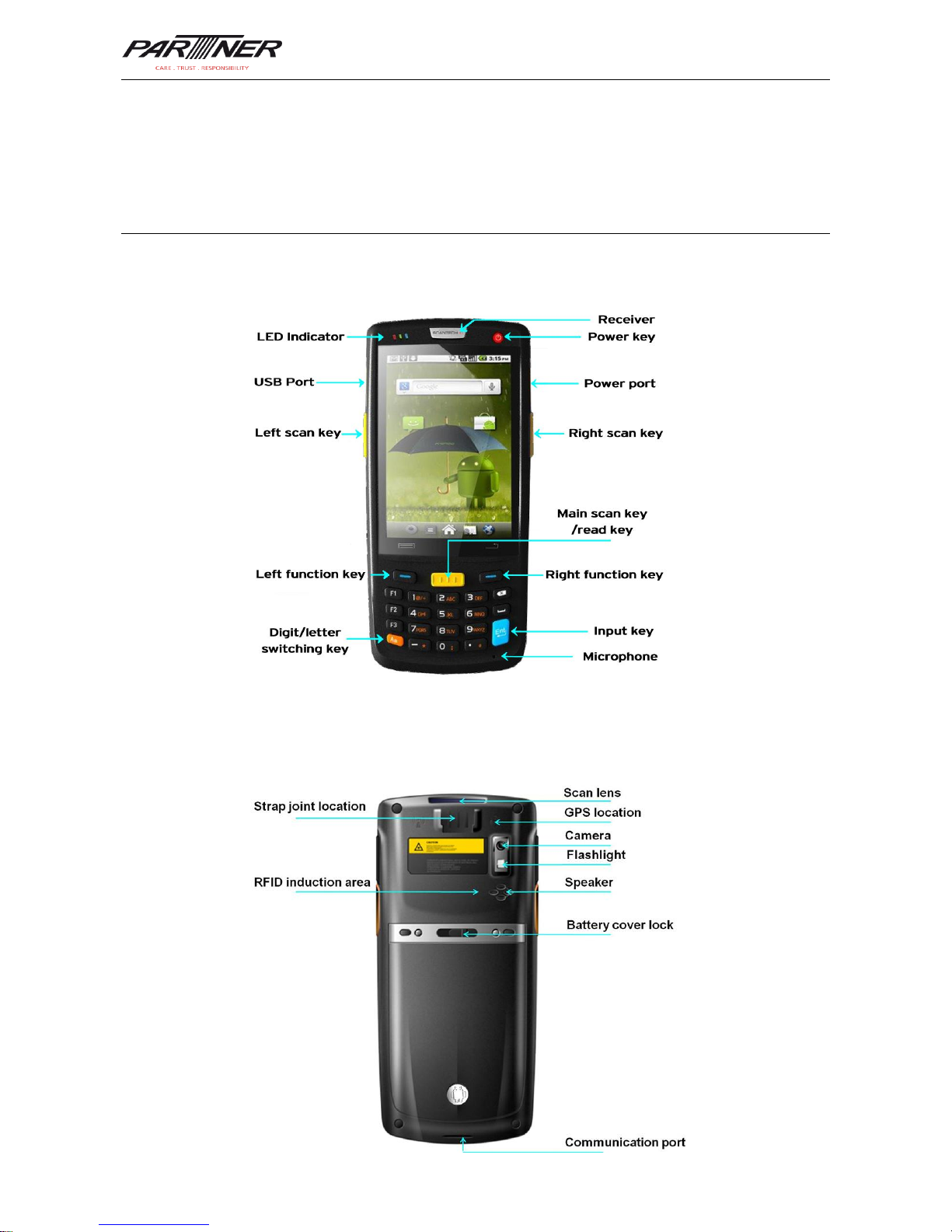
1.1 Appearance of MT-6330
Figure 1-1 Front view of MT-6330
Figure 1-2 Rear view of MT-6330
Page 4
MT-6330 User Manual
- 2 -
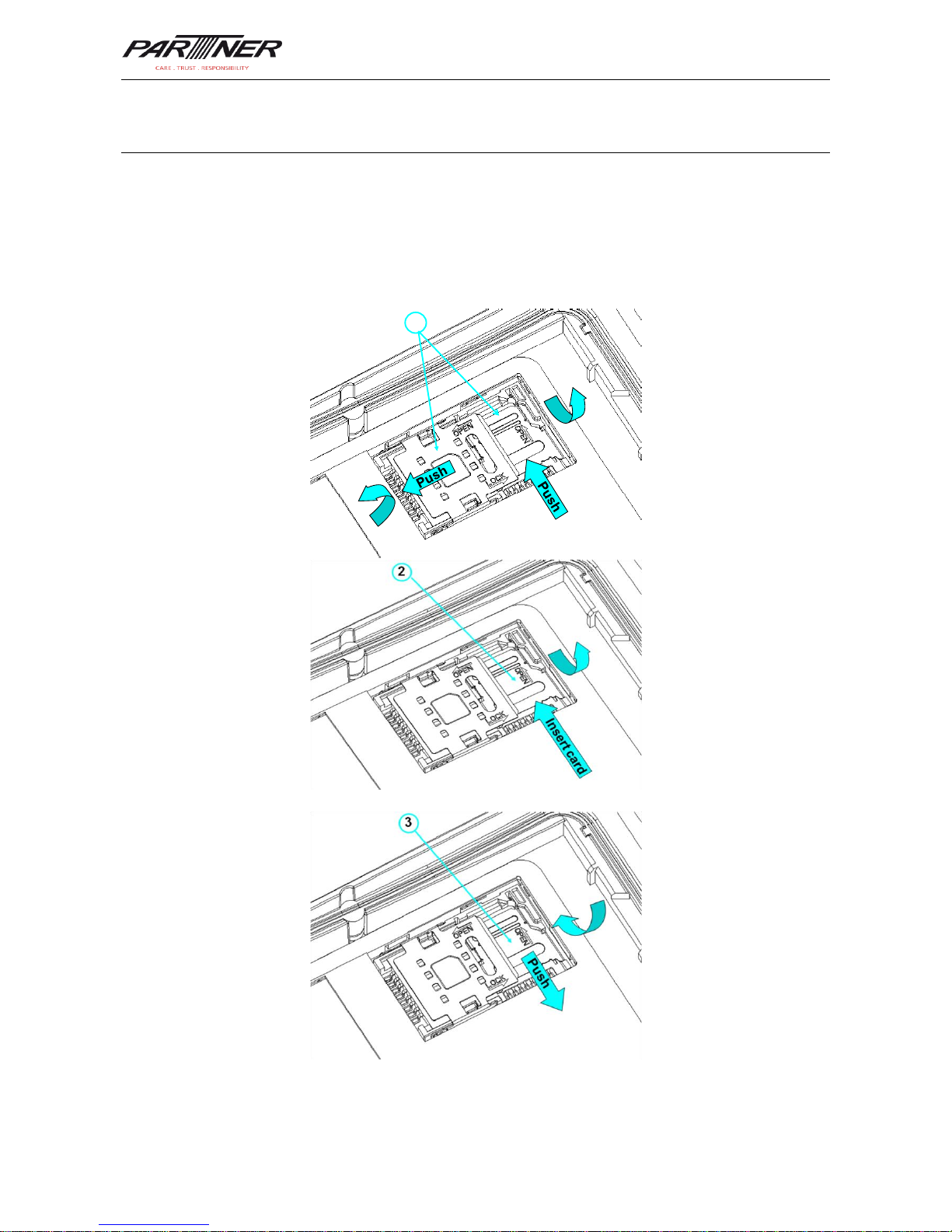
1.2 Installing an SD Card
To install an SD card, do as follows:
1. Push the card cover along the direction marked on the cover and open the cover.
2. Insert an SD card.
3. Press the SD card downward and lock the card along the IN direction marked on the
cover.
1
Figure 1-3 Inserting an SD card
Page 5
MT-6330 User Manual
- 3 -
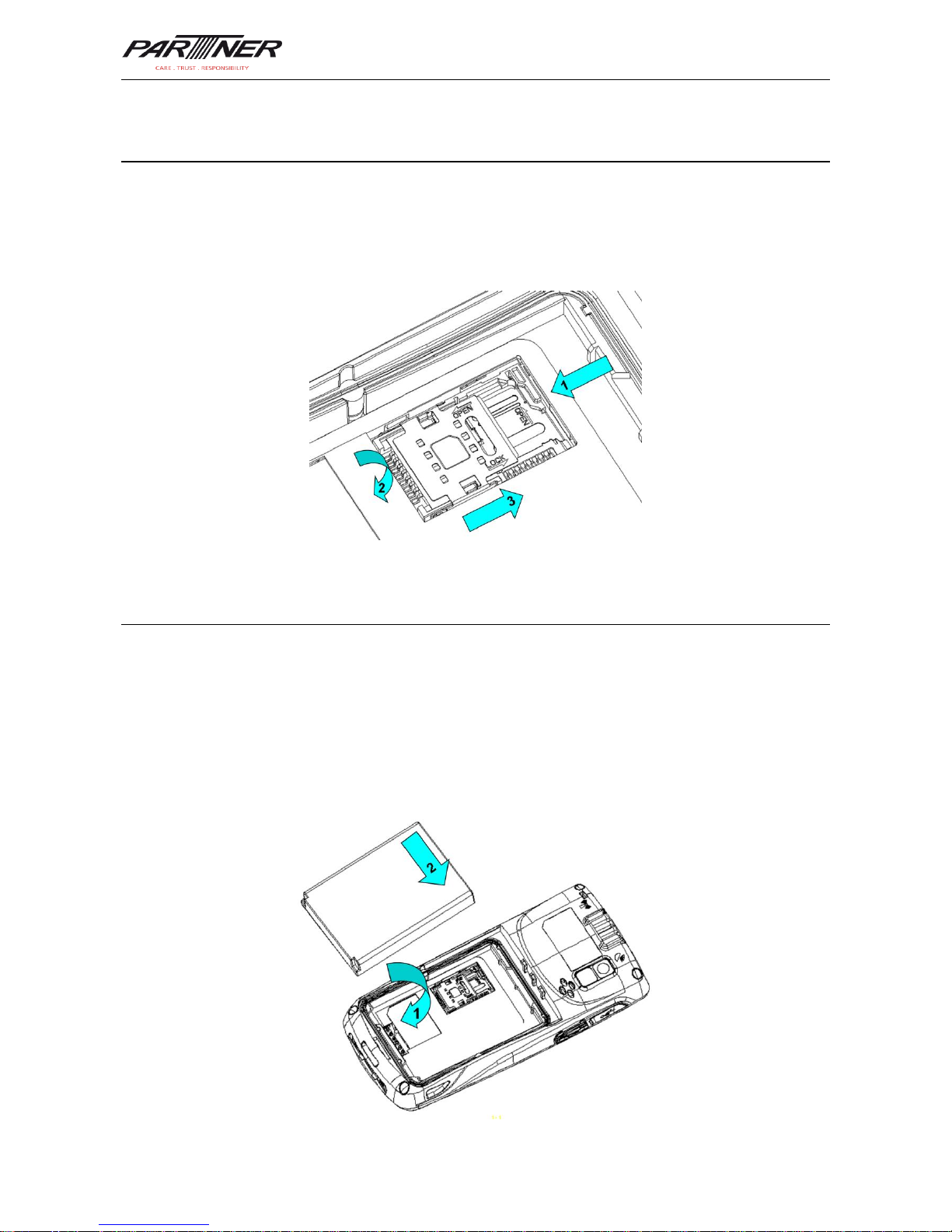
1.3 Installing a SIM Card
To install a SIM card, do as follows:
1. Insert a SIM card along the direction, as shown in Figure 1-4.
2. Press the card cover downward.
3. Push the SIM card along the LOCK direction to lock the card cover.
Figure 1-4 Inserting a SIM card
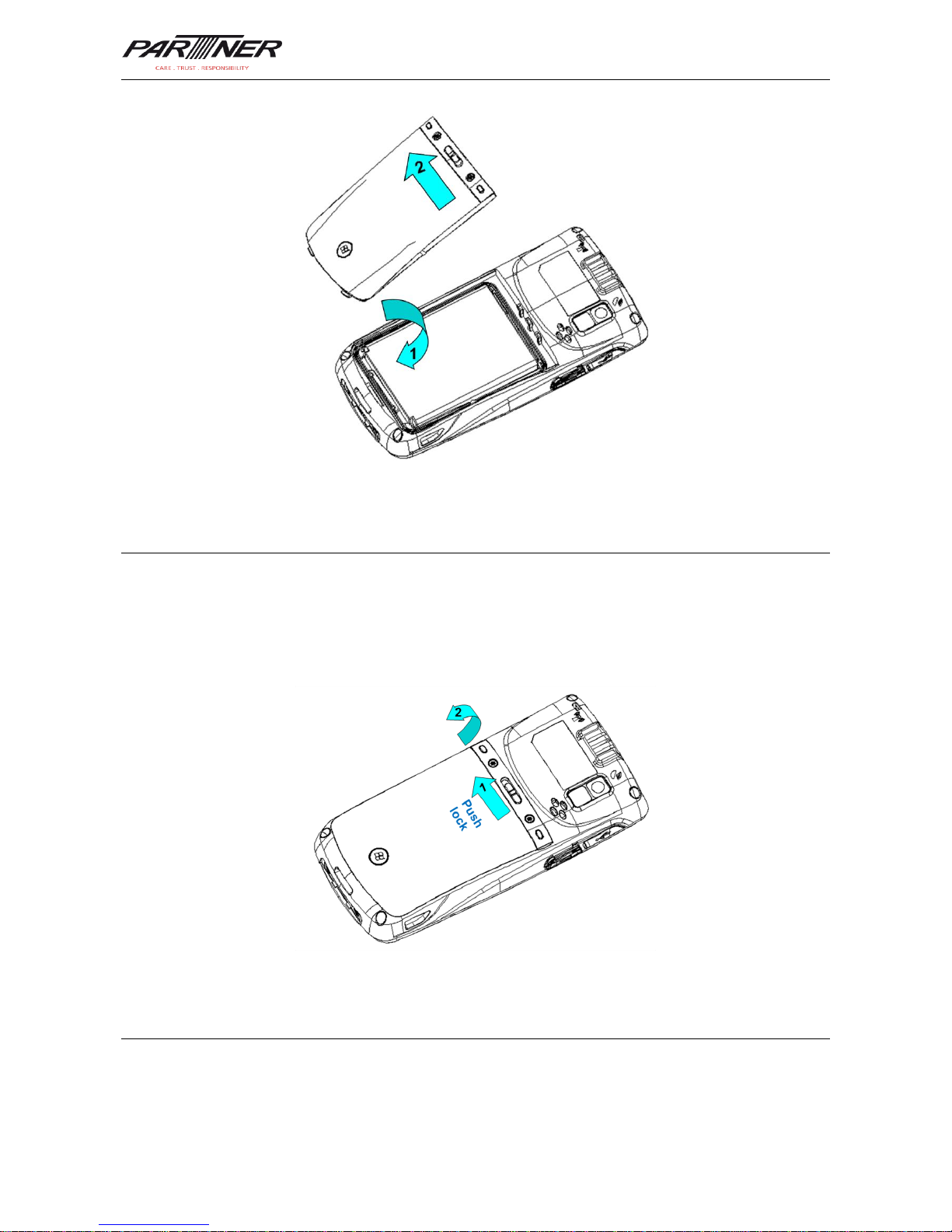
1.4 Installing a Battery
To install a battery, do as follows:
1. Push the battery to the bottom of the battery compartment.
2. Press the top of the battery downward to tighten the battery.
3. Push the joint at the bottom of the battery cover into the back shell.
4. Push the lock to the left and press the battery cover downward until the lock
automatically returns to the location on the right.
Page 6
MT-6330 User Manual
- 4 -
Figure 1-5 Installing a battery
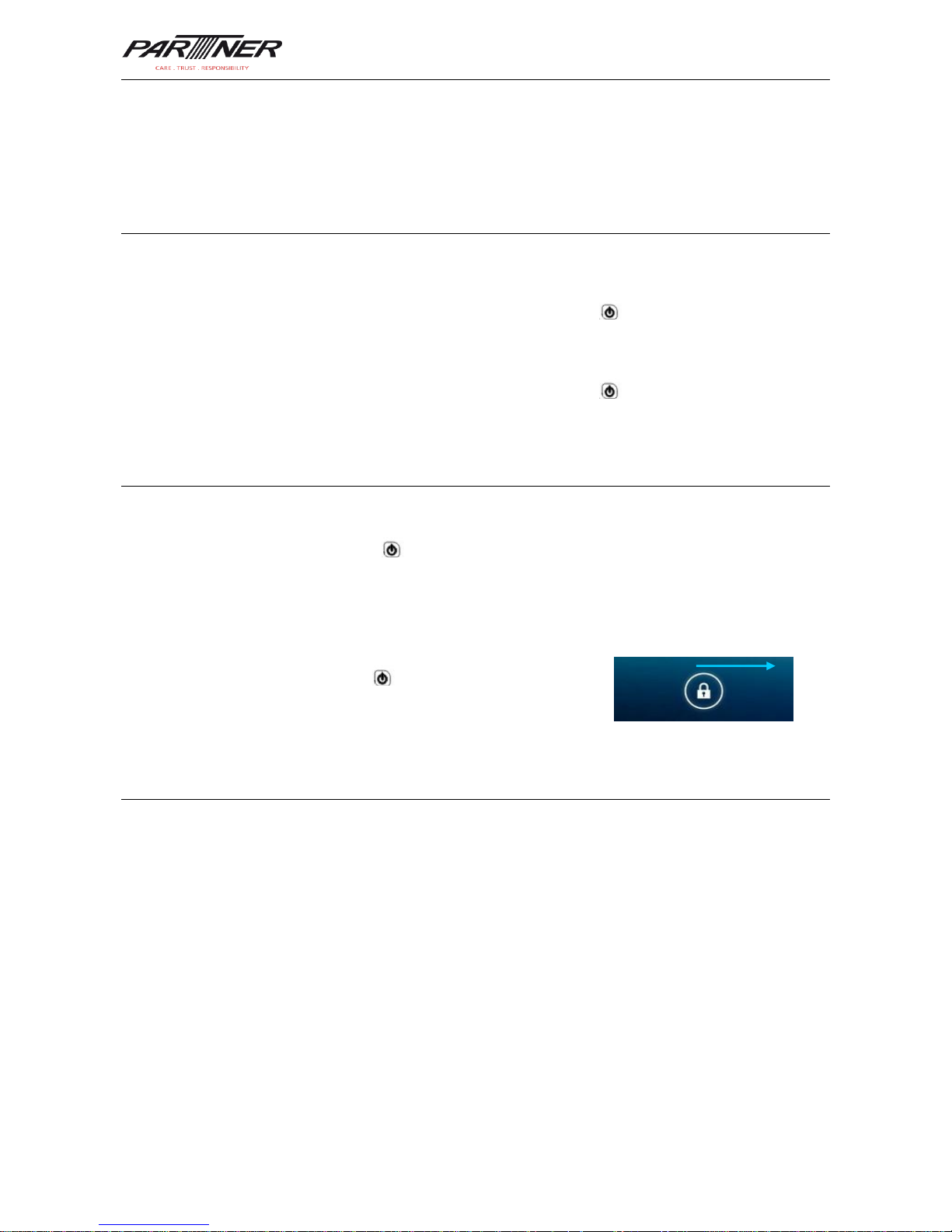
1.5 Disassembling the Battery Cover
To disassemble the battery cover, do as follows:
1. Insert your left forefinger into the upper left part of the battery cover and push the lock to
the left by using the thumb.
2. Pull out the battery cover.
Figure 1-6 Disassembling the battery cover
1.6 Charging
You can charge the MT-6330 in the following ways:
1. Charge the MT-6330 by using a charger.
Page 7

MT-6330 User Manual
- 5 -
2. Connect the MT-6330 to a PC by using a USB cable to charge the MT-6330.
In the charging status, the LED is red. When the LED becomes blue, charging is complete.
When the battery volume is insufficient, the MT-6330 displays alarm information.
When the battery volume is too low, the MT-6330 is automatically powered off.
★ Caution
The battery can be charged for more than or less than three hours. The battery will not be
damaged if charging is interrupted. The duration of the battery depends on different
applications of the MT-6330, for example, selected functions of MT-6330, usage mode, and
data transmission.
★ Tips
To ensure a longer standby time of the MT-6330, follow the following tips:
Always connect the MT-6330 to the AC power supply when you do not use it.
In Settings, set the time to sleep to a smaller value for the MT-6330 by selecting
Home > Applications > Settings > Display > Screen Delay.
Stop all wireless activities when you do not use the MT-6330.
Page 8
MT-6330 User Manual
- 6 -
2 Instructions on MT-6330
2.1 Power-on and Power-off
After installing a SIM card and a battery and fully charging the MT-6330, you can use the
MT-6330.
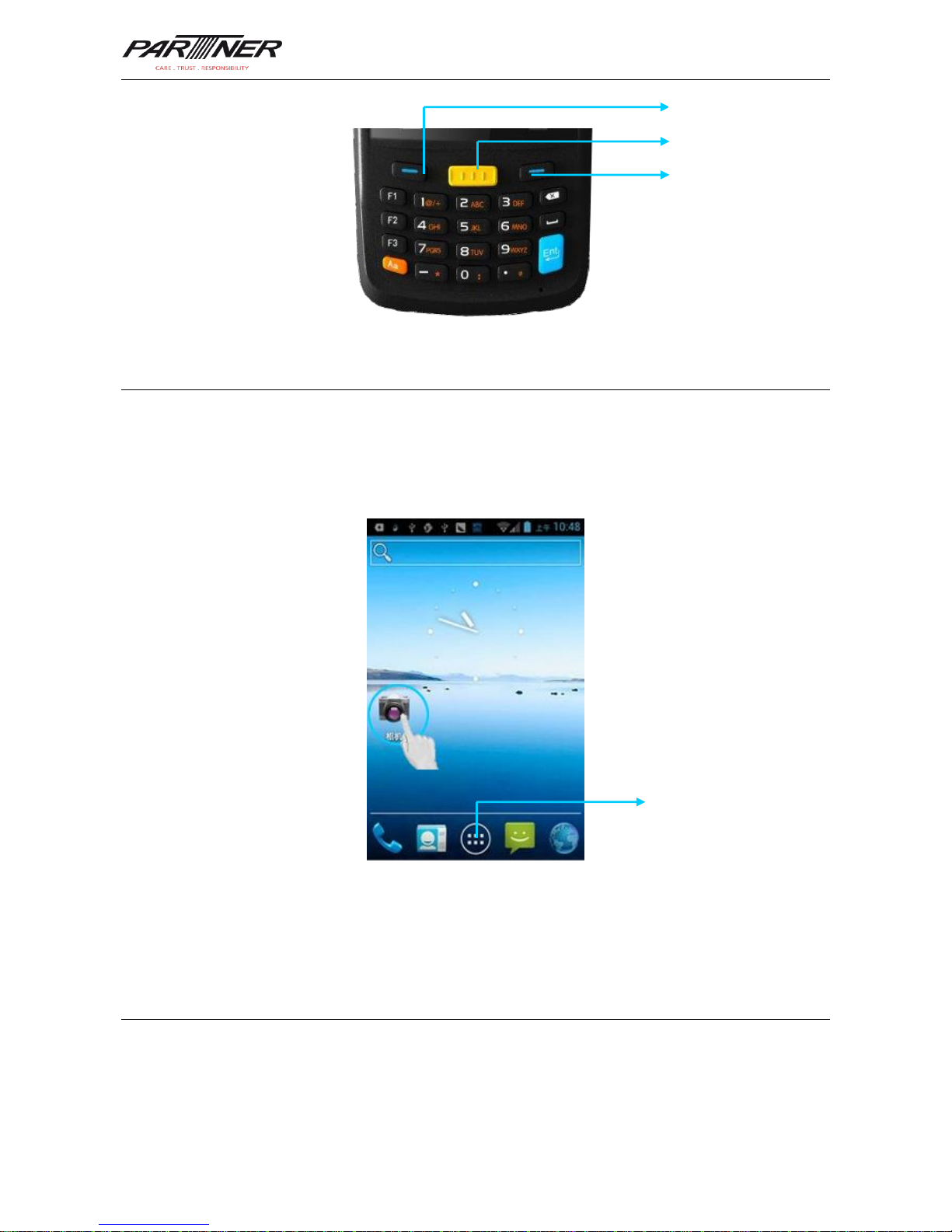
1. To power on the MT-6330, press and hold the On/Off key for some time. The
power-on page is displayed. After the guiding progress is complete, the MT-6330 enters
the Android system. It takes some time to initialize the MT-6330. Please wait patiently.
2. To power off the MT-6330, press and hold the On/Off key for some time. After a
dialog box for powering off the MT-6330 is displayed, click Power Off.
2.2 Locking and Unlocking the MT-6330
Locking MT-6330
Press and hold the On/Off key for a short time to lock the MT-6330. If you do not
perform any operation within the default and preset time to lock the MT-6330, the MT-6330
is locked automatically.
Unlocking the MT-6330
Press and hold the On/Off key for a short time and slide
the unlock key on the screen to the right to unlock the
MT-6330.
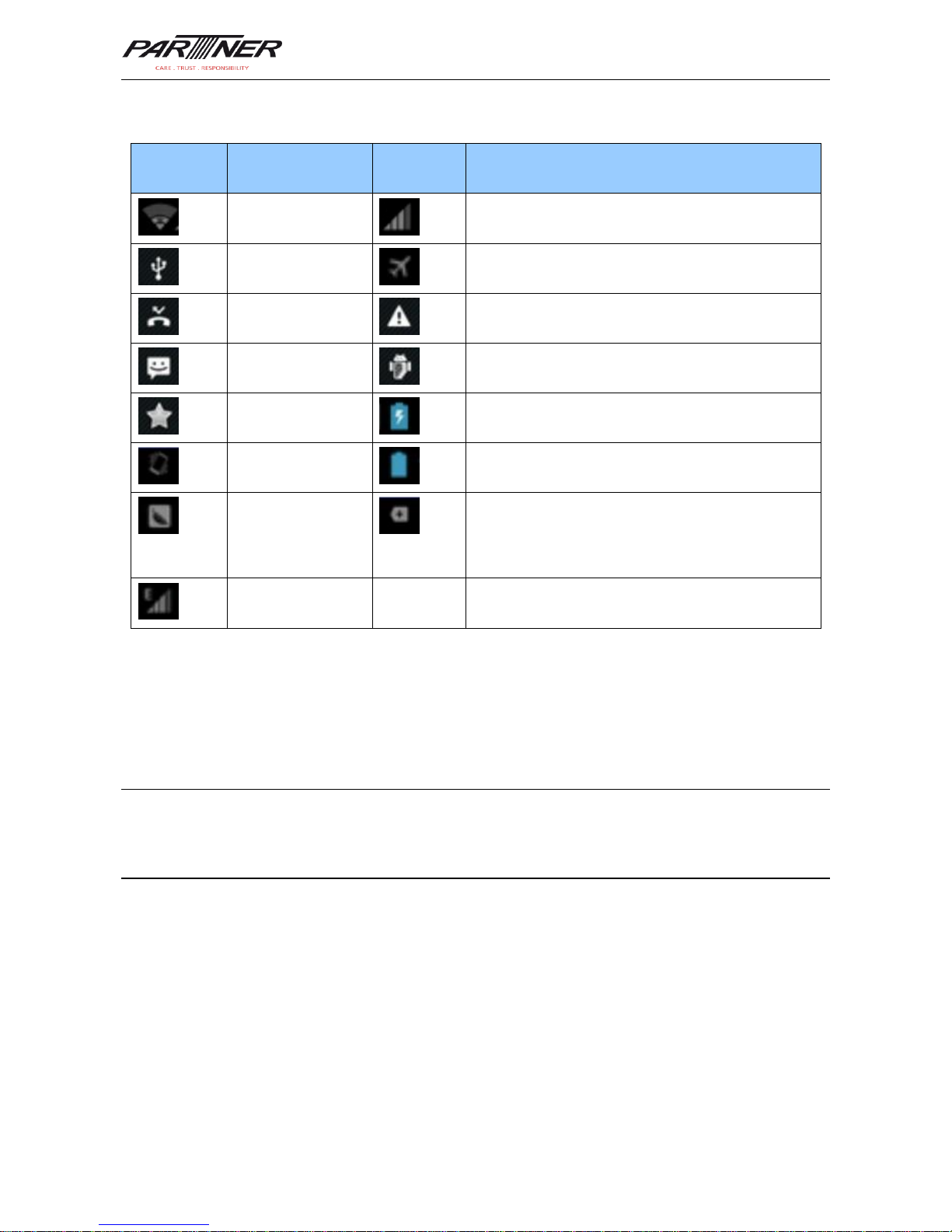
2.3 Keys of MT-6330
The MT-6330 provides a physical keypad that has 28 keys in total, as shown in the
following figure. In terms of function, the keys are divided into numeric/letter/symbolic keys,
direction keys, and scan keys.
On the physical keypad of the MT -6330, the left and right function keys and the yellow scan
key correspond respectively to the home key, return key, and menu key.
Home key/left function key: Used to return to the home page.
Press the home key. The applications used recently are displayed. Click the required
application to start the application.
Return key/right function key: Used to return to the previous operation page.
Menu key/scan key: Used to display related menus on the current page.
Page 9
MT-6330 User Manual
- 7 -
2.4 Home
The MT-6330 has five home pages. Slide to the left or right to switch among the pages. On
any page, press the Home key (left function key) to return to the home page. Click any
application on the home page to start the application.
★ Tips
You can add application icons in blank space of the home page.
Click the application tray to view all applications.
2.5 Status Icons and Indicators
Status icons and indicators are in the status bar in the upper part of the screen and show
device status and notifications.
Application tray
Menu key
Return key
Home key
Page 10
MT-6330 User Manual
- 8 -
Table 2-1 Status icons
Icon
Description
Icon
Description
WLAN
Signal strength
USB connection
Offline mode
Missed calls
Internet access restricted
New messages
USB debug
Modem logs
Charging
Mute mode
Full power
Connect to Pea
There are multiple notification icons, which are
beyond the scope of display.
EDGE
★ Note
The applications of the MT-6330 are often upgraded. Therefore, the status icons may be
different from those on the MT-6330. The actual status icons prevail.
2.6 Basic Settings
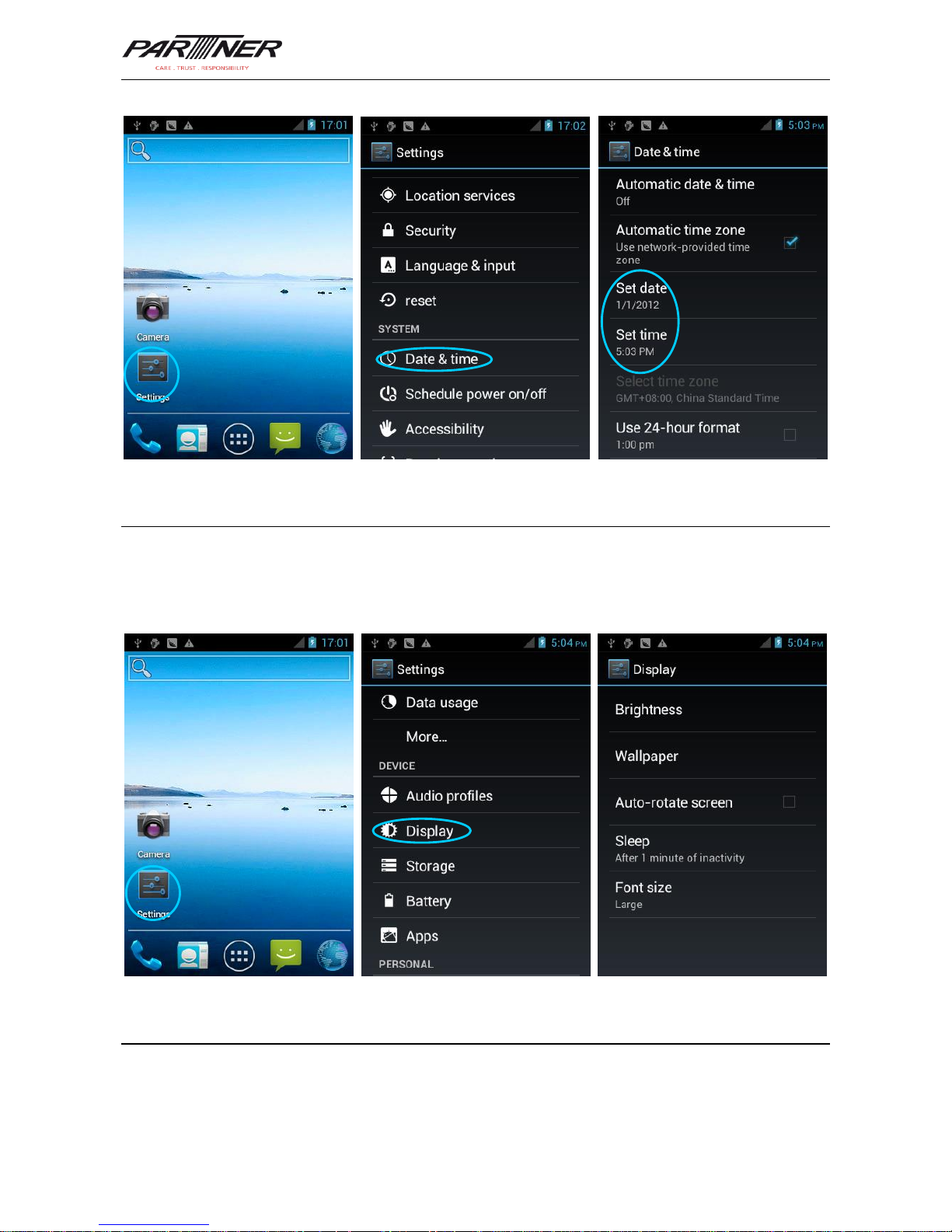
2.6.1 Date and Time Setting
To change the date and time in the MT-6330, do as follows:
Select Settings > Date & time and click Set Date or Set time.
Page 11
MT-6330 User Manual
- 9 -
2.6.2 Display Settings
To set display options, do as follows:
Select Settings > Display and set display options such as Brightness, Wallpaper,
Auto-rotate screen, and Font size.
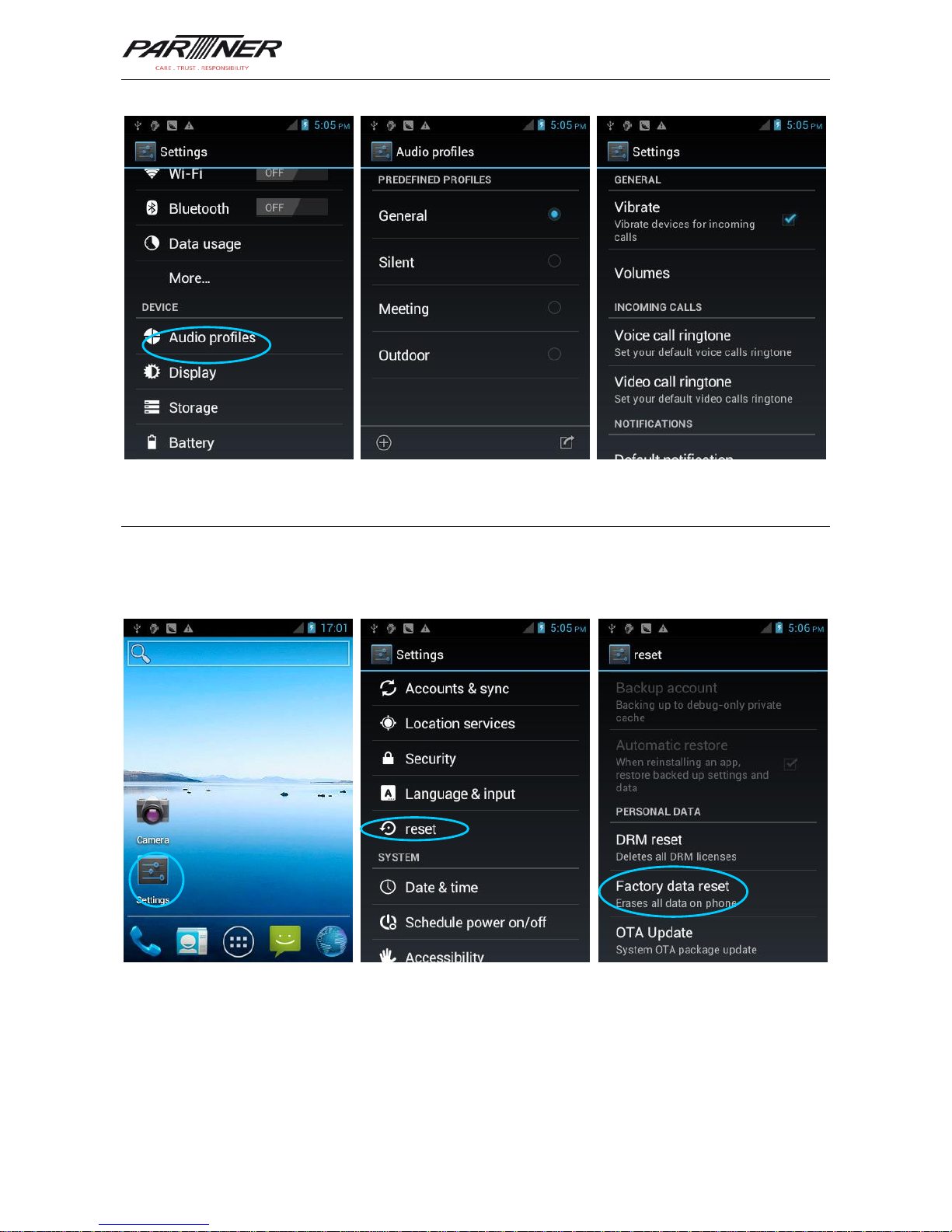
2.6.3 Ringtone Setting
Select Settings > Audio Profiles and click General/Silent/Meeting/Outdoor to set the
ringtone in the corresponding mode.
Page 12
MT-6330 User Manual
- 10 -
2.6.4 Security Setting
Select Settings > Reset > Factory date reset.
Click Clear all. The MT-6330 starts to restore factory settings.
★ Caution
This operation will clear the following data in the MT-6330:
Account
Data and settings of the system and applications
Page 13
MT-6330 User Manual
- 11 -
Downloaded applications
This operation does not clear the following data:
Current system software and bound applications
Files in the SD card, for example, music and pictures
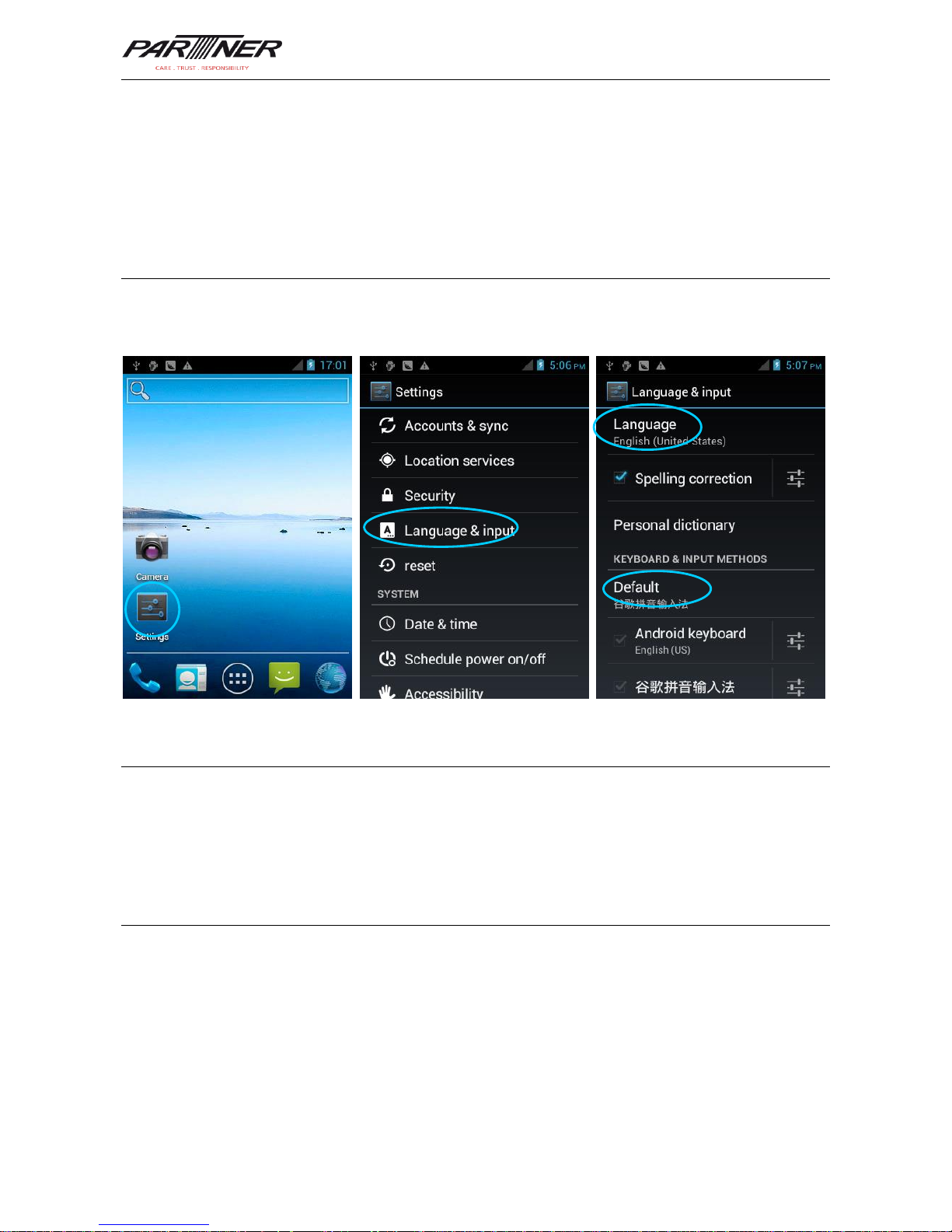
2.6.5 Language and Input Setting
Select Settings > Language and input. In the displayed list, select the desired language.
Click Default and select the desired input in the list.
2.6.6 Shortcuts
You can add shortcut icons on the home page of the MT-6330.
On the home page, click the application tray icon, select and drag the icon to be added to
the home page.
2.6.7 Widgets
You can add widgets such as clock, music player, and calendar on the home page of the
MT-6330.
On the home page, click the application tray icon, slide the screen to the widget page,
select and drag the widget to be added to the home page.
Click the icon of the widget to open the widget.
Page 14
MT-6330 User Manual
- 12 -
3 Call Function
3.1 Making a Call
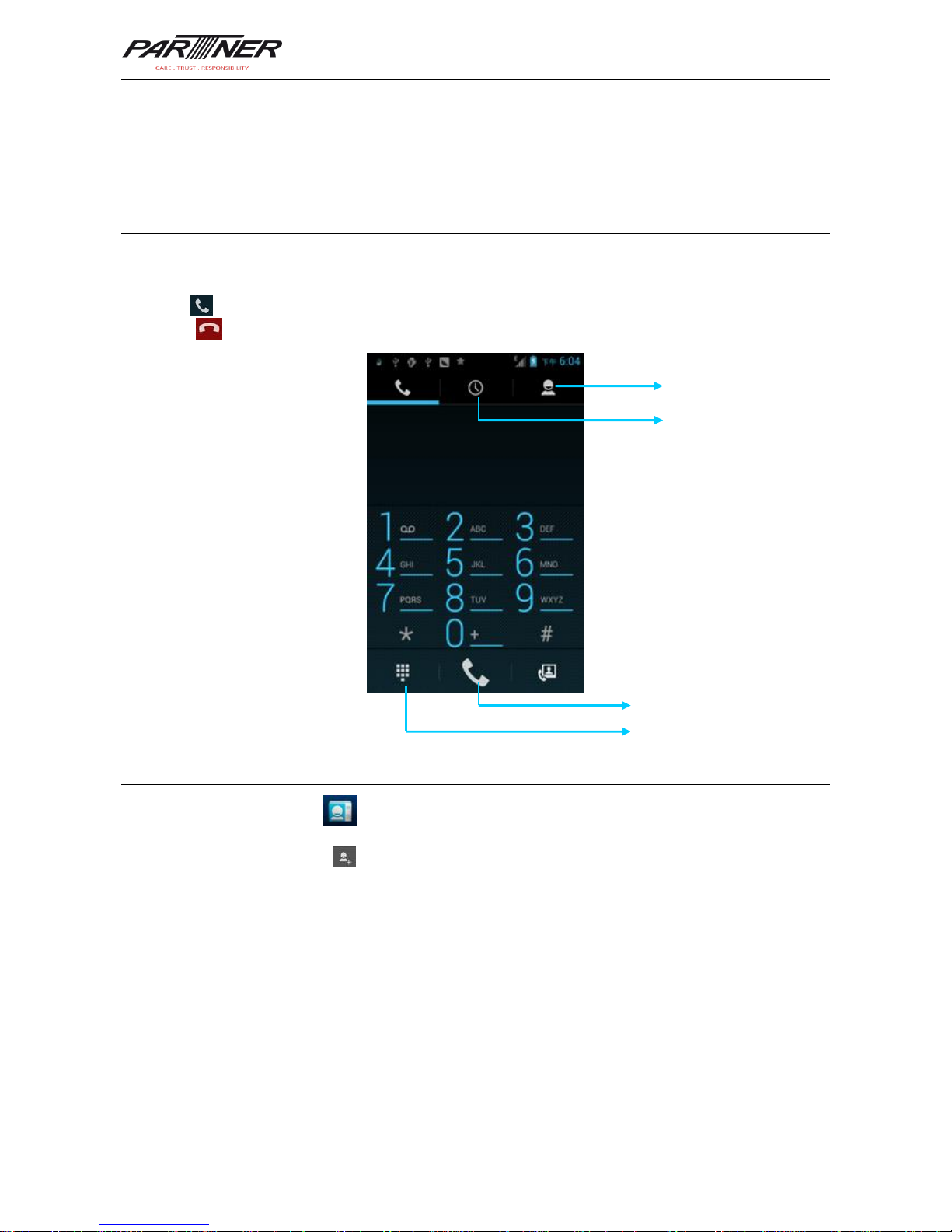
To make a call, do as follows:
1. Enter a telephone number by pressing number keys.
2.
Click to make a call.
3. Click to terminate the call.
3.2 Contacts
Find the following icon:
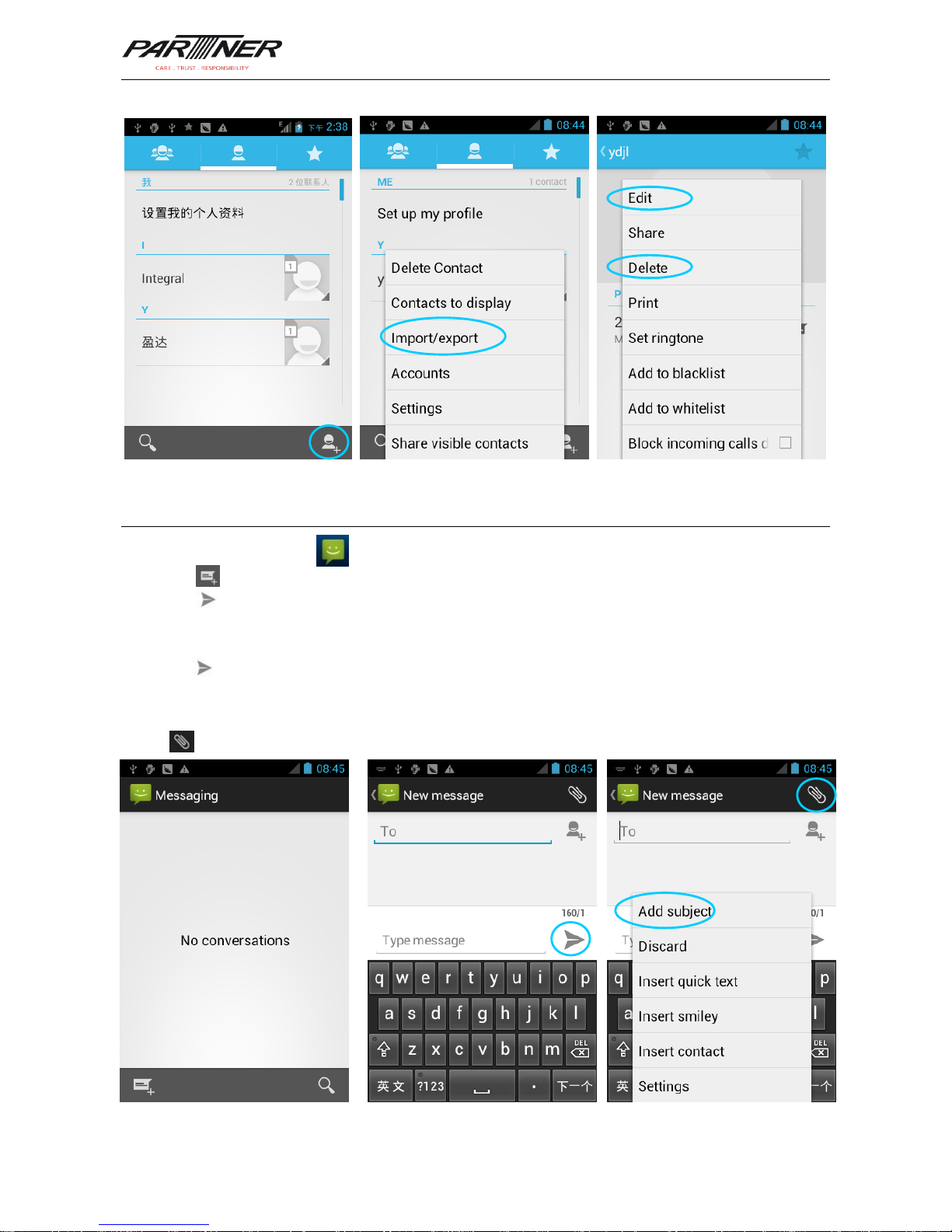
1. Click Contacts to open the contact list.
2. To add a contact, click .
3. To import or export contacts, press the menu key (yellow scan key) to open the menu
and click Import/export.
4. To edit or delete a contact, select a contact, press the menu key (yellow scan key) to
open the menu, and click Edit or Delete.
Contact
Call record
Virtual numeric keypad
Voice call
Page 15
MT-6330 User Manual
- 13 -
3.3 SMS and MMS
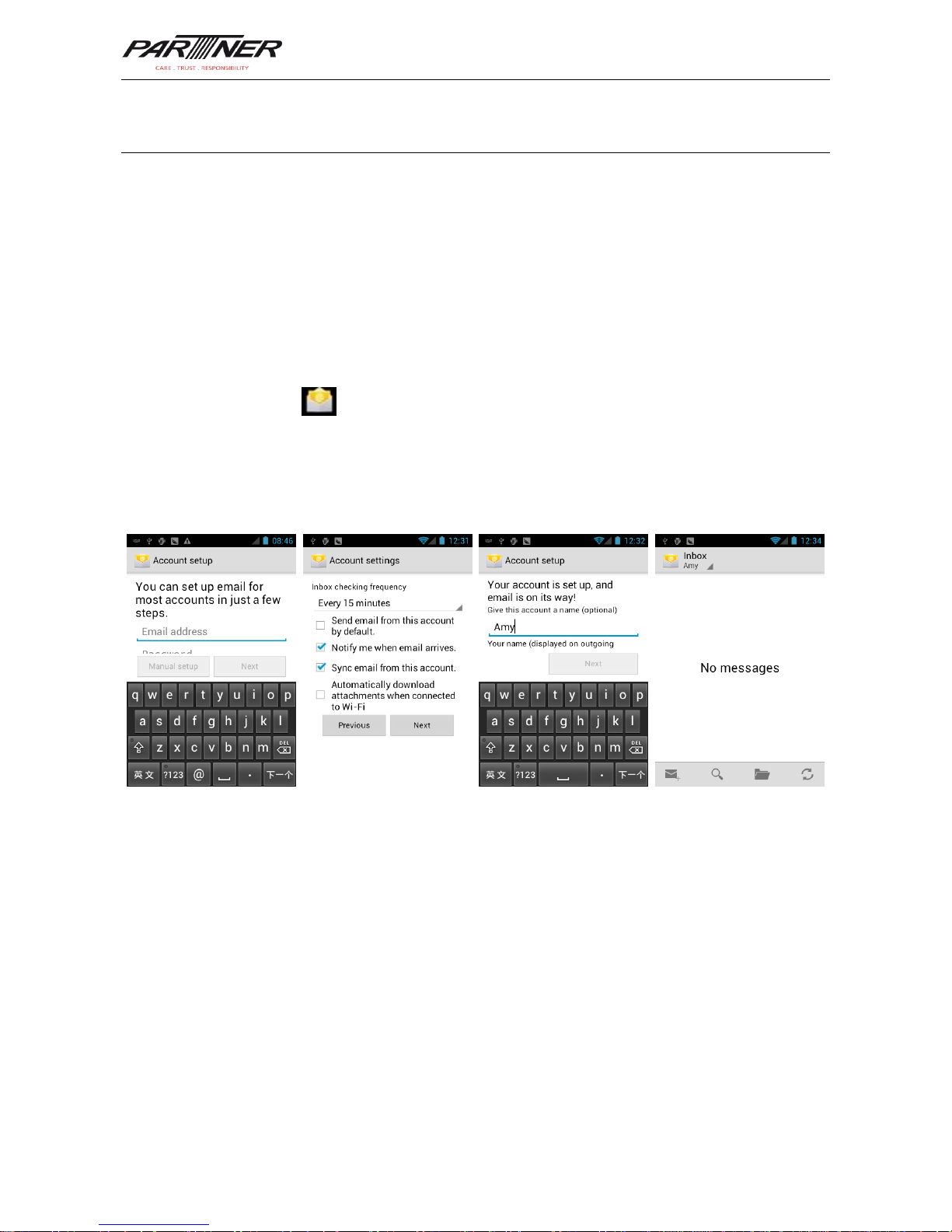
Find the following icon:
1. Click and enter the message recipient and the text to be sent.
2. Click to send the message.
3. On the message editing page, press the menu key (yellow scan key) to open the menu
and click Add Subject. Convert the message to be sent into a multimedia message and
click .
★ Tips
Click to add attachments such as picture, video, and audio files.
Page 16
MT-6330 User Manual
- 14 -
3.4 Email
You can send or receive emails.
★ Note
To create an email account on the MT-6330, you need to set the account on a PC. For
example, to create a QQ email account, log in to the QQ mailbox, click Settings in the
upper right corner of the mailbox to access the account options. Find the server options and
email receiving options, select all options, and click Save.
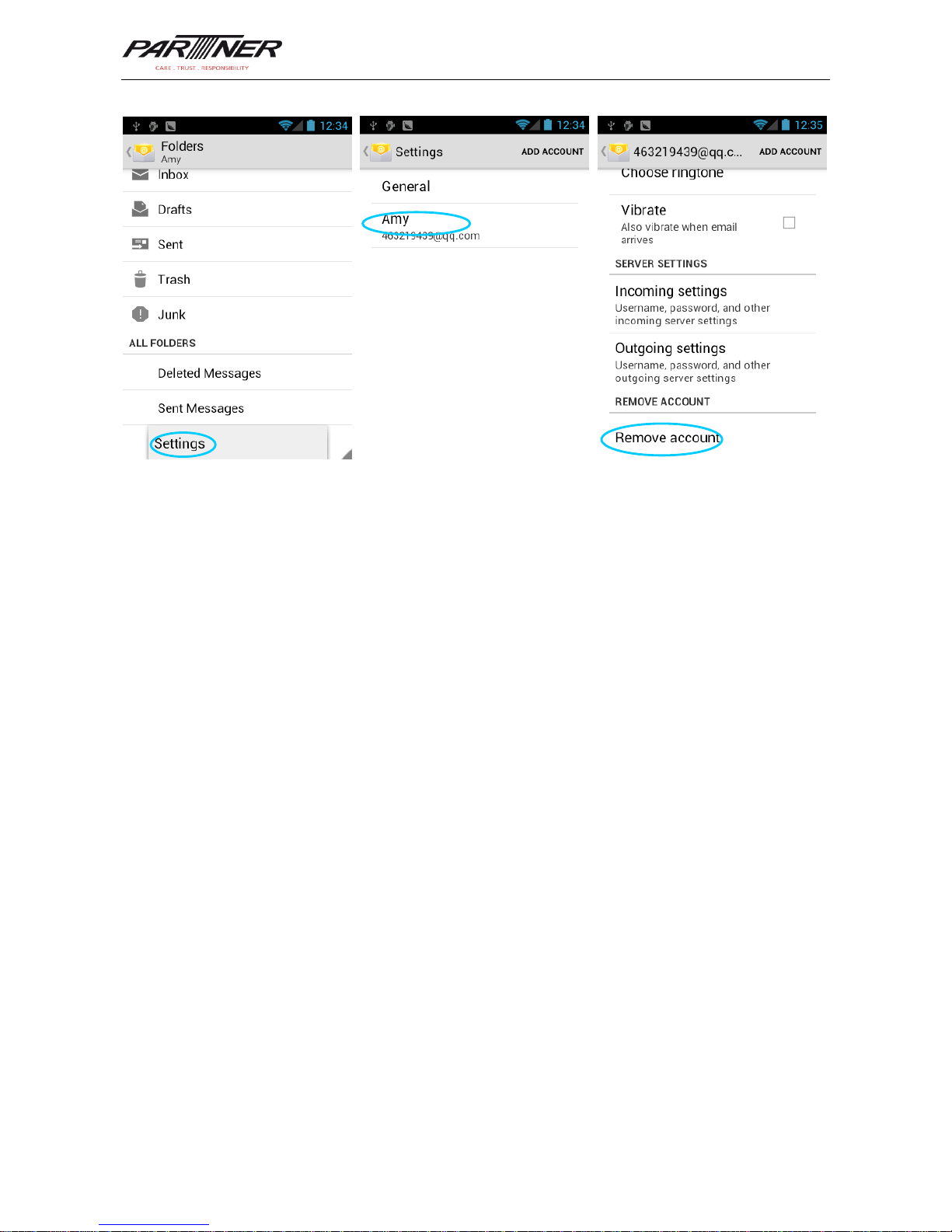
To set a mailbox on the MT-6330, do as follows:
Find the following icon:
1. Enter the email address and password and click Next. The system starts to connect the
email account.
2. Set Inbox checking frequency and click Next.
3. Create a name for this account and click Next. The Inbox page is displayed.
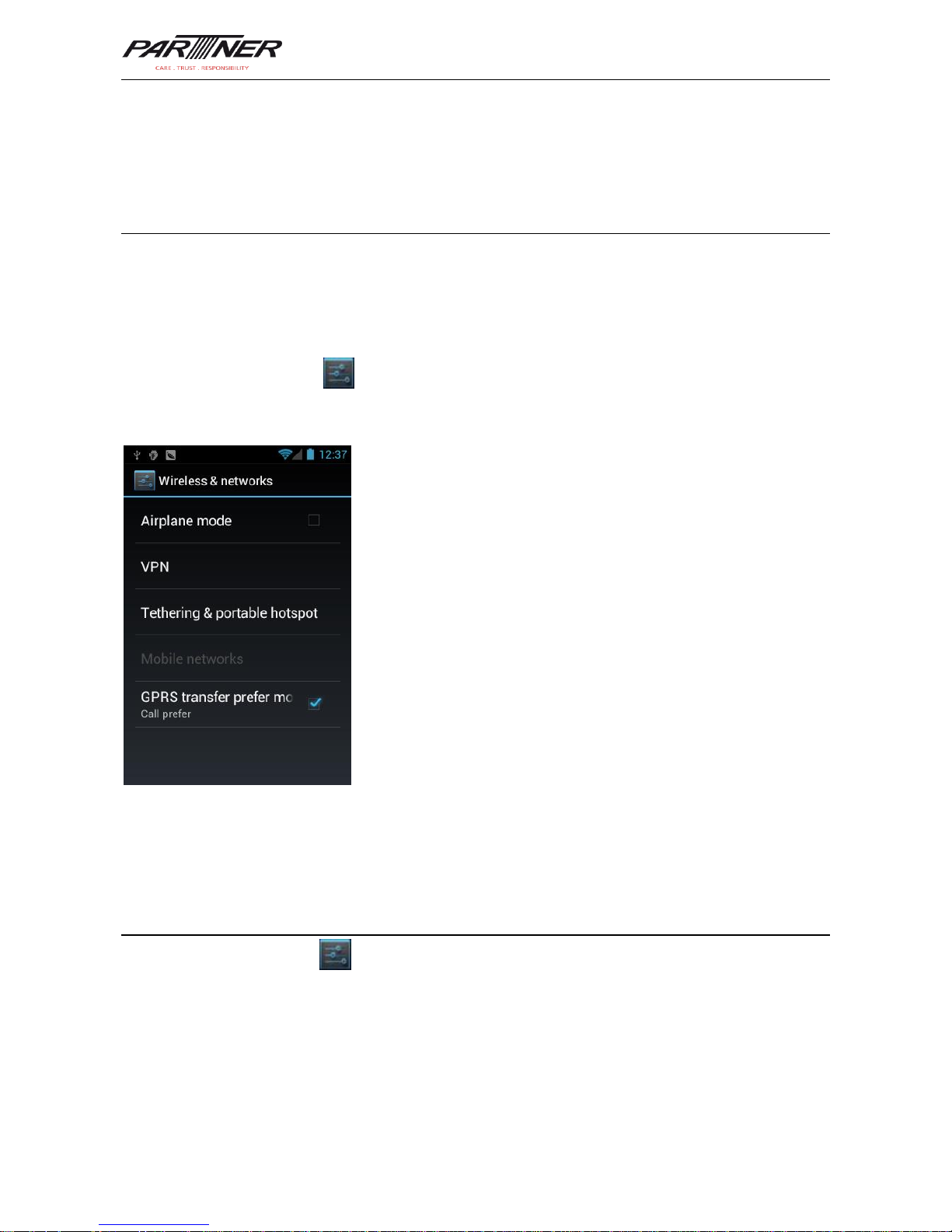
To delete an account, do as follows:
1. On the mailbox page, press the menu key (yellow scan key) to open the menu and click
Settings.
2. Click the email account to be deleted and access the setting page.
3. Click Remove account.
Page 17
MT-6330 User Manual
- 15 -
Page 18
MT-6330 User Manual
- 16 -
4. Network and Connection Synchronization
4.1 GPRS Data Connection
After a GPRS data connection is established, you can access the Internet. To establish a
GPRS data connection, ensure that a SIM card is installed in the MT-6330. Generally, the
MT-6330 has configured Internet access. If you delete the default configuration by mistake,
set the network as follows (assume that China Mobile’s network is used):
Find the following icon:
Select Settings > More > Wireless & networks > APN > CMNET and set the following
options as follows:
Name: CMNET
APN: cmnet
APN type: default,supl,net
Proxy: null
Port: null
User name: null
Password: null
Server: null
MMSC: null
MMS proxy: null
MMS port: null
MCC: 460
MNC: 02
Identity authentication type: null
APN protocol: IPv4
Enable/disable APN: APN enabled
Bearer system: null
4.2 Wi-Fi Network Connection
Find the following icon:
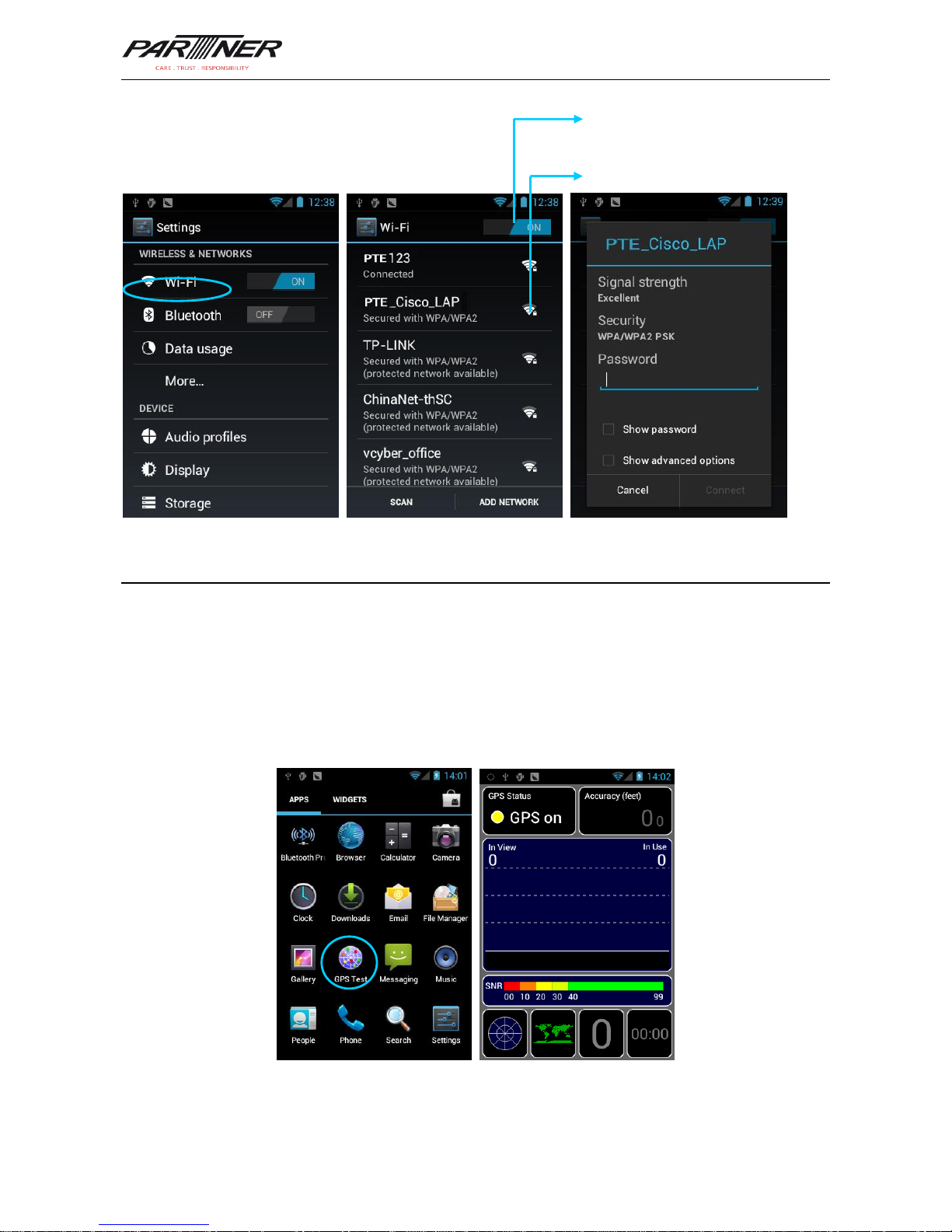
Select Settings > Wireless & networks > WLAN.
1. Click On for Wi-Fi. The system starts to search for networks. If the WLAN is enabled,
click Scan. The MT-6330 lists the searched networks.
2.
Click the network to be connected and enter the password in the displayed dialog box.
3.
Click Connect to complete the Wi-Fi connection.
Page 19
MT-6330 User Manual
- 17 -
4.3 GPS
The MT-6330 is equipped with a high-performance navigation chip and can obtain position
information quickly and accurately. The manufacturer of the MT-6330, Partner Tech Europe
GmbH, provides GPS Test, which is a GPS demonstration program. Before using the GPS,
install GPS Test. You can download GPS software (for the information related to GPS
software and HiMarket, see relevant description in 6.1 Installing Software) from HiMarket
and view position information.
Click to connect to the network
Click to enable Wi-Fi and
search for networks
Page 20
MT-6330 User Manual
- 18 -
4.4 Connecting MT-6330 to a Computer
Connect the MT-6330 to a computer by using a USB cable so that files in the memory card,
for example, pictures, videos, and music, can be transferred to the computer and
processed in the computer.
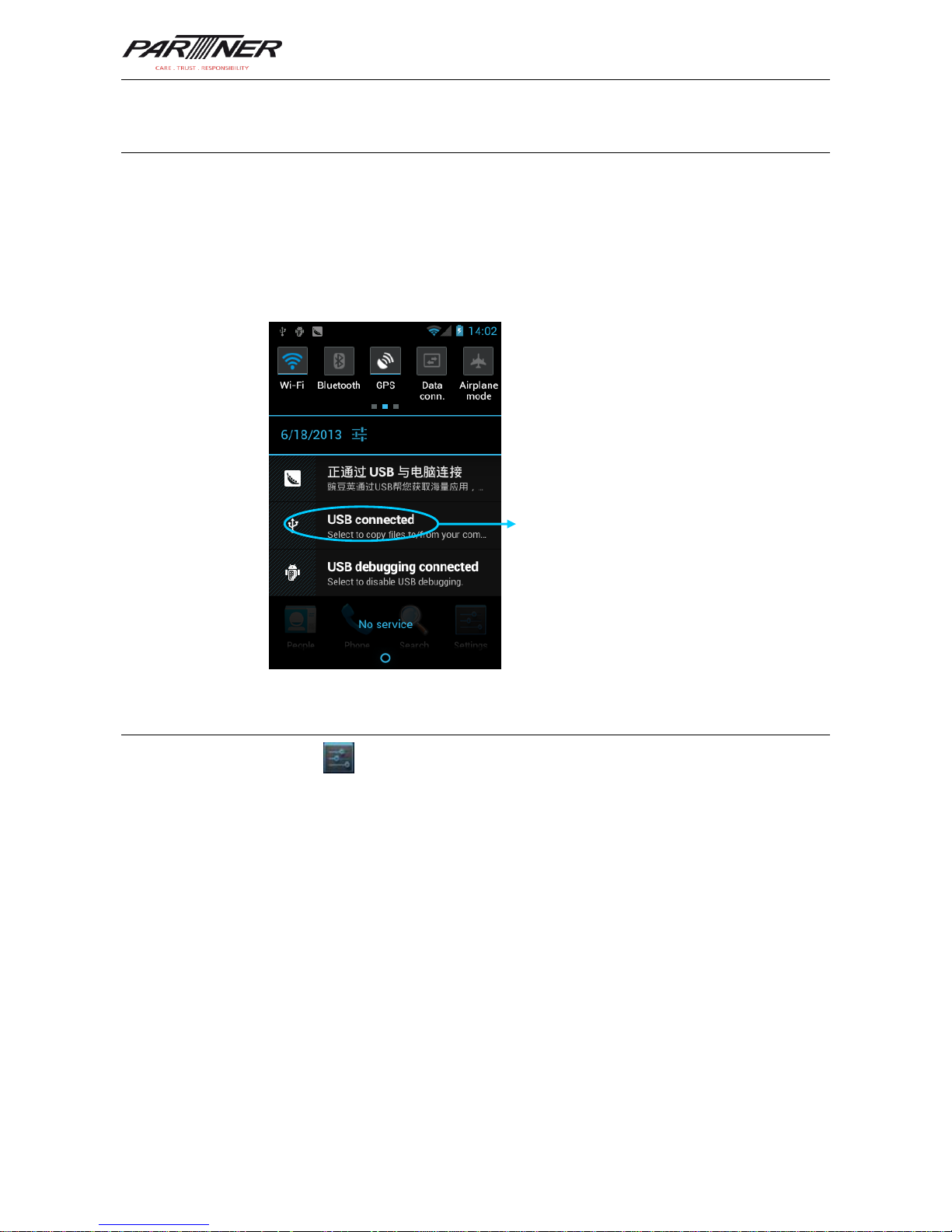
1. Connect the MT-6330 to a USB port of a computer by using the USB cable.
2. The icon of USB connection is displayed in the status bar of the MT-6330. Slide the
status bar. You can see USB connected and select the USB connection mode.
4.5 Synchronization
Find the following icon:
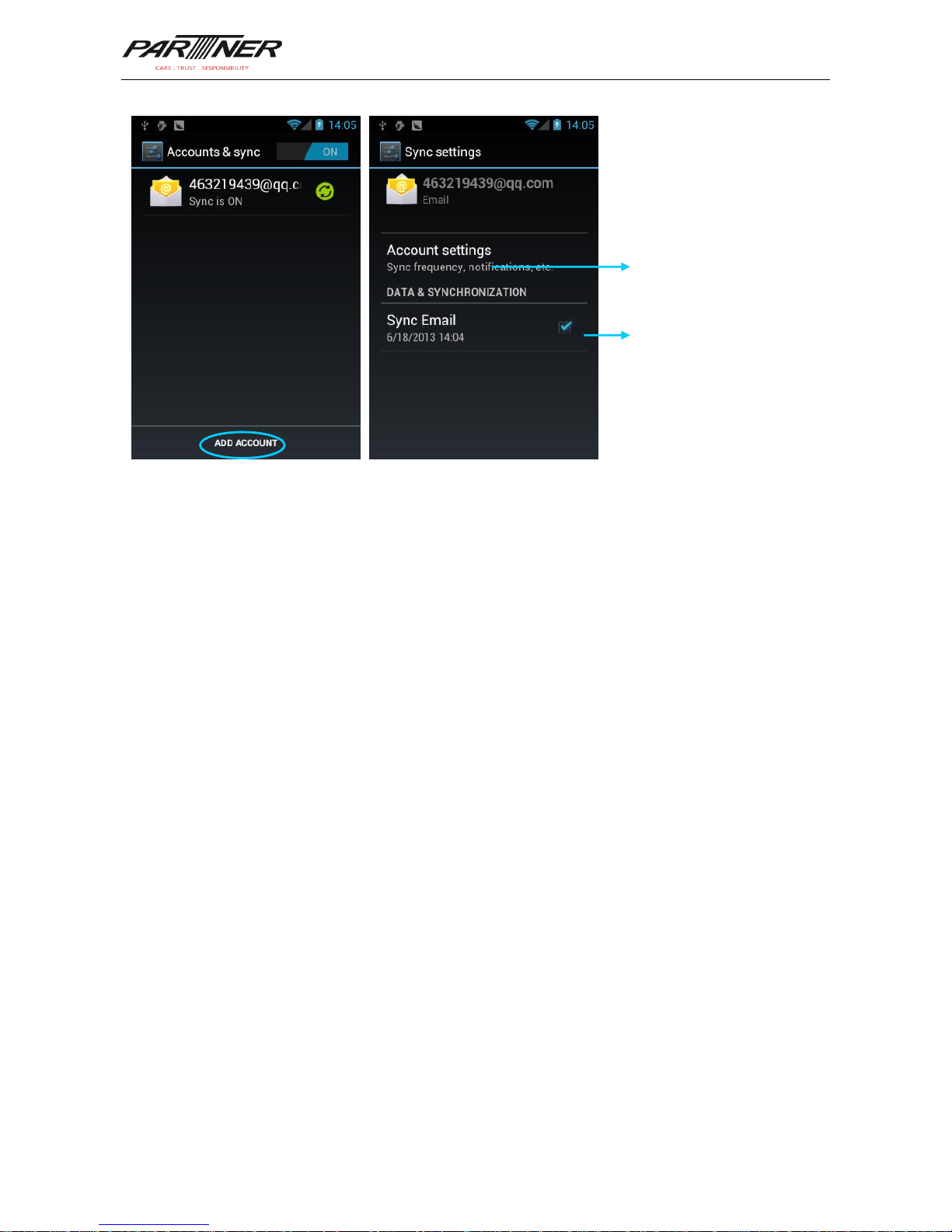
Select Settings > Accounts & sync.
1. Click ADD ACCOUNT to set a new account.
2. Click Company or Email, enter the email address and password, and click Next. Wait
until the connection is completed (for details about mailbox settings, see section 3.4
Email).
3. Click the account. On the Sync settings page, set the account as required.
Click the option to open the USB storage
device and copy files between a
computer and the MT-6330
Page 21
MT-6330 User Manual
- 19 -
Set email synchronization
frequency, notification, etc.
Select the option to
synchronize emails.
Page 22
MT-6330 User Manual
- 20 -
5 Introduction to iScan of MT-6330
5.1 Installing and Using iScan
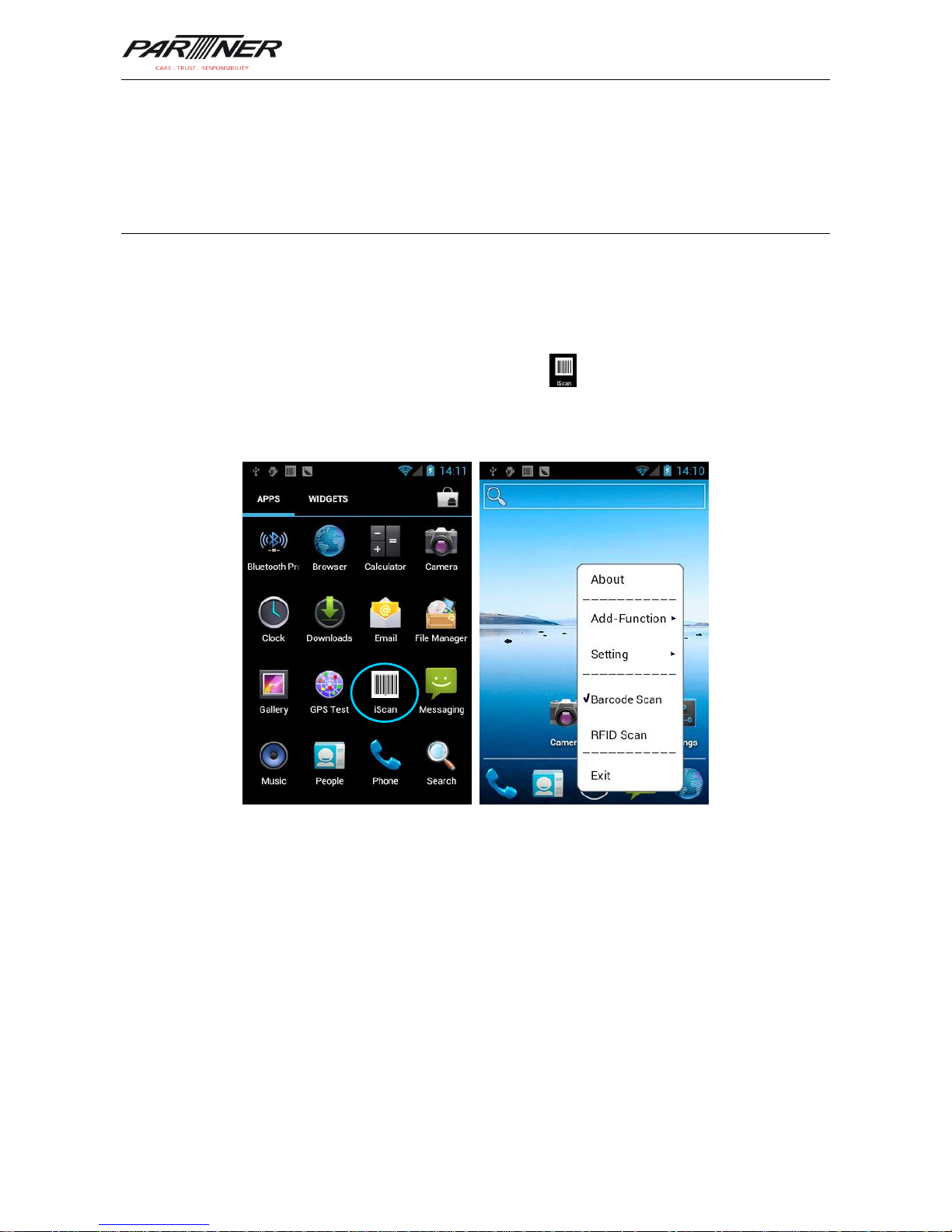
To collect data, you must install and start the scan application on the MT-6330. At present,
Partner Tech Europe GmbH provides the scan demonstration software, iScan, to obtain
and decode barcode information.
First of all, install iScan on the MT-6330 (for details on how to install iScan, see 6.1
Installing Software). After iScan is installed, the icon is displayed on the application
page. Click the icon to start the software and select Barcode Scan. In this case, you can
scan barcodes.
Page 23
MT-6330 User Manual
- 21 -
6 Managing MT-6330
6.1 Installing Software
The MT-6330 uses Google’s Android platform whose suffix is apk. To install software on the
MT-6330, use the following methods:
1. Download and install software through the online software store provided by Google
(Google Play) or Android software download platform (HiMarket) used in China.
HiMarket is recommended.
2. Download software installation packages, store them on an SD card, and install the
software by using file manager.
3. Connect the MT-6330 to a computer by using the USB cable and install software on the
computer. First of all, install software such as APK installer, Pea, or 91 mobile assistant
on the computer so that software can be installed in batches.
6.2 Uninstalling Software
If too many programs are installed or some installed programs are unnecessary, uninstall
existing software to increase the operation speed of the MT-6330. To uninstall software, use
the following methods:
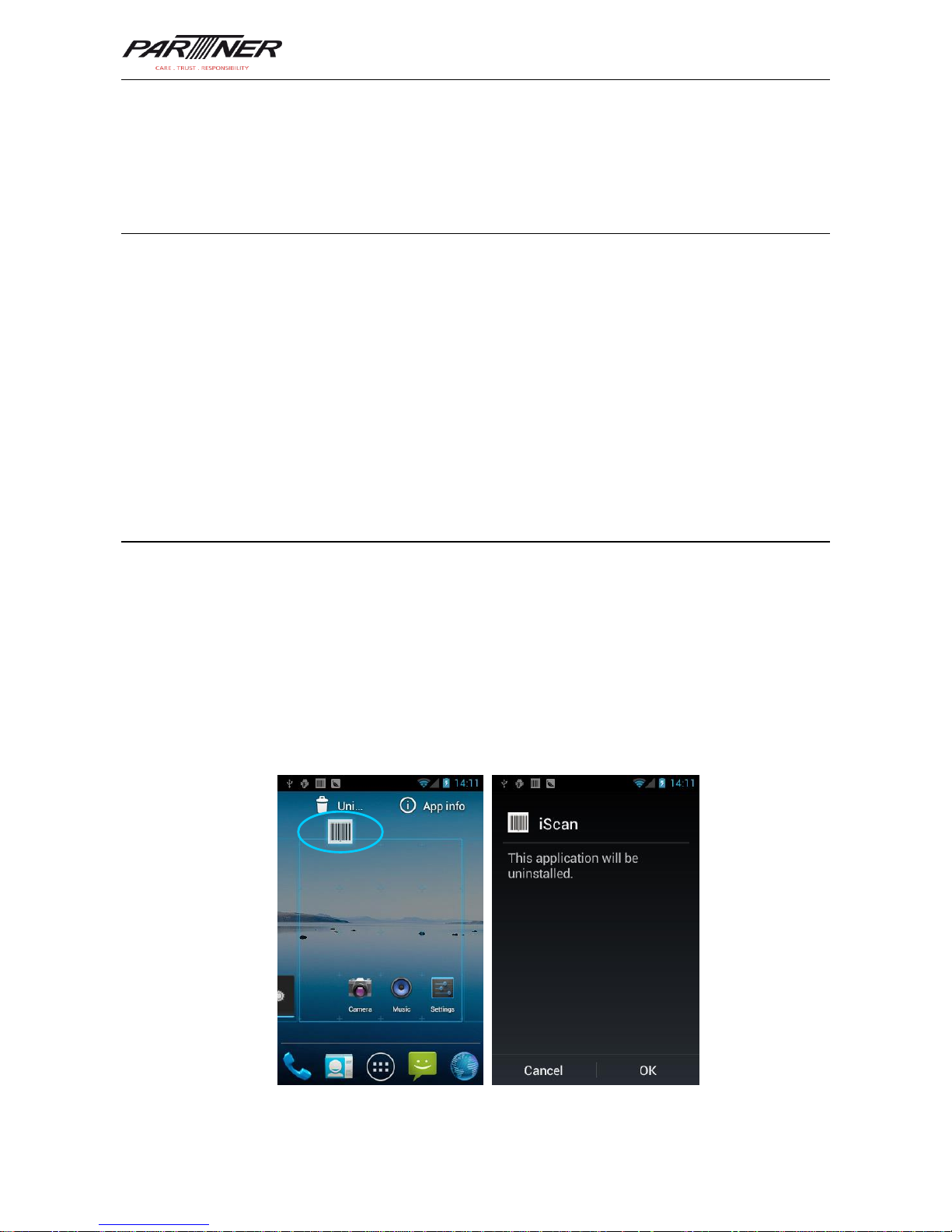
1. Select Settings > Applications. In the displayed application list, select the software to
be uninstalled and click the software. On the App info page, click Uninstall and then
click OK. Several seconds later, the system prompts that the software is uninstalled.
2. Click the application tray. On the application page, find the icon of the software to be
uninstalled and click the icon.
Page 24
MT-6330 User Manual
- 22 -
6.3 Managing Applications
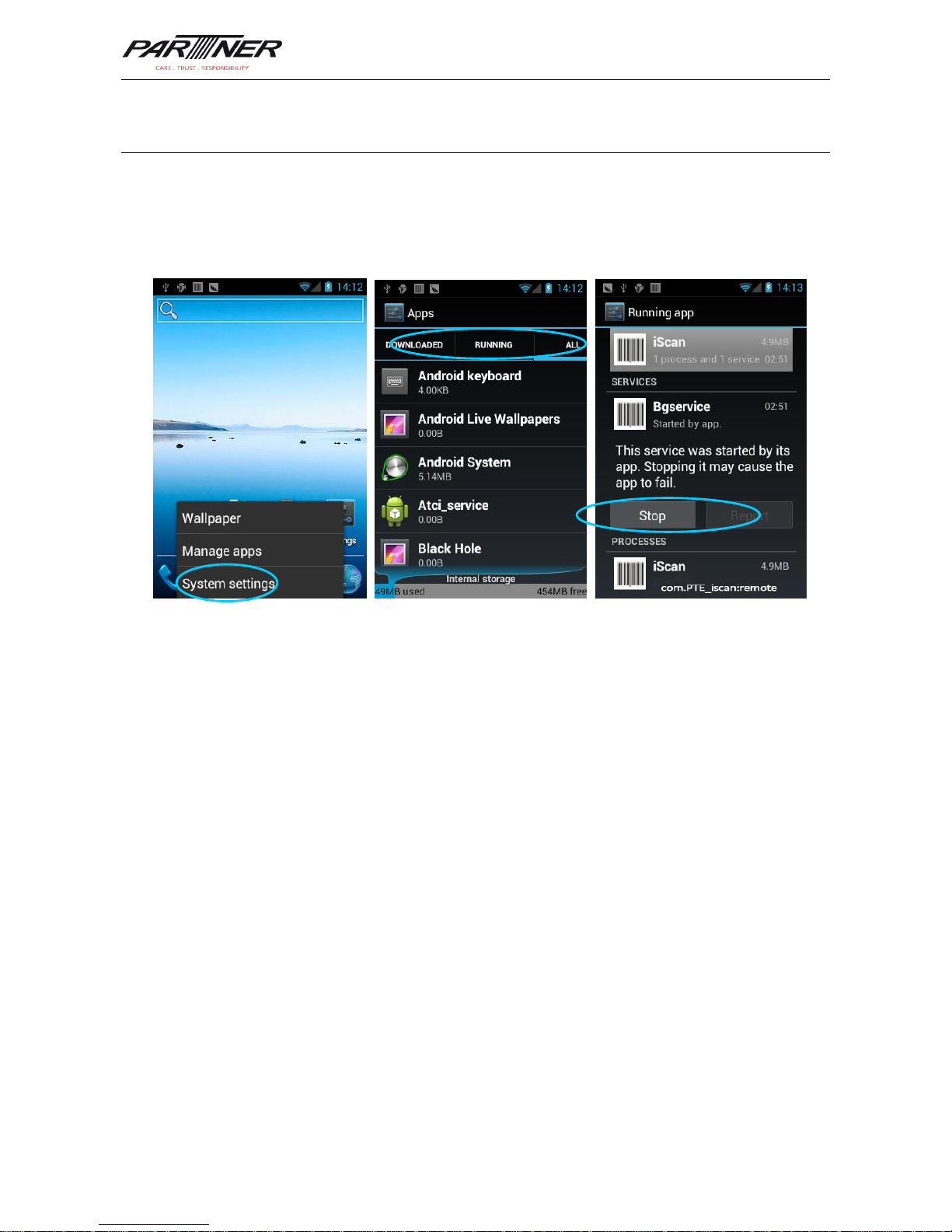
Press the menu key (yellow scan key) and click Manage apps. You can view the status of
downloaded applications, applications in the SD card, and running applications and click
any application to access the application information page where you can stop, uninstall, or
suspend the application.
Page 25

MT-6330 User Manual
- 23 -
7 Precautions and Troubleshooting
7.1 Precautions for MT-6330
To ensure that the MT-6330 does not fail, follow the following precautions during use
of the MT-6330:
Put the MT-6330 and its components and accessories in the places where children
cannot reach.
Keep the MT-6330 dry. Rain, moisture and liquid contain acidic materials and will
corrode the circuit board.
Do not store or use the MT-6330 in dusty or dirty places.
Do not store the MT-6330 in a place that is too hot. High temperature will shorten the
service life of electronic components.
Do not store the MT-6330 in a place that is too cold. When the temperature inside the
MT-6330 rises, moisture is generated inside the MT-6330, which may damage the
circuit board.
Do not try to disassemble the MT-6330. Otherwise, the MT-6330 may be damaged.
Do not touch the screen surface of the MT-6330 by using a pen, a pencil or other sharp
articles in case the screen may be scratched.
Do not throw, beat or violently collide the MT-6330. Otherwise, the components of the
MT-6330 may be damaged and the MT-6330 may be faulty.
Do not use strong chemical products or strong detergent to clean the MT-6330. If the
MT-6330 become dirty, clean the surface of the MT-6330 by using a soft cloth soaked
with dilute glass detergent.
Please use the protective film to reduce wear as much as possible. The screen
protective film can improve the availability and durability of the screen.
Pay attention to the following during use of the battery.
The area where the MT-6330 is charged must keep away from scraps, inflammables or
chemical substances.
When you charge the battery of a mobile device, the temperature on the battery and
charger must be in the range 0C to 40C.
Do not use incompatible batteries or chargers, which may cause fire, explosion, leakage
or other hazards.
Do not disassemble, press, twist, pierce or cut the battery.
Do not make the battery short-circuited or contact the connecting terminal of the battery
by using metal or other conductive objects.
Do not insert other materials into the battery, contact the battery with water or other
liquid, or expose the battery in an open fire, explosive source or other sources of
danger.
Do not put or store the battery in the environment where the temperature is too high.
Do not put the battery in a microwave oven or a drying machine.
Page 26
MT-6330 User Manual
- 24 -
Do not put the battery into a fire.
If the battery leaks, do not let the liquid stain your skin or eyes. Otherwise, wash your
skin or eyes with lots of water and go to see the doctor immediately.
Cleaning MT-6330
Shell
Clean the shell by using a cloth soaked with alcohol, including keys and space between
keys.
Display screen
You can clean the display screen by using a cloth soaked with alcohol. Do not let the
liquid gather around the screen. Otherwise, dry the screen by using a soft non-woven
cloth in case strip marks are left on the screen.
Scan lens
Clean the scan lens regularly by using lens paper or other articles suitable for cleaning
optical materials.
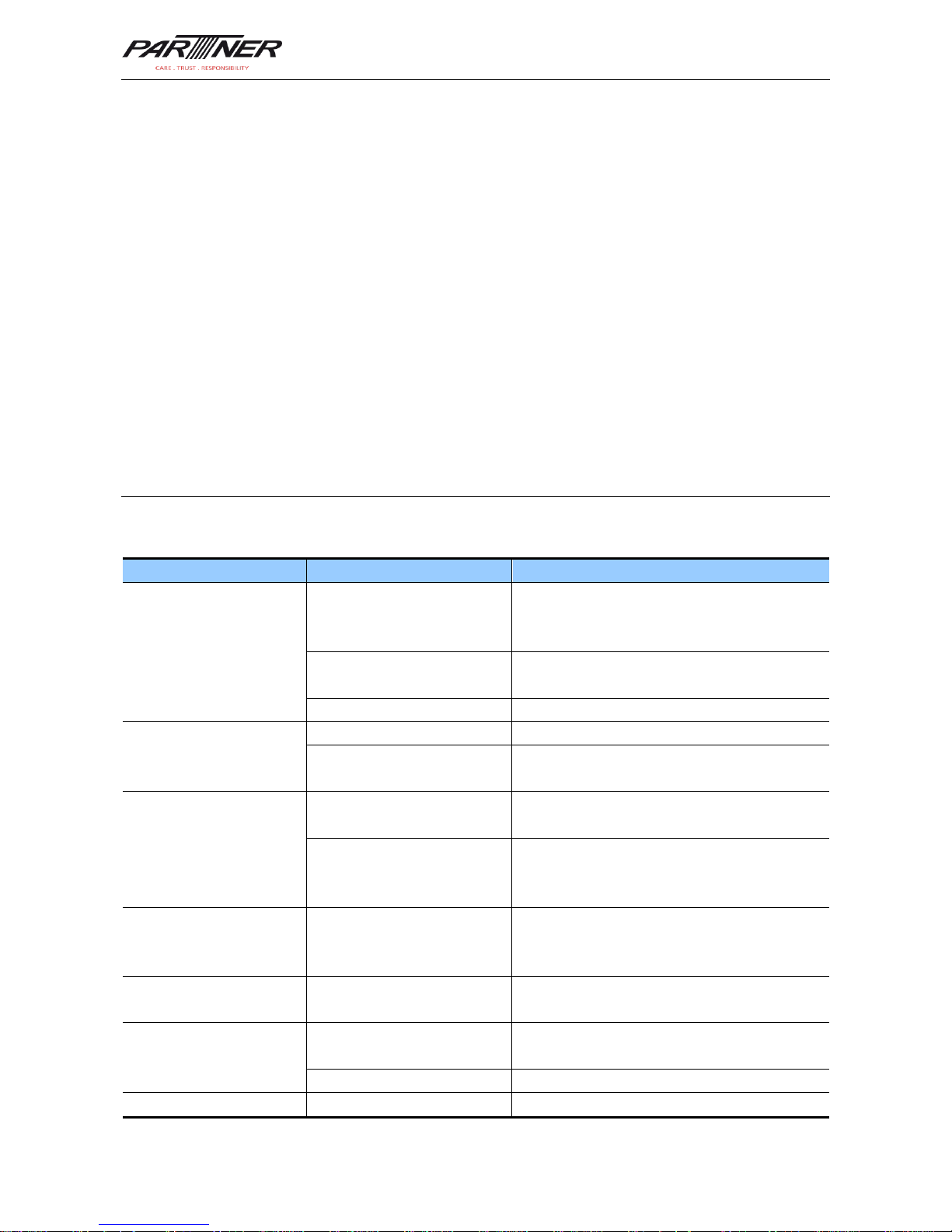
7.2 Troubleshooting
Table 7-1 MT-6330 troubleshooting
Fault
Cause
Solution
After the power key is
pressed, the MT-6330 is
not powered on.
The battery volume is too
low or the battery is not
charged.
Charge the MT-6330 or replace the battery.
The battery is incorrectly
installed.
Correctly install the battery.
The system breaks down.
Restores factory settings.
Battery charging fails.
The battery fails.
Replace the battery.
The temperature of the
battery is too high or low.
Put the battery in normal temperature.
During data
communication, data is
not transmitted or
transmitted data is
incomplete.
The cable configuration is
incorrect.
Consult the system administrator.
The communication
software is incorrectly
installed or configured.
Install or reinstall the ActiveSync software to
update the driver.
The relevant function is
not activated after a user
clicks a button or icon.
The system does not
respond.
Restart the system.
No sound can be heard.
The volume is too low or is
disabled.
Adjust the volume.
The MT-6330 is closed.
The MT-6330 is in the
inactive state.
After being inactive for a period of time, the
MT-6330 is closed.
The battery is used up.
Replace the battery.
The MT-6330 responds
Too many files are stored
Remove unused memos and records. If
Page 27
MT-6330 User Manual
- 25 -
Fault
Cause
Solution
at a low speed.
on the MT-6330.
necessary, save the records on the host or
increase the storage capacity by using an
SD card.
Too many applications are
installed on the MT-6330.
Remove applications installed on the
MT-6330.
The MT-6330 does not
decode barcodes.
The scan application is not
loaded.
Load iScan in the MT-6330.
Reading a barcode fails.
Check that the barcode is not defective.
The battery volume is low.
If the scanner stops sending out laser beam
after you turn on the switch, check the
battery volume.
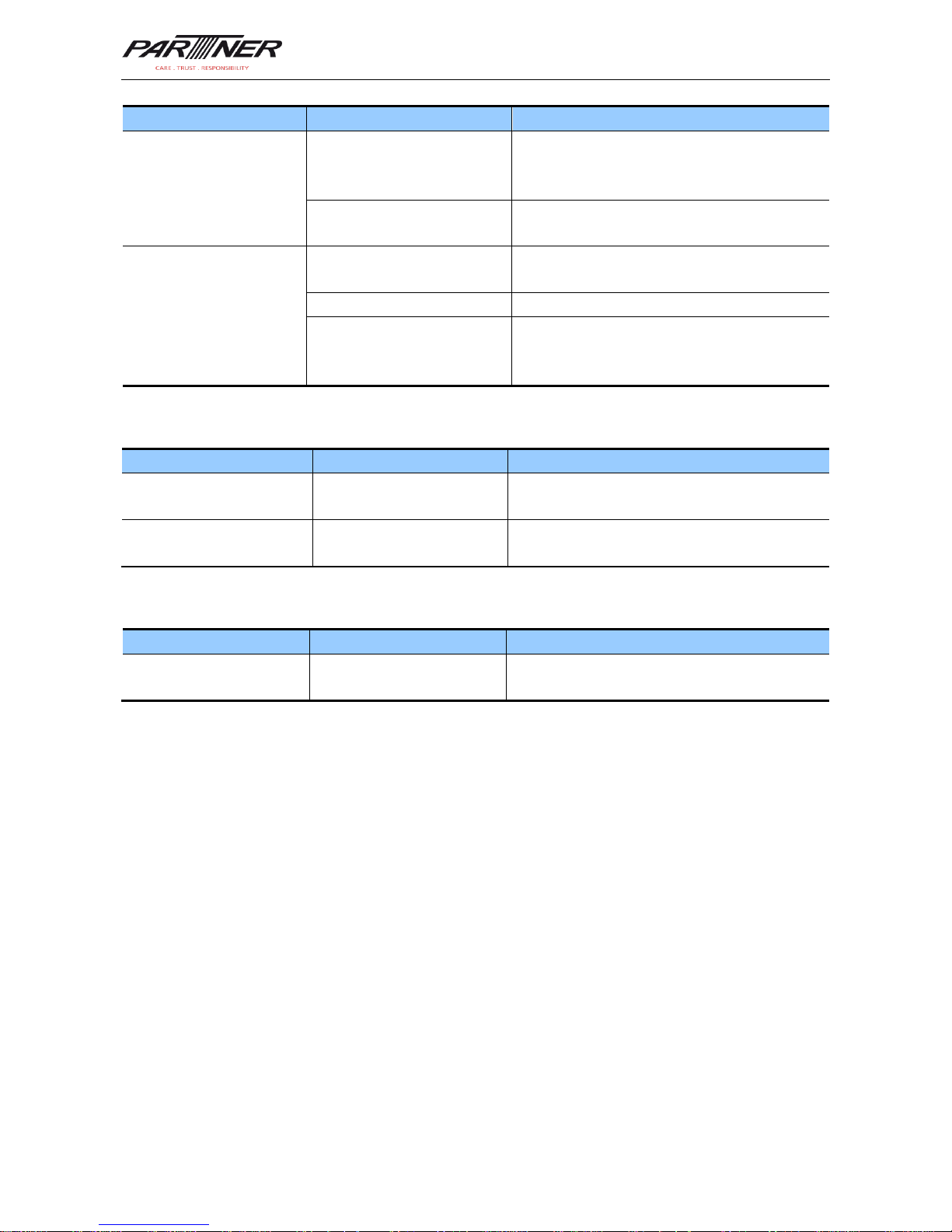
Table 7-2 Cable troubleshooting
Fault
Cause
Solution
Charging fails.
The cable is in poor
contact.
Replace the cable.
Connecting the
ActiveSync software fails.
The cable is in poor
contact.
Replace the cable.
Table 7-3 Wi-Fi connection troubleshooting
Fault
Cause
Solution
An AP cannot be
connected.
“Authentication fails” is
displayed.
The password of the WLAN device is
incorrect.
Page 28
MT-6330 User Manual
- 26 -
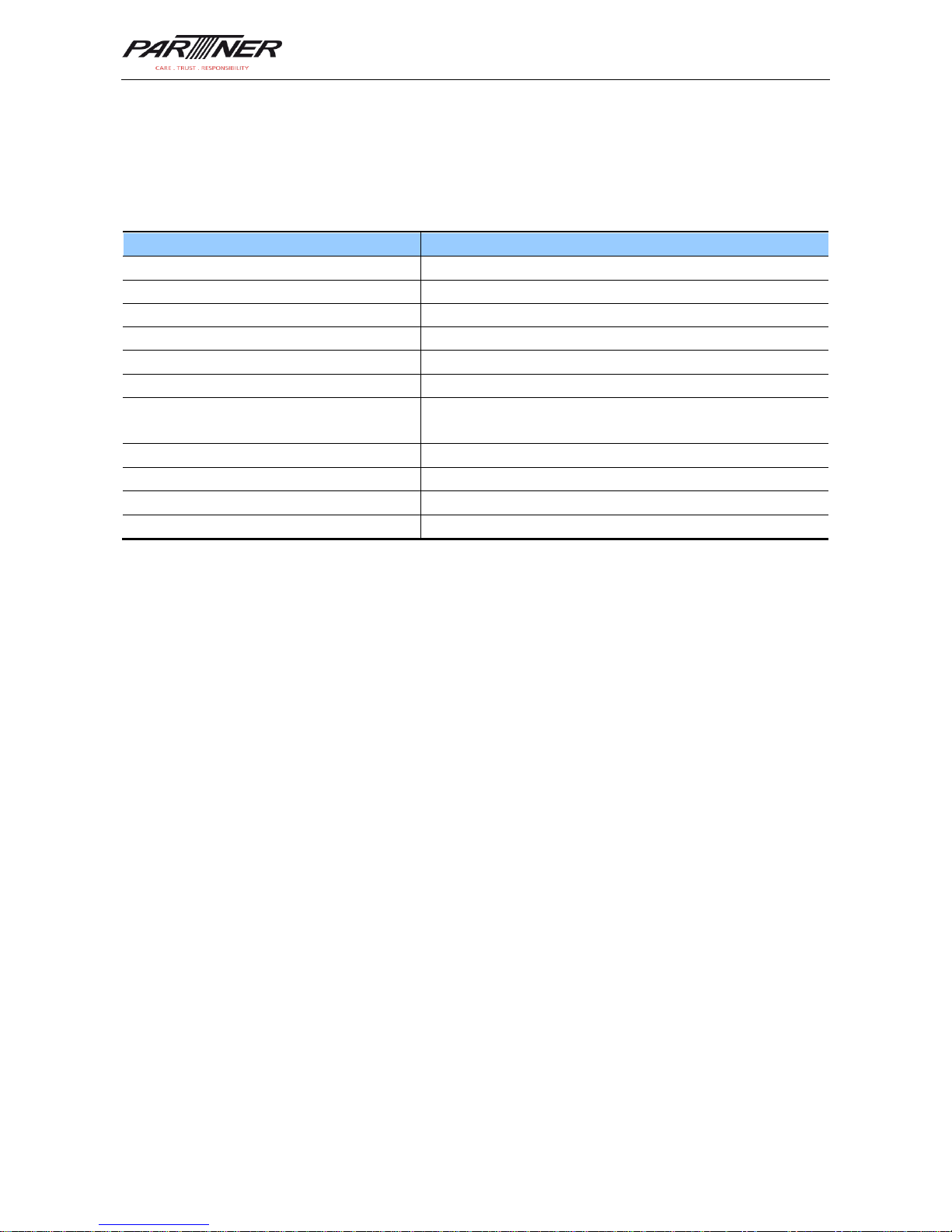
Appendix 1
Accessories of MT-6330
Component
Description
MT-6330
Standard battery
Power adapter
Used to charge the battery.
Straps
Hand strap
Package
USB data cable
Used to communicate with the host or charge the
MT-6330.
Instructions
Warranty card
One-slot USB charging base
Optional
Four-slot battery charger
Optional
Page 29
MT-6330 User Manual
- 27 -
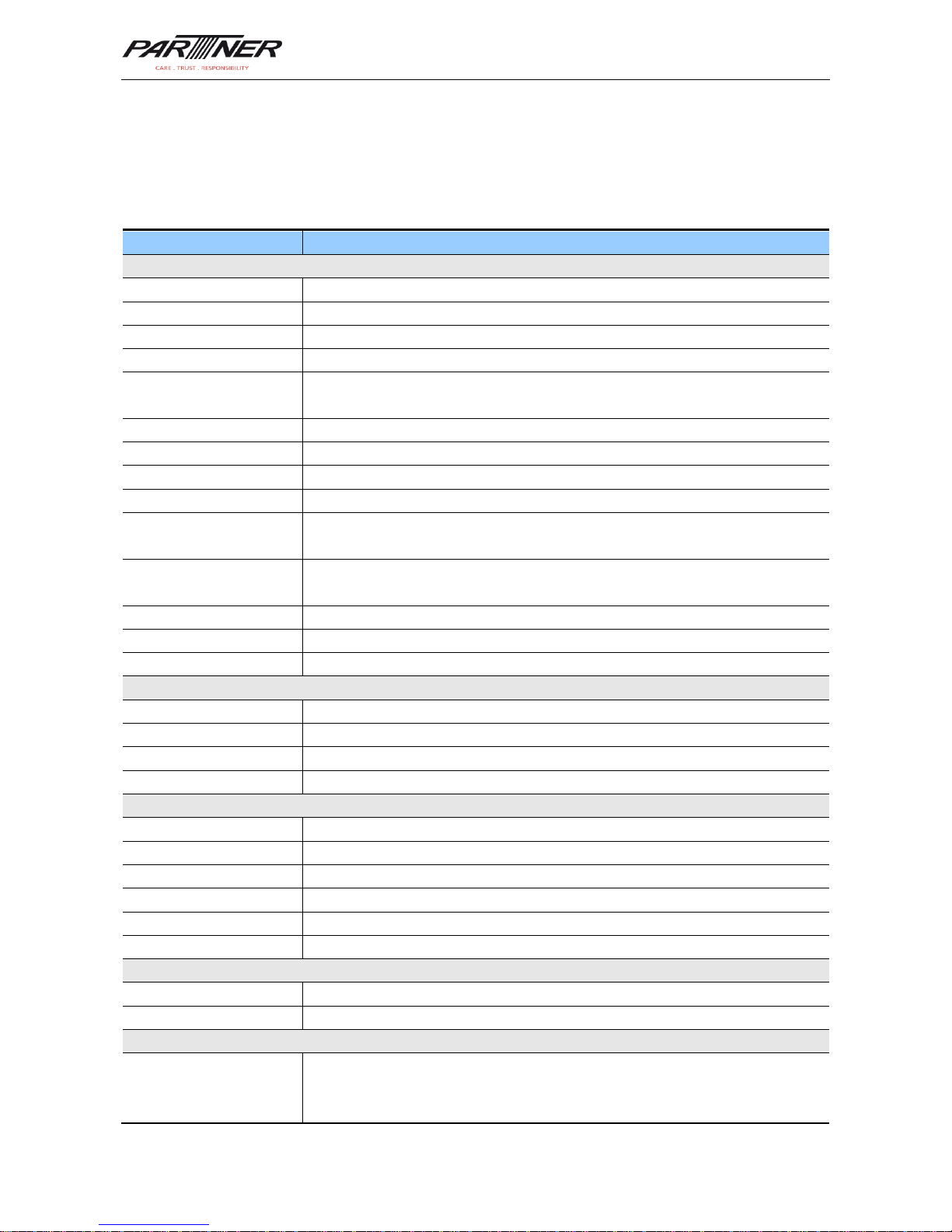
Appendix 2
Technical specifications of MT-6330
Item
Description
System Configuration
Processor
1 GHz high-performance ARM Cortex-A9 processor
Operating system
Android 4.0
Memory
4 GB ROM+512MB RAM
Expansion slot
Mini SD card (up to 32 GB is supported)
Display
3.5 inches, HVGA (320 X 480), TFT high brightness, LED backlight
Optional RETINA screen, high resolution (640 x 960)
Display material
Toughened glass
Touch screen
Capacitive touch screen
Camera (optional)
3 Mega pixel, auto-focus lens, LED flash
Scan lens
Corning Gorilla
glass
Keypad
31-key durable industrial keypad with interior transmission light
Main battery
3.7 V 4000 mAH rechargeable lithium polymer battery (6000 mAH battery
optional)
Audio
Built-in microphone
Notification
Vibrator alerts/LED prompt/audio notification
Vibration motor
Built-in programmable vibration motor
Usage Environment
Development tools
Android SDK+JDK+Eclipse
Supported language
Java, C
Management tool
Partner Tech Service
Operating temperature
-10C to 50C
Operating Environment
Storage temperature
-20C to 60C
Relative humidity
0 to 95% (non-condensing)
Drop specification
1.5-meter drop on concrete ground
Tumble specification
500 0.5-meter tumbles (1000 hits)
Sealing standard
IP65
Electrostatic discharge
15 kV air discharge, 8 kV direct discharge
Structural Parameters
Dimensions (LxWxD)
152 mm x 68 mm x 24 mm
Weight
255 g (standard battery included)
Communication & Transmission
Wireless voice
communication
2G: GSM 850/900/1800 MHz
3G: WCDMA 900/2100 MHz
(Optional: CDMA EVDO 800/1900 MHz)
Page 30
MT-6330 User Manual
- 28 -
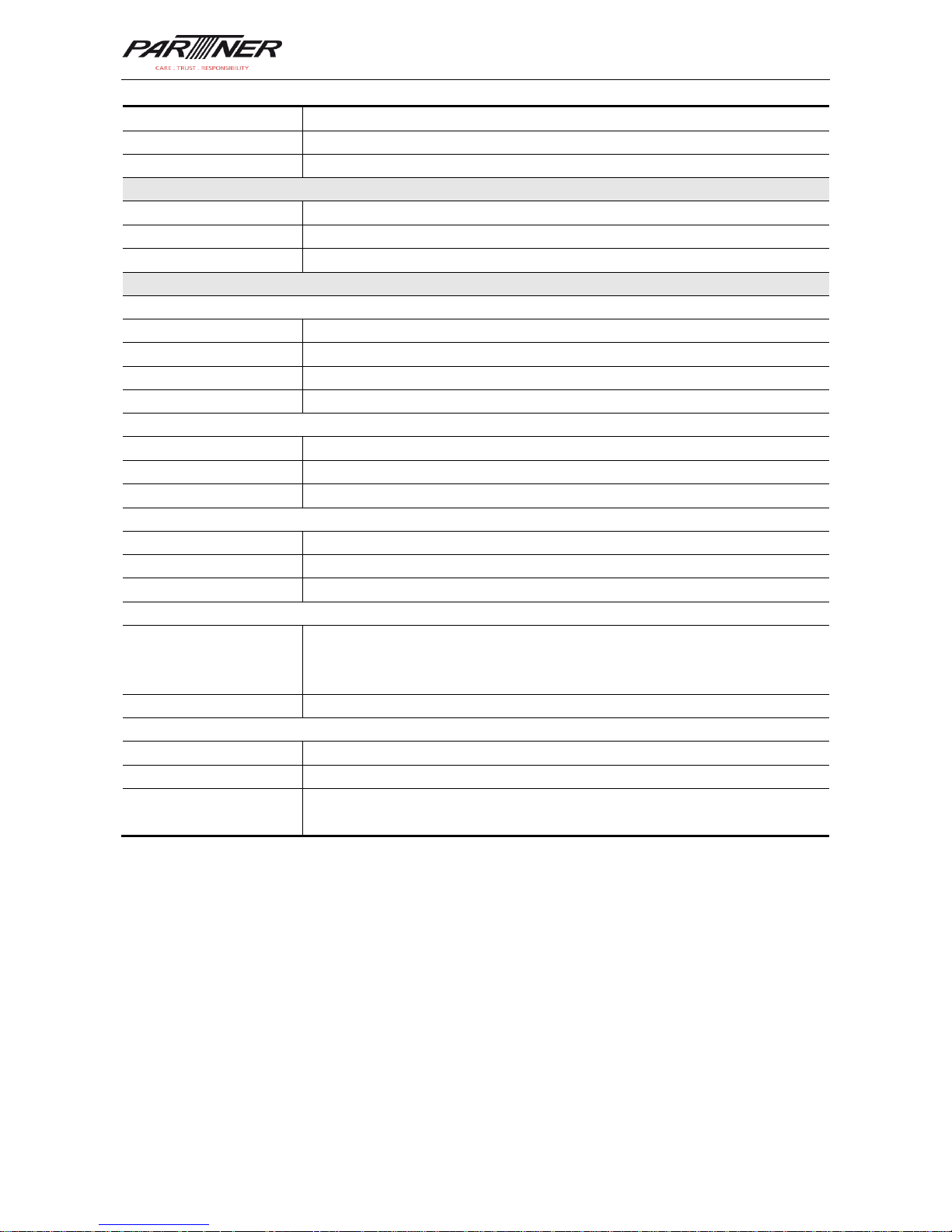
WWAN
GPRS/EDGE/WCDMA (Optional: CDMA EVDO)
WLAN
Wi-Fi 802.11b/g
GPS
High-performance GPS chip
Input/Input Interface
USB port
1 (Micro USB port)
Charger port
1 (DC port)
RS232 port
1
Data Collection Specification
1D Laser Scanner
Optical resolution
4 mil
Scan depth
3.81 cm - 60.98 cm
Scan angle
47° 3° (Standard)
Scan speed
102 12 scans/sec. (Bidirectional)
1D linear imager
Reading mode
CCD
Reading accuracy
4 mil
Decoding speed
300 times/sec. (Max.)
2D area imager
Optical resolution
3 mil
Scan angle
Omnidirectional
Scan speed
300 scans/sec.
Infrared Communication Module
Built-in infrared
communication module
Structure with two emitting tubes, meter reading distance of up to 5 meters,
fully supporting DL/T645 protocol and communication protocols of
worldwide mainstream meter manufacturers
Interface
Initial rate: 1200 bps, supported rates: 1200, 2400, 4800, and 9600 bps
RFID
Frequency
13.56 MHz
Reading distance
Within 50 mm
Communication
protocol
ISO14443A(B)/15693
Page 31

MT-6330 User Manual
- 29 -
Partner Tech Europe GmbH. All Rights Reserved.
This guide is prepared by Partner Tech Europe GmbH according to the existing information.
The content in this document is subject to update without notice.
Without written approval of Partner Tech Europe GmbH, no one shall copy, extract, back up,
modify, spread, or translate any part of this document in any form or method or use the
whole or part of this document for business purposes.
If you have any question, you are free to send an email to [email protected].
Page 32
MT-6330 User Manual
Partner Tech Europe GmbH
Fasanenweg 25
D- 22145 Hamburg
+49 (0)40 450 635-0
+49 (0)40 450 635-130
www.partner-tech.eu
 Loading...