

Page 1
PT-6215-ES USER GUIDE
Unpack the box and check the contents
The PT-6215-ES and its accessories are packed in a cardboard carton with foam
padding for protection during shipment. Carefully unpack the system and keep the
packing materials for future use.
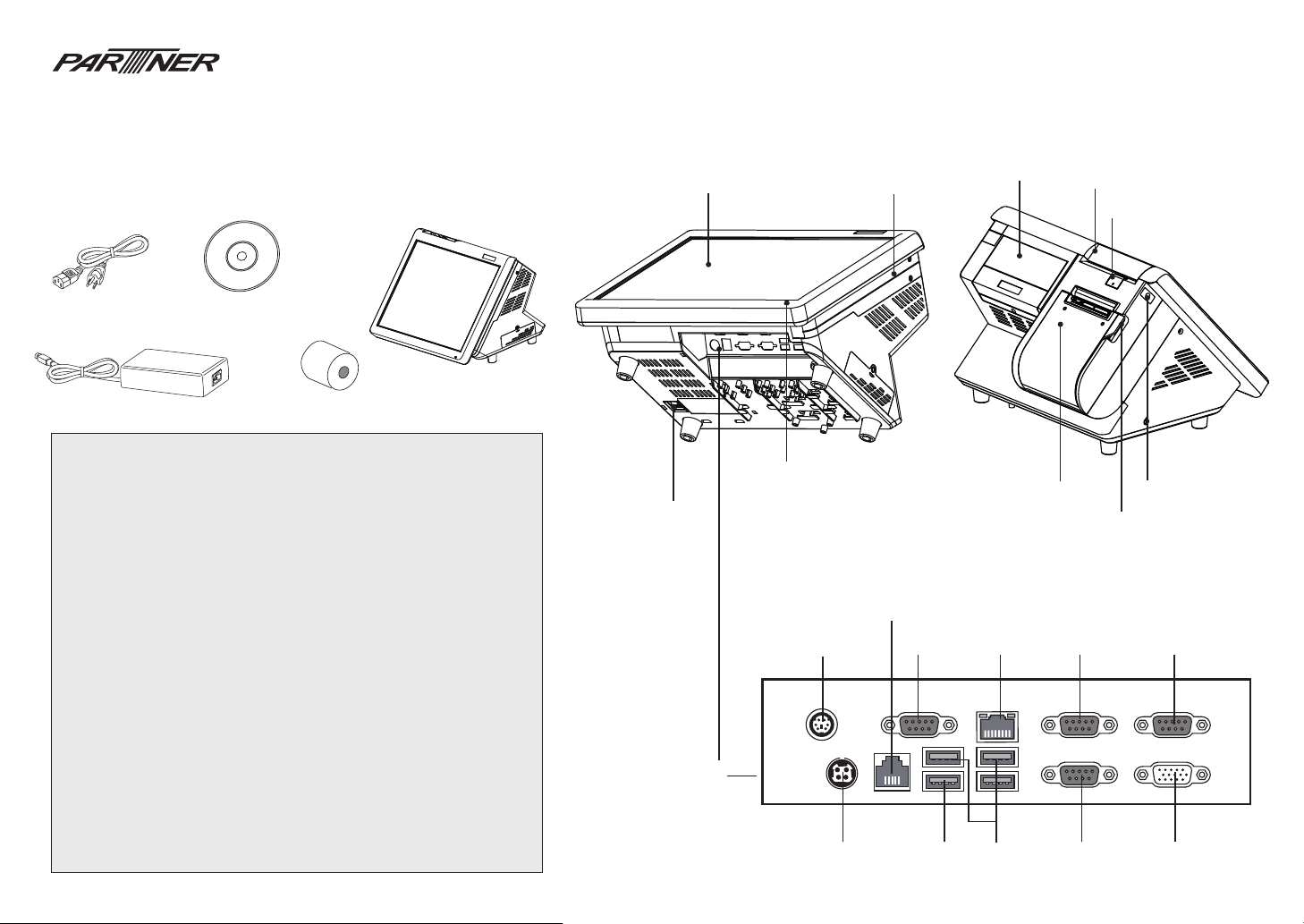
Verify that all of the items shown below are included in the box. If an item is missing
or appears to be damaged, contact your Partner Tech dealer immediately.
Power Cable
Adapter
WARNING:
This is Class A Product. In domestic environment this product may cause radio interference in which
case the user may be required to take adequate measures.
警告使用者:
這是甲類的資訊產品,在居住的環境中使用時,可能會造成射頻干擾,在這種情況下,使用者會被要求採
取某些適當的對策。
WARNING:
The system uses a 3V CR2032 battery mounted on the mainboard to keep time. There is a risk of
explosion if the wrong battery type is used when replacing. Dispose of used batteries according to
local ordinance regulations.
Federal Communications Commission (FCC) Statement
This equipment has been tested and found to comply with the limits for a Class A digital device,
pursuant to Part 15 of the FCC Rules. These limits are designed to provide reasonable protection
against harmful interference when the equipment is operated in a commercial environment. This
equipment generates, uses, and can radiate radio frequency energy and, if not installed and used in
accordance with the instruction manual, may cause harmful interference to radio communications.
Operation of this equipment in a residential area is likely to cause harmful interference in which
case users will be required to correct the interference at their own expense
Safety information
Before installing and using the machine, take note of the following precautions:
• Do not place the unit on an unstable surface, cart, or stand.
• Do not block the slots and opening on the unit, which are provided for ventilation.
• Only use the power source indicated on the marking label. If you are not sure, contact your
dealer or the Power Company.
• When replacing parts, ensure that your service technician uses parts specied by the
manufacturer.
• Do not place anything on the power cord. Place the power cord where it will not be in the way
of foot trac.
Driver CD with drivers and
the user manual PDF le.
PT-6215-ES
3” thermal paper roll
Identifying components
Touch Panel
LED HDD/Power
Indicators
Power Button
PS/2 KB
IO Panel
DC12V-IN
MSR
RJ-11
Cash drawer port
COM4
LAN
USB 2.0USB 3.0
VFD
Thermal Printer
Feed Button
Printer Cover Handle
COM2
COM1
Roller Gear Door
Feed Button
COM3
VGA
Page 2
Specication
Item PT-6215-ES
CPU Type Intel® Celeron® Processor J1900 (2M Cache, 2.0GHz up to 2.42 GHz)
LCD 15” Active TFT color LCD, 350 nits resolution 1024 x 768
Chipset Intel chipset
Touch 5-wire resistive touch (USB interface)
Memory 204pin DDR3L-1333 SO-DIMM x 2, Max Support 8GB
LAN Onboard 10/100/1000 BASE-T Gigabit Ethernet
Storage Internal 2.5” type SATA HDD x 1 (optional SATA SSD)
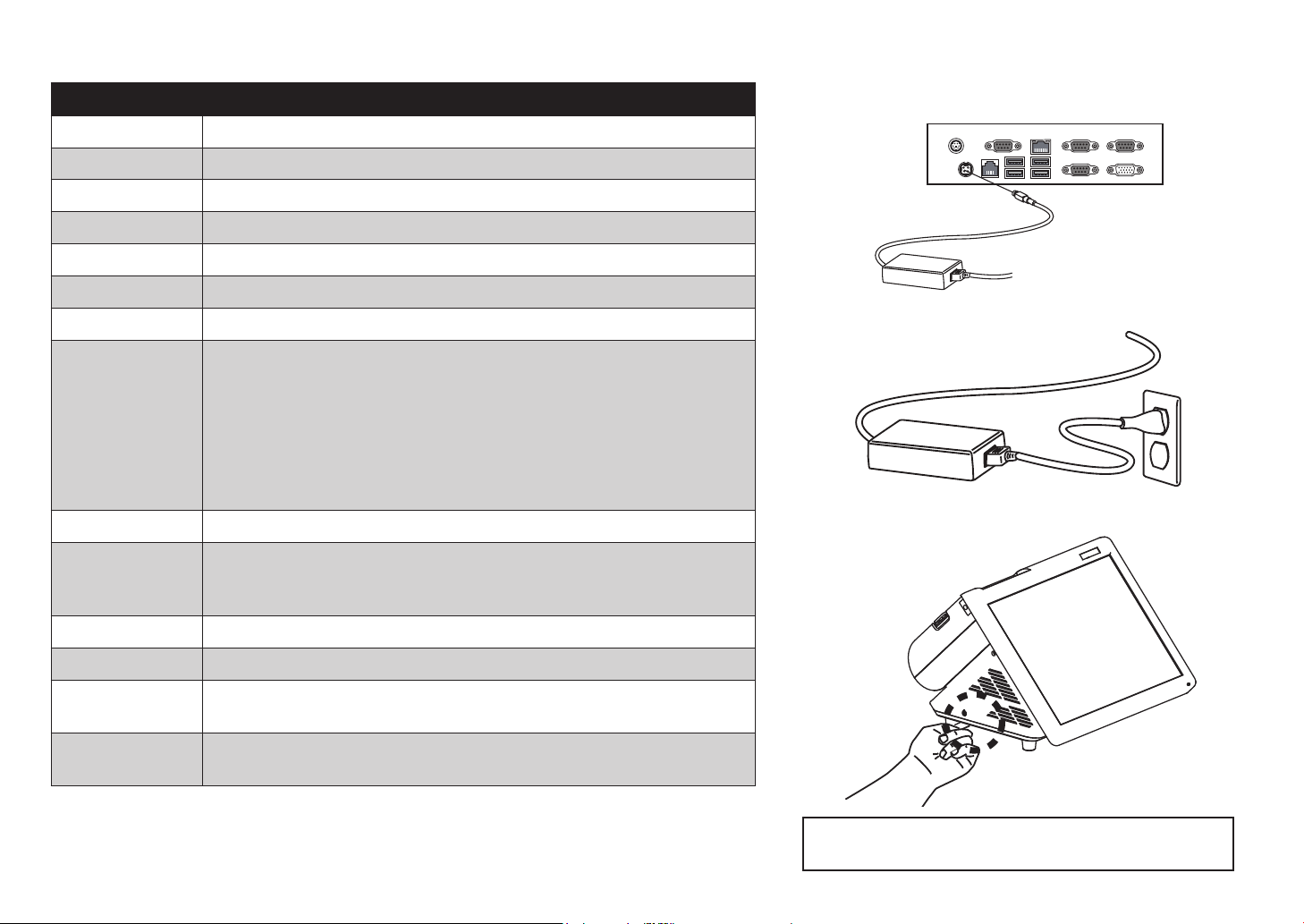
Quick start
1. Connect the power cable to the DC-IN connector located on the left side
of the PT-6215-ES I/O panel.
2. Plug the power cable into an electrical outlet.
I/O Interface 4* COM ports (COM1~4 on rear I/O, COM1~2 powered with DC+0/5/12V, BIOS selection;
Dimension 345 x 321 x 256 (WxDxH mm)
Integrated Peripherals
Operation System Window 7, POS Ready7, Window 8.1, Industry pro embedded 8.1 , Linux (Ubuntu)
Power Supply AC100~240V/DC12V, 15A, 180W adapter
Temperature
Environment
COM3~4 by Jumper setting)
1* DB-15 VGA port
1* RJ11 port supports 2 cash drawers (DC+24V)
1* RJ-45 LAN port with activity and link LEDs
3* USB 2.0 port
1* USB 3.0 port
1* PS2 Keyboard port
1* DC +12V input power-jack for adapter
Triple track magnetic card reader
2 x 20 VFD Customer display
250mm/sec 80mm Thermal receipt printer with cutter and control board
Operating Temperature: 0~40 °C
Storage Temperature: -20~60 °C
Operating Humidity:15% ~ 80%
Storage Humidity:15% ~ 80%
3. Press the power button on the left underside of the PT-6215-ES.
Note: Press once to power on the system. Press it for 4~5
seconds to force the system power o.
 Loading...