

Page 1
PAT-215 USER GUIDE
Unpack the box and check the contents
The PAT-215 and its accessories are packed in a cardboard carton with foam padding for
protection during shipment. Carefully unpack the system and keep the packing materials for
future use.
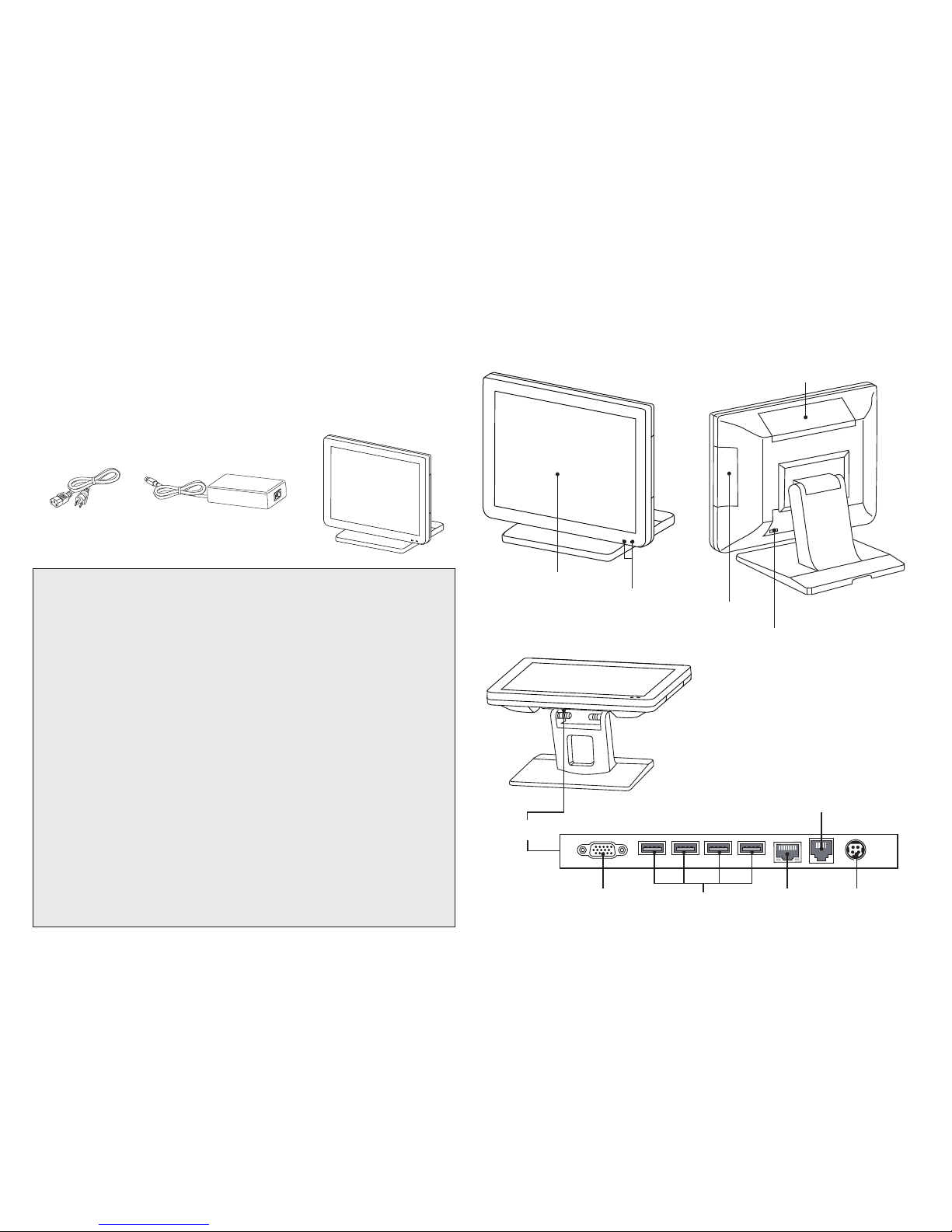
Verify that all of the items shown below are included in the box. If an item is missing or appears
to be damaged, contact your Partner Tech dealer immediately.
PAT-215
Adapter
Power Cable
Identifying components
Power Button
I/O
LED Power/ HDD
Indicator
15-inch TFT LCD
MSR (optional) Slot
DC12V-InLAN
RJ-11
Cash drawer port
COM
USB 2.0
WARNING:
This is Class A Product. In domestic environment this product may cause radio interference in which
case the user may be required to take adequate measures.
警告使用者:
這是甲類的資訊產品,在居住的環境中使用時,可能會造成射頻干擾,在這種情況下,使用者會被要求採取
某些適當的對策。
WARNING:
The system uses a 3V CR2032 battery mounted on the mainboard to keep time. There is a risk of
explosion if the wrong battery type is used when replacing. Dispose of used batteries according to
local ordinance regulations.
Federal Communications Commission (FCC) Statement
This equipment has been tested and found to comply with the limits for a Class A digital device,
pursuant to Part 15 of the FCC Rules. These limits are designed to provide reasonable protection
against harmful interference when the equipment is operated in a commercial environment. This
equipment generates, uses, and can radiate radio frequency energy and, if not installed and used in
accordance with the instruction manual, may cause harmful interference to radio communications.
Operation of this equipment in a residential area is likely to cause harmful interference in which case
users will be required to correct the interference at their own expense
Safety information
Before installing and using the machine, take note of the following precautions:
• Do not place the unit on an unstable surface, cart, or stand.
• Do not block the slots and opening on the unit, which are provided for ventilation.
• Only use the power source indicated on the marking label. If you are not sure, contact your dealer
or the Power Company.
• Whenreplacingparts,ensurethatyourservicetechnicianusespartsspeciedbythe
manufacturer.
• Do not place anything on the power cord. Place the power cord where it will not be in the way of
foottrafc.
VFD Customer Display
(optional) Slot
Page 2
Specication
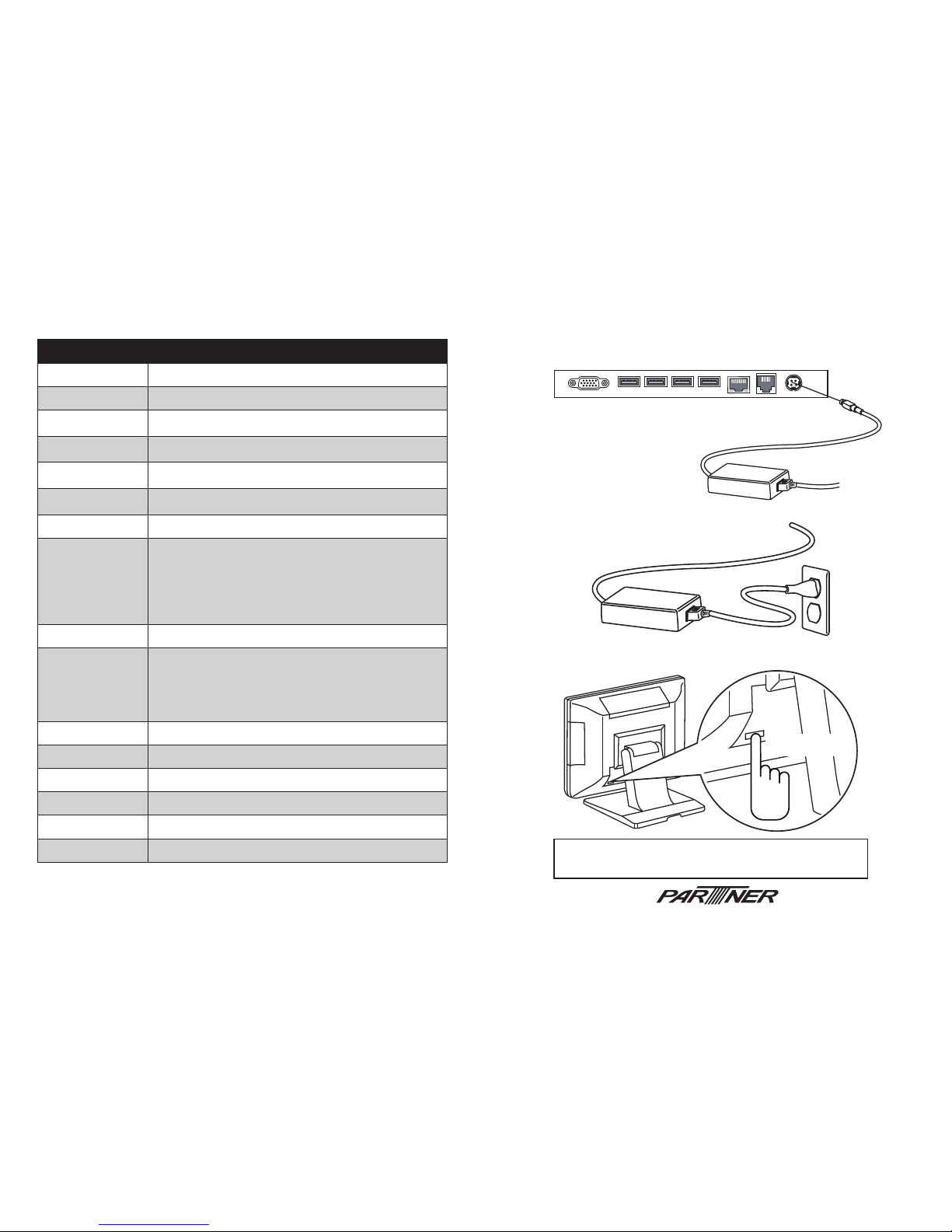
3. Turn it on by pressing and holding the power button for 1~2 seconds.
Note: If you want to force to shut down, you can press and
hold the power button for 8 seconds.
Quick start
1. Connect the power cable to the DC-IN connector located on the right side
of the I/O panel.
2. Plug the power cable into an electrical outlet.
Item PAT-215
CPU Type Freescale iMX6 Cortex A9 Dual Lite Core 1.0G CPU
LCD 15” LCD, resolution 1024 x 768, 350nits, LED backlight
Touch PCT Touch screen, USB interface
Memory DDR3-800 1GB On Board
LAN 10/100/1000 Gb Ethernet x 1
Storage eMMC on board 8GB
Audio 1 * Internal speaker 3W
I/O Interface
1 * Internal SD card
1 * COM port powered with DC +5/+12V by jumper
4 * USB 2.0
1 * RJ45 LAN
1 * RJ11 port supports 2 cash drawer(DC+24V)
1 * DC +12V input power-jack
Expansion Options 1 * Mini PCI-e
Optional Peripherals
3 tracks magnetic reader USB interface
Customer display module (2 x 20 VFD)
Wi & BT card
3G Module
Stand
Operation System Android 4.2.2
Power Supply AC100~240V, DC+12V/7.5A, 90 watt power adapter
Dimensions 360mm (W) x197.7mm (D) x 327.3mm (H)
Operating Temp 0°C ~ +40°C
Storage Temperature -20°C ~ +60°C
Humidity 15%~80%
1~2 seconds
www.partner.com.tw
Page 3

Federal Communication Commission Interference Statement
This equipment has been tested and found to comply with the limits for a Class A digital device, pursuant to Part 15 of
the FCCRules. These limitsare designed to provide reasonable protection against harmful interference in a residential
installation. Thisequipment generates, uses, and can radiate radio frequency energy and, if not installed and usedin
accordance with the instructions, may cause harmful interference to radio communications. However, there is no
guarantee that interference will not occur in a particular installation. If this equipment does cause harmful interference to
radio or television reception, which can be determined by turning the equipment off and on, the user is encouraged to try
to correct the interference by one or more of the following measures:
• Reorient or relocate the receiving antenna.
• Increase the separation between the equipment and receiver.
• Connect the equipment into an outlet on a circuit different from that to which thereceiver is connected.
• Consult the dealer or an experienced radio/TV technician for help.
FCC Caution:
This device complies with Part 15 of the FCC Rules. Operation is subject to the following two conditions: (1) This device
may not cause harmful interference, and (2) this device must accept any interference received, including interference
that may cause undesired operation.
Non-modification Statement:
Changes or modifications not expressly approved by the party responsible for compliance could void the user's authority to
operate the equipment.
FCC Radiation Exposure Statement:
This equipment complies with FCC radiation exposure limits set forth for an uncontrolled environment. This equipment
should beinstalled and operated with minimum distance 20cm between the radiator & your body.
 Loading...