

Page 1
Page 2
Please read and follow the instructions in this manual thoroughly to obtain optimum results from this unit. We also
recommend that you keep this manual handy for future reference.
Safety Precautions
• Be sure to read the instructions in this section carefully before use.
• Make sure to observe the instructions in this manual as the conventions of safety symbols and messages regarded as
very important precautions are included.
Safety symbols and messages described below are used in this manual to prevent bodily injury and property damage
which could result from mishandling. Before operating your product, read this manual rst and understand the safety
symbols and messages so you are thoroughly aware of the potential safety hazards.
WARNING
CAUTION
Make sure to observe the following handling precautions so that a re or personal injury does not result from leakage or
explosion of the battery.
• Do not short, disassemble, heat or put the battery into a re.
• Never charge batteries of the type which are not rechargeable.
• Do not solder a battery directly.
• Be sure to use the specied type of battery.
• Note the correct polarity when inserting a battery in the unit.
• Avoid locations exposed to the direct sunlight, high temperature and high humidity when storing batteries.
WARNING
CAUTION
Indicates a potentially hazardous situation which, if mishandled, could result
in death or serious injury.
Indicates a potentially hazardous situation which, if mishandled, could result
in moderate or minor personal injury, and/or property damage.
To prevent the electromagnetic wave from badly inuencing medical
equipment, make sure to switch o the units power when placing it in close
proximity to the medical equipment.
Battery discharges naturally according to a certain pattern even when not in
use. For best performance and a prolonged lifespan, battery should be charged
regularly aer every use or every month when the system is in storage and not
being used. CD player optical pickup head is a very delicate device and sensitive
to humidity. Please avoid using it in high humidity areas to avoid damage.
PAGE 2 OPERATION MANUAL V1.0
Page 3
Congratulations and thank you for purchasing this multi-functional wireless portable amplier. To ensure a trouble-free
operation, please read the manual thoroughly to fully understand its controls and functions.
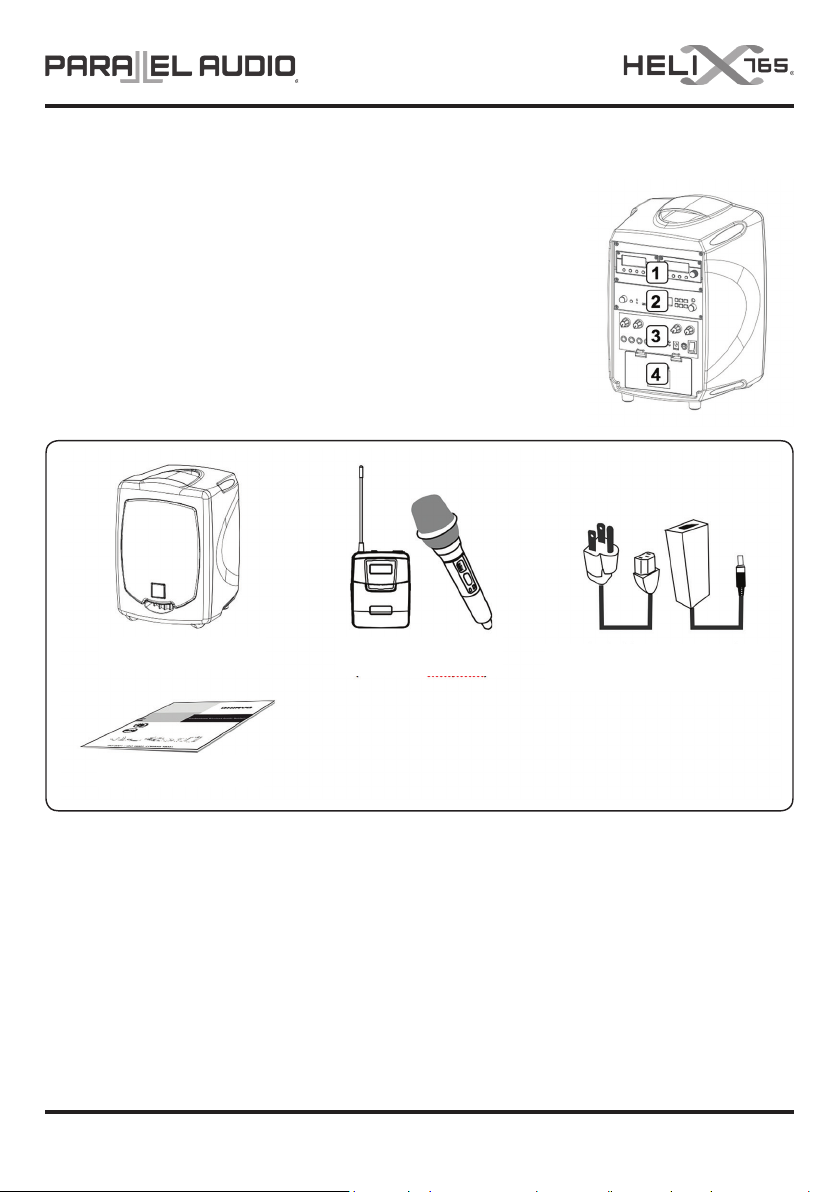
The rear panel of this portable amplier is divided into 4 sections:
1. Compartment for receiver / repeater module
2. Compartment for MP3-Bluetooth module
3. Unit control panel
4. Battery compartment
The Modular Compartment is user congurable and user can access
the battery compartment to replace battery.
In the Box
Helix 765 amplier
Operation manual
Note: The above specications are subject to change without prior notice.
Optional Accessories
1. Weather proof dust cover
2. Carry bag
3. Tripod stand
4. Wall-mount rack
5. Companion passive speaker
6. Wired microphone
0~2 transmitters
(handheld/beltpack)
OPERATION MANUAL V1.0
Switching power supply
(plug varies from country to country)
PAGE 3
Page 4
Parts and Functions
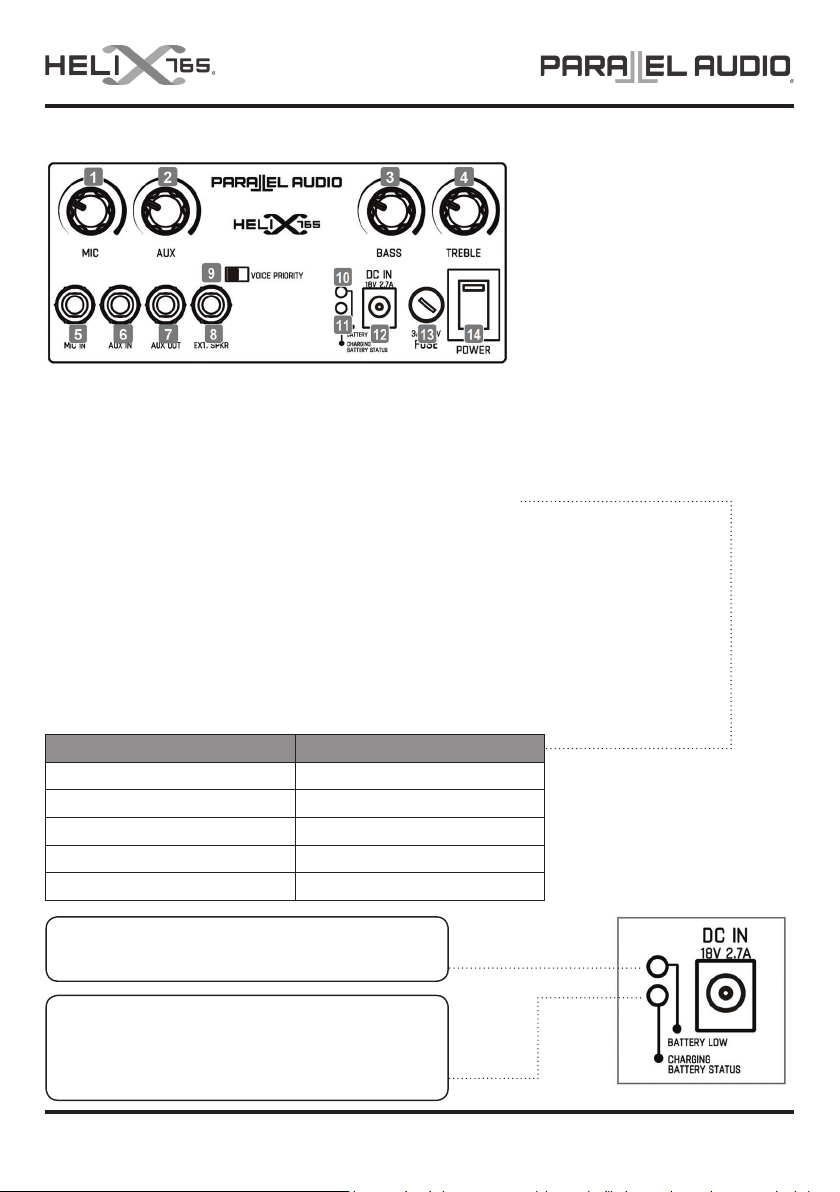
1. Microphone volume control
2. Aux in volume control
3. Bass tone control (for all audio)
4. Treble tone control (for all audio)
5. Wired microphone input socket (6.3mm)
6. Aux in socket (6.3mm)
7. Aux out socket (6.3mm)
Charging the Battery
Aer unpacking the unit for the rst time, please FULLY charge the unit before operation.
This is necessary as the built-in rechargeable battery might have been discharged naturally during
shipping and storage time, even though it has been fully charged in the factory prior to shipment.
While charging, the unit can be operated if required.
Battery Type:
MODEL HELIX-765
DC Input 18V 2.7A
Battery Type LI-ION
Specs 16.8V 5.2A
Qty 1 Pc
Charging Time About 8 hours
Battery Low: If the Battery Low indicator lights up RED,
the battery is weak and needs charging
8. External speaker socket (6.3mm)
9. Voice priority switch
10. Battery indicator
11. Charging indicator
12. DC input
13. Fuse
14. Power switch
Note: The above specications
are subject to change without
prior notice.
During Recharge: Charging LED ashes RED
Fully Charged: Charging LED turns GREEN
Wrong/no Battery Detected: Charging LED turns YELLOW
PAGE 4 OPERATION MANUAL V1.0
Page 5
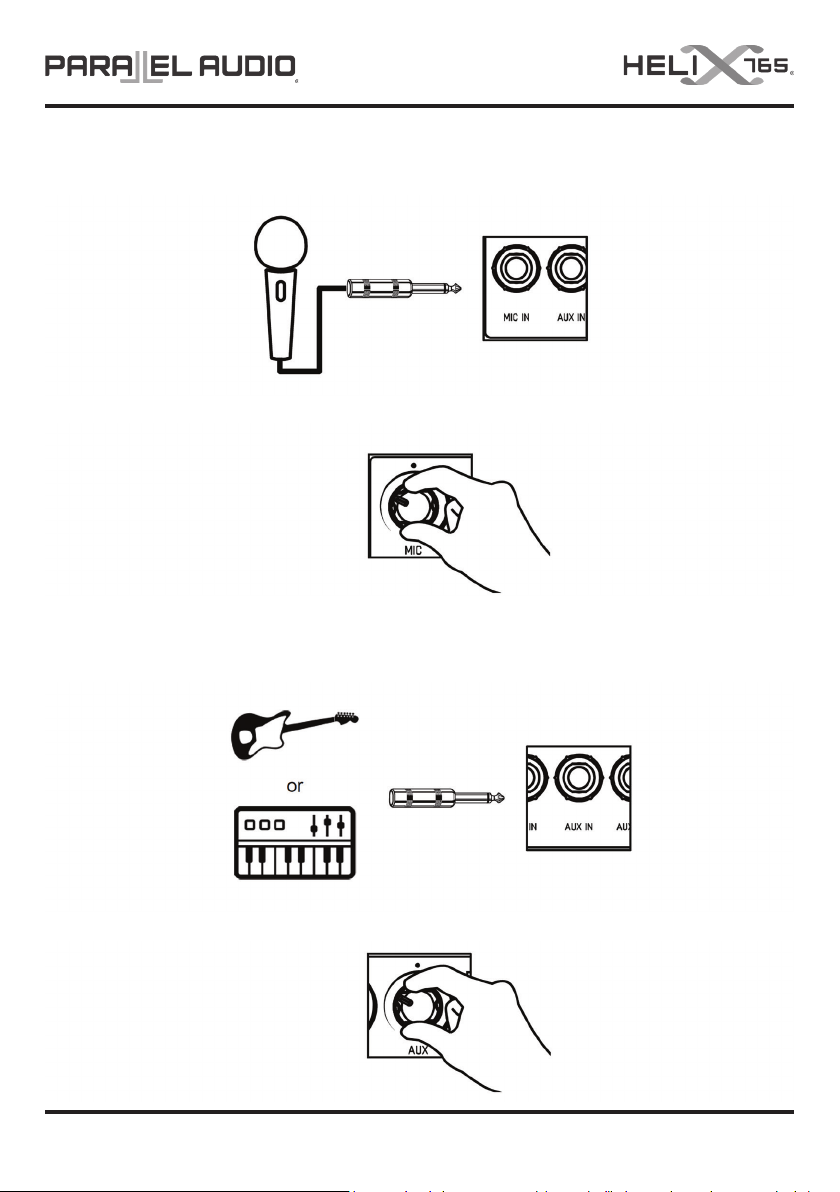
Using the Wired Microphone
1. Plug a wired microphone with a 6.3mm plug to MIC IN.
2. Turn on the amplier and then adjust its individual volume control to a desired level.
Using an Electronic Instrument
1. Plug an electronic guitar or keyboard with a 6.3mm plug to AUX IN.
2. Turn on the amplier and then adjust its individual volume control to a desired level.
OPERATION MANUAL V1.0
PAGE 5
Page 6
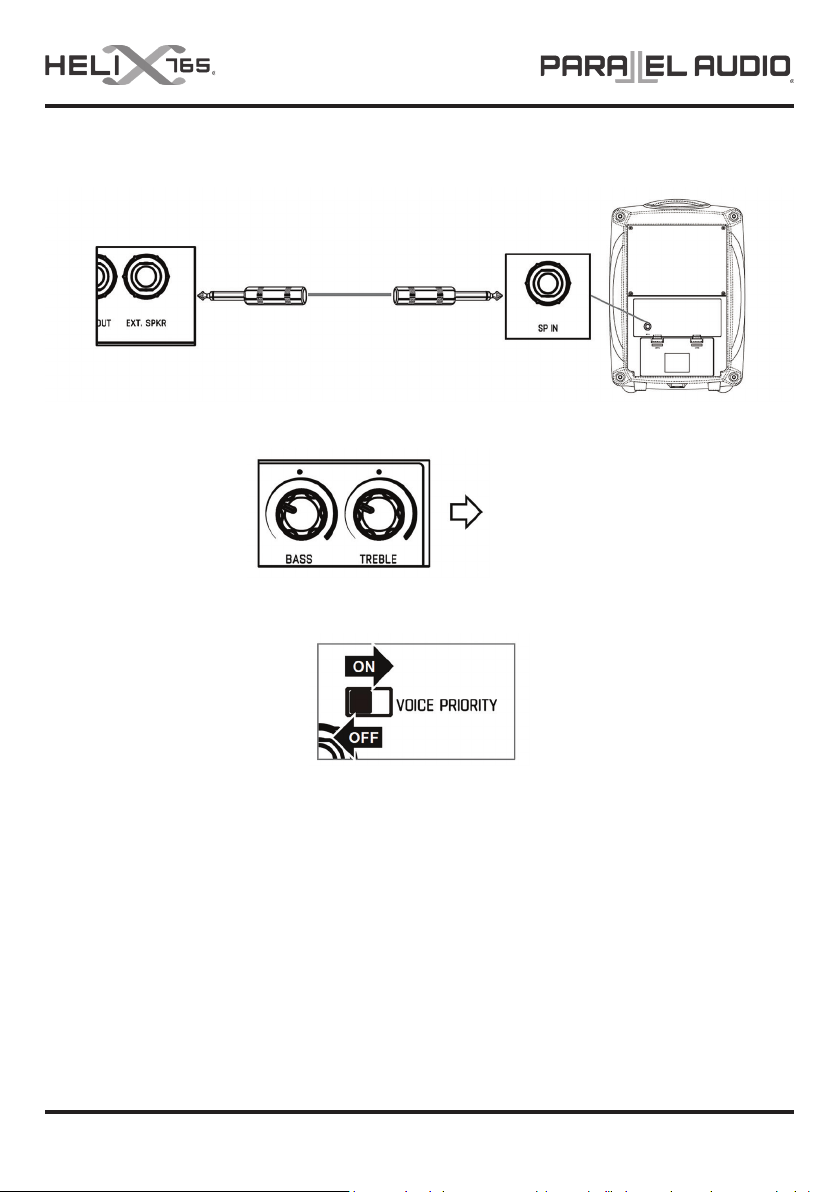
Connecting an External Speaker
Plug the external speaker’s audio cable with a 6.3mm connector to the EXT SPKR socket.
Tone Control
For all audio
Operating Voice Priority
Voice Priority operation is only necessary when CD/USB/MP3 is playing.
When the Voice Priority switch is ON, the ducking function will be activated. While the music is playing, a voice input
from either a Wired or Wireless Microphone will temporarily override and lower the volume of the background music and
voice can be heard more clearly.
Background music will return to its original volume when no audio is detected from the microphone for a few seconds.
Please Note: If the microphone is used within close proximity of the HELIX-765 speaker or other high level music
playback the Voice Priority feature may be activated and lower the music level. It is recommended that if the microphone
is not required whilst music is being played to switch o or mute the microphone.
PAGE 6 OPERATION MANUAL V1.0
Page 7

PORTABLE PA SYSTEM
BATTERY CARE
Congratulations on the purchase of your Parallel Audio portable PA system.
To maximise the life of the built in, re-chargeable batteries in this unit
please follow these instructions:
1. Charge unit for 10 hours before rst use.
2. Aer PA has been used for a period of time it may naturally shut down as the batteries
become at and require recharging. Do not continually reset the on/o switch as this will
cause permanent damage to the batteries. Re-charge PA for minimum 10 hours ASAP!
3. Do not store the portable PA system with discharged batteries (eg. Over school holidays,
etc). Always make sure the batteries are fully recharged before leaving for school holidays
or extended periods and then recharge fully once again before use of the portable PA. If
batteries have been fully drained, recharge as soon as possible!
4. The PA system may be recharged even aer only a short usage; batteries do not need to be
completely at before recharging – they have no memory eect.
5. To prolong battery life, always switch the PA o when not in use.
6. The batteries naturally discharge even without use of the PA, like a car battery! For best
results and in order to maximise the life span of the batteries, recharge the portable PA
every month, even when it has not been used.
7. We do not recommend leaving the PA on charge for more than 24 hours.
8. The battery manufacturer warrants the batteries for only 3 months from original purchase
date. Damage to batteries aer this time will not be covered by warranty.
9. The average lifespan of the batteries is around 1 to 2 years. The user is advised that a
change of batteries may be required within this time.
OPERATION MANUAL V1.0
PAGE 7
Page 8

PARALLEL AUDIO WARRANTY INFORMATION – 5 Year Warranty Term
Consumer Guarantees
When you purchase a NAS distributed product, you have the peace of mind in knowing that your product is covered by the NAS warranty. The NAS warranty is provided by:
In Australia: National Audio Systems Pty Ltd, ABN 50 085 679 894 [‘NAS’], 127 Merrindale Drive, Croydon, Victoria 3136.
In New Zealand: NAS Solutions Limited, NZBN 9429046800992 [‘NAS’], 7F Douglas Alexander Parade, Rosedale, Auckland 0632.
The Australian Consumer Law protects consumers by giving them certain guaranteed rights when they buy goods and services. Rights guaranteed under the Australian Consumer
Law include;
• The goods are of acceptable quality;
• The goods match their description or any sample or demonstration model;
• The goods are t for any represented purpose or purpose which the consumer has made known;
• Repairs and spare parts are reasonably available (unless notice has been provided that repairs or spare parts would not be available); and
• The services are carried out with reasonable care and skill and are completed within a reasonable time
These rights are called ‘Consumer Guarantees’ and apply automatically whenever goods or services are supplied to a consumer. These Consumer Guarantees cannot be refused, changed or
limited.
Consumer Guarantees have no set time limit and depending on the price and quality of goods a Consumer may be entitled to a remedy aer any manufacturers’ or NAS’s extended warranty
has expired.
The Specic Warranty Table Information outlines the warranty period, warranty type and any specic exclusions for your NAS product. NAS considers the warranty period specied in the
Specic Warranty Table to be a reasonable warranty period having regard to the price, design, manufacture and expected use of the product.
General Warranty (‘Warranty’)
NAS products come with guarantees that cannot be excluded under the Australian Consumer Law. You are entitled to a replacement or refund for a major failure or if the goods fail to be of
acceptable quality. You are also entitled to have the goods repaired or replaced if the goods fail to be of acceptable quality and failure does not amount to a major failure. What constitutes a
major failure is set out in the Australian Consumer Law.
Subject to the terms and conditions set out below, and unless otherwise specied in the Specic Warranty Information for your NAS product, NAS agrees to repair or replace, at NAS’s cost,
the NAS product purchased by you in Australia or New Zealand from NAS or a NAS authorised reseller when the product does not perform substantially in accordance with the specications
during the warranty period specied in the Specic Warranty Table for your NAS product. NAS makes no other express warranties in respect of your NAS product. To make a claim under this
Warranty, valid proof of purchase must be presented when the warranty claim is made, along with any other required information. The Warranty oered by NAS is not transferable.
The Warranty will only apply if your NAS product has been installed and used in accordance with NAS’s recommendations as noted in the operating instructions.
Warranty Exclusions
The Warranty does not cover damage caused by;
• Misuse or abuse of the product by You;
• Incorrect operation or not following the operation instructions (as noted in the operating instructions);
• Improper installation;
• Incorrect or improper maintenance or failure to maintain the product;
• Failure to clean or improper cleaning of the product;
• Incorrect voltage or non-authorised electrical connections;
• Adverse external conditions such as incorrect or uctuations in electrical voltage, thunderstorm activity, acts of God, acts of terrorism, damage caused by vermin, or any other circumstance
beyond NAS’s control;
• Exposure to excessive heat, moisture or dampness;
• Exposure to abnormally corrosive conditions;
• Alterations or modications to the product made by You or a third party; or
• Damage as a result of accident, liquid, grit, impact or lack of proper care as indicated in the operating instructions;
• Damage resulting from the use of cleaning solvents such as acetone
The Warranty does not apply if any serial number or appliance plate on the product has been tampered with, removed or defaced.
The Warranty does not apply if the product has been repossessed under any nancial agreement.
The Warranty excludes accessories and consumable goods which have ceased working through normal wear and tear such as, but not limited to, batteries, lamps and other parts classiable
as a consumable part.
The Warranty does not cover the loss of any data howsoever caused. You shall be responsible for backing up and protecting data against loss, damage or destruction.
Products presented for repair may be replaced by refurbished products of the same type rather than being repaired. Refurbished parts may be used to repair the products. Replacement of the
product or a part does not extend or restart the Warranty Term.
The product will be at the owner’s risk whilst in transit to and from all NAS authorised service centres, unless transported by NAS or its authorised representatives.
NAS and its authorised service centres may seek reimbursement of any costs incurred by them when the product is found to be in good working order.
The cost of claiming under this warranty, including return of any product to NAS is to be borne by the consumer.
The Warranty excludes removal or reinstallation costs.
* All Parallel Audio products come with a 5 year warranty term, excluding Parallel Audio batteries and CD players (see below).
Parallel Audio Limited Battery and CD Player Warranty: Batteries and CD players tted to all Parallel Audio portable PA products carry a 3 months warranty.
For further information and warranty claims, refer to our Support page at www.nas.solutions.
PAGE 8 OPERATION MANUAL V1.0
 Loading...