

Page 1
Page 2
BP6100
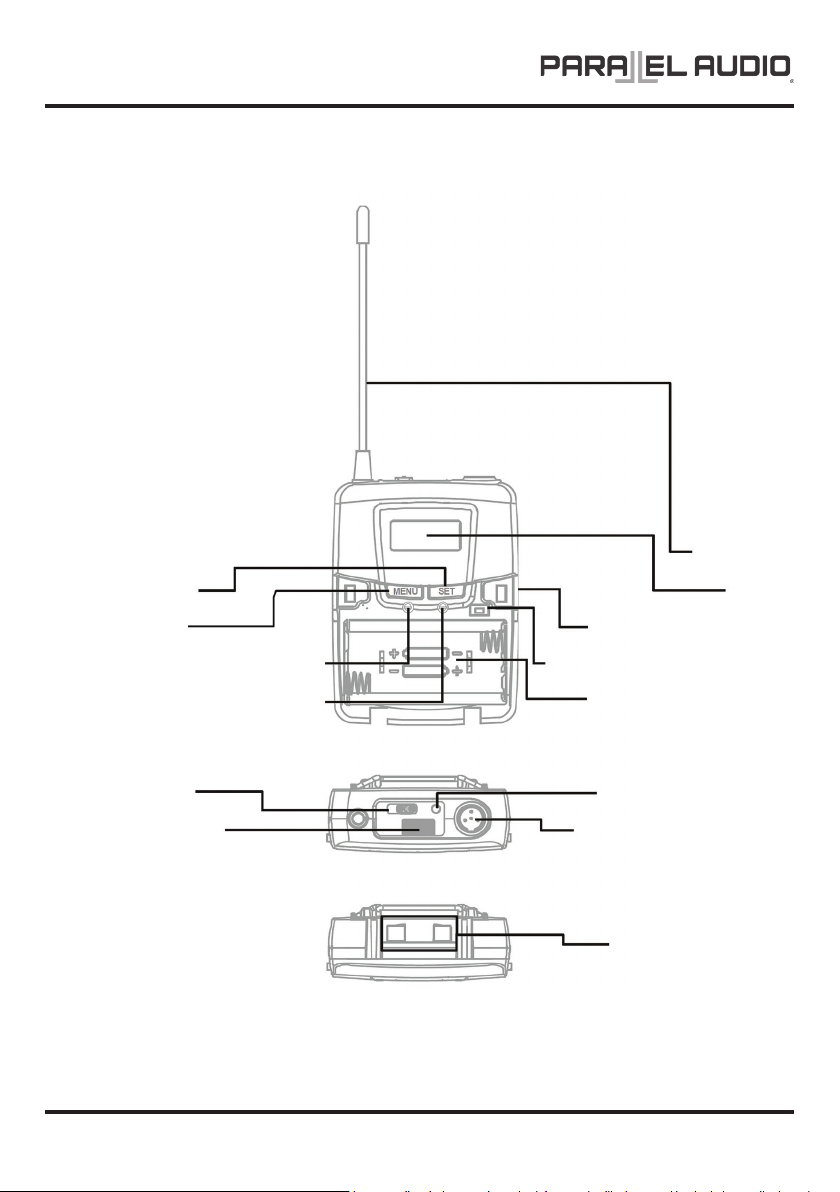
Parts and Functions
ANTENNA
SETTING BUTTON
MENU BUTTON
HIGH-IMPEDANCE GAIN CONTROL
LOW-IMPEDANCE GAIN CONTROL
POWER SWITCH
IrDA SENSOR
COVER RELEASE BUTTON
IrDA SYNCHRONISING BUTTON
BATTERY COMPARTMENT
BATTERY POWER LED
AUDIO INPUT CONNECTOR
CHARGING CONTACTS
LCD
PAGE 2 OPERATION MANUAL V1.0
Page 3

Battery Installation and Indicator
BP6100
When the transmitter is switched ON, the battery
power LED (red) will blink once to denote the
batteries installed are in good condition.
This transmitter requires 2 x AA batteries
to operate.
Note: Batteries contain a corrosive acid that may leak and damage the transmitter when stored for a long period.
Batteries should be removed from the transmitter before storing without use for more than 4 weeks.
Cautions
• This product uses 4 x AA size batteries. Alkaline or NiMH types are recommended. Do not attempt to recharge nonNiMH batteries in this product.
• It is advised not to pull and plug in the microphone contact frequently to prevent loose contact.
• When battery operating hour shortens tremendously or can not be charged, it means their life span has been
reached and a new set of batteries is necessary. When changing the batteries, please replace all of them at the same
time. Please do not mix and use new and old batteries together.
If the LED remains illuminated the batteries have
expired and require replacement.
To install, open the battery cover using the cover
release buttons and insert the batteries into the battery
compartment.
OPERATION MANUAL V1.0
PAGE 3
Page 4
BP6100
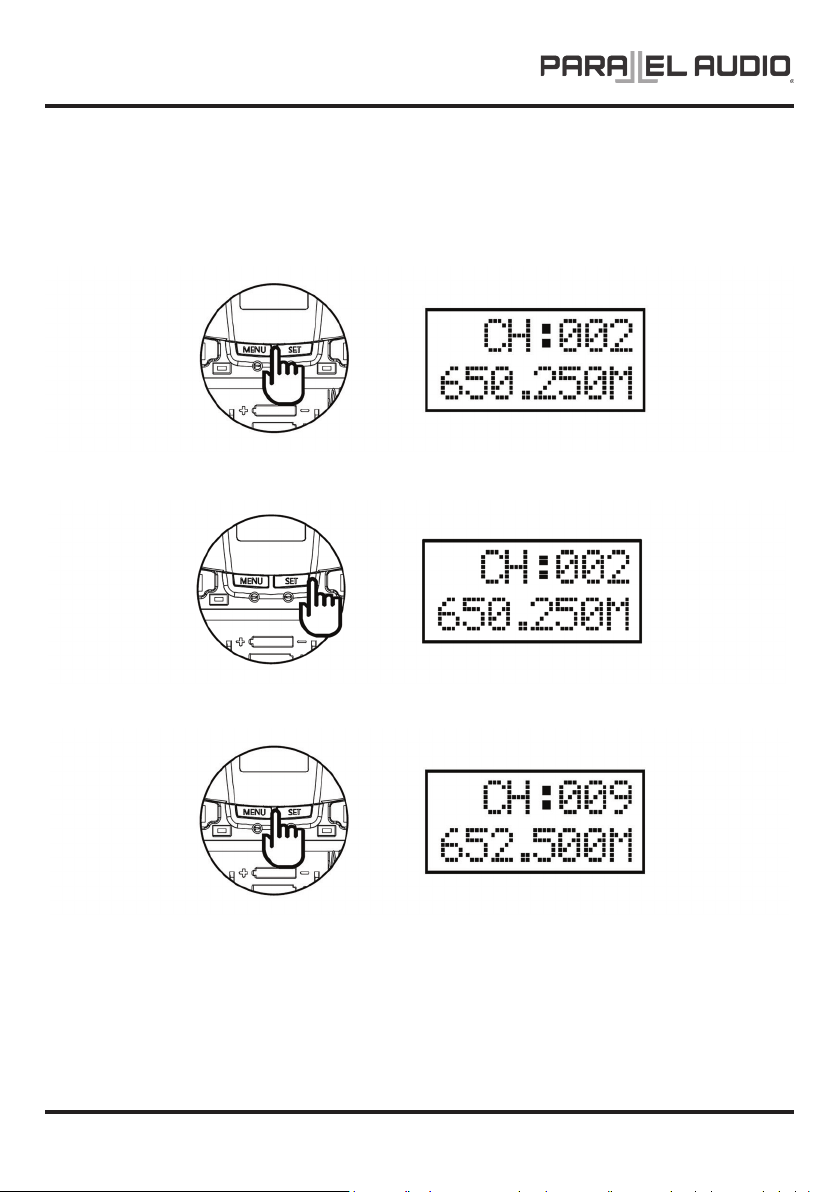
Channel Setting
For an interference- free operation, a cleaner channel might be necessary if the current one receives too much
interference. To select a new channel:
1. Use MENU button to go to the CHANNEL | FREQUENCY page
2. Press and hold the SET button for 3 seconds, then the upper-right channel number will ash to allow changes to be
made.
3. Press SET (channel up) / MENU (channel down) buttons to change the channel number. The corresponding
frequency will change accordingly.
4. 3 seconds aer selecting a channel, it will be automatically saved.
PAGE 4 OPERATION MANUAL V1.0
Page 5
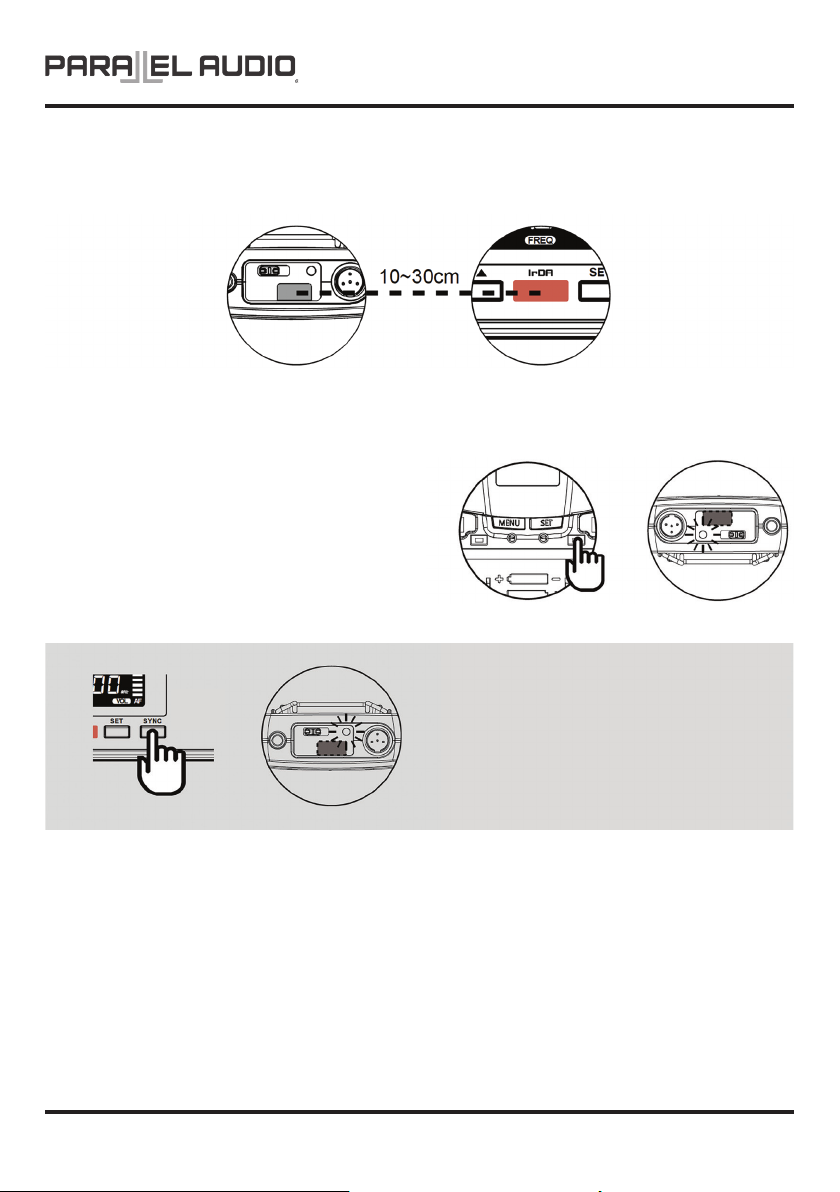
Channel Synchronising of the Receiver and Transmitter
This product features a bi-directional channel syncing feature.
Align infrared areas of the receiver and transmitter within 30cm.
Sync Channel from Beltpack Transmitter Ú Receiver
STEP 1: Press the synchronising button of the transmitter.
STEP 2: The transmitter’s LED will glow to denote
transmitting the frequency to the receiver and
synchronising the channels.
BP6100
Sync Channel from Receiver Ú Beltpack Transmitter
STEP 1: Press the synchronising button of the receiver and
the receiver will transmit the frequency to the transmitter
and synchronise the channels.
STEP 2: The transmitter’s LED will glow to denote its
channel synchronised by the receiver.
If it doesn’t work check that you have the IR sensor panels aligned, that they are facing each other, devices are within
30cm of each other, and try again.
OPERATION MANUAL V1.0
PAGE 5
Page 6
BP6100
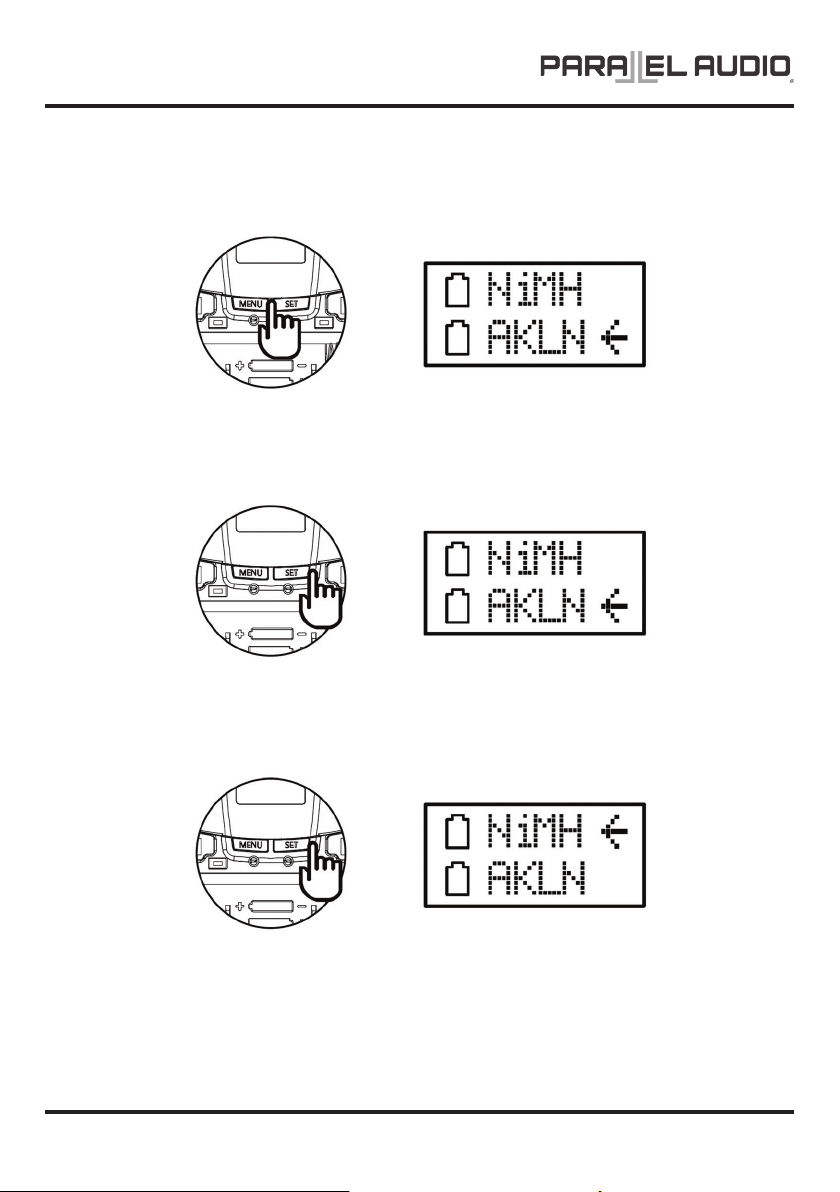
Battery Type Setting
1. Use MENU button to go to the BATTERY TYPE page.
2. Press and hold SET button for 3 seconds, then the cursor Ù will ash to allow changes to be made.
3. Press SET button to select either NiMH (rechargeable battery) or AKLN (alkaline battery).
4. 3 seconds aer selecting a battery type, it will be automatically saved.
PAGE 6 OPERATION MANUAL V1.0
Page 7
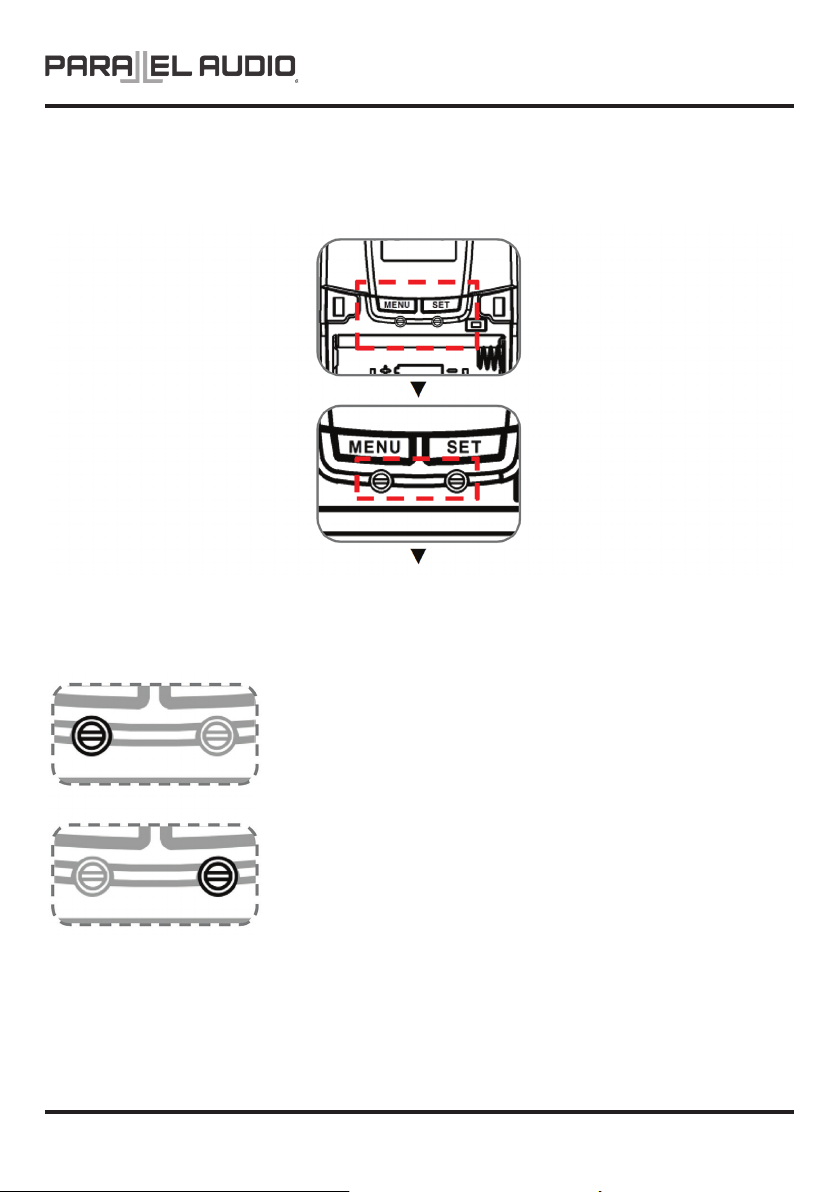
Gain Setting (GT | MT)
Gain control enables the user to set dierent output levels.
BP6100
OPERATION MANUAL V1.0
GT (LEFT) is for the use of instrument with high impedance, such as guitar.
MT (RIGHT)is for the use of low impedance such as lapel or headset microphones.
PAGE 7
Page 8

BP6100
PARALLEL AUDIO WARRANTY INFORMATION – 5 Year Warranty Term
Consumer Guarantees
When you purchase a NAS distributed product, you have the peace of mind in knowing that your product is covered by the NAS warranty. The NAS warranty is provided by:
In Australia: National Audio Systems Pty Ltd, ABN 50 085 679 894 [‘NAS’], 127 Merrindale Drive, Croydon, Victoria 3136.
In New Zealand: NAS Solutions Limited, NZBN 9429046800992 [‘NAS’], 7F Douglas Alexander Parade, Rosedale, Auckland 0632.
The Australian Consumer Law protects consumers by giving them certain guaranteed rights when they buy goods and services. Rights guaranteed under the Australian Consumer Law
include;
• The goods are of acceptable quality;
• The goods match their description or any sample or demonstration model;
• The goods are t for any represented purpose or purpose which the consumer has made known;
• Repairs and spare parts are reasonably available (unless notice has been provided that repairs or spare parts would not be available); and
• The services are carried out with reasonable care and skill and are completed within a reasonable time
These rights are called ‘Consumer Guarantees’ and apply automatically whenever goods or services are supplied to a consumer. These Consumer Guarantees cannot be refused, changed or
limited.
Consumer Guarantees have no set time limit and depending on the price and quality of goods a Consumer may be entitled to a remedy aer any manufacturers’ or NAS’s extended warranty
has expired.
The Specic Warranty Table Information outlines the warranty period, warranty type and any specic exclusions for your NAS product. NAS considers the warranty period specied in the
Specic Warranty Table to be a reasonable warranty period having regard to the price, design, manufacture and expected use of the product.
General Warranty (‘Warranty’)
NAS products come with guarantees that cannot be excluded under the Australian Consumer Law. You are entitled to a replacement or refund for a major failure or if the goods fail to be of
acceptable quality. You are also entitled to have the goods repaired or replaced if the goods fail to be of acceptable quality and failure does not amount to a major failure. What constitutes a
major failure is set out in the Australian Consumer Law.
Subject to the terms and conditions set out below, and unless otherwise specied in the Specic Warranty Information for your NAS product, NAS agrees to repair or replace, at NAS’s cost,
the NAS product purchased by you in Australia or New Zealand from NAS or a NAS authorised reseller when the product does not perform substantially in accordance with the specications
during the warranty period specied in the Specic Warranty Table for your NAS product. NAS makes no other express warranties in respect of your NAS product. To make a claim under this
Warranty, valid proof of purchase must be presented when the warranty claim is made, along with any other required information. The Warranty oered by NAS is not transferable.
The Warranty will only apply if your NAS product has been installed and used in accordance with NAS’s recommendations as noted in the operating instructions.
Warranty Exclusions
The Warranty does not cover damage caused by;
• Misuse or abuse of the product by You;
• Incorrect operation or not following the operation instructions (as noted in the operating instructions);
• Improper installation;
• Incorrect or improper maintenance or failure to maintain the product;
• Failure to clean or improper cleaning of the product;
• Incorrect voltage or non-authorised electrical connections;
• Adverse external conditions such as incorrect or uctuations in electrical voltage, thunderstorm activity, acts of God, acts of terrorism, damage caused by vermin, or any other circumstance
beyond NAS’s control;
• Exposure to excessive heat, moisture or dampness;
• Exposure to abnormally corrosive conditions;
• Alterations or modications to the product made by You or a third party; or
• Damage as a result of accident, liquid, grit, impact or lack of proper care as indicated in the operating instructions;
• Damage resulting from the use of cleaning solvents such as acetone
The Warranty does not apply if any serial number or appliance plate on the product has been tampered with, removed or defaced.
The Warranty does not apply if the product has been repossessed under any nancial agreement.
The Warranty excludes accessories and consumable goods which have ceased working through normal wear and tear such as, but not limited to, batteries, lamps and other parts classiable
as a consumable part.
The Warranty does not cover the loss of any data howsoever caused. You shall be responsible for backing up and protecting data against loss, damage or destruction.
Products presented for repair may be replaced by refurbished products of the same type rather than being repaired. Refurbished parts may be used to repair the products. Replacement of the
product or a part does not extend or restart the Warranty Term.
The product will be at the owner’s risk whilst in transit to and from all NAS authorised service centres, unless transported by NAS or its authorised representatives.
NAS and its authorised service centres may seek reimbursement of any costs incurred by them when the product is found to be in good working order.
The cost of claiming under this warranty, including return of any product to NAS is to be borne by the consumer.
The Warranty excludes removal or reinstallation costs.
* All Parallel Audio products come with a 5 year warranty term, excluding Parallel Audio batteries and CD players (see below).
Parallel Audio Limited Battery and CD Player Warranty: Batteries and CD players tted to all Parallel Audio portable PA products carry a 3 months warranty.
For further information and warranty claims, refer to our Support page at www.nas.solutions.
PAGE 8 OPERATION MANUAL V1.0
 Loading...