

Page 1

You have accessed an
older version of a
Paradyne product
document.
Paradyne is no longer a
subsidiary of A T&T. Any
reference to A T &T
Paradyne is amended to
read Paradyne
Corporation.
AREA CODE CHANGE
Please note that the area
code for Paradyne
Corporation in Largo,
Florida has changed from
813 to 727.
For any Paradyne
telephone number that
appears in this manual
with an 813 area code,
dial 727 instead.
Page 2
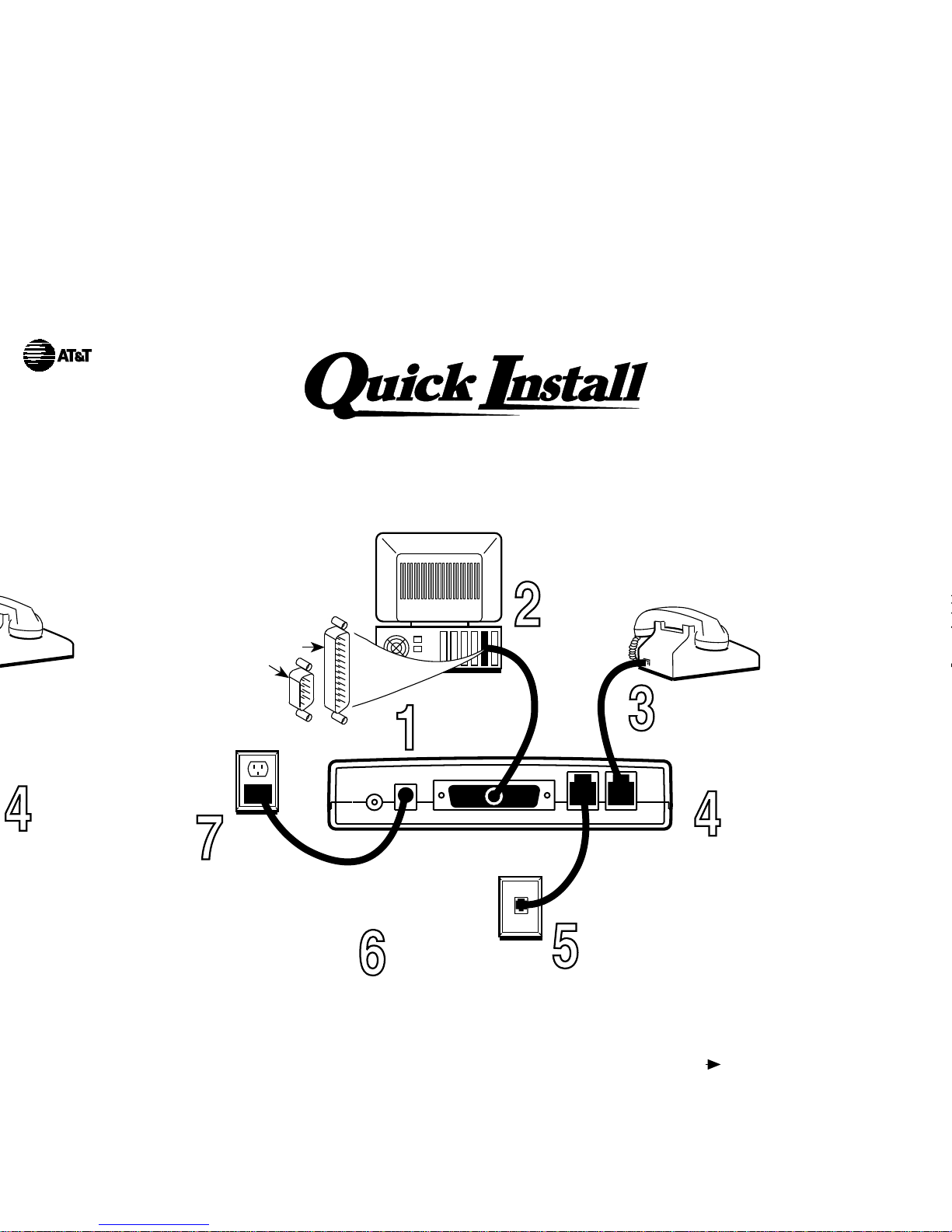
Your modem needs a serial cable to connect it to your
computer. One end must
have a 25-pin plug,
and the other end must
have a socket that
matches the
modem port on
your computer.
This is a 25-pin
or a 9-pin
connector.
Quick Installation for the DataPort External Modem
Plug the serial
cable into
your modem.
Plug the
serial cable
into the
serial port
of your PC.
Plug your phone
into the modem jack
marked PHONE.
Take one end of the line cord
(included with your modem)
and plug it into the modem
jack marked LINE.
Take the other end of the
line cable and plug it into
your telephone wall outlet.
Plug the
small power
connector
into the
modem
jack marked
POWER.
Plug the
transformer
at the other end
of the power cord
into a 110 Vac
power outlet.
Turn on your
modem and
your PC.
B. Get your Quick Link II Fax software ready:
C. Get yourself ready!
A. Get your DataPort modem ready:
1. Insert the Quick Link II Fax™ disk into your disk drive.
2. From the Microsoft® Windows™ Program Manager, select File Run,
and then type a:install (or b:install, if you are using drive B) at the
command line. (Under DOS, type at the C:\>prompt.) Press Enter.
3. Follow the instructions the install program displays on your screen.
Let the Auto Detect feature determine which COM port you are using.
You are now all set to explore a world of information and entertainment.
Page 3
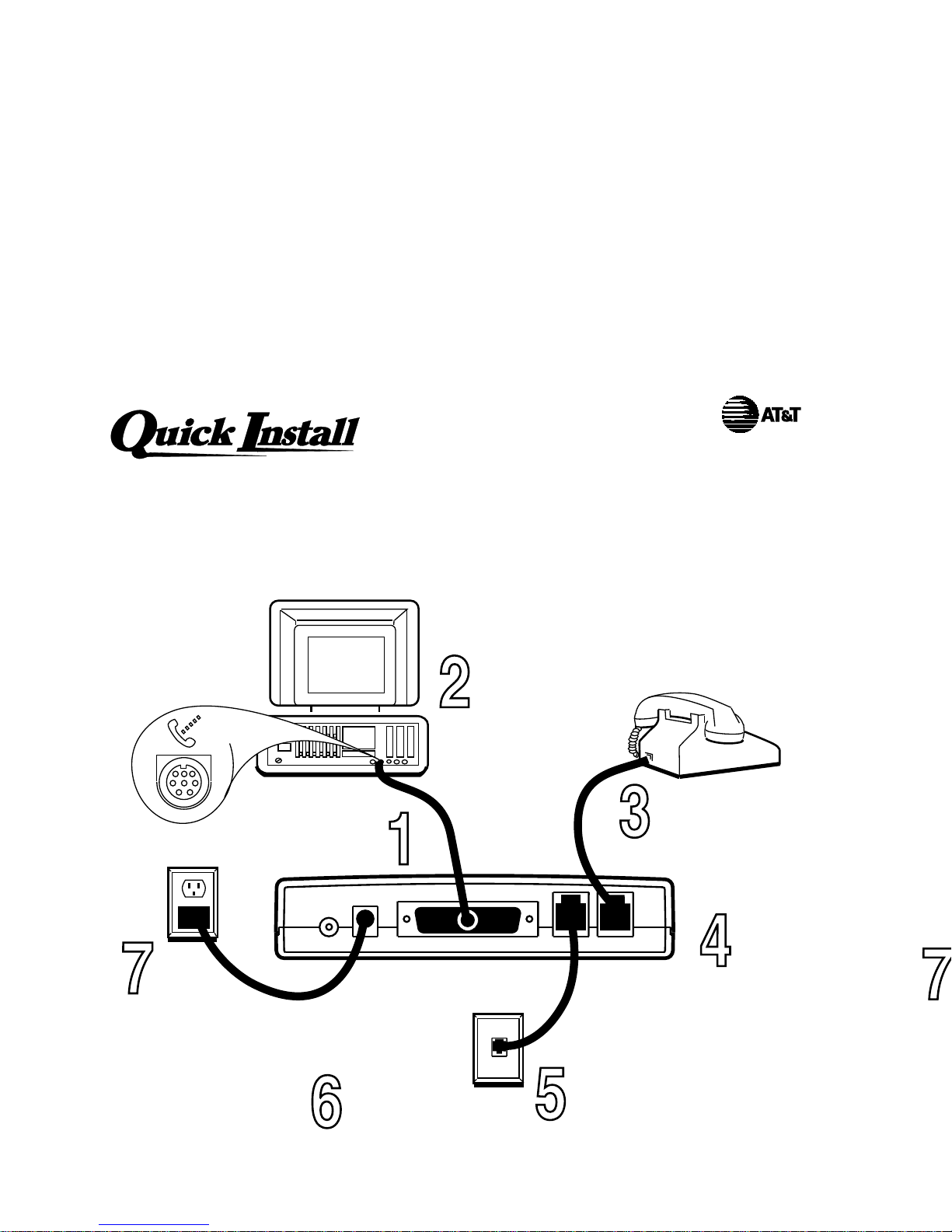
Your modem needs a serial cable to connect it to your
computer. One end must
have a 25-pin plug,
and the other end must
have a socket that
matches the
modem port on
your computer.
This is a 25-pin
or a 9-pin
connector.
Quick Installation for the DataPort External Modem
B. Get your Quick Link II Fax software ready:
A. Get your DataPort modem ready:
1. Insert the Quick Link II Fax
Quick Installation for the DataPort External Modem for
Macintosh
Plug the hardware
handshake cable
(included)
into your modem.
Plug the
other end of
the hardware
handshake cable
into the modem
port of your
Macintosh.
Plug your phone
into the modem jack
marked PHONE.
Take one end of the line cord
(included with your modem)
and plug it into the modem
jack marked LINE.
Take the other end of the
line cable and plug it into
your telephone wall outlet.
Plug the
small power
connector
into the
modem
jack marked
POWER.
Plug the
transformer
at the other end
of the power cord
into an 110 Vac
power outlet.
Turn on your
modem and
your Macintosh.
B. Get your MacComCenter software ready:
A. Get your DataPort modem ready:
1. Insert the MacComCenter ™ disk into your disk drive.
 Loading...