

Page 1

8383 Seneca Turnpike New Hartford, NY 13413 | p.800.458.6898 | www.partech.com
ParTech, Inc.
PAR Tablet 8
Quick Start Guide
PN 770504603
Page 2

This material has been created in order to accommodate a wide range of operations and
your specific business practices and system configuration may differ slightly from what is
represented in this material. While ParTech, Inc. (“PAR”) takes great care to ensure the
accuracy of these materials, all material is provided “as is” without warranty of any kind,
either express or implied, including, but not limited to, warranties of merchantability or
fitness for a particular purpose. PAR does not make any warranties or representations that
the materials will meet your requirements or that the operations of the hardware will be
uninterrupted or error free.
Trademark Notices: The PAR logo is a trademark of PAR Technology Corporation, the
parent company of ParTech, Inc. All other product names used throughout this material are
trademarks of the respective companies. No such use of any trademark is intended to
convey endorsement or other affiliation with these companies.
1 | P a g e
Page 3

Table of Contents
Getting to Know Your PAR Tablet 8 ............................................................................... 3
Front View .............................................................................................................. 3
Top View ................................................................................................................ 4
Bottom View ........................................................................................................... 4
Right View .............................................................................................................. 5
Rear View ............................................................................................................... 6
Tablet Charging ......................................................................................................... 7
How to Charge Your Tablet ....................................................................................... 8
Hard Reset ................................................................................................................ 8
Docking Station ......................................................................................................... 9
Battery Removal Instructions ..................................................................................... 10
Important Product and Safety information ................................................................... 11
Storage of Batteries: ............................................................................................. 12
Recycling .............................................................................................................. 12
Warning Statements ................................................................................................. 12
2 | P a g e
Page 4
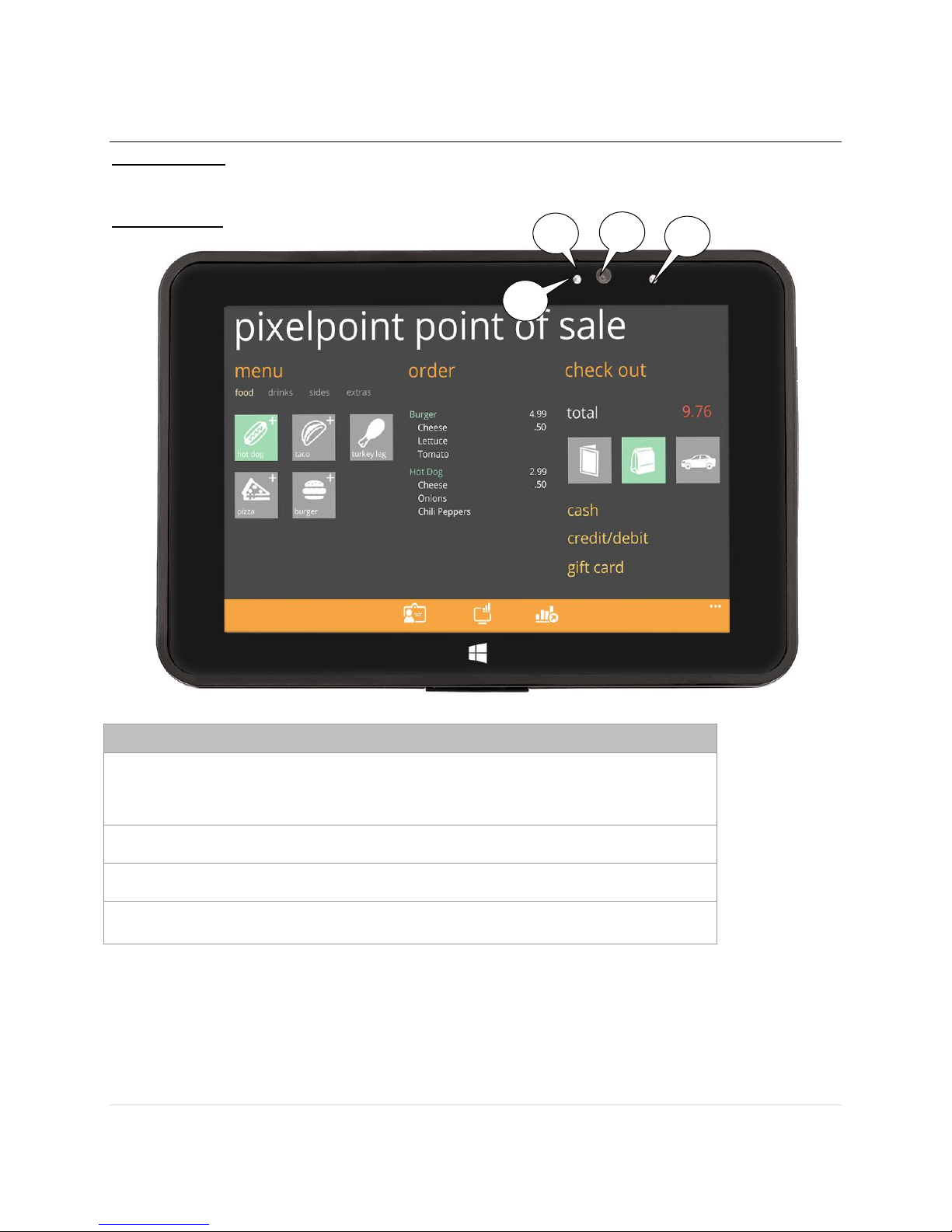
Getting to Know Your PAR Tablet 8
Feature
1 Indicator LED
When camera is in use.
2 Front camera
3 Front microphone
4 Ambient Light Sensor
2 1 3
4
IMPORTANT: Review this user guide in its entirety including all warning statements prior to
use.
Front View
3 | P a g e
Page 5
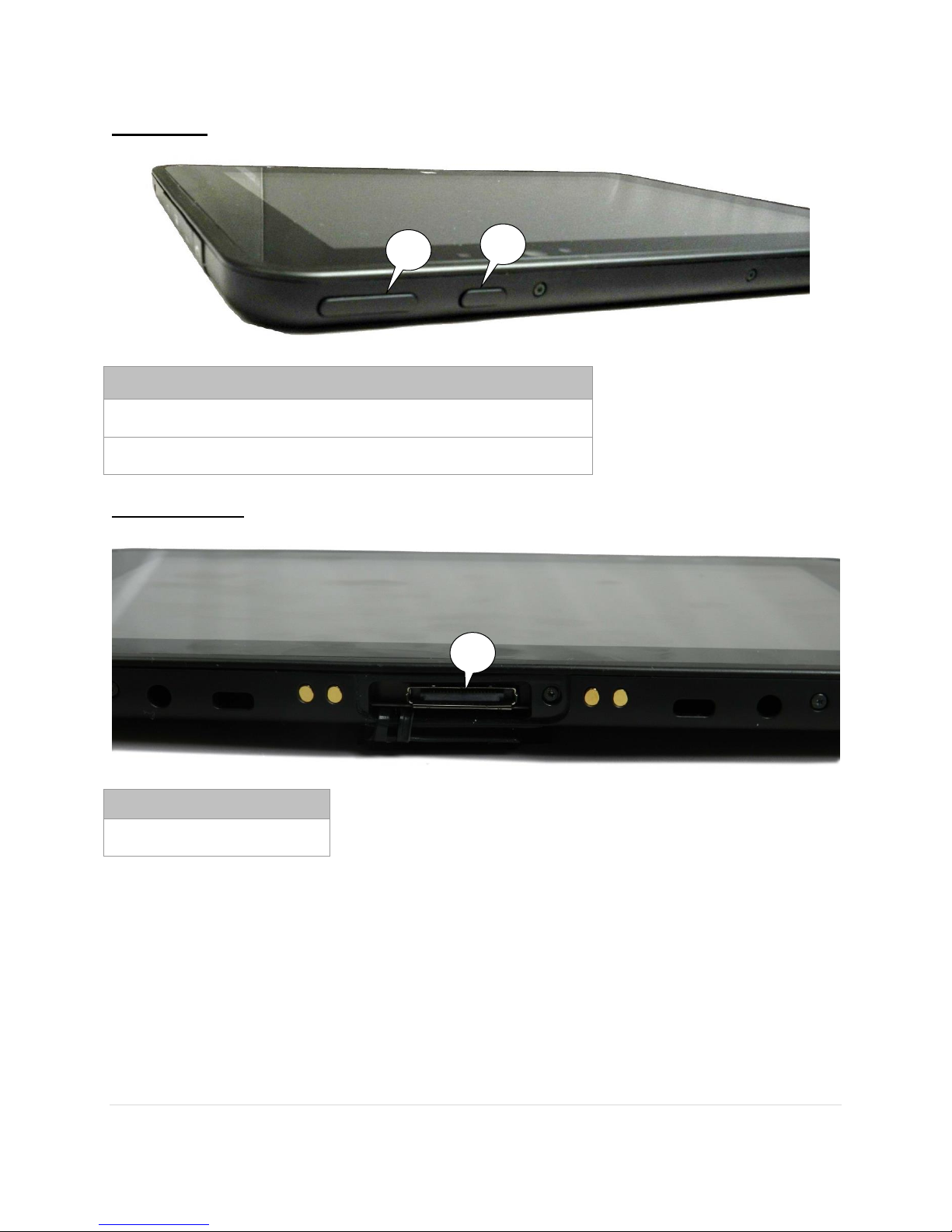
Top View
Feature
1 Power On/Off button
2 Volume button
Feature
1 Docking connector
2
1
1
Bottom View
4 | P a g e
Page 6
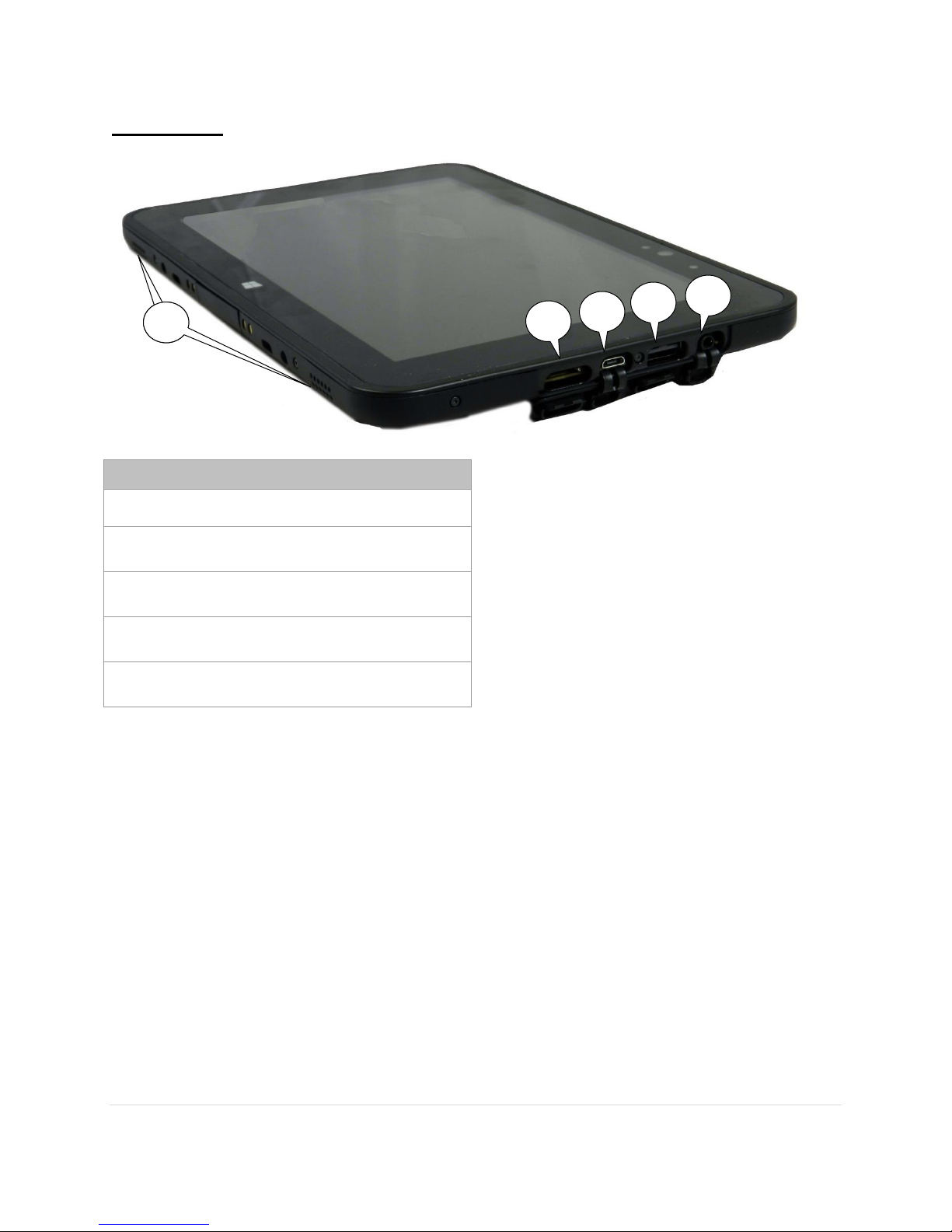
Right View
Feature
1 Audio jack
2 USB 2.0 port
3 MicroUSB Interface connector
4 MicroSDXC card slot
5 Stereo speakers
2 1 3
4
6 5
5 | P a g e
Page 7
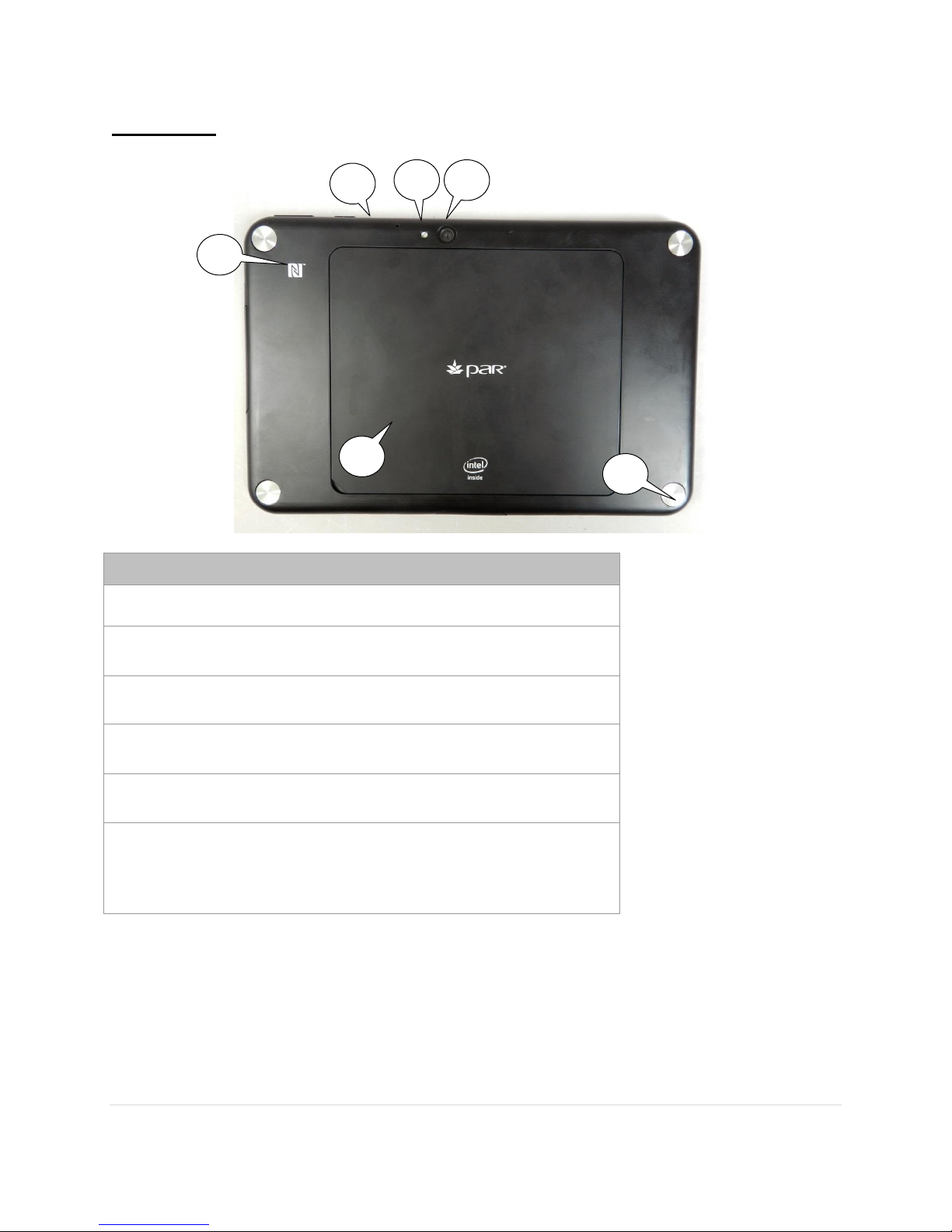
Rear View
Feature
1 Rear camera
2 Camera flash LED
3 Rear microphone
4 NFC antenna position
5 Battery cover
6 Mechanical fix points
(lower right called out)
Four (4) points located behind the corner covers.
2 1 3
4
5
6
6 | P a g e
Page 8
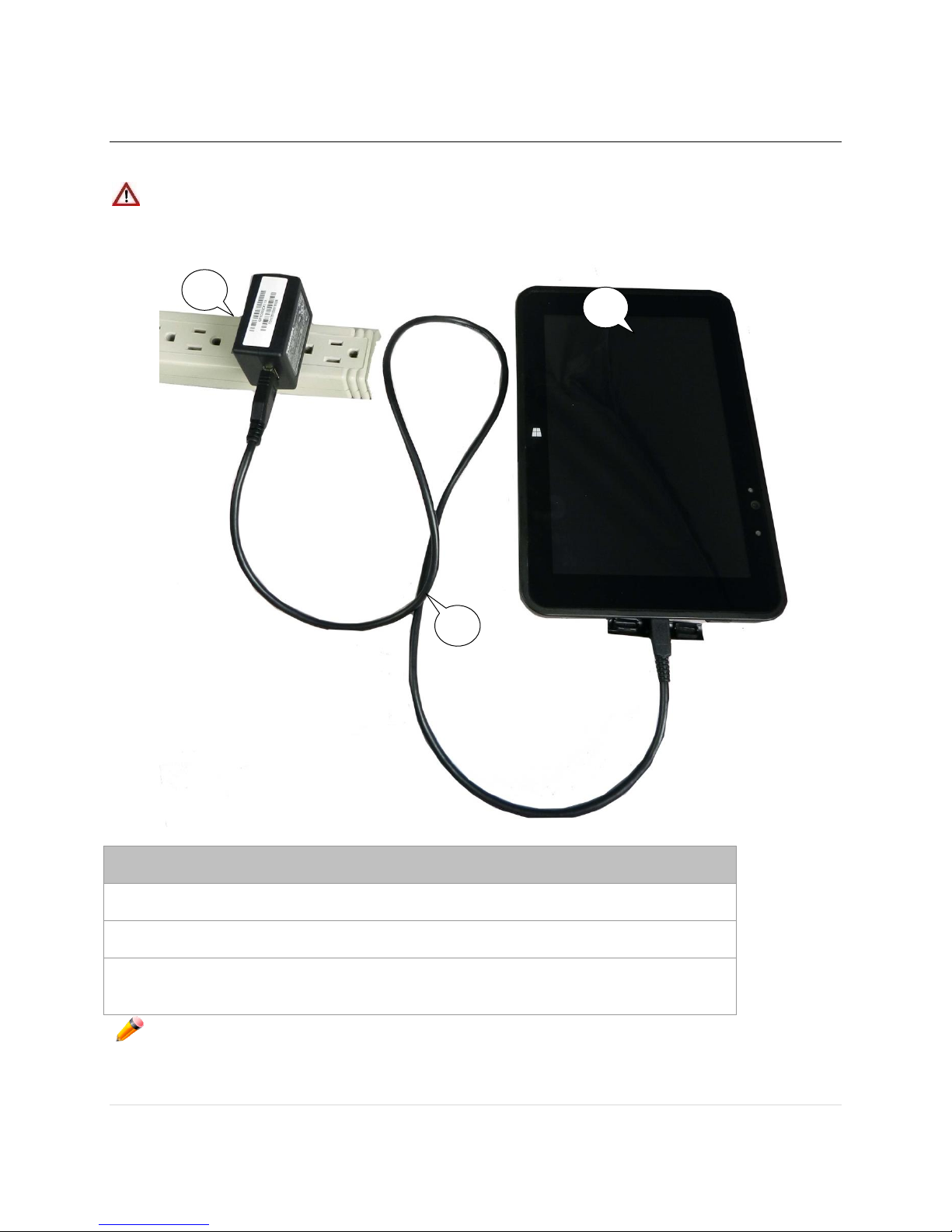
Tablet Charging
Feature
1 Tablet
2 Power plug
3 USB/Power cable
3 1 2
The following provides information on charging your tablet.
WARNING: IMPROPER CHARGING MAY RESULT IN DAMAGE TO THE TABLET,
FIRE OR SERIOUS PERSONAL INJURY. ONLY USE THE CHARGER
THAT WAS DELIVERED WITH THE TABLET.
NOTE: Only use the provided wall charger for charging the PAR tablet. Do not use any
other charging devices or USB ports to charge the device. DO NOT use damaged chargers
or power cables. DO NOT use the charger where moisture is present as electrical shock,
fire, personal injury or damage to the tablet or other property may result.
7 | P a g e
Page 9
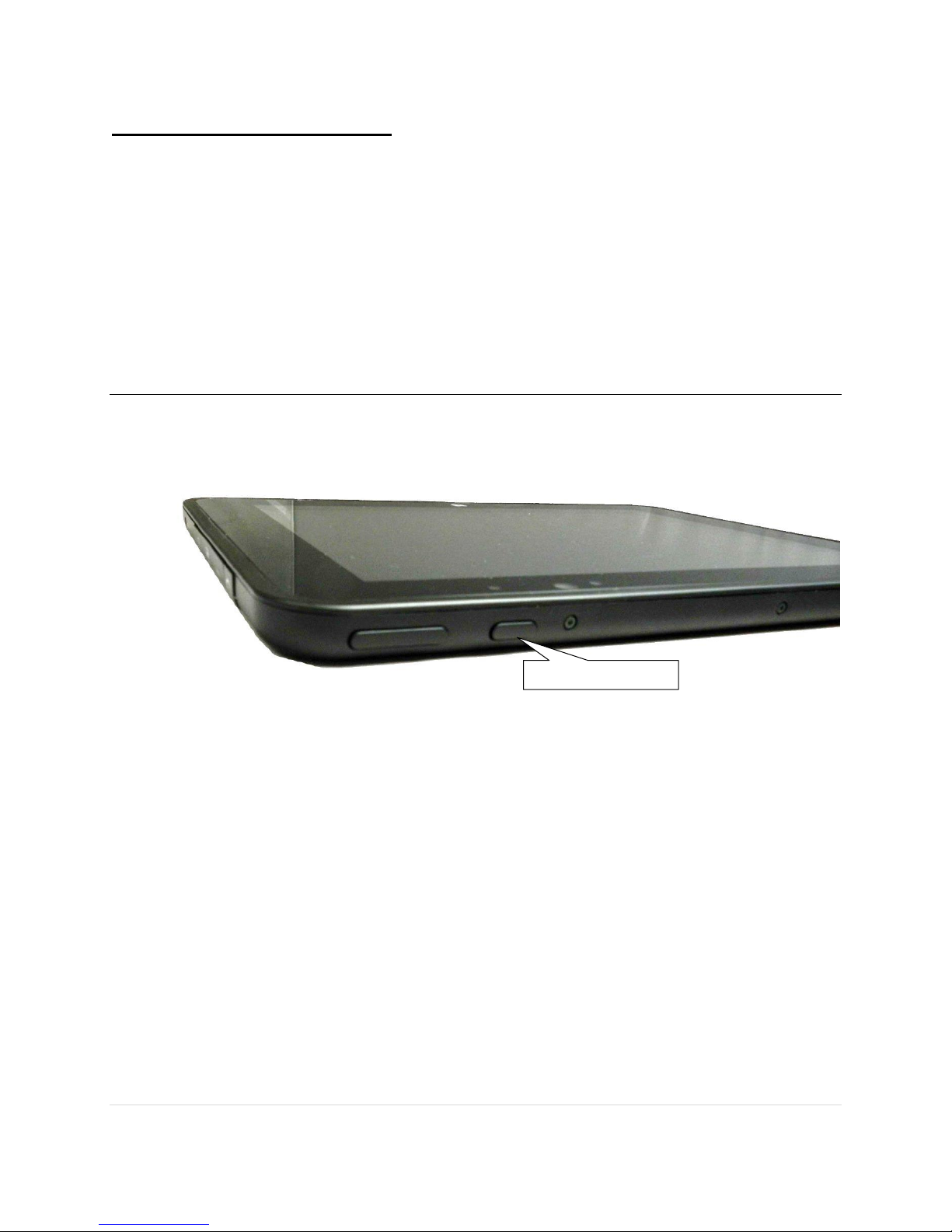
How to Charge Your Tablet
Power button
If this is the first time using your tablet, make sure battery is fully charged before
disconnecting the unit.
1. Connect the USB side of the USB/power cable to the power plug.
2. Connect the MicroUSB side of the USB/power cable to the MicroUSB Interface
connector.
3. Insert the power plug into an electrical outlet.
4. You can press the power button to start the unit.
5. Follow the instructions on the screen to complete the setup.
Hard Reset
Just in case your tablet freezes, you may need to do a hard reset.
1. Press and hold the power button for approximately 14 seconds. The tablet will turn
off.
2. Wait 30 seconds and then press the power button to turn the tablet on.
8 | P a g e
Page 10
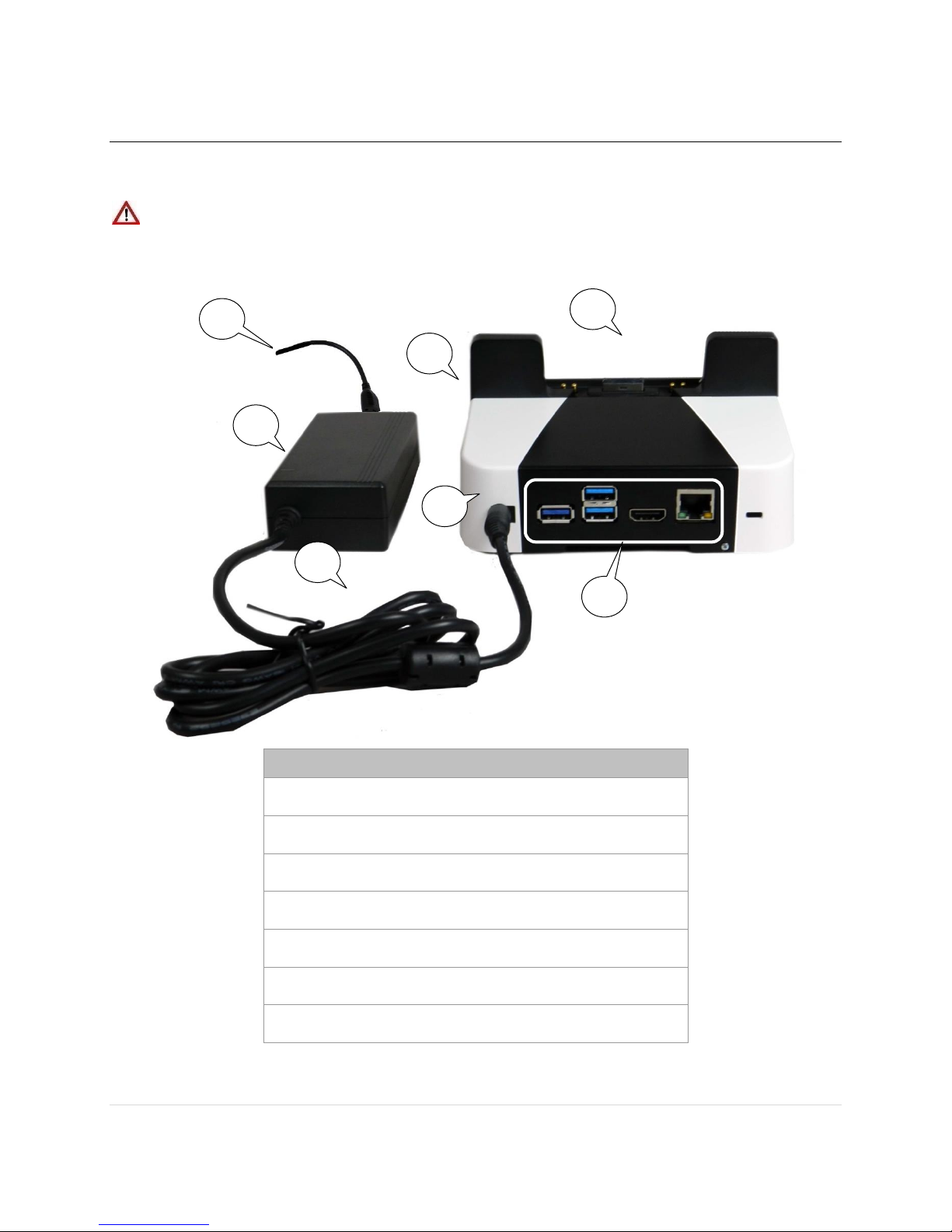
Docking Station
Features
1 Tablet connector
2 Release button
3 Power plug/connector
4 Power supply
5 Power cable
6 Power cable connector
7 Connection panel
2 4 5
6 1 3
7
The following provides information on the optional docking stations. The difference between
the stations is the “connection panel.” Only the station with the panel is shown below.
WARNING: USE OF INCOMPATIBLE DOCKING STATIONS MAY RESULT IN
DAMAGE TO THE TABLET, FIRE OR SERIOUS PERSONAL INJURY.
USE ONLY WITH THE DOCKING STATIONS AUTHORIZED FOR
USE BY THE TABLET SUPPLIER.
9 | P a g e
Page 11
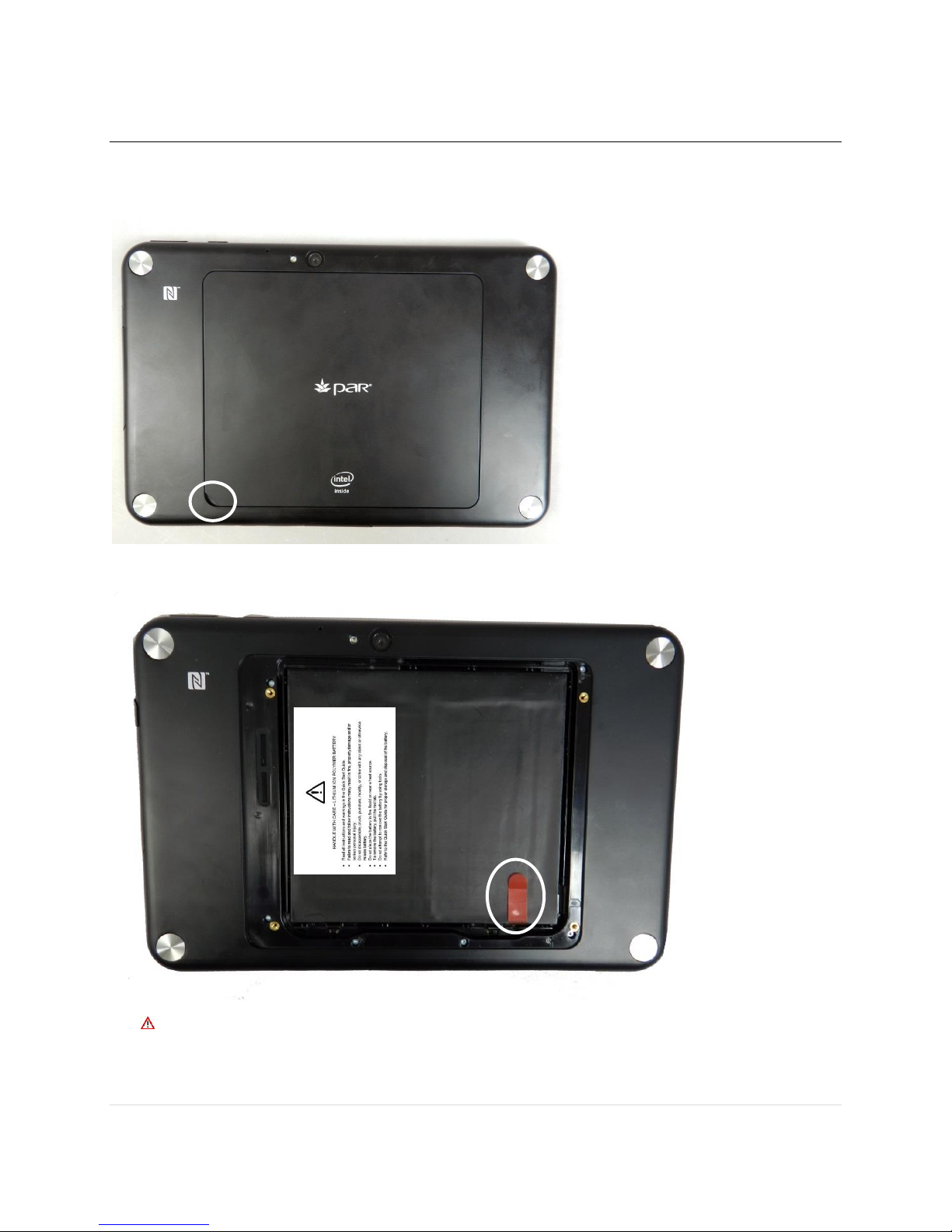
Battery Removal Instructions
1. Remove the battery door by lifting the small access area on the back cover, which is
shown circled below. DO NOT use any tools or sharp instruments as damage
to the battery will result.
2. To remove the battery, pull the red tab.
DO NOT use any tools or sharp instruments to remove the battery door, as
this will cause damage to the battery and/or cause serious personal injury.
10 | P a g e
Page 12

Important Product and Safety information
Battery Safety:
IMPROPER HANDLING OF BATTERY MAY RESULT IN EXPLOSION, FIRE,
PROPERTY DAMAGE, SERIOUS PERSONAL INJURY OR DEATH.
o DO NOT DISASSEMBLE BATTERY.
o DO NOT HIT, BEND, CRUSH, PUNCTURE, DROP, STRIKE WITH ANY
OBJECT, ATTEMPT TO MODIFY OR OTHERWISE MISUSE BATTERY.
o EXPOSURE TO HEAT MAY CAUSE BATTERY TO EXPLODE. DO NOT
PLACE BATTERY IN FIRE OR LIQUID OR IN CLOSE PROXIMITY TO A
HEAT SOURCE. BATTERY TEMPERATURE NOT TO EXCEED
60°C/140°F.
o IMPROPER CHARGING MAY CAUSE BATTERY TO EXPLODE. USE
ONLY THE CHARGER SUPPLIED WITH THE TABLET AND USE ONLY
COMPATIBLE DOCKING STATIONS.
o USE ONLY AUTHORIZED REPLACEMENT BATTERIES.
Stop using the tablet if abnormal heat, odor, discoloration, deformation or abnormal
condition is detected during use, charge or storage.
If the battery is leaking electrolytes, avoid contact with the skin, as it will cause skin
irritation. If contact with skin occurs, wash thoroughly with clear water.
External short circuit to the battery may result in electrical shock or overheating
which may cause fire or explosion.
Do not drop, bend or twist your tablet. This can break tablet display glass, internal
circuit boards or mechanics. If the glass breaks, do not touch the glass parts of the
device or attempt to remove the broken glass from the device. Stop using the device
until the glass is replaced by qualified service personnel.
If your tablet is malfunctioning or in need of service, call the numbers listed on page
13.
Do not try to disassemble the tablet. This may damage the device.
Operate your device in a place where temperature is between -10°C/14°F and
+50°C/122°F
Store your device in a place where temperature is between -20°C/-4°F and
+60°C/140°F
Ensure the battery door is securely seated. Improper battery door placement and
connector cover placement will allow liquid or moisture penetration into the device,
causing damage. If your tablet comes in contact with liquid, call the numbers listed
on page 13.
Listen to a headset at a moderate level, and do not place the device loudspeaker
outlets near your ear when the loudspeakers are in use.
Use only soft, clean and dry lint-free cloth to clean your device.
11 | P a g e
Page 13
Keep the unit and accessories away from small children.
Switch off your device before boarding an aircraft.
Switch off your device in any area with a potentially explosive atmosphere.
This product meets necessary regulatory guidelines for exposure to radio waves
(SAR, Specific Absorption Rate).
Use only charger which was delivered with your tablet.
Do not disconnect charger by pulling the cord.
Do not use damaged power cords or plugs
Save energy:
Close unused applications and data connections.
Decrease screen brightness and sound volume.
Deactivate unnecessary sounds like touch panel sound.
Disconnect your charger from AC outlet when charger is not needed.
Do not keep unnecessary accessories connected in your device.
Storage of Batteries:
If the battery needs to be removed from the tablet, it must be placed in a cool, dry location. It
must also be protected from anything that may puncture or pierce it. Keep batteries away from
children.
Do not store the batteries for longer than six months, because the battery life will be degraded.
Recycling
Return the used electronic units to dedicated collection points for proper recycling. The tablet has
an internal lithium ion polymer battery, which must be recycled or disposed in accordance with
applicable environmental laws.
Call PAR if there are any questions concerning recycling. See phone numbers on the last page.
Warning Statements
WLAN 802.11 a/n bands are allowed for indoor use only.
IMPROPER HANDLING OF BATTERY MAY RESULT IN EXPLOSION, FIRE,
PROPERTY DAMAGE, SERIOUS PERSONAL INJURY OR DEATH. SEE
IMPORTANT PRODUCT SAFETY INFORMATION ABOVE.
To prevent possible hearing damage, do not listen to headphones at high
volume for long periods of time. Turn the volume to the lowest level while
using earbuds or a headset.
12 | P a g e
Page 14

PAR Phone Numbers
For Service
USA: 800.382.6200
Canada: 800.387.4963
For Parts
USA: 800.PAR.PART
Canada: 800.387.4963
For Sales
Continental USA: 800.448.6505
Outside Continental USA: 315.738.0600
13 | P a g e
 Loading...