

Page 1
1
Dear Customer
Thank you for purchasing this product.
For optimum performance and safety,
please read these instructions carefully.
Supplied Accessories
Check the packing carton for these accessories.
Model No. SL-S222
Before connecting, operating or adjusting this product, please read these
instructions completely. Please keep this manual for future reference.
Portable CD player
Operating Instructions
The model number and serial number
of this product can be found on either
the back or the bottom of the unit.
Please note them in the space provided below and keep for future reference.
MODEL NUMBER
SERIAL NUMBER
Precautions
Before using this unit, be sure to read the applicable
items of the operating instructions and these safety suggestions carefully.
Afterwards keep them handy for future reference. Take
special care to follow the warnings indicated on the unit
itself as well as in the operating instructions.
Safety
1. Power Source—The unit should be connected to
power supply only of the type described in the operating instructions or as marked on the unit. Use only
the AC adaptor or car adaptor described in the operating instructions when recharging.
2. Polarization—If the unit is equipped with a polarized
AC power plug (a plug having one blade wider than
the other), that plug will fit into the AC outlet only one
way. This is a safety feature. If you are unable to insert the plug fully into the outlet, try reversing the
plug. If the plug should still fail to fit, contact your
electrician to replace your obsolete outlet. Do not defeat the safety purpose of the polarized plug.
3. Care of AC adaptor— Take care that the cord of the
AC adaptor should be routed so that they are not
likely to be walked on or pinched by items placed
upon or against them. Never take hold of the AC
adaptor if your hand is wet, and always grasp the
plug body when connecting or disconnecting it.
4. Nonuse Periods— When not in use, be sure to disconnect the AC adaptor from the AC power outlet.
5. Batteries— If the set is not used for a long period of
time or is used only from an AC power source, remove all the batteries to prevent potential damage
due to possible battery leakage. Do not mix batteries
(old and new) or different types of batteries.
Installation
∫ Environment
1. Water and Moisture—Do not use this unit near
water—for example, near a bathtub, washbowl,
swimming pool, or the like. Damp basements should
also be avoided.
2. Condensation—Moisture may form on the lens in
the following conditions.
2. ≥immediately after a heater has been turned on.
2. ≥in a steamy or very humid room.
2. ≥when the unit is suddenly moved from a cold envi-
ronment to a warm one. If moisture forms inside
this unit, it may not operate properly. To correct this
problem wait about one hour for the moisture to
evaporate.
3. Heat—Never use or place this unit near a heat
source. Do not leave it in an automobile exposed to
direct sunlight for a long time with the doors and windows closed as this may deform the cabinet.
∫ Placement
1. Foreign Material—Care should be taken so that ob-
jects do not fall into and liquids are not spilled into
the unit. Do not subject this unit to excessive smoke,
dust, mechanical vibration, or shock.
2. Magnetism— The unit should be situated away from
equipment or devices that generate strong magnetic
fields.
3. Stacking— Do not place any objects, on top of the
unit.
Maintenance
(See page 7 for details.)
Clean the cabinet, panel and controls with a soft cloth
lightly moistened with mild detergent solution.
Do not use any type of abrasive pad, scouring powder
or solvent such as alcohol or benzine.
Service
1. Damage Requiring Service—The unit should be
serviced by qualified service personnel when:
1. (a) The AC adaptor is damaged; or
1. (b) Objects have fallen or liquid has been spilled
into the unit; or
1. (c) The unit has been exposed to rain; or
1. (d) The unit does not appear to operate normally or
exhibits a marked change in performance; or
1. (e) The unit has been dropped, or the enclosure
damaged.
2. Servicing—The user should not attempt to service
the unit beyond that described in the operating instructions. All other servicing should be referred to
an authorized service personnel.
2.
For the address of an authorized servicenter:
2.
In the U.S.A.1-800-211-7262 or web site
2.
(http://www.panasonic.com)
2.
In Canada 905-624-5505 or web site
2.
(www.panasonic.ca)
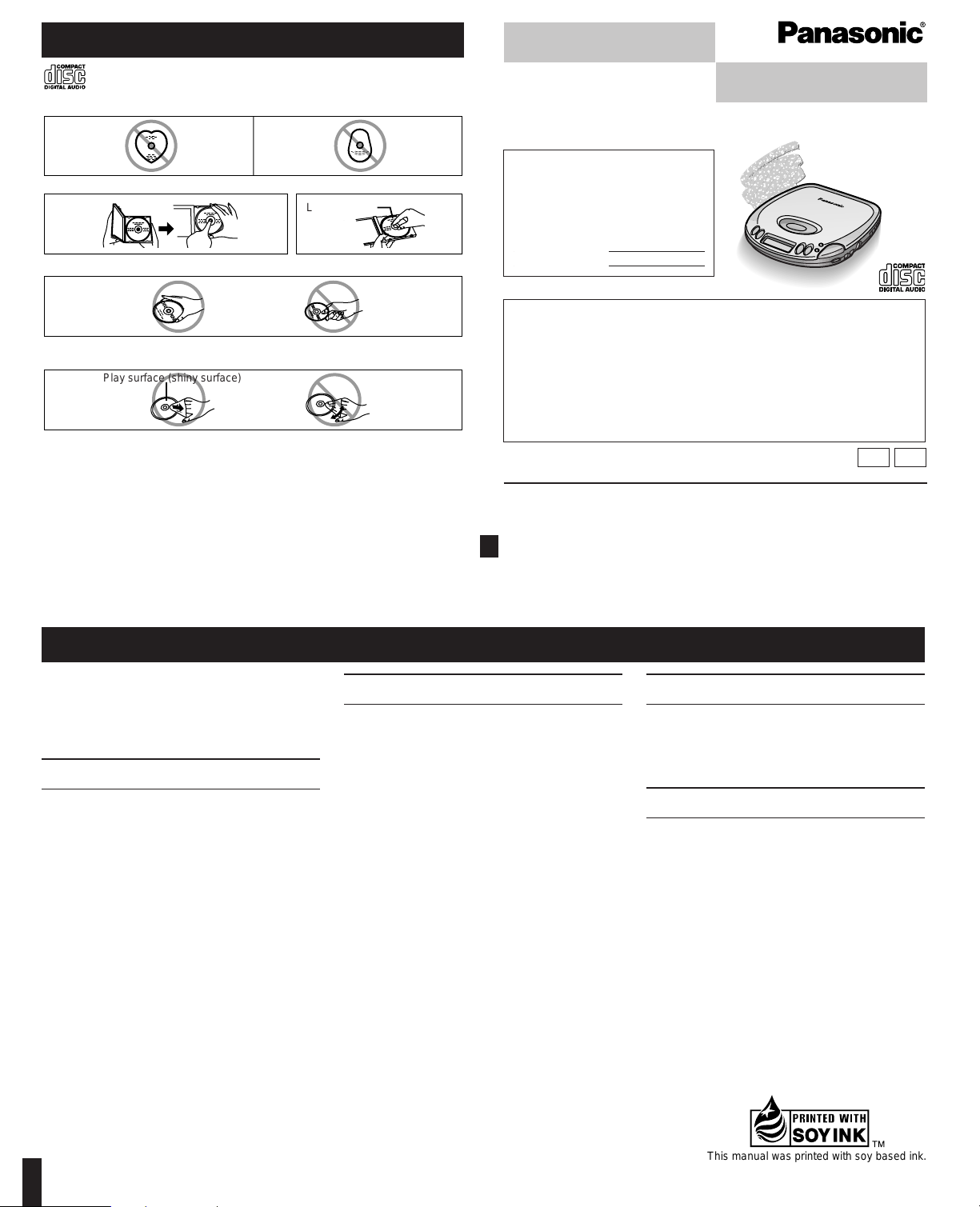
Concerning Compact Discs
Only compact discs bearing this mark can be used with this unit.
However, continued use of irregular shaped CDs can damage the unit.
If the surface is dirty
Wipe it with a damp cloth and then wipe dry. Wipe from the center toward the outer circumference.
How to hold a disc
How to store the disc in its caseHow to remove a disc from its case
AC adaptor. . . . . . . . . . . . . . . . . . . . . 1 pc.
(RFEA420C-S or RFEA421C-W)
For Canada
Stereo earphones . . . . . . . . . . . . . . . 1 pc.
(RFEV324P-KS or RFEV334P-KS)
For U.S.A.
Stereo headphones . . . . . . . . . . . . . . 1 pc.
(RFEV715P-KS)
Use numbers indicated in parentheses when asking for replacement parts.
(Only for U.S.A.) To order accessories contact 1-800-332-5368 or web site
(http://www.panasonic.com).
Panasonic Consumer Electronics Company, Division of
p
Matsushita Electric Corporation of America
One Panasonic Way Secaucus, New Jersey 07094
http://www.panasonic.com
Panasonic Sales Company, Division of Matsushita Electric of Puerto Rico, Inc. (“PSC”)
Ave. 65 de Infantería, Km. 9.5 San Gabriel Industrial Park, Carolina, Puerto Rico 00985
Panasonic Canada Inc.
5770 Ambler Drive, Mississauga, Ontario L4W 2T3
www.panasonic.ca
c 1999 Matsushita Electric Industrial Co., Ltd.
P PC
This manual was printed with soy based ink.
Play surface (shiny surface)
Label side up
Handling precautions
≥If you are taking the CD from a cold to a
warm environment, moisture may form on the
CD. Wipe this off with a soft, dry, lint-free
cloth before using the CD.
≥Do not write on the label side with a ball-point
pen or other writing instrument.
≥Do not use record cleaning sprays, benzine,
thinner, static electricity prevention liquids or
any other solvent.
≥Do not attach labels or stickers to CDs. (Do
not use CDs with exposed adhesive from
tape or left over peeled off stickers.)
≥Do not use scratch-proof protectors or covers
other than those specified for use with this
unit.
Storage precautions
Be sure to store CDs in their cases to protect
them from dust, scratches, and warping.
Do not place or store CDs in the following
places
≥Locations exposed to direct sunlight
≥Humid or dusty locations
≥Locations directly exposed to a heat vent or
heating appliance
≥In the glove compartment or on the rear deck
of an automobile
RQT5366-P F1199KK0 (D)
Printed in Japan
SL-S222
Page 2
Power Supply Preparations
Refer to the specifications (page 8) for information on operating times when using rechargeable batteries or dry-cell batteries.
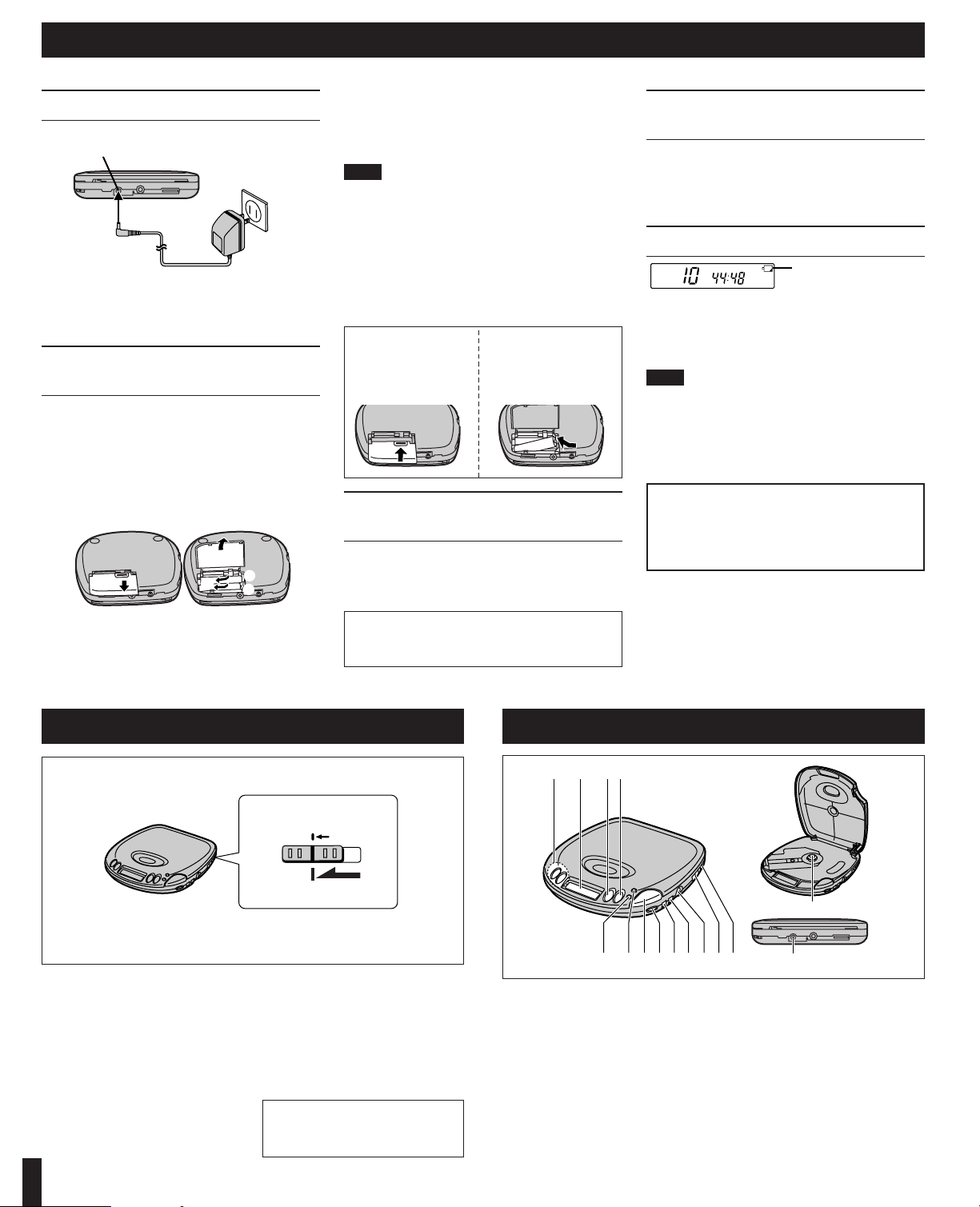
Using the AC adaptor
Connect the AC adaptor supplied.
Conserving power
The AC adaptor consumes 2.0 W when the unit is turned off with
[∫, OPR OFF]. To save power when the unit is not to be used for
a long time, unplug the AC adaptor from the household AC outlet.
Reprogram tracks if necessary before use.
Using rechargeable batteries
(not included)
Obtain the optional rechargeable batteries.
Make sure to recharge the batteries before using them. The unit
cannot be used to charge rechargeable batteries other than
those specially designed for it.
≥Optional batteries (P-3GAVA/2B)
Recharging procedure
1 Insert the special rechargeable bat-
teries into the unit.
2 Connect the AC adaptor.
(Refer to “Using the AC adaptor” for connection instructions.)
Recharging starts and the “H
” charging indicator flashes
on and off on the unit’s display. When the rechargeable
batteries fully recharge the charging indicator disappears.
3 When recharging is complete, un-
plug the AC adaptor from the
household AC outlet and the DC IN
jack.
Note!
≥Rechargeable batteries have a service life of approxi-
mately 300 charge-discharge cycles. If the operating
time on one full charge becomes noticeably shorter
than it used to be, the battery has reached the end of
its service life and should be replaced.
≥Recharging may only be performed when the unit is
powered off. (It is not possible to recharge the batteries while playing a CD.)
≥The AC adaptor and rechargeable batteries may be-
come warm while recharging is in progress. This is not
a malfunction.
Using the car adaptor
(not included)
Be sure to obtain the car adaptor (SH-CDC9), available
as an optional accessory.
The car adaptor can be used to recharge the unit’s batteries while in the car.
Using dry-cell batteries
(not included)
After disconnecting the AC adaptor, insert two “AA”
(LR6) alkaline batteries.
The procedure for inserting and removing dry-cell
batteries is identical to that for rechargeable batteries.
Battery indicator
This indicator flashes on and off when the batteries are
almost out of power. Power is cut off completely a short
while later.
Rechargeable batteries: Recharge batteries.
Dry-cell batteries: Replace batteries with new ones.
Note!
≥The length of time the unit will continue to operate be-
tween when the battery indicator starts flashing and
when the power is cut off differs depending on the
type of batteries used.
≥The battery indicator may not flash if rechargeable
batteries other than those designated by Panasonic
are used.
Removing batteries
Push up on the battery
in the direction indicated by the arrow. Then
lift it out.
If the battery lid
comes loose
Slide the lid back into
place horizontally.
HOLD Function
This function causes the unit to ignore
short, accidental button presses. (The
disc lid can still be opened and closed.)
The HOLD function prevents the
following:
≥Powering on the unit accidentally
(which can cause the batteries to run
down).
≥Play being cut off unexpectedly in the
middle of a selection.
To use the HOLD function
Set [HOLD] to the HOLD position.
“(” indication
When the unit is in HOLD status, pressing any button (other than the OPEN
button) causes the indication “(” to
appear on the display.
When the unit is powered off
The “(” indication appears only
when [1;] is pressed.
Location of Controls
A Skip/search buttons
(:, 96, 5)
B Display
C Stop/operation off button
(∫, OPR OFF)
D Play/pause button (1;)
E Repeat button (`)
F Memory/recall button
(MEMORY/RECALL)
G Open button (OPEN)
H Headphone volume control
(VOLUME)
I Anti-shock button (A.SHOCK)
J S-XBS button (S-XBS)
K Headphone jack (Ë)
L Play mode selector
(RESUME, RANDOM, NORMAL)
M Hold switch (HOLD)
N CD release button (PUSH)
O DC IN jack
(K DC IN 4.5 V)
Before operating the buttons
Be sure to move [HOLD] to release
the unit from the hold mode.
A B CD
F H IJ K LMG
E
N
o
If the unit malfunctions or freezes during use,
then disconnect the power sources (the AC
adaptor and batteries).
Re-connect the power source and continue operation.
d
e
B
C
A
CAUTION:
Use only car adaptor, Model: SH-CDC9 manufactured by Matsushita Electric Industrial Co.,Ltd.
2
DC IN jack (K DC IN 4.5 V)
Back panel of
the unit
Household
AC outlet
Battery indicator
HOLD mode
Back panel of
the unit
HOLD
Page 3
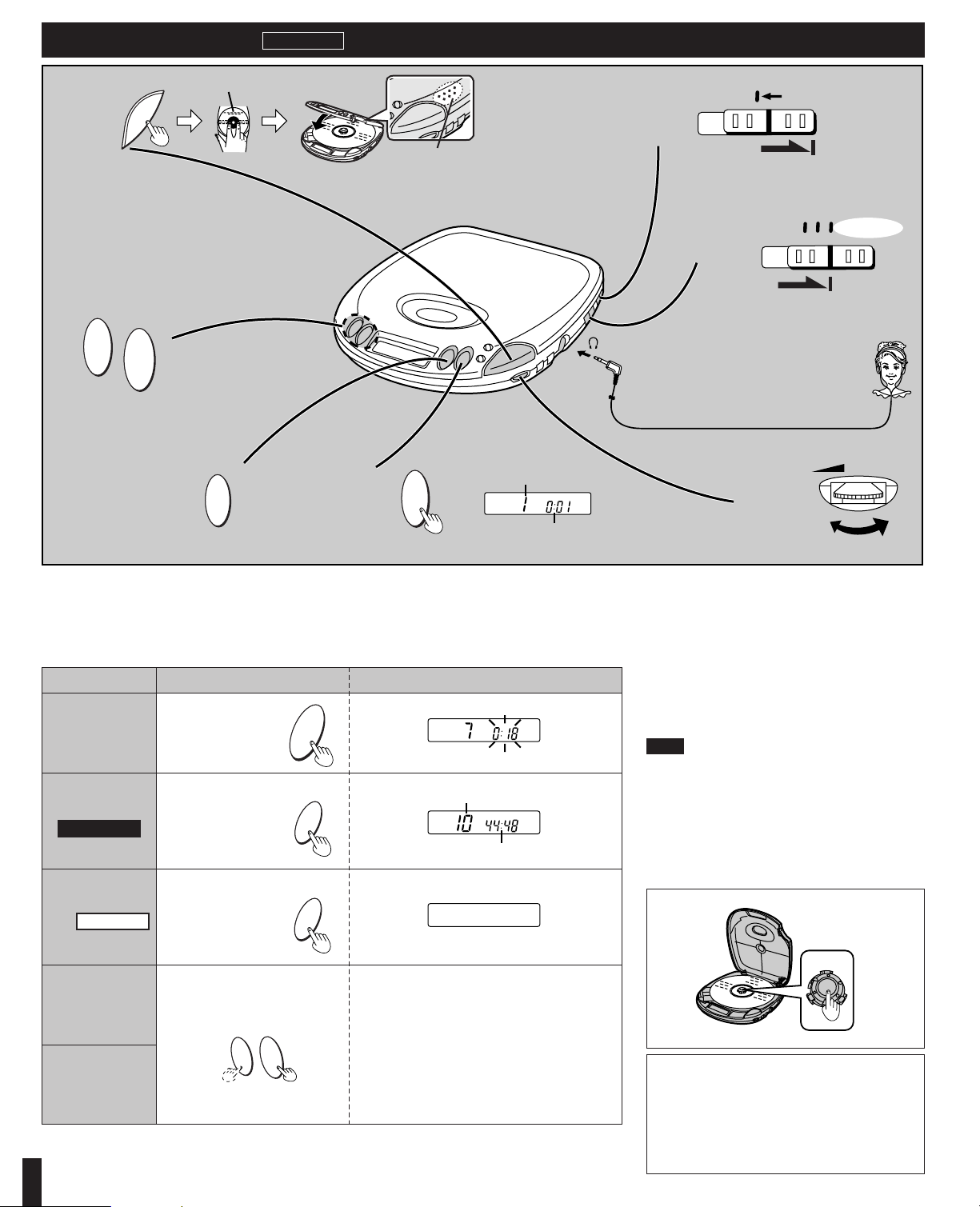
Button Display/referenceOperation
To pause play
To stop play
To turn off the
unit
Skip forward/
backward
(skip function)
Rapid forward/
backward
(search function)
Off mode
Stop mode
Sequential Play
Basic Play
Follow steps 1–6.
In step 4, connect the stereo headphones/earphones to the Ë jack. (Plug in firmly.)
≥Play stops automatically when all the tracks have been played.
≥If the unit has been connected to the car audio system, adjust the volume level between 4 and 6 on the unit, then
adjust the volume level on the system.
For your reference:
“)” indication
This indication appears for about 30 seconds if [1;] is
pressed when no disc is loaded in the unit or if the disc
is not properly secured.
“*” indication
This indication appears for about 10 minutes when the
cover is opened. (However, the indication does not appear when the unit is powered off.)
Note!
Never insert foreign objects into the unit body.
Removing discs
1 Press [∫,OPR OFF] to stop play and
disc’s rotation.
2 Press [OPEN] to open the lid.
3 Press [PUSH] to release the disc.
Do not stop the disc by hand or try to remove it before it
stops rotating. This can damage CDs.
≥During program play (page 4), these buttons are
used to skip forward or back through the programmed sequence of tracks.
≥During random play (page 4), the skip buttons
cannot be used to skip back to tracks that were
played previously in the random sequence.
≥During program play, random play or 1-track re-
peat play (page 4), search operation is limited to
the current track only.
Press during play.
Press during play.
Press during stop mode.
Press during play.
Press again to restart play.
Press and hold during play.
Auto power off function
If the unit is left in stop or paused status for approximately 10 minutes, the unit powers itself off automatically in order to prevent the battery from
running down.
(If no disc is loaded in the unit, it powers itself off in
about 30 seconds.)
RESUME
RANDOM
NORMAL
HOLD
5
4
6
VOLUME
1
5
6
2
3
4
L
R
:
9
6
5
P
OPR OFF
B
OPEN
Label must face upward.
Press here to close the lid.
Track number in play
Elapsed playing time of each track
3
P
OPR OFF
B
OPR OFF
B
:
9
6
5
(Backward) (Forward)
Total number of tracks
Total playing time
Plug type:
3.5 mm (1/8 in.) stereo
U
S
P
H
H
S
P
U
Page 4

Other Play Methods
Skip play
The disc plays from the specific track through to the
end, then play stops automatically.
Preparation: Put unit in stop mode.
1
2
Select the desired track.
3
Random play
1
2
For your reference:
≥It is also possible to press [9] while the unit is in
stop mode to change the first track to be played. (All
tracks are played eventually, regardless of which is
played first.)
≥Program play is not possible in the random mode.
Resume play
This function allows you to listen from the beginning of
the track where play stopped because the unit was
powered off (or switched to stop mode). It is useful
when listening to CDs in the car, etc.
For your reference:
≥If [RESUME, RANDOM, NORMAL] is put in the
[RESUME] position, the all-track repeat function will
be activated automatically as soon as the unit is powered on.
≥If power is cut off near the end of a track (off mode),
playback may resume from the beginning of the next
track.
≥If the unit is powered off while a disc was playing and
then a new disc is inserted, play will begin from the
middle of the new disc because the unit remembers
the position where play stopped on the previous disc.
Release
Release
The letters such as A in the various illustrations refer to the descriptions in the “Location of Controls” section (see page 2).
Program play
Up to 24 tracks can be entered in the programmed sequence.
Preparation: Put unit in stop mode.
1
2
Select the desired track.
3 Register in sequence.
(The indication “M” and the programmed sequence appear on the display.)
4 Repeat steps 2 and 3 to program all
the desired tracks.
5
∫ To program the same track in the se-
quence more than once
∫ After step 3, press [MEMORY/RECALL] desired
number of times.
∫ If “'” is displayed
∫ No more tracks can be programmed.
∫ To confirm the contents of the program
∫ Press [MEMORY/RECALL] while the disc is playing.
(The number of the programmed tracks appear on
the display in sequence.)
∫ To delete the entire programmed se-
quence
∫ Press [∫, OPR OFF].
Repeat function
Press during play or stop mode.
The setting is switched in the sequence indicated below
each time [`] is pressed.
1-track repeat (1 `)(----------------]
One track is repeated. |
v |
All-track repeat (ALL `) |
All the tracks on the disc are repeated. |
v |
Cancel (no indicator is shown)
===}
For your reference:
If [`] is pressed during program play, only the tracks
in the program are repeated.
(The indication “ALL” is not displayed.)
Changing the sound quality
Press during play or stop mode.
The setting switches in the sequence indicated below
each time [S-XBS] is pressed.
S-XBS>Cancel (no indicator is shown)
^========b
S-XBS:
Select this setting to boost the low-range response.
4
RESU
M
E
L
R
AND
O
M
N
O
RM
AL
:
9
6
5
A
P
D
RESUM
E
L
NO
R
M
AL
RAND
O
M
P
D
L
RESUM
E
R
AND
O
M
NO
RM
AL
N
O
R
M
AL
R
AN
DO
M
L
R
ESUM
E
L
RESUM
E
R
AN
D
O
M
N
O
R
M
AL
RESUM
E
L
RAND
OM
N
O
RM
AL
:
9
6
5
A
F
MEMORY/
RECALL
P
D
`
E
J
S-XBS
B
S-XBS
Page 5
Using the Unit with Optional Accessories
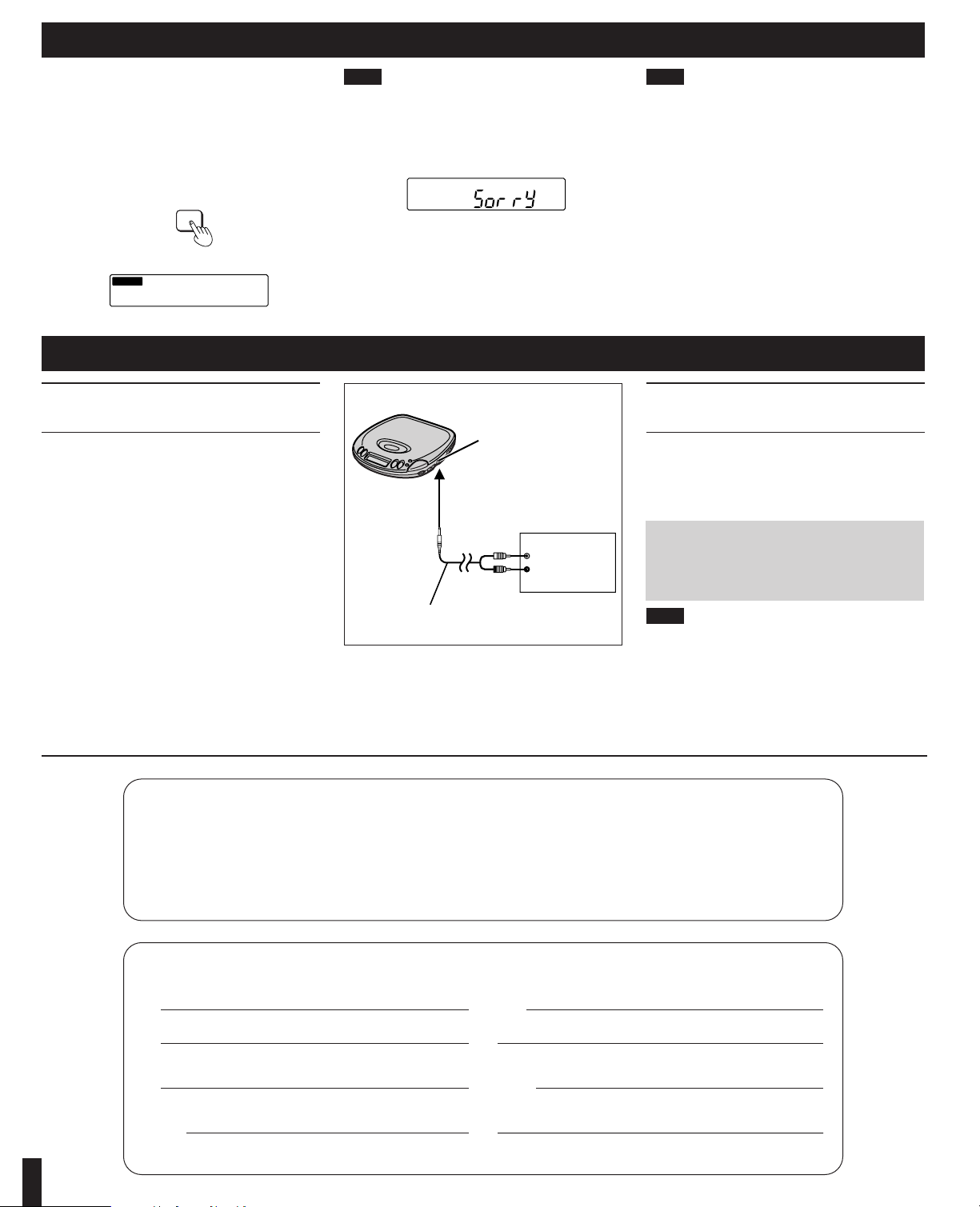
Using the unit with an audio
system
Using stereo connection cable (not included), you can
hear CDs on your audio system.
≥Connect the cable to the amplifier after turning off its
power.
≥Do not connect the cable to the PHONO jacks on the
amplifier.
≥Obtain the optional connecting cable if the amplifier
comes with mini-phone jacks.
≥Adjust the volume on the amplifier.
≥Keep the unit’s VOLUME control at a setting between
4 and 6.
Using the unit with a car audio
system
Items to be purchased
For connection to the car audio system and the
power supply:
≥Car stereo cassette adaptor (SH-CDM10A)
≥Car adaptor (SH-CDC9)
Note!
It may not be possible to use the unit with some types of
car stereos owing to restrictions imposed by the construction of the car stereo cassette adaptor.
For further details, refer to the instructions of the part
concerned.
L
R
Connect the car stereo cassette adaptor
to the unit’s headphone jack.
(When doing this, keep the unit’s VOLUME
control at a setting between 4 and 6.)
The anti shock function works by reading audio data
and storing it in memory (up to 10 seconds worth). The
unit then fills in interruptions caused by bumps and vibrations with data from the memory. This unit also incorporates a powerful anti-shock mechanism that
prevents skipping caused when play speed is changed
by swinging of the unit.
Press during play or stop mode.
The following indicator appears on the display.
Note!
If you have pressed [A.SHOCK] when the unit is in stop
mode, press [1;] to start play.
When bumps continue repeatedly
The following indicator appears on the display and
sound is interrupted.
To cancel the anti-shock function
Press [A.SHOCK] again.
Note!
≥The anti-shock setting can be changed during play,
but this may cause a slight interruption in the sound
because the disc’s rotation speed changes.
≥During anti-shock operation, the disc rotates at a high-
er rate than usual to collect extra audio data. This
could result in a slight increase in disc rotation noise.
Listening to sound with the unit connected to an audio system
The anti-shock function uses digital signal compression
technology. It is recommended that the anti-shock function be canceled if the unit is connected to a home
audio system.
Anti-Shock Function
5
If you ship the product
Carefully pack and send it prepaid, adequately insured and preferably in the original carton.
Attach a postage-affixed letter, detailing the complaint, to the outside of the carton.
Do NOT send the product to the Executive or Regional Sales offices. They are NOT equipped to make repairs.
Model
No.
Serial
No.
or
Code
No.
Date
of
Purchase
Dealer’s
Name
Dealer’s
Address
Customer’s Record
I
A.SHOCK
B
A.SHOCK
B
Headphone jack (Ë)
Amplifier
(White)
(Red)
Stereo connection cable (not included)
To CD or AUX
terminals
RQT5366
ONLY FOR U.S.A.
Page 6

For Product Information, Operating Assistance, Literature Request, Dealer Locations, and
all Customer Service inquiries please contact:
1-800-211-PANA (7262), Monday–Friday 9 am–9 pm; Saturday–Sunday 9 am–7 pm, EST.
Web Site: http://www.panasonic.com
You can purchase parts, accessories or
locate your nearest servicenter by visiting
our Web Site.
CALIFORNIA
6550 Katella Avenue
Cypress, CA 90630
800 Dubuque Avenue
S. San Francisco
CA 94080
20201 Sherman Way
Suite 102
Canoga Park, CA 91306
3878 Ruffin Road
Suite A
San Diego, CA 92123
COLORADO
1640 South Abilene Street
Suite D
Aurora, CO 80012
FLORIDA
3700 North 29thAvenue
Suite 102
Hollywood, FL 33020
GEORGIA
8655 Roswell Road
Suite 100
Atlanta, GA 30350
ILLINOIS
9060 Golf Road
Niles, IL 60714
1703 North Randall Road
Elgin, IL 60123
(Pick-up/Drop-off only)
MARYLAND
62 Mountain Road
Glen Burnie, MD 21061
MASSACHUSETTS
60 Glacier Drive
Suite G
Westwood, MA 02090
MICHIGAN
37048 Van Dyke Avenue
Sterling Heights, MI 48312
MINNESOTA
7850-12thAvenue South
Airport Business Center
Bloomington, MN 55425
OHIO
2236 Waycross Road
Civic Center Plaza
Forest Park, OH 45240
PENNSYLVANIA
2221 Cabot Blvd. West
Suite B
Langhorne, PA 19047
Chartiers Valley
Shopping Center
1025 Washington Pike
Bridgeville, PA 15017
TENNESSEE
3800 Ezell Road
Suite 806
Nashville, TN 37211
TEXAS
7482 Harwin Drive
Houston, TX 77036
13615 Welch Road
Suite 101
Farmers Branch,
TX 75244
WASHINGTON
20425-84thAvenue South
Kent, WA 98032
HAWAII
99-859 Iwaiwa Street
Aiea, Hawaii 96701
Phone (808) 488-1996
Fax (808) 486-4369
Factory Servicenters Locations
Service in Puerto Rico
Matsushita Electric of Puerto Rico, Inc. Panasonic Sales Company/Factory Servicenter:
Ave. 65 de Infanteria, Km. 9.5, San Gabriel Industrial Park, Carolina, Puerto Rico 00985
Phone (787) 750-4300 Fax (787) 768-2910
Accessory Purchases::::::
1-800-332-5368 (Customer Orders Only)
Panasonic Services Company 20421 84th Avenue South, Kent, WA 98032
(6 am to 5 pm Monday-Friday; 6 am to 10:30 am Saturday; PST)
(Visa, MasterCard, Discover Card, American Express, Check)
6
ONLY FOR U.S.A.
Page 7

Maintaining the
Lens
Open the lid and clean the lens as shown in the figure.
Use a cotton swab to gently wipe off any finger-prints.
Recommended product: Lens cleaner kit (SZZP1038C)
Product Service
Do not attempt to remove the cover(s) or repair the unit
yourself. Refer servicing to qualified personnel only.
Product information
For product service, product information or assistance
with product operation, refer to the servicenter directory.
User memo:
DATE OF PURCHASE
DEALER NAME
DEALER ADDRESS
TELEPHONE NUMBER
WARNING:
TO REDUCE THE RISK OF FIRE, ELECTRIC SHOCK OR PRODUCT DAMAGE, DO
NOT EXPOSE THIS APPLIANCE TO RAIN,
SPLASHING, DRIPPING OR MOISTURE.
CAUTION!
THIS PRODUCT UTILIZES A LASER.
USE OF CONTROLS OR ADJUSTMENTS
OR PERFORMANCE OF PROCEDURES
OTHER THAN THOSE SPECIFIED HEREIN
MAY RESULT IN HAZARDOUS RADIATION EXPOSURE.
DO NOT OPEN COVERS AND DO NOT
REPAIR YOURSELF. REFER SERVICING
TO QUALIFIED PERSONNEL.
The product you have purchased is powered
by a nickel-cadmium battery which is recyclable.
Please call 1-800-8-BATTERY for information on how to recycle this battery.
CAUTION:
This equipment has been tested and found to
comply with the limits for a Class B digital device, pursuant to Part 15 of the FCC Rules.
These limits are designed to provide reasonable protection against harmful interference
in a residential installation. This equipment
generates, uses and can radiate radio frequency energy and, if not installed and used
in accordance with the instructions, may
cause harmful interference to radio communications. However, there is no guarantee that
interference will not occur in a particular
installation. If this equipment does cause
harmful interference to radio or television reception, which can be determined by turning
the equipment off and on, the user is encouraged to try to correct the interference by one
of the following measures:
≥Reorient or relocate the receiving antenna.
≥Increase the separation between the equip-
ment and receiver.
≥Connect the equipment into an outlet on a
circuit different from that to which the receiver is connected.
≥Consult the dealer or an experienced
radio/TV technician for help.
Any unauthorized changes or modifications
to this equipment would void the user’s authority to operate this device.
This device complies with Part 15 of the FCC
Rules. Operation is subject to the following
two conditions: (1) This device may not
cause harmful interference, and (2) this device must accept any interference received,
including interference that may cause undesired operation.
Ni-Cd
RBRC
RBRC
7
THE FOLLOWING APPLIES ONLY IN THE
U.S.A.:
Air blower for
camera lens
Lens
Lens
Panasonic Audio Products
Limited Warranty
Panasonic Consumer Electronics Company or Panasonic Sales Company (collectively referred to as “the warrantor”) will repair this product with new or refurbished parts in the event of a defect in materials or workmanship, free of charge,
in the U.S.A. or Puerto Rico as follows ( all time periods start from the date of
original purchase ) :
COMPACT DISC PLAYERS, RADIOS, VIDEO CD PLAYERS, RADIO CASSETTE PLAYERS/RECORDERS (with and without CD Players), CASSETTE
RECORDERS, MICROCASSETTE RECORDERS/TRANSCRIBERS AND IC
RECORDERS—labor and parts for one (1) year.
ACCESSORIES—HEADPHONES, CARTRIDGES,
MICROPHONES, ADAPTERS—labor and parts for ninety (90) days.
BATTERIES—(when applicable) —New rechargeable batteries in exchange for
defective rechargeable batteries for ten (10) days. Non-rechargeable batteries
are not warranted.
RECHARGEABLE BATTERY PACKS—(when applicable)—New rechargeable
battery packs in exchange for defective rechargeable battery packs for ninety
(90) days. Non-rechargeable battery packs are not warranted.
Carry-in or mail-in service in the U.S.A. can be obtained during the warranty
period by contacting a Panasonic Services Company (PASC) Factory
Servicenter listed in the Servicenter Directory. Or call toll free, 1-800-211-7262 to
locate a PASC authorized Servicenter. Carry-in or mail-in service in Puerto Rico
can be obtained during the warranty period by calling the Panasonic Sales
Company telephone number listed in the Servicenter Directory.
This warranty is extended only to the original purchaser. A purchase receipt or
other proof of date of original purchase will be required before warranty service is
rendered.
This warranty only covers failures due to defects in materials and workmanship
which occur during normal use and does not cover normal wear to the stylus
(when applicable) or a dealer installed cartridge or stylus. The warranty does not
cover damages which occur in shipment or failures which are caused by products
not supplied by the warrantor, or failures which result from accident, misuse,
abuse, neglect, mishandling, faulty installation, misapplication, set-up adjustments, maladjustment of consumer controls, improper operation or maintenance,
improper antenna, inadequate signal reception or pick-up, alteration, modification, power line surge, improper voltage supply, lightning damage, commercial
use, such as; hotel, office, restaurant, or other business or rental use of the product, or service by anyone other than a PASC Factory Servicenter or a PASC authorized Servicenter, or damage that is attributable to acts of God.
LIMITS AND EXCLUSIONS
There are no express warranties except as listed above.
THE WARRANTOR SHALL NOT BE LIABLE FOR INCIDENTAL OR CONSEQUENTIAL DAMAGES RESULTING FROM THE USE OF THIS PRODUCT, OR
ARISING OUT OF ANY BREACH OF THIS WARRANTY, INCLUDING WITHOUT LIMITATION, DAMAGE TO TAPES, RECORDS OR DISCS. ALL EXPRESS AND IMPLIED WARRANTIES, INCLUDING THE WARRANTIES OF
MERCHANTABILITY, AND FITNESS FOR A PARTICULAR PURPOSE, ARE
LIMITED TO THE APPLICABLE WARRANTY PERIOD SET FORTH ABOVE.
Some states do not allow the exclusion or limitation of incidental or consequential
damages, or limitations on how long an implied warranty lasts, so the above exclusions or limitations may not apply to you.
This warranty gives you specific legal rights and you may also have other
rights which vary from state to state.
If a problem with this product develops during or after the warranty period, you
may contact your dealer or Servicenter. If the problem is not handled to your satisfaction, then write to the Panasonic Consumer Call Center at the company address above or call toll free 1-800-211-7262.
Panasonic Consumer Electronics
Company, Division of Matsushita
Electric Corporation of America
One Panasonic Way,
Secaucus, New Jersey 07094
Panasonic Sales Company, Division
of Matsushita Electric Corporation
of Puerto Rico, Inc.
Ave. 65 de InfanterÍa, Km. 9.5
San Gabriel Industrial Park,
Carolina, Puerto Rico 00985
ONLY FOR U.S.A.
Page 8
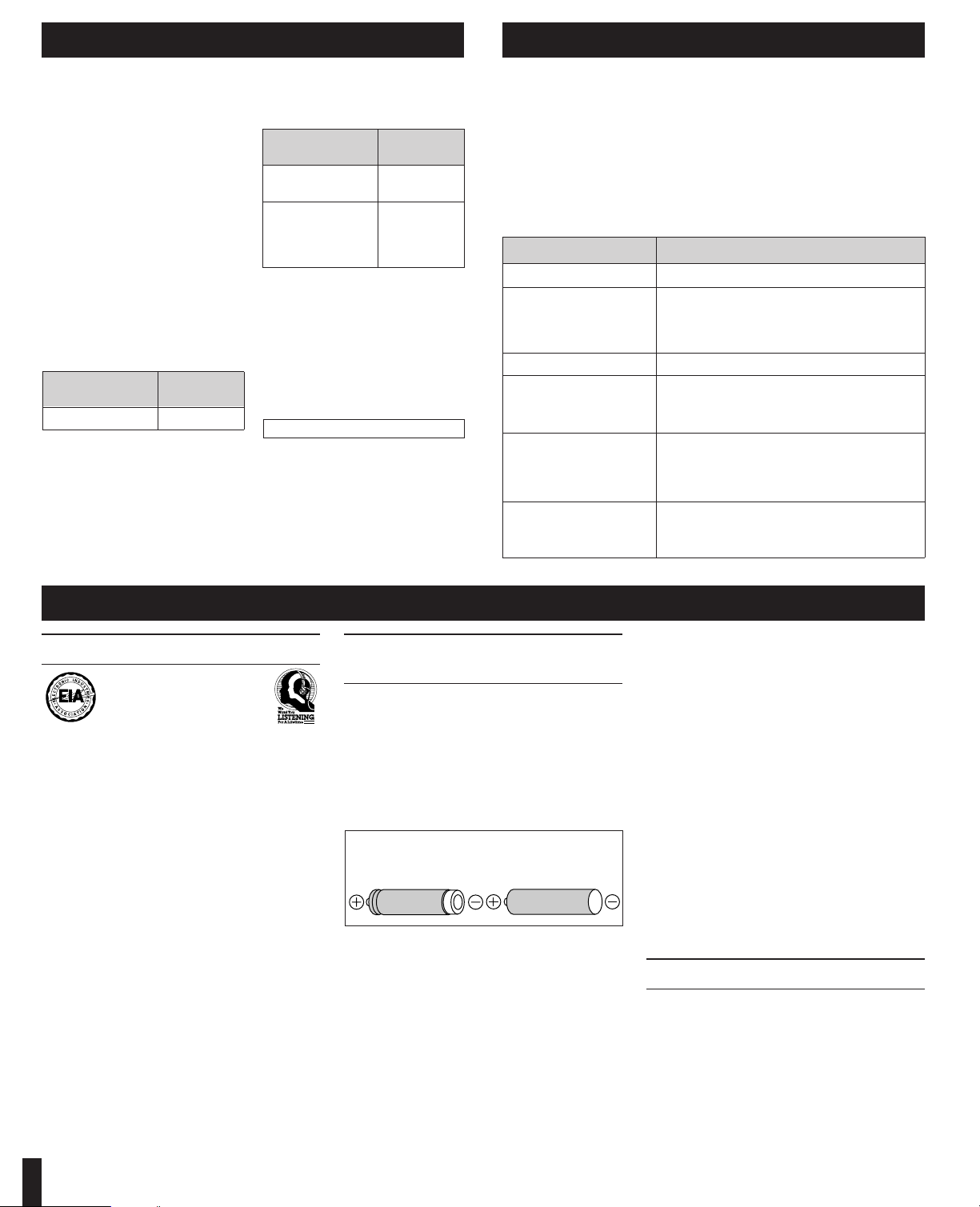
Problem
Cannot close the cover.
Cannot play discs.
Cannot remove disc.
Tracks on disc do not
play in order, starting
with the first track.
Cannot hear music—
too noisy.
TV picture is distorted.
Radio reception is
noisy.
Check this
Is the disc properly secured in place?
≥Is the unit in HOLD status?
≥Is the disc properly secured in place?
≥Is there condensation on the lens?
(Wait for about an hour and then try again.)
Did you press [PUSH] to release the disc?
Is [RESUME, RANDOM, NORMAL] in the
[NORMAL] position?
≥Is the headphone/earphone plug inserted all the
way?
≥Is the plug dirty? (Wipe away dirt on plug.)
≥Separate the unit from mobile phones.
Are you using the unit body too near a TV or tuner?
(If the TV or tuner is connected to a simple indoor
antenna, connect it to an outdoor antenna.)
Batteries used
2 alkaline batteries
Optional
rechargeable
batteries
(P-3GAVA/2B)
Power source
AC adaptor
Anti-shock
OFF/ON
2.5 W/2.7 W
Specifications Troubleshooting Guide
Before requesting service for this unit, check the chart below for a possible cause of
the problem you are experiencing. Some simple checks or a minor adjustment on
your part may eliminate the problem and restore proper operation.
If you are in doubt about some of the check points, or if the remedies indicated in the
chart do not solve the problem, refer to the directory of Authorized Service Centers
(enclosed with this unit) to locate a convenient service center, or consult your dealer
for instructions.
For detailed instructions, contact an authorized servicenter in the U.S.A. and
Panasonic Canada Inc. Customer Care Centre in Canada.
In the U.S.A. 1-800-211-7262 or web site (http://www.panasonic.com)
In Canada 905-624-5505 or web site (www.panasonic.ca)
Audio (Anti-shock OFF)
No. of channels: 2 (left and right,
stereo)
DA converter: 1 bit, MASH
Headphone
output level: Max. 9 mWi9 mW/
16≠ (adjustable)
Pickup
Light source: Semiconductor laser
Wavelength: 780 nm
General
Operational
temperature
range: 0 eC–40 eC
(32 eF–104 eF)
Rechargeable
temperature
range: 5 eC–40 eC
(41 eF–104 eF)
Power supply: DC 4.5 V
Power consumption:
Play time:
[When used in hold mode, with S-XBS
cancelled at 25 eC (77 eF), on a flat,
stable surface]
The play time may be less depending on
the operating conditions.
Recharging time: About 5 hours
Dimensions
(WaHaD): 128a25.8a144 mm
(5
1
⁄16za11⁄32za511⁄16z)
Weight: 257 g (9.1 oz.)
(with batteries)
212 g (7.5 oz.)
(without batteries)
Note:
Specifications are subject to change
without notice.
Weight and dimensions are
approximate.
Anti-shock
OFF/ON
About 22 h/
22 h
About 10 h/
10 h
8
When recharging: Approx. 3.4 W
Power consumption in standby mode : 2.0 W
Listening caution
Do not play your headphones or earphones at a high
volume. Hearing experts advise against continuous extended play.
If you experience a ringing in your ears, reduce volume
or discontinue use.
Do not use while operating a motorized vehicle. It may
create a traffic hazard and is illegal in many areas.
You should use extreme caution or temporarily discontinue use in potentially hazardous situations.
Even if your headphones or earphones are the open-air
type designed to let you hear outside sounds, don’t turn
up the volume so high that you can’t hear what’s around
you.
Sound can be deceiving. Over time your hearing “comfort level” adapts to higher volumes of sound. So what
sounds “normal” can actually be loud and harmful to
your hearing.
Guard against this by setting your equipment at a safe
level BEFORE your hearing adapts.
To establish a safe level:
≥Start your volume control at a low setting.
≥Slowly increase the sound until you can hear it com-
fortably and clearly, and without distortion.
Once you have established a comfortable sound level:
≥Set the dial and leave it there.
Cautions
EST. 1924
∫ Care
To prevent battery damage, electrolyte leakage and
short-circuiting, heed the following points.
≥Do not peel off the covering on batteries and do not
use if the covering has been peeled off.
≥Align the poles + and - correctly when inserting the
batteries.
≥Do not mix different types or makes of batteries or old
and new batteries.
≥Remove the batteries if you do not intend to use the
unit for a long time.
≥Do not throw into fire, short-circuit, disassemble, or
subject to excessive heat.
≥Do not attempt to recharge dry cell batteries.
≥Do not allow metal objects to touch the battery termi-
nals as this may cause short-circuiting which is dangerous.
≥When carrying batteries in a pocket or bag, ensure no
metal objects such as necklaces are placed together
with them. Contact with metal may cause short-circuiting which can cause a fire. For safety, carry the
rechargeable batteries in the battery carrying case.
When driving a car
In the interest of traffic safety, do not operate the unit
while driving.
Selection and care of
rechargeable /dry cell batteries
∫ Selection
As a safety precaution, the portable CD players made
by Panasonic are constructed so it is impossible to
recharge ordinary batteries.
Only batteries especially designed for this unit can be
recharged.
Special rechargeable Ni-Cd batteries:
P-3GAVA/2B (set of 2)
For details, check with your dealer.
≥If rechargeable battery play time is short after recharg-
ing, the batteries have reached the end of their service
life. Replace them with the recommended replacements.
≥Play time may be shorter than usual after recharging
batteries for the first time or after they have been unused for a long time. Repeatedly recharge and discharge the batteries if this occurs to restore them to
normal.
Ordinary dry cell
batteries/rechargeable
batteries
Special rechargeable
batteries
 Loading...