

Page 1
Operating
Instructions
VACUUM CLEANER
MC-V7347
Panasonic
Before operaling your vacuum cleaner, pleaee read these Instructions completely.
Page 2

CONSUMER INFORMATION
Please read IMPORTANT SAFETY INSTRUCTIONS on page 4 before use. Read and understand all Instructions.
TO OUR VALUED CUSTOMER
We are very pleased to welcome you to the Panasonic family of products. Thank you for
purchasing this product. Our intent is that you become one of our many satisfied customers.
Proper assembly and safe use of your vacuum cleaner are your responsibilities.
Your cleaner is Intended only for household use. The cleaner should be stored in a dry,
indoor area. Read the Operating Instructions carefully for important use and safety infor
mation.
Special care Is required when vacuuming certain types of carpet or floor covering. Always
check the caroet or floor covering manufacturer's recommended deanlng Instructions
before vacuuming.
PLEASE PAY CLOSE ATTENTION TO THE
WARNING AND CAUTION STATEMENTS THAT
ARE FOUND THROUGHOUT THIS MANUAL.
WARNING statements are designed to alert you
to the possibility of personal injury, loss of human
A
mRNING
life, and/or damage to the vacuum cleaner and/or
personal property if the instructions given are not
followed.
CAUTION statements are designed to alert you
A
A
TO AVOID ELECTRICAL SHOCK
Never vacuum damp or wet surfaces or liquids.
DO NOT store machine outdoors.
Replace worn or frayed power cord Immediately.
TO AVOID ACCIDENTS
Except tor hand-held cleaners, keep machine on floor - not chairs, tables, steps, stairs, etc.
Store machine promptly after each use to prevent accidents such as tripping over power cord or machine.
Use machine and accessories only in a manner intended by the manuf^urer.
The use of an extension cord is not recommended.
91997 Matsushita Electric Industrial Co., Ltd. All rights reserved.
CAUTION
WARNING
to thé possibility of damage to the vacuum clean
er and/or personal property if the instructions
given are not followed.
-2-
Page 3

TABLE OF CONTENTS
CONSUMER INFORMATION ............................................................................................. 2
IMPORTANT SAFETY INSTRUCTIONS ............................................................................ 4
PARTS IDENTIFICATION ................................................................................................... 5
Feature Chart ............................................................................................................... 5
TO ASSEMBLE CLEANER ............................................................................................... 6
Attaching Handle to Vacuum Cleaner............................................................................ 6
Using the Cord Hook..................................................................................................... 6
Attachment Assembly, Tools-on-Board
SPECIAL FEATURES OF CLEANER.................................................................................. 8
Automatic Self Adjusting Nozzle.................................................................................... 8
Edge Cleaning Feature.................................................................................................. 8
Motor Protector.............................................................................................................. 8
Carpet/Bare Floor Selector ........................................................................................... 9
Hose Ring and Hose Ring Mount.................................................................................. 9
Vac Gauge .................................................................................................................. 10
TO OPERATE CLEANER................................................................................................. 11
Power Cord ............................................................................................................... 11
On/Off Switch.............................................................................................................. 11
Handle Adjustments..................................................................................................... 12
Attachments ................................................................................................................ 13
........................................................................
7
ROUTINE CARE OF CLEANER ....................................................................................... 14
Cleaning Secondary Foam Filter ................................................................................ 14
Replacing HEPAType Exhaust Filter........................................................................... 14
Changing the Dust Bag................................................................................................ 15
Removing/lnstalling the Lower Plate
Replacing the Headlight Bulb ...................................................................................... 16
Replacing the Belt........................................................................................................ 17
Cleaning the Agitator ................................................................................................... 17
Replacing the Brushes ........................................................................................... 18-19
Cleaning Exterior and Attachments
Removing Clogs.......................................................................................................... 21
BEFORE REQUESTING SERVICE .................................................................................. 22
WARRANTY....................................................................................................................... 23
WHAT TO DO WHEN SERVICE IS NEEDED .................................................................. 24
...........................................................................
............................................................................
- 3-
16
20
Page 4

IMPORTANT SAFETY INSTRUCTIONS
When using vacuum cleaner, basic precautions should always
be followed, including the following:
READ ALL INSTRUCTIONS BEFORE
USING THIS VACUUM CLEANER
WARNING
To reduce the risk of fire, electrical shock, injury:
1. DO NOT leave vacuum cleaner when plugged in. Unplug from outlet when
not in use and before servicing.
2. To reduce the risk of fire, electric shock • DO NOT use outdoors or on wet
surfaces.
3. DO NOT allow to be used as a toy Close attention is necessary when
used by or near children.
4. Use only as described in this manual. Use only manufacturer's recom
mended attachments.
5. DO NOT use with damaged cord or plug. If vacuum cleaner is not working
as it should, has been dropped, damaged, left outdoors, or dropped into water,
return it to an authorized Panasonic Servicenter.
6. DO NOT pull or carry by cord, use cord as a handle, close door on cord, or
pull cord around sharp edges or corners. DO NOT run vacuum cleaner over
cord. Keep cord away from heated surfaces.
7. DO NOT unplug by pulling on cord. To unplug, grasp the plug, not the
cord.
8. DO NOT handle plug or vacuum cleaner with wet hands.
9. DO NOT put any objects into openings. DO NOT use with any opening
blocked: keep free of dust, lint, hair, and anything that may reduce air flow.
10. Keep hair, loose clothing, fingers, and all parts of body away from openings
and moving parts.
11. DO NOT pick up anything that is burning or smoking, such as cigarettes,
matches, or hot ashes.
12. DO NOT use without dust bag and/or filters in place.
13. Turn off all controls before unplugging.
14. Use extra care when cleaning on stairs.
15. DO NOT use cleaner to pick up flammable or combustible liquids such as
gasoline or use in areas where they may be present.
SAVE THESE INSTRUCTIONS
THIS VACUUM CLEANER IS INTENDED
FOR HOUSEHOLD USE ONLY
Note: Before you plug in your Panasonic vacuum cleaner, make sure that the voltage
indicated on the rating plate located at the back of the vacuum cleaner is the same as
your local supply.
- 4 -
Page 5
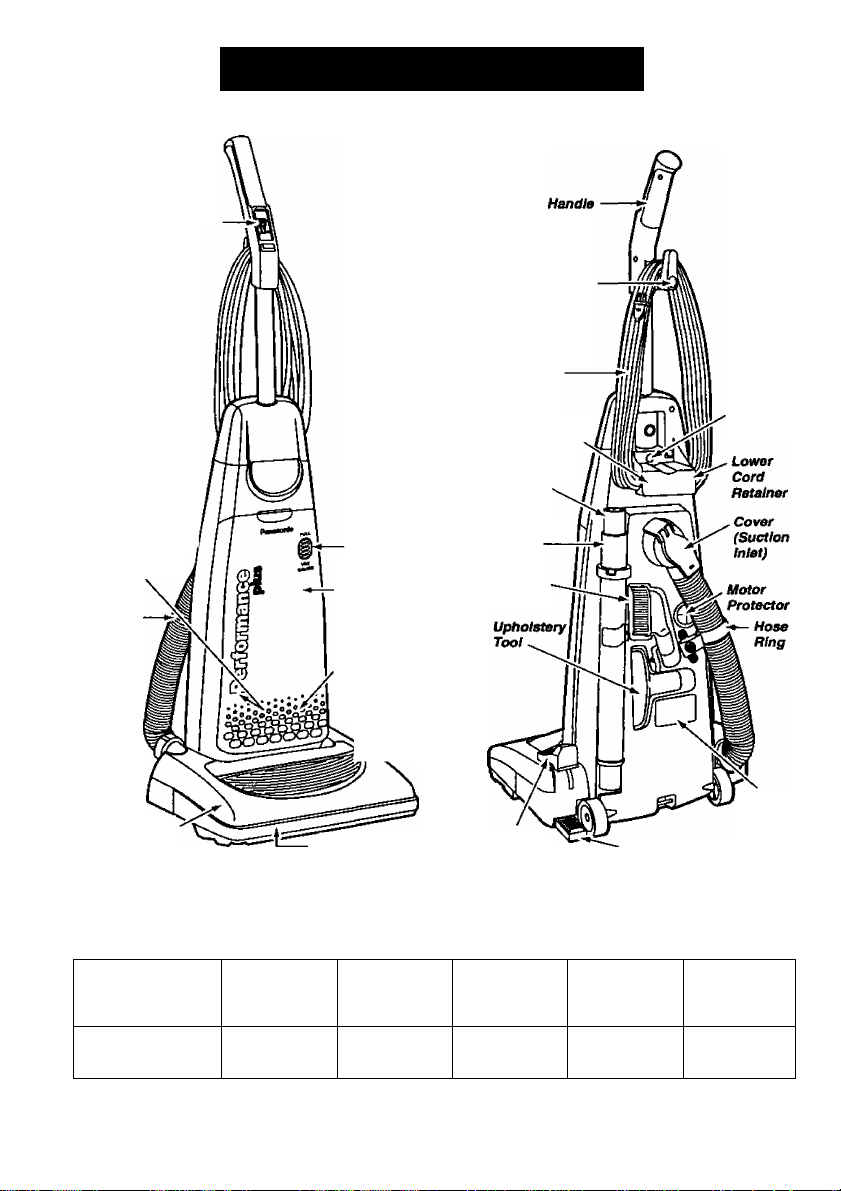
On/Off Switch
PARTS IDENTIFICATION
Quick
Release
Cord Hook
Power
Cord
Crevice
Tool
Secondary Filter¡
(Inside Dust
Compartment)
Hose
Nozzle
Vac
Gauge
Dust Cover
(Dust Bag
Inside)
Exhaust
Filter (Inside
Dust Cover)
Headlight
Furniture Guard
Telesct^ing
Wand
Dusting
Brush
Carpet/Bare
Floor Selector
FEATURE CHART
(PANASONIC UPRIGHT VACUUM CLEANER)
\,™rURES
Model
MC-V7347
POWER
120V.AC(60Hz)
12.0 Amps
DIRT
SENSOR
No
HEAOUGHT
Yes
Carry
Handle
Handle Release Pedal
CORD
LENGTH
35 Ft.
Handle
Screw
Rating
Plate
BARE
FLOOR
OPTION
Yes
-5-
Page 6
TO ASSEMBLE CLEANER
A
DO NOT plug Into electrical supply until assembly Is complete. Failure to do so
could result In electrical shock or injury.
WARNING
Electrical Shock Hazard.
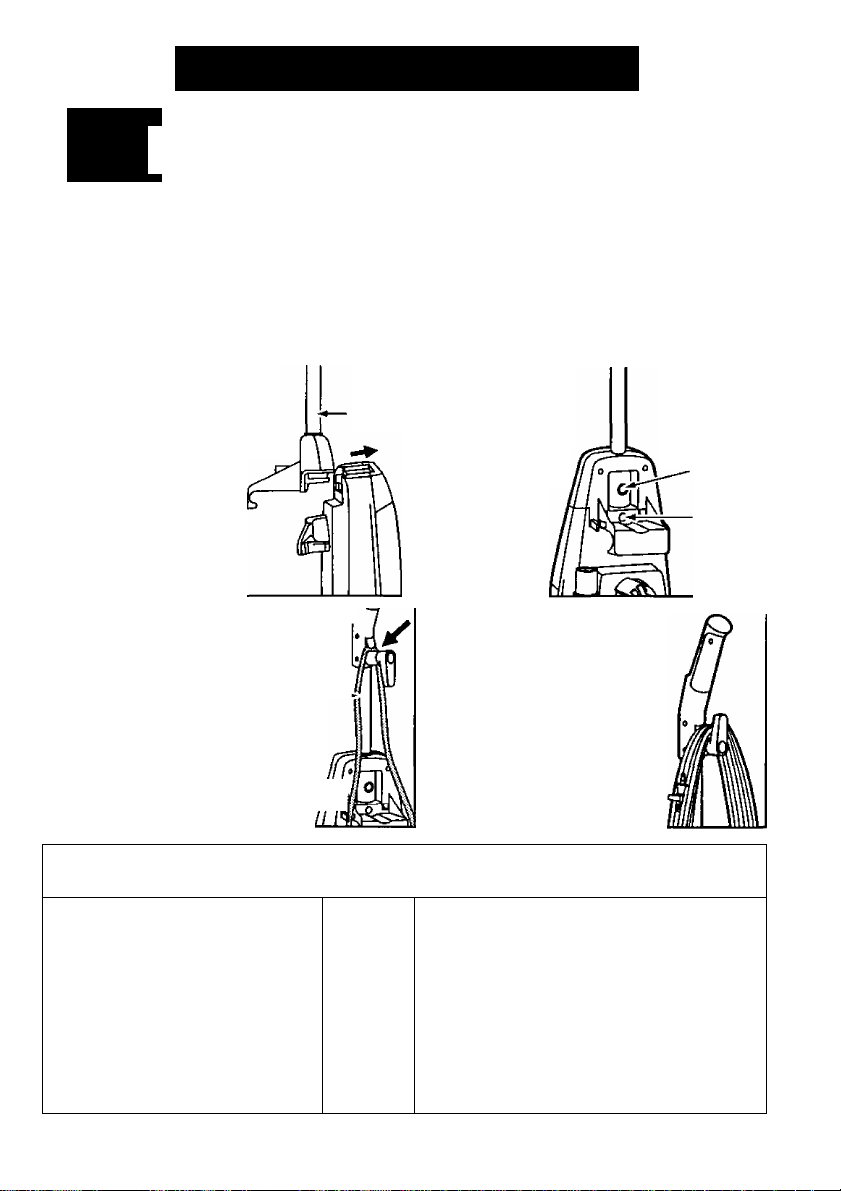
The vacuum cleaner main body and handle are packed separately.
1. The handle screw has
been installed for shipping
purposes. Please remove the
screw before inserting the
handle. Insert the handle
as shown in the illustra
tion. Make sure the
ON/OFF switch is In
the OFF position
before Installing.
3. There are two (2) recessed areas J
located on the back of the vacuum, as
shown in the illustration,
designed to secure the power power
cord during vacuuming. Cord
Always push the power cord down
into these recessed areas to help
keep the power cord from hanging
near the nozzle and being dam- ^
aged by the agitator. ^
Handle
2. Insert the screw
that you have
removed. Be sure
the screw is tight
ened, but not
overtightened.
4. Loosely wrap the power cord
around the quick release cord
hook and the lower cord retain
er. Secure the plug head to
the cord by pushing the power
cord into the retainer on the
plug head.
Retainer
(Plug
Head)—►
Do Not Remove
This Screw
Handle
Screw
1. The upper cord hook has a ,
quick-release action. To /
release the power cord, rotate jL
the hook downward and the /
complete power cord will drop IJ
off the hook for Immediate yM
use.
ÙSINGI^Ép^^l^K
2* DO NOT unplug the power Ky
cord by pulling on the cord. S 1
Grasp the plug head and pull to ftj
. Cord
Hoofr
unplug the vacuum cleaner. ^1
Return the hook to the upright
position before attempting to
rewind the cord.
- 6 -
Page 7
s
mrACmKEm»SSEMB\^,lo(àB<mmoe^
A
DO NOT get the power cord caught under the noizle when using the vacuum or
attachments as it can be damaged by the agitator as it revolves,
CAUTION
ATTACHMEHTTS
Suction Control Slide ~
Crevice
Tool
Crevice
Telescoping
Wand
'Zi
a
Dusting
Brush —
UfOiolatery Tool
Q Ra/S0d
Wand
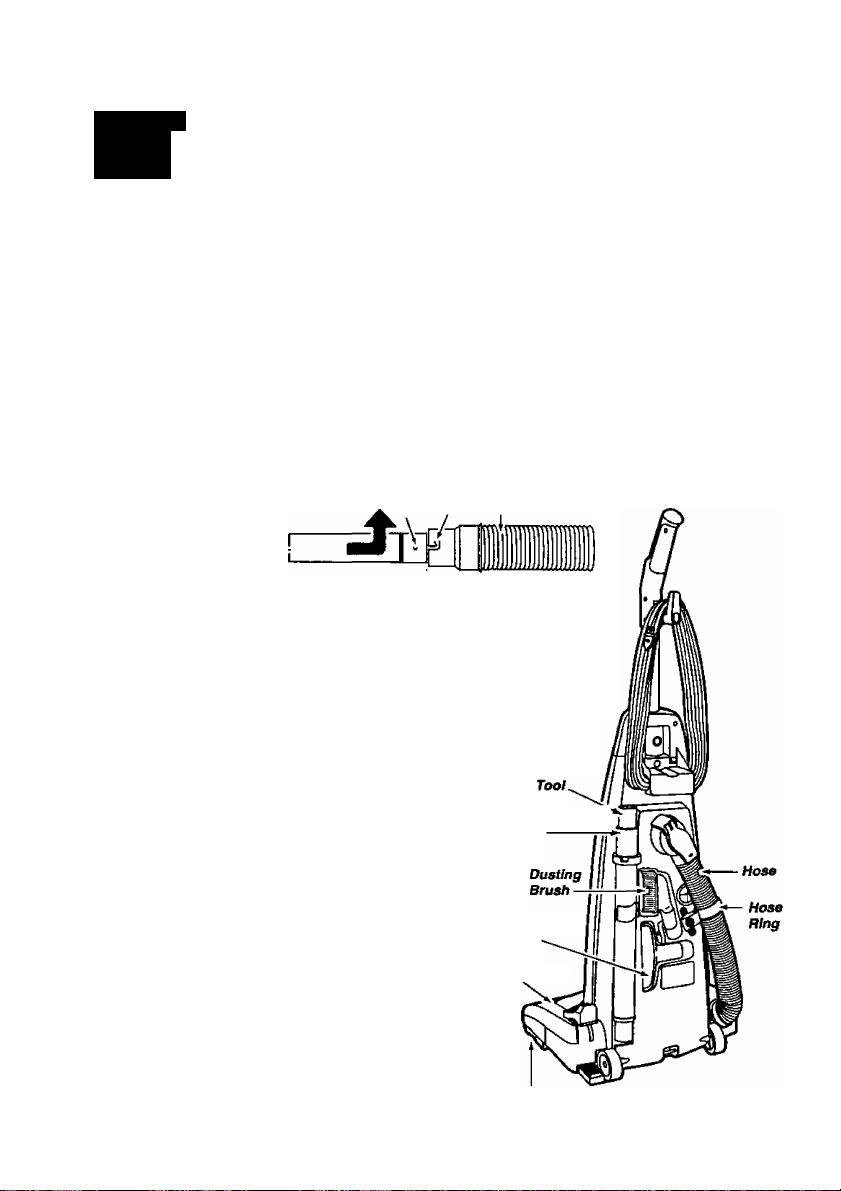
The attachments should be conveniently positioned on the back and side
of the cleaner for easy access. Some of the attachments may already be
assemt^ed. Assemble the hose and attachments to the cleaner as fol
lows:
Insert the crevice tool, cleaning end down, into the end of the telescop
ing wand nearest the locking ring. A slight twist of the crevice tool wilt
lock it into place.
Place the telescoping wand on the back of the cleaner
with the locking ring and the crevice tool up, and
the bottom resting on the ledge near the wheel.
The hose ring should be inserted into the slot to hold
in place only when vacuuming areas below the upper
cord hook.
To attach the wand to the hose for use, align the two
(2) raised tabs on the wand with the “J" slots In the
hose. After guiding the tabs along the grooves,
twist to lock in place.
V
Tab Hose
Nozzle
Telescoping h
Wand
Upholstery
Tool
-7-
— Agitator (Underneath)
Page 8
SPECIAL FEATURES OF CLEANER
S5íÉ :
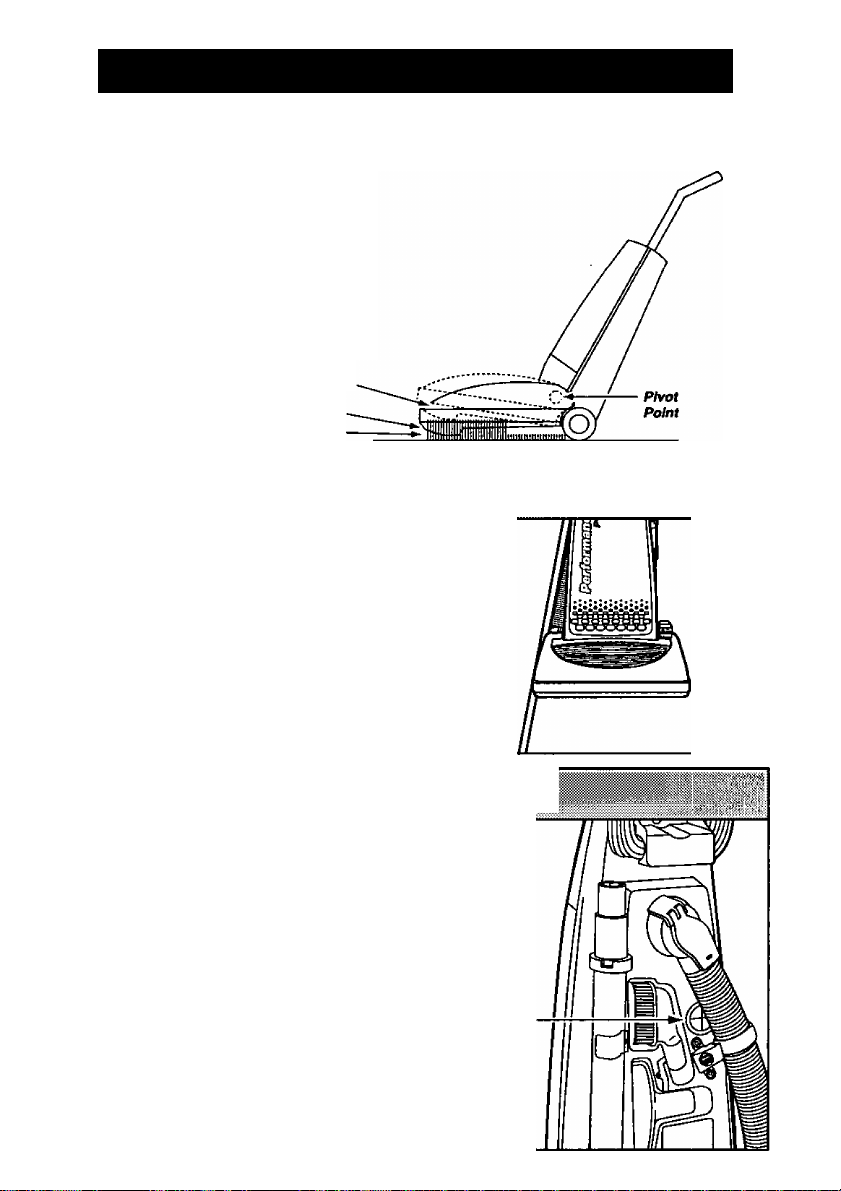
Your Panasonic upright vacuum cleaner is
designed with an automatic self adjusting
nozzle. No manual adjustments are
required. The height of the nozzle is
instantly and automatically adjusted to any
carpet pile height. This self adjusting
feature allows the nozzle to float evenly
over all carpet pile surfeces.
Nozzle
Deep Pile Carpet
Sfta//ow Pile Carpet
The edge cleaning feature provides for
improved cleaning of carpets near walls
and furniture.
MOTOR PROTECTOR
This vacuum has a motor protector by-pass valve which
automatically opens to provide cooling air to the motor
when a clog prevents the normal flow of air to the motor.
The by-pass valve opens to prevent the motor from
overheating and possibly causing damage to the
vacuum. When open, a change of sound will be noticed
as air rushes through the valve opening. If this occurs,
turn the vacuum off and unplug the power cord from
the outlet. Check for clogs as described in the Motor
REMOVING CLOGS section. Protector
The motor protector by-pass valve may open when
using attachments or when cleaning new carpet, due to
reduced air flow by the attachments themselves or by
new carpet fuzz filling the bag quickly.
- 8 -
Page 9
S' 1 ■
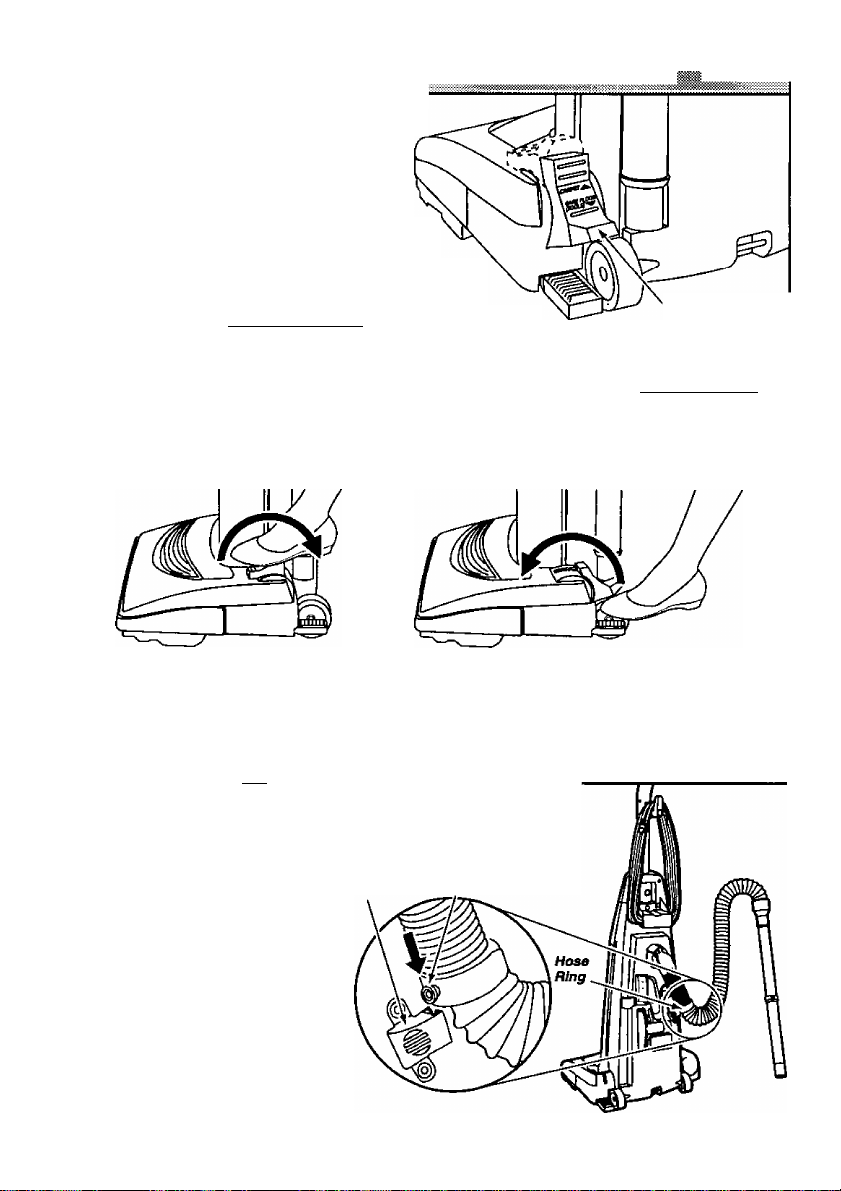
CARPETBARE l^tOOR SELECTOR
To use cleaner on bare floors, the carpet/bare
floor selector on top of the nozzle should
be positioned all the way back and down
toward the bottom of the nozzle until it
locks into place. When the selector is in this
position the agitator does not turn. This is
also the correct position to place the selector in
to use the attachments. Any time the attach
ments are used the agitator should not be turning.
To use cleaner on carpeted areas, the carpet/bare floor
selector should be all the wav forward and up to the carpet
position. This will allow the agitator to turn. When carpets are
being cleaned the selector should remain in this position.
Take care when selecting either position to make sure the selector is pushed fully and quickly
as possible to the desired position. Failure to do so can cause the belt to rub on the selector
shaft and may result In the belt becoming hot and creating a burning rubber smell.
To prevent injury when returning the selector to the carpet position, use caution as the selector
can move quickly upward due to tension caused by the belt.
Bara Floor/
Carpet Selector
To clean bare floor
or use ettachmenta
HOSE RING AND HOSE RING MOUNT
''' . ^ .
The hose ring is a feature designed to prevent tipping of the vacuum
while performing certain tasks that involve the use of the
attachments. To use this anti
tip feature, place the hose Hose Hose
ring in the hose ring mount as Bing Mount Ring Knob
shown in the illustration.
Rotate this ring on the hose so that
the hose ring knob will align with
the slot in the hose ring mount
and slide the ring down firmly
until it stops. For recommenda
tions on when to use the hose
ring and the exact location of the
hose ring mount see the ATTACH
MENTS section.
-9-
To clean carpet
Page 10

VAC GAUGE
The vac gauge located on the front of your vacuum
cleaner dust cover, indicates when the dust bag
should be changed. Change the dust bag when
FULL is indicated in order to maintain the best
cleaning efficiency.
NOTE: If the vac gauge indicates FULL while the
dust bag Is still empty, check to see if there are
any clogs as eicplained in the
section. The vac gauge indicator may not move as
expected when loose, fluffy dust is vacuumed.
REMOVING CLOGS
Panasonic
FULL
- 10 -
Page 11
TO OPERATE CLEANER
CAUTION
DO NOT use outlets above counters. Damage to Items In the surrounding areas could
occur. Be sure the switch Is In the off position while plugging the cord in.
m
NOTE: To reduce the risk of electrical shock, this vacuum has a polarized plug, one blade is wider
than the other. This plug will fit in a polarized outlet only one way. If the plug does not fit fully in
the outlet, reverse the plug. If it still does not fit, contact a qualified electrician to install the proper
outlet. DO NOT CHANGE THE PLUG IN ANYWAY.
'
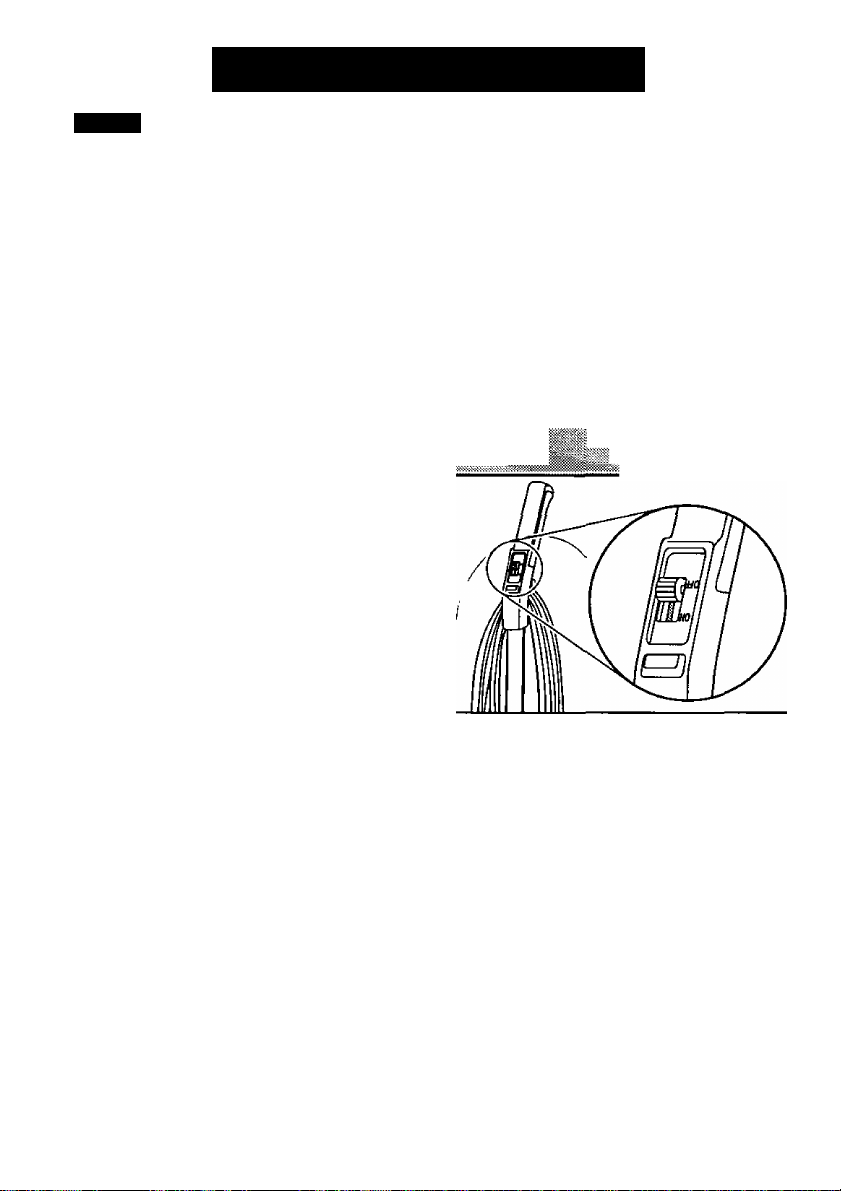
1. Plug the power cord into a 120V outlet.
2. To start the vacuum cleaner, push the switch to
the ON position.
3. To stop the vacuum cleaner, pull the switch to
the OFF position.
-11 -
Page 12
rnimmmmi&smEmm.
';f5
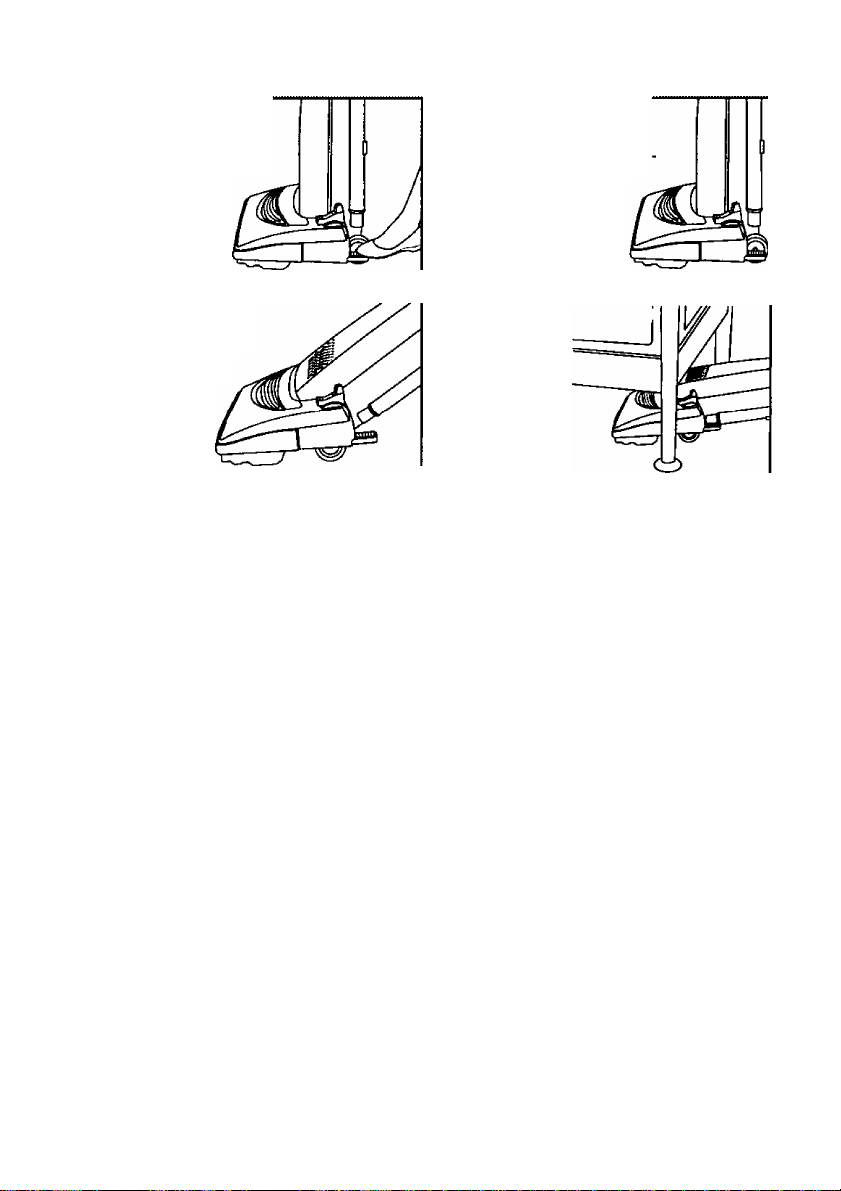
The handle may be lowered
to any pKisition required.
Step on the handle release
pedal as indicated by
the iilustration and
lower the handle
as desired.
2. Middle position
This position is for normai
cleaning.
1. Upright position
The handle locks in this posl
tion for storage. The
handle should always
be in an upright posi
tion when the attach
ments are used.
3. Low position
This position
is used for
cleaning under
furniture.
- 12-
Page 13
A
WARNING
DO NOT place hands or feet underneath the unit when using the attachment tools. The
agitator begins to revolve rapidly when using attachments.
Personal Injury Hazard when Using Attachments,
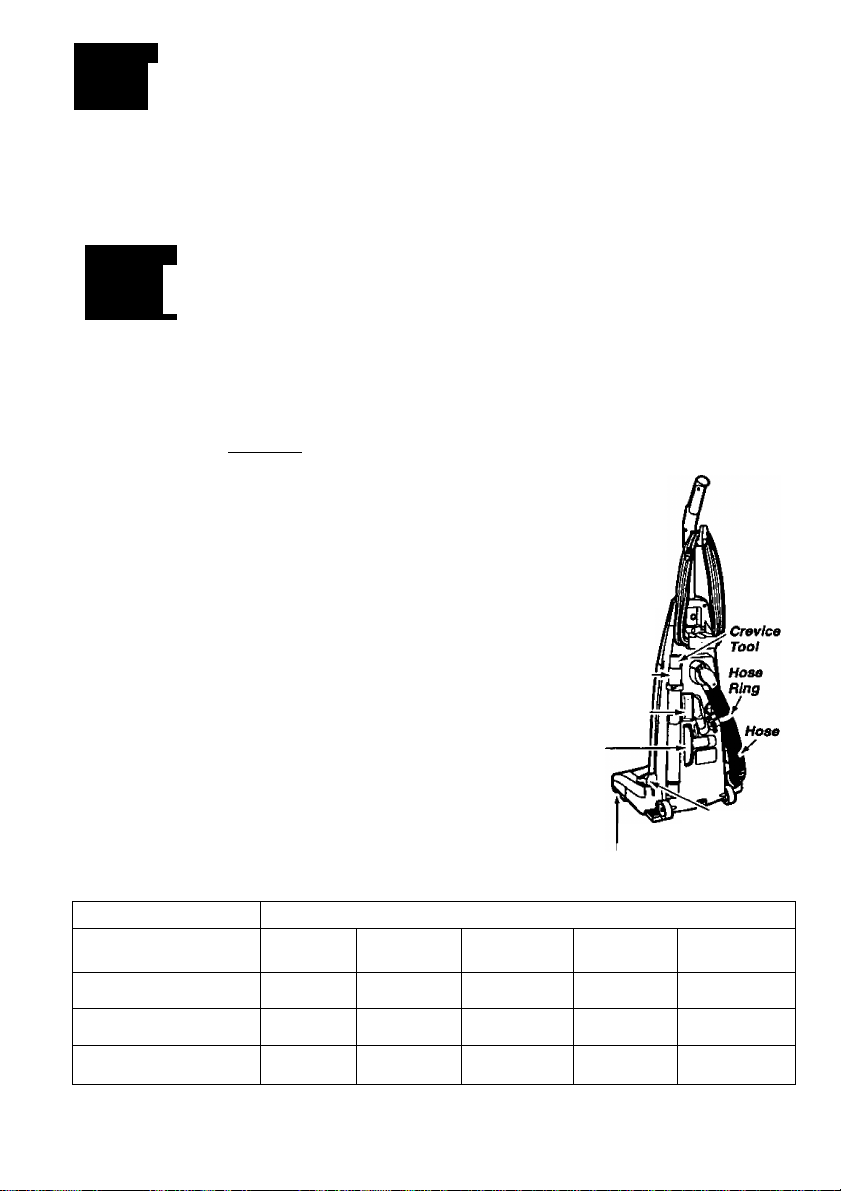
^AITACMMEHISI
A
When using the attachments, the agitator begins rotating If the carpet/bare floor selec
tor Is not In the bare floor position. Always use the bare floor position when using
attachments. DO NOT allow the cleaner to remain In Just one place for a period of
time, as the agitator may damage the floor surface. Avoid placing the cleaner on furni
ture, the fringed area of rugs, deep pile carpeting, or carpeted stairs. The Ideal posi
tion for the cleaner when using attachments Is for the unit to be on a level area with
the handle in the full upright position. See the HANDLE ADJUSTMENTS section.
To remove the hose from the rvozzle, grasp the lower end of the hose at the nozzle
and twist as you pull out. Once the hose has been removed it can be used as is, or
the telescoping wand can be used for further reach. Remove the telescoping wand
from the storage position on the vacuum cleaner. Remove the crevice tool from tfie
telescoping wand by pulling out while twisting slightly. To extend the wand, turn the
locking ring to the UNLOCK position, as indicated on the locking ring and pull it out
to full length. Lock the locking ring by turning it to the LOCK position. The tools
can be attached to the hose or the end of the wand. When connecting the
attachments to the hose or wand, always twist as you push down. If
additional reach is required, the dusting brush or upholstery tool
can be attached to the crevice tool by simply sliding them over the
narrow end. The attached hose end swivels at the back of the vac
uum cleaner to make cleaning easier in all directions.
When using the attachments, DO NOT overextend your reach with
the hose as it could tip the cleaner over. To help prevent tipping of
the vacuum when using the attachments to clean areas below the upper
cord hook, the hose ring should be placed in the hose ring mount. Above
this level, unhook the hose ring from the hose ring mount.
Store attachments in their proper positions as shown in the illustration and
place the hose back into the nozzle.
CAUTION
Telescoping
Wand
Dusting
Brush
Upholstery
Tool
Agitator (Underneath)
ATTACHMENT USE
CLEANING AREA
ATTACHMENT
Furniture*
Between
Cushions*
□rapes*
Stairs
Carpet/Bara
Floor Selector
Wails
CREVICE TOOL
DUSTING BRUSH &
UPHOLSTERY
TOOL
'Always clean attachments before using on fabrics. Attachments used in dirty areas, such as
under a refrigerator, should not be used on other surfaces until they are washed. They could leave
marks. See the CLEANING EXTERIOR AND ATTACHMENTS section.
X
X X
X
X
X
- 13-
X
X
X
X
X
X
Page 14
ROUTINE CARE OF CLEANER
Performing the following tasks will keep your new Panasonic vacuum cleaner operating at peak
performance levels and will ensure these high levels for years to come. Check the BEFORE
REQUESTING SERVICE section in this manual for recommendations on performing some of
these tasks to help solve various problems that may occur.
A
Always disconnect electrical supply before performing any service and/or cleaning of the
vacuum cleaner. Failure to do so could result In electrical shock or personal Injury from
cleaner suddenly starting. DO NOT operate the cleaner without the secondary filter. Be
sure the secondary filter is properly Installed. Failure to do so could result In motor fall’
ure.
WARNING
Electrical Shock or Personal Injury Hazard.
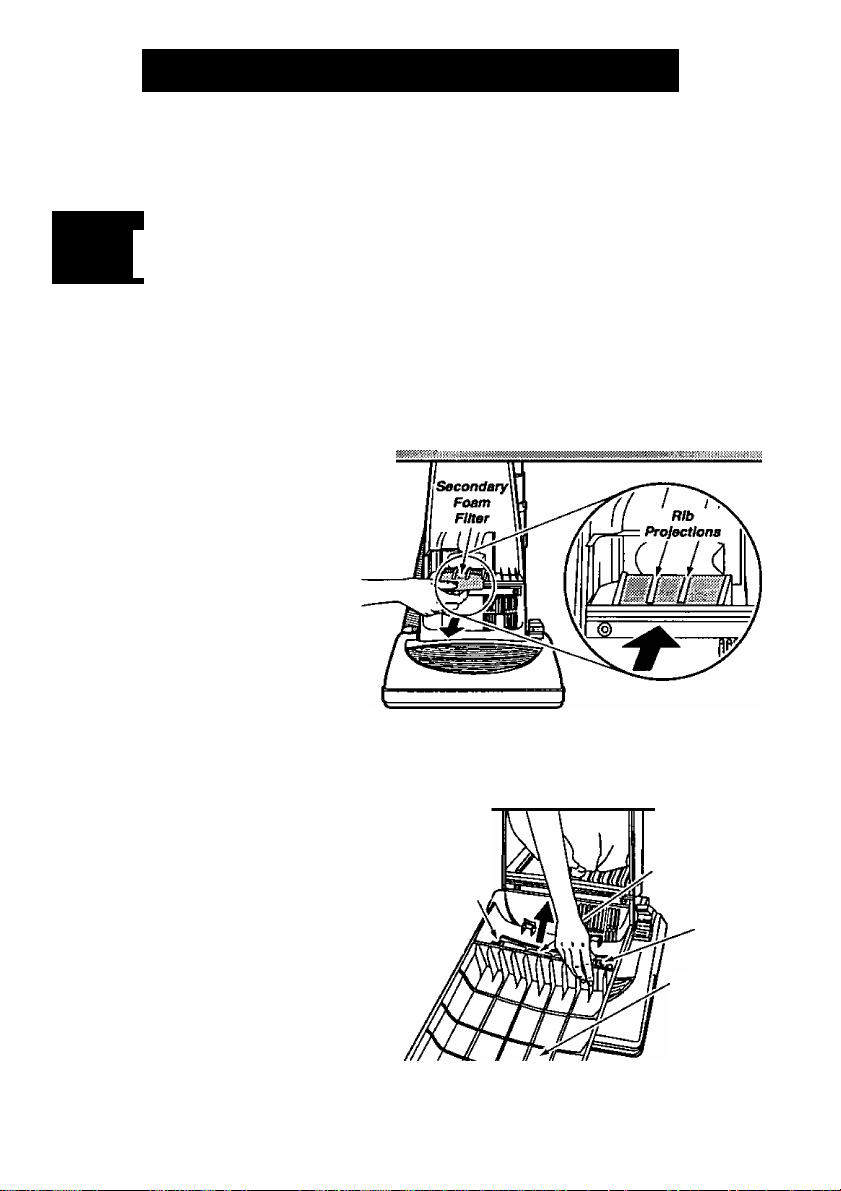
CLEANING SECONDARY FOAM RLTER
A secondary foam filter protects the motor
from dirt. When installing a new dust bag.
check this fitter. Accumulated dirt in the
dust compartment wilt collect on this filter
and may restrict motor performance.
When this filter becomes dirty, pull it
from the bottom of the dust compart
ment and clean by rinsing it in water.
When dry, slide this filter back into place.
Insert the secondary foam filter with a
ruler or something fiat. It should be fully
inserted under the plastic rib projecfons
all the way to the rear.
The HEPA type exhaust filter is located inside the dust
cover. The purpose of this filter is to remove dust
and dirt from the recirculated air. When installing
a new dust bag, check this filter. When the filter
becomes dirty, remove the filter and the frame
from the bottom of the dust cover by pulling straight up
on the two retainers on the frame. Do one side at a
time. Replace the filter. DO NOT CLEAN WITH
WATER*. Place the new filter in the frame with
the four slots in the filter aligned with the four
tabs on the frame. Place the frame and the fil
ter back into the dust cover, making sure the
white side is facing up.
*This filter cannot be cleaned and should be replaced at least once each year If the
cleaner Is used at least one hour each week.
Retainer
Ejdiauat Filter
(HEPA туре)
and Frame
Retainer
Duet Cover
- 14 -
Page 15
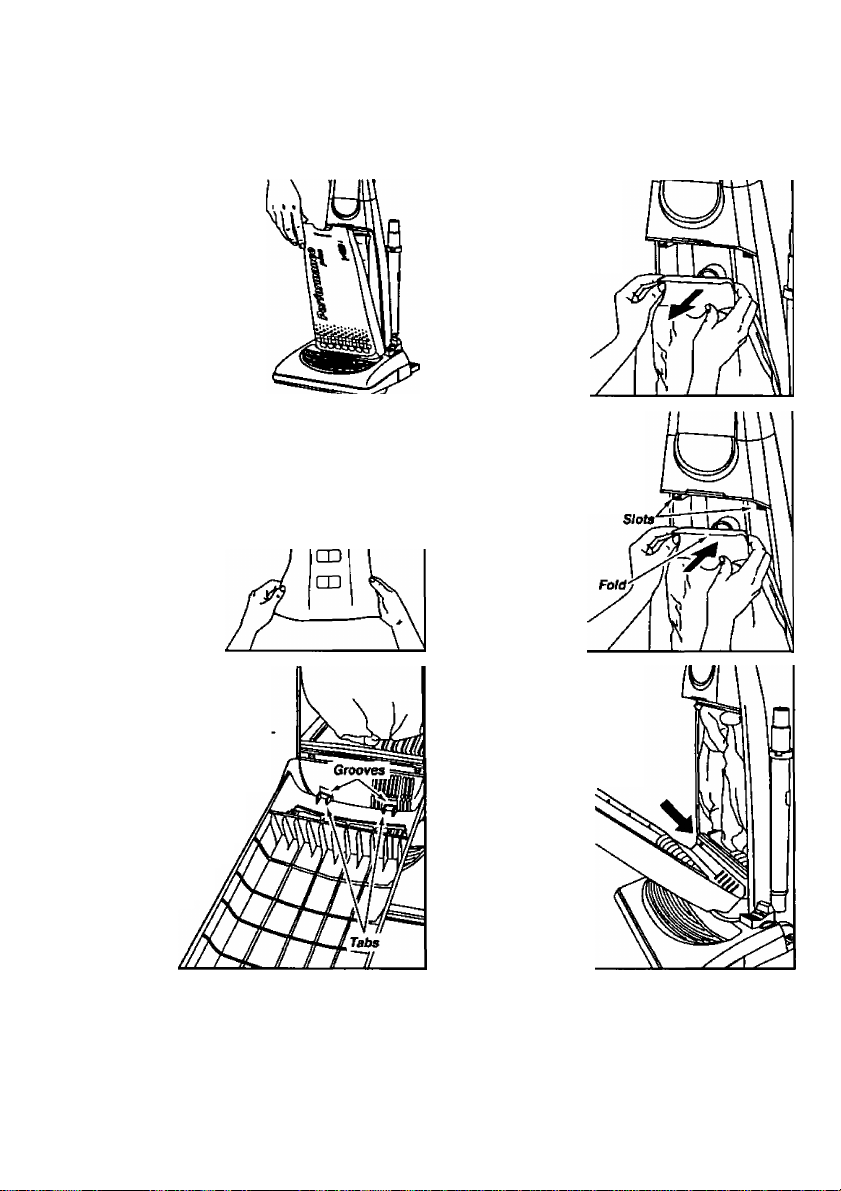
CHANGINGTHE DUST
■vw-s- ■. .ixls ^ V <
Always operate the vacuum with a genuine Panasonic Type U3 Standard, or U6
Electrostatic dust bag installed. Panasonic dust bags may be ordered through any
authorized Panasonic dealer.
1. Pull outward on
the dust cover grip,
located on the top of
the dust cover and
remove the cover.
3. Spread out the end
of the new dust bag.
NOTE: Pull carefully so
as not to tear the bag at
the folds.
5. Reinsert the tab pro
vided on the end of the
dust cover into the
grooves on the dust com
partment to allow the
cover to rotate closed.
NOTE: The dust
cover must be com
pletely and cor
rectly installed for
proper opera
tion.
CD
□ o
2. To remove the dust
bag, grasp the cardboard
portion of the dust bag
and pull it out.
4. Fold the new dust bag to
clear the slots as shown in
illustration. Failure to do
so will prevent the dust
cover from closing
properly. Attach the
new dust bag onto
the bag holder by
holding the card
board portion and
pushing back as
illustrated.
6. Rotate the dust cover up
into the closed position and
press into place.
NOTE: The dust bag
should not be
caught
between
the lower edge
of the dust
cover and the
gasket as indicated
by the arrow in the
illustration.
- 15 -
Page 16

A
When the lower plate Is removed for any reason, before reinstalling, be sure that all elec
trical wires are routed In a manner that prevents them from coming into contact with the
lower plate, lower plate screws, or any moving parts. Be sure that the wires are not
pinched in any way when the lower plate Is reinstalled.
WARNING Electiicat Shock or Personal Injury Hazard.
REMOVING/iNSTALUNGTHE LOWER PLATE
Before replacing any parts, disconnect the vacu
um cleaner from the electrical outlet.
Replacing some of the parts in this section involves the
removal and installation of the lower plate. Always place
paper under nozzle anytime the lower plate is removed
to protect the floor surface.
To Remove Lower Plate.
Start by placing the handle in the upright position.
See the HANDLE ADJUSTMENTS section. Turn the
vacuum cleaner over, exposing the underside. Release the
lower plate by pressing inward on the two (2) latches and pressing
inward on the two (2) locking tabs that secure the lower plate, as shown in
the illustration. Remove the lower plate and remove any residue that may exist in the belt area.
To Reinstall Lower Plate.
Hook the front end of lower plate into the slots on the front of the nozzle housing. Press the lower
plate Into place until the locking tabs snap into place, then press outward on the two (2) latches.
NOTE: To ensure maximum cleaning efficiency, the belt should be checked regularly to make sure
it is in good condition. Check to see if the belt is stretched, cracked, or if excessive slippage has
occurred. Replace if necessary.
__ _____
Two e
Latches
Two Locking Tabs
Lower
Plate
REPLAaNGTHE HEADUGHT BULB
1. Remove the lower plate using the procedure in the
REMOVING/INSTALLING THE LOWER PLATE sec
tion.
2. Grasp the bulb socket, wiggle the socket back and
forth while pulling it up out of the nozzle housing. To
remove the old bulb, push it in toward the bulb socket
while turning counterclockwise, then remove.
3. Install the new bulb by pushing it in toward the
bulb socket and turning it clockwise. Use any stan
dard bayonet base appliance bulb rated at 15 Watts.
NOTE: Do not use a bulb rated over 15 Watts.
During extended use, heat from the bulb could over
heat the surrounding plastic parts.
4. Reinsert the bulb socket into the nozzle housing by pushing it back down into the slot.
Replace the lower plate as outlined in the REMOVING/INSTALLING THE LOWER PLATE section.
- 16 -
Page 17

;:;phiM|itei^<^glf-^ j^<:i|M|i fax | >>|pH
iii
Wi^
A
Be careful when removing agttatw. The belt tension is high. Failure to do so could result
in personal injury from agitator releasing quickly and snapping away.
Place the carpet/bare floor selector in the carpet position. Unplug and turn the unit over.
Remove the lower plate as described in the REMOVING/ INSTALLING THE LOWER PLATE
section.
WARNING
Personal Injury Hazard.
Remove the agitator, carefuliy lift it out, and remove the
worn or broken belt from the brush pulley and motor shaft.
NOTE: The two brush supports may come off along with
the two washers as you lift the agitator out. DO NOT lose
the two small washers.
Loop the new belt around the motor shaft and loop it
around the brush pulley. See illustration for correct belt
routing. Use only a Panasonic Type UBS drive belt.
Before reinserting the agitator make sure the brush supports/washers are on correctly. See Illustration in
the REPLACING THE BRUSHES section.
After checking the brush supports, reinstall the agitator back into the housing grooves. After
installing the agitator, turn it by hand making sure that the belt is not twisted or pinched and all
rotating parts turn freely. Replace the lower plate as described in the REMOVING/IN STALLING
THE LOWER PLATE section.
Ci&INlNGiiiE AGnATORI
Switch oft the vacuum cleaner and unplug the power
cord before cleaning the agitator. In order to keep the
cleaning efficiency high, clean the agitator regularly.
Remove the lower plate if necessary. See the REMOV
ING/! N STALLING THE LOWER PLATE section
for the proper procedure.
Agitator - Cut off any carpet pile and lint
erjtangled around the agitator with a pair of
scissors as illustrated.
- 17-
Page 18

^REele^NG.illlEBBlBHES1
1. When to replace the brushes.
The brushes should be replaced when they are worn.
Brushes should be checked by holding a card across the
lower plate, see illustration. If the bristles on the agitator DO [-/
NOT touch the card, you SHOULD replace the brushes for
best cleaning results.
2. How to replace the brushes.
Place the vacuum cleaner handle In the upright position.
See the HANDLE ADJUSTMENTS section. Remove the
lower plate as outlined in the REMOVING/INSTALLING THE
LOWER PLATE section. After the lower plate is removed,
carefully lift up the agitator until it clears both sides of the
nozzle housing. While holding the agitator up, remove the
belt. Carefully remove both brush supports from the agitator
assembly. In order to keep the agitator assembly properly
balanced, the agitator holder and belt pulley must be aligned
to the brush holder. Before removing these items make
marks on them that will allow you to reinstall them exactly as
removed. See illustration. Depress the belt pulley tabs with
a screwdriver. Push in and twist with the screwdriver while
pulling out on the belt pulley to remove. Do one tab at a
time while pulling out to keep the other tab depressed. The
brushes can now be replaced. Push each brush as shown
in the illustration until it is free from the brush holder.
wim»'
7
Brush Wflk«
Support a «ark Support
‘
f
A
Personal Injury Hazard.
Use extreme care when prying or depressing
these items with a screwdriver in order to
help prevent personal injury or damage to the
vacuum. Be careful when working around the
ends of the metal brush holder since sharp
edges may be present
WARNING
18-
Page 19

■
REPlMCINGfHElBRMSHESf^siai
3. To replace the brushes:
Install the new brushes by reversing the
procedure and following these important
Brushes
(No Paint)
Brushes
(Paint Marks)
instructions. Your new brush kit contains
two (2) different matched pairs of brushes.
One pair has a white paint mark on one end
and the other pair does not. Lay these out
as shown in the iilustration to ensure proper
assembly. The pair without the paint mark
are designed to go on the end with the belt
Belt
Pulley
Agitator
Holder
pulley. They can go on the brush holder In any direction and in any
order. The pair with the paint mark are designed to go on the end
next to the agitator holder. The white paint mark must be on the
very end of the brush hoider next to the agitator hoider. When the
brushes are properly installed they will not hit the tower plate as
the agitator assembly rotates.
4. To reassemble the agitator:
Reinstall the agitator holder and belt pulley. Be sure to align the
marks that you made before you removed these items. This helps
keep the agitator assembly balanced. Place the brush supports
back on the agitator assembly. See the illustration below for an
exploded view of the complete agitator.
5. To replace the agitator assembly:
Place the belt over the belt pulley on the agitator unit. Place the
Align Holder
. Marks A
Agitator
agitator assembly back into the nozzle as outlined in the REPLAC
ING THE BELT section. After completing the assembly, rotate the
agitator, turning it by hand to assure that it rotates smoothly and
tile parts are assembled correctly. Pay particular attention to the brushes to ensure they do not
hit the lower plate at any point.
6. To check for correct reassembly:
Replace the lower plate as outlined in the REMOVING/tNSTALLING THE LOWER PLATE section.
After the completion of the reassembly, test the vacuum by turning it on and listening for any con
tact of the brushes with the lower plate. If any contact exists there will be a very noticeable noise.
ft.
Belt Pulley
Agitator Assembly
Brushes
^^^^**‘'*******^<f?—Wtirn"
Brush Holder-
Brush Supports •
- 19 -
Agitator Holder
Page 20

;№‘vis.KWiSSSiSW«isi^^ ■-—.. - ■L -' ■■
CLEANING EXTERIOR AND ATTACHMENTS
1. Unplug cord from wall outlet. DO NOT drip water on cleaner,
2. Clean exterior using a clean, soft cloth that has been dipped in a soiution of miid liquid
detergent and water and wrung dry. Wipe dry after cleaning.
3. To reduce static electricity and dust build-up, wipe outer surface of deaner and attachments.
4. Wash attachments in warm soapy water, rinse and air dry. DO NOT clean In dishwasher or
clothes washer.
DO NOT USE ATTACHMENTS IF THEY ARE WET.
A
Attac/tmenfa used in dirty areas, such as under a refrigerator, should not be used
on other surfaces until they are washed. They could leave marks.
CAUTION
-20-
Page 21

REMOVING CLOGS
The hose located on the back of the vacuum cleaner carries the dirt from the nozzle
up to the dust bag. If the hose should become clogged;
1. Unplug the power cord from the outlet
before checking the airflow passages. Pull
open the suction inlet cover and check for
ciogging in this area.
Cover
(Suction
Inlet)
2. Disconnect the hose from the nozzle pipe
and check the hose for clogging. Plug in the
vacuum cleaner and turn it on. Whiie running
the vacuum cleaner with tiie wand disconnect
ed, stretch the hose in and out to remove the
clog.
3. If the clog still exists, turn the vacuum
cleaner OFF and unplug the power cord. Turn
the vacuum cleaner over, exposing the under
side. Remove the lower plate. Remove the
nozzle pipe from the housing by lifting it
straight up. Inspect the hose end and clear it
of any obstructions. Reinstall the nozzle pipe
and lower plate. See the REMOVING/
INSTALLING THE LOWER PLATE section for
detailed instructions.
-21 -
Page 22

BEFORE REQUESTING SERVICE
A
WARNING
Disconnect the electrical supply before servicing or cieaning the unit Failure to do
80 could result in electrical shock or personal Injury from cleaner suddenly starting.
Electrical Shock or Personal Injury Hazard.
Review this chart to find do-it-yourself solutions for minor performance
problems. Any service needed, other than those described in these
Operating Instructions, should be performed by an authorized service
representative.
PROBLEM POSSIBLE CAUSE POSSIBLE SOLUTION
Cleaner will
not run.
Poor Job of dirt
pickup.
1. Unplugged at wall outlet.
2. On/Off switch not turned on.
3. Tripped circuit breaker/blown
fuse at household service panel.
1. Full or clogged dust bag.
2. Broken belt.
3. Carpet/bare floor setting Incorrect.
4. Clogged hose or nozzle.
5. Hose not inserted fully.
6. Worn agitator.
7. Hole in hose.
8. Dust cover improperly installed.
9. Belt not installed on motor shaft.
1. Plug in firmly. Push On/Off
switch to On.
2. Push On/Off switch to On.
3. Reset circuit breaker or replace
fuse.
1. Change bag.
2. Replace belt.
3. Set In the correct position.
4. Clean hose or nozzle area.
5. Insert hose.
6. Replace agitator.
7. Replace hose.
8. Property install dust cover.
9. Install belt on motor shaft.
Bare fioor option
will not work.
Dust escapes
the paper bag.
Light will
not work.
1. Belt improperly Installed with bare
floor selector in wrong position.
1. Bag improperly installed.
2. Bag torn.
1. Burned out light bulb.
- 22 -
1. Properly install belt.
1. Properly install bag.
2. Replace bag.
1. Replace light bulb.
Page 23

WARRANTY
Panasonic Vacuum Cleaner
Limited Warranty
Panasonic Consumer Electronics Company or Panasonic Sales Company {collectively
referred to as “the warrantor") will repair this product with new or refurbished parts free
of charge, in the U.S.A. or Puerto Rico for one (1) year from the date of original pur
chase in the event of a defect in materials or workmanship.
This Limited Warranty Excludes both Labor and Parts for the following Items
which require normal reolaceinent: Disposable Dust Bag, Fitters, Belts, Light Bulbs,
Agitator Brushes and Batteries (if supplied).
Carry-in or mail-in service in the U.S.A. or Puerto Rico can be obtained during the war
ranty period by contacting a Panasonic Services Company (PASC) Factory Servicenter
listed in the Servicenter Directory. Or call, toll free, 1-800-545-2672 to locate a PASC
Authorized Sen/icenter. Carry-in or mail-in service in Puerto Rico can be obtained dur
ing the warranty period by calling the local Panasonic Sales Company telephone num
ber listed in the Servicenter Directory.
This warranty is extended only to the original purchaser. A purchase receipt or other
proof of date of original purchase will be required before warranty performance is ren
dered.
This warranty only covers failures due to defects in materials and workmanship which
occur during normal use and does not cover damages which occur in shipment, or fail
ures which are caused by products not supplied by the warrantor, or failures which
result from accident, misuse, abuse, neglect, mishandling, misapplication, faulty instal
lation, improper operation or maintenance, alteration, modification, power line surge,
improper voltage supply, lightning damage, commercial use such as hotel, office,
restaurant or other business or rental use of the product, or service by anyone other
than a PASC Authorized Servicenter, or darhage that is attributable to acts of God.
LIMITS AND EXCLUSIONS:
There are no express warranties except as listed above.
THE WARRANTOR SHALL NOT BE LIABLE FOR INCIDENTAL OR CONSEQUEN
TIAL DAMAGES RESULTING FROM THE USE OF THIS PRODUCT, OR ARISING
OUT OF ANY BREACH OF THIS WARRANTY. ALL EXPRESS AND IMPLIED WAR
RANTIES, INCLUDING THE WARRANTIES OF MERCHANTABILITY AND FITNESS
FOR A PARTICULAR PURPOSE, ARE LIMITED TO THE APPLICABLE WARRANTY
PERIOD SET FORTH ABOVE.
Some states do not allow the exclusion or limitation of incidental or consequential dam
ages, or limitations on how long an implied warranty lasts, so the above exclusions or
limitations may not apply to you.
This warranty gives you specific legal rights and you may also have other rights which
vary from state to state. If a problem with this product develops during or after the war
ranty period, you may contact your dealer or Servicenter. If the problem is not handled
to your satisfaction, then write to the Customer Satisfaction Center at the listed address
on the back cover.
-23-
Page 24

WHATTO DO WHEN SERVICE IS NEEDED
If your Panasonic Vacuum Cleaner needs service, look in the yellow pages of
the telephone book under HOME APPLIANCE SERVICE for your nearest
Panasonic Services Company (“PASC”) Factory Servicenter, or PASC autho
rized Servicenter, or call 1 -800-545-2672, toll free to find a convenient servicen
ter. DO NOT send the product to the Executive or Regional Sales offices. They
are NOT equipped to make repairs.
If you ship the product
Carefully pacl< arxJ send it prepaid, adequately insured and preferably in the original carton.
Attach a postage- paid letter to the outside of the carton, which contains a description of your
complaint. DO NOT send the product to the Executive or Regional Sales Offices. They are
NOT equipped to make repairs.
Customer’s Record
Model No.
Serial No.
Dealer's Address.
Date of Purchase
protfcitJ should coTTtact
______
f ¿^^CUSTDMERISATISiiW:^
PANASONIC CONSUMER ELECTRONICS
COMPANY, DIVISION OF MATSUSHITA ELECTRIC
CORPORATION OF AMERICA
One Panasonic Way
Secaucus, New Jersey 07094
Dealers Name
PANASONIC SALES COMPANY,
MATSUSHrrA ELECTRIC OF
PUERTO RICO INC.
Ave. 65 de infantería. Km 9.5
San Gabriel Industrial Park
Carolina, Puerto Rico 009B5
C01ZAKW00U00
Printed in U.S.A.
- 24 -
Page 25

Instrucciones
de operación
ASPIRADORA
MC-V7347
. ''Aíw;. V. •,■. V,
Il i
¥\
■ .'-y.'". \.K
i
mm
¿j»’. u
Panasonic
AfrtM cto üMf su iM^rádors, compl«tcment$ «stas InstruccionM por favor.
.. ••í^vvíí . • • •
Page 26

Información para consumidor
Por favor, lea **Instrucciones importantes de seguridad”en la página 4 antes de usar su aspiradora. Lea y comprenda todas las instrucciones.
A NUESTRO CONSUMIDOR ESTIMADO
Nos da mucho gusto a presentarte a la familia de productos de Panasonic. Le damos las gracias
por comprar este producto. Estammos resueltos a hacerle uno de nuestros muchos
consumidores satisfechos.
Montaje correcto y uso seguro de su aspiradora son sus responsabilidaes. Su aspiradora
está fabricada para el uso a domicilio únicamente. Debe guardar la aspiradora en un lugar
seco y debajo de techo. Lea las “Instrucciones de operación” con cuidado para la infor
mación importante de uso y la información de seguridad.
Se requiere el cuidado especial cuando pasa la aspiradora sobre ciertas clases de alfom
bra o cubierta de piso. Siempre revise Ud las instrucciones de la limpieza recomendada
de fabricante para la alfombra o la cubierta de piso antes de pasar la aspiradora.
Favor de prestar mucha atención a las
secciones AVERTENCIA y CUIDADO que
están encontradas por este manual.
Las secciones AVERTENCIA están inclui
das para llamarle atención a la posibilidad
A
AVERTENOA
de la lesión corporal, la pérdida de vida
humana, y/o el daño a la aspiradora y/o el
daño a las propiedades personales si las
instrucciones dadas no están seguidas.
Las secciones CUIDADO están incluidas
para llamarle atendón a la posibilidad del
A
A
PARA EVITAR CHOQUE ELECTRICO
Nunca pase la aspiradora en las superficies húmedas o meadas ni aspre los líquidos.
No mantenga la agradóte a la intemperie.
Cambio en seguida un cordón eléctrico gastado o raido.
PARA EVITAR ACCIDENTES
Excepto las aspiradoras a mano, mantenga la aspiradora sobre el suelo • no sobre las sillas, tas mesas, los
escalones, las escaleras, etc.
Mantenga la aspiradora en un lugar seguro en seguida después de cada uso para evitar accidentes como
tropiezo con cordón eléctrico o con aspiradora.
Use la aspiradora y los accesorios únicamente en manera descrita en este manual.
No recomiende un cordón eléctrico adicional.
01997 Matsushita Electric Industrial Co., Ltd. Todos los derechos están reservados.
CUIDADO
AVERTENCIA
daño a la aspiradora, y/o del daño a las
propiedades personales sí las instruc
ciones dadas no están seguidas.
-2 -
Page 27

Tabla de contenido
INFORMACIÓN PARA CONSUMIDOR............................................................................... 2
INSTRUCCIONES IMPORTANTES DE SEGURIDAD........................................................ 4
IDENTIFICACIÓN DE PIEZAS ............................................................................................ 5
Diagrama de características
PARA ARMAR LA ASPIRADORA .................................................................................. 6
Colocación del mango a la aspiradora....................................................................... 6
Uso del sujetador de cordón eléctrico
Montaje de accesorios incluidos ................................................................................... 7
CARACTERÍSTICAS ESPECIALES DE LA ASPIRADORA ........................................... 8
Boquilla de ajuste automático ....................................................................................... 8
Característica de limpieza de para orillas ................................................................. 8
Protector de motor ........................................................................................................ 8
Control para alfombra/sin alfombra................................................................................ 9
Anillo para la manguera y soporte
para el anillo para la manguera...................................................................................... 9
Indicador de aspiración................................................................................................ 10
PARA OPERAR LA ASPIRADORA .................................................................................. 11
Cordón eléctrico........................................................................................................... 11
Interruptor de encendido/apagado
Ajustes del mango ....................................................................................................... 12
Accesorios ................................................................................................................... 13
.........................................................................................
......................................................................
..............................................................................
6
11
5
CUIDADO DE RUTINA DE LA ASPIRADORA
Limpieza del filtro secundario de espuma y caucho
Cambiar del filtro de escape del estilo HEPA
Cambio de la bolsa para polvo .................................................................................. 15
Cambiar/Insertar de la placa de base
Cambio de la bombilla ................................................................................................ 16
Cambio de la correa .................................................................................................... 17
Limpieza del agitador................................................................................................... 17
Cambiar los cepillos ............................................................................................... 18-19
Limpieza del exterior y de los accesorios
Quitar de los residuos de basura en los conductos
ANTES DE PEDIR SERVICIO .......................................................................................... 22
GARANTÍA ........................................................................................................................ 23
CUANDO NECESITA SERVICIO ...................................................................................... 24
..................................................................
.................................................
...........................................................
.........................................................................
....................................................................
..................................................
- 3-
14
14
14
16
20
21
Page 28

Instrucciones importantes de seguridad
Cuando usa su aspiradora, debe seguir las
instrucciones incluso las siguientes:
Lea todas tas instrucciones
antes de usar esta aspiradora
AVERTENCIA
Para reducir el riesgo de incendio, choque eléctrico o lesión corporal:
1. No abandone la aspiradora cuando está conectada. Desconéctela cuando no la
está usando y antes de darle servicio.
2. Para reducir el riesgo de incendio o choque eléctrico no use la aspiradora a) aire
libre ni sobre las superficies mojadas.
3. No permita que los niños jueguen con la aspiradora. Se requiere tener mayor
cuidado cuando sea usada en la proximidad de niños o por niños.
4. Use la aspiradora únicamente en la manera descrita en este manual. Use única
mente con los accesorios recomendados por la fábrica.
5. No use la aspiradora si el cordón eléctrico o el enchufe está dañado. Si la aspi
radora no está funcionando adecuadamente o si se ha le caído, está dañada, ha esta
do expuesta a la intemperie o si se le ha caído al agua, devuélvala a un Centro de
Servicio de Panasonic autorizado.
6. No hale ni transporte la aspiradora por el cordón; no use el cordón como mango;
no cierre puertas sobre el cordón; no hale el cordón sobre rebordes agudos ni
esquinas; no pase la aspiradora sobre el cordón. Mantenga el cordón alejado de
superficies calientes.
7. No desconecte la aspiradora tirando del cordón eléctrico. Para desconectarla, hale
el enchufe, no el cordón.
8. No toque la aspiradora ni el enchufe con las manos mojadas.
9. No coloque objetos en las aberturas. No use la aspiradora sí alguna abertura está
bloqueada; manténgala libre de polvo, pelusa, cabellos, o cualquier cosa que puede
disminuir el flujo de aire.
10. Mantenga el cabello, la ropa suelta, los dedos y todas las partes del cuerpo aleja
dos de las aberturas y piezas mecánicas.
11. No use la aspiradora para levantar objetos que se está quemando o emitiendo
humo, como cigarrillos, cerillos o cenizas calientes.
12. No use la aspiradora sin tener insertados la bolsa para polvo y/o los filtros.
13. Antes de desconectar la aspiradora, apáguela siempre.
14. Tenga cuidado mayor cuando usa la aspiradora sobre los escalones.
15. No use la aspiradora para aspirar líquidos inflamables o combustibles como gasoli
na ni la use en lugares donde éstos podrían estar presentes.
Guarde estas instrucciones
Esta aspiradora está recomendada
para el uso a domicilio unicamente.
Nota: Antes de conectar su aspiradora Panasonic, asegúrese de que el votaje indicado
en el voltímetro en la parte posterior de la aspiradora sea del mismo voltaje que el de
su casa.
-4-
Page 29

Identificación de piezas
Interruptor de
encendido/apagado
Indicador de
aepiractón
Cubierta de
bolsa (Bolsa
esté adentro)
Filtro de escape
(Dentro de
cubierta da bolsa)
Luz
Mango
Sujetador de
liberación rapide
del cordón
Tomillo
de mango
Compartimiento
Inferior para
el cordón
Cubierta
(Abertura de
aspiración)
Soporte para
la manguera
Voltímetro
Boquilla
__________
Protector de meubles alfombra/
, ., Control
Diagrama de características
(Aspiradora vertical Panasonic)
■'^^^racterísticas
Modelo--^^
MC-V7347
Voltaje Indicador
de polvo
120VAC(60Hz)
12.0 Amperios
Pedal de liberación
sin alfombra
Luz Extensión
del mango
de cofdón
Opción del
uso sin
alfombra
No Si 10,6 m/35pi Si
-5-
Page 30

Para armar la aspiradora
A
No conecte la aspiradora hasta que termine de armarla. De lo contrario podría
causar un choque eléctrico o lesión personal.
AVERTENCIA
Peligro de choque eléctrico.
ео|^^Ш1Ш|Гтапсю а
El cuerpo prinícpal de la aspiradora y el mango están empaquetados separados.
1. El tornillo del mango ha sido
insertado para el embalaje.
Retire el tornillo antes de inser
tar el mango. Inserte el mango
de manera que está demon
strada en el diagrama.
Asegúrese de que el
interruptor de encendido/apagado esté en
la posición "OFF" antes de
armar.
Hay dos huecos localizados en la /
parte posterior de la aspiradora como
se ve en el diagrama. Estos huecos
están diseñados para ase- bordón
gurar el codón eléctrico al eléctrico -
pasar la aspiradora.
Siempre empuje hacia abajo el cordón
eléctrico a estas depresiones para
que el cordón eléctrico no . ¡ÍÑj
cuelgue cerca de la boquilla y el M
agitador no le haga daño.
__
fItS
Mango
2. Inserte el tornillo
que acaba de retirar.
Asegúrese de
apretarlo pero
no demasiado.
4. Enrolle sueltamente el cordón
eléctrico alrededor del sujetador
del cordón y el compartimiento
inferior para el cordón.
Presione la ranura del enchufe
sobre el cordón eléctrico para
asegurarlo.
Enchufe
No removerse
este tomillo
Tomillo
de mango
''^%^Usb^^üjetad(^^«)«tórte^^TO
1. El sujetador superior ят
del cordón eléctrico tiene / /
una acción que librera el fiu
cordón. Para despren- / /
der el cordón eléctrico VÉj^
gire el sujetador hacia щАг
abjao y el cordón com- /м t
pleto dejará caer del j t ■
sujetador para el uso fШ
inmediato. JmIJL
Sujetador
^ del cordón
2. Cuando desconecta la aspi- ^
redora no tire del c»rdón eléctri- / ,
co. Hale el enchufe y tírelo, f\l
Cuando reenrolla el cordón
eléctrico, asegúrese de que el
sujetador esté en la posición
vertical.
_____________________________
-6 -
l
___
Page 31

Montaje de accesorios incluidos
i;;;;;;;®;
____ _____ ___
#... . __ _____ ___ ___ _____ _
______ __ _________
_______ __ _ _____________
:
.. .i
A
Cuando pasa ¡a aspiradora, no enrede el cordón eléctrico alrededor de la boquilla o
los accesorios. El agitador puede dañarlo cuando gira.
CUIDADO
Accesorios
Commande d'aspiration
g jiD-
Cepillo para
sacudir
--------
»
Herramienta
pa^ tapices
A Lengüeta Ranura
S salle^ en "J" Manguera
Tubo
Los accesorios deben estar en la parte posterior y en los lados de la
aspiradora para el acceso conveniene. Es posible que unos acce
sorios ya estén armados. Sigue las instrucciones siguientes para
Insertar la manguera y los accesorios a la aspiradora.
Inserte la herramienta para hendiduras con el estremo para
limpiar hacia abajo en ei extremo más cercano al
anillo para asegurar del tubo telescópico. Gire un
poquito la herramienta para hendiduras para asegu
rar.
Coloque el tubo telescópico en el posterior de la
aspiradora con el anillo para asegurar y la her
ramienta para hendiduras hacia arriba y el
extremo inferior en et reborde cercano a la rueda.
Se debe insertar el anillo para la manguera en la
ranura para asegurar solamente cuando pasa la
aspiradora en tas áreas que están bajo del nivel
del sujetador del cordón.
Para conectar el tubo con la manguera, alinee
las dos lengüetas levantadas en el tubo con las
ranuras de “J” en la manguera. Después de mover
las lengüetas por las ranuras, gire para asegurarlas.
Herramienta
para hendiduras
Tubo
telescópico
3
T
Manguera
■ Soprte
parala
manguera
Agitador (Abajo)
- 7 -
Page 32

Características especiales de la aspiradora
Su aspiradora vertical Panasonic está dis
eñada con boquilla de ajuste automático.
No se necesitan los ajustes manuales. La
altura de la boquilla ajusta instante y
automáticamente ai nivel del pelo de la
alfombra. Este ajuste automático permite
que la boquilla flote fácilmente sobre todos
niveles de pelo de alfombra.
Boquilla
Alfombra de pelo largo
Alfombra de pelo corto
Use la característica de limpieza para oril
las para aspirar con facilidad cerca de las
paredes y los muebles.
Prot de motor
Esta aspiradora tiene una válvula de desviación que sirve
como protector de motor que se abre automáticamente para
proveer un flujo de aire al motor cuando un zueco impida que
circule el aíre al motor. Si se abre la válvula bypass
para impedir que se recalente el motor y que no haga
daño a la aspiradora, se notará un cambio de sonido mientras
el aire pasa por la abertura de la válvula. Cuando
ocurre, apague la aspiradora y desenchufe el cordón ^ motor
del tomacorríente. Después, inspecciónela para
encontrar zuecos como se describe bajo la sección “Quitar de
los residuos de basura en los conductos”.
La válvula de desviación puede estar abierta mientras se usan
los accesorios o para limpiar una alfombra nueva a causa de
un flujo reducido de aire por los accesorios mismos o por la
pelusa de la alfombra que llene la bolsa rápidamente.
-8-
rFOi^CtOF
Page 33

..
..................................................
..
Соп^Щэта aifombrafein alfombra
Рага aspirar sobre un suelo sin alfombra, el control
para alfombra/sin alfombra localizado en la
superficie superior de la boquilla debe estar
colocado hacia atrás y hacia abajo de la
boquilla hasta que esté en la posición ase
gurada. Cuando el control está en esta posi
ción, el agitator no gira. Ésta es la posición
apropiada para usar los accesorios. Al usar los
accesorios, el agitator no debe girar.
Para aspirar sobre una alfombra, el control para alfom-
bra/sín alfombra debe estar en la posición más delantera y
en la posición para alfombras. Permite que el agitator gire. Al
aspirar sobre alfombras, el indicador debe estar en esta posición.
Tenga cuidado al seleccionar cualquiera posición para asegurarse que el indicador esté empu
jado por completo y tan rápido como posible a la posición deseada. No tener el indicador en
la posición apropiada puede causar que la conrea friccione en el eje del selector que pueda
calentarse la conrea y crear un olor de goma ardiente.
Al poner el control en la posición para alfombra y para evitar lesión corporal, tenga cuidado
porque el selector puede moverse rápido hacia arriba a causa de la tensión de la correa.
Contrai para
alfombra/
sin alfombra
Para aspirar sobra un suelo sin
alfombra o usar loa accesorios
El anillo para manguera es una característica diseñada para que la aspi
radora no derríbe cuando se pasa la aspiradora con unos accesorios.
Para utilzar esta característica de no rebollar, inserte el anillo para
manguera en el soporte para
anillo para manguera como
se ve en el diagrama. Gire
este anillo en la manguera
para que el botón alinee
con la ranura en el soporte para el
anillo para manguera y empuje
hacia abajo firmemente el anillo
para manguera hasta que pare.
Para las recomendaciones cuan
do se necesite el anillo para
manguera y la colocación apropi
ada del soporte para anillo para
manguera, véase la sección
“Accesorios”.
Soporte para aniílo
para manguera
Para aspirar sobre una alfombra
- 9 -
Page 34

iiidic3№rá€i6Maspif3cion
El indicador de aspiración que está localizado en la
parte delantera de la cubierta para bolsa en su aspi
radora, indica cuando la bolsa debe estar cambiado.
Cambie la bolsa cuando el indicador de aspiración
dice FULL para la mejor limpieza.
Nota: Si el indicador de aspiración indica FULL
aún la bolsa está vacia, revise sí hay algunos
residuos de basura. Véase ia sección "Quitar de
los residuos de basura. El indicador no mueve a
veces cuando aspira el polvo suelto o la pelusa.
- 10-
Page 35

Para operar la aspiradora
A
No use los enchu^s localizados sobre los muebles. Los objetos cercanos podrían resul
tar dañados. Asegúrese de que el interruptor esté en la posición “OFF” antes de conec
tar la aspiradora.
CUIDADO
Corción eléctrico
Nota: Рага reducir el riesgo de choque eléctrico, esta aspiradora cuenta con una clavija polariza
da, uno de los contactos es más ancho que el otro. La clavija sólo puede insertarse de una man
era en el enchufe. Si la clavija no cabe bien en el enchufe, inviértala. Si aún no cabe, llame a un
electhsta para que instale un enchufe correcto. No altere la clavija de ninguna manera.
í, jv ['' ’’ ’vnw n* "'^^s
1. Conecte el cordón eléctrico en un enchufe de 120
vatios.
2. Para arrancar la aspiradora, aprete el interruptor
de encendido/apagado a la posición 'ON".
3. Para arrancar la aspiradora, aprete el interruptor
de encendido/apagado a la posición 'OFF".
....
:
- 11 -
Page 36

Puede bajar el mango a
cualquier posición que
requiera. Pise en el pedal
de liberación del
mango como se ve
en el diagrama y
baje el mango ai
nivel deseado.
1. Posición vertical
El mango traba en esta posi
ción para el almacenaje.
El mango debe estar
en posición vertical
cuando se usan los
accesorios.
2. Posición mediana
Esta posición es para la
limpieza normal.
3. Posición baja
Esta posición es
para la limpieza
debajo de los
muebles.
- 12 -
Page 37

A
No coloque las manos o los pies debajo de la aspiradora cuando se usan los accesorios.
El agitador empieza a girar rápido cuando se usan loa accesorios.
AVERTENCIA
Peligro de lesión corporal cuando se usan
los accesorios.
Áccesoríos
A
Al usar los accesorios, el agitador empieza a girar si el control para adombra/sin alfombra no
está en la posición '‘Bata Floor\ Siempre use la posición "Bare Floor" cuando se utílizan los
accesorios. Cuando usa los accesorios, el agitador empieza a girar. No permita que la aspi
radora se quede en el mismo lugar por mucho tíempo porque el agitador puede dañar el
suelo. No coloque la aspiradora sobre los muebles, las orillas de alfombra con franjas, las
alfombras de pelo alto o los escalones con alfombra. La posición ideal de la aspiradora cuan
do se usan los accesorios es para que la aspiradora esté en una superficie fírme al mismo
nivel con el mango en la posición vertical. Véase en la sección los “Ajustes del mango".
Para quitar la manguera de la boquilla, toque el extremo inferior de la manguera cerca de
la boquilla y gire y empuje hacia afuera de la boquilla al mismo tiempo. Después de quitar
la manguera, se puede utilízarto sólo o se puede utilizar el tubo telescópico para más
extensión. Quíte el tubo telescópico del compartimiento de almacenaje en la aspiradora.
Para quitar la herramienta para hendiduras del tubo telescópico, gire y tire hacía afuera
un poquito. Para extender el tubo, gire el anillo para asegurar a la posición "UNLOCK"
como se indica en el anillo para asegurar y tire hacía afuera a la extensión máxima.
Gire el anillo para asegurar hasta la posición “LOCK" para asegúralo. Se puedeínsertar
las herramientas en la manguera o en el extremo del tubo. Al insertar los
accesorios en la manguera o en el tubo, siempre gire y extensión, se Tubo
puede insertar la herramienta para polvo o la herramienta para tapices telescópico
en el extremo estrecho. El extremo de la manguera eti et posterior de la ^
aspirador gira para que se pueda limpiar en todas las direcciones. Cepillo para ||
Al usar los accesorios no extenda la manguera más que ia extensión
máxima porque puede venir hacia abajo la aspiradora. Al utilizar los
accesorios para pasar la aspiradora en las áreas bajo del nivel del
sujetador superior para el cordón, inserte el anillo para la manguera
en el soporte para el anillo para la rnanguera para que la aspiradora
no venga hacia ^ajo. En áreas encima de este nivel, no asegure el anillo
para la manguera en el soporte para el anillo para la manguera.
Almanece los accesorios en su posición aproprada como se ve el diagrama y
devuelva la manguera a la boquilla.
CUIDADO
ШШ
sacudir -
Herramienta
para
tapices ■
-Agitador
(Abajo)
Control para
alfombra/
sin adombra
Uso de accesorios
Área para limpiar
Accesorio
Herramienta
para hendlduras^
Cepillo para A
sacudir SS
Cepillo para fl
tapices
‘Antes de usar los accesorios sobre telas, siempre limpíelos. Los accesorios que se usan en tas áreas
sucias como el refrigerador no deben estar usados hasta que estén limpiados. Pueden ensuciar las telas.
Véase la sección “Limpieza del exterior y los accesorios".
Mueble*
X X
X
X X
Entre
cojines* Cortinas*
X X
X X X
X
Escaleras Paredes
X
- 13-
Page 38

Cuidado de rutina de ia aspiradora
Siguiendo las instrucciones dadas, se nueva aspiradora Panasonic funcionará al nivel máximo y
continuará funcionando p>or mucho años en el futuro. Lea la sección "Antes de pedir servido" en
este manual para las recomendaciones para arreglar unos problemas que puedan ocurrir.
A
Cuando le da servicio a la aspiradoa y/o limpia la aspiradora siempre desconéctela del
enchufe en la pared. De lo contrario podría causar un choque eléctrico o lesión corporal
cuando la aspiradora arranca de repente. No use la aspiradora sin el filtro secunadarlo
de espuma y caucho. Asegúrese de que el filtro secundarlo de espuma y caucho esté
bien instalado. De lo contrario podría dañar el motor.
Un filtro secundarío de espuma y caucho pro
tege el motor del polvo. Cuando cambia la
bolsa para polvo, revise este filtro.
Si el filtro está sucio, podría disminuir el
rendimiento del motor. Cuando el filtro está
sucio, tírelo hacia abajo del compar
timiento para polvo y enjuagúelo con
agua. Cuando esté seco, inserte el fil
tro con la superficie blanca hacia arri
ba en su lugar apropiado. Use una regla
o cosa semejante para insertar el filtro
secundario de espuma y caucho.
Inserte el filtro bien debajo de las
lengüetas plásticas.
AVERTENCIA
Peligro de choque eléctrico o lesión
colerai.
El filtro de escape del estilo HEPA está localizado
dentro de la cubierta de polvo. El propósito de
esté filtro es quitar el polvo y la tierra del aire
recirculante. Cuando inserta una nueva bolsa
para polvo, revise este filtro. Cuando et filtro esté
sucio, tire del filtro y del marco de ia parte inferior de
la cubierta para polvo. Tire hacia arriba en los dos
pestillos en el marco, tire de un lado a la vez.
Cambie el filtro. No lo limpie con agua*.
Inserte el filtro nuevo en el marco con las cua
tro ranuras del filtro instaladas con las cuatro
lengüetas del marco. Otra vez inserte el
marco y el filtro en la cubierta de polvo,
asegurándose de que la superficie blanca esté hacia arriba.
*No puede lavar este filtro y debe cambiarlo al mínimo una vez cada año si usa ia aspi
radora un hora o más por semana.
Pestillo
- 14 -
Filtro de escape
(Del estillo HEPA
y el marco)
Pestillo
Cubierta
de polvo
Page 39

шш
Siempre opere la aspiradora con una bolsa para polvo Panasonic Type U3 regular o U6
electrostática insertada. Puede pedir las bolsas para polvo en cualquier Centro
Autorizado de Panasonic.
1. Tire hacia frente
de la ranura de la
cubierta para polvo
que está localizada en
la parte superior y quite
la cubierta.
3. Desdoble la bolsa
con cuidado para que no
se rompa.
Nota: Extiéndala con
cuidado para que la
bolsa no se rasgue en
los pliegues.
5. Inserte la lengüetas en
la parte inferior de la
cubierta para polvo otra vez
en las ranuras en el com
partimiento para polvo para
que la cubierta cerrada
pueda girar.
Nota: La cubierta
para polvo tiene que
estar insertada
completa y correc
tamente para
que la aspi
radora fun
cione bien.
□□
□ o
2. Para cambiar la bolsa
para polvo, hale la parte
de cartón de la bolsa y
tire hacia frente.
4. Doble la nueva bolsa para
polvo para que no toque las
ranuras como se ve en el diagra
ma. Una bolsa mal insertada
prohibe que la cubierta de
polvo no cierre firme- flanurasíi |
mente. Coloque la nueva
bolsa para polvo en el collar
para bolsa. Hale la
parte de cartón y
empuje hacia atrás.
Véase el diagrama.
6. Gire la cubierta para polvo
hacia arriba hasta que esté en
la posición cerrada y aprétela
bien.
Nota: Asegúrese de
que la parte Inferior
de la bolsa para
polvo no esté
localizada
entre ei borde de
la cubierta para polvo
y la junta. Véase la
flecha en el diagra
ma.
- 15-
Page 40

A
Cuando la placa de base está quitada para cualquier razón, antea de reinsertór, asegúrese de
que todos los alambres'eléctricos estén localizados en un lugar donde no pueden tocar la
placa de base, los tomillos para la placa de base, u otra pieza que /nueve. Cuando cambia ia
placa de base, asegúrese de que la placa de base no dañe los alambres eléctricos.
AVERTENCIA
Peligro de choque eléctrico o lesión
corporal.
Gàmbiar/InseiliFde la р1а(^ШЬкаж
Antes de cambiar algunas piezas, desconecte la
aspiradora del enchufe en la pared.
Para cambiar unas de estas piezas en esta sec
ción, hay que quitar y cambiar la placa de base. Siempre
coloque un periódico debajo de la boquilla cuando quita
la placa de base para proteger el suelo.
Para quitar la placa de base.
Primero coloque el mango en la posición vertical.
Véase la sección de “Ajustes del mango”. Invierta la
aspiradora de manera que la placa de base mire hacía
arriba. Suelta la placa de base por empujar hacia adentro en los
dos (2) pestillos y por empujar hacía adentro en las dos (2) lengüetas
para asegurar que aseguran la placa de base, como se ve en el diagrama.
Quite la placa de base y el residuo de basura si hay alguno en el área de correa.
Para cambiar ia placa de base.
Coloque el extremo delantero de la placa de base en las ranuras en el extremo delantero del
montaje de boquilla. Empuje en la placa de base hasta que las lengüetas para asegurar estén en
la posición apropiada. Etonces, empuje hacia afuera en los dos (2) pestillos.
Nota: Para el rendimiento máximo, hay que revisar la correa con regularidad para que la comea
esté en buenas condiciones. Revise sí la correa esté suelta o tenga grietas. Cambíela cuando
sea necesario.
Dos lengüetas
para asegurar
Placa
de base
déla
1. Quite la placa de base de manera descrita en ia
sección “Cambiar/Insertar de la placa de base".
2. Hale la bombilla moviéndola de lado a lado mien
tras la levanta del montaje de boquilla. Para quitar la
bombilla vieja empújela y déla vuelta para la izquier
da y quítela de la abertura.
3. Para Insertar la bombilla nueva, inserte y dé
vuelta para la derecha hasta que asegure en la aber
tura. Use una bombilla especial para los elec
trodomésticos de 15 vatios.
Nota: No use una bombilla de más de 15 vatios.
Durante un uso alargado, el calor de la bombilla
puede dañar las piezas plásticas cercanas.
4. Otra vez inserte el montaje de bombilla en el montaje de boquilla. Aprételo hacia abajo en la
ranura. Inserte la placa de base otra vez de manera descrita en la sección de “Cambiar/Insertar
de la placa de base”.
- 16-
Page 41

£r№iDiO!déM^correa
A
Tenga cuidado cuando Qurts e agitador. La tensión de la correa es alta. De lo contrarío
podría sufrir una lesión corporal si el agitador se libera rápidamente y sale disparado.
Mueva el indicador para alfombra/sin alfombra a la posición "Carpet". Desconecte la aspi
radora y inviértala de manera de que la placa de base mira hacia arriba. Quite la placa de base
de manera descrita en la sección “Camblar/Insertar de la placa de base".
Antes de insertar el agitador otra vez, asegúrese de que los sorportes de cepillo y las arandelas estén
insertadas de la manera correcta. Véase el diagrama en la sección “Cambiar los cepillos”.
Ele de
transmisión
del motor
Eje del Indicador
para alfombra/sin alfombra
AVERTENCIA Peligro de lesión corporal.
Quíte el agitador, levántelo con cuidado y quíte la correa de la
polea y del eje de transmisión del motor si está rota o en
malas condiciones.
Nota: Los dos sorportes para cepillo pueden salir con las
dos arandelas cuando levanta el agitador. No pierda estas
dos arandelas pequeñas.
Ensarte la correa nueva sobre el eje de transmisión del motor
y ensártela sobre la polea. Véase el diagrama para la man
era correcta de ensarte la correa. Use únicamente una cor
rea Panasonic UB8.
Después de revisar los sorportes para cepillo, inserte otra vez el agitador en las ranuras en la base de
la aspiradora. Después de insertar el agitador, gire a mano el agitador para asegurarse de que gire
libremente. Inserte otra vez la placa de base de la manera descrita en la sección “Cambiar/Insertar
de la placa de base".
;
immmr
Apague la aspiradora y desconecte el cordón elécticro
antes de limpiar el agitador. Para mantener el mayor
rendimiento, limpie el agitador con regularidad. Si es
necesario, quite la placa de base. Véase la sección
“Cambiar/Insertar de la placa de base" para la manera
apropiada.
Agitador - Corte con tijeras el pelo de
alfombra y la pelusa enredados alrededor
del agitador. Véase el diagrama.
- 17-
Page 42

Cambiar ios cepillos
1. Cuando cambia el cepillo.
Cambie el cepillo cuando esté en malas condiciones.
Revise el cepillo con una tarjeta puesta en la mano en la
placa de base. Véase el diagrama. Si los cerdámenes en el
montaje para cepillos NO se extenden hast la tarjeta, DEBA
cambiar los cepillos para le mejor limpieza.
2. Cómo cambia el cepillo.
Coloque el mango de la aspiradora en la posición vertical.
Véase la sección de los “Ajustes del mango". Quite la placa
de base de manera descrita en la sección “Cambiar/lnsertar
de la placa de base". Oespúes de quitar la placa de base,
levante con cuidado el agitador hasta que no toque los dos
lados del compartimiento de boquilla. Cuando levanta el
agitador, quite la correa. Quite con cuidado las dos
soportes para cepillo de encierre montaje del agitador. Para
balancer el montaje del agitador, alinee el soporte para el
agitador y la polea para la correa con el montaje des cepil
los. Antes de quitar estas piezas, márquelas para que
pueda devolverlas en el orden exacto. Véase el diagrama.
Empuje hacía abajo con un destornillador en las lengüetas
de la polea para la correa. Para quitar la polea para la cor
rea, empuje hacia adentro y gire con el destornillador al tirar
hacia afuera de la polea para la correa. Trabaje en una
lengüeta a la véz al tirar hacía afuera para mantener la otra
lengüeta empujada hacia abajo. Ahora se pueden cambiar
los cepillos. Empuje cada cepillo hasta que esté agüera del
soporte para cepillos. Véase el diagrama.
Soporte Marque Soporte
para con una „„
capillo mancha
.T. ——iiiumjj---------
_ , -., Soporte
Polea para la correa para agitador
A
Peligro de lesión corporal.
Tenga mucho cuidado cuando trabaja o empuja
hacia agajo en estas piezas con un destornil
lador para evitar la lesión corporal o el daño a la
aspiradora. Tenga cuidado cuand trabaja en los
extremos metates e los soportes para cepillos
porque es posible que sean agudos.
AVERTENCIA
-18-
Page 43

’ хЛл.«'
Canrriìlar ^ òeidiips (Cont)
3. Рага cambiar los cepillos:
Instale los nuevos cepillos en el orden
contrarío y siga las instrucciones impor
Cepillos
(Con manchas)
tantes. Su nuevo equipo de cepillos
contiene dos (2) distinos pares asocia
dos de cepillos. Un par tiene una
manca blanca en un extremo y el otro
par no la tiene. Véase el diagrama para
poner estas piezas en orden para
armarlas correctamente. El par sin la
Soporte para
el agfíador
mancha blanca está diseñado para colocarse en ei extremo con
la polea para la correa. Se pueden colocar en el soporte para
cepillos en cualquiera orden y en cualquiera dirección. El par
con la mancha blanca está diseñado para colocarse en el
extremo del soporte para cepillos al lado del soporte de agita
dor. El extremo con la mancha blanca debe colocarse al lado
del soporte del agitador. Cuando los cepillos estén bien Ínsta
los, ellos no tocarán la placa de base cuando el montaje del agi
tador gira.
4. Para rearmer el agitador;
Polea para
i la correa / Alinee las
manchas
lUliíb-
ñeinserte el soporte del agitador y la polea para la correa.
Asegúrese de que alinee las manchas que marcó Ud. antes de
quitar estas piezas. Esto mantiene el equilibrio del montaje del
agitador. Inserte otra vez las soportes para cepillo para encierre
Alinee S<4>ortapara
tas в/ agitador
■jnanrdias / /
en el montaje del agitador. Véase el diagrama abajo para una
ilustración grande del montaje de cepillos.
5. Para cambiar el montaje del agitador:
Coloque la correa en la polea para la correa en la unidad del agitador. Inserte el montaje de agi
tador en la boquilla como se describe en la sección “Cambiar la correa". Después, gire el agita
dor, girando a mano para asegurar que gire con facilidad y que las piezas estén insertadas cor
rectamente. Preste mucha atención a los cepillos para asegurar que ellos no toquen la placa de
base en ninguna parte.
6. Para revisar el conjunto de piezas:
Reinserte la placa de base como se describe en la sección “Cambiar/lnsertar de la placa de
base". Después de reinsertar la placa de base, encienda la aspiradora y escuche sí hay un ruido
que indica que los cepillos tocan la placa de base. Sí los cepillos tocan la placa de base, habrá
un ruido notable.
Polea para
la correa
Montaje de agitador
- Sr^orte pata el cepillo
Soportes para el cepillo
- 19-
Soporte para
el agitador
Page 44

1. Desconecte el cordón eléctrico del enchufe en la pared. No choree agua sobre la aspiradora.
2. Limpie el exterior con un trapo suave y limpio, que ha sido exprimido después de remojar en una
solución de agua y detergente líquido ligero. Seque el exterior con un trapo seco después de limpiar.
3. Para reducir la electricidad estática y la acumulación de polvo, limpie la superficie exterior y los
accesorios.
4. Limpie los accesorios en el agua tibia y jabonosa, enjuague y deje secar al aire libre. No lave los
accesorios en el lavaplatos ni en la lavadora para ropa.
No use los accesorios si están mojados.
A
CUIDADO
Los accesorios que se usan en áreas sucias como debajo del refrigerador no
deben usarse en otras superficies sin antes estar lavados. Podrían dejar marcas.
- 20 -
Page 45

lc№ jimduéb^
La manguera localizada en la parte posterior de la aspiradora transporta el polvo de la
boquilla hasta que llegue a la bolsa para polvo. Si la manguera está atascada:
1. Desconecte el cordón eléctrico del enchufe
antes de revisar los conductos de aire.Tire
para abrir la cubierta de la apertura de
aspiración y revise si hay residuos de polvo
en la manguera
Cubferta
(Abertura de
aspiración)
2. Desconecte la manguera del tubo de la
boquilla revise sí hay residuos de polvo en la
manguera. Conecte la aspiradora y arránquela. Mientras la aspiradora funciona con la
manguera desconectada, estire la manguera
al máximo y luego permita que se encoja
hasta su tamaño normal para quitar el residuo
de basura.
3. Si aún hay un residuo de basura, aprete el
botón de encendido/apagado en la posición
"OFF’ y desconecte el cordón elécrico.
Invierta la aspiradora de manera que la placa
de base mire hacia arriba. Quíte la placa de
base. Quíte el tubo para boquilla del montaje
por levantar hacia arriba. Revise el extremo
de ta manguera y limpíelo si hay obstáculos.
Inserte el tubo para boquilla y la placa de
base otra vez. Inserte la manguera corta para
boquilla y la placa de base otra vez. Para
más detalles, véase la sección
‘X^ambiar/lnsertar de la placa de base”.
- 21 -
Page 46

Antes de pedir servicio
A
AVERTENCIA
Desconecte la aspiradora antes de darle servicio o limpiarla. De lo contrario podna pro
ducirse un choque eléctrico o causar lesión personal si la aspiradora arranca de repente.
Peligro de choque eléctrico y lesión
personal.
Consulte este cuadro para encontrar soluciones que usted mismo puede
realizar cuando tenga problemas menores de rendimiento. Cualquier ser
vicio que necesita aparte de otros descritos en este manual tiene que ser
hecho por un representante de servicio autorizado.
PROBLEMA CAUSA POSIBLE SOLUCIÓN POSIBLE
La aspiradora
no funciona.
No aspira satis* 1. Boisa para polvo liena. 1. Cambie la bolsa.
factorlamente.
1. Está desconectada del enchufe.
2. El interruptor de encendido/
apagado ne está en LA
posición “ON".
3. Cortacircuitos botado o fusible
quemado en el tablero de
servicio de la residencia.
2. Correa rota.
3. Posición incorrecta del indicador
de alfombra/sin alfombra.
4. Manguera o boquilla atascada. 4. Revise la manguera o la boquilla.
5. Manguera no está bien insertada. 5. Inserte bien la manguera.
6. Cepillo desgastado.
7. Manguera rota. 7. Cambie la manguera.
8. La cubierta para polvo no está,
bien cerrada.
9. Correa no está instalda en el
eje del motor.
1. Conecte bien. Prete el interruptor
de encendido/apagado a la
posición “ON".
2. Prete el interruptor de encendido/
apagado a la posición "ON”.
3. Reestablezca el cortacircuitos
0 cambie el fusible.
2. Cambie la correa.
3. Mueva a la posición correcta.
6. Cambie el cepillo.
8. Cierre bien la cubierta para polvo.
9. Instale la correa en el eje del
motor.
Indicador de alfombra/sin alfom
bra no funciona.
La basura de 1. La bolsa no está bien cerrada.
sale de la bolsa
para polvo.
La luz no 1. Bombilla fundida. 1. Cambíela bombilla.
funciona.
1. La correa está mal instalada con
el indicador de alfombra/sin alfom
bra en la posición inapropiada.
2. Bolsa rota.
- 22 -
1, Instale la correa correctamente.
1. Cierre bien la bolsa.
2. Cambie la bolsa.
Page 47

Garantía
Garantía de la
aspiradora de Panasonic
Panasonic Consumer Electronics Company o Panasonic Sales Company (colectiva
mente referido como garante) arreglará este producto gratis con piezas nuevas o
restauradas en los Estados Unidos o Puerto Rico por un año de la fecha de compra
original en caso de un defecto en las materials o en el montaje del producto.
Esta garantía excluye ambos el labor y las piezas para las siguientes piezas que
requieren el cambio normal: las bolsas para polvo, los filtros, las correas, tas bombil
las, los cepillos para agitador, y ias piias (si están incluidas).
En los Estados Unidos o en Puerto Rico, puede llevar este producto ¡эага darle servicio
durante el perído de garantía a Panasonic Services Company (PASC) Factory
Servicenter. Busque este nombre en el gula Servicenter. O llame gratis al 1-800-5452672 para localizar un Centro PASC autorizado. En Puerto Rico, lleve o mande por
correo este producto a la Panasonic Sales Company local durante el período de garan
tía. Busque el número de teléfono en el guia Servicenter.
Se ofrece únicamente la garantía al comprador original. Se necesitan el recibo de
compra u otra prueba de la fecha de compra para obtener asistencia incluida en la
garantía.
Esta garantía incluye únicamente los defectos en materials o en el montaje que ocurre
durante el uso normal y no incluye el daño causado por transporte o problemas que
son causados por productos que no son Panasonic o problemas que resultan en los
accidentes, el mal uso, el abuso, el descuidado, el manejo malo, la aplicación mala, la
instalción mala, la operación inapropriada, el cuidado malo, la alteración, la modifi
cación de este producto, o el uso comericaj como en hoteles, oficinas, restaurantes, o
alquilar para uso, o arreglado por alguien que no está autorizado por Panasonic, o
daños resultados por los actos de Dios.
Límites y exclusiones:
No hay garantías espresadas excepto las descritas arriba. El garante no será respons
able de los daños incidentales o consiguientes resultados del uso de este producto o
violación de esta garantía. Todas las garantías expresadas o implícitas incluso las
garantías de comercio y det propósito particular están limitadas por el período de
garantía descrito arriba.
Algunos estados no permiten el límite o la exclusión de daños incidentales o consigu
ientes ni límite del tiempo de la garantía por eso los límites o exclusiones descritos arri
ba no le son aplicables a usted.
Esta garantía le da ciertos derechos legales y es posible que usted tenga otros dere
chos que varían de estado a estado. Si un problema con este problema ocurre durante
o después del período de la garantía, puede informarse en su tienda o a su Centro de
Servicio. Si el problema no se resuelve a su satisfacción, escriba al Customer
Satisfaction Center en la dirección incluida en la última página de este manual.
-23-
Page 48

Cuando necesita servicio
Si su aspiradora Panasonic necesita servicio, busque el Centro de Servicio
Panasonic o un Centro de Servicio PASC autorizado más cercano bajo
"Servicio de Eléctrodomésticos" en las páginas amarillas de la guía de telé
fonos o llame gratis al 1-800-545-2672 para encontrar un centro de servicio
conveniente. No mande el producto a las EXECUTIVE o REGIONAL SALES
OFFICES. No están equipadas para arreglar estos productos.
Si manda el producto
Empaquete con cuidado en el cartón original sí posible y mándelo prepagado y con seguro sufi
ciente. Ponga una carta con sellos en la que describe su problema con el producto en el exterior
del cartón. No mande el producto a las EXECUTIVE o REGIONAL SALES OFFICES. No
están equipadas para arreglar estos productos.
Récord de Comprador
Número de Modelo
Número de Serie
Dirección del Vendedor
Fecha de Compra
PANASONIC CONSUMER ELECTRONICS
COMPANY, DIVISION OF MATSUSHITA ELECTRIC
CORPORATION OF AMERICA
One Panasonic Way
Secaucus, New Jersey 07094
____
Nombre del Vendedor
PANASONIC SALES COMPANY,
MATSUSHITA ELECTRIC OF
PUERTO RICO INC.
Ave. 65 de infanteria, Km 9.5
San Gabriel Industrial Park
Cardina, Puerto Rico 00965
C01ZAKW00U00
Impreso en EUA
-24 -
 Loading...