

Page 1
E
N
G
L
I
S
H
8
23
CQ-DF783/DFX403U
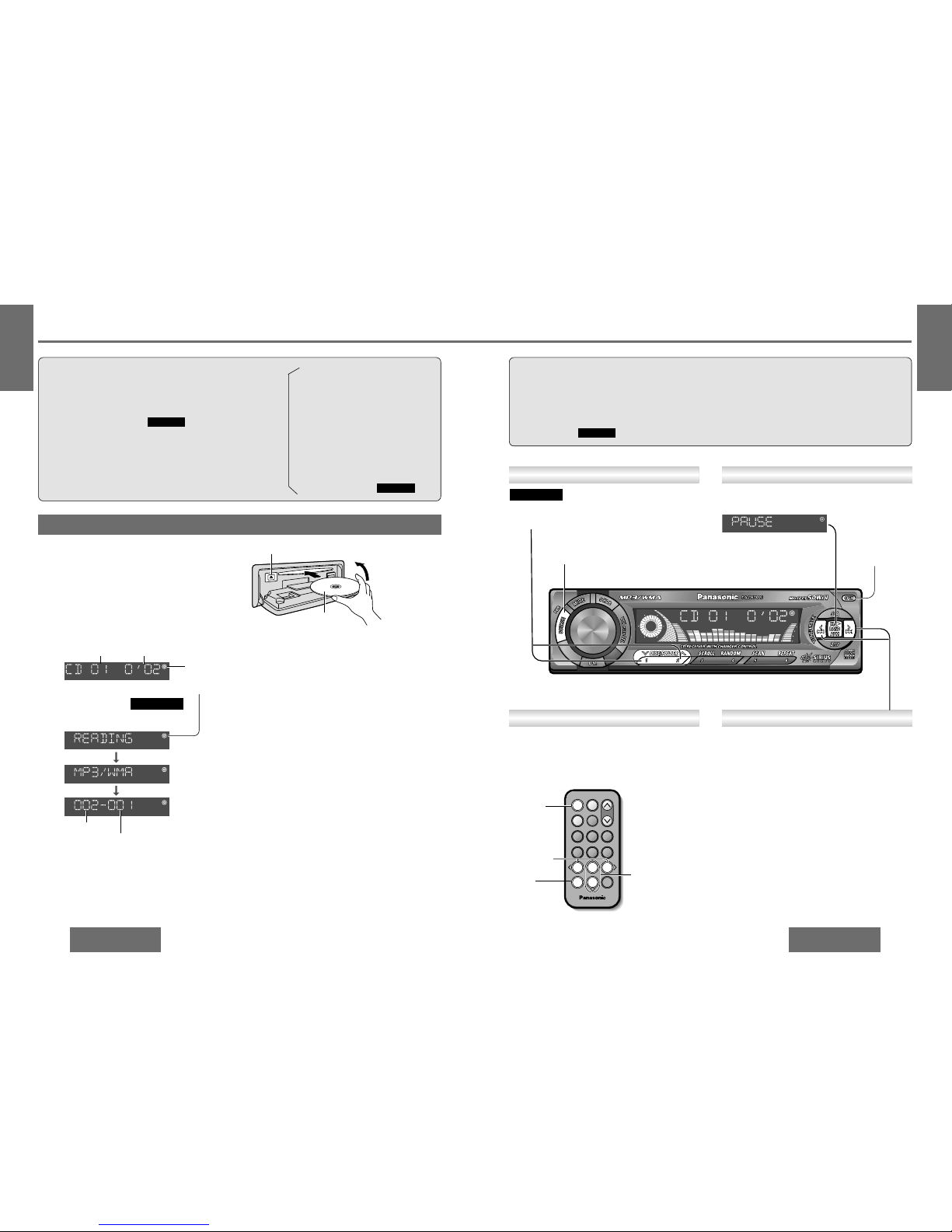
Open the front panel.
Press [OPEN].
1
Stop and eject the disc.
Press [OPEN] and [<] (eject).
3
Insert the disc.
The display changes as shown below.
Playback starts automatically.
2
(eject)
<
Label side
Close.
Caution:
≥ Available discs:
•
Disc size: 5z (12 cm) CD
•
CD-DA data recorded CD-R and CD-RW discs
•
MP3/WMA data recorded CD media
(CD-ROM, CD-R, CD-RW)
≥ 3z (8 cm) CD is not available for this unit, so do
not insert it absolutely.
≥ Before loading a disc, check to make sure that a
disc is not already loaded.
≥ Refer to page 43 about notes on CD-Rs/RWs.
≥ Refer to page 27 about notes on MP3/WMA.
CQ-DF783U
Listening to a CD
When CD is in the player
Press [SOURCE] to change to CD player
mode.
Close the front panel manually.
Data reading.
Press and hold.
[9] (5): Fast forward.
[:] (6): Fast reverse.
Release to resume the regular play.
Fast Forward/Fast ReverseTrack (File) Selection
[9]: Next track (file).
[:]: Beginning of the current track (file).
For the previous track (file), press twice.
Folder number
File number
CQ-DF783/DFX403U
E
N
G
L
I
S
H
7
22
CD Player
Note:
≥ The power will be turned on automatically when
a disc is loaded.
≥ Be sure to close the front panel while CD play-
back.
≥ The title can be displayed.
(pages 25, 26)
≥ It may take some time to distinguish CD-DA and
MP3/WMA before playback starts.
≥ If you record too many folders and files onto a
disc, it may take some time before playback
starts.
CQ-DF783U
["]: Next folder.
[#]: Previous folder.
CQ-DF783U
Folder Selection
[OPEN]
Press [
[ [
/1].
Press [
[ [
/1] again to cancel.
Pause
The model CQ-DFX403U does not support MP3/WMA playback.
∫ CD
∫ MP3/WMA
Track number Playing time
≥ Do not insert a disc when this indicator
lights.
≥ Lights when the disc is loaded.
[SOURCE]
[BAND]
(pause)
["] [#] (folder)
64975
Car Audio
SOURCE
MUTE
POWER
RAND
VOL
312
DISPBAND
REP
6
5
SET
SEL
#
SCAN
MENU
NUMBER
8
0
[6] [5]
(track/file)
[SOURCE]
•
use irregularly shaped discs.
•
push the front panel down or place
objects on it while it is open.
•
use discs that have a seal or label
attached.
≥ Do not •pinch your finger or hand in the front
panel.
•
insert foreign matter into the disc
slot.
•
watch the scroll display while driving
a car. (pages 25, 26)
CQ-DF783U
CQ-DF783U
Page 2

Press [RANDOM].
lights.
All the available tracks (files on all folders) play in a
random sequence.
∫ CD
∫ MP3/WMA
Press [RANDOM] again to cancel.
E
N
G
L
I
S
H
10
25
CQ-DF783/DFX403U
E
N
G
L
I
S
H
9
24
CD Player (continued)
CQ-DF783/DFX403U
Press [DISP] (display).
∫ CD
CQ-DF783U
∫ MP3/WMA
Display Change
Folder/file number
(default)
Playing time
Folder name (scroll)
(page 26)
File name (scroll)
(page 26)
Clock display
(Example: MP3)
Note:
Displays when there is no
file/folder name.
≥ The bit rate value changes when variable bit rate
(VBR) data is played.
≥ When playing a Tree 1 file, the folder name is dis-
played with the word “ROOT” (root folder).
≥ Folder and file names can be displayed.
Displayable character number varies with file systems.
≥ Characters that the player cannot display are
shown as an asterisk.
Press [SCAN].
The first 10 seconds of each track (file on all folder)
plays in sequence.
∫ CD
∫ MP3/WMA
Press [SCAN] again to cancel.
Scan Play
Press and hold [SCAN] for more than 2 seconds.
From the next folder, the first 10 seconds of the
first file on each folder plays in sequence.
Press and hold [SCAN] again for more than 2 seconds to cancel.
CQ-DF783U
Folder Scan Play
Press [DISP] (display).
CQ-DFX403U
Track number/
playing time (default)
Clock display
Press [REPEAT].
lights.
Press [REPEAT] again to cancel.
Repeat Play
Press and hold [REPEAT] for more than 2 seconds.
blinks.
Repeat the current folder.
Press and hold [REPEAT] again for more than
2 seconds to cancel.
CQ-DF783U
Folder Repeat Play
Random Play
Press and hold [RANDOM] for more than 2 seconds.
blinks.
All the files on the current folder play in a random
sequence.
Press and hold [RANDOM] again for more than
2 seconds to cancel.
CQ-DF783U
Folder Random Play
[DISP] (display)
[4] (random play)
[5] (scan play)
[6] (repeat play)
64975
Car Audio
SOURCE
MUTE
POWER
RAND
VOL
312
DISPBAND
REP
6
5
SET
SEL
#
SCAN
MENU
NUMBER
8
0
The model CQ-DFX403U does not support MP3/WMA playback.
CQ-DF783U
CQ-DF783U
Note:
Displays when there is no
title.
≥ The display shows title when a disc with CD text
data is loaded. (Up to 128 letters can be displayed
when scrolling. Some letters are not serviceable.)
Track number/
playing time (default)
Disc title (scroll)
(page 26)
Track title (scroll)
(page 26)
Clock display
Page 3
E
N
G
L
I
S
H
12
27
CQ-DF783/DFX403U
E
N
G
L
I
S
H
11
26
CD Player (continued)
CQ-DF783/DFX403U
Text Scroll
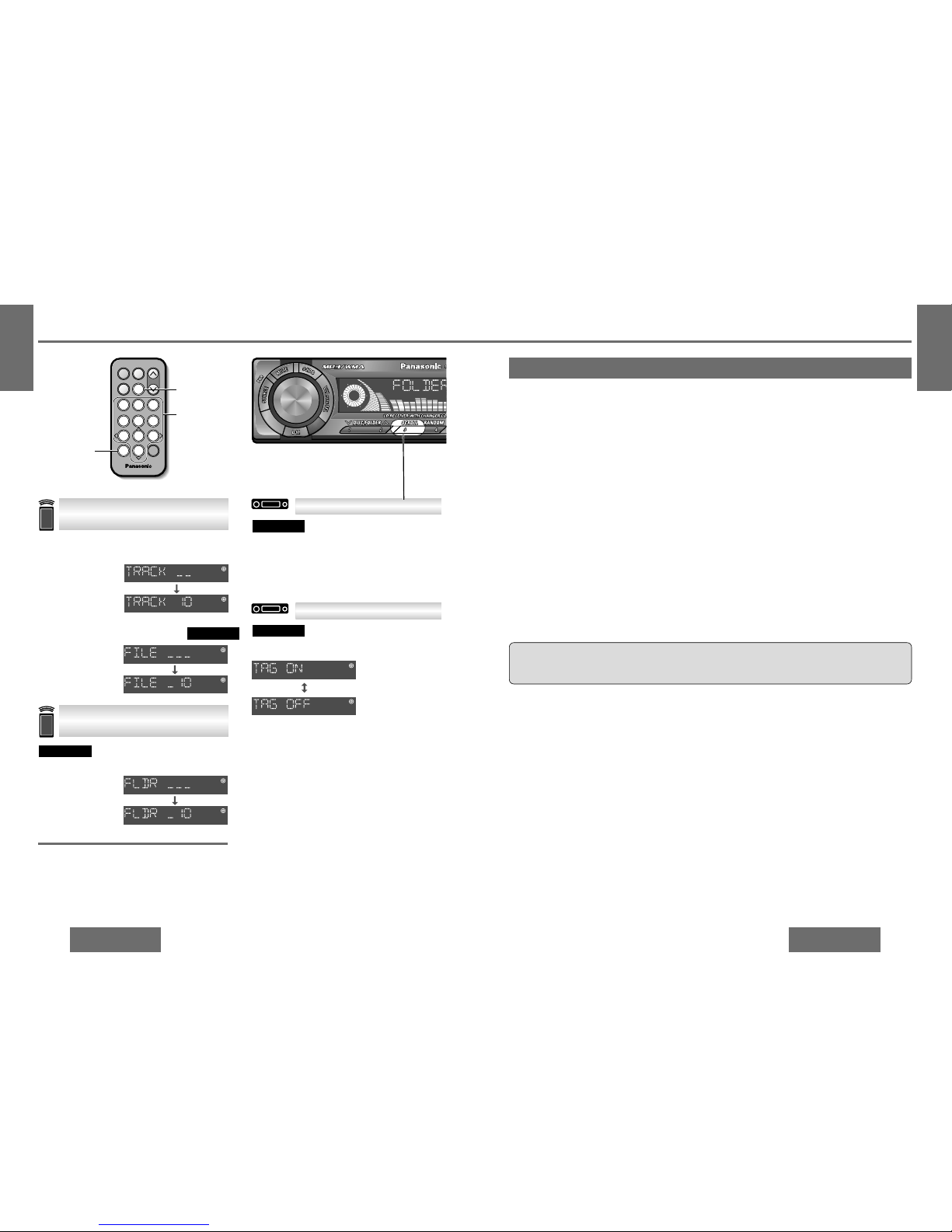
Press [SCROLL].
When the display is set to show disc/track title
(folder/file name/ID3/WMA tag) (page 25), this rescrolls the text.
CQ-DF783U
ID3/WMA Tag Setting
Press and hold [SCROLL] for more than 2 seconds.
CQ-DF783U
When a folder name is displayed:
TAG ON: The album title is displayed.
TAG OFF: The folder name is displayed.
When a file name is displayed:
TAG ON: The title/artist name is displayed
TAG OFF: The file name is displayed.
(Default)
Example: folder number 10
1 Press twice.
2 Press [1] [0].
3 Press [BAND].
[ ]
#
CQ-DF783U
Example: track (file) number 10
1 Press .
2 Press [1] [0].
3 Press [BAND].
[ ]
#
Note:
≥ Press [DISP] (display) to return to the regular
mode.
≥ Operation returns to the start of the disc when a
folder with no MP3 or WMA format files is selected.
Direct Track (File) Selection
Direct Folder Selection
∫ CD
∫ MP3/WMA
[BAND] (set)
[ ] (number)
[0] to [9]
(track/file/folder
number)
64975
Car Audio
SOURCE
MUTE
POWER
RAND
VOL
312
DISPBAND
REP
6
5
SET
SEL
#
#
SCAN
MENU
NUMBER
8
0
The model CQ-DFX403U does not support MP3/WMA playback.
Notes on MP3/WMA
CQ-DF783U
❐ What is MP3/WMA?
Common
≥ High bit rate and high sampling frequency are
recommended for high quality sounds.
≥ Selecting VBR (Variable Bit Rate) is not recom-
mended because playing time is not displayed
properly and sound may be skipped.
≥ The playback sound quality differs depending on
the encoding circumstances. For details, refer to
the user manual of your own encoding software
and writing software.
MP3
≥ It is recommended to set the bit rate to “128 kbps
or more” and “fixed”.
WMA
≥ It is recommended to set the bit rate to “64 kbps
or more” and “fixed”.
≥ Do not set the copy protect attribute on the WMA
file to enable this unit to playback.
Caution:
≥ Never assign the “.mp3”, or “.wma” file name extension to a file that is not in the MP3/WMA format.
This may not only produce noise from the speaker damage, but also damage your hearing.
∫ Displayable characters
≥ Displayable length of file name/folder name: within 128 characters
≥ Name files and folders in accordance with the standard of each file system. Refer to the instructions of writ-
ing software for details.
≥ ASCII character set and special characters in each language can be displayed.
ASCII character set
A to Z, a to z, digits 0 to 9, and the following symbols:
(space) ! ” # $ % & ’ ( ) * + , - . / : ; < = > ? @ [ \ ] ˆ _ ` { | } ~
Note:
≥ With some software in which MP3/WMA format files have been encoded, the character information may not
be displayed properly.
≥ Undisplayable characters and symbols will be converted into an asterisk.
Special characters
À Á Â Ã Å à á â ã å Ä ä
Ò Ó Ô Õ Ö ò ó ô õ ö
Ù Ú Û Ü ù ú û ü
❐ Points to remember when making MP3/WMA files
∫ Displayed items
CD-TEXT
≥ Disc title
≥ Track title
MP3/WMA
≥ Folder name
≥ File name
MP3 (ID3 tag)
≥ Album title
≥ Artist name
≥ Title name
WMA (WMA tag)
≥ Album title
≥ Artist name
≥ Title name
❐ Display Information
MP3 (MPEG audio layer 3) and WMA (Windows MediaTMAudio) are the compression formats of digital audio.
The former is developed by MPEG (Motion Picture Experts Group), and the latter is developed by Microsoft
Corporation. Using these compression formats, you can record the contents of about 10 music CDs on a single CD media. (This figures refer to data recorded on a 650 MB CD-R or CD-RW at a fixed bit rate of 128 kbps
and a sampling frequency of 44.1 kHz.)
Note:
≥ MP3/WMA encoding and writing software are not supplied with this unit.
≥ CD writing software is not supplied with this unit.
Page 4
CQ-DF783/DFX403U CQ-DF783/DFX403U
E
N
G
L
I
S
H
14
29
E
N
G
L
I
S
H
13
28
CD Player (continued)
CD Changer Mode
(When a CD changer is connected and a
magazine is in the changer.)
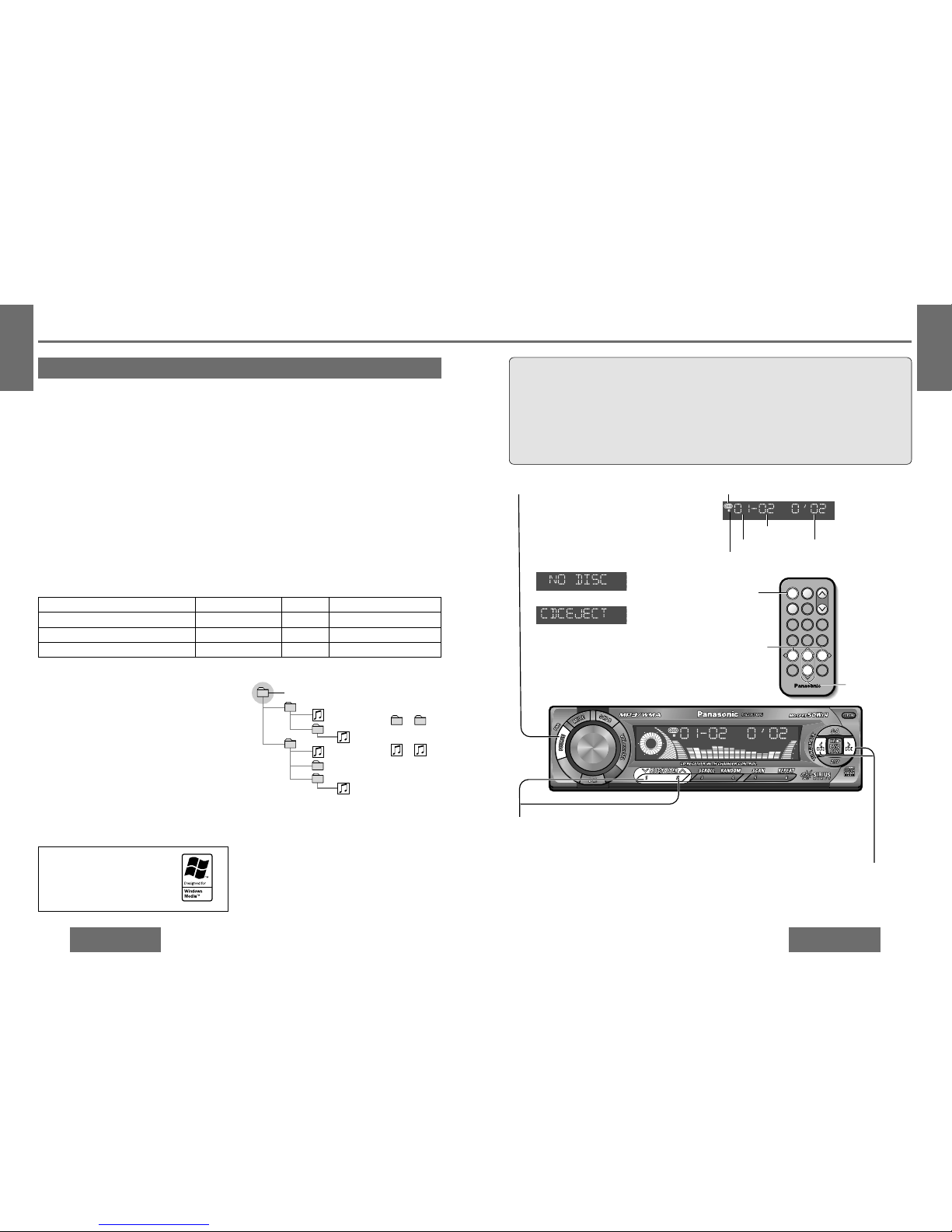
Press [SOURCE] to change to CD changer
mode.
Playback starts automatically.
Note:
Load a magazine
with CDs.
Magazine is ejected in the CD
changer mode.
1
Disc Selection
["]: Next disc.
[#]: Previous disc.
CD changer mode display
2
Lights when the changer is connected.
T rack Selection
[9]: Next track.
[:]: Beginning of the current track.
For the previous track, press twice.
3
Fast Forward/Fast Reverse
Press and hold.
[9](5): Fast forward.
[:](6): Fast reverse.
Release to resume the regular play.
CD changer functions are designed for optional
Panasonic CD changer unit.
Preparation:
≥ Connect the CD changer, and load a magazine
(CDs).
Note:
≥ The power will be turned on automatically when
a magazine is loaded.
≥ The following functions are not supported dur-
ing playback through the CD changer.
• CD-ROM, CD-RW playback
• CD text display
• MP3/WMA playback
• Pause
≥ In principle, CD-R disc play is supported but it
does not follow that it will be possible to play all
such discs properly.
Disc number Playing time
Track number
[SOURCE]
64975
Car Audio
SOURCE
MUTE
POWER
RAND
VOL
312
DISPBAND
REP
6
5
SET
SEL
#
SCAN
MENU
NUMBER
8
0
[6] [5]
(track)
["] [#] (disc)
CD Changer Control
Notes on MP3/WMA (continued)
CD changer 1 (This lights only when the dual
changer control unit is connected.)
Compression formats (Recommendation: “Points to remember when making MP3/WMA files” on the previous page)
1
1
4
5
6
2
3
6
Tree 1
Folder selection
In the order
Root folder (root directory)
Tree 2 Tree 3
File selection
In the order
[1
[
1
[2
[3
[4
[
4
to
to
.....
Tree 8 (Max.)
Note:
≥ This unit counts the number of folders irrespective of
the presence or absence of MP3/WMA file.
≥ If the selected folder does not contain any MP3/WMA
files, the nearest MP3/WMA files in the order of playback will be played.
≥ Playback order may be different from other MP3/WMA
players even if the same disc is used.
≥ “ROOT” appears when displaying the root folder name.
Maximum number of files/folders:
≥ Maximum number of files/folders: 999 (filesifolders)
≥ Maximum number of files in one folder: 255
≥ Maximum depth of trees: 8
≥
Maximum number of folders: 255 (Root folder is included.)
Copyright
It is prohibited by copyright laws to copy, distribute
and deliver copyrighted materials such as music
without the approval of copyright holder except enjoying yourself personally.
No warranty
Above description complies with our investigations
as of December 2002. It has no warranty for reproducibility and displayability of MP3/WMA.
≥ You are recommended to minimize the chances
of making a disc that contains both CD-DA files
and MP3/WMA files.
≥ If CD-DA files are on the same disc as MP3 or
WMA files, the songs may not play in the intended order, or some songs may not play at
all.
≥ When storing MP3 data and WMA data on the
same disc, use different folders for each data.
≥ Do not record files other than MP3/WMA files and
unnecessary folder on a disc.
≥ The name of MP3/WMA file should be added by
rules as shown in the following descriptions and
also comply with the rules of each file system.
≥ You may encounter trouble in playing MP3/WMA
files or displaying the information of MP3/WMA
files recorded with certain writing software or CD
recorders.
≥ The file extension “.mp3” or “.wma” should be
assigned to each file depending on the file format.
≥ This unit does not have the play list function.
≥ Although Multi-session recording is supported,
the use of Disc-at-Once is recommended.
Supported file systems
ISO 9660 Level 1/Level 2, Apple Extension to ISO
9660, Joliet, Romeo
Note:
≥ Apple HFS, UDF 1.50, Mix CD (CD Extra) is not
supported.
Compression method Bit rate VBR Sampling frequency
MPEG 1 audio layer 3 (MP3) 32 kj320 kbps Yes 32, 44.1, 48 kHz
MPEG 2 audio layer 3 (MP3) 8 kj160 kbps Yes 16, 22.05, 24 kHz
Windows Medio Audio Ver. 2, Ver. 8 64 kj192 kbps No 32, 44.1, 48 kHz
Windows Media, and the Windows
logo are trademarks, or registered
trademarks of Microsoft
Corporation in the United States
and/or other countries.
❐ Recording MP3/WMA files on a CD-media
❐ Folder selection order/file playback order (example)
Page 5
E
N
G
L
I
S
H
16
31
CQ-DF783/DFX403U
E
N
G
L
I
S
H
15
30
CD Changer Control
(continued)
CQ-DF783/DFX403U
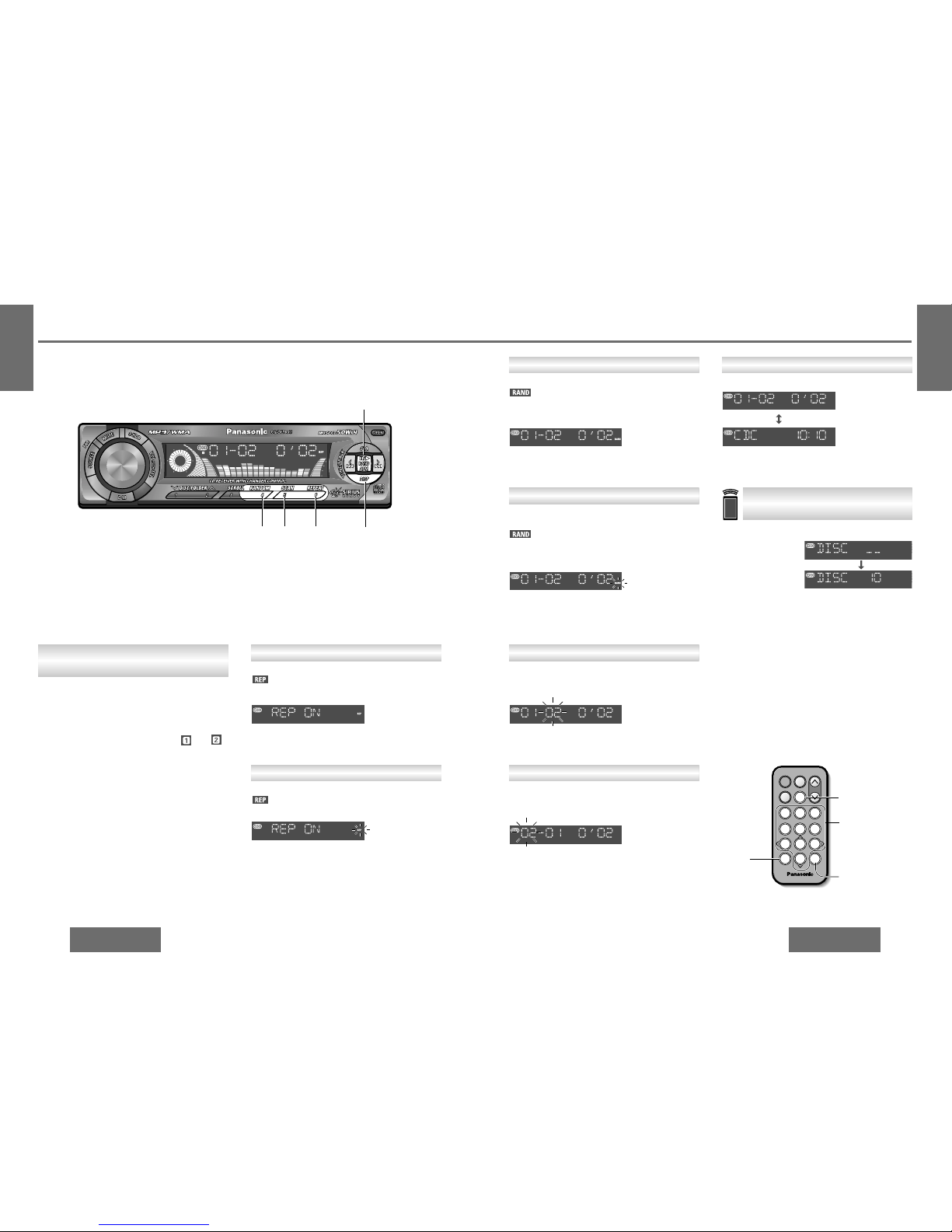
Example: disc number 10
1 Press .
2 Press [1] [0].
3 Press [BAND].
[ ]
#
Note:
≥ Press [DISP] (display) to return to the regular
mode.
Press [DISP] (display).
Disc number/
track number/
playing time (default)
Clock display
Display Change
Direct Disc Selection
Press [SCAN].
The first 10 seconds of each track on all discs plays
in sequence.
Press [SCAN] again to cancel.
Press and hold [SCAN] for more than 2 seconds.
From the next disc, the first 10 seconds of the first
track of all the discs plays in sequence.
Press and hold [SCAN] for more than 2 seconds
again to cancel.
Scan Play
Disc Scan Play
Press [REPEAT].
lights.
Repeat the current track.
Press [REPEAT] again to cancel.
Repeat Play
Press and hold [REPEAT] for more than 2 seconds.
blinks.
Repeat the current disc.
Press and hold [REPEAT] again for more than
2 seconds to cancel.
Disc Repeat Play
Random Play
Press [RANDOM].
lights.
All the available tracks on all discs in the magazine
play in a random sequence.
Press [RANDOM] again to cancel.
Press and hold [RANDOM] for more than 2 seconds.
blinks.
All the available tracks on the current disc play in a
random sequence.
Press and hold [RANDOM] again for more than
2 seconds to cancel.
Disc Random Play
[DISP]
(display)
[RANDOM] [SCAN] [REPEAT]
[BAND] (changer 1/2)
Use the dual changer control unit (CA-CD55; option) to connect the 2 CD changers to this unit.
(page 53)
Press [BAND].
The selected changer number (either or )
lights.
Note:
≥ For details on the Sirius receiver connections,
refer to the separate operating guide for Sirius.
Using Two Changers
(Dual Changers)
[BAND]
(changer 1/2)
(set)
[ ] (number)
[0] to [9]
(disc number)
[4] (random play)
[5] (scan play)
[6] (repeat play)
[DISP] (display)
64975
Car Audio
SOURCE
MUTE
POWER
RAND
VOL
312
DISPBAND
REP
6
5
SET
SEL
#
#
SCAN
MENU
NUMBER
8
0
 Loading...