

Page 1
2015 – OLED TV
Order No. ITD1511904GE
Model No. OLED-201510
Ver. 1.0
c
Panasonic Corporation 2015
Unauthorized copying and distribution is
a violation of law.
Page 2
Revision History
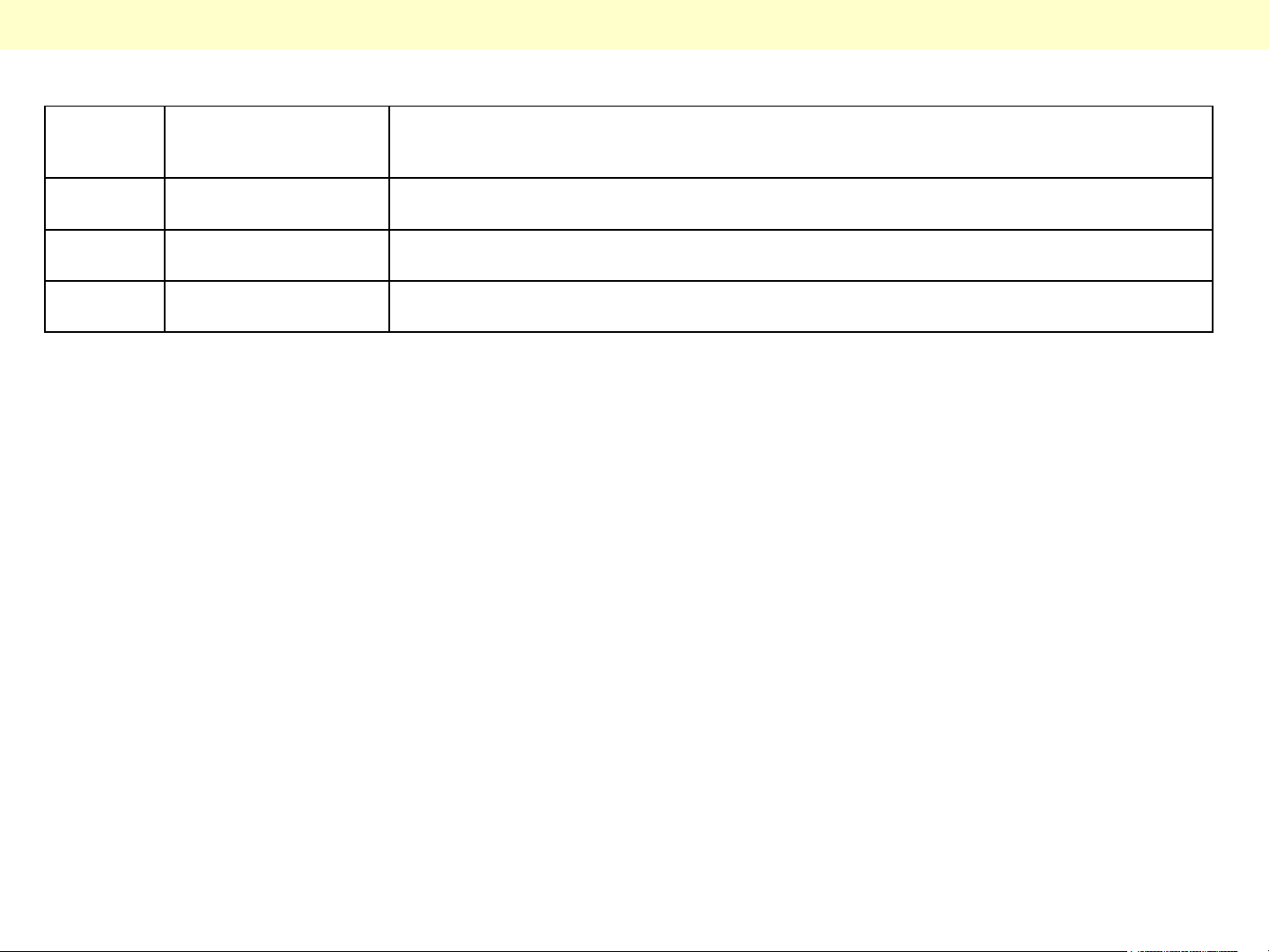
Version Issued/Revised
date
Ver. 1.0 6th. Nov. 2015 First version
Revised content
2
Page 3

INDEXINDEX
1.Lineup and Function Comparison
2.About OLED
3.Board Layout
4.Video Signal Processing
5.SOS Protection Circuit and Troubleshooting
6.Set layout of OLED
7.Service & handling instructions for OLED
3
Page 4

1. Lineup and Function Comparison
4
Page 5
OLED TV Model Concept
■Strengthen Panasonic Brand image by this model. Introduce this model with consider about “CURVED”
design Trend with our top level of picture quality and Smart functionality
■As reference position of Panasonic TV, pursuit of black performance based on self emitting device
characteristic and also pursuit of thinness with advanced quality cosmetic design
-Unmeasurable contrast and highest quality video performance based on self emitting device advantage
-Stylish and high quality cosmetic design with 360 degree utilize with thinnest OLE device
-Comply with basic 4K functionality such as HEVC, HDMI2.0(with HDCP2.2), and VP9
■Target User
・The Customer who pursuit “NEW” trend for TV
・Cinema Lover who pursuit DEEPEST black performance
■Unique Sales Point
1.Design
- 360 degree design with thin and curved image
2.High Quality video/High function performance
- Best Black reproduction based on self emitting device
Unmeasurable black reproduction
- Dynamic Cinema
Realize wide dynamic range performance with deep
black and White peak on OLED character
3.Function
■Basic Function
・Model Name: TX-65CZ950E
・LGD Module w/5000R, One body type TV
・HEVC, VP9, 3D(Passive)
・Design oriented w/ALCANTARA material
■Sales area
・Euro(B/E/W), Russia
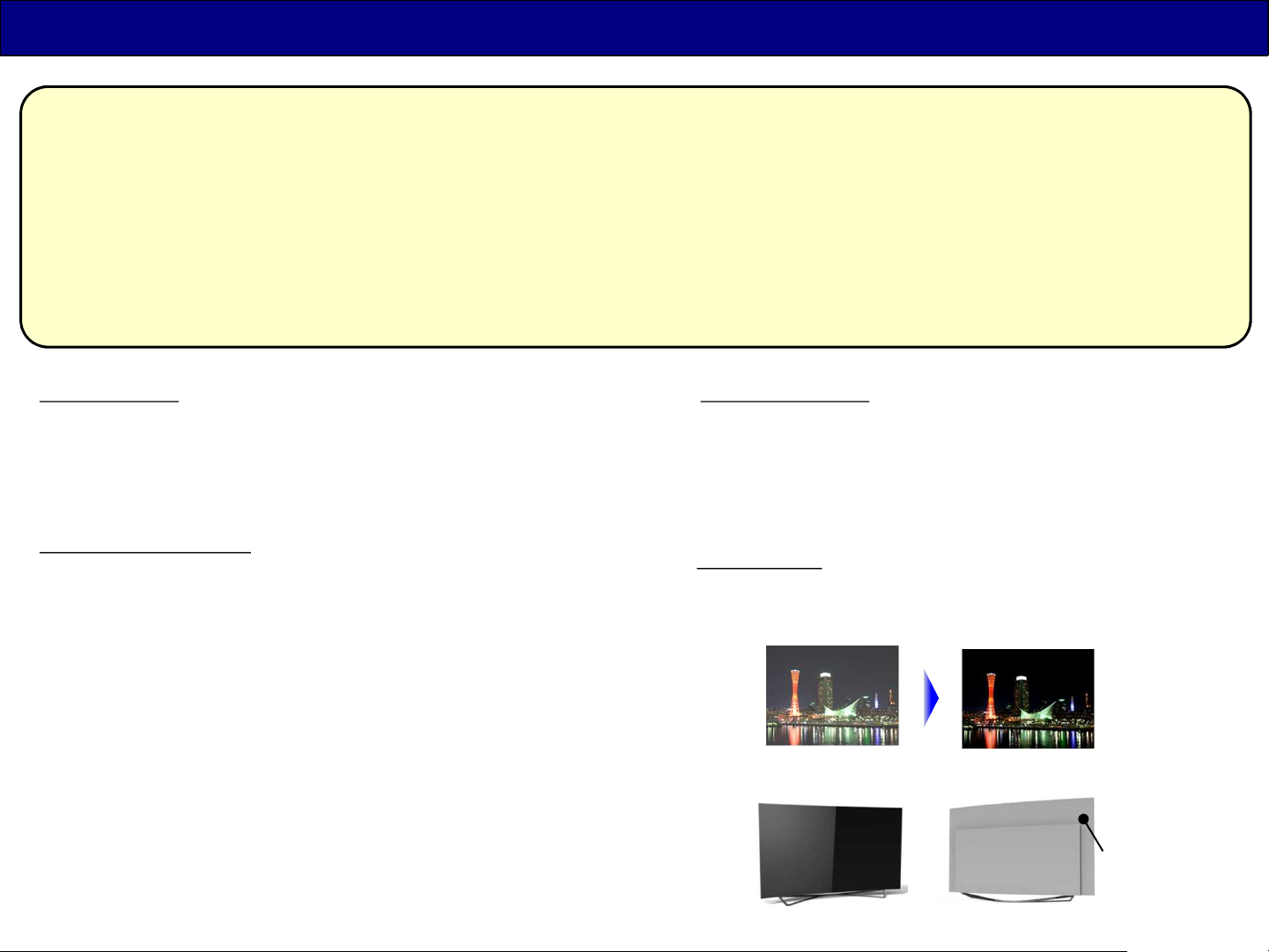
LCD: black float OLED: deep black
Thin design
6.5mm at edge
- Compatible with 4K IPTV(Netflix, Amazon, You tube)
FRONT VIEW
REAR VIEW
5
Page 6
New Model Number
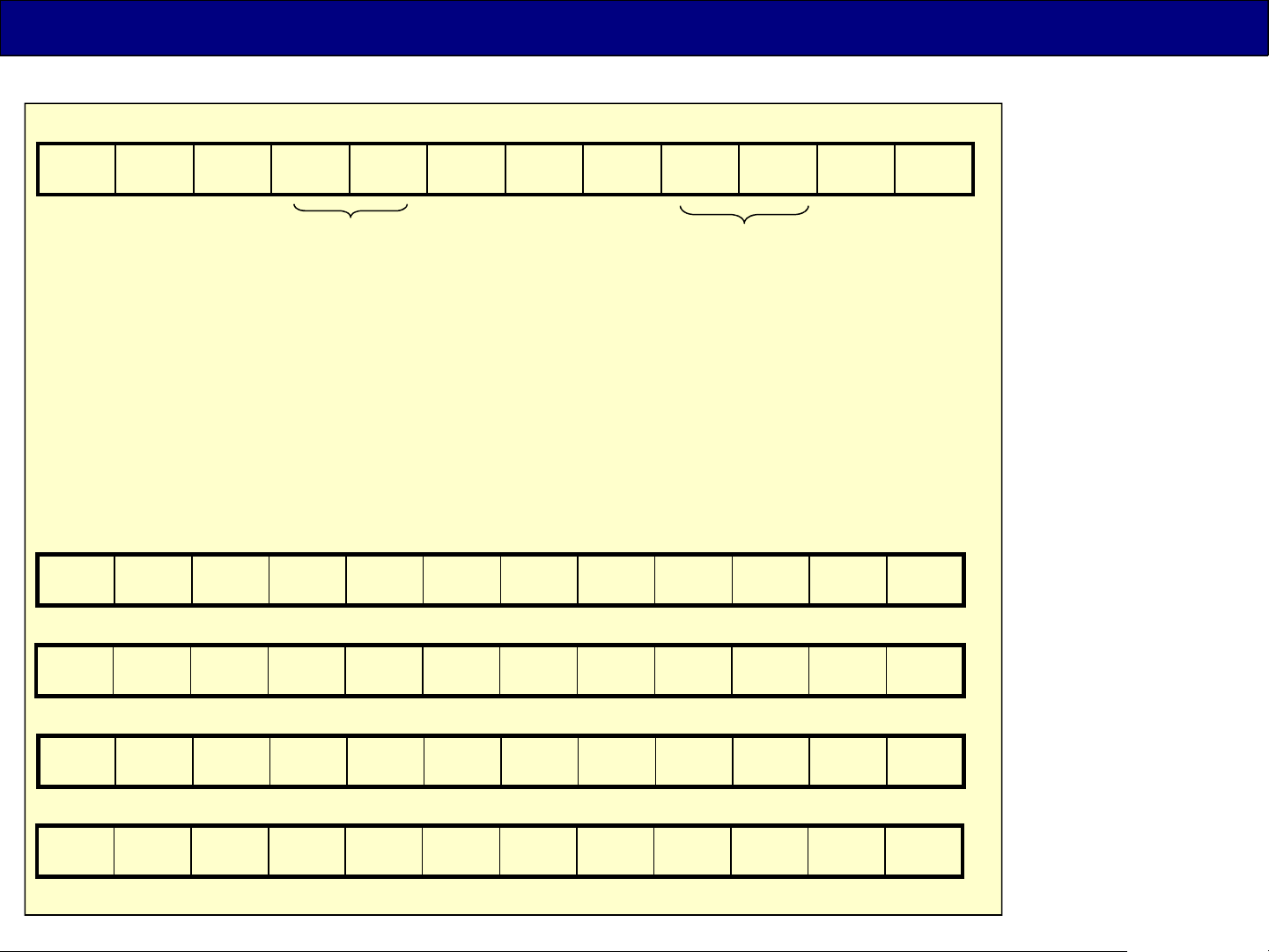
Continental Europe
T X - 6 5 C Z 9 5 0 E *
T=TV
(fixed)
H = Asia
C = Americas
X = Europe
Inch
Year
Series
Design/
Grade
Function/
Derived model
Country/
Region
<Year> : 1 digit alphabet ( 2014=A, 2015=C, … )
<Series> : 1 digit alphabet ( S=Smart, Non=no smart , X=4k, R=Curved 4k, Z=OLED)
<Design/Grade> : 3 digit number ( hundred's digit =Design/Grade,
ten’s digit and one’s digit = function difference or derived model )
< Examples >
UK/Ireland
T X - 6 5 C Z 9 5 2 B *
DACH (Germany, Austria)
T X - 6 5 C Z W 9 5 4 *
Switzerland
(Extra)
T X - 6 5 C Z C 9 5 4 *
Russia
T X - 6 5 C Z R 9 5 0 *
6
Page 7
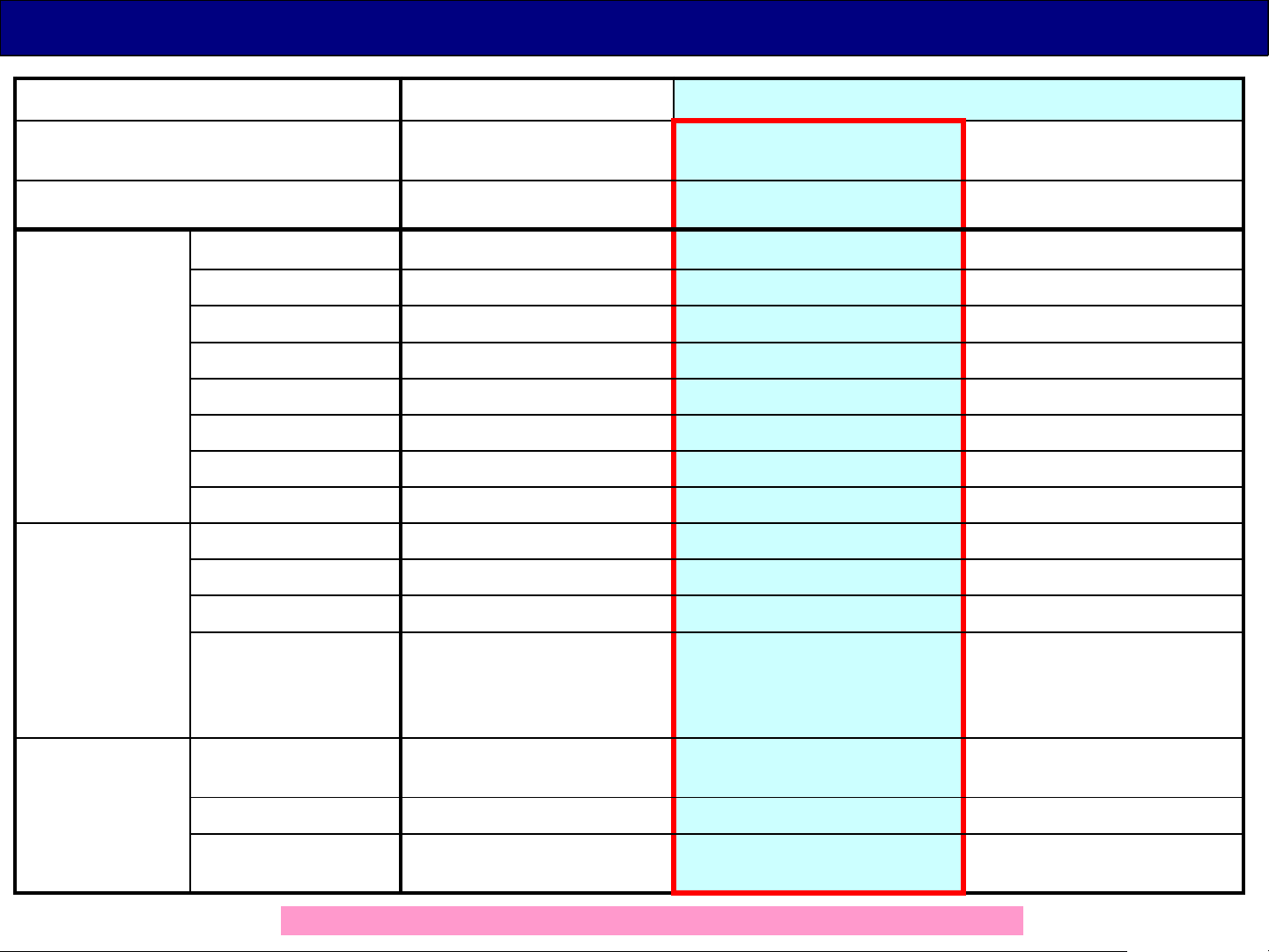
Lineup and Comparison of the Functions(Europe/CIS)
2014 2015
Model Name TX-65AX900E TX-65CZ950E
OLED
SoC Pro5+GCX2 Pro5+GCX2+MT5810 MT5810+GCX2
Function/
Easy Operation
Picture/Sound Real 10bit N Y N
My Home Screen 1.0 (No MHS, No Firefox OS) 2.0 powered by Firefox OS
WiFi N Y Y
HDMI 4 ports 4 ports 3 ports
SD Card Y N Y
DisplayPort Y N N
3D Y(Active) Y(Passive) Y(Active)
Multi Window Y Y(only Picture-and-Picture) Y
Mic/Camera/Sensor Mic/Camera/Motion Sensor N Motion Sensor
HDR N Y N
VP9 4K decode N Y(except Media Player) Y
TX-65CR850E
Curved LCD
Speaker System 18W
Design Screen radius of
curvature
Pedestal Slant type, arc Upright, buffed slim pipe Slant type, arc
Cosmetic cover N Y (ALCANTARA fabric finish,
60W
Front Squawker 4W x2
Woofer 10W x1
Infinity(Flat) Curved 5000R Curved 4000R
Front Tweeter 10W x2
Box Bottom Sq 10W x2
Woofer 10W x2
detachable)
The detail lineup and specification are different in each countries.
40W
Front Tweeter /Sq 10W x2
Woofer 10W x2
N
7
Page 8

2. About OLED
8
Page 9
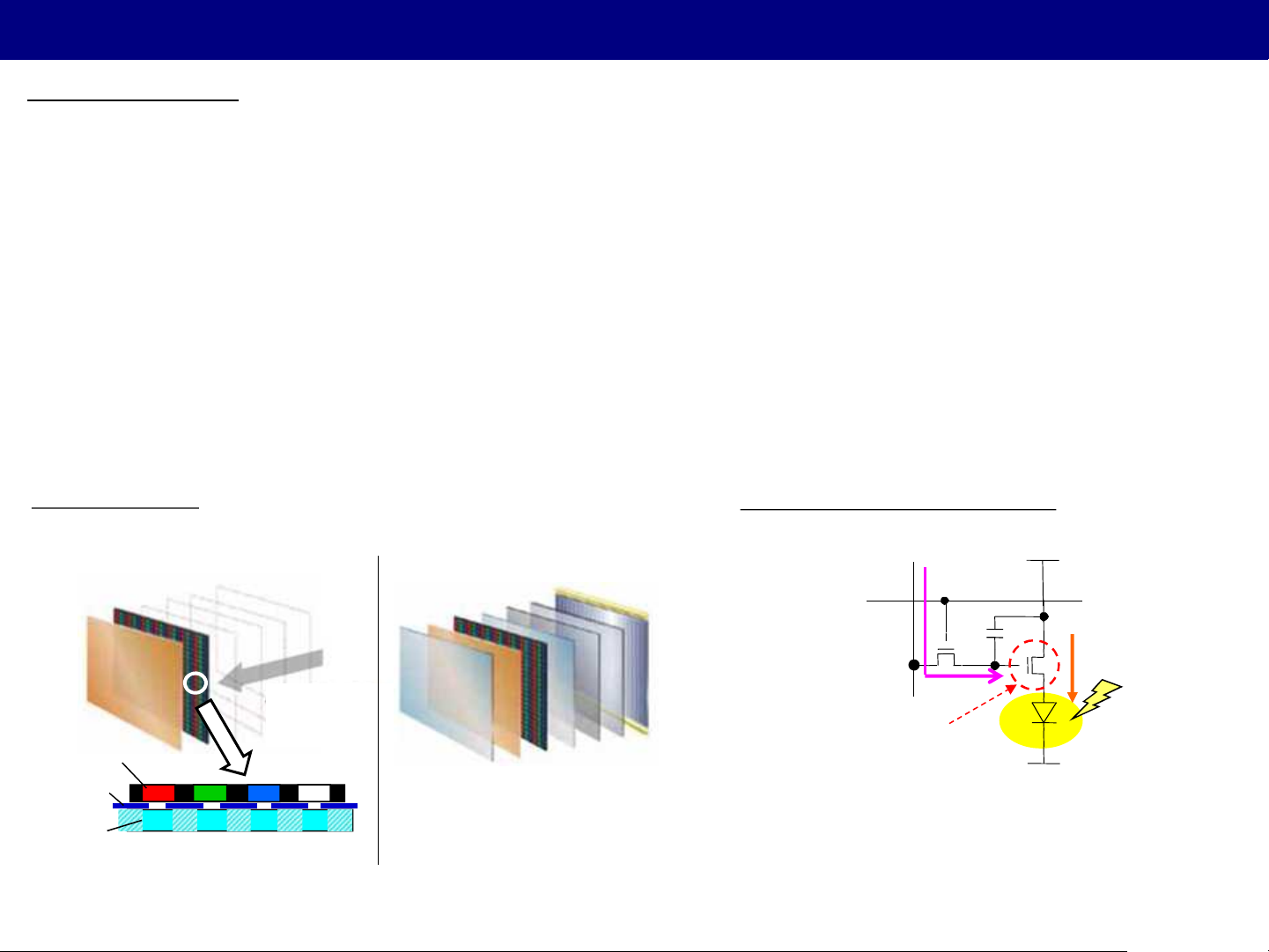
About OLED
仕様概略
■What is OLED?
OLED (Organic Light Emitting Diode)
Using an organic compound in the luminescent material, it is a kind of light-emitting element using a
phenomenon called “Organic EL (organic electroluminescence)”.
The OLED is deposited organic materials to electrodes formed on a glass substrate, has a sandwiched
structure with the electrodes, it is able to control the intensity with the current flow from the electrode.
Compared to the LCD, the advantages are,
① Contrast improvement by self-luminous
② Lower power consumption
③ Excellent Response speed
■Panel structure
Slim & light-weight without backlight
(OLED)
Need No
Backlight
Color Filter
TFT Cell
White EL
Pixel structure
(LCD)
■Light-emitting theory of OLED
DATA
Scanning line
Each voltage supplied to "data line" and the
"power line“ makes TFT "ON", the current flows
to the OLED device and it emit light. Brightness
of the device is controlled by the current value.
Data Voltage
TFT
POWER
Drain Current
(Id)
OLED device
9
Page 10

3. Board Layout
10
Page 11
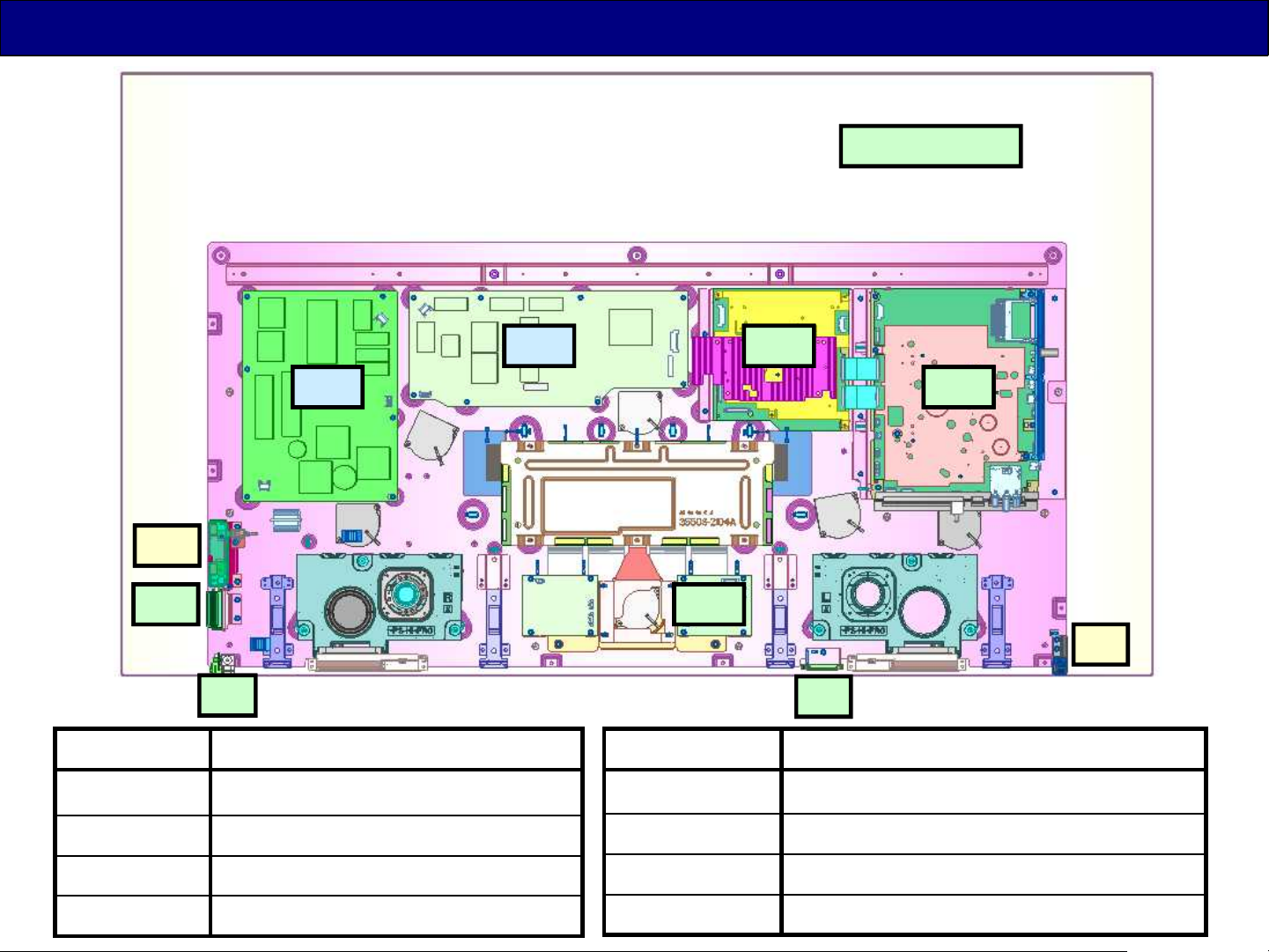
Board Layout (CZ950 series)
Panel Assy
P1
Wi-Fi
GK
S
Board Name Function
A-Board Main Board
P1-Board Power supply (not repairable)
P2
FR
A
PN
BT
K
Board Name Function
FR-Board Image processor (GCX2), Audio AMP
K-Board Remote Receiver, Power LED, C.A.T.S
P2-Board Power supply (not repairable)
PN-Board Temperature Sensor
GK-Board Control Buttons
S-Board Main Power Switch
11
Page 12

4. Video Signal Processing
12
Page 13
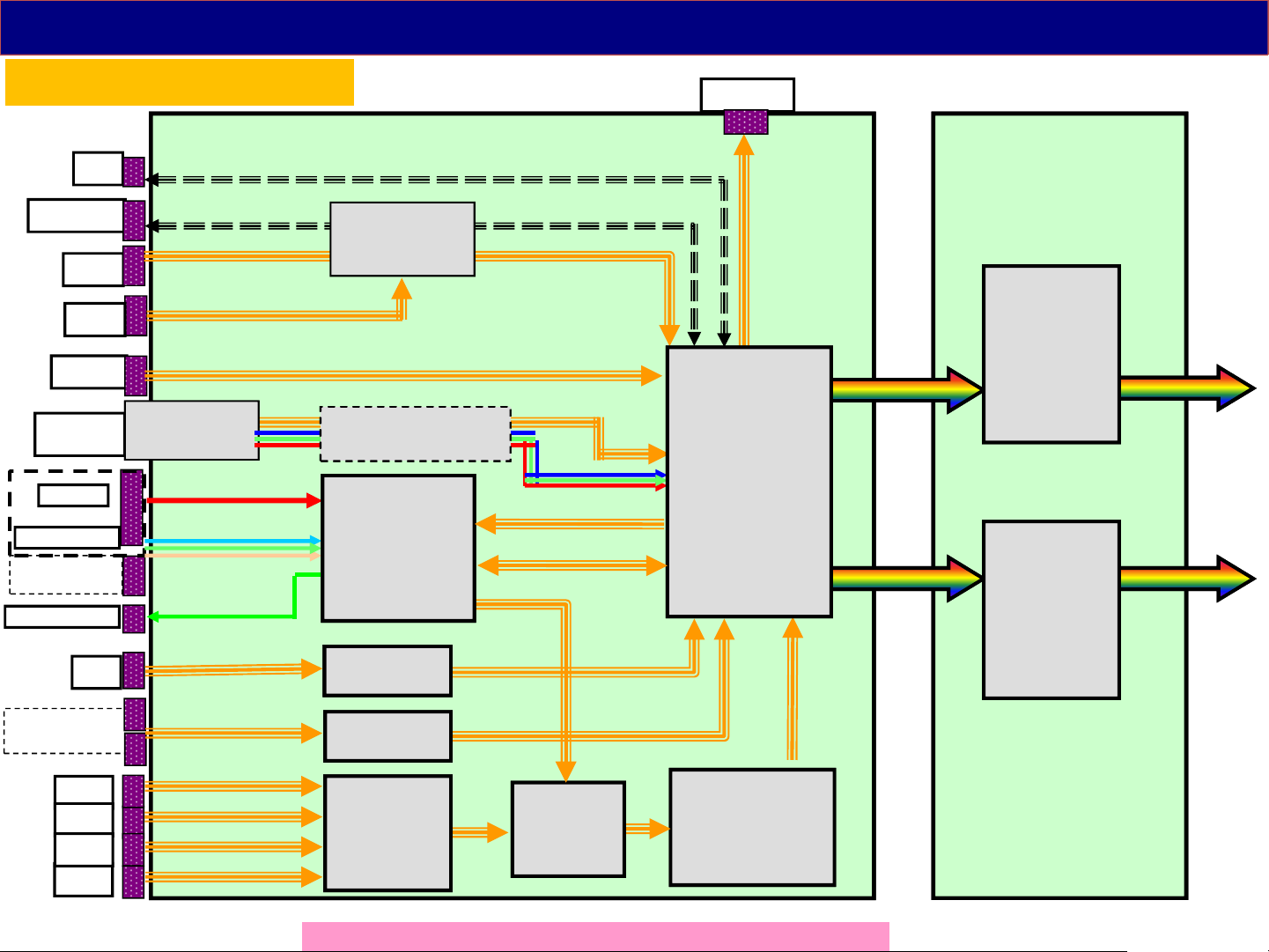
Video/Audio Signal Process
LAN Cont.
CZ950 series
WiFi
Bluetooth
USB1
USB2
USB3.0
Antenna
terminal
AV
Component
SCART
(only Europe)
Headphone
LAN
TU670*
TUNER
IC8650
(USB HUB)
IC6800/6803
De-Modulation
IC3000
(BROWNIE)
AV Switch
IC8600
LAN Cont.
Video for SCART
Audio IN/OUT
Internal HDMI Tx
OPT_out
IC8000
(PEAKS Pro5)
Resize
IP conv.
OSD
2D->3D
A
eDP BUS
IC9500
(GCEX2-1)
Frame
Rate
Convert
eDP-BUS
IC9600
(GCEX2-2)
Frame
Rate
Convert
FR
to OLED Panel
( V by One 8 Lane )
CI-slot x2
(only Europe)
HDMI
HDMI
HDMI
HDMI
CI Cont.
IC4512
HDMI SW
The input terminals are different by the models or countries.
IC4510
(RIO)
HDMI Rx
IC10000
(MT5810)
VP9 Decode
( TCON section is
attached to OLED
PANEL)
13
Page 14

5. SOS Protection Circuit and Troubleshooting
14
Page 15
Power SOS
SOS table of TX-65CZ950 series
LED (times) Failure Estimated Failure parts Note
1 Panel_SOS OLED panel New
2 EVDD(24V)_SOS OLED panel / P2 board New
7 SUB 3.3V_SOS A board/ P2 board =AX900
8 Power_SOS P2 board New
9 SOUND_SOS A board/ Speaker =AX900
10 GCX_SOS (GCEX2 initialization error) FR board =AX900
13 Emergency SOS A board =AX900
15
Page 16

6. Set layout of OLED
16
Page 17
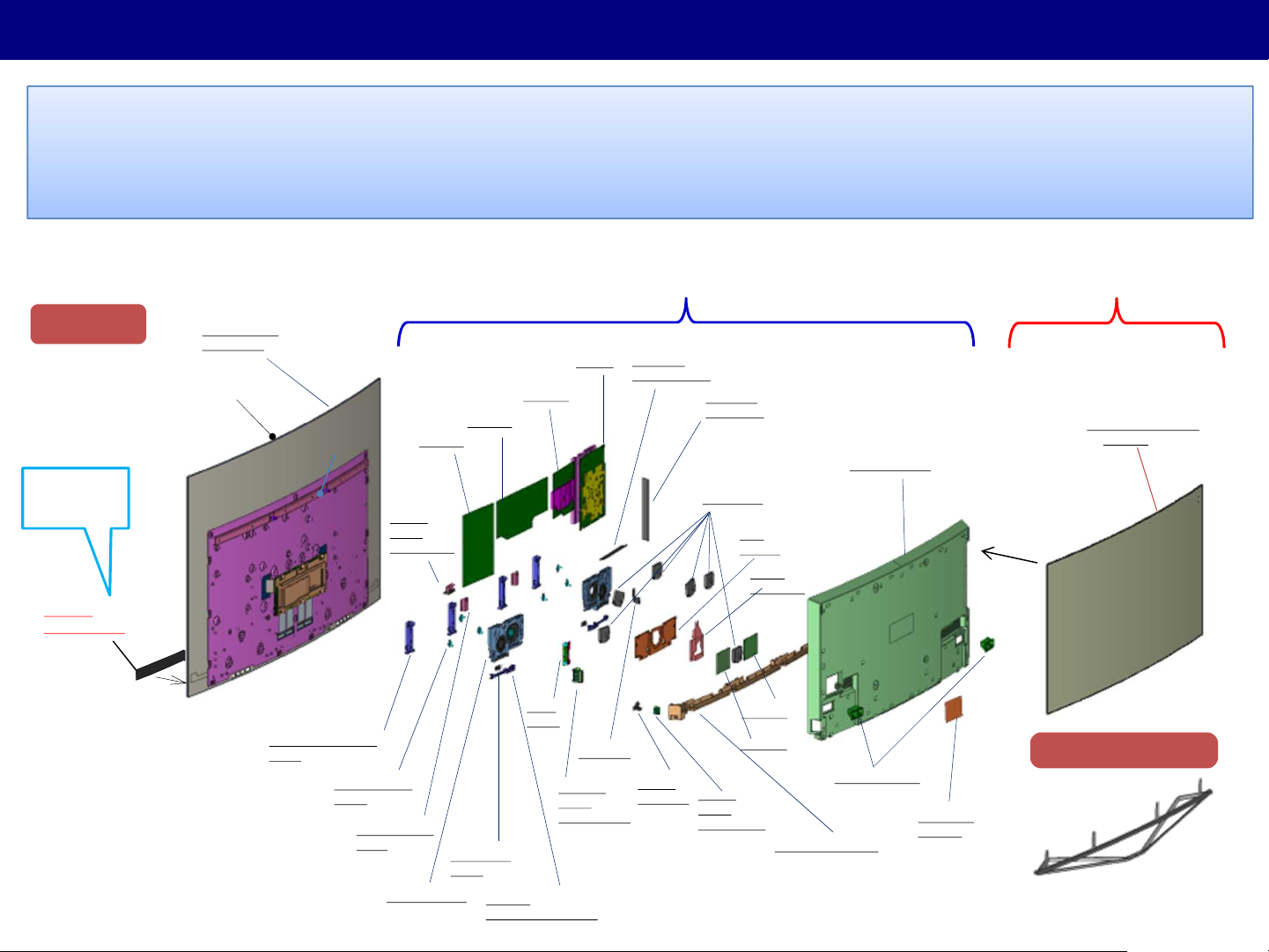
Set layout
◆Put COSMETIC-COVER onto REAR-COVER by customer.
◆OLED panel module is supplied as complete module.
[OLED-PANEL+MIDDLE-CABINET(AL/outline)+BACK-COVER+UDM-CHASSIS+T-CON]
FRONT-ORNAMENT is assembled in FACTORY.
KADOMA Mechanical Design
Display
Assemble in
Factory
FRONT
ORNAMENT
PANEL ASSY
(from LGD)
M/Cabinet
Back-Cover
(Pana-custom)
UDM Metal-Plate
STAND BRACKET
[4pcs]
Support
Bar
T-Con
K-PCB
ASSY
(IR/AI/LED)
SP BRACKET
[6pcs]
VESA METAL
[L&R]
SP BOX [L&R]
P1-PCB
P2-PCB
TWEETER
[2pcs]
SOUND
REFLECTOR [L&R]
FR-PCB
Wi-Fi
ASSY
(Assemble in Factory)
A-PCB
BT ASSY
GK-PCB
ASSY
(Control SW)
BOTTOM
AV BRACKET
S-PCB
HOLDER
SIDE_AV
BRACKET
FAN [6pcs]
FAN
METAL
DUCT
BARRIER
AP-PCB
AD-PCB
S-PCB
ASSY
(Power SW)
(Customer Process)
COSMETIC COVER
(ASSY)
REAR COVER
Pedestal Stand
HANDLE [2pcs]
AC CODE
COVER
BOTTOM COVER
AS ASSEMBLY(except STAND-POLE)
17
Page 18

7. Service & handling instructions for OLED
18
Page 19
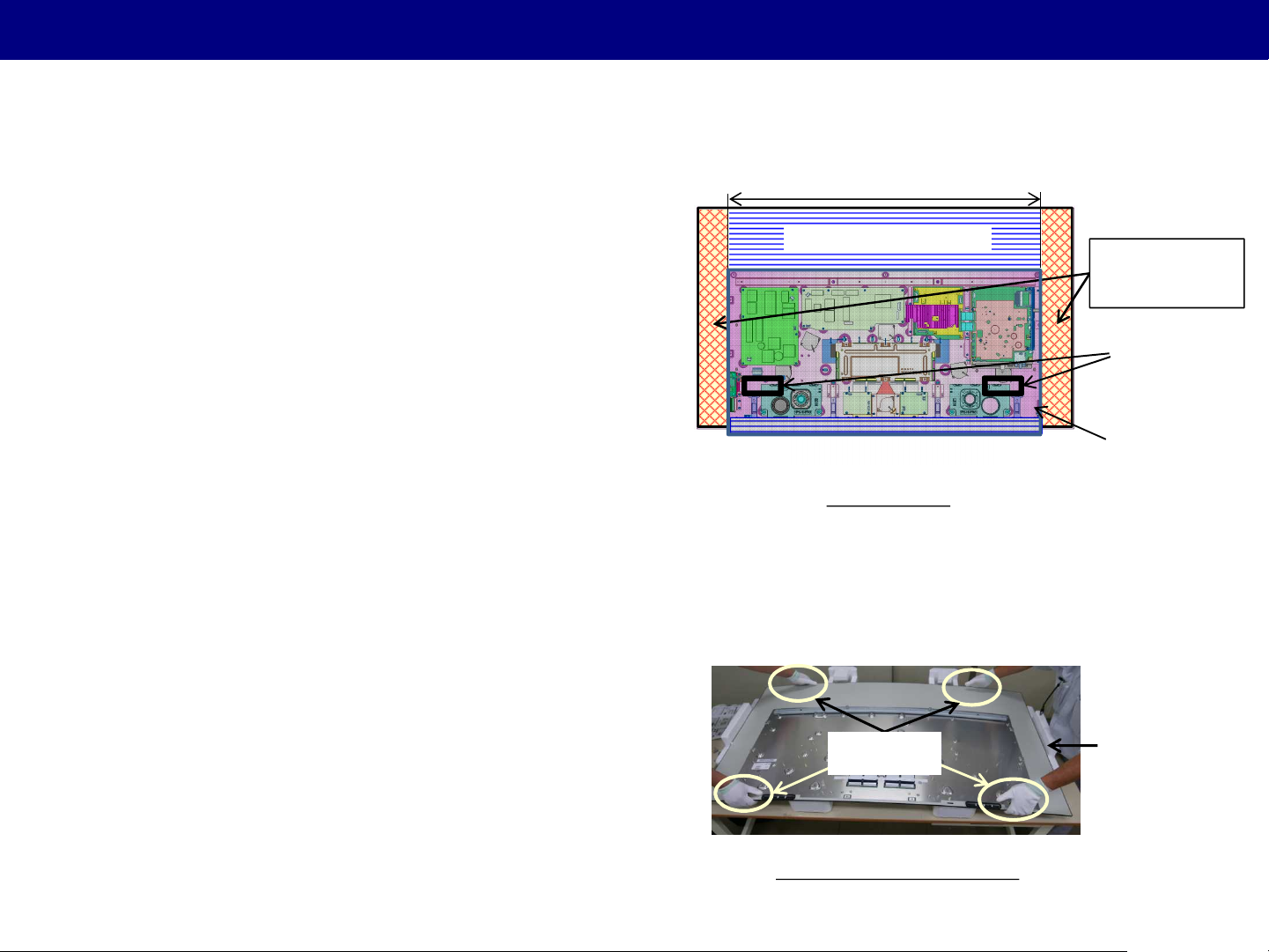
How to move OLED TV set, how to lay OLED TV set/panel
1. How to move OLED TV set
Two people are required to move the OLED TV set to
prevent the panel from bending.
Due to large screen and thin design, OLED panel is
weaker than other present TV set.
Handle at metal plate of the OLED panel.
Due to weakness of OLED panel, do not handle at the
area which is not reinforced by the metal plate.
Don’t move the TV without Back Cover.
Prior to handle, please make sure that the Back Cover
is fixed with at least four screws.
Handling the Bottom Cover will drop the TV set.
Use handle holes on the Back Cover.
2. How to lay OLED TV set/panel
Handle at metal plate of the OLED panel.
Same reason as above.
CUSHON-FRONT is necessary for laying the OLED TV
set or OLED panel on the table.(See next page also.)
Reinforced by Metal Plate
Area which can be handle
Area which can be handle
Handling area
Handle
at metal plate
Area which should
not be handle
(Both side)
Handle Hole
Back Cover
CUSHON-FRONT
When laying the OLED panel
19
Page 20
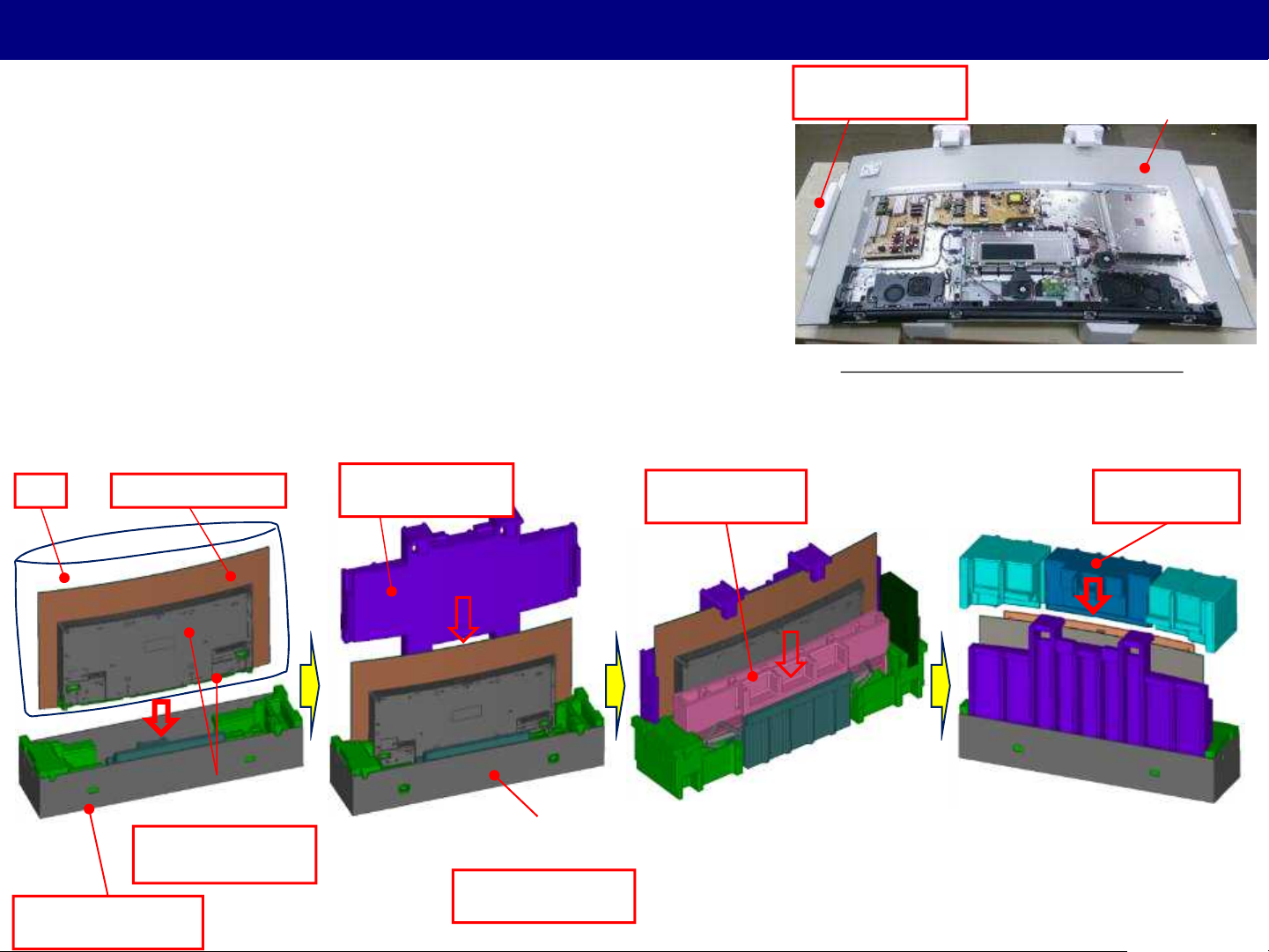
How to exchange OLED panel and Packing spec. of OLED repair panel
CUSHION FRONT
(TPD0E51001)
1. How to exchange OLED repair panel
When exchanging OLED panel, place the cushion-front bundled
in packing of OLED repair panel between the panel and the table
to prevent the panel from bending.
2. Packing of OLED repair panel
The packing specification for OLED repair panel uses one OLED set (TX-65CZ950) which includes
CARTON BOTTOM and All cushions of OLED repair panel.
OLED repair panelBAG
CUSHION FRONT
(TPD0E51001)
CUSHION REAR
(TPD0E51011)
How to put the OLED panel on the table
OLED panel
CUSHION TOP
(TPD0E13991)
Dummy Rear Cover
& Bottom Cover
CUSHION BOTTOM
(TPD0E23961)
CARTON BOTTOM
(TPC0EA33001)
CURTON TOP for repair :
Size is the same as OLED set.
The content of the Print is the special for Service.
20
Page 21
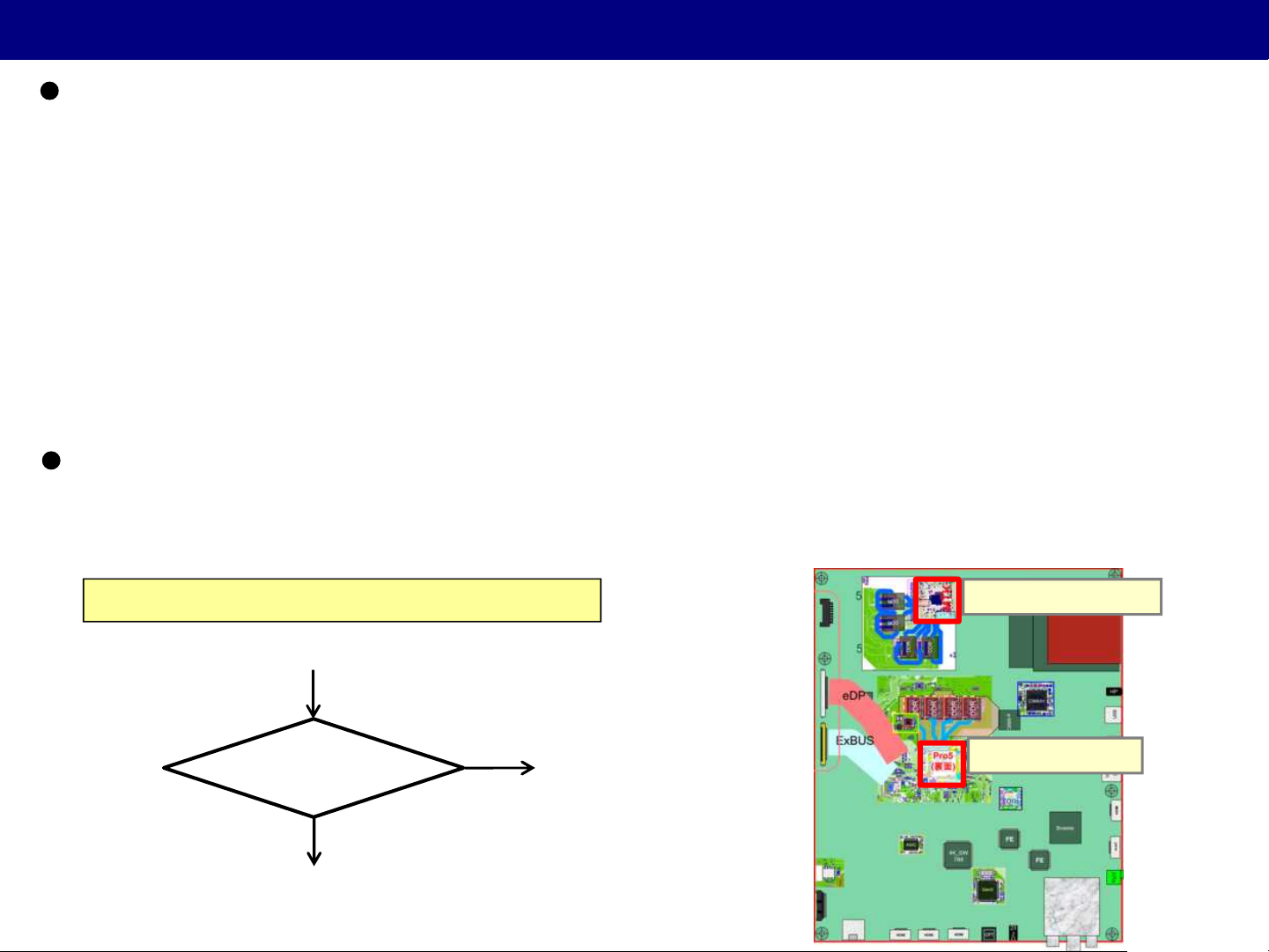
IC parts exchanged at the same time
Combination of exchange IC simultaneously / CZ950 series
1. Pro5 IC(IC8000) + eMMC(IC8920) (=AX900)
When Pro5 IC (IC8000) is replaced, eMMC (IC8920) should be also replaced with new one the same time.
When eMMC (IC8920) is replaced, Pro5 IC (IC8000) is not necessary to be replaced the same time.
2. MT5810 IC(IC10000) + eMMC(IC14000) (New/ CZ950)
When MT5810 IC (IC10000) is replaced, eMMC (IC14000) should be also replaced with new one the same time.
When eMMC (IC14000) is replaced, Pro5 IC (IC10000) is not necessary to be replaced the same time.
How to re-encrypt after the replacement IC (=AX900)
After the replacement of IC (IC8000+IC8920, IC10000+IC14000), SELF CHECK with factory shipment setting
should be done.
How to diagnosis between Pro5 and MT5810
What signal or contents are abnormal?
No (Other contents)
Are only VP9 contents abnormal?
Yes (Only VP9 contents)
MT5810 NG
* Only VP9 contents are played back by using MT5810.
Pro5 NG
MT5810(parts side)
Pro5(solder side)
21
Page 22
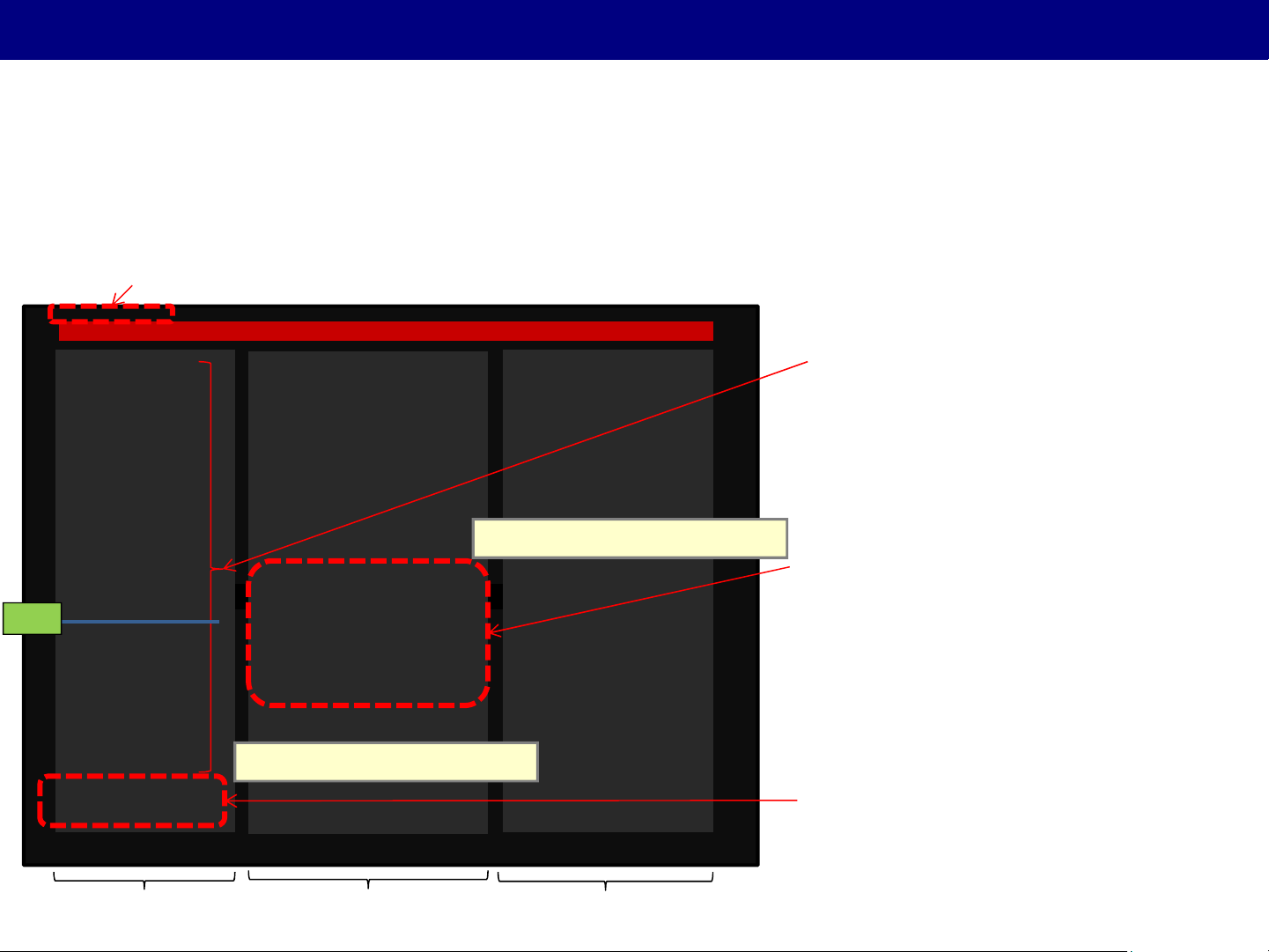
Selfcheck
Selfcheck (Changing items from AX900)
(1) Add the information of Easter
(1-a) software/EEPROM /LSI-DATA version
(1-b) result of Device Check
(2) Delete inch/panel type information
(2) e.g. 50FHD → deleted
SELF CHECK FAILED
delete
H14TUN OK
H15TUN2 OK
H90STBY OK
H30AVSW OK
H07TEMP OK
H17LAN OK
H00FE OK
H00SAT-TU OK
H96ID OK
H97ID2 OK
H45BT OK
H42WIFI 01
H03FAN OK
H36GCX OK
H37GCX2 OK
H71TCON OK
H80HDMISW OK
H81HDMISW2 OK
H92MEM1 OK
H91MEM2 OK
H00LAN OK
H00ID3 OK
PEAKS-SOFT 3.040
PEAKS-EEP 01.07.0005
LSI-PACKAGE 0.014
LSI-RELEASE 1.09
STBY-SOFT 1.02.00
STBY-EEP 1.00.33bd
STBY-ROMCOR 0.00.00
GCX DATA a4010201
DEC-SOFT 1.000
DEC-EEP 01.00.0000
LSI-PACKAGE 0.001
LSI-RELEASE 1.000
STBY-SOFT 1.00.00
STBY-EEP 1.00.0000
Add key for MT5810(Easter)
<How to display SelfCheck MENU> (=AX900)
1. Self-check indication only:
Panel Vol - + remote control “Blue” button
2. Self-check indication and forced to factory shipment setting:
Panel Vol - + remote control “Menu” button (Press>=3sec)
MODEL ID 0b
03000101
00004000
Add Soft Ver MT5810(Easter)
Delete “H52CAMERA” form AX900
< (1-a) Information of Easter side>
DEC-SOFT : MT5810 version
DEC-EEP : MT5810 EEPROM version
LSI-PACKAGE :LSI-PACKAGE version
LSI-RELEASE :LSI-DATA version
STBY-SOFT :STBY(uP) version
STBY-EEP :STBY(uP) EEPROM version
*If PRO5 can not get these information,
“-----” is displayed instead of version.
< (1-b) Result of Device Check of Easter>
H00LAN :ether device & MAC address check
(A-board)
H00ID3 :DTCP-IP KEY check (A-board)
Device Check area
Version Other (model id & SOS history)
22
Page 23
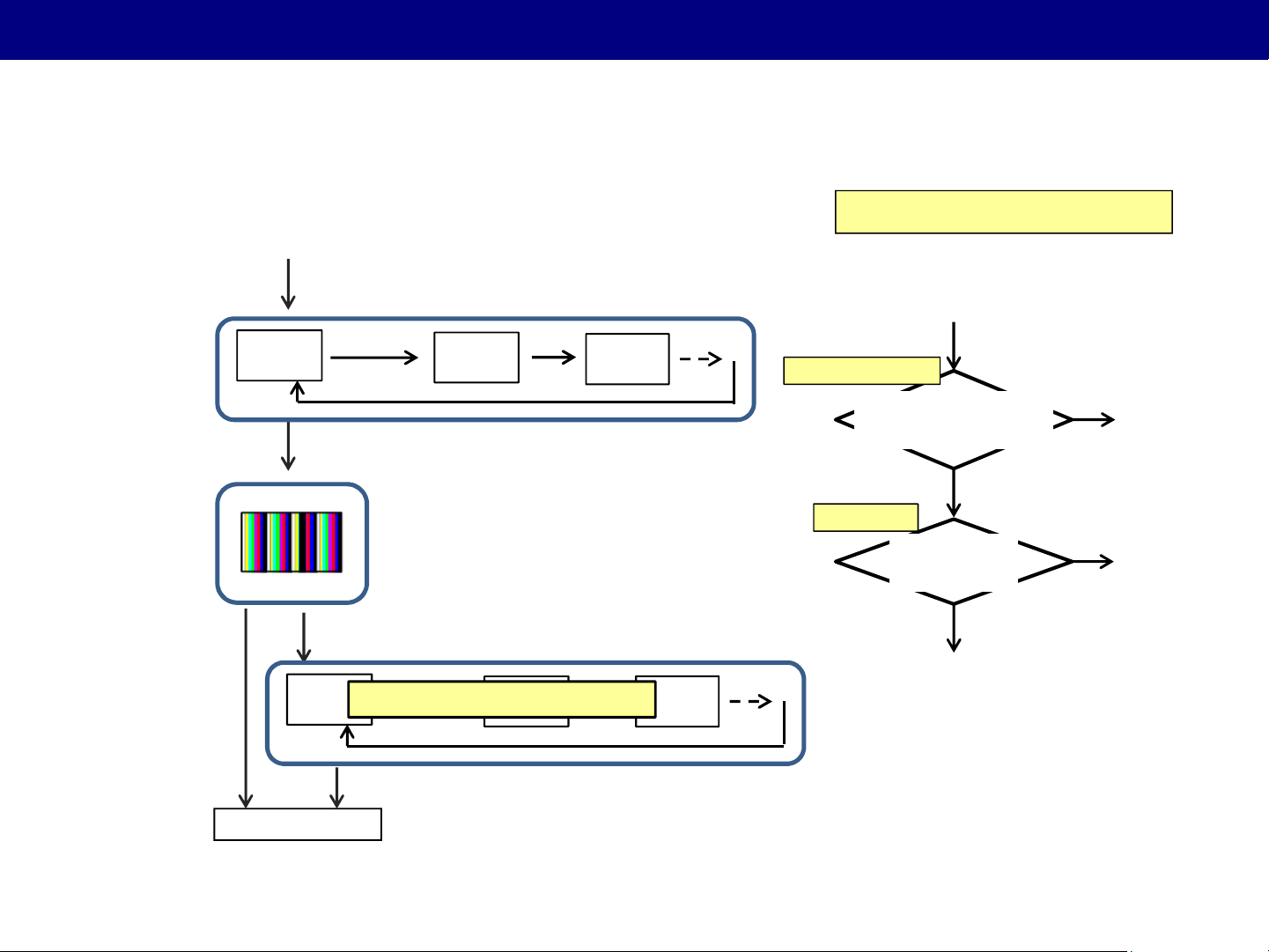
OLED Panel Test mode
You can diagnose a failure(abnormal picture) of CZ950 series
by using Panel test mode of OLED (Panel Free Run mode and FR test mode)
Panel Free Run
(=AX900)
FR Test mode
(=AX900)
New Panel Free Run
(OLED special mode)
* Not use for diagnosis
How to enter : While pressing [VOLUME ( - )] button of the main unit,
press [YELLOW] button of the remote control three times.
LED blinking (Green <-> Red)
White
How to move : Press [OK] button of the remote control three times.
Only 1 test pattern
How to move : Press [OK] button of the remote control three times.
Special
pattern
Red
Repeat
Condition :
The input of the signal is essential for display of FR test pattern.
In case of no signal , FR test pattern will not be able to be displayed.
LED blinking (Green <-> Red)
Not Use for failure diagnosis
Repeat
Green
How to diagnosis (=AX900)
(Symptom)
Picture : abnormal
Sound : normal
Panel Free Run mode
Still abnormal picture
is displayed on test pattern
FR Test mode
on FR test pattern
Enter Panel Free Run mode
of Panel free run
No (picture: normal)
Abnormal picture
is displayed
No (picture: normal)
A board NG
Yes
OLED panel NG
Yes
FR board NG
LED blinking (Green <-> Red)
Exit
How to exit : Switch off the power with the [POWER] button on the main unit
or the [POWER] button on the remote control..
23
 Loading...