

Page 1
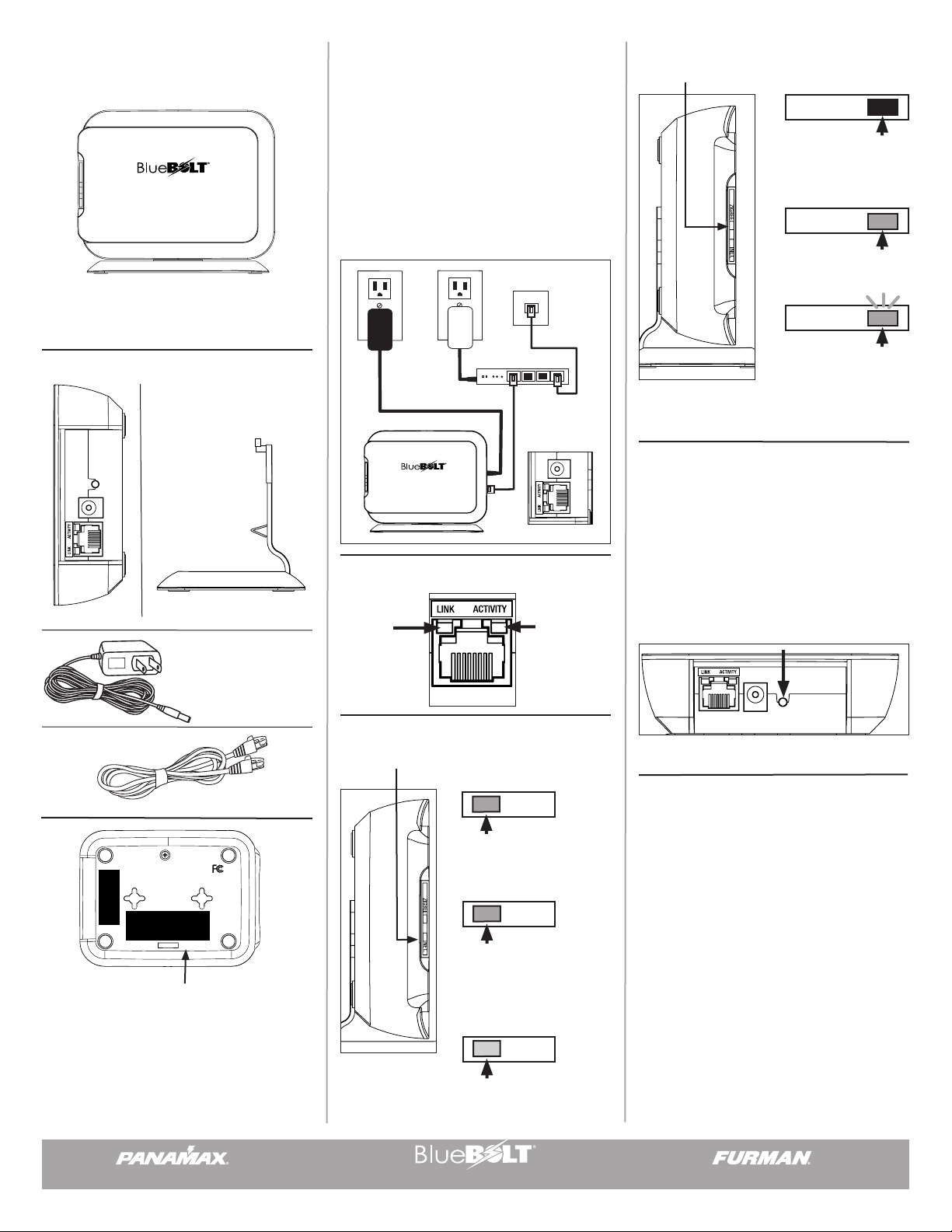
BB-ZigBee
RESET / RESTORE
5VDC
RESET / RESTORE
Quick Start Guide
Installation:
• BB-ZigBee must be located in a relatively open area
so that radio signal is not blocked.
Zigbee indicator:
Indicates status of ZigBee network.
ZIGBEE
ZIGBEE
NET.
It is recommended that you read the entire list of
instructions before proceeding.
Package Includes:
RESET / RESTORE
5VDC
500mA
NETWORK
1. BB-ZIGBEE
4. LAN Cable - CAT5E
2. Vertical Mount Stand
3. Power Cord & Transformer
• Unit may be mounted flat or vertically using the supplied stand. Can also be wall mounted or equipment
rack mounted using keyhole slots on back of product.
• Connect power cord to BB-ZigBee and wall outlet.
• Connect LAN Cable from router to BB-ZigBee.
Router
AC Power
LAN Cable
ZIGBEE
NET.
5VDC
500mA
NETWORK
Ethernet indicators:
• LINK:
Valid Ethernet
Connection
NETWORK
• ACTIVITY:
Data Activity
on Ethernet
Connection
Network Indicator:
Indicates status of Internet connection.
• LED is Off: Not jpined
to any ZigBee network.
ZIGBEE
• Green LED: ZigBee
Active
ZIGBEE
• Flashing Green LED:
Indicates mode to allow
an end-user device to
join the network.
Reset Button for System Reset:
• If the reset button is pressed for less than 8
seconds, the system goes to startup mode.
• If thereset button is pressed for more than 8
seconds, the system restores all factory settings
and goes to startup mode.
NETWORK
500mA
RESET / RESTORE
5VDC
MODEL NO:
BB-ZIGBEE
(1) This device may not cause harmful interference. (2) This device
must accept any interference received including interference
(FPO) ATE CODE
(1.6 in. x 0.6 in.)
SERIAL NUMBER LABEL
RATING: 5VDC, 500mA
FCC ID: LDV-BBZIGBEE
IC ID: 10379A-BBZIGBEE
This device complies with part 15 FCC rules.
Operation is subject to the following two conditions:
that may cause undesired operation.
NO USER SERVICEABLE PARTS
INSIDE. RETURN TO PANAMAX
IF SERVICE IS REQUIRED.
USE ONLY INDOORS.
FOR POSITIONING ONLY (FPO)
MAC ADDRESS LABEL
(2.4 in. x 0.85 in.)
Made in China
Designed in USA
PANAMAX LLC, PETALUMA, CA
(800) 472-5555
www.mybluebolt.com, www.panamax.com
ATTENTION: PLEASE RETAIN MAC ADDRESS
IDENTIFICATION NUMBER AND CHALLENGE KEY,
WHICH APPEARS ON THE BACK PANEL OF THE BBZigBee. This is unique to every BB-ZigBee unit and will
be required for registration.
www.panamax.com
NET.
• RED LED: No network
established.
See troubleshooting.
Online Registration:
Your BlueBOLT™ enabled Power Management
Component is completely plug-and-play and does
not require any software installation. The BlueBOLT™
control interface is operated through your web
browser.
NET.
• GREEN LED: Connection
to network established, but
connection to BlueBOLT not
established. See troubleshooting guide.
NET.
• BLUE LED: Connection
to network and BlueBOLT
established.
www.mybluebolt.com www.furmansound.com
1) Using any Internet connected computer, go to www.
mybluebolt.com using your standard Internet browser.
2) Follow the on screen instructions to create an
account and/or take control of your BlueBOLT™
enabled product. Note: you will need the BlueBOLTBB-ZigBee’s unique MAC address and challenge key
(provided on the card’s protective packaging as well
as on the label of the card itself) in order to register
the unit online.
DQS-00008-B
Page 2

Troubleshooting
SERVICE
Your BlueBOLT™ enabled Power Management
Component (BB-ZigBee) is completely plugand-play and does not require any software
installation. The BlueBOLT™ control interface is
operated through your web browser.
1) Using any Internet connected computer, go to
www.mybluebolt.com using your standard Internet
browser.
2) Follow the on screen instructions to create an
account and/or take control of your BlueBOLT™
enabled product. Note: you will need the
BB-ZigBee’s unique MAC address and challenge
key (provided on the label on the back of
BB-ZigBee) in order to register the unit online.
3) If BlueBOLT™ cannot detect your device
within 20 seconds of inputting your MAC address
and challenge key, please follow the on-screen
troubleshooting guide. Also confirm the BB-ZigBee
is properly connected to the Internet.
• Is your BB-ZigBee receiving power? Check the
power cable and confirm the unit is on.
• Is your BB-ZigBee installed properly? The “Link”
light should be illuminated (solid green) and the
“Activity” light should be blinking intermittently
(green).
• Is your Internet connection functioning?
• Can you access a general web page?
• Is your BB-ZigBee connected to your internet
router or modem? Check the Ethernet cable
and confirm that the unit is connected to an
active Internet connection, and make sure those
connected devices are receiving power.
If you have answered “Yes” to all of these
questions and are still unable to connect your
Power Management component, (BB-ZigBee)
contact Panamax/Furman customer service at
1-800-472-5555.
If you require technical support or equipment
service, please contact the Service Department at
1-800-472-5555. All equipment being returned
for repair must have a Return Authorization (RA)
number. To get an RA number, call the Customer
Service Department. Before returning any equipment for repair, be sure that it is adequately
packed and cushioned against damage in shipment, and that it is insured. We suggest that you
save the original packaging and use it to ship
the product for servicing. Also, please provide a
note with your name, address, phone number, RA
number and a description of the problem.
LIMITED 1 YEAR WARRANTY
Panamax/Furman Limited Product Warranty:
Panamax Inc. warrants to the purchaser of this
product for a period of one (1) year from the date
of purchase, that the unit shall be free of defects
in design, material or workmanship, and Panamax
Inc. will repair or replace any defective unit.
Full warranty information is available online at
www.Panamax.com or www.FurmanSound.com.
FCC CLASS B DIGITAL DEVICE INFORMATION
NOTE: This equipment has been tested and found
to comply with the limits for a Class B digital
device, pursuant to part 15 of the FCC Rules and
Industry Canada license-exempt RSS Standard(s).
These limits are designed to provide reasonable protection against harmful interference in a
residential installation. This equipment generates,
uses and can radiate radio frequency energy and,
if not installed and used in accordance with the
instructions, may cause harmful interference to
radio communications. However, there is no guarantee that interference will not occur in a particular installation. Changes or modifications not expressly
approved by the party responsible for compliance could
void the user’s authority to operate the equipment.
707-283-5900 • 800-472-5555 • www.panamax.com • www.mybluebolt.com
©2012 Panamax LLC, Panamax, Furman and BlueBOLT logos are US registered trademarks of Panamax
www.panamax.com
Panamax LLC, 1690 Corporate Circle, Petaluma, CA 94954
www.mybluebolt.com www.furmansound.com
 Loading...