

Page 1
Page 2

Page 3

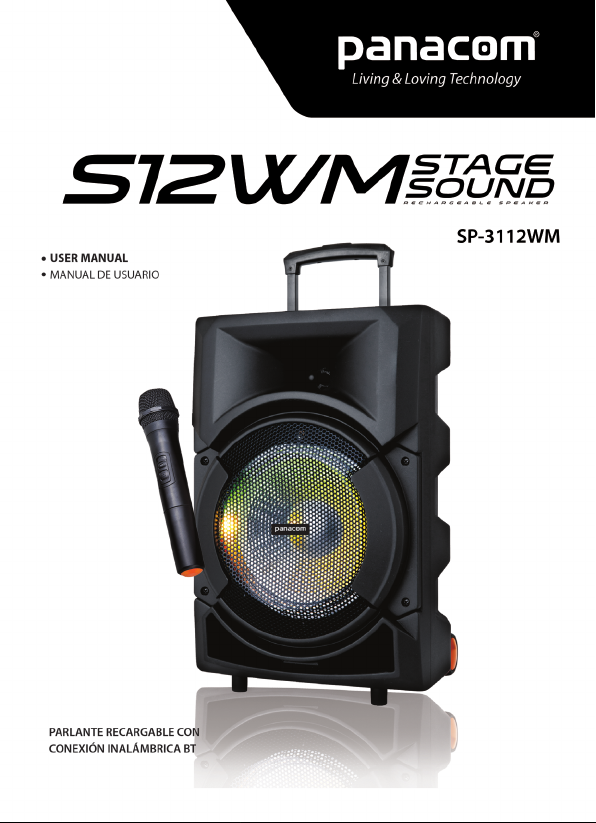
SP-3112WM RECHARGEABLE SPEAKER
USER’S GUIDE
Thank you for purchasing Panacom’s SP-3112WM.
Please read the manual carefully before operating.
PLEASE READ THE MANUAL CAREFULLY BEFORE OPERATING.
IMPORTANT SAFETY MEASURES
Before using this machine, please read all the safety and operating
instructions. Please adhere to all the instructions herein, and save this
information in a safe place for future use.
1. Please ensure the power cord for this unit is out of the way. Do not
place heavy objects on the power cord as it will cause damage to the
cord. Always rmly grasp the plug and pull the plug from the power
supply, never yank the cable in order to pull out the plug. Avoid the
use of an extension cable.
2. Ventilation: This unit should be placed in a well ventilated space
where it has no less than 10cm ventilation space on either side of it.
Do not cover the unit with a cloth or blanket. Do not put it on a bed,
sofa, or carpet as this will stie the ventilation of the unit.
3. Casing Dismantling: DO NOT dismantle the casing . There are no
usable parts inside the unit. Make use of a service center in order to
have your unit repaired.
4. Should the unit emit any smell or smoke, immediately turn off the
power supply. Take the unit to the service center from which you
bought it for repairs.
FEATURES
• Wireless BT connection Function
• Plays Mp3 les stored in SD card /USB drive external audio device
• Microphone input
• Aux input
• Remote control
• Built-in rehargeable battery
Pg. 3
Page 4

CONNECTING
1. AC power: battery can be charged when connected to AC power.
When the red light is on, battery is charging, it will change to green
once the battery is completely charged.
2. Internal battery will be charged even if the device is switched off
when plugged in to AC power
3. Adjust function keys to your personal audio preference
WIRELESS BT CONNECTION INSTRUCTION
Once you change the mode into”BLUE”, the Wireless BT connection
sign light will twinkle, and the speaker will give an alarm. Ensure you
enable the Wireless BT connection function on your Wireless BT
connection device. Search for Wireless BT connections until you nd
device model and pair.
BATTERY & CHARGING
1. The units takes approximately 8 hours to fully charge. It will
automatically begin charging once the power cord is connected.
2. If the battery power is low, it may stop playing or cause sound
distortions. Please charge the battery as soon as possible.
3. To maximize the battery’s lifespan, please charge the speaker
as soon as you run out of battey. When the unit is not used for
prolonged periods of time,the battery will gradually lose its power. It is
recommended to fully charge the battery at least every 30 days.
4. To save up battery, please power off the speaker once you stop
using it.
Pg. 4
Page 5
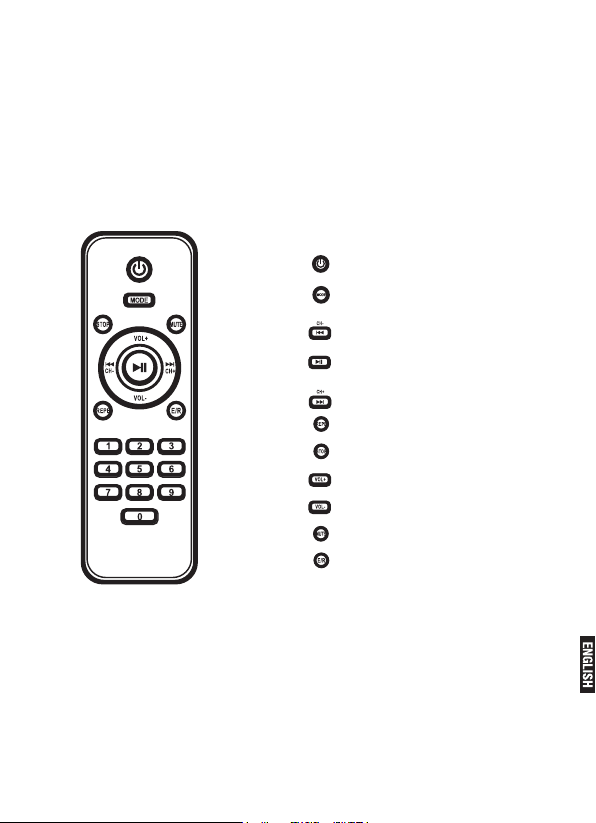
REMOTE CONTROL
Encendido / En espera
USB/SD/LINE/BT
Pista Anterior / Canal - FM Radio
Reproducir/Pausar/Radio FM
Pista siguiente / Canal + FM radio
Repetir
Detener
Aumentar el volumen
Disminuir el volumen
Silenciar
Ecualizador
Pg. 5
Page 6
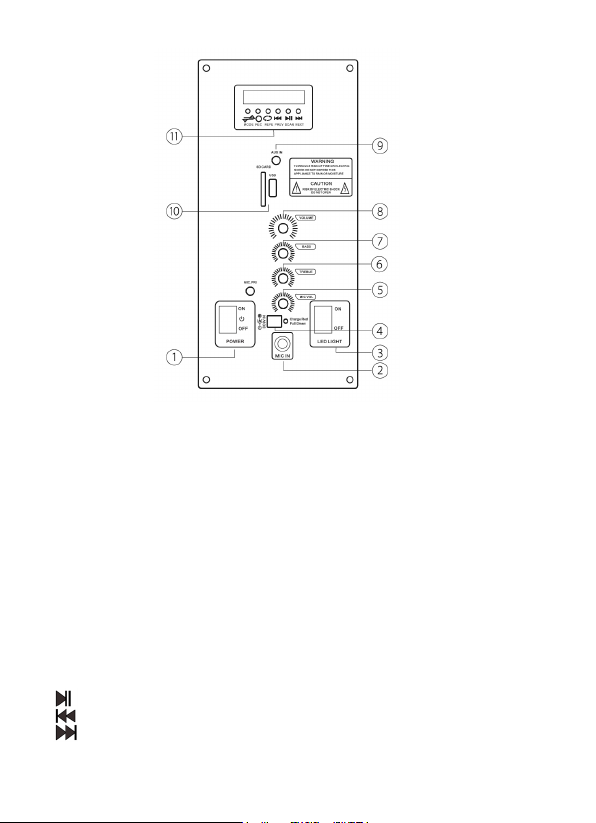
PANEL FUNCTION
1- Power: power on/off
2- Led light: led light on/off
3- Mic in: wired microphone input
4- DC9V IN: dc 9v charging input
5- Mic vol: microphone volume adjust
6- Treble: echo adjust
7- Bass: master volume adjust
8- Volume: master volume control
9- Aux input
10- Usb/sd card input
11- Display panel function:
Rec: recording; insert usb/sd card press this button for recording,
press again to stop and play recording sound.
:Play/pause
:Previous
:Next
Mode: mode select
Page 7

SP-3112WM PARLANTE RECARGABLE
GUÍA DEL USUARIO
Gracias por comprar el Panacom SP-3112WM.
Por favor lea este manual cuidadosamente previo al uso.
LEER TODAS LAS INSTRUCCIONES Y OPERACIONES DE SEGURIDAD ANTES DE USAR EL APARATO.
POR FAVOR ACEPTAR LAS INSTRUCCIONES DEL MANUAL EN
SU TOTALIDAD Y GUARDAR ESTA INFORMACIÓN EN UN LUGAR
SEGURO PARA FUTURO USO.
1. Asegurarse de que el cable esté fuera de la ruta de paso.
No apoyar objetos pesados sobre el cable ya que podría dañarlo.
Enchufar y desenchufar el cable agarrando el enchufe rmemente,
nunca arrancar el cable al desenchufar.
Evitar el uso de un alargador.
2. Ventilación: Esta unidad debe ser colocada en un ambiente de buena ventilación con más de 10cm de espacio de cada lado del aparato.
No cubrir la unidad con una sábana o manta.
No apoyarlo sobre una cama, sillón o alfombra ya que podría perjudicar
la ventilación.
3. Desmantelamiento: No desmantelar el aparato ni quitarle la carcasa. No hay partes utilizables dentro de la unidad. Contactar un centro
de servicios para cualquier reparación.
4. En caso de que la unidad emita algún tipo de olor o humo, apagarlo
inmediatamente. Contactarse con el centro de servicios del lugar de
su compra para repararlo.
CARACTERÍSTICAS
• Conexión Inalambrica BT
• Reproduce archivos de MP3 guardados en tarjeta SD/unidad USB/
dispositivo de audio externo
• Entrada de micrófono
• Entrada auxiliar
• Control remoto
• Batería recargable incorporada
Pg. 7
Page 8

CONECTAR
1- Energía de CA: la batería se carga cuando está conectada a la
energía de CA. La luz roja se encenderá cuando la batería se esté
cargando. Una vez que la batería esté completamente cargada, la luz
se pondrá verde.
2- La batería interna se cargará incluso si el aparato está apagado
cuando se encuentra conectado a la energía de CA.
3- Ajuste las teclas de función a sus preferencias personales de audio.
INSTRUCCIONES PARA CONEXIÓN INALAMBRICA BT
Una vez que cambie el modo a “BLUE”, la luz de la señal de Conexión
Inalambrica BT titilará y el parlante dará una alarma. Asegurarse de
activar Conexión Inalambrica BT en su dispositivo. Buscar la conexión
de Conexión Inalambrica BT que corresponda con el parlante.
CARGAR LA BATERÍA
1- Al parlante le toma 8 horas cargarse por completo. Comienza
a cargarse inmediatamente después de conectarlo al cable de
alimentación eléctrica.
2- La batería baja puede causar cortes o distorsiones en el sonido.
Por favor cargar la batería sin retrasos.
3- Para prolongar la duración de la batería, cargar el parlante
inmediatamente después de que la batería se haya agotado. Cuando
la unidad no es usada por largos períodos de tiempo, la batería pierde
gradualmente su capacidad. Se recomienda cargar el parlante por
completo por lo menos cada 30 días.
4- Para ahorrar batería, apagar el aparato una vez que se termina de usar.
Pg. 8
Page 9
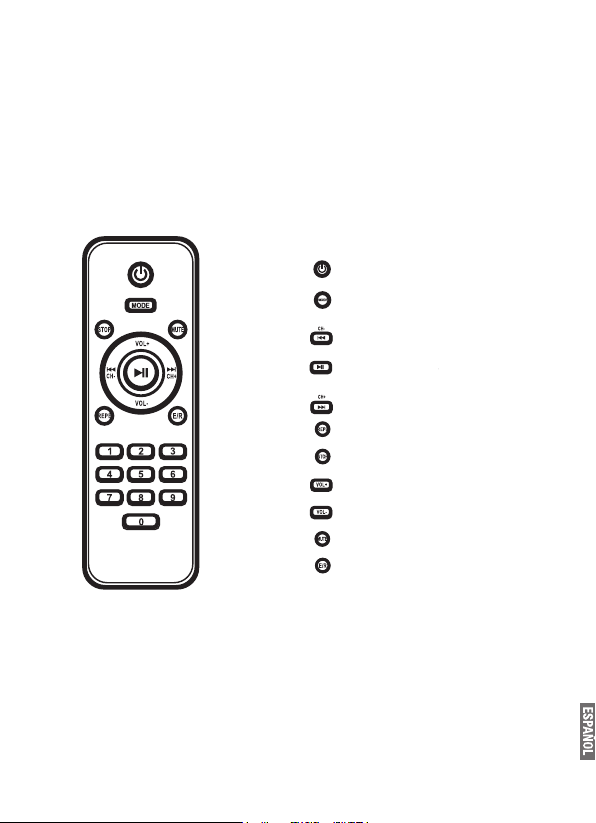
CONTROL REMOTO
Encendido / En espera
USB/SD/LINE/BT
Pista Anterior / Canal - FM Radio
Reproducir/Pausar/Radio FM
Pista siguiente / Canal + FM radio
Repetir
Detener
Aumentar el volumen
Disminuir el volumen
Silenciar
Ecualizador
Pg. 9
Page 10
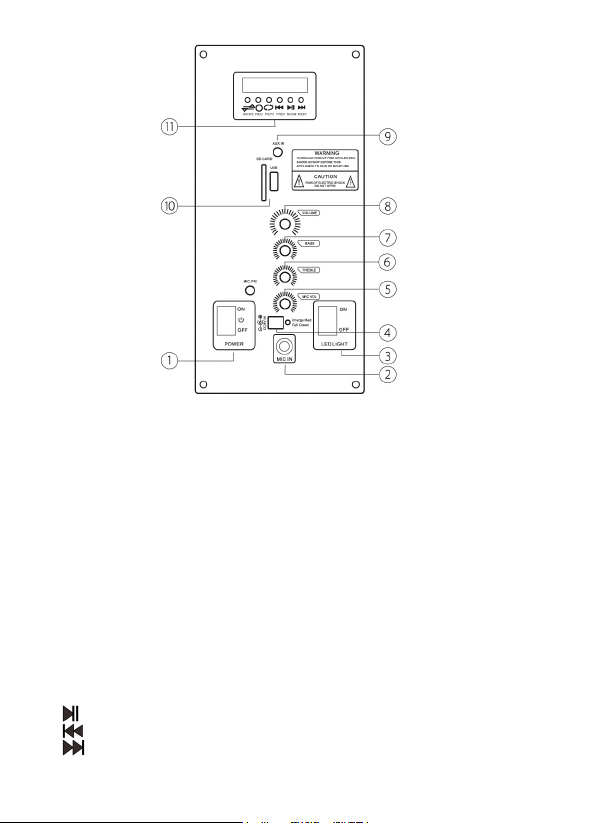
PANEL DE FUNCIÓN
1- Interruptor de encendido y apagado
2- Luz led de encendido y apagado
3- Entrada del micrófono: entrada del micrófono con cable
4- Entrada DC9V: entrada dc9v para cargar
5- Volumen del micrófono: ajuste volumen del micrófono
6- Altos: ajuste del eco de los altos
7- Bajos: ajuste master del volumen
8- Volumen: ajuste master del volumen
9- AUX: Entrada auxiliar
10- Entrada para usb/tarjeta sd
11- Visualización del panel de función:
Rec: grabadora; insertar la memoria usb/tarjeta sd y presionar
este botón para comenzar a grabar. Para nalizar la grabación y para
reproducir la grabación presionar nuevamente el mismo botón.
Reproducir/pausar auto buscador de estaciones fm
Previa
Proxima
Modo: seleccionar modo
Page 11

INTERNATIONAL WARRANTY
Terms and Conditions
1. PANACOM warrants the operation of this product to be free from
any manufacturing and/or material defect for a period of 6 months
from the date of purchase by the user.
2. This warranty is limited to the repair and/or replacement of this
product, according to our own criterion, free of charge within the
stipulated term and it does not extend to consequential or incidental
damages to other products that may be used with this unit.
3. The warranty shall be voided in the following cases: a) repair or
attempt to repair by third parties not authorized by the company.
b) in case of performing any type of cut in connection cables,
plugs, connectors, or other adapters different from the original ones
provided by the company.
4. To make this warranty effective, you shall contact the Authorized
Service Center of your country and they shall carry out the pertinent
procedure; said information is available at www.panacom.com. In
order to start the necessary procedure to get said warranty, you
shall hand in the Original Purchase Invoice where the purchase date,
dealer name and product identication shall be stated clearly.
5. Transportation, freight, stay and/or insurance expenses, if any, are
not covered by this warranty.
Pg. 11
Page 12

GARANTIA INTERNACIONAL
Términos y Condiciones
1. PANACOM garantiza el funcionamiento de este producto ante cualquier defecto de fabricación y/o vicio de material por el término de 6
meses contado a partir de la fecha de compra por parte del usuario.
2. Esta garantía se limita a la reparación y/o reemplazo de este
producto, a nuestro criterio, sin cargo alguno dentro del plazo de
vigencia y no se extiende a daños concecuentes o incidentales
hacia otros productos que fueran utilizados con esta unidad.
3. La garantía queda anulada ante: a) reparación o intento de
reparación por terceros no autorizados por la compañía. b) en el
caso de realizar cualquier tipo de corte de los cables de conexión,
chas, conectores, u otros adaptadores distintos de los originales
de fábrica.
4. Para hacer valer esta garantía se deberá remitir al centro de
servicios autorizado de su país quienes gestionarán la misma,
dicha información se encuentra www.panacom.com. Para gestionar
dicha garantía deberá presentar la Factura Original de compra en
la cual deberá constar claramente la fecha de compra, nombre del
comercio e indenticación del producto.
5. No quedan cubiertos por esta garantía gastos de traslado, ete,
estadía, y/o seguro si los hubiera.
Pg. 12
Page 13

TECHNICAL SERVICES / SERVICIO TECNICO
Razón Social localidad domicilio Teléfono
Company LoCaLity address phone
Ciudad de Buenos aires
SERVICE HOME C.A.B.A Carlos Calvo 3621 0810-888-7262
ProvinCia de Buenos aires
TAURO ELECTRÓNICA Santa Teresita Av 41 Nº 688 02246-52-0932
TOSHIMAR Mar del Plata Bolivar 3056 0223-494-0723
SERVICE DE LA COSTA San Nicolás Brown 113 03461-42-3916
SPEED SERVICE La Plata Calle 66 Nº 1165 ½ 0221-457-5873
entre 18 y 19
/ 356-4572
TAURO ELECTRÓNICA Mar de Ajo Catamarca 14 02257-42-1750
TAURO ELECTRÓNICA Dolores Cramer 199 02245-44-4300
TECNISERVICE Bahía Blanca Angel Brunel 877 0291-454-5460
CITTA SERVICE Bahía Blanca H. Irigoyen 176 0291-4520881/4515010
ProvinCia de CórdoBa
RAUL GARCÍA Córdoba Bº Gral Paz Eufrasio Loza 411 0351-452-1807
JUAN MARTÍN VALSECCHI Río Cuarto Dinkeldein 598 0358-464-7731
STONE BICYCLE Córdoba Av Pueyrredón 1616 0351-156-568959
ALCARAZ JUAN San Francisco Liniers 851/53 03564-437-114
ProvinCia de Corrientes
SERVITEC ELECTRONICA Corrientes Cabo de Hornos 3745 0379-4414026
B° 3 de Abril
ProvinCia de ChaCo
ELECTRONICA DANY Roque Sanz Peña Padre Mustacchio 276 03644-423751
ProvinCia de entre rios
VALENTE HNOS Paraná Av.de las Americas 2580 0343-4350390
ELECTRO SERVICE Concordia Urnilarrain 340/42 0345-421-4473/4230659
ELECTRO DAN Gualeguaychu San josé 492 03446-15-311-715
esq GuidoSpano
ProvinCia de Formosa
ELECTR.THOMPSON S.R.L Formosa Territorios Nac. 1064 03704-430805
ProvinCia de JuJuy
TECNOTRONIC S.S. de Jujuy Cerro Aguilar 629 Bº Lujan 0388-4256125
ProvinCia de La rioJa
EGA ELECTRONICA La Rioja Malvinas Argentinas y Pje 1 03822-155-38901
Pg. 13
Page 14

Razón Social localidad domicilio Teléfono
Company LoCaLity address phone
ProvinCia de mendoza
PLAY SERVICE Mendoza San Juan 1630 0261-489-9691
OMEGA.COM San Rafael Gutierrez 489 02627-429-206
ProvinCia de misiones
TOTAL SERVICE Posadas Chacra 32-33 edif 18 03764-47-1360
escalera 38 dto A PB
ProvinCia de neuquén
ELECTRONICA INTEGRAL Neuquén Comb. de S. Lorenzo 445 0299-155-717212
SOSA PAGANO SERVICIO Zapala Ejercito Argentino 229 02942-421980
ZENER ELECTRONICA San M. de los Andes Elordi 614 02972-425155
NORTE SERV ELECTRO. Chos Malal Catamarca 56 02942-155-77671
ProvinCia de rio negro
ELECTRO POWER Cipolletti J Kennedy 70 0299-478-2300
ProvinCia de saLta
ELECTRONICA SALTA Salta Alberdi 510 0387-422-3498
CASA EL GATO Tartagal Alberdi 11 03875-422-849
ProvinCia de san Juan
CAMPORA ERNESTO San Juan Laprida oeste 533 0264- 4084125
ProvinCia de santa Fe
ELECTROAUDITEL Rafaela Pellegrini 86 03492-570068
METAL CARCARAÑA Carcarañá Río Colorado 940 0341-4624782
STA. FE ELECTRONICA Santa Fe Blas Parera 9282 0342-4891088
SET INGENIERIA Rosario España 470 0341-425-8180
ProvinCia de santiago deL estero
ING.RAUL BARCHINI Sgo.del Estero Rivadavia 833 0385-423872/4223755
ProvinCia de tuCumán
CASA SILVESTRO Tucumán San Juan 610 0381-421-5763
SERVICE ELECTR. CENTRAL Tucumán Salta 190 0381-421-9230/
155-308894
Pg. 14
Page 15

Page 16

www.panacom.com
 Loading...