

Page 1
SP-3050
User Manual
Manual del Usuario
Page 2

Pg. 3
SP-3050 PORTABLE SPEAkER
User’s Guide
Thank you for purchasing SP-3050 Panacom’s Portable Speaker.
Please read the manual carefully before operating.
PRODUCT FEATURES
• Ultra-low distortion amplifying circuit
• Digital karaoke, treble and bass independent adjustment
• Professional treble and bass gain controlling circuit
• Compatible to DVDNCD/PC and other sound sources
• Unique acoustic appearance design
• Built-in MP3 encoding supporting U disk
• Built-in battery for outdoor activities
• Suitable for adaptor and charging
• Built in professional wireless microphone system
• Intelligent power switch charging circuit
• Professional high-effective loud-speaking unit
ATTENTION
The product has been installed with battery, making it applicable to the outdoor singing,
advertisement, recreation and other activities. Please charge the battery before using it outdoors,
so as to guarantee that the machine can be used for a longer time outdoors. The machine has been
set with power switch circuit. When you connect the adaptor to the power and insert the plug to
the charging interface, the machine will switch to the power supplied by the adaptor automatically
and charge the built-in battery. When the adaptor interrupts the power, the machine will intelligently
switch to the built-in battery for work continuously. When adaptor is used to charge the battery,
the integrated intelligent charging circuit within the machine will give hints about charging and the
charging indicator lamp will light.
After charging is finished, the intelligent charging circuit will give hint to that that the charge has been
fully charged and light the charging indicator lamp. At this moment you can close the AC power of
the adaptor. lf you still use adaptor in the machine to work, the charging circuit will automatically cut
off the charging circuit and it is unnecessary for you to worry about the charging breaking. You shall
notice that the battery has certain service life and it is beyond the warranty scope of the company.
Under general circumstances, the built-in battery needs charging 8-10 hours. With more charging
times, the battery volume will change and full charging time will reduce accordingly. When the battery
is out of charge after being used for a short time, please change the built-in battery. The user shall
also notice that if the electricity quantity of the battery is reduced when using the machine outdoors,
please close the power switch on therear plate and charge the built-in battery within 24hours. If the
electricity quantity of battery is totally consumed, the situation that the battery can not be charged
and the service life is expired will happen. When you don’t use the machine for a long time and leave
it alone, please charge the battery every six months, so as to avoid the invalidity of battery.
INSTRUCTION OF U DISK MP3 ENCODING PLAYING
When you need to use the built-in MP3 encoding function, please format your USD disk (U disk for short
below) as FA-T32 format in computer first and then copy the file in MP3 format in U disk. When reading U
disk, the encoding system will engage in encoding playing according to the generation sequence of MP3
songs file. Therefore, the song which is copied to U disk first will be played in priority or vice versa. When
the user needs to play according to the specific sequence, they can arrange the copying sequence. If the
files copied to U disk can not be played, please inspect whether the file format is in MP3 format. If not,
please switch to MP3 format in computer and then copy to U disk in order to play normally. When copying
MP3 file, you shall copy to the catalogue of U disk. It is suggested to delete all the unnecessary files and
file catalogues in order to reduce the occurrence of reading error when the encoding is played. When the
user buys U disk, please select the ones with better quality and internal encoding supporting 64MB/128M
B/256MB/512MB/1GB/2GB/4GB/8GB and other volumes. During the playing process, please make it far
away from the places with high temperature, high magnetic field and high frequency interference. In case
of crash, please close the power and restart for recovery!
Page 3
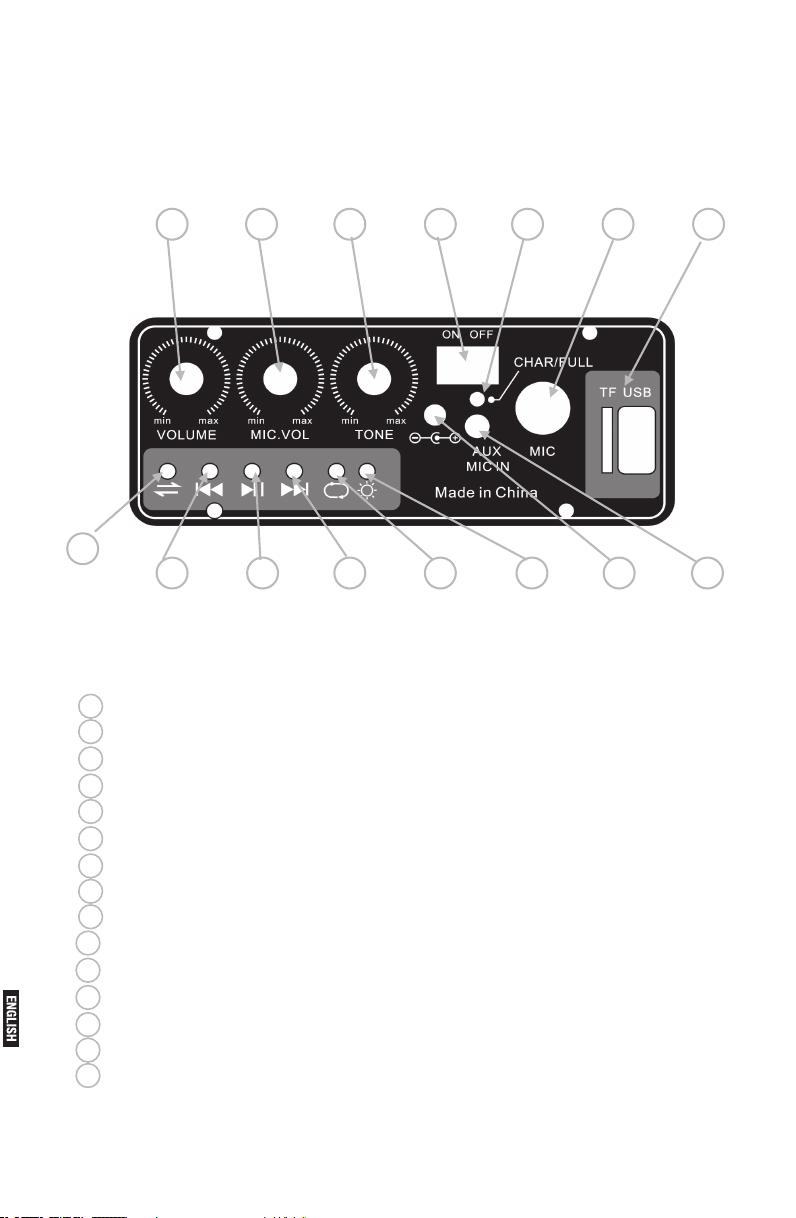
PANEL/REAR PLATE/MP3 FUNCTION AND OPERATION
7654321
15
14 13 12 11 10 98
1Slot - insert TF card / USB
2Mic - microphone plug
3Light - battery charging light
4 Power switch - power on or off
5 Tone - change tone volume
6Mic. vol - change micphone volume and aux mic in volume
7Volume - change the main volume
8Aux mic in - can connect a 3.5mm output plug from a music player
9Power jack - connect Iram adapator
10 Light - light up is power on / light off is power off
11 Cycle - repeat to play same music
12 Next - play next song
13 Play/pause - play music and pause the music
14 Previous - play previous song
15 Mode - change function mode - Line in / Wireless / TF / USB
Pg. 4
Page 4

Pg. 5
COMMON SIMPLE FAULTS AND GUIDANCE FOR OPERATION AND REPAIR
FAULT PHENOMENON
Failing to electrify
No sound
External
microphone has
no sound
Problems with
wireless
microphone
SIMPLE FAULT ANALYSIS
The power switch is not opened
The electricity quantity of built-in battery is totally consumed
Failing to input sound source
Failing to establish signal line
Main volume is switched to minimum U disk playing has no sound
Faults with extemal signal source
Poor contact or damage of extemal signal line
External microphone is not fully inserted in thejack
The external microphone switch is not opened
The volume knob of microphone is off
The switch of wireless microphone is not opened
The wireless microphone is not inserted in the battery
The sound of wireless microphone is in distortion
SOLUCIÓN DE PROBLEMAS
Open power switch
Use power adaptor to charge the battery
Change signal source
Reconnect signal line
Properly adjust the volume knob
Inspect U disk or audio switch
Change signal source
Readjust or change signal line
Totally insert the microphone to the jack
Open the switch of wireless microphone
Properly adjust the volume knob of
microphone
Open the switch of wireless microphone
Insert electrical apparatus to the battery box
of wireless microphone
Change the battery of wireless microphone
If there is still fault after the inspection above, please contact the nearest local maintenance
department.
Page 5

SP-3050 PARLANTE PORTATIL
Manual del Usuario
Gracias por comprar el SP-3050
Por favor lea este manual cuidadosamente previo al uso.
Parlante Portatil Panacom.
CARACTERÍSTICAS DEL PRODUCTO
• Circuito ultra baja distorsión amplificando
• Karaoke digital, agudos y graves con ajuste independiente
• Agudos Profesional y la ganancia de graves.
• Compatible con DVDNCD / PC y otras fuentes de sonido
• Diseño del aspecto acústico único
• Capacidad de la codificación MP3 de apoyo U disco
• Capacidad de la batería para actividades al aire libre
• Apto para el adaptador y carga
• Construido en el sistema profesional de micrófono inalámbrico
• Circuito de carga de interruptor de alimentación inteligente
• Unidad de alta voz de alta eficacia profesional
ATENCIÓN
El producto se ha instalado con la batería, por lo que es aplicable al aire libre, publicidad, recreación y otras
actividades. Por favor, cargue la batería antes de usarla al aire libre, a fin de garantizar que la unidad se
puede utilizar durante más tiempo. La unidad se ha establecido con el circuito de interruptor de encendido.
Cuando conecte el adaptador a la alimentación e inserte el enchufe a la interfaz de carga, la unidad cambia
a la potencia suministrada por el adaptador automáticamente y cargar la batería incorporada. Cuando
el adaptador interrumpe el poder, la unidad inteligente cambiar a la batería incorporada para trabajar
continuamente. Cuando se utiliza el adaptador para cargar la batería, el circuito de carga inteligente
integrado en la unidad va a dar pistas acerca de la carga y la luz indicadora de carga se iluminará.
Después que la carga haya terminado, el circuito de carga inteligente dará pista de que la carga se ha
cargado completamente y enciende la luz indicadora de carga. En este momento se puede cerrar la
alimentación de CA del adaptador. LF todavía utiliza el adaptador en la unidad para trabajar, el circuito
de carga se corta automáticamente y no es necesario que se preocupe por el corte de la carga. Usted
debe notar que la batería tiene cierta vida útil y está más allá del alcance de la garantía de la empresa.
En circunstancias generales, la batería incorporada necesita cargarse 8.10 horas. Con tiempos de
carga mayortes, el volumen de la batería va a cambiar y el tiempo de carga completa se reducirá en
consecuencia. Cuando la batería está fuera del cargo después de ser utilizado por un corto tiempo, por
favor, cambie la batería incorporada. El usuario debe notar también que si la cantidad de electricidad de
la batería se reduce cuando se utiliza la unidad al aire libre, por favor cerrar el interruptor de encendido y
cargar la batería incorporada dentro de 24 horas. Si la cantidad de electricidad de la batería está totalmente
consumida, la situación de que la batería no se puede cargar y la vida útil ha caducado. Cuando no se
utiliza la unidad durante un largo tiempo, por favor cargue la batería cada seis meses, a fin de evitar la
invalidez de la batería.
INSTRUCCIÓN DE CODIFICACIÓN DE MP3
Cuando tenga que utilizar la función integrada de codificación de MP3, formate el disco USD (disco de U)
como formato de FA-T32 en primer ordenador y luego copiar el expediente en formato MP3 en el disco
de U. Al leer el disco de U, el sistema de codificación se involucrará en la codificación de reproducir de
acuerdo a la secuencia de generación de archivo de canciones en formato MP3. Por lo tanto, la canción
que se copia en el disco de U fi primera se reproducirá en prioridad o viceversa. Cuando el usuario tiene
que reproducir de acuerdo a la secuencia específica, se puede organizar la secuencia de copia. Si el fi
les copian en el disco de U, no se puede reproducir, por favor inspeccione si el formato de archivo está
en formato MP3. Si no es así, por favor, cambie a formato MP3 en la computadora y luego copiar en el
disco de U. Al copiar archivos MP3, usted deberá copiar en el catálogo del disco. Se sugiere eliminar
todos los archivos innecesarios les y con el fin de reducir la posibilidad de error de lectura cuando se
hace la codificación. Cuando el usuario compra el disco de U, por favor seleccione las que tienen mejor
calidad y codificación interna apoyando 64MB / 128MB / 256MB / 512MB / 1GB / 2GB / 4GB / 8GB y
otros volúmenes. Durante el proceso de reproduccion, por favor, que sea muy lejos de los lugares con alta
temperatura, alta campo magnético y la interferencia de alta frecuencia. En caso de accidente, por favor
cierre la alimentación y reinicie para la recuperación!
Pg. 6
Page 6
Pg. 7
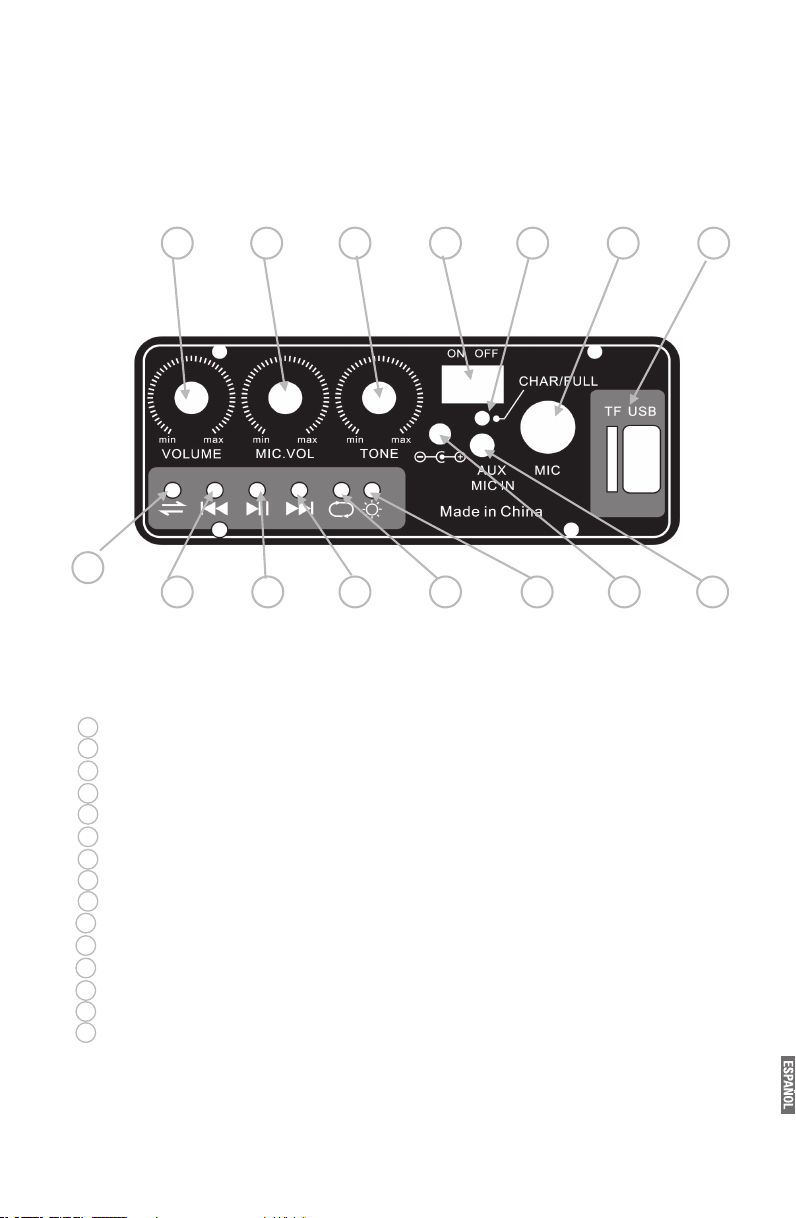
PANEL PLACA TRASERA
7654321
15
14 13 12 11 10 98
1
Ranura - tarjeta de inserción TF / USB
2
Mic - clavija del micrófono
3
Luz - luz de carga de la batería
4
Interruptor de potencia - encender o apagar
5
Volumen del tono de cambio
6
Micrófono. volumen del micrófono y el cambio en el volumen de micrófono aux -
7
Volumen - cambiar el volumen principal
8
Mic aux in - se puede conectar una clavija de 3,5 mm de salida
9
Conector energía - adaptador de conector Iram
10
Luz - iluminan es encendido / luz apagada está apagado
11
Ciclos - repetir jugar misma música
12
Siguiente - reporduce siguiente canción
13
Reproducir / pausar - reproducir música y hacer una pausa en la música
14
Anterior - reproducir la canción anterior
15
Modo de función de cambio - Modo de línea / Wireless / TF / USB
Page 7

FALLAS SIMPLES COMUNES Y ORIENTACIONES PARA EL FUNCIONAMIENTO Y
REPARACIÓN
FALLO
Eléctrico
Sin sonido
Micrófono externo
sin sonido
Problemas con
micrófono inalámbrico
ANÁLISIS DE FALLOS SIMPLE
El interruptor de alimentación no se abre
La cantidad de electricidad de la batería incorporada está totalmente
consumido
La falta de fuente de sonido de entrada
El no poder establecer la línea de señal
Volumen principal se conecta a un mínimo de juego del disco de U no tiene
sonido
Fallos con fuente de señal extema
Contacto pobre o daño de la línea de señal extema
Micrófono externo no se inserta plenamente en theJack
El conmutador de micrófono externo no se abre
El control de volumen del micrófono está apagado
El conmutador de micrófono inalámbrico no se abre
El micrófono inalámbrico no está insertado en la batería
El sonido del micrófono inalámbrico está en la distorsión
SOLUCIÓN DE PROBLEMAS
Interruptor de encendido abierto
Utilice el adaptador de corriente para cargar la
batería
Cambie la Fuente de la señal
Vuelva a conectar la línea de señal
Ajuste correctamente la perilla de volumen
Inspeccione el disco de U o el interruptor de audio
Fuente de señal Cambio
Vuelva a ajustar o cambiar la línea de señal
Insertar totalmente el micrófono a la toma
Abra el interruptor del micrófono inalámbrico
Ajuste correctamente la perilla de volumen de
micrófono
Abra el interruptor del micrófono inalámbrico
Inserte un aparato eléctrico a la caja de la batería
de micrófono inalámbrico
Cambiar la batería del micrófono inalámbrico
Si tel problema persiste, póngase en contacto con el departamento de mantenimiento local
más cercano.
Pg. 8
Page 8
Pg. 9
TECHNICAL SERVICES / SERVICIO TECNICO
Razón Social localidad domicilio Teléfono
Company LoCaLity address phone
Ciudad de Buenos aires
SERVICE HOME C.A.B.A Carlos Calvo 3621 011-4957-3030
ProvinCia de Buenos aires
TAURO ELECTRÓNICA Santa Teresita Av 41 Nº 688 02246-52-0932
TOSHIMAR Mar del Plata Bolivar 3056 0223-494-0723
SERVICE DE LA COSTA San Nicolás Brown 113 03461-42-3916
SPEED SERVICE La Plata Calle 66 Nº 1165 ½ 0221-457-5873
entre 18 y 19
/ 356-4572
TAURO ELECTRÓNICA Mar de Ajo Catamarca 14 02257-42-1750
TAURO ELECTRÓNICA Dolores Cramer 199 02245-44-4300
TECNISERVICE Bahía Blanca Angel Brunel 877 0291-454-5460
CITTA SERVICE Bahía Blanca H. Irigoyen 176 0291-4520881/4515010
ProvinCia de CórdoBa
RAUL GARCÍA Córdoba Bº Gral Paz Eufrasio Loza 411 0351-452-1807
JUAN MARTÍN VALSECCHI Río Cuarto Dinkeldein 598 0358-464-7731
STONE BICYCLE Córdoba Av Pueyrredón 1616 0351-156-568959
ALCARAZ JUAN San Francisco Liniers 851/53 03564-437-114
ProvinCia de Corrientes
SERVITEC ELECTRONICA Corrientes Cabo de Hornos 3745 0379-4414026
B° 3 de Abril
ProvinCia de ChaCo
ELECTRONICA DANY Roque Sanz Peña Padre Mustacchio 276 03644-423751
ProvinCia de entre rios
VALENTE HNOS Paraná Av.de las Americas 2580 0343-4350390
ELECTRO SERVICE Concordia Urnilarrain 340/42 0345-421-4473/4230659
ELECTRO DAN Gualeguaychu San josé 492 03446-15-311-715
esq GuidoSpano
ProvinCia de Formosa
ELECTR.THOMPSON S.R.L Formosa Territorios Nac. 1064 03704-430805
ProvinCia de JuJuy
TECNOTRONIC S.S. de Jujuy Cerro Aguilar 629 Bº Lujan 0388-4256125
ProvinCia de La rioJa
EGA ELECTRONICA La Rioja Malvinas Argentinas y Pje 1 03822-155-38901
Page 9
Razón Social localidad domicilio Teléfono
Company LoCaLity address phone
ProvinCia de mendoza
PLAY SERVICE Mendoza San Juan 1630 0261-489-9691
OMEGA.COM San Rafael Gutierrez 489 02627-429-206
ProvinCia de misiones
TOTAL SERVICE Posadas Chacra 32-33 edif 18 03764-47-1360
escalera 38 dto A PB
ProvinCia de neuquén
ELECTRONICA INTEGRAL Neuquén Comb. de S. Lorenzo 445 0299-155-717212
SOSA PAGANO SERVICIO Zapala Ejercito Argentino 229 02942-421980
ZENER ELECTRONICA San M. de los Andes Elordi 614 02972-425155
NORTE SERV ELECTRO. Chos Malal Catamarca 56 02942-155-77671
ProvinCia de rio negro
ELECTRO POWER Cipolletti J Kennedy 70 0299-478-2300
ProvinCia de saLta
ELECTRONICA SALTA Salta Alberdi 510 0387-422-3498
CASA EL GATO Tartagal Alberdi 11 03875-422-849
ProvinCia de san Juan
CAMPORA ERNESTO San Juan Laprida oeste 533 0264- 4084125
ProvinCia de santa Fe
ELECTROAUDITEL Rafaela Pellegrini 86 03492-570068
METAL CARCARAÑA Carcarañá Río Colorado 940 0341-4624782
STA. FE ELECTRONICA Santa Fe Blas Parera 9282 0342-4891088
SET INGENIERIA Rosario España 470 0341-425-8180
ProvinCia de santiago deL estero
ING.RAUL BARCHINI Sgo.del Estero Rivadavia 833 0385-423872/4223755
ProvinCia de tuCumán
CASA SILVESTRO Tucumán San Juan 610 0381-421-5763
SERVICE ELECTR. CENTRAL Tucumán Salta 190 0381-421-9230/
155-308894
Pg. 10
Page 10
Pg. 11
INTERNATIONAL WARRANTY
Terms and Conditions
1. PANACOM warrants the operation of this product to be free from any manufacturing and/or material
defect for a period of 6 months from the date of purchase by the user.
2. This warranty is limited to the repair and/or replacement of this product, according to our own criterion,
free of charge within the stipulated term and it does not extend to consequential or incidental damages
to other products that may be used with this unit.
3. The warranty shall be voided in the following cases: a) repair or attempt to repair by third parties not
authorized by the company. b) in case of performing any type of cut in connection cables, plugs, connectors, or other adapters different from the original ones provided by the company.
4. To make this warranty effective, you shall contact the Authorized Service Center of your country and
they shall carry out the pertinent procedure; said information is available at www.panacom.com. In order
to start the necessary procedure to get said warranty, you shall hand in the Original Purchase Invoice
where the purchase date, dealer name and product identification shall be stated clearly.
5. Transportation, freight, stay and/or insurance expenses, if any, are not covered by this warranty.
To ask for technical support of this product in Argentina call 0810-888-7262.
GARANTIA INTERNACIONAL
Términos y Condiciones
1. PANACOM garantiza el funcionamiento de este producto ante cualquier defecto de fabricación y/o
vicio de material por el término de 6 meses contado a partir de la fecha de compra por parte del usuario.
2. Esta garantía se limita a la reparación y/o reemplazo de este producto, a nuestro criterio, sin cargo
alguno dentro del plazo de vigencia y no se extiende a daños concecuentes o incidentales hacia otros
productos que fueran utilizados con esta unidad.
3. La garantía queda anulada ante: a) reparación o intento de reparación por terceros no autorizados por
la compañía. b) en el caso de realizar cualquier tipo de corte de los cables de conexión, fichas, conectores, u otros adaptadores distintos de los originales de fábrica.
4. Para hacer valer esta garantía se deberá remitir al centro de servicios autorizado de su país quienes
gestionarán la misma, dicha información se encuentra www.panacom.com. Para gestionar dicha garantía
deberá presentar la Factura Original de compra en la cual deberá constar claramente la fecha de compra,
nombre del comercio e indentificación del producto.
5. No quedan cubiertos por esta garantía gastos de traslado, ete, estadía, y/o seguro si los hubiera.
Para consultar por nuestra red de serivicio tecnico comunicarse al 0810-888-7262.
Page 11

www.panacom.com
 Loading...