

Page 1
Bluetooth
SMART
TM
Smart Wireless Scale
User Manual
Balance Intelligente Sans Fil
Guide de L’Utilisateur
Page 2
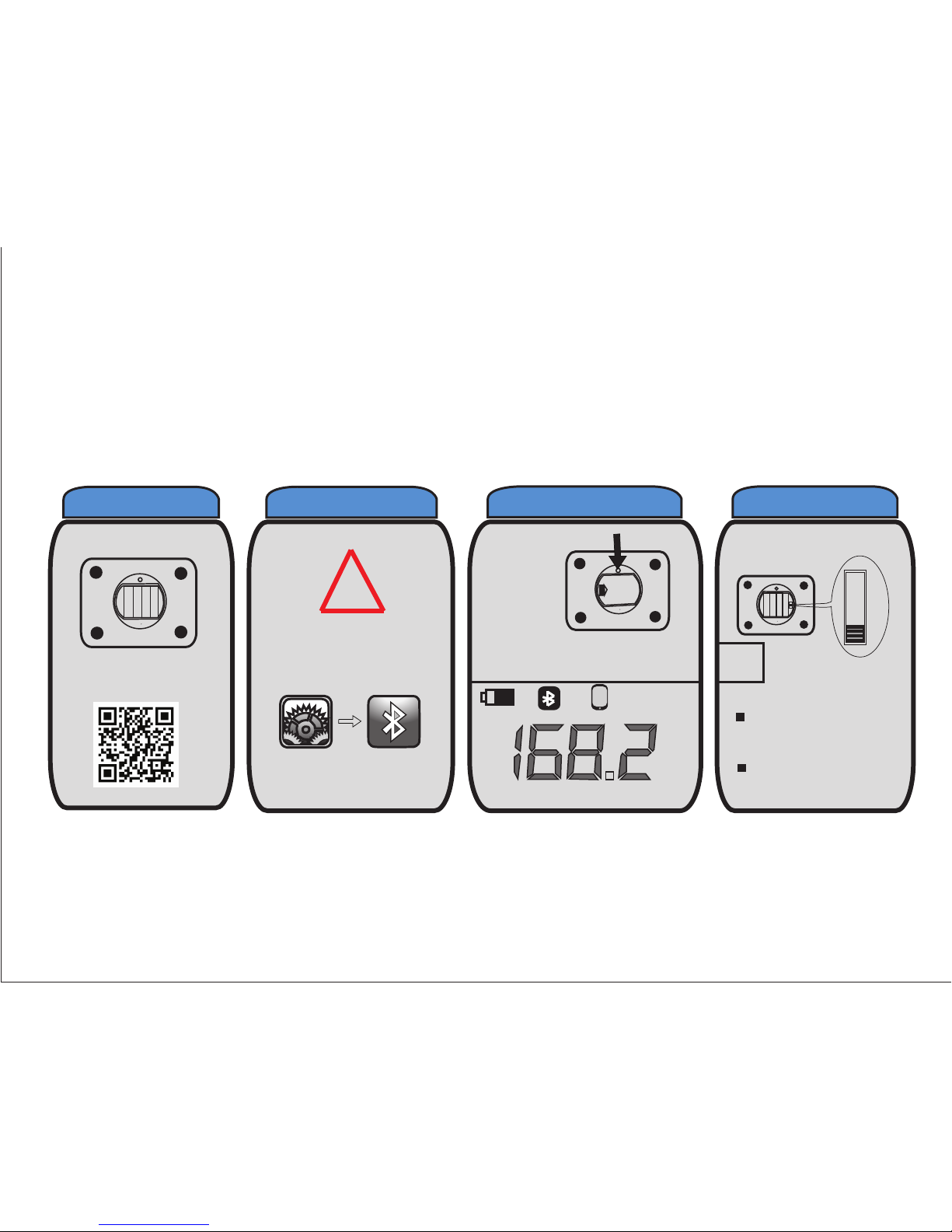
Install batteries
+++
+
---
-
Download & install app
!
Make sure Bluetooth
on phone is on
Settings Bluetooth
Press the
Pairing
button
LCD DISPLAY
lb
Battery Bluetooth Smartphone Weight Units
.
lb
st
kg
Setting weight unit
i
Always place scale
on a flat surface
Clean with moist
cloth
1
2
3
4
Quick Start Guide
Page 3
Box Contents
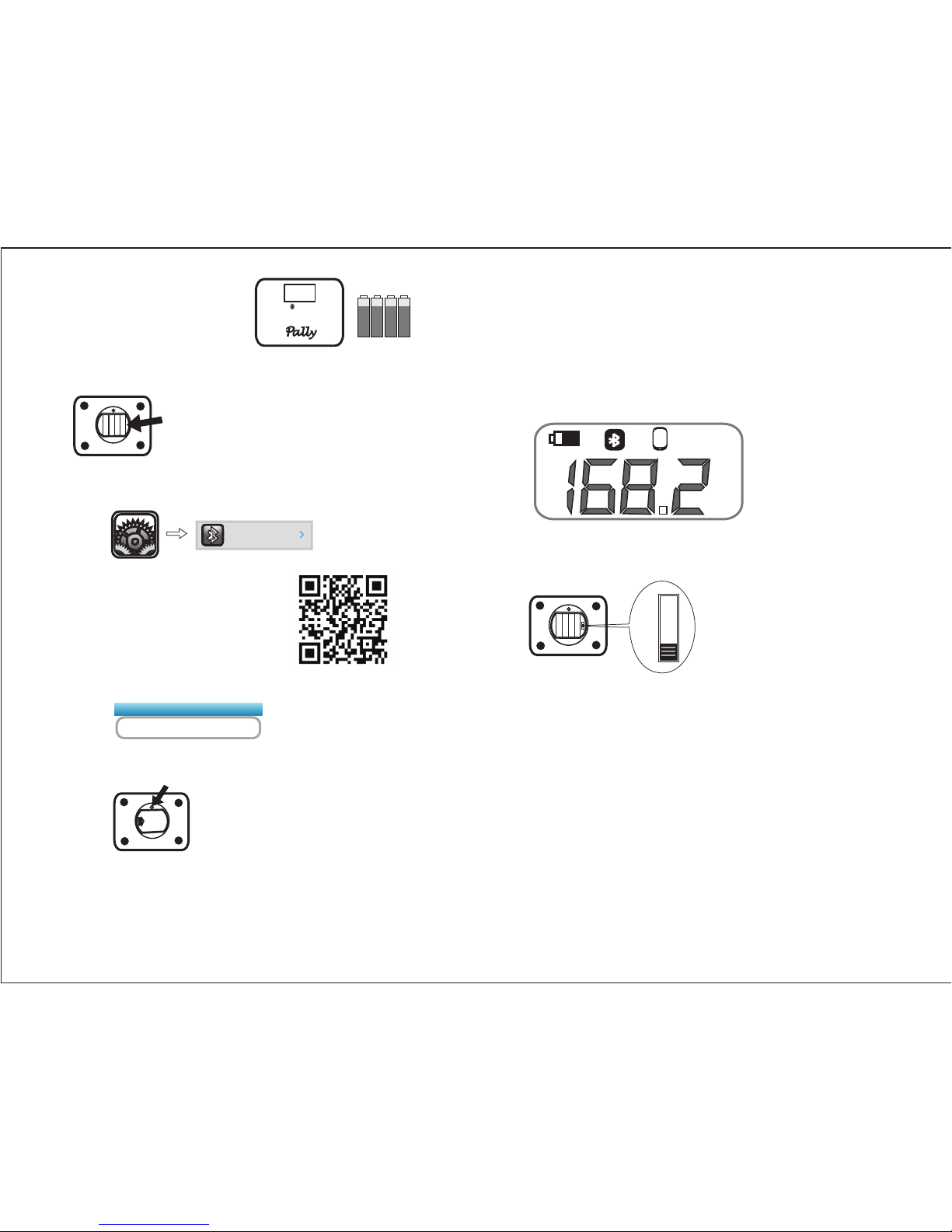
- Smart Wireless Scale
- 4 x AA Batteries
1. Setup
Install the four AA batteries
2) Download and install the free Pally
Smart Weight app from Apple App
store (scan QR code for fast access,
or visit www.pallytech.com/LX200/)
Launch the app and
follow the instructions.
4) Press the pairing button at the back of the scale to pair it with
your iPhone.
+++
+
-
-
-
-
Add a scale
Pally BLE Scale
Settings
2.Pairing with iPhone
1) Turn on Bluetooth in Settings on iPhone
3) Launch Pally Smart Weight app and tap “Add a scale”
Settings
Bluetooth
On
5) The Bluetooth sign will light up on the display when the scale is
connected to the iPhone. Step on the scale. The display flashes 3
times to indicate your weight is recorded. The measurement will be
displayed for 10 seconds and recorded for transmission to iPhone.
Bluetooth
SMART
TM
3. LCD Display
1) The Bluetooth sign will light up on the display when the scale is
connected to iPhone.
2) If you change or remove the batteries, the smartphone sign will flash
on the LCD, when replaced. You will need to open the app to reset
date and time, and smartphone sign will stop flashing. Measurments
will not be stored if the smartphone sign is flashing.
lb
Battery Bluetooth Smartphone Weight Unit
4. Setting Weight Unit
Weight unit switch is located next to the batteries.
You may select lb, kg, or st.
lb
st
kg
5. Care and Maintenance
1) Always place scale on a flat hard surface
2) Clean with moist cloth
6. Features
1) Stores 3000+ weight measurements
2) Transmits weight measurements automatically to iPhones.
3) Large 4.3 inch display with back-light, and a wide viewing angle.
4) Weight range:5~200kg, or 11~440lb, in 0.05kg/0.1lb increments
5) Extra-wide platform with attractive glass surface.
6) Free Smart Weight iPhone application
7) Real time transmission to iPhone
7. Online Support & Detailed Documentation
www.pallytech.com
.
Page 4
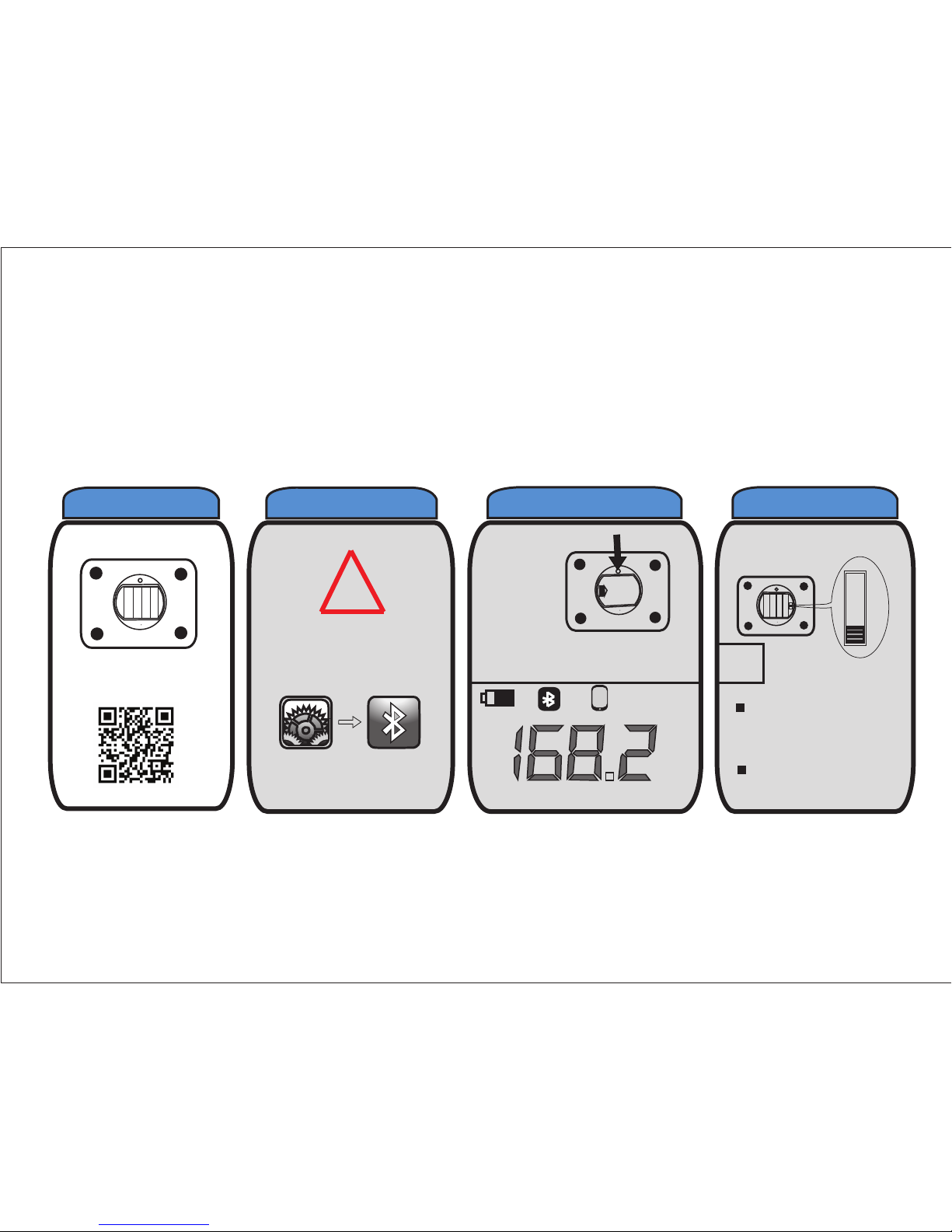
Installer les piles
Téléchargez et installez
l’application
+++
+
---
-
!
Assurez vous que
Bluetooth sur votre
téléphone est activé
Settings Bluetooth
Appuyez sur
le bouton
d’appairage
LCD écran
lb
.
Batterie Bluetooth Smartphone Unité de poids
lb
st
kg
Réglage Unité de Poids
i
Mettre toujours la
balance sur un
surface plat et dur
Nettoyer avec un
chiffon humide
1
2
3
4
Guide de démarrage rapide
Page 5
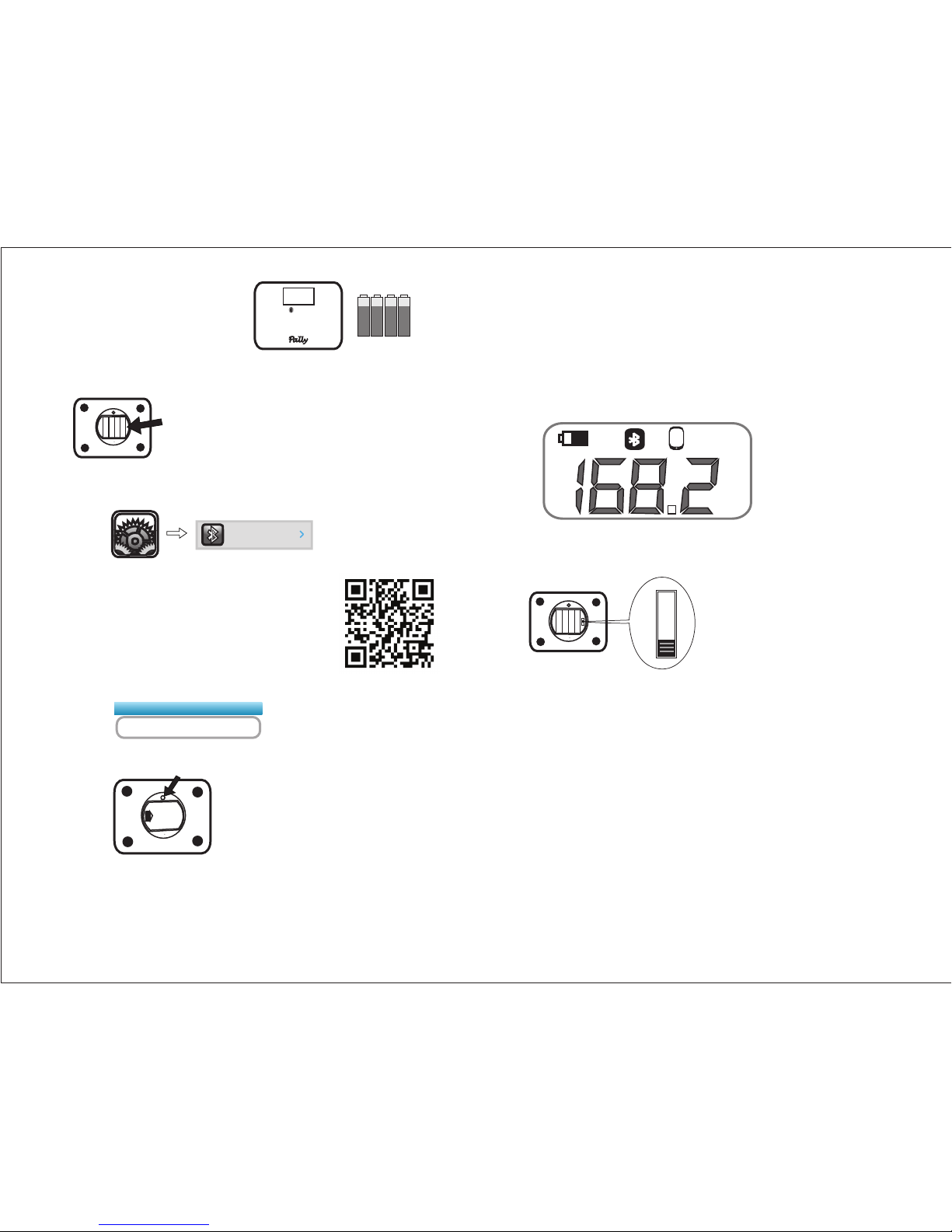
Contenu de la Boîte
- Balance Intelligente Sans Fils
- 4 x AA Piles
1. Installer
Installer les quatre piles AA
2) Téléchargez et installez l’application gratuite
Pally Smart Weight. Scanner le code QR pour
télécharger rapidement, ou visitez le site
www.pallytech.com/LX200/)
Lancez l'application
et suivez les instructions
4) Appuyez sur le bouton d’appairage en arrière de la balance.
Add a scale
Pally BLE Scale
Settings
2. Appairage avec iPhone
1) Activez la fonction Bluetooth dans settings
3) Lancez l’application Pally Smart Weight, et cliquez sur “add a scale”
Settings
Bluetooth
On
5) Le signe de Bluetooth sur la balance s'allume sur l'écran lorsque la
balance est connecté à l'iPhone. Montez sur la balance. L'affichage
clignote 3 fois pour indiquer que le poids est enregistré. La mesure
sera affichée pendant 10 secondes, et enregistré pour transmission
à l'iPhone.
Bluetooth
SMART
TM
3. LCD écran
1) Le signe de Bluetooth s'allume sur l'écran lorsque la balance est
connecté à l'iPhone.
2) Si vous changez les batteries, le signe smartphone se met à
clignoter sur l'écran LCD. Vous devez ouvrir l'application pour mettre
à jour le date, et le signe smartphone cesse de clignoter. Les mesures
ne seront pas conservés si le signe smartphone clignote.
4. Réglage Unité de Poids
Interrupteur de poids se trouve à l'intérieur du boîtier de la batterie.
Vous pouvez sélectionner lbs, kg, ou st.
lb
st
kg
5. Conseils D’Entretien
1) Mettre toujours la balance sur un surface plat et dur
2) Nettoyer avec un chiffon humide
6. Caractéristiques de la balance Intelligente Sans fil
1) 3000 mesures de poids enregistrées
2) Transmet automatiquement les mesures de poids sur iphone
3) Grand écran de 4,3 pouces avec rétro-éclairage, et un angle de vision
large
4) Gamme de poids: 5~200kg, ou 11~440lb, en 0,05kg/0,1lb incréments
5) Plateforme extralarge avec surface en verre attrayant
6) Application iPhone gratuite
7) Transmission en temps réel à l'iPhone
7. Support en ligne et documentation détaillée
www.pallytech.com
Indicateur de batterie Bluetooth Smartphone Unité de poids
lb
.
+++
+
-
-
-
-
Page 6

Limited Warranty
Ace Sensor Inc. (ASI) warrants this device to be free from defects in
workmanship and material, under normal residential use, for a period of
one (1) year from the date of purchase. This warranty extends only to
the original purchaser. A purchase receipt or other proof of date of
original purchase is required before warranty service is performed. ASI’s
obligation under this warranty is limited to replacing or repairing, or
assisting in the repair at ASI’s option. All repairs for which warranty
claims are made must be pre-authorized by ASI.
When experiencing any problems with this device, simply contact us
by going to www.PallyTech.com/support/ and starting a claim ticket. You
will receive a reply within 24 hours (excluding weekends and Canadian
Holidays). No warranty service will be provided to any device that has
been tampered with, unless directed by an ASI representative
This warranty does not cover normal wear of parts or damage
resulting from a negligent use or misuse of the device, use contrary to
the operating instructions, failure to provide reasonable and necessary
maintenance, or disassembly, repair or alteration by anyone unless
directed by an ASI Representative. Further, the warranty does not cover
damage resulting from Acts of God, such as fire, flood, hurricanes and
tornadoes. ASI is not responsible for shipping cost for warranty
service.
Limitation and Exclusions
To the extent permitted by applicable law, the liability of ASI, if any, for
any allegedly defective device or part shall be limited to repair or
replacement of the device or part and shall not exceed the purchase
price of a comparable replacement device or part. THE PROVISIONS
OF THIS WARRANTY ARE YOUR SOLE AND EXCLUSIVE REMEDY
WITH RESPECT TO THE PRODUCT(S) COVERED BY THIS
WARRANTY. ALL IMPLIED WARRANTIES WITH RESPECT TO THE
DEVICES(S) INCLUDING, BUT NOT LIMITED TO, IMPLIED
WARRANTIES OF MERCHANTABILITY AND FITNESS FOR A
PARTICULAR PURPOSE, ARE HEREBY EXPRESSLY EXCLUDED.
ASI is not responsible or liable for indirect, special or
consequential damages arising out of or in connection with the
use or
performance of the device or damages with respect to any
economic loss, loss of property, loss of revenues or profits, loss
of enjoyment or use, costs of removal, installation or other
consequential damages of whatsoever nature. Some
provinces/states do not allow the exclusion or limitation of
incidental or consequential damages. Accordingly, the above
limitation may not apply to you.
You the buyer may have other rights and remedies under your
state's or province’s applicable laws, which are in addition to any right
or remedy which may be available under this limited warranty.
Ownership Registration
Please register your purchase online at
www.PallyTech.com/support/register/ within thirty (30) days of
purchase or receipt. The registration will enable ASI to contact you in
the unlikely event of a product safety notification. By registering online
or reading this document you acknowledge that you have understood
the instructions for use, and warnings set forth in the accompanying
instructions.
Warranty Service
If you have any questions regarding this warranty or would like to
obtain warranty service, please create a support ticket at
www.PallyTech.com/support/ or email to [email protected].
Please explain the problem and include your name, contact phone
number and your purchase receipt or purchase order number.
If you do not have access to the internet, you can call us at
1 888-908-5993 extension 2.
Contact Information
Ace Sensor Inc.
11 - 300 Earl Grey Dr. #383
Ottawa, Ontario, K2T 1C1
Canada
Email: [email protected]
Telephone: +1 888-908-5993
Fax: +1 613 800-0726
Page 7

www.PallyTech.com
© Copyright of Ace Sensor Inc. 2013. All rights reserved.
 Loading...