

Page 1

DAC-M1 D/A CONVERTERS
USER’S MANUAL
Page 2

FCC Notice - Declaration of Conformity Information
This equipment has been tested and found to comply with the limits for a Class B digital device, pursuant to part 15 of
the FCC Rules. These limits are designed to provide reasonable protection against harmful interference in a residential
installation. This equipment uses and can radiate radio frequency energy and, if not installed and used in accordance
with the instructions, may cause harmful interference to radio communications.
However, there is no guarantee that interference will not occur in a particular installation. If this equipment does cause
harmful interference to radio or television reception, which can be determined by turning the equipment o and on, the
user is encouraged to try to correct the interference by one or more of the following measures:
Reorient or relocate the receiving antenna.
Increase the separation between the equipment and receiver.
Connect the equipment into an outlet on a circuit di erent from that to which the receiver is connected.
Consult the dealer or an experienced radio/TV technician for help.
WARNING : Only peripherals complying with the FCC class B limits may be attached to this equipment.
Changes or modi cations made to this equipment, not expressly approved by us or parties authorized by us could void
the user’s authority to operate the equipment. This device complies with part 15 of the FCC Rules. Operation is subject
to the following two conditions: (1) This device may not cause harmful interference, and (2) this device must accept any
interference received, including interference that may cause undesired operation.
01
Page 3
EU Declaration of Conformity
Hereby, PALAB Audio, Inc. declares that this device is in compliance with the essential requirements and other
relevant provisions of Directive 2004/108/EC.
The manufacturer of this product is PALAB Audio, Inc., No. 33, Cukengkou Rd., Ruifang Dist., New Taipei City 224, Taiwan .
The Authorized Representative for EMC and product safety is PALAB Audio, Inc., No. 33, Cukengkou Rd., Ruifang Dist.,
New Taipei City 224, Taiwan .
For any service or guarantee matters please refer to the addresses given in separate service or guarantee documents.
For customers in Europe
Disposal of Old Electrical & Electronic Equipment (Applicable in the European Union and other European
countries with separate collection systems)
This symbol on the product or on its packaging indicates that this product shall not be treated as
household waste. Instead it shall be handed over to the applicable collection point for the recycling of
electrical and electronic equipment. By ensuring this product is disposed of correctly, you will help
prevent potential negative consequences for the environment and human health, which could otherwise
be caused by inappropriate waste handling of this product. The recycling of materials will help to conserve
natural resources. For more detailed information about recycling of this product, please contact your local
Civic Oce, your household waste disposal service or the shop where you purchased the product.
02
Page 4

SAFETY INSTRUCTIONS
There are two categories of Safety Instructions included in this manual :
•
Product Warnings, (i.e., what must never be done to assure avoiding those hazards that could cause bodily
injury or property damage); and
•
User Directions (i.e., what must always be done to assure the safe use of your device).
The Safety Instructions contained in this manual have been categorized in accordance with the seriousness of the
potential hazards through the use of Signal Words. Those Signal Words, and their intended meanings, are as follows:
DANGER : Indicates that a failure to observe the Safety Instructions could result in death or catastrophic bodily injury.
WARNING : Indicates that a failure to observe the Safety Instructions could result in serious bodily injury.
CAUTION : Indicates that a failure to observe the Safety Instructions could result in minor bodily injury or property
damage.
NOTE : Designates important information that relates to activities and/or conditions that might result in loss of data
and/or damage to your device.
Safe Use and Operation of Your Device
This equipment emits stray RF energy and will interfere with the reception of signals by airborne electronic
navigational devices or medical devices. Do not operate this equipment near any sensitive medical devices.
03
Page 5

WARNING : Use only grounded AC power cords.
Always immediately disconnect the power to the equipment in the event the device emits an unusual odor or sound
or generates smoke.
WARNING : Never attempt to disassemble, repair or make any modi cation to your device. Disassembly, modi cation
or any attempt at repair could cause bodily injury or property damage, as well as damage to the device itself.
WARNING : Your device is not a toy. Never allow children to play with your device. Misuse, rough or improper handling
of your device by children could result in serious bodily injury for any of the enumerated safety warnings in this manual.
In addition, always keep all accessories and components out of the reach of small children as small parts might present
a choking hazard. Seek immediate medical attention if choking occurs or if any small part has been swallowed.
CAUTION : Never raise the sound volume level too high when using your device with earphones. An excessive sound
volume level could cause damage to your hearing.
WARNING : To reduce the risk of re or electric shock, do not expose the unit to moisture or water.
Do not allow foreign objects to get into the enclosure. If the unit is exposed to moisture, or a foreign object gets into the
enclosure, immediately disconnect the power cord from the wall. Take the unit to a quali ed service person for inspection
and necessary repairs.
Read all the instructions before connecting or operating the component.
Keep this manual so you can refer to these safety instructions.
Heed all warnings and safety information in these instructions and on the product itself. Follow all operating instructions.
04
Page 6

Do not use this unit near water.
You must allow a minimum 10 cm or 4 inches of unobstructed clearance around the unit. Do not place the unit on a bed,
sofa, rug, or similar surface that could block the ventilation openings. If the unit is placed in a bookcase or cabinet, there
must be ventilation of the cabinet to allow proper cooling. Keep the component away from radiators, heat registers,
stoves, or any other appliance that produces heat.
The unit must be connected to a power supply only of the type and voltage speci ed on the rear panel. Connect the
component to the power outlet only with the supplied power supply cable or an exact equivalent. Do not modify the
supplied cable.
Do not route the power cord where it will be crushed, pinched, bent, exposed to heat, or damaged in any way. Pay
particular attention to the power cord at the plug and where the cord exits the back of the unit.
The power cord should be unplugged from the wall outlet during a lightning storm or if the unit is to be left unused for
a long period of time.
Immediately stop using the component and have it inspected and/or serviced by a quali ed service agency if:
The power supply cord or plug has been damaged.
•
Objects have fallen or liquid has been spilled into the unit.
•
•
The unit has been exposed to rain.
•
The unit shows signs of improper operation.
The unit has been dropped or damaged in any way
05
Page 7
Quick Start Guide
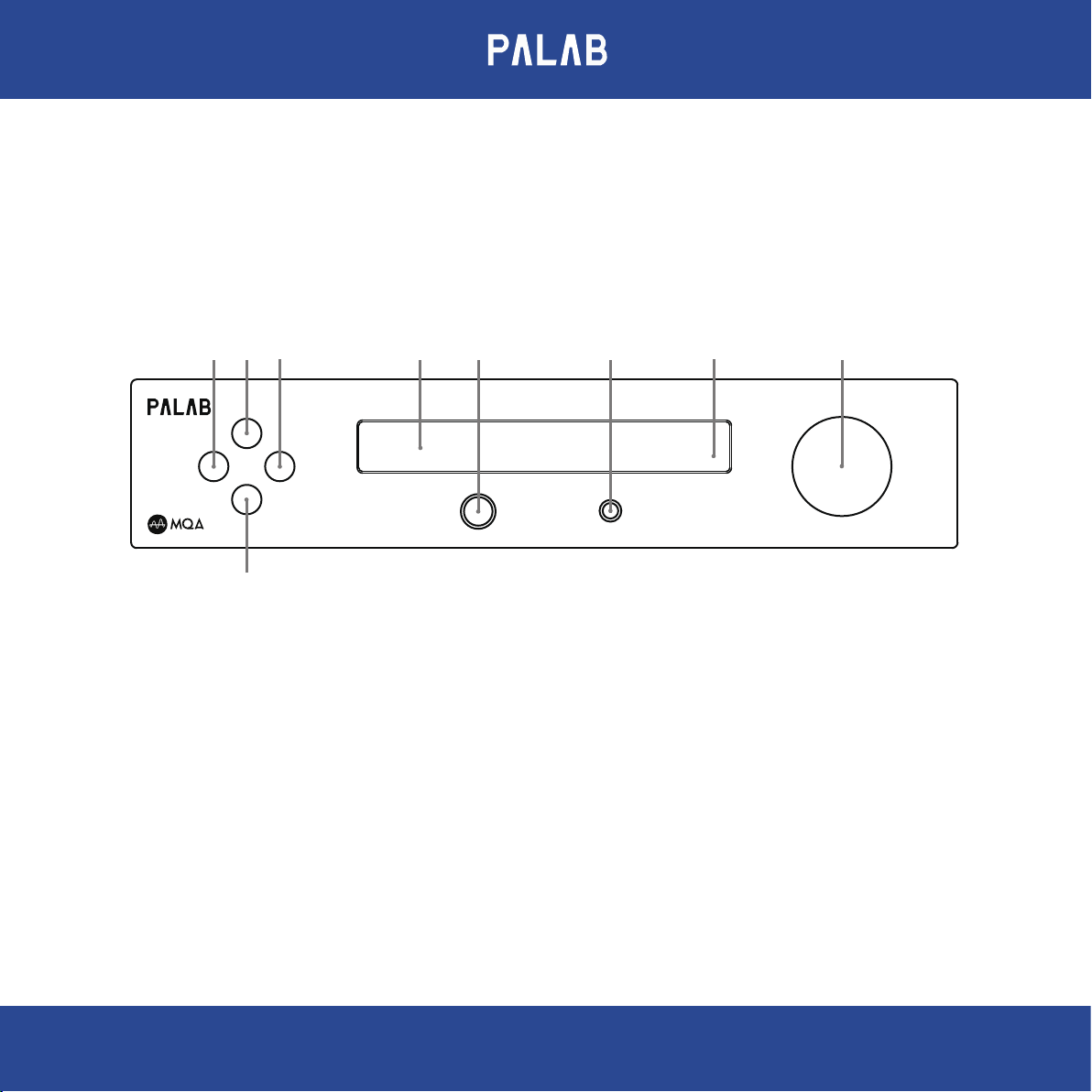
1. Front Panel View
2 34 5 6 7 9
M
◄ ►
P
1
1. Press to turn on or o the power
Input switch or switch menu item
2. & 3.
A. Press to switch between inputs
B. Use to change menu items in menu mode
4. Press to turn on or o the menu
5.
Display
DAC-M1 D/A CONVERTERS
PHONES
6.3
6. Standard 6.3mm (1/4") stereo headphone jack
7.
8. Standby led
9.
A. Press to mute / unmute.
B. Use to adjust the volume.
C. Use to change setting values when a menu item is shown.
8
4.4
4.4mm “Pentaconn” balanced headphone jack
Volume adjust / mute and change item values
VOLUME ● MUTE
06
Page 8
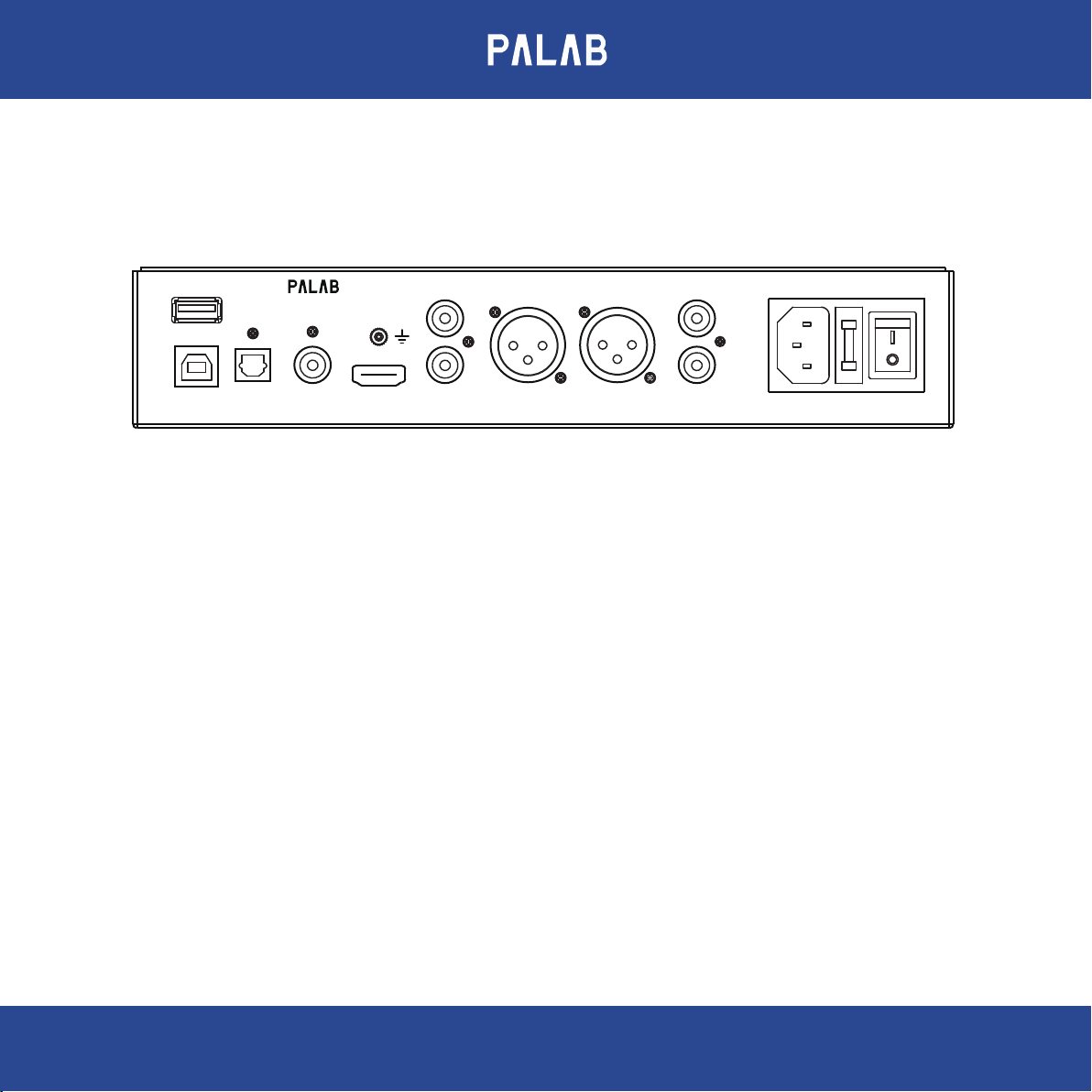
2. Rear Panel View
DAC-M1 D/A CONVERTERS
EXTENSION
OPTICAL COAXIAL
USB RCA IN
IIS/DSD
L
R
XLR - R
XLR - L
RCA OUT
L
R
POWER AC
Digital Inputs :
USB : USB slot is for connecting with the B Type USB to A Type USB 2.0 version cable to PC's USB port which is able to
send digital audio up to PCM 384KHz / DSD up to 256 and MQA.
Optical : Accept up to PCM 192KHz and MQA.
Coaxial : Accept up to PCM 192KHz and MQA.
IIS/DSD : With HDMI cable to transfer IIS and DSD data from PALAB source devices. Do not connect to the HDMI output
of Set Top Box or BD / DVD player.
Extension : For Bluetooth or Wi-Fi module. (option)
07
Page 9
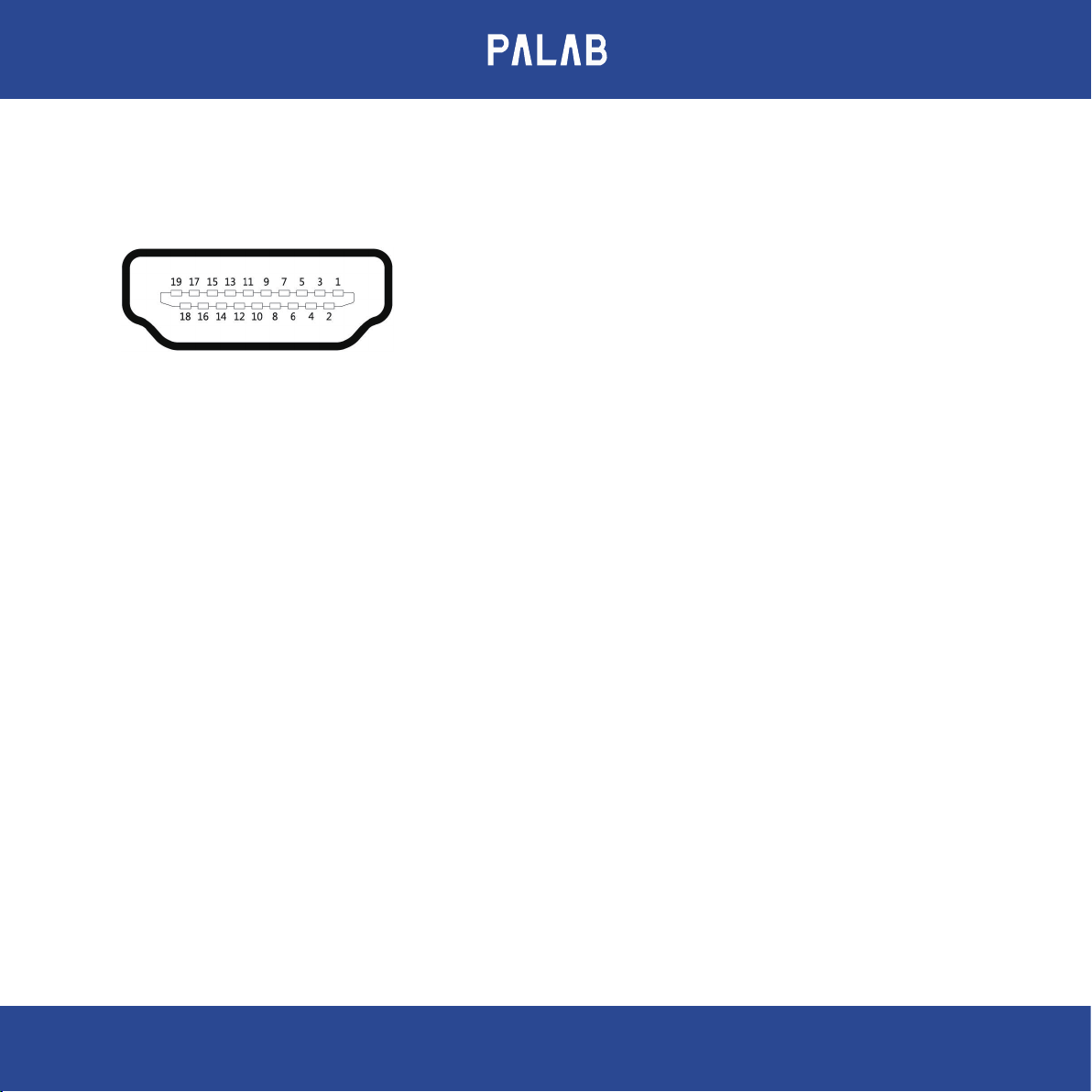
IIS / DSD Pin dene
PIN1 : SDATA - / DSD L-
PIN2 : GND
PIN3 : SDATA + / DSD L+
PIN4 : BCK + / DSD CLK +
PIN5 : GND
Note : DAC- M1 does not guarantee that all IIS/DSD source will operate and be compatible due to wide variety of
brands and custom specs.
PIN6 : BCK - / DSD CLK -
PIN7 : LRCK - / DSD R -
PIN8 : GND
PIN9 : LRCK + / DSD R +
PIN10 : NC
PIN11 : GND
PIN12 : NC
PIN13 : NC
PIN14 : NC
PIN15 : NC
PIN16 : NC
PIN17 : GND
PIN18 : NC
PIN19 : + 3.3V OUTPUT
Analog Input :
RCA IN : Stereo analog for CD/DVD/BD players, TV and any analog source device .
Analog Outputs :
1x Balanced Stereo Audio Output ( XLR MALE )
1x Stereo Audio Output ( RCA )
1x MMCX 4.4mm balanced headphone jack
1x 6.3 TRS headphone jack
08
Page 10
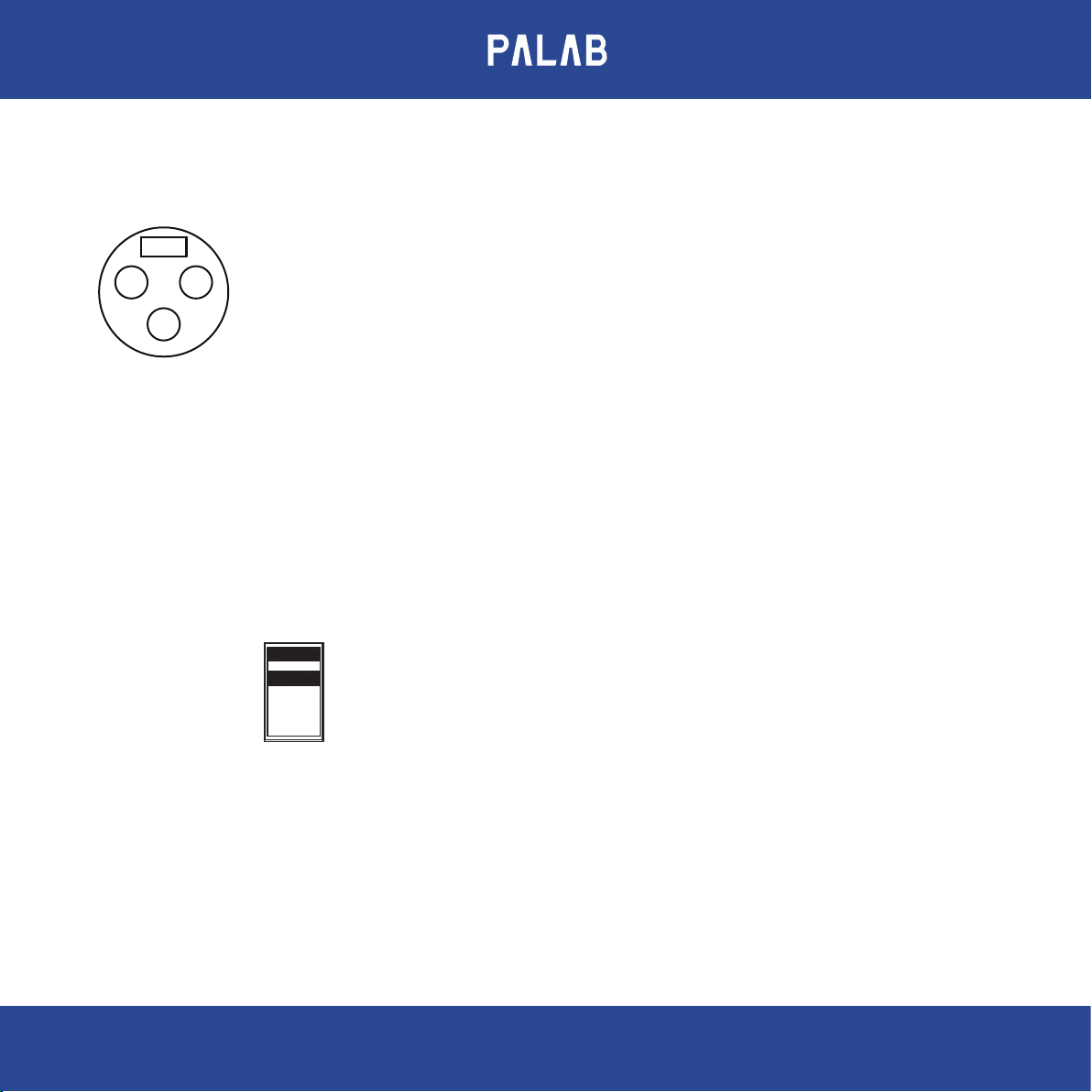
XLR MALE Pin dene
1
CASE
2
3
Pin 1 : Ground
Pin 2 : Positive (+)
Pin 3 : Negative (-)
Others :
Ground terminal : Chassis ground.
AC Inlet : Connect the supplied mains lead to the AC IN (115V or 230 V) terminal on the rear of the DAC.
AC Voltage Selector : Make sure that the AC voltage selector switch at the bottom of the unit is switched to the
appropriate voltage for your country. All PALAB products are shipped with the switch set
to 230V AC in order to prevent accidental damage.
230
09
Page 11
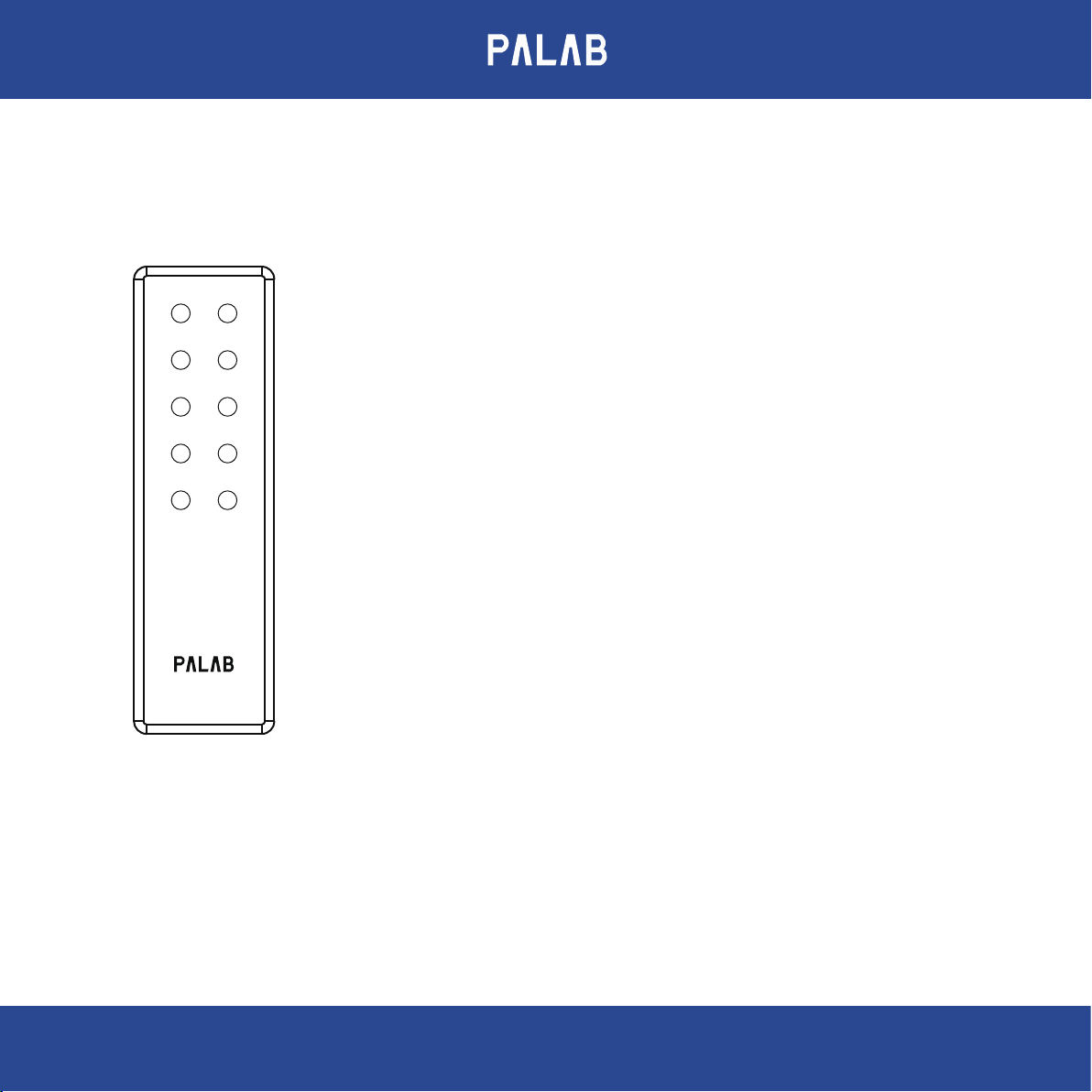
3. Remote Control
ON / STBY DISPLAY
MENU MUTE
• ON / STBY : Press to put the unit into standby mode or turn it on.
• DISPLAY : Display Input signal sampling frequency.
ITEM ▲ ITEM ▼
SOURCE ►◄ SOURCE
VOL ▲VOL ▼
DAC-M1
• MENU : Press to enter setting mode or return to the previous screen.
• MUTE : Mute / Unmute audio.
• ITEM : Press button to show the item that you want to set.
▲▼
• SOURCE : Select the playback source or change the setting value in menu mode.
• VOL : Increase / Decrease volume
◄►
▲▼
Battery Replacement:
To change the battery, please remove the 4 screws and the bottom cover
to reveal the battery casing.
10
Page 12
4. Start Up
Turn on the DAC-M1 display will rst show DAC-M1.
DAC-M1
Next, the usage status when the power was last turned o will be displayed. For example, the input is USB and the
volume is 88.
USB VOL 88
5. Display sample rate
Press the display button to display the locked sample rate, For example
PCM sample rate
PCM 44.1K or PCM 352.8K
DSD sample rate
DSD 64 or DSD 256
MQA original sample rate
MQA 44.1K or MQA352.8K
MQA Studio original sample rate
MQA STUDIO 352.8KHz
11
Page 13

6. Setup menu
Pressing the MENU button will display the set value when you left the menu last time, For example
Sample rate adjustment
SRC : OFF
Digital lter selection
DF : LIN FAST
Output setting
OUTPUT : L - R
DOP decode
DOP : DISABLE
Volume control mode
VOL ADJ : INDI
Display brightness
DIMM : BRIGHT
12
Page 14
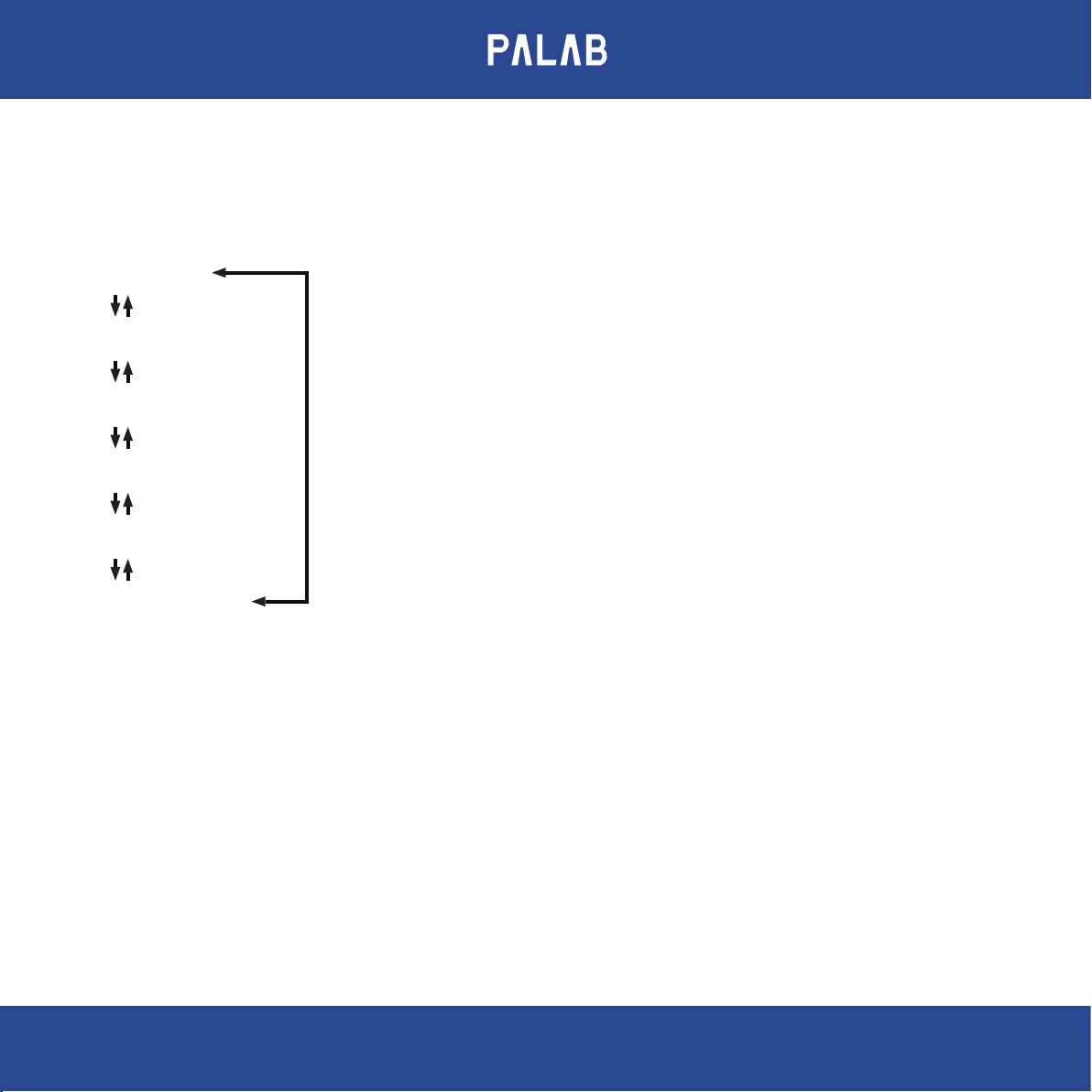
7. Menu structure
The menu items appear in the following order
SRC : OFF
DF : LIN FAST
OUTPUT : L - R
DOP : DISABLE
VOL ADJ : INDE
DIMM : BRIGHT
Output setting
DOP Decoder
Sample rate
SRC : OFF
SRC : PCM 44K
SRC : PCM 48K
SRC : PCM 88K
SRC : PCM 96K
SRC : PCM 176K
SRC : PCM 192K
SRC : PCM 352K
SRC : PCM 384K
SRC : DSD 64
SRC : DSD 128
SRC : DSD256
Volume control mode
Digital lter
DF : LIN FAST
DF : LIN SLOW
DF : MIN FAST
DF : MIN SLOW
DF : APODIZING
DF : CORRECTED
DF : BRICK WALL
Display brightness
OUTPUT : L - R
OUTPUT : R - L
OUTPUT : L - L
OUTPUT : R - R
DOP : DISABLE
DOP : ENABLE
VOL ADJ : INDi
VOL ADJ : LINK
13
DIMM : BRIGHT
DIMM : HALF
DIMM : DARK
Page 15

7-1. Sample rate conversion
Use to activate the up or down conversion circuit when receiving PCM or DSD signals.
SRC : OFF ( default )
The original input signal is sent directly to the D/A converter without conversion.
SRC : PCM xxK or SRC : DSD xx
The input source is converted to PCM or DSD digital format, and then sent to the D/A converter.
7-2. PCM digital lter
The Digital Filter function primarily changes characteristics outside the audible frequency, They cannot aect
changes within the audible frequency, You can choose the following digital lter.
DF : LIN FAST ( Linear phase fast roll-o lter ) ( default)
DF : LIN SLOW ( Linear phase slow roll-o lter )
DF : MIN FAST ( Minimum phase fast roll-o lter )
DF : MIN SLOW ( Minimum phase slow roll-o lter )
DF : APODIZING ( Apodizing fast roll-o lter )
DF : CORRECTED ( Corrected minimum phase fast roll-o lter )
DF : BRICK WALL ( Brick wall lter )
7-3. Analog output
You can choose to have the left and right channel outputs swapped or work in single channel mode.
OUTPUT : L - R ( default )
OUTPUT : R - L
OUTPUT : L - L
OUTPUT : R - R
14
Page 16

7-4. DOP ( DSD over PCM ) decod
Enable this feature when you want to use Coaxial or Optical to receive DOP signals, When the DOP decoder is enabled,
the MQA decoding function will be turned o at the same time.
DOP : DISABLE ( default )
DOP : ENABLE
Note : MQA signal cannot be decoded after DOP is enabled
7-5. Volume control mode
The volume can be adjusted individually for each input, or all inputs can be adjusted together.
VOL ADJ : INDI ( Individually ) ( default )
VOL ADJ : LINK
7-6. Display brightness
Three-level display brightness adjustment.
DIMM : BRIGHT ( default )
DIMM : HALF
DIMM : DARK
15
Page 17
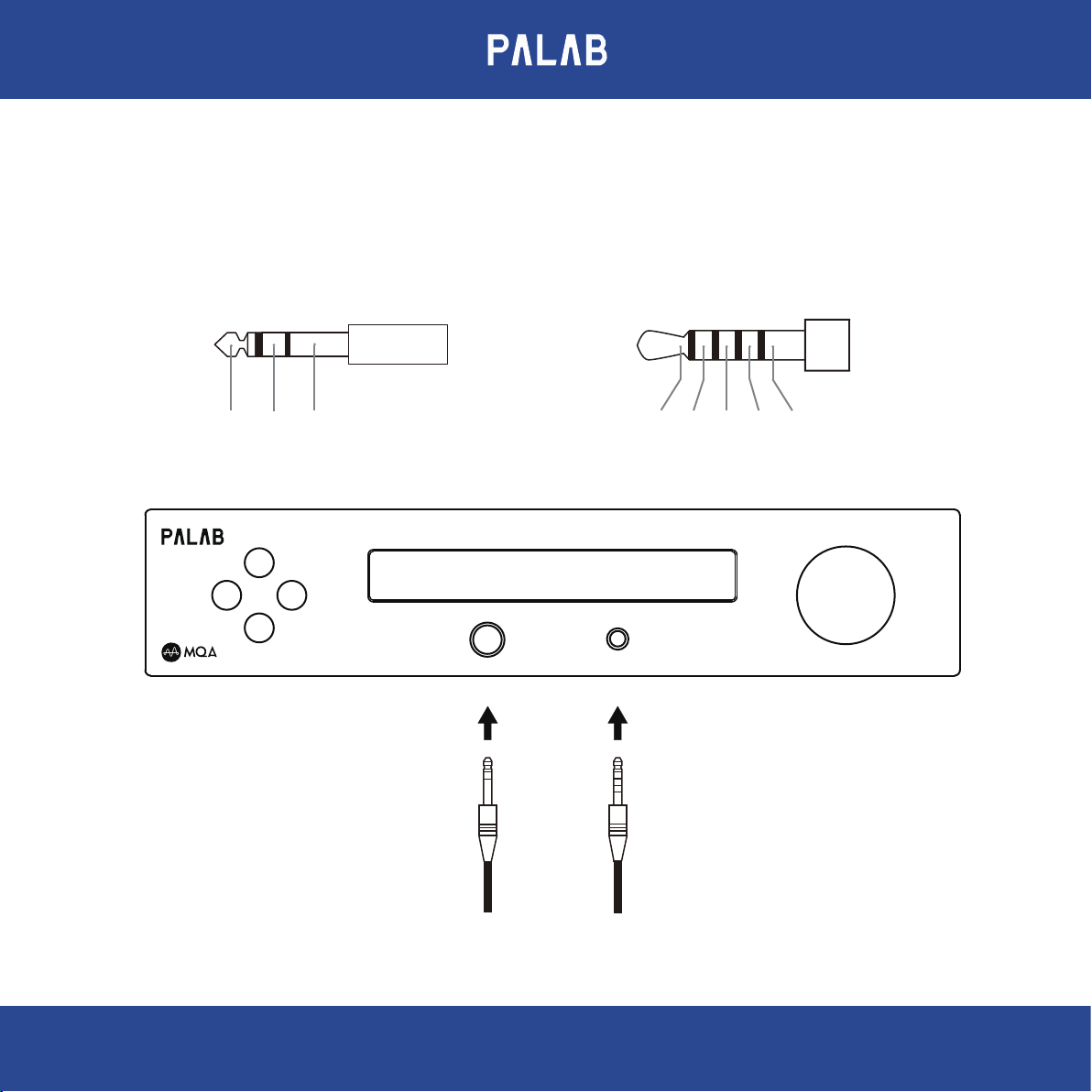
8. Connections ( Front Panel )
Wiring illustration
Standard 6.3mm stereo plugs
LEFT RIGHT GND
M
◄ ►
P
If headphones are connected, sound will
stop being output from the rear panel
connectors.
DAC-M1 D/A CONVERTERS
PHONES
6.3
JEIT standard RC-8141C
L+
L- R+
4.4
R- GND
VOLUME ● MUTE
16
Page 18
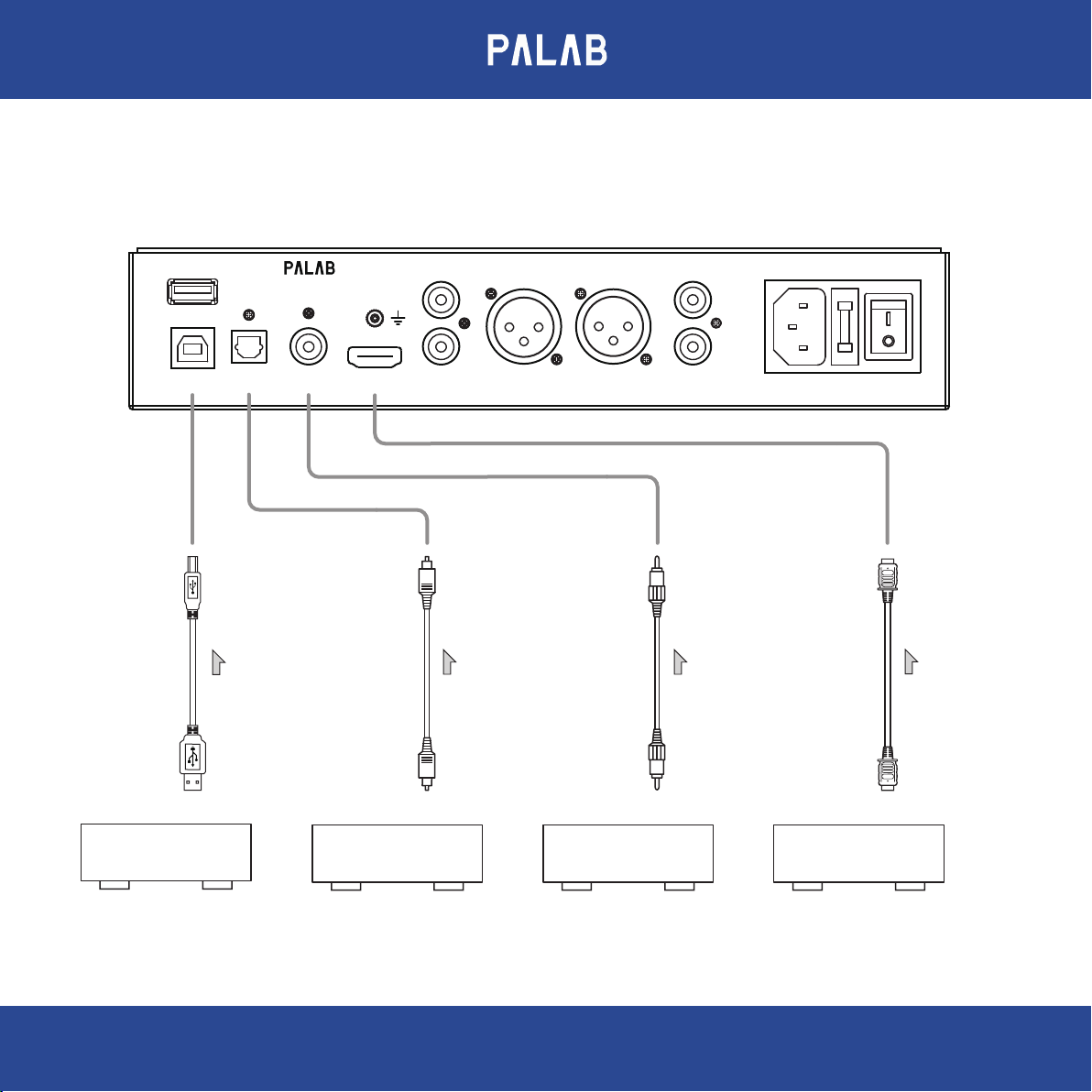
9. Connections ( Rear Panel )
DAC-M1 D/A CONVERTERS
EXTENSION
OPTICAL COAXIAL
USB RCA IN
High speed USB 2.0 cable
IIS/DSD
L
R
XLR - R
Optical cable
XLR - L
Coaxial cable
RCA OUT
L
R
POWER AC
HDMI cable
USB 2.0 or USB 3.0
OPTICAL DIGITAL OUTPUT COAXIAL DIGITAL OUTPUT IIS/DSD DIGITAL OUTPUT
Computer CD Player CD Player CD Transport
17
Page 19
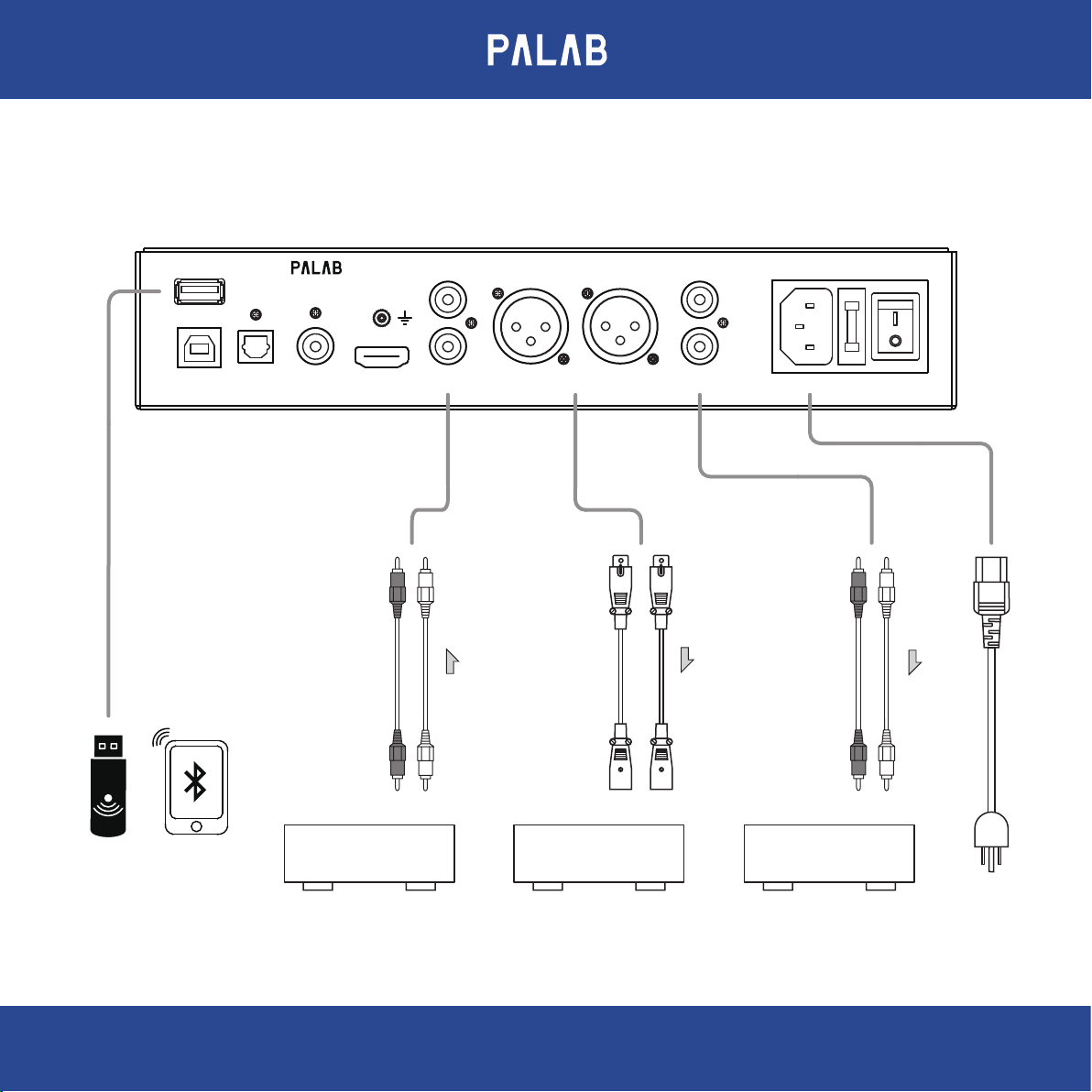
EXTENSION
DAC-M1 D/A CONVERTERS
L
L
Bluetooth or
WiFi Module
( Option )
OPTICAL COAXIAL
USB RCA IN
IIS/DSD
RCA Audio Cables
LINE OUTPUT
CD Player
R
XLR - R
XLR AUDIO INPUT
STEREO AMPLIFIER
XLR Audio Cables
XLR - L
RCA OUT
R
POWER AC
RCA Audio Cables
RCA AUDIO INPUT
TO MAINS
STEREO AMPLIFIER
18
Page 20

10. Windows Driver install
10-1. System requirements
Win 7 / 8 / 8.1 / 10 ( 32/64-bit )
10-2. Windows Installation Process
Please connect the DAC-M1 to the computer before installing the Windows driver.
10-3. Driver install
1. Please visit www.palabaudio.com and download the latest driver.
2. Open the driver folder and click setup.exe the driver will installer. connect the unit along with the source device.
3. Follow the onscreen directions. Please allow 3 ~ 5 minutes for the installer to complete. On older computers, it may
take longer.
Note : During the setup the hardware device must be connect to your PC source device and when the message
appear to ask for disconnect and reconnect, follow the instruction and when nish doing so click on “OK”. The source
device should recognize the PALAB USB device and a message will show on the bottom.
11. Uninstall Windows Driver
1. Open the Control Panel from START and double click on the Control Panel then select Add or Remove Programs.
2. Select PALAB USB USBAudio Driver and click Remove.
3. Click Yes to conrm the removal.
12. Mac Installation Process
There is no installation require for Mac system however, a simple setting is require in order to allow the USB HD
Audio to be active.
19
Page 21

13. MQA - Master Quality Authenticated
The DAC-M1 includes MQA technology,which enables you to play back MQA audio les and streams, delivering the
sound of the original master recording. The front panel display indicates if the MQA stream is detected. ‘MQA’ or
‘MQA Studio’ indicates that the product is decoding and playing an MQA stream or le, and denotes provenance to
ensure that the sound is identical to that of the source material. ‘‘MQA Studio’ indicates it is playing an MQA Studio le,
which has either been approved in the studio by the artist/producer or has been veried by the copyright owner. For
more about MQA please visit: http://www.mqa.co.uk/
‘Manufactured under licence from MQA Limited. The MQA logo is a trade mark of MQA Limited’.
Note : During MQA playback, the Sample rate conversion function will be disabled and force to o mode. also digital
lter function will be disabled and force to
Linear phase fast roll-o lter mode.
14. Technical Specications
Inputs : Rear panel
• USB : Type B 2.0 Hi-Speed, Windows OS : data stream up to 384KHz/24Bit and Native DSD 256.
Type B 2.0 Hi-Speed, Mac / Lunix OS : data stream up to 384KHz/24Bit and DOP DSD 128.
• OPTICAL : Supports PCM 44.1KHz ~ 192KHz/24Bit and DOP 64.
• COAXIAL : Supports PCM 44.1KHz ~ 192KHz/24Bit and DOP 64 and128.
• IIS/DSD : Supports PCM 384KHz/32Bit and DSD 256 data streams.
• RCA : Up to 2 Vrms audio signal.
• EXTENSION : Supports PCM 44.1KHz ~ 192KHz/24Bit.
Outputs : Front panel
• TRS 6.35mm :
Output power: 1700 mW, 32 ohms, <0.01% THD (watts per channel).
Output power: 135 mW, 600 ohms, <0.005% THD (watts per channel).
20
Page 22

• MMCX 4.4mm :
Output power: 1700 mW, 32 ohms, <0.01% THD (watts per channel).
Output power: 135 mW, 600 ohms, <0.005% THD (watts per channel).
Outputs : Rear panel
• RCA unbalanced outputs : 4 Vrms
• XLR balanced outputs : 8 Vrms
• Output Impedance: < 50 Ohm.
• Frequency response: 20 Hz - 20 KHz / ±0.3 dB.
• SNR: > 110 dB.
• THD+N: < 0.0005%.
15. GENERAL
• Power Supply: AC voltage selector switch at the bottom of the unit, 115V or 230V.
• Dimensions [W x H x D]:
• Weight:
• Power consumption:
16. Package content
• The DAC-M1 ( Black )
• Aluminum remote
• Power cord
21
Page 23

PALAB Limited Warranty and Limitation of Liabilities
ADDITIONAL RIGHTS
For consumers, who are covered by consumer protection laws or regulations in their country of purchase or, If dierent,
Their country of residence, The bennets conferred by thid warranty are in addition to all rights and remedies converyed
by such consumer protection laws and regulations. This warranty does not exclude, Limit or suspend any rights of
consumers arising out of nonconformity with a sales contract. Some countries, States and provinces do not allow the
exclusion or limitation of incidental or consequential damages or allow limitations on how long an implied warranty or
condition may last, So the limitations or exclusions described below may not apply to you. This warranty gives you
specic legal rights, And you may also have other rights that vary by country, State or province. This limited warranty is
governed by and construed under the laws of the country in which the product purchase took place.
LIMITED WARRANTY
For a period of ONE (1) Year from the date of retail purchase by the original end-user purchaser ( “Warranty Period”),
PALAB warrants (in) this product against defects in materials and workmanship, and (ii) that each product, unmodied
and under normal use and conditions, will substantially comply with PALAB ’ applicable written technical documentation
for the product. PALAB reserves the right to make substitutions and modications from time to time in the specications
of products sold by PALAB, provided that such substitutions or modications do not materially aect overall product
performance.
If a hardware defect exists and a valid claim is received within the Warranty Period, at its option and to the extent
permitted by law, PALAB will (1) repair the hardware defect at no charge, using new or refurbished replacement parts,
(2) exchange the product with a product that is new or which has been manufactured from new or serviceable used parts
and is at least functionally equivalent to the original product, or (3) refund the purchase price of the product. PALAB may
request that you replace defective parts with user-installable new or refurbished parts that PALAB provides in fulllment
of its warranty obligation. A replacement product/part assumes the remaining warranty of the original product or ninety
(90) days from the date of replacement or repair, whichever provides longer coverage for you. When a product or part is
exchanged, any replacement item becomes your property and the replaced item becomes PALAB's property. When a
refund is given, your product becomes PALAB's property.
22
Page 24

OBTAINING WARRANTY SERVICE
If you purchased the product in the U.S., deliver the product, at your expense, to any PALAB Service Center located in
the U.S. If you purchased the product outside of the U.S., deliver the product to any PALAB Authorized Importer in the
country where you purchased the product. Be aware, however, that not all countries have PALAB Authorized Service
Providers (‘NASP’) and not all Authorized Service Providers outside the country of purchase have all parts or
replacement units for the product. If the product cannot be repaired or replaced in the country it is in, it may need to
be sent to a dierent country or returned to the country of purchase at your expense for repair or replacement. If you
seek service in a country that is not the country of original purchase, you will comply with all applicable import and
export laws and regulations and be responsible for all custom duties, V.A.T. and other associated taxes and charges.
Where international service is available, PALAB may repair or exchange defective products and parts with comparable
products and parts that comply with local standards. You can always deliver the product to PALAB U.S. main service
center for obtaining warranty service, however, you may have to pay for return shipping cost.
PALAB may send you user-installable new or refurbished replacement product or parts to enable you to service or
exchange your own product (“DIY Service”). Upon receipt of the replacement product or part, the original product or
part becomes the property of PALAB and you agree to follow instructions, including, if required, arranging the return
of original product or part to PALAB in a timely manner.
When providing DIY Service requiring the return of the original product or part, PALAB may require a credit card
authorization as security for the retail price of the replacement product or part and applicable shipping costs. If you
follow instructions, PALAB will cancel the credit card authorization, so you will not be charged for the product or part
and shipping costs. If you fail to return the replaced product or part as instructed or the replaced product or part is not
eligible for warranty service, PALAB will charge the credit card for the authorized amount.
EXCLUSIONS AND LIMITATIONS
This Limited Warranty applies only to hardware products manufactured by or for PALAB that can be identied by the
"PALAB" trademark, trade name, or logo axed to them. The Limited Warranty does not apply to any non-PALAB
hardware products or any accessories, even if packaged or sold with PALAB hardware. Non-PALAB manufacturers,
23
Page 25

suppliers, may provide their own warranties. Other accessories distributed by PALAB under the PALAB brand name are
not covered under this Limited Warranty. This warranty does not apply: (a) to damage caused by accident, abuse,
misuse, misapplication, liquid contact, re, earthquake, non-PALAB products, or other external causes; (b) to damage
caused by service performed by anyone who is not a NASP; (c) to a product or a part that has been modied without
the written permission of PALAB; (d) to consumable parts, such as batteries, or protective coatings designed to diminish
over time unless failure has occurred due to a defect in materials or workmanship; (e) to cosmetic damage, including
but not limited to scratches, dents, and broken plastic on ports; (f) to defects caused by normal wear and tear or
otherwise due to the normal aging of the product; or (g) if any PALAB serial number has been removed or defaced.
Important: Do not open the hardware product. Opening the hardware product may cause damage that is not covered
by this warranty. Only PALAB or a NASP should perform service on this hardware product.
This warranty and remedies set forth above are exclusive and lieu of all other warranties, remedies and conditions,
Whether oral or written, Express or implied. PALAB specically disclaims any and all implied warranties, including,
whitout limitation, warranties of merchantability and tness for a particular purpose. If PALAB cannot lawfully disclaim
implied warranties under this limited warranty, All such warranties, Including warranties of merchantability and tness
for a particylar purpose are limited in duration to the duration of this warranty. No PALAB reseller, agent, or employee is
authorized to make any modication, extension, or addition to this warranty.
PALAB is not responsible for direct, special, incidental or consequential damages resulting from any breach of warranty
or condition, or under any other legal theory, Including but not limited to lost prots, downtime, goodwill, damage to or
replacement of equipment and property, Any costs of recovering, reprogramming, or reproducing any program or data
stored in or used with PALAB products, and any failure to maintain the condentiality of data stored on the product.
PALAB specically does not represent that it will be able to repair any product under this warranty or make a product
exchange without risk to or loss of programs or data.
PALAB shall not be liable for any incidental or consequential damages for breach of any express or implied warranty
on this product. Except to the extent prohibited by applicable law, any implied warranty of merchantability or tness
for a particular purpose on this product is limited in duration to the duration of this warranty.
24
Page 26

 Loading...