

Page 1

WIRED CHIPS®
UNIVERSAL
AUDIO
Page 2

Hi.
Page 3

Good call on picking up the Outdoor
Tech® Wired Chips®, universal wired
helmet audio. Your experience of the
universe will now be enhanced by our
slick button controls and awesome
audio quality. We created this manual
so that you and your new Wired Chips®
will be the best of buds. Pull up a chair,
put your spectacles on, and learn a
thing or two.
Kisses,
Page 4
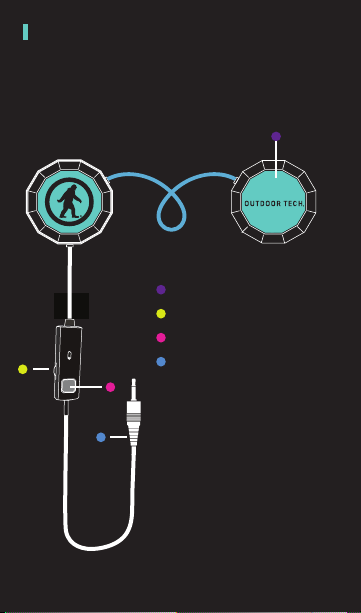
ANATOMY
LEFT EAR
RIGHT EAR
Primary MFB
Volume
Secondary MFB
3.55 mm jack
*ODT DICTIONARY
-MFB=Main Function Button
Page 5
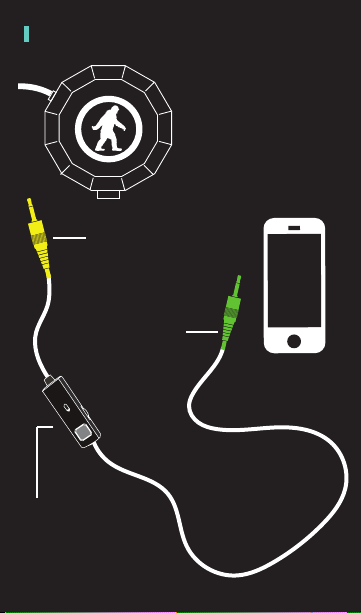
ANATOMY (CONTINUED)
Plug this end into the
Wired Chips® port.
*You will know its the right
end of the cord based on the
direction of the handsfree
controls.
Plug this end of the
cord into your device.
The handsfree control will
have the same capabilities
for functions/actions as the
Right ear speaker button.
The included 3.5mm cord
has two specific ends
that you must connect
to the Wired Chips® and
your preferred audio
source.
Connect the auxillary jack
into the Left ear speaker.
*The length of the wire from
the handsfree control to
the end that goes into your
device will be significantly
longer than the other length.
Page 6
CONTROLS
Wired Chips® have only one similarity
to your Average Joe’s headphones or
earbuds; they don’t need to be charged.
Other than that, these aren’t your mom’s
helmet audio.
There are two ways to control your
Chips®, the most convenient and
the one we recommend is through
our patented on ear button control,
but we like options, so there is also
an in-line control (they both do the
same thing).
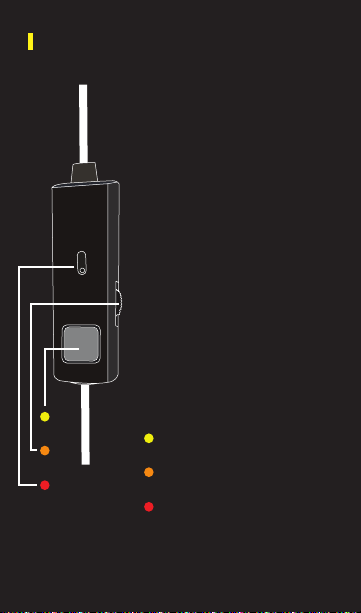
Method 1: Use the large tactile button
that is built into the left speaker, this
will control everything other than
volume.
Method 2: The MFB button on the
in-line control cable, same function,
but smaller, harder to locate and use
with gloves on, you choose.
Oh, you can control volume two ways
also, on your phone or audio source
device and on the roller wheel.
Multifunction Button
Volume wheel
Microphone
Page 7
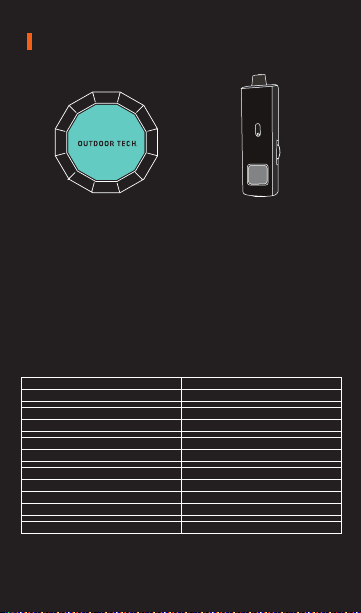
DUAL OPTIONS
=
RIGHT EAR BUTTON IN-LINE CONTROLS
Again, the choice is yours, use the primary
on ear MFB button or the in-line MFB button,
they function the same way.
FUNCTION ACTION
Play
Pause
Raise Volume
Lower Volume
Skip Forward
Skip Backward
Answer
Reject
Hang up
Mute
Siri/Voice Activation
*Don’t worry. We believe you can handle it.
Crazy, we know. One button does it all.
Don’t worry, we believe you can handle it.
Short press once
Short press once
Turn volume wheel up
Turn volume wheel down
Short press twice
Short press three times
Short press once
Long press for 2 sec
Short press twice
Turn volume wheel down
Long press for 2 sec
Press till song skips
Page 8

TALK
The built-in microphone on the in-line means that you
can answer phone calls with your Chips®.
Good for you.
The following are tips on how to use your Chips® button
to speak on the telephone:
Answer a call............. Press right ear button
End a call................... Press right ear button
Decline a call............. Press and hold the right ear
button for two seconds
Make a call................ Use your phone to dial as usual
Listen & talk through the Chips®
or use Siri/Voice Activation to do
so.
Mute/cancel mute
during a call.............. Turn down the volume wheel /
Turn up the volume wheel
Volume up during a
call.......................... Turn up the volume wheel
Volume down during
a call........................ Turn down the volume wheel
Page 9

CARE & MAINTENANCE
-Keep the Chips® dry
-Keep the Chips® away from direct sunlight or hot
places. High temperatures will shorten the life
of electronic devices, destroy the battery or
distort certain plastic parts.
-Do not try to disassemble the Chips®.
-Do not let the Chips® fall onto the floor or other
hard surfaces. The internal circuit board may get
damaged.
-Do not use intensive chemical products or
detergent to clean the product.
-Do not scratch the surface with sharp things.
Page 10
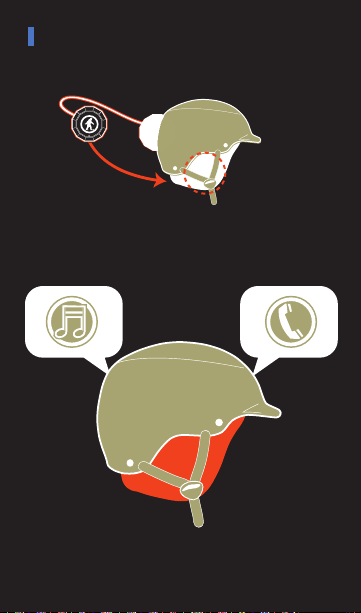
PUT THE CHIPS IN YOUR HELMET
1. Drop the Chips® into the slots inside your
helmet liner.
2. Rock out, make calls, and, you know, ski
and snowboard and whatnot.
Page 11

LAST NOTE
dang it.
Well, we’ve all been there and know that this
situation totally sucks.
So don’t let this be you on the mountain.
Keep your hands warm and the mobile device
that connects you to your mom safe and
sound. Use your Chips®
Page 12

DON’T BE SO ANTISOCIAL
Facebook.com/outdoortech
Twitter & Instagram: @outdoortech
Questions, comments, complaints, secret desires,
or just to say what’s up: email [email protected]
K bye.
outdoortech.com
U.S. Des. Pat. No. D704,676 S.
 Loading...