

Page 1

ORCAS
ACTIVE
EARBUDS
Page 2

Page 3

Hi.
Page 4

Good call on picking up the Outdoor Tech®
Orcas wireless earbuds. Your experience
of the universe will soon be enhanced
wirelessly. This manual exists to help make
sure that you use them correctly, so you’re
denitely going to want to relax for a hot
second and look through this.
Kisses,
Page 5

CONTENTS
Anatomy
Power Up
Pairing
Talk
Features
Specs
FAQ
Care & Maintenance
1
3
4
5
7
8
9
10
Page 6
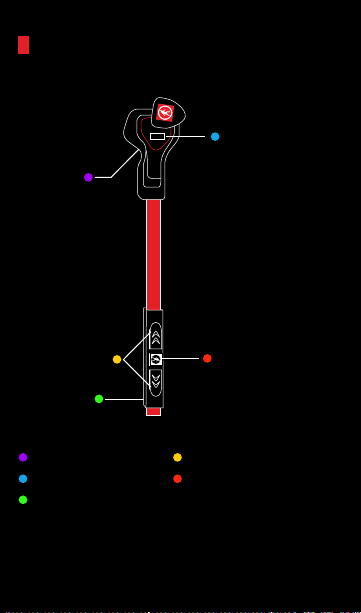
ANATOMY
LED Indicator
Charging Jack
Microphone
Volume/Track Control
Multifunction Button
(on reverse)
Page 7
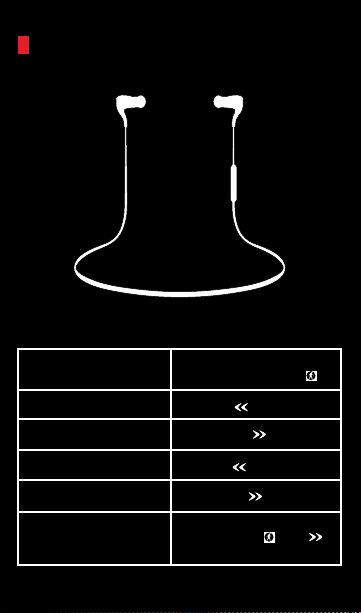
ANATOMY
Function Action
Play/Pause/
Answer/Hang Up
Raise Volume
Lower Volume
Skip Forward
Skip Back
Voice Command/Siri
Press the
multifunction button
Press up
Press down
Hold up
Hold down
Short Press the
multifunction & up
button simultaneously
Page 8
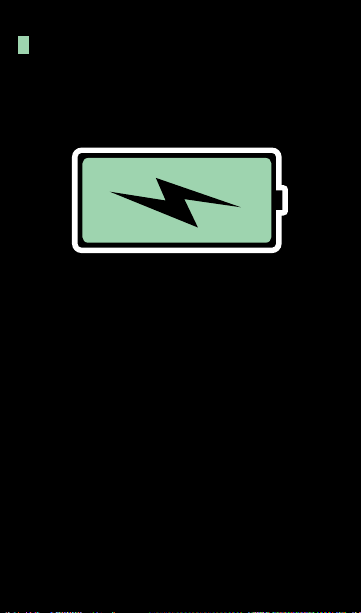
POWER UP
For best results, fully charge your Orcas before use.
For a full charge, plug the Orcas into your wall charger
or computer via micro USB cable.
The LED indicator located below the right ear piece will
flash red to indicate a low battery.
NOTE: It takes 2 hours to give your Orcas a full charge.
Page 9

PAIRING
Entering Pairing Mode
1. Hold the “multifunction button ( )” down until the
LED flashes red and blue alternately.
2. Release “button,” you are now in pairing mode.
Pair
Go to your device’s Bluetooth settings
ADD or SEARCH devices.
When “ODT ORCAS” appears, select it.
*If asked for a pass code: Enter “0000”
After successfully connecting, the blue LED will flash
twice every 4 seconds.
You should now be able to play music & make/receive
calls using the headset. Hooray.
Page 10
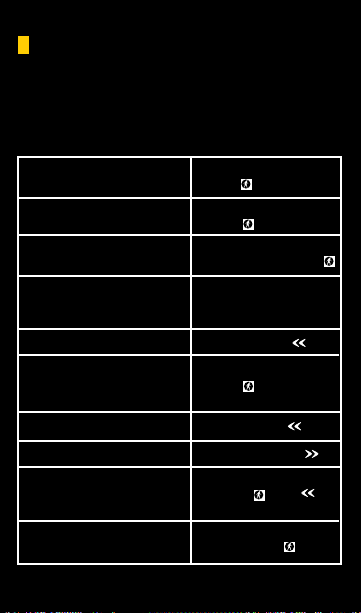
TALK
The following are tips on how to use your Orcas to talk
on the phone:
Answer/ Cancel a call
End a call
Decline a call
Make a call
Mute/cancel mute
Transfer conversation
to mobile phone or
headset during a call
Volume up during a call
Volume down during a call
Voice dial
Redial last number
Press the multifunction
button
Press the multifunction
button
Press & Hold the
multifunction button
Use your phone to dial
as usual. Listen & talk
through the Orcas.
Press & hold up
Press the multifunction
button
Short press up
Short press down
Short Press the multifunction & up
button simultaneously
Double click the
multifunction button
Page 11
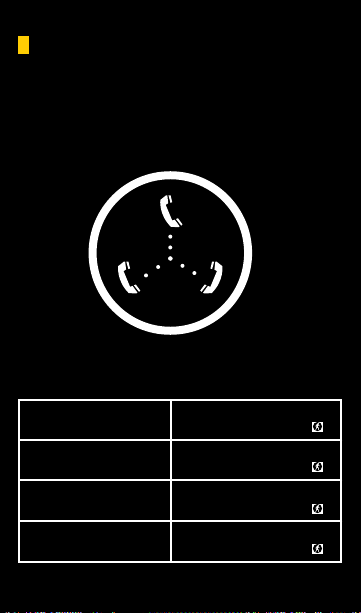
TALK (THE FANCY STUFF)
You’re popular. What happens when you’re on a call
with your girlfriend and your mom calls?
Answer new call
& end current call:
Answer new call
& retain current call:
Switch calls:
End current call &
switch retained call:
Short press the
multifunction button
Double Click the
multifunction Button
Double click the
multifunction Button
Short press the
multifunction Button
Page 12
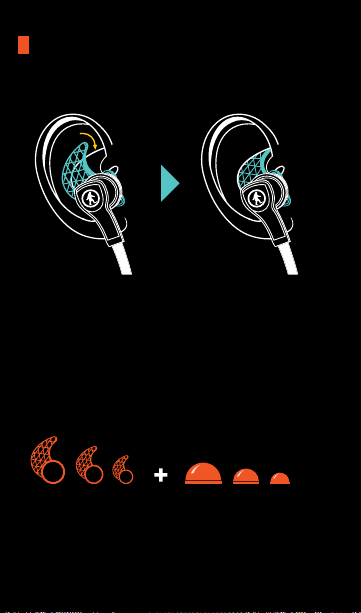
FEATURES: ORCA FINS
THE ORCA “FINS” PROVIDE A SUPER LEGIT FIT.
AND WE HAVE FIT OPTIONS FOR EVERYONE
Page 13

SPECS
Battery Life: Continuous talk/music time 5 hours,
Standby time/150 hours
*Battery life varies subject to different playing circumstances such as music type and volume.
Bluetooth Version: V4.0
Bluetooth Profiles: A2DP, aptX, AVRCP
Operating distance: 32 feet
Dimensions: 37 x 16 x 28 mm
Weight: 13g
Page 14

FAQ
1. Why is the LED flashing red instead of blue?
The battery is low. Recharge it.
2. Why is the red LED off when charging?
A. Make sure the connection between the charging
cable and the Orcas is tight.
B. If the Orcas haven’t been used in awhile, the light
may not come on immediately. Charge the battery
for at least 30 minutes.
3. Why cant I pair my Orcas?
Your Bluetooth device and the chips must both be in
pairing mode.
4. Why can’t I hear the sound on the headset?
A. Make sure the Orcas are on.
B. Make sure the volume is not too low or muted.
C. Make sure the Orcas are properly connected
with your device.
D. Make sure the Orcas are within range of your device.
5. Why can’t I hear the sound clearly on the headset?
A. Move your orcas closer to your device.
B. Make sure your Orcas are charged up.
C. Turn off your Orcas and device, then power
up and reconnect.
6. Why the pause/play, last/next song not function
when playing music?
Make sure your Bluetooth device supports AVRCP
(Audio/Video Remote Control profile)
Page 15

CARE & MAINTENANCE
- Keep the Orcas Dry
- Keep the Orcas away from direct sunlight or hot
places. High temperatures will shorten the life of
electronic devices, destroy the battery or distort
certain plastic parts.
- Do not try to disassemble the Orcas.
- Do not let the Orcas fall onto the floor or other
hard surfaces. The internal circuit board may
get damaged.
- Do not use intensive chemical products or detergent
to clean the product.
- Do not scratch the surface with sharp things.
Page 16

DON’T BE SO ANTISOCIAL
Facebook.com/outdoortech
Twitter & Instagram: @outdoortech
Questions, comments, complaints, secret desires,
or just to say what’s up: email [email protected]
K bye.
outdoortech.com
 Loading...