

Page 1
Cordless Multi-Purpose
+
-
Air Compressor OTB300
User Guide
[Revision 3.0 July 2018]
Safety
Read and understand this user guide before using the equipment. Retain the user guide for future reference.
Any damage or equipment failure due to incorrect usage is not covered by warranty.
• Always wear ANSI approved safety goggles when working with tools and equipment.
• When inflating tyres etc, do not exceed the pressures recommended by the manufacturer.
• Do not submerge the device as damage to the unit may occur.
• Always monitor inflation to avoid over-inflation or bursting of the inflated item.
• If inflation time exceeds 3 minutes be aware that some parts of the device may become hot.
Overview and Controls
The OTB300 is designed for general domestic inflation tasks, and includes additional functions:
• Standard vehicle 12VDC charging (charging cable / adaptor included).
• Programmable inflation pressure - automatically stops when required pressure is reached (Schrader type
plus 3 additional valve adaptors included).
• Charging/powering USB devices.
• Battery charge indicator.
• Torch function.
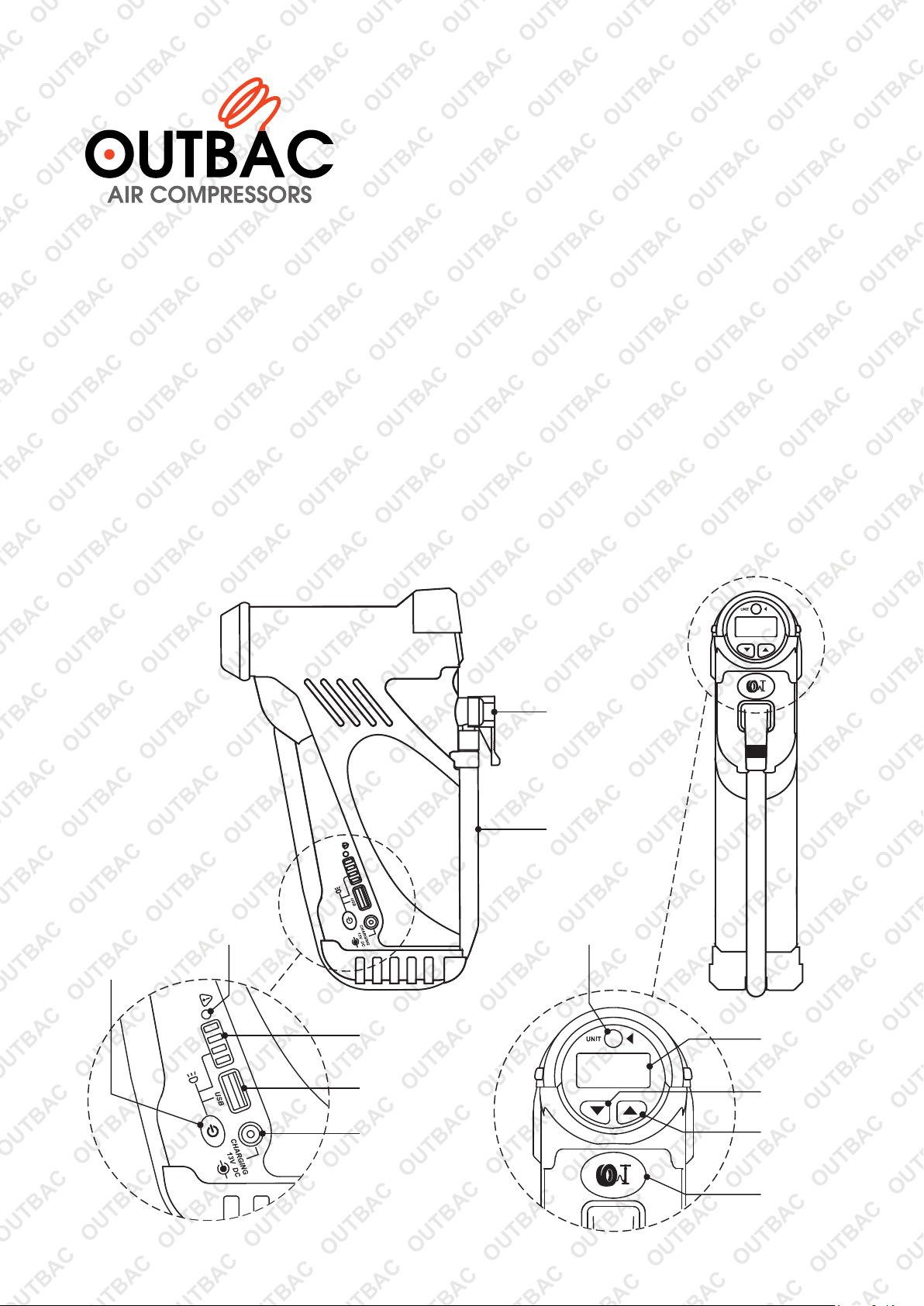
Torch / USB
Charging
Switch
Fault
Indicator
+
-
Battery Level
Indicator
USB
Connector
Charging
Connector
Valve
Adaptor
Air Hose
Pressure
Unit
Display
Decrease
Pressure
Increase
Pressure
Inflation
ON / OFF
Page 2
Operation
Note: Before use, ensure that all parts have been supplied and the battery is
fully charged. Initial charge may take up to 48 hours.
Charging the Battery
12VDC
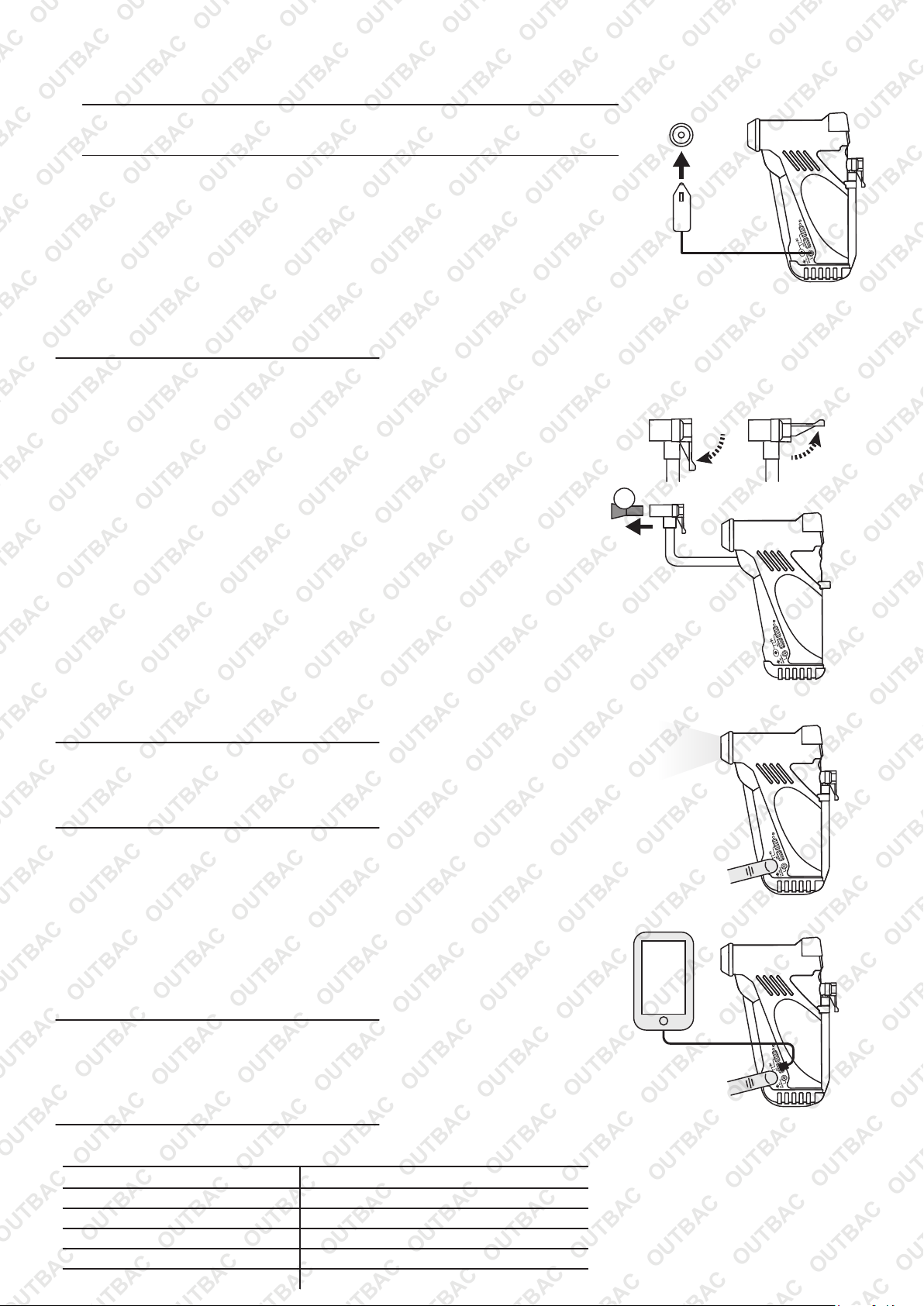
Connect the supplied charging cable to a standard 12VDC vehicle socket.
1
Connect the other end of the cable to the compressor Charging Connector.
2
When charging, the Battery Level Indicator flashes.
3
When fully charged, all 4 indicator lights will illuminate and remain on.
4
Charging
+
-
Note: For the compressor to reach full charge (4 Bars) the car engine needs to be running. With the car engine
turned off there will only be 12.8v running through the unit’s charger, once the car engine is started the charge rate
will increase to around 14v and the battery will charge up to 4 bars.
Using the Compressor for Inflation
Unclip the Air Hose from the unit. Unlock and securely connect the Valve
1
Adaptor to the valve of the item to be inflated (X), then lock the adaptor. If
required, attach the necessary adaptor into the Valve Adaptor.
Press the Inflation ON / OFF button to turn the unit on - the compressor
2
may activate for a short period. If no other buttons are pressed, the unit
3
will switch off after several seconds.
Press the Increase Pressure / Decrease Pressure buttons as required
until the desired pressure is shown in the Display. If required, press the
Pressure Unit button to change the unit of measurement between PSI,
4
Bar, KPa and kgf.
Press the Increase Pressure / Decrease Pressure buttons
5
simultaneously to save the pressure setting. If no pressure setting is
saved, the previously saved setting is applied.
Press the Inflation ON / OFF button to turn the compresor on. When the
pressure is reached, the compressor automatically stops. Disconnect the
Valve Adaptor quickly from the inflated item to avoid pressure loss. The
unit will switch off automatically after several seconds.
Locked Unlocked
X
Compressor
+
-
Using the Torch / Flashlight
Press and hold the Torch / USB Charging button for 3 seconds to activate the torch.
1
2
When finished, press the Torch / USB Charging button once to deactivate the torch.
Using the USB Charger
Connect the USB device to the USB Connector using a standard USB
1
cable (not supplied). The battery must be charged to use this function.
Press the Torch / USB Charging button once to switch the USB charging
2
function on. If the unit has been used within the last 48 hours, USB charging
is automatic on conneciton of the cable - no need to press the Torch / USB
Charging button.
When finished, disconnect the USB cable from the USB Connector.
3
Fault Indicator
The Fault Indicator may illuminate if the unit reaches an over-temperature or
over-current state. When in a fault state all functions are not available. When the
indicator is off, the unit can be used again.
Specifications
Charging Voltage
USB Output
Maximum Inflation Pressure
Battery Capacity
Maximum Discharge Capacity
Certification
13 to 30VDC
5VDC 2A
150PSI
11.1V 2000mAh
<10A
FCC, CE (EMC and LVD), IC, RoHS
Torch
USB
+
-
+
-
Page 3
Some experts believe that the incorrect or prolonged use of almost any product may
cause serious injury or death. To help reduce your risk of serious injury or death, refer
to the information below. For more information, see www.datastreamserver.com/safety
Consult all documentation, packaging and product
labelling before use. Note that some products feature
documentation available online. It is recommended to
print and retain the documentation.
Before each use, check the product for loose/broken/
damaged/missing parts, wear or leaks (if applicable).
Never use a product with
loose/broken/damaged/missing parts, wear or leaks.
Products must be inspected and serviced (if
applicable) by a qualified te
chnician every 6 months.
This is based on average residential use by persons of
average size and strength, and on a property of
average metropolitan size. Use beyond these
recommendations may require more frequent
inspections/servicing.
Ensure that all users of the product have completed a
suitable industry recognised training course before
being allowed access to the product.
If this product has been purchased in error when
considering the
information presented here, contact
the retailer directly for details of their returns policy, if
required.
The product has been supplied by a general
merchandise retailer that may not be familiar with your
specific application or description of application. Be
sure to attain third-party approval from a qualified
specialist for your application before use, regardless of
any assurances from the retailer or its representatives.
This product is not intended for use where fail-safe
operation is required. As with any product (for
example, automobile, computer, toaster), there is the
possibility of technical issues that may require the
repair or replacement of parts, or the product itself. If
the possibility of such failure and the associated time it
may take to rectify could in any way inconvenience the
user, business or employee, or financially affect the
user, business or emplo
yee, then the product is not
suitable for your requirements. This product is not
intended for use where incorrect operation or a failure
of any kind, including but not limited to, a condition
requiring product return, replacement, parts
replacement or service by a technician may cause
financial loss, loss of employee time or an
inconvenience requiring compensation.
©2018 Outbac. All rights reserved. No part of this document, including descriptive content, concepts, ideas,
diagrams or images may be reproduced or transmitted in any form or by any means, electronic or
mechanical, including photocopying, scanning or recording, or any information storage and retrieval system,
without express permission or consent from the publisher.
 Loading...