

Page 1
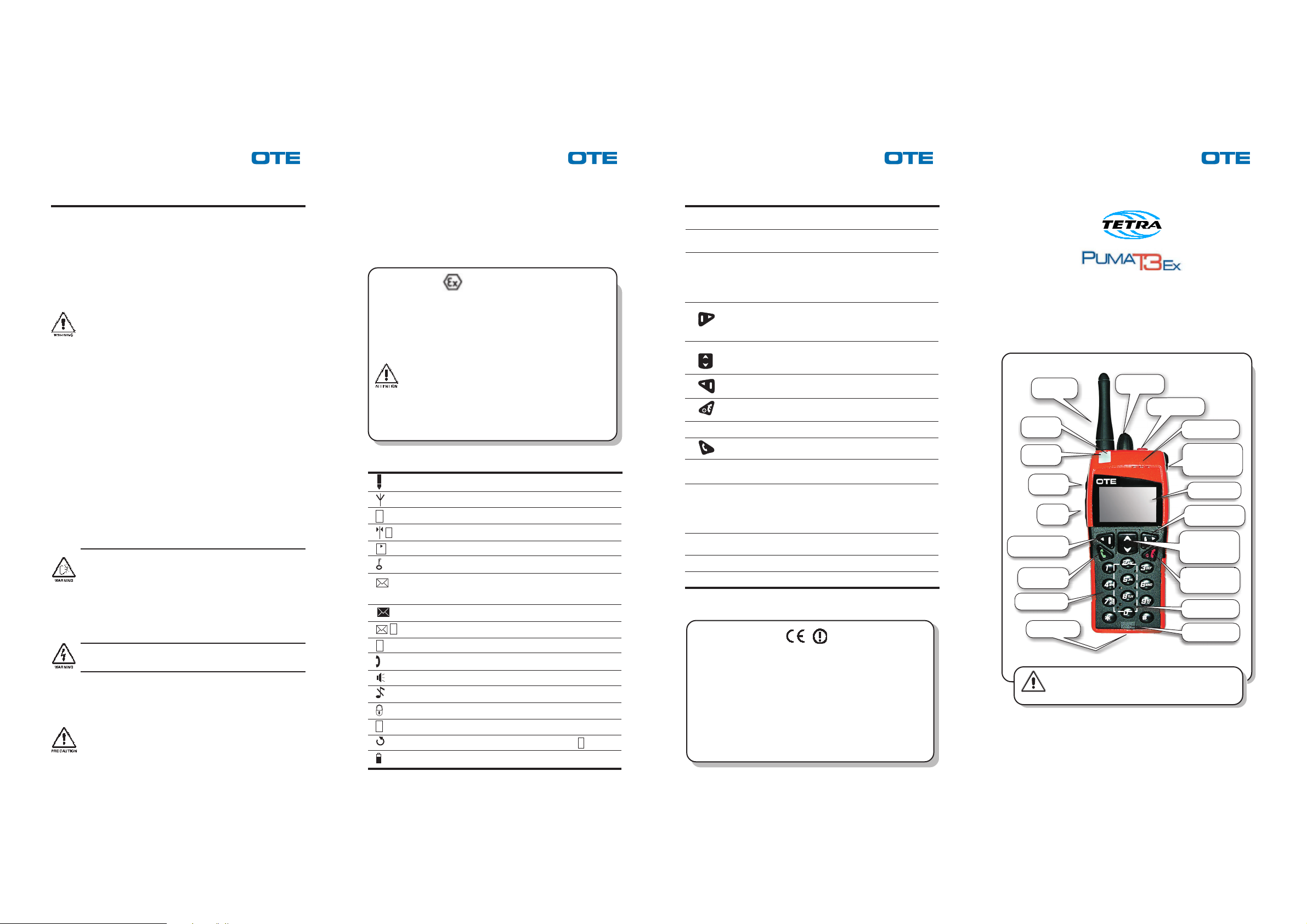
Emergency key
Group selector
(rotary knob plus
enter key)
Hearphone
On/Off and
off hook key
Loudspeaker
Microphone
Options selection
key
Forward &
backward menu
navigation key
Display
Options selection
key
On hook key
Connector
Keyboard
Antenna
PTT (1)
Red led
Green led
PTT
Volume knob
P/N 779-0511/01.01 P/N 779-0511/01.01 P/N 779-0511/01.01 P/N 779-0511/01.01
Safety recommendations
Carefully read all of the cautions and warnings before using the radio:
• Do not use the radio equipment for uses different than those indicated in the present guide.
• For a correct use of the radio equipment, read what is listed in this guide.
• Do not place the PUMA T3 Ex radio above the airbags or in their area of action. If the
airbag is activated, it may not swell correctly and/or hurl the portable unit, with great
force, inside the passenger compartment where the vehicle occupants are located.
• Replace the batteries following the instructions given in the relative technical manual.
• Make sure that batteries are not damaged.
• Do not use the radio if the battery is damaged.
• Position the battery charger far from heat sources and in such a way as to guarantee
its correct aeration as well as safe accessibility to the network power supply outlet.
Do not use the battery charger outside of the environments for which it was specified
(ex. use in indoor environments only).
• For a safe use/maintenance/installation of the PUMA T3 Ex battery charger carefully
read the safety recommendations in the relative Technical Manuals.
• Do not use the PUMA T3 Ex radio if the antenna is damaged.
• Turn off the radio or, inhibit transmission, if the equipment allows it, in
electromagnetically sensitive environments (ex. hospitals, airports, etc.).
• The electronic devices are sensitive to electromagnetic interference (EMI) if not
adequately shielded, designed or configured differently for electromagnetic fields
immunity.
If electromedical equipment (ex. pace-makers, acoustical equipment, etc.) is used
together with the PUMA T3 Ex radio, make sure that it is adequately shielded from
external electromagnetic fields.
• Carry out the maintenance interventions on the PUMA T3 Ex following the instructions
given in the technical manual.
• Follow all accident prevention standards when carrying out maintenance interventions
on the PUMA T3 Ex equipment and use the proper tools (spanners, screwdrivers, ...).
• First and second maintenance level interventions on the equipment are to be carried
out by authorized technicians only.
Third maintenance level interventions are to be carried out by OTE technicians only.
The maintenance levels are defined in the technical manual.
• Use only original accessories and spare parts, approved by the manufacturer, suitable
for the PUMA T3 Ex. The use of different accessories and/or spare parts (earphone,
antenna, etc.) makes the safety and electromagnetic compatibility certifications to be
valid no more and it could lower the user safety level and/or generate electromagnetic
fields that exceed the accepted limits.
• Follow the battery charger instructions in order to use it correctly.
• During voice calls, the PUMA T3 Ex use with its proper leather bag is recommended
in environments with temperature greater than 45°C.
• The emergency call is a priority type call.
The PUMA T3 Ex radio, like all mobile telephony equipment, operates with radio
frequency signals, therefore, the forwarding of the call depends on the network coverage
at the moment of the call.
• If you need send an emergency call, keep pressed the emergency button for at least
2 seconds; when the radio is switched on and the transmission is not inhibited.
• Even if the battery is discharged, the danger of explosion exist if the battery is
disposed on fire.
• Take the terminal only and exclusively into environments which the radio has been
certified for: Ex II 2 G EEx ib IIC T4
In any case, do not carry out connection operations between the radio and the
accessories in such environments.
• The radio unintegrity and/or hardware modifications or replacements not authorized
by the manufacturer can seriously jeopardize the intrinsic safety of the radio, and
make the certifications to be valid no more.
• Do not use the battery charger in environments that have a potentially explosive
atmosphere (ex. fuel storage sites, filling stations, etc.).
The use of the battery charger might trigger fires and/or explosions.
• Do not use the battery charger if the power supply cable and/or the plug are damaged.
• Do not cause short circuits between the battery terminals even if the battery is provided
of mechanical and electrical protections against accidental short circuits.
The radio complies with all product specifications and great care is taken by the manufacturer so
that user safety, as far as the effects of electromagnetic waves on health are concerned, is
guaranteed within the limits established by the international specifications.
In order to further increase the level of user safety, we invite you to take into consideration the
following additional precautions.
• The PUMA T3 Ex radio is equipped with an automatic system to control the power
transmitted so that the radio transmits at the maximum power only in cases of radio
coverage limit or emergency call.
Avoid touching the antenna when the radio is on and especially during transmission
because the ability of transmitting power gets worse. In fact, when the antenna is
touched, the PUMA T3 Ex radio automatically transmits at a greater power level than
that required, nevertheless the communication may be broken down or get qualitatively
worse.
• Avoid touching the equipment during data transmission.
• During voice communications in earphone mode hold the PUMA T3 Ex with the antenna
straight and above your shoulder and speak directly into the microphone.
• Hold the PUMA T3 Ex in the vertical positon and always at least 3 cm away from your
head during voice comunications in loudspeaker mode.
• Earphone kit is recommended when using the equipment in full-duplex mode for a long time.
• When using the earphone kit do not allow the cable to twist up around the radio forming
spirals.
PUMA T3 Ex
II 2 G EEx ib IIC T4
TÜV 04 ATEX 2380 X
The professional Puma T3 Ex Mobile Radio may be operated in hazardous explosive
areas that require equipment of category 2 and 3.
Special conditions for safe use are listed below
• It is only allowed to charge and replace the battery pack outside of the hazardous
area
• For safe use the battery pack cod. 771-0997/01, 771-1212/01, 771-1213/01,
771-1262/01, 771-1260/01, 771-1261/01, 771-1263/01, 771-1264/01 must be
used only
• To charge the battery pack use only the following battery chargers: 771-1073/
03, 771-1162/01, 771-1326/01, 771-1247/01, 771-1284/01, 771-1091/01.
• For safe use the earphone set 771-1271/01, 771-1272/01, 978-0742/01 and remote
speaker 771-1276/01 must be used only
• The maximum operating temperature is 55°C
Displayed symbols
Indication of level reception (TMO channel)
Trunked Mode (flashing when search the network)
Direct Mode
D
Direct Mode with DM-GATEWAY devices presence detected
D
Direct Mode with DM-REP devices presence detected
D
Encryption enabled
Presence of not read messages in the In-Box. If the symbol is
blinking the queue is full, and there is at least one message not
read
Full queue, each message is read
Data connection active
P
Fallback mode
F
Speech connection active, earphone mode
Speech connection active, loudspeacker mode
Keypad volume off
Keypad locked
Group scanning enabled
S
Group selector enabled, displayed alternatively to
Battery level indication
S
Main controls and indicators
VOLUME
knob
Emergency
key
GROUP
selector
Loudspeaker
PTT
PTT(1)
Red Led
Green Led
Earphone
This equipment is marked
According to the requirements specified in the R&TTE directive
1999/5/EC and the Commission Decision 6th April 2000, the EC marking
is accompanied by the Class II equipment class identifier.
This equipment (in the 380÷430 MHz and 410÷470 MHz versions) is
intended for sell and use in Austria, Belgium, Denmark, Finland, France,
Germany, Greece, Ireland, Italy, Luxembourg, Portugal, Spain, Sweden,
The Netherlands, United Kingdom.
This equipment requires authorization or license for use.
This equipment operates on frequency bands non-harmonised in the EU.
This equipment can also be used worldwide where the equipment is
approved for use.
Provides control of the audio output to the internal speaker and
headphone socket.
Keep pressed the Emergency key for at least 2 seconds to
send an emergency alarm.
Continuous rotary knob plus Enter key. The group selector is
disabled until it is pressed.
Press the enter key to enable the rotary knob, select the talk
group and than press the enter key again to confirm the
selection.
Right navigation key: it's usually related to the BACK/CLEAR
option. When the radio is in idle status it allows the access to
send status menu; during calls using this key it is possible to
send DTMF tones.
Up/down navigation key. In idle status allows to access the
phone lists menu. It changes conversation mode (from
loudspeaker to earphone and vice versa) during calls.
Left navigation key, for menu options selection. In idle status
and during calls it allows the access to the main menu.
Keep pressed for a few seconds to switch on/off the radio. If
pressed during communication it interrrupts the connection.
Speaker used for Loudspeaker conversation mode.
On hook key, to accept/place a call; if pressed in idle status
it allows to access the list of the last calls (made/received).
PTT button, press it to talk during half-duplex conversation. If
pressed in idle status it sends a call to the selected group.
Push-to-talk button during PMR standard conversation.
In stand by it sends an individual half duplex call to:
• the number selected by the user;
• dispatcher of the selected group (if no number has been
selected).
It is lit while the radio is transmitting; blinking in Tx Inhibit
mode.
It is lit while the radio is receiving.
Small speaker used for earphone conversation mode .
Handportable radio
Quick reference guide
Before using the equipment, read all the
instructions contained in the present guide and,
WARNING
with special care, those relative to safety.
© 2003-2004 OTE S.p.A. - All rights reserved.
OTE S.p.A. reserves the right to change specifications, performance or features relevant to the product
described without notice. This is an unpublished work the copyright in which vests in OTE S.p.A. The
information contained herein is confidential and the property of OTE S.p.A. and is supplied without liability for
errors or omissions. No part may be reproduced, disclosed or used except as authorised by contract or
other written permission.
OTE S.p.A. A Finmeccanica Company
Via Eugenio Barsanti, 8 - 50127 Florence - Italy
TETRA
Page 2
P/N 779-0511/01.01 P/N 779-0511/01.01 P/N 779-0511/01.01 P/N 779-0511/01.01
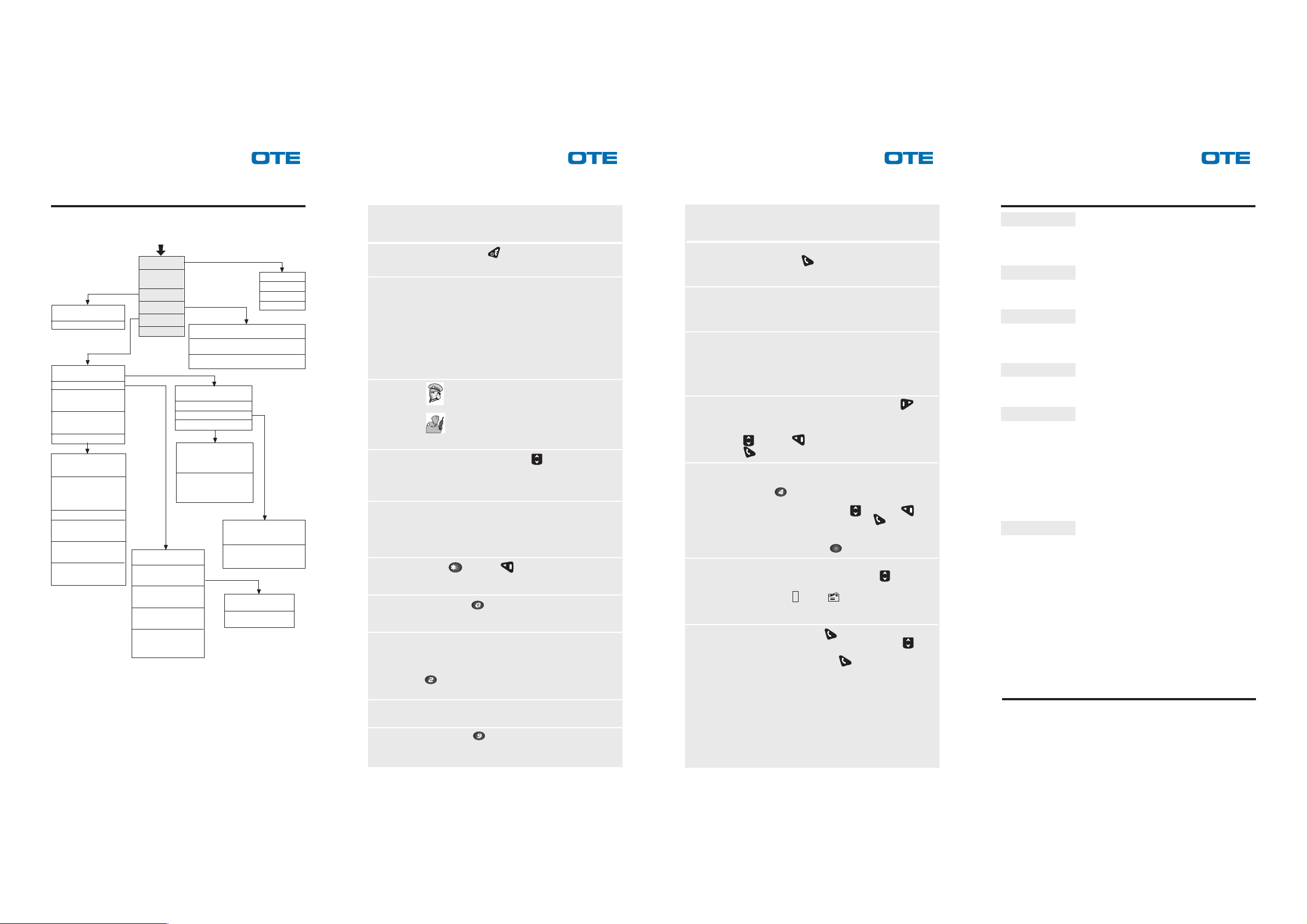
Menu structure
Menu
Messages
E2EE Status
(enable/disable E2EE)
Key E2EE
Group Mng
(group management)
Calls
Delivery Option
(to select the kind of
messages delivery report)
Tx Inhibit
(to disable/enable the
transmission)
Preferences
PIN
(to change/enable/disable
it)
Talk
(to select the default
conversation mode
loudspeaker/earphone for
direct incoming calls)
Language
Sounds
(to disable and to control
the sounds volume)
Backlight
(to change the display
backlight modality)
LCD contrast
(to change the display
contrast)
Change Mode
(TMO/DMO)
Encryption
Phone Lists
Settings
Help
Late Entry
(to enable/disable)
Call
(to configure the related
services, DMO only)
Group Call
(to select the type of group
call, TMO only)
Dial Mode
(to select the dialling
modality)
Gateway
(to select the default
gateway from the gateway
list, TMO only)
Phone Book
(user defined)
Home TETRA
(pre-configured phone book)
Non TETRA
(pre-configured phone book, TMO only)
Group Scan
(to enable/disable it)
WPS Selection
WPS Update
WPS Reconfigure
Active WPS
(to change the
configuration of the active
WPS)
Extra WPS
(to move the groups
assigned by DGNA in the
current WPS)
WPS Data
(to modify the current WPS
parameters)
Group Data
(to modify the groups
parameters)
Communication
(with/without ack)
Send TPNI
(enable/disable)
In Box
Out Box
Text Message
Status Send
☞ NOTE:
—
Some menus can be or not available according to the configuration of
the radio terminal.
— Choosing some options of WPS menus can cause the ending of active
group calls.
How to...
Switch on/
switch off the
handportable
Manage the
PIN (Personal
Identification
Number)
Hold your
Puma T3 Ex
Change
conversation
mode
Earphone/
Loudspeaker
Adjust the
Volume
Lock/unlock
keypad
Change
modality TMO/
DMO
Change
Working Profile
Subset (WPS)
Call a group
Call the OPEN
GROUP
Keep pressed the key for a few seconds.
PIN insertion at power on, can be:
• Enable/disabled from menu
• Always enabled
• Always disabled
If PIN insertion is enabled, at power on the user
must insert the current PIN.
In case of insertion of 3 consecutive wrong pin, the
current PUK must be inserted to unlock the radio.
In case of 3 consecutive wrong PUK insertion the
radio must be reprogrammed to be unlocked.
When you are speaking in
hold your radio like a normal telephone.
In
Loudspeaker
mode hold Puma T3 Ex in
Earphone
mode,
vertical position with its microphone, which
is located towards the bottom of the radio,
in front of your mouth.
During conversation, press the
Otherwise select Setting
from main menu.
key.
→→
→ Preferences
→→
→→
→ Talk
→→
To adjust the speech volume, use the volume knob;
turn it clockwise to increase the volume and
counterclockwise to decrease it. To adjust the volume
of the various sounds access from main menu to
→→
Settings
→ Preferences
→→
Press
to unlock it press any key and follow the instructions
and then keys to lock the keypad;
→→
→ Sounds.
→→
shown on the display.
Keep pressed
key for a few seconds. Otherwise
select Change mode from main menu and select the
modality.
Each WPS is composed of a set of different groups
related to the group selector knob positions. Changing
WPS you change the groups that can be selected by
means of the knob. To change WPS, keep pressed
key for a few seconds. Otherwise select
Settings
→→
→ Group MNG
→→
→→
→ WPS Select.
→→
Select the talk group by means of the relevant knob
then press PTT to talk.
Keep pressed
key for a few seconds, then press
PTT to talk.
TMO
**
**
**
**
**
**
**
**
**
*
DMO
How to...
Make an
individual full
duplex speech
call
Make an
individual half
duplex speech
call
Send an
emergency
alarm
Send a status
message
Send a text
message
Read a
received
message
(Inbox)
Last calls list
Digit a number or select a subscriber from phone
book then press
key.
Digit a number or select a subscriber from phone
book then press PTT (1).
Keep pressed the emergency key at least for 2
seconds. The radio can be programmed to:
• Send a call request
• Sen an SDS
• Send a call request and an SDS
at the emergency key pressing.
Access the send status menu, pressing the
key or selecting from main menu: Messages
→→
→ Send
→→
Status.
Select the status to be sent, then select an user
or a group and send it by means of the key
or selecting the Send option.
Access the text messages selecting from main menu
Messages
pressed
message or select a predefined message then select
Optns
→→
→ Text Messages; otherwise keep
→→
key for a few seconds. Create a new
→→
→Send. Select an user or a group
→→
and send the message by means of key or
selecting the option Send . During the editing of a
message it is possible to change from Uppercase to
#
Lowercase pressing the
key.
Access the received messages list from main menu
selecting Messages
scroll the list of messages. The received messages
can be status
→→
→ Inbox. Use the
→→
or text messages. Select the
S
key to
message to be read and then Optns to choose
among Delete-Replay-Replay+History.
From idle status press
of the last 20 calls. Scroll them by means of
key. It is possible to recall the subscriber by means
of PTT (1) (Half-Duplex) or
key to display the list
key (Full-Duplex,
TMO only ).
TMO
DMO
*
**
**
**
**
**
**
Menu main items
Messages
By means of this menu it is possible to send text and status
messages, and to read received messages and sent messages
that have been saved.
Change Mode
By means of this menu item it is possible to select the transmission
protocol TMO/DMO.
Encryption
By means of this menu it is possible to enable/disable End to End
Encryption. If enabled it is also possible to choose the key used
for the encryption.
Phone List
By means of this menu you can access the phone books (wheter
user defined or predefined).
Settings
Through the sub-menus of this item it is possible to configure
several options of the hand-held radio terminal. For example it is
possible to inhibit the transmission (Tx Inhibit) or to select the
default gateway and the digit ("0" "9") that must be dialled to
access that gateway (Gateway<0>, Gateway<9>).
Furthermore through the Preferences menu the user can
personalize the terminal, setting: language, sounds volume,
backlight, contrast.
Help
Selecting Help from main menu it is possible to visualize the direct
access keys function (direct access keys are available even
during calls).
Within the Help menu are also shown: the description of the strings
to be dialled to define the call priority, the gateways and the
address composition method.
☞ NOTE:
For what concerns technical characteristics, reference standard,
maintenance and troubleshooting, refer to the relevant technical
handbook.
 Loading...