

Page 1
P/N 779-0405/01 P/N 779-0405/01
Emergency speech call
— Press the Emergency Key to send an emergency call
request.
— Press the PTT button to speak.
PUMA T3
External speech call
— Select the gateway and dial the external subscriber identifier
— Press .
Closing speech call
— Press .
Receiving a call
— Press or the PTT button to answer the incoming call.
Fast menu access
— allows the «Send Status» menu access.
— allows the «Phone Book» menu access.
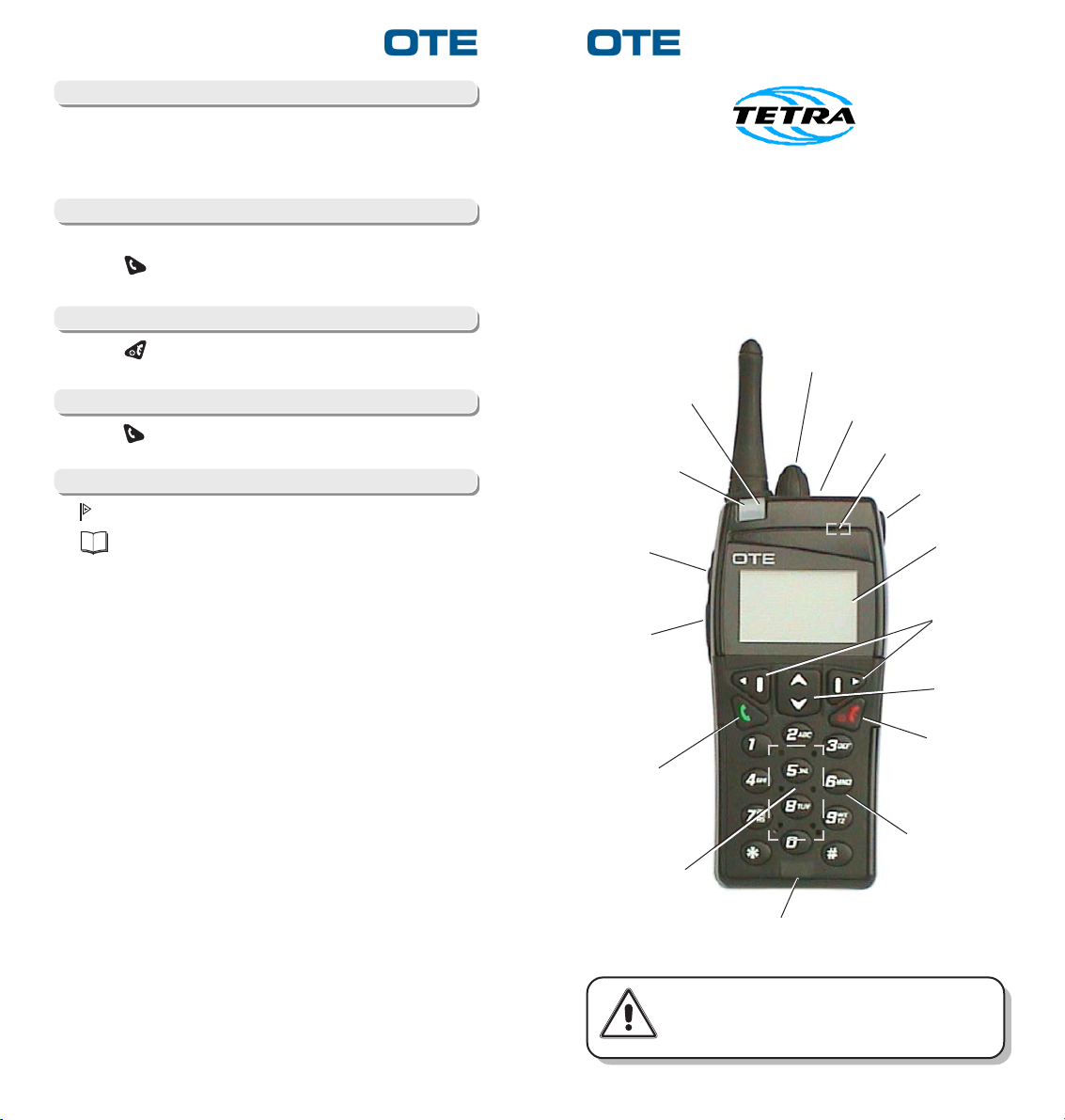
"G" KEY
PUSHBUTTON
HANDPORTABLE RADIO
Short User's Guide
VOLUME
CONTROL
GREEN LED
RED LED
PTT
EMERGENCY
KEY
LOUDSPEAKER
(Earphone mode)
GROUP
SELECTOR
DISPLAY
OPTIONS
SELECTION
KEYS
ON HOOK
KEY
LOUDSPEAKER
WARNING
SCROLLING
MENU KEY
ON/OFF and
OFF HOOK KEY
KEYPAD
MICROPHONE
Before using the equipment, read all the
instructions contained in the manual and, with
special care, those relative to safety.
Page 2
P/N 779-0405/01 P/N 779-0405/01
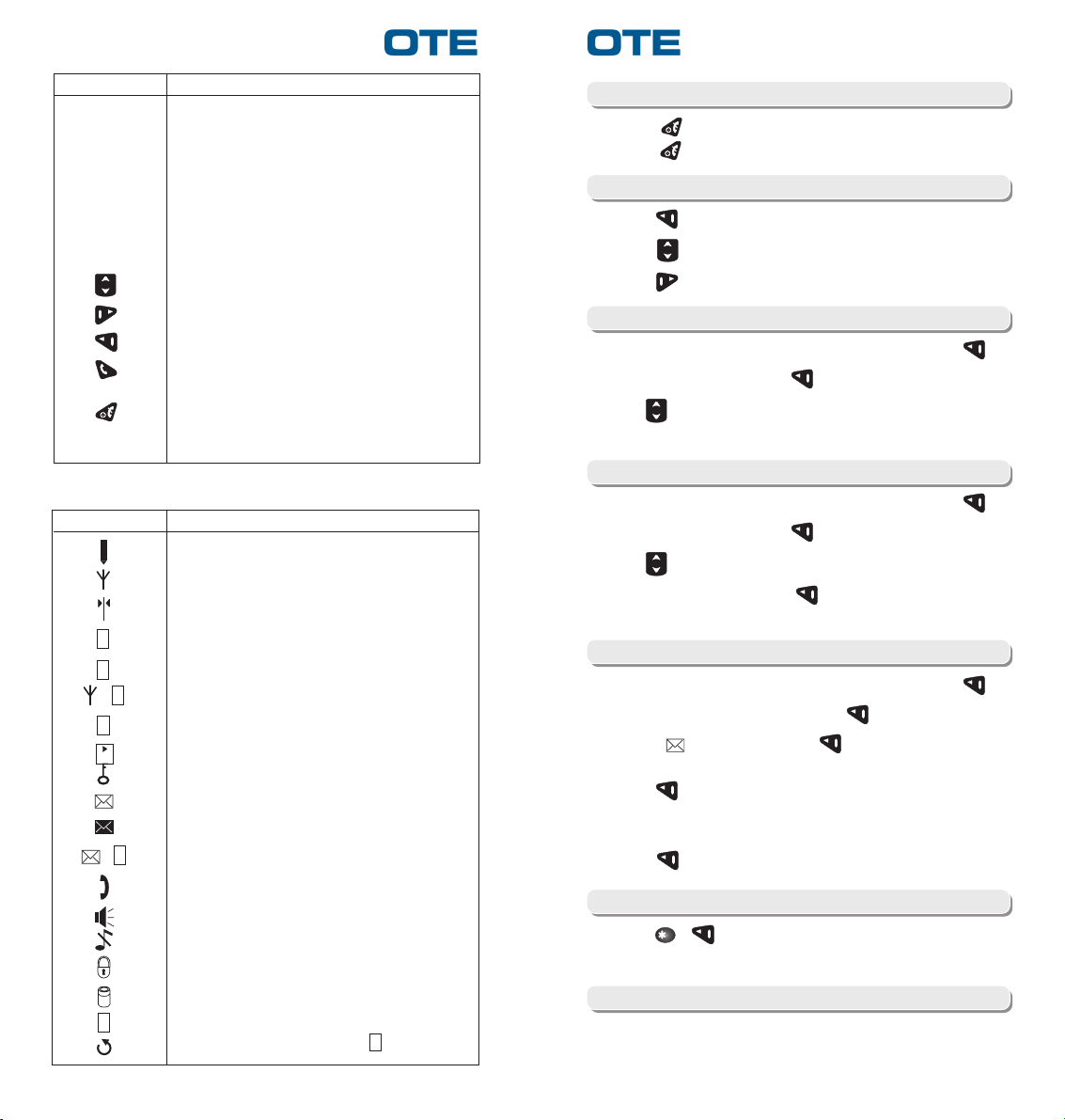
DescriptionIndication
Group selector 16 settings selector: it enables the selection of any
rotary knob: one of the 16 preset group. The group call is
Volume Control: Provides control of the audio output to the internal
Red LED It i s lit while the radio is transmitting; blinking in Tx
Green LED It is lit while the radio is receiving
Display: Backlighted, 36 alphanumeric characters
activated by the PTT pressing
speaker and headphone socket
Inhibit mode
Scrolling menu
Options selection
Options selection
“On hook” key to accept/make a call; if pressed in idle
status accesses the calls list
On/Off+Off Hook key, during a call cuts off the
connection; pressed for a few seconds turns off the
terminal
DISPLAYED SYMBOLS
DescriptionIndication
Signal level
Trunked Mode, searching network (flashing)
Direct Mode with DM-GATE device presence detected
D
R
+
G
F
D
+
P
S
Direct Mode
Repeater Mode
Gateway Mode
Fall-back Mode
Direct Mode with DM-REP device presence detected
Encryption enable
No read messages, full queue (flashing)
Full queue, each message is read
Data connection active
Earphone active
Loudspeaker active
Keypad DTMF OFF
Keypad locked
Battery level indication
Group scanning enable
Group selecting, alternatively at
S
Turning on/off the equipment
— Press to switch on the equipment.
— Press for several seconds in order to switch off the radio.
Main menu
— Press to enter main Menu.
— Press to switch among Menu options.
— Press to return to the upper Menu level.
Reading received messages
— From the main Menu select "Messages" and press .
— Select "In Box" and press .
— Use to scroll messages.
— Select the message to read.
Deleting a received message
— From the main Menu select "Messages" and press .
— Select "In Box" and press .
— Use to scroll messages.
— Select the message, press and select "Delete" to delete
it.
Sending a text message
— From the main Menu select "Messages" and press .
— Select "Text Message" and press .
— Select " <New>" and press .
— Edit the message using the alphanumeric keyboard then
press .
— Select "Send" and enter the identifier number of the radio to be
called.
— Press to send the message.
Lock/Unlock keypad
— Press e to lock the keypad; to unlock it press any key
and follow display instruction.
Making a call by GSRK
— Select a group with the Group Selector Rotary Knob.
— Press the PTT button to speak.
 Loading...