

Page 1

PRIVILEGE SERIES
350W MONO AMPLIFIER
User manual
ORPHEUS MEDIA SARL – Avenue des Sciences 3 – 1400 Yverdon-les-Bains - Phone : +41 24 423 90 88 – Fax : +41 24 424 90 89
Email : [email protected] – Website: www.orpheuslab.com
1
Page 2

Table of Contents
1. INTRODUCTION 3
1.1 CONTACT...............................................................................................................3
1.2 DOCUMENT OVERVIEW...............................................................................................3
1.3 UNPACKING............................................................................................................4
2. FRONT PANEL 5
3. REAR PANEL 6
4. CONNECTIONS 7
5. OPERATIONS 7
5.1 QUICK GUIDE..........................................................................................................7
5.2 MENU STRUCTURE....................................................................................................8
5.3 SETUP AND OPERATIONS............................................................................................9
6. TECHNICAL DATA 10
ORPHEUS MEDIA SARL – Avenue des Sciences 3 – 1400 Yverdon-les-Bains - Phone : +41 24 423 90 88 – Fax : +41 24 424 90 89
Email : [email protected] – Website: www.orpheuslab.com
2
Page 3

1.Introduction
1.1 Contact
ORPHEUS MEDIA SARL
Avenue des Sciences 3
1400 Yverdon-les-Bains
Phone : +41 24 423 9088
Fax : +41 24 424 9089
1.2 Document overview
This document is the user manual for the Orpheus Media Privilege series 350W Mono Amplifier.
ORPHEUS MEDIA SARL – Avenue des Sciences 3 – 1400 Yverdon-les-Bains - Phone : +41 24 423 90 88 – Fax : +41 24 424 90 89
Email : [email protected] – Website: www.orpheuslab.com
3
Page 4

1.3 Unpacking
First check and identify the contents of your 350W Mono amplifier package, as listed below:
● 350W Mono amplifier
● CD User manual
Read this before operating your unit
● Please read this manual carefully, to assure proper operation and the possible performance.
● Switch off the unit before connecting or disconnecting any input or output cables.
● Do not touch the inner pins of rear panel connectors, electrostatic discharge may cause
permanent damage to the unit.
● Choose the installation location for the unit carefully. Avoid placing it in direct sunlight or close
to a source of heat. Avoid also locations subject to vibration and excessive dust, heat, cold or
moisture.
● To reduce the risk of fire or electric shock, do not expose the unit to rain or moisture.
● Do not use force when operating switches, knobs and other controls.
● Do not open the chassis or attempt to male repairs by yourself, as this may result in damage
to the unit or electrical shock. If a foreign object should get into the unit, contact your local
dealer.
● When planning not to use the unit for a long period of time, it is advisable to disconnect the
power plug from the wall outlet.
● The power switch does not disconnect the complete unit form the main line.
● To prevent lightning damage, disconnect the power plug when there is an electrical storm.
● When moving the unit, be sure to first disconnect the power plug and all wires connected from
the unit to other equipment.
● When disconnecting the power plus from the wall outlet, always pull directly on the plug, never
pill the cord itself.
● Do not attempt to clean this unit with water or chemical solvents, as this may damage the unit
or the finish. Use a clean, dry cloth.
● Keep this manual in a safe place for future reference.
ORPHEUS MEDIA SARL – Avenue des Sciences 3 – 1400 Yverdon-les-Bains - Phone : +41 24 423 90 88 – Fax : +41 24 424 90 89
Email : [email protected] – Website: www.orpheuslab.com
4
Page 5

2.Front panel
1. CONTROL BUTTON Manual mode, It enables to go standby mode and
change the brightness level in simply pressing the
button.
Piloted mode, it enable to change the brightness
level in pressing the button. The standby mode is
controlled by trigger signal.
For more informations about use this button please see the Chapter 5 : Menu structure.
2. MAIN POWER INDICATORS
Lights blue when the unit is switched on and
operating.
Blinks red during the self-test procedure (approx. 4
seconds) after switching on the unit and during the
navigation in the menu.
Only Light red when the unit is in standby mode.
For more informations about lights ring see 5.2 Menu
structure.
ORPHEUS MEDIA SARL – Avenue des Sciences 3 – 1400 Yverdon-les-Bains - Phone : +41 24 423 90 88 – Fax : +41 24 424 90 89
Email : [email protected] – Website: www.orpheuslab.com
5
① ②
Page 6

3.Rear Panel
1. INPUT
Balanced (XLR in) and unbalanced(RCA in) input connectors
2. INPUT SELECTOR SWITCH
Press the switch either to the up to select the unbalanced input or to the down to select the
balanced input.
3. OUTPUT
Direct output to chain the amplifier for multi-amplification (see Connection chap.)
4. SPEAKER OUTPUT
Dual output connectors in parallel.
5. TRIGGER INPUT
Entrée trigger permet de piloter l'ampli grâce à un préamplificateur doté de sorties trigger.
6. TRIGGER SELECTOR SWITCH
Press the switch either to the left to select the pilot mode or to the right to select the manual
mode.
7. INPUT VOLTAGE SELECTOR & FUSE RECEPTACLE
The input voltage selector switch configures the unit to the line voltage of the country where it
is used.
The main fuse is located in the fuse receptacle. If it has to be changed, replace it by a T10A
slow-blow fuse.
8. POWER SUPPLY & POWER SWITCH
Power cord connection and main power switch.
ORPHEUS MEDIA SARL – Avenue des Sciences 3 – 1400 Yverdon-les-Bains - Phone : +41 24 423 90 88 – Fax : +41 24 424 90 89
Email : [email protected] – Website: www.orpheuslab.com
6
① ② ③ ④ ⑤⑥⑦ ⑧
Page 7
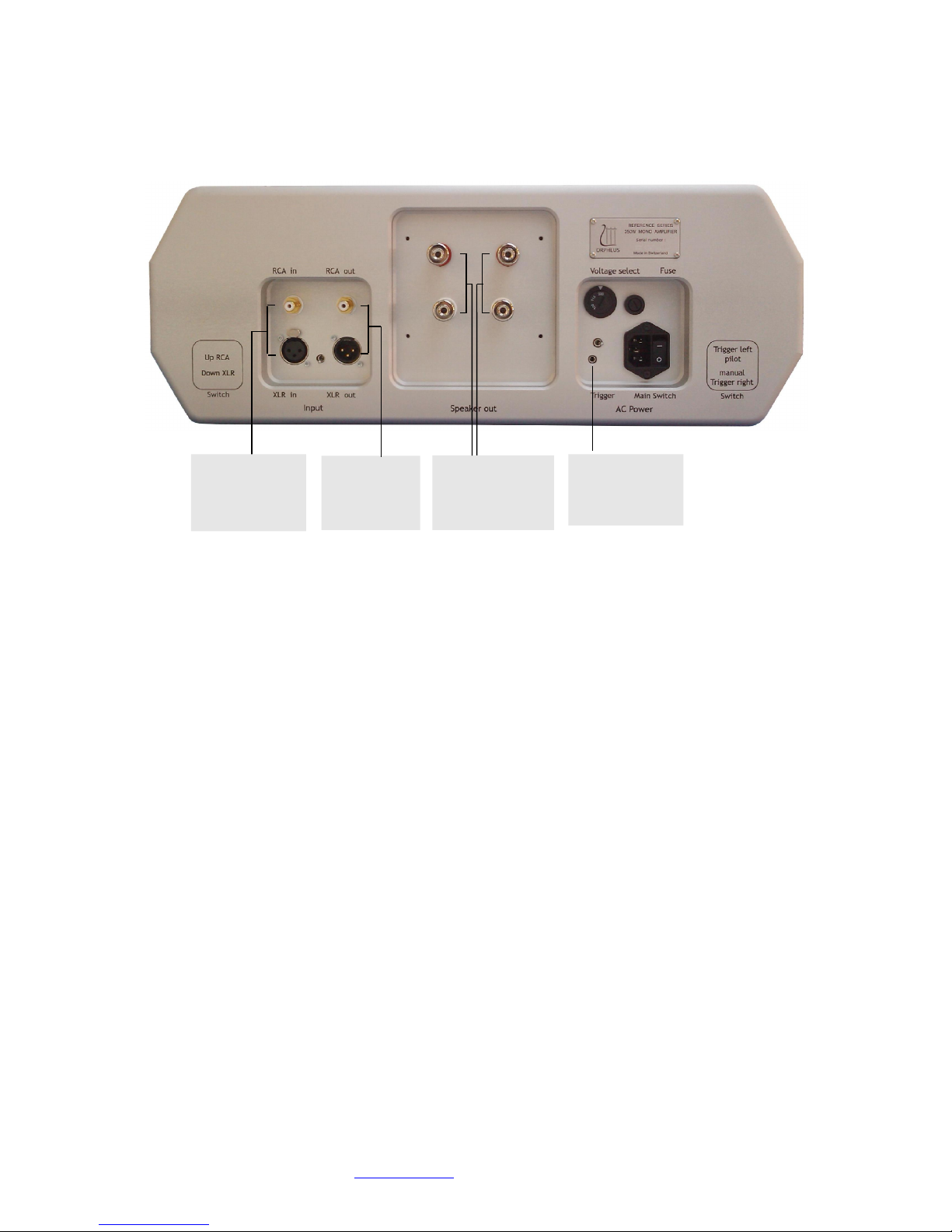
4. Connections
5.Operations
5.1 Quick guide
CONNECTION
Connect the input cable from the preamplifier first, followed by the output cable to the loudspeakers,
and finally the power cord.
INPUT FORMAT
Select either the unbalanced input on RCA connector or the balanced input on XLR connector by
flipping the switch up or down respectively
TRIGGER MODE
Select either the pilot mode or the manual mode by flipping the switch left or right respectively.
POWER ON
Flip the main power switch at the back of the unit from 0 to I.
The main power indicator on the front panel will blink red (approx. 4 sec ) and blue when ready for
operation.
GOING INTO STANDBY (ONLY IN MANUAL TRIGGER MODE)
Press the button once and wait that red light stop blinking.
ORPHEUS MEDIA SARL – Avenue des Sciences 3 – 1400 Yverdon-les-Bains - Phone : +41 24 423 90 88 – Fax : +41 24 424 90 89
Email : [email protected] – Website: www.orpheuslab.com
7
Input f or o ne balanced
or unbalanced ch an ne l,
e.g. Right o r left
chann el fr om
pream plifier
Dual o utput , e.g. Right
or lef t chan n el to
loudspeaker single o r biwired
Input f or t rigger
chann el, e.g. T rigger
out put channel fr om
pream plifier
Output t o anot her
amplif ier
Page 8

5.2 Menu structure
ORPHEUS MEDIA SARL – Avenue des Sciences 3 – 1400 Yverdon-les-Bains - Phone : +41 24 423 90 88 – Fax : +41 24 424 90 89
Email : [email protected] – Website: www.orpheuslab.com
8
①
②
③
④
⑤
⑦
Press the
button
Press the
button
Press the
button
Power Switch
ON
Main mode
ready for o peration
Standby mode
Brightness setup
Chan ge t he brightness pressing t he
butt on (bet ween 8 different s lev els)
Error
Aft er 4 Sec.
Witho ut press t he
butt on
Aft er 8 Sec.
Witho ut press
blue light off
red light off
blue light off
red light blink
blue light off
red light blink fastly
blue light off
red light on
blue light on
rouge light blink
blue light on
red light on
blue light on
red light off
Page 9

5.3 Setup and operations
1 START UP
After flip the main power switch at the back of the unit from 0 to I,the main power indicator on the front
panel will blink red (approx. 4 sec ) and blue when ready for operation.
3 BRIGHTNESS SETUP AND STANDBY
If you press the button, the red light will blink.
The unit is waiting a second press or not during 4 seconds.
If you press a second time, the red light will stop to blink and you will go to brightness configuration.
Piloted mode : after this laps time of 4 seconds, the unit will returned in main mode.
Manuel mode : after this laps time of 4 seconds, the unit will go to standby mode (switching off the
blue light).
4 BRIGHTNESS SETUP
The default brightness level loads automatically.
In this menu, you can choose between 8 different levels to set the light brightness.
Simply pressing the button to navigate between levels.
To confirm the value chosen and return to the main screen, wait 8 seconds without press the button.
The brightness level will be register in ROM automatically. You shouldn't set the level every restart
the unit.
5 STANDBY
In pilot mode, you can't to put the amp in standby mode manually. The signal will be send by a
preamp correctly « câbler ».
Red lights blink approximatively 35 seconds to discharge of voltage capacitors. The button has no
effect during this laps of time.
Wake up the unit, just press the button.
6 WAKE UP
The main power indicator on the front panel will blink red (approx. 4 sec ) and blue when ready for
operation (main mode).
7 PSU ERROR
In case of problems, the amplifier goes into error mode.
Red light is blinking very fastly. If this were to happen, switch off the main power. Wait 5 minutes
before try again to switch on the amplifier..
If this problem persists please contact your dealer or distributor as soon as possible.
ORPHEUS MEDIA SARL – Avenue des Sciences 3 – 1400 Yverdon-les-Bains - Phone : +41 24 423 90 88 – Fax : +41 24 424 90 89
Email : [email protected] – Website: www.orpheuslab.com
9
Page 10

6.Technical data
Max Power : 350 W RMS
Sensibility : XLR 3 V RMS for an 8Ω load
Voltage gain
XLR RCA
+ 32.3dB +26.3dB @ 16Ω load
+ 31.1dB +25.1dB @ 8Ω load
+ 29.0dB +23.0dB @ 4Ω load
+ 26.0dB +20.0dB @ 2Ω load
Dynamic range : RCA 112dB (A-weighted)
XLR 118dB (A-weighted)
Residual noise : RCA 120µV RMS (A-weighted)
XLR 66µV RMS (A-weighted)
ORPHEUS MEDIA SARL – Avenue des Sciences 3 – 1400 Yverdon-les-Bains - Phone : +41 24 423 90 88 – Fax : +41 24 424 90 89
Email : [email protected] – Website: www.orpheuslab.com
10
Page 11

Comments
Constructive feedback is always welcome.
Please feel free to forward us your comments at the address listed on last page or to your local dealer
or distributor.
TECHNOLOGY & DESIGN
The unit has been entirely manufactured and assembled in Switzerland; conceived by ORPHEUS
Media sàrl.
IMPORTANT NOTICE
ORPHEUS Media Sàrl reserve the right to make changes to their products or discontinue any product
or service without notice. Adequate operating safeguards must be used to minimize hazards.
Reproduction of user manual information is permissible only if it is without alteration and is
accompanied by all relevant conditions, limitations and notices. Source must be clearly identified when
reproducing user manual information.
ORPHEUS Media guarantees that the product described below is free of defective material and
workmanship. The warranty extends for a period of one year form original purchase date, but at
maximum two years form manufacturing date. ORPHEUS Media agrees to repair or replace defective
parts or the complete unit at its option, provided that the equipment is returned exclusively to the
original dealer.
This limited warranty is contingent upon proper and normal use and installation, and does not cover
damage due to external causes, including but not limited to, accident, careless handling, improper
installation or connection, problems with electrical power, electrical contact or electrical grounding,
liquids, chemicals, oxidation, corrosion, exposure to the elements, service or repair not authorized by
ORPHEUS Media, usage not in accordance with product instructions, failure to perform required
preventive maintenance, and problems caused by use of parts and components not supplied or
authorized by ORPHEUS Media. Removing, altering, tampering with serial number voids the limited
warranty. The limited warranty does not extend to or include consequential damage, and does not
apply in any case for damage occurring during shipping or installation.
ORPHEUS MEDIA SARL – Avenue des Sciences 3 – 1400 Yverdon-les-Bains - Phone : +41 24 423 90 88 – Fax : +41 24 424 90 89
Email : [email protected] – Website: www.orpheuslab.com
11
 Loading...